by Contributed | Mar 3, 2021 | Technology
This article is contributed. See the original author and article here.
Pipeline sometimes needs to understand and reads metadata from trigger that invokes it. For instance, with Tumbling Window Trigger run, based upon window start and end time, pipeline will process different data slices or folders. In Azure Data Factory, we use Parameterization and System Variable to pass meta data from trigger to pipeline.
This pattern is especially useful for Tumbling Window Trigger, where trigger provides window start and end time, and Custom Event Trigger, where trigger parse and process values in custom defined data field. Please note that different trigger types offer different metadata, and System Variable will contain most up to date information for each one.
- Data Factory UI
This section shows you how to pass meta data information from trigger to pipeline, within the Azure Data Factory User Interface.
Go to the Authoring Canvas and edit a pipeline
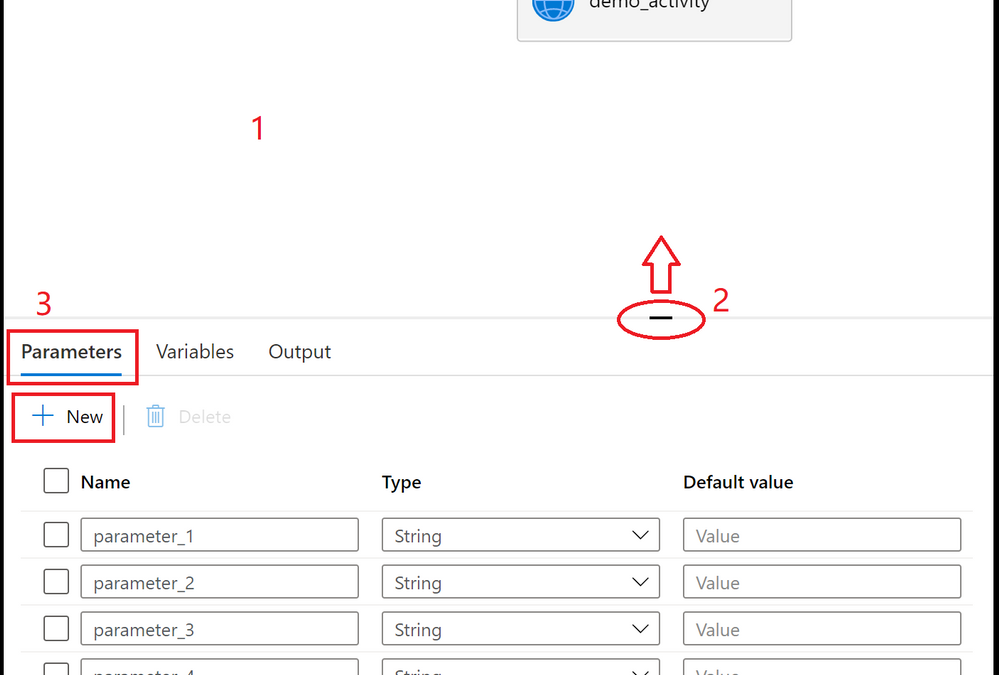
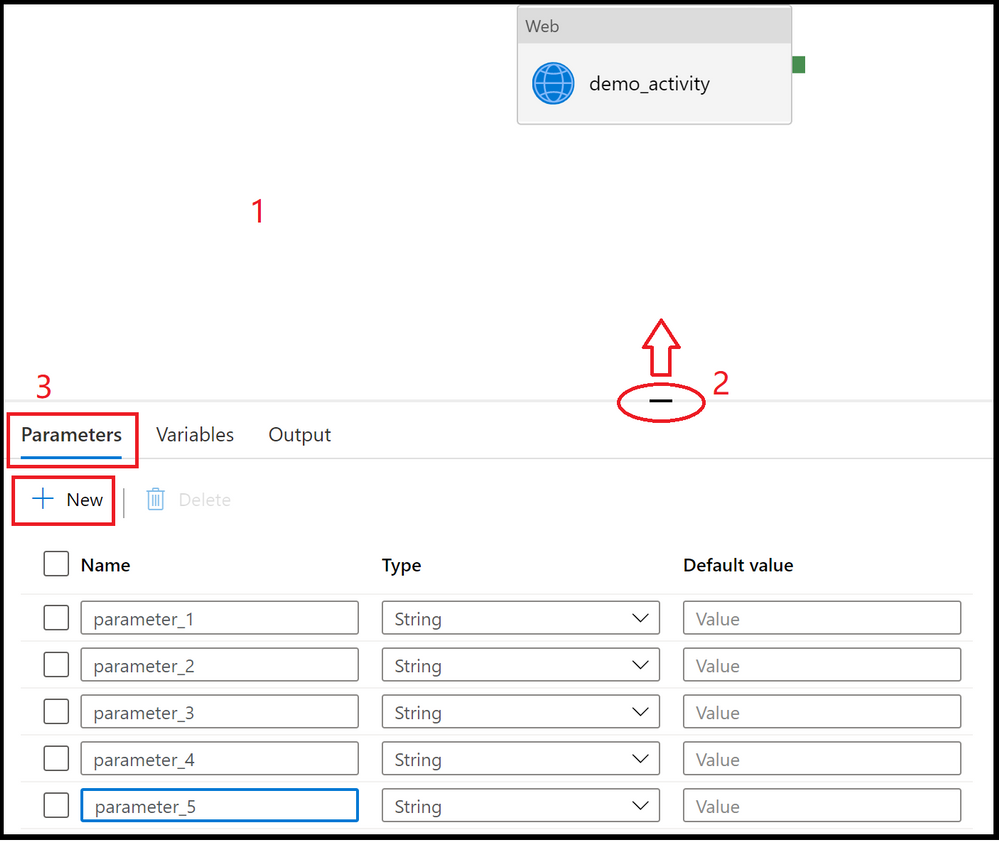
Click on the blank canvas to bring up pipeline settings. Do not select any activity. You may need to pull up the setting panel from the bottom of the canvas, as it may have been collapsed
Select Parameters section and select + New to add parameters
Add triggers to pipeline, by clicking on + Trigger.
Create or attach a trigger to the pipeline, and click OK
In the following page, fill in trigger meta data for each parameter. Use format defined in System Variable to retrieve trigger information. You don’t need to fill in the information for all parameters, just the ones that will assume trigger metadata values. For instance, here we assign trigger run start time to parameter_1.
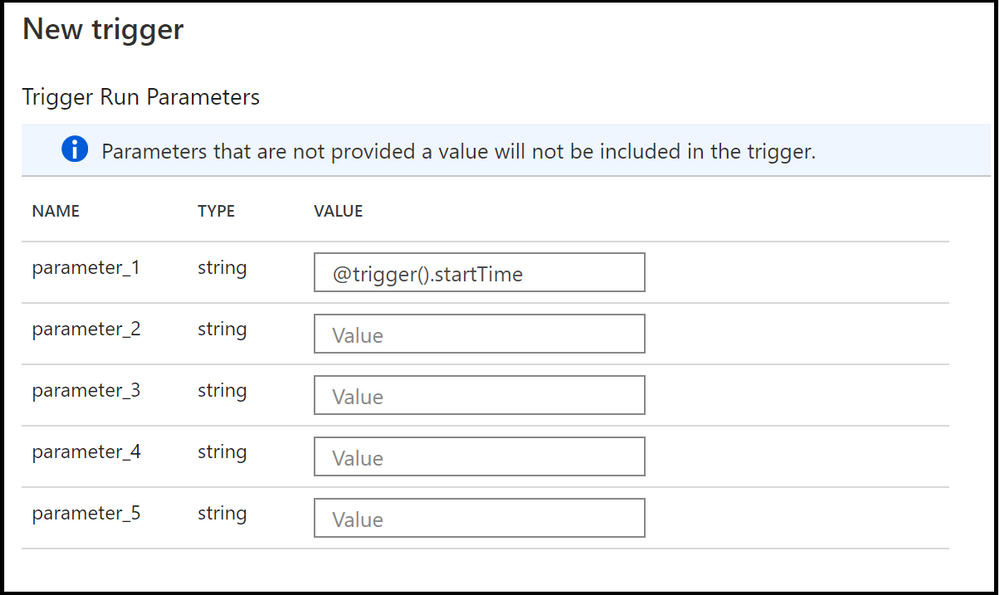
- To use the values in pipeline, utilize parameters @pipeline().parameters.parameterName, not system variable, in pipeline definitions. For instance, in our case, to read trigger start time, we’ll reference @pipeline().parameters.parameter_1.
- JSON Schema
To pass in trigger information to pipeline runs, both the trigger and the pipeline json need to be updated with parameters section.
- Pipeline Definition
Under properties section, add parameter definitions to parameters section
{
    "name": "demo_pipeline",
    "properties": {
        "activities": [
            {
                "name": "demo_activity",
                "type": "WebActivity",
                "dependsOn": [],
                "policy": {
                    "timeout": "7.00:00:00",
                    "retry": 0,
                    "retryIntervalInSeconds": 30,
                    "secureOutput": false,
                    "secureInput": false
                },
                "userProperties": [],
                "typeProperties": {
                    "url": {
                        "value": "@pipeline().parameters.parameter_2",
                        "type": "Expression"
                    },
                    "method": "GET"
                }
            }
        ],
        "parameters": {
            "parameter_1": {
                "type": "string"
            },
            "parameter_2": {
                "type": "string"
            },
            "parameter_3": {
                "type": "string"
            },
            "parameter_4": {
                "type": "string"
            },
            "parameter_5": {
                "type": "string"
            }
        },
        "annotations": [],
        "lastPublishTime": "2021-02-24T03:06:23Z"
    },
    "type": "Microsoft.DataFactory/factories/pipelines"
}
- Trigger Definition
Under pipelines section, assign parameter values in parameters section. You don’t need to fill in the information for all parameters, just the ones that will assume trigger metadata values.
Here is a Schedule Trigger that will pass its trigger start time
{
    "name": "trigger1",
    "properties": {
        "annotations": [],
        "runtimeState": "Started",
        "pipelines": [
            {
                "pipelineReference": {
                    "referenceName": "demo_pipeline",
                    "type": "PipelineReference"
                },
                "parameters": {
                    "parameter_1": "@trigger().startTime"
                }
            }
        ],
        "type": "ScheduleTrigger",
        "typeProperties": {
            "recurrence": {
                "frequency": "Minute",
                "interval": 15,
                "startTime": "2021-03-03T04:38:00Z",
                "timeZone": "UTC"
            }
        }
    }
}
- Use trigger metadata in pipeline
To use the values in pipeline, utilize parameters @pipeline().parameters.parameterName, not system variable, in pipeline definitions.
by Contributed | Mar 3, 2021 | Technology
This article is contributed. See the original author and article here.
Recent high profile cyberattacks have highlighted the importance of having strong standards and features built into infrastructure monitoring and management tools. Microsoft System Center Operations Manager (SCOM) offers world class monitoring capabilities and includes powerful built-in security features.
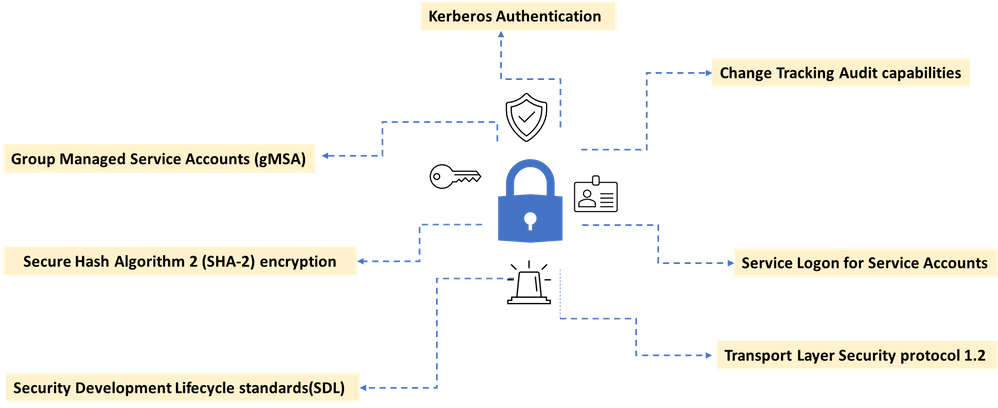
Our increased focus on customers security concerns have led us to include enhancements to many security related features in recent SCOM update rollups. We know that organizations have strict controls and best practices and we want to ensure that our customers have the right tools to prevent attacks and gain peace of mind. Here are some of SCOM’s security offerings.
A new addition to SCOM 2019 was increasing out of the box security configuration through support for group managed service accounts (gMSA).Group Managed Service Accounts (gMSA) has been a very popular capability because it alleviates the need for password management – now all accounts used in SCOM can be gMSA. A detailed guide on how to configure gMSA accounts in lieu of your existing SCOM accounts is provided here.
Another important best practice is to disable interactive and remote interactive sessions for service accounts. SCOM 2019 supports hardening of service accounts and does not require granting the “Allow log on locally” user right for several accounts. The default configuration on SCOM 2019 Management Servers, Gateways, and Agents, is that service accounts and RunAs accounts will now leverage the “Log on as a Service” user right, and no longer require the “Log on locally” user right.
An additional security feature in SCOM is that Run As account credentials can only be distributed to computers that you specify. Automatically distributing Run As account according to discovery could introduce a security risk, which is why an automatic distribution option is not included in Operations Manager.
Authentication in Operations Manager
SCOM implements a default set of authentication protocols, including Kerberos, NTLM, Transport Layer Security/Secure Sockets Layer (TLS/SSL) as part of an extensible architecture. In addition, some protocols are combined into authentication packages such as Negotiate and the Credential Security Support Provider. These protocols and packages enable authentication of users, computers, and that in turn ensures access to resources in a secure manner.
SCOM also mandates a least privileged model for its security account matrix. The least privileged model is a best practice in IT security and the concept is that any user, service, or process should have only the bare minimum privileges necessary to execute the required task. Mandating this principle reduces the risk of attackers gaining access to sensitive data by compromising low level user accounts or devices.
Auditing in Operations Manager
We recently introduced Management pack change tracking, a feature that allows enhanced audit tracking capabilities in SCOM. Management Packs are essentially the arteries of SCOM that help the core of SCOM function well. They include monitoring configurations and data collection parameters tailored for specific applications and services. Management packs are released by both Microsoft and third-party vendors for a range of tools and applications that need to be monitored in the customer’s landscape.
SCOM allows to be defined giving access rights to perform actions on the monitored objects. These roles can be defined to determine who can potentially change monitoring settings for applications and services through Management Packs. A profile is defined on a group of users which impose Role-based security and limit privileges that users have for various aspects of Operations Manager. The change tracking feature allows the administrators to do an easy root cause analysis as and when required to keep track of what changes are being done by which user and when.
Security is built-into SCOM
To help customers deploy the latest security protocols, we enable Transport Layer Security (TLS) protocol version 1.2 for System Center Operations Manager management groups. In support of our commitment to use best-in-class encryption, SCOM’s engineering team is continually upgrading our cryptographic infrastructure. Customers can configure the Web console and Reporting server to use Secure Sockets Layer (SSL) connections to ensure that both incoming requests and outbound responses are encrypted prior to transmission.
System Center Operations Manager provides layers of protection built into the product to safeguard against security breaches. SCOM follows Microsoft’s Software Development Lifecycle(SDL) policy , which considers security and privacy throughout all phases of the development process. The SCOM team uses Microsoft approved SDL tools like BinSkim, CredScan, Codesign Validation, and Anti malware to perform security checks for each line of code they produce. In addition to these tools and to add further protection, our code is also encrypted with Secure Hash Algorithm 2 (SHA-2).
We are very proud to offer a product like System Center Operations Manager, one that continues to support evolving industry security needs and strives to keep our customers safe and productive.
by Contributed | Mar 3, 2021 | Technology
This article is contributed. See the original author and article here.
Recent high profile cyberattacks have highlighted the importance of having strong standards and features built into infrastructure monitoring and management tools. Microsoft System Center Operations Manager (SCOM) offers world class monitoring capabilities and includes powerful built-in security features.
Our increased focus on customers security concerns have led us to include enhancements to many security related features in recent SCOM update rollups. We know that organizations have strict controls and best practices and we want to ensure that our customers have the right tools to prevent attacks and gain piece of mind. Here are some of SCOM’s security offerings.
A new addition to SCOM 2019 was increasing out of the box security configuration through support for group managed service accounts (gMSA).Group Managed Service Accounts (gMSA) has been a very popular capability because it alleviates the need for password management – now all accounts used in SCOM can be gMSA. A detailed guide on how to configure gMSA accounts in lieu of your existing SCOM accounts is provided here.
Another important best practice is to disable interactive and remote interactive sessions for service accounts. SCOM 2019 supports hardening of service accounts and does not require granting the “Allow log on locally” user right for several accounts. The default configuration on SCOM 2019 Management Servers, Gateways, and Agents, is that service accounts and RunAs accounts will now leverage the “Log on as a Service” user right, and no longer require the “Log on locally” user right.
An additional security feature in SCOM is that Run As account credentials can only be distributed to computers that you specify. Automatically distributing Run As account according to discovery could introduce a security risk, which is why an automatic distribution option is not included in Operations Manager.
Authentication in Operations Manager
SCOM implements a default set of authentication protocols, including Kerberos, NTLM, Transport Layer Security/Secure Sockets Layer (TLS/SSL) as part of an extensible architecture. In addition, some protocols are combined into authentication packages such as Negotiate and the Credential Security Support Provider. These protocols and packages enable authentication of users, computers, and that in turn ensures access to resources in a secure manner.
SCOM also mandates a least privileged model for its security account matrix. The least privileged model is a best practice in IT security and the concept is that any user, service, or process should have only the bare minimum privileges necessary to execute the required task. Mandating this principle reduces the risk of attackers gaining access to sensitive data by compromising low level user accounts or devices.
Auditing in Operations Manager
We recently introduced Management pack change tracking, a feature that allows enhanced audit tracking capabilities in SCOM. Management Packs are essentially the arteries of SCOM that help the core of SCOM function well. They include monitoring configurations and data collection parameters tailored for specific applications and services. Management packs are released by both Microsoft and third-party vendors for a range of tools and applications that need to be monitored in the customer’s landscape.
SCOM allows to be defined giving access rights to perform actions on the monitored objects. These roles can be defined to determine who can potentially change monitoring settings for applications and services through Management Packs. A profile is defined on a group of users which impose Role-based security and limit privileges that users have for various aspects of Operations Manager. The change tracking feature allows the administrators to do an easy root cause analysis as and when required to keep track of what changes are being done by which user and when.
Security is built-into SCOM
To help customers deploy the latest security protocols, we enable Transport Layer Security (TLS) protocol version 1.2 for System Center Operations Manager management groups. In support of our commitment to use best-in-class encryption, SCOM’s engineering team is continually upgrading our cryptographic infrastructure. Customers can configure the Web console and Reporting server to use Secure Sockets Layer (SSL) connections to ensure that both incoming requests and outbound responses are encrypted prior to transmission.
System Center Operations Manager provides layers of protection built into the product to safeguard against security breaches. SCOM follows Microsoft’s , which considers security and privacy throughout all phases of the development process. The SCOM team uses Microsoft approved SDL tools like BinSkim, CredScan, Codesign Validation, and Anti malware to perform security checks for each line of code they produce. In addition to these tools and to add further protection, our code is also encrypted with Secure Hash Algorithm 2 (SHA-2).
We are very proud to offer a product like System Center Operations Manager, one that continues to support evolving industry security needs and strives to keep our customers safe and productive.
by Contributed | Mar 2, 2021 | Technology
This article is contributed. See the original author and article here.
Today is UNESCO World Engineering Day for Sustainable Development. A day to celebrate how applying engineering skills can improve modern life and achieve positive environmental impact. While the UN Sustainable Development Goals represent an ambitious challenge to enhance the peace and prosperity on the planet, UN SDG goal #2 ‘Zero Hunger’ calls for bold and transformative steps to end hunger and help people achieve food security, acquire better nutrition, and promote sustainable agriculture. The United Nations predicts, “if recent trends continue, the number of people affected by hunger will surpass 840 million by 2030, or 9.8 percent of the population.” Powerful tools like Microsoft’s commercial FarmBeats precision agriculture technology are already playing a pivotal role in helping us achieve ‘Zero Hunger’ by combining a farmer’s knowledge and intuition about their farm with data-driven decision making. However, making these tools approachable, reducing the complexity, and training communities in using data, machine learning, AI, and the world of IoT is still a significant challenge.
Meet the FarmBeats for Students program designed to bring the fundamentals of AI, machine learning, data science, and the emerging world of IoT into the classroom. Developed in partnership with the National FFA and Microsoft, the program combines an affordable hardware kit produced by Seeed Studio with FREE curated curriculum and activities designed to give students hands-on experience building a garden monitoring system. First, they assemble a Raspberry Pi equipped with atmospheric and environmental sensors to understand their soil’s health by streaming, visualizing, and analyzing their sensor data in Excel. Next, they use Excel to construct an agent for automating their garden or greenhouse. Finally, using Lobe’s no-code machine learning application, they build models to analyze plant health and nutrient problems in their plants and identify pests in their garden. The course ends with an introduction to Microsoft’s Responsible AI Framework and presents a discussion about some of the social and ethical challenges raised by this new technology.
It has been inspiring to partner with National FFA. Together we have built this rich collection of materials to kickstart the next generation of food producers in achieving the 2030 goal of Zero Hunger. Today, over 800,000 students in grades seven-adult participate in formal agricultural education instructional programs throughout the United States. Their community of dedicated academic advisors brings leadership and classroom/laboratory education programs to their students by introducing work-based tools to achieve real-world success. National FFA has been at the forefront of helping students discover their talents through their programs of hands-on career experiences. The FarmBeats for Students program infuses rural education pathways with 21st Century skills that enable students to see connections between technology and data-driven decision making while academically aligning to the AI4K12 Big 5 Ideas, AFNR career standards, CSTA standards, and Common Core Math Standards.
On this World Engineering Day for Sustainable Development, we are proud to launch the FarmBeats for Students program. With the release of the kit and curriculum combined with today’s students’ ingenuity and passion, we are confident that we are building modern engineering skills that will help solve real-world problems like alleviating the threats of hunger and feeding the world.
by Contributed | Mar 2, 2021 | Technology
This article is contributed. See the original author and article here.
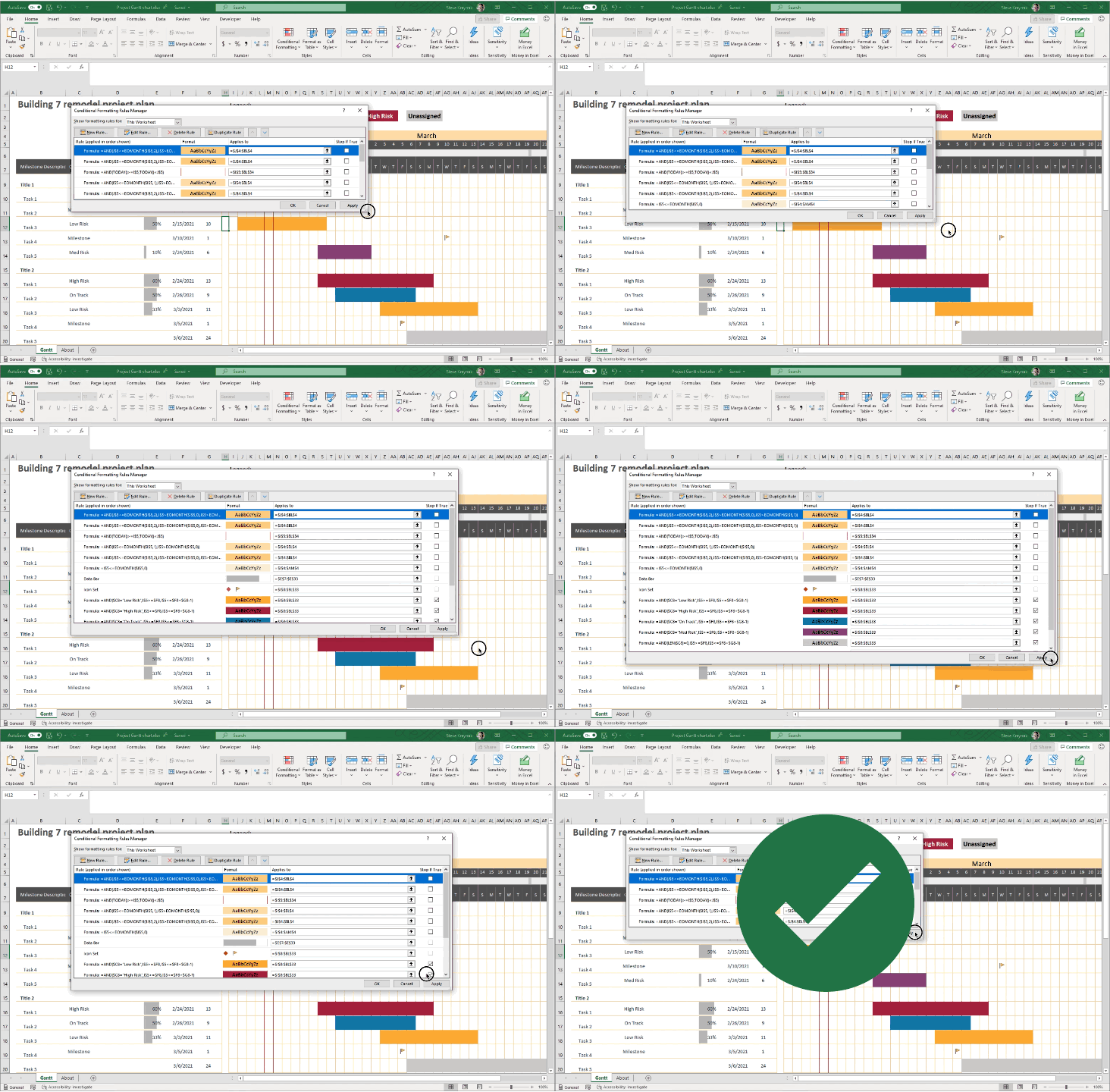
We’re happy to announce a highly requested improvement to the Conditional Formatting dialogs in Excel for Windows. If you’re a Microsoft 365 subscriber, they’re now resizable so you can see more rules at a time, and it’s easier to see the formula and range that the rules apply to. This includes the Conditional Formatting Rules Manager and New/Edit Rule dialogs.
That’s not all. If you’re a Microsoft 365 subscriber, in Excel for Windows and coming soon to Excel for Mac, there’s a new button so you can duplicate a selected conditional formatting rule.
Animation showing the Conditional Formatting Rules Manager dialog being resized.
To create a copy of a rule, you no longer need to manually recreate the formula and format of the rule you’re trying to copy. Simply select the rule, and click “Duplicate Rule” to create the copy. This should be really useful when you want to create a few rules that are similar, but with some slight modifications. You can create one rule, then duplicate it and make the necessary tweaks to the new rule. You don’t need to start from scratch for each one.
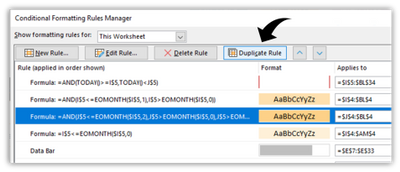 Screen shot showing the new Duplicate Rule button in the Conditional Formatting Rules Manager dialog.
The ability to resize the Conditional Formatting dialogs is one of the top requests that we’ve received, and we hope you like it. If you have additional suggestions, please use the feedback button on the Help tab of the ribbon to let us know.
To get these improvements, you must be a Microsoft 365 subscriber, and you need to install the latest updates. For Windows, this is version 16.0.13530 or greater. For Mac this is version 16.47 or greater.


Recent Comments