by Contributed | Feb 16, 2021 | Technology
This article is contributed. See the original author and article here.
Final Update: Tuesday, 16 February 2021 21:34 UTC
We’ve confirmed that all systems are back to normal with no customer impact as of 02/16, 21:30 UTC. Our logs show the incident started on 02/16, 20:17 UTC and that during the 1 hour and 13 minutes that it took to resolve the issue customers experienced in the West US 2 Region with workspace-enabled Application Insights resources experienced intermittent data gaps as well as possible misfiring of alerts based on resulting data gaps or latencies.
- Root Cause: The failure was due to an ingestion backend resource that was in a bad state due to cached data.
- Incident Timeline: 1 Hours & 13 minutes – 02/16, 20:17 UTC through 02/16, 21:30 UTC
We understand that customers rely on Application Insights as a critical service and apologize for any impact this incident caused.
-Jeff
Initial Update: Tuesday, 16 February 2021 21:22 UTC
We are aware of issues within Application Insights and are actively investigating. Some customers in West US 2 may experience delayed or missed Log Search Alerts and Data Gaps.
- Work Around: None
- Next Update: Before 02/16 22:30 UTC
We are working hard to resolve this issue and apologize for any inconvenience.
-Jeff
by Contributed | Feb 16, 2021 | Technology
This article is contributed. See the original author and article here.
Azure confidential computing offers a state-of-the-art hardware, software & services platform to protect sensitive customer data in-use while minimizing the Trusted Computing Base (TCB). Customers taking advantage of Azure confidential computing can further strengthen their security posture through use of Azure Attestation, a feature that allows them to verify the compliance of various workloads according to their security policies. If their environment becomes non-compliant with their security policies, the customer can prevent exposure of data.
Azure Attestation offers a simple PaaS experience to enable customers solve the complicated problem of gaining trust and verifying the identity of an environment before they interact with it. The ability to gain this trust allows customers to develop applications and create business models that require uncompromising trust where they were previously unable to create them — in the cloud.
What is Azure Attestation?
Azure Attestation is a unified solution that supports attestation of platforms backed by Trusted Platform Modules (TPMs) alongside the ability to attest to the state of Trusted Execution Environments (TEEs) such as Intel® Software Guard Extensions (SGX) enclaves
Azure Attestation receives evidence from an environment, validates it with Azure security standards and user-defined policies, and produces cryptographic proofs (called attestation tokens) for claims-based applications. These tokens enable relying parties to gain confidence in the trustworthiness of the environment, the integrity of the software binaries running inside it and make trust-based decisions to release sensitive data to it. The tokens generated by Azure Attestation can be consumed by services in scenarios such as enclave validation, secure key sharing, and confidential multi-party computation.
Why use Azure Attestation ?
Azure Attestation provides the following benefits:
- Offers a unified solution for attesting multiple TEEs or platforms backed by TPMs
- Allows the creation of custom attestation providers and configuration of policies to customize the generation of attestation tokens
- Provides the ability to securely communicate with the attested platform with the help of data embedded in an attestation token using industry-standard formatting
- A highly available service with Business Continuity and Disaster Recovery (BCDR) configured across regional pairs
How does Azure Attestation work?
The following actors are involved in an Azure Attestation workflow:
Client: The component which collects evidence from an environment and sends attestation requests to Azure Attestation.
Azure Attestation: The component which accepts evidence from the client, validates it with Azure security standards, evaluates it against the configured policy and returns the attestation token to the client.
Relying party: The component which relies on Azure Attestation for remotely attesting the state of an environment supported by the TPM/enclave.
Consider a multi-party data sharing use-case where an organization (relying party) wants to share data with its partners and achieve great insights by running inference models on the aggregated information. To protect data confidentiality while leveraging mutual benefits, data in-use can be encrypted and stored in TEEs like SGX enclaves. However, before giving access to the encrypted content, organizations would like to validate the trust worthiness of the enclave and then securely transfer secrets to the enclave. Azure Attestation enables the remote verification process.
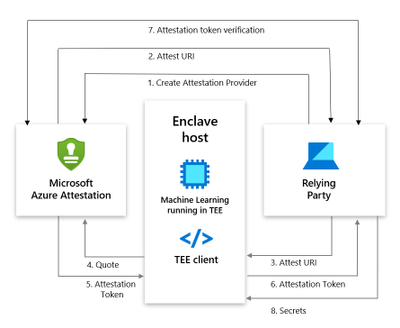
Below is the workflow to perform SGX attestation using custom attestation providers:
- User creates an provider using PowerShell/Portal/CLI. Note that Regional shared attestation providers can be used to perform attestation when there is no requirement for custom policies
- Attest URI is returned to the user
- Attest URI is shared with the TEE client as a reference to Azure Attestation
- The client collects enclave evidence and sends attestation request to Azure Attestation
- The service validates the submitted information and evaluates it against a configured policy. If the verification succeeds, it issues an attestation token and returns it to the client
- Client sends the attestation token back to the relying party
Getting started with Azure Attestation
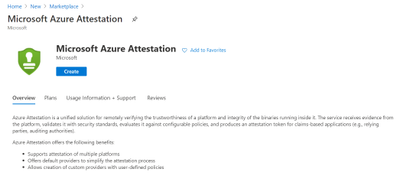
- To create an attestation provider via Azure portal, click the Create button on the Azure Attestation page in the Azure portal Marketplace menu.
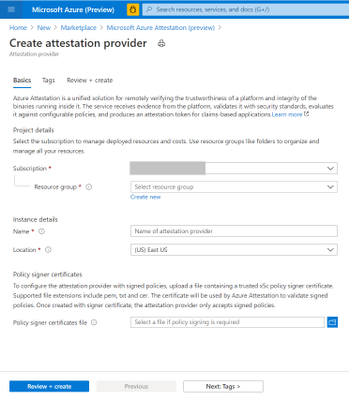
- Provide a name, location, subscription and resource group and proceed with the creation of your attestation provider.
- If needed, upload policy signer certificates file to configure the attestation provider with signed policies. Learn more.
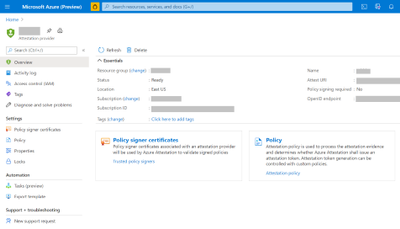
- Once created, details of the provider can be seen in Overview page.
- To view the default policy of your attestation provider, select Policy in the left-hand side Resource Menu.
- To configure a custom policy to meet your requirements, click configure and provide policy information in text/JSON Web Token format and click Save.
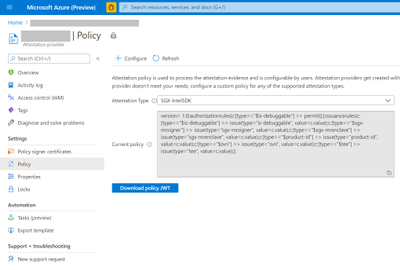
- Click the Refresh button to view the updated policy
Creation and management of attestation providers can also be performed using Command Line Interface (CLI) or Azure PowerShell.
Customer success stories
We are excited to enable multiple scenarios that benefit from Azure Attestation. Some of them include:
SQL Always Encrypted with secure enclaves
“Microsoft Azure Attestation is a key component of a solution for confidential computing provided by Always Encrypted with secure enclaves in Azure SQL Database. Azure Attestation allows database users and applications to attest secure enclaves inside Azure SQL Database are trustworthy and therefore can be confidently used to process queries on sensitive data stored in customer databases.”
– Joachim Hammer, Principal Group PM Manager, Azure SQL
ISV partners
Microsoft also works with platform partners who specialize in creating scalable software running on top of Azure confidential computing environments. Partners like Fortanix, Anjuna and Scone are already poised to use the services offered by Azure Attestation.
Future roadmap for Azure Attestation
Our long-term aspiration is to partner with people and organizations around the planet to help them achieve more, and more securely with Microsoft Azure Attestation. Azure Attestation will be the one Microsoft service that attests multiple platforms used by Azure customers such as Confidential Containers, Confidential VMs, IoT edge devices and more. We expect Azure Attestation to be the leading cloud service used by customers to establish unconditional trust in infrastructure and runtime across Azure, on-premises and at the edge. Azure Attestation will continue to strengthen customer data governance.
Learn more about Azure Attestation

by Scott Muniz | Feb 16, 2021 | Security
This article was originally posted by the FTC. See the original article here.
As the Coronavirus pandemic continues, so does its financial impact. For people who need help with rent or mortgage payments, or have student loans, there may be some good news about the federal relief response.
Renters — The temporary stop on evictions for certain renters now runs through March 31, 2021. The Centers for Disease Control and Prevention has information on who is eligible and the steps to take.
Homeowners — If you’re struggling to make your federally backed mortgage payments because of the pandemic, payment forbearance may still be available, and the pause on foreclosures runs through at least March 31, 2021. The Federal Housing Finance Agency tells you how to find out if your mortgage is federally backed. Contact your mortgage servicer to find out what other help is available to you.
Student Loan Borrowers — For those federal student loans that are covered, the U.S. Department of Education has automatically paused payments through September 30, 2021.
Remember that scammers are paying attention to this news and may try to take advantage of you. Here are some ways to protect yourself:
If you spot a scam, please report it to the Federal Trade Commission at ReportFraud.ftc.gov.
Brought to you by Dr. Ware, Microsoft Office 365 Silver Partner, Charleston SC.
by Contributed | Feb 16, 2021 | Technology
This article is contributed. See the original author and article here.
Azure confidential computing offers a state-of-the-art hardware, software & services platform to protect sensitive customer data in-use while minimizing the Trusted Computing Base (TCB). Customers taking advantage of Azure confidential computing can further strengthen their security posture through use of Azure Attestation, a feature that allows them to verify the compliance of various workloads according to their security policies. If their environment becomes non-compliant with their security policies, the customer can prevent exposure of data.
Azure Attestation offers a simple PaaS experience to enable customers solve the complicated problem of gaining trust and verifying the identity of an environment before they interact with it. The ability to gain this trust allows customers to develop applications and create business models that require uncompromising trust where they were previously unable to create them — in the cloud.
What is Azure Attestation?
Azure Attestation is a unified solution that supports attestation of platforms backed by Trusted Platform Modules (TPMs) alongside the ability to attest to the state of Trusted Execution Environments (TEEs) such as Intel® Software Guard Extensions (SGX) enclaves
Azure Attestation receives evidence from an environment, validates it with Azure security standards and user-defined policies, and produces cryptographic proofs (called attestation tokens) for claims-based applications. These tokens enable relying parties to gain confidence in the trustworthiness of the environment, the integrity of the software binaries running inside it and make trust-based decisions to release sensitive data to it. The tokens generated by Azure Attestation can be consumed by services in scenarios such as enclave validation, secure key sharing, and confidential multi-party computation.
Why use Azure Attestation ?
Azure Attestation provides the following benefits:
- Offers a unified solution for attesting multiple TEEs or platforms backed by TPMs
- Allows the creation of custom attestation providers and configuration of policies to customize the generation of attestation tokens
- Provides the ability to securely communicate with the attested platform with the help of data embedded in an attestation token using industry-standard formatting
- A highly available service with Business Continuity and Disaster Recovery (BCDR) configured across regional pairs
How does Azure Attestation work?
The following actors are involved in an Azure Attestation workflow:
Client: The component which collects evidence from an environment and sends attestation requests to Azure Attestation.
Azure Attestation: The component which accepts evidence from the client, validates it with Azure security standards, evaluates it against the configured policy and returns the attestation token to the client.
Relying party: The component which relies on Azure Attestation for remotely attesting the state of an environment supported by the TPM/enclave.
Consider a multi-party data sharing use-case where an organization (relying party) wants to share data with its partners and achieve great insights by running inference models on the aggregated information. To protect data confidentiality while leveraging mutual benefits, data in-use can be encrypted and stored in TEEs like SGX enclaves. However, before giving access to the encrypted content, organizations would like to validate the trust worthiness of the enclave and then securely transfer secrets to the enclave. Azure Attestation enables the remote verification process.
Below is the workflow to perform SGX attestation using custom attestation providers:
- User creates an provider using PowerShell/Portal/CLI. Note that Regional shared attestation providers can be used to perform attestation when there is no requirement for custom policies
- Attest URI is returned to the user
- Attest URI is shared with the TEE client as a reference to Azure Attestation
- The client collects enclave evidence and sends attestation request to Azure Attestation
- The service validates the submitted information and evaluates it against a configured policy. If the verification succeeds, it issues an attestation token and returns it to the client
- Client sends the attestation token back to the relying party
Getting started with Azure Attestation
- To create an attestation provider via Azure portal, click the Create button on the Azure Attestation page in the Azure portal Marketplace menu.
- Provide a name, location, subscription and resource group and proceed with the creation of your attestation provider.
- If needed, upload policy signer certificates file to configure the attestation provider with signed policies. Learn more.
- Once created, details of the provider can be seen in Overview page.
- To view the default policy of your attestation provider, select Policy in the left-hand side Resource Menu.
- To configure a custom policy to meet your requirements, click configure and provide policy information in text/JSON Web Token format and click Save.
- Click the Refresh button to view the updated policy
Creation and management of attestation providers can also be performed using Command Line Interface (CLI) or Azure PowerShell.
Customer success stories
We are excited to enable multiple scenarios that benefit from Azure Attestation. Some of them include:
SQL Always Encrypted with secure enclaves
“Microsoft Azure Attestation is a key component of a solution for confidential computing provided by Always Encrypted with secure enclaves in Azure SQL Database. Azure Attestation allows database users and applications to attest secure enclaves inside Azure SQL Database are trustworthy and therefore can be confidently used to process queries on sensitive data stored in customer databases.”
– Joachim Hammer, Principal Group PM Manager, Azure SQL
ISV partners
Microsoft also works with platform partners who specialize in creating scalable software running on top of Azure confidential computing environments. Partners like Fortanix, Anjuna and Scone are already poised to use the services offered by Azure Attestation.
Future roadmap for Azure Attestation
Our long-term aspiration is to partner with people and organizations around the planet to help them achieve more, and more securely with Microsoft Azure Attestation. Azure Attestation will be the one Microsoft service that attests multiple platforms used by Azure customers such as Confidential Containers, Confidential VMs, IoT edge devices and more. We expect Azure Attestation to be the leading cloud service used by customers to establish unconditional trust in infrastructure and runtime across Azure, on-premises and at the edge. Azure Attestation will continue to strengthen customer data governance.
Learn more about Azure Attestation
by Contributed | Feb 16, 2021 | Technology
This article is contributed. See the original author and article here.
Security is at an inflection point as digital attack surfaces increase and threat attack sophistication escalates. It continues to be one of the most challenging areas our customers navigate. Our Government customers have additional obligations to data compliance and governance.
Microsoft Defender for Endpoint is a holistic, cloud delivered endpoint security solution that includes risk-based vulnerability management and assessment, attack surface reduction, behavioral based and cloud-powered next generation protection, endpoint detection and response (EDR), automatic investigation and remediation, managed hunting services, rich APIs, and unified security management.
We are excited to announce that Microsoft Defender for Endpoint is now available for customers in the Government Community Cloud (GCC). Microsoft Defender for Endpoint in GCC supports the Federal Risk and Authorization Management Program (FedRAMP) accreditation at a High Impact level. FedRAMP artifacts are available for review by customers who are required to comply with FedRAMP. Federal agencies can review these artifacts in support of their review to issue an Authority to Operate (ATO).
While Microsoft Defender for Endpoint is available for purchase, we will continue to add capabilities and features. Learn more here: Microsoft Defender for Endpoint for US Government customers – Windows security | Microsoft Docs



Recent Comments