
by Contributed | Feb 19, 2021 | Technology
This article is contributed. See the original author and article here.
Azure Cloud Services for DJI Drones
Jiong Shi is a 12-time Azure MVP from China. Interested in Azure IoT, Windows IoT, Windows Embedded and UWP, Jiong is a professor at Zhejiang Wanli University, China, and the author of a book titled “Windows 10 IoT Application Developer Guide”. Moreover, Jiong is a keen blogger, an active developer in his local community, and speaker at Ignite China. Follow him on Twitter @dearsj001.

How to: Create your own Family Video Room using Azure Communication Services without writing any code (if you don’t want to) | The thoughtstuff Blog
Tom Morgan is a Microsoft Teams Platform developer and Microsoft MVP with more than 10 years of experience in the software development industry. For the last 8 years, Tom has worked at Modality Systems, with responsibility for delivery of the Modality Systems product portfolio. Tom is passionate about creating great software that people will find useful. He enjoys blogging and speaking about Microsoft Teams development, Office365, Bot Framework, Cognitive Services and AI, and the future of the communications industry. He blogs at thoughtstuff.co.uk and tweets at @tomorgan.

Augmented Reality for .NET Developers on iOS
Lee Englestone is an innovative Dev Manager who likes to operate in the area where technology, product, people and business strategy converge. Lee, from the UK, is constantly working on side projects, building things and looking for ways to educate the .NET community in great technologies. He is the creator of Visual Studio Tips, Hackathon Tips and Xamarin Arkit. For more, see Lee’s blog and Twitter @LeeEnglestone.

Deploying a Machine Learning Model with Azure ML Pipelines
Vlad Iliescu is an AI MVP, public speaker, storyteller, music lover and uke player. Hailing from Romania, Vlad is Partner and Head of AI at Strongbytes, a company with a strong focus on building software products around well-operationalized machine learning models, and the co-founder of the Romanian AI conference NDR. For more on Vlad, check out his blog and Twitter @vladiliescu

How to: create and add a OneNote tab to your Microsoft Teams team channel using Power Automate + Graph API
Vesku Nopanen is a Principal Consultant in Office 365 and Modern Work and passionate about Microsoft Teams. He helps and coaches customers to find benefits and value when adopting new tools, methods, ways or working and practices into daily work-life equation. He focuses especially on Microsoft Teams and how it can change organizations’ work. He lives in Turku, Finland. Follow him on Twitter: @Vesanopanen
by Contributed | Feb 19, 2021 | Technology
This article is contributed. See the original author and article here.
Final Update: Friday, 19 February 2021 07:44 UTC
We’ve confirmed that all systems are back to normal with no customer impact as of 02/19, 07:16 UTC. Our logs show the incident started on 02/19, 05:19 UTC and that during the 1 hour and 57 minutes that it took to resolve the issue some customers using Azure Monitor Alerts who may have experienced errors when using ITSM connector in East US region to create the work items in external ticketing systems.
- Root Cause: The failure was due to an issue with one of our dependent service.
- Incident Timeline: 1 Hour & 57 minutes – 02/19, 05:19 UTC through 02/19, 07:16 UTC
We understand that customers rely on Azure Monitor as a critical service and apologize for any impact this incident caused.
-Mohini
by Contributed | Feb 19, 2021 | Technology
This article is contributed. See the original author and article here.
Just under two weeks before MS Ignite but the news keeps on coming. This week’s news includes Cross Region Restore of Azure VMs now generally available, Azure Firewall Premium now in public preview, Azure role-based access control (RBAC) for Azure Key Vault data plane authorization is now generally available, Azure Machine Learning updates for native terminal is now generally available and as always, the Microsoft Learn Module of the Week.
Cross Region Restore of Azure VMs now generally available
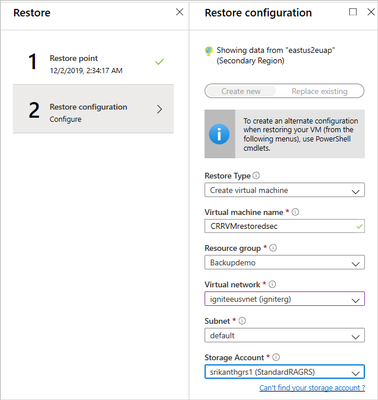
The backup data in the Azure Backup Recovery service vault stores backup data which defaults storage settings to geo-redundancy, and the backed up data in the primary region is geo-replicated to an Azure-paired secondary region. The data replicated to the secondary region is available to restore in the secondary region only if Azure declares a disaster in the primary region. Customers who opt-in for this feature can initiate restores in the secondary region at any time making the customer controlled secondary region restores possible in both times of primary region being available or unavailable.
Further details can be found here: Cross Region Restore
Azure Firewall Premium now in public preview
The following capabilities can now be preformed under the new Azure Firewall Premium public preview:
- Transport Layer Security (TLS) Inspection: decrypts outbound traffic, performs the required value-added security functions and re-encrypt the traffic which is sent to the original destination.
- Intrusion Detection and Prevention System (IDPS): provides signature-based IDPS to allow rapid detection of attacks by looking for specific patterns, such as byte sequences in network traffic, or known malicious instruction sequences used by malware.
- Web Categories: Allows admins to allow or deny user access to the Internet based on categories (e.g. social networking, search engines, gambling), reducing the time spent on managing individual FQDNs and URLs. This capability is also available for Azure Firewall Standard based on FQDNs only.
- URL Filtering: Allow users to access specific URLs for both plain text and encrypted traffic, typically being used in congestion with web categories.
For more information, see the Azure Firewall Premium documentation.
Azure role-based access control (RBAC) for Azure Key Vault data plane authorization is now generally available
System admins can now achieve unified management and access control across Azure Resources with Azure role-based access control (RBAC) for Azure Key Vault on data plane. This capability now allows the ability to manage RBAC for Key Vault keys, certificates, and secrets with roles assignment scope available from management group to individual key, certificate, and secret. When enabled, Azure AD users and services will be validated exclusively by Azure RBAC.
Further details can be found here: Provide access to Key Vault keys, certificates, and secrets with an Azure role-based access control
Azure Machine Learning updates for native terminal now generally available
Terminal in Azure Machine Learning can now be used to perform any CLI operation directly in the Azure Machine Learning studio. CLI operations include cloning notebook files from Git Repository , installing a Python package, and executing Python Files.
For more information, see the Azure Machine Learning CLI documentation.
Community Events
- Microsoft Ignite – Registration is now available for the upcoming event. Stay tuned for more details as they become available.
- Azure admin jump start – Live, demo-heavy deep dives into scenarios detailing core Azure services, workloads, security, and governance.
MS Learn Module of the Week

Deploying and managing compute resources for Azure administrators
The goal of this Azure fundementals learning path is to learn how to deploy and configure virtual machines, containers, and Web Apps in Azure.
This 11 hour learning path can be completed here: Deploy and manage compute resources for Azure administrators
Let us know in the comments below if there are any news items you would like to see covered in the next show. Be sure to catch the next AzUpdate episode and join us in the live chat.
by Contributed | Feb 18, 2021 | Technology
This article is contributed. See the original author and article here.
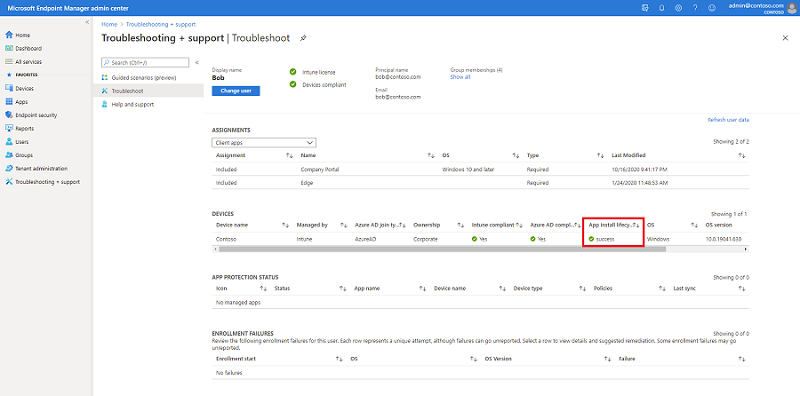
We recently discovered an issue within the Troubleshooting + support blade where the Devices table > column App install lifecycle might not be showing an accurate status. We’ve received customer feedback where the column is showing “Failure” but upon investigation the apps are not failing to deploy and there are no issues with the apps on devices.
Additionally, if you select the impacted device, load the “Managed Apps” view, select one of the apps targeted to the device and click the app, the app install history may show the status as “Failed to install”, however the app is present on the device.
Both these issues are related to each other because the App install lifecycle is computed from the app install history. The issue appears at random so you may not be impacted, keep on reading to learn more.
Steps to reproduce:
Navigate to the Microsoft Endpoint Manager admin center
Click Troubleshooting + support
Select a user
Under the Devices table, view the status of the App install lifecycle column
Confirm if the status is correct by checking Device Install status for getting the accurate installation status for an app for a device.
Troubleshoot blade in the MEM admin center
How to check Device Install status:
Navigate to the Microsoft Endpoint Manager admin center
Click Apps > All apps
Select an app
Click Device install status
The correct status will be displayed in the Status column
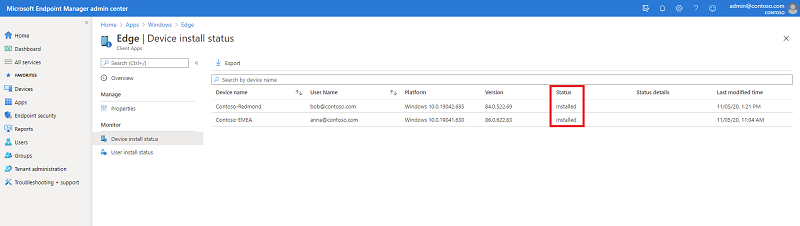 Device install status blade in the MEM admin center
If the App install lifecycle column in the Troubleshooting blade shows a different status than the Device Install status, you have run into this problem. To workaround this issue, our recommendation is to use the Device Install status for understanding the correct install status of the app for the affected device.
Our engineering team is actively working to fix this issue, we’ll update this post as additional information becomes available. If you have any questions, let us know in the comments on this post or tagging @IntuneSuppTeam on Twitter.
by Contributed | Feb 18, 2021 | Technology
This article is contributed. See the original author and article here.
Azure Service Bus is the enterprise messaging PaaS of choice for customers looking for a cloud native service with familiar queue and topic subscription semantics using the industry driven Advanced Message Queuing Protocol (AMQP). By virtue of being a modern PaaS offering on Azure, Azure Service Bus aims to bring deeper integrations with Azure’s services along with high availability, secure design and scalability built into the platform as a first-class experience to the application integration space.
As businesses, from retail to finance, and manufacturing to transportation, accelerate their digitalization efforts and further embrace the cloud, many are moving and modernizing existing Java-based workloads that lean on enterprise messaging brokers like IBM MQ, TIBCO EMS or JBoss A-MQ through the JMS 2.0 application interface.
With Azure Service Bus Premium expanding its feature set to provide JMS 2.0 specification compliance, businesses can leave the complexity and cost of licensing, maintaining, and operating these legacy broker infrastructures behind and switch to Azure Service Bus as the reliable and highly available backbone of their critical applications. For multi-site systems that use centralized broker infrastructures in on-premises datacenters, Azure Service Bus is also a very attractive, cost efficient, managed PaaS alternative to running such infrastructure even if many of the attached workloads remain on-premises.
Today, we’re ecstatic to announce the general availability for Java Message Service (JMS) 2.0 for enterprise workloads on Azure Service Bus Premium tier.
Seamlessly migrate and connect existing applications with Azure Service Bus over AMQP
By leveraging Azure Service Bus JMS support, customers can avoid the overhead of procuring licenses, managing an enterprise messaging broker on their own IaaS Compute, simplify cost management with a fixed price per messaging unit, and by leveraging automatic scale up/down to address variability in workloads.
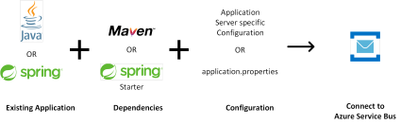
We also continue to promise the simplicity of configuration only code changes to enable our customers to bring their existing JMS client applications.
Utilize existing JMS enterprise application integration (EAI) connectors and tooling to interact with Azure Service Bus
With full support for Java Message Service (JMS) 2.0 on Azure Service Bus, the possibilities for interacting with Azure Service Bus are virtually endless. Our customers can now utilize existing EAI connectors that leverage JMS APIs to perform management and data plane operations on Azure Service Bus.
We’ve also added support for the JMS toolbox tool to interact with Azure Service Bus, enabling customers to have a familiar tool used with various JMS message brokers.
Get Started Today
To learn more about Azure Service Bus and try out the Java Message Service (JMS 2.0), check out the below links


Recent Comments