by Contributed | Jan 6, 2021 | Technology
This article is contributed. See the original author and article here.
Hi Teams Community,
Tomorrow January 7th, 2021 is another big milestone date for Teams Meeting Recording Storage. We wanted to send a quick reminder to everyone to bookmark and review https://aka.ms/tmrodsp for all the details!
What’s happening tomorrow? Glad you asked:
Rolling out starting January 7, 2021 |
All new Teams meeting recordings will be saved to OneDrive for Business and SharePoint unless you delay this change by modifying your organization’s Teams Meeting policies and explicitly setting them to Stream. Seeing the policy reporting as Stream isn’t enough. You need to explicitly set the policy value to Stream. |
Be sure to review the document carefully for additional information. For most of you there’s no action you need to take. If you have business requirements to stay on Stream, be sure to opt out following the instructions in
Otherwise, starting tomorrow this change will begin rolling out world wide to non-GCC/DoD tenants (the rollout isn’t ‘instant’ so your Tenant may not start saving Teams Meeting Recordings to OneDrive SharePoint immediately, please be patient).
If you are signed into your M365 Tenant Admin Portal as an Admin you can also review the information in Message Center Post 222640.
And finally, this Feature rollout is listed in the Microsoft 365 Roadmap, item 67138.
As always we welcome your feedback on the Blog.
Happy Recording!
Microsoft Teams Support
by Scott Muniz | Jan 6, 2021 | Security, Technology
This article is contributed. See the original author and article here.
CISA has released Emergency Directive (ED) 21-01 Supplemental Guidance version 3: Mitigate SolarWinds Orion Code Compromise, providing guidance that supersedes Required Action 4 of ED 21-01 and Supplemental Guidance versions 1 and 2.
- Federal agencies without evidence of adversary follow-on activity on their networks that accept the risk of running SolarWinds Orion in their enterprises should rebuild or upgrade, in compliance with hardening steps outlined in the Supplemental Guidance, to at least SolarWinds Orion Platform version 2020.2.1 HF2. The National Security Agency (NSA) examined this version and verified it eliminates the previously identified malicious code. This version also includes updates to fix un-related vulnerabilities, including vulnerabilities that SolarWinds has publicly disclosed.
- Federal agencies with evidence of follow-on threat actor activity on their networks should keep their affected versions disconnected, conduct forensic analysis, and consult with CISA before rebuilding or reimaging affected platforms and host operating systems.
The updated supplemental guidance also includes forensic analysis and reporting requirements.
CISA has also updated AA20-352A: Advanced Persistent Threat Compromise of Government Agencies, Critical Infrastructure, and Private Sector Organizations, originally released December 17, 2020. This update includes new information on initial access vectors, updated mitigation recommendations, and new indicators of compromise (IOCs).
Although the Emergency Directive only applies to Federal Civilian Executive Branch agencies, CISA encourages state and local governments, critical infrastructure entities, and other private sector organizations to review CISA Emergency Directive 21-01 – Supplemental Guidance v.3 for recommendations on operating the SolarWinds Orion Platform. Review the following resources for additional information on the SolarWinds Orion compromise.
by Contributed | Jan 6, 2021 | Technology
This article is contributed. See the original author and article here.
Attack simulation training Generally Available
We are pleased to announce the General Availability (GA) of Attack simulation training in Microsoft Defender for Office 365. Delivered in partnership with Terranova Security, Attack simulation training is an intelligent social engineering risk management tool that automates the creation and management of phishing simulations to help customers detect, prioritize and remediate phishing risks by using real phish and hyper-targeted training to change employee behaviors. To see a demo of the product tune into our announcement video at Microsoft Ignite 2020.
Emulate real threats with intelligent simulations
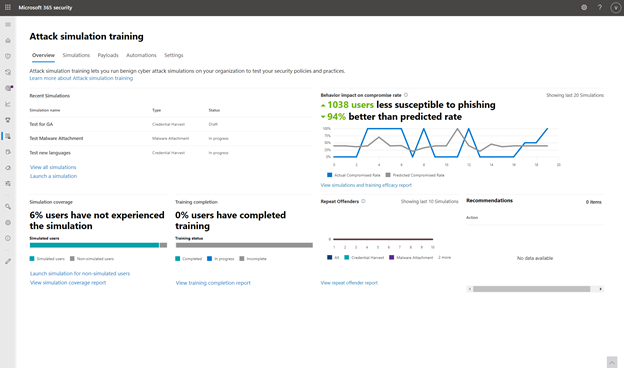
Intelligent simulations automate simulation and payload management, user targeting, schedule and cleanup. In the Microsoft 365 Security Center, administrators can launch a simulation and choose a technique commonly used by attackers and target users.
Attack simulation training dashboard
Wide variety of Phishing Techniques
Following the simple steps outlined in the workflow, administrators can choose from the top five social engineering techniques and select the phish template from a list of real attacks seen in their tenant. Optionally customers can upload their own template and then select the users to whom the simulation will be sent.
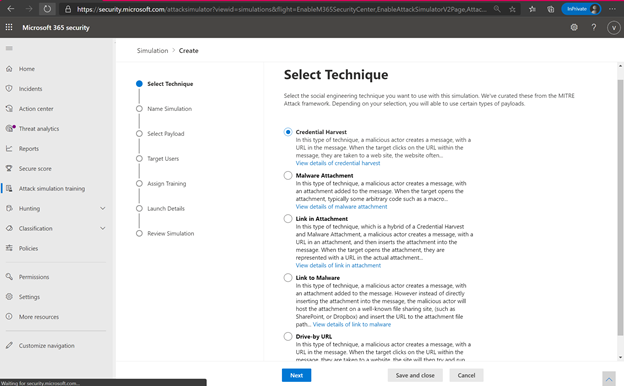
Phishing Techniques available
Phish Template Library from Real Phish Emails
To maximize accuracy, Attack simulation training pulls its phishing templates from real world phish attackers seen in the customers environment. The security administrator can automate a “payload harvester” that collects and neutralizes phish emails received by the organization.
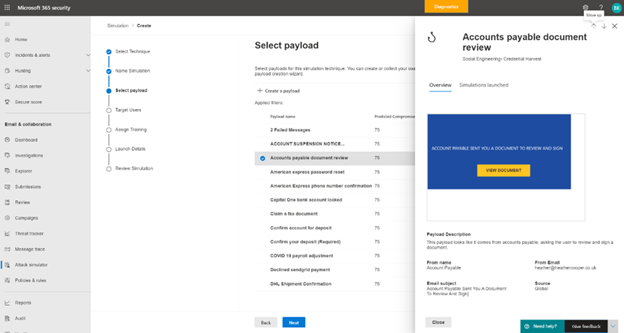
Payloads Available
Through the real payload harvester, Attack simulation training trains employees to identify and report the kinds of emails real attackers will send them. The security administrator can set up targeted payload harvesting as well, using conditions like technique used, department targeted and frequency.
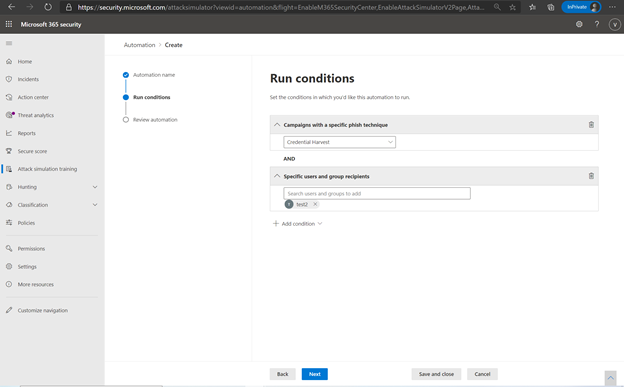
Payload Harvesting Conditions
Finally, security administrators can add ‘phishing indicators’ like an incorrect domain name, an urgency tip or a misspelled company name to train end users on commonly-seen phishing indicators.
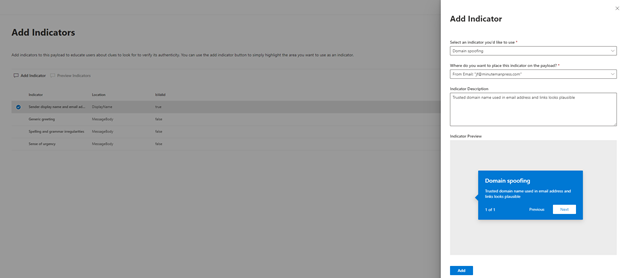
Add indicators to phishing templates
User targeting and training assignment
User targeting is automated, and the administrator can use any address book properties to filter for a user list and target them. The administrator can also quickly import a list of “repeat offenders” or employees who have failed a simulation in the past and target the simulation to this group.
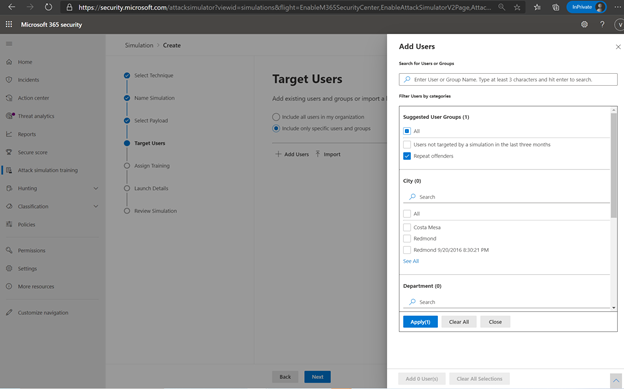
Target users based on address book filters
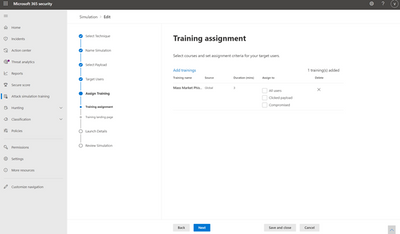
The administrator can then assign training tailored to a user’s behavior in the simulation. Microsoft recommends training to assign based on learning pathways and our intelligence into which training is effective for which kinds of behavior. The administrator can also choose to assign training themselves. For example, an administrator may choose to assign 3 trainings to users who were compromised in the simulation but only 2 to those who clicked and 1 to all users. The landing page on which the end user will land to access this training are wholly customizable for the look and voice of your brand. Finally, the administrator has the option to schedule the simulation to launch right away or at a later time, which can be customized by recipient time-zone.
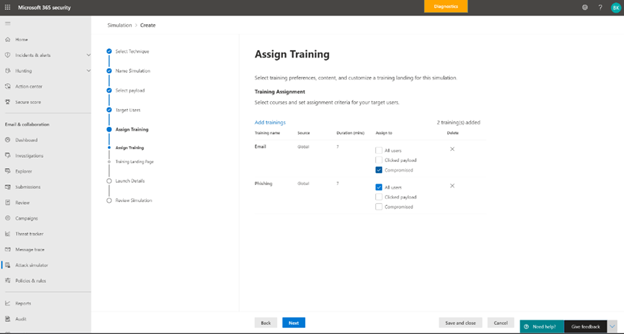
Assign Training
Customized Role Based Access ensures that administrating the simulation and training is a secure and diversified workflow.
Quantify social engineering risk and prioritize remediation through training
The training effectiveness metric, which plots your organization’s actual compromise rate in a simulation against Microsoft’s predicted compromise rate, measures the effectiveness of the training program. Overlay the dates of training completion and simulations to correlate which trainings caused a drop in compromise rate and evaluate their effectiveness.
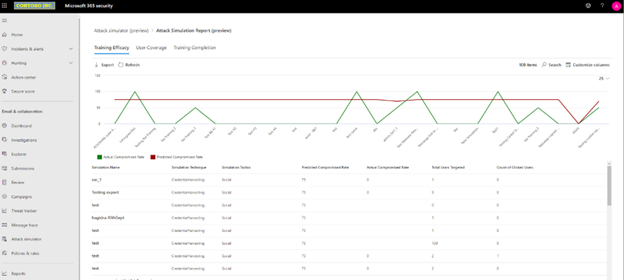
Training Effectiveness Report
Gain visibility over your organization’s training completion and simulation status through completeness and coverage metrics and track your organization’s progress against the baseline predicted compromise rate. Every reporting dashboard can be filtered in different ways and exported for reporting. Multiple reporting views allowing you to drill down on training efficacy, training completion, repeat offenders and coverage.
Reinforce the human firewall with industry-leading Security Awareness Training
Terranova Security’s huge library of phish training content enables personalized and highly specific training targeting based on the user’s behavior during a simulation.
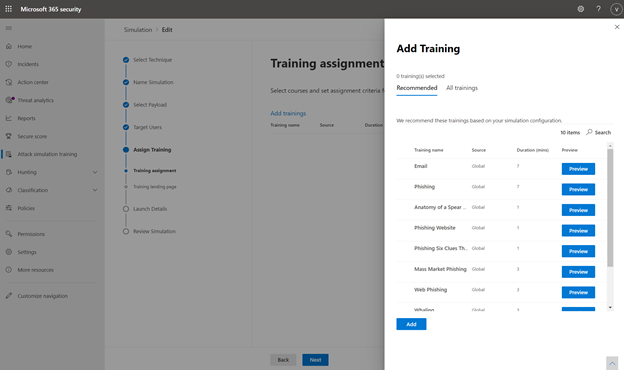
Training Library
Nanolearnings, microlearnings, and interactivity
cater to diverse learning styles and reinforce awareness. Additionally, all trainings are available in 40+ languages and accessible to the highest standards to meet the needs of Microsoft’s global customers.
Attack simulation training enables organizations to improve their security posture by training their employees effectively and changing risky behavior. Organizations can choose from multiple training options to best fit their needs – using Microsoft’s recommended learning pathways, choosing to assign training manually, or choosing not to add training to a simulation.
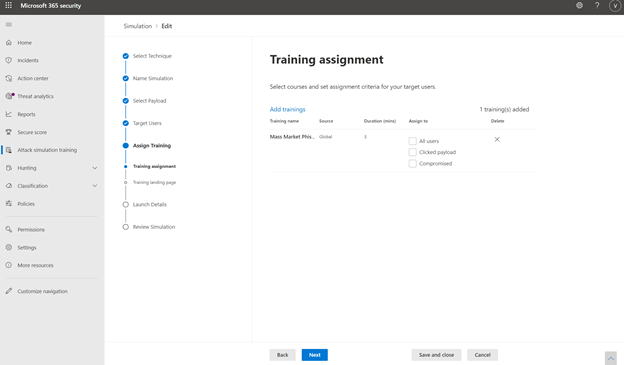
Assigning Training
E3 Trial
As we mentioned in our blog announcing the expansion of public preview to E3 license holders, we will continue to offer a subset of Attack simulation training capabilities to E3 customers as a trial. The trial offering contains the ability to use a Credential Harvest payload and the ability to select from 2 training experiences ISA Phishing and Mass Market Phishing.
The trial offering will not include any other phishing techniques, automated simulation creation and management, conditional payload harvesting, and the complete catalog of Terranova Security trainings.
To get started today, go to Attack simulation training in your M365 Security and Compliance Center or use this link: aka.ms/AttackSim
by Contributed | Jan 6, 2021 | Technology
This article is contributed. See the original author and article here.
The MSIX Packaging Extension is an Azure DevOps extension which helps build, package and sign Windows apps using the MSIX package format.
CI/CD workflows have become an integral part of the development process to improve efficiency and quality while reducing cost and time to market. Microsoft’s CI/CD solution Azure DevOps Pipelines is widely adopted and popular, but the current process of integrating build and deployment workflows for apps that need to be packaged as MSIX into Azure Pipelines is tedious, specifically for people that are not Azure Pipelines or MSIX experts. The new Azure DevOps extension offers a straightforward, intuitive and UI based solution making it easier to automate build and deployment process for apps being packaged as MSIX, and also for apps with existing CI/CD workflows to move to MSIX without disrupting their build and deployment mechanisms.
To learn more about using MSIX with CI/CD pipelines, check out our documentation. Head to the Azure DevOps Marketplace to grab the extension.
Check it out and let us know what you think!
John Vintzel (@jvintzel), PM Lead, MSIX
Thanks to Sahibi Miranshah for the post!


Recent Comments