by Contributed | Jan 19, 2021 | Technology
This article is contributed. See the original author and article here.
Remote and hybrid work has become the new norm for many employees across the globe as day-to-day collaboration continues to be accomplished virtually. With this shift to online communication, how can you ensure that you’re collaborating safely?
Queue Microsoft Teams! Whether you’re hosting virtual meetings, carrying out daily group and 1:1 chat, sharing documents, or coauthoring in a document in real-time – Teams enables safe and secure collaboration!
Tip 1: Control who can join your Microsoft Teams meetings directly and present
Meeting organizers can change participant settings for a specific meeting through the Meeting options web page. In Teams, go to your Calendar, select a meeting, and then select Meeting options. From here you can determine settings like who needs to be admitted to the meeting and who can bypass the lobby to join it directly. Additionally, you can decide which participants are able to join with the presenter role to present out content and who should join as standard attendees. Another helpful control for large meetings is the ability to prevent attendees from unmuting themselves – this is particularly useful when the meeting will be led by specific participants while the rest of the audience will be listening in. Note that your organization controls the default participant settings.
Tip 2: Minimize Teams meeting disruptions by muting individual or all meeting attendees
In order to prevent meeting disruptions, intentional or accidental, as a meeting organizer you have the ability to mute individual attendees or all meeting attendees. If an attendee happens to leave their microphone unmuted while being away, you can easily mute that participant from the participant pane. During large meetings led by designated speakers, such as a town hall or lecture, the ability to mute all attendees ensures your presenters won’t be accidentally interrupted.
Tip 3: Determine who can present content or share their screen in your Teams meeting
As the meeting organizer, you can determine who has the ability to present out content or share their screen within the meeting. Prior to the meeting start, we discussed above how this can be accomplished via Meeting options. Once your meeting has begun, you can select a participant via the participant pane to determine whether they have the presenter role or are a standard attendee. This can be especially useful when you have outside participants attending your meeting who may only need the presenter role temporarily.
Tip 4: End your Teams meeting for everyone in attendance at once
As the meeting organizer, sometimes the meeting needs to end at your discretion without allowing participants to remain. Ending a meeting for all attendees is often applicable in large-meeting settings such as a town hall, lecture, or webinar class to ensure attendees don’t remain in the meeting. Once a meeting has wrapped up, instead of clicking Leave, select the dropdown located next to it and click End Meeting. You can also access this by going into your meeting controls, click more options (…) , and select End Meeting. This will end and close the meeting for everyone in attendance.
Tip 5: Create a team with increased security
If any of the content stored or discussed within the team may be considered business sensitive, such as financial details or classified project information, it’s best practice to apply increased protections to that team to ensure the content security. This can be accomplished by creating a new team and applying an IT-created sensitivity label. When applying a sensitivity label to your team, it automatically applies the configured protections to the team.
When creating a new team, on the sensitivity and privacy pane select the dropdown under Sensitivity to select an IT-created sensitivity label to apply to the team. As a reminder, it’s always best to check with your organization or IT department on how sensitive business information should be stored.
Tip 6: Create a private channel
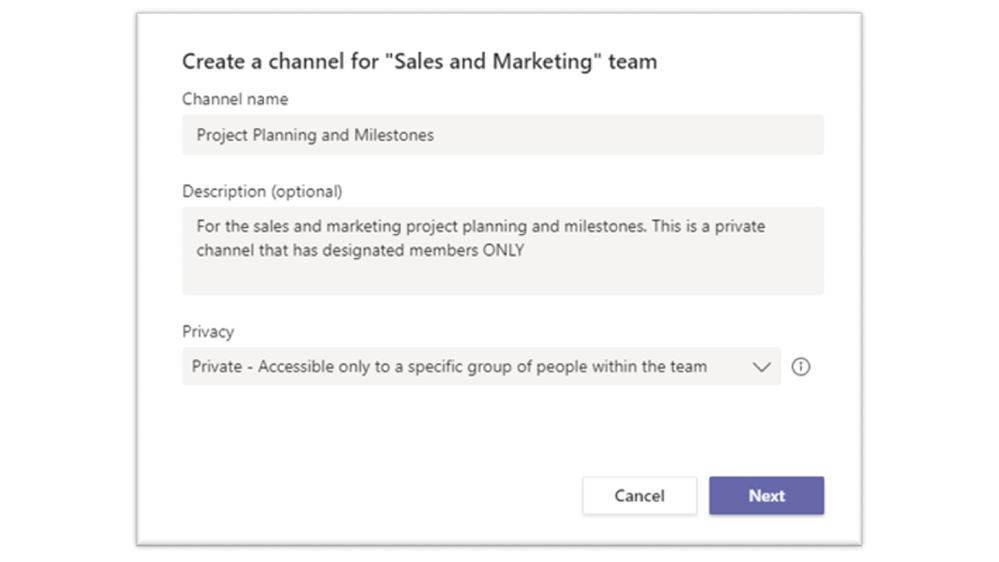
Sometimes you need to share sensitive information within a team to specified team members only, such as project details or strategic planning, that doesn’t require holistic team protection. Rather than creating a new team, you can create a private channel within an existing team that is only accessible to designated members. This is a great way to provide a security layer to protect sensitive business information without creating a new team.
To create a private channel, go to the team and choose more options (…) and select Add channel. After providing a name and description, under Privacy select the dropdown arrow to specify the channel is Private – Accessible only to a specific group of people within the team. Once created, you can add additional private channel owners and up to 250 members. As a reminder, it’s always best to check with your organization or IT department on how sensitive business information should be stored.
Tip 7: Help protect sensitive data in Teams
Microsoft Teams supports data protection policies to help protect sensitive information from being accidentally or inadvertently shared. When collaborating in a Teams 1:1 or channel chat, you may have a message return as blocked if that message contains information that meets your organization’s sensitive information policy.
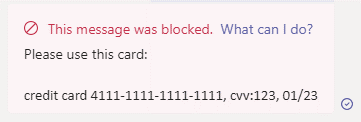
If your message is blocked, within that blocked message you may see a clickable link that says What can I do? If you click that link, a helpfully policy tip created by your organization will display educating you on why content within that message is considered business sensitive. Policy tips are designed to help the sender understand why certain content is considered business sensitive or is best practice not to share.
We hope that these safe online collaboration tips will help you remain productive while having the confidence you’re remaining secure.
by Contributed | Jan 19, 2021 | Technology
This article is contributed. See the original author and article here.
We’re pleased to announce the new Microsoft Certified: Power Platform Solution Architect Expert certification, giving you the opportunity to prove your expertise in architecting solutions using Microsoft Power Platform. To earn this certification, you must pass Exam PL-600: Microsoft Power Platform Solution Architect and earn at least one of the following certifications:
Exam PL-600 is replacing Exam MB-600 on June 30, 2021
Exam PL-600 replaces Exam MB-600: Microsoft Dynamics 365 + Power Platform Solution Architect, which expires on June 30, 2021. After that date, MB-600 will no longer be available for you to take—only PL-600 will be. If you’re currently preparing for MB-600, make sure you take and pass that exam before June 30, 2021. When you pass Exam PL-600 and earn one of the prerequisite certification options, you’ll have earned your Microsoft Power Platform Solution Architect Expert certification, and it will be valid for a full year.
Give your career a boost
Getting advanced training and certification in Microsoft Power Platform can help you improve your business and expand your opportunities to get hired and promoted. An increasing number of job listings on LinkedIn, PricewaterhouseCoopers (PwC), and other sites list proficiency in Microsoft Power Platform as part of the job description. And, according to the 2020/2021 Nigel Frank Microsoft Dynamics Salary Survey, 61 percent of respondents believe that certifications give you the edge in the job market, and 73 percent of permanent employees reported that their salary increased after certification.
Is this certification right for you?
Do you have experience performing proactive and preventive work to increase the value of your customers’ investment? Are you able to identify opportunities to solve business problems? Do you promote organizational health in your engagements? If this describes you and you want to brush up on these skills, why not take training that can help you earn certification as a Microsoft Power Platform Solution Architect Expert?
To pursue this advanced certification, you must have experience leading successful implementations and an ability to focus on solutions that address the broader business and technical needs of an organization. You should have functional and technical knowledge of Microsoft Power Platform, Dynamics 365 customer engagement apps, related cloud solutions from Microsoft, and third-party technologies. In addition to having experience across Microsoft Power Platform, you should be able to facilitate design decisions across development, configuration, integration, infrastructure, security, availability, storage, and change management.
Are you eager to sit for the exam? Your experience with the following tasks is the background you need to take the exam and get a certification that validates your skills:
- Initiate solution planning and identify Microsoft Power Platform components.
- Identify organization information and metrics.
- Evaluate an organization’s enterprise architecture.
- Capture requirements and perform gap analysis.
- Architect a solution.
- Lead the design process, and use Power Automate in your automation strategy.
- Design integrations.
- Identify opportunities to integrate and extend Microsoft Power Platform solutions by using Azure.
- Design the data and security models.
- Validate the solution design.
- Support and troubleshoot the solution as it goes live.
Preparing for certification
Start your Microsoft Certification journey today! The resources section on the certification page contains valuable help to get you ready for the certification exam. There, you’ll find links to the free online learning paths and paid instructor-led training offered by Microsoft Learning Partners that help you prepare for this exam, along with a link for scheduling the exam.

by Contributed | Jan 19, 2021 | Technology
This article is contributed. See the original author and article here.
As I stand here typing in my very poorly insulated, frigid, dilapidated shack of a garage (affectionately dubbed my “Papaya Boathouse”) in my puffy jacket, surrounded by 10 bicycles and a whitewater kayak among other things (a frequent talking point on the stream of video calls that make up my days), it’s almost laughable how normal it now seems, versus how foreign this scene was a year ago. So much has changed in ways we never could have imagined; our perspectives have been thrown out of whack – which has also presented opportunities.
The year 2020 was bonkers in many ways, but it was also a huge turning point in Microsoft becoming the worldwide frontrunner in ambitious environmental efforts, as well as being just the beginning, with a lot more that needs to be done, quickly. When I look back on 2020 (and it still feels like a really long March), a few main themes emerge for me around the environmental sustainability landscape.
1. Leveling the playing field
Many Microsoft employees joined the Worldwide Sustainability Community in a search for more information, resources, and a community that could be a connection point. The WWSC doubled its membership in 2020 to nearly 4,000 people, and the number of regional chapters in our community also doubled to 26 and counting.
However, members of the WWSC outside of the central “hubs” of activity (primarily Redmond, but strong chapter locations around the world) have expressed feelings of inequity at being unable to join in person for events and initiatives. With our new virtual world format, everyone, everywhere has a level playing field, and the opportunity to participate equally in the movement. This goes for people outside of the WWSC and outside of Microsoft, as well. With all the hilarity that often ensues with video conferencing in our remote world, there’s also a lot to gain from the equitable involvement opportunities now afforded to all.
2. Rebuilding right
In one of my favorite books, “No Impact Man: The Adventures of a Guilty Liberal Who Attempts to Save the Planet, and the Discoveries He Makes About Himself and Our Way of Life in the Process,” a major theme is about taking away everything, to be able to bring back just what’s important to us. “Eliminating the colossal waste from our lives, responsible for so much of the damage we do to our planetary habitat, does not entail depriving ourselves but just changing some no-longer-functional habits. After all, who would suggest that a world without plastic bags is to be deprived? Who could possibly argue that using plastic bags makes us happier?” This can be applied to what’s happening now; starting by taking away, so we can rebuild with what matters – what’s actually important without all the stuff we thought we needed – and with the corresponding reduction in resource use and degradation.
No Impact man was later made into a documentary
3. Bring on the new administration
With president-elect Joe Biden calling climate change the “number one issue facing humanity,” things are looking a lot more hopeful for the United States rejoining the game for global cooperation and leadership on environmental issues. Mr. Biden’s Plan for Climate Change and Environmental Justice includes making US electricity production carbon-free by 2035 and having the country achieve net-zero emissions by the middle of the century. There are already efforts of cooperation across parties to point to, that have flown under the radar. In September, Democrats and Republicans cooperated on a bill to cut the use of hydrofluorocarbons (HFCs), a family of gases commonly used as refrigerants, which includes some of the most powerful greenhouse gases known to science. The same month, the Senate passed a bill called the Bipartisan Wildlife Conservation Act intended to improve species conservation and protect vital ecosystems.
4. The plant-based revolution
The science is clear that the meat and dairy industry is the single greatest factor in deforestation, water pollution, and a top contributor to climate change, putting us into the Earth’s sixth mass extinction. The conversion of land for beef production and animal feed is a leading cause of deforestation in many tropical regions, including in the Amazon. One of the US’s, and much of the world’s, most serious and persistent threats to clean drinking water is pollution from factory farm runoff. And there is endless evidence that the meat industry is one of the leading causes of climate change. If cattle were their own nation, they would be the world’s third-largest emitter of greenhouse gases.
Project Drawdown identifies plant-rich diets as their #4 top solution to reaching the point of drawing down carbon from our atmosphere. This is to speak nothing of the ethical travesties of inflicting these traumas on billions of sentient beings, including the workers, and the consistent evidence of the health concerns, with higher risks for heart disease, cancer, diabetes, and premature death (if you have not seen the movie Gamechangers, you have to watch it next!).
 Plant-based diets have both environmental and health benefits
While getting all our nutrition from plants is, for most people, not actually challenging, it’s certainly not what is convenient, cheap, accessible, and – most importantly – accepted as normal in many parts of the world, and especially in the United States. Until 2020! 2020 has seen a massive rise in plant-based products served in fast food chains, making it just as convenient to choose the planet-and moral-friendly option as the destructive one. See this massive list of chains serving the stuff! And in Singapore, cultured meat has been approved for consumers for the first time!! This is huge! So, while eating fluffy animal cadavers still abounds, this 2020 momentum has got me giddy, and I’m so excited to watch its progression.

by Contributed | Jan 19, 2021 | Technology
This article is contributed. See the original author and article here.
It is fair to say that 2020 has been disruptive, and nowhere is that more evident than in the acceleration of the climate crisis. 2020 was another year for the record books: the Artic is now 12 degrees F warmer on average than it was in 1990, an area the size of Connecticut was lost to historic wildfires in California alone, and global biodiversity is in freefall as the next mass extinction quickens. The list goes on and on but for all the bad news, there was some good too: 2020 saw Microsoft step forward with several bold new commitments, promising to leverage its vast resources to create solutions and drive sustainable change across the entire economy and we felt this acutely in the Worldwide Sustainability Community (WWSC) as new members and new questions flooded in.Wildfires raging in California
As I look back at 2020, I see it as the year sustainability was finally elevated to its rightful place as an essential part of Microsoft’s corporate strategy and slowly but surely, its very culture.
On January 9, 2020, I walked up to the microphone at the company’s first all-team meeting of the year and asked our CEO Satya Nadella, “How will you make sustainability a core cultural value at Microsoft? How will you make sustainability the next accessibility?” He essentially replied, “Stay tuned – we’re gonna have a lot more to say about this soon.”
Satya was foreshadowing January 15th, a mere 6 days later, when Microsoft unveiled its game-changing carbon negative announcement. I was sitting in the front row in Building 99 that day, wondering what was about to happen. I watched as Satya, Amy, Brad, and Lucas took the stage to tell the world, “Those of us who can afford to move faster and go further should do so,” and that Microsoft would lead the way by leveraging its resources to make sustainable change happen faster, in line with the best available science.
Watching President and Chief Legal Officer Brad Smith give a master class in carbon scope calculations was a sure sign things were different. As Vox, put it, “Climate change has moved out of the public relations department, into the C-suite, and down to the shop floor.” It was a turning point not only for Microsoft but for the overall debate on what role the private sector could play in addressing the climate crisis, where so many governments had failed to act.
At Microsoft, this moment represented something even more important: the awakening of our company’s ecological consciousness. This was a moment many of us in the WWSC had been working towards for years.
 WWSC Earth DayThe carbon announcement was just the beginning and was quickly followed by three more sustainability commitments throughout the year: ecosystems in April (just in time for the 50th anniversary of Earth Day, the birth of the modern environmental movement!), waste in August, and water in October. The sum of these announcements was that Microsoft would become a carbon negative, zero waste, water positive company that protected more land than it used for all of its operations by 2030. Sustainability would now be an indispensable part of Microsoft’s future; the company was proudly taking a leadership role and would create scalable tech solutions others could use too.
The sleeping giant had finally woken. The number of customer requests asking how Microsoft could help them be more sustainable went from a slow trickle to a raging torrent in the blink of an eye.
In many ways, this represents a new beginning: the hardest work lies ahead, and the window of time to do it is rapidly closing. At the current rate, our global civilization will spend its remaining carbon budget in 7 short years, by 2027, representing how many more greenhouse gases we can emit into the atmosphere before we pass a tipping point likely to be a civilization ender. To put this in perspective: while Microsoft promises to be carbon negative by 2030 (pulling more carbon out of the atmosphere than it emits annually), the target date is three years after we’ve exhausted the planetary budget.
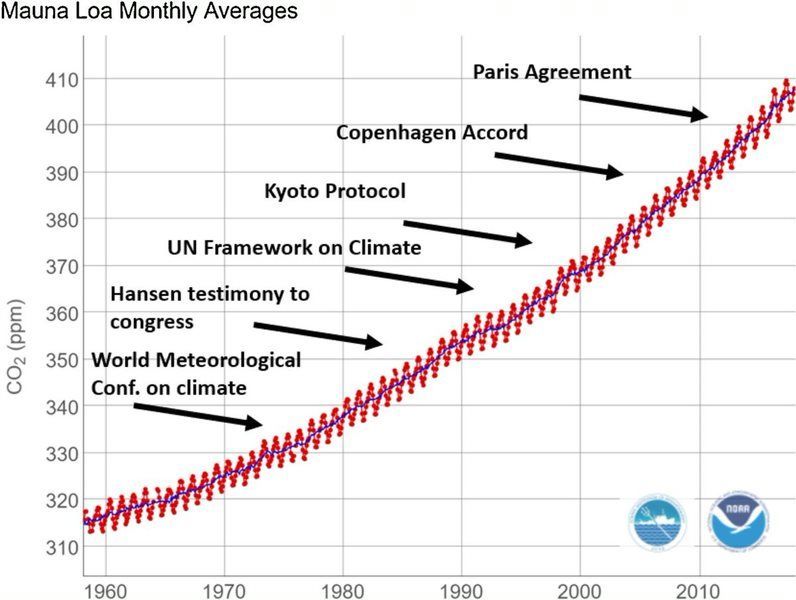 Global carbon emissions are still rising despite commitments made by most countries at the Paris Agreement in 2015
Microsoft’s total carbon emissions (16 million metric tons in 2019) represent .04% of the global annual total (40 billion metric tons). Even with the best of intentions, Microsoft is too small in the scheme of things to move the needle on our own. This is why such a big part of Microsoft’s strategy here is to empower customers, partners, and even competitors (we’re all Earthlings, after all) with new solutions themselves to create a wave of sustainable change across the entire economy.
Despite the grim reality that most things are moving in the wrong direction and we are running out of time, there are encouraging signs of progress. I can see interest sparking in other companies, companies that are looking to us for answers and for help. I see this progress happening every day from the conversations happening in our Worldwide Sustainability Community, watching as employees educate each other and point each other to answers to questions that weren’t even being asked six months ago.
2020 was, without a doubt, the year of sustainability at Microsoft. It’s fair to say that 2021 will be an important year for translating our corporate commitments into actionable change, something all employees have an important role to play in and precisely why we founded the WWSC.
We are now 10% of the way into our 2030 journey – the next 90% will need to be about education, innovation, and most importantly, action in rapid succession. It will need to happen at hyper-scale: any solutions we develop need to be highly scalable to address truly planetary sized challenges within the timeframe. I believe the fastest way to make this happen is culture change at Microsoft, the first wave of which has begun, initiated both from the bottom-up grassroots and now, the top-down leadership. Where we meet in the middle is where we get the most inertia.
In 2021, we will need to take action to translate Microsoft’s commitments into real change – and we need your help. The Worldwide Sustainability Community was founded on the belief that everyone has something meaningful to contribute and you don’t need sustainability in your job title to drive change in this space. This reinforces that it is incumbent on all of us to apply our growth mindset and be constant learners when it comes to sustainability. We must grow our knowledge in this area so that we can take full advantage of the opportunity that lies before us. Only then will we understand how to leverage the vast resources of a trillion-dollar technology company to help solve the world’s most pressing environmental challenges.
by Contributed | Jan 19, 2021 | Technology
This article is contributed. See the original author and article here.
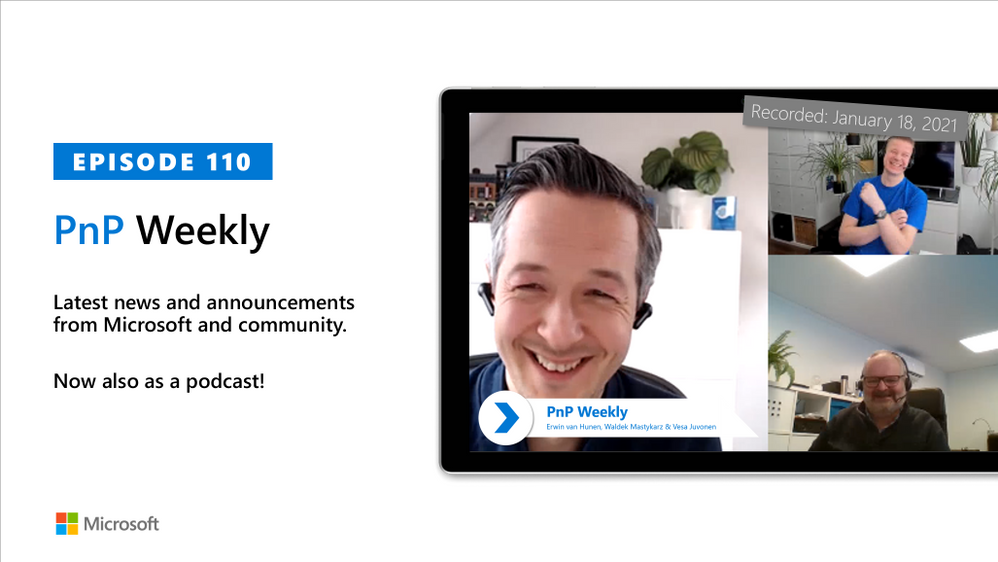
In this installment of the weekly discussion revolving around the latest news and topics on Microsoft 365, hosts – Vesa Juvonen (Microsoft) | @vesajuvonen, Waldek Mastykarz (Microsoft) | @waldekm, are joined by Erwin van Hunen (Valo Intranet) | @erwinvanhunen – MVP, Father of PnP PowerShell, and Lead Architect at Valo Intranet in Sweden.
How do you end up owning a PnP open source project? Start by making and sharing something that makes your own life easier. In Erwin’s case, create a little PowerShell module in 2014. Now, 60 Million PowerShell Cmdlets are executed each day. Subsequent discussion focuses on who, why, where, how to use PnP PowerShell. PnP PowerShell can be used for Microsoft Teams and Planner in addition to SharePoint. Covered off on connectivity, authentication, supportability, roadmap, and on how PnP PowerShell and Microsoft Graph PowerShell are complementary. Future and present – a multi-Platform PnP PowerShell for Windows, Mac, Linux, Raspberry Pi, Azure Functions, Azure Automation. PnP.PowerShell v1.00 is releasing this week thanks to contributions from many PnP community members.
This episode was recorded on Monday, January 18, 2020.
Did we miss your article? Please use #PnPWeekly hashtag in the Twitter for letting us know the content which you have created.
As always, if you need help on an issue, want to share a discovery, or just want to say: “Job well done”, please reach out to Vesa, to Waldek or to your Microsoft 365 PnP Community.
Sharing is caring!


Recent Comments