by Scott Muniz | Dec 2, 2020 | Security, Technology
This article is contributed. See the original author and article here.
Original release date: December 2, 2020
Mozilla has released a security update to address a vulnerability in Thunderbird. An attacker could exploit this vulnerability to take control of an affected system.
The Cybersecurity and Infrastructure Security Agency (CISA) encourages users and administrators to review the Mozilla Security Advisory for Thunderbird 78.5.1 and apply the necessary update.
This product is provided subject to this Notification and this Privacy & Use policy.
by Scott Muniz | Dec 2, 2020 | Security, Technology
This article is contributed. See the original author and article here.
Original release date: December 2, 2020
Xerox has released security updates for DocuShare 6.6.1, 7.0, and 7.5 to address a vulnerability that could allow an unauthenticated attacker to obtain sensitive information.
The Cybersecurity and Infrastructure Security Agency (CISA) urges users and administrators review Xerox Mini Bulletin XRX20W and apply the necessary updates.
This product is provided subject to this Notification and this Privacy & Use policy.
by Contributed | Dec 2, 2020 | Azure, Microsoft, Technology
This article is contributed. See the original author and article here.
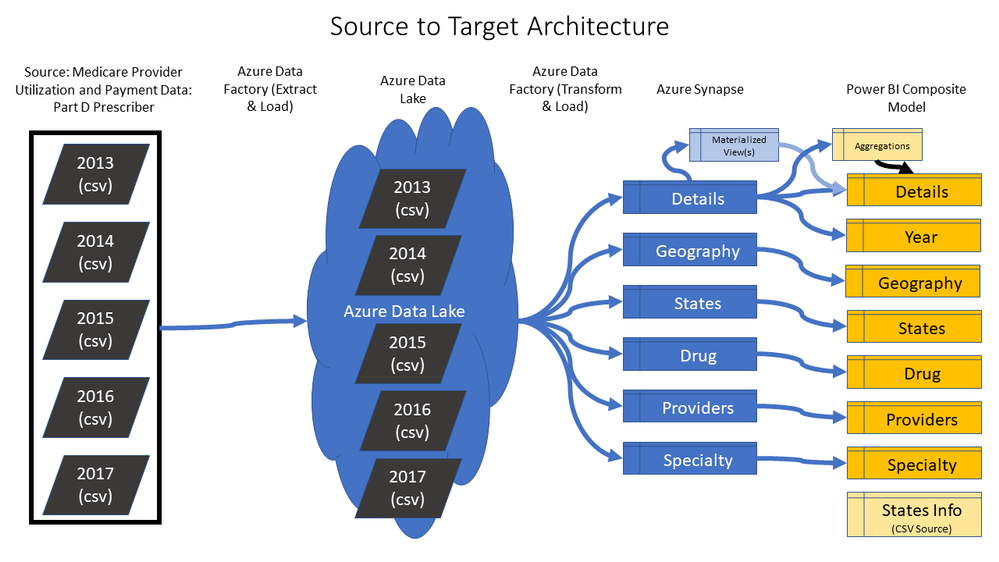
For many people, hands-on experience is often the best way to learn and evaluate data tools. I’ve been working with a colleague from our Azure team, Kunal Jain, to put together an end-to-end Azure Synapse and Power BI solution using 120+ million rows of real CMS Medicare Part D Data that is available for use in the public domain. If you’re not highly technical, and you’ve never used Azure or Power BI before, you can still deploy this solution with a few simple steps using an Azure ARM template. We also provide a video to walk you through a paint-by-numbers tutorial. The Azure ARM template will automatically:
- Create Azure Data Lake, Azure Data Factory, and Azure Synapse
- Pull the raw data from CMS into a Data Lake using Azure Data Factory
- Shape the data and create a dimensional model for Azure Synapse
- Deploy the solution to Azure Synapse, including performance tuning settings
The entire process takes about an hour and a half to run, with most of that time spent on waiting for the scripts from the ARM template to finish. Once deployed, another video also walks you through the steps of connecting it to a pre-built Power BI report template. The whole process should take about 1-2 hours with no code required, and at the end you can review and evaluate and end-to-end Azure and Power BI solution using real CMS Medicare Part D Data:
Here is a link to the GitHub site: https://github.com/kunal333/E2ESynapseDemo
While the source CMS data is real public Healthcare data, the intent of this project is to provide you with a simple end-to-end solution for the purposes of learning, demos, and tool evaluation. We intend to enhance and build upon this solution in the future, but it is not a supported solution intended to be used for production purposes.
Below is a tutorial video for deploying the solution. Note that this is designed to be low code with only a few things to cut and paste. All you need is an Azure account, and you can pause the Synapse instance or delete the entire Resource Group at any time. There are also simple instructions on the GitHub page:
Here is another tutorial video describing the process by which to connect the Power BI Template file containing the business logic:
The following diagram summarizes the steps of the whole process:
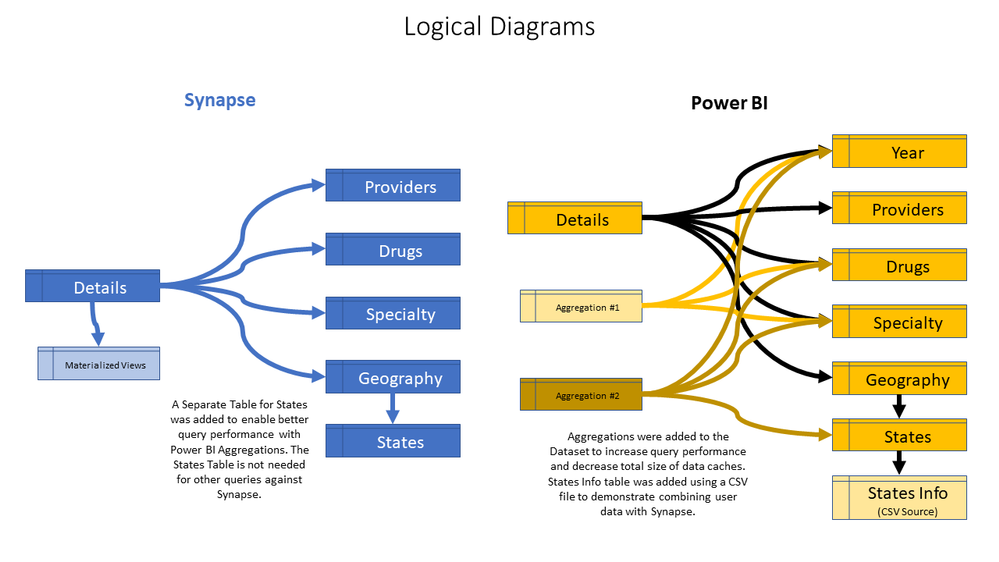
Azure Data Factory, along with Power BI, creates the following logical model that enables highly performant end user queries for complicated questions about the data. Notice that a CSV file is also added to the Power BI layer to demonstrate that custom criteria from a business user can be used to query the Synapse data:
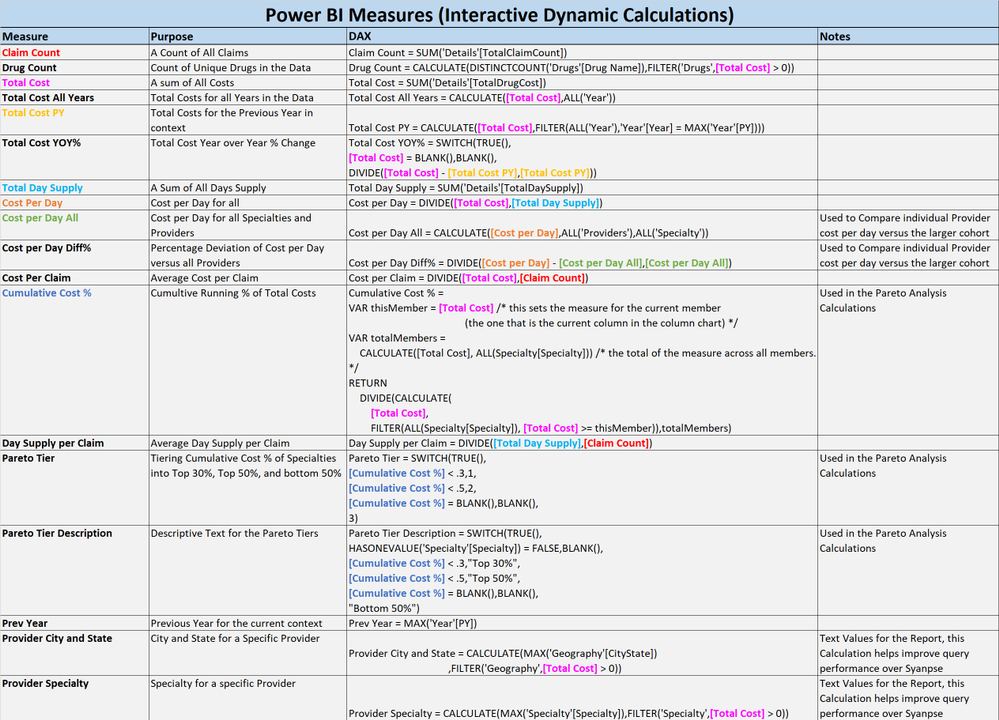
Calculations have been added to the Power BI Semantic Layer to enable complex analytics such as Pareto Analysis:
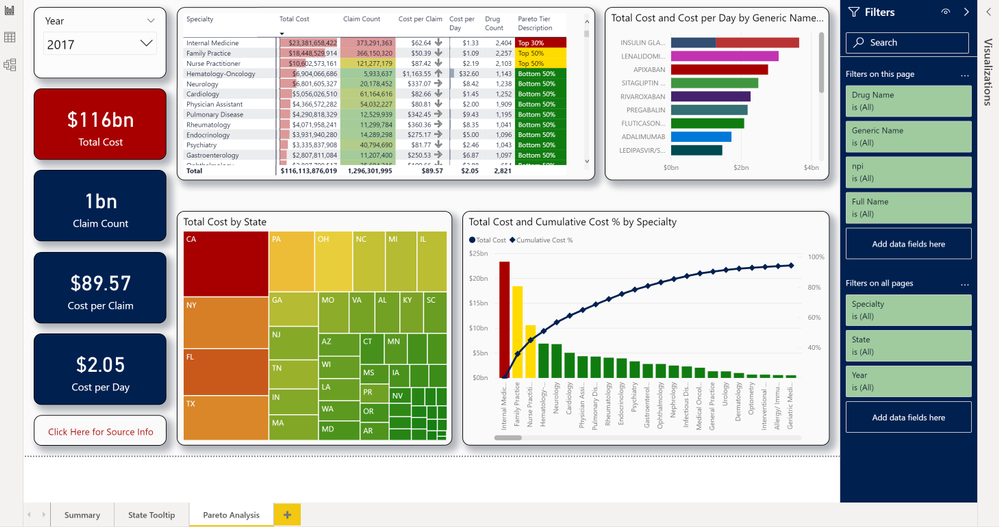
Below is a screenshot of the pre-built Power BI report:
More information about the solution is available at the GitHub site: https://github.com/kunal333/E2ESynapseDemo
If you deploy this solution, we’d appreciate if you could take the time to provide some feedback. What was your experience with the ARM template? How do you plan to use this solution? What types of similar solutions can we provide in the future that would be valuable?:

by Contributed | Dec 2, 2020 | Technology
This article is contributed. See the original author and article here.
Welcome back to Reconnect, the ongoing series where we catch up with former members of Microsoft MVP.
This week, we are lucky to be joined by none other than two-time titleholder Christopher Alcock!
Hailing from the northwest of England, Christopher been working with the Microsoft Technology stack since the days of Visual Basic 3. For the past two decades, Christopher has focused on web technologies, working with Classic ASP and ASP.NET, along with SQL Server and IIS.
Today, Christopher is a chief engineer and holds accreditations in ASP.NET, C#, XML, XSLT, ADO, Domain Driven Design, Unit Testing, HTML, CSS, JavaScript, NHibenate, and COM.
Since 2006, Christopher has been blogging every day with The Morning Brew, a daily round-up of the best .NET development resources.
With various links to software, community, and technical information, the blog serves as an important hub for software developers with more than 3000 entries over the years.
In addition to his committed online work, Christopher is also a regular in-person contributor to the UK technology scene with Liverpool Users of .NET, VBUG Manchester, DeveloperDeveloperDeveloper, Geekup, and Thoughtworks GeekNights.
And, when he finds the time, Christopher enjoys getting his camera out and practising amateur photography.
For more on Christopher, check out his blog and Twitter @calcock

by Scott Muniz | Dec 2, 2020 | Security, Technology
This article was originally posted by the FTC. See the original article here.
Scammers are targeting college students. In the last year, we told you about a car wrap scam and a COVID-19 scam hitting college students. Today, we want to tell you about a fake check scam.
In this one, a scammer posing as a professor sends you an email. It uses a college domain name and a format like your.name@collegename.edu. The scammer offers you a part-time job, like personal assistant or dog walker. Then, the scammer sends you a check, asks you to deposit it, send some of the money to someone else, and keep the rest as payment. A while later, the bank realizes the check was fake and deducts the original check amount from your account. So, if you deposited a $1,000 check, they’ll take that back. But if you sent $400 to someone else, you’re now out $400 of your own money.
People report losing a lot of money to fake check scams. The median loss in 2019 was $1,988. That’s a lot of money for anyone to lose. But an FTC analysis published earlier this year showed that people in their twenties are more than twice as likely as people over 30 to report losing money to fake check scams.
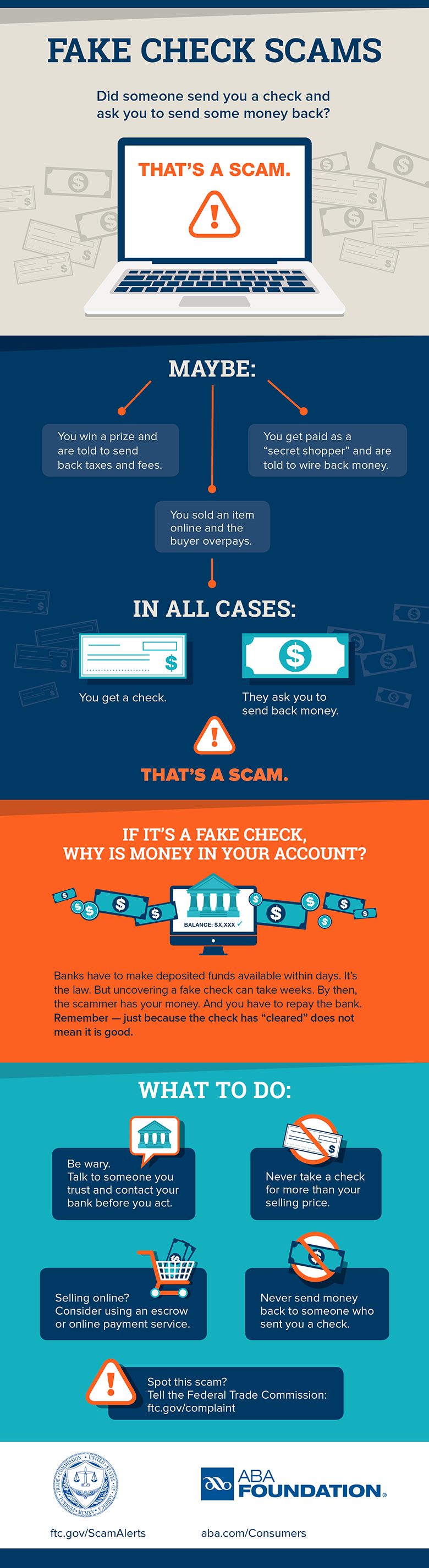
So how do you avoid a fake check scam? Never use money from a check to send gift cards, money orders, or wire money to someone. It’s always a scam. And, once you send the money or put it on a gift card and give someone the gift card PIN, it‘s like giving them cash. It’s almost impossible to get your money back.
Banks have to give you money from deposited checks within a few days. But if the check turns out to be a fake, they’ll make sure they get that money back from your account. The bottom line is, if someone sends you a check and tells you to send money by wire transfer or gift card — it’s a scam.
Spotted a scam like this? We want to hear about it. Let us know at ReportFraud.ftc.gov.
Brought to you by Dr. Ware, Microsoft Office 365 Silver Partner, Charleston SC.


Recent Comments