by Contributed | Dec 3, 2020 | Technology
This article is contributed. See the original author and article here.
As tech professionals know all too well, staying ahead is a part of the job and can even contribute to how successful you are. Having the right skills not only makes you the team’s go-to subject matter expert, but it could also give you a boost of confidence, a salary bump, and increase your job satisfaction. In fact, one survey discovered that sixty-five percent of those who received certifications realized one of their benefits within three months.1 If you haven’t already started, now is the time to get started at your own pace, right at home. Here are ten reasons you should earn a Microsoft Certification.
- Make more money
Almost thirty-five percent of technical professionals said getting certified led to salary or wage increases, and twenty-six percent reported job promotions.1
- Receive recognition from an industry leader
Businesses around the world not only rely on Microsoft, but there’s also a high demand for professionals to be skilled in Microsoft technologies. Having the prestige of a Microsoft Certification validates your abilities to stay current and perform in job roles for a modern digital business.
- Feel empowered
Ninety-one percent of certified technical experts believe that the effort employees put into acquiring new skills strongly contributes to their success. These certified technical professionals are also more likely to believe they can learn difficult skills, which means they’re able to take on hard work and ultimately, help fulfill digital transformation initiatives. 2
- Grow with a solid foundation
Using Microsoft Learn to help you get certified means you’ll go deeper into the technical world and build the foundational skills that are needed to grow in your career. Microsoft-certified professionals outperformed uncertified peers by twenty-six percent. 3
- Explore an exciting, new path
Microsoft Azure accounts for seventeen percent of the worldwide cloud market. If you’re a recent graduate or simply looking for something different in your career, adding a role-based Microsoft Certification to your resume will open doors to cloud-based career opportunities.4
- Get the job you’ve always wanted
Boost your resume to stand out. Adding a Microsoft Certification to your profile shows your commitment to embrace the evolving forefront of technology and continue learning.
- Ride the
wave cloud
In 2018, forty percent of organizations planned to invest in cloud computing. The next year, that number went up to sixty.5 Since Microsoft Azure is a key driver for increased cloud investment and there’s FIFTEEN (and growing) Azure-focused Microsoft Certifications, you could earn some serious credibility for jumping on the growth bandwagon.
- Stand out
Ninety-three percent of business decision-makers around the world say that certified employees add more value, close the skills gaps, are more productive than their non-certified peers, and are better at meeting client needs.6
- Get those shiny, happy feelings again
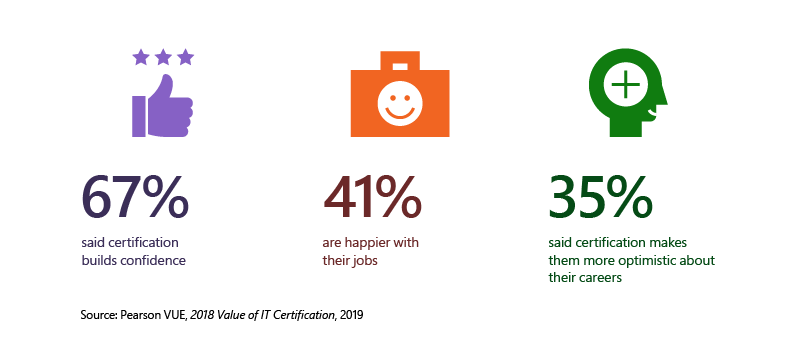
Who knew a Microsoft Certification could actually improve your well-being? Here’s what technical professionals had to say.
- Learn for free
How do you prepare for a Microsoft Certification? Microsoft Learn’s role-based training helps you learn in the way that best fits your busy lifestyle. With free self-paced interactive, hands-on, browser-based learning paths, you can access modules online at any time. Or discover instructor-led training offered by Learning Partners, delivered by Microsoft Certified Trainers. With the countless technology updates to meet innovation and productivity, the content is also kept up to date to meet industry demands.
Ready to take the next step? Check out our certifications and learning paths on Microsoft Learn.
Related resources
1Source: Pearson VUE survey, 2018 Value of IT Certification, 2019
2Source: IDC white paper, sponsored by Microsoft, Business Value of Digital Transformation and the Contribution of a Growth Mindset in IT, May 2020
3Source: IDC white paper, sponsored by Microsoft, Benefits of Role-Based Certifications, June 2020
4Source: Kinsta, Cloud Market Share – A Look at the Cloud Ecosystem in 2020, June 2020
5Source: Global Knowledge, 2019 IT Skills and Salary Report, Looking Forward, 2019
6Source: Global Knowledge, 2019 IT Skills and Salary Report, IT Decision Maker Insights, 2019
by Contributed | Dec 3, 2020 | Technology
This article is contributed. See the original author and article here.
Security conscious organizations look at ways to ensure corporate data on mobile devices are protected. One method used to protect that data is through device enrollment. Device enrollment enables organizations to deploy compliance policies (PIN strength, jailbreak/root validation, etc.), as well as configuration policies (WiFi, certificates, VPN, etc.). Device enrollment also enables organizations to manage app lifecycle.
In Android 2.2, Google introduced support for device management with the device administrator API. Since that time, organizational needs have changed, as mobile devices continue to contain and access more sensitive data. These needs include separation of work and personal data, kiosk management, app configuration, and app distribution, to name a few. The device administrator API was not designed to handle these scenarios.
With Android 5.0, Google introduced a new management profile with the introduction of managed device (device owner) and work profile (profile owner) modes (what is collectively known as Android Enterprise now). As the functionality in Android Enterprise has continued to evolve, Google announced decreasing support for device administrator. For more information on Microsoft Endpoint Manager’s plans, see:
Android offers Android Enterprise work profile as an enrollment model for personally-owned devices, where IT wants to provide a clear separate boundary between work and personal data. As organizations transition from device administrator to work profile for personally-owned devices, users may experience confusion or frustration that there are now separate app instances for work and personal use.
To address this concern, Android introduced the CrossProfileApps API in Android 9. This API allows an app to recognize when it has a corresponding instance in the work or personal profile. Using this API, an app may expose an in-app user experience to end users, allowing them to switch to the cross-profile instance without having to back out to the app launcher and tap the other app icon’s instance.
Outlook and the CrossProfileApps API
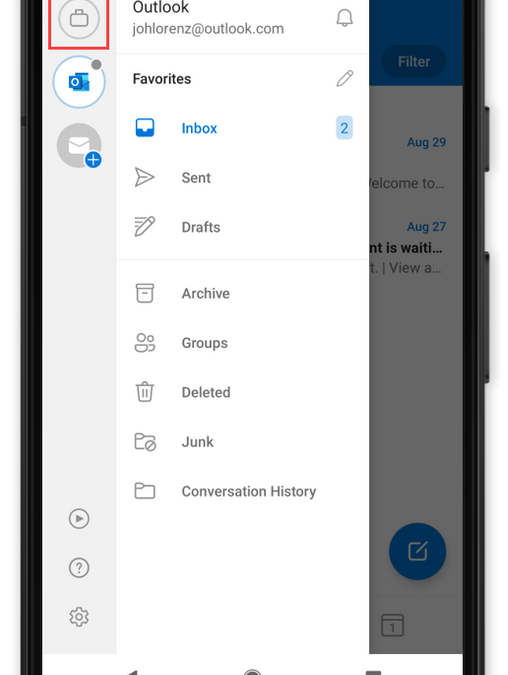
The first Microsoft app to take advantage of the CrossProfileApps API is Outlook for Android. This feature is slowly rolling out this month and requires a minimum build of 4.2039.0 with Android 9 or later. Users can leverage this functionality from within the left-hand navigation menu. When launching Outlook in the personal profile, users will see a work profile switcher button (highlighted by the red square) in the left-hand navigation account switcher section:
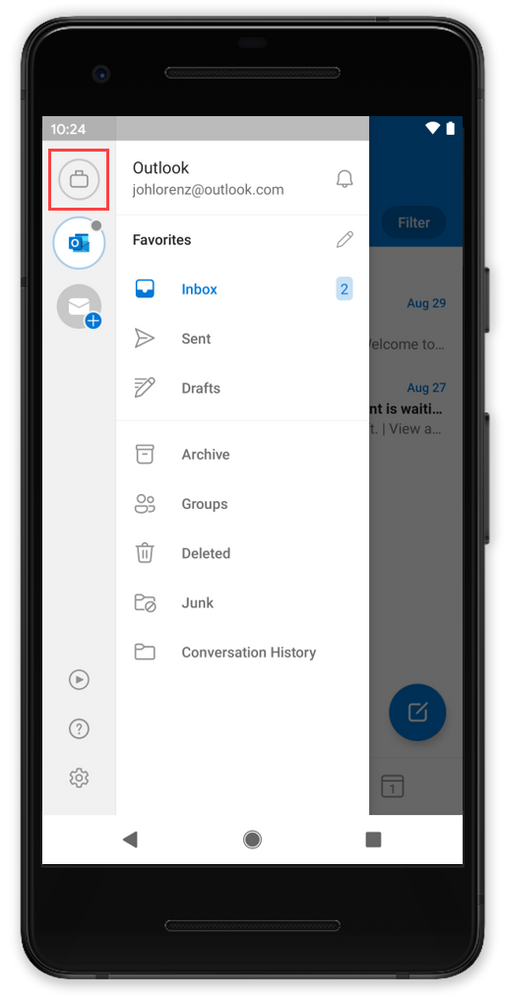 Switch to work profile
With Outlook in the work profile, users will see a personal profile switcher button (highlighted by the red square) in the left-hand navigation account switcher section:
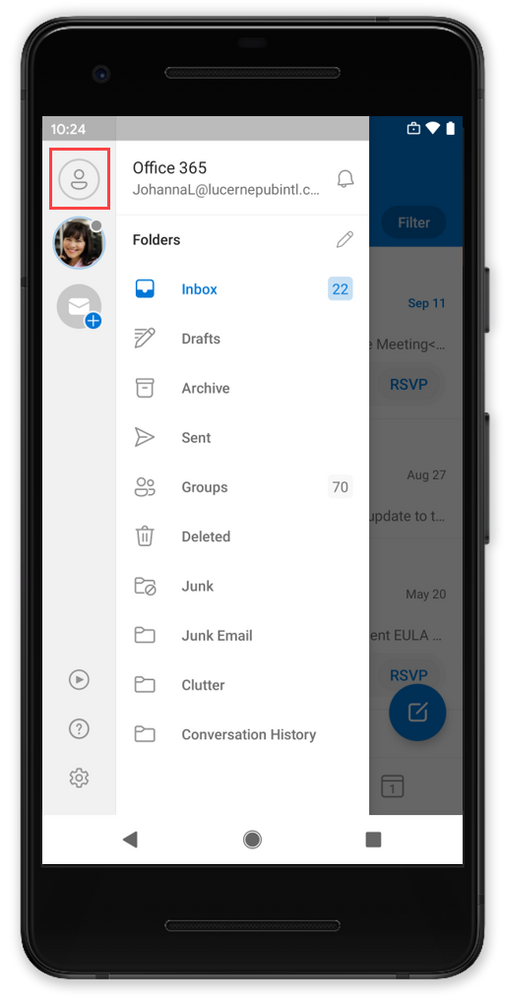 Switch to personal profile
When the user taps the work or personal profile switcher button, they will be switched to the relevant instance of Outlook:
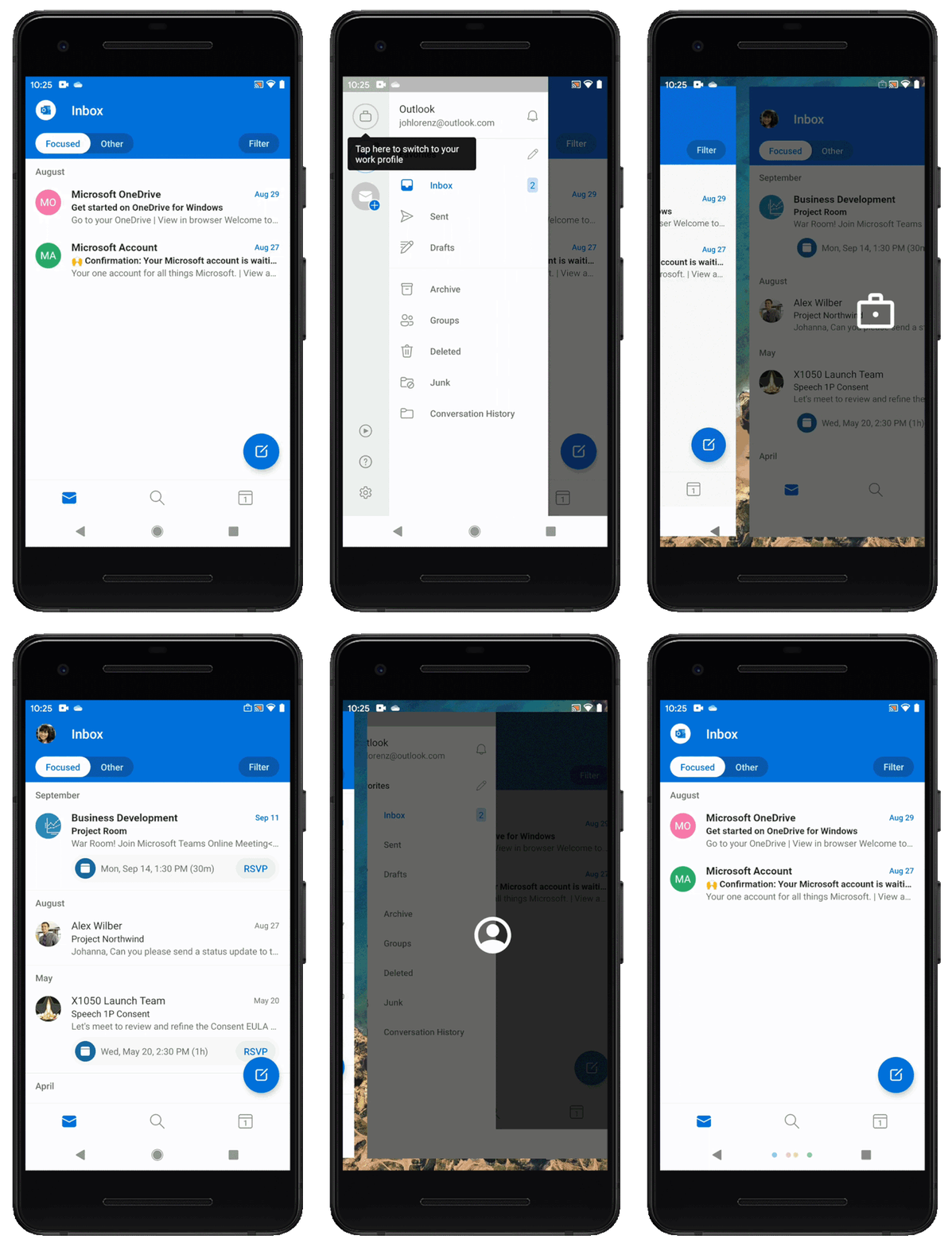 Cross-Profile switching experience
We are also releasing a teaching moment to educate users on this functionality, for example:
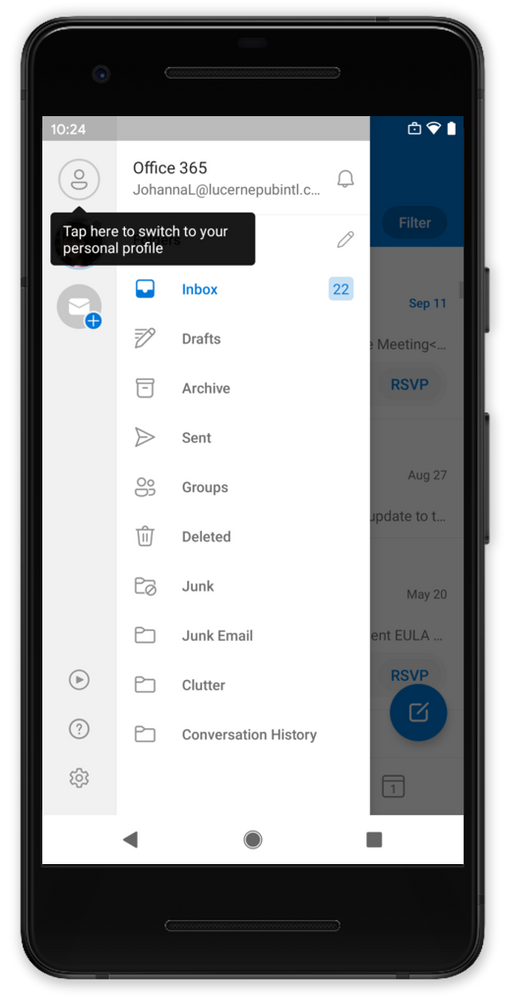 Work Profile teaching moment
It is important to note that this functionality only works if the user is using the same app in both profiles. Users using Gmail in their personal profile, for example, cannot use the CrossProfileApps API to switch to Outlook in the work profile.
We hope your users will find this improvement useful. If you have any questions, please let us know.
Ross Smith IV
Principal Program Manager
Customer Experience Engineering
by Scott Muniz | Dec 3, 2020 | Security, Technology
This article is contributed. See the original author and article here.
Original release date: December 3, 2020
The United Kingdom (UK) National Cyber Security Centre (NCSC) has released its Annual Review 2020, which focuses on its response to evolving and challenging cyber threats. Recognizing cybersecurity as a “team sport,” the publication includes highlights of NCSC’s collaboration with many partners, including the Cybersecurity and Infrastructure Security Agency (CISA). A few examples:
This product is provided subject to this Notification and this Privacy & Use policy.
by Scott Muniz | Dec 3, 2020 | Security, Technology
This article is contributed. See the original author and article here.
Original release date: December 3, 2020
Apple has released security updates to address vulnerabilities in iCloud for Windows. An attacker could exploit some of these vulnerabilities to take control of an affected system.
The Cybersecurity and Infrastructure Security Agency (CISA) encourages users and administrators to review the Apple security page for iCloud for Windows 11.5 and apply the necessary updates.
This product is provided subject to this Notification and this Privacy & Use policy.
by Scott Muniz | Dec 3, 2020 | Security, Technology
This article is contributed. See the original author and article here.
Original release date: December 3, 2020
IBM X-Force has released a report on malicious cyber actors targeting the COVID-19 cold chain—an integral part of delivering and storing a vaccine at safe temperatures. Impersonating a biomedical company, cyber actors are sending phishing and spearphishing emails to executives and global organizations involved in vaccine storage and transport to harvest account credentials. The emails have been posed as requests for quotations for participation in a vaccine program.
The Cybersecurity and Infrastructure Security Agency (CISA) encourages Operation Warp Speed (OWS) organizations and organizations involved in vaccine storage and transport to review the IBM X-Force report Attackers Are Targeting the COVID-19 Vaccine Cold Chain for more information, including indicators of compromise. For tips on avoiding social engineering and phishing attacks, see CISA Insights: Enhance Email & Web Security.
This product is provided subject to this Notification and this Privacy & Use policy.


Recent Comments