
by Contributed | Dec 4, 2020 | Azure, Microsoft, Technology
This article is contributed. See the original author and article here.
The UP Podcast with Lisa Crosbie & Megan V. Walker
Lisa Crosbie and Megan V. Walker are Business Application MVPs. With Lisa in Australia and Megan in the United Kingdom, the pair thought it was a great idea to start a podcast together about Microsoft Business Applications, the Power Platform, Dynamics 365, and Microsoft technologies. The UP Podcast shares what is new and exciting, highlights community content, and seeks to share and learn with the audience. Follow on Twitter @LisaMCrosbie, @MeganVWalker, @the_UP_podcast.

How to automatically re-enable flow using Power Automate
Hiroaki Nagao is a Business Applications MVP from Japan. Currently working as a system administrator in an operating company, Hiroaki is a core member of the local Power Apps / Power Automate community. A regular blogger with more than 100 posts this year, find more on his blog or Twitter @mofumofu_dance

Engage Your Audience with Forms Polls in Microsoft Teams Meetings
Matti Paukkonen is an Office Apps & Services MVP and Modern Work Architect from Finland. He has more than 10 years’ experience of Microsoft collaboration solutions, like SharePoint, Microsoft Teams and Microsoft 365. He writes technical blog articles, organizes a local Teams User Group, and participates on several communities and speaks on events. Follow him on Twitter @mpaukkon.

Azure Sentinel: Connecting the Enterprise Firewalls
John Joyner is an inventor, author, speaker, and professor on datacenter and enterprise cloud computing topics. John, who has been named as an MVP for the past twelve years, teaches a cloud computing management course at the University of Arkansas. For more, check out his Twitter @john_joyner

ML.NET Model Builder: Getting Started (using ASP.NET Core)
Syed Shanu is a Microsoft MVP, a two-time C# MVP and two-time Code project MVP. Syed is also an author, blogger and speaker. He’s from Madurai, India, and works as Technical Lead in South Korea. With more than 10 Years of experience with Microsoft technologies, Syed is an active person in the community and always happy to share his knowledge on topics related to ASP.NET , MVC, ASP.NET Core, Web API, SQL Server, UWP, Azure, among others. You can see his contributions to MSDN and TechNet Wiki here. Follow him on Twitter @syedshanu3.
by Contributed | Dec 4, 2020 | Technology
This article is contributed. See the original author and article here.
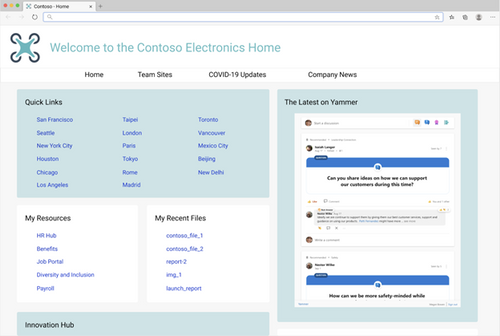
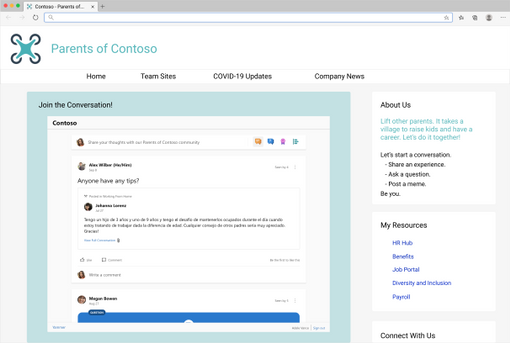
Soon, you can bring the new Yammer to a web page near you! This is an update to the current embeddable JavaScript widgets that brings Yammer’s new platform experience to any HTML based application. We plan to start rolling out starting December 2020.
You will not need to take any additional actions, if the feed is eligible to be upgraded (see known limitations chart below), your users will see the new Yammer instead of the Classic Yammer in the Embeds!
What’s new and different about this updated experience?
You’ll get the new Yammer experience including rich media previews and visual treatment for questions, praise, and polls. Plus, you’ll get an improved, relevant Home Feed to stay on top of conversations across your communities – embed the Home Feed on your intranet home page to help your employees stay up-to-date on their personalized feed.
The new Yammer Embed brings more functionality, like reacting to and pinning conversations.
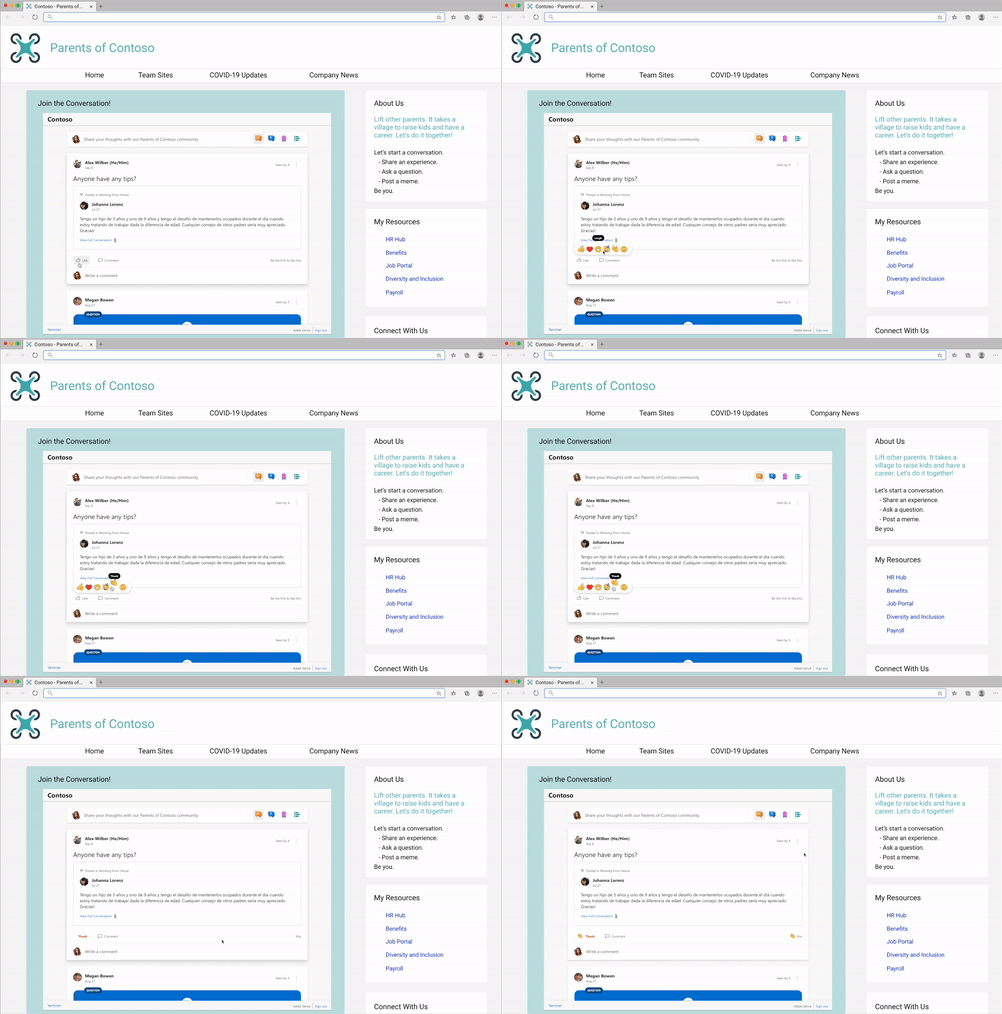
- Start a conversation in any community
- Create any type of Yammer post directly from Embed– questions, polls, praise, etc.
- Upload of images & files into new conversations and replies
- Use rich text in messages
- Close Conversation, Mark Best Answer to a Question
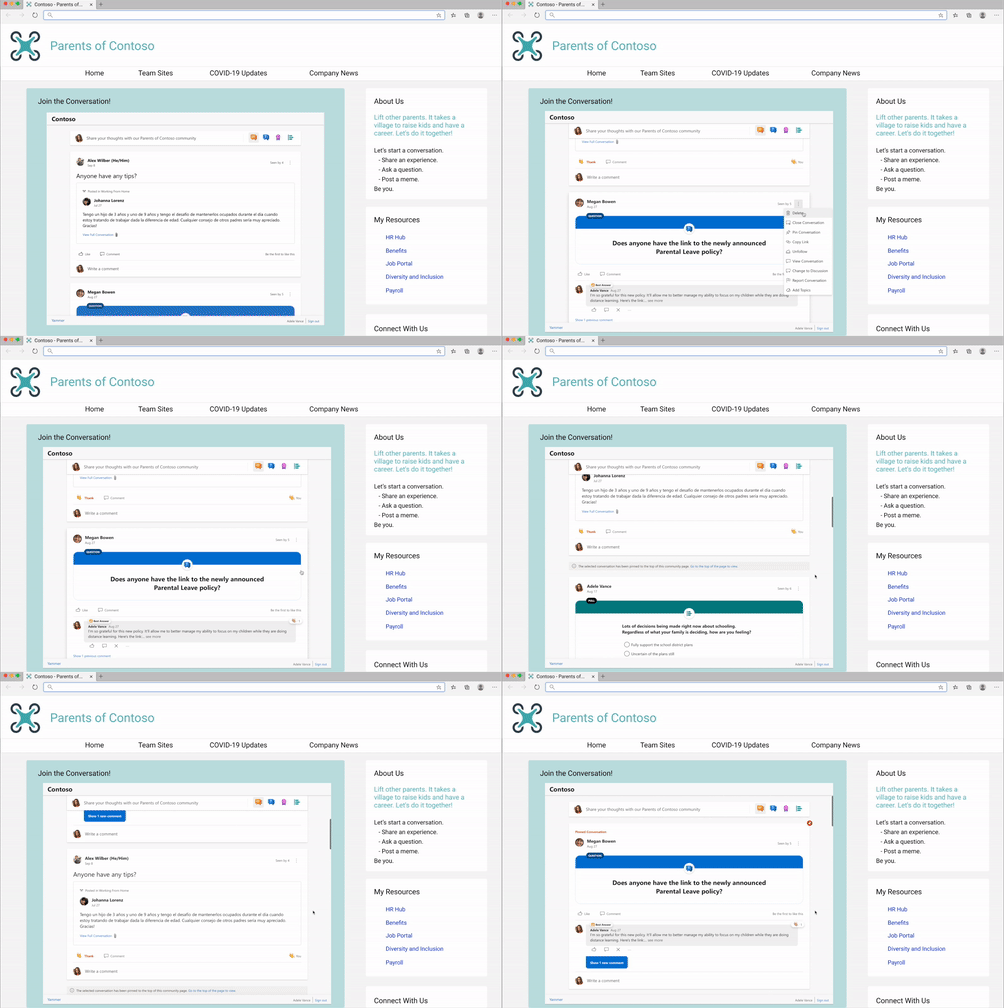
We’ve seen our customers embed Yammer in a variety of ways, including embedding the conversations for virtual events. Need help with this? Request virtual event assistance for embed.
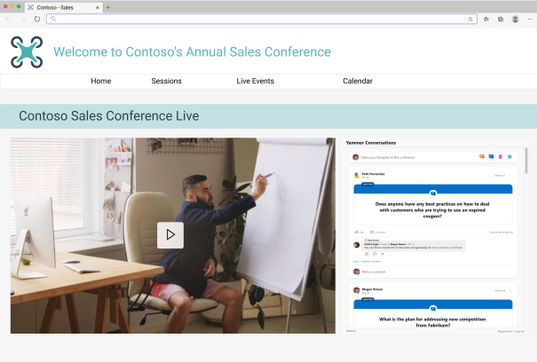
Or embedding conversations for community and team sites.
Current limitations and future development
Limitation
|
Estimated Timeline for changes
|
defaultGroupId configuration: We are currently still working on supporting this configuration, which will allow for home, user, topic, and Open Graph feeds to be set to the provided defaultGroupId to publish to. Currently, if home, topic, or user feeds are used with a defaultGroupId configured, the feed will be set to the community feed of the defaultGroupId. The defaultGroupId parameter is invalid for community feeds and will set the publisher to the provided defaultGroupId for Open Graph feeds.
|
CY2021 Q1
|
External networks: Embeds that attempt to access a feed from an external network will be redirected to use the existing classic Yammer Embeds
|
CY2021 Q2
|
Metadata Overrides for Open Graph feeds: the ability to override ‘type’, ‘title’, ‘image’, ‘description’ are no longer supported
|
NA
|
IE11 redirection: Users attempting to load the Embeds on IE11 will be redirected to use the existing classic Yammer Embeds
|
NA
|
Additionally, feature requests and feedback can be submitted to newyammerembedpreview@service.microsoft.com.
How are you embedding Yammer at your organization? Please share your tips and best practices is in the comments below.
by Contributed | Dec 4, 2020 | Technology
This article is contributed. See the original author and article here.
Introduction
This is John Barbare and I am a Sr. Customer Engineer at Microsoft focusing on all things in the Cybersecurity space. In this blog I will walk you through various Microsoft products from the Microsoft Security Stack and explain in detail what each of the Secure Scores depict. This is especially important as you are assessing the overall risk of your environment and seeing how prone your organization is from attacks. With that said, let’s talk about Microsoft Secure Score, the various products which incorporate it, and conclude with your overall Secure Score for multiple products in the Microsoft Security Stack.
Microsoft Secure Score
Microsoft Secure Score is a measurement of an organization’s security posture, with a higher number indicating more improvement actions taken and the overall achievement is to get a lower or acceptable secure score for your environment. This Secure Score can protect your organization against a number of threats, threat vectors, CVEs (Common Vulnerabilities and Exposures), improve security configuration changes, and numerous other security modifications. By using Secure Score, you can help your organization assess the current security posture, improve your overall security posture with delivering discoverability, visibility, guidance, and control, and finally comparing with benchmarks and establishing key performance indicators (KPIs).
Azure Security Center / Azure Defender
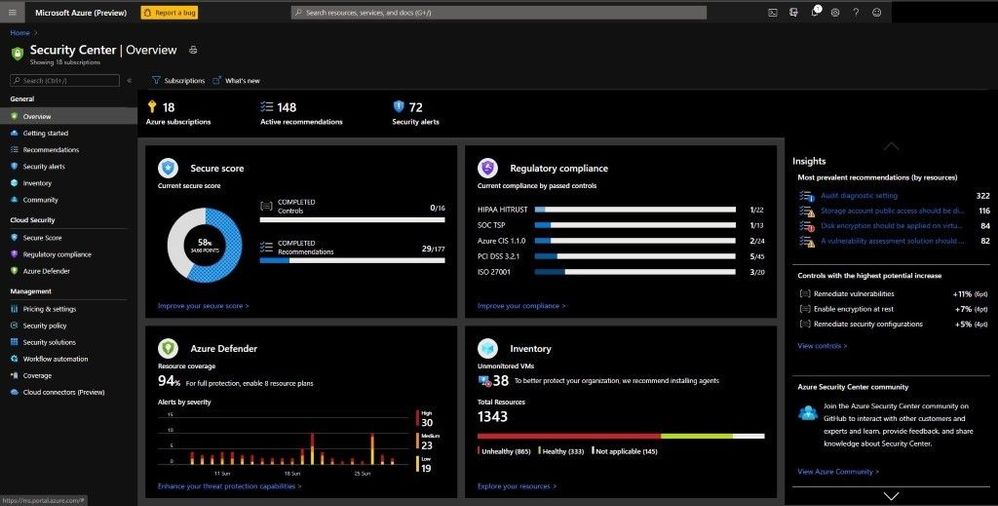
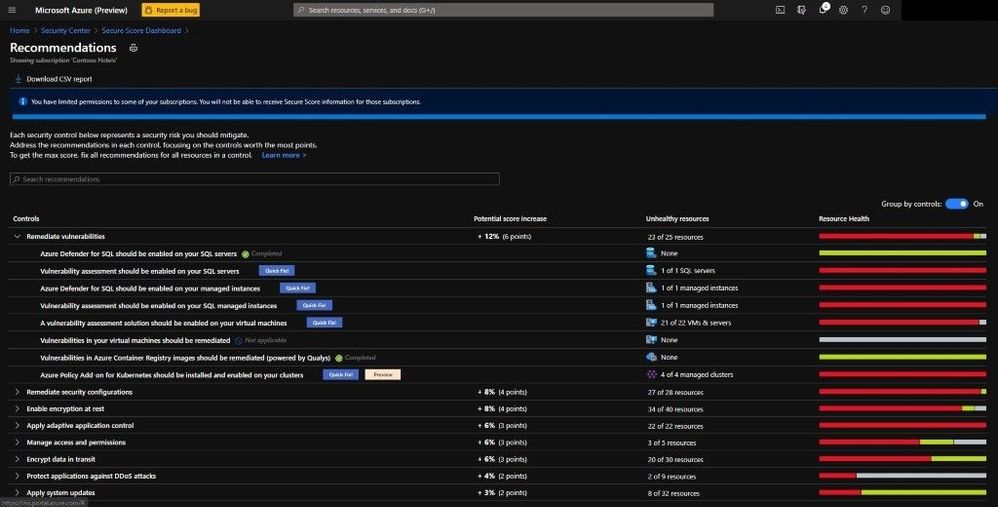
Inside Azure Defender you are displayed with the Secure Score dashboard and various security-based information in deriving the Secure Score. Here we can see how to better understand the current security situation inside Azure Defender and all the security settings and assist in efficiently and effectively improving your overall Secure Score. Recommendations are grouped into security controls. Each control is a logical group of related security recommendations and reflects your vulnerable attack surfaces. Your score only improves when you remediate all the recommendations for a single resource within a control. In order to get all the possible points for a selected security control, every one of your resources must comply with all security recommendations within the specific security control. For example, Remediate Vulnerabilities has a max score of 6 points. If you have 40 resources, you will divide the maximum score by 40 giving you .15 maximum points per resource.
- Potential increase (0.15 x 7 unhealthy resources = 1.05) – The remaining points available to you within the control. If you remediate in this case, 1.05 points rounds to 1 point.
- Current score (0.15 x 30 healthy resources = 4.50) – The current score for this control. Each control contributes to the total score. In this example, the control is contributing 4.50 points to the current secure total.
- Max score – The maximum number of points you can gain by completing all recommendations within a control. The maximum score for a control indicates the relative significance of that control. Use the max score values to triage the issues to work on first.
As you can see below, the dashboard is extraordinarily rich with lots of information to see why your Secure Score is low or high and the insights into the most prevalent security recommendations.
Azure Security Center / Azure Defender
By selecting the Improve your Secure Score underneath the pie graph, you can see all the security recommendations as seen below.
 Remediation options
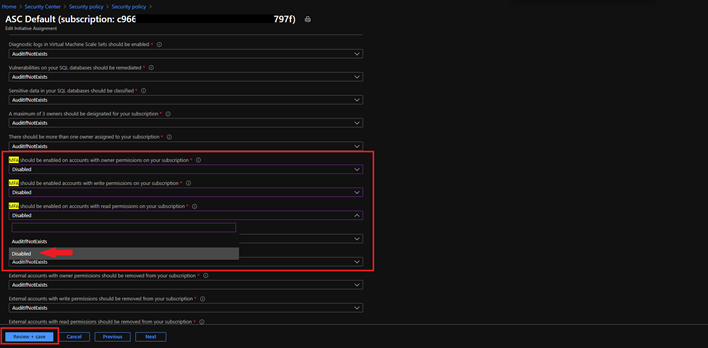
One item to make note of is that only built-in Azure Security recommendations have an impact on the Secure Score. If you have any 3rd party controls or any items in preview, these actions are not included in the calculation of your overall Secure Score. This doesn’t mean to not remediate, but when the preview does end and you have remediated, your Secure Score will be factored in. If you use a 3rd party control – RSA Token for MFA – and do not use the one recommended for Secure Score in Azure Defender, you have the option to change the Security policy since you are using an RSA Token for MFA, but this doesn’t have an impact on the calculation of the Secure Score. The idea of disabling the MFA policy in this example will not negatively affect the Secure Score and will also not deduct any points in the process.
To change this, go to the Security Policy blade, select the Subscription, select View effective policy under Security Center effective policy, select the assignment hyperlink, select the parameters tab on the next screen, and search for MFA. Since you are using MFA via an RSA Token, you can edit the initiative assignment from AuditifNotExists to Disable and select Review + Save.
 Disabling an Audit Policy
Azure Active Directory Identity Protection
Moving over to Azure Active Directory and seeing how your Secure Score is and your overall security of your Azure Active Directory tenant. Inside Azure Active Directory you can gain a maximum of 243 points based on how well you are aligned with Microsoft’s best recommendation for security as it pertains to Azure Active Directory security. You can measure your identity security posture, a list of improvements, and a trend graph of how your identity has changed over time. Every 48 hours, Azure looks at your security configuration and compares your settings with the recommended best practices for Azure Active Directory and your tenants. Based on the outcome of this assessment, a new score is calculated for your directory and your configurations.
 Azure Active Directory Identity Protection
If you want to see what actions in your environment are impacting it the greatest from an Identity/ User impact perspective, one can select the User Impact column and sort from High to Low as seen below. Then you can drill down and start remediating high user impact identity action items and start remediating to have a stronger Secure Score.
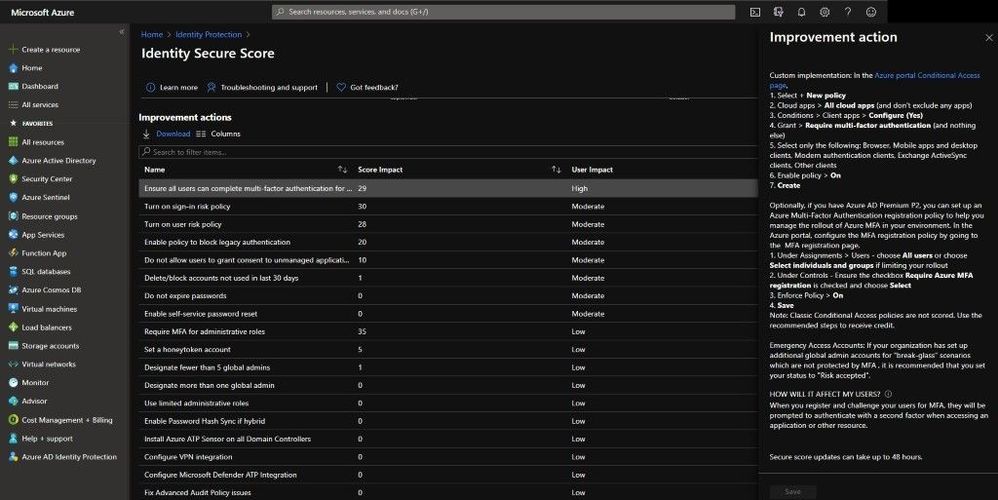 Improve an action
Microsoft Defender for Endpoint
The product I have the most experience with and my favorite is Microsoft Defender for Endpoint. Inside the Threat and Vulnerability Dashboard we can see multiple scores that are accessing our onboarded endpoints.
The first one is Exposure Score, which reflects the current exposure associated with devices in your organization. Several factors affect the Exposure Score:
- Weaknesses discovered on devices.
- The likelihood of devices to get breached.
- Value of devices to the organization.
- Related alerts discovered on devices.
One can reduce the Exposure Score by addressing what needs to be remediated based on the prioritized security recommendations. Underneath the score you can see your Exposure Score over time and see any impacts or improvements made along the chart.
The second one is Microsoft Secure Score for Devices which reflects the collective security configuration posture of your devices across O/S, Application, Network, Accounts, and Security Controls. One can Increase the secure score for devices by addressing what needs to be remediated in your O/S, applications, network, accounts, and security controls, based on the prioritized security recommendations. Underneath the score you can see your score for devices over time and see any impacts or improvements made along the chart.
The third one is not really a score, but an Exposure Distribution number based on a low, medium, and high categorization. Exposed devices are easy targets for cybersecurity attacks so ensuring that these devices can receive security updates, have critical security controls, and are properly configured is key to maintaining an acceptable and minimal risk level.
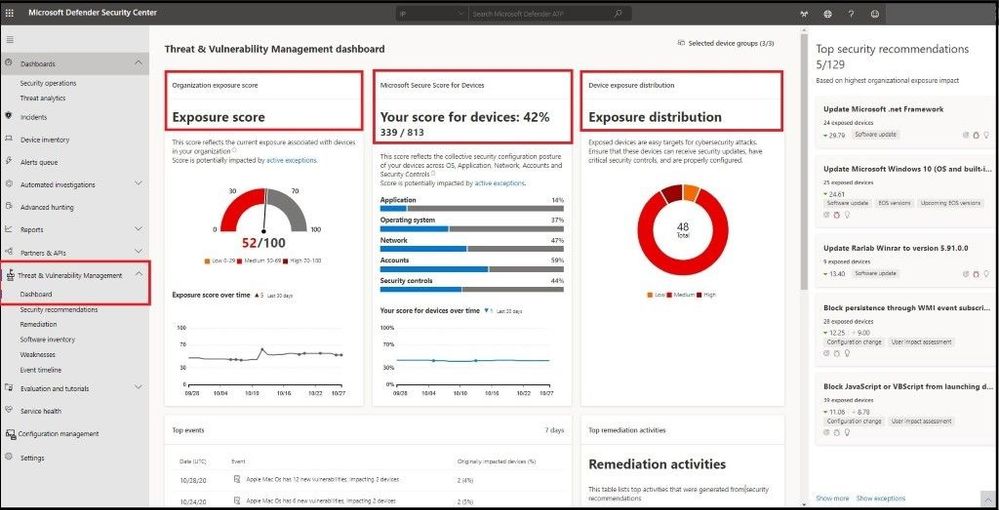 MDE – Threat and Vulnerability Management Dashboard
Microsoft 365 Compliance Center
Inside Microsoft 365 Compliance Center and under the Compliance Manager blade, one will find your overall Compliance Score. The Compliance score measures your progress in completing actions that help reduce risks around data protection and regulatory standards. This score measures your progress in completing recommended improvement actions within controls. Your score can help you understand your current compliance posture. It can also help you prioritize actions based on their potential to reduce risk.
Compliance Manager gives you an initial score based on the Microsoft 365 data protection baseline. This baseline is a set of controls that includes key regulations and standards for data protection and general data governance. This baseline draws elements primarily from NIST CSF (National Institute of Standards and Technology Cybersecurity Framework) and ISO (International Organization for Standardization), as well as from FedRAMP (Federal Risk and Authorization Management Program) and GDPR (General Data Protection Regulation of the European Union). Most of my customers use these baselines so this is always a big hit once we have everything onboarded to see where they are.
Because every organization has specific needs, Compliance Manager relies on you to set up and manage assessments to help minimize and mitigate risk as comprehensively as possible. Actions are assigned a score value based on whether they are mandatory or discretionary, and whether they are preventative, detective, or corrective.
 Microsoft 365 Compliance Center
Microsoft Cloud App Security
Heading over to Microsoft’s Cloud App Security Broker – Microsoft Cloud App Security – we can assess cloud applications in the environment and determine a risk score based on a plethora of metrics. Cloud Discovery analyzes your traffic logs against Microsoft Cloud App Security’s cloud app catalog of over 16,000 cloud apps. The apps are ranked and scored based on more than 80 risk factors to provide you with ongoing visibility into cloud use, Shadow IT, and the risk Shadow IT poses to your organization.
Cloud Discovery provides you with important data regarding the credibility and reliability of the cloud apps that are used across the environment. Within the portal, each discovered app is displayed along with a total score. The score represents Cloud App Security’s assessment of this app’s maturity of use for enterprises. The total score of any given app is a weighted average of sub scores relating to the subcategories which Cloud App Security considers when assessing reliability:
- General – This category refers to basic facts about the company that produces the app, including its domain, founding year, and popularity. These fields are meant to show the company’s stability on the most basic level.
- Security – The security category accounts for all standards dealing with the physical security of the data used by the discovered app. This category includes fields such as multi-factor authentication, encryption, data classification, and data ownership.
- Compliance – This category displays which common best-practice compliance standards are upheld by the company that produces the app. The list of specifications includes standards such as HIPAA (Healthcare Insurance Portability & Accountability Act), CSA (Cloud Security Alliance), and PCI-DSS.
- Legal – This category displays which apps have regulations and policies in-place to ensure data protection and privacy of the app’s users such as GDPR, DMCA (Digital Millennium Copyright Act), and data retention policy.
One item I like to do when onboarding Microsoft Cloud App Security and after everything is connected and synchronized is to show the risk scores of “risky” applications. On the Discovered Apps dashboard, I will slide the Risk Score from a 0 – 7 thresholds. This will pull up all the apps that are deemed to be “risky” as I base this off 70% or lower. Then by going in and investigating, I can make further determination to see if it is risky or to accept the risk based on all the data provided.
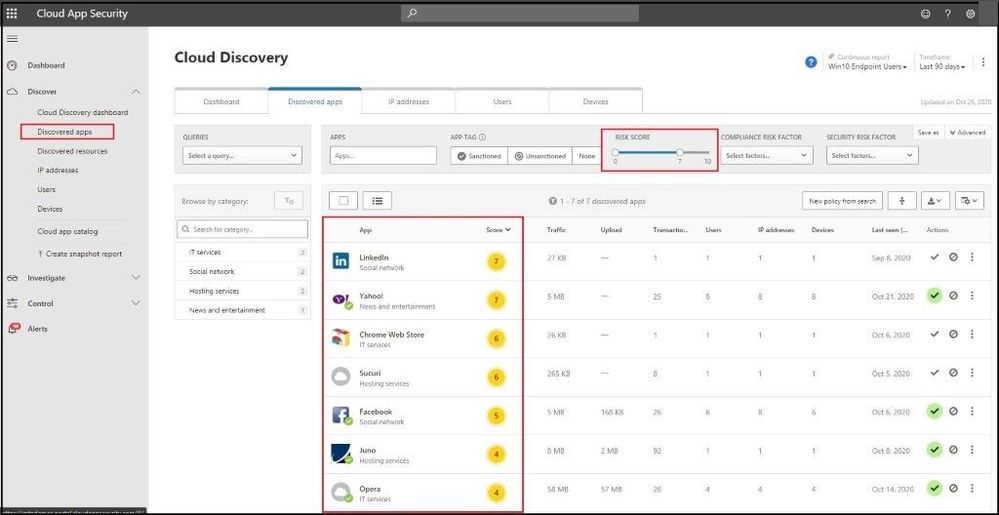 Microsoft Cloud App Security – Discovered Apps
Here I have selected the Chrome Web Store app and want to investigate why it has a number/score of a 6 out of 10 rating. Upon hovering over the Compliance field, I am presented with a property score of 2/10 with a total category weight of 29%. If my company is very strong from a compliance standpoint and needed all apps to be ISO 27001, HIPAA, and SOC2 compliant, I can confirm that this app will be “unsanctioned” in my environment and I will not allow users to run or install this app in my environment. A great blog post on a walkthrough of how to do this can be found here.
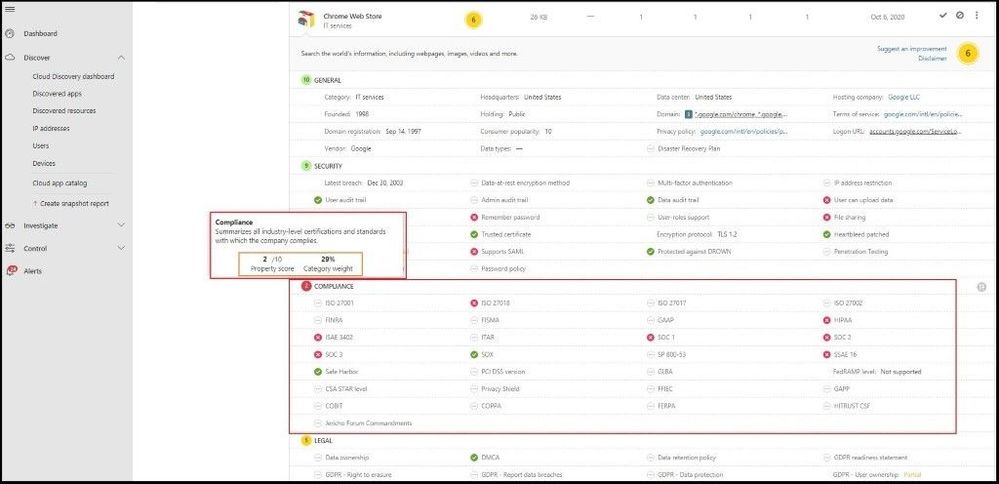 Compliance Score of an App
Microsoft 365 Defender
Even though I went over several of the Microsoft Security products your organization can use for which licenses you have that will display a Secure Score, I will conclude with Microsoft 365 Defender which pulls in all the security dashboards / Secure Scores all into one overall Secure Score. From the main dashboard (Overview tab), you can see your overall Secure score with a breakdown from an Identity, Data, Devices, and Applications perspective. Next, you can review the actions to review and the top improvement actions across your enterprise.
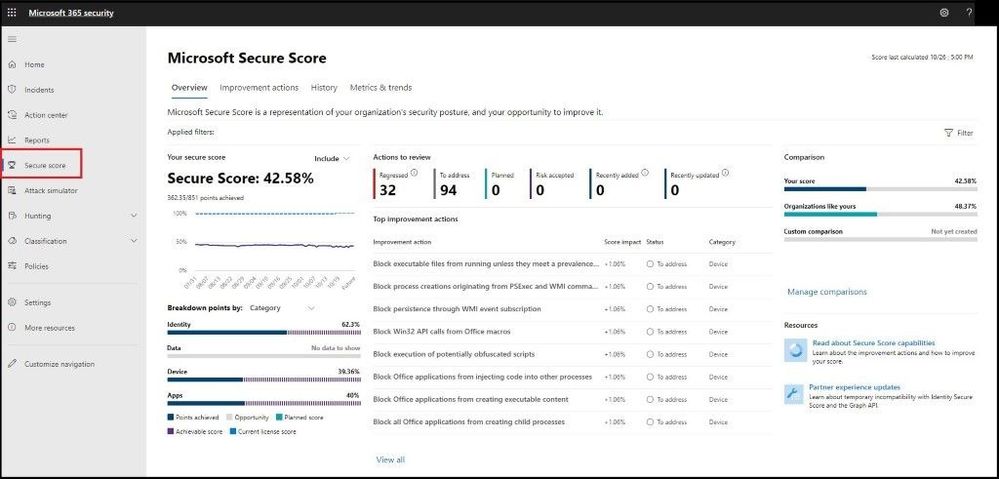 Microsoft 365 Defender – Secure Score
Next, we will select the Improve actions tab which will display all the improvement actions across all the products. When you make any changes, it may take up to 24 hours to reflect a change in the score or dashboard.
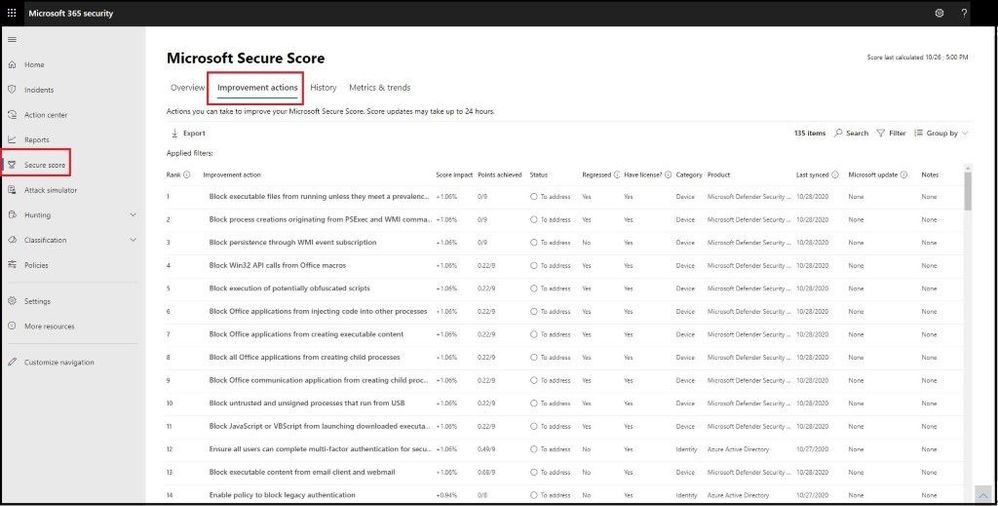 Improve Actions
Next, we will select the History tab and see a history graph for the last 90 days or custom date range. Under the graph we can see all the activity that has resulted in a security change and the resulting points, category, and what it was attributed to.
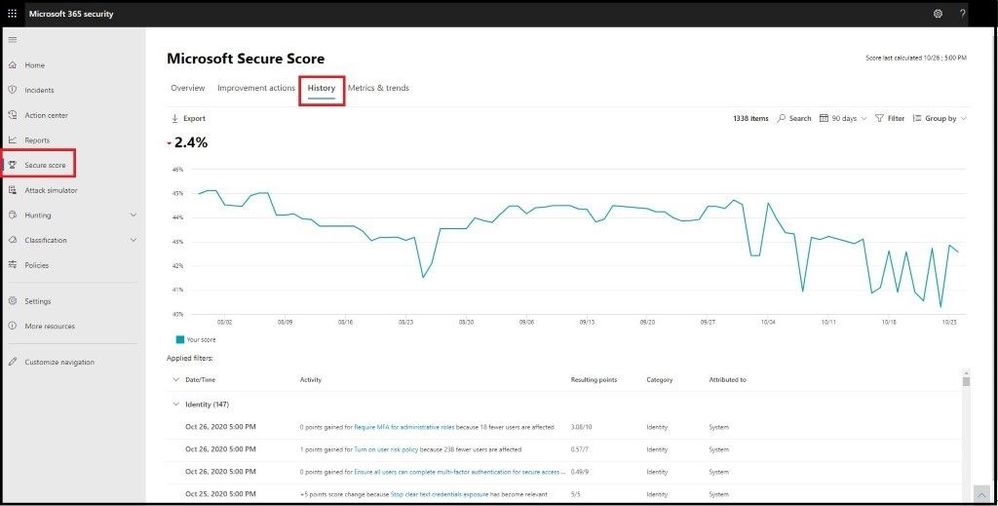 History of Secure Score
If you select the Filter tab, you can filter by category, product, and/or update type as seen in the image below.
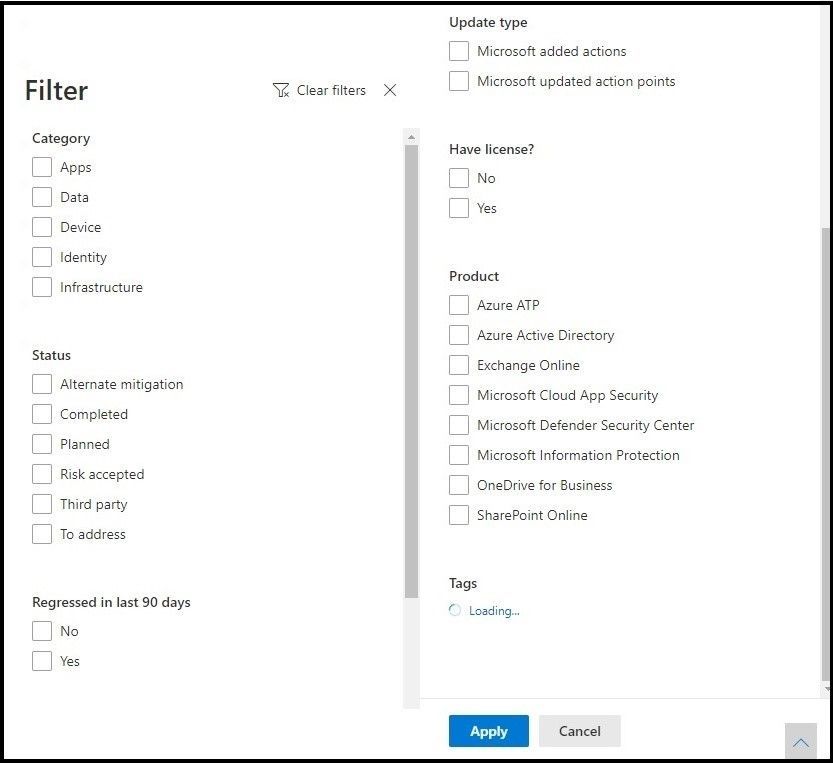 Filters
After applying any filters, you can get more fine grained with the overall Secure Score and dive into the status or see what has regressed over the last 90 days.
Next, we will go into the Metrics and Trends tab. Inside here we can see are several graphs and charts to give you more visibility into trends and set goals. You can set the date range for the whole page of visualizations. The visualizations include:
- Your Secure Score zone – Customized based on your organization’s goals and definitions of good, okay, and bad score ranges.
- Regression trend – A timeline of points that have regressed because of configuration, user, or device changes.
- Comparison trend – How your organization’s Secure Score compares to others’ overtime. This view can include lines representing the score average of organizations with similar seat count and a custom comparison view that you can set.
- Risk acceptance trend – Timeline of improvement actions marked as “risk accepted.”
- Score changes – The number of points achieved, points regressed, along with the subsequent score change, in the specified date range.
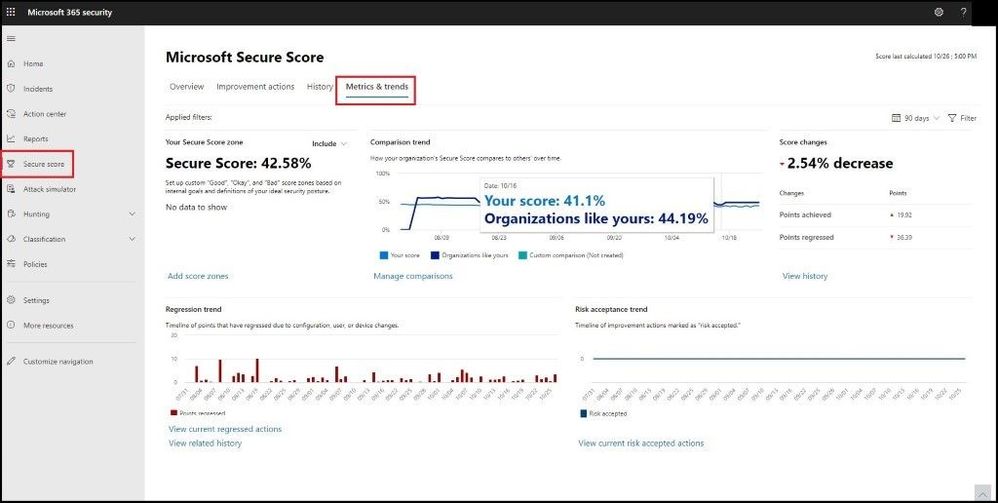 Metrics and Trends
The feature I like best about these Metrics and Trends is being able to compare your organization with others in the same industry, Microsoft product licenses, organization size, and/or geographical region. By selecting the Manage Comparisons link under the comparison trend chart, we can select and choose the custom criteria to compare your organization with as seen below.
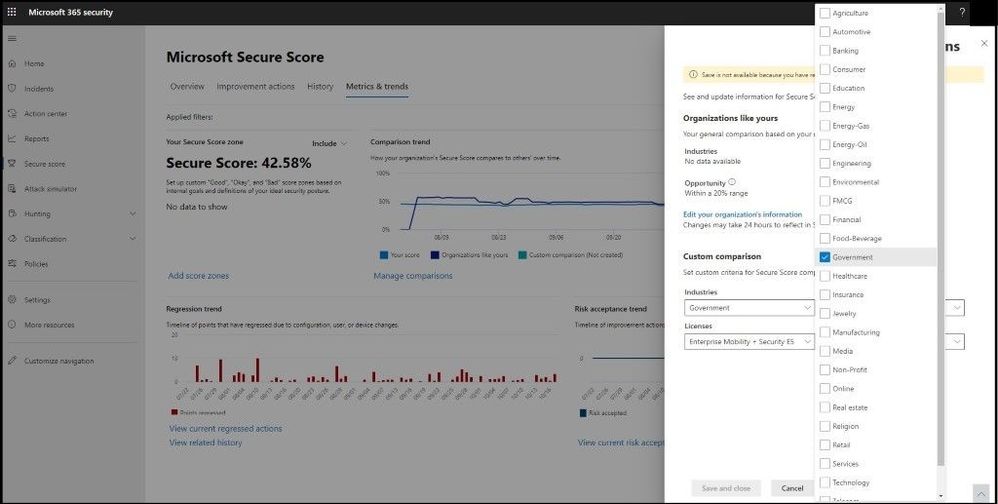 Comparing Like Organizations
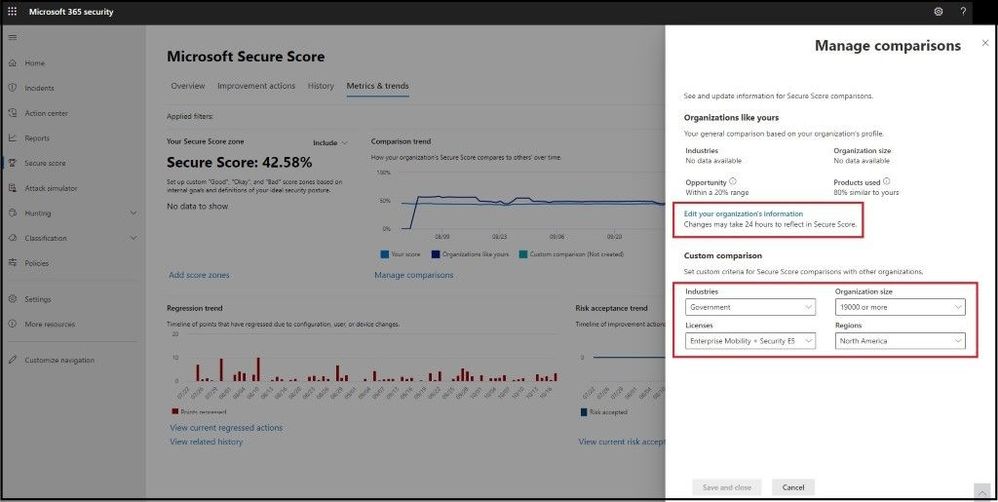 Like Organizations
The comparison data is anonymized, so Microsoft does not know exactly which other tenants are included and your privacy is protected as well.
Video Demo
Conclusion
Thanks for taking the time to read this blog and I hope you had fun reading how Microsoft uses Secure Score across multiple security products and then combines into one overall Secure Score in Microsoft 365 Defender. Even though I did not show every specific product that has a Secure Score, this blog will show you how to get started in remediating and securing your endpoints more securely. All of my clients have raved about Microsoft Secure Score and now you can see in more detail why and how you can use it in your current environment. Hope to see you in the next blog and always protect your endpoints!
Thanks for reading and have a great Cybersecurity day!
Follow my Microsoft Security Blogs: http://aka.ms/JohnBarbare and also on LinkedIn.


Recent Comments