by Scott Muniz | Dec 8, 2020 | Security, Technology
This article is contributed. See the original author and article here.
Original release date: December 8, 2020
The CERT Coordination Center (CERT/CC) has released information on 33 vulnerabilities, known as AMNESIA:33, affecting multiple embedded open-source Transmission Control Protocol/Internet Protocol (TCP/IP) stacks. A remote attacker could exploit some of these vulnerabilities to take control of an affected system.
The Cybersecurity and Infrastructure Security Agency (CISA) encourages users and administrators to review CERT/CC Vulnerability Note VU #815128 and CISA Advisory ICSA-20-343-01 for more information and to apply the recommended mitigations. Refer to vendors for appropriate patches, when available.
This product is provided subject to this Notification and this Privacy & Use policy.
by Contributed | Dec 8, 2020 | Azure, Microsoft, Technology
This article is contributed. See the original author and article here.
With Azure Sentinel you can receive all sorts of security telemetry, events, alerts, and incidents from many different and unique sources. Those sources can be firewall logs, security events, audit logs from identity and cloud platforms. In addition, you can create digital trip wires and send that data to Azure Sentinel. Ross Bevington first explained this concept for Azure Sentinel in “Creating digital tripwires with custom threat intelligence feeds for Azure Sentinel”. Today you can walkthrough and expand your threat detection capabilities in Azure Sentinel using Honey Tokens or in this case Canarytokens.
What is a Honey Token? A honey token is a digital artifact like a Word Document, Windows Folder, or JavaScript file that when opened or accessed will act as a digital trip wire and alert you to being used. When used the honey token might make a GET HTTP call to a public facing URL or IP. The so that an attacker would want to investigate and exfiltrate the artifact but also ensuring you reduce false positives from normal users. One way to do this is creating a separate folder from the normal directory structure. This could take the form of naming a Word document High Potential Accounts.docx. And then placing it in a Sales share but inside two more nested directories.
The other key is to make the digital artifact searchable or easily found, you want the attacker to see the token and access it. You can also sprinkle these honey tokens through out the network and in different use cases beyond. The key here is ensuring that the honey token is in a visible location and can directory searched upon by normal user credentials.
As with most things a balanced approach should be taken with honey token names and placement. Think through where in the cyber kill chain you want the digital trip wire, and ways to make the token enticing to an attacker but will also reduce false positives from normal employees and routines.
Honey Tokens are not a new concept but the following approach described to use a service called Canarytokens is a bit newer. Canarytokens is a free service provided by Thinkist that generates different types of tokens and provides the back end trip wire logging and recording. The service allows you to focus on the naming and placement specific to your industry and buisness rather then building a Public facing URL that logs and collects the tokens being tripped. Thinkist also has a paid service as well that includes many useful features.
In the below example you will walk through creating a free Canarytoken (honey token as described) but through a Canary service and use it to update Azure Sentinel when it is triggered.
To begin with you can deploy a Logic App Ingest-CanaryTokens here. The Logic App will act a listener and will provide a URL you can use in the Canarytoken generation.
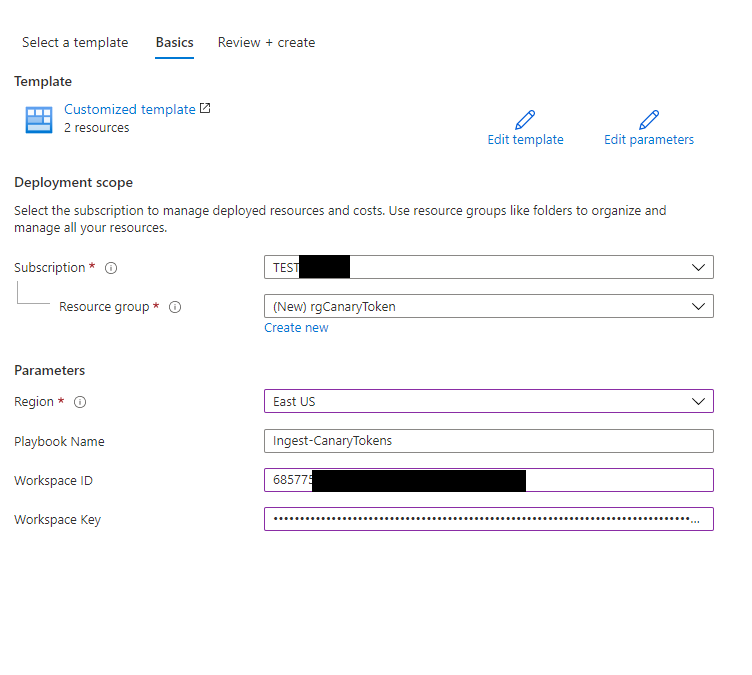
To Deploy the Logic App fill in your Azure Sentinel Workspace ID and Key.
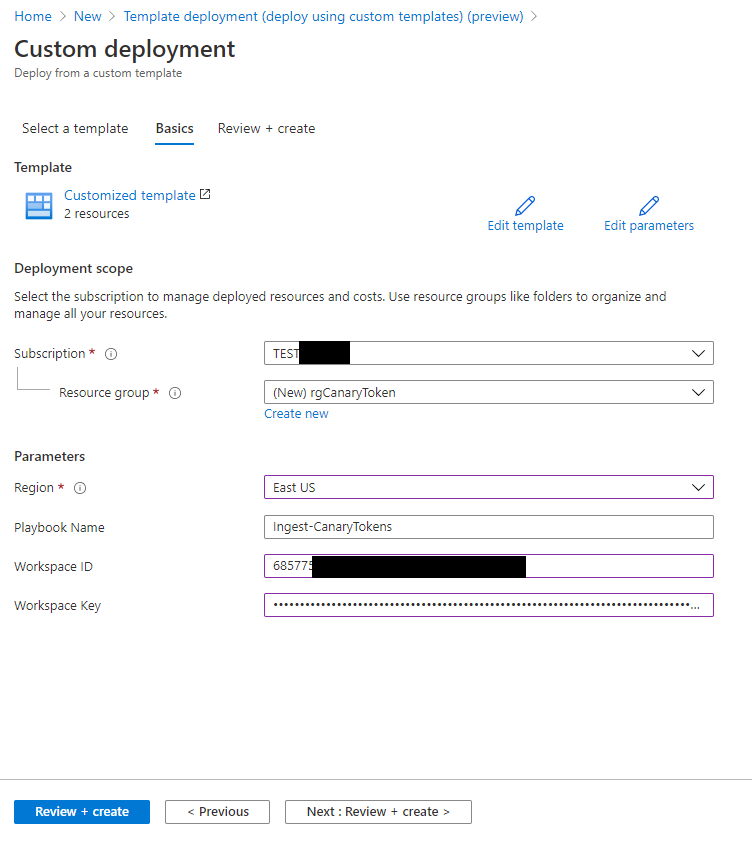
Once deployed go to the Logic App and in the Overview click on the blue link: See trigger history
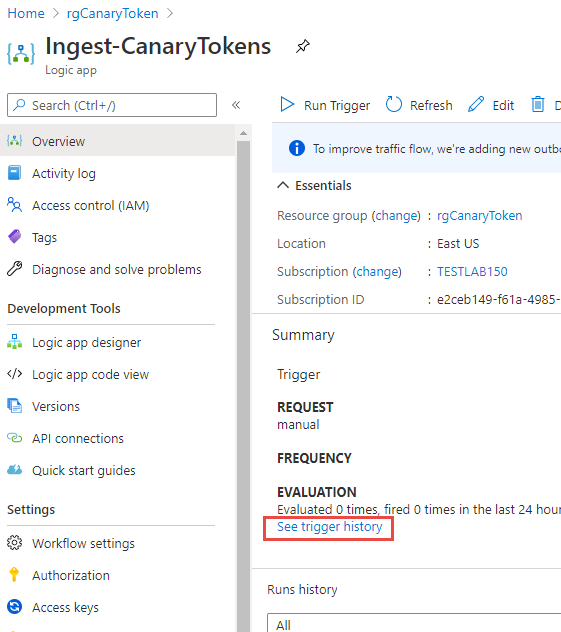
Copy the URL from the following field: Callback url [POST]

With this LogicApp and a Callback listening URL you can now generate a Canarytoken.
To create the Canarytoken go to the following website: Canarytokens
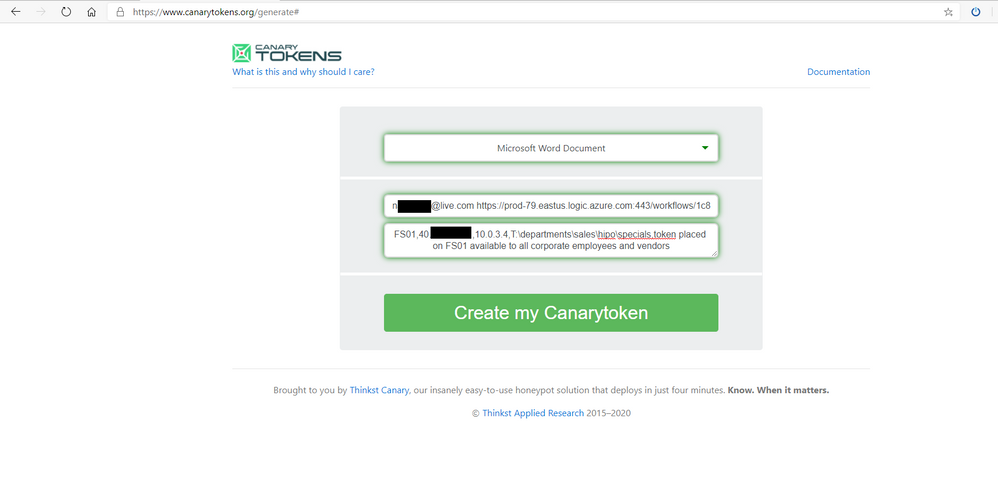
- Choose Microsoft Word Document
- Fill out your email address and enter a <SPACE> and paste the Logic App Callback URL
- In the final field enter a description, – see below
You will use description to also host your Entities for Azure Sentinel. You can use a comma as a separator between the entity information you want to capture upon tripping the wire.
Be sure to be descriptive to what ServerShare or OneDrive the Canarytoken will be placed. Because you will generate several different tokens the descriptive notes will come in the alert that is triggered ensuring you will be able to dive further on that Server or Service to investigate further activity of the attacker.
In this example you could use:
Name |
Descriptor |
Azure Sentinel parsed column name |
|
Computername |
The Computername where Canarytoken is hosted |
CanaryHost |
|
Public IP |
the public ip of internet access where token is hosted. Can be used to correlate if token is launched within data center or known public ip of server
|
CanaryPublicIP
|
|
Private IP |
Private ip of computer where token is hosted could be used to correlate additional logs in Firewalls and other IP based logs
|
CanaryPrivateIP |
|
Share Path |
The share path this Canarytoken is hosted at, helps indicate where a scan or data was compromised at.
|
CanaryShare |
|
Description |
helps provide addition context for SOC Analyst about purpose of Canarytoken and it’s placement
|
CanaryDescription |
|
*EXAMPLE:
FS01,42.27.91.181,10.0.3.4,T:departmentssaleshipospecials,token placed on FS01 available to all corporate employees and vendors
4. Once Completed click Create my Canarytoken
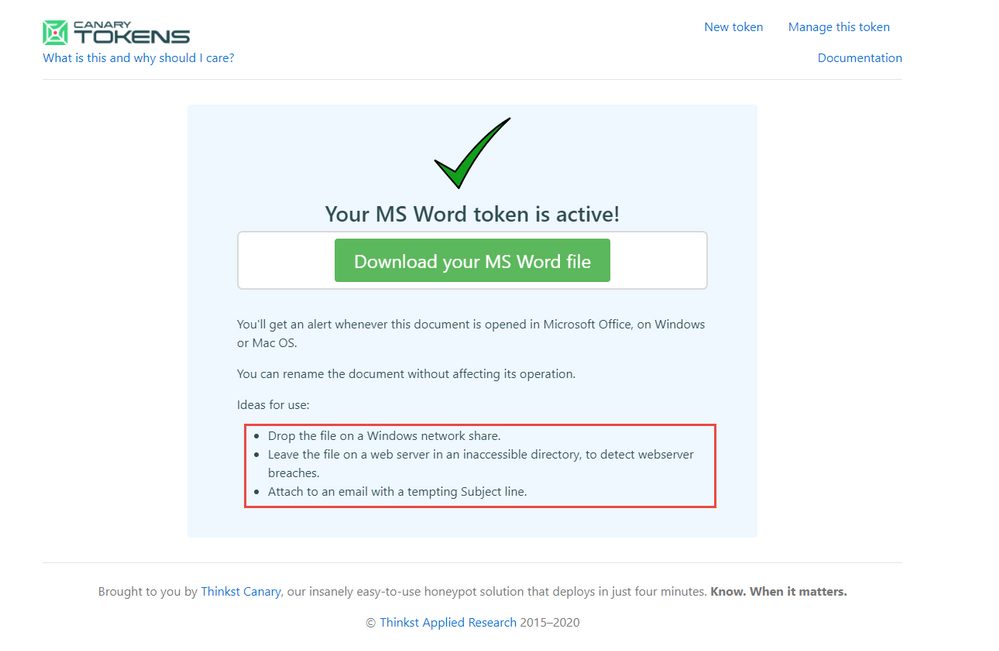
Check out the further use cases for the Canarytokens to be placed. Go ahead and Download your MS Word file.
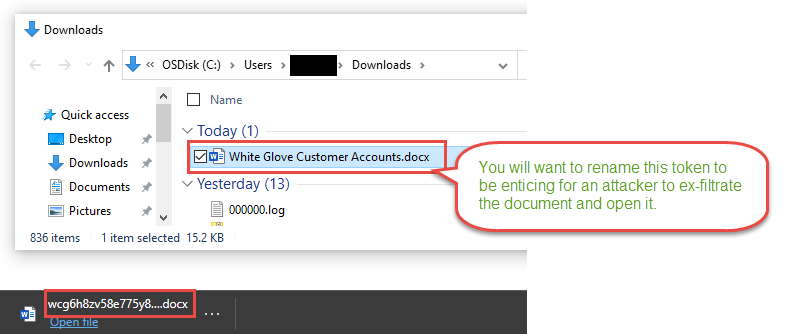
Notice the file name that downloads is the Canarytoken id itself. This word document name really is not that compelling for an attacker to discover, exfiltrate, and investigate. You should rename the file immediately to something more compelling.
You want to grab the attention of the attacker searching for valuable information. Remember the overall arching goal for most attackers is obtaining key corporate data. The Canarytoken is helping alert to the violation of confidentiality, integrity and availability of key corporate data. Names like Project Moonshot placed in NextGeneration folder could help entice. Document name like High Potential Account List in a Sales team folder may also do the trick. Be creative to your industry and business as to what data could be valuable.
In this example we used White Glove Customer Accounts.docx
To make the document seem more legitimate you can use a website Mockaroo – Random Data Generator and API Mocking Tool | JSON / CSV / SQL / Excel to generate random and fictious data easily. Here you can create what appears to be a customer account list with account numbers and email addresses.
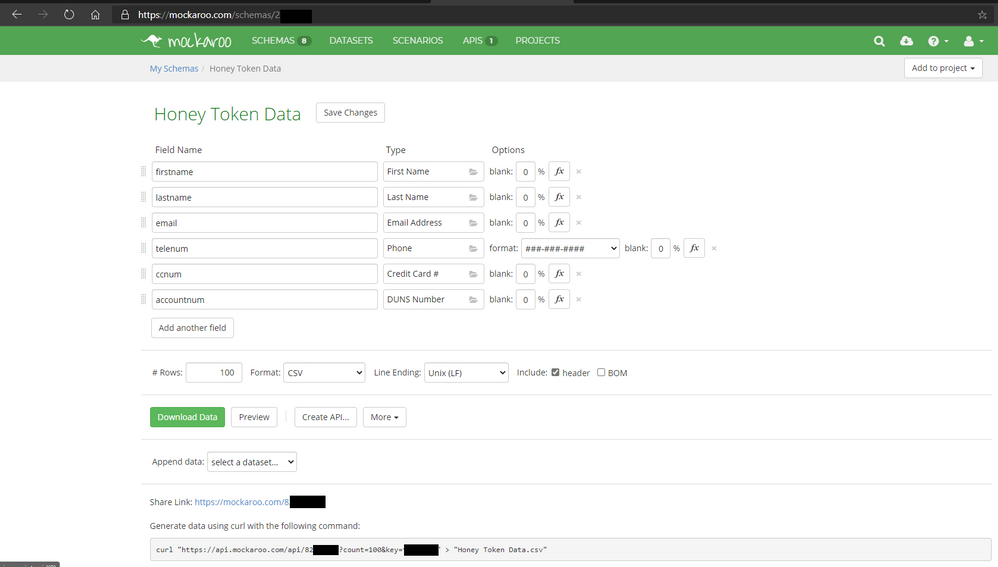
Once you fill out the fields you want go ahead and download a CSV sample by clicking Download Data green button. Open with Excel and be sure to manipulate the Rows and Columns to make it nicely formatted. With the table looking presentable copy the content in Excel and Open the Word Document Canarytoken and paste the content in and save the document.
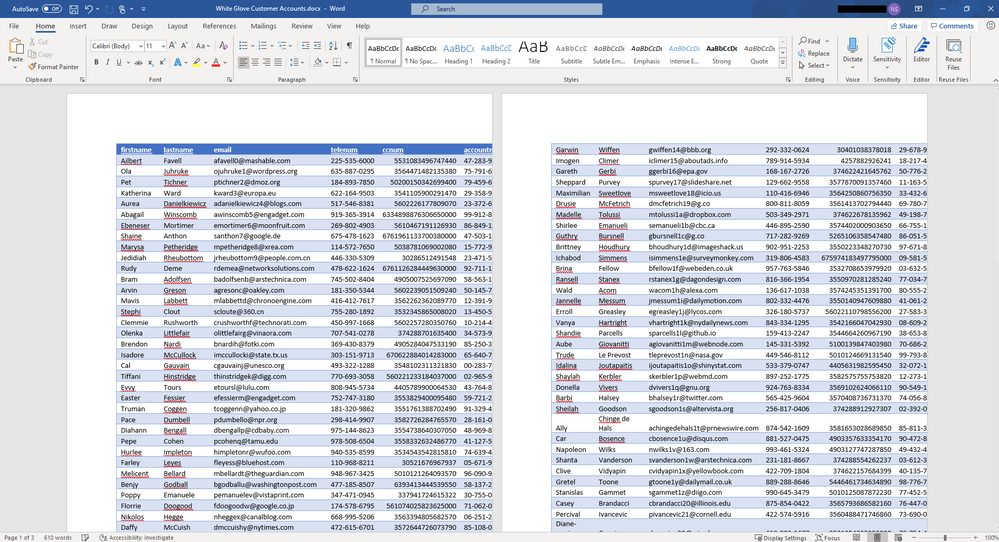
You now have a Canarytoken that looks authentic and hopefully will not arouse the suspicion of the attacker but will be visible and entice them greatly to exfiltrate and open it. Continue to examine Mockaroo and the data you can generate it is a very easy to use and helpful tool.
Now find a home for the word document in a File Share on a File Server, or as an email attachment in your executives mailbox – again think back to the description you gave it and follow that to where it is placed so in the worst case you are attacked this can tip you off to where on your network to focus your investigation further in Azure Sentinel’s logs and events you are collecting.
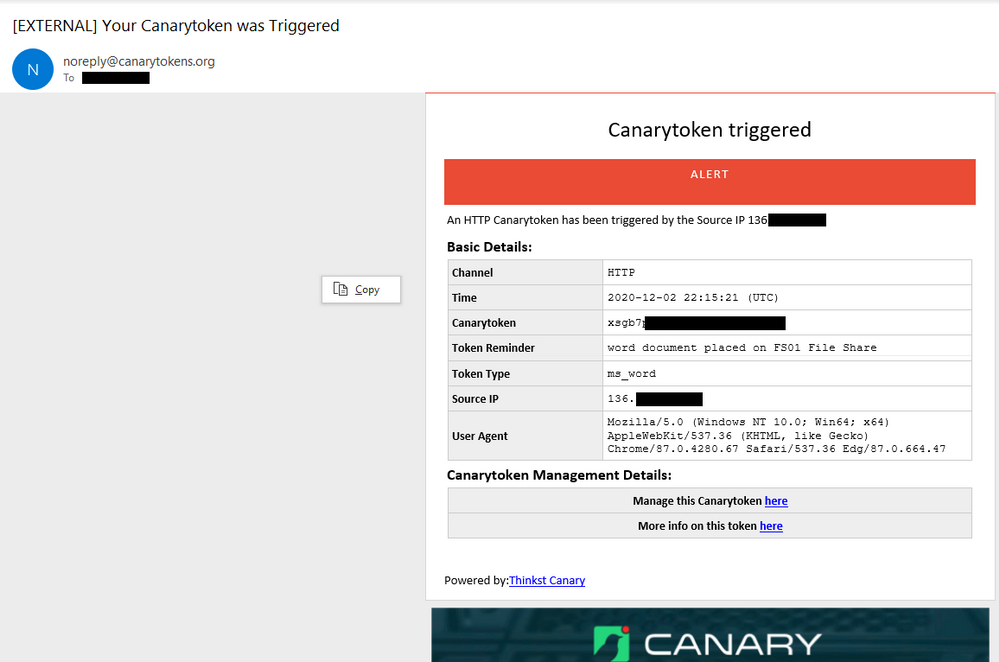
To test this open the Word Document on your computer or on another server or computer with word. When Microsoft Word opens a .1 by .1 header and footer image with a open URL will execute a GET HTTP call to the appropriate CanaryToken endpoint you created earlier. Once this occurs you will receive an email with details like below.
Be sure to also check out the More info on this token here link, which will provide more geo information on the public ip that opened the document and also if it came off a known Tor browser or not.
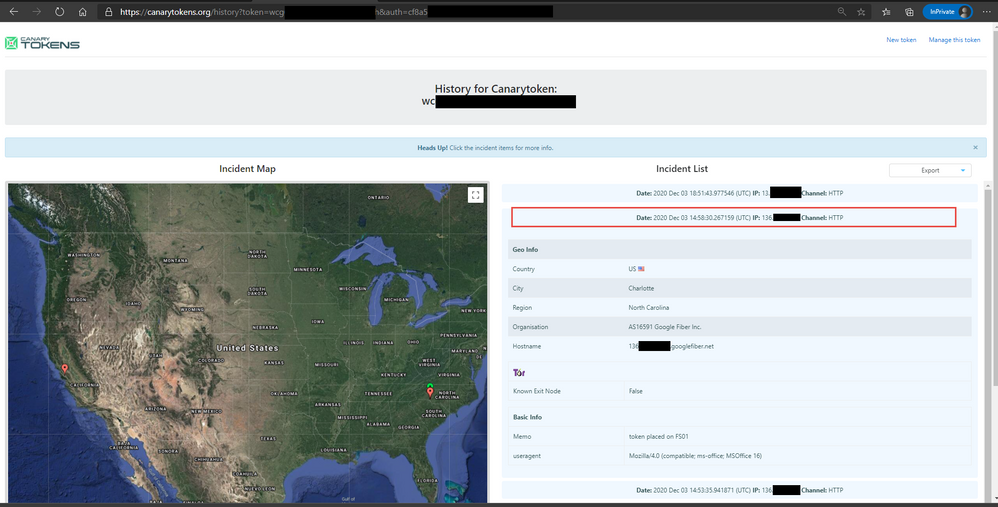
You can also download a JSON or CSV file of the detailed information found in the Incidents generated when the Canarytoken was opened.
In addition to the email the Logic App listener will be invoked which will take the Incident Data and enrich it a little further and send it to Azure Sentinel into a custom logs table named CanaryTokens_CL.
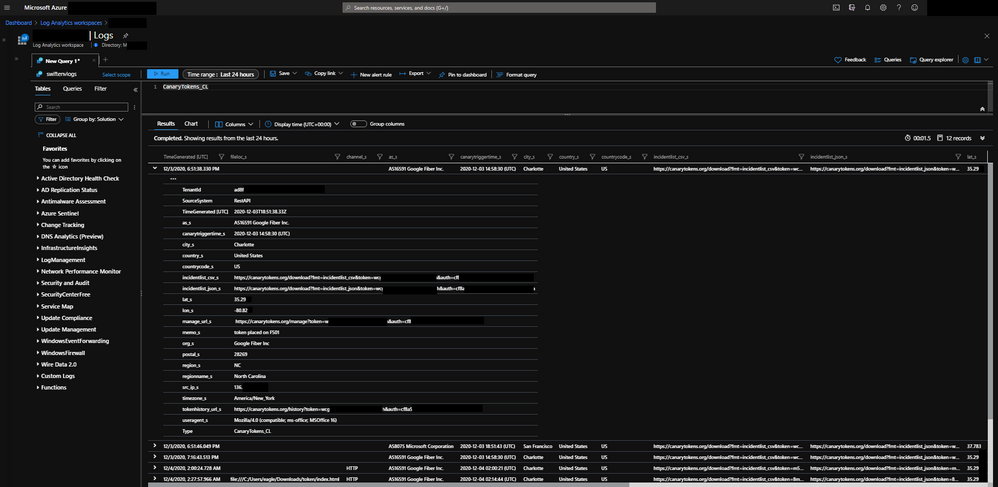
Some of those enriched fields include geo information on the public ip address that triggered the Canarytoken. There is also parsed information from the memo field to include specifics around the Canarytokens placement in your environment and objectives and some logic to tell you if the canary was triggered on host. Finally string fields for URLs have been populated for you to review the management and history of the Canarytoken if you need to pivot from Azure Sentinel to the Canarytoken specifically while investigating.
You can now use Azure Sentinel to raise a High Priority incident and work the incident with case management. You can also correlate logs and data with other Azure Sentinel data collected further helping you investigate the incident.
An example Scheduled query rule in Azure Sentinel you can use following along this walkthrough. Step by step instructions Here
id: 27dda424-1dbe-4236-9dd5-c484b23111a5
name: Canarytoken Triggered
description: |
  'A Canarytoken has been triggered in your enviroment, this may be an early sign of attacker intent and activity,
    please follow up with Azure Sentinel logs and incidents accordingly along with the Server this Canarytoken was hosted on.
    Reference: https://blog.thinkst.com/p/canarytokensorg-quick-free-detection.html'
severity: High
requiredDataConnectors:
  - connectorId: Custom
    dataTypes:
      - CanaryTokens_CL
queryFrequency: 15m
queryPeriod: 15m
triggerOperator: gt
triggerThreshold: 0
tactics:
  - Discovery
  - Collection
  - Exfiltration
relevantTechniques:
query: |
CanaryTokens_CL
| extend Canarydata = parse_csv(memo_s)
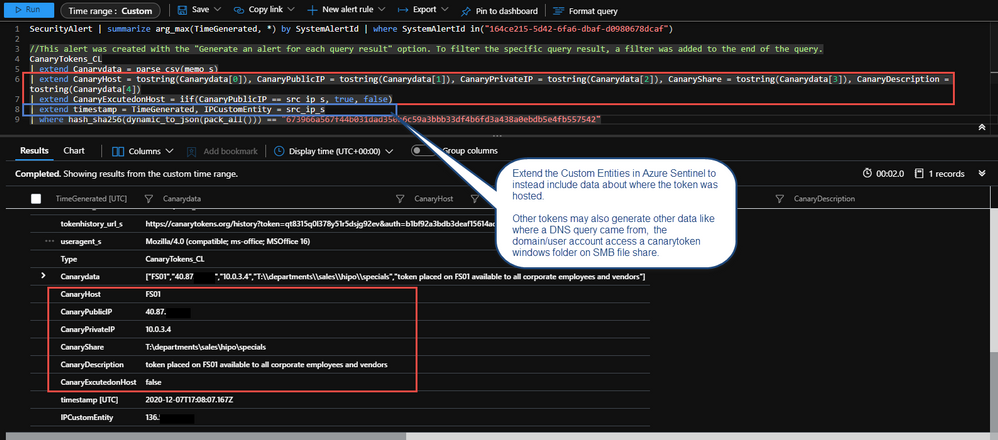
| extend CanaryHost = tostring(Canarydata[0]), CanaryPublicIP = tostring(Canarydata[1]), CanaryPrivateIP = tostring(Canarydata[2]), CanaryShare = tostring(Canarydata[3]), CanaryDescription = tostring(Canarydata[4])
| extend CanaryExcutedonHost = iif(CanaryPublicIP == src_ip_s, true, false)
| extend timestamp = TimeGenerated, IPCustomEntity = src_ip_s //,AccountCustomEntity = user_s, HostCustomEntity = computer_s
entityMappings:
  - entityType: IP
    fieldMappings:
      - identifier: Address
        columnName: IPCustomEntity
Once you have created the rule, open the Canarytoken word document one more time to generate an alert.
Within 15 minutes or so a new Azure Sentinel Incident for the Canarytoken being trigged will appear, your SOC can now use the Logs fed into Azure Sentinel to correlate and investigate further.
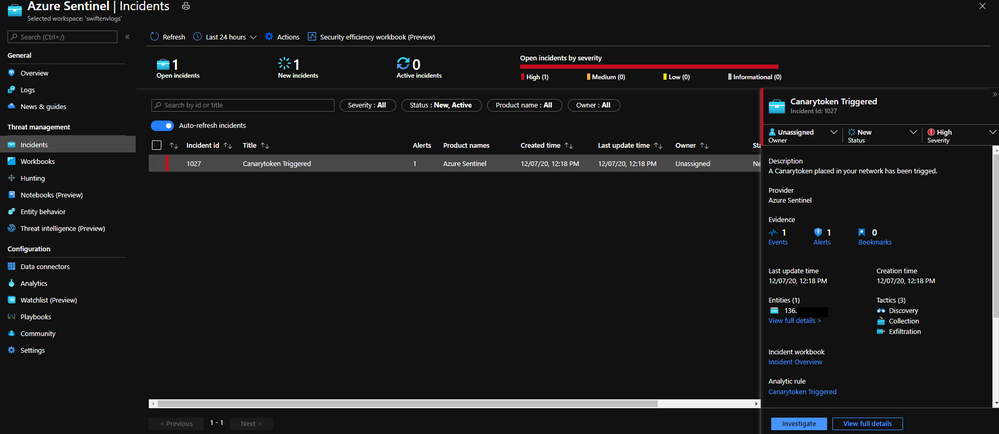
In addition the Investigate Graph is also populated with the Public IP Address of where this was triggered.
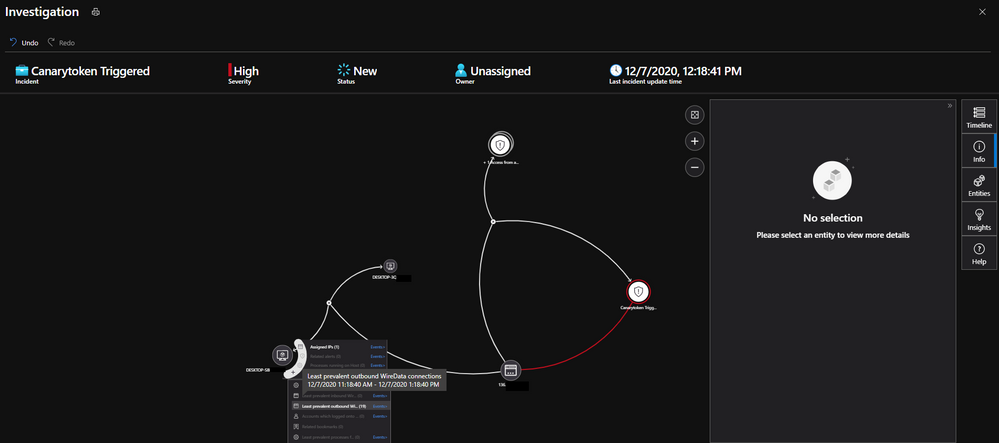
Please tweak the Custom Entities to your liking. Another way is to point where the Canarytoken was placed to bolster the pivot of the Investigation graph. The above alert sample parses the memo field you added early with commas when generating the initial Canarytoken.
In this article you learned about honey tokens and a Canary service and how to use Canarytokens in your environment and integrate the enriched alerts into Azure Sentinel raising awareness of a potential attacker and data exfiltration that may have occurred.
You have just scratched the surface with the concept of honey tokens. If you are interested in learning more in depth I highly recommend Chris Sander’s book Intrusion Detection Honeypots which is a excellent resource.
Special thanks to:
@Ofer Shezaf for reviewing this post
@Chris Sanders for inspiration and information on the topic of Honey Tokens
by Contributed | Dec 8, 2020 | Technology
This article is contributed. See the original author and article here.
This year Microsoft has released some features to make shopping a little easier. Today I’ll walk you through how I use Microsoft Edge and Bing in tandem to get my gift-giving done in record time while shopping for my Mom, Dad, and younger brother.
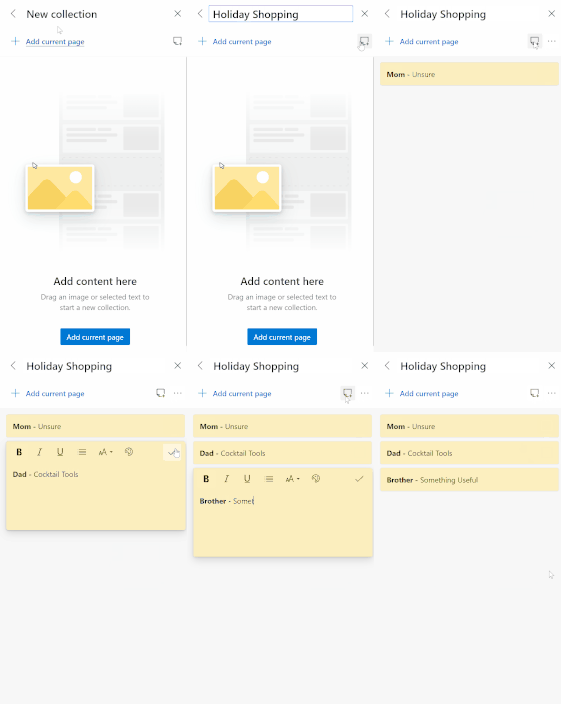
First off, I’ve set up a Collection in my MSFT Edge browser to keep my gift ideas straight by using notes. (This is an awesome article about how to use Collections.) I like to organize my collection with Notes first so I can keep on track.
Really-Honey-Just-Send-Me-A-Picture Gift: Mom
Now that I have that out of the way, I’m going to start looking through Microsoft Bing to see if I can find some inspiration for mom’s gift.
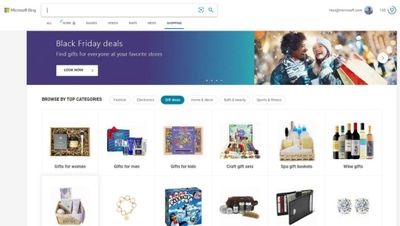
My mom is someone who has excellent taste in fashion but won’t drop money on herself very often. After poking around in the gift guide and selecting “Gifts for Women” I saw “Designer Handbag” in the Gift Ideas for Women carousel at the top of the page—perfect!

I know my mom loves Michael Kors, I’ll filter my results to show for Michael Kors handbags between $0 and $100. For the first pass, there are some good options, but nothing I think would be quite her style. So, I’ll expand my price range to $150 which brought up a cute clutch at $148.50. Since this is a bit out of my price range, I dragged it to the in Bing Shopping so I can go check on it to see if the price drops into my range later. If dragging and dropping isn’t your thing you can also turn price tracking on in the product overview which will automatically drop the item into your Price Track Collection in Bing Shopping. With that figured out, I can update my note for Mom’s Gift in my Holiday Shopping collection in the Microsoft Edge browser and start searching for dad’s gift.
The-Chef-Who-Has-Everything Gift: Dad
Alright, one down, two to go. Dad is up next. With the pandemic this year, my dad has been playing it safe and not eating out, easy to do when you’re a chef! When it comes to kitchen gadgets, he has them all, but what he doesn’t have is tools to make cocktails at home. The tools I’m looking for are a mixing glass or a set of tins, a mixing spoon, jigger, orange peeler, cocktail strainer, and a set of small tongs. This should be a good assortment of tools for him to use to make just about any cocktail.
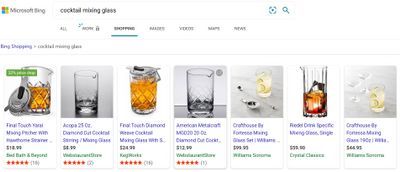
After the first search results pulled up I realized that doing this piece by piece will get expensive quickly since a mixing glass can easily be upwards of $45. I’m going to try and find a Cocktail kit that’s good quality, has the tools I want for my dad and is less than $100. As a bonus, I’m going to try and see if I can find something from a small business. To pinpoint what I’m looking for, I’m going to search for “Cocktail Mixing Kit” and filter by Etsy.
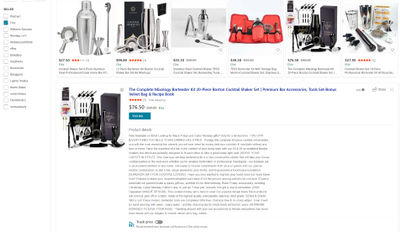
And there we have it! Within a minute I was able to find the perfect Cocktail Mixing Kit from a small business listed on Etsy. Looking at the comprehensive product information I can see that this 20 piece set is on sale for 15% off. Score! I saved this to my “Holiday Shopping” collection under the sticky Note for dad and now I’m off to the next.
The-I-Don’t-Want-Anything Gift: Brother
Finally, it’s time to find something for my brother. When we were younger I’d know months in advance what I was going to get him, but now that we’re adults it’s a bit harder. Since I’m not sure what my brother is into right now, I’d like to find something that is from a store that I know he shops at in case he wants to exchange it. Based on what I can find in the Deal Hub I’m going to check out Kohl’s and as luck would have it, this site has coupons!

(Learn more about Microsoft Shopping in our Microsoft Edged Insiders.) And there it is, a valet tray! Perfect, it’s useful and simplistic and easy to return/exchange if needed.
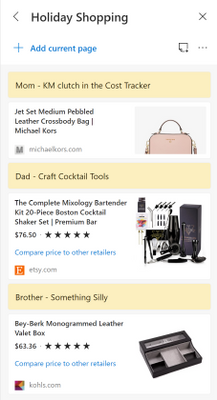
Now that I can see what I’m getting for everyone, I rest can easy knowing that I’ve got my holiday shopping completed.
Happy Holidays,
Alyxandria (she/her)
Community Manager – Bing Insiders
by Contributed | Dec 8, 2020 | Technology
This article is contributed. See the original author and article here.
PowerShell is a command-line shell and a scripting language, all in one. You can use PowerShell for script automation, run batches of commands, control resources in the Cloud and much more. It started out with automation on Windows but nowadays there’s PowerShell core which works on Linux, macOS and Windows.
PowerShell is one of those “great to have” tools if you are considering a career in Ops or DevOps. The LEARN platform, found at aka.ms/learn, have just released the first module dedicated to PowerShell language. The module is meant to be a beginner module and explains, things such as:
- Understand what PowerShell is and what you can use it for.
- Explore cmdlets.
- Construct a sequence of cmdlets in a pipeline.
- Apply sound filtering and formatting principles to your commands.
There’s also a PowerShell extension for VS Code that can speed up the authoring process, that I think you should check out. Here the link to learn more and download the PowerShell extension for VS Code


Recent Comments