by Contributed | Dec 8, 2020 | Technology
This article is contributed. See the original author and article here.
This blog was co-authored by Emma Stephen, Claudia van der Velden, and Tony Crabbe
The hybrid workplace – approximate 1.4 billion people worldwide have made the shift as offices worldwide remain closed in some countries and open in others. Whilst we like working in more casual clothes, having more time for hobbies, and having our pets around, we also have more meetings and interruptions (individual attention), feel less connected to our teams (team attention) and more siloed (community attention). Whilst many don’t want to go back to the office fulltime, we’re still working to find our home office rhythm and create new working habits for the home office (whilst trying to stay away from the snack cupboard which is now much closer).
That’s no surprise – it’s a big shift and many of us were unprepared with recent research finding that 61% of managers felt unprepared to lead remote teams. Organizations are doing the best they can to equip their people whilst considering what changes this means for office real-estate longer term with a focus on cost-saving and convenience. But this change involves more than a lift-and-shift of our office behaviors and that is where the opportunity is. This is the opportunity for us to re-examine our working cultures and how we harness our attention and that of others.
Our previous blogs have explained what attention is, why it’s important, and given hints and tips for individuals and teams. This blog is a toolkit for those who want to catalyze the conversation around attention in their organizations – to become an attention advocate/influencer – at the individual, team, and community level.
Individual attention – advocate for flow
Flow, losing ourselves in a task or activity where we are so engaged that we lose a sense of time and other senses. Employees who have more opportunity to find flow are also more engaged . Innovative companies where “employees can tackle problems from new angles and in new ways, employees are supported in developing new ideas, and the organizations are flexible in adapting to changes in their operations” also have a higher percentage of employees who can achieve flow during their work.
Put simply, they have more chunks of uninterrupted time available to them, engage in less task switching, and can make real progress against their goals. To advocate in practice, try the following to lead by example:
- Schedule focus time – whether you use a tool like MyAnalytics to find and block time, or you do this manually, block 90-120 minute slots in your calendar for undisturbed work. Respect and protect this time – decline meetings, enable do not disturb (each interruption will cost you 23 minutes of re-engagement time), and set yourself a little challenge around what you’re doing .
- Timing is everything – the research found that the prime time when the majority of people achieve flow is between 08.00 and 10.00. Consider this when you are setting your meetings.
- Take regular breaks – our minds need to re-charge so when you’ve snapped out of flow or have simply been back to back, refresh with a break. Research has shown that just a few minutes physical activity – simply a short walk – outside renews our attention .
- Create clarity – plan the topics you would like to work on during focus time, so you set clear goals
Team attention – advocate for connection
Team spirit, feeling that you’re part of a group gives a sense of belonging. We often miss this sense of belonging while working alone in your home office. According to the research, after company culture, maintaining team cohesion is the biggest challenge we face. In blog 4 we spoke about engagement as the hook for attention at the team level. So how can you lead by example in your team, staying engaged and connected to harness the collective attention? To advocate in practice, be more intentional about:
- Be clear on purpose – Creating a clear purpose for your team gives direction and a shared common goal which gives more purpose to work, helps people prioritize, and empowers them to make decisions. Whether you are creating or taking on a task, get clarity on how it contributes to team goals and try teaming up with a colleague. Working together on a task builds a space for learning and connection, which fosters attention.
- Re-think your rituals – If we want to stay innovative and doing our best work as a team, we need to stay connected. In innovative companies 70% of employees report feeling a sense of belonging vs. 43% in less innovative cultures. Build in time to chat at the beginning of meeting agendas, check-in on a colleague, and think about how you can connect asynchronously for example a weekly Friday highlight of the week share.
- Don’t be a phubber – Phubbing is snubbing someone with your phone or generally multitasking in a meeting. Leverage video on in meetings to encourage self-discipline when it comes to paying attention. Advocate for “vote with your feet rules” meaning if you are in a meeting that is poorly prepared or you do not need to be there, then leave.
Community attention – advocate for sharing
Networks formed of communities that run across the organizational structures and silos are key for learning and innovation. Most ideas are only half ideas until they “meet” the other half and become a fully-fledged great idea . Well managed, engaging communities are great places for ideas to meet and to gain insights from people outside our regular echo-chambers. To advocate in practice and strengthen the foundations for community attention, try:
- Strengthening your growth mindset – We tend to seek feedback from our closest peers and the team around us, but our organizations are full of people with different expertise and experience. Try reaching out to a broader community for feedback and see what new ideas and perspectives you learn.
- Re-connecting – Many of us have networks we’ve built up throughout out time with an organization but we don’t often connect. Research has shown that these weak links are some of the most powerful when it comes to helping us out and brining new perspectives. In our new hybrid world, it’s also a chance to break through the geographic boundaries that naturally occur in the office so reach out to someone you haven’t spoken to in a while and get their perspective.
- Share – Companies that have cultures where people are generous with sharing their knowledge across networks and supporting each other experience better business outcomes. We’re not saying engage in sharing all the time – it can be draining – but next time you go to share something with a few people, ask yourself who else this might be relevant to and share more broadly.
We hope that this last blog in the Modern Collaboration Architecture series gave you some ideas on how to become an attention advocate at the individual, team, and community level. What will you try first?
This blog post is a part of our series on the Modern Collaboration Architecture, developed by @Rishi Nicolai, a Microsoft Digital Strategist with over 25 years of experience in leading organizations through change and improving employee productivity.
About the authors:
Claudia van der Velden
Claudia a Customer Success Manager at Microsoft and enjoys exploring organizational cultures from an eco-system perspective. In a complex puzzle where all is interconnected, small changes can have a large impact. She believes in the importance of considering all elements for the eco-system to thrive, stay well balanced, and perhaps most importantly, letting go of control and trusting the natural course to find its way. Claudia is based in the Netherlands and studies for her Masters in Applied Psychology, Leadership Development.
Emma Stephen
Emma is a Customer Success Manager at Microsoft and is passionate about bringing the human element into the workplace. She believes technology both enables change and can catalyse wider change efforts if introduced in the right way. Emma is based in Zurich and currently studying for her Masters in Applied Positive Psychology and Coaching Psychology with a hope to leverage this in the organisational context.
Tony Crabbe
Tony Crabbe is a Business Psychologist who supports Microsoft on global projects as well as a number of other multinationals. As a psychologist he focuses on how people think, feel and behave at work. Whether working with leaders, teams or organizations, at its core his work is all about harnessing attention to create behavioural change.
His first book, the international best-seller ’Busy’ was published around the world and translated to thirteen languages. In 2016 it was listed as being in the top 3 leadership books, globally. His new book, ‘Busy@Home’ explores how to thrive through the uncertainties and challenges of Covid; and move positively into the hybrid world.
Tony is a regular media commentator around the world, as well as appearances on RTL, the BBC and the Oprah Winfrey Network.

by Contributed | Dec 8, 2020 | Dynamics 365, Microsoft 365, Technology
This article is contributed. See the original author and article here.
In today’s modern sales environment a trend is surfacing among B2B sellers and buyers: the desire for more authentic, personalized relationships. But despite the desire for personalized relationships, purchasing involves more people than ever, and successful sales require sellers to navigate an increasingly large group of stakeholders.
While increasingly large groups of stakeholders may create complexity in relationship building, it also opens the door to uncovering additional customer needs. If your organization is equipped with the tools needed to successfully implement a customer-centric perspective, you can turn complexity into opportunity, and not only build trusted relationships with your customers but also uncover the insights needed to turn relationships into revenue.
C.H. Robinson improves visibility into customer needs with Microsoft Dynamics 365
Global logistics company C.H. Robison is no stranger to solving complex problems for their more than 119,000 customers. When they needed a better way to capture customer needs and catalog them centrally, they turned to Microsoft.
C.H. Robinson empowered their organization to dive deeper into uncovering what their customers need and better articulate all that they can do for their customers by deploying Microsoft Dynamics 365 Sales, Microsoft Power Apps, and Microsoft Power BI. C.H. Robison realized the benefits at a rapid pace, and achieved full ROI in 11 months, a full six months ahead of the projected schedule.
With Dynamics 365, C.H. Robinson implemented a digital transformation that resulted in 5 key takeaways:
- Increased focus on the customer and potential opportunities: C.H. Robinson utilized Dynamics 365 Sales and Power Apps to create a canvas app that could streamline the capture of detailed customer data. Salespeople can use Dynamics 365 Sales to fluidly input and access detailed customer data at any point while talking to customers, which helps salespeople maintain focus on the customer and opportunity.
- Immediate visibility into unmet customer needs: Just as important as solving surfaced problems is not missing the chance to solve for additional unmet needs. Using a Power BI dashboard embedded in Dynamics 365, C.H. Robinson’s salespeople and account managers can more efficiently identify opportunities and plan out the next actions to take to meet customer needs.
- Full deployment in six months, training included: Over the course of three “go lives” beginning in June 2019, Dynamics 365 Sales was deployed to 3,000 people at C.H. Robinson, 90 percent of whom use it at least once a month. PowerObjects, an HCL Technologies company and a Microsoft Partner Network member with Gold competencies, facilitated the rollout with a series of “leadership change workshops” and training sessions, ensuring everyone understood the “why” in addition to the “what” and “how.”
- A foundation for further business transformation: As just the first phase of all-up digital transformation, C.H. Robinson now has insights into Microsoft features, functionality, and technology that can expand their innovation and outcomes. James Santy, Vice President of Sales Operations at C.H. Robinson, notes that, “Throughout our journey, Microsoft has been by our side every step of the way. Based on our tremendous success to date, we’re eager to consider other business applications from Microsoft.”
- A centralized, 360-degree view of each customer: The deployment of Dynamics 365 and Microsoft Power Platform has resulted in C.H. Robinson creating and capturing 14,000 individuals sales opportunities in the first six months, and an increase in the quality of data by 89 percent. They owe it all to the centralized repository of accurate and trusted data within Dynamics 365 Sales that can be used to identify, prioritize, and close opportunities.
In addition to opportunities, ROI, and data quality, C.H. Robinson is seeing another key metric increase: customer happiness.
“We embarked on our digital transformation because our customers were giving us feedback that they needed us to help them in new ways … we still have work to do, but today, with Dynamics 365, we now have the foundation we need to get there.”James Santy, Vice President of Sales Operations, C.H. Robinson
Learn more
Read the full story to learn how C.H. Robinson gained actionable insights into their customers’ needs.
Watch a demo or take a guided tour to see how Dynamics 365 Sales can empower your sellers with actionable insights.
The post 5 takeaways how a company turned needs into opportunities appeared first on Microsoft Dynamics 365 Blog.
Brought to you by Dr. Ware, Microsoft Office 365 Silver Partner, Charleston SC.
by Contributed | Dec 8, 2020 | Technology
This article is contributed. See the original author and article here.
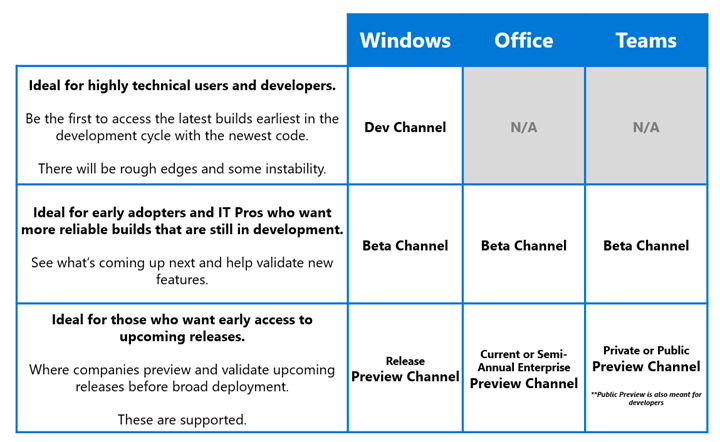
Today, we are announcing a change in how customers can preview upcoming Microsoft Teams features. This includes adopting pre-release channel names like Office and Windows Insider programs, as well as a new broadly available Public Preview channel. With this change, Insiders will find similar names and expectations for similar channels across Windows, Office, and Teams programs. As mentioned in the Windows Insider blog post, our goal is to not only make it clearer for existing Insiders to choose the experience that’s right for them, but also for new Insiders to pick the right channel as they join. The Insider community is important to us due to their early actionable feedback and we are working to align how all our Insider programs work better together across Microsoft.
Read on to learn more about the Public Preview channel and why we are launching it.
Teams Public Preview and channel names alignment
Teams continues to innovate at a fast pace while delivering an enterprise-grade experience to over 115M daily active users. We first launched pre-release access to Teams features via our Technology Adoption Program (TAP) over 4 years ago. This continues to be a private and under NDA program for all participating customers.
As Teams adoption continues to accelerate, it is important to bring in more diversity and easier options for customers to preview pre-release features for product quality, internal planning, adoption & training readiness. With this, we are launching Teams Public Preview channel to allow customers to preview and evaluate features before they roll out to the rest of their company. Please review this article for guidance on how to configure preview access for selected users in your tenant.
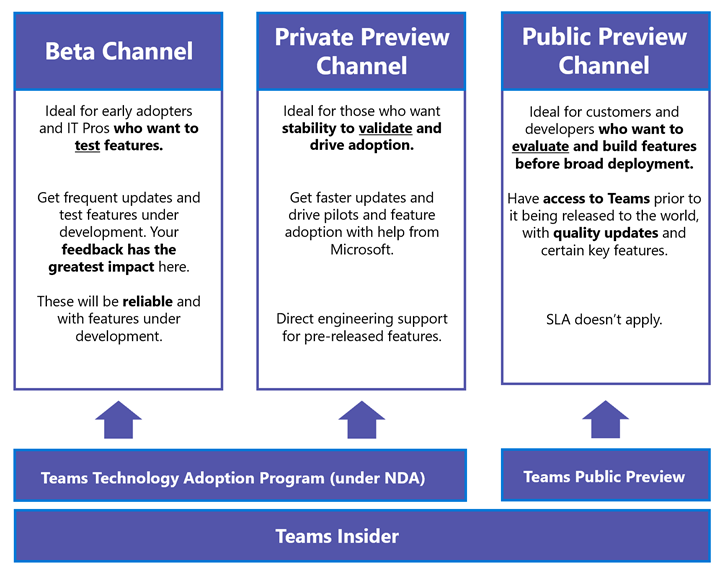
Teams Insiders can pick one of the three channels, based on the quality of client builds they are most comfortable with and participation commitments.
One key difference between Teams and rest of Microsoft 365 is that Teams delivers feature rollout against build rollouts. This means (1) a feature can be enabled without a new build update, and (2) different channels may have the same build version at any point in time.
About Teams pre-release channels
Here is an overview of the available channels:
Beta Channel
Ideal for early adopters and IT Pros who want to test features as they are being built. We look for bugs and regressions from this audience before releasing the features to the next channel. This was previously called Ring 1.5 and is available to participating Teams TAP customers and only under NDA and program requirements. This channel requires the most time commitment and is only available via self-customer nominations.
Private Preview Channel
Insiders in this channel will see more stable features for validation and piloting adoption. There will be faster updates and adoption help from Microsoft. Pre-release feature support is provided directly by Teams engineering. This channel was previously called Ring 3 and, like Beta channel, is available to participating Teams TAP customers only under NDA and program requirements.
Public Preview Channel
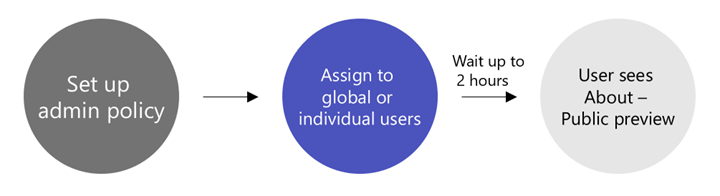
We are launching Public Preview with this announcement. This is for customers who want to evaluate a feature or developers who want to build a solution before broader deployment. There are no program requirements or commitments. This is an opt-in program, controlled via IT admin policy. Please read about how to configure this policy here. For Developer Preview please read here.
Aligning with Office and Windows
With today’s announcement, Teams pre-release channels are better aligned with Office and Windows Insider programs. An Insider can now make a choice as to which experience, they want and have it mean the same thing between Windows, Office, and Teams. Insiders will need to opt into each Insider Program separately, but we are looking to improve this experience over time.
How to join Public Preview channel
Please read the instructions here Public preview in Microsoft Teams – Microsoft Teams | Microsoft Docs
December 2020 Preview pack
Windows 10 native notifications.
Large gallery and Together mode for web
2×2 view on VDI (Citrix, VMWare)
Meeting reactions
Thank you for helping us grow and evolving with us. We hope you enjoy the features and look forward to your thoughts or feedback. or ask questions in our new discussion board within the Tech Community.
by Contributed | Dec 8, 2020 | Technology
This article is contributed. See the original author and article here.
“Sanity is a madness put to good use.” ― George Santayana
Let us, then, put SharePoint to good use – even if at first it brings us to the brink. There is a lesson to be learned by all. Madness is productivity in disguise. :)
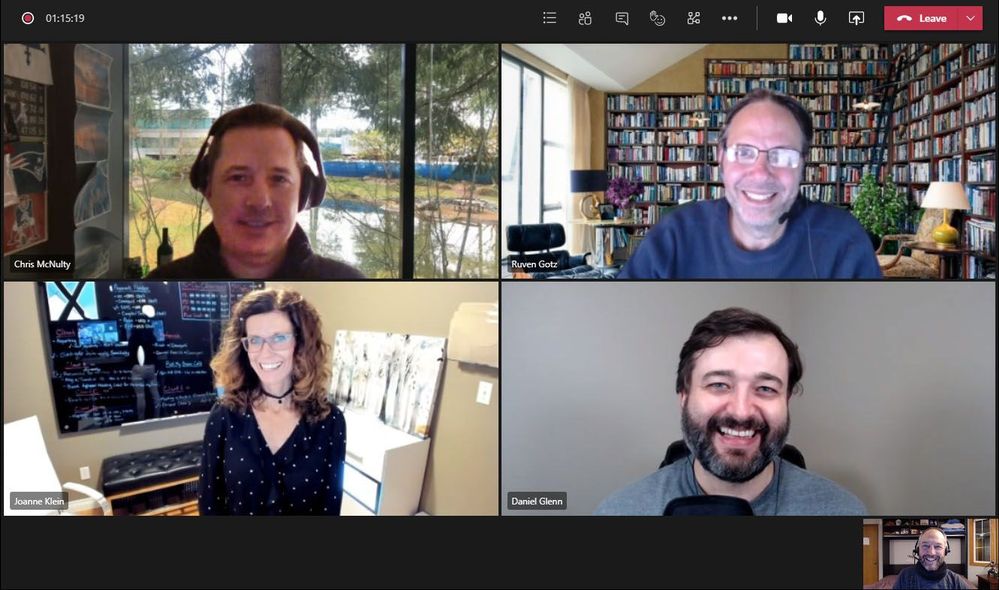
In this episode, Chris and I talk with Joanne Klein (SharePoint and Microsoft 365 consultant), Ruven Gotz (Director, Workplace eXperience Lead, Avanade) and Daniel Glenn (Microsoft 365 Practice Lead, InfoWorks) about what sent them to the crazy farm, and back. You’ll hear their stories of tech-driven insanity, and why they all stuck with SharePoint through the years. The outcome: “lessons learned,” promoted “best practices”, and insights on a product that’s matured as a service year over year.
By tuning in, may you pull out at least one less hair on your next SharePoint adventure.
Listen to podcast below and start the uncrazy making:
https://html5-player.libsyn.com/embed/episode/id/17088683/height/90/theme/custom/thumbnail/yes/direction/backward/render-playlist/no/custom-color/247bc1/
Subscribe to The Intrazone podcast! And listen to episode 59 now + show links and more below.
Intrazone guests and co-hosts – clockwise, starting top left: Chris McNulty (director | Microsoft) [co-host], Ruven Gotz (Director, Workplace eXperience Lead, Avanade) [guest], Daniel Glenn (Microsoft 365 Practice Lead, InfoWorks) [guest], Joanne Klein (SharePoint and Microsoft 365 consultant) [guest], and little Mark Kashman (senior product manager | Microsoft) [co-host].
Links to important on-demand recordings and articles mentioned in this episode:
- Articles and sites
- Events
- Hosts and guests
Subscribe today!
Listen to the show! If you like what you hear, we’d love for you to Subscribe, Rate and Review it on iTunes or wherever you get your podcasts.
Be sure to visit our show page to hear all the episodes, access the show notes, and get bonus content. And stay connected to the SharePoint community blog where we’ll share more information per episode, guest insights, and take any questions from our listeners and SharePoint users (TheIntrazone@microsoft.com). We, too, welcome your ideas for future episodes topics and segments. Keep the discussion going in comments below; we’re hear to listen and grow.
Subscribe to The Intrazone podcast! And listen to episode 59 now.
Thanks for listening!
The SharePoint and Power Platform teams wants you to unleash your magic, creativity, and productivity. And we will do this, together, one poof of magic at a time.
The Intrazone links
+ Listen to other Microsoft podcasts at aka.ms/microsoft/podcasts.
![Left to right [The Intrazone co-hosts]: Chris McNulty, director (SharePoint, #ProjectCortex – Microsoft) and Mark Kashman, senior product manager (SharePoint – Microsoft).](https://www.drware.com/wp-content/uploads/2020/11/large-375 "Chris-Mark_in-studio.jpg") Left to right [The Intrazone co-hosts]: Chris McNulty, director (SharePoint, #ProjectCortex – Microsoft) and Mark Kashman, senior product manager (SharePoint – Microsoft).
Left to right [The Intrazone co-hosts]: Chris McNulty, director (SharePoint, #ProjectCortex – Microsoft) and Mark Kashman, senior product manager (SharePoint – Microsoft).
 The Intrzone, a show about the Microsoft 365 intelligent intranet: https://aka.ms/TheIntrazone.
by Contributed | Dec 8, 2020 | Technology
This article is contributed. See the original author and article here.
Explore the new role-based learning paths that were released last month on Microsoft Learn. The Microsoft Learn training and certification portfolio is continually expanding to help you build your skills and then validate them by earning certification. Take a look at the latest free, online training that you can work through at your own pace. Whether you’re beginning or continuing your skilling journey, choose a learning path and start it today. Before long, you’ll have a new set of skills you can demonstrate to employers or colleagues—and the satisfaction of having accomplished a goal and helped to advance your career. Want help figuring out where to begin and which training to take when? Check out the Microsoft Learn Dynamics 365 landing page, which highlights useful collections, learning paths to get you started, and popular learning paths and modules.
The following learning paths and modules were released in November 2020.
FastTrack for Dynamics 365
Supply Chain Management
Project Operations
Business Central
Customer Insights


Recent Comments