by Scott Muniz | Dec 8, 2020 | Security
This article was originally posted by the FTC. See the original article here.
Whether you’re just starting out or starting a new life, information on your background report can determine if you get credit, a job, or even housing. That’s why the law requires background screening companies to take steps to ensure the accuracy of the information they collect and share about you. But some companies don’t take enough of these steps and put together inaccurate background reports that can stand between you and a place to live.
Brought to you by Dr. Ware, Microsoft Office 365 Silver Partner, Charleston SC.
by Scott Muniz | Dec 8, 2020 | Security, Technology
This article is contributed. See the original author and article here.
Original release date: December 8, 2020
Adobe has released security updates to address vulnerabilities in multiple products. An attacker could exploit some of these vulnerabilities to take control of an affected system.
The Cybersecurity and Infrastructure Security Agency (CISA) encourages users and administrators to review the following Adobe Security Bulletins and apply the necessary updates.
This product is provided subject to this Notification and this Privacy & Use policy.
by Contributed | Dec 8, 2020 | Technology
This article is contributed. See the original author and article here.
With more and more people working from home, businesses need to provide secure printing capabilities for both at-home and the in-office workers. It is no longer predictable where workers will be when they need to print documents and it’s key to be able to support the hybrid workforce with secure printing.
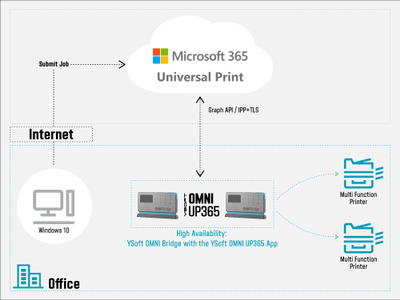
With the Universal Print service in Microsoft 365 and YSoft OMNI Series™, the user can be anywhere and securely print to any existing printer from a zero trust network – whether that printer is at home or in the office.
YSoft OMNI Series primer
Because it will take time for Universal Print-compatible printers to hit the market in mass, businesses need a way to take advantage of Universal Print on existing printers. That is where OMNI Series comes in. YSoft OMNI Bridge pulls print jobs from the Universal Print service within the Microsoft 365 cloud and delivers it to the printer. One OMNI Bridge can support up to 25 printers.
Maintaining the Zero Trust Network environment
When you think about printing, it involves pulling the print job from point A (the job spooler) to point B (the printer). Regarding security, think about data transferred or stored – known as data in transit and data at rest.
Within the Microsoft 365 environment, encryption is turned on by default in keeping with concepts of secure by design and secure by default. This encryption doesn’t require the user to do anything. Data is seamlessly encrypted using service-managed keys and AES-256 encryption. Universal Print, naturally as part of Microsoft 365, uses the same encryption. (For more information, see the Microsoft 365 Encryption documentation.)
OMNI Series applies the same concept of secure by default and leverages the encryption provided by Microsoft to secure both data in transit and data at rest. Print jobs are spooled and stored in Microsoft 365 and OMNI Series pulls the print job using Transport Layer Security (TLS). Security is further maintained when OMNI Series transfers the print job to a local printer using IPP over SSL.
This same security applies whether the worker on the office LAN to print on a multifunction printer or on their home LAN to print on a home printer. In the office or at home, the protection is maintained.
To learn more about trying YSoft OMNI Series with Universal Print today, visit the Y Soft website and join others around the world in supporting the hybrid workforce with secure Universal Print. You can also listen to Y Soft’s webcast with Alan Meeus from Microsoft on LinkedIn
by Scott Muniz | Dec 8, 2020 | Security, Technology
This article is contributed. See the original author and article here.
Original release date: December 8, 2020
Microsoft has released updates to address vulnerabilities in Microsoft software. A remote attacker could exploit some of these vulnerabilities to take control of an affected system.
The Cybersecurity and Infrastructure Security Agency (CISA) encourages users and administrators to review Microsoft’s December 2020 Security Update Summary and Deployment Information and apply the necessary updates.
This product is provided subject to this Notification and this Privacy & Use policy.
by Contributed | Dec 8, 2020 | Microsoft, Technology
This article is contributed. See the original author and article here.
You can now deploy the December 2020 latest cumulative update (LCU) and servicing stack update (SSU) together via our new one cumulative update package, or separately.
On September 9th, 2020, I announced the work in progress to simplify on premises deployments of servicing stack updates. Today, I am excited to announce that you can take advantage of this new capability using Windows Server Update Services (WSUS) and the Windows Insider Program for Business.
We have released the December 2020 LCU and the December 2020 SSU to WSUS in two ways for devices running Windows 10, version 2004 and later: to the typical Security Updates category and to the Windows Insider Pre-Release category.
To deploy the cumulative update and servicing stack update separately, no special action is needed. Just ensure, as always, that you deploy the SSU prior to deploying the LCU so that both updates install successfully on the device.
To deploy the LCU and SSU together using the new one cumulative update package, simply follow three easy steps.
Step 1: Sync the Windows Insider Pre-release category
- In the WSUS console, from Products and Classifications, select Windows Insider Pre-Release Product and Upgrades. Sync WSUS.
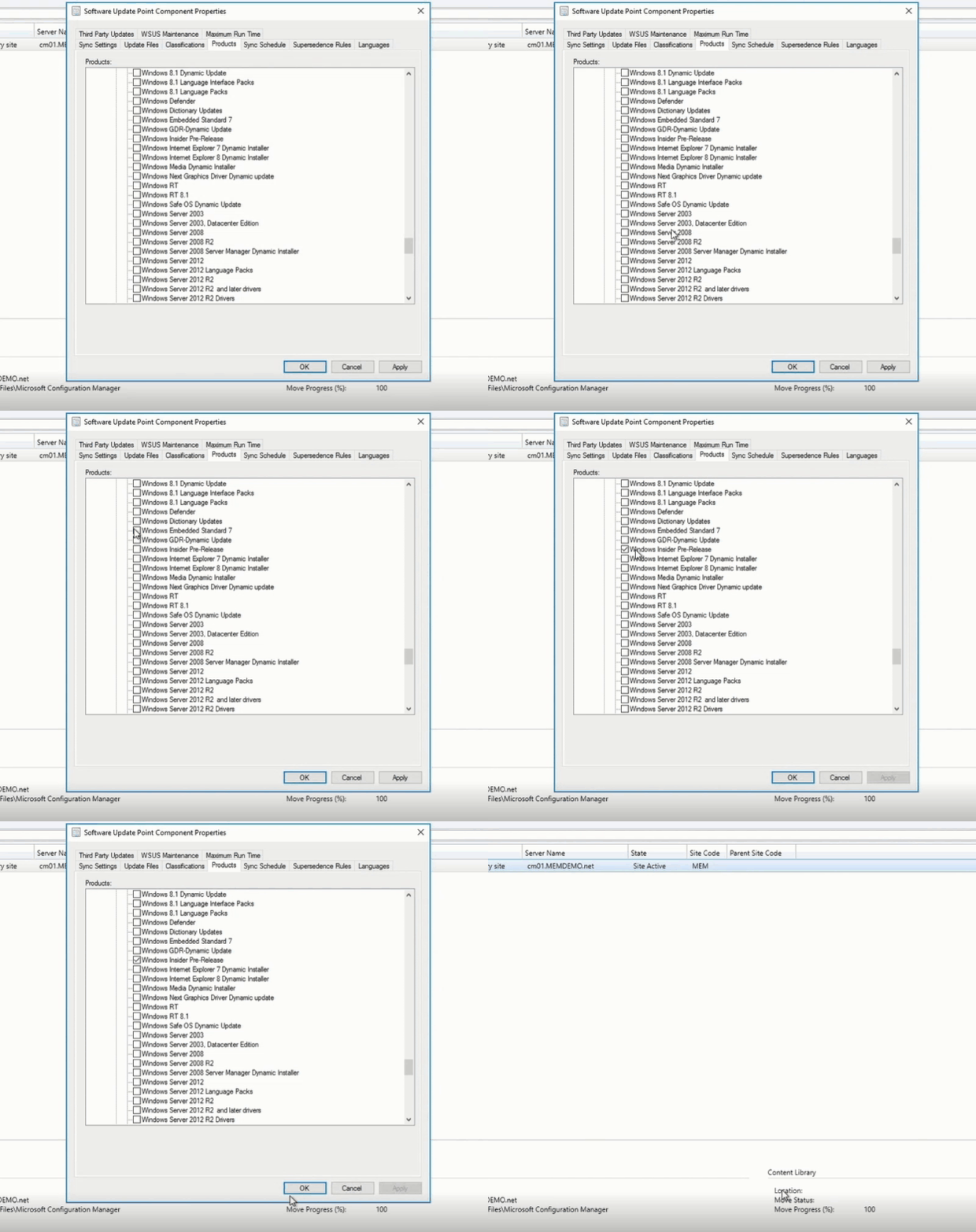
- In Microsoft Endpoint Manager Configuration Manager, navigate to the Products tab of
Software Update Point Component Properties and select Windows Insider Pre-Release. Select OK to confirm this selection.
Step 2: Select the OS version
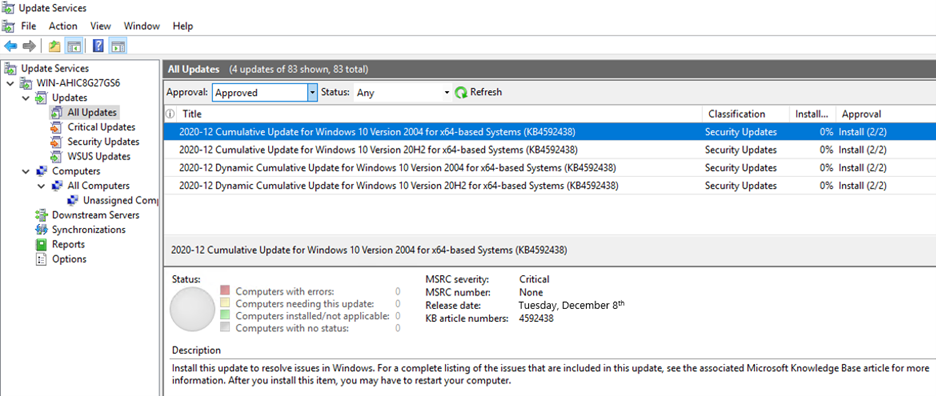
From the list of All Updates, select the cumulative update for the version of Windows 10 running on the device(s) that will receive the update. Currently, this would be either of the following:
- 2020-12 Cumulative Update for Windows 10 Version 2004
- 2020-12 Cumulative Update for Windows 10 Version 20H2
Step 3: Deploy the update
Deploy the update to the desired devices in your organization the same way you would deploy any other monthly cumulative update.
Check your preferred method of reporting and note that your devices are now running the December LCU (KB4592438) and SSU (KB4593175).
That’s it! It’s that simple.
The best part? Like all preview builds published to commercial devices in the Release Preview Channel and to the WSUS Windows Insider Pre-Release category, testing out this new deployment technology for LCUs and SSUs from WSUS is fully supported.
If you run into an issue that prevents you or other users in your organization from deploying or updating using this new one cumulative package, use this online form to request assistance directly from Microsoft Support at no cost to you. Or contact customer support through your typical channel.
Try out this new way of deploying LCUs and SSUs and let us know what you think by commenting below or reaching out to me directly on Twitter @ariaupdated.


Recent Comments