by Contributed | Dec 9, 2020 | Technology
This article is contributed. See the original author and article here.
Creating meaningful connection can be difficult in larger group settings. Breakout rooms allow organizers to divide the meeting into sub-groups to facilitate discussions and brainstorming sessions.
We are excited to announce that breakout rooms will be available this week in Microsoft Teams.
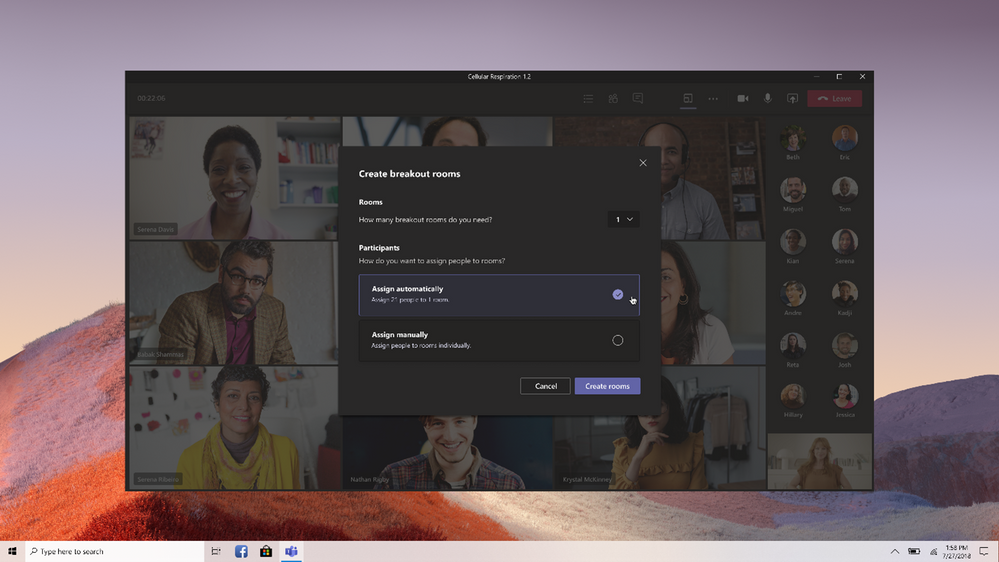
The meeting organizer can create up to 50 breakout rooms and choose to automatically or manually assign participants into rooms. The organizer can start a breakout room in a Teams meeting or a Teams channel meeting, allowing greater flexibility on how you want to meet.
Using the breakout room settings, the meeting organizer can choose to allow participants to come back to the main meeting at any time, then return to the assigned breakout room. This way participants can ask a clarifying question without disturbing the breakout room discussions.
Also, organizers can use the setting to re-create breakout rooms in the same meeting. This allows them to assign participants into new room setups.
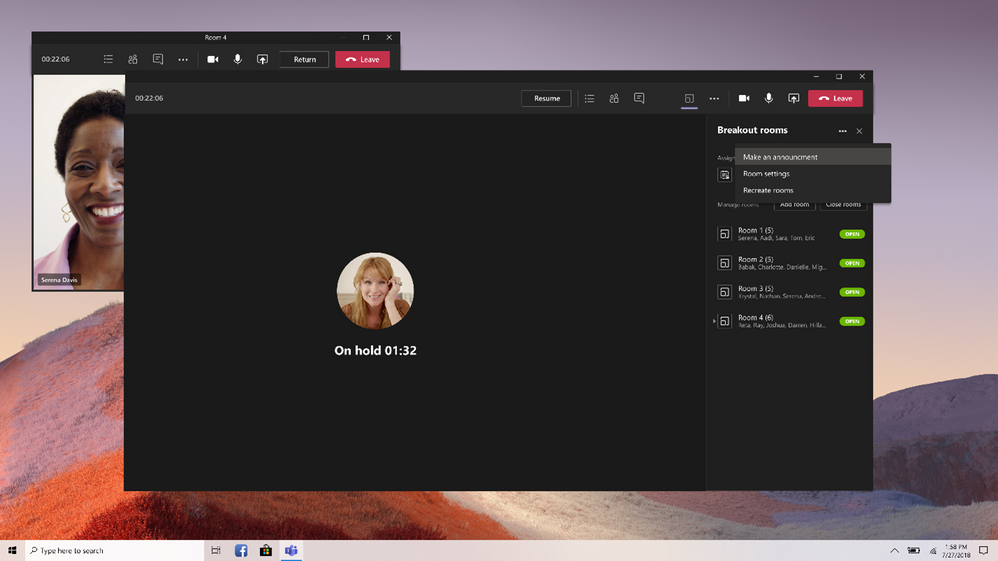
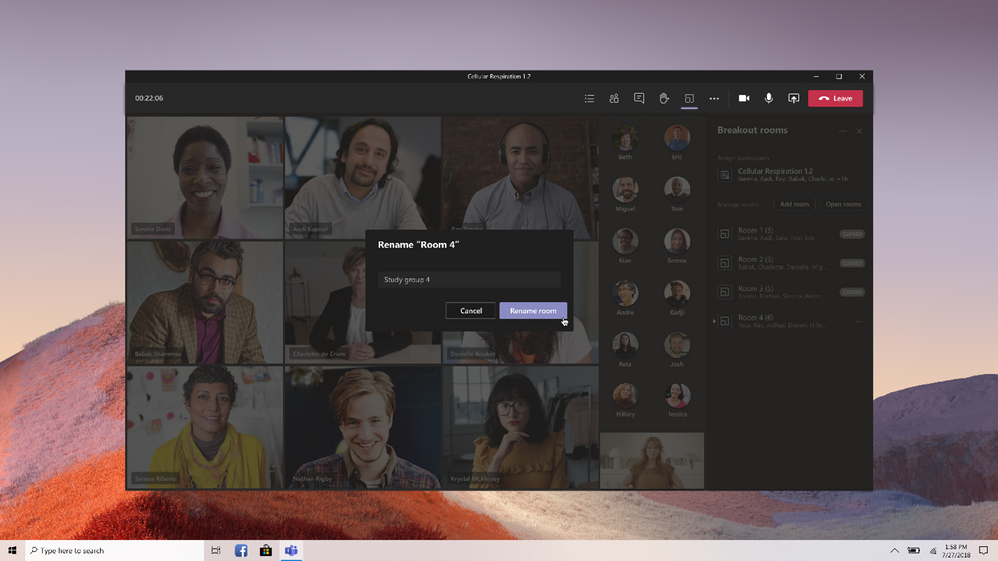
The meeting organizer can create, rename, and delete rooms as needed.
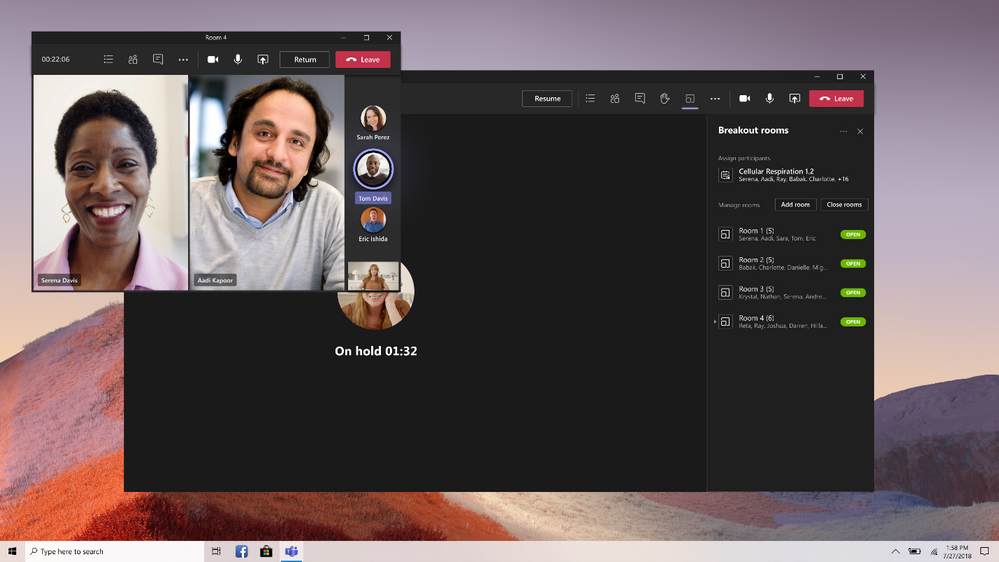
Once the breakout rooms are open, meeting organizers can join any of the breakout sessions. And should the need arise, you can quickly switch attendees in between breakout rooms.
Organizers can send announcements to the breakout rooms, and recall all participants back to the main meeting at any time.
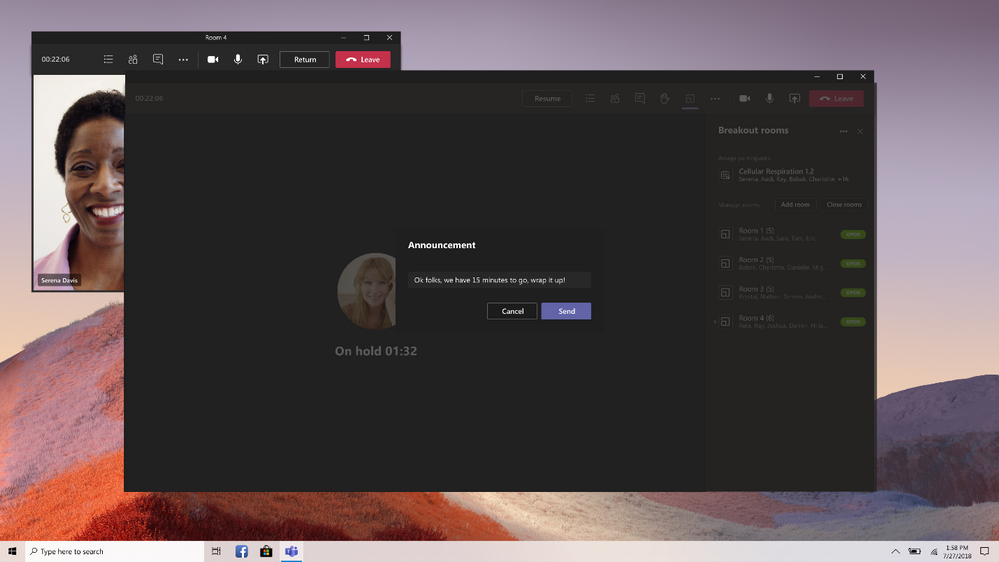
Since breakout rooms are Teams meetings, all the innovation that makes Teams meetings inclusive, interactive, and intelligent are available within. Attendees can discuss a topic in their breakout room while in a virtual coffee shop in Together mode. Or students can bring up the Microsoft Whiteboard and draw out their ideas. This is also true of our security features that help make your Teams meetings a safe and secure place to meet.
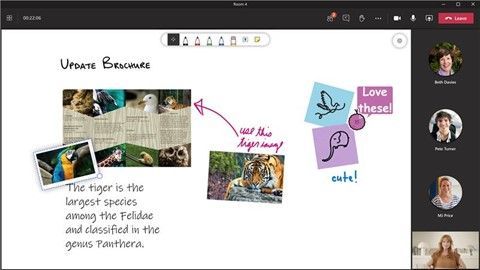
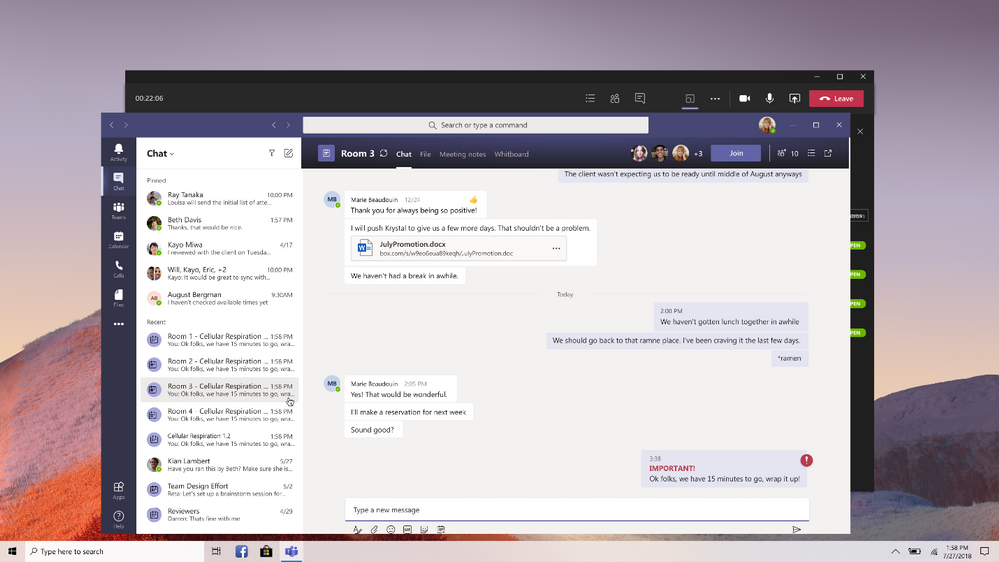
Any files from the breakout rooms can be shared in the main meeting once everyone is back together and will be available afterwards in the meeting chat.
FAQ
Who can start a breakout room?
- Only the meeting organizer can start breakout rooms.
How can I use breakout rooms?
- The meeting organizer can start a breakout room on the desktop client only.
- Participants can join a breakout room from desktop, web or mobile. Microsoft Teams Rooms do not have breakout room capabilities yet.
- Participants logged in from multiple devices will have all end points join the same breakout room.
How do I make sure I can start using breakout rooms?
I’m an educator, what will my students be able to do?
- Since breakout rooms are Teams meetings, the same security policies and options apply.
- Educators will have the option to push students into the breakout rooms and pull them back to the main meeting, without any additional action needed by the student.
- Students can be assigned to breakout rooms, join breakout rooms, use the whiteboard or screen share if allowed to in normal school meetings, re-join the main meeting, and see their breakout room chat.
- Students cannot add participants, will not see suggestions of students who should join, cannot get meeting details or dial out, will not see the files or chats from other breakout rooms, and cannot rejoin the original meeting themselves.
- Learn more about using breakout rooms at your school or university here.
by Contributed | Dec 9, 2020 | Technology
This article is contributed. See the original author and article here.
Earlier last month we announced improvements coming to search in SharePoint Online (https://techcommunity.microsoft.com/t5/microsoft-search-blog/we-re-improving-search-usage-reports-in-sharepoint-online-with/ba-p/1849502). As we continue to innovate across Microsoft Search to bring you a better, more precise search experience – we’re making some changes and improvements to search in SharePoint Online.
No matter where people work or what kind of device they use, they need the ability to quickly and easily find the information that will help them be more productive. As part of our continued effort to bring Microsoft Search to all your favorite productivity apps and services we’re making changes and improvements to several classic search experiences in SharePoint.
Changes and improvements to the query experience in SharePoint Online
Updates to FQL (FAST Query Language)
As we continue to modernize Microsoft Search, we’ll retire some elements of FQL described below in February 2021.
FAST Query Language (FQL) is a powerful query language that enables developers to perform exact searches and to narrow the scope of search to values that belong to a specific managed property or a full-text index. The FQL query language is only intended for programmatic query integration.
As part of this deprecation several operators related to FQL will be removed. Beginning on <DATE> the following FQL operators will be removed:
COUNT operator
The COUNT operator In FQL specifies the of number query term occurrences an item must include for the item to be returned as a result.
FILTER operator
The FILTER operator in FQL is used to query metadata or other structured data. Once this operator is retired, the FILTER operator will be ignored. This change will not impact the user experience; however, ranking of results may change.
Dynamic rank ‘weight’ parameter to the ‘string’ operator
Enables custom ranking where the expressions enclosed in the affected string() operator will get a different rank. This change will not impact the user experience; however, ranking of results may change.
Per string configuration of linguistics on/off
Enables linguistics control where stemming is not applied to the expressions enclosed in the affected string() operator. This change will not impact the user experience; however, ranking of results may change.
Per string configuration of wildcard on/off
Enables wildcard expansion control where the expected behavior is that when set to off then any wildcard character in the string must be treated as a character. This change will not impact the user experience; however, ranking of results may change.
FQL dynamic rank difference between OR and ANY
The ANY operator, is like the OR operator except that the dynamic rank (the relevance score in the result set.md) is affected by neither the number of operands that match nor the distance between the terms in the item. The OR operator in FQL is returns only items that match at least one of the OR operands. Items that match will get a higher dynamic rank if more of the OR operands match. Once this operator is retired, the ANY operator will be implemented similarly to the OR operator.
We recommend, where applicable, using the default SharePoint query language, KQL where your business requirements can be similarly met.
KQL is the default query language for building search queries. Using KQL, you specify the search terms or property restrictions that are passed to the SharePoint search service.
Learn more about KQL query syntax at https://docs.microsoft.com/en-us/sharepoint/dev/general-development/keyword-query-language-kql-syntax-reference.
Search Query Rules
Search Query Rules in SharePoint help support the users’ search intent, by creating pre-defined rules which apply to the user queries. In a query rule, you specify conditions and correlated actions. When a query meets the set conditions, search performs the actions to improve the relevance of the search results.
For example, you might specify a condition that checks whether the query matches a term in a SharePoint term set, or another condition that checks whether the query is frequently performed on a particular search vertical in your search system, such as Videos.
Beginning on February 1st, 2021 we’ll be removing the following conditions in SharePoint
- Context condition: Category
- Context condition: User segment
- Query condition: Taxonomy
- Found in query condition option “Query matches dictionary exactly.”
- Found in query condition option “Query contains action term.”
- Found in query condition option “Advanced Query Text Match.”
- Query condition: Common query
- Query condition: Commonly clicked property
- Query condition: Regular expression
In addition to these changes, we’ll additionally deprecate the following out-of-the-box query rules that take a dependency on the conditions to be deprecated:
- Location in People Search (depends on Taxonomy query condition)
- Location in SharePoint Search (depends on Taxonomy query condition)
- Phone Number in People Search (depends on Regular expression query condition)
- Phone Number in SharePoint Search (depends on Regular expression query condition)
- Tags in People Search (depends on Regular expression query condition)
- Tags in Conversation Search (depends on Regular expression query condition)
- People Expertise Search
NOTE These deprecations only apply to classic search experiences, they do not affect the modern search experiences.
For scenarios in which you would like to promote a result above existing ranked results, Microsoft Search provides a set of Answers, both editorial and AI mined, that can be used in place of classic search functionality such as Best Bets and Promoted Results.
An Answer is a highly relevant and high confidence result that satisfies a user intent expressed as a query/question in search, presenting the most relevant information needed to get a job done and help users to faster task completion.
An Answer is a way to address user intent. When searching, the user typically types in characters and keywords to express an intent. Recognizing the keywords that are triggers for specific intents is important, but it is even more important that the content that is shown in search satisfies the user intent.
Answers are useful when you want to promote a search result to appear above ranked results. For example, for the query “sick leave”, you could specify a particular result, such as a link to a site that has a statement of company policy regarding time off work. You can think of Answers as being navigational aids to assist employees in getting directions to the information that matters most to help them keep productive and informed.
In Microsoft Search, an Answer can come from a variety of sources. Learn more about Microsoft Search Answers at https://blog.wbaer.net/2020/10/06/making-the-most-of-answers-in-microsoft-search/.
Changes and improvements to relevance in SharePoint Online
Changes to Authoritative Pages
Currently, as a global or SharePoint admin in Microsoft 365, you can influence the pages or documents that should appear at the top of your list of search results by identifying high-quality pages, also known as authoritative pages. Authoritative pages link to the most relevant information. A typical example of an authoritative page could be the home page of your company portal. Beginning February 1, 2021, we’ll remove the ability to configure authoritative pages in SharePoint Online.
Like query rules, Answers in Microsoft Search can be implemented to influence specific sites, documents, and more to promote a result above ranked results. Refer to the information above to learn more about Answers in Microsoft Search.
Improving Personal Favorites
Search is something we use every day, a lot, and it’s hard to keep track of what you last searched for now you’ll no longer need to search for what you’ve searched for adding a new option to view and manage your personal query history.
In SharePoint Online, personal favorites were used to display previous queries when a threshold was met, for example, if frequently searching for “Contoso Marketing Presentation”, this query would become a candidate to be displayed in search. Beginning February 1, 2021, we’ll remove personal favorites and recommend personal query history in Microsoft Search.
With personal query history, you’ll see your recent queries as you begin typing in the search box to help you get back to insights and information you recently used or accessed so you’ll no longer have to bookmark your queries or memorize the right query to get you back to where you were. Your personal query history can be managed through your Office 365 My Account settings and new My Account privacy controls allow you to delete your query history or download your query history for future reference.
To learn more about Microsoft Search in SharePoint visit https://aka.ms/MicrosoftSearch/Ignite2020/Sessions/5002. To watch related sessions from Microsoft Ignite visit https://techcommunity.microsoft.com/t5/microsoft-search-blog/microsoft-search-at-ignite-2020/ba-p/1651098.
by Contributed | Dec 9, 2020 | Technology
This article is contributed. See the original author and article here.
For those of you studying towards the AZ220 Azure IoT Developer Certification, Pluralsight have begun publishing a series of videos targeting individual sections of the Objective Domain.
Why become certified?
Becoming certified in any subject is a fantastic idea for a number of reasons. The primary goal for me when deciding to become certified is to give myself a measure of how well I know the whole subject.
In the case of AZ220 of course, I was involved in writing questions for the exam itself. However the process is actually quite similar, in that as authors, we’re tasked with writing a question on a given topic. In order to write a good question you need a clear understanding of the topic and the areas of learning required. This is the same when preparing for the exam.
There are some other great benefits to becoming certified too. An obvious benefit is the credibility you add to your skill set when either applying for jobs or tendering for contracts depending on your mode of working. This can mean the difference between landing that dream job or not, or perhaps achieving a payrise or promotion, or grabbing a new client.
Of course, having well trained staff working for your company has a heap of benefits in itself, meaning the work they produce will be of a higher quality. Also, staff who are offered training as part of their position tend to be happier in their role.
Finally, certifications often form part of a wider set of exams leading to a achieving an Associate or Expert level certification. This then demonstrates your overall mastery of a far wider topic area.
Where do I start?
When studying for Microsoft Certifications, the first place I start is on the Certification Page;
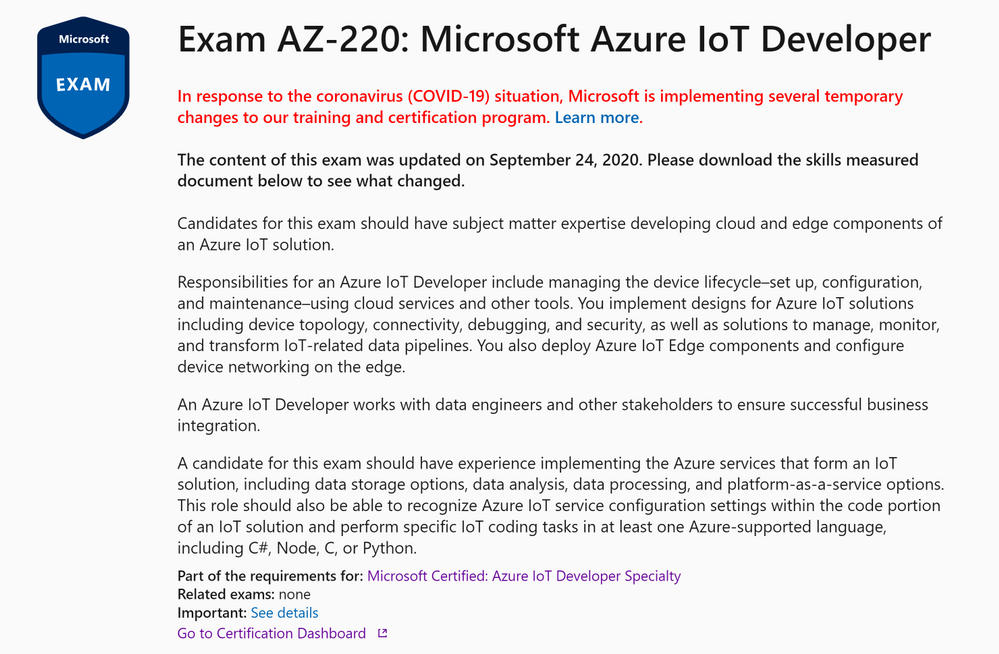
This is where you’ll find information on the audience that Microsoft are pitching the exam to and a roundup of the responsibilities and skills of the person taking the exam.
There’s then a more in depth list of Exam Topics which is called the Skills Outline, this is often referred to as the exam Objective Domain or OD. You’ll often find this as a downloadable document in the Skills Outline Section;
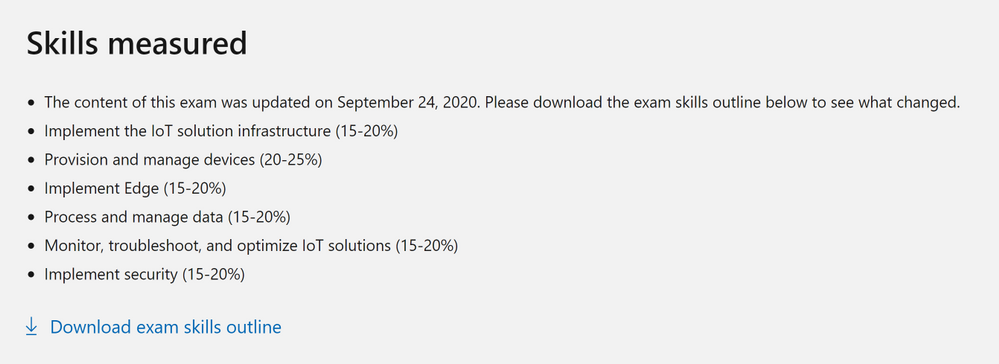
What are Pluralsight doing?
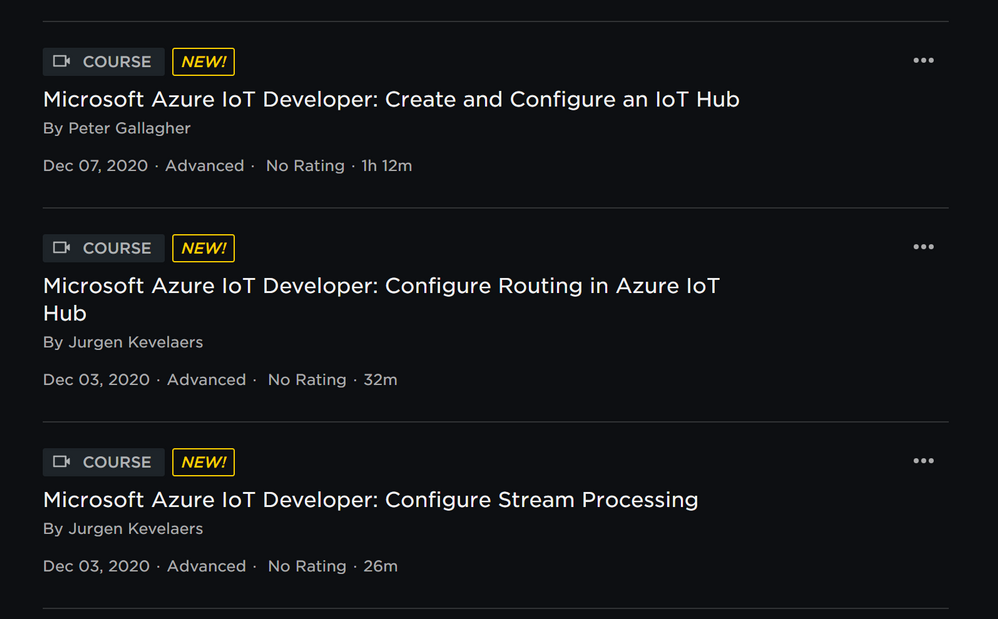
There are currently three courses published on the platform, with the rest of the Objective Domain being covered in the coming weeks and months;
- Create and Configure an IoT Hub – Pete Gallagher
- Configure Routing in Azure IoT Hub – Jurgen Kevelaers
- Configure Stream Processing – Jurgen Kevelaers
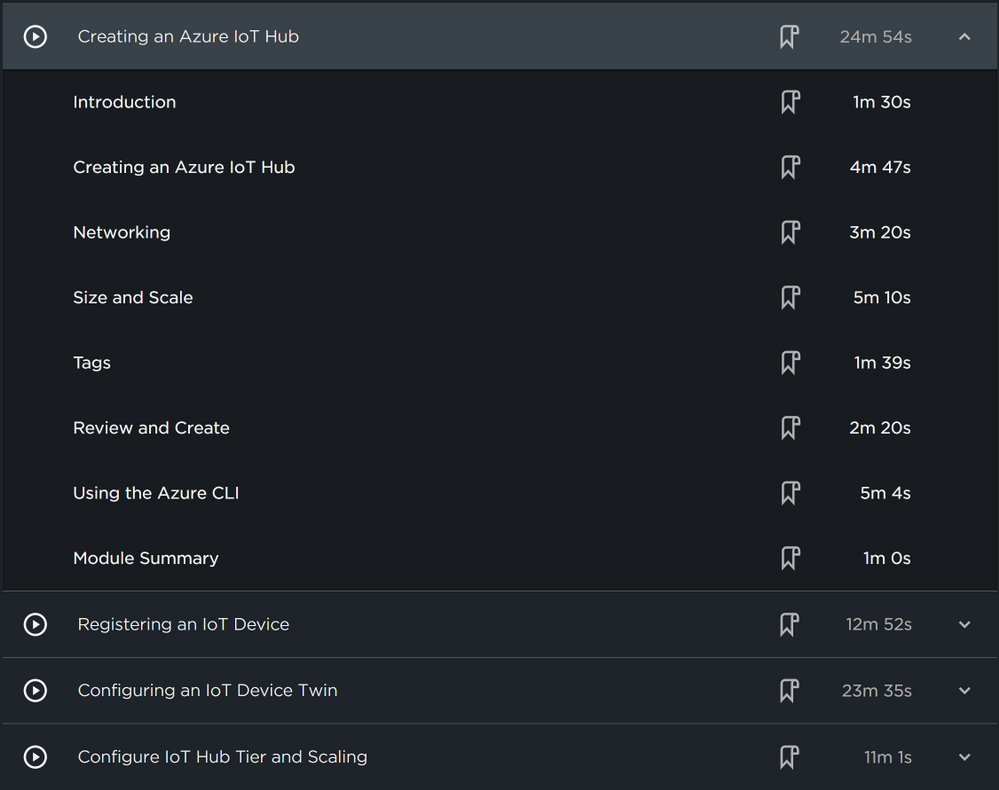
I have created the first course above, concentrating on Creating and Configuring an IoT Hub.
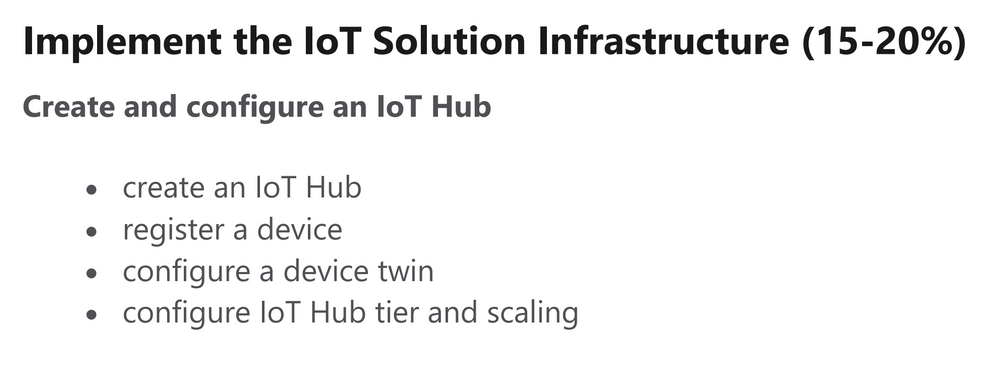
As a bit of explanation, each section of the Exam Skills Outline or Objective Domain document, is broken down into different categories and sections.
“Create and Configure an IoT hub” forms the first section of the AZ220 Objective Domain Document which is part of the Implement the IoT Solution Infrastructure category;
As such, I’ve formatted my course to map to these domain objectives exactly;
Along with some fabulous fellow authors, I was actually involved in the creation of the AZ220 certification. This has gifted me a unique perspective from which to create valuable content. This I hope will help make these videos very useful in your journey to passing the AZ220 Azure IoT Developer Certification.
What other sources of learning material are there?
Alongside this series of videos, there is also a wealth of information to study on the Microsoft Docs site, as well as curated Learning Paths as part of Microsoft Learn.
Further, the excellent Paul DeCarlo has created an invaluable Study guide for the AZ220 Certification, with links to the relevant MS Docs pages for each section of the Objective Domain.
There’s also an Event Learning Path available. This is a set of curated content created by members of the Azure IoT Advocacy team and is a solution based set of Videos tailored towards the topics in the exam.
Are there any events planned?
At the time of writing, we’re excited to announce a special IoT Event named All Around Azure IoT!
On January 19th 2021, across three different time zones, this awesome event will feature speakers both from the Azure IoT Advocacy team as well as Microsoft MVPs like myself. Once again, this content will be targeted at attendees looking to learn more about the Azure IoT platform with a view to becoming certified. I highly recommend looking at the event, it’ll be awesome!
Final takeaways…
Azure IoT Developers looking to pass the AZ220 Azure IoT Developer have never had so many excellent resources to call upon to help in their journey.
The Azure IoT platform is, in my opinion, the most fully featured platform for IoT Developers, the range of services available on any platform, the learning materials are second to none and the community is fantastic.
Becoming certified will offer you a great range of opportunities in your career as an IoT Developer and is a great way to verify your achievements.
I hope you have fun, enjoy your journey and feel free to get in touch if you have any questions at all!



Recent Comments