by Contributed | Nov 4, 2020 | Technology
This article is contributed. See the original author and article here.
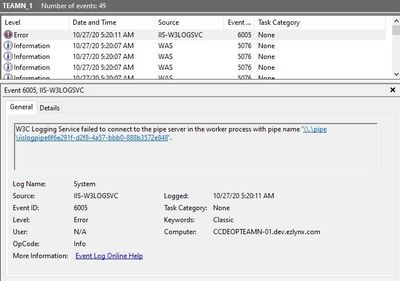
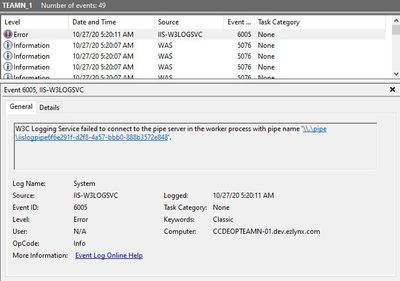
In some cases, Event Viewer may display “W3C Logging Service failed to connect to the pipe server” error after application pool recycles.
The error message:
Root Cause
W3logsvc process maintains pipeline to the worker process to get detailed information of each request so it can log data accordingly.
This event error happens if the pipeline connection is not available anymore.
Solution
If this error happens during application pool recycle and it doesn’t cause any issues with the application, it’s okay to ignore it.
In the scenario I troubleshot, it was happening at 4am which is the time for the regular application pool recycle. There were occurrences during the day but when I look into them, I saw application recycles right before the Event ID 6005 so they are also expected.
Note: In the my case, the issue started occurring the application is migrated from Windows Server 2012 R2 to 2019.
by Scott Muniz | Nov 4, 2020 | Security
This article was originally posted by the FTC. See the original article here.
During Medicare’s Open Enrollment Period, which end ends December 7, Medicare beneficiaries can choose the plans that are best for them. It’s good to understand what sellers are — and aren’t — allowed to do, so you’ll be prepared if an insurance agent or representative tries to enroll you in a Medicare plan that isn’t right for you.
Brought to you by Dr. Ware, Microsoft Office 365 Silver Partner, Charleston SC.
by Contributed | Nov 4, 2020 | Technology
This article is contributed. See the original author and article here.
AD Explorer v1.50
This release of AdExplorer, an Active Directory (AD) viewer and editor, adds support for exporting data from the “Compare” dialog and is now available for x64 and ARM64.
Disk Usage v1.62
This release of Disk Usage (DU), a tool for viewing disk usage information, now also accounts for the MFT (Master File Table), removes the MAX_PATH limitation and is now available for ARM64.
VMMap v3.31
This update to VMMap, a utility that reports the virtual memory layout of a process, fixes a Thread Environment Block bug on Windows 10 systems.
Sysmon v12.02
This bugfix update to Sysmon improves configuration parsing.
ARM64 ports
by Contributed | Nov 4, 2020 | Technology
This article is contributed. See the original author and article here.
Engaging your people is more critical than ever. Yammer connects leaders, communicators, and employees to build communities, share knowledge and engage everyone. Use this as a toolkit to understand the scenarios for getting the most out of Yammer today.
We have three sections that include videos, downloadable and editable resources, customer stories, and the features that map to help you execute the scenarios in your own organization.
- Exchange knowledge and crowdsource ideas with employee-led communities
- Share information and engage people with modern workplace Communications
- Foster culture and navigate change, encourage leaders to use Yammer
If you are just getting started or have tried Yammer in the past, we have the tools for you in every step of the journey.
Take a look here!
https://aka.ms/Yammer/Resource/Flipbook
Or follow this link to view it directly.
https://aka.ms/Yammer/Resource/Flipbook
by Contributed | Nov 4, 2020 | Technology
This article is contributed. See the original author and article here.
Intro
At Microsoft Ignite 2020, Scott Hanselman showcased how he is using Azure, IoT (Internet of Things), and Developer Tools to help his family manage household chores.
The Problem
Scott, like more and more people who are working from home, realized that there had to be a better way to stay in front of the need to do additional chores around his home. With everyone at home, things like dishes, garbage, and general chores add up fast. He wanted to be able to see at a glance the current list of chores that needed to be completed, real-time status of chores that can change quickly over time, and to be notified when certain chores were needed to be complete, for instance garbage.
The Solution
Scott already leverages a DAKboard, which allows customization of a display via a website. On his DAKboard, Scott can put his work/personal calendar, family photos and the weather all on a monitor that sits in his kitchen. He wanted to be able to add a “heatmap” of sorts to his DAKboard that would show parts of the house that notable chores are (garbage cans for instance) and what the “status” of them are in real-time. This way, if he sees that a chore needs to be done, the family can respond.
There are a few things at play here.
- Sensors: Most of the chores rely on items that are not “smart”, so external sensors and an IoT solution will be needed.
- Web: The heatmap requires real-time updates, so a web solution that offers such will be needed.
- Notifications: Finally, he wants to be notified when the threshold is met of a certain chore instantly, so a communication mechanism is needed.
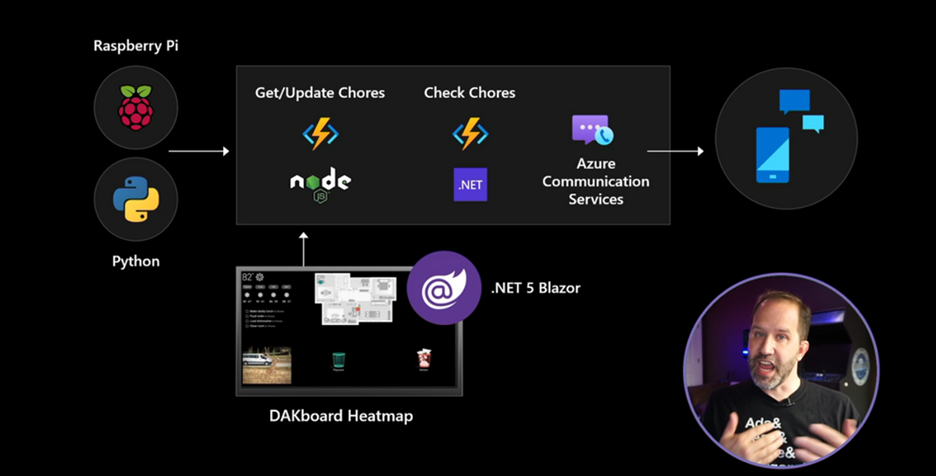
With the above requirements, we can start to build a solution. The solution will require an IoT device that will poll the status of a particular chore. The device will update a datastore via a service and the heatmap will be a web application that will sync with the value of the datastore in real time. With that, we landed on the below solution architecture.
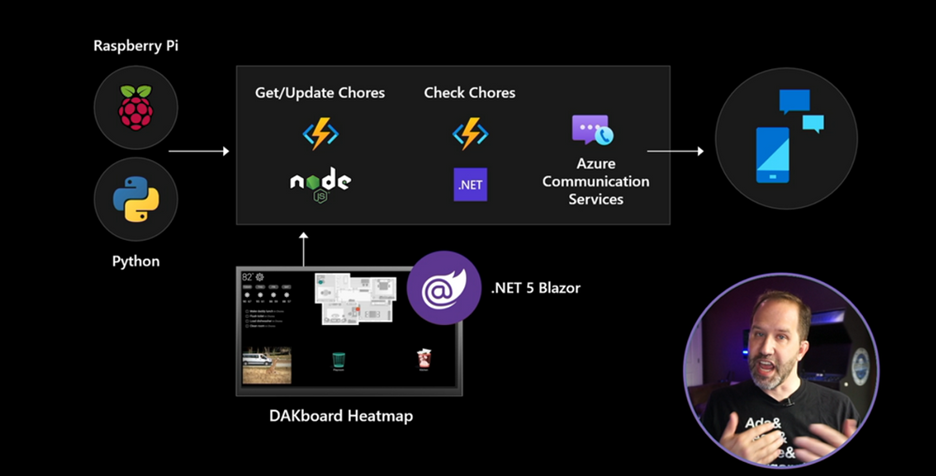
To build the solution, we knew that an IoT device would be needed to monitor the status of the chore. We decided on a Raspberry Pi with a connected . In the case of garbage status, the sensor was attached to the inside of the lid of the garbage can. The sensor could then check the level of the garbage in the can and update the chore datastore via an Azure Function written in Node.js. When the datastore is updated, another Azure Function, written in C#, is triggered that compares the current level to the threshold, and if it is met, a notification is sent.
For the notification, we relied on recently announced Azure Communication Services to send an SMS. When the notification function determines a message needs to be sent, it will leverage a phone number obtained via Azure Communication Services and the chore assignee will get a message from that number. Azure Communication Services is configured via the Azure Portal, more information can be seen at the GitHub repository for the ChoresIOT solution. Working against Azure Communication Services is seamless, as it is included in the already existing Azure SDK (software development kit). There is also an Azure Logic App connector for Azure Communication Services that you can leverage.
For the heatmap UI, we need to leverage a web technology that allows real-time communication with the function that manages the datastore. The technology that was decided on was Azure SignalR Service. The complete application leverages ASP.NET Core Blazor WebAssembly in .NET 5 configured to integrate with Azure SignalR Service. Because we are leveraging WebAssembly, we are able to deploy the application to any host since a backend server is not required. We deployed the web application to Azure Static Web Apps, a new service in Azure where you can host applications that do not require a connected backend server. Finally, since the solution is using Azure SignalR Service, when the chore datastore is updated, the heatmap will update automatically whenever the threshold for a particular chore is met.
Now that the solution is complete, whenever a chore status is updated via the Raspberry Pi, the datastore will be updated via the Azure Function. Once the datastore is updated, the other Azure Function will check the status the chore threshold and send an SMS if needed. Finally, the heatmap will be updated in real-time. This end to end experience can be seen below during the Microsoft Ignite 2020 session.
As you can see in the video, when Scott puts trash into the garbage, the heatmap automatically updates and he receives an SMS message, powered by Azure Communication Services.
What’s Next?
The ChoresIoT GitHub Repository lists out all the parts needed to setup a similar solution at home. Take a look at the source code and contribute or ask questions if interested. For more information on Azure Communication Services and how to enable telephony-over-IP communications features to your applications, be sure to check out the documentation.
Also be sure to check out the free services that you can create in Azure today.


Recent Comments