by Scott Muniz | Jul 9, 2020 | Uncategorized
This article is contributed. See the original author and article here.
Hello to all of our AWESOME readers that have helped us build the Premier Field Engineering TechCommunity blog up to have great content, great Q&A, and become one of the authoritative blogs on the TechCommunity site!
Due to some recent changes that you may or may not have heard about, we have decided to consolidate our efforts into the Core Infrastructure and Security TechCommunity in order to provide a more encompassing location for our readers to learn, grow, design, and most importantly (to me), fix things! All new content will be published to the Core Infrastructure and Security TechCommunity blog, and all existing content will be moved, barring no issues, on July 20, 2020.
The CIS TechCommunity is already an extraordinarily popular blog, and this will result in an excellent merger where Core Infrastructure and Security will not only cover its typical topics (Azure, Windows, Active Directory, core OS, clustering, performance, storage, MIM/FIM, System Center, etc), but will now also include those additional topics already covered within the Premier Field Engineering blog, to include our offerings content for workshops, health checks, and other arenas.
This is a change we are all really excited about, and we think you will find it only increases the depth of information you can find!
You might be saying to yourself at this point; “Brandon, am I going to have to update all of my bookmarks I have to the Premier Field Engineering TechCommunity content?”. The answer to that potentially daunting question/task is no, you should be redirected automatically. But, just in case, here’s an easy button: https://aka.ms/CISTechComm
If you happen to follow the RSS feed for the PFE TechCommunity (I’m looking at all of you 1.25 MILLION followers of the RSS feed!), that unfortunately will need to be updated. I apologize for the inconvenience on that front for sure!
We look forward to seeing all of our loyal readers over in the Core Infrastructure and Security TechCommunity, and remember, follow the Core Infrastructure and Security TechCommunity to get quicker access to content that can help you solve all your problems in the world! (Ok, not really, but as a team of nearly 600 people, we do try).
We’ll see you over there!
Thank you for reading, and we thank you for your continued support now and in the future!
Brandon “look I wasn’t as long winded this time” Wilson
by Scott Muniz | Jul 9, 2020 | Uncategorized
This article is contributed. See the original author and article here.
Scenario:
You are trying to perform ListBlob operation on a container with soft delete option enabled and having ‘X’ number of day as the retention period. You are facing latency while performing the listing operation on the container.
Actions:
You are trying to perform ListBlob operation on a container comprising of multi-million blobs and this can lead to high storage latency being observed for the operation. The article talks about the some of the key points that you can take note off and try isolating this ahead:
- Let us look at series of steps that take place whenever a listing operation is performed
- Whenever a ListBlob operation is performed on a container – with or without prefix, the Azure Storage’s Partition server will scan internal filetables and memorytables on the partition which is holding that storage account. The partition may or may not contain data for other storage account too.
- Each iteration scans a maximum of 5000 rows by default (however it may not return any rows), it returns the result and the next marker. Additionally, the table layer also has a timeout of 5 seconds for any kind of scan operation done.
- Once this timeout OR maximum rows are hit, the table server will return the results it got so far, along with the next marker. Hence, we may sometimes not see the blob that we ‘expected’ to see in first result. This is as per design.
- Additionally, if you are overwriting blobs very frequently, it generates a lot of snapshots and may increase the time for the listing operation.
- Let us now look at series of steps that take place when a deletion operation is fired with Soft Delete option as disabled.
- Whenever you perform delete operation over the blobs and if the soft delete option isn’t enabled, the blobs get marked for deletion at the same time itself.
- The garbage collector then collects all the blobs marked for deletion and clean them up.
- Please note that there might be some delay in garbage collector to catch up on the blobs marked for deletion.
- Until this time, you might see latency while performing the listing operation as it could be a case that deleted blobs are interleaving with live blobs.
- Once the GC process catches up you should no longer see any latency while performing the listing operation.
- Let us take this on step further and look at series of steps that take place once a deletion operation is fired with Soft Delete option as enabled.
-
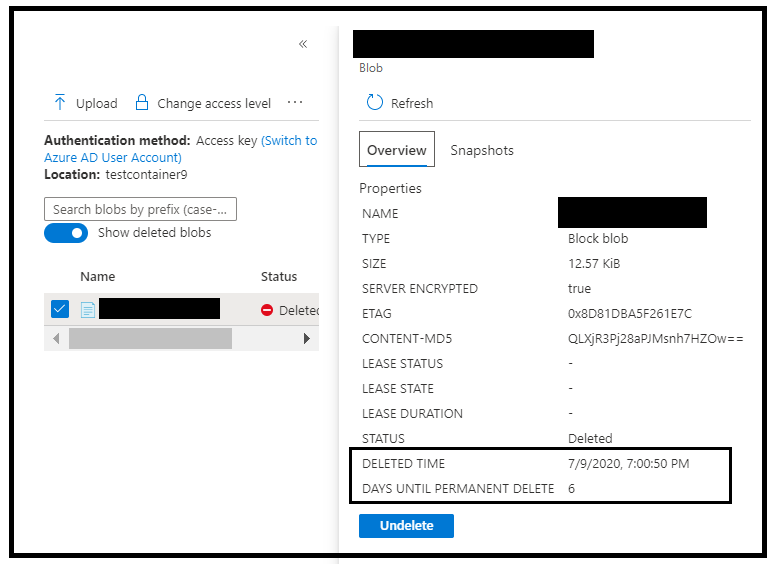
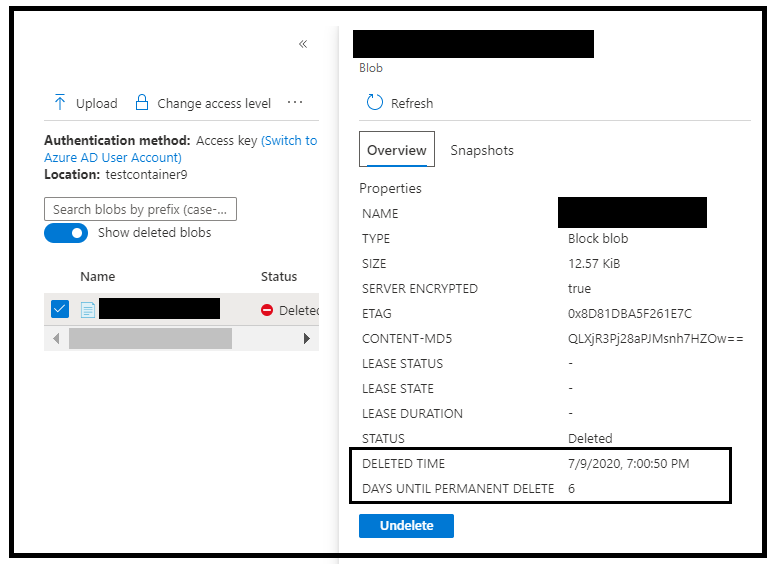
- Whenever you perform delete operation over the blobs and if the soft delete option is enabled, the blobs will continue to reside in the storage account until the actual expiry time of the blob is met. You can get an idea of the actual expiry time by help of Deleted Time and RemainingRetentionDays (Days until permanent delete)
- Deleted Time signifies the time when the delete operation was performed over the blob whereas the RemainingRetentionDays signifies the number of days after which soft deleted blob will be permanently deleted.
- You can check for these values from the Azure Portal by selecting the properties of the deleted blob. Please refer to the below snippet:
- Alternatively, you can also make us of ListBlob API call and include the parameter as include={deleted} to fetch the values for Deleted-Time and RemainingRetentionDays.
- Now, in this case, the garbage collector will not attempt to remove these soft deleted blobs prior to that timeframe as they will not qualify for the same.
- Post Soft Delete expiry time, the blobs will get qualified for the garbage collection.
- The GC process may then additionally take couple days to permanently clean these objects ahead.
- For example : Let’s say you have deleted the blobs starting 7th Jan at 01:00 PM UTC until 7:00 PM UTC and you have soft delete option enabled on the account with retention period of 3 days. In this scenario, the blobs will continue to reside in the storage account approximately till on 10th Jan at 07:00 PM UTC (i.e. until respective blobs expires). The GC process may then take additional days couple of days before you start to see the effect of blob deletion. (NOTE : These values are just for representation)
- The latency in this case shall continue to persist for a longer time as compared to the delete operation with soft delete option disabled.
By far, we know that the ListBlob operation on a multi-million blob container may cause high storage latency and this is as per design. The question further arises if there is anything that can be done to overcome the latency which is caused due to deletion. There can be 3 further sub-scenarios here:
- You have completed the deletion of blobs, but you don’t want to wait for entire expiry time to be met. Below are the steps that you can then follow ahead:
- Undelete (recover) blobs deleted on 7th JAN (Date taken from the above example only; you need to modify as per you requirement)
- Temporarily disable the Blob SoftDelete settings.
- Delete the recovered blobs again. This time when the blobs are deleted, they will be marked for permanent deletion as SoftDelete was disabled.
- Enable SoftDelete settings back again.
- In case, you have gone pass the retention period this option will not be available, and you will then only have to wait for GC process to catch up.
- You are yet to start with the deletion of blobs. Below are the steps that you can then follow ahead:
- Temporarily disable the Blob SoftDelete settings.
- Delete the recovered blobs again. This time when blobs are deleted, they will be marked for permanent deletion as SoftDelete settings was disabled.
- Enable SoftDelete settings back again.
Note: In both the above-mentioned options, it may impact other blobs deleted during the time SoftDelete is temporarily disabled on Storage Account.
- In case, you don’t want to go with either of the above 2 options, but still want to clean up soft delete blobs without waiting for the retention period, there is one more option you can try ahead:
- You can copy all the blobs in the container to a different container.
- Delete the container.
Below are other generic points related to Soft Delete option:
- This is a great feature in order to protect your blob data from being accidentally or erroneously modified or deleted
- The options is not enabled by default whether it is a new account or an existing storage account.
- You can enabled or disable the feature at any given point of time.
- If at any point of time, you want to get a count of soft deleted blobs, you can make use of the powershell script provided in the link below as well:
https://gist.github.com/ajith-k/80a2dc84986d6bb83be76be6bc672043
Hope this helps!
by Scott Muniz | Jul 9, 2020 | Uncategorized
This article is contributed. See the original author and article here.
Train your mind and the tech will follow.
This series of training videos covers the value and recent updates across SharePoint, OneDrive, Microsoft Lists, Microsoft Teams, Project Cortex, Yammer, and Stream – including information for employees, admins, and developers – all in the context of scenarios supported within Microsoft 365 across teamwork and employee engagement.
It is all here in one blog post, inline… consume at your leisure.
Scroll down and learn about all as you go or click each title in the grid below to jump down the page to watch specific sessions – each with related links to learn more:
Microsoft 365 Collaboration [keynote]
Microsoft 365 empowers individuals, teams, and organizations to be creative, collaborative, and effective with an integrated suite of experiences that are simple, superior, smart, and secure. Jeff Teper shares the latest innovations and updates for content collaboration, employee engagement and communications, and knowledge management. Learn how the experiences in Microsoft 365—including SharePoint, OneDrive, Yammer, Stream, and Office—integrate to power collaboration across devices, on the web, in desktop and mobile apps, and in the hub for teamwork, Microsoft Teams.
Presented by Jeff Teper [LinkedIn | Twitter], Omar Shahine [LinkedIn | Twitter], Navjot Virk [LinkedIn | Twitter], Susan Hanley [LinkedIn | Twitter], Graham Sheldon [LinkedIn | Twitter], and Ed Averett [LinkedIn | Twitter].
Learn more:
[Back to top]
OneDrive powers intelligent file experiences across Microsoft 365
OneDrive is the intelligent files app for Microsoft 365. In this session we will cover upcoming innovations and explore functionalities that empower you to access, share and collaborate on all your files from anywhere while protecting your work.
Presented by Randy Wong [LinkedIn | Twitter].
Learn more about OneDrive in Microsoft 365: https://aka.ms/OneDrive/blog
[Back to top]
Collaboration & external file sharing across Microsoft 365
Microsoft 365 provides a rich set of solutions for collaborating with users both inside and outside of your organization. This session offers an in-depth look at existing and brand-new external sharing capabilities. Learn best practices for configuring external sharing and educating users on how to best leverage Teams, SharePoint, and OneDrive for collaborating with others.
Presented by Ankita Kirti [LinkedIn | Twitter].
Learn more:
[Back to top]
Microsoft Lists – Share and track information with across Microsoft 365
Get an early look at Microsoft Lists – your smart information tracking app in Microsoft 365. Lincoln will showcase how Lists evolve from SharePoint lists today and how current and new innovation empower individuals and teams to create, share and track information – all in the apps they use every day, including Microsoft Teams. Lots of demos highlighting Lists home, mobile, conditional formatting, fast quick edit, ready-made templates, new views, alerts, flows and more – work tracking with built-in security and compliance.
Presented by Lincoln DeMaris [LinkedIn | Twitter].
Learn more:
[Back to top]
Design productivity apps with SharePoint lists and libraries, Power Apps, and Power Automate
No-code and low-code apps have been essential in SharePoint for a long time. Additional tolls from the Power Platform – Power Apps and Power Automate – provide additional power and capability to build productivity using SharePoint lists as the data source. We also discuss the patterns to help transform customer solutions that remain on-premises and/or in legacy tool sets like InfoPath, SharePoint Designer or Access Web Apps.
Presented by Chakkaradeep “Chaks” Chandran [LinkedIn | Twitter].
Learn more how to create a Power App for a list in SharePoint for Microsoft 365.
[Back to top]
Knowledge and Project Cortex – the Microsoft 365 Vision
In a world of rapid change, harnessing knowledge empowers people to act quickly, and organizations to be more resilient. Later this year, Microsoft will release Project Cortex, our new knowledge and content management solution. Join us for an overview of Project Cortex and Microsoft Search and how they help customers harness knowledge throughout Microsoft 365.
Presented by Naomi Moneypenny [LinkedIn | Twitter] and Chris McNulty [LinkedIn | Twitter].
Learn more about Project Cortex: https://aka.ms/ProjectCortex.
[Back to top]
Connect the workplace with engaging, dynamic experiences across your intranet
The intelligent intranet in Microsoft 365 powers collaboration, employee engagement, and knowledge management. The intelligent intranet is mobile-ready, personalized, social, and actionable. Join in and explore innovations like multilingual pages, navigation, news, pages, and broader integrated solutions with Yammer, Stream, and Microsoft Teams.
Presented by Debjani Mitra [LinkedIn | Twitter] and Brad McCabe [LinkedIn].
Learn more:
[Back to top]
The New Yammer
The new Yammer is landing. See how Yammer has been completely redesigned to power leadership engagement, company-wide communication, and communities in Microsoft 365. Explore the new capabilities, features, and styling while discovering how Yammer continues to supercharge community, knowledge sharing, and engagement across Microsoft 365.
Presented by Jason Mayans [LinkedIn | Twitter].
Learn more about The New Yammer and Yammer in general.
[Back to top]
Microsoft 365 Live Events and remote work
Learn how live events can help your organization deliver better communications, training and more. In this session, we will walk through a detailed setup of a live event and look at the underlying technology that enables successful live broadcasts.
Presented by Lorena Huang Liu [LinkedIn | Twitter] & Christina Torok [LinkedIn | Twitter].
Learn more about Microsoft Live Events.
[Back to top]
Architecting Your Intranet
You are ready to start bringing the power of the intelligent intranet to your organization, but you are wondering where to start. What should you do with your existing sites? What about navigation? How should you think about your IA? These are just a few of the questions you might be wondering. Join us for this discussion as we help break through the analysis paralysis and learn from the best practices of numerous customers that have already started the journey.
Presented by Melissa Torres [LinkedIn | Twitter].
Learn more about the Microsoft 365 intelligent intranet and how to use SharePoint site designs and site scripting in Microsoft 365.
[Back to top]
Migration to SharePoint, OneDrive, and Microsoft Teams in Microsoft 365, free and easy
Regardless of your organization’s size, data scale or information complexity, you can migrate documents and sites into SharePoint in Office 365 successfully. Come learn about new capabilities available in the SharePoint Migration Tool (aka.ms/SPMT) in addition to performance and reliability investments to best assess, plan and implement your migration. Learn how to migrate file shares, doc libraries, and SharePoint Server 2013 sites and more using the SharePoint Migration Tool and new capabilities to simplify large file share migrations through SharePoint Admin Center.
Presented by Hani Loza [LinkedIn | Twitter] and Eric Warnke [LinkedIn | Twitter].
Learn more:
[Back to top]
SharePoint developer overview
Discover how every experience can become more collaborative and engaging with the Microsoft 365 platform – starting with SharePoint. SharePoint serves as the center of collaboration – where content is stored and communicated across teams, departments, and the whole organization. See the latest development advancements and new capabilities for SharePoint. You’ll take away new ideas for building next-generation collaboration applications and get the essential roadmap for custom apps in your organization.
Presented by Luca Bandinelli [LinkedIn].
Learn more about the SharePoint Framework (SPFx).
[Back to top]
Jumpstart your projects with community projects from Patterns and Practices (PnP)
Across SharePoint and Microsoft 365, an extremely active developer community has come together with SharePoint engineering and have released numerous valuable reusable components and controls, which will simplify design, implementation, and management of Microsoft 365 and on-premises deployments. Join this session to hear the latest updates around the different guidance, samples, and reusable assets built by the community for the community.
Presented by Vesa Juvonen [LinkedIn | Twitter].
Learn more:
[Back to top]
Security and compliance in SharePoint and OneDrive
Safeguard your devices, personal information, and files from being compromised. This session explores the core tenets of platform security, secure access and sharing, information governance, and compliance across SharePoint, Microsoft OneDrive, and Microsoft 365.
Presented by Sesha Mani [LinkedIn | Twitter].
Learn more about security and compliance in Microsoft 365.
[Back to top]
Well, if you’ve made it this far then your mind is full. And now, the tech shall follow.
Thanks for learning with us :),
Mark


Recent Comments