by Scott Muniz | Jul 15, 2020 | Azure, Microsoft, Technology, Uncategorized
This article is contributed. See the original author and article here.
By: Gourav Bhardwaj (VMware), Trevor Davis (Microsoft) and Jeffrey Moore (VMware)
Challenge
When moving to Azure VMware Solution (AVS) customers may want to maintain their operational consistency with their current 3rd party networking and security platforms. The types of 3rd party platforms could include solutions from Cisco, Juniper, or Palo Alto Networks and the means for connectivity is independent of the NSX-T Service Insertion/Network Introspection certification process for vSphere or AVS. The following is a use case based on an actual customer deployment.
Solution
The Azure VMware Solution environment allows access to the following VMware management components:
- vCenter User Interface (UI)
- NSX-T Manager User Interface (UI)
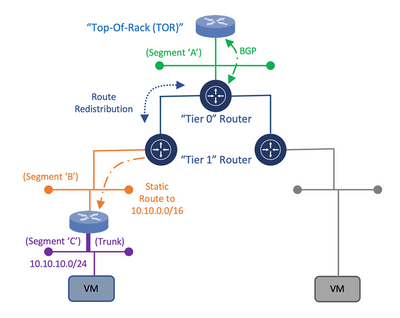
Within this architecture design, the uplink of the 3rd party appliance can be connected to a segment that is attached to the NSX-T “Tier 1” router while the individual or trunked downlinks of the appliance will support the connectivity of the Virtual Machine (VM) workloads which is similar to the On-Premises deployment model as depicted in the following diagram:
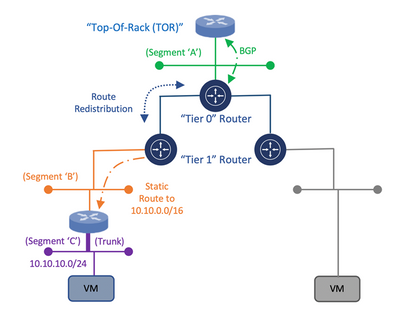
Diagram 1: Deployment Model for Connectivity of a 3rd Party Appliance with NSX-T
Once the appliance is attached to the NSX-T “Tier 1” router, static routes need to be configured to direct traffic through the 3rd Party appliance. Within the NSX-T Manager UI, the customer has the ability to create these static routes on the NSX-T “Tier 1” router which will assist in the network traffic direction through the 3rd Party appliance and to the customer’s VM workloads within AVS. Once the static routes are created, they can be redistributed within the dynamic routing protocol, Border Gateway Protocol (BGP).
This would allow for the static route information to be dynamically sent from the NSX-T “Tier 0” router through the uplink to the Top of Rack (ToR) platform and eventually, to the Azure Express Route backbone which will allow for the end-to-end connectivity from the customer’s locally attached On-Premises Express Route service to the AVS environment. This approach would provide a means to maintain the operational consistency between what is currently On-Premises and the Azure VMware Solution environment.
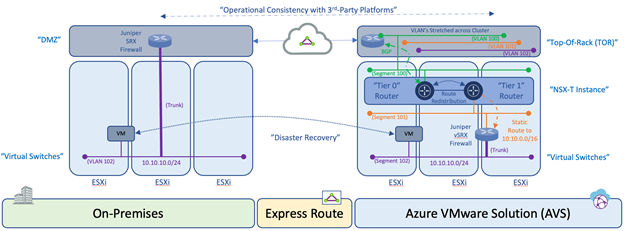
Diagram 2: Operational Consistency Deployment Model of 3rd Party Appliance in Azure VMware Solution
An additional consideration for this design is related to the location of the VM’s within the cluster and the potential vSphere Distributed Resource Scheduler (DRS) event which attempts to load balance the VM’s across the ESXi hosts within a cluster via vMotion based on available resources. During such as event, the 3rd Party appliance may reside on one ESXi host while the VM workload resides on another ESXi host. Within a customer’s On-Premises data center, this situation can be resolved by stretching the VLAN’s on the ToR switch that are associated to the uplinks and downlinks attached to the 3rd Party platform which would provide connectivity independent of which ESXi host the platforms and VM’s reside. Within Azure VMware Solution, this needs to occur as well using NSX Segments or vSphere Distributed Switch (VDS).
Once the solution is verified based on these mentioned topics, the customer is able to consume the 3rd Party platform within Azure VMware Solution in the same way as the On-Premises data center environment which will align with the requirement for operational consistency between On-Premises and AVS for services such as Disaster Recovery.
Author Bio’s:
Gourav Bhardwaj
Staff Cloud Solutions Architect (VMware)
VCDX 76 (VCDX-xx)
Digital and workspace transformation expert; Speaker at conferences and workshops.
LinkedIn: https://www.linkedin.com/in/vcdx076/
Trevor Davis
Azure VMware Solutions, Sr. Technical Specialist (Microsoft)
Twitter: @vTrevorDavis
LinkedIn: https://www.linkedin.com/in/trevorpdavis/
Jeffrey Moore
Staff Cloud Solutions Architect (VMware)
3xCCIE (#29735 – RS, SP, Wireless), CCDE (2013::20)
Focused on incubation and acceleration efforts for Azure VMware Solution (AVS).
LinkedIn: https://www.linkedin.com/in/jjtm/
Twitter: @Jeffrey_29735

by Scott Muniz | Jul 15, 2020 | Azure, Microsoft, Technology, Uncategorized
This article is contributed. See the original author and article here.
One of Azure’s largest online conferences returned even bigger this year as Brazil’s technical community rallied to “uncomplicate” all things cloud.
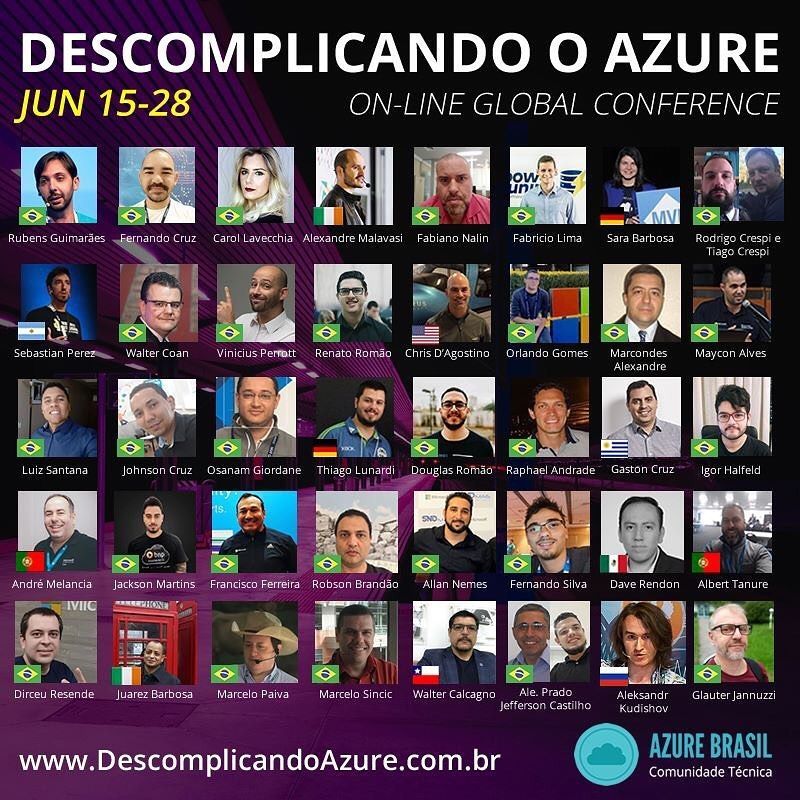
The fifth edition of Uncomplicating Azure – or Descomplicando o Azure – expanded from one to two weeks thanks to the support of more than 40 expert presentations on Cloud, Dev, Data, AI, IoT, Productivity and more.
The online conference from June 15-26 expanded farther than South America’s largest country to include speakers from 11 countries. So far, the event’s 35 hours of content has received 28,000 views and counting.
MVP and event organizer Rubens Guimarães said the conference sought to connect communities, people, cultures, and knowledge through digital channels in real-time.
“Participating in communities is something that requires effort, constant learning, time, and dedication, but it is very rewarding when colleagues come to you to talk about having earned a new certification through a lecture tip or getting a new job or even solving a problem of project,” Rubens said. “Being part of communities is something that completes my daily life, strengthening me as an individual in society.”
The ability to connect different people of different backgrounds was a particular highlight, Rubens said, with speakers hailing from Russia, India, USA, Argentina, Chile, and other countries. The event’s multi-platform nature enabled for the addition of subtitles in several languages.
Especially in the context of Brazil’s ongoing battle against the pandemic, the conference served as a meeting ground for members of the technical community to reconnect with each other and the wider world.
“As usual, being part of the Microsoft Community is incredible – and even now with this complicated situation, Brazilians can keep warm and alive through webinars,” said Brazilian Sara Barbosa, who previously served as an MVP for Office Apps & Services before recently joining Microsoft as an FTE. “The energy and content each speaker shared were great. Even though Descomplicando o Azure has a focus on Azure, the diversity of presentations allowed customers, enthusiasts, and community folks to learn about a variety of Microsoft technologies such as SQL, Power Platform, and others.”
Similarly, Brazilian MVP for Data Platform Rodrigo Crespi reinforced the benefit of consistently learning from other like-minds at home and abroad. “Being part of a technical community allows me to meet and interact with the brightest minds in IT,” he said. “There were several important moments, but I highlight my great satisfaction in sharing the little of my knowledge with various people around the world.” Brazilian MVP for Data Platform Fabricio Lima agreed that the event further developed his professional skillset.
Irish-based MVP speaker Alexandre Malavasi praised the sheer breadth and depth of the conference speakers, noting that the diversity of themes meant any audience from students to company managers would find something of use.
“It is extremely rare to see an event that involves so many speakers, including those with international participation, being completely free to the community,” Alexandre said. “I am sure that the event contributed for IT professionals, in general, to understand more accurately the potential, extent, and possibilities that Azure can provide for the development of robust, resilient, high-performance, and cost-effective applications.”
US-based MVP Gaston Cruz said the conference’s international perspective would be useful to many going forward. “This event not only allowed people to learn but also to get a lot of new ideas of how to implement cutting edge technologies and leverage them to support business needs and transform them in the worldwide context that we are in now.”
Argentine-based MVP Sebastián Pérez said he enjoyed the engagement of attendees, with some even following up after his presentation for more information. Meanwhile, German-based MVP Reconnect member Thiago Lunardi said he simply enjoyed being back in the Microsoft community with other thought leaders. “For me, [the highlight] was the minutes before going live. I was out of the spotlight for over 2 years, and the feeling to be back contributing was like I had never left it behind. It’s great to be part of Microsoft community, just great.”
While Uncomplicating Azure is an annual event, Rubens said the organizing team was already looking for an adaptation to be held every six months. Check out the YouTube channel to watch presentations from the conference.
by Scott Muniz | Jul 15, 2020 | Uncategorized
This article is contributed. See the original author and article here.
With three months until support for Office 2016 for Mac and Office 2010 ends this October, now is the time to transition to Microsoft 365 Apps. We know that transitions like this can be challenging – we’ve heard your concerns about app compatibility, managing configurations and the installation process, and getting users up and running on new devices even while working remotely. In the most recent update to the Microsoft 365 Apps for enterprise guided tour, we’ve included a few new videos that show how you can use Microsoft’s cloud deployment tools to address these concerns. Keep reading – and watch the videos – to learn more about these tools.
App Compatibility
Your apps – whether they’re custom line-of-business or just apps from other sources – need to keep working once you’ve upgraded to Microsoft 365 Apps. That’s why we offer the Microsoft Desktop App Assure service, which pledges that if you encounter app compatibility issues with any eligible Windows 10 or Microsoft 365 services, we’ll help you resolve them at no additional cost.
Managing configuration and installation
Every organization is unique, and software installation, configuration, and update processes must be tailored to fit your needs. The Office Customization Tool simplifies preparations and provides granular control over the installation process, with configuration settings grouped into intuitive categories. Easily deploy Office to fit the needs of your organization, from different languages to application preferences.
Simplifying deployment for remote workers
Microsoft’s suite of cloud provisioning tools simplifies and accelerates the deployment process for IT admins and end-users – even when they’re not working in the same location. Learn more about empowering remote workers with Microsoft 365 on Microsoft Docs.
With these tools, we’ve made it simpler for IT to deploy Microsoft 365 Apps. Find out more about how to get started – and the tools available to help – at the Deployment guide for Microsoft 365 Apps. Still have questions? Ask us directly during the Microsoft Office End of Support AMA on September 9, 2020, 9-10 AM Pacific.
by Scott Muniz | Jul 15, 2020 | Azure, Microsoft, Technology, Uncategorized
This article is contributed. See the original author and article here.
AI and Machine Learning techniques are changing the ways industries process data. And one of the most exciting developments is the ability to process at the edge, next to cameras, sensors, or other systems generating that data. This allows you to get insights right away, without needing to send everything to the cloud first – saving you bandwidth and getting results faster.
We designed Azure Stack Edge for exactly these situations. It’s an extension of the Azure cloud that lets you run analysis locally, but still controlled and managed from the cloud. So, you can deploy and monitor from the cloud, but have everything running at your site, right where your data is generated. Whether that’s a grocery store improving operations, a hospital improving efficiency in the Operating Room, or cities looking to improve traffic safety and efficiency.
One of the cool things about Azure Stack Edge is you can install it, and then have it analyze data from your existing systems. This opens up all sorts of new opportunities you might not expect. For example, airports have big existing scanners checking luggage for dangerous items. But as part of conservation efforts, they also want to check for illegal animal parts. This can reduce poaching and improve environment sustainability. With Azure Stack Edge you have those scanners do double duty. They can continue to do their normal work looking for dangerous items, and also send the scans to Azure Stack Edge to run AI models designed to detect other items. There’s a new Microsoft Mechanics video that highlights this use case and how it uses Azure Stack Edge as a platform to run locally. Definitely check out the video to get the full story.
If your business is looking to do AI analysis at the edge, Azure Stack Edge is a great solution. It’s part of Azure, so there’s nothing to buy. You sign up like any other Azure service and we send you a server and bill you monthly on your normal Azure bill. It has built in ML acceleration hardware, and works with Microsoft’s container deployment systems. Read more about Azure Stack Edge here, or order one from the Azure Portal.
by Scott Muniz | Jul 15, 2020 | Uncategorized
This article is contributed. See the original author and article here.
[Co-authored by @Susan Hanley and @Mark Kashman with guidance from @Melissa Torres]
Having a solid information architecture (IA) is an important prerequisite for realizing a well-maintained and well-performing intranet. Good IA helps people find what they need and accomplish the tasks they want to complete – in a way that makes sense to them. A great IA helps improve user adoption, satisfaction, and productivity, reduce IT cost, reduce information overload, and minimize governance compliance and bad information risk.
Great IA takes good planning. It requires knowledge of the domain or content, understanding the user and user experiences, and awareness of approaches and best practices in Microsoft SharePoint. An important best practice is providing a consistent experience for everyone.
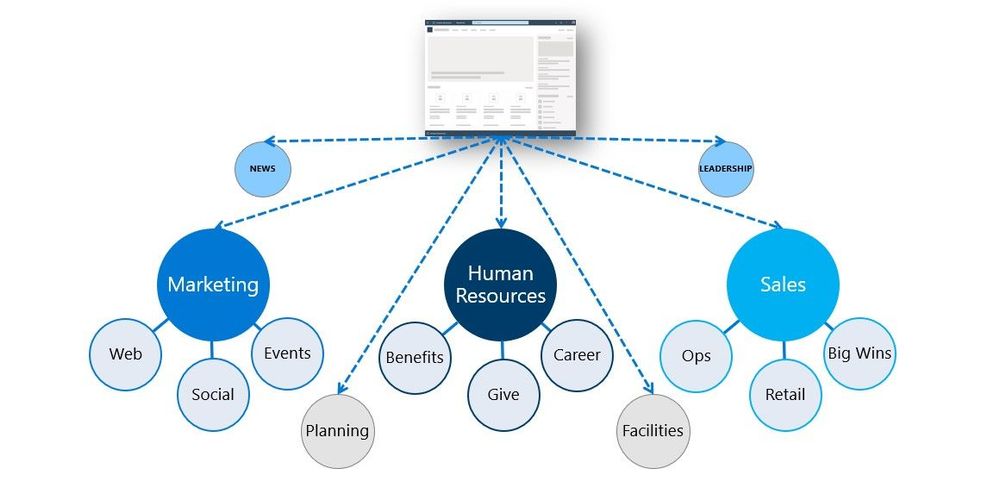
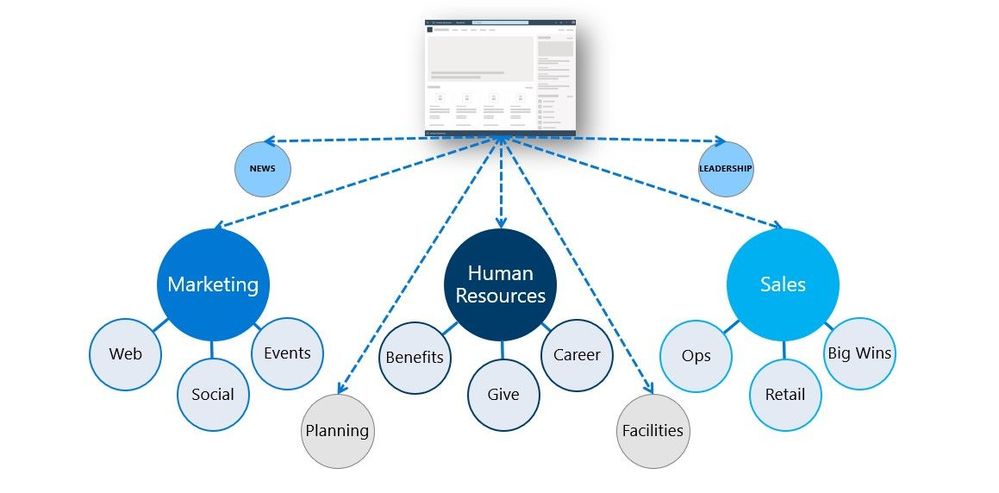 SharePoint powers your entire intelligent intranet and the intranet architecture (IA) is vital. The above diagram references logical site groupings and adherence to design consistency throughout.
Many people complain that going from site to site across their organization’s intranet feels disjointed. Each site looks different from the other with similar types of information scattered in different places. While it’s great to allow site owners flexibility, without some basic design principles and guidelines that can be applied consistently, the impact is costly and time consuming – for both site owners and visitors.
The best way to ensure a positive experience for site owners and visitors is to establish design patterns for your intranet sites and use site designs and templates to ensure that the patterns are applied consistently on all sites.
Below, we will dive into the following areas + resources throughout:
- Ensure consistency across all sites throughout your intranet scripting
- Organizing with hubs that can organize themselves
- Utilizing Microsoft Teams templates
- Manage who can create Microsoft 365 Groups
On to the details…
Ensure consistency across all sites throughout your intranet scripting
When people in your organization create new SharePoint sites, you want to ensure a level of consistency across all sites or sets of sites. For example, you may need consistent:
- Branding, theming for look and feel
- Library or list configurations to help people achieve more and ensure metadata alignment
- Functionality by configuring settings, features, extensions, and solutions
- You may also have detailed site provisioning scripts, such as using example designs from the SharePoint Look Book, that can be applied each time a new site is created.
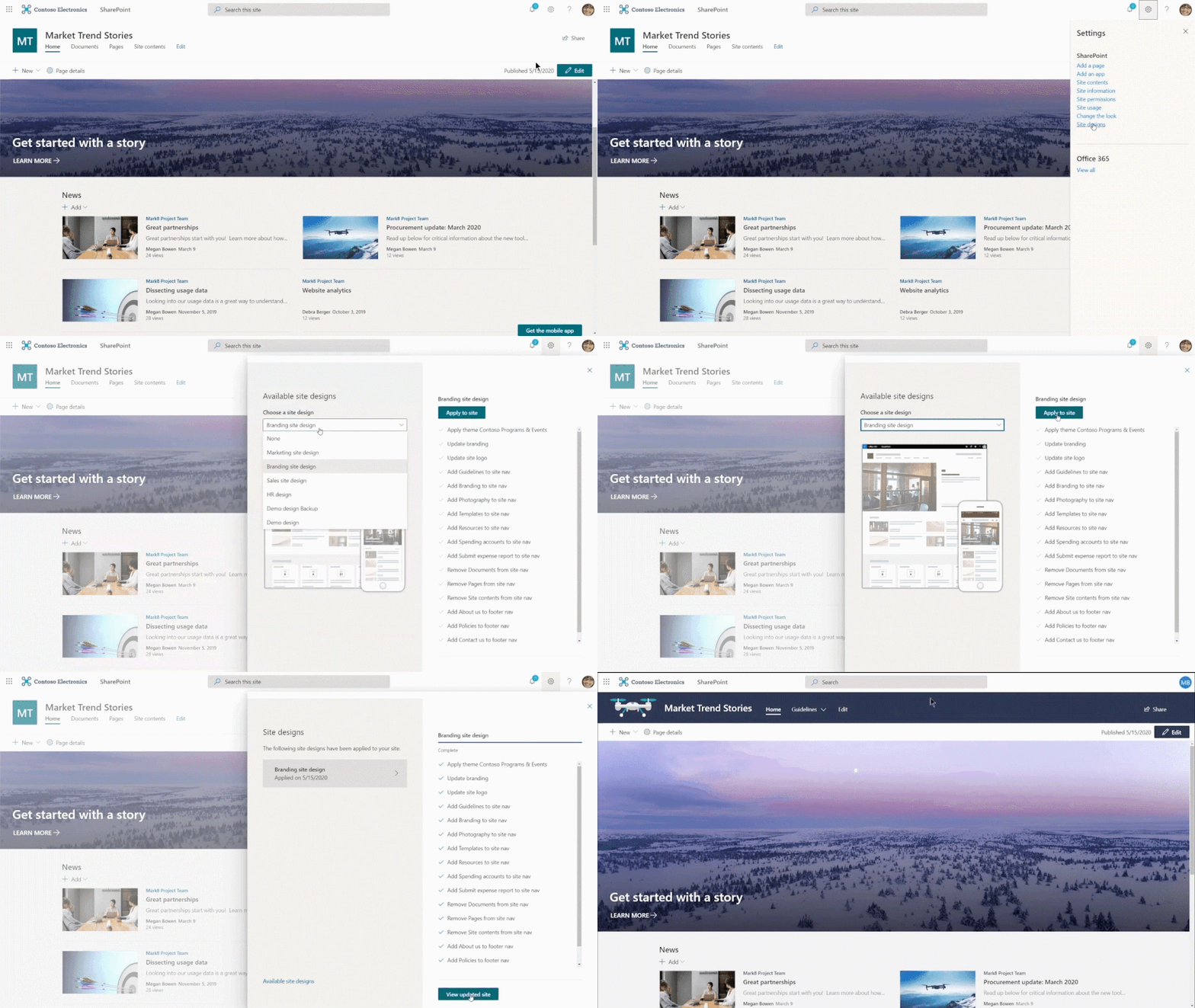 Applying a new site design to a SharePoint site.
All help make your intranet more governable, consistent, predictable, and more usable on day one – for each project, team, event; a more automated, intranet-as-a-service – at scale.
Let’s breakdown how it is done…
Planning your site designs
- Audience targeting site designs (for sites and hubs)
- Setting a single default design for your tenant
- Applying to existing sites, tackling updates after the initial setup
- Extending their power via PnP and reference Look Book examples
When people in your organization create new SharePoint sites, you often need to ensure some level of consistency. For example, you may need proper branding and theming applied to each new site. Site designs are like a template. They can be used each time a new site is created to apply a consistent set of actions. They can also be applied to existing modern sites (group-connected team sites and communication sites). Most actions typically affect the site itself, such as setting the theme or creating lists. And a site design can also include other actions, such as recording the new site URL to a log or sending a notification.
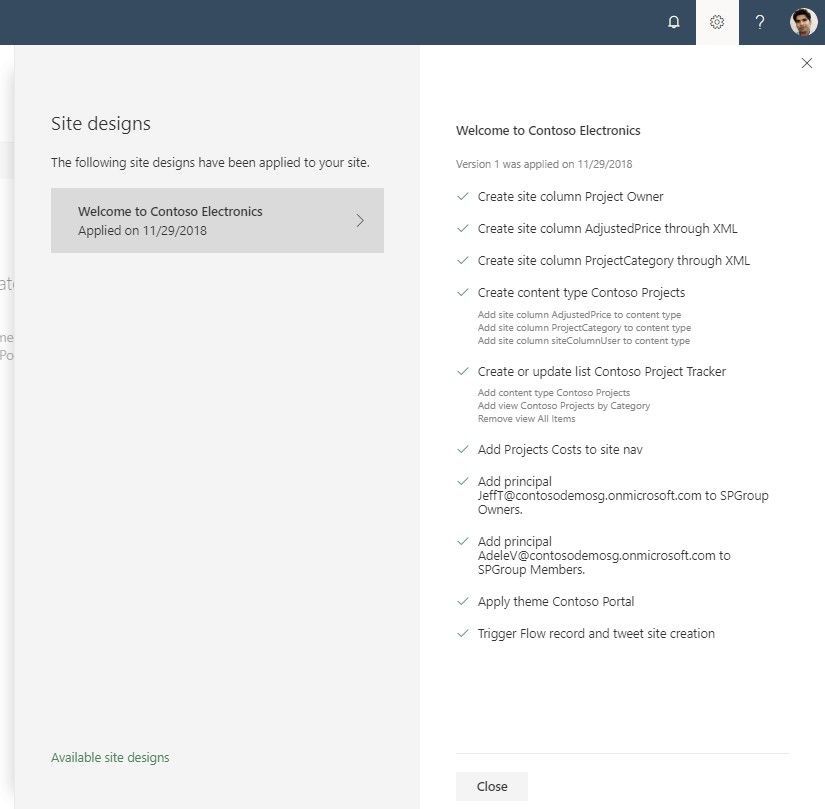 When the actions in the scripts are completed, SharePoint displays detailed results of those actions in a progress pane.
Learn more about how to design and use SharePoint site designs and site scripts.
Organizing with hubs that can organize themselves
SharePoint hubs connect and organize sites based on preferred organizational attributes. You can associate both existing sites and enable new site creation from within hubs themselves. And associated sites can be a mix of team sites and/or communication sites.
Once connected, hubs determine the connected sites’ theming, navigation, search, news, and content rollup, and visitor permissions. And to take this even further, you can use site designs to further customize (adapt) each connected site to programmatically assert content and site customization for desired outcomes.
The combination helps ensure consistency across projects, departments, divisions, regions, as you organize and save time throughout your teams – throughout your intranet.
Here are a few examples:
- Ensuring a consistent approach for project sites – and facilitating management of a portfolio of client-specific projects. A company has a business unit that does projects for a variety of customers. There are multiple projects for each customer. There is a client manager for each customer who needs an easy way to access and roll up content across all the projects for the customers whose portfolios they manager. The business unit wants a way to ensure that each project is executed in a similar way, leveraging resources from the Project Management Office (PMO). The architecture decision is to create a hub for each customer – and use the hub site to store shared assets (such as deliverable templates and customer contact information) for the customer portfolio. To ensure that all project sites are created consistently, they use a site design for project team sites. Each time a new project is created from the customer hub, a script is run to apply the design template, ensuring that both look and feel as well as shared metadata is applied consistently in all project sites. The key outcome is that all project sites share a common structure and when team members work on more than one project, they can easily find and share the information they need. Moreover, the client relationship manager for each client can use the hub “roll ups” for easy visibility into the status of key deliverables across all projects in the portfolio.
- Sharing consistent metadata and home page design. The global legal team for a large organization wants to ensure that all local legal sites follow a consistent design and share common metadata for legal documents. A site design is created that incorporates a home page layout for all legal sites, a standard set of pages, and a document library with shared metadata attributes. The script is run for all new legal sites that associate to the Global Legal hub but also for local legal sites that are linked rather than associated to the Global Legal hub. In this example, local legal teams have the option of associating to a geographic hub rather than Global Legal if the sites are created in local language. Shared metadata values are stored as managed metadata so that when there are updates to values, all the legal sites are immediately updated. When a new column is required, the site script is re-run to ensure that all sites are updated with the new column. This approach empowers local legal teams to focus on content rather than structure as the create their legal sites. It also ensures that search consistently finds critical assets no matter where they are located with the use of shared metadata for all legal sites.
- Creating a common look and feel for intranet sites. While many organizations leverage more than one hub for different geographies, functions, or portfolios, some smaller organizations start with one hub for the intranet. To ensure that each intranet site starts with a consistent look and feel, sites are created with a site design that ensures, as an example, that the Site Owner is always displayed in the lower left hand corner of the home page and frequently needed links are always in a narrow column on the right towards the top of the home page. By ensuring that each site follows a consistent pattern, visitors know that they can always easily find someone to help them (by scrolling to the bottom of the page) and that the site owner has carefully curated links to the most frequently needed items and applications on the right side of the home page. This ensures that visitors can quickly execute their top tasks on each site. However, since the pages follow patterns aligned to user expectations, visitors also know that they will be able to browse and search for content to help them find what they need and get back to work.
Planning your hub sites
SharePoint hubs provide an important building block for your intranet. They are the “connective tissue” you use when organizing families of team sites and communication sites together.
One of the key principles of modern intranets based on Microsoft SharePoint is that each unit of work should get a separate site collection to optimally manage governance and growth over time. Each communication site and Microsoft 365 group-connected team site is created as a site collection that can have its own permissions. A hub (commonly created from a communication site) should also be considered its own unit of work that brings together numerous other sites.
All organizations need intranets that make it easy to align experiences with the way you work and that can adapt to the inevitable changes in the way you work. This is a key benefit provided by SharePoint hubs; they model relationships as links, rather than hierarchy or ownership, so that you can adapt to the changes in the way you work in a dynamic, changing world.
Learn more about planning your SharePoint hub sites.
Setting up a hub site design
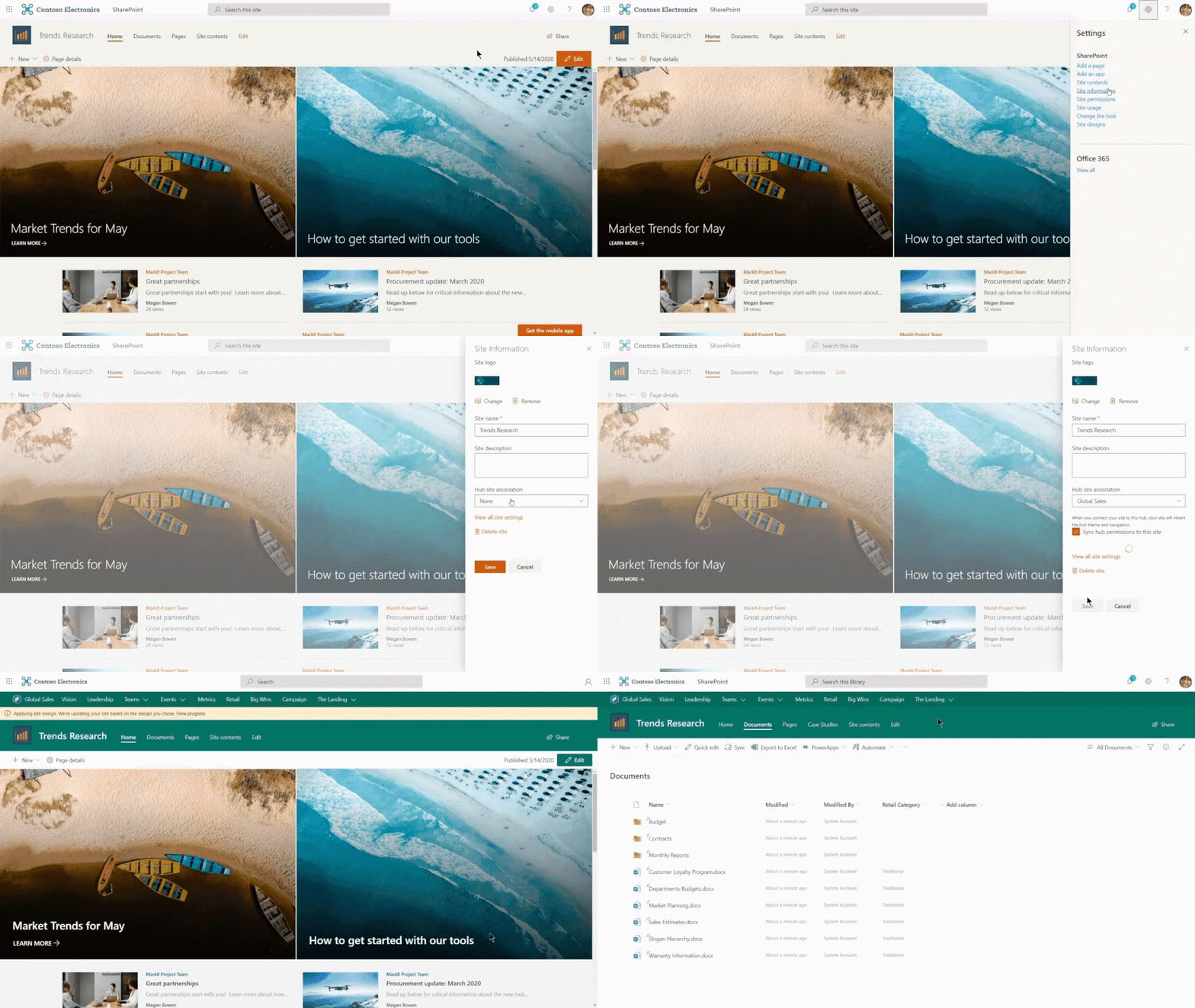 Sites can inherit the hubs site design when they are initially associated to the hub.
Easy for people to create sites from hub
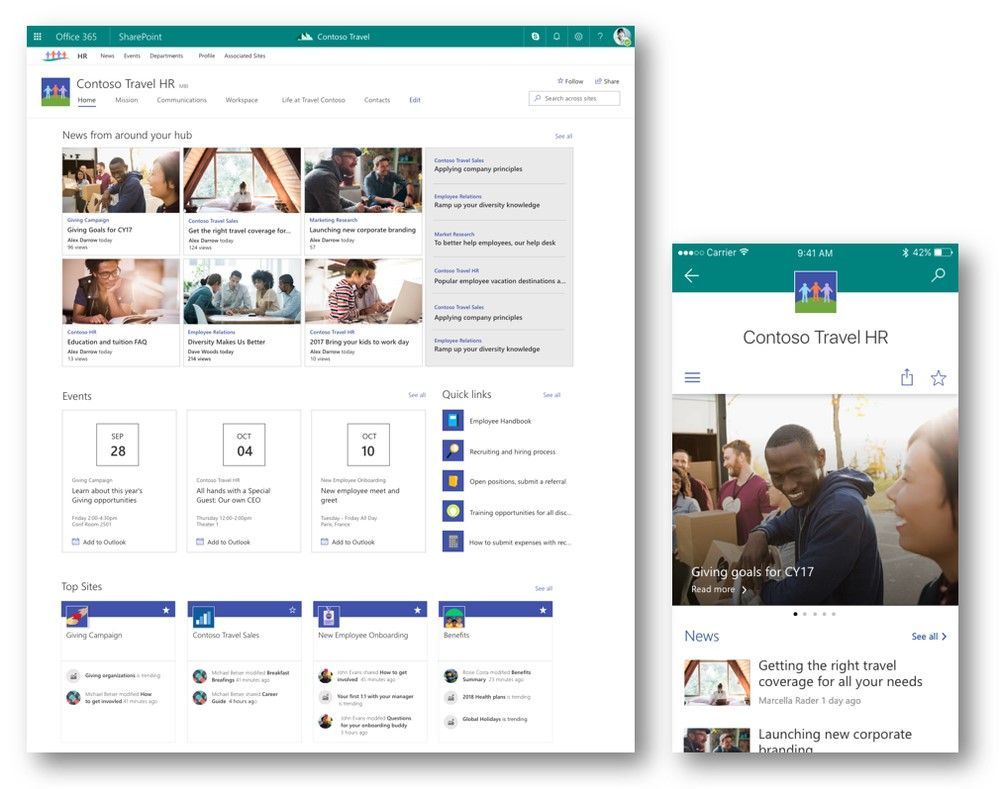 The Contoso Travel HR communication shown here as a part of the HR hub site, Web view on the left, within the SharePoint mobile app on the right.
You can automate tasks such as creating, removing, or controlling permissions for hubs. You can also control a site’s properties when it is becomes a part of an established hub – its theme, list and library structures, content, permissions, etc..
Learn more about setting up your hub sites.
Utilizing Microsoft Teams templates
Teams templates are pre-built definitions of a team’s structure designed around a business need or project. You can use Teams templates to quickly create rich collaboration spaces with channels for different topics and preinstall apps to pull in mission-critical content and services. Teams templates provide a predefined team structure that can help you easily create consistent teams across your organization.
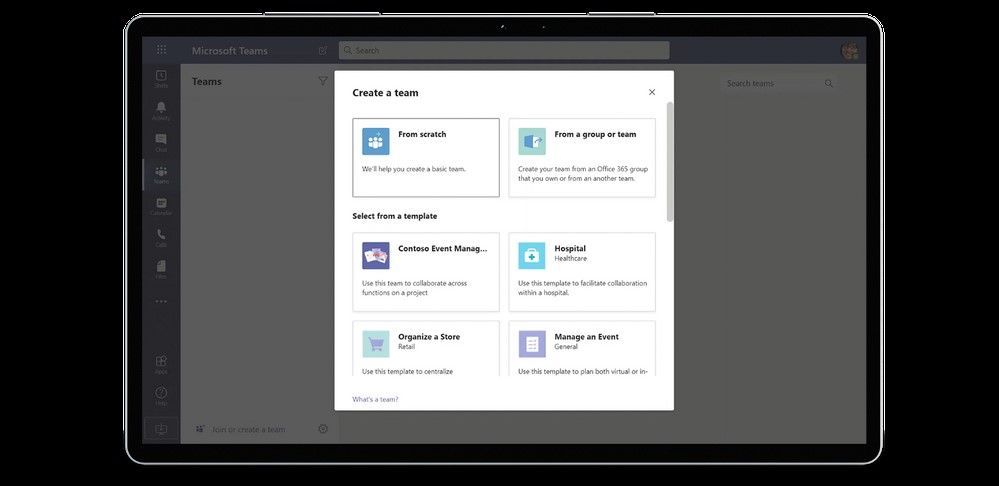 Use Teams templates for people to save time and adhere to predefined team structure.
Learn more about how to get started using Teams templates.
Manage who can create Microsoft 365 Groups
AKA, manage who can create sites, teams, plans, and more. Creating Microsoft 365 Groups is meant to be easy for collaboration agility. Depending on your business, however, you might want to control who can create groups. You can restrict Microsoft 365 Groups creation to the members of a particular security group in Azure Active Directory (AAD). In turn, this equates to whom can create Teams teams, SharePoint sites, Planner plans, etc. It is easy for admins to establish and manage who can and cannot create Microsoft 365 Groups using Windows PowerShell.
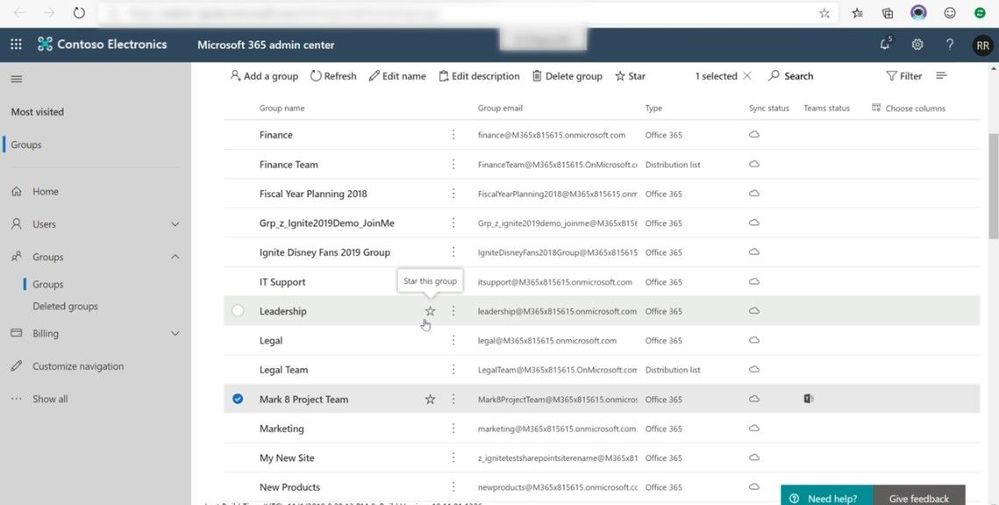 Admins manage who can and cannot create Microsoft 365 Groups.
Learn more and get started today.
Last thoughts
One of the most important goals for well-used intranets is to share and leverage organizational knowledge. Traditional intranets are typically not much more than a collection of sites. Modern intranets provide a collection of experiences that align to business outcome goals and initiatives. Creating great experiences for users means that you need to focus on the content and task stories that the visitor needs to accomplish – not just the content and stories that the site owner wants to tell. Establishing a consistent (and flexible) pattern for sites helps site owners of each individual site optimize their information architecture to create the best visitor experience. Stories that can be told, read, and understood.
Site designs and site scripts allow you to quickly and consistently create sites that incorporate your organization’s preferred design patterns and governance. This allows site owners to focus on quality content instead of page layout and ensures that site visitors can quickly find what they need. Hubs extend the ability to create optimal experiences by allowing you to create families of related sites that work in concert to improve user experiences with shared navigation, scoped search, consistent designs and connected content.
Package and templatize to optimize and balance. The happiest of sites and site owners are those that spend time creating content – furthering the business – not fumbling through site structure. And with known structure, IT can better support, meet “customer” expectation, and maintain a realm of policy and predictability.
Resources
Thanks, Susan Hanley – Microsoft MVP and IA / KM expert and Mark Kashman – senior product manager (SharePoint/Microsoft)


Recent Comments