by Scott Muniz | Jul 16, 2020 | Azure, Microsoft, Technology, Uncategorized
This article is contributed. See the original author and article here.
IoT is almost always associated with NoSQL database. This is quite understandable as its flexibility and specialization are great for ingesting IoT data. But what if that flexibility and performance are also available in Azure SQL? That would make Azure SQL a perfect target for IoT data as along flexibility and performance you have security, manageability, analytics, and scalability. In this episode, Davide Mauri discusses all this and more – and shows you why Azure SQL is a great option for IoT and HTAP.
Watch on Data Exposed
Additional Resources:
Azure IoT reference architecture
Streaming At Scale – Azure SQL
Ingesting 10K events/sec Video
JSON Performance in Azure SQL
View/share our latest episodes on Channel 9 and YouTube!
by Scott Muniz | Jul 16, 2020 | Uncategorized
This article is contributed. See the original author and article here.
Microsoft Threat Protection (MTP) is an integrated, cross-domain threat detection and response solution. It provides organizations with the ability to prevent, detect, investigate and remediate sophisticated cross-domain attacks within their Microsoft 365 environments.
To help you get started with MTP and take advantage of its capabilities we’ve compiled a series of short videos. These will walk through the key product features and show you how to apply them to your business today.
We’re constantly adding new capabilities to MTP so check back here regularly for new videos and instructional content. You can also follow us on Twitter.
Please share your feedback, or ask questions in the comments section below; let us know what other videos and topics you would like to see.
|
Overview
|
Getting started
|
|
Watch an all-up overview of Microsoft Threat Protection and learn about its capabilities
|
Check out how you can get started quickly and start benefiting from its capabilities
|
|
|
|
| |
|
Incident
|
Advanced hunting
|
|
Learn how alerts are being correlated into incidents and how to work with them
|
Get started with advanced hunting to hunt for threats across your MTP data
|
|
|
|
| |
|
Automated self-healing
|
|
|
This video helps you better understand how MTP automates remediation actions
|
|
|
|
|
by Scott Muniz | Jul 16, 2020 | Uncategorized
This article is contributed. See the original author and article here.
We commissioned Forrester Consulting to conduct a New Technology Total Economic Impact™ study of Microsoft Teams Platform and examine potential return on investment enterprises may realize by rolling out the Microsoft Teams platform. Forrester interviewed six customers and two partners across a range of industries and global geographies to determine how using Teams as a platform changed their organizations*.
Common pain points customers cited in their operations before adopting Microsoft Teams as a platform were:
- Organization struggled to drive adoption for productivity and data visualization tools already available to employees.
- Employees constantly switched between applications and tools throughout the day, losing time and momentum.
- Employees sometimes chose publicly available third-party communication applications, increasing risks for data security for the organizations.
Using the Microsoft Teams platform as a hub for teamwork enabled organizations to reduce disruptions to employee productivity, helped IT and security teams strengthen protection against data leaks, and contributed to a culture of citizen developers that, in turn, accelerated business digitization and innovation. The study reflected a projected return on investment of 393% to 1,085% over 3 years and following key projected benefits.
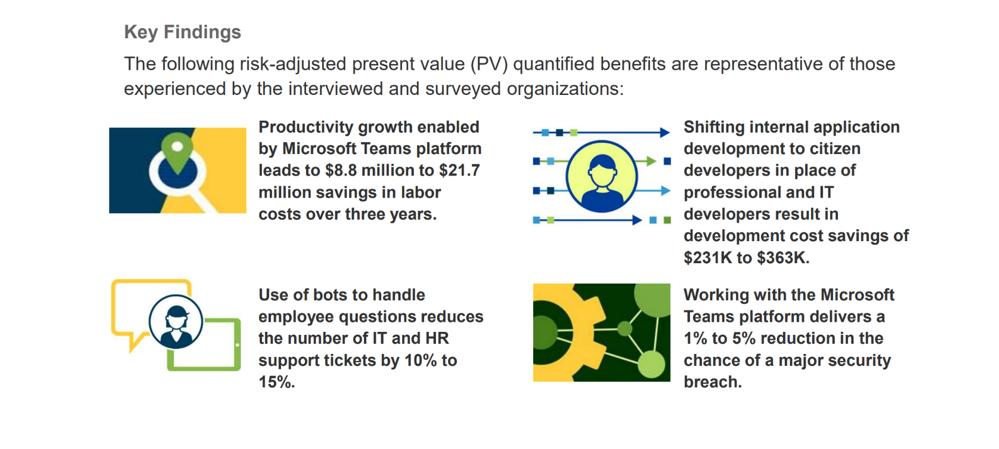
Besides the directly quantifiable, below benefits were identified through the study.
- Increased employee engagement – Better aligned functionality in one consolidated, easy-to-use platform reduced the efforts for employees to accomplish their daily tasks, leading to a better EX.
- Improved insights to influence decision making – The Teams platform presents real-time data in an easy-to-digest format through integration with data visualization tools, enabling organizations to act on insights and accelerate decision making.
- Better business outcomes – Certain applications integrated into the Teams platform support business functions instead of back-end operations and open previously untapped revenue streams.
Additional uses and business opportunities found in the study included:
- Driving further employee adoption – Introducing new employee groups to the platform would inevitably lead to new use cases and better business outcomes.
- Nourishing citizen developers – A central collaboration environment for citizen developers across the organization will remove a bottleneck from innovation efforts.
- Expanding integrations – Integrating new tools and data sources into the Microsoft Teams platform and making them usable could have a big impact on utilizing the existing knowledge within each organization.
Download the June 2020 study, New Technology: The Projected Total Economic Impact Of The Microsoft Teams Platform today and learn more about the measurable impact Microsoft Teams as a platform can have for your organization.
* Based on the interviews, Forrester constructed a TEI framework, a composite company, and an associated ROI analysis that illustrates the areas financially affected. The composite organization is representative of the companies of the six customers that Forrester interviewed and is used to present the aggregate financial analysis. The composite organization is a global, multibillion-dollar company with a strong brand and a large customer base. Of the 30,000 employees spread across many business lines, 10% to 15% are active users of the Microsoft Teams platform. Active users rely on the platform to perform their daily tasks. The remaining employees are currently using Teams for communication purposes only.
by Scott Muniz | Jul 15, 2020 | Uncategorized
This article is contributed. See the original author and article here.
DirectML
DirectML is a high-performance, hardware-accelerated DirectX 12 library for machine learning. DirectML provides GPU acceleration for common machine learning tasks across a broad range of supported hardware and drivers, including all DirectX 12-capable GPUs from vendors such as AMD, Intel, NVIDIA, and Qualcomm.
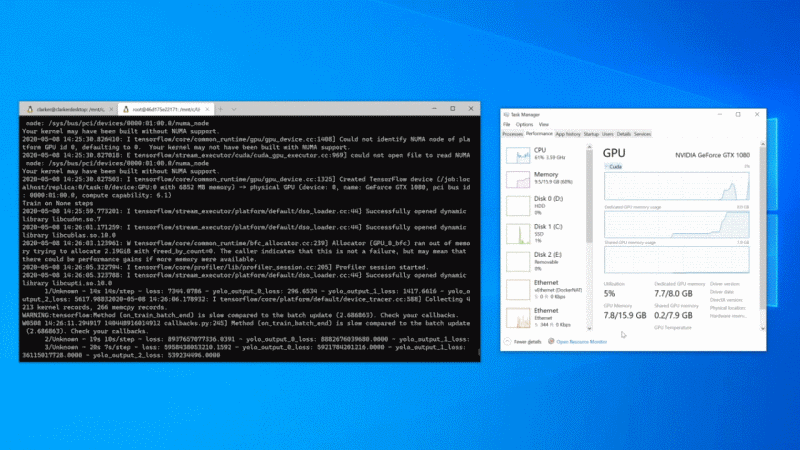
The preview of GPU compute is now available within WSL 2 to Windows Insiders (Build 20150 or higher)! This preview will initially support artificial intelligence (AI) and machine learning (ML) workflows, enabling professionals and students alike to run ML training workloads across the breadth of GPUs in the Windows ecosystem.
NVIDIA CUDA support
NVIDIA’s CUDA as the optimized path for GPU hardware acceleration is typically utilised to enable data scientists to use hardware-acceleration in their training scripts on NVIDIA GPUs.
NVIDIA CUDA support has been present on Windows for years. However, there is a variety of CUDA compute applications that only run in a native Linux environment. However there is now CUDA inside WSL 2. There is a preview of CUDA for WSL 2. This preview includes support for existing ML tools, libraries, and popular frameworks, including PyTorch and TensorFlow. As well as all the Docker and NVIDIA Container Toolkit support available in a native Linux environment, allowing containerized GPU workloads built to run on Linux to run as-is inside WSL 2.
See https://docs.microsoft.com/en-us/windows/win32/direct3d12/gpu-accelerated-training
Empowering educators and students through DirectML
The DirectML API enables accelerated inference for machine learning models on any DirectX 12 based GPU, and we are extending its capabilities to support training.
In addition, we intend to integrate DirectML with popular machine learning tools, libraries, and frameworks so that they can automatically use it as a hardware-acceleration backend on Windows.
DirectML works well in Windows or Windows Subsystem for Linux WSL. By doing so, our intent is to fully empower students to learn in the Windows or Linux environment that works for them, on the hardware they already have.
For more information, see Get Started with Windows ML.
ONNX Runtime on DirectML
ONNX Runtime is a cross-platform inferencing and training accelerator compatible with many popular ML/DNN frameworks, including PyTorch, TensorFlow/Keras, scikit-learn, and more.
DirectML is available as an optional execution provider for ONNX Runtime that provides hardware acceleration when running on Windows 10.
For more information about getting started, see Using the DirectML execution provider.
Tensorflow with DirectML
We have a preview package of TensorFlow with a DirectML backend. Students and beginners can start with the TensorFlow tutorial models or our examples to start building the foundation for their future. In line with this, we are also engaging with the TensorFlow community through their RFC process. We plan to open source our extension of the TensorFlow code base that works with DirectML.
For WSL See https://docs.microsoft.com/en-us/windows/win32/direct3d12/gpu-tensorflow-wsl
For Windows See https://docs.microsoft.com/en-us/windows/win32/direct3d12/gpu-tensorflow-windows
When used standalone, the DirectML API is a low-level DirectX 12 library and is suitable for high-performance, low-latency applications such as frameworks, games, and other real-time applications. The seamless interoperability of DirectML with Direct3D 12 as well as its low overhead and conformance across hardware makes DirectML ideal for accelerating machine learning when both high performance is desired, and the reliability and predictability of results across hardware is critical.
More information about DirectML can be found in Introduction to DirectML.
Your feedback
If you have feedback on the NVIDIA CUDA path for WSL, please share it via the Community Forum for CUDA on WSL. For feedback on the TensorFlow with DirectML package, please use the DirectML GitHub repo.
Getting started using GPU with WSL
In order to get your system setup please use our getting started documentation.
Keep upto date with announcement on WSL
To stay in the loop on our latest news and future updates, stay tuned to the Windows Command Line blog and follow @crahrig on Twitter!
by Scott Muniz | Jul 15, 2020 | Uncategorized
This article is contributed. See the original author and article here.
The latest version of the related article, Assess an enterprise and consolidate assessment reports with DMA, has been updated to include support for SQL Server 2019 and Azure SQL Managed Instance.
Please refer to the technical documentation for the step-by-step instructions associated with completing this task.


Recent Comments