Using the FarmBeats Student Kit to learn more about IoT, Digital Agriculture and Precision Farming

Using the FarmBeats Student Kit to learn more about IoT, Digital Agriculture and Precision Farming

This article is contributed. See the original author and article here.

ImperialMicrosoft.png


Guest Blog: 

Microsoft Farmbeats University community project Imperial College London


About Us:

We are currently 3rd Year Electrical and Electronic Engineering students at Imperial College London. We worked on this project in collaboration with the Microsoft FarmBeats Engineering Team. You can learn more about each of us through the below Linkedin Profiles. Feel free to message us regarding any questions about the project through Linkedin messaging! 

 

ImperialTeam.png

Team Members 


What is Microsoft FarmBeats?

FarmBeats is a venture of Microsoft Research that was launched in 2015 as a prototype for an Internet of Things (IoT) platform for agriculture. Stemming from the concept of Digital Agriculture, it uses technologies such as low-cost sensors, drones, vision, white space, cloud computing and Machine Learning algorithms to combat very little or no-power in farms. Consequently, the FarmBeats platform has not only allowed for real-time seamless data collection from sensors, cameras and drones but also for storage and complex processing within Microsoft’s cloud computing platform, known as Microsoft Azure.


This concept of data-drive farming enables farmers to make effective data-driven decisions about their farms which help improve overall agricultural yield, lower costs, and reduce the impact the environment impact of agricultural production. The International Food Policy Research Institute claims that these data-driven techniques provide for robust data-analytics within the agricultural industry which can boost the farm productivity by as much as 67% while reducing consumption


A Global Challenge

It is estimated that the global population will rise by 2.2 billion by 2050, thus requiring a 70% increase in the current yield of agriculture. This growing population combined with environmental challenges has exacerbated the current food shortage challenge which makes this an issue of contemporary global significance. Dr. Ranveer Chandra, the Principal Research Scientist of the FarmBeats venture, says that, “Large amounts of data can be captured from the farms and Machine Learning can be used to translate that data into insight for the growers” Finally, key statistic by the Food Security Research Program in the UK is that more than 2 billion people lack vital micronutrients which affects their health and life expectancy. Dr. Chandra says that the FarmBeats product is capable of giving insights to also achieve the growth of highly nutritious food with minimal environmental impact.


FarmBeats Student Kit  

The Microsoft FarmBeats student kit is a tool to help enable data-driven farming. Microsoft truly believes that reliable and properly contextualized data coupled with farmer’s knowledge and intuition about their farm, can help increase farm productivity and reduce costs. Moreover, the FarmBeats student kit was developed to promote the concept of FarmBeats among students at universities. These kits are easy-to-use solutions that help students learn about precision agriculture and Internet of Things (IoT) technologies. This IoT kit consists of a Raspberry Pi, running Windows 10 IoT Core, with preconfigured Microsoft Azure cloud services with the following sensors:

Grove BME280 Temperature, Humidity and Pressure Sensor

Grove Capacitive Soil Moisture Sensor

Grove Light Sensor v1.2


This kit gives students an opportunity to not only utilize Python programming for IoT devices but also understand Microsoft Azure cloud services. The data from the sensors is brought to life in an online dashboard using Microsoft Azure IoT central which will give students an insight to understand how to improve their productivity, increase yield and save resources.


Aim of our Project
 

So, to give an overview of our project, our aim is to teach undergraduate students, just as ourselves, about IOT and digital agriculture. For this, we’ve created a set of learning resources using the FarmBeats Kit and the Azure cloud computing services.


We’ve designed these resources following certain specifications:

  • For easy integration with Microsoft Learn in the future, we hosted our instructions on GitHub arranged as markdown files.
  • As mentioned, we catered these resources particularly towards undergraduate students who are interested in IOT or digital agriculture.
  • We’ve defined certain learning objectives for the designed labs and provided knowledge checks along the way to solidify students’ learning.
  • And also, we provided instructions for DIY kits as well as the official FarmBeats Kit, so that the students could use their own Raspberry Pis and sensors to follow our resources even if they don’t have access to the official kits.

We’ve designed these learning modules in such a way that they start out simple and get more sophisticated along the way, so that the students can build up on the things they learn as they progress through the labs.


In each of the labs, students experiment on familiar agriculture scenarios and utilize several Azure cloud computing services.


We also provide extension project suggestions, so that the students can apply the things they learn in the labs themselves, and hopefully, build even more sophisticated projects.


Lesson Plan

We are delivering a set of learning resources which comprises of a GitHub repository containing user guides and step-by-step tutorials for the following modules:


Monitor your plant: Here students will learn how to set-up their Raspberry Pi with their sensors and learn how to obtain and view real-time data from the sensors using IoT Hub or a mobile application developed in PowerApps  


Water your plant: A more advanced lab where the students will learn how to start processing data and learn how to build products such as automatic irrigation system.


Predict the Weather: In this lab, students will learn how to use Azure Machine Learning. This will help them build a model that will help them predict the probability of rain.


LED Light Grow System: Finally, in this scenario, the light sensor to create an LED grow light system that optimizes the plant growth.


We have chosen the above modules for the following reasons:


  • These modules have strong links to state-of-the-art digital agriculture techniques. Students will learn and apply the typical precision farming methods at universities.
  • These experiments focus on issues of contemporary global significance. For instance, the second scenario, helps students understand and appreciate the problem of water scarcity. It guides them to design an automatic irrigation system to efficiently irrigate their plants such that they can conserve water.
  • Finally, these modules show how the student kit with just a few sensors intertwined with cloud computing can be used to design and build complex products.


GitHub Link to the Project:

https://github.com/microsoft/FarmBeats-UniversityCommunity/tree/master/community-members/Imperial%20College%20London


Deep dive into Scenario 1: Monitor your Plant

In this scenario, students will learn how to create their own application in two different platforms which are: Azure IoT Central Application and PowerApps. These applications will allow the student to visualise the sensor data collected from the sensors configured with their Raspberry Pi. The process of creating application is considerably different according to the platform chosen. It is highly recommended for students to create an application using both Azure IoT central and PowerApps to gain a deeper understanding of Azure services.


Creating an application using Azure IoT Central

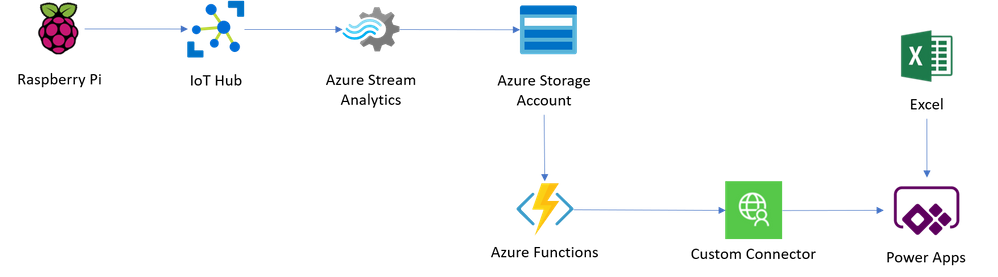
Azure IoT Central is an IoT application platform that allows the user to easily interact with the Azure Cloud services. IoT Central has a friendly user interface to monitor plant conditions, create rules, and easily manage several devices. The student will learn how to use a Raspberry Pi, IoT Central, Azure Event Hubs, Azure Stream Analytics and Azure Blob Storage account.

 

Scenario1.png


Azure IoT Central Service

The first step is to create an interface in Azure IoT Central. In this tutorial, students learn how to use this service, from creating a custom application to creating a device template and device in IoT Central. A device is defined using capability models, which define the capabilities of all devices that will use this template. Capability models are consist of three parts:


  • Interfaces: These are reusable collections of capabilities, and are grouped into three categories
    • This consists of actual values that are detected and sent by the Raspberry Pi. The values that the sensors will read are the Soil Moisture, Temperature, Pressure and Humidity.
    • These are settings applied on the device.  For instance, in a thermostat, it could be the desired temperature. These settings can be set by the device, or via Azure IoT Central which can then be synced to the device.
    • These are calls that can be made on the device with an option of passing data. For example, a call can be made, on the thermostat, by a mobile application to send a request to change the desired temperature.
  •  Cloud Properties: These are properties set in the Azure IoT Central against a device, but not synced to the device. For example a device could have a cloud property for the account name of the owner, the devices location, or the date it was last serviced.
  • Views: These are dashboards for a device that can contain charts, data values and other information allowing the user or the student to visualize telemetry or send commands.

The environment sensor requires a capability model to be created, with an interface defined for the telemetry values being sent and a view to display these values. After creating the template, a device needs to be created to be able to connect the Raspberry Pi and send data.


Azure Event Hubs

The data received by the Azure Iot Central application is then exported to Azure Event Hubs. Azure Event Hubs is a real-time data ingestion service that allows the user to take capture incoming data. This data can be streamed from Azure Event Hubs to a storage account, referred to as Azure Blob Storage. This is done using Azure Stream Analytics.


Azure Blob Storage

As mentioned, the Azure Storage Account is used to store all incoming data, ordered by date and time. This allows the student to revisit this data, at any point in time. There are a wide variety of Azure storage services which include file, table and blob. In this case, the students will use blob storage. Azure Blob Storage allows a user to store blobs of unstructured data that can be easily accessed from other Azure services, such as Azure Machine Learning Studio (Scenario 3).

AzureBlobStorage.png

Azure Stream Analytics

The data from the sensors ingested into Azure Event Hubs has to be streamed into the Azure Blob Storage account using Azure Stream Analytics. This service provides real-time analytics on streams of data, allowing the student to stream data from one service to another. It is easily implemented in Structured Query Language (SQL) and it does not require the student to learn new processing frameworks.


Creating an application using PowerApps

Although, PowerApps is a more complex platform compared to Azure IoT Central, it still allows a user to build an application without having a significant programming experience. PowerApps has a user-friendly interface and allows the student to connect to a wide variety of data sources ranging from Microsoft Excel tables to Microsoft Outlook and Azure Services. Furthermore, the interface created with PowerApps is more customizable and highly compatible with mobile applications.
Farmbeats App.png


IoT Hub

In this case, the Raspberry Pi sends the data from the sensors to the IoT Hub instead of the Azure IoT Central. The IoT Hub is a platform that enables easy communication between IoT devices. Moreover, it allows the user to have a bidirectional communication with enhanced security. Alternatively, Azure Event Hubs can be used instead of IoT Hub. But the main difference between the two services lies in the fact that Azure Event Hubs can only receive messages, whereas, the IoT Hub can not only receive but also send messages.


Azure Storage Account

In terms of the Azure Storage account, students get an opportunity to explore tables within the service.  Tables can store upto petabytes of structured data which can be accessed using a key-value approach where the key should be unique for each element. In this part of the experiment, ‘partitionkey’ was set to be the device name and the ‘rowkey’ was set as the timestamp. This allows the student to easily filter through the entire table by using either of the keys.
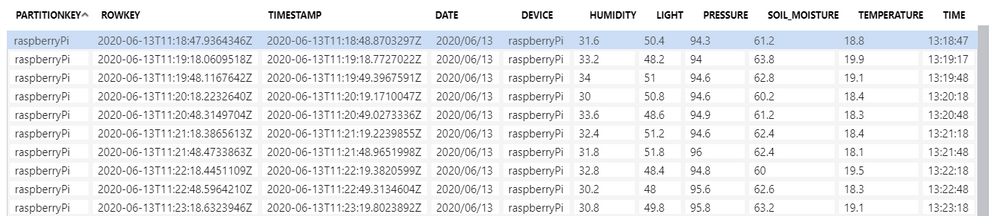
Azurestorage.png


Azure Functions

Azure Functions is an event driven server-less compute platform which essentially allows for small blocks of code to be defined. These blocks of code can be triggered by events such as a web request, data changes in storage or events being put into an Azure Event Hub.  In this experiment, it is mainly used to get the information from the table. This is done by ‘binding’ the function to the table in the storage account. This function does not require any advanced code and the function will directly obtain the data from the table named ‘data’. his data can be retrieved by the variable ‘messageJSON’ when writing the code inside the function. The ‘connection’ field accesses the ‘AzureWebJobsStorage’ which contains the storage account string.


Although, these functions can be written in a variety of programming languages such as C#, F#, Java, JavaScript and Python, the latter is chosen due to its easy readability.


Connectors

PowerApps has a great variety of ‘connectors’ to import data from sources such as: Microsoft Sharepoint, Microsoft Outlook, Google Mail, Azure Event Hubs, and so on. However, in this tutorial, the student will create their own custom connector to establish communication with the Application Programming Interface (API) in the Azure Functions. This will allow for requests to be customized and the required data to be extracted. Moreover, Microsoft Excel is also used as a connector to import static data regarding information from the sensors about the model or the sensor name.


PowerApps

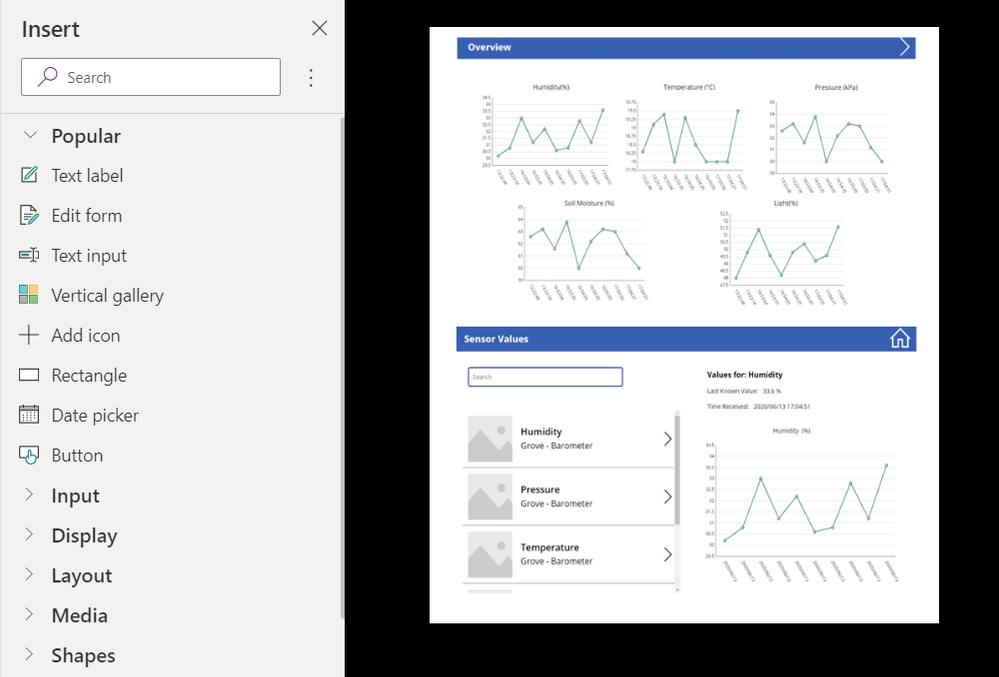
PowerApps offers a whole range of components, from ‘icons’ to ‘galleries’ and ‘text input’. All this is very widely used in current applications in the market. These tools can be inserted by just dragging them from the insert tab.
powerapps.png


The figure above display an example of the interface that students will learn to create. The interface uses icons to navigate between screens. On the other hand, line graphs are used to display the data while the text input is used to insert a search bar. Moreover, galleries are present to choose which sensor data to display and text labels are added to show more detailed information about the measurements. Finally, a timer to refresh the data. Moreover, the student will also gain knowledge about working with collections which is used to store data in PowerApps.


Acknowledgements

We would like to thank Dr. Christos Bouganis, Reader in Intelligent Systems in the Department of Electrical and Electronic Engineering at Imperial College London, for his invaluable support and continued engagement during the project. We would also like to thank our Industrial Supervisors from Microsoft, Mr. Lee Stott, Mr. Jim Bennett and Ms. Stacey Wood, for their valuable insights and suggestions for our project along with regular meetings. We would also like to express our sincere gratitude towards them for giving us a great opportunity to present our work on the the FarmBeats learning resource to the Microsoft FarmBeats Engineering Team based in Redmond, Washington, U.S.




Azure Marketplace new offers – Volume 79

Azure Marketplace new offers – Volume 79

This article is contributed. See the original author and article here.
We continue to expand the Azure Marketplace ecosystem. For this volume, 82 new offers successfully met the onboarding criteria and went live. See details of the new offers below:

Applications

AccessMyLAN.png

AccessMyLAN: AccessMyLAN is a cloud-based private Access Point Name solution that’s easy to deploy and works for any SIM-enabled device (smartphone, laptop, tablet, etc.). It continually protects users by filtering out malicious content and other online threats at the source.

Ahsay Whitelabel Cloud Backup Suite for MSPs.png

Ahsay Whitelabel Cloud Backup Suite for MSPs: Ahsay Whitelabel Cloud Backup Suite is designed for managed service providers, system integrators, and IT consulting companies, and it enables them to offer secure managed backup services hosted in the cloud or on-premises.

ALM Octane.png

ALM Octane: Micro Focus ALM Octane, a comprehensive DevOps management solution, supports enterprise application delivery with high-quality criteria, continuous visibility, and delivery across the entire application lifecycle.

Aquaforest Searchlight 2 OCR.png

Aquaforest Searchlight 2 OCR: Aquaforest’s solutions designed for SharePoint and Office 365 improve search success by ensuring that site collections are text-searchable. The trial version of Aquaforest Searchlight allows unlimited auditing, which will allow you to determine how many of your PDFs are not fully searchable.

Aquaforest Searchlight 2.0 Suite (OCR and Tagger).png

Aquaforest Searchlight 2.0 Suite (OCR and Tagger): Aquaforest’s Searchlight is built to enhance searches in SharePoint and Office 365. Searchlight Tagger can automatically add metadata tags based on document content, and Searchlight 2.0 adds Azure storage options, long file paths, and time zone handling.

Arista CloudEOS Router (BYOL).png

Arista CloudEOS Router (BYOL): The Arista CloudEOS Router is a feature-rich, multi-cloud, and multi-hypervisor virtual router that empowers enterprises and cloud providers to build consistent, highly secure, and scalable hybrid networks.

Avid - Edit On Demand.png

Avid | Edit On Demand: Avid | Edit on Demand brings the collaborative power of Media Composer and Avid NEXIS to the cloud, making it easy to set up an entire post-production video-editing suite whenever and wherever it’s needed.

Bluesource Cloud Locker.png

Bluesource Cloud Locker: Bluesource Cloud Locker, a scalable solution for storing legacy archive data, allows organizations to ditch aging on-premises systems and use it to store and export legacy email and PST files.

Cerberus.png

Cerberus: CryptoBLK’s Cerberus gives IT practitioners in banks, financial institutions, and blockchain/distributed ledger technology companies a cost-effective tool for real-time monitoring and alerts covering multiple blockchain applications and infrastructures.

Cloud Backup for Exchange Online.png

Cloud Backup for Exchange Online: Cloud Backup for Exchange Online is a SaaS platform hosted on Microsoft Azure that offers anytime protection for Exchange Online, OneDrive for Business, SharePoint Online, and more. Automatically back up your content up to four times a day with on-demand restore functionality.

Cloud Backup for OneDrive for Business.png

Cloud Backup for OneDrive for Business: Cloud Backup for OneDrive for Business is a SaaS platform hosted on Microsoft Azure that offers anytime protection for OneDrive for Business, SharePoint Online, Exchange Online, and more. Automatically back up your content up to four times a day with on-demand restore functionality.

Cloud Backup for SharePoint Online.png

Cloud Backup for SharePoint Online: Cloud Backup for SharePoint Online is a SaaS platform hosted on Microsoft Azure that offers anytime protection for SharePoint Online, OneDrive for Business, Exchange Online, and more. Automatically back up your content up to four times a day with on-demand restore functionality.

Cloud Double Check.png

Cloud Double Check: Habílitas’ Cloud Double Check lets you send and receive SMS and WhatsApp messages in bulk as part of an information or sales campaign. The SaaS platform is hosted on Microsoft Azure and delivers live reporting at each stage of your campaign. This application is available only in Spanish.

Cloudentity Authorization Control Plane - VM.png

Cloudentity Authorization Control Plane – VM: Cloudentity’s Authorization Control Plane delivers a rich authorization layer providing continuous and contextual security for your users, APIs, and services. Easily detect and prevent misuse of your APIs via a threat intelligence dashboard that provides insight across your application ecosystem.

CRP ERP and unlimited billing.png

CRP ERP and unlimited billing: Crol is a complete cloud enterprise resource planning solution offering unlimited billing and AI and business intelligence for small and medium-sized enterprises in Mexico. This application is available only in Spanish.

Data Management for Regulatory Reporting.png

Data Management for Regulatory Reporting: Analytium’s Data Controller helps banking, finance, insurance, and telecom organizations manage, process, and validate data for effective reporting and analytics. The web application lets users understand and monitor data and create reporting in complex and regulated industries.

Defend and Recover- Secure Azure with CSOC.png Defend & Recover: Secure Azure with CSOC: Secure Azure is an integrated Microsoft Azure and cybersecurity management solution based in the U.K. that aligns your cloud management to the Microsoft Cloud Adoption Framework, enabling you to address threats through Azure Sentinel and delivering managed threat detection and response.
Demand Planning and Forecasting and Replenishment for Auto parts.png

Demand Planning & Forecasting & Replenishment for Auto parts: Obase’s automated spare parts replenishment solution helps organizations transform data into actions for the toughest supply chain challenges. Adapt your inventory management processes to the fast-changing automotive industry and more accurately forecast inventory.

Devolutions Password Hub.png

Devolutions Password Hub: Devolutions Password Hub is a secure, cloud-based password manager for teams. It empowers organizations to easily vault and manage user passwords, along with other sensitive information, through a user-friendly web interface that can be quickly and securely accessed via any browser.

GeoServer on Windows Server 2016.png

GeoServer on Windows Server 2016: GeoServer on Windows Server 2016 is an open-source software server written in Java that allows users to share and edit geospatial data. Designed for interoperability, GeoServer publishes data from any major spatial data source using open standards.

GeoServer on Windows Server 2019.png

GeoServer on Windows Server 2019: GeoServer on Windows Server 2019 is an open-source software server written in Java that allows users to share and edit geospatial data. Designed for interoperability, GeoServer publishes data from any major spatial data source using open standards.

ITM SPO - Standalone VM.png

ITM SPO – Standalone VM: International Trust Machines Corporation (ITM) addresses the issue of convergence in blockchain technology and the Internet of Things (IoT) with a practical, scalable solution that leverages blockchain to provide data security, data integrity, and data traceability for IoT.
Joget DX Low Code Platform - RHEL - 10 users.png

Joget DX Low Code Platform – RHEL – 10 users: Joget is an open-source no-code/low-code application platform for fast, simple digital transformation. Joget combines business process automation, workflow management, and rapid application development to empower non-coders to quickly build and maintain apps anytime, anywhere.

Joget DX Low Code Platform - Ubuntu - 10 users.png

Joget DX Low Code Platform – Ubuntu – 10 users: Joget is an open-source no-code/low-code application platform for fast, simple digital transformation. Joget combines business process automation, workflow management, and rapid application development to empower non-coders to quickly build and maintain apps anytime, anywhere.

MiX Portal Software as a Service.png

MiX Portal Software as a Service: Advanced Mine Management Systems’ MiX is a self-service SaaS portal that facilitates near real-time streaming of siloed system data to Microsoft Azure IoT Hub. Ingest data into analytics and reporting to help make informed decisions and be proactive instead of reactive.

Modern Data Mart.png

Modern Data Mart: Modern Data Mart enables users to build a simple data-loading process or a modern data warehouse in the cloud. Integrate your data sources and optimize data ingestion using the Ralph Kimball methodology for data warehousing. This application is available in German.

Odoo 13 On Ubuntu 18.04 With Nginx.png

Odoo ERP CRM to consolidate your operations: Odoo is an open-source enterprise resource planning (ERP) and customer relationship management (CRM) platform that can consolidate a variety of business operations, from supply chain and project management to accounting and human resources.

Oracle DB in Azure.png

Oracle DB in Azure: Advatech Sp. z o.o. offers fast and easy online backup of Oracle Database on Microsoft Azure with cloning functionality. Back up Oracle Database according to Oracle recommendations and without downtime or performance impact on your production systems. This application is available in English and Polish.

Payruler Software as a Service.png

Payruler Software as a Service: Payruler is a comprehensive, web-based HRMS and payroll system locally built for Philippine businesses and tax structure. It covers the entire employee lifecycle from recruitment to retirement. Digitally transform your HR and payroll processes with Payruler.

Red Canary for Microsoft Defender ATP.png

Red Canary for Microsoft Defender ATP: Red Canary’s partnership with Microsoft brings exceptional security operations to teams using Microsoft security products. Red Canary for Microsoft Defender ATP supercharges the Microsoft Defender ATP endpoint protection platform with the Red Canary Managed Detection & Response offering.

SecurityScan Pack.png

SecurityScan Pack: Extend Solutions SA de CV’s SecurityScan Pack reduces vulnerability gaps to prevent information breaches, identity theft, and fraud. It identifies top security threats and provides a comprehensive vulnerability analysis with references and recommendations for better protection.

Shoptimize.png

Shoptimize: Shoptimize is an AI-powered, end-to-end e-commerce platform that delivers everything required to launch and grow an e-commerce store. Configure your store’s UI and UX, integrate payment gateways and logistics partners, and leverage market intelligence to attract and retain customers.

SMART OaaS General Production Environment.png

SMART OaaS General Production Environment: Mint Management Technologies’ SMART OaaS General Production Environment is a secure and cost-effective solution that combines Microsoft Azure services, Azure Blueprints, and proactive migration strategies and execution for continuous modernization of applications.

Spaceti.png

Spaceti: Spaceti’s property technology solution includes software that analyzes a building’s indoor environment, a mobile app for people in the building, and Spaceti’s proprietary IoT sensors. Get a precise overview of air quality along with the occupancy of individual workspaces, meeting rooms, and parking spaces.

SUNSPOTS Governance Mapping and Security Management.png

SUNSPOTS Governance Mapping & Security Management: SUNSPOTS.cloud is a multi-cloud, AI-powered SaaS platform for real-time infographics, mapping, and management of your organization’s governance and security. Automatically scan your cloud workloads and convert the data into easy-to-understand visual graphic maps.

Sync Public Folder Calendars to Smartphones.png

Sync Public Folder Calendars to Smartphones: The CiraSync platform automatically syncs the Office 365 GAL, shared calendars, public folder contacts and calendars, and CRM data to Exchange so that you can access accurate, up-to-date contacts and calendars on your iPhone or Android smartphone.

Sync Shared Calendars to Smartphones.png

Sync Shared Calendars to Smartphones: The CiraSync platform automatically syncs the Office 365 GAL, shared calendars, public folder contacts and calendars, and CRM data to Exchange so that you can access accurate, up-to-date contacts and calendars on your iPhone or Android smartphone.

Sync Shared GAL Contacts and Calendars to Smartphones.png

Sync Shared GAL Contacts & Calendars to Smartphones: The CiraSync platform automatically syncs the Office 365 GAL, shared calendars, public folder contacts and calendars, and CRM data to Exchange so that you can access accurate, up-to-date contacts and calendars on your iPhone or Android smartphone.

Sync the Global Address List to Office 365 Smartphones.png

Sync the Global Address List to Office 365 Smartphones: The CiraSync platform automatically syncs the Office 365 GAL, shared calendars, public folder contacts and calendars, and CRM data to Exchange so that you can access accurate, up-to-date contacts and calendars on your iPhone or Android smartphone.

Syncier Marketplace Private Area.png

Syncier Marketplace Private Area: Based on the Syncier Marketplace, a public marketplace for the insurance industry, Syncier Marketplace Private Area enables users to create, manage, and exchange API services across their organization. Syncier Marketplace Private Area is fully connectable to existing API gateways and IAM infrastructures.

Tag bio's COVID Financial Recovery for Providers.png

Tag.bio’s COVID Financial Recovery for Providers: During the COVID-19 pandemic, healthcare providers have seen a change in the populations and volumes of patients seeking care. The Tag.bio platform leverages an organization’s billing and electronic medical record data to inform decisions that will help improve financial recovery from the COVID-19 crisis.

The Kingdom Software.png

The Kingdom Software: Integrating geology, geophysics, log analysis, spatial data, analytics, and machine learning into a single application, IHS Markit’s Kingdom is an easy-to-use solution for the evaluation of subsurface data to resolve the complexities of reservoirs.

Theator Surgical Intelligence platform.png

Theator Surgical Intelligence platform: Powered by visual AI, Theator’s Surgical Intelligence platform puts defining intraoperative moments in the hands of surgeons so that they can continuously hone their craft. Theator is paving the path for real-time surgery decision support while helping create a stronger, healthier world today.

Truck Scheduler.png

Truck Scheduler: Truck Scheduler from Ceteris AG makes use of existing solutions that monitor traffic to calculate the estimated time of delivery at the destination. As soon as the planned time can no longer be met, Truck Scheduler sends update notifications automatically. This application is available only in German.

Trusted Token.png

Trusted Token: Envision Blockchain Solutions’ Trusted Token came out of the Enterprise Ethereum Alliance (EEA) Trusted Execution Working Group’s Devcon 5 presentation and uses reputation, reward, and penalty tokens to incentivize participation of member organizations and their employees in EEA groups.

Unravel for Azure Databricks Subscription Service.png

Unravel for Azure Databricks Subscription Service: Unravel for Microsoft Azure Databricks is a monitoring, tuning, and troubleshooting tool for big data running on Azure Databricks. Unravel provides granular chargeback and cost optimization for Azure Databricks workloads and can help evaluate cloud migrations from on-premises Hadoop to Azure.

Vormetric Data Security Manager v6.4.2.png

Vormetric Data Security Manager v6.4.2: The Vormetric Data Security Manager (DSM) from Thales eSecurity provisions and manages keys for Vormetric Data Security Platform solutions, including Vormetric Transparent Encryption, Vormetric Tokenization with Dynamic Data Masking, Vormetric Application Encryption, and Vormetric Key Management.

Webee Visual IoT.png

Webee Visual IoT: Webee is a next-generation Industrial IoT solution to increase the visibility, sustainability, and efficiency of industrial operations. Deploy end-to-end solutions in minutes with Webee’s no-coding, end-to-end toolset powered by AI, IoT, and computer vision.

Workspace 365.png

Workspace 365: Workspace 365 simplifies work with an adaptive workspace, adjusting to people’s roles, locations, devices, and browsers to offer a personalized experience. Take away the clutter and surface what’s important to each employee with Workspace 365.

Xalok - CMS Content Management.png

Xalok – CMS Content Management: Designed by and for journalists, Xalok allows users to edit texts, photos, videos, and graphics simply and quickly. Features include live image editing, easy multi-file upload management, automatic taxonomy, advanced search, metadata modeling, and live video. This application is available in Spanish.

Consulting services

[dot]NET to Azure OpenShift 4-Week Proof of Concept.png

.NET to Azure OpenShift 4-Week Proof of Concept: In this proof of concept, Perficient will get your ASP.NET app running in an Azure Red Hat OpenShift cluster. Having your app in a fully managed Kubernetes cluster on Azure will set it up beautifully for a microservices architecture moving forward.

1 hour Briefing on Azure Automation with Novunex.png

1 hour Briefing on “Azure Automation with Novunex”: Insight Direct (UK) Limited’s briefing will help you determine how your company can benefit from Microsoft Azure automation and the Novunex platform, a low-code/no-code solution for business processes.

Application Migration- 3-Week Assessment.png

Application Migration: 3-Week Assessment: This assessment from Applied Cloud Systems will identify applications that may be candidates for migration to Microsoft Azure. Let Applied Cloud Systems reduce your dependency on on-premises infrastructure and lower your costs.

Application Modernization 2-Day Workshop.png

Application Modernization 2-Day Workshop: Softlanding’s workshop will provide an overview of Microsoft Azure Platform-as-a-Service and help you modernize your applications using Azure and Microsoft Power Apps to meet your business objectives.

Application Modernization Assessment - 6 Weeks.png

Application Modernization Assessment – 6 Weeks: WinWire Technologies will review your applications with the aim of optimizing your business and cloud investments. The process will involve envisioning, consulting, and scoping sessions, along with workshops and application information discovery.

Azure Application Development- 10-Day Workshop.png

Azure Application Development: 10-Day Workshop: Tech Fabric LLC’s workshop will help you implement development strategies to automate business processes, safely connect data, eliminate manual work, and delight users with custom software solutions and the power of Microsoft Azure.

Azure Cost Optimization Audit (3-Day Assessment).png

Azure Cost Optimization Audit (3-Day Assessment): Forward-thinking organizations using Microsoft Azure are continually looking at ways to optimize costs and reinvest the savings into projects and initiatives that drive innovation. Hanu’s free assessment aims to save you 15 percent or more on your next Azure bill.

Azure Data Platform - 1 Hour Briefing.png

Azure Data Platform – 1 Hour Briefing: endjin’s briefing will increase your knowledge of the Microsoft Azure data ecosystem and is intended for chief technology officers, IT directors, and leaders of development, data, reporting, or AI.

Azure DevOps Innovate - 2-day Workshop.png

Azure DevOps Innovate – 2-day Workshop: In this hands-on workshop, Equinox Limited will help you transform your development business with Microsoft Azure DevOps. Equinox Limited will give your team an overview of CI/CD with pipelines, automation, and testing.

Azure MFA 4-hour workshop.png

Azure MFA 4-hour workshop: This workshop from edgemo will focus on Microsoft Azure Multi-Factor Authentication (MFA) and Conditional Access. edgemo will also cover best practices, implementation of Conditional Access policies, and rollout planning.

Azure Migration Discovery- 2 Hour Assessment.png

Azure Migration Discovery: 2 Hour Assessment: In this complimentary assessment, Parallo’s solution architects will examine your application and determine your ideal migration and modernization pathway to Microsoft Azure.

Azure Sentinel 4-hour workshop.png

Azure Sentinel 4-hour workshop: edgemo’s workshop will focus on Microsoft Azure Sentinel and help you put together a functional solution gathering telemetry from Active Directory, Azure Active Directory, and Office 365 to give you insight into user logins on your systems.

Capture and Consult- 4-Wk CAF Cloud Assessment.png

Capture & Consult: 4-Wk CAF Cloud Assessment: In this assessment, Six Degrees Technology Group Ltd. will deliver a quantitative and qualitative analysis for migrating to Microsoft Azure or optimizing your Azure environment to control cost, enhance performance, and minimize risk.

CIO- 1 hour cloud and DC transformation consultation.png

CIO: 1 hour cloud & DC transformation consultation: Insight Direct (UK) Limited’s briefing will guide you on your path to the cloud and demonstrate how you could benefit from a range of available services. This offer is available in German.

Cloud and DC Transformation Advisory 1 Hour Briefing.png

Cloud & DC Transformation Advisory 1 Hour Briefing: Insight Direct (UK) Limited’s briefing will guide you on your path to the cloud and demonstrate how you could benefit from a range of available services.

Cloud Adoption Framework- 1-2 Week Implementation.png

Cloud Adoption Framework: 1-2 Week Implementation: Applied Cloud Systems will put into place a framework so you can easily request and access cloud resources. Team members will be given access to the breadth of allowed cloud resources within compliance and budget constraints.

Cloud Readiness Assessment- Two Week Assessment.png

Cloud Readiness Assessment: Two Week Assessment: In this engagement, Logicalis Inc. will analyze your IT assets and non-Microsoft Azure workloads, then present you with an assessment of the cost and effort it would take to move them to the cloud.

Cloud Security Assessment- Two Week Assessment.png

Cloud Security Assessment: Two Week Assessment: Logicalis Inc. will analyze your Microsoft Azure environment and compare it against best practices for security, performance, agility, scale, and cost. Logicalis will then offer prioritized remediation steps.

Customer Insights- 5-Wk Implementation.png

Customer Insights: 5-Wk Implementation: This package from Best Practices Consulting will implement Microsoft Dynamics 365 Customer Insights so you can obtain a unique view of your customers and discover insights that allow you to create a personalized experience.

DevOps App Mod with GitHub and Azure- 4wk Imp..png

DevOps App Mod with GitHub & Azure: 4wk Imp.: InCycle Software will deliver key DevOps patterns and practices using GitHub repositories, CI/CD delivery with GitHub Actions, and artifact management with GitHub Packages. Also included is a proof-of-concept implementation of Dev/Test environments on Azure.

Enterprise App Dev- 8-Week Proof of Concept.png

Enterprise App Dev: 8-Week Proof of Concept: Solutions to specific business needs are not always provided by off-the-shelf software. AgileThought can help you with custom-developed software built upon Microsoft Azure DevOps and Azure Kubernetes Service.

ExpressRoute Consulting Svcs- 8-wk Implementation.png

ExpressRoute Consulting Svcs: 8-wk Implementation: CenturyLink’s professionals will assess, architect, and implement a Microsoft Azure ExpressRoute solution with Cloud Connect to accelerate your network maturity.

Financial Cash prediction with Azure ML- 8 Weeks PoC.png

Financial Cash prediction with Azure ML: 8 Weeks PoC: verovis GmbH’s proof of concept will enable clients to make cash management projections based on historical liquidity data. Data from the customer’s ERP system will be fed into self-developed models implemented with Azure Machine Learning and more.

Free 1 Day Product 360 Workshop - Contact Us Offer.png

Free 1 Day Product 360 Workshop – Contact Us Offer: Agile Solutions GB Ltd.’s workshop will identify business use cases, infrastructure requirements, Azure architecture, and delivery structure for a fully customized Product 360 data management solution.

Insight - ADS Foundations- 5-wk Implementation.png

Insight – ADS Foundations: 5-wk Implementation: Insight will conduct at least two workshops with your stakeholders, then will design and implement your Microsoft Azure data platform configured to a repeatable framework that is extensible for scalability.

Kickstart Cloud for ISVs - 2-Hr workshop.png

Kickstart Cloud for ISVs – 2-Hr workshop: Take the first step toward cloud success with Equinox Limited’s workshop, which will help you plan to move to the cloud, enable DevOps, and put your business on the path for continuous improvement.

KoçSistem Azure Data Factory.png

KoçSistem Azure Data Factory: Let KoçSistem manage Microsoft Azure Data Factory for you. KoçSistem’s team will conduct performance monitoring, resource lock management, and more. Simplify ETL at scale with this hybrid data integration service.

Mass Data Processing-IoT Integration-3 day Workshop.png

Mass Data Processing-IoT Integration: 3 day Workshop: After this workshop by Gfi Poland Sp. z o. o., attendees will understand the general architectural patterns of IoT systems and how Microsoft Azure services can accelerate business.

Modern Data Platform- 10-Wk implementation.png

Modern Data Platform: 10-Wk implementation: Over 10 weeks, Hitachi Solutions will implement its Modern Data Platform, a solution built for self-service analytics. Modern Data Platform can be a catalyst for change in the way you create, consume, and communicate information.

Regain Control Over Cloud Costs- 5-Day Assessment.png

Regain Control Over Cloud Costs: 5-Day Assessment: Objectivity Ltd.’s assessment is intended for companies that have migrated – or are migrating – their IT solutions to Microsoft Azure and are now seeking to optimize costs.

Windows Virtual Desktop (WVD) 2-Day Assessment.png

Windows Virtual Desktop (WVD) 2-Day Assessment: Is your organization considering Windows Virtual Desktop? This assessment by Spartan Systems Limited will help you determine how Windows Virtual Desktop could be implemented for maximum benefit.

Windows Virtual Desktop- 2-week Implementation.png

Windows Virtual Desktop: 2-week Implementation: DXC, formerly known as eBECS Limited, will deliver a remote desktop and application virtualization environment for your business needs. This scalable service offering enables the deployment and management of Windows Virtual Desktop on Microsoft Azure.

Introducing Advanced KQL Free Online Course

Introducing Advanced KQL Free Online Course

This article is contributed. See the original author and article here.

We are pleased to present yet another free online course Azure Data Explorer – Advanced KQL. Whether you are a Data Analysts, Data Scientists, Marketing person, Developer or just love data and addicted to ADX, this course is for you. It shall expose you to advanced techniques for performing various kind of data analysis using KQL:

  • Usage analytics: users’ activity, MAU, DAU, retention, churning etc.
  • Geographic capabilities: geo hashing, s2 cells, geo distance, geo fencing, geospatial joins and more
  • Diagnosis and Root Cause Analysis: investigate anomalies in your data using built in ML plugins
  • Time Series Analysis: scalable analysis, both in time and frequency domains, including regressions, automatic seasonality detection, filtering, anomaly detection and forecasting
  • Extensibility using inline Python / R: leverage these huge data science eco systems for any kind of data analysis algorithm, such as ML, AI, statistical tests, graphs, sequence mining and more


m04-d03-i03-kusto-app-hash-map.png

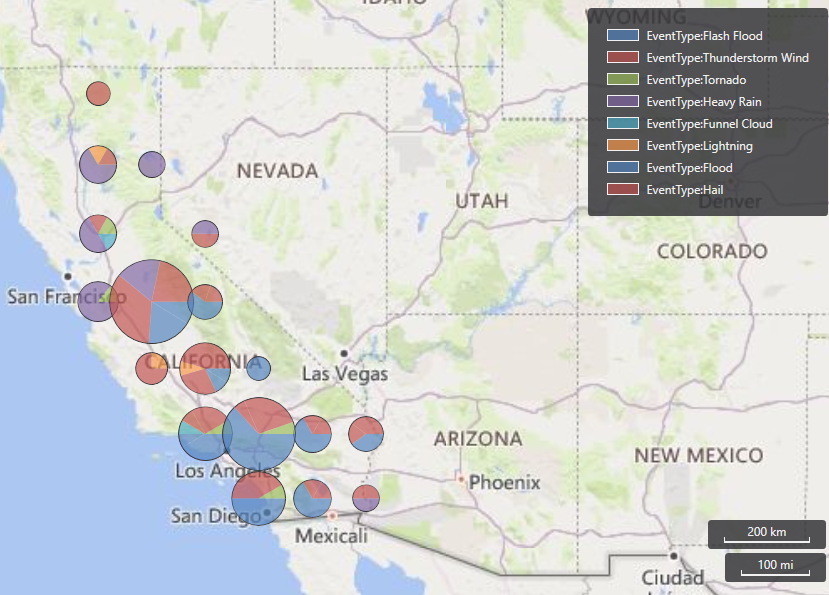
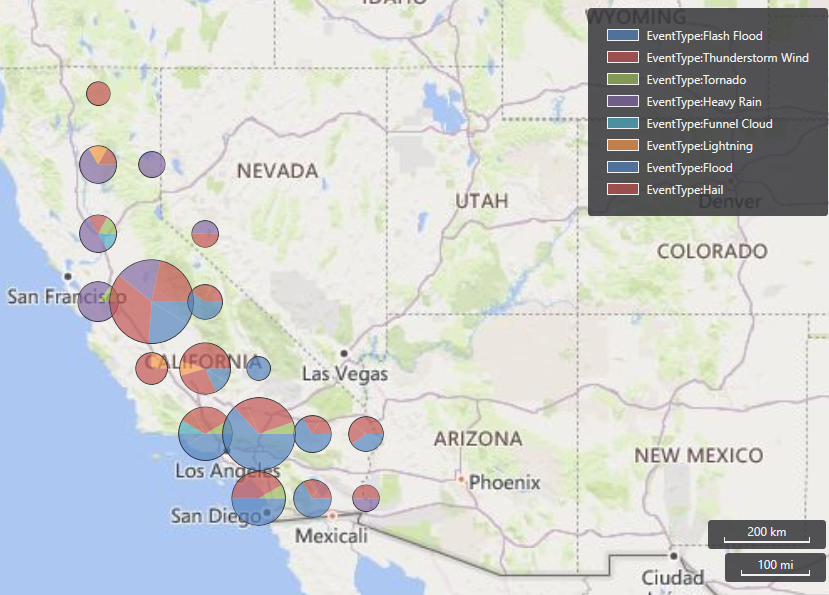
Geographic Analysis Module: Storm events by type in the polygon of California


m07-d04-i01-multi-forecast.png

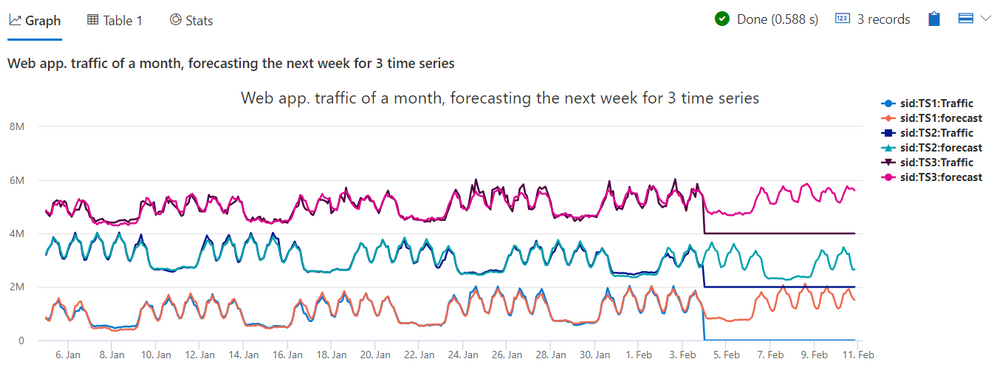
Time Series Analysis II: Forecasting of web app. traffic of next week for multiple time series


To learn the full broad view of ADX advanced capabilities you can take the full course, at your own pace. However, each module is a stand alone unit, so you can just cherry pick the modules you like based on your needs.


Enjoy, and don’t forget to share your feedback!

Installation of SCOM Reporting 2019 after UR1

Installation of SCOM Reporting 2019 after UR1

This article is contributed. See the original author and article here.

Lately, we have observed a strange issue with users unable to install SCOM reporting 2019 when Update Rollup 1 is installed in the environment. Below are the steps to successfully install the component. Please make sure that you are using the correct Build numbers of Update Rollup. They are available at System Center – Operations Manager build versions. Lastly, this problem may occur with future update rollups too.


Issue: SCOM Reporting 2019 cannot be installed after the Management servers are upgraded to 2019 UR1.  The following error message appears:


The management server is a different version than the current setup build. Please use a different management server or the correct version of setup. Server Version: 10.19.10349.0.


Workaround: To resolve this, use the following steps:

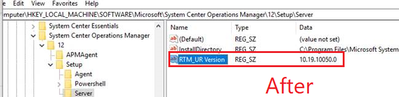
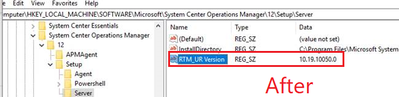
  • On the server machine, modify the registry key “HKEY_LOCAL_MACHINESOFTWAREMicrosoftSystem Center Operations Manager12SetupServer” data “RTM_UR version” from “10.19.10311.0“(UR1 or latest UR version) to “10.19.10050.0” (RTM version).
AakashMSFT_1-1595240977051.png


  • Restart the health service.
  • Ensure that the server version in Operations Manager Products -> Management Servers is reset to RTM version.
AakashMSFT_2-1595240977056.png


  • Proceed with Reporting/Web console installation. After installation, patch the components to Update Rollup (UR1 or latest UR version).
  • Once completed, reset the “RTM_UR version” reg key from RTM version to the appropriate UR version and restart the health service (In this case, it is UR1 10.19.10311.0).
  • Once done, verify that the product version of the server is updated back to the UR version.
AakashMSFT_3-1595240977060.png


Best practices of how to use ADF copy activity to copy new files only

Best practices of how to use ADF copy activity to copy new files only

This article is contributed. See the original author and article here.

In on-going ELT scenario, how to easily load new files only after an initial full data loading is a very common use case. One of the typical examples is that files can be continually dropped to a landing folder of your source store, where you want an easy way to copy the new files only to data lake store instead of repeatedly copy any files which have already been copied last time. In this blog, we will talk about several best practices of using ADF copy activity to achieve that use case.  


When we try to come up with the best approaches to copy new files only, it is impossible to achieve that without understanding your data pattern as well as the scenario environment. Given that, we will illustrate 4 different scenarios below with the best practices for each of using ADF to copy new files only.


Scenario 1:

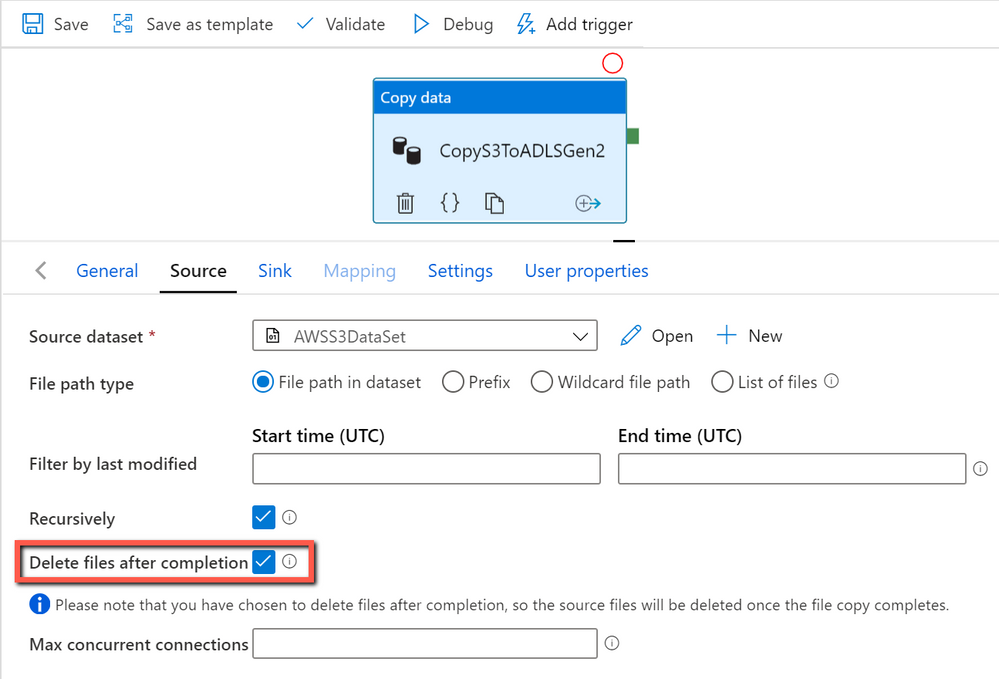
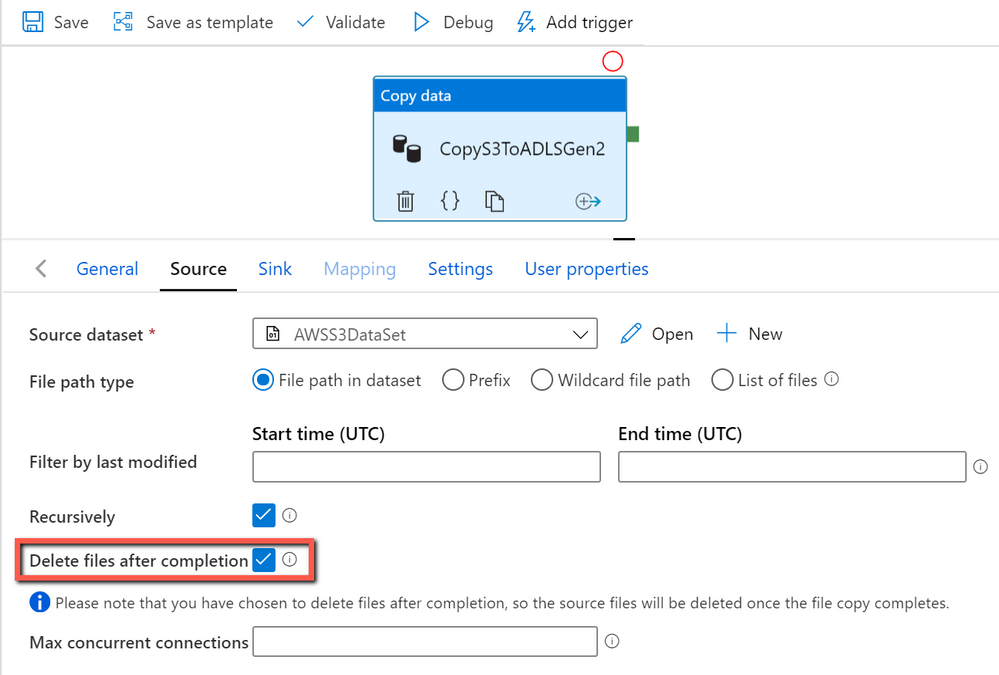
If your files become useless in source store after being moved to the destination store, we suggest you to simply delete files from source store after successfully moving them to the destination store by setting “deleteFilesAfterCompletion” as true in copy activity.  By doing so, all the files which show up in source store are new files by nature.

copywithdelete.png


Scenario 2:

If the files can not be deleted from data source after being moved to the destination, you can find if your folders or files are time-based partitioned or not. For example, your folder structure may follow the pattern like “yyyy/mm/dd/”. If so, you can leverage the ADF system variable with parameter to get the new files only via time partitioned folder name or file name.  You can do this following the instruction below: 

ADF tutorial on incremental copy from time partitioned folder name


Scenario 3:

If your data pattern is not belong to scenario #1 or #2, you can try to find if your file property “LastModifiedDate” can be used to differentiate the new files from the old ones.  If so, you can copy the new and changed files only by setting modifiedDatetimeStart” and “modifiedDatetimeEnd” in ADF dataset. ADF will scan all the files from the source store, apply the file filter by their LastModifiedDate, and only copy the new and updated file since last time to the destination store. Please be aware if you let ADF scan huge amounts of files but only copy a few files to destination, you would still expect the long duration due to file scanning is time consuming as well.

You can go with the following instructions as below:

ADF tutorial on incremental copy via LastModifiedDate

ADF template on incremental copy via LastModifiedDate


Scenario 4:

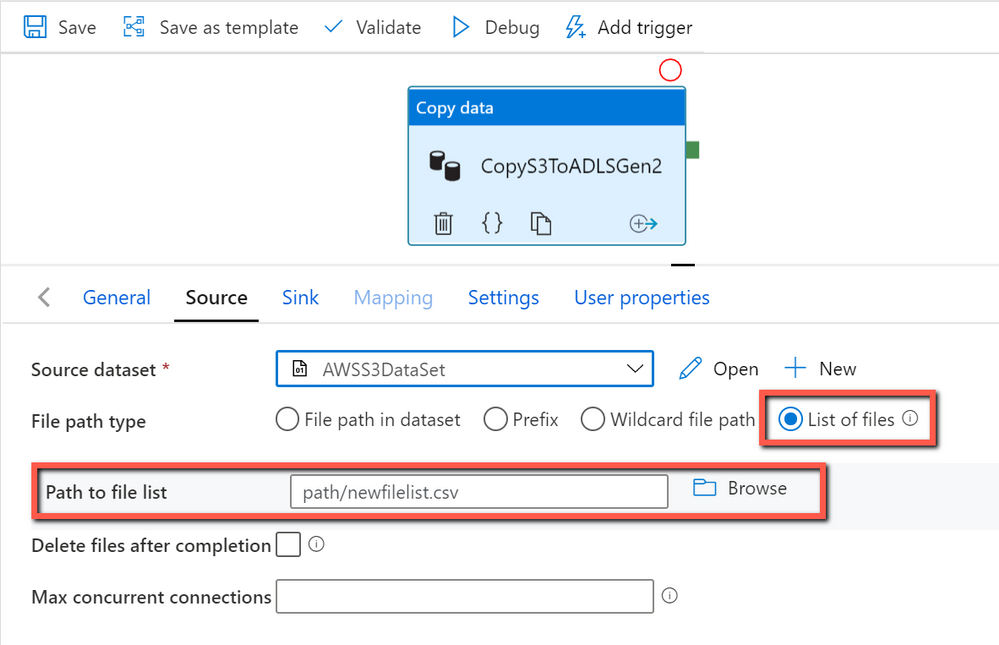
If none of approaches above can be used in your scenario, you need to build a custom way to get the file list of new files, and send the new file list to ADF to copy them. ADF copy activity can consume a text file that includes a list of files you want to copy.

copywithnewfilelist.png

More information as below:

Example of file including a list of files name to copy