Infrastructure + Security: Noteworthy News (July, 2020)

This article is contributed. See the original author and article here.


You are reading the July issue of the Infrastructure + Security: Noteworthy News series!  As a reminder, the Noteworthy News series covers various areas, to include interesting news, announcements, links, tips and tricks from Windows, Azure, and Security worlds on a monthly basis.


Microsoft Azure

Modern Auth and Unattended Scripts in Exchange Online PowerShell V2

Today, we are happy to announce the Public Preview of a Modern Auth unattended scripting option for use with Exchange Online PowerShell V2. This feature provides customers the ability to run non-interactive scripts using Modern Authentication. This feature requires version 2.0.3-Preview or later of the EXO PowerShell V2 module, available via PowerShellGallery.

Customize External Identities self-service sign-up with web API integrations

Last month at Microsoft Build, we announced the public preview of Azure Active Directory (Azure AD) External Identities, introducing self-service sign-up for external users.  As a follow-up to that announcement, the team has released the public preview of the API connectors feature mentioned in Principal Group PM Manager Robin Goldstein’s blog post. This means you can now invoke web APIs as specific steps in a sign-up flow to trigger cloud-based custom workflows.

Working with the Azure AD entitlement management API

Azure Active Directory (Azure AD) entitlement management can help you manage access to groups, applications, and SharePoint Online sites for internal users as well as users outside your organization.  This beta version of the API now allows you to programmatically create packages.

ClaimsXRay in AzureAD with Directory Extension

Read on to see how to use the famous ClaimsXRay application with AzureAD to troubleshoot problems with SAML single sign-on for 3rd party tool applications.

Introducing Microsoft Teams displays

As many people around the world are working remotely, we are seeing an increased need to streamline the work experience and help prioritize what is important. Following our recent blog on Teams product news, we are excited to announce our newest device innovation, Microsoft Teams displays, a category of all-in-one dedicated Teams devices featuring an ambient touchscreen, and a hands-free experience powered by Cortana.

Migration updates – Migration Manager general availability and SPMT adds Teams support

We are pleased to share Migration Manager – part of the SharePoint admin center – has completed rollout to Microsoft 365, including commercial and government cloud customers. We, too, have updated the SharePoint Migration Tool (SPMT) – adding support for migrating content to Microsoft Teams.

A New RecoverableItems Experience Comes to Exchange Online!

We are excited to announce that RecoverableItems, a tenant admin PowerShell cmdlet, has shipped to the preview version of Exchange Admin Center with a new UI!

Azure geo-zone-redundant storage is now general available

Geo-zone-redundant storage (GZRS) and read-access geo-zone-redundant storage (RA-GZRS) are now generally available, offering intra-regional and inter-regional high availability and disaster protection for your applications.

Azure Storage account failover is now generally available

Customer-initiated Storage account failover is now generally available, allowing you to determine when to initiate a failover instead of waiting for Microsoft to do so. When you perform a failover, the secondary replica of the Storage account becomes the new primary, and the DNS records for all Storage service endpoints—blob, file, queue, and table—are updated to point to this new primary. Once the failover is complete, clients will automatically begin reading from the Storage account and writing data to it in the new primary region, with no code changes.

Windows Server

Installation of SCOM Reporting 2019 after UR1

Lately, we have observed a strange issue with users unable to install SCOM reporting 2019 when Update Rollup 1 is installed in the environment. Below are the steps to successfully install the component. Please make sure that you are using the correct Build numbers of Update Rollup.

Endpoint analytics is now available in public preview

With this initial release of Endpoint analytics, we provide insights to help you understand your devices’ reboot and sign-in times so you can optimize your users’ journey from power on to productivity.  It also helps you proactively remediate common support issues before your users become aware of them which can help reduce the number of calls your helpdesk gets. Endpoint analytics even allows you to track the progress of enabling your devices to get corporate configuration data from the cloud, making it easier for employees to work from home.

How to Troubleshoot Windows Server Network connectivity issues via PowerShell

The Test-NetConnection cmdlet displays diagnostic information for a connection. It supports ping test, TCP test, route tracing, and route selection diagnostics. Depending on the input parameters, the output can include the DNS lookup results, a list of IP interfaces, IPsec rules, route/source address selection results, and/or confirmation of connection establishment.

Released: Azure SQL Managed Instance Management Pack (7.0.22.0)

System Center Operations Manager Management Pack for Azure SQL Managed Instance is now available. If you have a hybrid data environment and SCOM is your preferred monitoring solution, you can now use it to monitor your Azure SQL Managed Instances in addition to on premises SQL Servers, SQL VMs, and Azure SQL DBs. 

Windows Client

What’s new for IT pros in Windows 10, version 2004

Windows 10, version 2004, officially known as the Windows 10 May 2020 Update, is now available through Windows Server Update Services (WSUS) and Windows Update for Business, and can be downloaded from Visual Studio Subscriptions, the Software Download Center (via Update Assistant or the Media Creation Tool), and the Volume Licensing Service Center. For those of you exploring your deployment options in a remote work scenario, check out Deploying a new version of Windows 10 in a remote world.

Active Investigation into Outlook Crashing on Launch

There is a new symptom of Outlook crashing on launch starting on 7/15/2020.   A fix has been published but will take time to propagate to worldwide availability. 


Security

Configure authentication session management with Conditional Access

In complex deployments, organizations might have a need to restrict authentication sessions.  Conditional Access controls allow you to create policies that target specific use cases within your organization without affecting all users.  Session controls provides you the ability to modify how often the user must re-authenticate.

Why are my users not prompted for MFA as expected?

It may be frustrating after have MFA enabled for quite some time that now all of a sudden some of your users are no longer receiving the MFA prompt while logging into applications which required this before.  Read on to discover why this may be the new user experience.

Announcing GA: Mark new files as ‘sensitive by default’ in OneDrive and SharePoint

When new files are added to SharePoint or OneDrive in Microsoft 365, it takes a while for them to be crawled and indexed.  It takes additional time for the Office Data Loss Prevention (DLP) policy to scan the content and apply rules to help protect sensitive content. If external sharing is turned on, sensitive content could be shared and accessed by guests before the Office DLP rule finishes processing.  Instead of turning off external sharing entirely, you can address this issue by using a new PowerShell cmdlet.

Announcing general availability of the new version of Microsoft Secure Score

Earlier this year we blogged about the latest public preview of Microsoft Secure Score and today we’re pleased to announce that we‘ve completed our global roll out making it generally available to all of our commercial customers.

Announcing general availability of the new version of Microsoft Secure Score

Earlier this year we blogged about the latest public preview of Microsoft Secure Score and today we’re pleased to announce that we‘ve completed our global roll out making it generally available to all of our commercial customers.

Creating a Custom Dashboard for Azure Security Center with Azure Resource Graph

Azure Resource Graph (ARG) provides an efficient way to query at scale across a given set of subscriptions for any Azure Resource. With ARG, you can query, visualize, or export Azure Security Center (ASC) recommendations in order to get the information that matters most to you.

identityProtectionRoot resource type

Identity Protection is a tool that allows organizations to discover, investigate, and remediate identity-based risks in their environment. You can use the following Microsoft Graph APIs to query risks detected by Identity Protection.

Protect and Secure Cloud-based Applications using Azure MFA

In this guide step by step, we show you how to enable MFA for an Azure App Service web app so authentication is taken care of by Azure Active Directory, and users accessing the app are forced to perform multifactor authentication using conditional access policy that Azure AD will enforce.

Announcing high value asset tagging in Microsoft Defender ATP

We are excited to introduce a new setting in Microsoft Defender ATP that allows customers to define a machine’s value to the organization. 

Updates and Support Lifecycle

Support update for Azure AD Premium customers using Microsoft Identity Manager

For Azure AD Premium customers, standard support is available from June 2020 onward, continuing after January 2021, for specific components of Microsoft Identity Manager 2016 Service Pack 2, or later service packs, that enable Azure AD integration. This is in addition to the existing support for Microsoft Identity Manager already provided through the fixed lifecycle policy and plans for support for businesses.

Impact of Changes to Update Channels for Microsoft 365 Apps

Microsoft recently made changes to the update channels for Microsoft 365 Apps. For the official announcement of these changes, read this blog post. For Microsoft Endpoint Configuration Manager admins that manage Microsoft 365 Apps updates, actions may be required depending on your environment.

Released: June 2020 Quarterly Exchange Updates

Announcing the availability of quarterly servicing cumulative updates for Exchange Server 2016 and 2019. These updates include fixes for customer reported issues as well as all previously released security updates. 

Azure API Management update – July 2020

A regular Azure API Management service update was started on July 8, 2020. Continue to the article to see what it includes in terms of new features, bug fixes, and changes, along with other improvements.


Products reaching End of Support for 2020

Microsoft Premier Support News

Check out Microsoft Services public blog for new Proactive Services as well as new features and capabilities of the Services Hub, On-demand Assessments, and On-demand Learning platforms.


The Importance of Comments in Data Projects

This article is contributed. See the original author and article here.

Project management, scientific experimentation and software engineering all have at least one component in comment: documentation. Without the basic concept of transferring the knowledge of a given operation from the author to the reader, projects of any nature are doomed to become a maintenance issue, with potentially devastating results. 


In Data Projects, we have an interesting issue with this documentation. Whilst the project plans, software specifications and so on are well-defined and mostly consistent in nature and delivery method (such as a Microsoft Word document), comments within the code for a given component are not. Different languages, platforms and other constructs make consistency more challenging. This can become a huge issue when the calling or receiving component needs to rely on the operation of the other component. 


To state the obvious: At the very least, you should comment your code with complete, informative information. It’s up to you to understand how your language or compiler uses comments, and you will also have to learn how other popular languages use comments since you may need to read source code from your team.


When I learned to program (on a Mainframe, several hundred years ago) I was taught to write comments detailing the flow of the program first, and then go lay in my code underneath the comments I wrote. “Comment-First” coding. 


Depending on the language/interpreter, there are (usually) two types of comments: Line and Block. A Line comment is indicated by some set of symbols (such as — in T-SQL), and is terminated with the end of the line. A Block comment uses different symbols to “start” and “stop” comment text (such as /* and */ in T-SQL), and can span multiple lines. 


In general, always prefer Block comments to Line comments. The reason is that lines of text often have different ASCII characters to signal the “EOL” or End of Line for a given software/hardware environment – Linux and Windows terminators for instance. Take, for example, this unfortunate comment: 


— Whatever you do, do not run 

— TRUNCATE TABLE 

— On this code!


(Yes, I’ve something just like this) If the at the start of the line is removed for the middle component by some accident, you can see that would have a tragic result. I recommend the comment be changed to this: 


/* Whatever you do, do not run TRUNCATE TABLE 

 On this code!

*/


Or even


/* Whatever you do, do not run TRUNCATE TABLE  On this code! */


That way you’ll get a syntax error alerting you to an issue if you leave out the start or end comment symbols. 


As an aside, each language may handle these comments differently, so make sure you understand how they work, or are even stored. For instance, in some SQL dialects, starting a Stored Procedure with a comment may not save the comment in the Stored Procedure definition (although if you keep the source code it’s there of course). For instance, this: 


/* Let’s Create a Procedure to deal with that return data: */

CREATE PROC @ReturnMe AS

….


Might be different when you call to view the text of the Stored Procedure than this: 


CREATE PROC @ReturnMe AS

/* Let’s Create a Procedure to deal with that return data: */

….


So what is a “Good” Comment? Well, since I am “old-school”, my comments at the start of the code looks like this: 


/* <MyObjectOrFileName>

Purpose: <PurposeOf Code>

Author: <AuthorName>

Date Created: <DateCodeOriginallyCreated>

Edits: 

<DateEditedAndReason>

<DateEditedAndReason>

*/


/* <Code SegmentComment>  */


/* EOF <MyObjectOrFileName>*/


In fact, for Transact-SQL code, I use this handy tip from my friend Dr. Greg Low to make text that a default Query Window in SQL Server Management Studio.


Other tools have similar constructs, or you can just paste that in OneNote to use.


Is all this a bit much? Yes. Until you need it. Also, coding my comments makes me think more about what I am doing, and slows me down a bit to put higher quality into my work.


There is an interesting new development in Data Projects: Notebooks. I use Jupyter Notebooks quite a bit in Data Science work. Jupyter Notebooks have “Cells” that allow you to enter either Code or Text. The text is usually longer, can be formatted, have links and graphics, and can be quite descriptive. In a way, it’s like a hyper set of comments. So are comments still needed in the Code cells? 


Like most Data Project questions, the answer is “it depends”. If the Notebook itself is a code artifact, the Code Cells do not need to be further annotated – that’s the point of the text. If, however, the code in a Cell can be “extracted” for use in some other way, or the Text Cell is used to explain the purpose but not the code flow, then yes, comments are still needed. 


So stick to the basics in your software engineering and Data Science work, and ensure you comment your code. As I was taught early on, “Pretend that the person that will maintain your code is a very easily triggered person, and knows where you live.” That’s good advice.  

Experiencing Alerting failure for Log Search Alerts in China Gov – 07/21 – Investigating

This article is contributed. See the original author and article here.

Initial Update: Tuesday, 21 July 2020 12:57 UTC

We are aware of issues within Log Search Alerts and are actively investigating. Some customers may experience issues with missed or delayed Log Search alerts in China Government.

  • Work Around: None
  • Next Update: Before 07/21 17:00 UTC

We are working hard to resolve this issue and apologize for any inconvenience.
-Mohini


Exploring Azure SQL Managed Instance Management Pack

Exploring Azure SQL Managed Instance Management Pack

This article is contributed. See the original author and article here.

We released System Center Operations Manager Management Pack for Azure SQL Managed Instance recently. It provides comprehensive monitoring capabilities for SQL Managed Instance. If you have a hybrid data environment, you can use a single monitoring solution, SCOM, to monitor all your data assets as we already have management packs for SQL Server and Azure SQL DB.


Discovery

After you install the management pack (MP), there are two templates to get you started: Manual and Automatic Discovery. As the names suggest, you can either discover your instances by adding them manually or automatically discover instances in a given subscription. Both options have wizards that walk you through this setup. We will not explore them in this post as the instructions in the MP guide are very detailed. I just want to point out that you can use either Azure Active Directory (AAD) or SQL Authentication to connect to the instances. You can use a connection with sysadmin rights or there is an option to use the least amount of privileges to monitor the product just like SQL Server MP. This is also explained in detail in the MP guide.


Monitoring

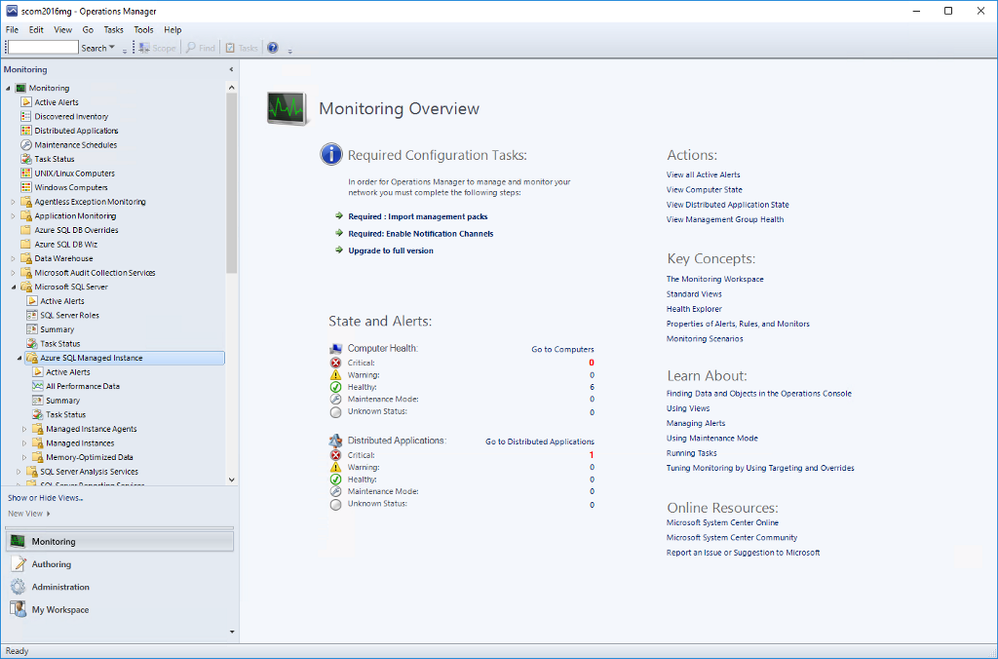
Once you complete all the steps in the wizard, you will be able to see the instances in the SCOM dashboard under Monitoring. Under Microsoft SQL Server folder, you’ll see a subfolder for Microsoft Azure SQL Managed Instance.

MIMP1.png

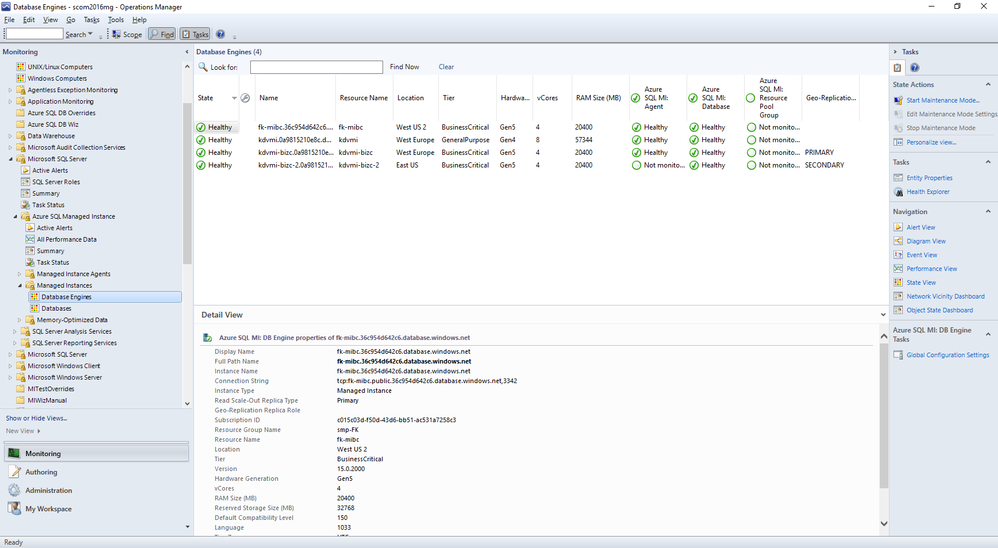
Navigate to Microsoft Azure SQL Managed Instance -> Managed Instances -> Database Engines

You can see the instances listed with some details. You can select which columns to display here by right-clicking and selecting Personalize View from the list. If you are using geo-replication, you will see that Geo-Replication Replica Role is listed in Detailed View. It can be Primary or Secondary (or blank if this instance is not participating in geo-replication).

MIMP2.png

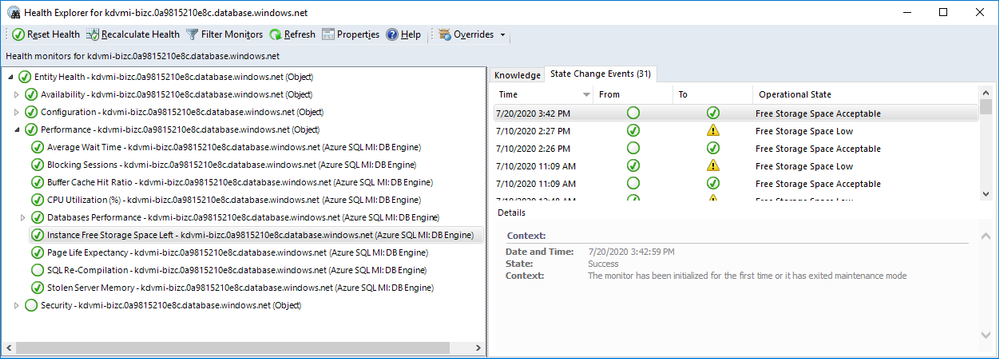
As usual, you can drill down by double-clicking on the instance rows. This will take you to the list of individual monitors and their status. Most of these are the monitors you are familiar with from SQL Server MP.

There is a brand new monitor called Instance Free Storage Space Left. It uses percentages and is set to warn if it goes below 20% but, of course, it is customizable just like all the other monitors. It also shows the actual data in MB.

MIMP3.png

Navigate to Microsoft Azure SQL Managed Instance -> Managed Instances -> Databases

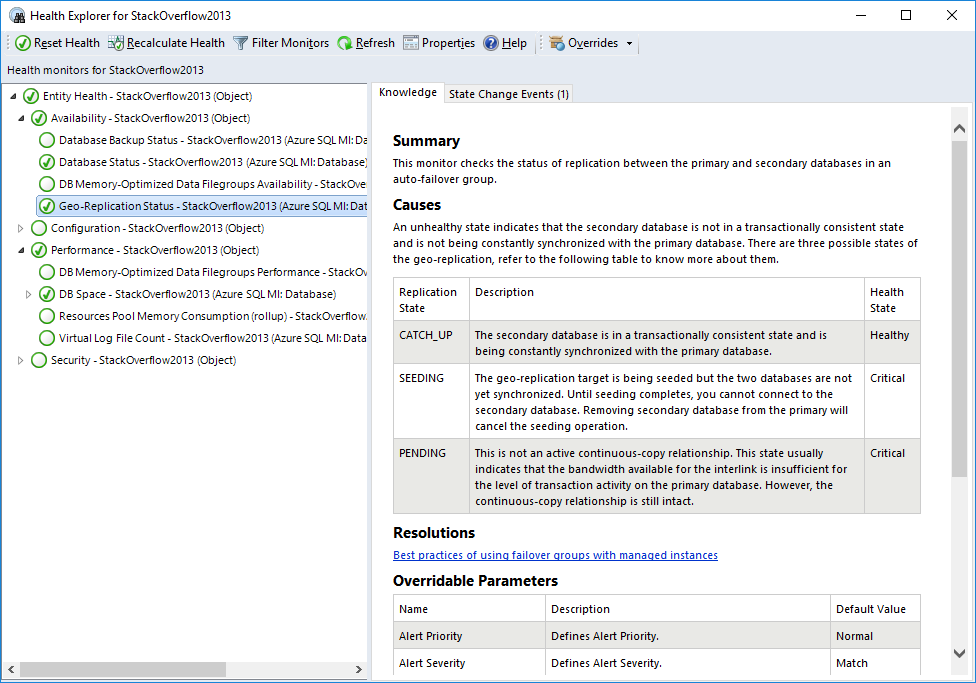
If you double-click on a geo-replicated database, you will see the new monitor, Geo-Replication Status, under Availability. All the information is on the right hand side. As you can see it can be in one of three states:

  • CATCH_UP: This is the healthy state.
  • SEEDING: Seeding is happening but until it competes, you can’t connect to the secondary database.
  • PENDING: Not in an active continuous-copy relationship. Usually indicates bandwidth related issues.

MIMP4.png

Also on the Databases view, right-click on a geo-replicated database and select Open->Performance View. You will find the new counter Geo-Replication Lag (sec) along with other counters. This rule collects performance metric for the primary database only and shows the time difference between transactions committed on primary database and persisted on secondary database.


Other Views

You can also explore Managed Instance Agents and Memory-Optimized Data folders for monitors specific to those areas. We will not explore those in this post.


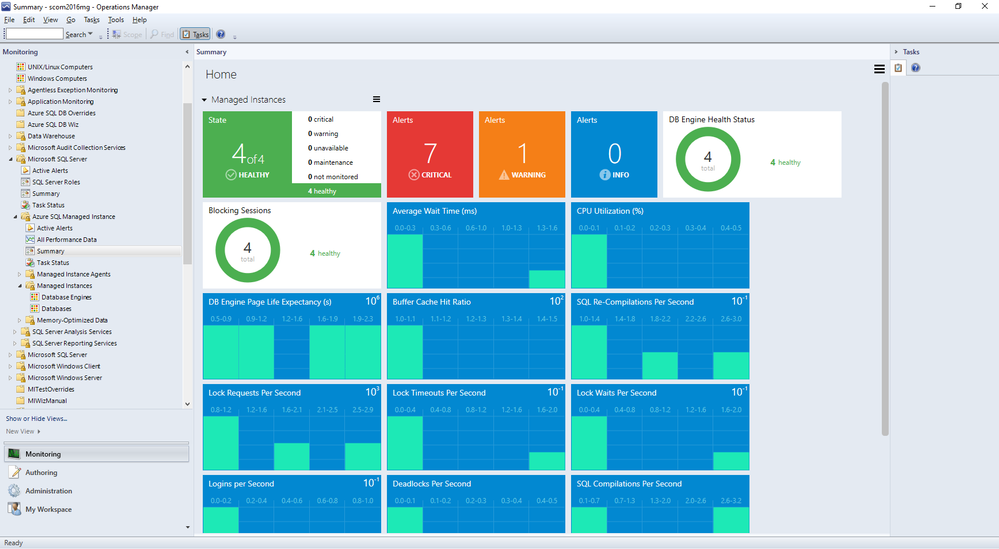
Summary Dashboard under Microsoft Azure SQL Managed Instance provides the usual status-at-a-glance view of everything. Just like other SQL MPs, you can drill down to get to specific monitors/rules and customize it by adding or removing tiles to fit your needs.

MIMP5.png

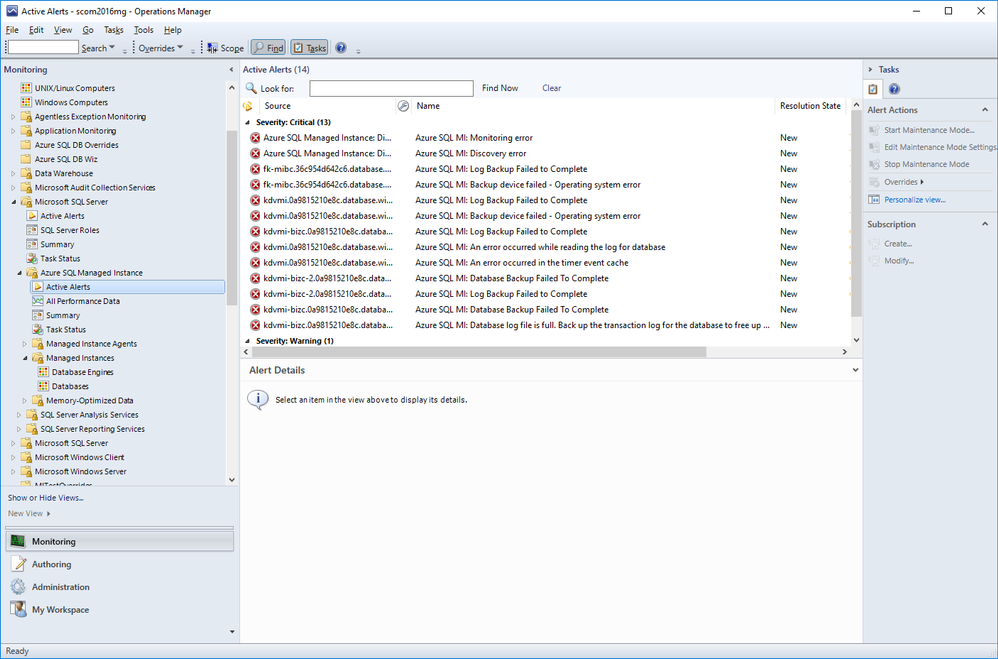
Active Alerts view under Microsoft Azure SQL Managed Instance lets you view all your active alerts in a single place just like other SQL MPs.

MIMP6.png

Summary

Azure SQL Managed Instance Management Pack is very similar to other SQL MPs but also introduces product specific monitors and rules.

Hunting the Demons- Azure Sentinel Administrative Suspicious Activities Library

This article is contributed. See the original author and article here.

Azure Activity logs  provides insight into any subscription-level or management group level events that have occurred in Azure, there are three main categories covered under Azure Activity and a bunch of resource types, for more details click here:

  • Azure Resources
  • Audit
  • Security

Each event in the Activity Log has a particular category . See the sections below for more detail on each category and its schema when you access the Activity log from the portal, PowerShell, CLI, and REST API. The schema is different when you stream the Activity log to storage or Event Hubs: 


Category Description
Administrative Contains the record of all create, update, delete, and action operations performed through Resource Manager. Examples of Administrative events include create virtual machine and delete network security group.

Every action taken by a user or application using Resource Manager is modeled as an operation on a particular resource type. If the operation type is Write, Delete, or Action, the records of both the start and success or fail of that operation are recorded in the Administrative category. Administrative events also include any changes to role-based access control in a subscription.

Service Health Contains the record of any service health incidents that have occurred in Azure. An example of a Service Health event SQL Azure in East US is experiencing downtime.

Service Health events come in Six varieties: Action Required, Assisted Recovery, Incident, Maintenance, Information, or Security. These events are only created if you have a resource in the subscription that would be impacted by the event.

Resource Health Contains the record of any resource health events that have occurred to your Azure resources. An example of a Resource Health event is Virtual Machine health status changed to unavailable.

Resource Health events can represent one of four health statuses: Available, Unavailable, Degraded, and Unknown. Additionally, Resource Health events can be categorized as being Platform Initiated or User Initiated.

Alert Contains the record of activations for Azure alerts. An example of an Alert event is CPU % on myVM has been over 80 for the past 5 minutes.
Autoscale Contains the record of any events related to the operation of the autoscale engine based on any autoscale settings you have defined in your subscription. An example of an Autoscale event is Autoscale scale up action failed.
Recommendation Contains recommendation events from Azure Advisor.
Security Contains the record of any alerts generated by Azure Security Center. An example of a Security event is Suspicious double extension file executed.
Policy Contains records of all effect action operations performed by Azure Policy. Examples of Policy events include Audit and Deny. Every action taken by Policy is modeled as an operation on a resource.


Our hunting library for today will shed more lights on “Administrative” category which contains the record of all create, update, delete, and action operations performed through Resource Manager, this means an auditing  & reporting activities have to be in place and hence there are a set of operations (Operation Name) which defines a resource types.


Hunting such kind of activities (aka: Demons) require defining the category, operation name “value” & activity value. Before sharing couple of hunting use-cases let’s have a look at a set of administrative operations as a sample:


Operation name Resource type
Create or update workbook Microsoft.Insights/workbooks
Delete Workbook Microsoft.Insights/workbooks
Set Workflow – Playbook Microsoft.Logic/workflows
Delete Workflow – Playbook Microsoft.Logic/workflows
Create Saved Search Microsoft.OperationalInsights/workspaces/savedSearches
Delete Saved Search Microsoft.OperationalInsights/workspaces/savedSearches
Update Alert – Analytics Rules Microsoft.SecurityInsights/alertRules
Delete Alert  – Analytics  Rules Microsoft.SecurityInsights/alertRules
Update Alert Rule Response Actions Microsoft.SecurityInsights/alertRules/actions
Delete Alert Rule Response Actions Microsoft.SecurityInsights/alertRules/actions
Update Bookmarks Microsoft.SecurityInsights/bookmarks
Delete Bookmarks Microsoft.SecurityInsights/bookmarks
Update Cases Microsoft.SecurityInsights/Cases
Update Case Investigation Microsoft.SecurityInsights/Cases/investigations
Create Case Comments Microsoft.SecurityInsights/Cases/comments
Update Data Connectors Microsoft.SecurityInsights/dataConnectors
Delete Data Connectors Microsoft.SecurityInsights/dataConnectors
Update Settings Microsoft.SecurityInsights/settings
Update / Delete NSG Microsoft.Network/networkSecurityGroups
Create / Update / Delete Pubic IP Addresses Microsoft.Network/publicIPAddresses
Create / Update / Delete Network Interfaces Microsoft.Network/networkInterfaces
Route tables actions Microsoft.Network/routeTables
Create / Update / Delete Front door web app firewall policies Microsoft.Network/frontdoorwebapplicationfirewallpolicies
DDOS Protection Plans Actions Microsoft.Network/ddosProtectionPlans
Create / Update / Delete Virtual Networks Microsoft.Network/virtualNetworks
Create / Update / Delete Front doors Microsoft.Network/frontdoors
Create / Update / Delete Subnets Microsoft.Network/virtualNetworks/subnets
Create / Update / Delete Application Gateways  Microsoft.Network/applicationGateways
Create / Update / Delete Update Virtual Network Peerings Microsoft.Network/virtualNetworks/virtualNetworkPeerings
Firewall Policies Rule Groups Actions Microsoft.Network/firewallPolicies/ruleGroups
Create / Update / Delete Azure Firewalls  Microsoft.Network/azureFirewalls
Create / Update  / Delete Firewall Policies Microsoft.Network/firewallPolicies
DNS Resources Actions Microsoft.Network/getDnsResourceReference


Use- Cases:


#1 Creating a new Azure Sentinel Analytics – Rule:


AzureActivity
| where Category == "Administrative"
| where OperationNameValue == "Microsoft.SecurityInsights/alertRules/write"
| where ActivitySubstatusValue == "Created"


#2 Deleting an existing Azure Sentinel Analytics – Rule:


AzureActivity
| where Category == "Administrative"
| where OperationNameValue == "Microsoft.SecurityInsights/alertRules/delete"
| where ActivitySubstatusValue == "OK"


#3 Creating a new NSG:


// NSG : 201 Created status means "Created" 
AzureActivity
| where Category == "Administrative"
| where OperationNameValue == "Microsoft.Network/networkSecurityGroups/write"
| where ActivitySubstatusValue == "Created"


#4 Updating an Existing NSG:


// NSG : 200 Ok status means "Updated"
AzureActivity
| where Category == "Administrative"
| where OperationNameValue == "Microsoft.Network/networkSecurityGroups/write"
| where ActivitySubstatusValue == "OK"


#5 Creating Virtual Network Subnets:


// Virtual Networks Subnets Creation
AzureActivity
| where Category == "Administrative"
| where OperationNameValue == "Microsoft.Network/virtualNetworks/subnets/write"
| where ActivitySubstatusValue == "Created"


And much more use-cases and hunting queries can be configured, we make it easy so check out the Azure Sentinel Administrative Suspicious Activities Library uploaded to gihub :

AnalyticsRulesAdministrativeOperations

AzureNSG_AdministrativeOperations

AzureSentinelWorkbooks_AdministrativeOperation

AzureVirtualNetworkSubnets_AdministrativeOperationset


Enjoy hunting the demons! and please share your feedback.