by Scott Muniz | Jul 21, 2020 | Uncategorized
This article is contributed. See the original author and article here.
Microsoft 365 Content Services Partner Program: Accepting applications through August 31, 2020
2020 has been a busy year for the Microsoft 365 Content Services Partner Program. We’ve grown to more than 100 partners this year, including 37 Charter members. Partners in the Microsoft 365 Content Services Partner Program – both SIs and ISVs – are a select group of organizations around the globe who have demonstrated their expertise in delivering solutions that make the transformation of their customers’ content management approach practical and attainable.
This year we’ll look to program partners to help us drive adoption and usage of Microsoft 365, focusing on Project Cortex, and help our customers realize the full value of the knowledge and insights solutions available in Microsoft 365.
As mentioned in today’s Project Cortex announcements at Microsoft Inspire, we’re inviting our partners to join us on this journey. If your organization delivers solutions that make the transformation of your customers’ content management approach practical and attainable, we encourage you to submit an application to join the Microsoft 365 Content Services Partner Program.
We will be accepting applications for new and renewed membership now through August 31, 2020.
Register today for an office hours call on Tuesday, August 4, at 8am PDT, where we’ll walk you through the program, benefits, requirements, and application process. We look forward to telling you more about the program at that time.
A few things to note for this year’s registration for partners applying for all levels:
- You can select at most 2 workloads that align to your current business for this program
- You can select at most 3 industries that you will target for this program
- You must indicate your organization’s status as a registered Microsoft partner
- If you’re applying for charter and preferred status,
- You must indicate their managed partner status, Modern Workplace competencies, and deal capacity
- You must provide two pieces of customer evidence featuring Microsoft 365 Content Services solutions (such as Microsoft 365, SharePoint, Teams) and published to your own website or a Microsoft site
Program partners can receive the following benefits:
- Access to compete and go-to-market collateral
- Access to technical and business training
- Quarterly updates
Charter and preferred partners can receive additional benefits, like:
- NDA briefings and events, like the Microsoft Content Services Summit and the Content Kitchen
- Distribution and amplification of approved partner/customer case studies
- Use of logos and letters recognizing charter and preferred partner status
- Alignment and referral to the Microsoft field
- Additional marketing opportunities
In return for these additional benefits, charter and preferred partners will commit to having team members complete Project Cortex training; obtaining a Gold competency for Knowledge (when it becomes available); and submitting two pieces of customer evidence during the program year.
Furthermore, Preferred partners must have the capacity to lead or support at least 20 Project Cortex engagements.
More details about the partner program, partner levels, incentives, and requirements are available in the Microsoft 365 Content Services Partner Program overview deck.
For more information on the Microsoft 365 Content Services Partner Program, visit aka.ms/ContentServicesProgram.
by Scott Muniz | Jul 21, 2020 | Alerts, Microsoft, Technology, Uncategorized
This article is contributed. See the original author and article here.
Lifting and shifting your application to the cloud is extremely easy, on paper. The hard truth is that the only way to know for sure how it is going to perform is to test it. Benchmarking on-premises is hard enough, but benchmarking in the cloud can get really tricky due to changes in what’s exposed in PaaS environments. WorkloadTools is a set of open-source tools that can help you capture, analyze, and replay your workload, on-premises, and in the cloud. In this episode of Data Exposed: MVP Edition, Gianluca Sartori introduces the tool and its capabilities.
Watch on Data Exposed
Additional Resources:
WorkloadTools on GitHub:
Learn more about Microsoft Most Valuable Professionals (MVPs)
View/share our latest episodes on Channel 9 and YouTube!
by Scott Muniz | Jul 21, 2020 | Uncategorized
This article is contributed. See the original author and article here.
Azure Lab Services provides the ability to create a template machines with nested Hyper-V virtual machines. See Enable nested virtualization on a template virtual machine in Azure Lab Services documentation for further details. This is useful for classes where you need a couple machines to talk to one another, like the Ethical Hacking class described in the class type documentation.
Let’s talk about some tips when you need to create your own template machine with nested Hyper-V virtual machines.
1. Consider which Hyper-V VMs are needed for the class, not the department.
There is sometimes a tendency to want to create one template for all classes in a department. Taking the time to consider what is needed for only a specific class can save money by allowing for a smaller template machine size to be used. Save the image for reuse in the future.
2. Use VHDX for virtual disks.
The OS disk size for Lab Services VMs depends on the selected image and for most of the images its 128 GB. The size of a VHD disk for a Hyper-V VM matches the maximum size you want that virtual disk to be. The VHDX format allows for the actual size of the file to be reduced and to later be increased up to the maximum disk size. Using the VHDX file format for your virtual disk could potentially allow for more Hyper-V VMs on a lab template machine. This is dependent on the number and size of files stored on each virtual disk, though.
The ability to shrink virtual disks only works with the VHDX file format. If you have an existing VHD file, use the Convert-VHD PowerShell cmdlet to convert to a VHD file to VHDX. Use Resize-VHD PowerShell cmdlet to shrink the virtual disk size and store more virtual disks on the template machine.
3. Use dynamic memory when creating the Hyper-V virtual machine.
Users can set the minimum and maximum RAM for the Hyper-V virtual machine. This allows other Hyper-V virtual machines or the host machine to use the memory when it is not needed. This can be useful in cases where a Hyper-V VM only needs to be used in bursts rather than continuously.
We hope you find these tips useful. Please comment below if you know of more tips or have a question.
Thanks,
The Lab Services Team
by Scott Muniz | Jul 21, 2020 | Uncategorized
This article is contributed. See the original author and article here.
Hello Everyone –
This week is Microsoft Inspire where we celebrate our partners that have helped us innovate and accelerate growth over the last year. Whether businesses are starting their journey to cloud identity, migrating applications to modern authentication, or rolling out a passwordless solution to their employees, they often need help. That’s where our identity partners come in, offering everything from migration support to integrating their solutions with our identity platform. They’re a critical part to help us achieve our 5 identity priorities that we outlined earlier this year. We’ve seen amazing progress in our partner ecosystem and wanted to share just some of the ways our partners are contributing to our 5 identity priorities of 2020:
Priority 1: Connect all applications and cloud resources to improve access controls and the user experience.
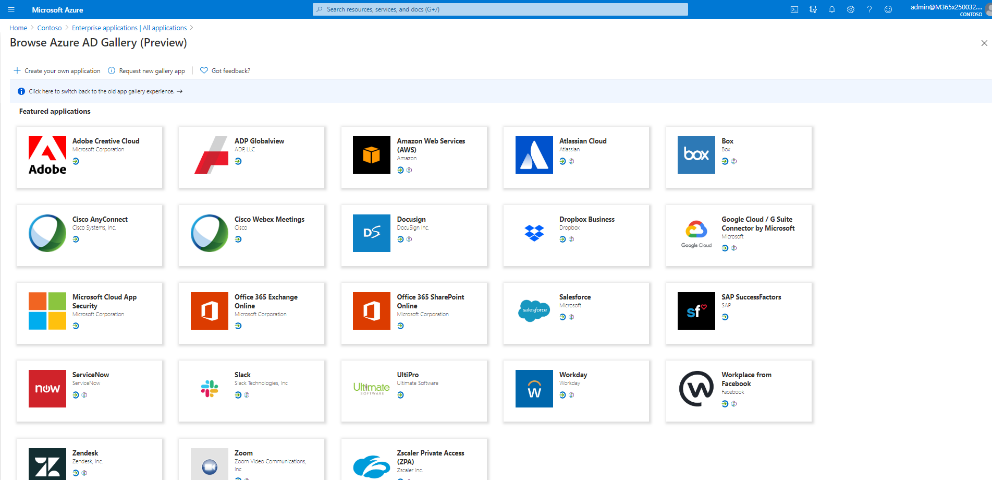
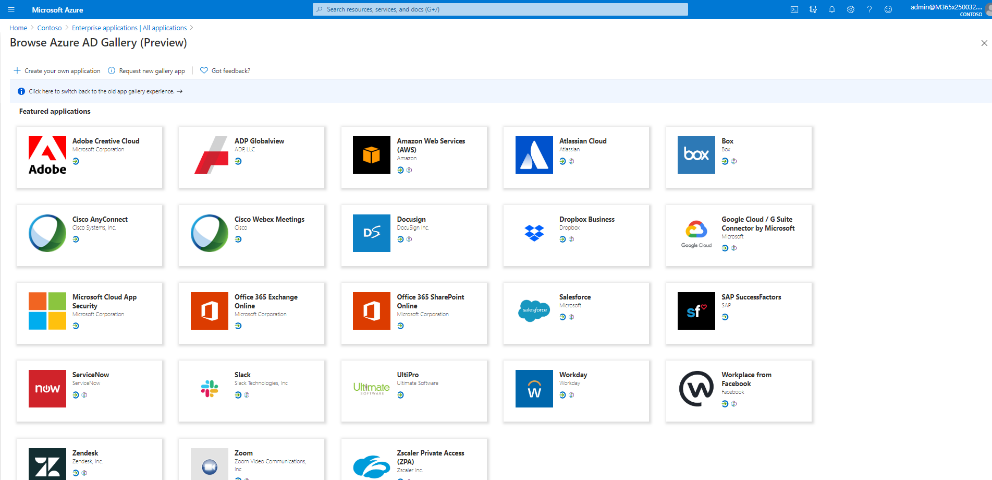
As employees adapt to remote work, they need secure, seamless access to all types of applications from cloud apps to on-premises apps. Organizations are simplifying and securing access to our partner applications like Cisco Webex, Zoom, Box, Docusign, Workplace from Facebook thanks to Azure AD. Hundreds of partners have built integrations that support single sign-on and user provisioning and our Azure AD app gallery has grown to over 3,400 pre-integrated applications.
While the usage of cloud apps continues to grow, many organizations still rely on legacy-auth based applications. Thanks to our secure hybrid access partners – Akamai, Citrix, F5 networks and Zscaler – we’ve been able to help customers access legacy-auth based applications that use protocols like header-based and Kerberos authentication.
Priority 2: Empower developers to integrate identity into their apps and improve security.
At Microsoft Build we announced several enhancements to make it easier for developers to create secure and trustworthy apps. We’ve already seen hundreds of developers get publisher verified that help admins and end-users understand the authenticity of who an app developer is. Over 660 applications by 390 publishers have been verified thus far.
We also added more Azure AD capabilities in Microsoft Graph to enable our partners to build identity and security focused applications and workflows. For example, Lumagate, built an AI-powered chatbot that simplifies management of identities and endpoints with Microsoft Graph. RSA has leveraged Azure AD’s risky user data and other Microsoft security signals to enrich their risk score engine. And F5 networks is using the Azure AD application gallery API to simplify the configuration of select SAP and Oracle applications between Azure AD and F5 BIG-IP APM.
We’ve also extended Azure AD B2C capabilities with several partners that enable developers to further protect their customer-facing applications. Developers can integrate with partners including LexisNexis and Experian for risk analysis and fraud detection and integrate with partners like IDology, Jumio, and Onfido to perform identity verification and proofing.
Priority 3: Go passwordless to make security effortless for users.
Our goal to eliminate dependencies on passwords and replace them with more secure authentication can only be achieved with our partners. Over 150 million people – across our consumer accounts and Azure AD accounts – are signing in using passwordless methods each month. Azure AD supports platform, software, and hardware authenticator options that are phishing-resistant and user-friendly to meet your business needs. Our partners below have built a variety of hardware security keys to choose from that meet FIDO2 standards and integrate with Azure AD. Partners like Yubico and Feitian have recently released new security keys like the iePass FIDO Security Key and YubiKey 5Ci that are designed for ease-of-use with mobile devices.

Priority 4: Enable boundaryless collaboration and automated access lifecycle for all users.
To improve access lifecycle for all users we’ve worked with HR systems like SAP SuccessFactors and Workday to enhance our existing integrations. Earlier this year we announced the public preview of user provisioning from SAP SuccessFactors to Azure AD allowing you to easily orchestrate user data from SAP SuccessFactors into Azure AD. We also added more enhancements to our existing Workday integrations such as support for more writeback fields and the ability to specify the Workday API version to use.
Effective collaboration across employees, partners and customers requires more than simply connecting them to the right resources but ensuring they have the right access. Our integrations with Identity Governance partners like Saviynt and Omada provide advanced governance scenarios such segregation of duties, complex workflows and granular reporting across hybrid application estates, and governance for Microsoft Teams. Additionally, our industry-focused partners like Imprivata provide clinical access governance for cloud and legacy healthcare applications (i.e. EHRs).
Priority 5: Start your Zero Trust journey to protect your organization as you digitally transform.
Zero Trust starts with a strong identity foundation. With customers around the globe responding to COVID-19 by moving their office employees to remote work, identity-driven security solutions are required to help safeguard company resources. Many of our service partners are helping customers implement a Zero Trust security strategy that puts identity at the center. For example, partners like Concurrency, Edgile and Optiv have helped customers transition to remote work with our identity driven security solutions making it easier and more secure for employees to work from home.
Join us virtually, live or on-demand
While we wish we could all meet in person this year at Microsoft Inspire 2020, we have a great line up of free, virtual sessions to share with you wherever you are in the world. If you’re a partner looking to build a practice with Azure AD be sure to attend our identity sessions below and learn how to take advantage of our identity workshops that will help you assess the maturity of your customers identity estate.
Featured session:
Digital Breakouts
Connection zones
On Demand Sessions
Best regards,
Sue Bohn
Partner Director of Program Management
Microsoft Identity Division
by Scott Muniz | Jul 21, 2020 | Uncategorized
This article is contributed. See the original author and article here.
Windows Admin Center version 2007 is generally available today. In this release, we have made Windows Admin Center compatible with the new Azure Stack HCI, which required substantial updates to the cluster deployment experience and various tools across the product. Note that this release is pronounced as “twenty oh-seven” in regard to this year and month, and not in reference to the year 2007.
Download Windows Admin Center version 2007
Windows Admin Center version 2007 new features and updates
Windows Admin Center supports the new Azure Stack HCI
Today we announced the release of a new version of Azure Stack HCI for on-premises hyperconverged infrastructure (HCI) clusters. This version is a subscription-based Azure service that combines the price-performance of our HCI solution with native Azure hybrid capabilities, all while letting enterprises leverage existing skills.
To find out more about the new Azure Stack HCI, check out the Azure Stack HCI page.
What’s new in Windows Admin Center
Cluster deployment
Windows Admin Center now provides a graphical cluster deployment workflow. The cluster deployment workflow allows users to deploy multiple cluster types based on the operating system that runs on their choice of servers.
New location and UI
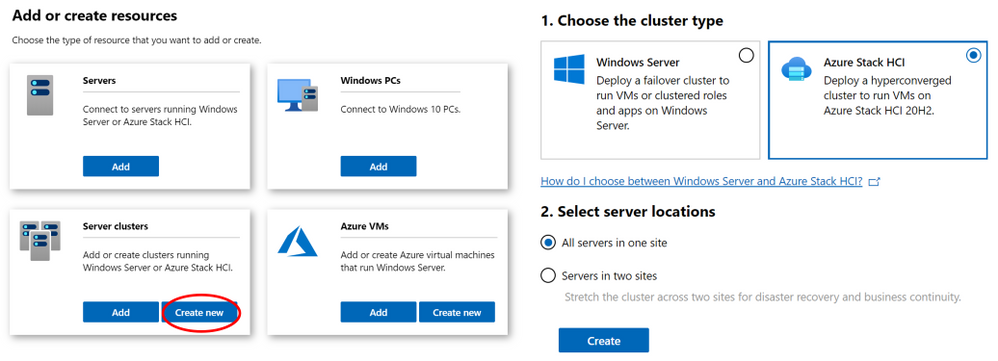
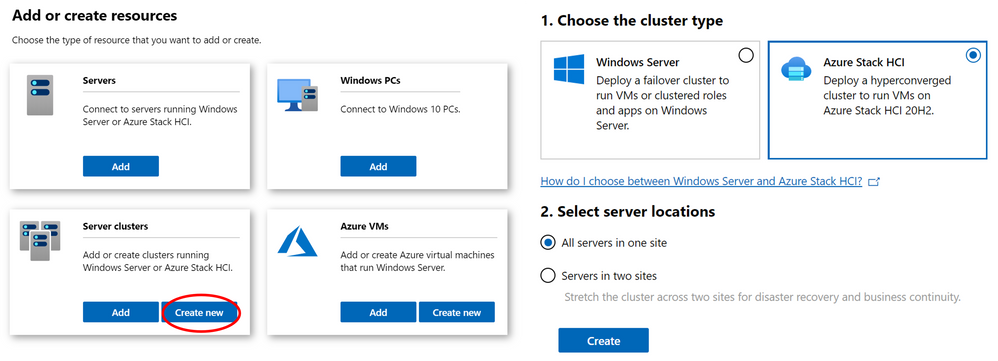
- To launch the workflow, from the All Connections page, click on “+Add” and select “Create new” on the server clusters tile.
- Users can create hyperconverged clusters running Azure Stack HCI, or classic failover clusters running Windows Server.
- The cluster deployment workflow is included in Windows Admin Center without needing to install an extension.
- For the first time ever, use Windows Admin Center to deploy a cluster that’s stretched across two sites.
Workflow details
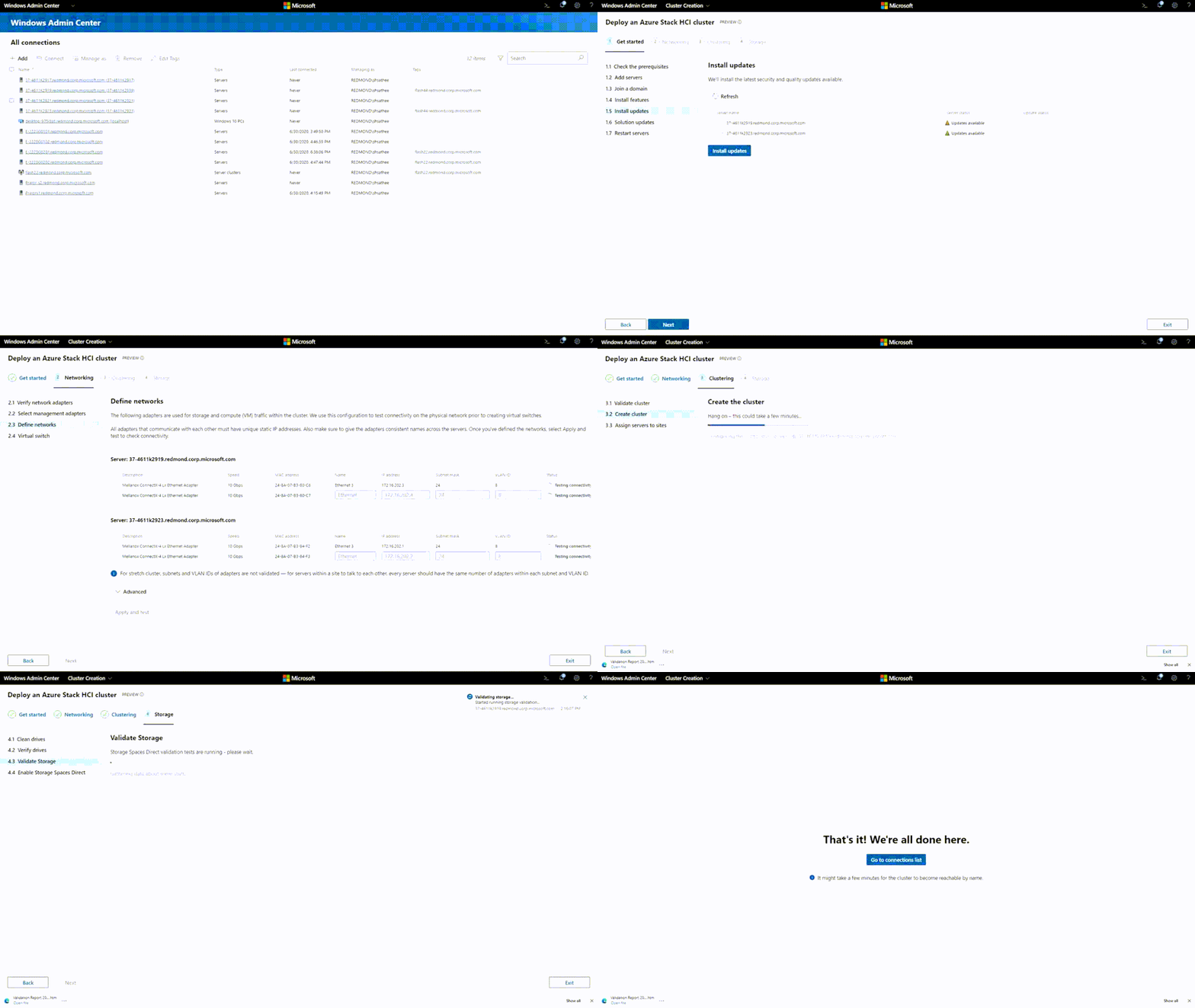
- You can bring in your workgroup servers and get them domain-joined as part of the cluster deployment workflow.
- Windows Admin Center detects the cluster type that is deployed and installs the necessary roles and features.
- We support multiple network topologies to cater to different customer scenarios.
- Windows Admin Center is working to provide an integrated firmware/driver update experience as part of deployment workflow.
If you’re having difficulties with any of these new features, please consult the cluster deployment section of the known issues page of our documentation.
User experience
New look
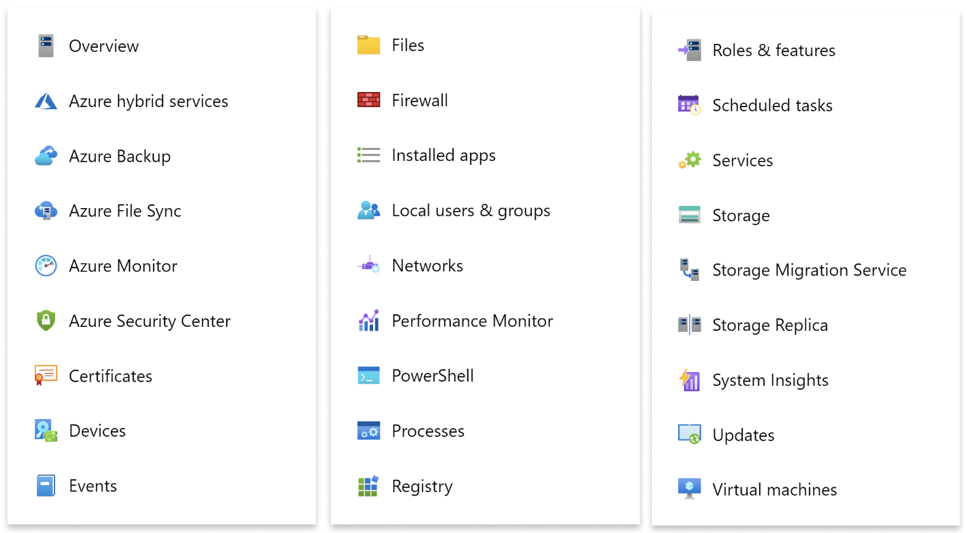
Windows Admin Center has some new color! We hope you like our new icons and the design changes we have made to make Windows Admin Center look more modern. Windows Admin Center has historically been tied to Windows Server, but now it has become its own independent product. While the license terms have been updated, this shouldn’t affect your usage of Windows Admin Center in any way.
Feedback
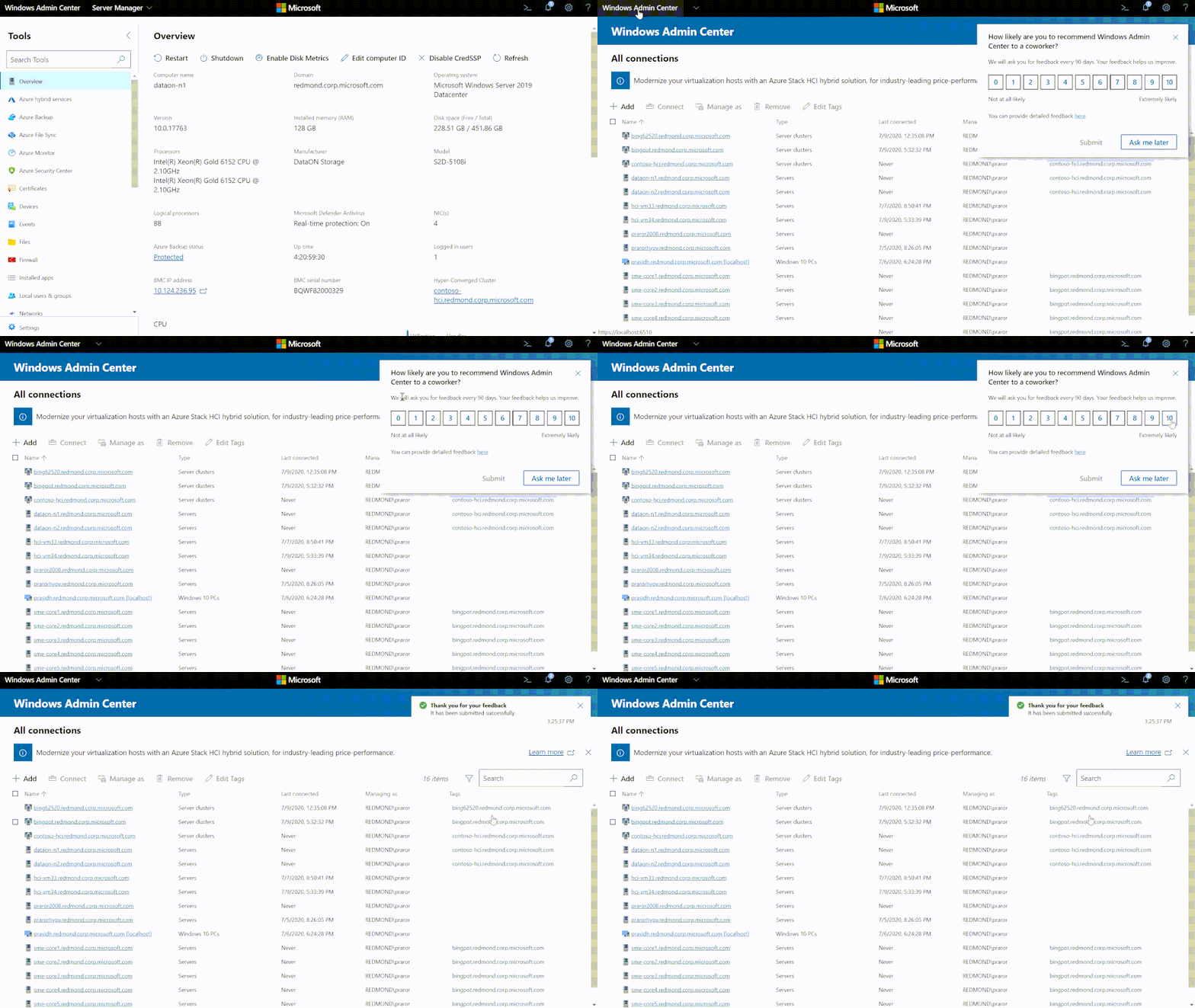
You can now let us know how we are doing from inside Windows Admin Center. Occasionally, you may receive a pop-up asking how likely you are to recommend Windows Admin Center to a coworker. Please provide your feedback as it will help us improve your experience.
Bug fixes and accessibility improvements
- Schedule restarts in the Updates tool: We have fixed the bug where users could not schedule restarts in the Updates tool.
- Connecting to Hyper-V servers: In the previous release, there was a bug that prevented connection to Hyper-V servers. That has been fixed.
- Accessibility fixes: We have been working hard to improve accessibility within the product. If you have any questions or concerns, please email us at wacchat@microsoft.com
Core tools
Active Directory
This release includes a new version, version 0.85.0, of the Active Directory tool based on all the feedback we received from User Voice! Some of the changes from the preview version include:
- Search with more descriptive queries using PowerShell Expression Language syntax
- filter by object type or run range-based queries
- search for users with a password count over a certain threshold
- More connected experience
- Ability to unlock users
Go to Settings > Extensions to install it now.
Containers
The Windows Admin Center containers extension has recently been updated. This extension is available through the Windows Admin Center Insiders feed (https://aka.ms/wac-insiders-feed).
To read more about the extension and its features, read the blog post.
Virtual Machines
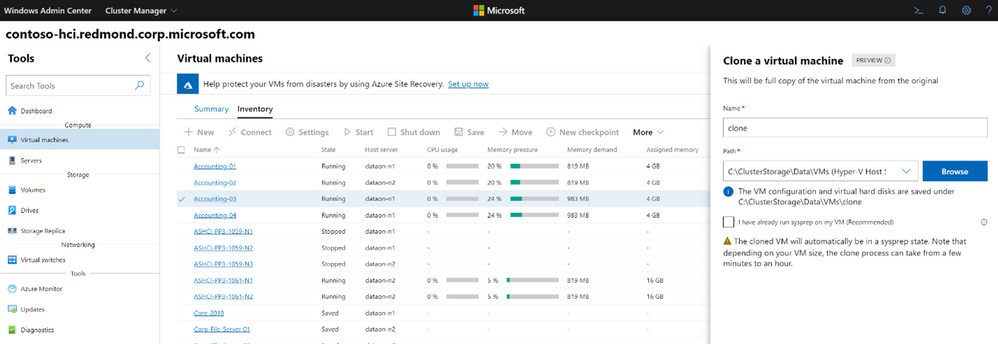
Users are now able to click on a virtual machine and perform a full clone. You can run sysprep on the virtual machine beforehand or let us run it for you. Windows Admin Center brings in an optimized VM clone experience that significantly reduces user effort, time, and engagement needed for the process. This feature is in preview so please give us feedback.
Software Defined Networking (SDN) monitoring
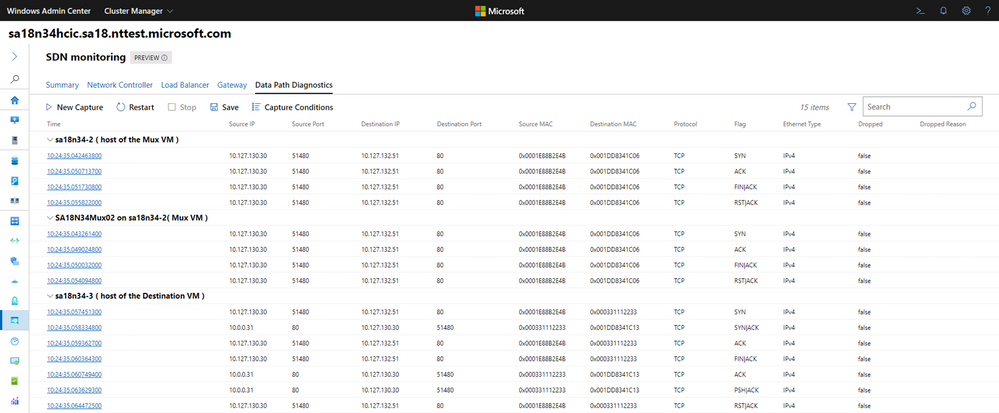
The SDN monitoring extension now includes Data Path Diagnostics. This feature automates packet captures to diagnose networking data path issues in SDN scenarios. After you choose your SDN scenario and provide basic parameters, Windows Admin Center identifies the involved SDN components and their location in the cluster, sets the right packet filters, and captures network traffic on all the relevant machines. Afterwards, we present the captured logs in a single view that is easy to follow and manipulate through Windows Admin Center. This view allows you to download the logs for additional post-processing using your tool of choice.
Partner ecosystem
Windows Admin Center continues to promote an extensible ecosystem and we’re thrilled to collaborate with our external partners. Several of our partners have released updates for their extensions in the past few months that include bug fixes and improvements targeted at Windows Admin Center version 2007.
The Lenovo XClarity Integrator for Windows Admin Center provides IT administrators a smooth and seamless management experience across Windows Server hyper-converged and physical infrastructure. In this release, improvements include:
- New user role-based access control
- Firmware update
- Cluster-aware firmware update for clusters
- Firmware update for Azure HCI clusters with the best recipe for ThinkAgile MX certified nodes, involving both firmware and Windows drivers
- Support compliance policy-based firmware update
- Disk Manager for ThinkAgile MX HCI cluster
- Graphic front/rear view of the Lenovo ThinkAgile MX certified Azure HCI cluster node servers
- Display of overall storage pool, drive, and server information
- Operations on servers, including turning on or turning off the location LED
- Operations on drives, including turning on or turning off the location LED, replacing a drive in a storage pool, adding a drive to a storage pool, and removing a drive from a server
The Dell EMC OpenManage Integration for Microsoft Admin Center extension enables IT administrators to manage Dell EMC PowerEdge servers as hosts, Microsoft Failover Clusters created with PowerEdge servers, and Azure Stack Hyper-Converged Infrastructure created with Dell EMC Microsoft Storage Spaces Direct Ready Nodes, AX Nodes. In this release, improvements include:
- Added support for Dell EMC Online Catalogs
- Ability to perform Server update including selective component updates
- Cluster update—Premium licenses required for respective hardware, such as Dell EMC PowerEdge Server and Azure Stack HCI clusters based on AX nodes or Storage Spaces Direct Ready Nodes from Dell EMC
- To locate physical disks or to identify failed physical disks, provision to blink and unblink the physical disks Light Emitting Diodes (LEDs) is provided
- Support for newer platforms based on AX nodes—Dell EMC Solutions for Microsoft Azure Stack HCI nodes: AX-640, AX-6515, and AX-740xd
- Ability to monitor health and inventory of Accelerators (GPU) with latest iDRAC9 based PowerEdge Servers.
- User interface enhancements for Intel Persistent memory Health monitoring and Inventory.
- Correlation between Storage Controllers and Physical Disks to view the associated disks.
- Ability to refresh the health, inventory, and iDRAC information of the managed target nodes to ensure that displayed inventory information is the latest.
- Usability enhancement by downloading DSU and IC automatically required for components update.
The QCT Management Suite is designed to help users manage and monitor their Windows Server hyper-converged infrastructure and QCT system configuration information on a single dashboard. With the upgrade to version 2.1.0, fixes and additions include:
- Add Switch function.
- Network Adapter and Switch Port mapping.
- PFC enable check of Switch.
- Switch Port Status check.
- Switch Environment Information includes Switch Model, Software Version, Serial Number, Device Name, Fan Status, Power Supply Unit Status.
- Support list:
- QuantaMesh T3048-LY8
- QuantaMesh T4048-IX8D (Preview)
- Add Physical/Virtual Network Adapter information and mapping function.
Keep an eye on your extension manager for new partner extensions coming soon!
Download today
We hope you enjoy this latest update of Windows Admin Center, the various new functionality in preview, and all the extensions now available. Learn more and download today!
As always, thanks for your ongoing support, adoption and feedback.
We are already working hard on our next release and are excited to bring you a lot more features.
Ask Microsoft Anything
While this is not a feature, the Windows Admin Center team hosted our first public Ask Microsoft Anything (AMA). You can view the AMA here. To stay informed about future events like this, follow us on Twitter at @servermgmt.
<3,
Windows Admin Center Team


Recent Comments