by Contributed | Nov 22, 2023 | Technology
This article is contributed. See the original author and article here.
Author(s): Arun Sethia is a Program manager in Azure HDInsight Customer Success Engineering (CSE) team.
Co-Author: Sairam is a Product manager for Azure HDInsight on AKS.
Introduction
Azure Logic Apps allows you to create and run automated workflows with little to no code. These workflows can be stateful or stateless. Each workflow starts with a single trigger, after which you must add one or more actions. An Action specifies a task to perform. Trigger specifies the condition for running any further steps in that workflow, for example when a blob is added or updated, when http request is received, checks for new data in an SQL database table, etc. These workflows can be stateful or stateless, based on your Azure Logic App plan (Standard and Consumption).
Using workflows, you can orchestrate complex workflow with multiple processing steps, triggers, and interdependencies. These steps can involve certain Apache Spark and Apache Flink jobs, and integration with Azure services.
The blog is focused on how you can add an action to trigger Apache Spark or Apache Flink job on HDInsight on AKS from a workflow.
Azure Logic App – Orchestrate Apache Spark Job on HDInsight on AKS
In our previous blog, we discussed about different options to submit Apache Spark jobs to HDInsight on AKS cluster. The Azure Logic Apps workflow will make use of Livy Batch Job API to submit Apache Spark job.
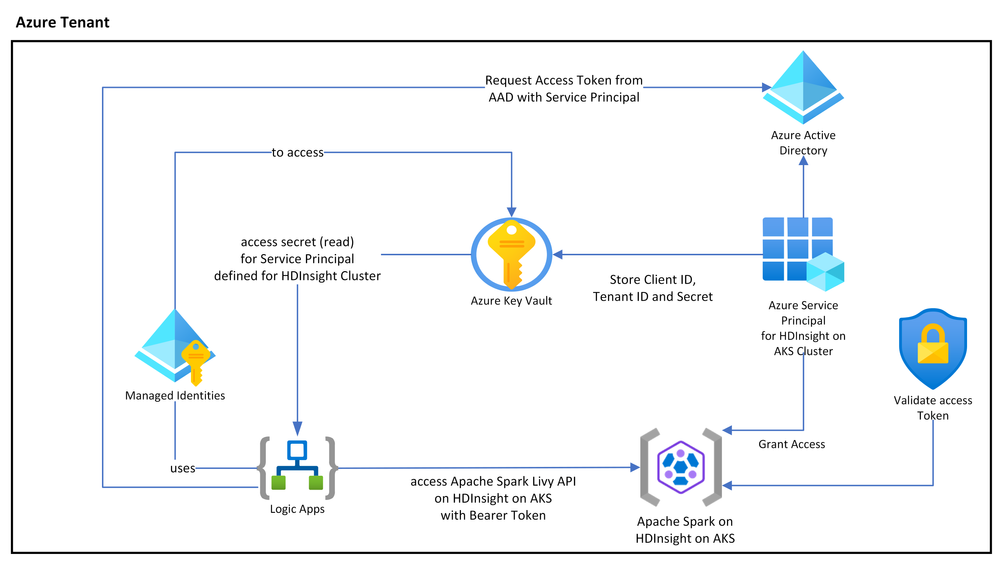
The following diagram shows interaction between Azure Logic Apps, Apache Spark cluster on HDInsight on AKS, Azure Active Directory and Azure Key Vault. You can always use the other cluster shapes like Apache Flink or Trino for the same, with the Azure management endpoints.
HDInsight on AKS allows you to access Apache Spark Livy REST APIs using OAuth token. It would require a Microsoft Entra service principal and Grant access to the cluster for the same service principal to the HDInsight on AKS cluster (RBAC support is coming soon). The client id (appId) and secret (password) of this principal can be stored in Azure Key Vault (you can use various design pattern’s to rotate secrets).
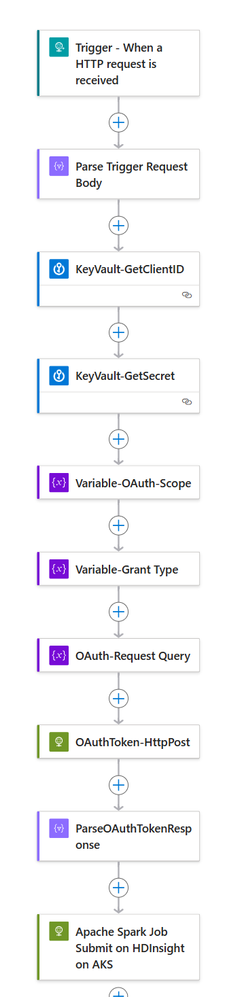
Based on your business scenario, you can start (trigger) your workflow; in this example we are using “Http request is received.” The workflow connects to Key Vault using System managed (or you can use User Managed identities) to retrieve secrets and client id for a service principal created to access HDInsight on AKS cluster. The workflow retrieves OAuth token using client credential (secret, client id, and scope as https://hilo.azurehdinsight.net/.default).
The invocation to the Apache Spark Livy REST APIs on HDInsight is done with Bearer token and Livy Batch (POST /batches) payload.
The final workflow is as follows, the source code and sample payload are available on this GitHub
Azure Logic App – Orchestrate Apache Flink Job on HDInsight on AKS
HDInsight on AKS provides user friendly ARM Rest APIs to submit and manage Flink jobs. Users can submit Apache Flink jobs from any Azure service using these Rest APIs. Using ARM REST API, you can orchestrate the data pipeline with Azure Data Factory Managed Airflow. Similarly, you can use Azure Logic Apps workflow to manage complex business workflow.
The following diagram shows interaction between Azure Logic Apps, Apache Flink cluster on HDInsight on AKS, Azure Active Directory and Azure Key Vault.
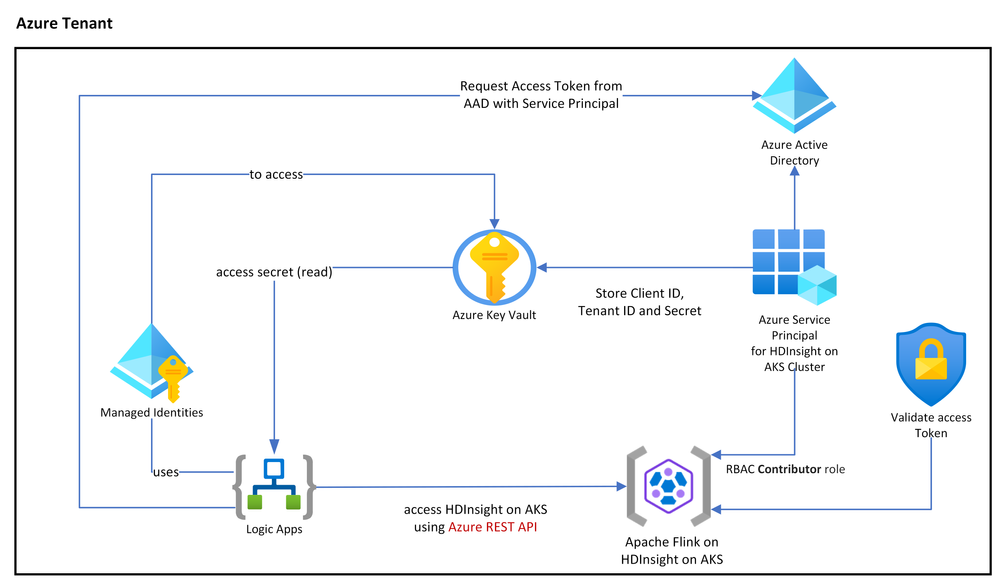
To invoke ARM REST APIs, we would require a Microsoft Entra service principal and configure its access to specific Apache Flink cluster on HDInsight on AKS with Contributor role. (resource id can be retrieved from the portal, go to cluster page, click on JSON view, value for “id” is resource id).
az ad sp create-for-rbac -n --role Contributor --scopes
The client id (appId) and secret (password) of this principal can be stored in Azure Key Vault (you can use various design pattern’s to rotate secrets).
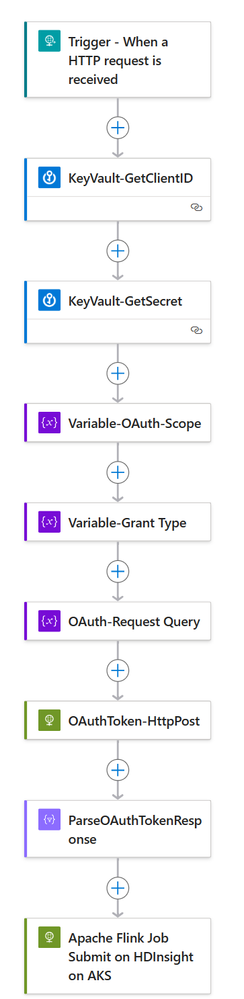
The workflow connects to Key Vault using System managed (or you can use User Managed identities) to retrieve secrets and client id for a service principal created to access HDInsight on AKS cluster. The workflow retrieves OAuth token using client credential (secret, client id, and scope as https://management.azure.com/.default).
The final workflow is as follows, the source code and sample payload is available on GitHub
Summary
HDInsight on AKS REST APIs lets you automate, orchestrate, schedule and allows you to monitor workflows with your choice of framework. Such automation reduces complexity, reduces development cycles and completes tasks with fewer errors.
You can choose what works best for your organization, let us know your feedback or any other integration from Azure services to automate and orchestrate your workload on HDInsight on AKS.
References
We are super excited to get you started:
by Contributed | Nov 21, 2023 | Technology
This article is contributed. See the original author and article here.
The Viva Engage Festival, hosted by Swoop Analytics, is an interactive virtual event that brings together Viva Engage thought leaders, communication innovators, and community enthusiasts from around the globe. This is not just another webinar; it’s an opportunity to dive deep into the future of employee engagement, learn about new tech, explore the latest Viva Engage experiences, and connect with a community passionate about driving change in their businesses.
Hear from leading customers and directly from Microsoft
Viva Engage Festival includes customer speakers and industry experts who will share knowledge and expertise on a wide range of topics around Viva Engage, from Comcast, NSW Government, Johnson and Johnson, Vestas and more. Join us for an exclusive look into Microsoft’s journey with Viva Engage and communities as we share our own experiences.

We hope you join us to connect with like-minded individuals who share a passion for driving meaningful engagement. Whether you’re a business leader, a professional, or an enthusiast, you’ll leave the festival with the inspiration and knowledge needed to take your Viva Engage investments to the next level.
Nominate Viva Engage Community Champion!
As part of our 2023 Viva Engage Festival, Microsoft and SWOOP Analytics will announce this year’s regional winners of the Community Champion Award. The Viva Engage Community Champion Award is an opportunity to recognize passionate community managers around the world who are committed to employee engagement, knowledge sharing, and collaboration in their Viva Engage networks. Can you think of anyone who deserves this title? Let us know who it might be! The 2023 Viva Engage Community Champion will be announced for each region during the festival. Nominations close November 30, 2023.
Hope to see you there!
Don’t miss this opportunity to be part of a global community that is shaping the way we connect and collaborate. Register now, mark your calendar, and get ready to unlock the doors to a new era of engagement!
by Contributed | Nov 20, 2023 | Technology
This article is contributed. See the original author and article here.
Ignite has come to an end, but that doesn’t mean you can’t still get in on the action!
Display Your Skills and Earn a New Credential with Microsoft Applied Skills
Advancements in AI, cloud computing, and emerging technologies have increased the importance of showcasing proficiency in sought-after technical skills. Organizations are now adopting a skills-based approach to quickly find the right people with the appropriate skills for specific tasks. With this in mind, we are thrilled to announce Microsoft Applied Skills, a new platform that enables you to demonstrate your technical abilities for real-world situations.
Microsoft Applied Skills gives you a new opportunity to put your skills center stage, empowering you to showcase what you can do and what you can bring to key projects in your organization. This new verifiable credential validates that you have the targeted skills needed to implement critical projects aligned to business goals and objectives.
There are two Security Applied Skills that have been introduced:
Security Applied Skills Credential: Secure Azure services and workloads with Microsoft Defender for Cloud regulatory compliance controls
Learners should have expertise in Azure infrastructure as a service (IaaS) and platform as a service (PaaS) and must demonstrate the ability to implement regulatory compliance controls as recommended by the Microsoft cloud security benchmark by performing the following tasks:
- Configure Microsoft Defender for Cloud
- Implement just-in-time (JIT) virtual machine (VM) access
- Implement a Log Analytics workspace
- Mitigate network security risks
- Mitigate data protection risks
- Mitigate endpoint security risks
- Mitigate posture and vulnerability management risks
Security Applied Skills Credential: Configure SIEM security operations using Microsoft Sentinel
Learners should be familiar with Microsoft Security, compliance, identity products, Azure portal, and administration, including role-based access control (RBAC), and must display their ability to set up and configure Microsoft Sentinelb by demonstrating the following:
- Create and configure a Microsoft Sentinel workspace
- Deploy a Microsoft Sentinel content hub solution
- Configure analytics rules in Microsoft Sentinel
- Configure automation in Microsoft Sentinel
Earn these two credentials for free for a limited time only.
View the Learn Live Sessions at Microsoft Ignite On-demand
Learn Live episodes guide learners through a module on Learn and work through it in real-time. Microsoft experts lead each episode, providing helpful commentary and insights and answering questions live.
In the Threat Detection with Microsoft Sentinel Analytics Learn Live session, you will learn how Microsoft Sentinel Analytics can help the SecOps team identify and stop cyber-attacks. During the Deploy the Microsoft Defender for Endpoint environment Learn Live session, you will learn how to deploy the Microsoft Defender for Endpoint environment, including onboarding devices and configuring security.
Complete the Microsoft Learn Cloud Skills Challenge for a Chance to Win
The Microsoft Ignite Edition of Microsoft Learn Cloud Skills Challenge is underway. There are several challenges to choose from, including the security-focused challenge Microsoft Ignite: Optimize Azure with Defender for Cloud. If you complete the challenge, you can earn an entry into a drawing for VIP tickets to Ignite next year. You have until January 15th to complete the challenge. Get started today!
Keep up-to-date on Microsoft Security with our Collections
Collections are an excellent way to dive deeper into how to use Microsoft Security products such as Microsoft Sentinel and Microsoft Defender. You can also learn the latest on how Microsoft prepares organizations for AI and Microsoft Security Copilot. Explore all of the Microsoft Security collections and take the next step in your learning journey by visiting aka.ms/LearnatIgnite.
by Contributed | Nov 18, 2023 | Technology
This article is contributed. See the original author and article here.
We are thrilled to announce an addition to our Database Migration Service capability of supporting Oracle to SQL scenario and General availability of the Oracle Assessment and Database schema conversion toolkit . In tune with the changing landscape of user needs, we’ve crafted a powerful capability that seamlessly blends efficiency, precision, and simplicity, promising to make your migration journey smoother than ever.
Why Migrate?
Shifting from Oracle to SQL opens a world of advantages, from heightened performance and reduced costs to enhanced scalability.
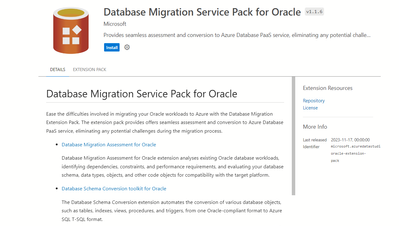
Introducing the Database Migration Service Pack for Oracle
At the core of our enhanced Database Migration Service is the seamless integration with Azure Data Studio Extensions. This dynamic fusion marries the best of Microsoft’s Azure platform with the user-friendly interface of Azure Data Studio, ensuring a migration experience that’s both intuitive and efficient.
What’s Inside the Service Pack:
Holistic Assessment:
Gain deep insights into your Oracle database with comprehensive assessment tools.
Identify potential issues, optimize performance, right-size your target, and enjoy automated translation of Oracle PL/SQL to T-SQL.
Assessment Oracle to SQL
Automated Conversion of Complex Oracle Workloads:
Effortlessly convert Oracle schema to SQL Server format.
The conversion wizard guides you through the process, providing a detailed list of successfully converted objects and highlighting areas that may need manual intervention.
Code Conversion Oracle to SQL
Reusable Interface:
The database conversion employs SQL Project, delivering a familiar development experience.
Reuse and deploy your previous development work, minimizing the learning curve and maximizing efficiency.
Elevate Your Database Experience
Our Database Migration capability is not just a tool; it’s a solution to seamlessly transition from Oracle to SQL with ease.Ready to embark on a migration journey that exceeds expectations? Keep an eye out for updates, tutorials, and success stories as we unveil this transformative capability.
Modernize your database, upgrade your possibilities.

by Contributed | Nov 17, 2023 | Technology
This article is contributed. See the original author and article here.
Digital Marketing Content (DMC) OnDemand works as a personal digital marketing assistant and delivers fresh, relevant and customized content and share on social, email, website, or blog. It runs 3-to-12-week digital campaigns that include to-customer content and to-partner resources. This includes an interactive dashboard that will allow partners to track both campaign performance and leads generated in real time and to schedule campaigns in advance
TIPS AND TRICKS
DMC campaigns were created to assist you with your marketing strategies in automated way. However, we understand that you want to make sure the focus remains on your business as customers and prospects discover your posts. There are several ways you can customize campaigns to put the focus on your business and offerings:
- Customize the pre-written copy | Although we provide you with copy for your social posts, emails, and blog posts, pivoting this copy to highlight your unique value can help ensure customers and prospects understand more about your business and how you can help solve their current pain points.
- Upload your own content throughout the campaigns | If you have access to the Partner GTM Toolbox co-branded assets, you can create your own content quickly and easily through customizable templates. Choose your colors, photography, and copy to help customers and prospects understand more about your business. Alternatively, you can learn more about how to create your own content by reading the following blog posts: one-pagers and case studies. Once complete, click on “Add new content” within the any campaign under “Content to share”.
- Engage with your audience | Are people replying to your LinkedIn, Facebook, and X (formerly Twitter) posts? Take some time to respond to build a rapport.
- Access customizable content | Many campaigns in PMC contain content that was designed for you to customize. Microsoft copy is included, but designated sections are left blank for your copy and placeholders are added to ensure you are following co-branding guidelines. You can find examples here.
- Upload your logos | Cobranded content is being added on a regular basis, so make sure you’re taking advantage of this recently added functionality to extend your reach.
NEW CAMPAIGNS
NOTE: To access localized versions, click the product area link, then select the language from the drop-down menu.
- Product Area: Microsoft Security
- Data Security
- Now available in Dutch, English, French, German, Brazilian Portuguese, Spanish
- Defend against cybersecurity threats
- Now available in Dutch, English, French, German, Brazilian Portuguese, Spanish
- Modernize Security Operations
- Product Area: Microsoft 365
- Product Area: Microsoft Dynamics 365 & Power Platform
- Product Area: Microsoft Azure


Recent Comments