by Contributed | Nov 27, 2023 | Technology
This article is contributed. See the original author and article here.
Azure AI Health Insights: New built-in models for patient-friendly and radiology insights
Azure AI Health Insights is an Azure AI service with built-in models that enable healthcare organizations to find relevant trials, surface cancer attributes, generate summaries, analyze patient data, and extract information from medical images.
Earlier this year, we introduced two new built-in models available for preview. These built-in models handle patient data in different modalities, perform analysis on the data, and provide insights in the form of inferences supported by evidence from the data or other sources.
The following models are available for preview:
- Patient-friendly reports model* This model simplifies medical reports and creates a patient-friendly simplified version of clinical notes while retaining the meaning of the original clinical information. This way, patients can easily consume their clinical notes in everyday language. Patient-friendly reports model is available in preview.
- Radiology insights model* This model uses radiology reports to surface relevant radiology insights that can help radiologists improve their workflow and provide better care. Radiology insights model is available in preview.
Simplify clinical reports
Patient-friendly reports is an AI model that provides an easy-to-read version of a patient’s clinical report. The simplified report explains or rephrases diagnoses, symptoms, anatomies, procedures, and other medical terms while retaining accuracy. The text is reformatted and presented in plain language to increase readability. The model simplifies any medical report, for example a radiology report, operative report, discharge summary, or consultation report.
The Patient-friendly reports model uses a hybrid approach that combines GPT models, healthcare-specialized Natural Language Processing (NLP) models, and rule-based methods. Patient-friendly reports also uses text alignment methods to allow mapping of sentences from the original report to the simplified report to make it easy to understand.
The system uses scenario-specific guardrails to detect hallucinations, omissions, and any other ungrounded content and does several steps to ensure the full information from the original clinical report is kept and no new additional information is added.
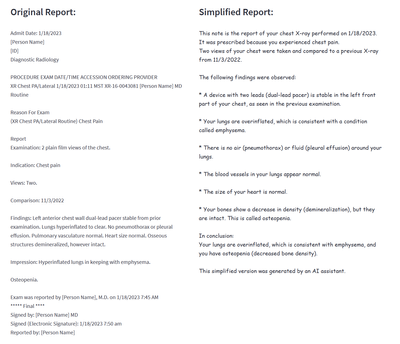
The Patient-friendly reports model helps healthcare professionals and patients consume medical information in a variety of scenarios. For example, Patient-friendly reports model saves clinicians the time and effort of explaining a report. A simplified version of a clinical report is generated by Patient-Friendly reports and shared with the patient, side by side with the original report. The patient can review the simplified version to better understand the original report, and to avoid unnecessary communication with the clinician to help with interpretation. The simplified version is marked clearly as text that was generated automatically by AI, and as text that must be used together with the original clinical note (which is always the source of truth).
Figure 1 Example of a simplified report created by the patient-friendly reports model
Improve the quality of radiology findings and flag follow-up recommendations
Radiology insights is a model that provides quality checks with feedback on errors and mismatches and ensures critical findings within the report are surfaced and presented using the full context of a radiology report. In addition, follow-up recommendations and clinical findings with measurements (sizes) documented by the radiologist are flagged.
Radiology insights inferences, with reference to the provided input that can be used as evidence for deeper understanding of the conclusions of the model. The radiology insights model helps radiologists improve their reports and patient outcomes in a variety of scenarios. For example:
- Surfaces possible mismatches. A radiologist can be provided with possible mismatches between what the radiologist documents in a radiology report and the information present in the metadata of the report. Mismatches can be identified for sex, age and body site laterality.
- Highlights critical and actionable findings. Often, a radiologist is provided with possible clinical findings that need to be acted on in a timely fashion by other healthcare professionals. The model extracts these critical or actionable findings where communication is essential for quality care.
- Flags follow-up recommendations. When a radiologist uncovers findings for which they recommend a follow up, the recommendation is extracted and normalized by the model for communication to a healthcare professional.
- Extracts measurements from clinical findings. When a radiologist documents clinical findings with measurements, the model extracts clinically relevant information pertaining to the findings. The radiologist can then use this information to create a report on the outcomes as well as observations from the report.
- Assists generate performance analytics for a radiology team. Based on extracted information, dashboards and retrospective analyses, Radiology insights provides updates on productivity and key quality metrics to guide improvement efforts, minimize errors, and improve report quality and consistency.
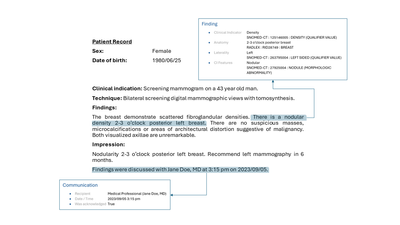
Figure2 Example of a finding with communication to a healthcare professional
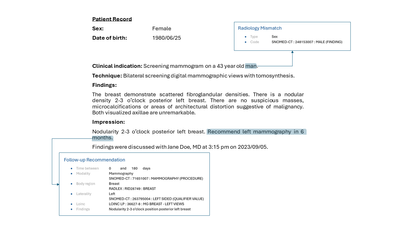
Figure 3 Example of a radiology mismatch (sex) between metadata and content of a report with a follow-up recommendation
Get started today
Apply for the Early Access Program (EAP) for Azure AI Health Insights here.
After receiving confirmation of your entrance into the program, create and deploy Azure AI Health Insights on Azure portal or from the command line.
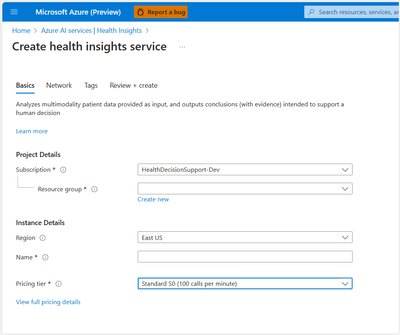
Figure 4 Example of how to create an Azure Health Insights resource on Azure portal
After a successful deployment, you send POST requests with patient data and configuration as required by the model you would like to try and receive responses with inferences and evidence.
Do more with your data with Microsoft Cloud for Healthcare
With Azure AI Health Insights, health organizations can transform their patient experience, discover new insights with the power of machine learning and AI, and manage protected health information (PHI) data with confidence. Enable your data for the future of healthcare innovation with Microsoft Cloud for Healthcare.
We look forward to working with you as you build the future of health.
*Important
Patient-friendly reports models and radiology insights model are capabilities provided “AS IS” and “WITH ALL FAULTS.” Patient-friendly reports and Radiology insights aren’t intended or made available for use as a medical device, clinical support, diagnostic tool, or other technology intended to be used in diagnosis, cure, mitigation, treatment, or prevention of disease or other conditions, and no license or right is granted by Microsoft to use this capability for such purposes. These capabilities aren’t designed or intended to be implemented or deployed as a substitute for professional medical advice or healthcare opinion, diagnosis, treatment, or the clinical judgment of a healthcare professional, and should not be used as such. The customer is solely responsible for any use of Patient-friendly reports model or Radiology insights model.
by Contributed | Nov 26, 2023 | Technology
This article is contributed. See the original author and article here.
A few days ago, a customer asked us to find out details about the active connections of a connection pooling, how many connection poolings their application has, etc. In this article, I would like to share the lessons learned to see these details.
As our customer is using .NET Core, we will rely on the following article to gather all this information Event counters in SqlClient – ADO.NET Provider for SQL Server | Microsoft Learn
We will continue with the same script that we are using in the previous article Lesson Learned #453:Optimizing Connection Pooling for Application Workloads: A single journey – Microsoft Community Hub, and once the link is implemented Event counters in SqlClient – ADO.NET Provider for SQL Server | Microsoft Learn, we will see what information we obtain.
Once we executed our application we started seeing the following information:
2023-11-26 09:38:18.998: Actual active connections currently made to servers		0
2023-11-26 09:38:19.143: Active connections retrieved from the connection pool		0
2023-11-26 09:38:19.167: Number of connections not using connection pooling		0
2023-11-26 09:38:19.176: Number of connections managed by the connection pool		0
2023-11-26 09:38:19.181: Number of active unique connection strings		1
2023-11-26 09:38:19.234: Number of unique connection strings waiting for pruning		0
2023-11-26 09:38:19.236: Number of active connection pools		1
2023-11-26 09:38:19.239: Number of inactive connection pools		0
2023-11-26 09:38:19.242: Number of active connections		0
2023-11-26 09:38:19.245: Number of ready connections in the connection pool		0
2023-11-26 09:38:19.272: Number of connections currently waiting to be ready		0
As our application is using a single connection string and using a single connection pooler, the details that appear below are stable and understandable. But let’s make a couple of changes to the code to see how the numbers change.
Our first change will be to open 100 connections and once we reach those 100, we will close and reopen them to see how the counters fluctuat. The details we observe while our application is running indicate that connections are being opened but not closed. Which is expected.
2023-11-26 09:49:01.606: Actual active connections currently made to servers		13
2023-11-26 09:49:01.606: Active connections retrieved from the connection pool		13
2023-11-26 09:49:01.607: Number of connections not using connection pooling		0
2023-11-26 09:49:01.607: Number of connections managed by the connection pool		13
2023-11-26 09:49:01.608: Number of active unique connection strings		1
2023-11-26 09:49:01.608: Number of unique connection strings waiting for pruning		0
2023-11-26 09:49:01.609: Number of active connection pools		1
2023-11-26 09:49:01.609: Number of inactive connection pools		0
2023-11-26 09:49:01.610: Number of active connections		13
2023-11-26 09:49:01.610: Number of ready connections in the connection pool		0
2023-11-26 09:49:01.611: Number of connections currently waiting to be ready		0
But as we keep closing and opening new ones, we start to see how our connection pooling is functioning
2023-11-26 09:50:08.600: Actual active connections currently made to servers		58
2023-11-26 09:50:08.601: Active connections retrieved from the connection pool		50
2023-11-26 09:50:08.601: Number of connections not using connection pooling		0
2023-11-26 09:50:08.602: Number of connections managed by the connection pool		58
2023-11-26 09:50:08.602: Number of active unique connection strings		1
2023-11-26 09:50:08.603: Number of unique connection strings waiting for pruning		0
2023-11-26 09:50:08.603: Number of active connection pools		1
2023-11-26 09:50:08.604: Number of inactive connection pools		0
2023-11-26 09:50:08.604: Number of active connections		50
2023-11-26 09:50:08.605: Number of ready connections in the connection pool		8
2023-11-26 09:50:08.605: Number of connections currently waiting to be ready		0
In the following example, we can see how once we have reached our 100 connections, the connection pooler is serving our application the necessary connection.
2023-11-26 09:53:27.602: Actual active connections currently made to servers		100
2023-11-26 09:53:27.602: Active connections retrieved from the connection pool		92
2023-11-26 09:53:27.603: Number of connections not using connection pooling		0
2023-11-26 09:53:27.603: Number of connections managed by the connection pool		100
2023-11-26 09:53:27.604: Number of active unique connection strings		1
2023-11-26 09:53:27.604: Number of unique connection strings waiting for pruning		0
2023-11-26 09:53:27.605: Number of active connection pools		1
2023-11-26 09:53:27.606: Number of inactive connection pools		0
2023-11-26 09:53:27.606: Number of active connections		92
2023-11-26 09:53:27.606: Number of ready connections in the connection pool		8
2023-11-26 09:53:27.607: Number of connections currently waiting to be ready		0
Let’s review the counters:
Actual active connections currently made to servers (100): This indicates the total number of active connections that have been established with the servers at the given timestamp. In this case, there are 100 active connections.
Active connections retrieved from the connection pool (92): This shows the number of connections that have been taken from the connection pool and are currently in use. Here, 92 out of the 100 active connections are being used from the pool.
Number of connections not using connection pooling (0): This counter shows how many connections are made directly, bypassing the connection pool. A value of 0 means all connections are utilizing the connection pooling mechanism.
Number of connections managed by the connection pool (100): This is the total number of connections, both active and idle, that are managed by the connection pool. In this example, there are 100 connections in the pool.
Number of active unique connection strings (1): This indicates the number of unique connection strings that are currently active. A value of 1 suggests that all connections are using the same connection string.
Number of unique connection strings waiting for pruning (0): This shows how many unique connection strings are inactive and are candidates for removal or pruning from the pool. A value of 0 indicates no pruning is needed.
Number of active connection pools (1): Represents the total number of active connection pools. In this case, there is just one connection pool being used.
Number of inactive connection pools (0): This counter displays the number of connection pools that are not currently in use. A value of 0 indicates that all connection pools are active.
Number of active connections (92): Similar to the second counter, this shows the number of connections currently in use from the pool, which is 92.
Number of ready connections in the connection pool (8): This indicates the number of connections that are in the pool, available, and ready to be used. Here, there are 8 connections ready for use.
Number of connections currently waiting to be ready (0): This shows the number of connections that are in the process of being prepared for use. A value of 0 suggests that there are no connections waiting to be made ready.
These counters provide a comprehensive view of how the connection pooling is performing, indicating the efficiency, usage patterns, and current state of the connections managed by the Microsoft.Data.SqlClient.
One thing, that pay my attention is Number of unique connection strings waiting for pruning This means that if there have been no recent accesses to the connection pooler, we might find that if there have been no connections for a certain period, the connection pooler will be eliminated, and the first connection that is made will take some time (seconds) to be recreated, for example, in the night when we might not have active workload:
Idle Connection Removal: Connections are removed from the pool after being idle for approximately 4-8 minutes, or if a severed connection with the server is detected.
Minimum Pool Size: If the Min Pool Size is not specified or set to zero in the connection string, the connections in the pool will be closed after a period of inactivity. However, if Min Pool Size is greater than zero, the connection pool is not destroyed until the AppDomain is unloaded and the process ends. This implies that as long as the minimum pool size is maintained, the pool itself remains active.
We could observe in Microsoft.Data.SqlClient in the file SqlClient-mainSqlClient-mainsrcMicrosoft.Data.SqlClientsrcMicrosoftDataProviderBaseDbConnectionPoolGroup.cs useful information about it:
Line 50: private const int PoolGroupStateDisabled = 4; // factory pool entry pruning method
Line 268: // Empty pool during pruning indicates zero or low activity, but
Line 293: // must be pruning thread to change state and no connections
Line 294: // otherwise pruning thread risks making entry disabled soon after user calls ClearPool
These parameters work together to manage the lifecycle of connection pools and their resources efficiently, balancing the need for ready connections with system resource optimization. The actual removal of an entire connection pool (and its associated resources) depends on these settings and the application’s runtime behavior. The documentation does not specify a fixed interval for the complete removal of an entire connection pool, as it is contingent on these dynamic factors.
To conclude this article, I would like to conduct a test to see if each time I request a connection and change something in the connection string, it creates a new connection pooling.
For this, I have modified the code so that half of the connections receive a clearpool. As we could see new inactive connection pools shows.
2023-11-26 10:34:18.564: Actual active connections currently made to servers		16
2023-11-26 10:34:18.565: Active connections retrieved from the connection pool		11
2023-11-26 10:34:18.566: Number of connections not using connection pooling		0
2023-11-26 10:34:18.566: Number of connections managed by the connection pool		16
2023-11-26 10:34:18.567: Number of active unique connection strings		99
2023-11-26 10:34:18.567: Number of unique connection strings waiting for pruning		0
2023-11-26 10:34:18.568: Number of active connection pools		55
2023-11-26 10:34:18.568: Number of inactive connection pools		150
2023-11-26 10:34:18.569: Number of active connections		11
2023-11-26 10:34:18.569: Number of ready connections in the connection pool		5
2023-11-26 10:34:18.570: Number of connections currently waiting to be ready		0
Source code
using System;
using Microsoft.Data.SqlClient;
using System.Threading;
using System.IO;
using System.Diagnostics;

namespace HealthCheck
{
    class ClsCheck
    {
        const string LogFolder = "c:tempMydata";
        const string LogFilePath = LogFolder + "logCheck.log";

        public void Main(Boolean bSingle=true, Boolean bDifferentConnectionString=false)
        {
            int lMaxConn = 100;
            int lMinConn = 0;
            if(bSingle)
            {
                lMaxConn = 1;
                lMinConn = 1;
            }
            string connectionString = "Server=tcp:servername.database.windows.net,1433;User Id=username@microsoft.com;Password=Pwd!;Initial Catalog=test;Persist Security Info=False;MultipleActiveResultSets=False;Encrypt=True;TrustServerCertificate=False;Connection Timeout=5;Pooling=true;Max Pool size=" + lMaxConn.ToString() + ";Min Pool Size=" + lMinConn.ToString() + ";ConnectRetryCount=3;ConnectRetryInterval=10;Authentication=Active Directory Password;PoolBlockingPeriod=NeverBlock;Connection Lifetime=5;Application Name=ConnTest";
            Stopwatch stopWatch = new Stopwatch();
            SqlConnection[] oConnection = new SqlConnection[lMaxConn];
            int lActivePool = -1;
            string sConnectionStringDummy = connectionString;

            DeleteDirectoryIfExists(LogFolder);
            ClsEvents.EventCounterListener oClsEvents = new ClsEvents.EventCounterListener();
            //ClsEvents.SqlClientListener olistener = new ClsEvents.SqlClientListener();
            while (true)
            {
                if (bSingle)
                {
                    lActivePool = 0;
                    sConnectionStringDummy = connectionString;
                }
                else
                {
                    lActivePool++;
                    if (lActivePool == (lMaxConn-1))
                    {
                        lActivePool = 0;

                        for (int i = 0; i = 5)
                    {
                        Log($"Maximum number of retries reached. Error: " + ex.Message);
                        break;
                    }
                    Log($"Error connecting to the database. Retrying in " + retries + " seconds...");
                    Thread.Sleep(retries * 1000);
                }
            }
            return connection;
        }

        static void Log(string message)
        {
            var ahora = DateTime.Now;
            string logMessage = $"{ahora.ToString("yyyy-MM-dd HH:mm:ss.fff")}: {message}";
            //Console.WriteLine(logMessage);
            try
            {
                using (FileStream stream = new FileStream(LogFilePath, FileMode.Append, FileAccess.Write, FileShare.ReadWrite))
                {
                    using (StreamWriter writer = new StreamWriter(stream))
                    {
                        writer.WriteLine(logMessage);
                    }
                }
            }
            catch (IOException ex)
            {
                Console.WriteLine($"Error writing in the log file: {ex.Message}");
            }
        }

        static void ExecuteQuery(SqlConnection connection)
        {
            int retries = 0;
            while (true)
            {
                try
                {
                    using (SqlCommand command = new SqlCommand("SELECT 1", connection))
                    {
                        command.CommandTimeout = 5;
                        object result = command.ExecuteScalar();
                    }
                    break;
                }
                catch (Exception ex)
                {
                    retries++;
                    if (retries >= 5)
                    {
                        Log($"Maximum number of retries reached. Error: " + ex.Message);
                        break;
                    }
                    Log($"Error executing the query. Retrying in " + retries + " seconds...");
                    Thread.Sleep(retries * 1000);
                }
            }
        }

        static void LogExecutionTime(Stopwatch stopWatch, string action)
        {
            stopWatch.Stop();
            TimeSpan ts = stopWatch.Elapsed;
            string elapsedTime = String.Format("{0:00}:{1:00}:{2:00}.{3:00}",
               ts.Hours, ts.Minutes, ts.Seconds,
               ts.Milliseconds / 10);
            Log($"{action} - {elapsedTime}");
            stopWatch.Reset();
        }

        public static void DeleteDirectoryIfExists(string path)
        {
            try
            {
                if (Directory.Exists(path))
                {
                    Directory.Delete(path, true);
                }
                Directory.CreateDirectory(path);
            }
            catch (Exception ex)
            {
                Console.WriteLine($"Error deleting the folder: {ex.Message}");
            }
        }
    }

}
Enjoy!
by Contributed | Nov 25, 2023 | Technology
This article is contributed. See the original author and article here.
Introduction
A Practical Guide for Beginners: Azure OpenAI with JavaScript and TypeScript is an essential starting point for exploring Artificial Intelligence in the Azure cloud. This guide will be divided into 3 parts, covering: ‘How to create the Azure OpenAI Service resource,’ How to implement the model created in Azure OpenAI Studio, and finally, how to consume this resource in a Node.js/TypeScript application. This series will help you learn the fundamentals so that you can start developing your applications with Azure OpenAI Service. Whether you are a beginner or an experienced developer, discover how to create intelligent applications and unlock the potential of AI with ease.
Responsible AI
Before we start discussing Azure OpenAI Service, it’s crucial to talk about Microsoft’s strong commitment to the entire field of Artificial Intelligence. Microsoft is deeply dedicated to this topic. Therefore, Microsoft is committed to ensuring that AI is used in a responsible and ethical manner. Furthermore, Microsoft is working with the AI community to develop and share best practices and tools to help ensure that AI is used in a responsible and ethical way, thereby incorporating the six core principles, which are:
- Fairness
- Inclusivity
- Reliability and Safety
- Transparency
- Security and Privacy
- Accountability
If you want to learn more about Microsoft’s commitment to Responsible AI, you can access the link Microsoft AI Principles.
Now, we can proceed with the article!
Understand Azure OpenAI Service
Azure OpenAI Service provides access to advanced OpenAI language models such as GPT-4, GPT-3.5-Turbo, and Embeddings via a REST API. The GPT-4 and GPT-3.5-Turbo models are now available for general use, allowing adaptation for tasks such as content generation, summarization, semantic search, and natural language translation to code. Users can access the service through REST APIs, Python SDK, or Azure OpenAI Studio.
To learn more about the models available in Azure OpenAI Service, you can access them through the link Azure OpenAI Service models.
Create the Azure OpenAI Service Resource
The use of Azure OpenAI Service is limited. Therefore, it is necessary to request access to the service at Azure OpenAI Service. Once you have approval, you can start using and testing the service!
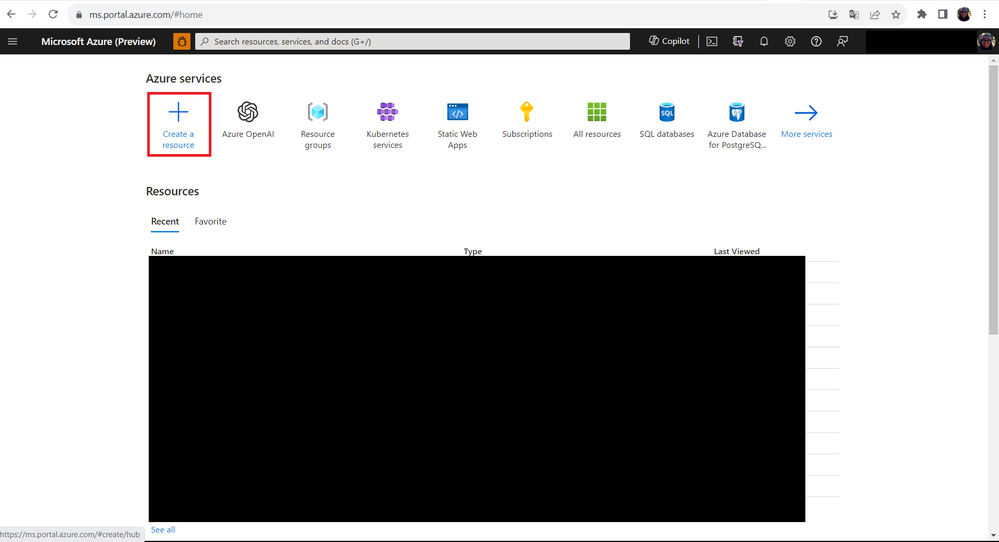
Once your access is approved, go to the Azure Portal and let’s create the Azure OpenAI resource. To do this, follow the steps below:
- Step 01: Click on the Create a resource button.
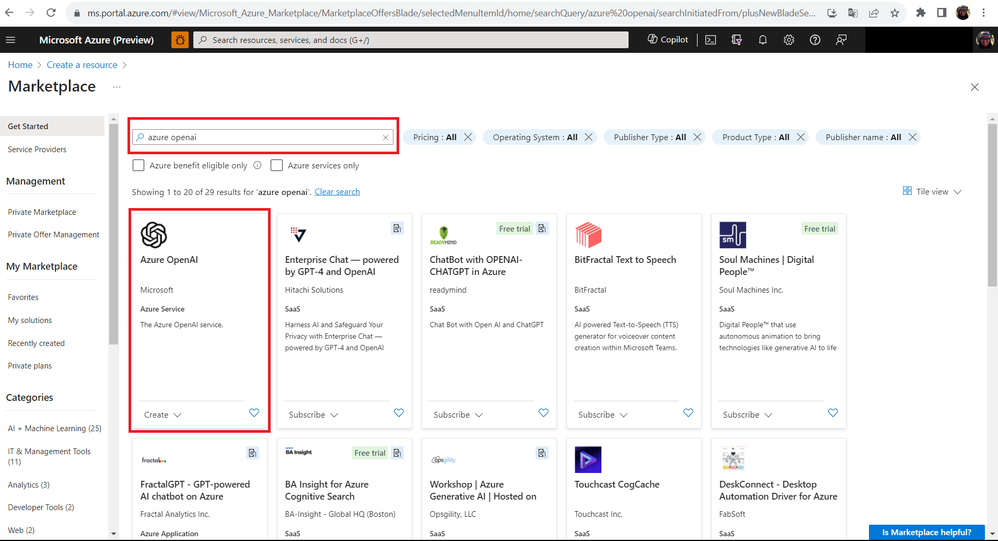
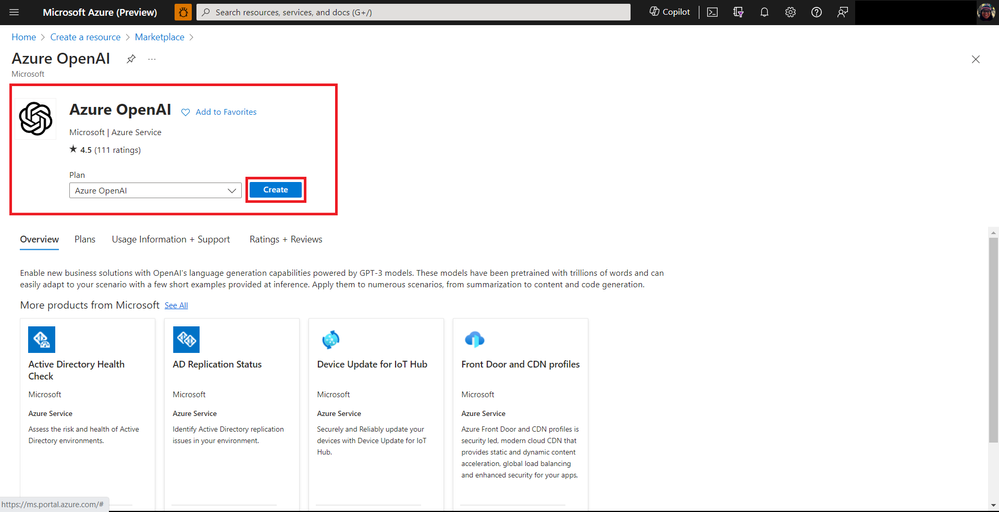
- Step 02: In the search box, type Azure OpenAI and then click Create.
- Step 03: On the resource creation screen, fill in the fields as follows:
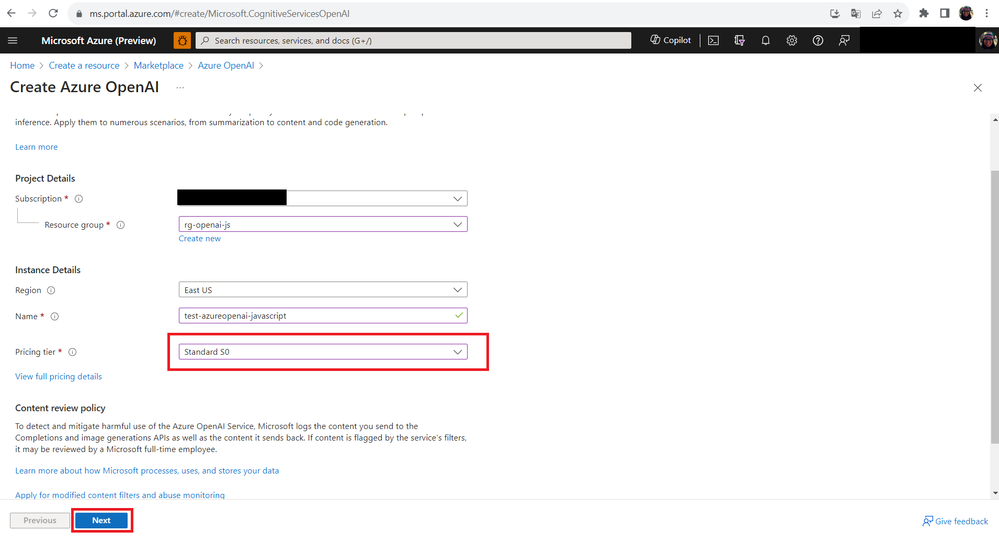
Note that in the Pricing tier field, you can test Azure OpenAI Service for free but with some limitations. To access all features, you should choose a paid plan. For more pricing information, access the link Azure OpenAI Service pricing.
Step 04: Under the Network tab, choose the option: All networks, including the internet, can access this resource. and then click Next.
Step 05: After completing all the steps, click the Create button to create the resource.
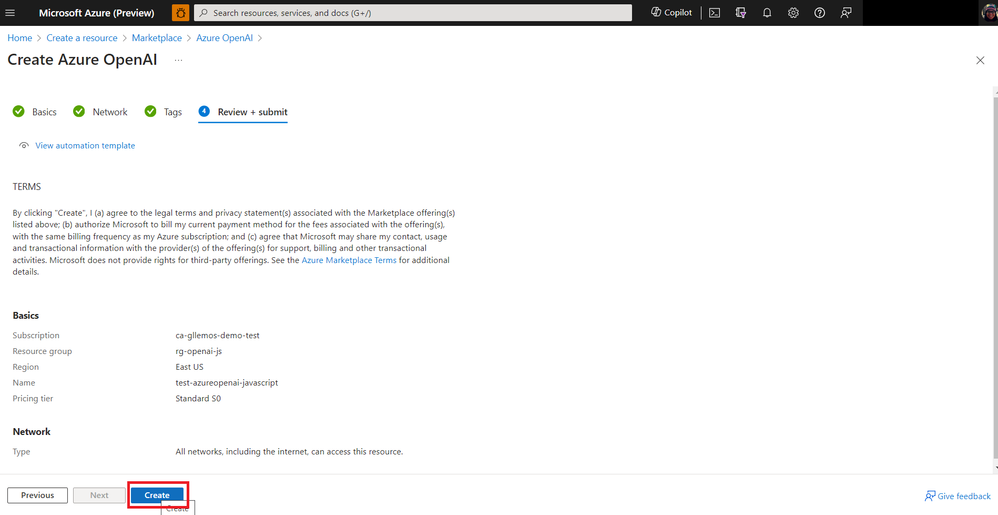
- Step 06: Wait a few minutes for the resource to be created.
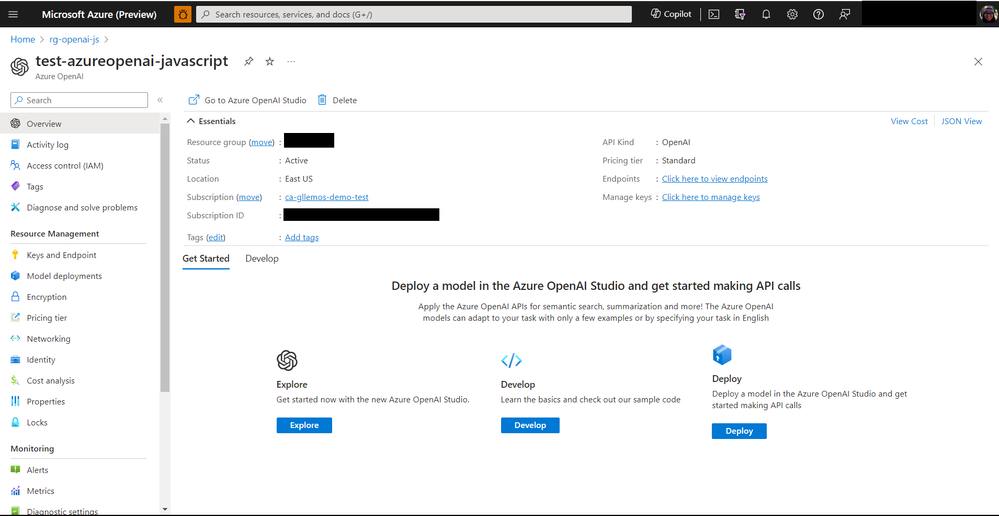
Next steps
In the next article, we will learn how to deploy a model on the Azure OpenAI Service. This model will allow us to consume the Azure OpenAI Service directly in our code.
Oh, I almost forgot to mention! Don’t forget to subscribe to my YouTube Channel! In 2023/2024, there will be many exciting new things on the channel!
Some of the upcoming content includes:
- Microsoft Learn Live Sessions
- Weekly Tutorials on Node.js, TypeScript, & JavaScript
- And much more!
If you enjoy this kind of content, be sure to subscribe and hit the notification bell to be notified when new videos are released. We already have an amazing new series coming up on the YouTube channel this week.

See you in the next article!

by Contributed | Nov 24, 2023 | Technology
This article is contributed. See the original author and article here.
In this blog series dedicated to Microsoft’s technical articles, we’ll highlight our MVPs’ favorite article along with their personal insights.
Jungsun Kim, Data Platform MVP, Korea
SQL Server technical documentation – SQL Server | Microsoft Learn
“This article introduces various DB technologies ranging from the latest version of SQL Server, Azure SQL, Business Intelligence, to Machine Learning.”
(In Korean: SQL Server 최신 버전, Azure SQL, Business Intelligence, Machine Learning에 이르기까지 다양한 DB기술을 소개합니다.)
*Relevant Activity: I have been writing a series of articles about new features of SQL Server 2022 on my website: 김정선의 Data 이야기 (visualdb.net)
Sergio Govoni, Data Platform MVP, Italy

SQL Server encryption – SQL Server | Microsoft Learn
“Databases in a company are the place where information is stored to drive the company’s production processes. Tera of data, dozens of databases, millions of rows, the entire activity depends on this, and information security can no longer be an option, we have to think about security by design and security by default.”
*Relevant Blog:
– Encryption in your SQL Server backup strategy! | by Sergio Govoni | CodeX | Medium
– Database encryption becomes transparent with SQL Server TDE! | by Sergio Govoni | CodeX | Medium
– Advanced database encryption with SQL Server Always Encrypted! | by Sergio Govoni | CodeX | Medium
– How to manage Always Encrypted columns from a Delphi application! | by Sergio Govoni | CodeX | Medium
James Hickey, Developer Technologies MVP, Canada

SQL Server and Azure SQL index architecture and design guide – SQL Server | Microsoft Learn
“If you work with SQL Server, it’s really helpful to understand advanced information about how indexing works, memory management, etc. You’ll find tips about creating better indexes & queries and how to debug issues better.”
Inhee LEE, Business Applications MVP, Korea

Create a machine ordering app with Power Apps – Online Workshop – Training | Microsoft Learn
“This is a practical course that enables you to understand the power platform comprehensively and organically. Through the practical course, you can learn each element systematically while covering various practical aspects, making it a very suitable course for beginners and intermediate learners. I recommend this course.”
(In Korean: 파워플랫폼에 대한 전체적인 이해를 종합적이고 유기적으로 가능하게 하는 실습과정입니다. 실습과정을 통해서 실무적인 요소를 두루 다루면서도 체계적으로 하나하나 익힐 수 있어서 초보자와 중급자 모두에게 매우 적절한 실습과정이어서 추천했습니다.)
*Relevant Activity: I shared this content with a group of Facebook: Power Platform | Facebook
by Contributed | Nov 23, 2023 | Technology
This article is contributed. See the original author and article here.
Description
Report CreateFile operations during Event Grid ingestion from Adlsv2 as errors
When uploading a file with Azure Data Lake SDK, there is an initial CreateFile event with size of 0.
Another FlushAndClose event is sent to Azure Data Explorer when setting the close parameter to ‘true’ on the SDK’s file upload option.
This event indicates that the final update has been made and the file stream is ready for ingestion.
Current Behavior:
Azure Data Explorer ignores the CreateFile event during data ingestion and no monitoring of these errors is reflected to users.
Expected behavior:
Azure Data Explorer will treat CreateFile events as an error of empty blob.
As a result, users are expected to get the following permanent errors for these events:
- Failure ingestion metrics:
- “IngestionResult” of permanent bad request
- “BlobsDropped” from the relevant event grid data connection.
- “EventsDropped” from the relevant event grid data connection.
- Failed ingestion logs in case of turning on the failed ingestion diagnostic logs
Required Change:
Filter out CreateFile events from the event grid subscription.
This filtering reduces the traffic coming from Event Grid and optimizes the ingestion of events into Azure Data Explorer.
You can read more about how to use the SDK correctly and avoid empty file errors here.
Schedule & plan
Step 1: Existing clusters which do not use the functionality today will get the change immediately.
Step 2: Clusters created after end of December 2023 will get the change.
Step 3: Current flow users as well as new clusters created until end of December 2023 will receive the changes after end of February 2024.
- Deprecating the metric “Events Processed (for Event/IoT Hubs)”
This metric represents the total number of events read from Event Hubs/ IoT hub and processed by the cluster. These events can be split by the status: Received, Rejected, Processed.
Required Change
Users can use the metrics “Event received”, “Events processed” and “Event dropped” to get the number of events that were received, processed, or dropped from each data connection respectively.
You can read more about these metrics here.
To ensure continuity of monitoring, please move any automated process that uses the old metric to use the new metrics instead.
Schedule & plan
The changes above are planned to take place at the end of February 2024.


Recent Comments