by Contributed | Jan 20, 2024 | Technology
This article is contributed. See the original author and article here.
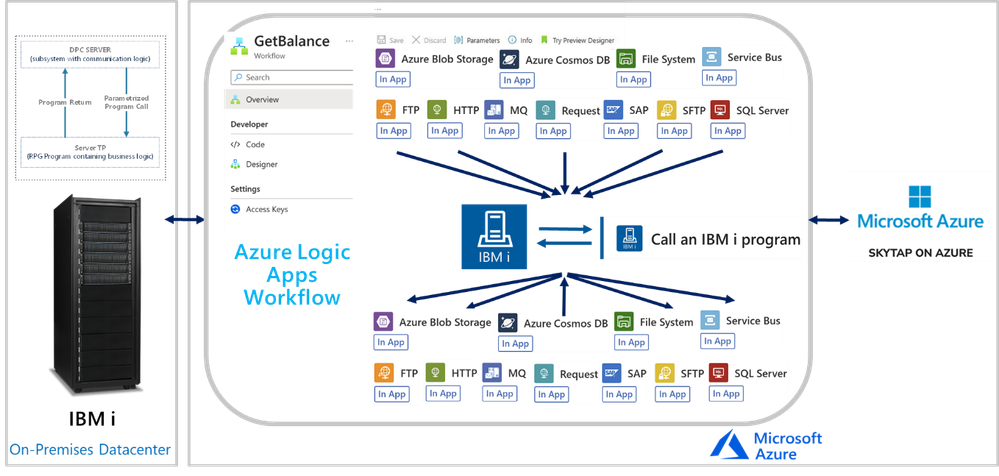
In this session, we continue with the “We Speak”, Mission Critical Series with an episode on how Azure Logic Apps can unlock scenarios where is required to integrate with IBM i (i Series or former AS/400) Applications.
The IBM i In-App Connector
The IBM i In-App connector enables connections between Logic App workflows to IBM i Applications running on IBM Power Systems.
Background:
More than 50 years ago, IBM released the first midrange systems. IBM advertised them as “Small in size, small in price and Big in performance. It is a system for now and for the future”. Over the years, the midranges evolved and became pervasive in medium size businesses or in large enterprises to extend Mainframe environments. Midranges running IBM i (typically Power systems), support TCP/IP and SNA. Host Integration Server supports connecting with midranges using both.
IBM i includes the Distributed Program Calls (DPC) server feature that allows most IBM System i applications to interact with clients such as Azure Logic Apps in request-reply fashion (client-initiated only) with minimum modifications. DPC is a documented protocol that supports program to program integration on an IBM System i, which can be accessed easily from client applications using the TCP/IP networking protocol.
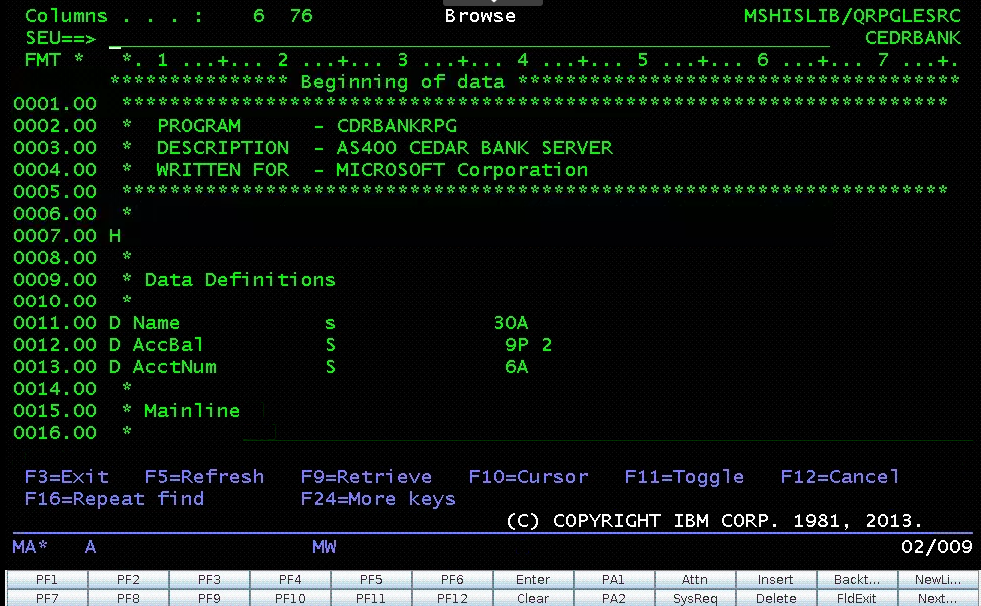
IBM i Applications were typically built using the Report Program Generator (RPG) or the COBOL languages. The Azure Logic Apps connector for IBM i supports integrating with both types of programs. The following is a simple RPG program called CDRBANKRPG.
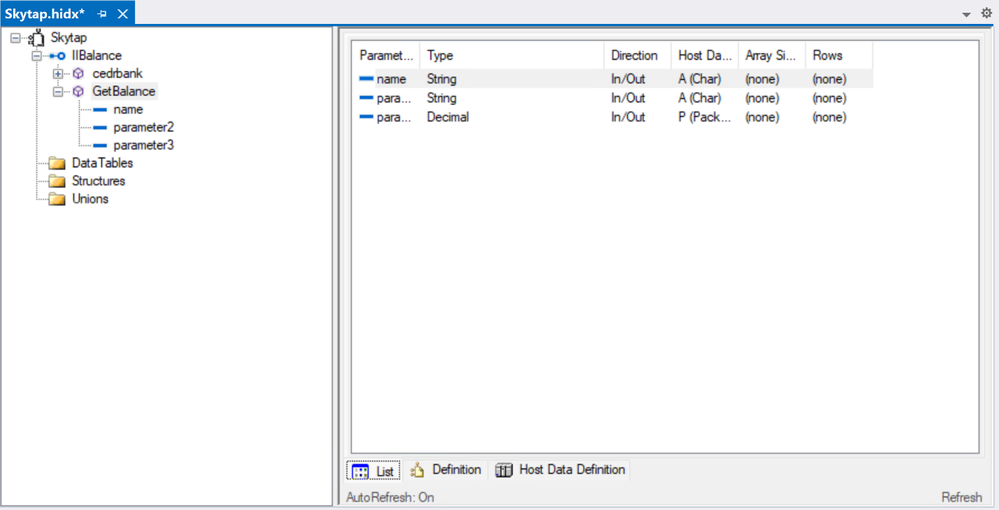
As with many of our other IBM Mainframe connectors, it is required to prepare an artifact with the metadata of the IBM i programs to call by using the HIS Designer for Logic Apps tool. The HIS Designer will help you creating a Host Integration Design XML file (HIDX) for use with the IBM i connector. The following is a view of the outcome of the HIDX file for the program above.
For instructions on how to create this metadata artifacts, you can watch this video:
Once you have the HIDX file ready for deployment, you will need to upload it in the Maps artifacts of your Azure Logic App and then create a workflow and add the IBM 3270 i Connector.
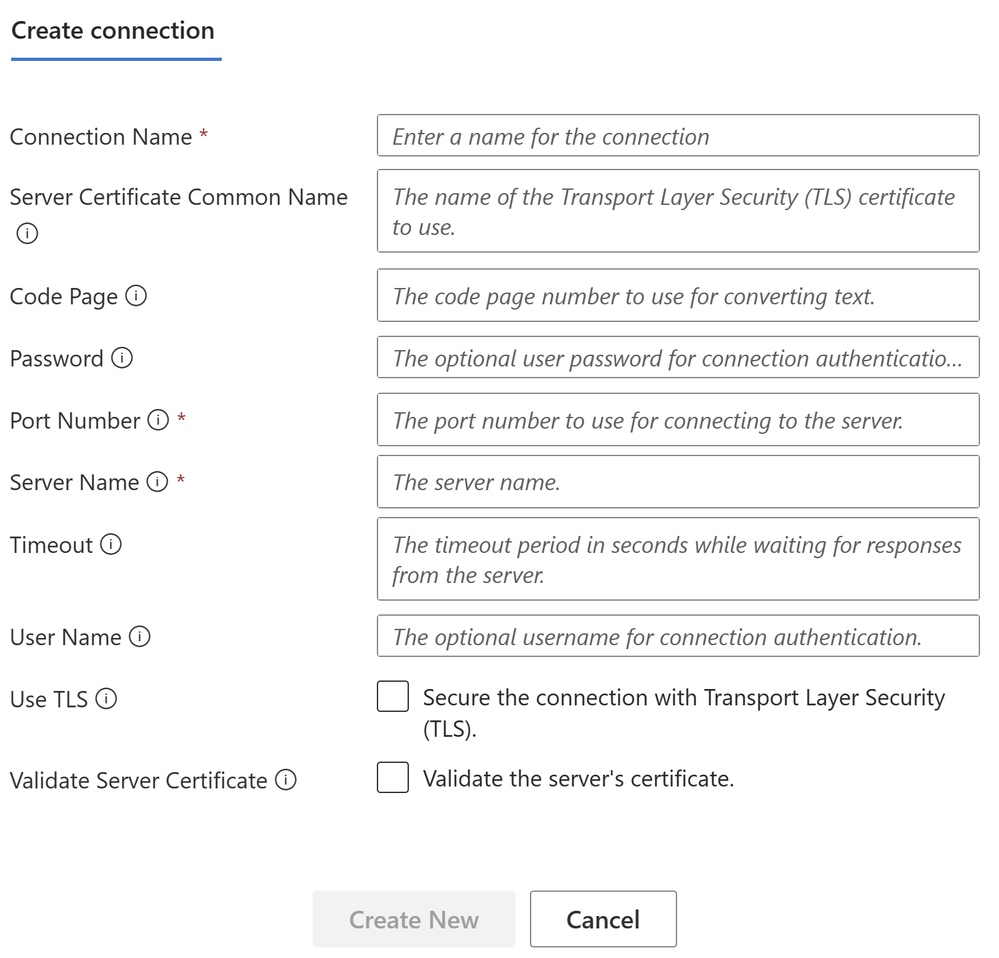
To set up the IBM i Connector, you will require inputs from the midrange Specialist. You will require at least the midrange IP and Port.
In the Parameters section, enter the name of the HIDX file. If the HIDX was uploaded to Maps, then it should appear dynamically:
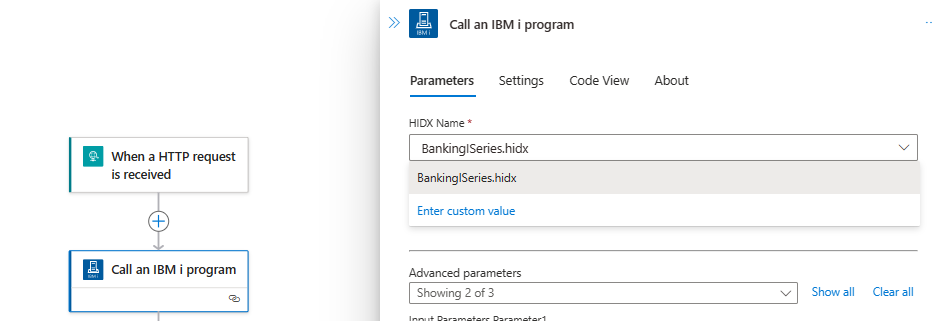
And then select the method name:

The following video include a complete demonstration of the use of the IBM i In-App connector for Azure Logic Apps:

by Contributed | Jan 20, 2024 | Technology
This article is contributed. See the original author and article here.
Below, you’ll find a treasure trove of resources to further your learning and engagement with Microsoft Fabric.
Dive Deeper into Microsoft Fabric
Microsoft Fabric Learn Together
Join us for expert-guided live sessions! These will cover all necessary modules to ace the DP-600 exam and achieve the Fabric Analytics Engineer Associate certification.
Explore Learn Together Sessions
Overview: Microsoft Fabric Learn Together is an expert-led live series that provides in-depth walk-throughs covering all the Learn modules to prepare participants for the DP-600 Fabric Analytics Engineer Associate certification. The series consists of 9 episodes delivered in both India and Americas timezones, offering a comprehensive learning experience for those looking to enhance their skills in Fabric Analytics.
Agenda:
- Introduction to Microsoft Fabric: An overview of the Fabric platform and its capabilities.
- Setting up the Environment: Guidance on preparing the necessary tools and systems for working with Fabric.
- Data Ingestion and Management: Best practices for data ingestion and management within the Fabric ecosystem.
- Analytics and Insights: Techniques for deriving insights from data using Fabric’s analytics tools.
- Security and Compliance: Ensuring data security and compliance with industry standards when using Fabric.
- Performance Tuning: Tips for optimizing the performance of Fabric applications.
- Troubleshooting: Common issues and troubleshooting techniques for Fabric.
- Certification Preparation: Focused sessions on preparing for the DP-600 certification exam.
- Q&A and Wrap-up: An interactive session to address any remaining questions and summarize key takeaways.
This series is designed to be interactive, allowing participants to ask questions and engage with experts live. It’s a valuable opportunity for those looking to specialize in Fabric Analytics and gain a recognized certification in the field.
For more detailed information and to register for the series, you can visit the page on Microsoft Learn. Enjoy your learning journey https://aka.ms/learntogether
Hands-On Learning with Fabric
Enhance your skills with over 30 interactive, on-demand learning modules tailored for Microsoft Fabric.
Start Your Learning Journey and then participate in our Hack Together: The Microsoft Fabric Global AI Hack – Microsoft Community Hub
Special Offer: Secure a 50% discount voucher for the Microsoft Fabric Exam by completing the Cloud Skills Challenge between January and June 2024.
Unlock the power of Microsoft Fabric with engaging, easy-to-understand illustrations. Perfect for all levels of expertise!
Access Fabric Notes Here
Your Path to Microsoft Fabric Certification
Get ready for DP-600: Implementing Analytics Solutions Using Microsoft Fabric. Start preparing today to become a certified Microsoft Fabric practitioner.
Join the Microsoft Fabric Community
Connect with fellow Fabric enthusiasts and experts. Your one-stop community hub: https://community.fabric.microsoft.com/. Here’s what you’ll find:
Stay Ahead: The Future of Microsoft Fabric
Be in the know with the latest developments and upcoming features. Check out the public roadmap
by Contributed | Jan 19, 2024 | Technology
This article is contributed. See the original author and article here.
Hello Azure Communication Services users!
As we enter 2024, we’d like to take the opportunity to hear what you think of the Azure Communication Services platform. We’d love to hear your insights and feedback on what you think we’re doing well and where you think we have an opportunity to better meet your needs. We’d really appreciate it if you would take 5-7 minutes to complete our survey HERE and share your thoughts with us. We’ll use this information to help guide future development, and to help us focus on the areas that our customers tell us are most important to them.
Please note – This survey is specifically designed for developers who’ve built something (even a demo or sample) with
Azure Communication Services. We will offer additional opportunities for other users to share their feedback as well.
That survey link, again, is HERE. Thanks for your feedback, and here’s to a productive and successful 2024!
by Contributed | Jan 18, 2024 | Technology
This article is contributed. See the original author and article here.
Welcome to the fourth edition of Microsoft Viva People Science industry trends, where the Viva People Science team share learnings from customers across a range of different industries. Drawing on data spanning over 150 countries, 10 million employees, and millions of survey comments, we uncover the unique employee experience challenges and best practices for each industry.
In this blog, @Jamie_Cunningham and I share our insights on the state of employee engagement in the retail industry. You can also access the recording from our recent live webinar, where we discussed this topic in depth.
Let’s first look at what’s impacting the retail industry today. In summary, we are hearing about market volatility, supply chain constraints, changing consumer behavior, technological advancements, labor pressures, and rising costs. According to the Deloitte Retail Trends 2023 report, the top-of-mind issues for retail leaders are:
- Growth versus sustainability: Retailers need to balance the short-term pressures of profitability and cash flow with the long-term goals of environmental and social responsibility.
- Consumer confidence and retail sales: Retailers need to cope with the uncertain and volatile consumer demand, which is influenced by factors such as inflation, health concerns, and government policies.
- Leadership quality and brand strength: Retailers need to demonstrate strong and visionary leadership, as well as to build and maintain a distinctive and trusted brand identity.
- Technological innovation: Retailers need to leverage technology and data to create personalized, seamless, and omnichannel customer experiences, as well as to optimize their operations and supply chains.
These issues require retailers to be agile, resilient, and innovative in their employee experience strategies and execution. The retail industry also faces some specific challenges in attracting and retaining talent, such as:
- Rewards: Retail jobs often pay comparatively lower wages and benefits to other industries and can lack recognition and rewards for employees’ hard work.
- Wellbeing: Retail employees often deal with high-stress, low-flexibility, and high-risk work environments, which can affect their physical and mental health.
- Growth: Retail employees often perceive limited opportunities for career advancement, skill development, and learning, which can lead to disengagement and attrition.
According to Glint benchmark data (2023), employee engagement in retail has declined by two points between 2021 and 2022. It’s clear that retailers need to invest in improving the employee experience, especially for the frontline workers, who are the face of the brand and the key to customer loyalty. So, how do they do this? Here are three examples of how retailers we’ve worked with have addressed the needs of their employees with the support of Microsoft Viva:
1. Create a compelling future
We worked with the leadership team of a MENA (Middle East and North Africa) based retailer to recognize that there was a connection between their ability to communicate the future of the direction of the organization effectively, and the degree to which employees saw a future for themselves in the organization. The team committed to clarifying how the business initiatives they were rolling out connected to future work opportunities for their teams.
2. Build bridges with frontline employees
According to the Microsoft Work Trend Report (2022), sixty-three percent of all frontline workers say messages from leadership don’t make it to them. A global fashion brand recognised after several years of employee listening that the actions being taken by leadership were not being felt on the shop floor. We worked with them to adopt a simplified action taking model with one clear commitment from leaders, that was efficient and effective in terms of communication and adoption. They also increased their investment in manager enablement to support better conversations within teams, when results from Viva Glint were released. This simplified approach led to improved perceptions of the listening process, and greater clarity at all levels on where to focus for a positive employee experience.
3. One internal team, one goal
Through an Executive Consultation with leaders of a UK retailer, it was identified that wellbeing was a risk for the business that unless addressed, would severely impact their priorities. With that in mind, the team created internal alignment – to prioritise wellbeing through both training investment and policy changes, resulting in a thirteen-point improvement in the wellbeing score year over year.
Conclusions
To succeed in this dynamic and competitive market, retailers need to focus on their most valuable asset: their employees. By investing in the employee experience, especially for the frontline workers, retailers can boost their employee engagement, customer satisfaction, and business performance.
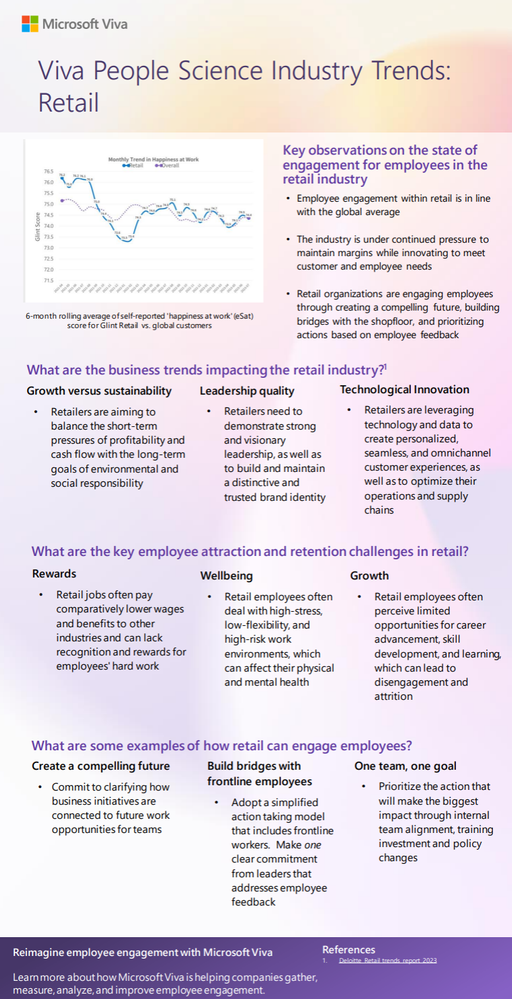
A downloadable one-page summary is also available with this blog for you to share with your colleagues and leaders.
Leave a comment below to let us know if this resonates with what you are seeing with your employees in this industry.
References:
Deloitte retail trends report (2023)
Microsoft Work Trend Index special report (2022)
by Contributed | Jan 17, 2024 | Technology
This article is contributed. See the original author and article here.
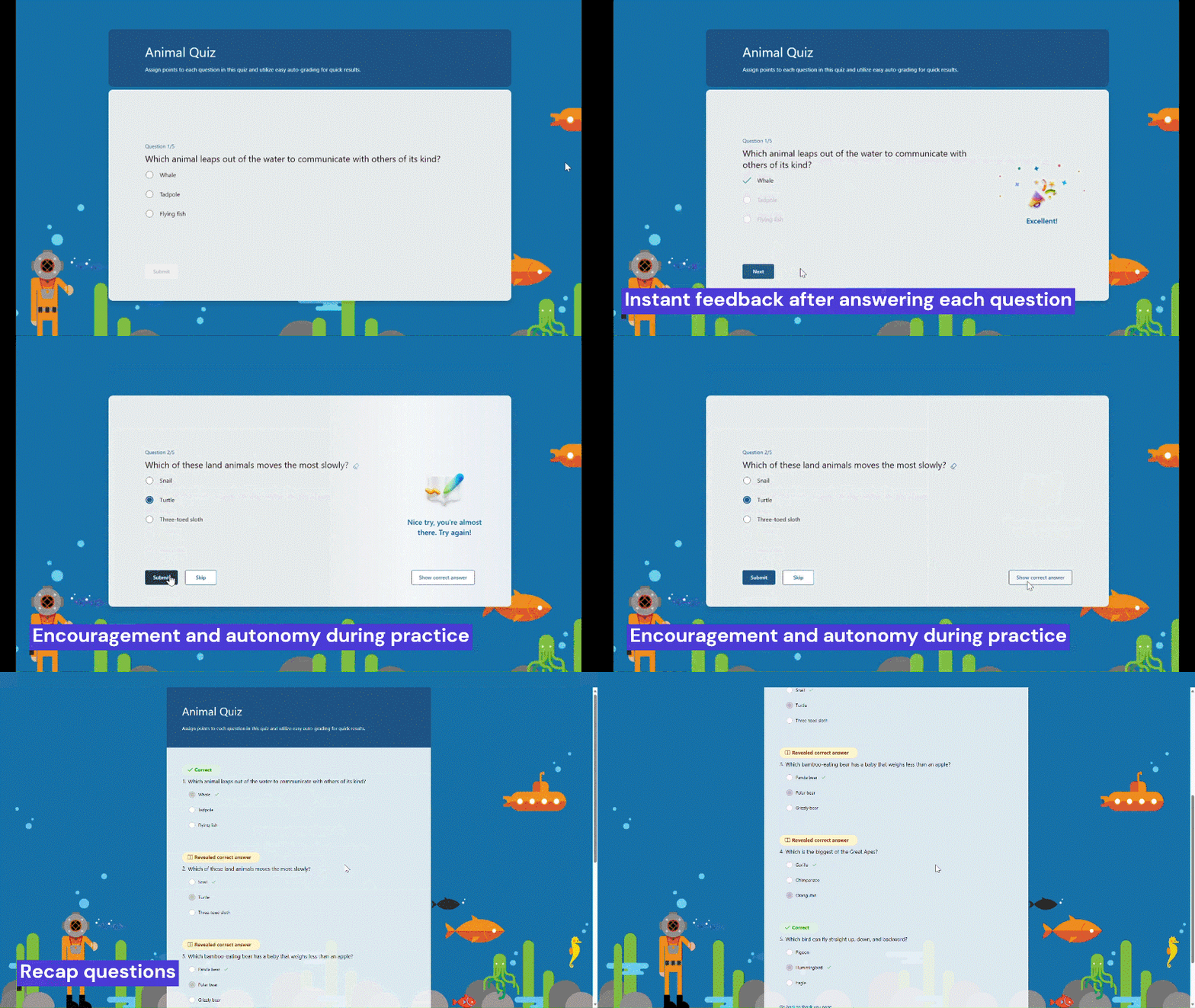
Practice mode is now available in Forms. It’s tailored for EDU users, particularly students, offering a new way for students to review, test, and reinforce their knowledge. Follow me, let’s check out more details of practice mode. You can just try it from this template. (Note: Practice mode is only available for quizzes. )
Practice mode
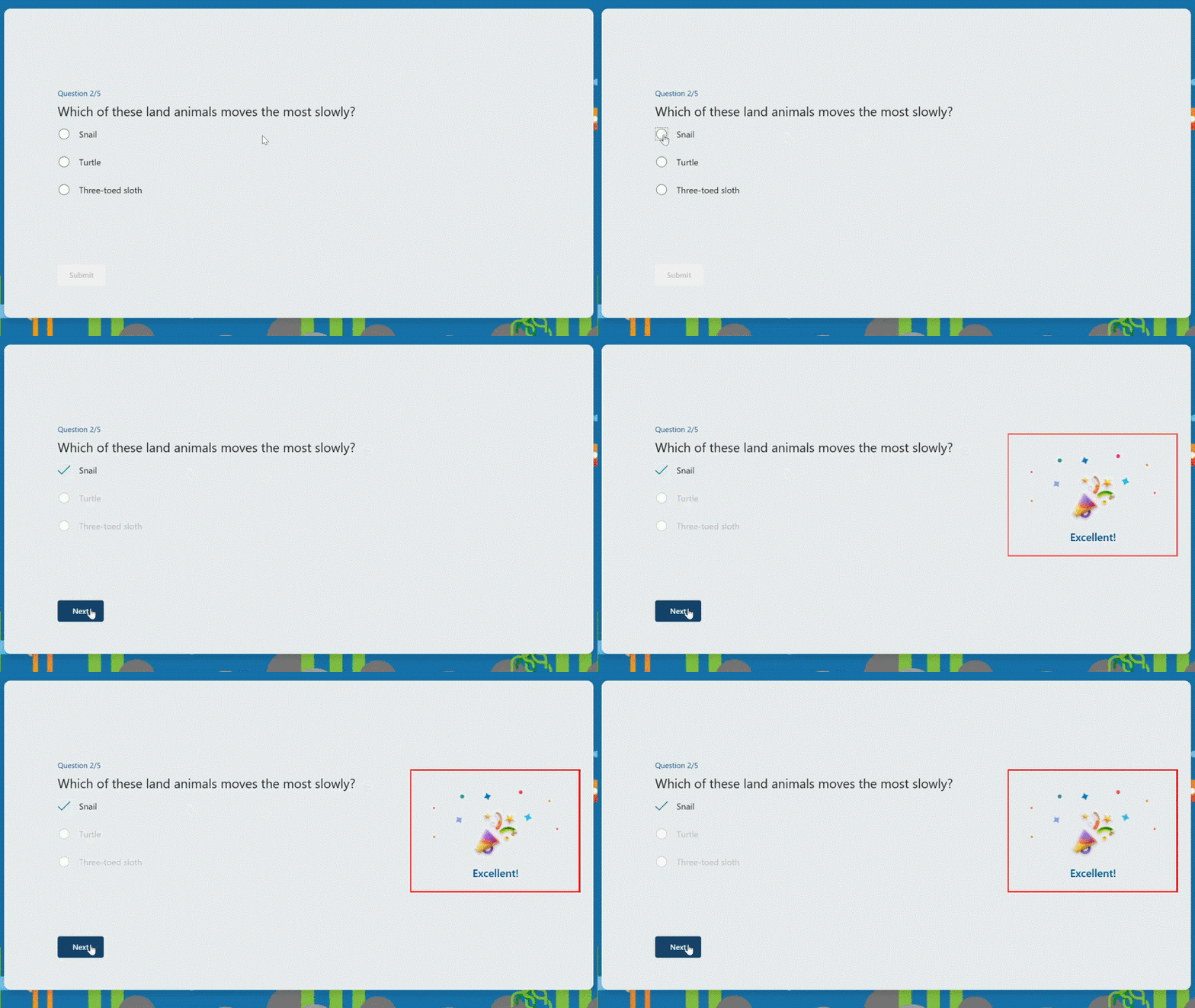
Instant feedback after answering each question
In practice mode, questions will be shown one at a time. Students will receive immediate feedback after submitting each question, indicating whether their answer is right or wrong.
 Instant feedback after answering each question
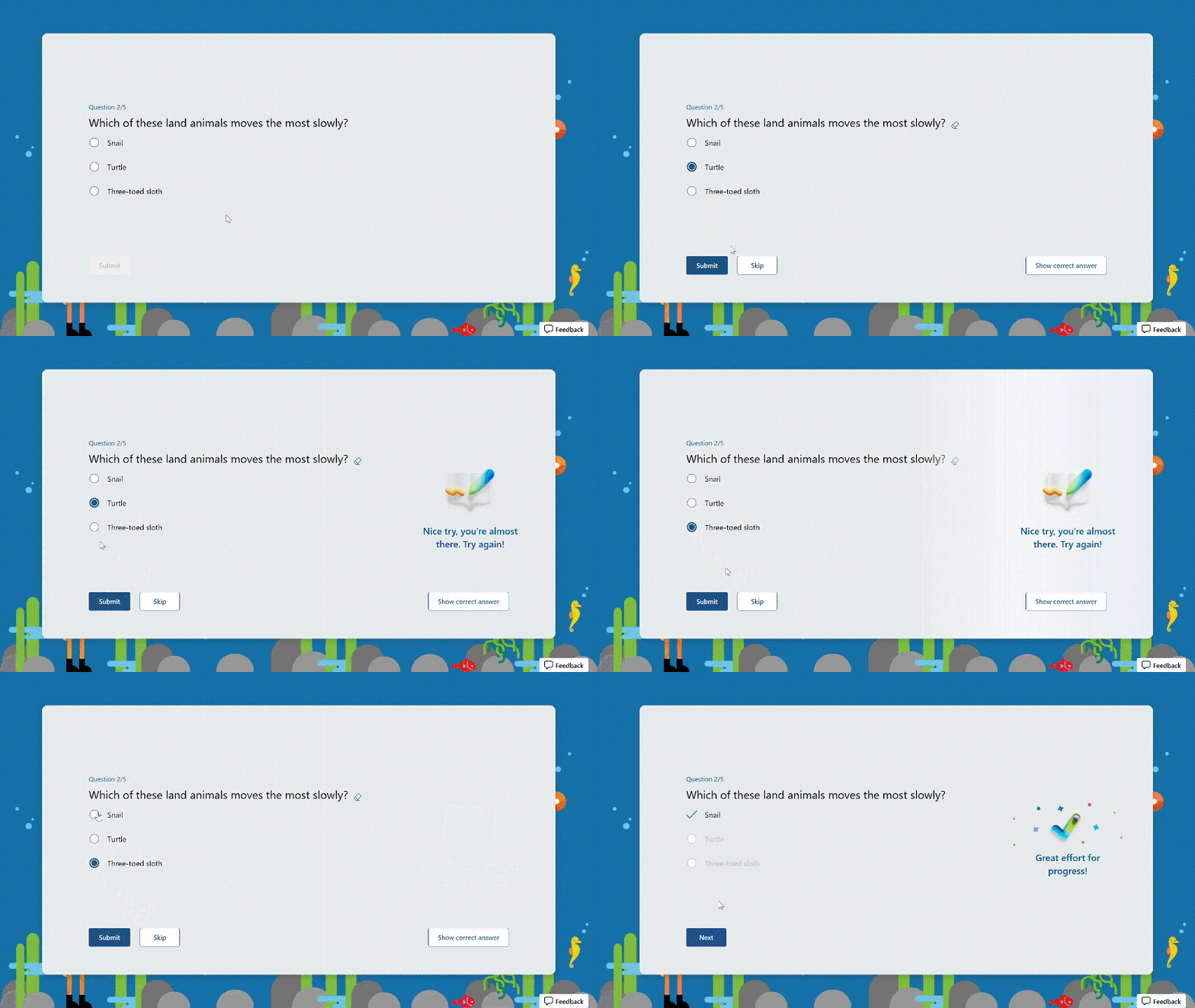
Try multiple times for the correct answer
Students can reconsider and try a question multiple times if they answer it incorrectly, facilitating immediate re-learning, and consequently strengthening their grasp of certain knowledge.
 Try multiple times to get the correct answer
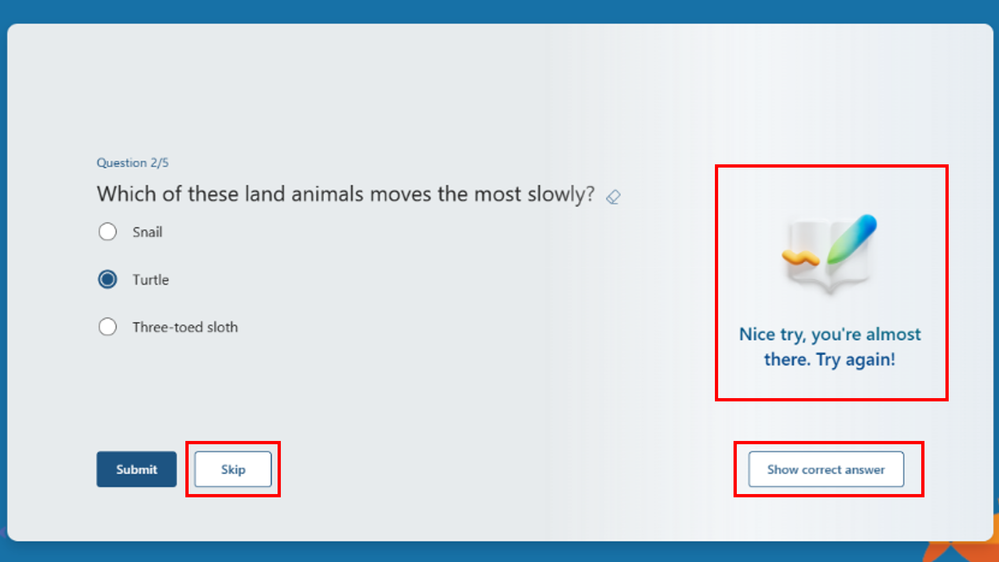
Encouragement and autonomy during practice
Students will receive an encouraging message after answering a question, whether their answer is correct or not, giving them a positive practice experience. And They have the freedom to learn at their own pace. If they answer a question incorrectly, they can choose to retry, view the correct answer, or skip this question.
 Encouragement message and other options
Recap questions
After completing the practice, students can review all the questions along with the correct answers, offering a comprehensive overview to assess their overall performance.
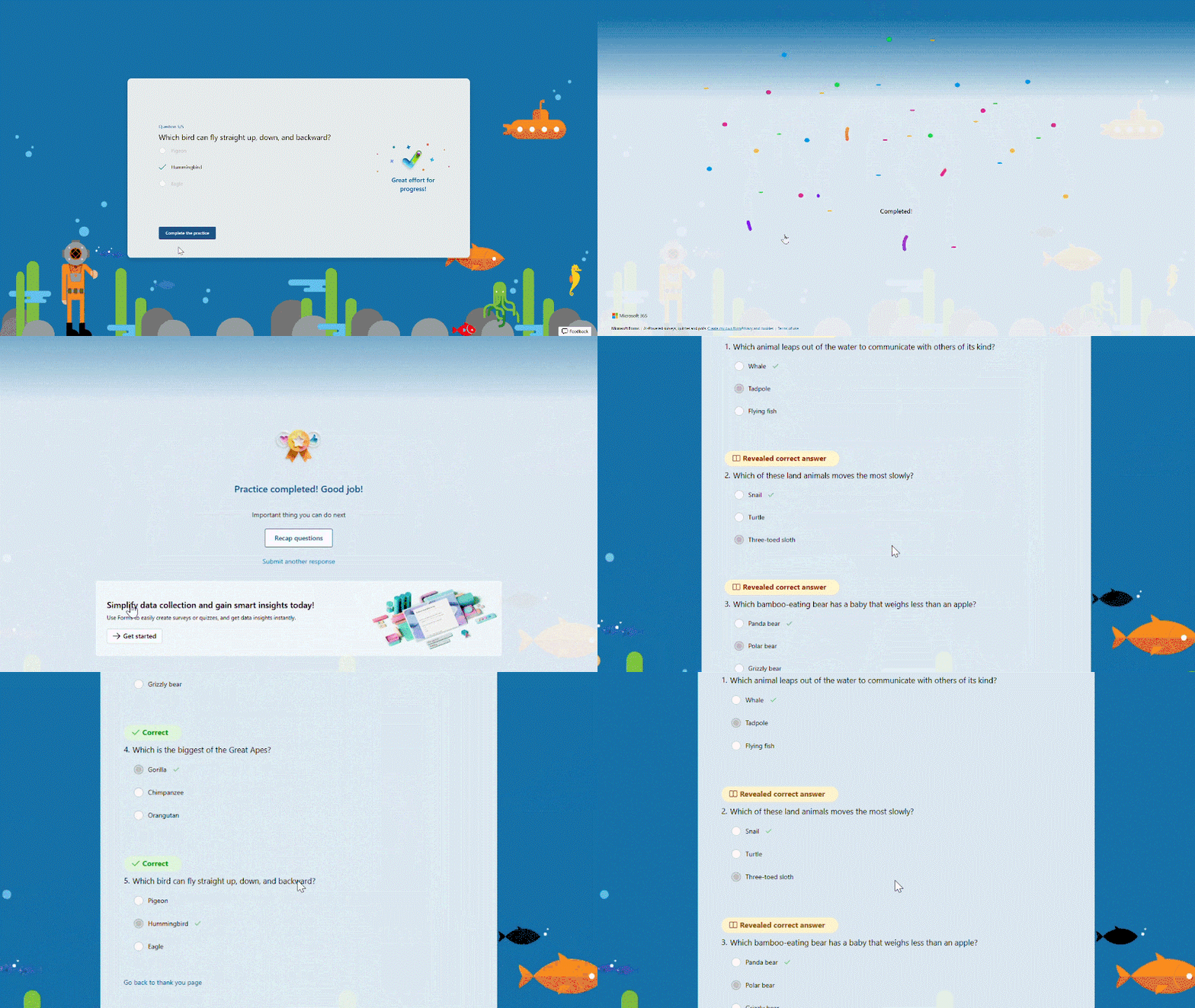 Recap questions
Enter practice mode
Practice mode is only available for quizzes. You can turn it on from the “…” icon in the upper-right corner. Once you distribute the quiz recipients will automatically enter practice mode. Try out practice mode from this template now!
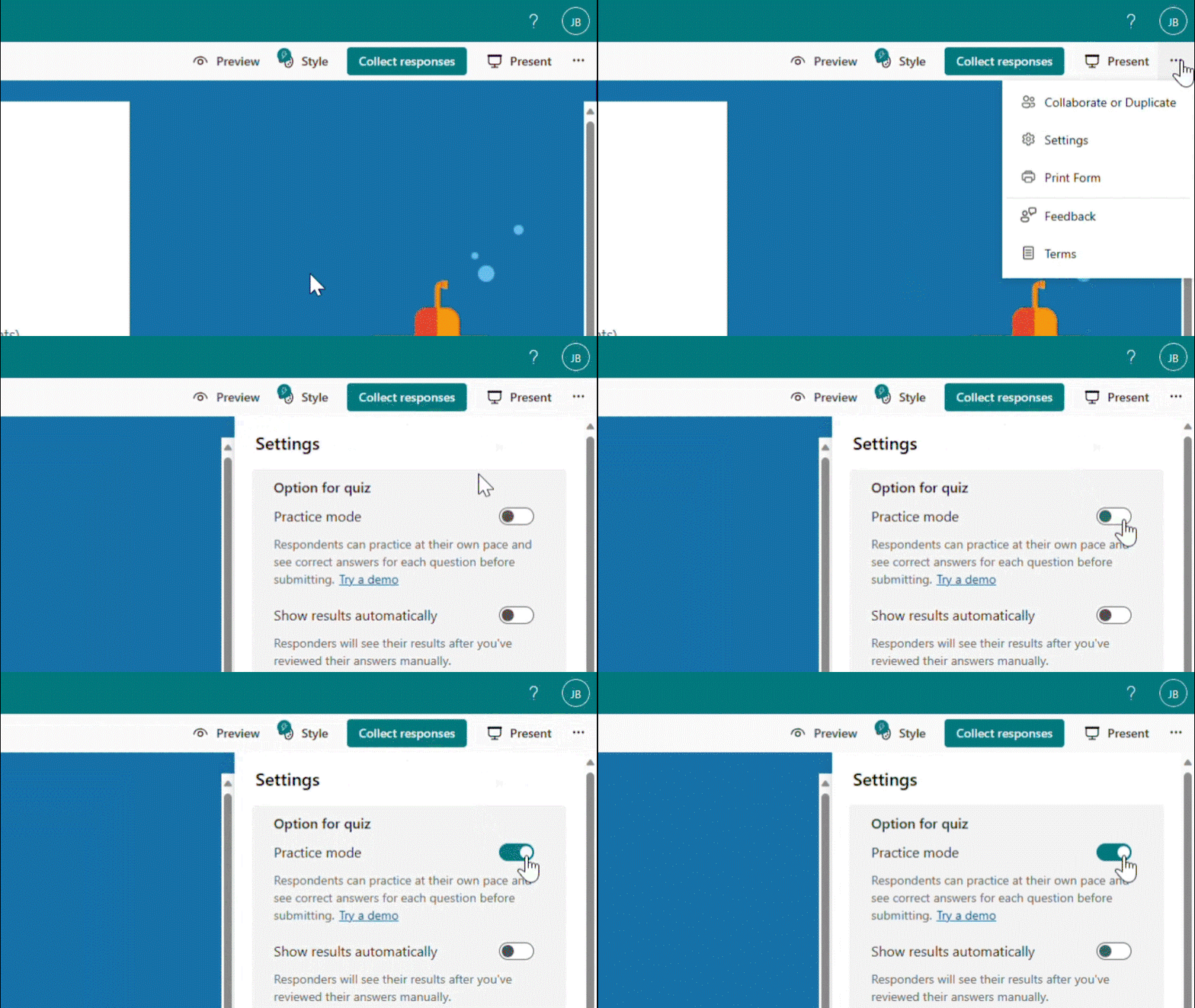 Enter practice mode


Recent Comments