by Contributed | Jun 16, 2021 | Technology
This article is contributed. See the original author and article here.
Are you looking for the right Microsoft Power Platform and Dynamics 365 certifications to help advance your career and to earn the recognition you deserve? We’re here to help you discover the career path that’s right for you—whether you’re just starting out, looking to advance, or wanting to change to something new. When you pass a Microsoft Certification exam, you let the world know that you have these in-demand skills. In addition to providing evidence of your mastery of technical skills, certifications can boost your confidence and highlight your drive to keep pace with technical change.
The combination of your growth mindset and a globally recognized, industry-endorsed Microsoft Certification sends a career-building message to employers. To help you discover your career path and choose the certifications that are right for your journey, we’re kicking off a new series of blog posts that explain the value and benefits of Microsoft Power Platform and Dynamics 365 certifications.
In this post, we offer a quick overview of our fundamentals certifications. These certifications let the world know that you’ve mastered the basics of Microsoft Power Platform or Dynamics 365—whether you’re new to the field or brushing up on your skills as a seasoned professional—and that you’re ready to advance.
The fundamentals certifications
Certifications matter. The Global Knowledge 2020 IT Skills and Salary Report points out, “A majority of certified IT professionals experience two main certification benefits: better job performance and higher salaries.”[1] A fundamentals certification is a great way to help open doors to professional advancement. If you’re new to the workforce, having a fundamentals certification on your résumé can set you apart. If you’re already in your career, you know that organizations need to keep pace with the digital transformation trend. A certification tells employers that you’ve studied for and passed an exam for specific skill sets and that you’re ready to keep learning, regardless of where you are on your career path.
A fundamentals certification can be the first milepost on your journey as you prepare for role-based or specialty certifications, but it isn’t a prerequisite for any of them.
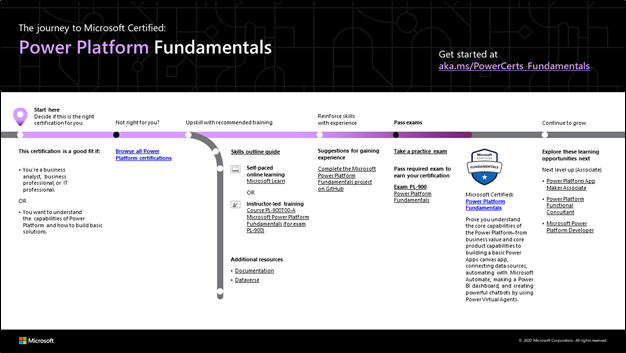
The Microsoft Certified: Power Platform Fundamentals certification proves that you can use your Microsoft Power Platform skills to improve your team’s productivity. No experience is necessary to train for it—just basic familiarity with computer technology, data analytics, cloud computing, and the internet. You earn it by passing Exam PL-900: Microsoft Power Platform Fundamentals.
There are two fundamentals certifications for Dynamics 365. The first is for those who are familiar with customer relationship management (CRM) and are IT savvy—either generally or through work experience. The Microsoft Certified: Dynamics 365 Fundamentals (CRM) certification can highlight those skills and enhance your career journey. You earn it by passing Exam MB-910: Microsoft Dynamics 365 Fundamentals (CRM) (beta).
The other fundamentals certification is for those who have a broad exposure to the enterprise resource planning (ERP) capabilities of Dynamics 365 and who understand the basics of how finance and operations apps fit in within the overall Microsoft ecosystem. Earn Microsoft Certified: Dynamics 365 Fundamentals (ERP) by passing Exam MB-920: Microsoft Dynamics 365 Fundamentals (ERP).
These two certifications that focus on CRM and ERP skills are replacing the older Dynamics 365 Fundamentals certification, which retires on June 30, 2021.
Benefits of fundamentals certifications
Microsoft created fundamentals certifications to build and validate understanding of technologies that businesses use. These very popular technical certifications are held by professionals all over the globe. They build the foundational skills and provide a pathway for earning certifications based on deeper technical skills required to perform industry roles. We keep these certifications current with market and industry demands.
In the annual Nigel Frank survey on Dynamics 365 salary and marketing trends, 61 percent of respondents say that a certification gives you an edge in the job market. And 28 percent of professionals with a certification report that they experienced a pay increase after successfully completing their training.
People in different roles and career stages can benefit from fundamentals certifications. These include:
- IT professionals who want to show a general understanding of the applications they work with.
- Business stakeholders and others who know Microsoft Power Platform or Dynamics 365 and want to validate their skills and experience.
- Developers who want to highlight their understanding of business operations, ERP, or CRM.
- Students, recent graduates, and people changing careers who want to leverage Microsoft Power Platform or Dynamics 365 capabilities to move to the next level.
How do I get started?
If you need more experience before you take the exam, we recommend that you work closely with a Microsoft Power Platform or Dynamics 365 expert on your team and take on a project to deepen your skills. Then explore our training opportunities. No matter where you are on your journey, we have training to fit your needs. To get started, check out our three fundamentals certification journey maps. You can also find the journey maps in the resources sections on the associated certification and exam pages.
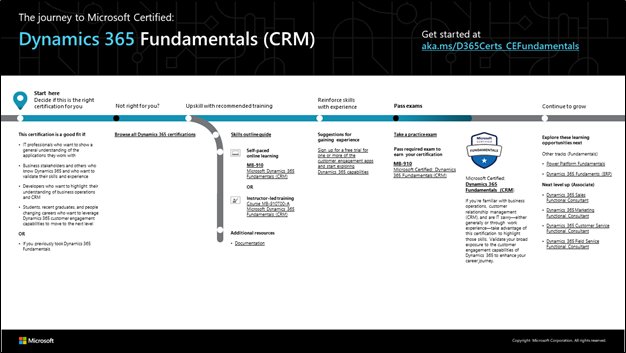
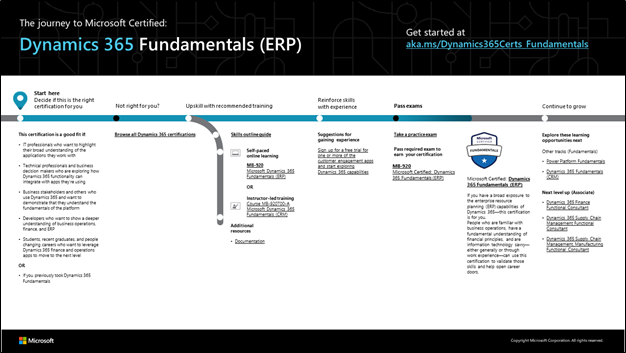
To map out your path, choose the journey map for your fundamentals certification. Then follow the sequence in the map. As shown at the beginning of the map, start by deciding whether this certification is a good fit for you.
Next, choose the training you’ll need to be prepared. To understand what you’ll be measured on when taking Exam PL-900, Exam MB-910, or Exam MB-920, review the skills outline guide on the associated exam page. Then sign up for the training that fits your learning style and experience:
Practice exams are available for some certifications. For example, you can take a trial run for the Microsoft Power Platform Fundamentals exam with the PL-900 Microsoft Official Practice Test. All the exam objectives are covered in depth, so you’ll find what you need to be ready for any question.
After you pass the exam and earn your certification, you can continue to broaden your technical expertise by taking one of the other certifications described in this blog post or by exploring other fundamentals offerings. Each certification you earn validates proven capabilities in a specific line of business. This can be very valuable for an IT professional who wears many hats. Or dive deeper into the intermediate and advanced certifications for your targeted career journey. Check out the possible Microsoft Power Platform and Dynamics 365 certification paths.
Where’s my community?
You’re not alone! Share your career journey with others who have similar interests in Microsoft Power Platform and Dynamics 365 technologies. Here are some places where you can share and gather information and learn from your peers and others.
Celebrate with the world: Post your badge on LinkedIn
When you earn a certification or learn a new skill, celebrate your accomplishment with your network. It often takes less than a minute to update your LinkedIn profile and share your achievements, highlight your skills, and help boost your career potential. Here’s how:
- If you’ve earned a certification already, follow the instructions in the congratulations email you received. Or find your badge on your Certification Dashboard, and follow the instructions there to share it. (You’ll be transferred to the Acclaim website.)
- For more information on badges, check out the Certification Badges FAQ.
- To add specific skills to your LinkedIn profile, go to your profile page and update the Skills and endorsements section. Tip: We recommend that you choose skills listed in the skills outline guide for your certification.
Related blogs and other resources
Ready to discover your career path?
Join the community of professionals who have earned a Microsoft Certification—to help land that first job, advance your career, or shift your focus to a new and exciting technology. These certifications not only validate your technical skills and experience but also help ensure that you’ve got what it takes for those key roles that employers need to fill.
1 Source: Global Knowledge, 2020 IT Skills and Salary Report, 2020.
by Contributed | Jun 16, 2021 | Technology
This article is contributed. See the original author and article here.
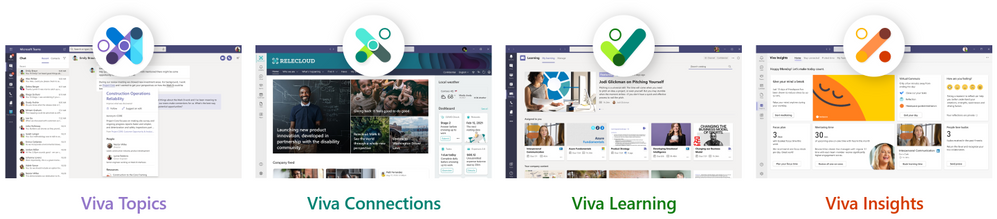
Our Microsoft Mechanics series on Microsoft Viva is almost in the books! If you’ve missed the series so far, start with our introduction to Viva, then dive into each of the modules: Viva Topics, Viva Connections, and Viva Learning. The video for Viva Insights will be available very soon. Each module video gives a brief overview of the solution, the experience across different roles, and IT guidance for implementation.
The Microsoft Mechanics videos are fantastic technical primers for deploying Microsoft Viva throughout your organization. But the employee experience platform is a robust solution, and you probably have questions the videos don’t answer. That’s why we’re hosting our first-ever Microsoft Viva Ask Microsoft Anything (AMA) on June 23 at 9:00-10:00 a.m. PST.
We’ll have some of our best folks from the Microsoft Viva team on hand to answer all your questions during this hour-long session. Curious who you should assign as knowledge managers in Viva Topics? Ask us! Wondering how to optimize your SharePoint page for Viva Connections, or what’s on the roadmap for Viva Learning? Ask us! Looking for best practices to share with your team about virtual commute settings in Viva Insights? Ask us anything! The floor is yours.
Visit our dedicated Microsoft Viva AMA page at aka.ms/VivaAMA for instructions about accessing the event and posting questions on June 23. In the meantime, add the AMA to your calendar.

See you soon!
by Contributed | Jun 16, 2021 | Technology
This article is contributed. See the original author and article here.
Hello folks,
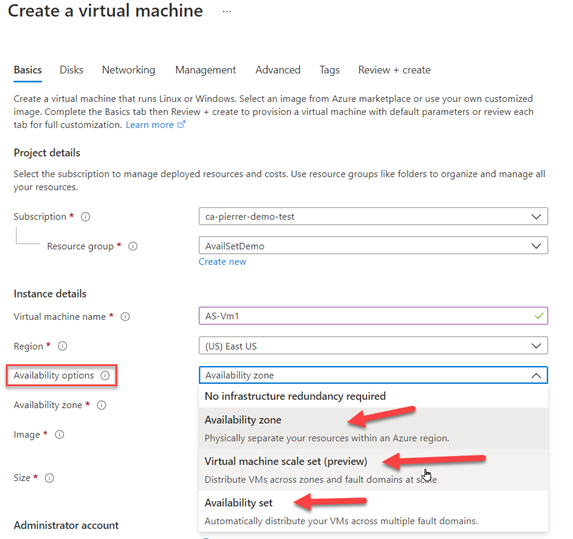
I’ve been looking at ways to scale regular VM up and down without having to create a full VM template used by the existing VM Scale Set. And I wanted a way that did not force me to choose between Availability and Scalability. I found my saving grace with Virtual Machine Scale set with flexible orchestration (VMSS Flex for short)
The way it’s been so far you almost HAD to choose. For example. If I’m doing a database cluster, I need to ensure that I have replicas up, and that some percentage of those VM are always up. (and yes I know that if I’m looking for resiliency and scalability for a database I’d be better off with a PaaS service) but for this example I can use Availability set allowing you to spread those VM across fault domains. (Azure Fault domains are defined as group of VMs that share a common power source and network switch.). I could also use Availability Zones (unique physical locations within an Azure region).
On the other side – the Scalability side – of that choice we have VM Scale Set in Uniform orchestration mode – essentially allowing me to create a VM template and “stamp” out as many as I need. (VM Scale Set is really built to deploy and manage a set of identical, virtual machines.) but with a scale set you don’t have as much control over each node as you would with a regular VM. You can only have one set of VM size for your set…
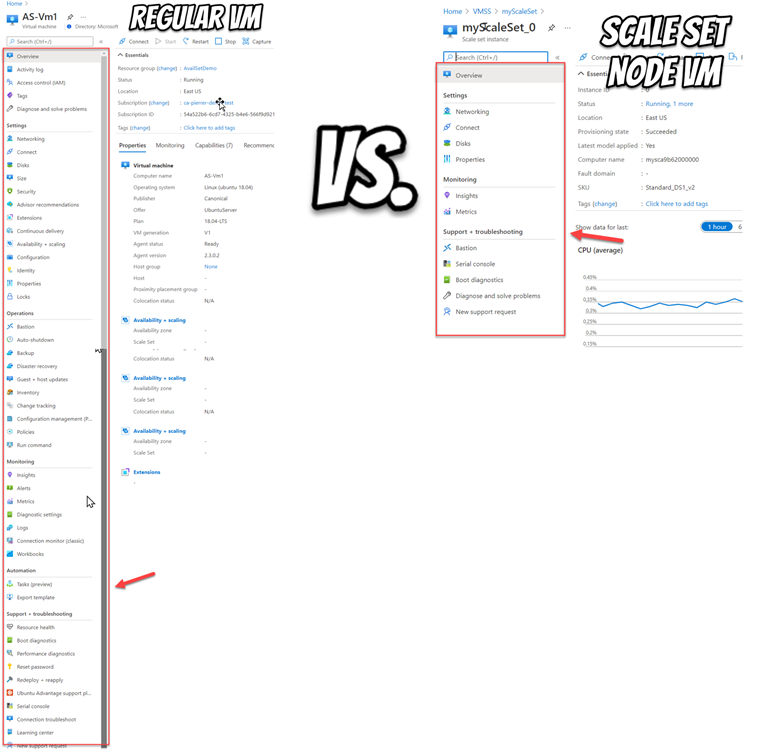
VMSS Flex is really the cumulation of all the things we learned with all the options listed above.
VMSS Flex is like a scale set, where you’re still defining a template, defining capacity and where you want them (fault domains and zones), BUT… it’s also like an Availability Set where you can put specific instance in this grouping. For example, I can setup a VM with specific configuration and place it in Fault Domain 1 and another specifically configured VM and place it in fault domain 2. VMSS Flex also support scalability (auto-scale) based on schedule or metrics. That’s where the flexibility starts but not where it stops.
The scaling out is NOT limited to VMs of the same size like we had in the traditional VM scale sets (otherwise known as VM Scale Sets with Uniform orchestration). You could start with 3 large VM for the standard load but scale out or burst with Spot instances. This enables you to scale out your application while maintaining fault domain isolation that is essential to run quorum-based or stateful workloads, including:
- Quorum-based workloads
- Open-Source databases
- Stateful applications
- Services that require High Availability and large scale
- Services that want to mix virtual machine types, or leverage Spot and on-demand VMs together
- Existing Availability Set applications
VMSS Flex now gives you FULL control over these VMs. You have control over the NICs the Disks, you can snapshot them, back them up individually, use Azure Site recovery… Everything you can do with the existing VM ecosystem.
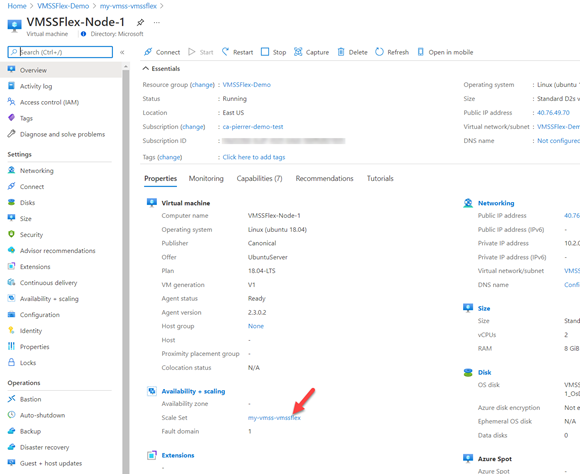
This has real potential. VMSS Flex is still in preview. If you want to check it out, follow the instructions here.
To conclude, As far as I’m concerned, VMSS Flex should be the location for ALL my VMs going forward. And By the way we are working on a series that will cover:
- Quick create
- Availability at scale
- Cost optimization
- Types of workloads
- Stateful, Open source DBs
- Stateless web apps
- Load balancing
- Managing individual VMs
- Manually scale and Metrics based scale
- Predictive autoscaling
And more…
So subscribe to this blog and don’t miss a thing.
Cheers!
Pierre
by Contributed | Jun 15, 2021 | Technology
This article is contributed. See the original author and article here.
Education IT admins around the world are already planning for the next Back-to-School (BTS) season. If your organization is returning to in person learning, fully remote, or somewhere in between, Microsoft has you covered. Here are the latest Microsoft 365 product updates and roadmap items you need to know!!
School Data Sync (SDS)
SDS is releasing 11 amazing updates for the upcoming BTS season, including a new enhanced v2.1 CSV data schema for Education Insights Premium, group provisioning support in v2.1 sync profiles, and a several updates to MS Graph APIs for SDS remote management and partner integration scenarios!!
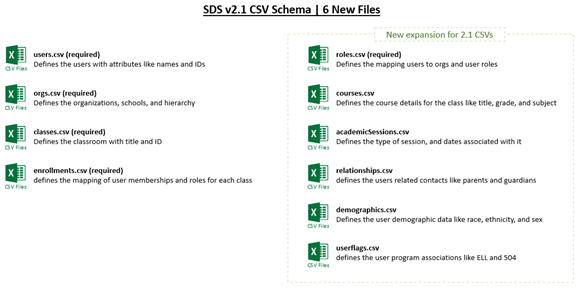
- v2.1 CSV Schema Update: SDS is evolving the v2 CSV file schema to include a variety of new data elements like demographics, flags, sessions, parents and guardians, and courses. These new data elements will be used for both SDS provisioning scenarios and Education Insights Premium enhancements, as described later in this post. Of course, the 2.1 schema still contains all of the same Higher Education and K12 data elements we introduced with the initial v2 release last summer. The new data schema is available now within SDS under the v2.1 CSV Sync Profile setup. Learn More
Release Planned: Available Now
- SDS for Insights: Microsoft recently announced Education Insights Premium, which provides an enriched set of analytics capabilities and reports for organizational leaders within the tenant. To power the experience, SDS is introducing SDS for Insights which merges the data ingested by SDS with the M365 activity data captured and utilized by the Insights App in Teams. The result is enhanced Insights with rich educational context. SDS also ingests organizational data like school memberships, which can be leveraged by Education Insight Premium to school leaders access to Insights for just their school, instead of viewing Insights for the entire organization. Deploying SDS for Insights not only provides more data for Insights, but it also sets and provides the organizational boundaries for delegated access to a subset of Insights reports.
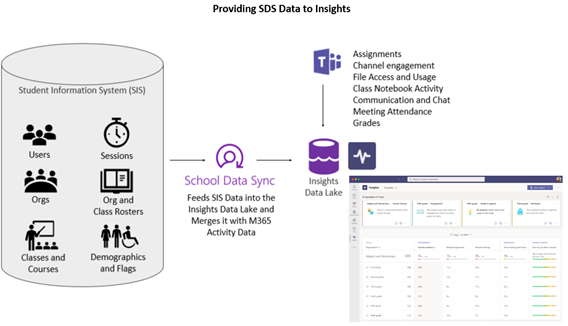
Release Planned: Available Now (public preview)
- v2.1 Security Group Sync: SDS is adding the ability to create the dynamic Security Groups (SGs) when using the v2.1 CSV format. On the SDS settings page, an IT admin can easily enable the creation of Security Groups like All Teachers, All Students, and School based SGs. Security Groups are broadly useful across M365, and can help IT Admin manage users, devices, and applications across the platform. Find the settings below on the SDS settings page!
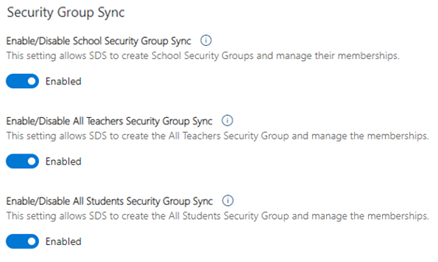
Release Planned: Available Now
- v2.1 Administrative Unit (AU) Sync: SDS is adding the ability to create dynamic School based AUs when using the v2.1 CSV format. New v2.1 sync profiles will create and manage these AUs by default, and the AUs will contain every student, teacher, and class within each school. AUs help IT admins enable delegated administrators with AU scoped roles, allowing them to manage subsets of the broader directory and tenant. See the collection of updates related to delegated administration in the M365 Admin Center, which SDS will help you deploy and utilize.
Release Planned: Available Now
- v2.1 Parents & Guardians: SDS is adding the ability to create the Parent and Guardian Contacts when using the v2.1 CSV format. With the introduction of the new relationships.csv, IT admins can now optionally ingest Parent and Guardian data to provision each one as contacts within substrate. These contacts are then used within Teams for Education to send the Weekly Parent Email Digest. Also, stay tuned for new Parent and Guardian use cases coming soon to M365!!
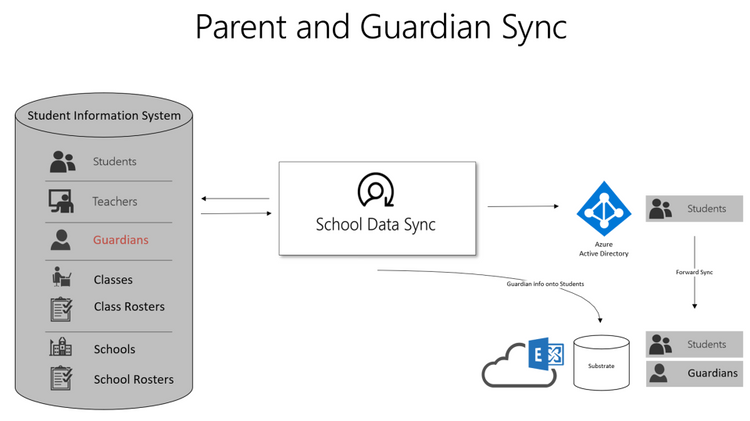
Release Planned: Available Now
- v2.1 writing more data to Azure AD: SDS is adding the ability to write more attributes onto synced users and groups in Azure AD. The new optional user extension attributes include grade and school associations which can be utilized by Azure AD Dynamic Groups provisioning engine and are also made available on MS Graph to complement app integration scenarios. New optional Groups attributes will include course title, grade, subject, and term/session details, which also may be used to enrich app integration scenarios and assist with group cleanup processes.
Release Planned: Available Now
- New OneRoster API Providers: SDS has just introduced a collection of new OneRoster API partners and providers for simplified setup and configuration of SDS sync profiles which do not require CSV export and import management. The newly released SDS OneRoster API providers include Arbor Education, Edge Learning, eSchooling, iSAMS, Rediker Software, and Skyward!!
Release Planned: Available Now
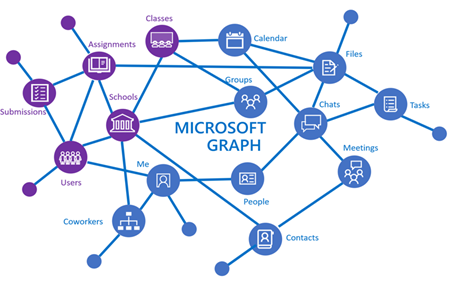
- App-Only Sync Profile Management APIs: SDS provides a collection of Remote Management APIs on MS Graph within the broader Education API set. The APIs allow customers and partners to remotely manage and monitor their sync profiles. For Managed Service Providers, this required a persistent Global Admin account within the tenant to facilitate remote monitoring and management of their customers. We are excited to announce support for app-only context within most remote management APIs, to remotely manage and monitor SDS sync profiles across multiple tenants from a single application or system, without requiring a persistent Global Admin account in the tenant.
Release Planned: Available Now
- Sync Status API Update: SDS provides an Get Sync Status API on MS Graph to remotely monitor Sync Profile Status. This API is critical for remote SDS management. The SDS team is introducing several enhancements to the Sync Status API, to ensure alignment and consistency with Sync status reporting through the SDS application’s user interface, for deeper insights into the current state of sync.
Release Planned: Mid-July 2021
- Sync Performance Boost: When you configure SDS to start syncing data, each sync profile runs through a pre-sync validation process. During this process, SDS calls into Azure AD to check for valid/matching users before attempting to sync user data forward. This process can be time intensive and add several hours to first-time sync in large tenants. SDS will now pre-load Azure AD data into the SDS service, allowing pre-sync validation to run locally. The change will exponentially decrease sync times, reducing the validation checks from hours to just a few minutes, allowing the real sync to start and complete much faster.
Release Planned: Mid-July 2021
- Grade Sync adding new providers: Educators shouldn‘t have to copy and paste grades – ever. Grade Sync is the time-saving solution within Teams Assignments that automatically sends grades you enter to your Student Information System (SIS) gradebook. Grade Sync now supports syncing to OneRoster v1.1 compliant providers including verified providers: Aequitas, eSchoolData, Infinite Campus, PowerSchool, and Skyward. Learn More about getting started syncing grades.
Release Planned: Summer 2021 (private preview)
M365 Admin Center and School Level IT Administration
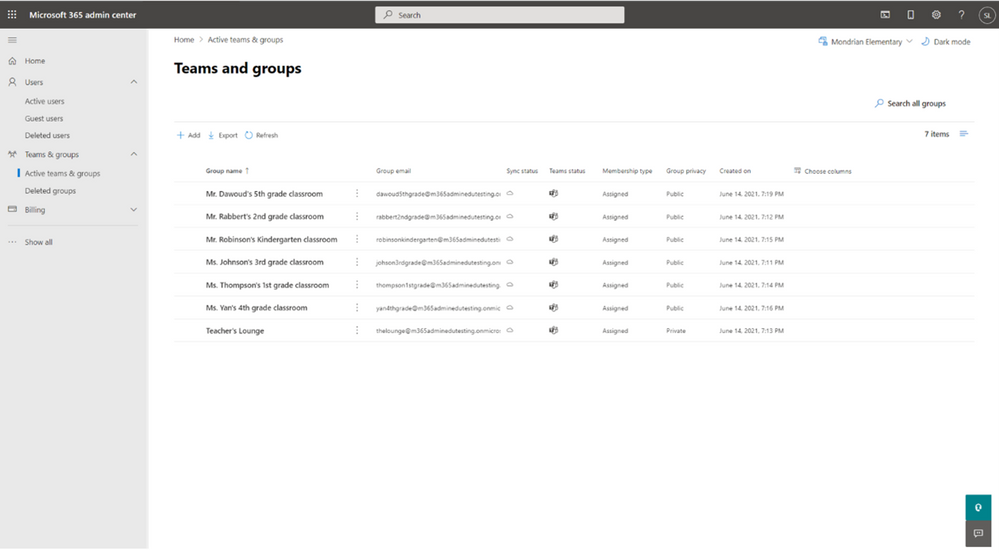
The Microsoft 365 Admin Center is releasing a brand-new experience for Education IT Admins for BTS! The new experience provides a single and centralized place for delegated School level IT admins to perform and manage the most common administrative tasks across M365 workloads like Azure AD, Teams, Exchange, and SharePoint. This will help central IT teams and Global Administrators focus on higher privileged tasks within M365 while delegating the operational tasks down to others within the organization as appropriate. Using Administrative Unit (AU) scoping and RBAC role assignments, delegates will be empowered to manage the subset of users, groups, teams, and group connected sites associated with their specific school, college, or subset of the broader tenant and directory!!
- M365 Admin Center UX for School IT: The M365 Admin Center will provide a new streamlined experience for School level IT admins, which allows central IT teams and Global Administrators to delegate many common and repeatable administrative tasks to school level delegates. The solution ensures that school delegates can only manage the subset of users, groups, teams, sites, and objects associated with their school(s). The tasks and permissions within the solution span Azure AD, Teams, Exchange, and SharePoint:
- Manage Users, Attributes, Reset Passwords, and Assign Licenses
- Manage Groups, Teams, and Group Connected Sites
- Manage Email, Chat, External Sharing, and Privacy
- Manage Memberships and Access
- (Coming soon) Manage Teams channels, Security Groups, and add Groups and Teams to an AU
Release Planned: Mid-July (public preview)
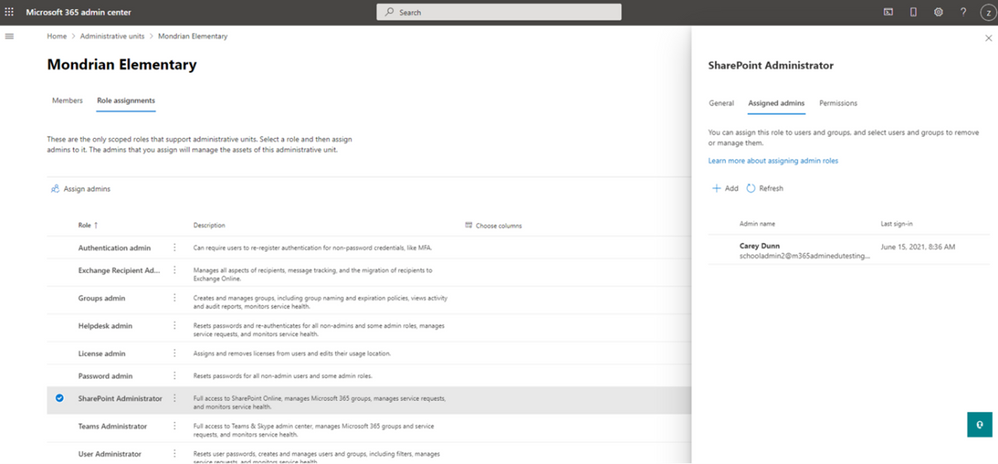
- Administrative Unit support across Teams, SharePoint, and Exchange: Administrative units provide a way to define the structure of an organization to assist with delegated management. For example, one administrative unit for each school in a district. However, these have solely supported management across users and Azure AD groups. To ensure delegated admins can manage across more Microsoft services, Microsoft extended administrative unit support to Teams, Microsoft Groups, and SharePoint sites. There are also three new scoped administration roles that can be assigned: Teams Admin, SharePoint Admin, and Exchange Recipient Admin. These roles can be assigned to an admin over a particular AU, which grants them rights to manage only the objects within that AU from the Microsoft 365 Admin Center. The AU scoped roles will only provide a targeted subset of the role’s broader functionality, while the un-scoped version of these RBAC roles will continue to allow IT admins to do much more within each service specific admin portal.
Release Planned: Mid-July (public preview)
- Structure your tenant and delegate admin tasks across your organization: Administrative units let you subdivide your organization into a logical structure that meets your needs, and then assign specific administrators that can manage only the members of that unit. For example, you can use administrative units to delegate permissions to administrators so they can control access, manage users, and set policies only in the “School of Engineering,” instead of the entire university.
Global admins and privileged role admins can create and manage the membership of administrative units in the Microsoft 365 admin center today. We’ve also added 3 new scoped roles, increasing the total number of scoped role assignments a delegated admin can have to 9. We are going to continue adding functionality to the delegated admin experience, including support for bulk user membership assignments and dynamic user membership.
Release Planned: Mid-July (public preview)
- Delegated Password Reset with Password Writeback Support: One of the most common challenges for EDU IT Admins is the endless student password reset requests. The M365 Admin Center recently released a new streamlined experience for Educators and School Leaders, allowing them to easily perform password resets for their students. To complete the story, M365 Admin Center is adding support for delegated password reset on hybrid Identities with password writeback enabled via AAD Connect Sync!! Now every EDU organization can delegate password reset permissions to Educators and School leaders!!
Release Planned: Mid-July (public preview)
Duty of Care and Student Protection
Many EDU organizations deploy M365 tenants containing multiple schools, sometimes spanning hundreds or even thousands of schools within a single tenant. To protect the students within the tenant for bullying or unintended communications and content sharing, IT admins need a way to set boundaries within the tenant. M365 offers Information Barriers (IB) to provide boundaries for directory visibility, communication, and collaboration. We are pleased to announce a collection of new Information Barrier enhancements planned to release this August tailored for Education.
- Users in Multiple IB Segments: Many EDU institutions have educators that teach across multiple schools, and to support school segmentation educators must be allowed to exist in multiple segments. In addition, Microsoft recommends IT create an All Staff IB segment and policy to facilitate broad communication and collaboration amongst all educators and staff within the tenant, while keeping students segmented to just the school(s) which they attend. To support these scenarios and provide EDU adequate flexibility in design and implementation, Information Barriers will support assigning users into multiple IB segments.
Release Planned: August 2021
- Support scale of 5K+ IB Segments per Tenant: Microsoft recommends deploying into a single tenant when user populations are 1M users or less for a single organization. To support 1M user tenants with school per school segmentation, Microsoft will begin supporting 5K segments per tenant. This scale increase should empower any 1M user or less organization to deploy M365 in a single tenant model while also protecting the students and their data contained within the tenant.
Release Planned: August 2021
- Support for 4 IB Modes on Groups: User segments and IB policies will restrict people’s ability to see and find other users in a variety of people picker experiences like adding users to a chat and communicating via Teams. In addition, we are introducing IB modes on Microsoft 365 Groups to further strengthen IB compliance. The IB modes will evaluate group membership, access, and sharing controls.
- Open mode – no restrictions on the group or its content, anyone can be a member of the group.
- ownerModerated mode – the group membership is restricted to users from within the owner’s IB segments, and allows the owners to share content with other users within their segments.
- Implicit mode – the group membership is restricted to users within group members IB segments, and content is restricted to the group members.
- Explicit mode – the group membership is restricted to the users within the segments explicitly stamped on the group by IT admins. Content is restricted to users within the segments on the group and site access permissions.
Release Planned: August 2021
- Support IBs based on AU membership: For organizations that have deployed School Data Sync, they are creating an AU per school by default. To help schools onboard and adopt information barriers with ease, Microsoft will support creating IB segments based on the membership of an Administrative Unit. So, once you have setup SDS and have created your school AUs, you can configure an IB policy per school and mirror your School AU memberships with a corresponding School IB segment with ease.
Release Planned: August 2021
- SDS provisioning of groups with IB Mode ownerModerated: School Data Sync will begin creating all Class Groups with IB mode ownerModerated, to prepare organizations for Information Barriers adoption. This setting will allow the educator (owner) to add and invite any other users from the segments which they are a member of, and share content with their segment members, putting them in control of their classes.
Release Planned: August 2021
- IBs + Address Book Policy in the same tenant: Information Barriers will be fully supported by Teams and SharePoint, but Outlook and OWA do not yet support IBs. To mitigate directory exposure and the ability to easily find and communication with others outside of the intended segment(s), Microsoft will support configuring and running both Information Barriers and Address Book Policy within the same tenant, at the same time. This will allow IT to apply segmentation that spans all 3 core workloads – Teams, SharePoint, and Exchange.
Release Planned: August 2021
by Contributed | Jun 15, 2021 | Technology
This article is contributed. See the original author and article here.
Azure portal Import from BACPAC fails if database schema is large because the number of tables, columns, indexes and views.
” BadRequest ErrorMessage: The ImportExport operation with Request Id ‘ed049000-1d74-46bf-9dd6-2375c5d079fa’ failed due to ‘An internal error occurred. Please contact Microsoft support and reference the server name, database name, and operation ID.’..”
SQL Server Management Studio “Import data-Tier application” option fails after some time with an error indicating “not enough memory”
If the number of tables, indexes and views is large, import model preparation needs a lot of memory and time.
In this case the solution is use SqlPackage.exe with “/p:Storage=File” option
/p: Storage=({File|Memory}) Specifies how elements are stored when building the database model. For performance reasons the default is InMemory. For large databases, File backed storage is required.
Syntax
sqlpackage.exe /Action:Export /ssn:tcp:<servername>.database.windows.net,1433 /sdn:<source–database–name> /su:<username> /sp:<Password> /tf:.export.bacpac /p:Storage=File /d:true /df:.outputlog.log /p:LongRunningCommandTimeout=0
SqlPackage.exe /Action:Import /sf:.bacpacfile.bacpac /tsn:<servername>.database.windows.net /tdn:<database–name> /p:Storage=File /tu:<username> /tp:********** /d:true /df:.outputlog.log /p:LongRunningCommandTimeout=0
Note that some import steps will take some time (hours) and you could think that process is hang. You can use Windows “Resource Monitor” and monitor Sqlpackage.exe disk activity.
Note: This solution also applies to export operations
Regards, Paloma.-


Recent Comments