![[Guest Blog] Hypotheses and High Hopes: How 'empower everyone' can really mean everyone](https://www.drware.com/wp-content/uploads/2021/06/fb_image-194.jpeg)
by Contributed | Jun 25, 2021 | Technology
This article is contributed. See the original author and article here.
This blog was written by MVP, Paul Culmsee. Paul explains how he came to guide many non IT people into Power Platform experts, and what he has learnt along the way. Paul has a proven track record of developing world-class Power Platform talent through mentorship.
My name is Paul Culmsee and I run a consultancy called Seven Sigma in Perth, Western Australia.
I’m starting my story at the time when a startup that I had poured my heart, soul (and cash) into failed. Why it failed doesn’t actually matter, but amongst the pain felt at the time came the learning of some lessons. One in particular that really rearranged my mental molecules was finally understanding what it means to formulate a hypothesis, test it as quick as you can to see if you are right, and adjust if you are not. This principle has served me very well ever since, and as you will see has delivered some awesome outcomes that we never could have predicted.
So as you read my story, see if you can spot all my hypotheses, and how I tested them.
“Can this be used for audits?”
I think it was late 2016 or early 2017 when I built my first simple Power App for capturing lessons learnt on projects and was surprised at how quick and easy it was. I showed it to a team member, a Safety Manager, who took the phone, used the app for a few moments, then asked two questions: 1) “Is PowerApps any good?” and; 2) “Can this be used for audits?”
I found it interesting that he had little interest in the problem my app was trying to solve, but quickly connected the concept to one of his business’ own problems. In the past, when introducing tools like SharePoint or Teams, I was used to having to explain the intent and benefits to users.
Anyway, at that time, I did not know the answers, so I said, “I honestly don’t know if it’s any good, but would you be willing to fund a few days to build a prototype? Worst case is it sucks, and you can give a real prototype to IT to get done by real developers.”
Five days later, the app was delivered and yes, Power Apps seemed good. It was surprisingly easy, and I suggested it could be taught to anyone. They took me up on it which led to conducting what I suspect is the world’s first Hackathon-style training session on Power Apps to a group of non-IT users. I taught them how to build their own audit apps. I will never forget the best comment of the day that is the essence of citizen development…
“We are a bunch of electricians, welders and fitters and here we are, building apps!”
On daughters and hackathons
Word spread of that session and in true FOMO style, I ended up doing six more sessions with different teams at that company. I began to suspect Power Apps was going to be mega huge in the future, and it would initially be driven by citizen developers before IT departments would start to notice. I had proven that hackathon training worked at small scale, but that was all members of the same company and teams. What about folks from different organisations with different use-cases?
To test this hypothesis, I called up my old friend, Debbie Ireland, in New Zealand, who runs a training company and after a couple of conversations, numbers and dates were set for public Power Apps hackathons in New Zealand. The experiment continued…
Around this time, my teenage daughter, Ashlee, was struggling with anxiety and depression, something that had affected her for some time. She has already told this story, but the quick version is she agreed to my offer to teach her Power Apps for the same money she was getting in a dead-end job. She learnt it blazingly fast, and early on, when I asked her if she liked it, she answered, “Well, I don’t hate it!” (I took that as a yes!).
Ashlee did well with Power Apps – very well. Such was the positive change in her, I asked her to come to New Zealand with me to help run the hackathons. Not only were the sessions all sold out, but we also learnt that hackathon-style training works for diverse groups too. More importantly for me was how it transformed Ashlee. At times, we would swap roles, and she would present. For someone who was too terrified to put her hand up at school, she was now taking centre stage. In fact, when she came home, she designed and ran youth hackathons and I was relegated to the assistant role.
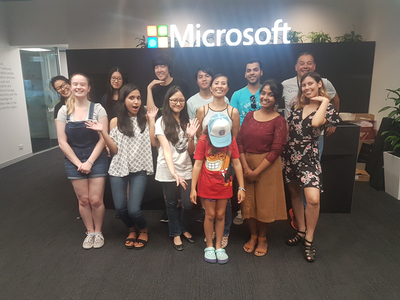 The world-first Power Platform Youth Hackathon in 2018
Early success
While all of this was happening, we were proving the power of citizen development at one of our major clients – an internationally known Australian company. What started out as me helping a citizen maker put the finishing touches off an app that managed logistics at a port, led to the IT department taking note, asking me 1) for help to govern the platform; and 2) to prove that citizen development could be the basis for that governance via a mentored and end-to-end project.
On the latter challenge, I spent 12 half-day sessions over three months mentoring Ada and Tram, two geoscientists by profession, to build and launch that particular app. It was a success, was enhanced from its scope and as I type these words, is being re-engineered as a whole-of-organisation solution. The success of these type of stories meant that this organisation was one of the earliest to sign an enterprise deal with Microsoft to unlock the broader Power Platform stack.
On the governance side, I worked with Nichole – a former Executive Assistant with no formal IT background, who was the inaugural member of the Power Apps team. I mentored her as not only an app maker, but on how to govern, manage and grow the Power Platform. Together, we designed a vision, service model, and guardrails for Power Platform, and she manages it to this day (and is my top coffee buddy).
I still work with Nichole and have many fond memories. At the very start, she came in completely green, so not only was she tasked with governance, but inherited some Power Apps work performed by someone else. Talk about diving in the deep end! In our first session I remember her asking me “What is a variable?” Yet, she embraced the learning curve with such grit that within a short time, she had built and deployed various apps, trained users and developed a deep understanding of the whole platform, and how to manage it.
By the way, much of the early work Nichole and I did can now be found in the dashboards of the Power Platform Centre of Excellence Starter Kit.
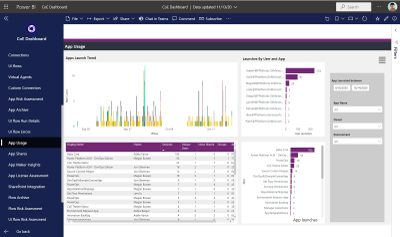 One of the many dashboards we developed now in Power Platform CoE Starter Kit
The three-month challenge…
I would be remiss not to mention another Culmsee here – my wife, Terrie. Even before Ashlee started her journey, Terrie could see value and learnt how to build apps as well. A nurse in her early career, Terrie has a lot of other strings to her bow and is a natural when it comes to User Experience and Design-Thinking. In a wonderful feedback loop, her deep working knowledge of Power Apps means she now mentors everyone in our team (including me) to the point that when we design our apps, we always ask each-other “What would Terrie make us change here!”
Learning from Terrie, Ashlee, Ada, Tram, Nichole, and by now a very large number of hackathons, I felt we could now take someone with no experience, get them building apps in a week, get them good in a month, and get them really good within three months.
To prove this, we took on two trainees at my company – Tahlia and Woong. Both were students who came in with no prior Power Apps experience, and both worked in the Power Platform team at my client with Nichole and myself. They did not just perform app development either. Both had to engage with users directly, envision the solution, learn to estimate well, develop User Experience skills, train users, and learn how to structure projects. Both Tahlia and Woong exceeded our expectations by light-years, remain full-time at my company, and along with Ashlee, are now senior members of our team and highly regarded by clients. I am so proud of them all – they give me the energy to keep going!
Onwards and upwards
I think we have done our bit to prove that citizen development is real, is desirable, and most importantly, does a lot more than teach some app development skills. As you can see by my stories, people have learnt much more than how to open Power Apps studio. They have truly embraced the promise of Digital Transformation.
I semi-jokingly tell people that while Microsoft’s mission is to “Empower everyone”, Seven Sigma’s mission is to “prove that Microsoft is not lying”. So, have we proved all we set out to prove? No! The next step in our plans is to take on more trainees, but have Tahlia, Ashlee and Woong mentor them, to prove that a virtuous cycle of world-class mentoring can be created and sustained.
Ten years ago, websites used to cost many thousands of dollars to build and maintain, yet these days hugely rich sites can be built by anyone, using monthly online services at a fraction of that original cost. I believe apps are now on that same trajectory and the opportunity is huge for organisations. The paradigm is changing before our very eyes.
Whether you agree with my assertion about the future of apps or not, I get disillusioned when I hear people lament about a lack of local skills/talent, but then exacerbate the problem by defaulting to offshore development. It is my sincere hope that more organisations, as they recognise the paradigm of citizen development and low code, give local folks opportunities to shine.
We, at Seven Sigma, have proven it can be done. What about your company?

by Contributed | Jun 25, 2021 | Technology
This article is contributed. See the original author and article here.
On November 1, 2021, Microsoft will no longer support Office 2010 & 2013 clients for Microsoft 365 Government Community Cloud (GCC) and Microsoft 365 GCC High tenants, and will deny access to Microsoft 365 GCC High. To ensure business continuity, reduce security risk, and maintain CMMC compliance, Summit 7 recommends assessing and planning your organizational upgrade today.
Primary Issue: Office desktop client applications, such as Outlook, OneDrive and Teams clients cannot connect to Microsoft 365 GCC High services. Windows Defender for Endpoint will also experience compatibility issues.
Microsoft Government Cloud Services are always evolving. New releases are iterated, tested, and released into the Microsoft Commercial Cloud and Government Community Cloud at a rapid cadence. After new applications and services have gone through the FedRAMP compliance certification, they are implemented in Office 365 GCC High. At the same time, aging versions of Microsoft Office and Windows desktop operating systems will face reliability and performance issues when connecting to the current release of Microsoft 365 Cloud platforms.
As of this writing, November is less than five months away. For most of our clients, the Microsoft End-of-Support for Office 2010 and Office 2013 falls in the next fiscal budget period to start planning and executing an organization migration for older devices, desktop OS, and Office applications. Additionally, the latest versions of Microsoft Office desktop applications come with the latest release of Windows 10 as an operating system requirement. Organizations can avoid future user experience issues by taking strategic steps now and increase proper cyber hygiene by updating out-of-support applications and OS. Even more, neglecting some of these steps may put your organization in a non-compliant state according to CMMC Level 3 requirements.
The CMMC Domain – System and Information Integrity (SI) – is one of the areas of concern when operating dated OS, firmware, and endpoint software. SI.1.210 for example requires organizations to “Identify, report, and correct information system flaws in a timely manner.” By keeping users on non-supported clients, the proper security updates will not occur, and the organization will be susceptible to advanced threats and jeopardize their ability to meet CMMC Level 3.
On the other hand, there can be a well planned approach to maintain certain workloads or end-of-life technologies. Risk Management (RM) 3.147 requires DIB suppliers to “Manage non-vendor supported products separately and restrict as necessary to reduce risk.” If a smaller user base needs to perform unique duties with Office 2010 or 2013 applications, the organization can consider isolating endpoints with firewalls or air-gapped network architectures.
Understanding Microsoft Fixed Policy Product Lifecycle
Microsoft Products are released in two phases generally covering a ten-year lifecycle —Mainstream Support and Extended Support.
- Mainstream Support is the first phase of a product’s lifecycle and typically lasts five years. During this phase:
- Microsoft receives requests and provides changes to product design and features
- Performs security and non-security updates
- Self-help and paid support options are available
- Extended Support is the final phase of a product’s lifecycle and typically last five years from the end of the Mainstream Support. Microsoft only supports products at the published service level in Extended Support including:
- Security updates
- Paid programs
- Unified Support customers have the ability to request non-security fixes for designated products
If it’s absolutely mission-critical to run legacy applications beyond the End of Support date, you typically can invest in Microsoft’ Extended Security Update (ESU) Program, but this is mostly untenable with Microsoft 365 GCC High.
Can I Delay Migrating Office 2010/2013?
Microsoft products are Secure by Design for the era the products were originally released and supported. Still, the cyber threat landscape is constantly evolving. As a result, older applications simply can’t keep pace with software innovation and effectively address software vulnerabilities. This particular flaw was on full display when organizations failed to patch and update Exchange 2013, resulting in the infamous SolarWinds attack. As we continue to see an escalation in the scale, scope, and sophistication of cyber threats in the United States from nation states and cyber criminals – the continued use of outdated applications, operating systems, and infrastructure is an open invitation for malicious actors to wreak havoc on your organization.
Final Thoughts for Migration Planning
Security and compliance are significant reasons on their own to migrate your organization to the latest clients for Windows and Microsoft 365 for your Government Cloud Services. More than that, there is another dynamic that is equally important—the productivity of your organization—in other words, the people dynamic.
Legacy Office applications are often customized for the organization’s mission and people. These customizations may use macros, scripts, addons, and third-party applications that are also out-of-support, no longer needed, or non-compliant with CMMC. Yet, people rely on these bespoke Office applications to perform their daily activities. Within the CMMC clarification documents, SC.3.180 explains “As legacy components in your architecture age, it may become increasingly difficult for those components to meet security principles and requirements. This should factor into life-cycle decisions…”
As you assess your inventory, be mindful to identify any customizations to your legacy Office applications. Some features may have been deprecated, replaced, or embedded into the latest versions of Microsoft 365. Note the changes so that you can prepare your people for what’s coming, what’s different, and how to enhance their productivity, collaboration, and mission-fulfillment.
Help Is Always Available
Getting a handle on the number of devices and their respective configurations can be a daunting task. Microsoft Endpoint Manager is a solution to assess and manage devices; as well as deploy apps across your organization’s desktops, laptops, tablets, and phones. It’s part of the Microsoft 365 Cloud and can help accelerate your organization’s ability to be compliant with regulations, mitigate cyber threats, and improve your organization’s productivity.
Microsoft keeps a short list of partners that understand the requirements for CMMC, Office 365 GCC High, and all of the nuance of modernizing DIB companies. You don’t have to tackle these challenges alone. Summit 7 can partner to help you assess your migration and start planning today, so that this year you can enjoy the holiday season in November/December.
Original Source Blog:
https://info.summit7systems.com/blog/office-2010-2013-clients-eos-gcc-high

by Contributed | Jun 25, 2021 | Technology
This article is contributed. See the original author and article here.
Guest blog by Electronic and Information Engineering Project team at Imperial College.
Introduction
We are a group of students studying engineering at Imperial College London!
Teams Project Repo and Resources
For a full breakdown of our project see https://r15hil.github.io/ICL-Project15-ELP/
Project context

The Elephant Listening Project (ELP) began in 2000, our client Peter Howard Wrege took over in 2007 as director https://elephantlisteningproject.org/.
ELP focuses on helping protect one of three types of elephants, the forest elephant which has a unique lifestyle and is adapted to living in dense vegetation such as the forest. They depend on fruits found in the forest and are known as the architect of the rainforest since they disperse seeds all around the forest. Since they spend their time in the forest it is extremely hard to track them since the canopy of the rainforest is so thick, you cannot see the forest floor, so ELP use an acoustic recorder to record vocalisations of the elephants to track them. Currently they have put one acoustic recorder per 25 square kilometre. These devices can detect elephant calls in a 1km radius and gunshots 2-2.5km radius around each recording site. Currently the recordings are recorded to an SD card, and then collection from all the sites takes a total of 21 days in the forest. This happens every 4 months. Once all the data is collected it goes through a simple ‘template detector’ which has 7 examples of gunshot sounds, cross correlation analysis is carried out, locations in the audio file with a high correlation get flagged as a gunshot.
The problem with the simple cross correlation method is that it produces an extremely large amount of false positives, such as tree branch falls and even things as simple as raindrops hitting the recording device. This means that there is a 15-20 day analysis effort, however it is predicted that with a better detector, this analysis effort can be cut down to a 2-3 day effort!
Currently the detector has an extremely high recall, but a very bad precision (0.5%!!!). The ideal scenario would be to improve the precision, in order to remove these false positives and make sure that when a gunshot is detected, the gunshot is in fact a gunshot (high precision).
The expectation is to have a much better detector than the one in place, that can detect gunshots to a very high precision with a reasonable accuracy. Distinguishing between automatic weapons (eg AK-47) and shotguns is also important, since automatic weapons are usually used to poach elephants. This is an important first step to real time detection.
Key Challenges
The dataset we had was very varied and sometimes noisy! It consisted of thousands of hours of audio recordings of the rainforest and a spreadsheet of the gunshots located in the files. The gunshots we were given varied, some close to the recorder and some far, sometimes multiple shots and sometimes single shots.
A lot of sounds in the rainforest sound like gunshots, but it is relatively easier distinguishing them using a frequency representation which brought us onto our initial approach.
Approach(es)
Our first approach was to use convolutional neural network known as CNN. We trained this using a method called mel-frequency cepstrum coefficients known as MFCCs.
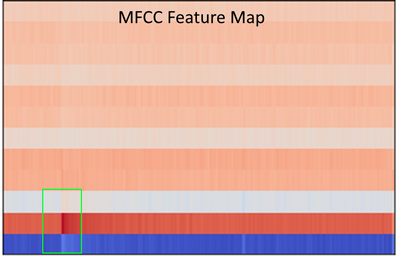
This MFCC method is a well known way to tackle audio machine learning classification.
MFCC extracts features from frequency, amplitude and the time component. However, MFCCs are very sensitive to noise, and because the rainforest contains various sounds, testing it on 24 hour sound clips did not work. The reason it didn’t work is because our data of the gunshots to train our model also included other sounds (noise), which meant that our machine learning model learnt to recognise random forest background noises instead of gunshots. Due to a lack of time and knowledge on identifying gunshot, checking and relabelling all of our dataset manually so that it only clean gunshots was not viable. Hence, we decided to use a computer vision method as a second approach.
We focused on labelling gunshots on a visual representation of sound called the mel-spectrogram which allows us to ignore the noise other parts of the audio clip which would be noise, and specifically focus on the gunshot.
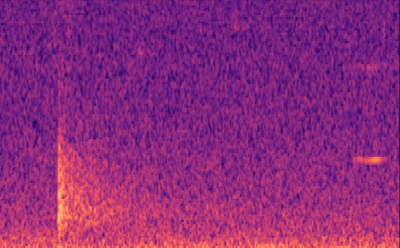
Labelling our data was extremely easy for our computer vision (object detection) model. We used the Data Labelling service on Azure Machine Learning where we could label our mel-spectrograms for gunshots and build our dataset to train our object detection models. These object detection models (Yolov4 and Faster R-CNN ) use XML files in training, Azure Machine Learning allowed us to export our labelled data in a COCO format in a JSON file. The conversion from COCO to the XML format we needed to train our models was done with ease.
With the new object detectors, we were able to find the exact start and end times of gunshots and save it to a spreadsheet!
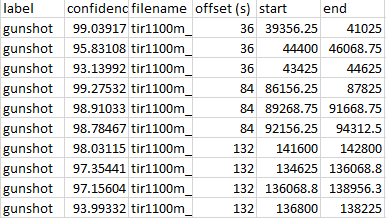
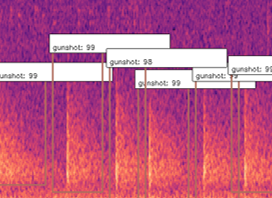
This is extremely significant because essentially what our system is doing is not only detecting gunshots, but generating clean and labelled data of gunshots, and with this data more standard methods of machine learning for audio methods can be used, such as MFCC.
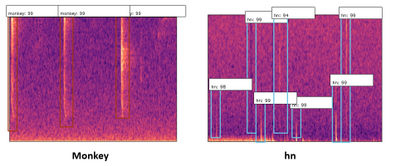
To expand on this, we also found that our detector was picking up “gunshot like” sound events such as thunder, monkey alarm calls and raindrops hitting the detector (‘hn’ in the image below). This meant that we could use that data to train our model further, to say ‘that is not a gunshot, it is a…’, training for the other sound events to be detected too.
Our Design History – Overview
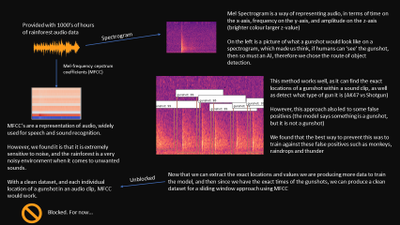
Concept
The concept of our system was to train a machine learning model in order to classify sound. A sound classification model would be to detect whether or not there was a gunshot.
Signal Processing
Trying to detect gunshots directly from sound waveform is hard because it does not give you much information to work with, only amplitude. Hence, we needed to do some signal processing to extract some features from the sound.
Initially we began research by reading papers and watching video lectures in signal processing. All sources of research we used can be found in “Code and resources used”.
What we found were two common signal processing techniques in order to analyse sound, the Mel-Frequency Cepstrum Coefficients (MFCCs, on the left below) and the Mel-Spectrogram (on the right below).
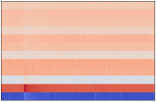
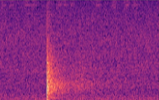
Since MFCCs were a smaller representation and most commonly used in audio machine learning for speech and sound classification, we believed it would be a great place to start, and build a dataset on. We also built a dataset with Mel-spectrograms.
Machine Learning – Multi-layer perceptron (MLP)
The multi-layer perceptron is a common machine learning model used for things such as regression or classification, from our knowledge of machine learning we believed this network would not perform well due to its ‘global approach’ limitation, where all values are passed into the network at once. This will also have an extremely high complexity with the data representation of sounds we are using as we would have to flatten all the 3D arrays into a single 1D array and input all of this data at once.
Convolutional Neural Network (CNN)
CNNs are mainly applied to analyse visual 2D data therefore we do not have to flatten our data like we have to do with MLP. Using this you can classify an image to find whether or not a gunshot is present since is “scans through” the data and looks for patterns, in our case a gunshot pattern. We could use both MFCC or Mel-spectrograms to train this.
Recurrent Neural Network (RNN)
A recurrent neural network is a special type of network which can recognise sequencing, and therefore we believed it would work very well in order the detect gunshots. This is because a gunshot typically has an initial impulse and then a trailing echo, an RNN would be able to learn this impulse and trailing echo type scenario and output whether it was a gunshot or something else. This would be trained with MFCCs.
Object Detection
Although usually a larger architecture, object detection would work well in order to detect gunshots from Mel-Spectrograms due to a gunshots unique shape. This means that we can detect whether there is a gunshot present, but also how many gunshots are present as Object Detection won’t classify the entire image like a CNN would, it would classify regions of the image.
Implementation -The Dataset
The data we were given was a key factor and had a direct impact in which models worked for us and did not.
We were given thousands of hours of audio data, each file being 24 hours long. Since we were provided with ‘relative’ gunshot locations in audio clips, our dataset was very noisy, the time locations we were given usually contained a gunshot within 12 seconds of the given time, and sometimes contained multiple gunshots. Due to the lack of time on this project, it was not realistic to listen to all of the sound clips and manually relabel all our data by ear, also, gunshots are sometimes very hard to distinguish from other rainforests sounds by ear, and many of these other sounds were very new to us. This is why we took a 12 second window in our signal processing, to ensure all of our data contains the gunshot(s). Luckily, in our testing of different machine learning techniques, we found an approach to solve the problem of detecting gunshots in noisy data, as well as building a clean dataset for the future!
CNN with Mel-Spectrogram
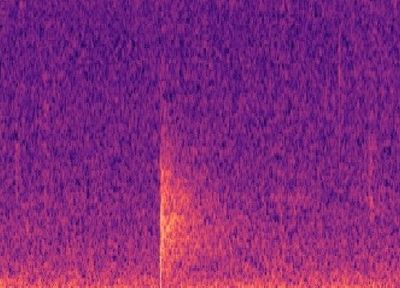
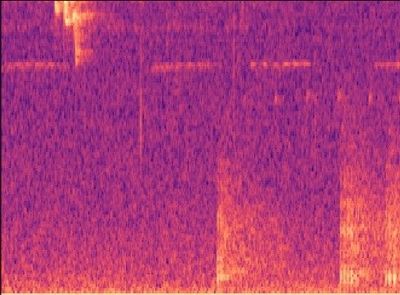
Building a simple CNN with only a few convolutional layers, which a dense layer classifying whether there is a gunshot or not, worked quite well, with precision and recall above 80% on our validation sets! However, this method on noisy images did not work well, noisy images being a Mel-spectrogram with a lot of different sounds, such as below. Although it has an OK precision and recall, we cannot guarantee all the gunshots will be the only sounds occuring at once. Below you can see an example of a gunshot which can be detected using a CNN, and a gunshot that cannot be detected using a CNN.
CNN and RNN with MFCC
This method suffered a similar problem with noise as the CNN with Mel-Spectrogram did. However with a clean dataset, we think an RNN with MFCC would work extremely well!
Object Detection with Mel-Spectrogram
Object Detection won’t classify the entire image like a CNN would, it would classify regions of the image, and therefore it can ignore other sound events on a Mel-spectrogram. In our testing we found that object detection worked very well in detecting gunshots on a mel-spectrogram, and could even be trained to detect other sound events such as raindrops hitting the acoustic recorder, monkey alarm calls and thunder!
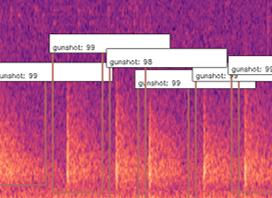
What this allowed us to do was to also get the exact start and end times of gunshots, and hence automatically building a clean dataset that can be used to train networks in the future with much cleaner data that contains the exact location of these sound events! This method also allowed us to count the gunshots by seeing how many were detected in the 12s window, as you can see below.
Build – Use of cloud technology
In this project, the use of cloud technology allowed us to speed up many processes, such as building the dataset. We used Microsoft Azure to store our thousands of hours of sound files, and Azure Machine Learning Services to train some of our models, pre-process our data and build our dataset!
Storage
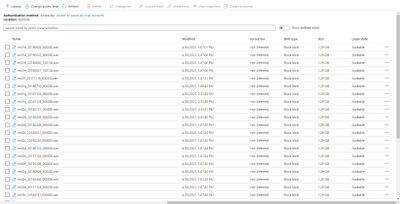
In order to store all of our sound files, we used blob storages on Azure. This meant that we could import these large 24 hour audio files into Azure Machine Learning Services for building our dataset. Azure Machine Learning Services allowed us to create IPYNB notebooks to run our scripts to find the gunshots in the files, extract them and build our dataset.
Data labelling
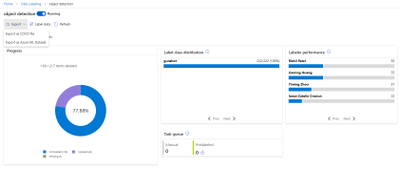
Azure ML also provided us with a Data Labelling service where we could label our Mel-spectrograms for gunshots and build our dataset to train our object detection models. These object detection models (Yolov4 and Faster R-CNN ) use XML files in training, Azure ML studio allows us to export our labelled data in a COCO format in a JSON file. The conversion from COCO to the XML format we needed to train our models was done with ease.
Custom Vision
The Custom Vision model is the simplest model of the three to train. We did this by using Azure Custom Vision, it allowed us to upload images, label the images and train models with no code at all!
Custom Vision is a part of the Azure Cognitive Services provided by Microsoft which is used for training different machine learning models in order to perform image classification and object detection. This service provides us with an efficient method of labelling our sound events (“the objects”) for training models that can detect gunshot sound events in a spectrogram.
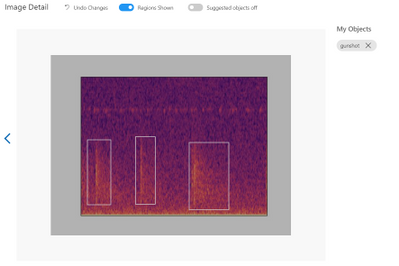
First, we have to upload a set of images which will represent our dataset and tag them by creating a bounding box around the sound event (“around the object”). Once the labelling is done, the dataset is used for training. The model will be trained in the cloud so no coding is needed in the training process. The only feature that we have to adjust when we train the model is the time spent on training. A longer time budget allowed means better learning. However, when the model cannot be improved anymore, the training will stop even if assigned a longer time.
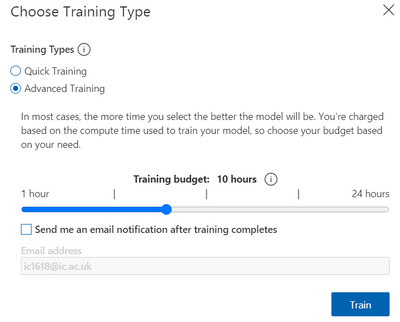
The service provides us with some charts for the model’s precision and recall. By adjusting the probability threshold and the overlap threshold of our model we can see how the precision and recall changes. This is helpful when trying to find the optimal probability threshold for detecting the gunshots.
The final model can be exported for many uses, in many formats. We use the Tensorflow model. The system contains two python files for object detection, a pb file that contains the model, a json file with metadata properties and some txt files. We adapted the system from the standard package provided. The sound files are preprocessed inside the predict.py file and it extracts the audio files from the sounds folder and it exports labelled pictures with the identified gunshots in cache/images folder. It then does inference on the spectrogram to detect gunshots. Once all the soundfiles have been checked a CSV is generated with the start and end times of the gunshots detected within the audio.
Yolov4 Introduction
The full name of YOLOV4 is YOU ONLY LOOK ONCE. It is an object detector which consists of a bunch of deep learning techniques and completely based on Convolutional Neural Network(CNN). The primary advantages of YOLOv4 compared to the other object detector are the fast speed and relatively high precision.
The objective of Microsoft project 15 is detecting the gunshots in forest. The conventional audio classification method is not effective and efficient on this project, because the labelling of true locations of gunshots in training set is inaccurate. Therefore, we start to consider computer vision method, like YOLOV4, to do the detection. Firstly, the raw audio files are converted into thousands of 12 seconds clips and represented in Mel-spectrum. After that, according to the information of true locations of gunshots, the images that contain the gunshots are picked out and construct training data set. These pre-processing steps are the same with the other techniques used to do the detection for project 15 and you can find the detailed explanations from https://r15hil.github.io/ICL-Project15-ELP/.
In this project, YOLOV4 can be trained and deployed on NVIDIA GeForce GTX 1060 GPU and the training time is approximately one hour.
Implementation
1. Load Training Data
In order to train the model, the first step we need to do is loading the training data in yolov4-keras-masterVOCdevkitVOC2007Annotations. The data has to be in XML form and includes the information about the type of the object and the position of the bounding box.
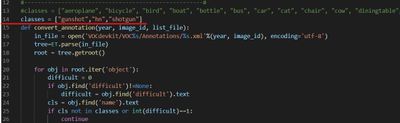
Then run voc_annotations file to save the information of training data into a .txt file. Remember to modify the classes list in line 14 before operating the file.
2. Train the Model
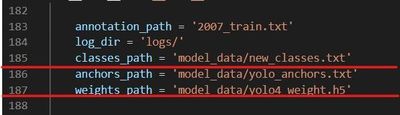
The train.py file is used to train the model. Before running the file, make sure the following file paths are correct.
3. Test
For more detailed testing tutorial, follow How to run
More Explanations
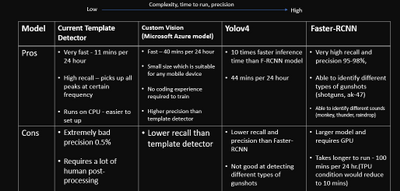
The idea of using YOLOV4 is after training and testing Faster R-CNN method. Faster R-CNN model achieves 95%-98% precision on gunshot detection which is extraordinarily improved compared to the current detector. The training data for YOLOV4 model is totally same with that used in the Faster R-CNN model. Therefore, in this document, the detection results of YOLOV4 will not be the main points to talk about. Briefly speaking, the YOLOV4 can achieve 85% precision but detect the events with lower probability than Faster R-CNN .
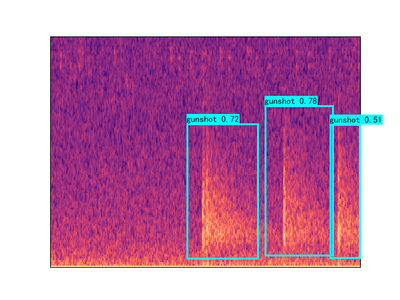
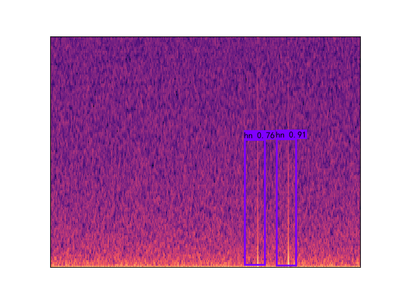
The reason why we still build YOLOV4 model is that it can make our clients to have diversified options and choose the most appropriate proposal in the real application condition. Even though Faster R-CNN model has the best detection performance, the disadvantage is obvious which is its operation time. In the case of similar GPU, the Faster R-CNN needs 100 minutes to process 24 hours audio file while YOLOV4 only takes 44 minutes to do the same work.
Faster R-CNN – Introduction
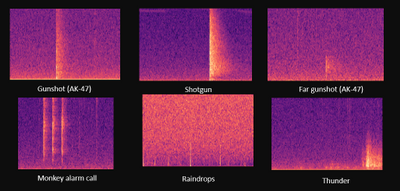
Figure1. Gunshot and some example sounds that cause errors for the current detectors
The Faster R-CNN code provided above is used to tackle the gunshot detection problem of Microsoft project 15. (see Project 15 and Documentation). The gunshot detection is solved by object detection method instead of any audio classification network method under certain conditions.
- The Limited number of forest gunshot datasets given with random labeled true location, which generally require 12s to involve single or multi gunshot in the extracted sound clip. The random label means that the true location provided is not the exact location of the start of the gunshot. Gunshot may happen after the given true location in the range of one to twelve 12 seconds. The number of gunshots after true location also ranging from single gunshots over to 30 gunshots.
- We do not have enough time for manually relabelling the audio dataset and limited knowledge to identify gunshots from any other similar sounds in the forest. In some case, even gunshot expert find difficulty to identify gunshot from those similar forest sound. e.g., tree branch.
- Forest gunshots shoot at different angles and may shoot from miles. Online gunshot dataset would not implement to this task directly.
- Current detector used in the forest has only 0.5% precision. It will peak up sound like raindrop and thunder shown in Figure1. Detection needs long manual post-processing time. Hence, the given audio dataset would be limited and involve mistakes.
The above conditions challenge audio classification methods like MFCC with CNN. Hence, the objection detection method provides an easier approach under a limited time. Object detection provides faster labeling through Mel-spectrum images, which are shown above. Mel spectrum also provides an easy path to identify gunshots without the specialty of gunshot audio sound. The Faster R-CNN model provides high precision 95%-98% on gunshot detection. The detection bounding box can also be used to re-calculate both the start and end times of the gunshot. This reduces manual post-processing time from 20 days to less than an hour. A more standard dataset also be generated for any audio classification algorithm in future development.
Set up
tensorflow 1.13-gpu (CUDA 10.0)
keras 2.1.5
h5py 2.10.0
pre-trained model ‘retrain.hdf5’ can be download from here.
The more detailed tutorial on setting up can be found here.
Pre-trained model
The latest model is trained under a multi-classes dataset including AK-47 gunshot, shotgun, monkey, thunder, and hn, where hn represent hard negative. Hard negatives are high-frequency mistakes made by the current detector, which are mostly peak without an echo shape spectrum. For example, any sounds have the shape of the raindrop (just peak without echo) but can be appeared in the different frequency domain with a raindrop. The initial model is only trained with gunshot and hn datasets due to the limited given manual dataset. Then the network test under a low threshold value, e.g.0.6, to obtain more false positive datasets or true gunshot among thousand hours forest sound file testing. The model will then use those hard negatives to re-train. This technic also calls hard mining. The following images Figure.2 show three hard negative datasets (monkey, thunder, hn) used to train the lastest model.
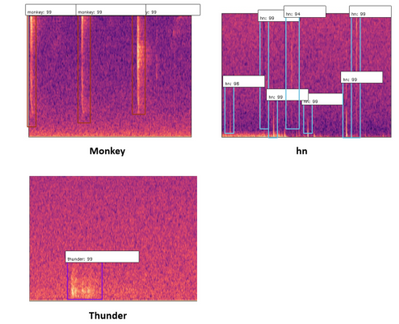
Figure2. three type of hard negative enter into training
The model also provides classification between different gunshot which are AK-47 and shotgun shown in Figure3.
Figure3. Mel-spectrum image of AK-47 and shotgun
Result
The following testing result shown in Table1 is based on the experiment on over 400 hours of forest sound clips given by our clients. The more detailed information on other models except Faster R-CNN can be found in https://r15hil.github.io/ICL-Project15-ELP/.
Model name |
current template detector |
custom AI(Microsoft) |
YOLOV4 |
Faster R-CNN |
|---|
Gunshot dectection precision |
0.5% |
60% |
85% |
95% |
Table1. testing result from different models
The model also generates a CSV file shown in Figure4. It includes the file name, label, offset, start time, and end time. The offset is the left end axis of the Mel-spectrum, where each Mel-spectrum is conducted from 12s sound clips. The start time and end time can then calculated using the offset and the detection bounding coordinate. Therefore, this CSV file would provide a more standard dataset, where the true location will more likely sit just before the gunshot happen. Each cutting sound clip is likely to include a single gunshot. Therefore, this dataset would involve less noise and wrong labeling. It will benefit future development on any audio classification method.
Figure4. example of csv file for gunshot labelling
Current model weaknesses and Future development
The number of the hard negative dataset is still limited after 400 hours of sound clip testing. Hard negatives like the bee and strong thunder sound(shown in Figure5) are the main predicted errors for the current model. To improve the model further, it should find more hard negatives using a lower threshold of the network through thousands of hours of sound clip testing. Then, the obtained hard negative dataset can be used to re-train and improve the model. However, the current model can avoid those false positives by setting around a 0.98 threshold value, but it will reduce the recall rate by 5-10%. The missing gunshots are mainly long-distance gunshots. This is also caused by very limited long-distance gunshots provided in the training dataset.
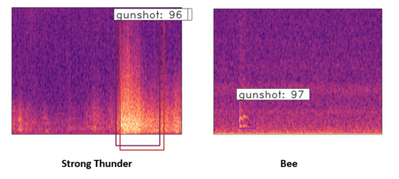
Figure5. Mel-spectrum image of the strong thunder and bee
Reference
https://github.com/yhenon/keras-rcnn
Results
Model name |
current template detector |
custom AI(Microsoft) |
YOLOV4 |
Faster R-CNN |
|---|
Gunshot dectection precision |
0.5% |
60% |
85% |
95% |
Table1. testing result from different models
What we learnt
Throughout this capstone project we learnt a wide range of things, not only to do with technologies but also the importance and safety of forest elephants, and how big of an impact they have on rainforests.
Poaching these elephants means that there is a reduce in the amount of seed dispersion, essentially preventing the diverse nature of rainforests and the spread of fruits and plants across the forest in which many animals depend on.
“Without intervention to stop poaching, as much as 96 percent of Central Africa’s forests will undergo major changes in tree-species composition and structure as local populations of elephants are extirpated, and surviving populations are crowded into ever-smaller forest remnants,” explained John Poulson from Duke University’s Nicholas School of the Environment.
In terms of technologies, we learnt a lot about signal processing through MFCCs and mel-spectrograms; how to train and use different object detection models; feature extraction from data; how to use Azure ML studio and blob storage.
Above all, we learnt that in projects with a set goal, there will always be obstacles but tackling those obstacles is really when your creative and innovative ideas come to life.
For full documentation and code visit https://r15hil.github.io/ICL-Project15-ELP/
Learning Resources
Classify endangered bird species with Custom Vision – Learn | Microsoft Docs
Classify images with the Custom Vision service – Learn | Microsoft Docs
Build a Web App with Refreshable Machine Learning Models – Learn | Microsoft Docs
Explore computer vision in Microsoft Azure – Learn | Microsoft Docs
Introduction to Computer Vision with PyTorch – Learn | Microsoft Docs
Train and evaluate deep learning models – Learn | Microsoft Docs
PyTorch Fundamentals – Learn | Microsoft Docs


Recent Comments