by Contributed | May 23, 2024 | Technology
This article is contributed. See the original author and article here.
Today, we’re excited to introduce rich reporting and easy troubleshooting for the Microsoft Playwright Testing service!
Microsoft Playwright Testing is a managed service built for running Playwright tests easily at scale. Playwright is a fast-growing, open-source framework that enables reliable end-to-end testing and automation for modern web apps. You can read more about the service here.
Now, with this new Reporting feature users can publish test results and related artifacts and view them in the service portal for faster and easier troubleshooting.
Quickly Identify Failed and Flaky Tests
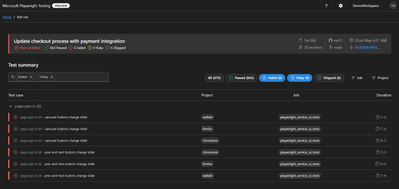
In the fast-paced world of web development, applications evolve rapidly, constantly reshaping user experiences. To keep up, testing needs to be just as swift. Playwright automates end-to-end tests and delivers essential reports for troubleshooting. The Reporting feature provides a streamlined dashboard that highlights failed and flaky tests, enabling you to identify and address issues quickly. This focused view helps maintain application quality while supporting rapid iteration.

Screenshot of test results filtered by failed and flaky tests
Troubleshoot Tests Easily using rich artifacts
As test suites grow and the frequency of test execution increases, managing generated artifacts becomes challenging. These artifacts are crucial for debugging failed tests and demonstrating quality signals for feature deployment, but they are often scattered across various sources.
The Reporting feature consolidates results and artifacts, such as screenshots, videos, and traces, into a unified web dashboard, simplifying the troubleshooting process. The Trace Viewer, a tool offered by Playwright, that helps you explore traces and allows you to navigate through each action of your test and visually observe what occurred during each step. It is hosted in the service portal with the test for which it is collected, eliminating the need to store and locate it separately for troubleshooting.
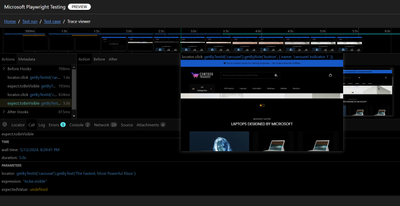
Screenshot of trace viewer hosted in the service portal
Seamless Integration with CI Pipelines
Continuous testing is essential for maintaining application quality, but collecting and maintaining execution reports and artifacts can be challenging. Microsoft Playwright Testing service can be easily configured to collect results and artifacts in CI pipelines. It also captures details about the CI agent running the tests and presents them in the service portal with the test run. This integration facilitates a smooth transition from the test results to the code repository where tests are written. Users can also access the history of test runs in the portal and gain valuable insights, leading to faster troubleshooting and reduced developer workload.
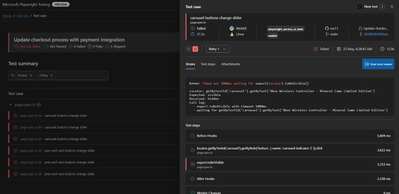
Screenshot of test result with CI information
Join the Private Preview
For current Playwright users, adding the Reporting feature with your existing setup is easy. It integrates with the Playwright test suite, requiring no changes to the existing test code. All you need to do is install a package that extends the Playwright open-source package, add it to your configuration, and you’re ready to go. This feature operates independently of the service’s cloud-hosted browsers, so you can use it without utilizing service-managed browsers.
We invite teams interested in enhancing their end-to-end testing to join the private preview of the Reporting feature. This feature is available at no additional charge during the private preview period. However, usage of the cloud-hosted browsers feature will be billed according to Azure pricing.
Your feedback is invaluable for refining and enhancing this feature. By joining the private preview, you gain early access and direct communication with the product team, allowing you to share your experiences and help shape the future of the product.
Interested in trying out the reporting feature and giving us feedback? Sign up here.
Check out Microsoft Playwright Testing service here. If you are new to Microsoft Playwright Testing service, learn more about it.
by Contributed | May 22, 2024 | Technology
This article is contributed. See the original author and article here.
Microsoft Copilot in Azure (Public Preview) is an AI-powered tool to help you do more with Azure. Copilot in Azure extends capabilities to Azure Database for MySQL, allowing users to gain new insights, unlock untapped Azure functionality, and troubleshoot with ease. Copilot in Azure leverages Large Language Models (LLMs) and the Azure control plane, all of this is carried out within the framework of Azure’s steadfast commitment to safeguarding the customer’s data security and privacy.
The experience now supports adding Azure Database for MySQL self- help skills into Copilot in Azure, empowering you with self-guided assistance and the ability to solve issues independently.
You can access Copilot in Azure right from the top menu bar in the Azure portal. Throughout a conversation, Copilot in Azure answers questions, suggests follow-up prompts, and makes high-quality recommendations, all while respecting your organization’s policy and privacy.
For a short demo of this new capability, watch the following video!
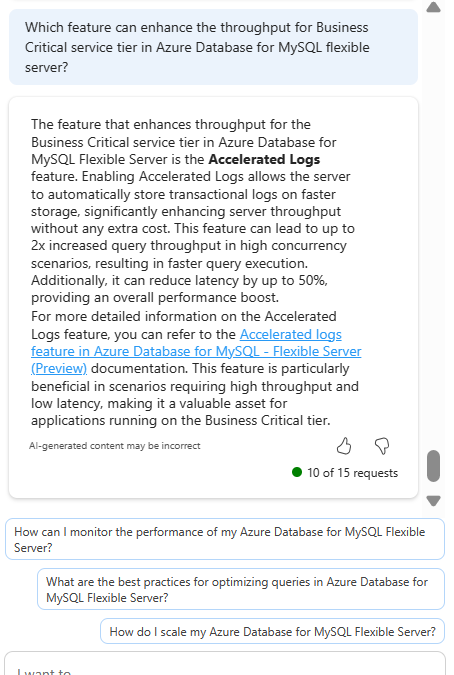
Discover new Azure Database for MySQL features with Microsoft Copilot in Azure
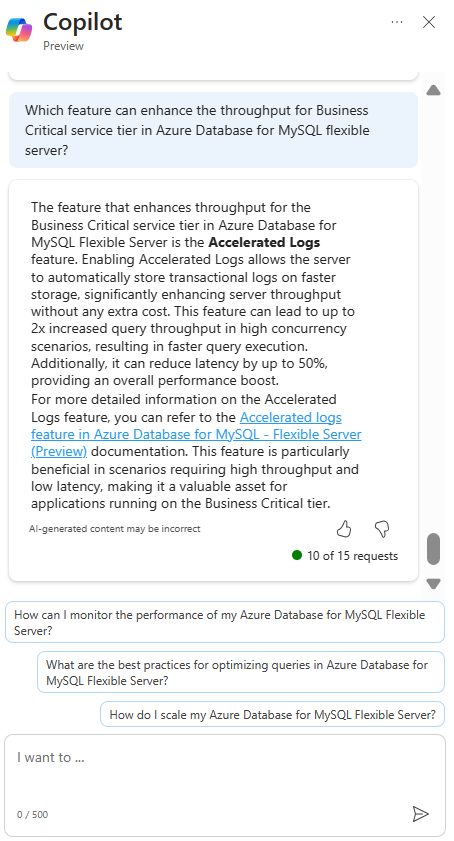
Explore when to enable new features to supplement real-life scenarios
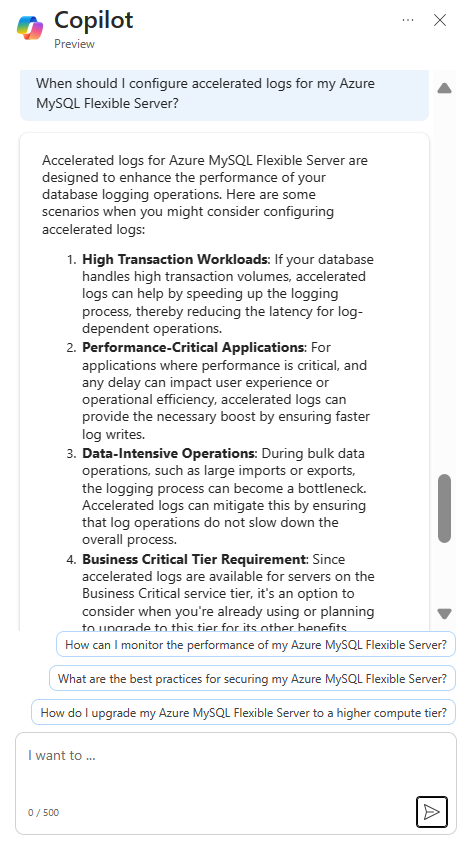
Learn from summarized tutorials to enable features on-the-go
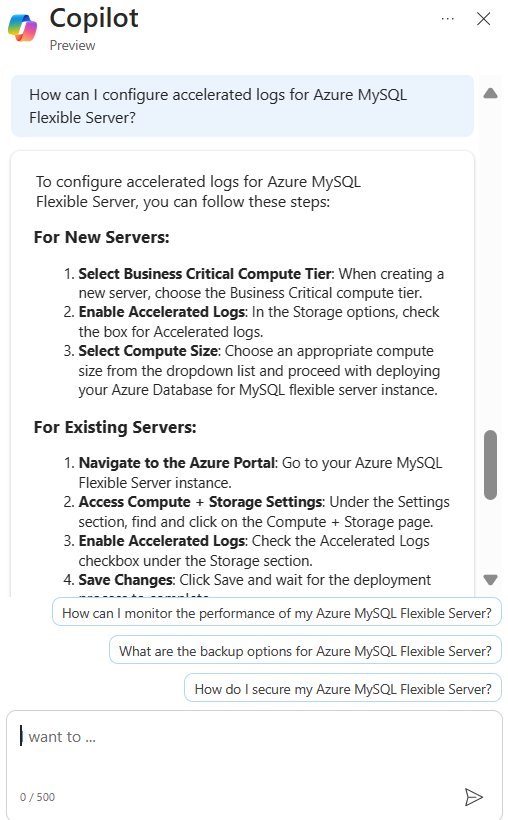
Troubleshoot your Azure Database for MySQL issues and get expert tips
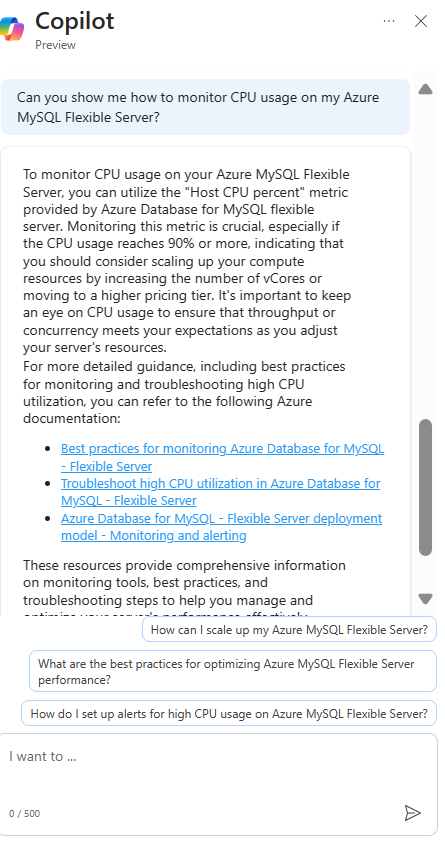
Join the preview
To enable access to Microsoft Copilot in Azure for your organization, complete the registration form. You only need to complete the application process one time per tenant. Check with your administrator if you have questions about joining the preview.
For more information about the preview, see Limited access. Also be sure to review our Responsible AI FAQ for Microsoft Copilot in Azure.
Thank you!
by Contributed | May 21, 2024 | Technology
This article is contributed. See the original author and article here.
The crucial role of backup and restore in ADCS
Active Directory Certificate Services (ADCS) serves as a pivotal part within identity and access management (IAM), playing a critical role in ensuring secure authentication and encryption. These functionalities are integral for fostering trust across the enterprise application and service ecosystem. In modern organizations, the significance of Active Directory Certificate Services has grown exponentially, fortifying digital identities, communication channels and data. Given its pervasive role, the potential loss of this service due to systemic identity compromise or a ransomware attack could be catastrophic. Microsoft advocates platform owners adopt an “assume breach” mindset as an initiative-taking measure against these sophisticated cybersecurity threats to ensure and preserve confidentiality, integrity, and availability of IAM based services.
As part of an “assume breach” approach, organizations must prioritize comprehensive backup and restore strategies within their ADCS infrastructure. These strategies are paramount for ensuring swift recovery and restoration of essential certificate services following a cyberattack or data breach. By keeping up-to-date backups and implementing effective restoration procedures, organizations can minimize downtime, mitigate potential damage, and uphold operational continuity amidst evolving security challenges.
Let us look at some of the services and features of an ADCS platform which organizations are dependent on:
- Certificate enrollment and renewal: ADCS facilitates automated enrolment and renewal processes, ensuring prompt issuance and rotation of cryptographic keys to maintain security.
- Key archival and recovery: Organizations can utilize ADCS to archive private keys associated with issued certificates, enabling authorized personnel to recover encrypted data or decrypt communications when necessary.
- Certificate revocation and management: ADCS provides mechanisms for revoking and managing certificates in real-time, allowing organizations to promptly respond to security incidents or unauthorized access attempts.
- Public Key Infrastructure (PKI) integration: ADCS seamlessly integrates with existing PKI infrastructures, enabling organizations to use established cryptographic protocols and standards to enhance security across their networks.
- Enhanced security controls: ADCS offers advanced security controls, such as role-based access control (RBAC) and audit logging, empowering organizations to enforce granular access policies and keep visibility into certificate-related activities.
Now that we know what this service offers, imagine your organization as a fortified stronghold, wherein Active Directory Certificate Services and Active Directory Domain Services form the bedrock of the Identity and Access Management infrastructure. In case of a cybersecurity breach penetrating this stronghold, the backup and restoration process acts as a crucial defensive measure. It is not merely about restoring ADCS services: it is about swiftly and effectively rebuilding the stronghold. This guarantees the continuation of trust relationships and the seamless operation of vital IT services within the stronghold, such as remote access VPNs, consumer web services, and third-party self-service password reset tools—each of which are essential components for operational continuity, customer experience and business productivity. Without effective backup measures, the stronghold is vulnerable, lacking the protective mechanisms akin to a portcullis or moat.
The significance of thoroughly assessing all backup and recovery procedures cannot be overstated. This is akin to conducting regular fire drills, ensuring that the IT team is adept and prepared to respond to crises effectively. IT administrators must have the requisite knowledge and readiness to execute restoration operations swiftly, thereby upholding the integrity and security of the organization’s IT environment. Additionally, recognizing the potential exploitation of ADCS for keeping persistence underscores the imperative for vigilance in monitoring and securing ADCS components against unauthorized manipulation or access.
What are the key elements for a successful backup and recovery?
From a technical perspective, Active Directory Certificate Services (ADCS) backups must cover the foundational pillars of the service. These include the private key, the Certificate Authority (CA) database, the server configuration (registry settings) and the CAPolicy.inf file. Let us explain each in detail:
- CA private key: The most critical logical part of a CA is its private key material. This key is stored in an encrypted state on the local file system by default. The use of devices like Hardware Security Modules (HSMs) is encouraged to protect this material. The private key is static, so it is recommended to create a backup directly after the deployment and to store it in a safe, redundant location.
- CA database: By default, this repository holds a copy of all issued certificates, every revoked certificate, and a copy of failed and pending requests. If the CA is configured for Key Archival and recovery, the database will include the private keys for those issued certificates whose templates are configured for the feature.
- Server configuration: These are the settings and configurations that dictate ADCS operations. From security policies to revocation lists settings, safeguarding the server configurations ensures that the ADCS can be restored with identical functionality.
- CAPolicy.inf: The CAPolicy.inf file is used during the setup of ADCS and then during CA certificate renewal. This file may be used to specify default settings, prevent default template installation, define the hierarchy, and specify a Certificate Policy and Practice Statement.
How is ADCS backed up?
A practical approach to performing a backup involves utilizing ‘certutil,’ a command-line tool integrated into the Windows operating system. This tool offers a range of functions tailored for managing certificates and certificate services. Other methods encompass employing the graphical user interface (GUI) or PowerShell. To start a backup of the CA database using ‘certutil,’ adhere to the outlined example below:
certutil -backupdb -backupkey "C:BackupFolder"
The command syntax is as follows:
- backupdb: Starts the backup process for the database.
- backupkey: Safeguards the private key of the CA (requires providing a password).
- C:BackupFolder: Specifies the path where the backup will be stored. It is important to use a secure location, ideally on a separate drive or device. Note: this folder must be empty.
Running this command starts the creation of a backup encompassing the CA database and the CA’s private key, thereby guaranteeing the safeguarding of the fundamental elements of the CA. Safeguarding these components is imperative, as malevolent actors may exploit the backup for nefarious purposes.
In addition to preserving the CA Database and the CA’s private key, for comprehensive restoration onto a new server, it is crucial to back up the registry settings associated with ADCS using the following command:
Reg export “HKEY_LOCAL_MACHINESYSTEMCurrentControlSetservicesCertSvcConfiguration” C:BackupFolderCAConfig.reg
All settings on the earlier location of the CA database, as well as configurations related to certificate validity settings, CRL and AIA extensions, can be utilized during the recovery process.
If the source CA utilizes a custom CAPolicy.inf, it is advisable to replicate the file to the identical backup location. The CAPolicy.inf file is typically found in the %windir% directory (default location being C:Windows).
How can the service be restored?
Remove ADCS role(s)
If the source server is still available and a CA Backup is available, remove the CA role from it. This is required for Enterprise CAs that are domain-joined. If present, remove the “Web Server” based roles/features before the Certification Authority role.
Remove the source server from the domain
Reusing the same host name on the destination server requires that the source server either be renamed or removed from the domain and the associated computer object removed from Active Directory before renaming and joining the destination server to the domain.
Adding ADCS role(s)
After ensuring that the destination server has the correct hostname and is successfully integrated into the domain, continue to assign the CA role to it. If the destination server is already part of the domain, it needs Enterprise Admin permission to configure the ADCS role as an Enterprise CA.
Before advancing, transfer the backup folder to a local drive, and, if accessible, move the original CAPolicy.inf file to the %windir% folder on the destination server.
- Launch the Add Roles wizard from Server Manager.
- Review the “Before You Begin” page, then select Next.
- On the “Select Server Roles” page, select Active Directory Certificate Services, then Next, then Next again on the Intro to ADCS page.
- On the “Select Role Services” page, ensure only Certificate Authority is selected, then click Next. (Do not choose any other roles)
Configuring ADCS:
Now configure a clean ‘empty’ CA. This is done prior to restoring the configuration and database content:
- Select the choice to “Configure Active Directory Certificate Services on this server.”
- Confirm that the correct credentials are in place depending on the installation: Local Admin for Standalone CA, Enterprise Administrator needed for Enterprise certification authority.
- Check the box for “Certification Authority.”
- Select the desired option based on the source CA configuration (“Standalone” or “Enterprise”) on the “Specify Setup Type” page, then click “Next.”
- Select “Root” or “Subordinate CA” on the “Specify CA Type” page, then click “Next.”
- Select “Use existing key” on the “Set Up Private Key” page, then click “Next.”
- Import the Private key from the backup folder copied previously. Select the key and click “Next.”
- Configure the desired path on the “Configure Certificate Database” page, then select “Next,” then “Install.”
At this point we have restored the CA and have an empty database with default server settings.
- Open “Certificate Authority” manager from Server Manager or from Administrative Tools.
- Expand “Certificate Authority (Local)” right click “CAName,” and select “All Tasks,” and click on “Restore CA.”
- Click “OK” to stop the service.
- Select “Next” on the “Welcome to the Certification Authority Restore Wizard.”
- Check only “Certificate Database” and “Certificate Database Log,” click “Browse” and target the backup folder. “C:BackupFolder”, click “Next” and click “Finish” then wait until the restore completes.
- Click “Yes” to continue and start the service.
- Expand “Certificate Authority (Local)” right click “CAName” and select “Issued Certificates” to verify the database was restored.
Restore registry settings:
After the database is restored, import the configuration settings that were backed up from the source CA’s registry.
- Create a registry backup of the destination server:
Reg export “HKEY_LOCAL_MACHINESYSTEMCurrentControlSetservicesCertSvcConfiguration” C:BackupFolderDestinationCAConfig.reg
- Locate the “C:BackupFolderCAConfig.reg” file and double click on it to merge the settings, click “Yes” to continue and then “OK” on the Registry Editor confirmation window.
- Restart the ADCS Service to verify the restored settings.
- After everything is verified, restart the server to ensure it belongs to the “Cert Publishers” group.
Verify server status:
- Open “Certificate Authority” manager from Server Manager or from Administrative Tools.
- Expand “Certificate Authority (Local),” then “CAName” right click “Revoked Certificates” select “All tasks” then “Publish.” Select “OK” at the popup.
- Run ADCSView.msc to verify the health of the destination CA server.
Test certificate issuance:
With the CA restored, test certificate issuance to ensure full functionality.
- Publish any templates that were published before and ensure the CA issues certificates are issued as expected.
Note! We recommend an assessment be conducted on all certificate templates to confirm security settings and to reduce the number of templates if possible.
Conclusion
This article highlights the necessity of setting up and upholding a robust “back-and-restore” strategy as a primary defence mechanism against cyber threats. it becomes much more likely that recovery for ADCS will not be successful, and a complete rebuild will be required.
In addition to this, adopting a defence-in-depth approach is equally imperative. This involves implementing supplementary protective measures such as endpoint detection and response through Defender for Endpoint (MDE), or monitoring user and entity behaviour analytics with Microsoft Defender for Identity (MDI). These measures empower cybersecurity operatives to swiftly respond across multiple phases of MITRE ATT&CK, thereby safeguarding the organization’s digital ecosystem, particularly the pivotal identity and access management services.
Integrating the strategic management of ADCS (Active Directory Certificate Services) with these advanced security solutions further strengthens organizational defences against the continually evolving landscape of cyber threats. This strategy augments the resilience of the cybersecurity framework and ensures the continuity and integrity of organizational operations, particularly during the transition to a more secure ADCS infrastructure.
In conclusion, the adoption of a robust backup and restoration strategy, complemented by a multi-faceted defence framework that integrates ADCS management with innovative security solutions, creates a formidable shield against cyber threats. This approach bolsters cybersecurity resilience and fortifies organizational continuity and operational integrity in the dynamic landscape of evolving security challenges.

by Contributed | May 20, 2024 | Technology
This article is contributed. See the original author and article here.
v:* {behavior:url(#default#VML);}
o:* {behavior:url(#default#VML);}
w:* {behavior:url(#default#VML);}
.shape {behavior:url(#default#VML);}
Dan Kershaw
Normal
Dan Kershaw
3
6436
2024-05-15T17:40:00Z
2024-05-15T17:43:00Z
1
786
4484
37
10
5260
16.00
Clean
Clean
false
false
false
false
EN-GB
X-NONE
X-NONE
We’re thrilled to announce that Bicep templates for Microsoft Graph resources will be in public preview starting May 21st. Bicep templates bring declarative infrastructure-as-code (IaC) capabilities to Microsoft Graph resources. This new capability will initially be available for core Microsoft Entra ID resources.
Bicep templates for Microsoft Graph resources allow you to define the tenant infrastructure you want to deploy, such as groups or applications, in a file, then use the file throughout the development lifecycle to repeatedly deploy your infrastructure. The file uses the Bicep language, a domain-specific language (DSL), that uses declarative syntax to deploy resources typically used in DevOps and infrastructure-as-code solutions.
What problems does this solve?
Azure Resource Manager or Bicep templates allow you to declare Microsoft Azure resources in files and deploy those resources into your infrastructure. Configuring and managing your Azure services and infrastructure often includes managing Microsoft Entra ID resources, like applications and groups. Until now, you had to orchestrate your deployments between two mechanisms using ARM or Bicep template files for Azure resources and Microsoft Graph PowerShell for Microsoft Entra ID resources.
Now, with the Microsoft Graph Bicep release, you can declare the Microsoft Entra ID resources in the same Bicep files as your Azure resources, making configurations easier to define, and deployments more reliable and repeatable.
Let’s look at how this works and then we’ll run through an example.
The Microsoft Graph Bicep extension
To provide support for Bicep templates for Microsoft Graph resources, we have released the new Microsoft Graph Bicep extension that allows you to author, deploy, and manage supported Microsoft Graph resources (initially Microsoft Entra ID resources) in Bicep template files either on their own, or alongside Azure resources.
Authoring experience
You get the same first-class authoring experience of the Bicep Extension for VS Code when you use it to create your Microsoft Graph resource types in Bicep files. The editor provides rich type-safety, IntelliSense, and syntax validation.
Editing a Bicep file containing Microsoft Graph resources
You can also create Bicep files in Visual Studio with the Bicep extension for Visual Studio.
Deploying Bicep files
Once you have authored your Bicep file, you can deploy it using familiar tools such as Azure PowerShell and Azure CLI. When the deployment request is made to the Azure Resource Manager the deployments engine orchestrates the deployment of interdependent resources so they’re created in the correct order, including the Microsoft Graph resources.
The following image shows a Bicep template file where the Microsoft Graph group creation is dependent on the managed identity resource, as it is being added as a group member. The deployments engine first sends the managed identity request to the Resource Manager, which routes it to the Microsoft.ManagedIdentity resource provider. Next, the deployments engine sees that Microsoft.Graph/groups is an extensible resource, so it knows to route this resource request to the Microsoft Graph Bicep extension. The Microsoft Graph Bicep extension then translates the groups resource request into a request to Microsoft Graph.
Deploying a Bicep file containing Microsoft Graph resources
Scenario: Using managed identities with security groups and app roles
Managed identities can be assigned to security groups and Microsoft Entra ID app roles as an authorization strategy. Using security groups can simplify management by reducing the number of role assignments.
Using a Microsoft Entra ID group to assigned roles to managed identities
However, this configuration isn’t possible using a Bicep or Resource Manager template. With Microsoft Graph Bicep extension, this limitation is removed. Rather than assigning and managing multiple Microsoft Azure role assignments, role assignments can be managed via a security group through a single Bicep file.
Bicep file declaring an Microsoft Entra ID group with a managed identity member
In the example above, a security group can be created and referenced, whose members can be managed identities. With Bicep templates for Microsoft Graph resources, declaring Microsoft Graph and Microsoft Azure resources together in the same Bicep files, enables new and simplifies existing deployment scenarios, bringing reliable and repeatable deployments.
Learn more
by Contributed | May 18, 2024 | Technology
This article is contributed. See the original author and article here.
Introduction
As ransomware attacks grow in number and sophistication every year, threat actors can quickly impact business operations if organizations are not well prepared. In this blog, we detail an investigation into a ransomware event. During this intrusion the threat actor progressed through the full attack chain, from initial access through to impact, in less than five days, causing significant business disruption for the victim organization.
During the investigation, the Microsoft Incident Response team (formerly known as DART) identified the threat actor employing a range of tools & techniques to achieve their objectives, including:
- Exploitation of unpatched internet exposed Microsoft Exchange Servers
- Web Shell deployment facilitating remote access
- Use of living of the land tools for persistence and reconnaissance
- Cobalt Strike beacons for command and control
- Process Hollowing and the use of vulnerable drivers for defense evasion
- Deployment of custom developed backdoors to facilitate persistence
- Deployment of a custom developed data collection and exfiltration tool
Forensic analysis
Initial Access
In order to obtain initial access into the victim’s environment, the Threat Actor was observed exploiting known vulnerabilities (ProxyShell) on unpatched Microsoft Exchange Servers:
- CVE-2021-34473
- CVE-2021-34523
- CVE-2021-31207
The exploitation of these vulnerabilities allowed the Threat Actor to:
- Attain SYSTEM level privileges on the compromised Exchange host
- Enumerate LegacyDN of users by sending an Autodiscover requests, including SIDs of users
- Construct a valid authentication token and use it against the Exchange Powershell backend
- Impersonate domain admin users and creates a web shell by using the New-MailboxExportRequest cmdlet
- Create web shells in order to obtain remote control on the affected servers
The Threat Actor was observed operating from the following IP to exploit ProxyShell and access the web shell:
Persistence
Backdoor
Microsoft IR identified the creation of Registry Run Keys, a common persistence mechanism employed by threat actors to maintain access to a compromised device, where a payload is executed each time a specific user logs in.
Registry Key
|
ValueName
|
ValueData
|
HKEY_CURRENT_USERSoftwareMicrosoftWindowsCurrentVersionRun
|
MsEdgeMsE
|
rundll32 C:UsersuserDownloadsapi-msvc.dll,Default
|
HKEY_CURRENT_USERSoftwareMicrosoftWindowsCurrentVersionRun
|
MsEdgeMsE
|
rundll32 C:tempapi-msvc.dll,Default
|
HKEY_CURRENT_USERSoftwareMicrosoftWindowsCurrentVersionRun
|
MsEdgeMsE
|
rundll32 C:systemtestapi-system.png,Default
|
api-msvc.dll, detected by Microsoft Defender Antivirus as Trojan:Win32/Kovter!MSR, was determined to be a backdoor capable of collecting system information such as installed antivirus products, device name and IP address. This information is then sent via HTTP POST request to a command and control (C2) channel:
- hxxps://myvisit[.]alteksecurity[.]org/t
FileName
|
SHA-256
|
api-msvc.dll
|
4a066569113a569a6feb8f44257ac8764ee8f2011765009fdfd82fe3f4b92d3e
|
Unfortunately, the organization was not using Microsoft Defender as the primary AV/EDR solution, preventing to take action against the malicious code.
An additional file name, api-system.png, was identified with similarities to api-msvc.dll. This file behaved like a DLL, had the same default export function, and also leveraged Run Keys for persistence.
Cobalt Strike Beacon
The threat actor leveraged Cobalt Strike, a common commercial penetration testing tool, to achieve persistence. The file sys.exe, detected by Microsoft Defender Antivirus as Trojan:Win64/CobaltStrike!MSR, was determined to be a Cobalt Strike beacon and was downloaded directly from the file sharing service temp.sh:
- hxxps://temp[.]sh/szAyn/sys.exe
This beacon was configured to communicate with the following command and control (C2) channel:
FileName
|
SHA-256
|
sys.exe
|
5f37b85687780c089607670040dbb3da2749b91b8adc0aa411fd6280b5fa7103
|
AnyDesk
Microsoft IR frequently observes threat actors leveraging legitimate remote access during an intrusion, in an effort to blend in on a victim network. In this case, the threat actor utilized AnyDesk, a common remote administration tool to maintain persistence and move laterally within the network. AnyDesk was installed as a Service and was executed from the following paths:
- C:systemtestanydeskAnyDesk.exe
- C:Program Files (x86)AnyDeskAnyDesk.exe
- C:ScriptsAnyDesk.exe
Successful connections were observed in AnyDesk Logs (ad_svc.trace) involving anonymizer service IP addresses linked to TOR and MULLVAD VPN. This is a common technique that actors employ to obscure their source IP ranges.
Reconnaissance and Privilege Escalation
Microsoft IR found the presence and execution of the network discovery tool NetScan being used by the threat actor to perform network enumeration, under the following executable names:
FileName
|
SHA-256
|
netscan.exe
|
1b9badb1c646a19cdf101ac4f6fdd23bc61eaab8c9f925eb41848cea9fd0738e
|
netapp.exe
|
1b9badb1c646a19cdf101ac4f6fdd23bc61eaab8c9f925eb41848cea9fd0738e
|
In addition, execution of AdFind, an Active Directory reconnaissance tool, was observed in the environment.
FileName
|
SHA-256
|
adfind.exe
|
f157090fd3ccd4220298c06ce8734361b724d80459592b10ac632acc624f455e
|
Credential Access
Evidence of likely Mimikatz usage, a credential theft tool commonly used by threat actors, was also uncovered, through the presence of a related log file mimikatz.log.
Microsoft IR assesses that Mimikatz was likely used to attain credentials for privileged accounts.
Lateral Movement
Using compromised domain admin credentials, the threat actor used Remote Desktop Protocol and Powershell Remoting to obtain access to other servers in the environment, including Domain Controllers.
Data Staging and Data Exfiltration
A suspicious file named “explorer.exe” was identified. The file was recognized by Microsoft Defender Antivirus as “Trojan:Win64/WinGoObfusc.LK!MT” and quarantined, but after disabling Windows Defender Antivirus service, the threat actor was able to execute the file using the following command:
FileName
|
SHA-256
|
explorer.exe
|
2d078d18e64c0085278245e284112e01aa64c69a1485bf07a6d649773293faf6
|
Explorer.exe was reverse engineered by Microsoft IR and determined to be ExByte, a GoLang based tool developed and commonly used in BlackByte ransomware attacks for collection and exfiltration of files from victim networks.
The binary is capable of enumerating files of interest across the network, and upon execution creates a log file containing a list of files and associated metadata.
Multiple log files were uncovered during the investigation in the path:
Analysis of the binary revealed a list of file extensions which are targeted for enumeration.

Binary analysis showing file extensions enumerated by explorer.exe
Forensic analysis identified a file named data.txt that was created and later deleted after ExByte execution. This file contained obfuscated credentials which ExByte leveraged to authenticate to the popular file sharing platform Mega NZ, via it’s API at:
- hxxps://g.api.mega.co[.]nz

Binary analysis showing explorer.exe functionality for connecting to file sharing service MEGA NZ
Microsoft IR also determined that this tool was crafted specifically for the victim, as it contained a hardcoded device name belonging to the victim and an internal IP address.
Execution Flow
Upon execution ExByte decodes several strings and checks if the process is running with privileged access by reading .PHYSICALDRIVE0:
- If this check fails, ShellExecuteW is invoked with IpOperation parameter RunAs which runs explorer.exe with elevated privilege.
After this access check, explorer.exe attempts to read data.txt file in the current location:
- If the text file doesn’t exist, it invokes a command for self-deletion and exits from memory:
C:Windowssystem32cmd.exe /c ping 1.1.1.1 -n 10 > nul & Del explorer.exe /F /Q
- If data.txt exists, explorer.exe reads the file, passes the buffer to Base64 decode function and then decrypts the data using the key provided in the command-line. The decrypted data is then parsed as JSON below and fed for login function:
{
“a”:”us0”,
“user”:””
}
Finally, it then forms an URL for login to the API of file sharing service MEGA NZ:
- hxxps://g.api.mega.co[.]nz/cs?id=1674017543
Data Encryption and Destruction
MICROSOFT IR found several devices where files had been encrypted and identified suspicious executables, detected by Microsoft Defender Antivirus as Trojan:Win64/BlackByte!MSR, with the following names:
- wEFT.exe
- schillerized.exe
The files were analyzed and determined to be BlackByte 2.0 binaries responsible for encryption across the environment. This binary requires an 8-digit key number to encrypt files.
Two modes of execution were identified:
- When the -s parameter is provided, the ransomware self-deletes and encrypts the machine it was executed on
- When the -a parameter is provided, the ransomware conducts enumeration and uses an UPX packed version of PsExec to deploy across the network.
- Several domain admin credentials were hardcoded in the binary, facilitating the deployment of the binary across the network.
Depending on the switch (-s or -a), execution may create below files:
- C:SystemDataM8yl89s7.exe (Random Name – UPX Packed PsExec)
- C:SystemDatawEFT.exe (Additional BlackByte binary)
- C:SystemDataMsExchangeLog1.log (Log file)
- C:SystemDatarENEgOtiAtES
- A Vulnerable (CVE-2019-16098) driver RtCore64.sys, used to evade detection by installed AV/EDR software
- C:SystemDataiHu6c4.ico (Random Name – BlackBytes icon)
- C:SystemDataBB_Readme_file.txt (BlackByte ReadMe File)
- C:SystemDataskip_bypass.txt (Unknown)
FileName
|
SHA-256
|
M8yl89s7.exe (RANDOM NAME)
|
ba3ec3f445683d0d0407157fda0c26fd669c0b8cc03f21770285a20b3133098f
|
rENEgOtiAtES
|
01aa278b07b58dc46c84bd0b1b5c8e9ee4e62ea0bf7a695862444af32e87f1fd
|
Some capabilities identified for the BlackByte 2.0 ransomware were:
AV/EDR Bypass:
- The file rENEgOtiAtES created matches RTCore64.sys, a vulnerable driver (CVE-2049-16098) that allows any authenticated user to read/write to arbitrary memory.
- The BlackByte binary then creates and starts a service named RABAsSaa calling rENEgOtiAtES, and exploits this service to evade detection by installed AV/EDR software.
Process Hollowing
- Invokes svchost.exe, injects to it to complete device encryption, and self-deletes by executing the following command:
- cmd.exe /c ping 1.1.1.1 -n 10 > Nul & Del “PATH_TO_BLACKBYTE” /F /Q
Modification / Disabling of Windows Firewall
- The following commands are executed to either modify existing Windows Firewall rules, or to disable Windows Firewall entirely:
- cmd /c netsh advfirewall set allprofiles state off
- cmd /c netsh advfirewall firewall set rule group=”File and Printer Sharing” new enable=Yes
- cmd /c netsh advfirewall firewall set rule group=”Network Discovery” new enable=Yes
Modification of Volume Shadow Copies
- The following commands are executed to destroy volume shadow copies on the machine:
- cmd /c vssadmin Resize ShadowStorge /For=B: /On=B: /MaxSuze=401MB
- cmd /c vssadmin Resize ShadowStorage /For=B: /On=B: /MaxSize=UNBOUNDED
Modification of Registry Keys/Values
- The following commands are executed to modify the registry, facilitating elecated execution on the device:
- cmd /c reg add HKLMSOFTWAREMicrosoftWindowsCurrentVersionPoliciesSystem /v LocalAccountTokenFilterPolicy /t REG_DWORD /d 1 /f
- cmd /c reg add HKLMSOFTWAREMicrosoftWindowsCurrentVersionPoliciesSystem /v EnableLinkedConnections /t REG_DWORD /d 1 /f
- cmd /c reg add HKLMSYSTEMCurrentControlSetControlFileSystem /v LongPathsEnabled /t REG_DWORD /d 1 /f
Additional Functionality
- Ability to terminate running services and processes.
- Ability to enumerate and mount volumes and network shares for encryption.
- Perform anti-forensics technique time-stomping (sets the file time of encrypted and ReadMe file to 2000-01-01 00:00:00)
- Ability to perform anti-debugging techniques.
Recommendations
To guard against BlackByte ransomware attacks, Microsoft IR recommends the following:
- Ensure that you have a patch management process in place and that patching for internet exposed devices is prioritized.
- Implement an EDR solution like Microsoft Defender for Endpoint to gain visibility of malicious activity in real time across your network
- Ensure antivirus signatures are updated regularly and that your AV solution is configured to block threats
- Block inbound traffic from Ips specified in the Indicators of Compromise table
- Block inbound traffic from TOR Exit Nodes
- Block inbound access from unauthorized public VPN services
Indicators of compromise (IOC)
The table below shows IOCs observed during our investigation. We encourage our customers to investigate these indicators in their environments and implement detections and protections to identify past related activity and prevent future attacks against their systems.
Indicator
|
Type
|
Description
|
api-msvc.dll
(Backdoor installed through RunKeys)
|
SHA-256
|
4a066569113a569a6feb8f44257ac8764ee8f2011765009fdfd82fe3f4b92d3e
|
sys.exe
(Cobalt Strike Beacon)
|
SHA-256
|
5f37b85687780c089607670040dbb3da2749b91b8adc0aa411fd6280b5fa7103
|
explorer.exe
(Exbyte, file enumeration and exfiltration tool)
|
SHA-256
|
2d078d18e64c0085278245e284112e01aa64c69a1485bf07a6d649773293faf6
|
rENEgOtiAtES
(Vulnerable driver RtCore64.sys created by BlackByte binary)
|
SHA-256
|
01aa278b07b58dc46c84bd0b1b5c8e9ee4e62ea0bf7a695862444af32e87f1fd
|
[RANDOM_NAME].exe
(UPX Packed PsExec created by BlackByte binary)
|
SHA-256
|
ba3ec3f445683d0d0407157fda0c26fd669c0b8cc03f21770285a20b3133098f
|
“netscan.exe”,
“netapp.exe
(Netscan network discovery tool)
|
SHA-256
|
1b9badb1c646a19cdf101ac4f6fdd23bc61eaab8c9f925eb41848cea9fd0738e
|
AdFind.exe
(Active Directory information gathering tool)
|
SHA-256
|
f157090fd3ccd4220298c06ce8734361b724d80459592b10ac632acc624f455e
|
hxxps://myvisit[.]alteksecurity[.]org/t
|
URL
|
C2 for backdoor api-msvc.dll
|
hxxps://temp[.]sh/szAyn/sys.exe
|
URL
|
Download URL for sys.exe
|
109.206.242[.]59
|
IP Address
|
C2 for Cobalt Strike beacon sys.exe
|
185.225.73[.]44
|
IP Address
|
Originating IP address for ProxyShell exploitation and web shell interaction
|
NOTE: These indicators should not be considered exhaustive for this observed activity.
Detections
Microsoft 365 Defender
Microsoft Defender Antivirus
- Trojan:Win32/Kovter!MSR
- Trojan:Win64/WinGoObfusc.LK!MT
- Trojan:Win64/BlackByte!MSR
- HackTool:Win32/AdFind!MSR
- Trojan:Win64/CobaltStrike!MSR
Microsoft Defender for Endpoint
Microsoft Defender for Endpoint customers should watch for these alerts that can detect behavior observed in this campaign. Note however that these alerts are not indicative of threats unique to the campaign or actor groups described in this report.
- ‘CVE-2021-31207’ exploit malware was detected
- An active ‘NetShDisableFireWall’ malware in a command line was prevented from executing.
- Suspicious registry modification.
- ‘Rtcore64’ hacktool was detected
- Possible ongoing hands-on-keyboard activity (Cobalt Strike)
- A file or network connection related to a ransomware-linked emerging threat activity group detected
- Suspicious sequence of exploration activities
- A process was injected with potentially malicious code
- Suspicious behavior by cmd.exe was observed
- ‘Blackbyte’ ransomware was detected
Microsoft Defender Vulnerability Management
Microsoft Defender Vulnerability Management surfaces impacted devices that may be affected by the Exchange (ProxyShell) and drivers vulnerabilities used in the attack:
- CVE-2021-34473
- CVE-2021-34523
- CVE-2021-31207
- CVE-2019-16098
Advanced hunting queries
Microsoft 365 Defender and Microsoft Sentinel
ProxyShell Web Shell Creation Events
DeviceProcessEvents
| where ProcessCommandLine has_any (“ExcludeDumpster”,”New-ExchangeCertificate”) and ProcessCommandLine has_any ((“-RequestFile”,”-FilePath”)
Suspicious Vssadmin Events
DeviceProcessEvents
| where ProcessCommandLine has_any (“vssadmin”,”vssadmin.exe”) and ProcessCommandLine has “Resize ShadowStorage” and ProcessCommandLine has_any (“MaxSize=401MB”,” MaxSize=UNBOUNDED”)
Conclusions
BlackByte Ransomware attacks are still targeting organizations having infrastructure with old unpatched vulnerabilities, allowing them to accomplish their objectives with a minimum effort. According to Shodan, at the time this blog was written, there are nearly 3300 public facing servers still affected to ProxyShell vulnerabilities, making this an easy target for threat actors looking to impact organizations around the world.
As Microsoft shows in the Microsoft Digital Defense Report, key practices like “Keep up to date” in conjunction to other good practices mentioned from a basic security hygiene strategy, could protect against 98 percent of attacks.
As new tools are being developed by threat actors, a modern threat protection solution M365 Defender is necessary to prevent and detect the multiple techniques used in the attack chain, especially where the threat actor attempts to evade or disable specific defense mechanisms.
Hunting for malicious behavior should be performed regularly in order to detect potential attacks that could evade detections, as a complementary activity for continuous monitoring from security tools alerts and incidents.
To understand how Microsoft can help you secure your network and respond to network compromise, visit https://aka.ms/MicrosoftIR.
Appendix
Encryption
Different file extensions are targeted by BlackByte binary for Encryption:
.4dd
|
.4dl
|
.accdb
|
.accdc
|
.accde
|
.accdr
|
.accdt
|
.accft
|
.adb
|
.ade
|
.adf
|
.adp
|
.arc
|
.ora
|
.alf
|
.ask
|
.btr
|
.bdf
|
.cat
|
.cdb
|
.ckp
|
.cma
|
.cpd
|
.dacpac
|
.dad
|
.dadiagrams
|
.daschema
|
.db
|
.db-shm
|
.db-wal
|
.db3
|
.dbc
|
.dbf
|
.dbs
|
.dbt
|
.dbv
|
. dbx
|
. dcb
|
. dct
|
. dcx
|
. ddl
|
. dlis
|
. dp1
|
. dqy
|
. dsk
|
. dsn
|
. dtsx
|
. dxl
|
. eco
|
. ecx
|
. edb
|
. epim
|
. exb
|
. fcd
|
. fdb
|
. fic
|
. fmp
|
. fmp12
|
. fmpsl
|
. fol
|
.fp3
|
. fp4
|
. fp5
|
. fp7
|
. fpt
|
. frm
|
. gdb
|
. grdb
|
. gwi
|
. hdb
|
. his
|
. ib
|
. idb
|
. ihx
|
. itdb
|
. itw
|
. jet
|
. jtx
|
. kdb
|
. kexi
|
. kexic
|
. kexis
|
. lgc
|
. lwx
|
. maf
|
. maq
|
. mar
|
. masmav
|
. mdb
|
. mpd
|
. mrg
|
. mud
|
. mwb
|
. myd
|
. ndf
|
. nnt
|
. nrmlib
|
. ns2
|
. ns3
|
. ns4
|
. nsf
|
. nv
|
. nv2
|
. nwdb
|
. nyf
|
. odb
|
. ogy
|
. orx
|
. owc
|
. p96
|
. p97
|
. pan
|
. pdb
|
. pdm
|
. pnz
|
. qry
|
. qvd
|
. rbf
|
. rctd
|
. rod
|
. rodx
|
. rpd
|
. rsd
|
. sas7bdat
|
. sbf
|
. scx
|
. sdb
|
. sdc
|
. sdf
|
. sis
|
. spg
|
. sql
|
. sqlite
|
. sqlite3
|
. sqlitedb
|
. te
|
. temx
|
. tmd
|
. tps
|
. trc
|
. trm
|
. udb
|
. udl
|
. usr
|
. v12
|
. vis
|
. vpd
|
. vvv
|
. wdb
|
. wmdb
|
. wrk
|
. xdb
|
. xld
|
. xmlff
|
. abcddb
|
. abs
|
. abx
|
. accdw
|
. and
|
. db2
|
. fm5
|
. hjt
|
. icg
|
. icr
|
. kdb
|
. lut
|
. maw
|
. mdn
|
. mdt
|
|
|
|
|
|
|
|
File extensions targeted by BlackByte binary for encryption
Also, the following Shared Folders are targeted to encrypt:
Users
|
Backup
|
Veeam
|
homes
|
home
|
media
|
common
|
Storage Server
|
Public
|
Web
|
Images
|
Downloads
|
BackupData
|
ActiveBackupForBusiness
|
Backups
|
NAS-DC
|
DCBACKUP
|
DirectorFiles
|
share
|
|
Example: IP_AddressDownloads
Extensions ignored:
.ini
|
.url
|
.msilog
|
.log
|
.ldf
|
.lock
|
.theme
|
.msi
|
.sys
|
.wpx
|
.cpl
|
.adv
|
.msc
|
.scr
|
.key
|
.ico
|
.dll
|
.hta
|
.deskthemepack
|
.nomedia
|
.msu
|
.rtp
|
.msp
|
.idx
|
.ani
|
.386
|
.diagcfg
|
.bin
|
.mod
|
.ics
|
.com
|
.hlp
|
.spl
|
.nls
|
.cab
|
.exe
|
.diagpkg
|
.icl
|
.ocx
|
.rom
|
.prf
|
.thempack
|
.msstyles
|
.icns
|
.mpa
|
.drv
|
.cur
|
.diagcab
|
.cmd
|
.shs
|
|
|
|
|
|
|
Folders ignored:
windows
|
boot
|
program files (x86)
|
windows.old
|
programdata
|
intel
|
bitdefender
|
trend micro
|
windowsapps
|
appdata
|
application data
|
system volume information
|
perflogs
|
msocache
|
|
Files ignored:
bootnxt
|
ntldr
|
bootmgr
|
thumbs.db
|
ntuser.dat
|
bootsect.bak
|
autoexec.bat
|
iconcache.db
|
bootfont.bin
|
|
|
|
Process terminated by BlackByte binary
teracopy
|
teamviewer
|
nsservice
|
nsctrl
|
uranium
|
processhacker
|
procmon
|
pestudio
|
procmon64
|
x32dbg
|
x64dbg
|
cff explorer
|
procexp
|
pslist
|
tcpview
|
tcpvcon
|
dbgview
|
rammap
|
rammap64
|
vmmap
|
ollydbg
|
autoruns
|
autorunssc
|
filemon
|
regmon
|
idaq
|
idaq64
|
immunitydebugger
|
wireshark
|
dumpcap
|
hookexplorer
|
importrec
|
petools
|
lordpe
|
sysinspector
|
proc_analyzer
|
sysanalyzer
|
sniff_hit
|
windbg
|
joeboxcontrol
|
joeboxserver
|
resourcehacker
|
fiddler
|
httpdebugger
|
dumpit
|
rammap
|
rammap64
|
vmmap
|
agntsvc
|
cntaosmgr
|
dbeng50
|
dbsnmp
|
encsvc
|
infopath
|
isqlplussvc
|
mbamtray
|
msaccess
|
msftesql
|
mspub
|
mydesktopqos
|
mydesktopservice
|
mysqld
|
mysqld-nt
|
mysqld-opt
|
Ntrtscan
|
ocautoupds
|
ocomm
|
ocssd
|
onenote
|
oracle
|
outlook
|
PccNTMon
|
powerpnt
|
sqbcoreservice
|
sql
|
sqlagent
|
sqlbrowser
|
sqlservr
|
sqlwriter
|
steam
|
synctime
|
tbirdconfig
|
thebat
|
thebat64
|
thunderbird
|
tmlisten
|
visio
|
winword
|
wordpad
|
xfssvccon
|
zoolz
|
|
|
|
|
Services terminated by BlackByte binary
CybereasonRansomFree
|
vnetd
|
bpcd
|
SamSs
|
TeraCopyService
|
msftesql
|
nsService
|
klvssbridge64
|
vapiendpoint
|
ShMonitor
|
Smcinst
|
SmcService
|
SntpService
|
svcGenericHost
|
Swi_
|
TmCCSF
|
tmlisten
|
TrueKey
|
TrueKeyScheduler
|
TrueKeyServiceHelper
|
WRSVC
|
McTaskManager
|
OracleClientCache80
|
mfefire
|
wbengine
|
mfemms
|
RESvc
|
mfevtp
|
sacsvr
|
SAVAdminService
|
SepMasterService
|
PDVFSService
|
ESHASRV
|
SDRSVC
|
FA_Scheduler
|
KAVFS
|
KAVFS_KAVFSGT
|
kavfsslp
|
klnagent
|
macmnsvc
|
masvc
|
MBAMService
|
MBEndpointAgent
|
McShield
|
audioendpointbuilder
|
Antivirus
|
AVP
|
DCAgent
|
bedbg
|
EhttpSrv
|
MMS
|
ekrn
|
EPSecurityService
|
EPUpdateService
|
ntrtscan
|
EsgShKernel
|
msexchangeadtopology
|
AcrSch2Svc
|
MSOLAP$TPSAMA
|
Intel(R) PROSet Monitoring
|
msexchangeimap4
|
ARSM
|
unistoresvc_1af40a
|
ReportServer$TPS
|
MSOLAP$SYSTEM_BGC
|
W3Svc
|
MSExchangeSRS
|
ReportServer$TPSAMA
|
Zoolz 2 Service
|
MSOLAP$TPS
|
aphidmonitorservice
|
SstpSvc
|
MSExchangeMTA
|
ReportServer$SYSTEM_BGC
|
Symantec System Recovery
|
UI0Detect
|
MSExchangeSA
|
MSExchangeIS
|
ReportServer
|
MsDtsServer110
|
POP3Svc
|
MSExchangeMGMT
|
SMTPSvc
|
MsDtsServer
|
IisAdmin
|
MSExchangeES
|
EraserSvc11710
|
Enterprise Client Service
|
MsDtsServer100
|
NetMsmqActivator
|
stc_raw_agent
|
VSNAPVSS
|
PDVFSService
|
AcrSch2Svc
|
Acronis
|
CASAD2DWebSvc
|
CAARCUpdateSvc
|
McAfee
|
avpsus
|
DLPAgentService
|
mfewc
|
BMR Boot Service
|
DefWatch
|
ccEvtMgr
|
ccSetMgr
|
SavRoam
|
RTVsc
screenconnect
|
ransom
|
sqltelemetry
|
msexch
|
vnc
|
teamviewer
|
msolap
|
veeam
|
backup
|
sql
|
memtas
|
vss
|
sophos
|
svc$
|
mepocs
|
wuauserv
|
|
|
|
EDR/AV drivers Blackbyte can bypass
360avflt.sys
|
360box.sys
|
360fsflt.sys
|
360qpesv.sys
|
5nine.cbt.sys
|
a2acc.sys
|
a2acc64.sys
|
a2ertpx64.sys
|
a2ertpx86.sys
|
a2gffi64.sys
|
a2gffx64.sys
|
a2gffx86.sys
|
aaf.sys
|
aalprotect.sys
|
abrpmon.sys
|
accessvalidator.sys
|
acdriver.sys
|
acdrv.sys
|
adaptivaclientcache32.sys
|
adaptivaclientcache64.sys
|
adcvcsnt.sys
|
adspiderdoc.sys
|
aefilter.sys
|
agentrtm64.sys
|
agfsmon.sys
|
agseclock.sys
|
agsyslock.sys
|
ahkamflt.sys
|
ahksvpro.sys
|
ahkusbfw.sys
|
ahnrghlh.sys
|
aictracedrv_am.sys
|
airship-filter.sys
|
ajfsprot.sys
|
alcapture.sys
|
alfaff.sys
|
altcbt.sys
|
amfd.sys
|
amfsm.sys
|
amm6460.sys
|
amm8660.sys
|
amsfilter.sys
|
amznmon.sys
|
antileakfilter.sys
|
antispyfilter.sys
|
anvfsm.sys
|
apexsqlfilterdriver.sys
|
appcheckd.sys
|
appguard.sys
|
appvmon.sys
|
arfmonnt.sys
|
arta.sys
|
arwflt.sys
|
asgard.sys
|
ashavscan.sys
|
asiofms.sys
|
aswfsblk.sys
|
aswmonflt.sys
|
aswsnx.sys
|
aswsp.sys
|
aszfltnt.sys
|
atamptnt.sys
|
atc.sys
|
atdragent.sys
|
atdragent64.sys
|
aternityregistryhook.sys
|
atflt.sys
|
atrsdfw.sys
|
auditflt.sys
|
aupdrv.sys
|
avapsfd.sys
|
avc3.sys
|
avckf.sys
|
avfsmn.sys
|
avgmfi64.sys
|
avgmfrs.sys
|
avgmfx64.sys
|
avgmfx86.sys
|
avgntflt.sys
|
avgtpx64.sys
|
avgtpx86.sys
|
avipbb.sys
|
avkmgr.sys
|
avmf.sys
|
awarecore.sys
|
axfltdrv.sys
|
axfsysmon.sys
|
ayfilter.sys
|
b9kernel.sys
|
backupreader.sys
|
bamfltr.sys
|
bapfecpt.sys
|
bbfilter.sys
|
bd0003.sys
|
bddevflt.sys
|
bdfiledefend.sys
|
bdfilespy.sys
|
bdfm.sys
|
bdfsfltr.sys
|
bdprivmon.sys
|
bdrdfolder.sys
|
bdsdkit.sys
|
bdsfilter.sys
|
bdsflt.sys
|
bdsvm.sys
|
bdsysmon.sys
|
bedaisy.sys
|
bemk.sys
|
bfaccess.sys
|
bfilter.sys
|
bfmon.sys
|
bhdrvx64.sys
|
bhdrvx86.sys
|
bhkavka.sys
|
bhkavki.sys
|
bkavautoflt.sys
|
bkavsdflt.sys
|
blackbirdfsa.sys
|
blackcat.sys
|
bmfsdrv.sys
|
bmregdrv.sys
|
boscmflt.sys
|
bosfsfltr.sys
|
bouncer.sys
|
boxifier.sys
|
brcow_x_x_x_x.sys
|
brfilter.sys
|
brnfilelock.sys
|
brnseclock.sys
|
browsermon.sys
|
bsrfsflt.sys
|
bssaudit.sys
|
bsyaed.sys
|
bsyar.sys
|
bsydf.sys
|
bsyirmf.sys
|
bsyrtm.sys
|
bsysp.sys
|
bsywl.sys
|
bwfsdrv.sys
|
bzsenspdrv.sys
|
bzsenth.sys
|
bzsenyaradrv.sys
|
caadflt.sys
|
caavfltr.sys
|
cancelsafe.sys
|
carbonblackk.sys
|
catflt.sys
|
catmf.sys
|
cbelam.sys
|
cbfilter20.sys
|
cbfltfs4.sys
|
cbfsfilter2017.sys
|
cbfsfilter2020.sys
|
cbsampledrv.sys
|
cdo.sys
|
cdrrsflt.sys
|
cdsgfsfilter.sys
|
centrifyfsf.sys
|
cfrmd.sys
|
cfsfdrv
|
cgwmf.sys
|
change.sys
|
changelog.sys
|
chemometecfilter.sys
|
ciscoampcefwdriver.sys
|
ciscoampheurdriver.sys
|
ciscosam.sys
|
clumiochangeblockmf.sys
|
cmdccav.sys
|
cmdcwagt.sys
|
cmdguard.sys
|
cmdmnefs.sys
|
cmflt.sys
|
code42filter.sys
|
codex.sys
|
conduantfsfltr.sys
|
containermonitor.sys
|
cpavfilter.sys
|
cpavkernel.sys
|
cpepmon.sys
|
crexecprev.sys
|
crncache32.sys
|
crncache64.sys
|
crnsysm.sys
|
cruncopy.sys
|
csaam.sys
|
csaav.sys
|
csacentr.sys
|
csaenh.sys
|
csagent.sys
|
csareg.sys
|
csascr.sys
|
csbfilter.sys
|
csdevicecontrol.sys
|
csfirmwareanalysis.sys
|
csflt.sys
|
csmon.sys
|
cssdlp.sys
|
ctamflt.sys
|
ctifile.sys
|
ctinet.sys
|
ctrpamon.sys
|
ctx.sys
|
cvcbt.sys
|
cvofflineflt32.sys
|
cvofflineflt64.sys
|
cvsflt.sys
|
cwdriver.sys
|
cwmem2k64.sys
|
cybkerneltracker.sys
|
cylancedrv64.sys
|
cyoptics.sys
|
cyprotectdrv32.sys
|
cyprotectdrv64.sys
|
cytmon.sys
|
cyverak.sys
|
cyvrfsfd.sys
|
cyvrlpc.sys
|
cyvrmtgn.sys
|
datanow_driver.sys
|
dattofsf.sys
|
da_ctl.sys
|
dcfafilter.sys
|
dcfsgrd.sys
|
dcsnaprestore.sys
|
deepinsfs.sys
|
delete_flt.sys
|
devmonminifilter.sys
|
dfmfilter.sys
|
dgedriver.sys
|
dgfilter.sys
|
dgsafe.sys
|
dhwatchdog.sys
|
diflt.sys
|
diskactmon.sys
|
dkdrv.sys
|
dkrtwrt.sys
|
dktlfsmf.sys
|
dnafsmonitor.sys
|
docvmonk.sys
|
docvmonk64.sys
|
dpmfilter.sys
|
drbdlock.sys
|
drivesentryfilterdriver2lite.sys
|
drsfile.sys
|
drvhookcsmf.sys
|
drvhookcsmf_amd64.sys
|
drwebfwflt.sys
|
drwebfwft.sys
|
dsark.sys
|
dsdriver.sys
|
dsfemon.sys
|
dsflt.sys
|
dsfltfs.sys
|
dskmn.sys
|
dtdsel.sys
|
dtpl.sys
|
dwprot.sys
|
dwshield.sys
|
dwshield64.sys
|
eamonm.sys
|
easeflt.sys
|
easyanticheat.sys
|
eaw.sys
|
ecatdriver.sys
|
edevmon.sys
|
ednemfsfilter.sys
|
edrdrv.sys
|
edrsensor.sys
|
edsigk.sys
|
eectrl.sys
|
eetd32.sys
|
eetd64.sys
|
eeyehv.sys
|
eeyehv64.sys
|
egambit.sys
|
egfilterk.sys
|
egminflt.sys
|
egnfsflt.sys
|
ehdrv.sys
|
elock2fsctldriver.sys
|
emxdrv2.sys
|
enigmafilemondriver.sys
|
enmon.sys
|
epdrv.sys
|
epfw.sys
|
epfwwfp.sys
|
epicfilter.sys
|
epklib.sys
|
epp64.sys
|
epregflt.sys
|
eps.sys
|
epsmn.sys
|
equ8_helper.sys
|
eraser.sys
|
esensor.sys
|
esprobe.sys
|
estprmon.sys
|
estprp.sys
|
estregmon.sys
|
estregp.sys
|
estrkmon.sys
|
estrkr.sys
|
eventmon.sys
|
evmf.sys
|
evscase.sys
|
excfs.sys
|
exprevdriver.sys
|
failattach.sys
|
failmount.sys
|
fam.sys
|
fangcloud_autolock_driver.sys
|
fapmonitor.sys
|
farflt.sys
|
farwflt.sys
|
fasdriver
|
fcnotify.sys
|
fcontrol.sys
|
fdrtrace.sys
|
fekern.sys
|
fencry.sys
|
ffcfilt.sys
|
ffdriver.sys
|
fildds.sys
|
filefilter.sys
|
fileflt.sys
|
fileguard.sys
|
filehubagent.sys
|
filemon.sys
|
filemonitor.sys
|
filenamevalidator.sys
|
filescan.sys
|
filesharemon.sys
|
filesightmf.sys
|
filesystemcbt.sys
|
filetrace.sys
|
file_monitor.sys
|
file_protector.sys
|
file_tracker.sys
|
filrdriver.sys
|
fim.sys
|
fiometer.sys
|
fiopolicyfilter.sys
|
fjgsdis2.sys
|
fjseparettifilterredirect.sys
|
flashaccelfs.sys
|
flightrecorder.sys
|
fltrs329.sys
|
flyfs.sys
|
fmdrive.sys
|
fmkkc.sys
|
fmm.sys
|
fortiaptfilter.sys
|
fortimon2.sys
|
fortirmon.sys
|
fortishield.sys
|
fpav_rtp.sys
|
fpepflt.sys
|
fsafilter.sys
|
fsatp.sys
|
fsfilter.sys
|
fsgk.sys
|
fshs.sys
|
fsmon.sys
|
fsmonitor.sys
|
fsnk.sys
|
fsrfilter.sys
|
fstrace.sys
|
fsulgk.sys
|
fsw31rj1.sys
|
gagsecurity.sys
|
gbpkm.sys
|
gcffilter.sys
|
gddcv.sys
|
gefcmp.sys
|
gemma.sys
|
geprotection.sys
|
ggc.sys
|
gibepcore.sys
|
gkff.sys
|
gkff64.sys
|
gkpfcb.sys
|
gkpfcb64.sys
|
gofsmf.sys
|
gpminifilter.sys
|
groundling32.sys
|
groundling64.sys
|
gtkdrv.sys
|
gumhfilter.sys
|
gzflt.sys
|
hafsnk.sys
|
hbflt.sys
|
hbfsfltr.sys
|
hcp_kernel_acq.sys
|
hdcorrelatefdrv.sys
|
hdfilemon.sys
|
hdransomoffdrv.sys
|
hdrfs.sys
|
heimdall.sys
|
hexisfsmonitor.sys
|
hfileflt.sys
|
hiofs.sys
|
hmpalert.sys
|
hookcentre.sys
|
hooksys.sys
|
hpreg.sys
|
hsmltmon.sys
|
hsmltwhl.sys
|
hssfwhl.sys
|
hvlminifilter.sys
|
ibr2fsk.sys
|
iccfileioad.sys
|
iccfilteraudit.sys
|
iccfiltersc.sys
|
icfclientflt.sys
|
icrlmonitor.sys
|
iderafilterdriver.sys
|
ielcp.sys
|
ieslp.sys
|
ifs64.sys
|
ignis.sys
|
iguard.sys
|
iiscache.sys
|
ikfilesec.sys
|
im.sys
|
imffilter.sys
|
imfilter.sys
|
imgguard.sys
|
immflex.sys
|
immunetprotect.sys
|
immunetselfprotect.sys
|
inisbdrv64.sys
|
ino_fltr.sys
|
intelcas.sys
|
intmfs.sys
|
inuse.sys
|
invprotectdrv.sys
|
invprotectdrv64.sys
|
ionmonwdrv.sys
|
iothorfs.sys
|
ipcomfltr.sys
|
ipfilter.sys
|
iprotect.sys
|
iridiumswitch.sys
|
irongatefd.sys
|
isafekrnl.sys
|
isafekrnlmon.sys
|
isafermon
|
isecureflt.sys
|
isedrv.sys
|
isfpdrv.sys
|
isirmfmon.sys
|
isregflt.sys
|
isregflt64.sys
|
issfltr.sys
|
issregistry.sys
|
it2drv.sys
|
it2reg.sys
|
ivappmon.sys
|
iwdmfs.sys
|
iwhlp.sys
|
iwhlp2.sys
|
iwhlpxp.sys
|
jdppsf.sys
|
jdppwf.sys
|
jkppob.sys
|
jkppok.sys
|
jkpppf.sys
|
jkppxk.sys
|
k7sentry.sys
|
kavnsi.sys
|
kawachfsminifilter.sys
|
kc3.sys
|
kconv.sys
|
kernelagent32.sys
|
kewf.sys
|
kfac.sys
|
kfileflt.sys
|
kisknl.sys
|
klam.sys
|
klbg.sys
|
klboot.sys
|
kldback.sys
|
kldlinf.sys
|
kldtool.sys
|
klfdefsf.sys
|
klflt.sys
|
klgse.sys
|
klhk.sys
|
klif.sys
|
klifaa.sys
|
klifks.sys
|
klifsm.sys
|
klrsps.sys
|
klsnsr.sys
|
klupd_klif_arkmon.sys
|
kmkuflt.sys
|
kmnwch.sys
|
kmxagent.sys
|
kmxfile.sys
|
kmxsbx.sys
|
ksfsflt.sys
|
ktfsfilter.sys
|
ktsyncfsflt.sys
|
kubwksp.sys
|
lafs.sys
|
lbd.sys
|
lbprotect.sys
|
lcgadmon.sys
|
lcgfile.sys
|
lcgfilemon.sys
|
lcmadmon.sys
|
lcmfile.sys
|
lcmfilemon.sys
|
lcmprintmon.sys
|
ldsecdrv.sys
|
libwamf.sys
|
livedrivefilter.sys
|
llfilter.sys
|
lmdriver.sys
|
lnvscenter.sys
|
locksmith.sys
|
lragentmf.sys
|
lrtp.sys
|
magicbackupmonitor.sys
|
magicprotect.sys
|
majoradvapi.sys
|
marspy.sys
|
maxcryptmon.sys
|
maxproc64.sys
|
maxprotector.sys
|
mbae64.sys
|
mbam.sys
|
mbamchameleon.sys
|
mbamshuriken.sys
|
mbamswissarmy.sys
|
mbamwatchdog.sys
|
mblmon.sys
|
mcfilemon32.sys
|
mcfilemon64.sys
|
mcstrg.sys
|
mearwfltdriver.sys
|
message.sys
|
mfdriver.sys
|
mfeaack.sys
|
mfeaskm.sys
|
mfeavfk.sys
|
mfeclnrk.sys
|
mfeelamk.sys
|
mfefirek.sys
|
mfehidk.sys
|
mfencbdc.sys
|
mfencfilter.sys
|
mfencoas.sys
|
mfencrk.sys
|
mfeplk.sys
|
mfewfpk.sys
|
miniicpt.sys
|
minispy.sys
|
minitrc.sys
|
mlsaff.sys
|
mmpsy32.sys
|
mmpsy64.sys
|
monsterk.sys
|
mozycorpfilter.sys
|
mozyenterprisefilter.sys
|
mozyentfilter.sys
|
mozyhomefilter.sys
|
mozynextfilter.sys
|
mozyoemfilter.sys
|
mozyprofilter.sys
|
mpfilter.sys
|
mpkernel.sys
|
mpksldrv.sys
|
mpxmon.sys
|
mracdrv.sys
|
mrxgoogle.sys
|
mscan-rt.sys
|
msiodrv4.sys
|
msixpackagingtoolmonitor.sys
|
msnfsflt.sys
|
mspy.sys
|
mssecflt.sys
|
mtsvcdf.sys
|
mumdi.sys
|
mwac.sys
|
mwatcher.sys
|
mwfsmfltr.sys
|
mydlpmf.sys
|
namechanger.sys
|
nanoavmf.sys
|
naswsp.sys
|
ndgdmk.sys
|
neokerbyfilter
|
netaccctrl.sys
|
netaccctrl64.sys
|
netguard.sys
|
netpeeker.sys
|
ngscan.sys
|
nlcbhelpi64.sys
|
nlcbhelpx64.sys
|
nlcbhelpx86.sys
|
nlxff.sys
|
nmlhssrv01.sys
|
nmpfilter.sys
|
nntinfo.sys
|
novashield.sys
|
nowonmf.sys
|
npetw.sys
|
nprosec.sys
|
npxgd.sys
|
npxgd64.sys
|
nravwka.sys
|
nrcomgrdka.sys
|
nrcomgrdki.sys
|
nregsec.sys
|
nrpmonka.sys
|
nrpmonki.sys
|
nsminflt.sys
|
nsminflt64.sys
|
ntest.sys
|
ntfsf.sys
|
ntguard.sys
|
ntps_fa.sys
|
nullfilter.sys
|
nvcmflt.sys
|
nvmon.sys
|
nwedriver.sys
|
nxfsmon.sys
|
nxrmflt.sys
|
oadevice.sys
|
oavfm.sys
|
oczminifilter.sys
|
odfsfilter.sys
|
odfsfimfilter.sys
|
odfstokenfilter.sys
|
offsm.sys
|
omfltlh.sys
|
osiris.sys
|
ospfile_mini.sys
|
ospmon.sys
|
parity.sys
|
passthrough.sys
|
path8flt.sys
|
pavdrv.sys
|
pcpifd.sys
|
pctcore.sys
|
pctcore64.sys
|
pdgenfam.sys
|
pecfilter.sys
|
perfectworldanticheatsys.sys
|
pervac.sys
|
pfkrnl.sys
|
pfracdrv.sys
|
pgpfs.sys
|
pgpwdefs.sys
|
phantomd.sys
|
phdcbtdrv.sys
|
pkgfilter.sys
|
pkticpt.sys
|
plgfltr.sys
|
plpoffdrv.sys
|
pointguardvista64f.sys
|
pointguardvistaf.sys
|
pointguardvistar32.sys
|
pointguardvistar64.sys
|
procmon11.sys
|
proggerdriver.sys
|
psacfileaccessfilter.sys
|
pscff.sys
|
psgdflt.sys
|
psgfoctrl.sys
|
psinfile.sys
|
psinproc.sys
|
psisolator.sys
|
pwipf6.sys
|
pwprotect.sys
|
pzdrvxp.sys
|
qdocumentref.sys
|
qfapflt.sys
|
qfilter.sys
|
qfimdvr.sys
|
qfmon.sys
|
qminspec.sys
|
qmon.sys
|
qqprotect.sys
|
qqprotectx64.sys
|
qqsysmon.sys
|
qqsysmonx64.sys
|
qutmdrv.sys
|
ranpodfs.sys
|
ransomdefensexxx.sys
|
ransomdetect.sys
|
reaqtor.sys
|
redlight.sys
|
regguard.sys
|
reghook.sys
|
regmonex.sys
|
repdrv.sys
|
repmon.sys
|
revefltmgr.sys
|
reveprocprotection.sys
|
revonetdriver.sys
|
rflog.sys
|
rgnt.sys
|
rmdiskmon.sys
|
rmphvmonitor.sys
|
rpwatcher.sys
|
rrmon32.sys
|
rrmon64.sys
|
rsfdrv.sys
|
rsflt.sys
|
rspcrtw.sys
|
rsrtw.sys
|
rswctrl.sys
|
rswmon.sys
|
rtologon.sys
|
rtw.sys
|
ruaff.sys
|
rubrikfileaudit.sys
|
ruidiskfs.sys
|
ruieye.sys
|
ruifileaccess.sys
|
ruimachine.sys
|
ruiminispy.sys
|
rvsavd.sys
|
rvsmon.sys
|
rw7fsflt.sys
|
rwchangedrv.sys
|
ryfilter.sys
|
ryguard.sys
|
safe-agent.sys
|
safsfilter.sys
|
sagntflt.sys
|
sahara.sys
|
sakfile.sys
|
sakmfile.sys
|
samflt.sys
|
samsungrapidfsfltr.sys
|
sanddriver.sys
|
santa.sys
|
sascan.sys
|
savant.sys
|
savonaccess.sys
|
scaegis.sys
|
scauthfsflt.sys
|
scauthiodrv.sys
|
scensemon.sys
|
scfltr.sys
|
scifsflt.sys
|
sciptflt.sys
|
sconnect.sys
|
scred.sys
|
sdactmon.sys
|
sddrvldr.sys
|
sdvfilter.sys
|
se46filter.sys
|
secdodriver.sys
|
secone_filemon10.sys
|
secone_proc10.sys
|
secone_reg10.sys
|
secone_usb.sys
|
secrmm.sys
|
secufile.sys
|
secure_os.sys
|
secure_os_mf.sys
|
securofsd_x64.sys
|
sefo.sys
|
segf.sys
|
segiraflt.sys
|
segmd.sys
|
segmp.sys
|
sentinelmonitor.sys
|
serdr.sys
|
serfs.sys
|
sfac.sys
|
sfavflt.sys
|
sfdfilter.sys
|
sfpmonitor.sys
|
sgresflt.sys
|
shdlpmedia.sys
|
shdlpsf.sys
|
sheedantivirusfilterdriver.sys
|
sheedselfprotection.sys
|
shldflt.sys
|
si32_file.sys
|
si64_file.sys
|
sieflt.sys
|
simrep.sys
|
sisipsfilefilter
|
sk.sys
|
skyamdrv.sys
|
skyrgdrv.sys
|
skywpdrv.sys
|
slb_guard.sys
|
sld.sys
|
smbresilfilter.sys
|
smdrvnt.sys
|
sndacs.sys
|
snexequota.sys
|
snilog.sys
|
snimg.sys
|
snscore.sys
|
snsrflt.sys
|
sodatpfl.sys
|
softfilterxxx.sys
|
soidriver.sys
|
solitkm.sys
|
sonar.sys
|
sophosdt2.sys
|
sophosed.sys
|
sophosntplwf.sys
|
sophossupport.sys
|
spbbcdrv.sys
|
spellmon.sys
|
spider3g.sys
|
spiderg3.sys
|
spiminifilter.sys
|
spotlight.sys
|
sprtdrv.sys
|
sqlsafefilterdriver.sys
|
srminifilterdrv.sys
|
srtsp.sys
|
srtsp64.sys
|
srtspit.sys
|
ssfmonm.sys
|
ssrfsf.sys
|
ssvhook.sys
|
stcvsm.sys
|
stegoprotect.sys
|
stest.sys
|
stflt.sys
|
stkrnl64.sys
|
storagedrv.sys
|
strapvista.sys
|
strapvista64.sys
|
svcbt.sys
|
swcommfltr.sys
|
swfsfltr.sys
|
swfsfltrv2.sys
|
swin.sys
|
symafr.sys
|
symefa.sys
|
symefa64.sys
|
symefasi.sys
|
symevent.sys
|
symevent64x86.sys
|
symevnt.sys
|
symevnt32.sys
|
symhsm.sys
|
symrg.sys
|
sysdiag.sys
|
sysmon.sys
|
sysmondrv.sys
|
sysplant.sys
|
szardrv.sys
|
szdfmdrv.sys
|
szdfmdrv_usb.sys
|
szedrdrv.sys
|
szpcmdrv.sys
|
taniumrecorderdrv.sys
|
taobserveflt.sys
|
tbfsfilt.sys
|
tbmninifilter.sys
|
tbrdrv.sys
|
tdevflt.sys
|
tedrdrv.sys
|
tenrsafe2.sys
|
tesmon.sys
|
tesxnginx.sys
|
tesxporter.sys
|
tffregnt.sys
|
tfsflt.sys
|
tgfsmf.sys
|
thetta.sys
|
thfilter.sys
|
threatstackfim.sys
|
tkdac2k.sys
|
tkdacxp.sys
|
tkdacxp64.sys
|
tkfsavxp.sys
|
tkfsavxp64.sys
|
tkfsft.sys
|
tkfsft64.sys
|
tkpcftcb.sys
|
tkpcftcb64.sys
|
tkpl2k.sys
|
tkpl2k64.sys
|
tksp2k.sys
|
tkspxp.sys
|
tkspxp64.sys
|
tmactmon.sys
|
tmcomm.sys
|
tmesflt.sys
|
tmevtmgr.sys
|
tmeyes.sys
|
tmfsdrv2.sys
|
tmkmsnsr.sys
|
tmnciesc.sys
|
tmpreflt.sys
|
tmumh.sys
|
tmums.sys
|
tmusa.sys
|
tmxpflt.sys
|
topdogfsfilt.sys
|
trace.sys
|
trfsfilter.sys
|
tritiumfltr.sys
|
trpmnflt.sys
|
trufos.sys
|
trustededgeffd.sys
|
tsifilemon.sys
|
tss.sys
|
tstfilter.sys
|
tstfsredir.sys
|
tstregredir.sys
|
tsyscare.sys
|
tvdriver.sys
|
tvfiltr.sys
|
tvmfltr.sys
|
tvptfile.sys
|
tvspfltr.sys
|
twbdcfilter.sys
|
txfilefilter.sys
|
txregmon.sys
|
uamflt.sys
|
ucafltdriver.sys
|
ufdfilter.sys
|
uncheater.sys
|
upguardrealtime.sys
|
usbl_ifsfltr.sys
|
usbpdh.sys
|
usbtest.sys
|
uvmcifsf.sys
|
uwfreg.sys
|
uwfs.sys
|
v3flt2k.sys
|
v3flu2k.sys
|
v3ift2k.sys
|
v3iftmnt.sys
|
v3mifint.sys
|
varpffmon.sys
|
vast.sys
|
vcdriv.sys
|
vchle.sys
|
vcmfilter.sys
|
vcreg.sys
|
veeamfct.sys
|
vfdrv.sys
|
vfilefilter.sys
|
vfpd.sys
|
vfsenc.sys
|
vhddelta.sys
|
vhdtrack.sys
|
vidderfs.sys
|
vintmfs.sys
|
virtfile.sys
|
virtualagent.sys
|
vk_fsf.sys
|
vlflt.sys
|
vmwvvpfsd.sys
|
vollock.sys
|
vpdrvnt.sys
|
vradfil2.sys
|
vraptdef.sys
|
vraptflt.sys
|
vrarnflt.sys
|
vrbbdflt.sys
|
vrexpdrv.sys
|
vrfsftm.sys
|
vrfsftmx.sys
|
vrnsfilter.sys
|
vrsdam.sys
|
vrsdcore.sys
|
vrsdetri.sys
|
vrsdetrix.sys
|
vrsdfmx.sys
|
vrvbrfsfilter.sys
|
vsepflt.sys
|
vsscanner.sys
|
vtsysflt.sys
|
vxfsrep.sys
|
wats_se.sys
|
wbfilter.sys
|
wcsdriver.sys
|
wdcfilter.sys
|
wdfilter.sys
|
wdocsafe.sys
|
wfp_mrt.sys
|
wgfile.sys
|
whiteshield.sys
|
windbdrv.sys
|
windd.sys
|
winfladrv.sys
|
winflahdrv.sys
|
winfldrv.sys
|
winfpdrv.sys
|
winload.sys
|
winteonminifilter.sys
|
wiper.sys
|
wlminisecmod.sys
|
wntgpdrv.sys
|
wraekernel.sys
|
wrcore.sys
|
wrcore.x64.sys
|
wrdwizfileprot.sys
|
wrdwizregprot.sys
|
wrdwizscanner.sys
|
wrdwizsecure64.sys
|
wrkrn.sys
|
wrpfv.sys
|
wsafefilter.sys
|
wscm.sys
|
xcpl.sys
|
xendowflt.sys
|
xfsgk.sys
|
xhunter1.sys
|
xhunter64.sys
|
xiaobaifs.sys
|
xiaobaifsr.sys
|
xkfsfd.sys
|
xoiv8x64.sys
|
xomfcbt8x64.sys
|
yahoostorage.sys
|
yfsd.sys
|
yfsd2.sys
|
yfsdr.sys
|
yfsrd.sys
|
zampit_ml.sys
|
zesfsmf.sys
|
zqfilter.sys
|
zsfprt.sys
|
zwasatom.sys
|
zwpxesvr.sys
|
zxfsfilt.sys
|
zyfm.sys
|
zzpensys.sys
|
|
|
Recent Comments