by Contributed | Jan 26, 2024 | Technology
This article is contributed. See the original author and article here.
Web application firewalls (WAFs) are essential tools for cyber security professionals who want to protect their web applications from malicious attacks. WAFs can filter, monitor, and block web traffic based on predefined as well as custom rules. Custom rules allow you to create your own unique rule that is evaluated for each request that passes through the WAF. These rules hold higher priority than rules in the managed rulesets and will be processed first. One of the most powerful features of Azure Web Application Firewall is the ability to create geomatch custom rules, which allow you to match web requests based on the geographic location of the source IP address. You may want to block requests from certain countries or regions that are known to be sources of malicious activity, or you may want to allow requests from specific locations that are part of your business operations. Geomatch custom rules can also help you comply with data sovereignty and privacy regulations, by restricting access to your web applications based on the location of the data subjects.
In this blog post, we will introduce you to the geomatch custom rules feature of Azure Web Application Firewall and show you how to create and manage them using the Azure portal, Bicep and PowerShell.
Geomatch Custom Rule Patterns
Geomatch custom rules can help you achieve various security objectives, such as blocking requests from high-risk regions and allowing requests from trusted locations. Geomatch custom rules can also be very useful for mitigating distributed denial-of-service (DDoS) attacks, which aim to overwhelm your web application with a large volume of requests from multiple sources. By using geomatch custom rules, you can quickly identify and block the regions that are generating the most DDoS traffic, while allowing legitimate users to access your web application. In this blog, we’ll cover different custom rule patterns that you can use to tune your Azure WAF using geomatch custom rules.
Scenario: Block traffic from all countries except “x”
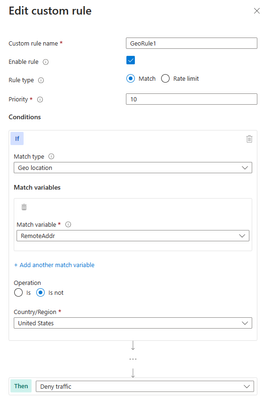
One of the common scenarios where geomatch custom rules can be very helpful is when you want to block traffic from all countries except a specific one. For example, if your web application is only intended for users in the United States, you can create a geomatch custom rule that blocks all requests that do not originate from the US. This way, you can reduce the attack surface of your web application and prevent unauthorized access from other regions. This specific technique uses a negating condition for this traffic pattern to work. To create a geomatch custom rule that blocks traffic from all countries except the US, check out the Portal, Bicep, and PowerShell examples below:
Portal example – Application Gateway:
Portal example – Front Door:
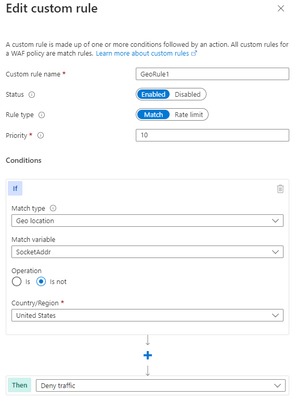
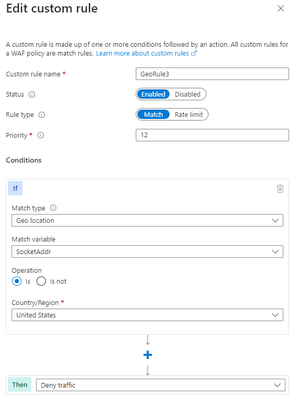
*Note: You’ll notice on the Azure Front Door WAF, we are using SocketAddr as the Match variable and not RemoteAddr. The RemoteAddr variable is the original client IP that’s usually sent via the X-Forwarded-For request header. The SocketAddr variable is the source IP address the WAF sees.
Bicep example – Application Gateway:
properties: {
customRules: [
{
name: ‘GeoRule1’
priority: 10
ruleType: ‘MatchRule’
action: ‘Block’
matchConditions: [
{
matchVariables: [
{
variableName: ‘RemoteAddr’
}
]
operator: ‘GeoMatch’
negationConditon: true
matchValues: [
‘US’
]
transforms: []
}
]
state: ‘Enabled’
}
Bicep example – FrontDoor:
properties: {
customRules: {
rules: [
{
name: ‘GeoRule1’
enabledState: ‘Enabled’
priority: 10
ruleType: ‘MatchRule’
matchConditions: [
{
matchVariable: ‘SocketAddr’
operator: ‘GeoMatch’
negateCondition: true
matchValue: [
‘US’
]
transforms: []
}
]
action: ‘Block’
}
PowerShell example – Application Gateway:
$RGname = “rg-waf “
$policyName = “waf-pol”
$variable = New-AzApplicationGatewayFirewallMatchVariable -VariableName RemoteAddr
$condition = New-AzApplicationGatewayFirewallCondition -MatchVariable $variable -Operator GeoMatch -MatchValue “US” -NegationCondition $true
$rule = New-AzApplicationGatewayFirewallCustomRule -Name GeoRule1 -Priority 10 -RuleType MatchRule -MatchCondition $condition -Action Block
$policy = Get-AzApplicationGatewayFirewallPolicy -Name $policyName -ResourceGroupName $RGname
$policy.CustomRules.Add($rule)
Set-AzApplicationGatewayFirewallPolicy -InputObject $policy
PowerShell example – FrontDoor:
$RGname = “rg-waf”
$policyName = “wafafdpol”
$matchCondition = New-AzFrontDoorWafMatchConditionObject -MatchVariable SocketAddr -OperatorProperty GeoMatch -MatchValue “US” -NegateCondition $true
$customRuleObject = New-AzFrontDoorWafCustomRuleObject -Name “GeoRule1” -RuleType MatchRule -MatchCondition $matchCondition -Action Block -Priority 10
$afdWAFPolicy= Get-AzFrontDoorWafPolicy -Name $policyName -ResourceGroupName $RGname
Update-AzFrontDoorWafPolicy -InputObject $afdWAFPolicy -Customrule $customRuleObject
Scenario: Block traffic from all countries except “x” and “y” that target the URI “foo” or “bar”
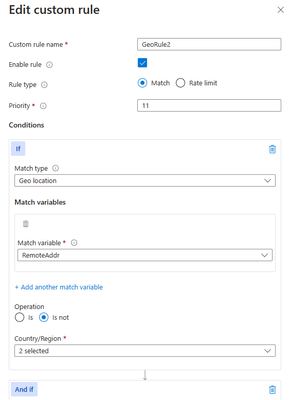
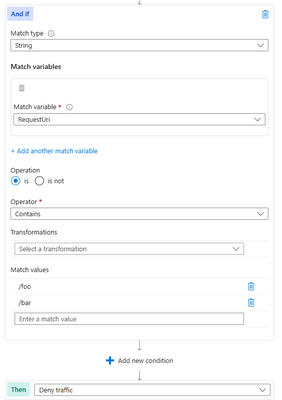
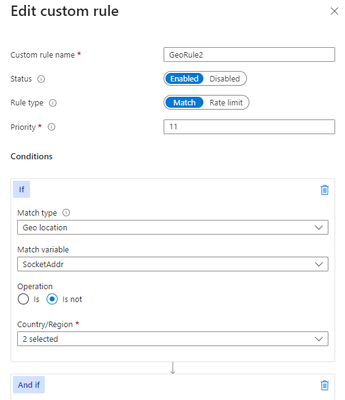
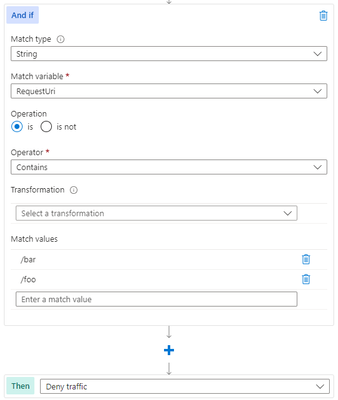
Another scenario where geomatch custom rules can be useful is when you want to block traffic from all countries except two or more specific ones, that target an explicit URI. For example, if your web application has specific URI paths that are only intended for users in the US and Canada, you can create a geomatch custom rule that blocks all requests that do not originate from either of these countries. With this pattern, request payloads from the US and Canada are still processed through the managed rulesets, catching any unwanted malicious attacks while still blocking requests from all other countries. This way, you can ensure that only your target audience can access your web application and avoid unwanted traffic from other regions. Furthermore, to reduce potential false positives, you can include the country code “ZZ” in the list to capture IP addresses that aren’t yet mapped to a country in Azure’s dataset. This specific technique also uses a negate condition for the Geo location type and a non-negate condition for our URI match. To create a geomatch custom rule that blocks traffic from all countries except the US and Canada to a specified URI, check out the Portal, Bicep, and PowerShell examples below:
Portal example – Application Gateway:
Portal example – Front Door:
Bicep example – Application Gateway:
properties: {
customRules: [
{
name: ‘GeoRule2’
priority: 11
ruleType: ‘MatchRule’
action: ‘Block’
matchConditions: [
{
matchVariables: [
{
variableName: ‘RemoteAddr’
}
]
operator: ‘GeoMatch’
negationConditon: true
matchValues: [
‘US’
‘CA’
]
transforms: []
}
{
matchVariables: [
{
variableName: ‘RequestUri’
}
]
operator: ‘Contains’
negationConditon: false
matchValues: [
‘/foo’
‘/bar’
]
transforms: []
}
]
state: ‘Enabled’
}
Bicep example – FrontDoor:
properties: {
customRules: {
rules: [
{
name: ‘GeoRule2’
enabledState: ‘Enabled’
priority: 11
ruleType: ‘MatchRule’
matchConditions: [
{
matchVariable: ‘SocketAddr’
operator: ‘GeoMatch’
negateCondition: true
matchValue: [
‘US’
‘CA’
]
transforms: []
}
{
matchVariable: ‘RequestUri’
operator: ‘Contains’
negateCondition: false
matchValue: [
‘/foo’
‘/bar’
]
transforms: []
}
]
action: ‘Block’
}
PowerShell example – Application Gateway:
$RGname = “rg-waf “
$policyName = “waf-pol”
$variable1a = New-AzApplicationGatewayFirewallMatchVariable -VariableName RemoteAddr
$condition1a = New-AzApplicationGatewayFirewallCondition -MatchVariable $variable1a -Operator GeoMatch -MatchValue @(“US”, “CA”) -NegationCondition $true
$variable1b = New-AzApplicationGatewayFirewallMatchVariable -VariableName RequestUri
$condition1b = New-AzApplicationGatewayFirewallCondition -MatchVariable $variable1b -Operator Contains -MatchValue @(“/foo”, “/bar”) -NegationCondition $false
$rule1 = New-AzApplicationGatewayFirewallCustomRule -Name GeoRule2 -Priority 11 -RuleType MatchRule -MatchCondition $condition1a, $condition1b -Action Block
$policy = Get-AzApplicationGatewayFirewallPolicy -Name $policyName -ResourceGroupName $RGname
$policy.CustomRules.Add($rule1)
Set-AzApplicationGatewayFirewallPolicy -InputObject $policy
PowerShell example – FrontDoor:
$RGname = “rg-waf”
$policyName = “wafafdpol”
$matchCondition1a = New-AzFrontDoorWafMatchConditionObject -MatchVariable SocketAddr -OperatorProperty GeoMatch -MatchValue @(“US”, “CA”) -NegateCondition $true
$matchCondition1b = New-AzFrontDoorWafMatchConditionObject -MatchVariable RequestUri -OperatorProperty Contains -MatchValue @(“/foo”, “/bar”) -NegateCondition $false
$customRuleObject1 = New-AzFrontDoorWafCustomRuleObject -Name “GeoRule2” -RuleType MatchRule -MatchCondition $matchCondition1a, $matchCondition1b -Action Block -Priority 11
$afdWAFPolicy= Get-AzFrontDoorWafPolicy -Name $policyName -ResourceGroupName $RGname
Update-AzFrontDoorWafPolicy -InputObject $afdWAFPolicy -Customrule $customRuleObject1
Scenario: Block traffic specifically from country “x”
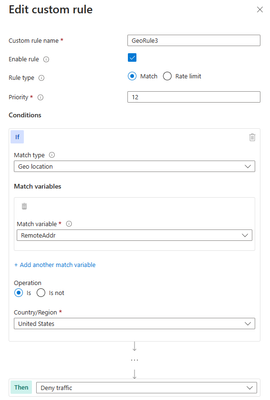
A similar scenario where geomatch custom rules can be helpful is when you want to block traffic from a specific country or multiple countries. For example, if your web application is facing a lot of malicious requests from country X, you can create a geomatch custom rule that blocks all requests that originate from that country. This way, you can protect your web application from potential attacks and reduce the load on your resources. You can use this pattern to block multiple countries that you have validated as malicious or hostile. This specific technique uses a match condition for this traffic pattern to work. To create a geomatch custom rule that blocks traffic from country X, check out the Portal, Bicep, and PowerShell examples below:
Portal example – Application Gateway:
Portal example – Front Door:
Bicep example – Application Gateway:
properties: {
customRules: [
{
name: ‘GeoRule3’
priority: 12
ruleType: ‘MatchRule’
action: ‘Block’
matchConditions: [
{
matchVariables: [
{
variableName: ‘RemoteAddr’
}
]
operator: ‘GeoMatch’
negationConditon: false
matchValues: [
‘US’
]
transforms: []
}
]
state: ‘Enabled’
}
Bicep example – FrontDoor:
properties: {
customRules: {
rules: [
{
name: ‘GeoRule3’
enabledState: ‘Enabled’
priority: 12
ruleType: ‘MatchRule’
matchConditions: [
{
matchVariable: ‘SocketAddr’
operator: ‘GeoMatch’
negateCondition: false
matchValue: [
‘US’
]
transforms: []
}
]
action: ‘Block’
}
PowerShell example – Application Gateway:
$RGname = “rg-waf “
$policyName = “waf-pol”
$variable2 = New-AzApplicationGatewayFirewallMatchVariable -VariableName RemoteAddr
$condition2 = New-AzApplicationGatewayFirewallCondition -MatchVariable $variable2 -Operator GeoMatch -MatchValue “US” -NegationCondition $false
$rule2 = New-AzApplicationGatewayFirewallCustomRule -Name GeoRule3 -Priority 12 -RuleType MatchRule -MatchCondition $condition2 -Action Block
$policy = Get-AzApplicationGatewayFirewallPolicy -Name $policyName -ResourceGroupName $RGname
$policy.CustomRules.Add($rule2)
Set-AzApplicationGatewayFirewallPolicy -InputObject $policy
PowerShell example – FrontDoor:
$RGname = “rg-waf”
$policyName = “wafafdpol”
$matchCondition2 = New-AzFrontDoorWafMatchConditionObject -MatchVariable SocketAddr -OperatorProperty GeoMatch -MatchValue “US” -NegateCondition $false
$customRuleObject2 = New-AzFrontDoorWafCustomRuleObject -Name “GeoRule3” -RuleType MatchRule -MatchCondition $matchCondition2 -Action Block -Priority 12
$afdWAFPolicy= Get-AzFrontDoorWafPolicy -Name $policyName -ResourceGroupName $RGname
Update-AzFrontDoorWafPolicy -InputObject $afdWAFPolicy -Customrule $customRuleObject2
Geomatch custom rules and Priority
When using geomatch custom rules, it’s important to use the priority parameter wisely to avoid unnecessary processing or conflicts. The Azure WAF will determine the order that it evaluates the rules by using the priority parameter. This parameter is a numerical value that ranges from 1 to 100, with lower values indicating higher priority. The priority must be unique across all custom rules. You should assign higher priority to the rules that are more critical or specific for your web application security, and lower priority to the rules that are less essential or general. This way, you can ensure that WAF applies the most appropriate actions to your web traffic. Given our examples above, the scenario where we’ve identified an explicit URI path is the most specific and should have a higher priority rule than other types of patterns. This allows us to protect a critical path on the application with the highest priority while allowing more generic traffic to be evaluated across the other custom rules or managed rulesets.
Geomatch Custom Rule Anti-Patterns
On the other hand, there are some anti-patterns that you should avoid when using geomatch custom rules. These are scenarios where you set the custom rule action to allow instead of block. This can have unintended consequences, such as allowing a lot of traffic to bypass the WAF and potentially exposing your web application to other threats. Instead of using an allow action, you should use a block action with a negate condition, as shown in the previous patterns. This way, you can ensure that only traffic from the countries that you want is allowed, and all other traffic is blocked by the WAF.
Scenario: Allow traffic from country “x”
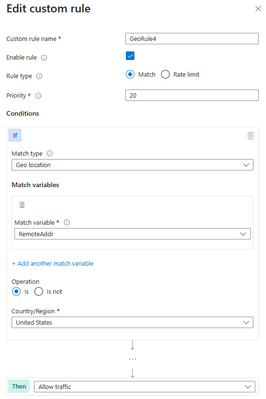
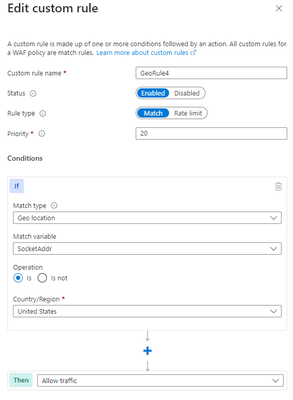
The first anti-pattern that you should be aware of is setting the geomatch custom rule to allow traffic from a specific country. For example, suppose you want to allow traffic from the United States because you have a large customer base there. You might think that creating a custom rule with the action “allow” and the value “United States” would achieve this. However, this is not the case. What this rule does is to allow all traffic that originates from the United States, regardless of whether it has a malicious payload or not, as the allow action bypasses further rule processing of the managed rulesets. Additionally, traffic from all other countries will still be allowed to be processed by the WAF, consuming resources. This exposes your web application to malicious requests from the United States that would otherwise be blocked by the WAF.
Portal example – Application Gateway:
Portal example – Front Door
Bicep example – Application Gateway:
properties: {
customRules: [
{
name: ‘GeoRule4’
priority: 20
ruleType: ‘MatchRule’
action: ‘Allow’
matchConditions: [
{
matchVariables: [
{
variableName: ‘RemoteAddr’
}
]
operator: ‘GeoMatch’
negationConditon: false
matchValues: [
‘US’
]
transforms: []
}
]
state: ‘Enabled’
}
Bicep example – FrontDoor:
properties: {
customRules: {
rules: [
{
name: ‘GeoRule4’
enabledState: ‘Enabled’
priority: 20
ruleType: ‘MatchRule’
matchConditions: [
{
matchVariable: ‘SocketAddr’
operator: ‘GeoMatch’
negateCondition: false
matchValue: [
‘US’
]
transforms: []
}
]
action: ‘Allow’
}
PowerShell example – Application Gateway:
$RGname = “rg-waf”
$policyName = “waf-pol”
$variable3 = New-AzApplicationGatewayFirewallMatchVariable -VariableName RemoteAddr
$condition3 = New-AzApplicationGatewayFirewallCondition -MatchVariable $variable3 -Operator GeoMatch -MatchValue “US” -NegationCondition $false
$rule3 = New-AzApplicationGatewayFirewallCustomRule -Name GeoRule4 -Priority 20 -RuleType MatchRule -MatchCondition $condition3 -Action Allow
$policy = Get-AzApplicationGatewayFirewallPolicy -Name $policyName -ResourceGroupName $RGname
$policy.CustomRules.Add($rule3)
Set-AzApplicationGatewayFirewallPolicy -InputObject $policy
PowerShell example – FrontDoor:
$RGname = “rg-waf”
$policyName = “wafafdpol”
$matchCondition3 = New-AzFrontDoorWafMatchConditionObject -MatchVariable SocketAddr -OperatorProperty GeoMatch -MatchValue “US” -NegateCondition $false
$customRuleObject3 = New-AzFrontDoorWafCustomRuleObject -Name “GeoRule4” -RuleType MatchRule -MatchCondition $matchCondition3 -Action Allow -Priority 20
$afdWAFPolicy= Get-AzFrontDoorWafPolicy -Name $policyName -ResourceGroupName $RGname
Update-AzFrontDoorWafPolicy -InputObject $afdWAFPolicy -Customrule $customRuleObject3
Scenario: Allow traffic from all counties except “x”
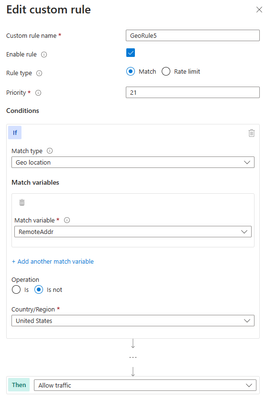
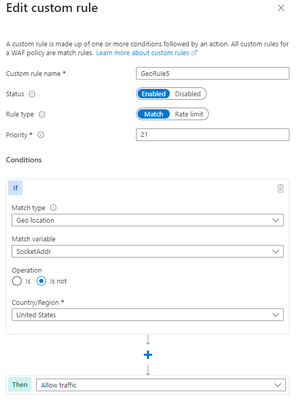
Another anti-pattern that you should avoid when using geomatch custom rules is to set the rule action to allow and specify a list of countries to exclude. For example, you might want to allow traffic from all countries except the United State, where the US is a country that you suspect of malicious activity. However, this approach can also have unintended consequences, such as allowing traffic from countries that you have not verified or validated as safe or legitimate or allowing traffic from countries that have low or no security standards, exposing your web application to potential vulnerabilities or attacks. As mentioned in the previous scenario, using the allow action for all countries except the US, indicates to the WAF to stop processing the request payloads against the managed rulesets. All rule evaluation will cease once the custom rule with allow is processed, thus exposing the application to unwanted malicious attacks.
Therefore, it is better to use a more restrictive and specific rule action, such as block, and specify a list of countries to allow with a negate condition. This way, you can ensure that only traffic from trusted and verified sources can access your web application, while blocking any suspicious or unwanted traffic.
Portal example – Application Gateway:
Portal example – Front Door:
Bicep example – Application Gateway:
properties: {
customRules: [
{
name: ‘GeoRule5’
priority: 21
ruleType: ‘MatchRule’
action: ‘Allow’
matchConditions: [
{
matchVariables: [
{
variableName: ‘RemoteAddr’
}
]
operator: ‘GeoMatch’
negationConditon: true
matchValues: [
‘US’
]
transforms: []
}
]
state: ‘Enabled’
}
Bicep example – FrontDoor:
properties: {
customRules: {
rules: [
{
name: ‘GeoRule5’
enabledState: ‘Enabled’
priority: 21
ruleType: ‘MatchRule’
matchConditions: [
{
matchVariable: ‘SocketAddr’
operator: ‘GeoMatch’
negateCondition: true
matchValue: [
‘US’
]
transforms: []
}
]
action: ‘Allow’
}
PowerShell example – Application Gateway:
$RGname = “rg-waf”
$policyName = “waf-pol”
$variable4 = New-AzApplicationGatewayFirewallMatchVariable -VariableName RemoteAddr
$condition4 = New-AzApplicationGatewayFirewallCondition -MatchVariable $variable4 -Operator GeoMatch -MatchValue “US” -NegationCondition $true
$rule4 = New-AzApplicationGatewayFirewallCustomRule -Name GeoRule5 -Priority 21 -RuleType MatchRule -MatchCondition $condition4 -Action Allow
$policy = Get-AzApplicationGatewayFirewallPolicy -Name $policyName -ResourceGroupName $RGname
$policy.CustomRules.Add($rule4)
Set-AzApplicationGatewayFirewallPolicy -InputObject $policy
PowerShell example – FrontDoor:
$RGname = “rg-waf”
$policyName = “wafafdpol”
$matchCondition4 = New-AzFrontDoorWafMatchConditionObject -MatchVariable SocketAddr -OperatorProperty GeoMatch -MatchValue “US” -NegateCondition $true
$customRuleObject4 = New-AzFrontDoorWafCustomRuleObject -Name “GeoRule5” -RuleType MatchRule -MatchCondition $matchCondition4 -Action Allow -Priority 10
$afdWAFPolicy= Get-AzFrontDoorWafPolicy -Name $policyName -ResourceGroupName $RGname
Update-AzFrontDoorWafPolicy -InputObject $afdWAFPolicy -Customrule $customRuleObject4
Conclusion
The Azure Web Application Firewall is a powerful tool for protecting your web applications from common threats and attacks and by using geomatch custom rules, you can fine-tune your security controls based on the geographic location of the requests. The patterns outlined help to maintain the effectiveness and performance of the Azure WAF when utilizing geomatch custom rules. You should always test your rules before applying them to production and monitor their performance and impact regularly. By following these best practices, you can leverage the power of geomatch custom rules to enhance your web application security.
Resources
What is Azure Web Application Firewall on Azure Application Gateway? – Azure Web Application Firewall | Microsoft Learn
Azure Web Application Firewall (WAF) v2 custom rules on Application Gateway | Microsoft Learn
Azure Web Application Firewall (WAF) Geomatch custom rules | Microsoft Learn
What is Azure Web Application Firewall on Azure Front Door? | Microsoft Learn
Web application firewall custom rule for Azure Front Door | Microsoft Learn
Geo-filtering on a domain for Azure Front Door | Microsoft Learn
Configure v2 custom rules using PowerShell – Azure Web Application Firewall | Microsoft Learn
Create and use v2 custom rules – Azure Web Application Firewall | Microsoft Learn
Configure an IP restriction WAF rule for Azure Front Door | Microsoft Learn
by Contributed | Jan 25, 2024 | Technology
This article is contributed. See the original author and article here.
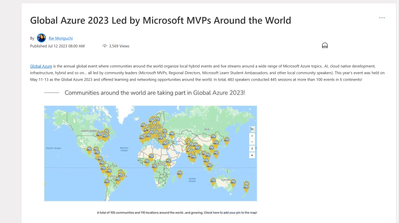
Global Azure, a global community effort where local Azure communities host events for local users, has been gaining popularity year by year for those interested in learning about Microsoft Azure and Microsoft AI, alongside other Azure users. The initiative saw great success last year, with the Global Azure 2023 event featuring over 100 local community-led events, nearly 500 speakers, and about 450 sessions delivered across the globe. We have highlighted these local events in our blog post, Global Azure 2023 Led by Microsoft MVPs Around the World.
Looking ahead, Global Azure 2024 is scheduled from April 18 to 20, and its call for organizer who host these local events has begun. In this blog, we showcase the latest news about Global Azure to a wider audience, including messages from the Global Azure Admin Team. This year, we will directly share the essence of Global Azure’s appeal through the words of Rik Hepworth (Microsoft Azure MVP and Regional Director) and Magnus Mårtensson (Microsoft Azure MVP and Regional Director). We invite you to consider becoming a part of this global initiative, empowering Azure users worldwide by stepping up as an organizer.


What’s New in Global Azure 2024?
For Global Azure 2024 we are doing multiple new things:
- Last year we started a collaboration with the Microsoft Learn Student Ambassador program. This year we will build on this start to further expand the activation among young professionals to join Global Azure and learn about our beloved cloud platform. As experienced community leaders, no task can be more worthy than to nurture the next generation of community leaders. We are working with the MLSA program to help young professionals arrange their first community meetups, or to join a meetup local to them and become involved in community work. We are asking experienced community leaders to mentor these young professionals to become budding new community leaders, they need guidance in how to organize a successful first Azure learning event!
- For the -24 edition of our event, we are working on a self-service portal for both event organizers and event attendees, to access and claim sponsorships that companies give to Global Azure. As a community leader you will sign in and see the list of attendees at your location. You can share sponsorships directly with the attendees and the people who attend your event can claim the benefits from our portal.
What benefits can the organizers gain from hosting a local Global Azure event?
There is no better way to learn about something, about anything, than to collaborate with like-minded people in the learning process. We have been in communities for tech enthusiasts for many years; some of our best friends are cloud people we have met through communities, and the way we learn the most is from deep discussions with people we trust and know. Hosting a Global Azure Community event for the first time could be the start of a new network of great people who know and like the same things and who also need to continuously want to and need to learn more about the cloud. For us, community is work-life and within communities we find the best and most joyful parts of being in tech.
Message to the organizers looking forward to hosting local Global Azure events
For community by community – that is our guiding motto for Global Azure. We are community, and learning happens here! As a hero, it is your job to set up a fun agenda full of learning, and to drive the event when it happens. It is hugely rewarding to be involved in community work, at least if we are to believe the people who approach us wherever we go – “I really like Global Azure, it is the most fun community event we host in our community in X each year”. This is passion, and this is tech-geekery when it is at its best. You are part of the crowd that drives learning and that makes people enthusiastic about their work and about technology. We hope that your Global Azure event is a great success and that it leads to more learners of Azure near you becoming more active and sharing with their knowledge – as our motto states!
Additional message from Rik and Magnus
Global Azure has global reach to Azure cloud tech people everywhere. We are looking for additional sponsors who want to have the potential to reach these people. You need to give something away, like licenses or other giveaways to become a sponsor. When you do we can in turn ensure that everyone sees that yours is a company that backs the community for tech and who supports learning.
This year, we are also particularly keen to hear from our MVP friends who have struggled in the past with finding a location for their event but have a Microsoft office, or event space nearby. We are keen to see if we can help, but we need people to reach out to us so we can make the right connections.
If anyone out there in the community is interested in stepping up to a global context, we are often looking for additional people to join the Global Azure Admins team.
Azure is big, broad, wide, and deep – there are so many different topics and technologies that are a part of Azure. Withing Global Azure anything goes! AI is a very valid Global Azure focus, because AI happens on the Azure platform and somehow data needs to be securely transported to, ingested, and stored in Azure. Compute can happen in so many ways in the cloud and you can be part of using the cloud as an IT Pro management/admin community as well as a developer community. We have SecOps, FinOps, DevOps (all the Ops!!). Global Azure is also very passionate about building an inclusive and welcoming community around the world that includes young people and anybody who is underrepresented in our industry.
To find out more, head to https://globalazure.net and read our #HowTo guide. We look forward to seeing everyone’s pins appear on our map.
by Contributed | Jan 24, 2024 | Technology
This article is contributed. See the original author and article here.
Container security is an integral part of Microsoft Defender for Cloud, a Cloud Native Application Platform (CNAPP) as it addresses the unique challenges presented by containerized environments, providing a holistic approach to securing applications and infrastructure in the cloud-native landscape. As organizations embrace multicloud, the silos between cloud environments can become barriers for a holistic approach to container security. Defender for Cloud continues to adapt, offering new capabilities that resonate with the fluidity of multicloud architecture. Our latest additions to AWS and GCP seamlessly traverse cloud silos and provide a comprehensive and unified view of container security posture.
Container image scanning for AWS and GCP managed repositories
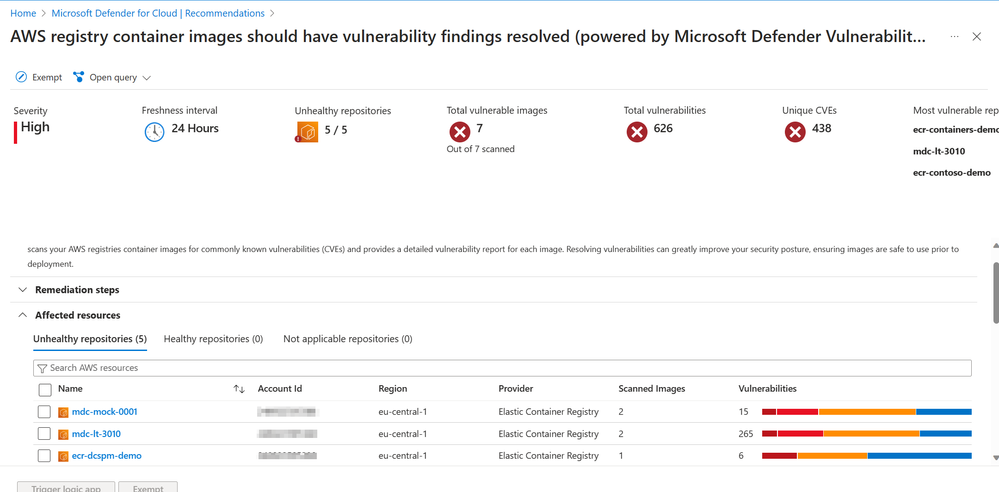
Container vulnerability assessment scanning powered by Microsoft Defender Vulnerability Management is now extended to AWS and GCP including Elastic Container Registry (ECR), Google Artifact Registry (GAR) and Google Container Registry (GCR). Using Defender Cloud Security Posture Management and Defender for Containers, organizations are now able to view vulnerabilities detected on their AWS and GCP container images at both registry and runtime, all within a single pane of glass.
With this in-house scanner, we provide the following key benefits for container image scanning:
- Agentless vulnerability assessment for containers: MDVM scans container images in your Azure Container Registry (ACR), Elastic Container Registry (ECR) and Google Artifact Registry (GAR) without the need to deploy an agent. After enabling this capability, you authorize Defender for Cloud to scan your container images.
- Zero configuration for onboarding: Once enabled, all images stored in ACR, ECR and GAR are automatically scanned for vulnerabilities without extra configuration or user input.
- Near real-time scan of new images: Defender for Cloud backend receives a notification when a new image is pushed to the registry; they are added to the queue to be scanned immediately.
- Daily refresh of vulnerability reports: Vulnerability reports are refreshed every 24hrs for images previously scanned that were pulled in the last 30 days (Azure only), pushed to the registry in the last 90 days or currently running on the Azure Kubernetes Service (AKS) cluster, Elastic Kubernetes Service (EKS) cluster or Google Kubernetes Engine (GKE).
- Coverage for both ship and runtime: Container image scanning powered by MDVM shows vulnerability reports for both images stored in the registry and images running on the cluster.
- Support for OS and language packages: MDVM scans both packages installed by the OS package manager in Linux and language specific packages and files, and their dependencies.
- Real-world exploitability insights (based on CISA kev, exploit DB and more)
- Support for ACR private links: MDVM scans images in container registries that are accessible via Azure Private Link if allow access by trusted services is enabled.
The use of a single, in-house scanner provides a unified experience across all three clouds for detecting and identifying vulnerabilities on your container images. By enabling “Agentless Container Vulnerability Assessment” in Defender for Containers or Defender CSPM, at no additional cost, your container registries in AWS and GCP are automatically identified and scanned without the need for deploying additional resources in either cloud environment. This SaaS solution for container image scanning streamlines the process for discovering vulnerabilities in your multicloud environment and ensures quick integration into your multicloud infrastructure without causing operational friction.
Through both Defender CSPM and Defender for Containers, results from container image scanning powered by MDVM are added into the Security graph for enhanced risk hunting. Through Defender CSPM, they are also used in calculation of attack paths to identify possible lateral movements an attacker could take to exploit your containerized environment.
Discover vulnerable images in Elastic Container Registries
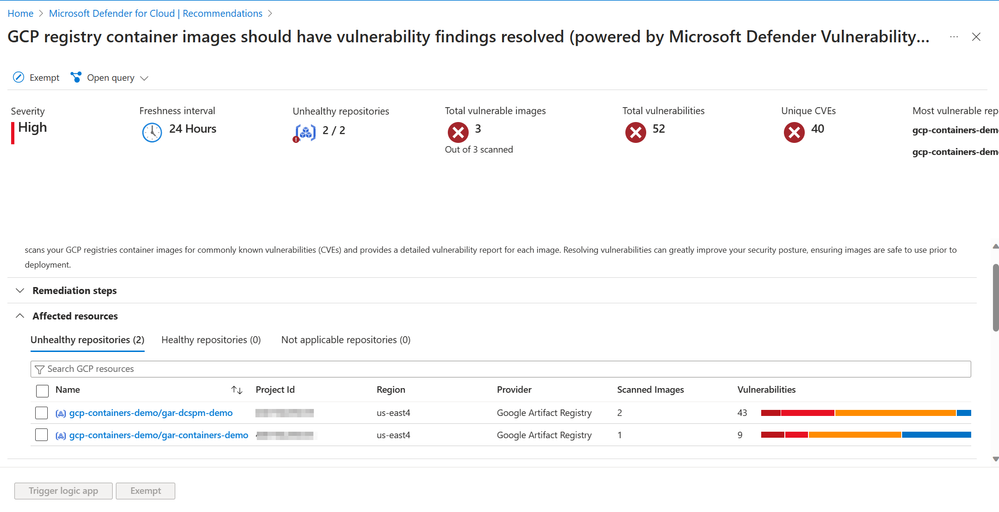 Discover vulnerable images in Google Artifact Registry and Google Container Registry
Unified Vulnerability Assessment solution across workloads and clouds
Microsoft Defender Vulnerability Management (MDVM) is now the unified vulnerability scanner for container security across Azure, AWS and GCP. In Defender for Cloud, unified Vulnerability Assessment powered by Defender Vulnerability Management, we shared more insights about the decision to use MDVM, with the goal being to enable organizations to have a single, consistent vulnerability assessment solution across all cloud environments.
Vulnerability assessment scanning powered by Microsoft Defender Vulnerability Management for Azure Container Registry images is already generally available. Support for AWS and GCP is now public preview and provides a consistent experience across all three clouds.
With the general availability of container vulnerability assessment scanning powered by Microsoft Defender Vulnerability Management, we also announced retirement of Qualys container image scanning in Defender for Cloud. Retirement of Qualys container image scanning is set for March 1st, 2024.
To prepare for the retirement of Qualys container image scanning and consider the following resources:
Agentless Inventory Capabilities & Risk-Hunting with Cloud Security Explorer
Leaving zero footprint, agentless discovery for Kubernetes performs API-based discovery of your Google Kubernetes Engine (GKE) and Elastic Kubernetes Service (EKS) clusters, their configurations, and deployments. Agentless discovery is a less intrusive approach to Kubernetes discovery as it minimizes impact and footprint on the Kubernetes cluster by avoiding additional installation of agents and resource consumption.
Through the agentless discovery of Kubernetes and integration with the Cloud Security Explorer, organizations can explore the Kubernetes data plane, services, images, configurations of their container environments and more to easily monitor and manage their assets.
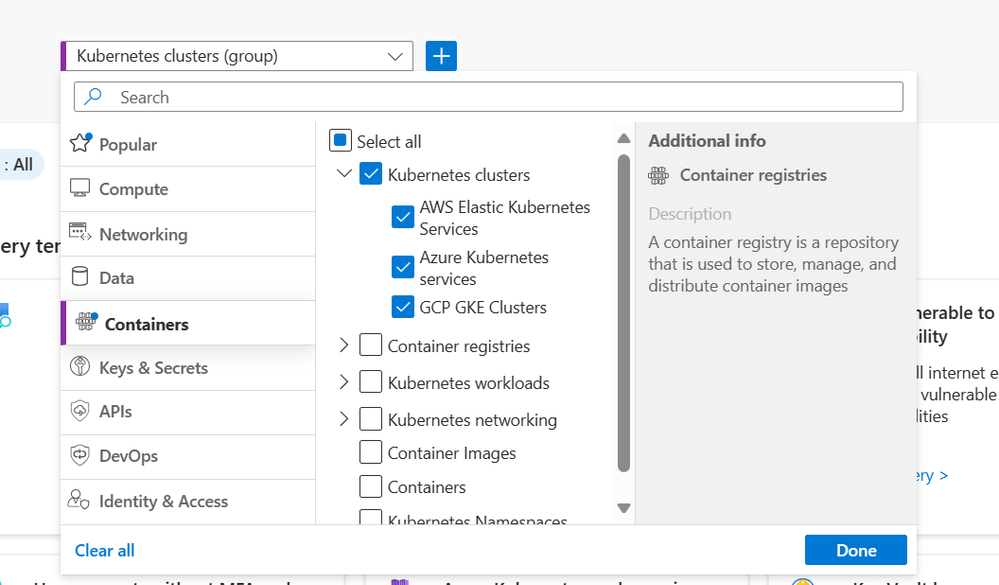 Discover your multicloud Kubernetes cluster in a single view.
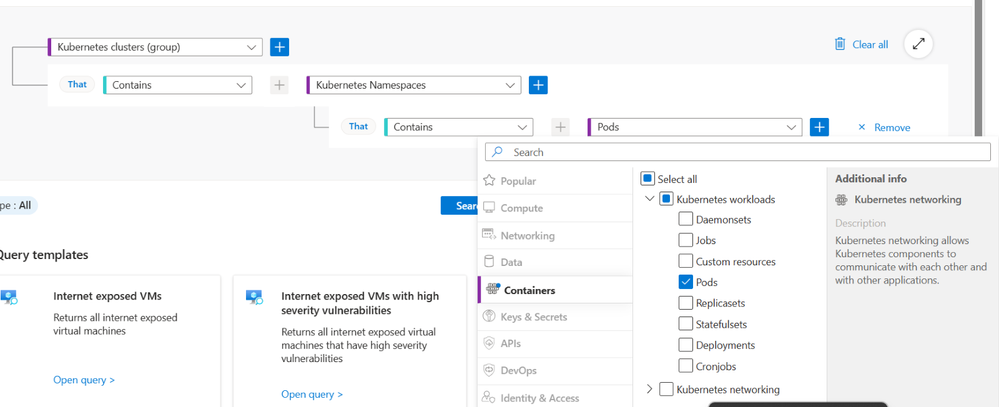
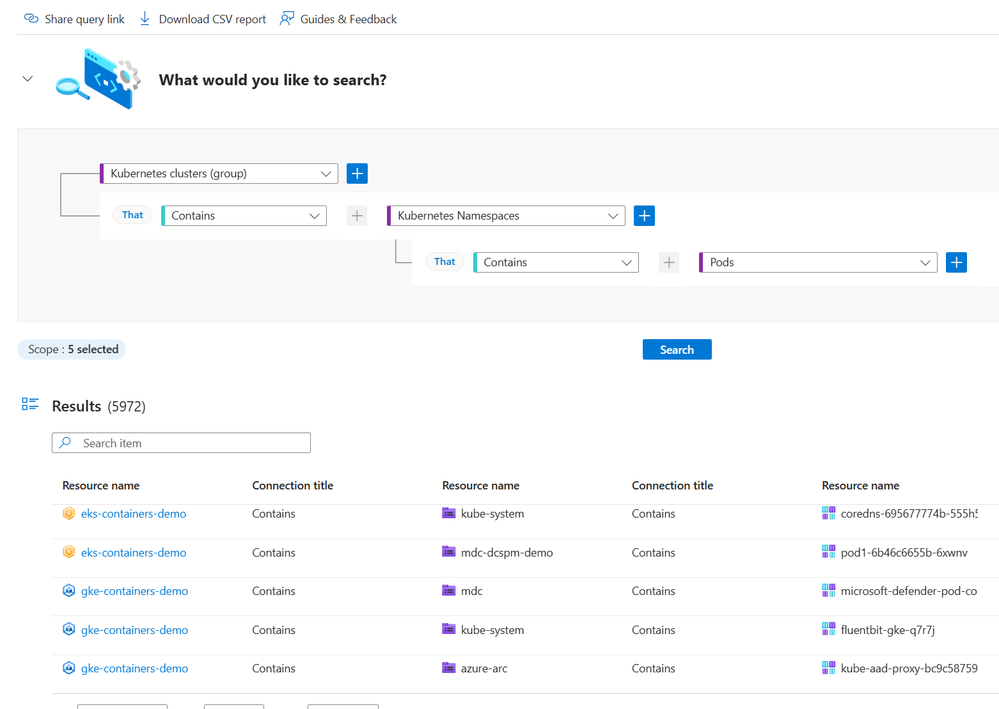 View Kubernetes data plane inventory
Using the Cloud Security Explorer, organizations can also hunt for risks to their Kubernetes environments which include Kubernetes-specific security insights such as pod and node level internet exposure, running vulnerable images and privileged containers.
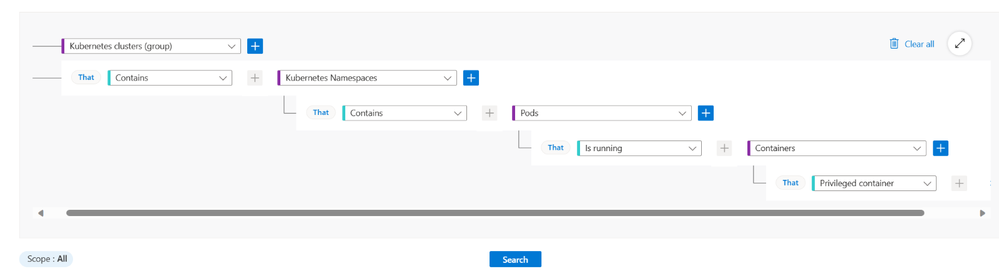
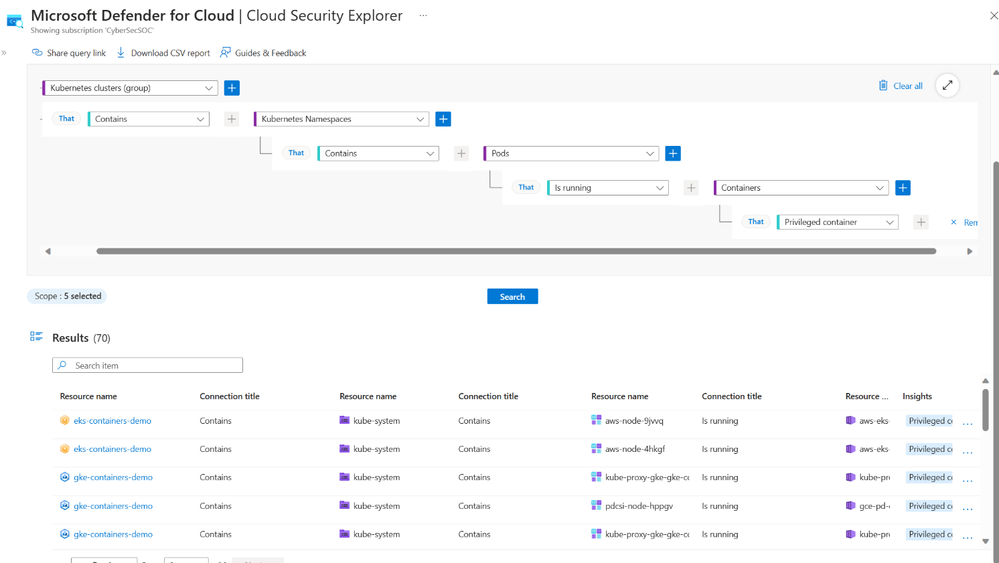 Hunt for risk such as privileged containers
Defender Cloud Security Posture Management now complete with multicloud Kubernetes Attack Paths
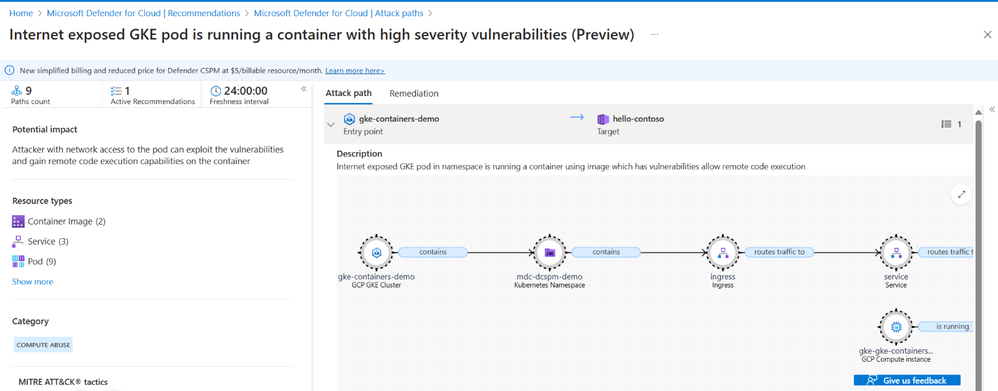
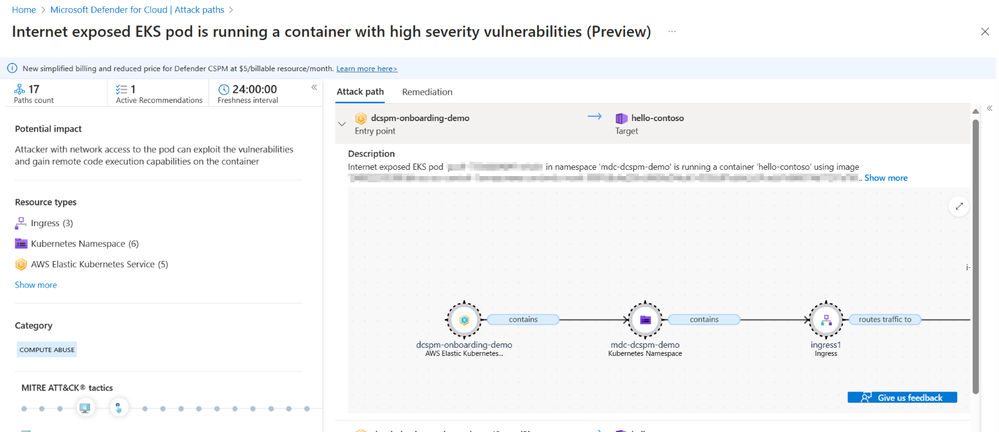
Multicloud organizations using Defender CSPM can now leverage the Attack path analysis to visualize risks and threats to their Kubernetes environments, allowing them to get a complete view of potential threats across all three cloud environments. Attack path analysis utilizes environment context including insights from Agentless Discovery of Kubernetes and Agentless Container Vulnerability scanning to expose exploitable paths that attackers may use to breach your environment. Reported Attack paths help prioritize posture issues that matter most in your environment and help you get a head of threats to your Kubernetes environment.
Next Steps
Reviewers:
Maya Herskovic, Senior PM Manager, Defender for Cloud
Tomer Spivak, Senior Product Manager, Defender for Cloud
Mona Thaker, Senior Product Marketing Manager, Defender for Cloud
by Contributed | Jan 23, 2024 | Technology
This article is contributed. See the original author and article here.
Introduction
Hello everyone, I am Bindusar (CSA) working with Intune. I have received multiple requests from customers asking to collect specific event IDs from internet-based client machines with either Microsoft Entra ID or Hybrid Joined and upload to Log Analytics Workspace for further use cases. There are several options available like:
- Running a local script on client machines and collecting logs. Then using “Send-OMSAPIIngestionFile” to upload required information to Log Analytics Workspace.
The biggest challenge with this API is to allow client machines to authenticate directly in Log Analytics Workspace. If needed, Brad Watts already published a techcommunity blog here.
Extending OMS with SCCM Information – Microsoft Community Hub
- Using Log analytics agent. However, it is designed to collect event logs from Azure Virtual Machines.
Collect Windows event log data sources with Log Analytics agent in Azure Monitor – Azure Monitor | Microsoft Learn
- Use of Monitoring Agent to collect certain types of events like Warning, Errors, Information etc and upload to Log Analytics Workspace. However, in monitoring agent, it was difficult to customize it to collect only certain event IDs. Also, it will be deprecated soon.
Log Analytics agent overview – Azure Monitor | Microsoft Learn
In this blog, I am trying to extend this solution to Azure Monitor Agent instead. Let’s try to take a scenario where I am trying to collect Security Event ID 4624 and upload it to Event Table of Log Analytics Workspace.
Event ID 4624 is generated when a logon session is created. It is one of the most important security events to monitor, as it can provide information about successful and failed logon attempts, account lockouts, privilege escalation, and more. Monitoring event ID 4624 can help you detect and respond to potential security incidents, such as unauthorized access, brute force attacks, or lateral movement.
In following steps, we will collect event ID 4624 from Windows client machines using Azure Monitor Agent and store this information in Log Analytics workspace. Azure Monitor Agent is a service that collects data from various sources and sends it to Azure Monitor, where you can analyse and visualize it. Log Analytics workspace is a container that stores data collected by Azure Monitor Agent and other sources. You can use Log Analytics workspace to query, alert, and report on the data.
Prerequisites
Before you start, you will need the following:
- A Windows client that you want to monitor. Machine should be Hybrid or Entra ID joined.
- An Azure subscription.
- An Azure Log Analytics workspace.
- An Azure Monitor Agent.
Steps
To collect event ID 4624 using Azure Monitor Agent, follow these steps:
If you already have a Log Analytics workspace where you want to collect the events, you can move to step #2 where we need to create a DCR. A table named “Events” (not custom) will be used to collect all the events specified.
1. Steps to create Log Analytics Workspace
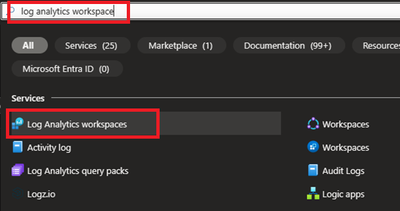
1.1 Login to Azure portal and search for Log analytics Workspace
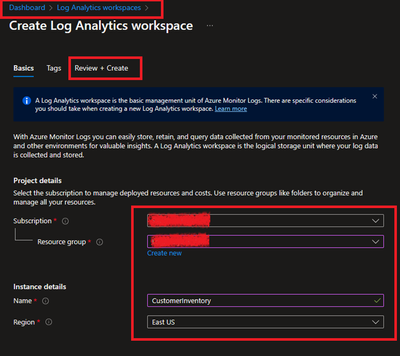
1.2 Select and Create after providing all required information.
2. Creating a Data Collection Rule (DCR)
Detailed information about data collection rule can be found at following. However, for the granularity of this blog, we will extract the required information to achieve our requirements.
Data collection rules in Azure Monitor – Azure Monitor | Microsoft Learn
2.1 Permissions
“Monitoring Contributor” on Subscription, Resource Group and DCR is required.
Reference: Create and edit data collection rules (DCRs) in Azure Monitor – Azure Monitor | Microsoft Learn
2.2 Steps to create DCR.
For PowerShell lovers, following steps can be referred.
Create and edit data collection rules (DCRs) in Azure Monitor – Azure Monitor | Microsoft Learn
- Login to Azure portal and navigate to Monitor.
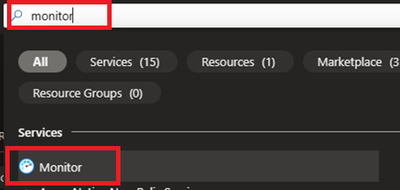
- Locate Data collection Rules on Left Blade.
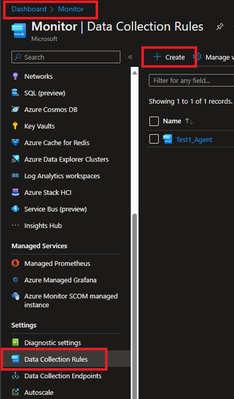
- Create a New Data Collection Rule and Provide required details. Here we are demonstrating Platform Type Windows
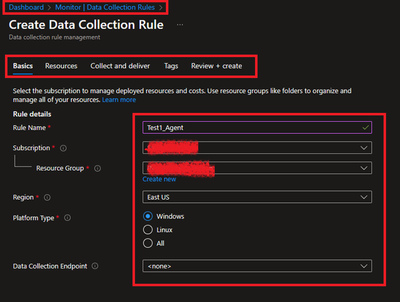
- Resources option talks about downloading an Azure Monitor Agent which we need to install on client machines. Please select link to “Download the client installer” and save it for future steps.
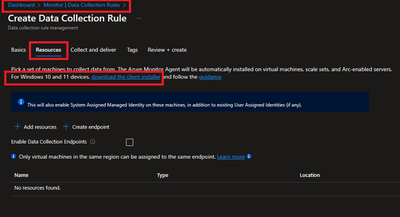
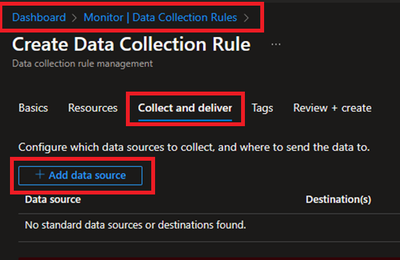
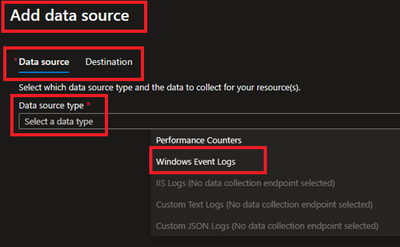
- Under Collect and deliver, collect talks about “what” needs to be collected and deliver talks about “where” collected data will be saved. Click on Add data source and select Windows Event Logs for this scenario.
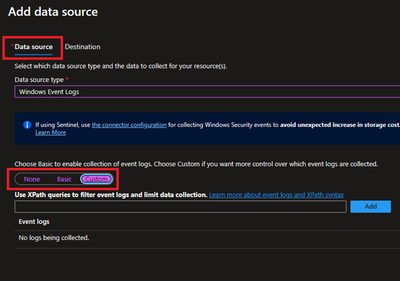
- In this scenario, we are planning to collect Event ID 4624 from Security Logs. By default, under Basic, we do not have such option and thus we will be using Custom.
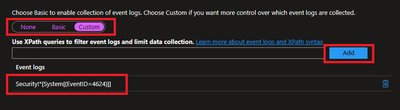
Customer uses XPath format. XPath entries are written in the form LogName!XPathQuery. For example, in our case, we want to return only events from the Security event log with an event ID of 4624. The XPathQuery for these events would be *[System[EventID=4624]]. Because you want to retrieve the events from the Security event log, the XPath is Security!*[System[EventID=4624]]. To get more information about how to consume event logs, please refer to following doc.
Consuming Events (Windows Event Log) – Win32 apps | Microsoft Learn
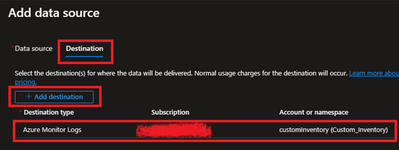
- Next is to select the Destination where logs will be stored. Here we are selecting the Log analytics workspace which we created in steps 1.2.
- Once done, Review and Create the rule.
2.3 Creating Monitoring Object and Associating it with DCR.
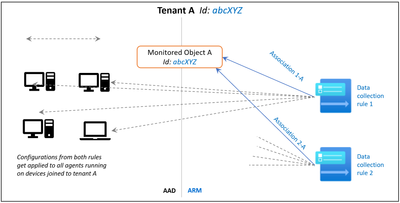
You need to create a ‘Monitored Object’ (MO) that creates a representation for the Microsoft Entra tenant within Azure Resource Manager (ARM). This ARM entity is what Data Collection Rules are then associated with. This Monitored Object needs to be created only once for any number of machines in a single Microsoft Entra tenant. Currently this association is only limited to the Microsoft Entra tenant scope, which means configuration applied to the Microsoft Entra tenant will be applied to all devices that are part of the tenant and running the agent installed via the client installer.
Here, we are using a PowerShell script to create and map Monitoring Object to DCR.
Reference: Set up the Azure Monitor agent on Windows client devices – Azure Monitor | Microsoft Learn
Following things to keep in mind:
- The Data Collection rules can only target the Microsoft Entra tenant scope. That is, all DCRs associated to the tenant (via Monitored Object) will apply to all Windows client machines within that tenant with the agent installed using this client installer. Granular targeting using DCRs is not supported for Windows client devices yet.
- The agent installed using the Windows client installer is designed for Windows desktops or workstations that are always connected. While the agent can be installed via this method on client machines, it is not optimized for battery consumption and network limitations.
- Action should be performed by Tenant Admin as one-time activity. Steps mentioned below gives the Microsoft Entra admin ‘owner’ permissions at the root scope.
#Make sure execution policy is allowing to run the script.
Set-ExecutionPolicy unrestricted

#Define the following information
$TenantID = ""  #Your Tenant ID
$SubscriptionID = "" #Your Subscription ID where Log analytics workspace was created.
$ResourceGroup = "Custom_Inventory" #Your resroucegroup name where Log analytics workspace was created.


$Location = "eastus" #Use your own location. “location" property value under the "body" section should be the Azure region where the Monitor object would be stored. It should be the "same region" where you created the Data Collection Rule. This is the location of the region from where agent communications would happen.


$associationName = "EventTOTest1_Agent" #You can define your custom associationname, must change the association name to a unique name, if you want to associate multiple DCR to monitored object.

$DCRName = "Test1_Agent" #Your Data collection rule name.


#Just to ensure that we have all modules required.

If(Get-module az -eq $null)
{
    Install-Module az
    Install-Module Az.Resources
    Import-Module az.accounts
}

#Connecting to Azure Tenant using Global Admin ID
Connect-AzAccount -Tenant $TenantID

#Select the subscription
Select-AzSubscription -SubscriptionId $SubscriptionID

#Grant Access to User at root scope "/"
$user = Get-AzADUser -UserPrincipalName (Get-AzContext).Account

New-AzRoleAssignment -Scope '/' -RoleDefinitionName 'Owner' -ObjectId $user.Id

#Create Auth Token
$auth = Get-AzAccessToken

$AuthenticationHeader = @{
    "Content-Type" = "application/json"
    "Authorization" = "Bearer " + $auth.Token
    }


#1. Assign ‘Monitored Object Contributor’ Role to the operator.
$newguid = (New-Guid).Guid
$UserObjectID = $user.Id

$body = @"
{
            "properties": {
                "roleDefinitionId":"/providers/Microsoft.Authorization/roleDefinitions/56be40e24db14ccf93c37e44c597135b",
                "principalId": `"$UserObjectID`"
        }
}
"@

$requestURL = "https://management.azure.com/providers/microsoft.insights/providers/microsoft.authorization/roleassignments/$newguid`?api-version=2020-10-01-preview"


Invoke-RestMethod -Uri $requestURL -Headers $AuthenticationHeader -Method PUT -Body $body


##

#2. Create Monitored Object


$requestURL = "https://management.azure.com/providers/Microsoft.Insights/monitoredObjects/$TenantID`?api-version=2021-09-01-preview"
$body = @"
{
    "properties":{
        "location":`"$Location`"
    }
}
"@

$Respond = Invoke-RestMethod -Uri $requestURL -Headers $AuthenticationHeader -Method PUT -Body $body -Verbose
$RespondID = $Respond.id

##

#3. Associate DCR to Monitored Object
#See reference documentation https://learn.microsoft.com/en-us/rest/api/monitor/data-collection-rule-associations/create?tabs=HTTP

$requestURL = "https://management.azure.com$RespondId/providers/microsoft.insights/datacollectionruleassociations/$associationName`?api-version=2021-09-01-preview"
$body = @"
        {
            "properties": {
                "dataCollectionRuleId": "/subscriptions/$SubscriptionID/resourceGroups/$ResourceGroup/providers/Microsoft.Insights/dataCollectionRules/$DCRName"
            }
        }

"@

Invoke-RestMethod -Uri $requestURL -Headers $AuthenticationHeader -Method PUT -Body $body


#IN case you want to create more than DCR, use following in comments.


#Following step is to query the created objects.
#4. (Optional) Get all the associatation.
$requestURL = "https://management.azure.com$RespondId/providers/microsoft.insights/datacollectionruleassociations?api-version=2021-09-01-preview"
(Invoke-RestMethod -Uri $requestURL -Headers $AuthenticationHeader -Method get).value
3. Client-side activity
3.1 Prerequisites:
Reference: Set up the Azure Monitor agent on Windows client devices – Azure Monitor | Microsoft Learn
- The machine must be running Windows client OS version 10 RS4 or higher.
- To download the installer, the machine should have C++ Redistributable version 2015) or higher
- The machine must be domain joined to a Microsoft Entra tenant (AADj or Hybrid AADj machines), which enables the agent to fetch Microsoft Entra device tokens used to authenticate and fetch data collection rules from Azure.
- The device must have access to the following HTTPS endpoints:
- global.handler.control.monitor.azure.com
- .handler.control.monitor.azure.com (example: westus.handler.control.azure.com)
- .ods.opinsights.azure.com (example: 12345a01-b1cd-1234-e1f2-1234567g8h99.ods.opinsights.azure.com) (If using private links on the agent, you must also add the data collection endpoints)
3.2 Installing the Azure Monitoring Agent Manually
- Use the Windows MSI installer for the agent which we downloaded in step 1.3 while creating the DCR.
- Navigate to downloaded file and run that as administrator. Follow the steps like configuring proxy etc as per your need and finish the setup.
- Following screenshots can be referred to install manually on selected client machines to test.
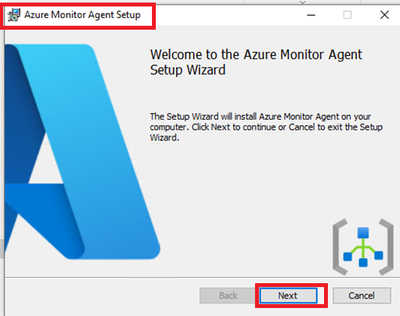
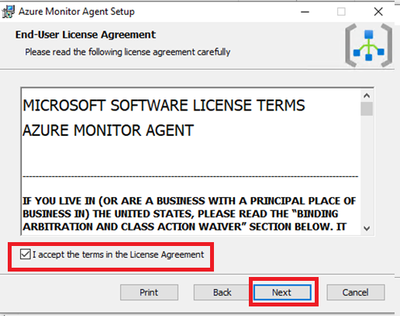
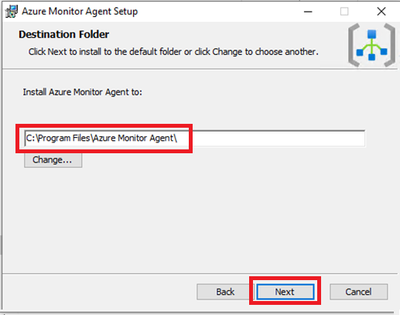
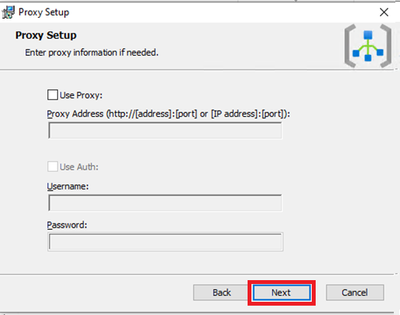
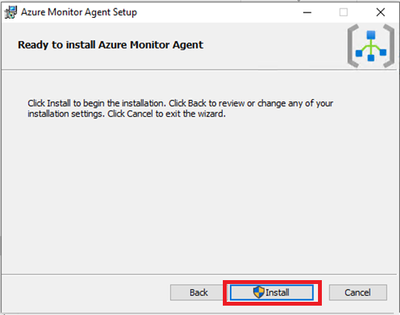
This needs Admin permissions on local machine.
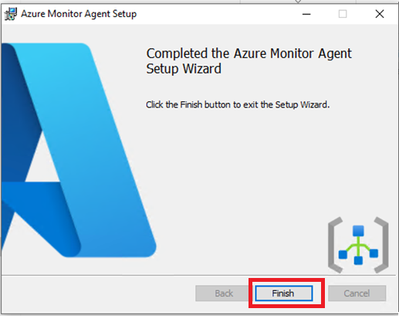
- Verify successful installation:
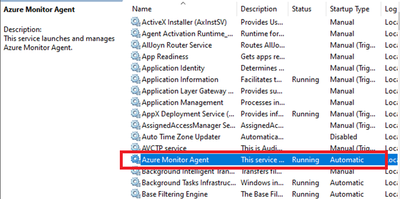
- Open Services and confirm ‘Azure Monitor Agent’ is listed and shows as Running.
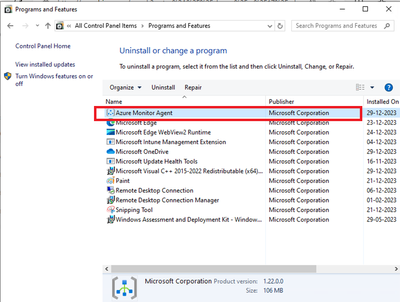
- Open Control Panel -> Programs and Features OR Settings -> Apps -> Apps & Features and ensure you see ‘Azure Monitor Agent’ listed.
3.3 Installation of Azure Monitor Agent using Intune.
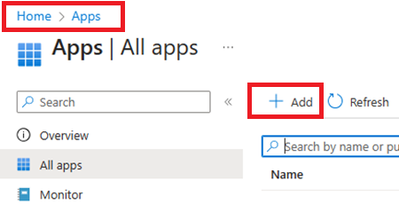
- Login to Intune Portal and navigate to Apps.
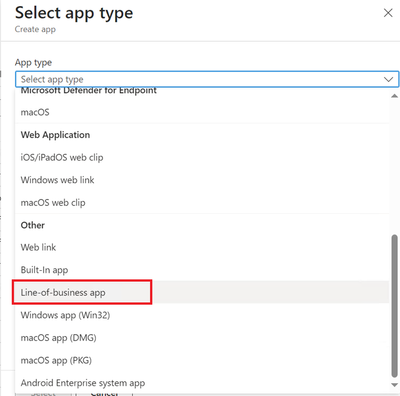
- Click on +Add to create a new app. Select Line-of-business app.
- Locate the Agent file which was downloaded in section 2.2 during DCR creation.
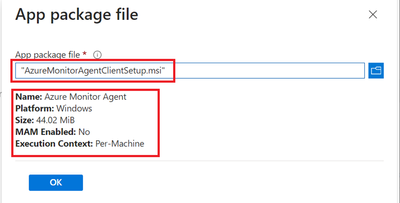
- Provide the required details like scope tags and groups to deploy.
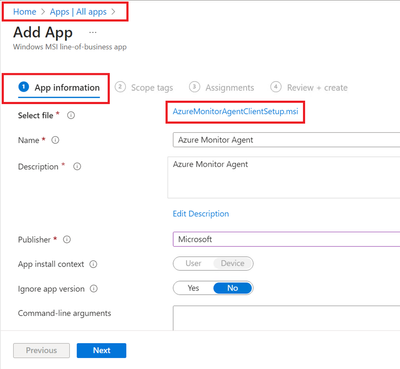
- Assign and Create.
- Ensure that machines are already installed with C++ Redistributable version 2015) or higher. If not, please create another package as dependent of this application. If you do not do that, Azure Monitoring Agent will be stuck in Install Pending State.
4. Verification of configuration.
Its time to validate the configuration and data collected.
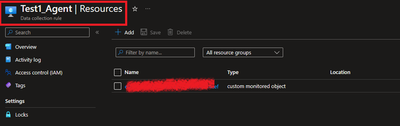
4.1 Ensure that the Monitoring Object is mapped with data collection rule.
To do this, navigate to Azure Portal > Monitor > Data collection rule > Resources. A new custom monitored object should be created.
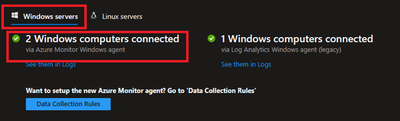
4.2 Ensure that Azure Monitor Agents are Connected.
To do this, navigate to Azure Portal > Log Analytics Workspaces > Your workspace which was created at the beginning > Agents > Focus on Windows Computers Connected Via Azure Monitor Windows Agents on Left Side.
4.3 Ensure that the client machines can send required data.
To check this, navigate to Azure Portal > Log Analytics workspaces > Your workspace which was created at the beginning > Tables. Events table must be created.

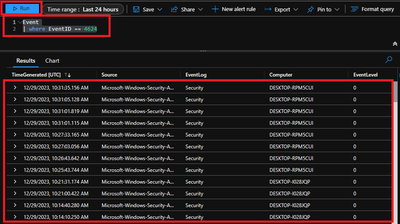
4.4 Ensure that required data is captured.
To access the event logs captured, navigate to Azure Portal > Log Analytics workspaces > Your workspace which was created at the beginning > Logs and run KQL query.
“Event
| where EventID == 4624”
Conclusion
Collecting event IDs, like Event ID 4624 from Windows clients is a useful way to track user logon activities and identify any suspicious or unauthorized actions. By using Azure Monitor Agent and Log Analytics workspace, you can easily configure, collect, store, and analyse this data in a scalable and easy way. You can also leverage the powerful features of the Log Analytics query language (KQL) and portal to create custom queries, filters, charts, and dashboards to visualize and monitor the logon events. You can further refer this data in PowerBI reports as well.
We would like to thank you for reading this article and hope you found it useful and informative.
If you want to learn more about Azure Monitor and Log Analytics, you can visit our official documentation page and follow our blog for the latest updates and news.



Recent Comments