by Contributed | Jun 25, 2021 | Technology
This article is contributed. See the original author and article here.
Throughout the last several months there have been many new features, updates, and happenings in the world of Information Protection at Microsoft. As we continue to build out more of this story, we wanted to use this opportunity to connect with customers, partners, and more on some of these updates to keep you informed and provide a single pane of glass on everything we have been working on for the last several months. In addition, we hope to give you some insight into the next big things being built within MIP overall.
Microsoft Information Protection:
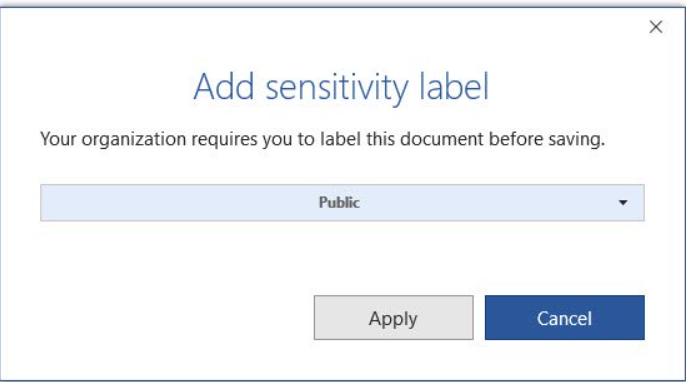
General Availability: Mandatory Labeling
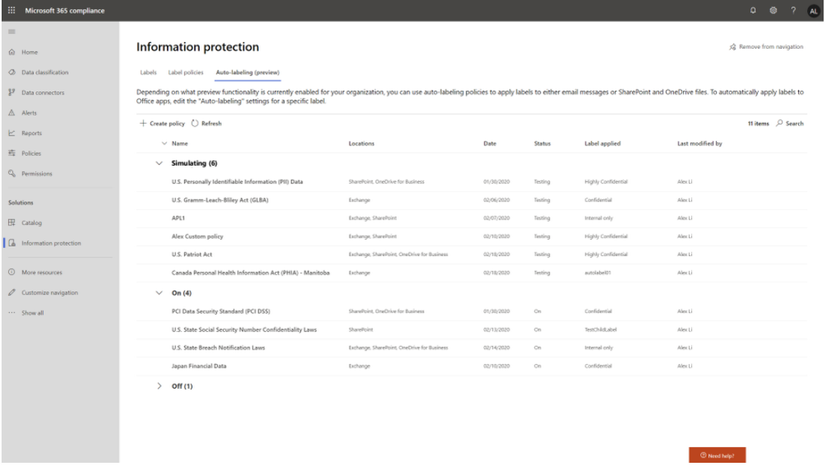
General Availability: Improvements for Exchange Online service side auto-labeling
Public Preview: Co-authoring
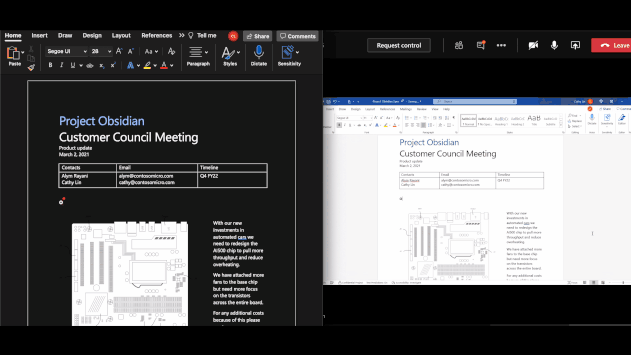
- Co-authoring and AutoSave on Microsoft Information Protection-encrypted documents
- Client-based automatic and recommended labeling on Mac
- Mandatory labeling requiring users to apply a label to their email and documents
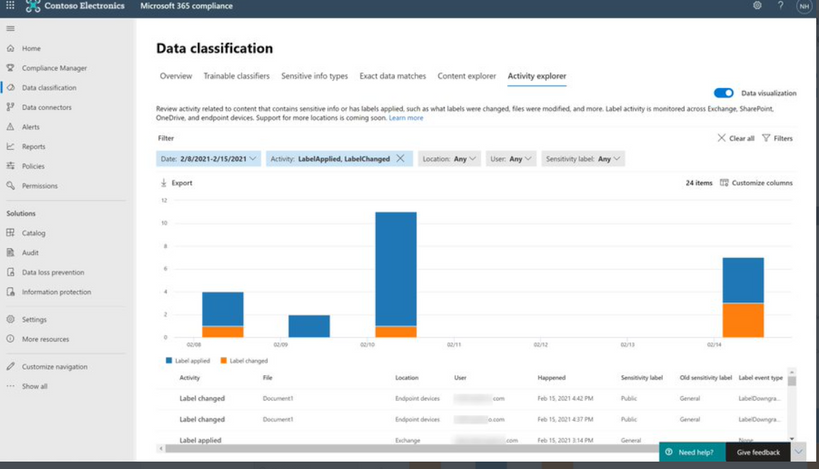
- Availability of audit label activities in Activity Explorer
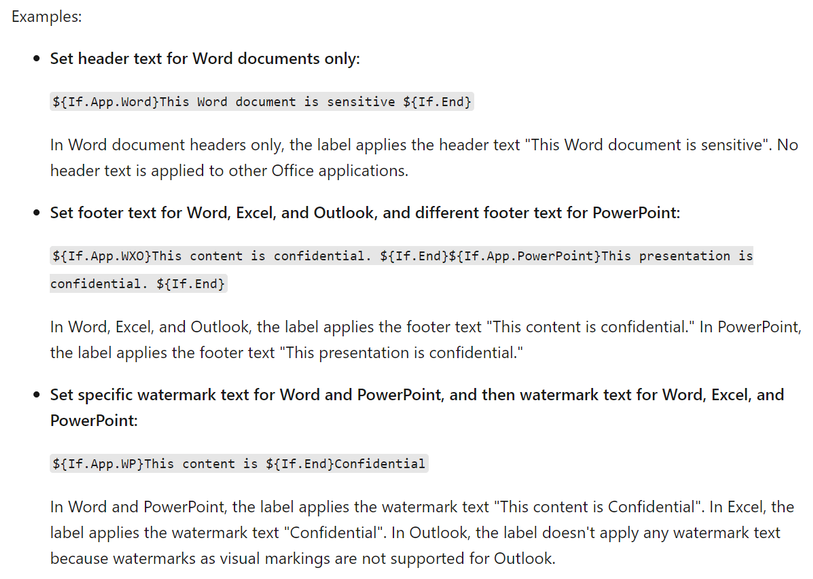
- Native support for variables and per-app content marking
- You can leverage co-authoring using:
- Production or test tenant
- Microsoft 365 apps with the following versions:
- Windows – Current Channel 16.0.14026.20270+ (2105)
- Mac: 16.50.21061301+
- If AIP Unified Labeling Client Version is in use, verify that in addition to the updated Microsoft 365 app, you use version 2.10.46.0 of the Unified Labeling client.
- PLEASE NOTE: That Co-authoring for Native/Built-In Labeling will be added in the upcoming Current Channel within 2 weeks
Read more about the feature at Enable co-authoring for documents encrypted by sensitivity labels in Microsoft 365 – Microsoft 365 Compliance | Microsoft Docs
Public Preview: AIP Audit Logs in Activity Explorer
General Availability: Dynamic Markings with Variables within native labeling across all platforms
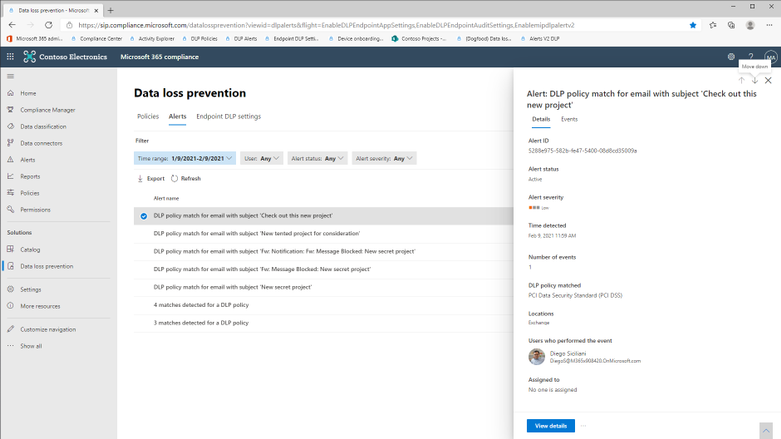
GA: DLP Alerts
Microsoft announces the General Availability of the Microsoft Data Loss Prevention Alerts Dashboard. This latest addition in the Microsoft’s data loss prevention solution provides customers with the ability to holistically investigate DLP policy violations across:
- Exchange
- SharePoint Online
- OneDrive
- Teams
- Devices
- Cloud apps
- On-premises file shares
Learn more about the feature at: Learn about the data loss prevention Alerts dashboard – Microsoft 365 Compliance | Microsoft Docs
Azure Information Protection:
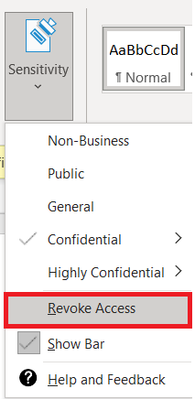
GA: Track and Revoke
- Document tracking provides information for administrators about when a protected document was accessed.
- If necessary, both admins and users can revoke document access for protected tracked documents.
- This feature is available for AIP UL client version 2.9.111.0 or later
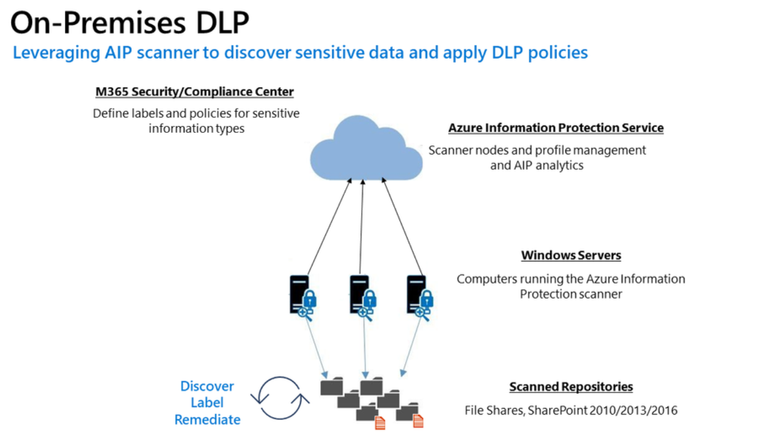
Public Preview: DLP On-Prem
- The DLP on-premises scanner crawls on-premises data-at-rest in file shares and SharePoint document libraries and folders for sensitive items that, if leaked, would pose a risk to your organization or pose a risk of compliance policy violation
- This gives you the visibility and control you need to ensure that sensitive items are used and protected properly, and to help prevent risky behavior that might compromise them
- You need to leverage the Scanner binaries from AIP UL Client Version 2.10.43.0
![[Guest Blog] Hypotheses and High Hopes: How 'empower everyone' can really mean everyone](https://www.drware.com/wp-content/uploads/2021/06/fb_image-194.jpeg)
by Contributed | Jun 25, 2021 | Technology
This article is contributed. See the original author and article here.
This blog was written by MVP, Paul Culmsee. Paul explains how he came to guide many non IT people into Power Platform experts, and what he has learnt along the way. Paul has a proven track record of developing world-class Power Platform talent through mentorship.
My name is Paul Culmsee and I run a consultancy called Seven Sigma in Perth, Western Australia.
I’m starting my story at the time when a startup that I had poured my heart, soul (and cash) into failed. Why it failed doesn’t actually matter, but amongst the pain felt at the time came the learning of some lessons. One in particular that really rearranged my mental molecules was finally understanding what it means to formulate a hypothesis, test it as quick as you can to see if you are right, and adjust if you are not. This principle has served me very well ever since, and as you will see has delivered some awesome outcomes that we never could have predicted.
So as you read my story, see if you can spot all my hypotheses, and how I tested them.
“Can this be used for audits?”
I think it was late 2016 or early 2017 when I built my first simple Power App for capturing lessons learnt on projects and was surprised at how quick and easy it was. I showed it to a team member, a Safety Manager, who took the phone, used the app for a few moments, then asked two questions: 1) “Is PowerApps any good?” and; 2) “Can this be used for audits?”
I found it interesting that he had little interest in the problem my app was trying to solve, but quickly connected the concept to one of his business’ own problems. In the past, when introducing tools like SharePoint or Teams, I was used to having to explain the intent and benefits to users.
Anyway, at that time, I did not know the answers, so I said, “I honestly don’t know if it’s any good, but would you be willing to fund a few days to build a prototype? Worst case is it sucks, and you can give a real prototype to IT to get done by real developers.”
Five days later, the app was delivered and yes, Power Apps seemed good. It was surprisingly easy, and I suggested it could be taught to anyone. They took me up on it which led to conducting what I suspect is the world’s first Hackathon-style training session on Power Apps to a group of non-IT users. I taught them how to build their own audit apps. I will never forget the best comment of the day that is the essence of citizen development…
“We are a bunch of electricians, welders and fitters and here we are, building apps!”
On daughters and hackathons
Word spread of that session and in true FOMO style, I ended up doing six more sessions with different teams at that company. I began to suspect Power Apps was going to be mega huge in the future, and it would initially be driven by citizen developers before IT departments would start to notice. I had proven that hackathon training worked at small scale, but that was all members of the same company and teams. What about folks from different organisations with different use-cases?
To test this hypothesis, I called up my old friend, Debbie Ireland, in New Zealand, who runs a training company and after a couple of conversations, numbers and dates were set for public Power Apps hackathons in New Zealand. The experiment continued…
Around this time, my teenage daughter, Ashlee, was struggling with anxiety and depression, something that had affected her for some time. She has already told this story, but the quick version is she agreed to my offer to teach her Power Apps for the same money she was getting in a dead-end job. She learnt it blazingly fast, and early on, when I asked her if she liked it, she answered, “Well, I don’t hate it!” (I took that as a yes!).
Ashlee did well with Power Apps – very well. Such was the positive change in her, I asked her to come to New Zealand with me to help run the hackathons. Not only were the sessions all sold out, but we also learnt that hackathon-style training works for diverse groups too. More importantly for me was how it transformed Ashlee. At times, we would swap roles, and she would present. For someone who was too terrified to put her hand up at school, she was now taking centre stage. In fact, when she came home, she designed and ran youth hackathons and I was relegated to the assistant role.
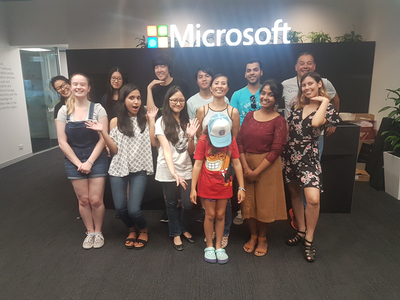 The world-first Power Platform Youth Hackathon in 2018
Early success
While all of this was happening, we were proving the power of citizen development at one of our major clients – an internationally known Australian company. What started out as me helping a citizen maker put the finishing touches off an app that managed logistics at a port, led to the IT department taking note, asking me 1) for help to govern the platform; and 2) to prove that citizen development could be the basis for that governance via a mentored and end-to-end project.
On the latter challenge, I spent 12 half-day sessions over three months mentoring Ada and Tram, two geoscientists by profession, to build and launch that particular app. It was a success, was enhanced from its scope and as I type these words, is being re-engineered as a whole-of-organisation solution. The success of these type of stories meant that this organisation was one of the earliest to sign an enterprise deal with Microsoft to unlock the broader Power Platform stack.
On the governance side, I worked with Nichole – a former Executive Assistant with no formal IT background, who was the inaugural member of the Power Apps team. I mentored her as not only an app maker, but on how to govern, manage and grow the Power Platform. Together, we designed a vision, service model, and guardrails for Power Platform, and she manages it to this day (and is my top coffee buddy).
I still work with Nichole and have many fond memories. At the very start, she came in completely green, so not only was she tasked with governance, but inherited some Power Apps work performed by someone else. Talk about diving in the deep end! In our first session I remember her asking me “What is a variable?” Yet, she embraced the learning curve with such grit that within a short time, she had built and deployed various apps, trained users and developed a deep understanding of the whole platform, and how to manage it.
By the way, much of the early work Nichole and I did can now be found in the dashboards of the Power Platform Centre of Excellence Starter Kit.
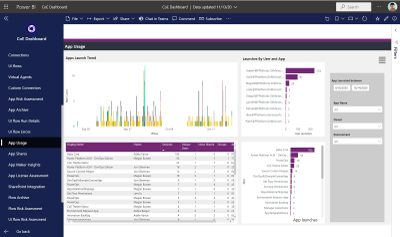 One of the many dashboards we developed now in Power Platform CoE Starter Kit
The three-month challenge…
I would be remiss not to mention another Culmsee here – my wife, Terrie. Even before Ashlee started her journey, Terrie could see value and learnt how to build apps as well. A nurse in her early career, Terrie has a lot of other strings to her bow and is a natural when it comes to User Experience and Design-Thinking. In a wonderful feedback loop, her deep working knowledge of Power Apps means she now mentors everyone in our team (including me) to the point that when we design our apps, we always ask each-other “What would Terrie make us change here!”
Learning from Terrie, Ashlee, Ada, Tram, Nichole, and by now a very large number of hackathons, I felt we could now take someone with no experience, get them building apps in a week, get them good in a month, and get them really good within three months.
To prove this, we took on two trainees at my company – Tahlia and Woong. Both were students who came in with no prior Power Apps experience, and both worked in the Power Platform team at my client with Nichole and myself. They did not just perform app development either. Both had to engage with users directly, envision the solution, learn to estimate well, develop User Experience skills, train users, and learn how to structure projects. Both Tahlia and Woong exceeded our expectations by light-years, remain full-time at my company, and along with Ashlee, are now senior members of our team and highly regarded by clients. I am so proud of them all – they give me the energy to keep going!
Onwards and upwards
I think we have done our bit to prove that citizen development is real, is desirable, and most importantly, does a lot more than teach some app development skills. As you can see by my stories, people have learnt much more than how to open Power Apps studio. They have truly embraced the promise of Digital Transformation.
I semi-jokingly tell people that while Microsoft’s mission is to “Empower everyone”, Seven Sigma’s mission is to “prove that Microsoft is not lying”. So, have we proved all we set out to prove? No! The next step in our plans is to take on more trainees, but have Tahlia, Ashlee and Woong mentor them, to prove that a virtuous cycle of world-class mentoring can be created and sustained.
Ten years ago, websites used to cost many thousands of dollars to build and maintain, yet these days hugely rich sites can be built by anyone, using monthly online services at a fraction of that original cost. I believe apps are now on that same trajectory and the opportunity is huge for organisations. The paradigm is changing before our very eyes.
Whether you agree with my assertion about the future of apps or not, I get disillusioned when I hear people lament about a lack of local skills/talent, but then exacerbate the problem by defaulting to offshore development. It is my sincere hope that more organisations, as they recognise the paradigm of citizen development and low code, give local folks opportunities to shine.
We, at Seven Sigma, have proven it can be done. What about your company?
by Contributed | Jun 25, 2021 | Technology
This article is contributed. See the original author and article here.
We’re proud to announce HoloLens 2 Mixed Reality Production for Unreal Engine, a free course built in collaboration with our friends at Epic Games. You don’t need to already know how to use Unreal Engine or develop for the HoloLens — this course will take you from zero to expert! It covers every topic you’ll need to know to build complex full-featured AR apps, from gestural controls to mapping the 3D world around you using mesh tracking and Azure Spatial Anchors, all using Unreal’s Blueprints system rather than requiring you to write C++ code. While the course will help you get a HoloLens 2 device set up for development if you have one, you can also use the HoloLens Simulator or the Unreal Play in Editor feature without needing an AR headset.
Today, we’re excited to launch the first four courses of the learning path.
In “Prepare Unreal Engine for Mixed Reality Development”, you’ll learn how to set up your development environment, setting up both Unreal Engine 4 and the HoloLens development kit to successfully build and deploy projects to a physical HoloLens device or the HoloLens simulator.
In “Gaze and Head Interactions”, you’ll learn all about the HoloLens’ gaze and head tracking capabilities, and explore best practices for designing experiences that use head and gaze position.
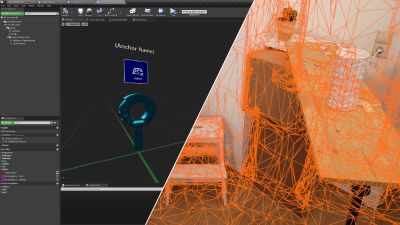
 A sample app you’ll be building with a 3D world
In “Incorporate Hand Interactions with UX Tools”, you’ll learn how to integrate hand tracking into your apps, including complex manipulation of objects in your scene with tricks like snapping to a world mesh.
Finally, “Implement UI with UX Tools and Unreal Motion Graphics” will show you how to create delightful user interfaces in both 2D and 3D using Unreal Motion Graphics and the UX Tools library.
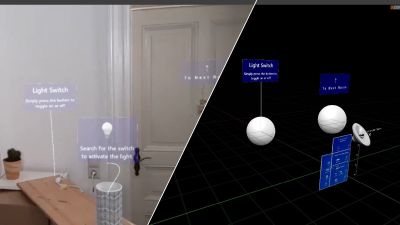 Designing interactions that use the real world
There will be 7 more courses coming soon covering more advanced topics like world mapping, spatial audio, voice recognition, performance optimization, and multi-device networking, but these first few courses will give you a solid foundation to start building exciting experiences for the HoloLens with Unreal Engine 4!
The course is completely free and available here.
by Contributed | Jun 25, 2021 | Technology
This article is contributed. See the original author and article here.
On November 1, 2021, Microsoft will no longer support Office 2010 & 2013 clients for Microsoft 365 Government Community Cloud (GCC) and Microsoft 365 GCC High tenants, and will deny access to Microsoft 365 GCC High. To ensure business continuity, reduce security risk, and maintain CMMC compliance, Summit 7 recommends assessing and planning your organizational upgrade today.
Primary Issue: Office desktop client applications, such as Outlook, OneDrive and Teams clients cannot connect to Microsoft 365 GCC High services. Windows Defender for Endpoint will also experience compatibility issues.
Microsoft Government Cloud Services are always evolving. New releases are iterated, tested, and released into the Microsoft Commercial Cloud and Government Community Cloud at a rapid cadence. After new applications and services have gone through the FedRAMP compliance certification, they are implemented in Office 365 GCC High. At the same time, aging versions of Microsoft Office and Windows desktop operating systems will face reliability and performance issues when connecting to the current release of Microsoft 365 Cloud platforms.
As of this writing, November is less than five months away. For most of our clients, the Microsoft End-of-Support for Office 2010 and Office 2013 falls in the next fiscal budget period to start planning and executing an organization migration for older devices, desktop OS, and Office applications. Additionally, the latest versions of Microsoft Office desktop applications come with the latest release of Windows 10 as an operating system requirement. Organizations can avoid future user experience issues by taking strategic steps now and increase proper cyber hygiene by updating out-of-support applications and OS. Even more, neglecting some of these steps may put your organization in a non-compliant state according to CMMC Level 3 requirements.
The CMMC Domain – System and Information Integrity (SI) – is one of the areas of concern when operating dated OS, firmware, and endpoint software. SI.1.210 for example requires organizations to “Identify, report, and correct information system flaws in a timely manner.” By keeping users on non-supported clients, the proper security updates will not occur, and the organization will be susceptible to advanced threats and jeopardize their ability to meet CMMC Level 3.
On the other hand, there can be a well planned approach to maintain certain workloads or end-of-life technologies. Risk Management (RM) 3.147 requires DIB suppliers to “Manage non-vendor supported products separately and restrict as necessary to reduce risk.” If a smaller user base needs to perform unique duties with Office 2010 or 2013 applications, the organization can consider isolating endpoints with firewalls or air-gapped network architectures.
Understanding Microsoft Fixed Policy Product Lifecycle
Microsoft Products are released in two phases generally covering a ten-year lifecycle —Mainstream Support and Extended Support.
- Mainstream Support is the first phase of a product’s lifecycle and typically lasts five years. During this phase:
- Microsoft receives requests and provides changes to product design and features
- Performs security and non-security updates
- Self-help and paid support options are available
- Extended Support is the final phase of a product’s lifecycle and typically last five years from the end of the Mainstream Support. Microsoft only supports products at the published service level in Extended Support including:
- Security updates
- Paid programs
- Unified Support customers have the ability to request non-security fixes for designated products
If it’s absolutely mission-critical to run legacy applications beyond the End of Support date, you typically can invest in Microsoft’ Extended Security Update (ESU) Program, but this is mostly untenable with Microsoft 365 GCC High.
Can I Delay Migrating Office 2010/2013?
Microsoft products are Secure by Design for the era the products were originally released and supported. Still, the cyber threat landscape is constantly evolving. As a result, older applications simply can’t keep pace with software innovation and effectively address software vulnerabilities. This particular flaw was on full display when organizations failed to patch and update Exchange 2013, resulting in the infamous SolarWinds attack. As we continue to see an escalation in the scale, scope, and sophistication of cyber threats in the United States from nation states and cyber criminals – the continued use of outdated applications, operating systems, and infrastructure is an open invitation for malicious actors to wreak havoc on your organization.
Final Thoughts for Migration Planning
Security and compliance are significant reasons on their own to migrate your organization to the latest clients for Windows and Microsoft 365 for your Government Cloud Services. More than that, there is another dynamic that is equally important—the productivity of your organization—in other words, the people dynamic.
Legacy Office applications are often customized for the organization’s mission and people. These customizations may use macros, scripts, addons, and third-party applications that are also out-of-support, no longer needed, or non-compliant with CMMC. Yet, people rely on these bespoke Office applications to perform their daily activities. Within the CMMC clarification documents, SC.3.180 explains “As legacy components in your architecture age, it may become increasingly difficult for those components to meet security principles and requirements. This should factor into life-cycle decisions…”
As you assess your inventory, be mindful to identify any customizations to your legacy Office applications. Some features may have been deprecated, replaced, or embedded into the latest versions of Microsoft 365. Note the changes so that you can prepare your people for what’s coming, what’s different, and how to enhance their productivity, collaboration, and mission-fulfillment.
Help Is Always Available
Getting a handle on the number of devices and their respective configurations can be a daunting task. Microsoft Endpoint Manager is a solution to assess and manage devices; as well as deploy apps across your organization’s desktops, laptops, tablets, and phones. It’s part of the Microsoft 365 Cloud and can help accelerate your organization’s ability to be compliant with regulations, mitigate cyber threats, and improve your organization’s productivity.
Microsoft keeps a short list of partners that understand the requirements for CMMC, Office 365 GCC High, and all of the nuance of modernizing DIB companies. You don’t have to tackle these challenges alone. Summit 7 can partner to help you assess your migration and start planning today, so that this year you can enjoy the holiday season in November/December.
Original Source Blog:
https://info.summit7systems.com/blog/office-2010-2013-clients-eos-gcc-high


Recent Comments