by Contributed | Jul 7, 2021 | Technology
This article is contributed. See the original author and article here.
We are happy to announce the GA of App Service Environment v3 (ASEv3) along with Isolated V2. The ASEv3 was developed in response to customer feedback and has many improvements over the earlier versions while still providing an isolated single tenant web application hosting platform. As part of the Azure App Service, the ASEv3 provides a PaaS experience to host your Windows or Linux applications. You can deploy Windows or Linux applications as code and Microsoft will manage the OS your applications run in. If you want greater control over your app, you have the ability to host Linux containers as well.
Just like with earlier versions, the ASEv3 deploys into a subnet in one of your Azure Virtual Networks (VNets). You can choose to deploy the ASE with an internal VIP in your VNet or with an external VIP that faces the internet. Apps that are deployed into an ASEv3 can access resources within the same VNet without any additional configuration. The inbound and outbound traffic to your apps can be controlled completely with Network Security Groups (NSGs) or any supported type of routes.
Pricing
Applications are hosted in App Service plans which are created in an App Service Environment. The App Service plan is essentially a provisioning profile for an application host. As you scale your App Service plan out, you create more application hosts with all of the apps in that App Service plan on each host. Pricing for ASEv3 is centered on the App Service plan Isolated v2 pricing with some variation based on deployment type. This is an improvement over the App Service Environment v2, which carried a stamp fee in addition to the App Service plan rate. While there is no stamp fee, there is a minimum charge for your ASEv3 based on the deployment type. These are minimum charges though and are not additive. Beyond selecting if you want an internal or external VIP, an ASEv3 can be deployed in one of three ways:
- Default ASEv3: If ASE is empty there is a charge as if you had one ASP with one instance of Windows I1v2. This is not an additive charge but only applies if the ASEv3 is totally empty. If the ASEv3 has one or more instances, you just pay for your Isolated v2 App Service plans.
- Availability Zone ASEv3: An AZ ASEv3 requires a minimum 9 Windows I1v2 instance charge. This is not an added charge but only applies if you have fewer than 9 total App Service plan instances. All App Service plans in an AZ ASEv3 have a minimum instance count of three. This ensures that customer workloads are zone redundant and are spread across each availability zone.
- Dedicated host ASEv3: With the dedicated host option, you pay for two dedicated hosts with a small percentage of the Isolated V2 per core charge as you scale. The dedicated host deployment does not support availability zone based deployments.
The App Service plan size options in ASEv3 are: 2 core 8 GB RAM, 4 core 16 GB RAM, 8 core 32 GB RAM. The larger sizes handle larger applications but also allows for holding more apps within a single App Service plan. Availability zone support is only available in select regions where all of the App Service dependencies are deployed zone redundant. Reserved instance pricing is available for Isolated v2 App Service plans. With reserved instance pricing you have 1 year and 3 year options that substantially reduce costs.
Networking differences between multi-tenant and ASEv3
In the multi-tenant App Service, there are a number of networking features that enable apps to be exposed on a private address or access resources within a VNet. Those features need to be enabled on at an app by app basis. If you want to enforce network access control on your app, then you need to configure that on each app that this is desired upon. In ASEv3 you do not need to enable anything on your apps for them to be in your VNet. All apps that are in Isolated v2 plans are already in your VNet.
With ASEv3 you can enforce your network access external to the application. Unlike the earlier versions of the App Service Environment (ASE), with ASEv3 there are no networking dependencies in your VNet. While it was possible to control application traffic with earlier versions of the ASE, you always needed to allow for the dependency traffic. With ASEv3 you can completely control your VNet making it far easier to manage.
If you have used earlier versions of the ASE, you will find that scaling is improved. While it isn’t as fast as in the multi-tenant service, it is substantially faster than earlier versions. Scaling now will only block other scale operations of the same OS and App Service plan size combination. You can simultaneously scale a Windows small I1v2 and a Linux medium I1v2 for example. There is also no need to manage the front end scaling as with earlier ASE versions. In ASEv3, the front ends that handle inbound HTTP/HTTPS are automatically scaled without any customer adjustment required.
The ASEv3 is available in most commercial regions now and will soon be in all commercial regions. To learn more about the App Service Environment v3, read:
by Contributed | Jul 7, 2021 | Technology
This article is contributed. See the original author and article here.
Due to virus lockdowns, many businesses have had to shift their customer engagement model away from the more traditional Brick & Mortar, in person experiences and either add or expand their online shopping experience to keep their customers. Azure Maps can help retailers realize these benefits through experiences created using features of Azure Maps such as:
|
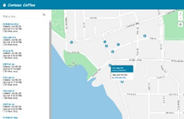
Store or Locker Locator
Find the closest locked delivery box to avoid box theft from front door delivery and return items to locked box location rather than brick and mortar store. Further Azure Search capability could be used to suggest the locations that have the specific item the customer wants in stock and pre-purchase so it is ready for curb-side pick-up
|
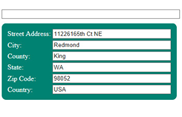 |
Valid Address Entry
Avoid costly returned as undeliverable packages due to poorly completed addresses in web forms. Accepting only addresses that are populated in a drop down ensures the address is recognized within Azure Maps and is “routable” for delivery option offerings.
|
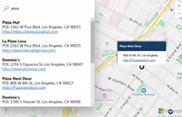 |
Point of Interest Advertising
Want to have your business found organically by folks looking for businesses in Azure Maps, Bing Maps and TomTom? To ensure your business listing is correct on all Microsoft connected maps we have the following two suggested links:
|
In all cases, it is important for retail customers to know where the business is located and that is where Azure Maps pulls it all together.
As part of the Azure IoT Suite of offerings from Microsoft, Azure Maps exists to give you the ability to make your location-based scenarios a reality. In the case of retail these are pretty well known but there is always room to innovate!
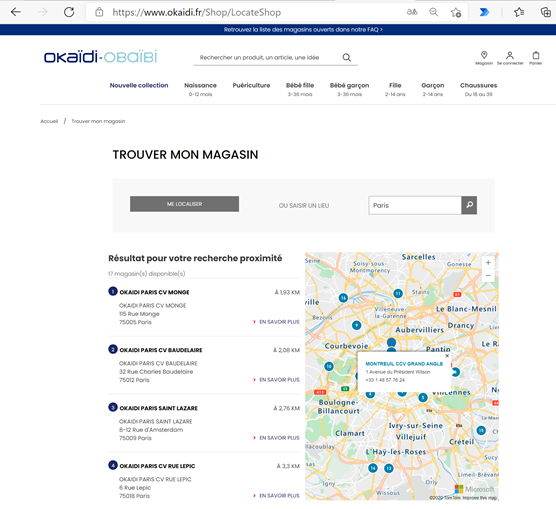
For example, World-wide children’s clothes retailer and Azure Maps customer, Okaïdi, has created their own “LocateShop” experience using the store locator functionality offered through the Azure Maps Web SDK. Customers easily find the “Location” option and then can type any city or country worldwide in the edit box to find the closest store or web retail site. They can then get their expectation set for a trip to the physical store to shop and pick up or follow the link to an online shopping experience if there is no retail store in their region.
Okaïdi has created a completely blended online and off-line shopping experience for their customers based on where they live and immediately sets the expectation o which shopping experiences they have available to them through their location finder page.
|
 |
While this blog focused on how Azure maps can help within your Retail solution, I also wanted to let you know that Microsoft has initiatives to help businesses succeed including:
- https://startups.microsoft.com/ – You are doing big things. We are here to help! Accelerate growth with a customized set of offerings and resources that evolve with your startup from idea to exit.
- https://partner.microsoft.com/ – Members of the Microsoft Partner Network have access to resources, programs, tools, and connections. Discover a community designed to help businesses grow.
- https://www.microsoftiotinsiderlabs.com/ – Accelerate your AI and/or IOT Project with personalized help from our Microsoft technology experts.
To Find out more about Azure for Retail and Microsoft for Business check out these information-packed links:
Thank you for your interest in Azure Maps. All of the samples above are directly accessible through the links and have Github repositories for you to leverage the sample code within your solutions. If you need any assistance or have any questions feel free to post them in our Q&A section, we are here to help!
by Contributed | Jul 7, 2021 | Technology
This article is contributed. See the original author and article here.
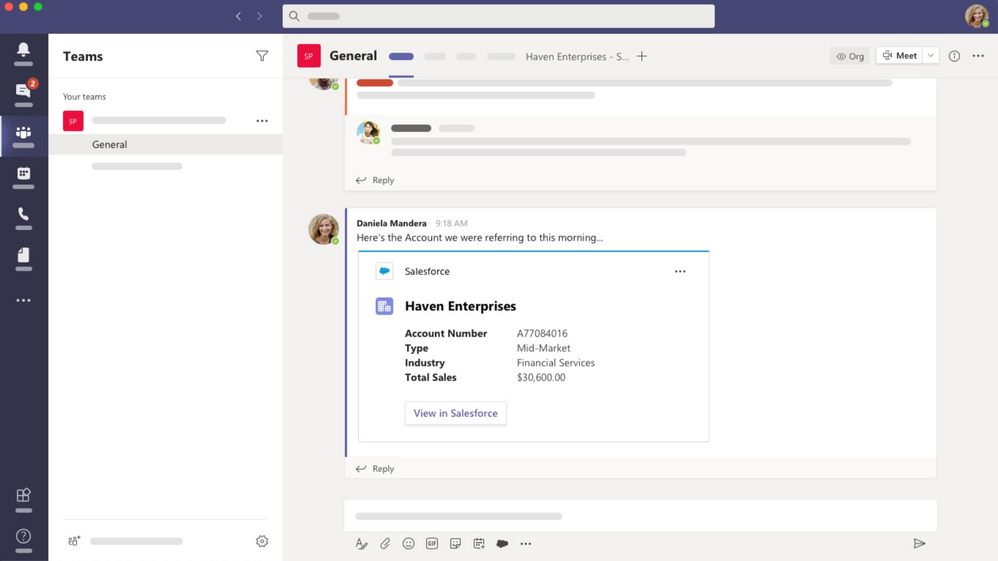
At Build, we shared how a new class of collaboration apps is needed to support the global structural changes for hybrid work. These apps provide a single collaborative layer to support synchronous and asynchronous working styles. We call this new class of applications collaborative apps.
The Salesforce app in Microsoft Teams is now Generally Available. Now, sales and service teams using Salesforce Sales Cloud or Service Cloud can bring account data and records into their Teams workspace for better collaboration. Sales and service reps no longer need to switch between windows to find key data; it’s all in one workspace so teams can stay aligned and work efficiently.
The integration supports the type of collaboration teams need in their current hybrid customer engagements. Sales teams need to have the most recent and relevant context about accounts as they interact with their teams and customers to provide a seamless buying experience. For service teams, it can create better coordination and faster response times to open cases, increasing customer satisfaction and reducing the support load on the team.
The Salesforce integration allows customers to access their Salesforce records in Teams channels, chat conversations, and meetings. This helps increase internal alignment and save time by no longer having to switch between applications.
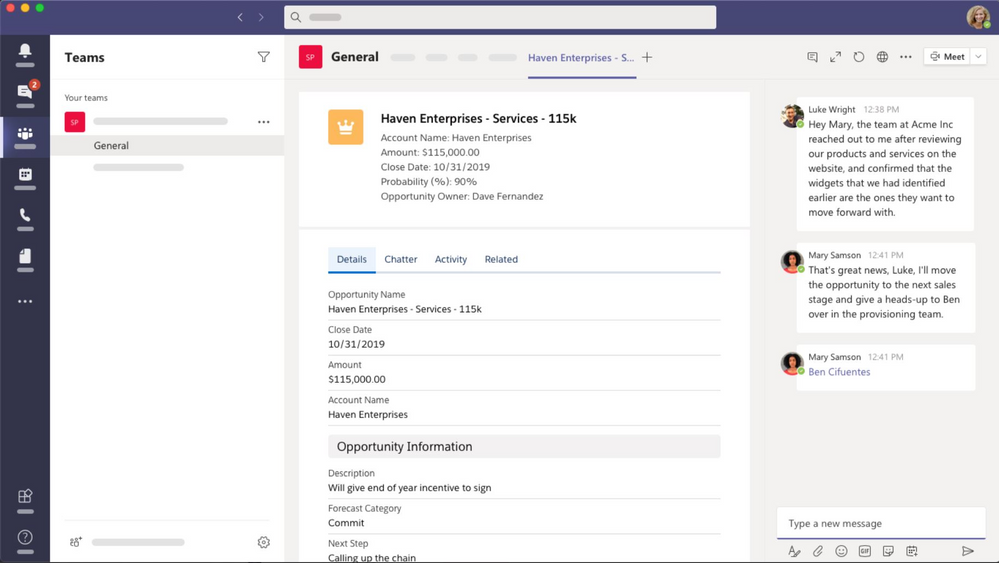
With the Teams Integration, Salesforce users can:
- Pin records to Teams channel tabs and chats to make them easy to find
- Edit records directly within Teams.
- Post important conversation moments on the Salesforce Chatter feed of records pinned on Teams channel and chat tabs.
- Mention Salesforce records (opportunities, accounts, cases, contacts, and leads) in Teams channels and chats to facilitate collaboration.
- Preview more details about records mentioned in Teams channels and chats.
The integration has received a high volume of interest while in pilot and we’re excited to see a collaborative app meeting our joint customers where they work.
To get started:
Add the Salesforce App to your Teams tenant from the Teams Admin Center. The Salesforce integration with Microsoft Teams is available to Microsoft customers licensed with Teams, and Salesforce customers with Sales and Service licenses in Enterprise, or higher editions, orgs.
by Contributed | Jul 7, 2021 | Technology
This article is contributed. See the original author and article here.
First things first. It’s OK to be nervous about the future. Or maybe you’re excited. Or maybe both!
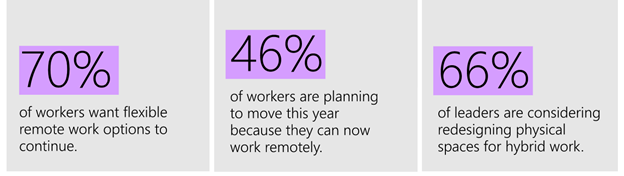
We’ve been through a lot. The global pandemic has deeply impacted our lives, companies, and families. Now depending on location, we are getting ready to return to our offices. It’s important to note, especially if you are a leader, people manager or Adoption Specialist, that there will be varying degrees of anxiety, excitement, trepidation, and general angst about this process. But we do have some data on the topic from the Work Trend Index report:
Work Trend Index report showing 70% of workers want remote flexibility, 46% plan to move and 66% of leaders are planning to redesign physical spaces.
People need and want flexibility, especially now that they’ve seen how it can have a positive impact on their lives. Facility managers, leaders and IT professionals are discussing how to best redesign the physical space to truly embrace a hybrid workforce. While the pandemic sent many of us home overnight, this return to work will take place over many months and will be a journey as we determine what is best depending on our role, region, and organization. If we can agree that our goals are a) the psychological safety and health of our workers, b) the operational productivity of our organization as a whole and c) our ability to impact our customers, partners, and employees in a positive way then I have some ideas. Let me break it down into 3 specific areas where you can help your co-workers and organizations with this transition.
#HumansFirst – Create safety belonging
This change is about people: About how they collaborate and create an inclusive environment that is their lived, shared experience, no matter the person’s location or role. Let’s not make the collective mistake of thinking that our conference room technology or any meeting solutions is going to completely bridge the new gaps between those who return to the workplace facility and those who do not. It’s critical that we lead with empathy as we assist people with their return. Going to work will not feel the same as it did 16 months ago. That’s OK. It’s OK to be nervous especially given the lack of accepted standards regarding vaccination status.
 Image of green, yellow and red wrist bands to indicate level of comfort with physical contact. Credit: James Osborne, LinkedIn Post
This unique and completely optional idea of color-coded bands depending on your comfort level with physical contact was recently shared by James Osborne on LinkedIn. While this may not be useful for your company culture it is worth having discussions, broadly or just within your team, about comfort levels and concerns.
Consider meeting 1 on 1 with your staff to gently discuss the topic of returning to the workplace. Each person will have their own experience and opinions which need to be respected while seeking balance for the whole of the organization. We can all lead from wherever we are in our organizations on this topic. If you want the outcome of productivity and talent retention, seek to create an environment of psychological safety to discuss these issues and others.
Regarding the physical return – give yourself and your staff time to reorient to the office environment. You may not remember where the sugar is, or the copy machine is located. That’s OK. You may experience random anxiety or feelings of being overwhelmed while another co-worker may be wildly excited to be able to concentrate while no longer managing remote education for their small children. We’ve been through a joint psychological trauma and depending on how much loss you personally experienced it may take some time to feel comfortable back at the office. Don’t rush it. Discuss with trusted allies and respect your own feelings and those of others.
Create Clarity – Communicate Company Policies
At Microsoft it has been clearly stated that we can return to the office once a given stage is attained and work from home up to 50% of the time without manager approval. Does your organization have clearly stated policies? We follow our states mask guidance and even when no longer required, it is perfectly acceptable to continue to wear a mask if that makes you comfortable. This comfort level may be different for everyone, especially for those of us who are caregivers to people with underlying conditions or may be concerned about the lack of knowledge regarding virus variants. That’s OK. What we need are clearly defined policies, communicated repeatedly and through multiple channels. If you aren’t doing that, I’d suggest that starting now would be helpful for you and your employees.
Communication is a key pillar of organizational change and service adoption. Now however many of us have hit the Covid-Information-Overload-Wall (my own term  ). There has been so much discussion of the situation that many are tuning out what you are saying. Be brief, be bright and be gone. Rinse and repeat. Give employees short, actionable guidance for where they are in the return to workplace cycle. Consider creating a channel in Teams or Yammer for questions. Use email, video, chat, and town halls to land your guidance. You can not communicate too much in this situation. A single email is not a communications plan!
Use the Technology – Differently and with more precision
Not only do we have information overload regarding the Covid-19 situation, but we also have shared online meeting fatigue. That’s OK. As we return to the workplace we can once again meet over coffee, in a conference room or hallway. When we do, the old challenges will re-emerge – lack of information transfer, failure to include all who are impacted by decisions and more. Now more than ever we can utilize the other capabilities of Microsoft Teams (and other collaboration technology) to share updates, ideas, and decisions with our co-workers. Including a Teams meeting link in every meeting allows you to chat before, during and after a meeting, share files and notes as well as track action items. These best practices existed long before the global pandemic. As we return to the office and collaborate with those who work, at least part time, remotely it is even more important to utilize the tools that are available to us to improve our collaboration practices.
It’s also time to update your #HumansFirst meeting best practices for these new situations. Identify when you will use video, who is taking notes and how you will ensure those not in the physical room will feel included in the conversation. Adding to your agenda dedicated time for remote participants to give feedback and having all members join the Teams meeting to see chat are ways we can improve our inclusiveness in the phase we are now stepping into. As an Adoption Specialist now is the time to bring these adoption themes back out for broad consumption. We’ll be discussing this and more in our Microsoft 365 Champions program when we resume our monthly calls in August 2021. We hope you join us!
Of course, we believe it is also essential to review your meeting room technology to ensure you have what is necessary to create a productive, collaborative environment. New categories of Teams Devices from Microsoft and our partners will make this easier and more affordable than ever. It is extremely worthwhile to review your new and upcoming options in this area.
#BetterTogether – We can do this!
The last 16 months have permanently changed me and my approach to people management, technology adoption and solution architecture. I’m convinced that not only can we best succeed by approaching situations with a commitment to empathy and diversity but that we will create new opportunities by doing so together. I have always loved technology but my desire to be helpful to people is, for me, the most important thing. However you may be feeling about the next 16 months, just know you aren’t in it alone. We are with you and always ready to help. Join us in the Driving Adoption blog for more on this topic or read our Adoption Newsletter on LinkedIn. Whatever you do, give yourself time to adjust and talk with your trusted allies. Share your stories and let’s help each other reimagine the future of hybrid work together.
by Contributed | Jul 7, 2021 | Technology
This article is contributed. See the original author and article here.
By Masaki Iwamaru – Service Engineer | Microsoft Endpoint Manager – Intune
The Box – Cloud Content Management app (iOS/Android) by Box Inc. provides quick access to data in Box cloud storage for personal and enterprise use. Since October 2020, the app supports Intune app protection policies (APP) . These policies use data protection features, built with the Intune App SDK, to provide secure data access and use. For example, you can control data transfer between apps, restrict copy-paste between apps, set access requirements, and force conditional launch settings. You do not need to implement a mobile device management (MDM) solution or deploy app config policies to use Box app with Intune app protection policies.
This blog post provides step-by-step guidance on using the Box – Cloud Content Management app with Intune app protection policies.
Note
There is a separate Box for EMM app that you can use with Intune MDM. This article focuses on the Box – Cloud Content Management (iOS/Android) app for unmanaged devices. If you are interested in using the Box for EMM app for managed devices, see Integrating Box for EMM app with Intune app protection policies (APP).
Use the Box app with Intune app protection policies (without MDM)
Step 1. Enable Intune MAM feature in the Box admin console.
You need to enable the Intune mobile application management (MAM) feature in the Box admin console. Otherwise, the Box app won’t receive Intune app protection policies. This will require administrative privileges.
- Sign in to your Box tenant with a web browser.
- Go to Admin Console > Enterprise Settings > Mobile.
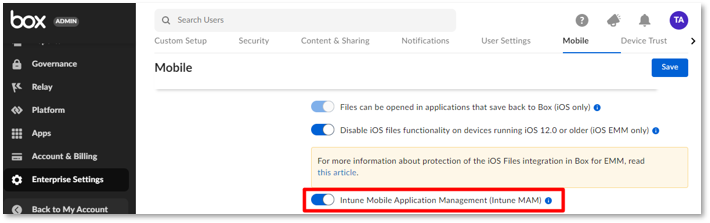
- Enable the toggle button next to Intune Mobile Application Management (Intune MAM) and select Save.
Screenshot of the Box admin portal with the “Intune Mobile Application Management (Intune MAM)” setting highlighted.
Step 2. Apply an app protection policy to the Box app.
You can create a new app protection policy or use an existing one.
- Sign in to the Microsoft Endpoint Manager admin center.
- Go to Apps > App configuration policies.
- Create a new app configuration policy or select an existing policy.
- Go to the Apps properties page for your policy, and confirm the following settings:
- In the Public apps list, make sure that the Box – Cloud Content Management app is included.
- Set Target to apps on all device types to Yes to avoid misconfigurations.
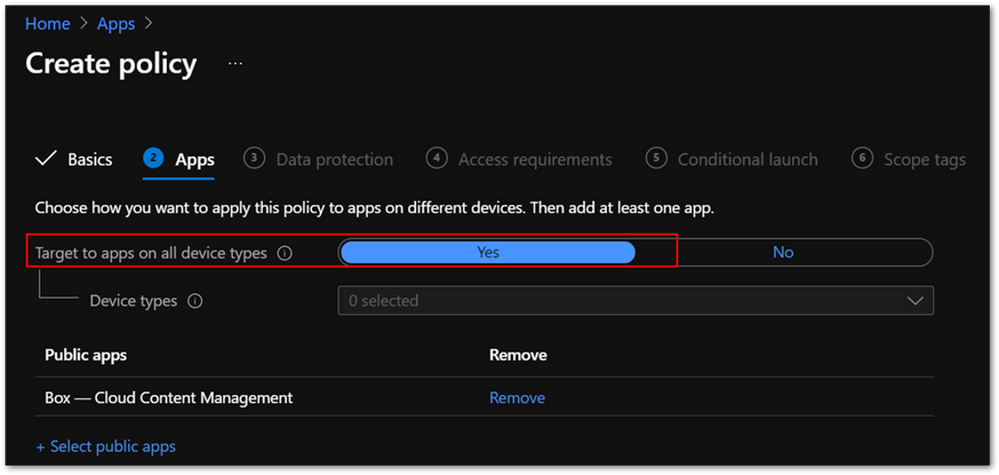 Screenshot of an Intune APP policy with the “Target to apps on all device types” setting highlighted.
5. Make sure the policy is assigned to the correct users. App protection policies should be assigned to users instead of devices.
Step 3. Install the Box – Cloud Content Management app.
If you set Target to apps on all device types to Yes in the app protection policy, end users can install the Box app either directly from Intune or from a public app store.
Note:
If you set this field to No and select Managed for Device types, users will need to install the app from Intune to receive an app config policy with the IntuneMAMUPN key. See the Intune documentation for more information about the iOS app configuration settings about and an example using this key.
Step 4. Launch the Box – Cloud Content Management app.
When an end user launches the app, they will see the Microsoft Azure Active Directory (Azure AD) sign-in screen. The user name is automatically populated. It should be the same as the user who enrolled the device. When they sign in to Azure AD, the app protection policy will be applied. The user will then see an app restart request.
Step 5. Relaunch the app.
When an end user relaunches the app, it might ask them to set an app PIN at sign in (if you configured it to require one). They can now use the app with Intune app protection.
FAQ
Here are common issues to be aware of when you’re integrating the Box app with Intune app protection policies:
- App protection policy is not applied after sign-in.
Make sure the policy is assigned to correct users. The app protection policy should be assigned to users, not devices.
Confirm that Target to apps on all device types is set to Yes.
It can take time for the policy to be applied if end users are signed in to the app before the policy assignment. This article provides more information about expected policy delivery timing.
- Do I need to deploy a Public ID app config key, which is required for Box for EMM?
No. You don’t need to deploy a Public ID app config key to use the Box – Cloud Content Management app with Intune app protection policies. Instead, you need to enable the Intune MAM feature in Box admin console.
- Should I set up single sign-on (SSO) between Azure AD and Box service?
You can use Box features without SSO integration. However, your end users must sign in with identical user names for both the Box app and Azure AD (Step 4 above). While it is optional, SSO provides a simplified and excellent user experience. Check out this article to learn about SSO integration guidance.
- Should I enroll devices to MDM to protect the Box app with Intune app protection policies?
No, you don’t need to enroll devices to MDM such as Intune. The Box – Cloud Content Management app supports app protection policies without MDM enrollment scenario.
- Can I use Box app with MDM managed devices?
Yes, you can use Box app with MDM managed devices. Intune app protection policies can be applied to the Box – Cloud Content Management app on MDM managed devices. Check out this article how to target app protection policies based on device management state.
More info and resources
For further resources on this subject, please see the links below.
iOS/iPadOS app protection policy settings
Android app protection policy settings in Microsoft Intune
Validate your app protection policy setup
Create and deploy app protection policies
Set up app protection policies for iOS devices
If you have any questions, reply to this post or reach out to @IntuneSuppTeam on Twitter.


Recent Comments