Autoruns v14.01
This article is contributed. See the original author and article here.
This update for Autoruns fixes a regression with VirusTotal submissions introduced in v14.0.

This article is contributed. See the original author and article here.

This article is contributed. See the original author and article here.
We continue to expand the Azure Marketplace ecosystem. For this volume, 120 new offers successfully met the onboarding criteria and went live. See details of the new offers below: | ||||||||||||||||||||||||||||||||||||||||||||||||||||||||||||||||||||||||||||||||||||||||||||||||||||||||||||||||||||||||||||||||||||||||||||||||||||||||||||||||||||||||||||||||||||||||||||||||||||||||||||||||||||||||||||||||||||||||||||||||||||||
| ||||||||||||||||||||||||||||||||||||||||||||||||||||||||||||||||||||||||||||||||||||||||||||||||||||||||||||||||||||||||||||||||||||||||||||||||||||||||||||||||||||||||||||||||||||||||||||||||||||||||||||||||||||||||||||||||||||||||||||||||||||||

This article is contributed. See the original author and article here.
This is the next installment of our blog series highlighting Microsoft Learn Student Ambassadors who achieved the Gold milestone and have recently graduated from university. Each blog in the series features a different student and highlights their accomplishments, their experience with the Student Ambassadors community, and what they’re up to now.
Today we’d like to introduce Nandita Gaur who is from India and recently graduated from ABES Engineering College with a degree in Computer Science and Engineering.
Responses have been edited for clarity and length.
When you joined the Student Ambassador community in 2019, did you have specific goals you wanted to reach, such as a particular skill or quality? What were they? Did you achieve them? How has the program impacted you in general?
Microsoft has always been my dream organization, so when I got to know about this amazing program by Microsoft for students, I had to join. Before joining the community, my goals were oriented towards my personal growth. I wanted to enhance my resume by learning new skills, meet new people around the globe working on various technologies, and meet people of Microsoft. Now that I have graduated from this program, I have grown so much as a person. I have achieved all my goals. In fact, a lot more than that. I am a lot more confident in public speaking skills as compared to before. I have learned about Cloud Computing, Machine Learning, and Artificial Intelligence, gained knowledge about various Microsoft products, and I have met various impactful personalities around the globe.
The Student Ambassadors community has impacted me so much. My mindset has changed. I have realized that emphasizing just only on the personal growth is not going to help you much in the life. It’s all about making an impact. It’s about how many people are going to get benefitted by the work you do.
What are the accomplishments that you’re the proudest of and why?
I have conducted many events, thus impacting a lot of people, but one thing that I am truly proud of is winning the Azure Developer Stories contest, a blogging contest held in April 2020 wherein we had to document a project based on Machine Learning. I didn’t really know Machine Learning before this contest, but since it was declared during lockdown, I had all the time to study. So I referred to Microsoft Learn and based on all the knowledge I gathered from it, I made a project on COVID-19 Analysis using Python. I just couldn’t believe it when the results were announced. I was declared winner among all the Student Ambassadors of India. This boosted my confidence a lot.
“Nothing is tough; all it takes is some dedication.”
I was too reluctant to start Machine Learning then because it covers a lot of mathematics, something which I tried to avoid for as long as possible. I couldn’t find good resources to study Machine Learning online, and this contest by the Student Ambassador community introduced me to a well-structured course on Microsoft Learn on Machine Learning. I had no reason to procrastinate. I had the all the resources. I had to start learning.
I am really proud of all the learning I have gathered about Machine Learning and fighting the habit of procrastination.
What do you have planned after graduation?
I will be working as a Support Engineer with the Microsoft India CE&S team on Dynamics 365. I also plan to keep mentoring the students of my college so that they can achieve more than they think they can.
If you could redo your time as a Student Ambassador, is there anything you would have done differently?
I could have made much more connections. Although I have made a lot of friends, I was reluctant in the beginning to talk to anyone. I didn’t prefer speaking much. If I had spoken more, then I would have probably got the chance to be a speaker at Microsoft Build or Ignite.
If you were to describe the community to a student who is interested in joining, what would you say about it to convince him or her to join?
It is a wonderful opportunity that grooms your personality and helps you evolve as a person. You get to meet talented people across the globe and learn various technologies with them and make strong connections that may help you in your career. You get to know what’s going inside Microsoft and about the Microsoft mission, its culture and values, and you build a close connection with Microsoft employees who mentor you in making projects, provide you valuable career tips, and also provide you with various speaking opportunities at international conferences. You will know what’s going around the world in the field of technology and have a clearer picture of how technology can be used to create an impact in this world.
What advice would you give to new Student Ambassadors?
Push aside your inhibitions and start talking around. Start discussions, involve yourself in conversations, and conduct useful events that may help the students of your local community at University.
Just organizing events is not helpful. You have to attend sessions too. All the speakers from Microsoft are immensely talented professionals who have interesting knowledge to offer that is going to help you at every point in your career. You have a lot to take and to offer. So take full advantage of the opportunities that the Student Ambassadors team is offering you.
Do you have a motto in life, a guiding principle that drives you?
During lockdown I was much too demotivated. There was a lot of negativity in the environment. To top it off, placement season for post-graduation job was overhead. I had lost my productivity because of all the chaos around and felt like I am making no progress in life. Luckily I landed on this song called “Hall of Fame” by an Irish band “The Script”. It is an inspirational song that says you can do anything you set your mind to as long as you believe in yourself and try. It motivated me to get up and start working, so I made this song my guiding principle.
What is one random fact few people know about you?
I am good at palmistry. My classmates in the high school consulted with me, showing their hands to me to know about their future, personality, and what could be done to improve it. Even teachers too! I enjoyed this fame but eventually realized that this does not help with anything except unnecessary worrying among the folks for their future. When I moved to college, I kept this skill as a secret. Actually, I have given up this job completely, so please don’t consult me for this (LOL).
Good luck to you in your journey, Nandita!
This article is contributed. See the original author and article here.
Get started with DevOps Guest post by Charlie Johnstone, Curriculum & Quality Leader for Computing, Film & TV at New College Lanarkshire: Microsoft Learn for Educator Ambassador
DevOps enables better communications between developers, operations, quality and security professionals in an organisation, it is not software or hardware and not just a methodology, it is so much more! What it does is bring together the people in your teams (both developers and ops people), products and processes to deliver value to your end users.
This blog will focus on some of the tools and services used within Azure DevOps to build test and deploy your projects wherever you want to deploy, whether it be on prem or in the cloud.
This blog will be delivered in multiple parts, in this part, following a short primer, I will discuss part of the planning process using Azure Boards
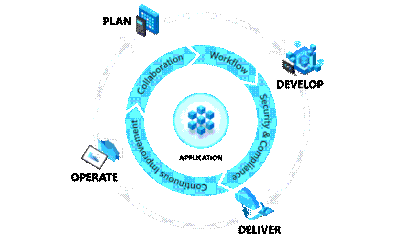
Plan:
In the plan phase, the DevOps teams will specify and detail what the application will do. They may use tools like Kanban boards and Scrum for this planning.
This is fairly obvious, this is mainly focused on coding, testing and reviewing. Automation is important here using automated testing and continuous integration (CI). In Azure, this would be done in a Dev/Test environment
In this phase, the application is deployed to a production environment, including the application’s infrastructure requirements. At this stage, the applications should be made available to customers, and should be scalable.
Once in the production environment, the applications need monitoring to ensure high availability, if issues are found then maintenance and troubleshooting are necessary.
Each of these phases relies on each other and, to some degree, involves each of the aforementioned roles.
Continuous Integration allows developers to merge code updates into the main code branch. Every time new code is committed, automated testing takes place to ensure stability of the main branch with bugs identified prior to merging.
Continuous Delivery automatically deploys new versions of your applications into your production environment.
Used together as CI/CD, you will benefit from automation all the way from committing new code to its deployment in your production environment, this allows incremental changes in code to be quickly and safely deployed.
Tools for CI/CD include Azure Pipelines and GitHub Actions.
Version control systems basically track the history of changes to a project’s code. In an environment where where multiple developers are collaborating on a project, version control is vital. Tools like Git provide for development teams to collaborate on projects in writing code. Version control systems allow for code changes happening in the same files, dealing with conflicts and rolling back to previous states where necessary.
This is where you can begin to manage your projects by creating your work items. Azure Boards has native support for Kanban and Scrum as well as reporting tools and customisable dashboards, and is fully scalable.
We are going to use Basic process for this walkthrough, other available process types are Agile, Scrum and CMMI.
To begin your project, go to https://dev.azure.com/ and sign in. The first task you need to do is optionally to create a new organization.
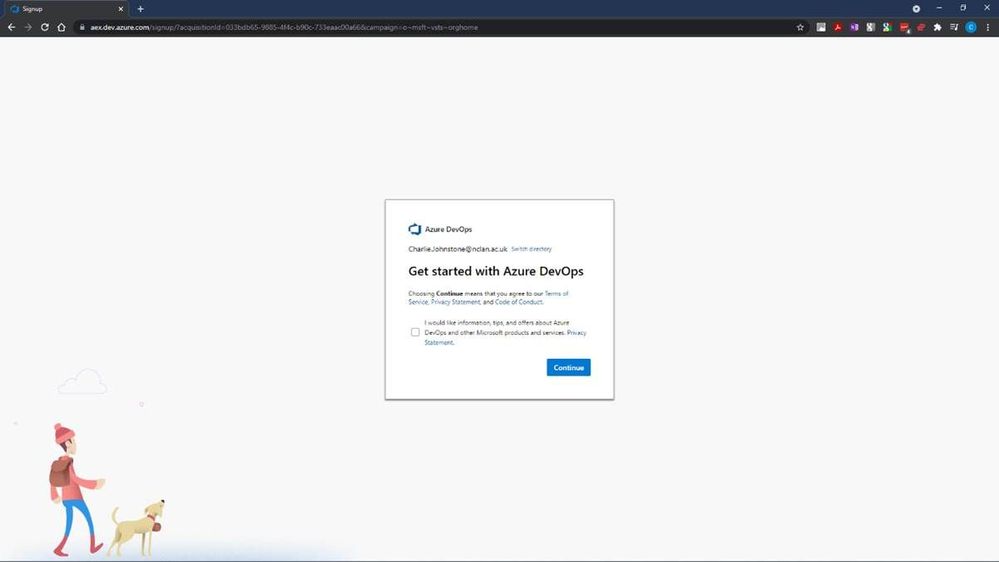
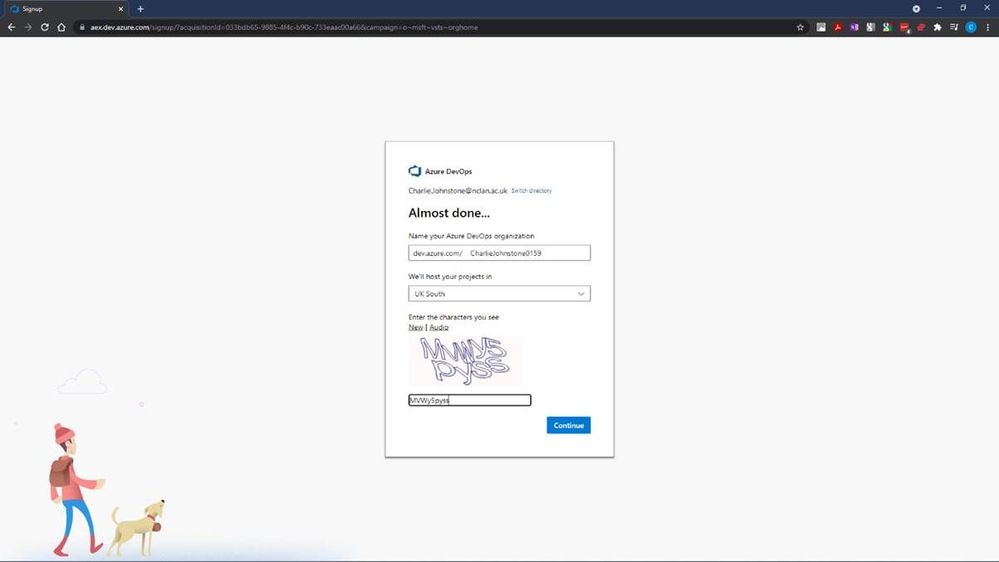
After selecting “Continue”, you will have the opportunity to name your organisation and choose the region where you want your project hosted.
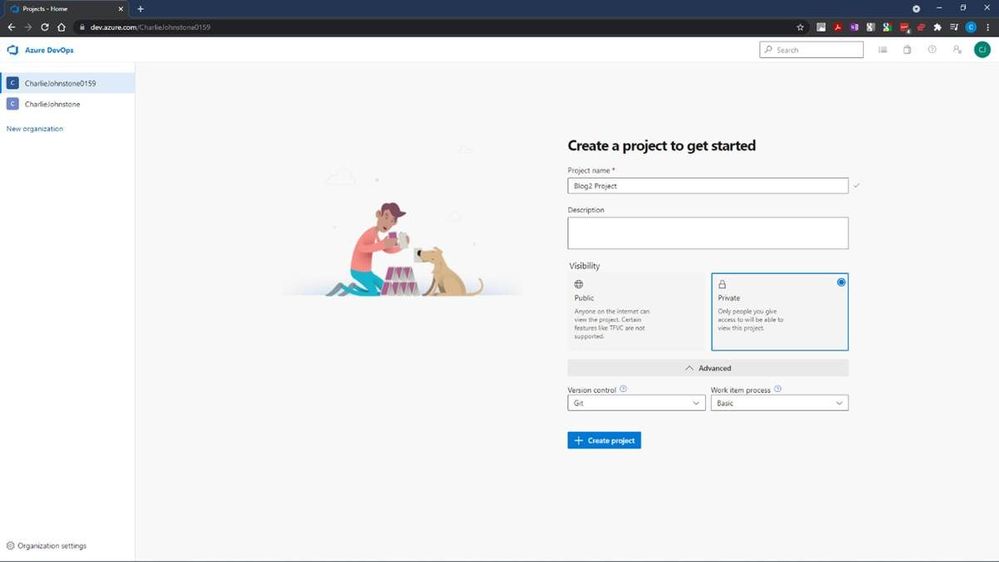
Following this step we will create our new project, for the purposes of this article, I’ve named it “BBlog2 Project”, made it private, selected Git for version control and chosen to use Basic process for work items.
The next step is to create the “Boards” you will be using
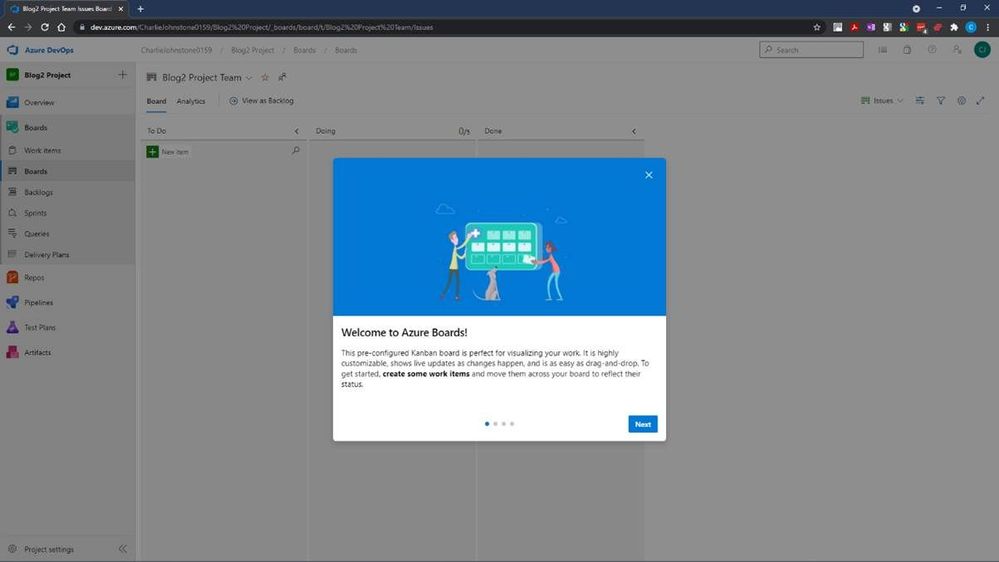
It is worth a look at the screens on the welcome dialog. Once you have done this you will see a screen similar to that below.
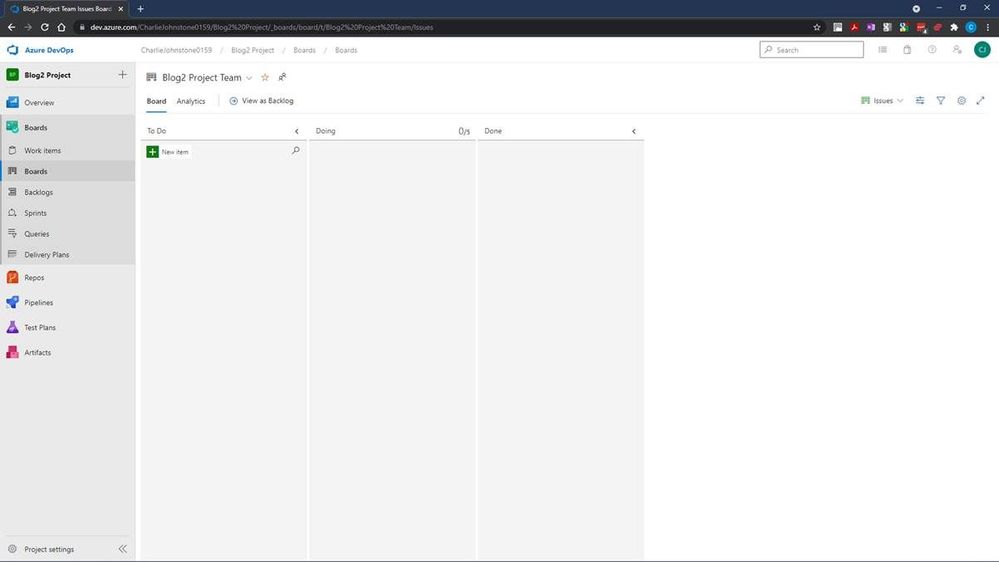
This is where we will define our work items. I have created some simple items for demonstration purposes. Having created these items, the next screen will show how simple it is to change the status of an item.
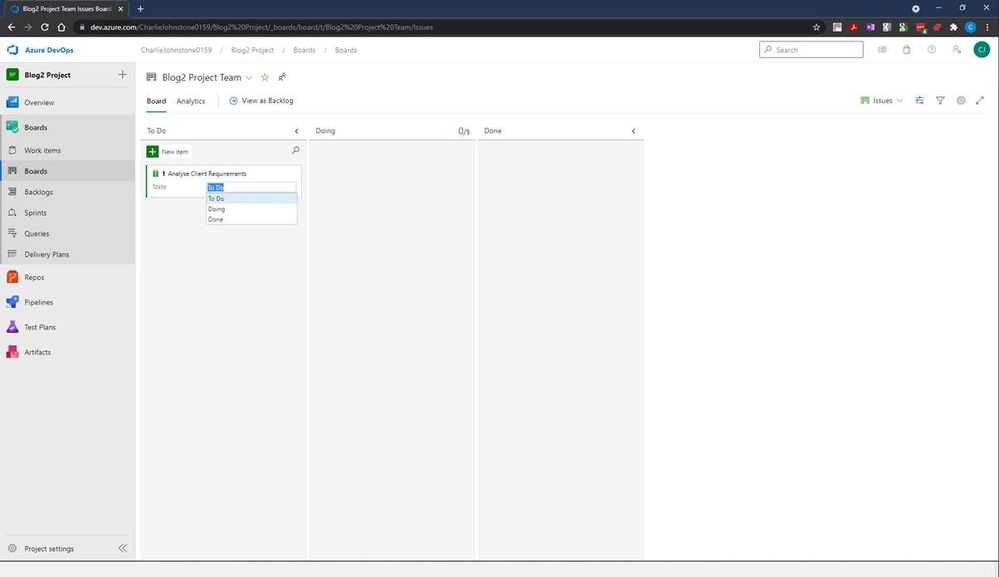
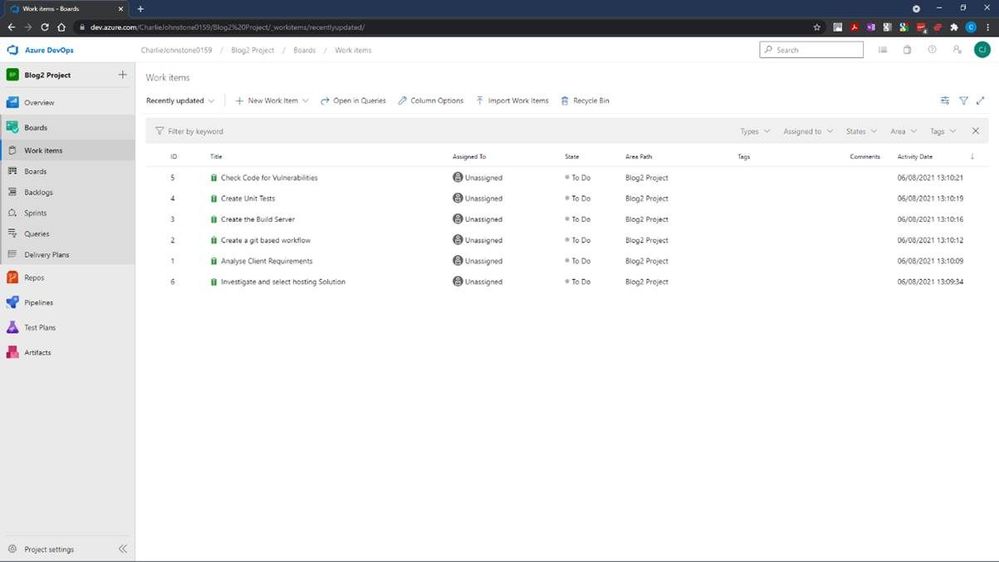
Once your project is properly underway, it is very easy to change a work item’s state from To Do, to Doing and finally to Done. This gives you a simple visual view of where your work items are. The next 2 screens show all my work items created both in the Boards and Work Items tabs, but there’s still work to be done here, as you’ll see, all items are currently unassigned and no schedules have been created.
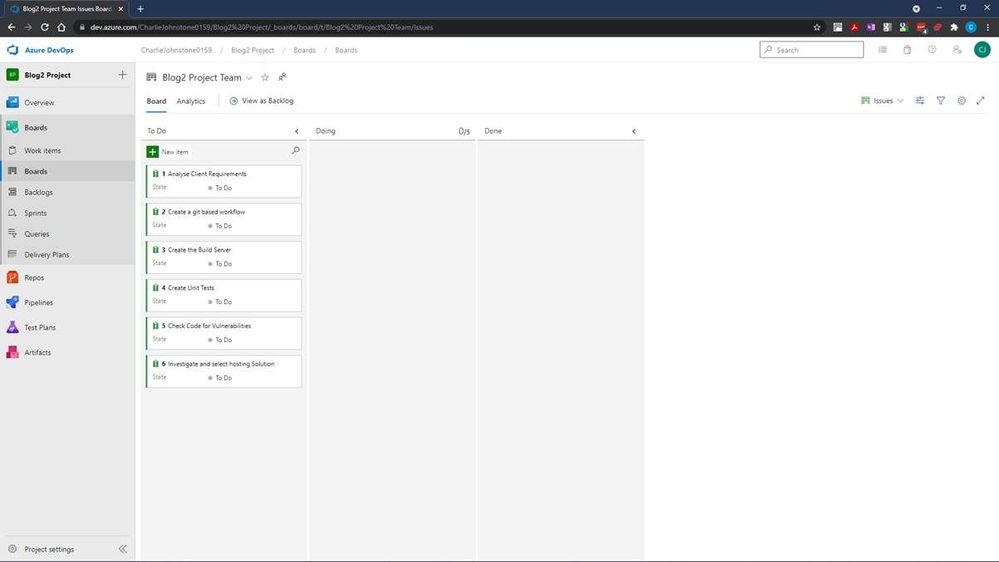
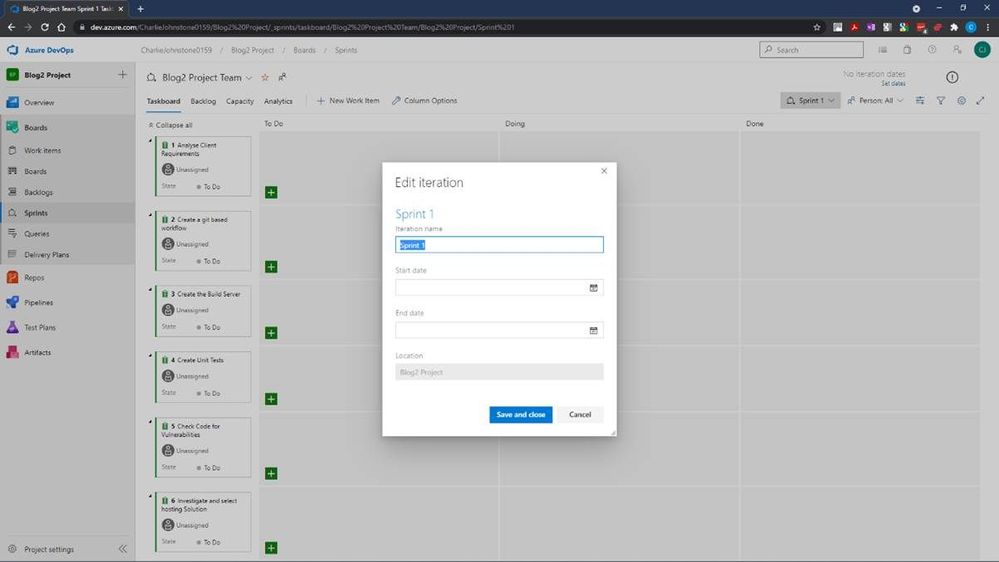
For the next screen I have set the dates for the project, using the default “Sprint 1” Iteration name.
Having done some tasks slightly out of order, my next task was to create my team, I would have been better doing this earlier. To do this, I returned to “Project Settings” (bottom left of screen) and selected the “Teams” page below.
At this stage I was the only team member of the only team
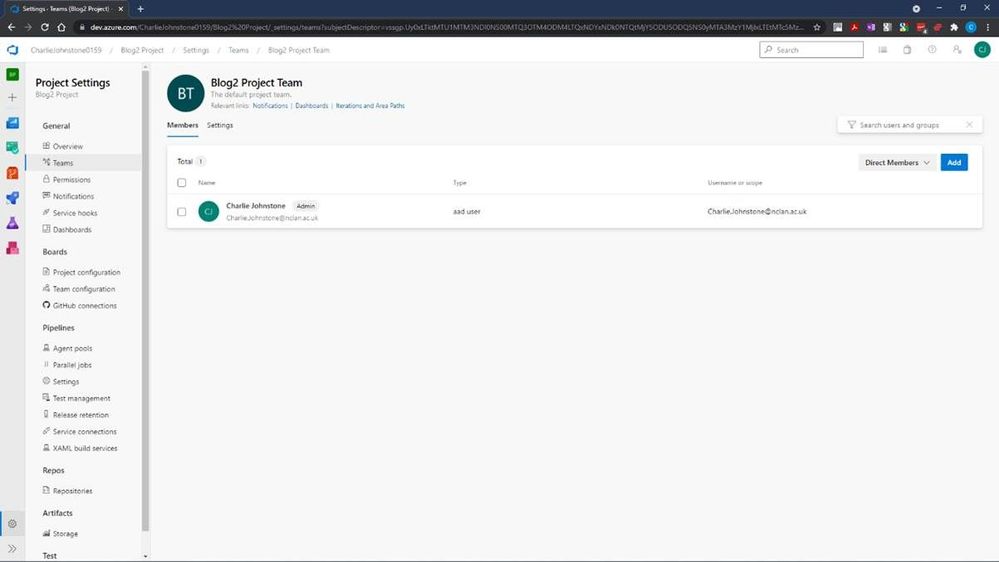
At this stage it’s a simple process to add team members by selecting “Add” on the right of the screen and searching your Azure AD for your desired team members.
On completion of this process you should see a fully populated team as below, names and emails blurred for privacy reasons
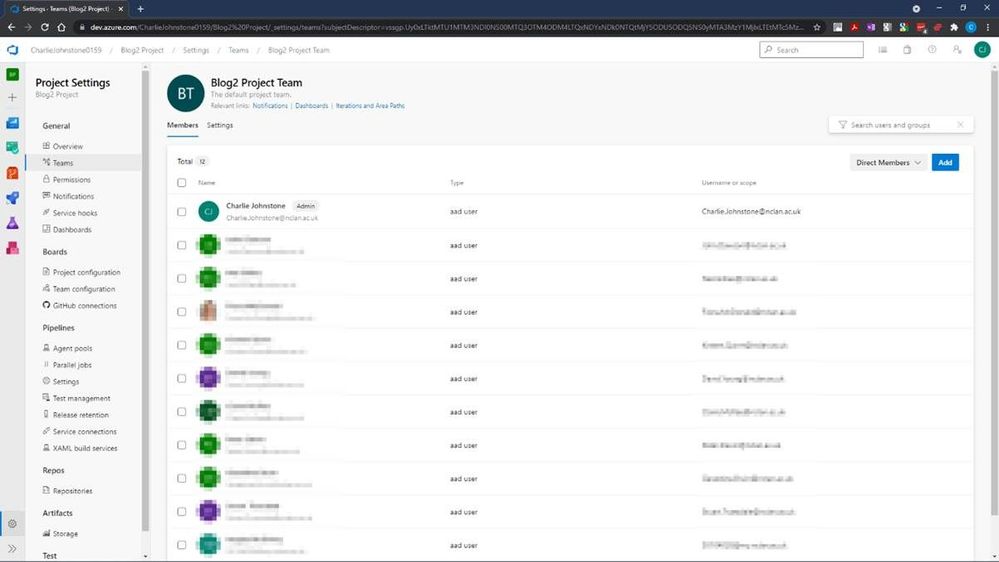
At this point if we return to our Boards tab, and select a work item, you will see (highlighted) that the items are still unassigned, clicking this area will allow you to assign this task to a member of your team.
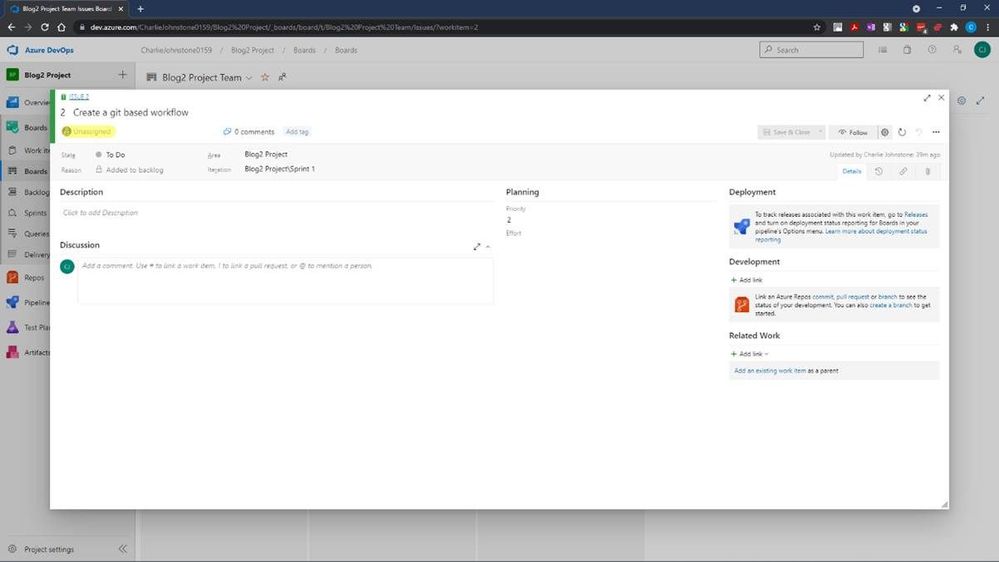
The final screen below shows that all the Work Items have now been assigned. The team members will then start to work on the items and change the state form To Do, to Doing. When a task is completed, it can then be updated to Done.
This is a very straightforward tool to use, and I have only really touched the surface of it, as a getting started guide, the next item in this series will be on Pipelines.
My main source for this post has been an excellent new resource https://docs.microsoft.com/en-us/learn/modules/get-started-with-devops/. For more useful information on Azure DevOps services, another great resource is https://docs.microsoft.com/en-us/azure/devops/get-started/?view=azure-devops.
The reason for the focus on Azure Boards is that my team is embarking on a new journey, we are beginning to teach DevOps to our first year students. Microsoft has provided great resources which are assisting us in this endeavour.
For students and faculty, Microsoft offers $100 of Azure credit per year on validation of your status as a student or educator, just follow the link here for Microsoft Azure for Student
This is far from the only DevOps resource offered by Microsoft. For a some more introductory information for educators wishing to become involved with DevOps, a great quick read is https://docs.microsoft.com/en-us/azure/education-hub/azure-dev-tools-teaching/about-program. This provides an introduction on how to get your students started with Azure and gives you and your students the opportunity to claim your free $100 in order study Azure; download a wealth of free software; get free licences for Azure DevOps and get started with how computing works now and in the future.
My team has only been working with Azure since the beginning of the 2021, initially focusing on the Fundamentals courses AZ-900 (Azure Fundamentals) and AI-900 (Azure AI Fundamentals)
We are adding DP-900 (Azure Data Fundamentals) and SC-900 (Security, Compliance, and Identity Fundamentals) to the courses we offer to our first year students.
Our second and third-year students are being given the opportunity to move to role based certifications through a pilot programme for AZ-104 (Microsoft Azure Administrator) to make their employment prospects much greater.
Our experience of these courses to date has been great, the students have been very engaged with many taking multiple courses. Our industry contacts have also taken notice with one large organisation offering our students a month’s placement in order to develop a talent stream.
My recommendations for how to approach the fundamentals courses is possibly slightly unusual. Though at this stage I think the most important courses for students to study are AZ-900 to learn about cloud computing in general and the tools and services within Azure; and DP-900 because data drives everything! I would start the students journey with AI-900, this is a great introduction to artificial intelligence services and tools in Azure, which like the other fundamentals courses, contains excellent labs for students to complete and does not require coding skills. The reason I recommend starting with AI-900 is that it provides a great “hook”, students love this course and on completion want more. This has made our job of engaging the students in the, arguably, more difficult courses quite straightforward.
If you don’t feel ready to teach complete courses or have a cohort for whom it wouldn’t be appropriate, Microsoft is happy for you to use their materials in a piecemeal manner, just pick out the parts you need. My team are going to do this with local schools, our plan is to give in introduction to all the fundamentals courses already mentioned over 10 hours.
To get fully involved and access additional great resources, sign up either as an individual educator or as an institution to the Microsoft Learn Educator Programme.
Education needs to move away from just developing software for PC and on-prem environments and embrace the cloud, services such as Azure is not the future, it is NOW! It’s time to get on board or risk your graduates being irrelevant to the modern workplace.
This article is contributed. See the original author and article here.
The field of Artificial Intelligence is being applied to more and more application areas, such as self-driving cars, natural language processing, visual recognition, fraud detection and many more.
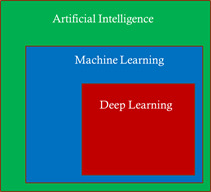
A subset of artificial intelligence is Deep learning (DL), which is used to develop some of the more sophisticated training model, using deep neural networks (DNN) trying to mimic the human brain. Today, some of the largest DL training models can be used to do very complex and creative tasks like write poetry, write code, and understand the context of text/speech.
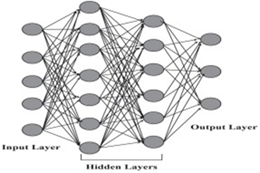
These large DL models are possible because of advancements in DL algorithms (DeepSpeed )), which maximize the efficiency of GPU memory management. Traditionally, DL models were very parallel floating-point intensive and so performed well on GPU’s, the newer more memory efficient algorithms made it possible to run much larger DL models but at the expense of significantly more inter-node communication operations, specifically, allreduce and alltoall collective operations.
Modern DL training jobs require large Clusters of multi-GPUs with high floating-point performance connected with high bandwidth, low latency networks. The Azure NDv4 VM series is designed specifically for these types of workloads. ND96asr_v4 has 8 A100 GPU’s connected via NVlink3, each A100 has access to 200 Gbps HDR InfiniBand, a total of 1.6 Tbps internode communication is possible.
We will be focusing on HPC+AI Clusters built with the ND96asr_v4 virtual machine type and providing specific performance optimization recommendations to get the best performance.
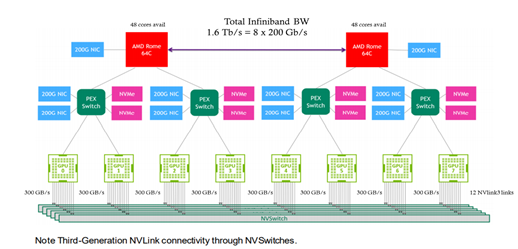
The Deep learning hardware and software stack is much more complicated compared to traditional HPC. From the hardware perspective CPU and GPU performance is important, especially floating-point performance and the speed in which data is moved from CPU (host) to GPU (device) or GPU (device) to GPU (device). There are many popular Deep learning frameworks e.g. pytorch, tensorflow, Caffe and CNTK. NCCL is one of the popular collective communication library for Nvidia GPU’s and low-level mathematics operations is dependent on the CUDA tools and libraries. We will touch on many parts of this H/W and S/W stack in this post.
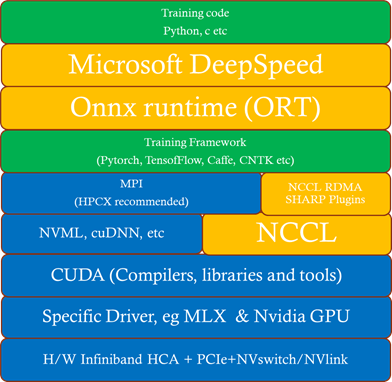
In this section we discuss some deployment options.
It’s recommended that you start with one of the Azure Marketplace images that support NDv4. The advantage of using one of these Marketplace images is the GPU driver, InfiniBand drivers, CUDA, NCCL and MPI libraries (including rdma_sharp_plugin) are pre-installed and should be fully functional after booting up the image.
Another option, especially if you want to customize your image is to build your own custom image. The best place to start is the azhpc-images GitHub repository, which contains all the scripts used to build the HPC marketplace images.
You can then use packer or Azure Image builder to build the image and Azure Shared image gallery to store, use, share and distribute images.
In this section we will explore some options to deploy an HPC+AI NDv4 cluster.
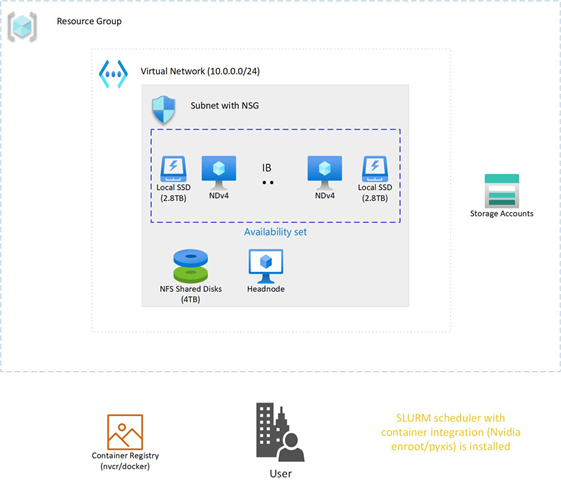
In this section we will look at a couple of areas that should be carefully considered to make sure your large DL training job is running optimally on NDv4.
Here is the procedure to set the GPU’s to maximum clock rates and to then reset the GPU clock rate after your job is completed. The procedure for GPU id 0 is shown, need to do this procedure for all GPUs.
First get maximum graphics and memory clock frequencies
max_graphics_freq=$(nvidia-smi -i 0 –query-gpu=clocks.max.graphics –format=csv,noheader,nounits)

max_memory_freq=$( nvidia-smi -i 0 –query-gpu=clocks.max.mem –format=csv,noheader,nounits)

echo “max_graphics_freq=$max_graphics_freq MHz, max_memory_freq=$max_memory_freq MHz”

max_graphics_freq=1410 MHz, max_memory_freq=1215 MHz
Then set the GPUs to the maximum and memory clock frequencies.
sudo nvidia-smi -I 0 -ac $max_memory_freq, $max_graphics_freq

Applications clocks set to “(MEM 1215, SM 1410)” for GPU 00000001:00:00.0

All done.
Finally, when job is finished, reset the graphics and memory clock frequencies.
sudo nvidia-smi -i 0 -rgc

All done.
When MPI is used with NCCL, MPI is primarily used just to start-up the processes and NCCL is used for efficient collective communication.
You can start processes by explicitly executing mpirun or via a Scheduler MPI integration (e.g SLURM srun command.).
If you have flexibility on the choice of MPI library, then HPCX is the preferred MPI library due to its performance and features.
It is required to disable Mellanox hierarchical Collectives (HCOLL) when using MPI with NCCL.
mpirun –mca coll_hcoll_enable 0 or export OMPI_MCA_COLL_HCOLL_ENABLE=0
The first step is to determine what is the correct CPU (NUMA) to GPU topology. To see where the GPU’s are located, you can use
ltopo or nvidia-smi topo -m
to get this information or use the check application pinning tool (contained in the azurehpc Github repo (see experimental/check_app_pinning_tool)
./check_app_pinning.py
Virtual Machine (Standard_ND96asr_v4) Numa topologyNumaNode id Core ids GPU ids
============ ==================== ==========
0 [‘0-23′] [2, 3]
1 [’24-47′] [0, 1]
2 [’48-71′] [6, 7]
3 [’72-95’] [4, 5]
We can see that 2 GPU’s are located in each NUMA domain and that the GPU id order is not 0,1,2,3,4,5,6,7, but 3,2,1,0,7,6,5,4. To make sure all GPU’s are used and running optimally we need to make sure that 2 processes are mapped correctly and running in each NUMA domain. There are several ways to force the correct gpu to cpu mapping. In SLURM we can map GPU ids 0,1 to NUMA 1,
GPU ids 2,3 to NUMA 0, GPU ids 4,5 to NUMA 3 and GPU ids 6,7 to NUMA 2 with the following explicit mapping using the SLURM srun command to launch processes.
srun –cpu-bind=mask_cpu:ffffff000000,ffffff000000,ffffff,ffffff,ffffff000000000000000000,ffffff000000000000000000,ffffff000000000000,ffffff00000000000
A similar gpu to cpu mapping is possible with HPCX MPI, setting the following environmental variable and mpirun arguments
export  CUDA_VISIBLE_DEVICES=2,3,0,1,6,7,4,5

–map-by ppr:2:numa                                      (Add :pe=N, if running hybrid parallel (threads in addition to processes)
Then you can use the AzureHPC check_app_pinning.py tool as your job runs to verify if processes/threads are pinned optimally.
Two aspects of I/O need to be addressed.
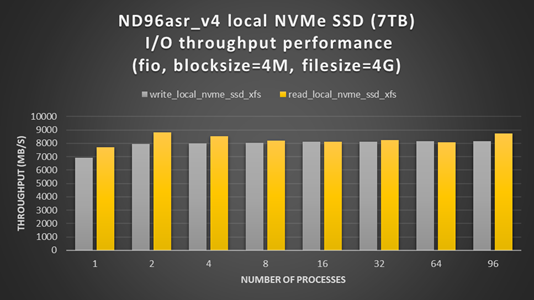
ND96asr_v4 virtual machine contains 8 NVMe SSD devices. You can combine the 8 devices into a striped raid 0 device, that can then be used to create an XFS (or ext4) filesystem and mounted. The script below can be run on all NDv4 VM’s with a parallel shell (e.g pdsh) to create a ~7TB local scratch space (/mnt_nvme).
The resulting local scratch space has a read and write I/O throughput of ~8 GB/s.
#!/bin/bash
mkdir /mnt/resource_nvme
mdadm --create /dev/md128 --level 0 --raid-devices 8 /dev/nvme0n1 /dev/nvme1n1 /dev/nvme2n1 /dev/nvme3n1 /dev/nvme4n1 /dev/nvme5n1 /dev/nvme6n1 /dev/nvme7n1
mkfs.xfs /dev/md128
mount /dev/md128 /mnt/resource_nvme
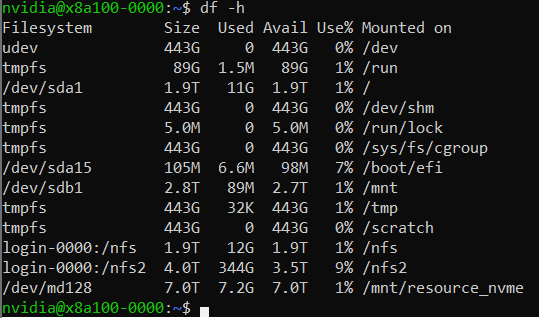
The process described here is specific to azcopy, but the same principals can be applied to any of the language specific SDK (e.g BLOB API via python).
In this example, lets assume that we have as single BLOB storage account with an ingress limit of 20 Gbps. At each checkpoint, 8 files (corresponding to each GPU) need to be copied to the BLOB storage account, each file will be transferred with its own azcopy. We choose that each azcopy can transfer data at a maximum transfer speed of 2300 Mbps (2300 x 8 = 18400 < 20000 Gpbs) to avoid throttling. The ND96asr_v4 has 96 vcores and so we choose that each azcopy can use 10 cores, so each instance of azcopy gets enough cores and other processes have some additional vcores.
export AZCOPY_CONCURRENCY_VALUE=10

azcopy cp ./file “blob_storage_acc_container” –caps-mbps 2300
The performance of large scale DL training models built with the pytorch framework can be significantly improved by utilizing DeepSpeed and/or Onnx runtime. It can be straight forward to enable DeepSpeed and Onnx runtime by importing a few extra modules and replacing a few lines of code with some wrapper functions. If using DeepSpeed and Onnx its best practice to apply Onnx first and then DeepSpeed.
Within Azure there is automated testing to help identify unhealthy VM’s. Our testing processes and procedures continue to improve, but still it is possible for an unhealthy VM to be not identified by our testing and to be deployed. Large DL training jobs typically require many VM’s collaborating and communicating with each other to complete the DL job. The more VM’s deployed the greater the change that one of them may be unhealthy, resulting in the DL job failing or underperforming. It is recommended that before starting a large scale DL training job to run some health checks on your cluster to verify it’s performing as expected.
Run high performance linpack (HPL) on each VM, its convenience to use the version contained in the Nvidia hpc-benchmarks container. (Note: This is a non-optimized version of HPL so the numbers reported are ~5-7% slower than the optimized container. It will give you good node to node variation numbers and identify a system that is having CPU, memory, or GPU issues).
#!/bin/bash
#SBATCH -t 00:20:00
#SBATCH --ntasks-per-node=8
#SBATCH -o logs/%x_%j.log

CONT='nvcr.io#nvidia/hpc-benchmarks:20.10-hpl'
MOUNT='/nfs2/hpl/dats/hpl-${SLURM_JOB_NUM_NODES}N.dat:/workspace/hpl-linux-x86_64/sample-dat/HPL-dgx-a100-${SLURM_JOB_NUM_NODES}N.dat'
echo "Running on hosts: $(echo $(scontrol show hostname))"

export NCCL_DEBUG=INFO
export OMPI_MCA_pml=ucx
export OMPI_MCA_btl=^openib,smcuda

CMD="hpl.sh --cpu-affinity 24-35:36-47:0-11:12-23:72-83:84-95:48-59:60-71 --cpu-cores-per-rank 8 --gpu-affinity 0:1:2:3:4:5:6:7 --mem-affinity 1:1:0:0:3:3:2:2  --ucx-affinity ibP257p0s0:ibP258p0s0:ibP259p0s0:ibP260p0s0:ibP261p0s0:ibP262p0s0:ibP263p0s0:ibP264p0s0 --dat /workspace/hpl-linux-x86_64/sample-dat/HPL-dgx-a100-${SLURM_JOB_NUM_NODES}N.dat"
srun --gpus-per-node=8 --container-image="${CONT}" --container-mounts="${MOUNT}" ${CMD}
You should see ~95 TFLOPs DP on ND96asr_v4 (which has 8 A100 GPU’s)
The CUDA bandwidthTest is a convenience way to verify that the host to gpu and gpu to host data bandwidth speeds are good. Below is an example testing gpu id = 0, you would run a similar test for the other 7 gpu_ids, paying close attention to what NUMA domains they are contained in.
numactl –cpunodebind=1 –membind=1 ./bandwidthTest –dtoh –htod –device=0[CUDA Bandwidth Test] – Starting…
Running on…Device 0: A100-SXM4-40GB
Quick ModeHost to Device Bandwidth, 1 Device(s)
PINNED Memory Transfers
Transfer Size (Bytes) Bandwidth(GB/s)
32000000 26.1Device to Host Bandwidth, 1 Device(s)
PINNED Memory Transfers
Transfer Size (Bytes) Bandwidth(GB/s)
32000000 25.0Result = PASS
The expected host to device and device to host transfer speed is > 20 GB/s.
This health check and many more detailed tests to diagnose unhealthy VMs can be found in the azhpc-diagnostics Github repository.
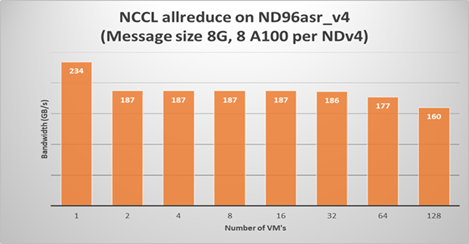
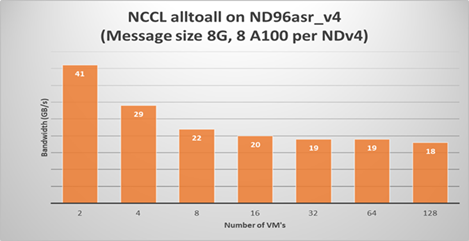
Running a NCCL allreduce and/or alltoall benchmark at the scale you plan on running your deep learning training job is a great way to identify problems with the InfiniBand inter-node network or with NCCL performance.
Here is a SLURM script to run a NCCL alltoall benchmark (Note: using SLURM container integration with enroot+pyxis to use the Nvidia pytorch container.)
#!/bin/bash
#SBATCH -t 00:20:00
#SBATCH --ntasks-per-node=8
#SBATCH --gpus-per-node=8
#SBATCH -o logs/%x_%j.log
export UCX_IB_PCI_RELAXED_ORDERING=on
       UCX_TLS=rc
       NCCL_DEBUG=INFO
       CUDA_DEVICE_ORDER=PCI_BUS_ID
       NCCL_IB_PCI_RELAXED_ORDERING=1
       NCCL_TOPO_FILE=/workspace/nccl/nccl-topology.txt

CONT="nvcr.io#nvidia/pytorch:21.05-py3"
MOUNT="/nfs2/nccl:/workspace/nccl_284,/nfs2/hpcx-v2.8.1-gcc-MLNX_OFED_LINUX-5.1-0.6.6.0-ubuntu18.04-x86_64:/opt/hpcx,/nfs2/nccl_2.10.3-1/nccl:/workspace/nccl"

export OMPI_MCA_pml=ucx
export OMPI_MCA_btl=^openib
export OMPI_MCA_COLL_HCOLL_ENABLE=0

srun --ntasks=$SLURM_JOB_NUM_NODES --container-image "${CONT}"
    --container-name=nccl
    --container-mounts="${MOUNT}"
    --ntasks-per-node=1
    bash -c "apt update && apt-get install -y infiniband-diags"

srun --gpus-per-node=8
    --ntasks-per-node=8
    --container-name=nccl
    --container-mounts "${MOUNT}"
    bash -c 'export LD_LIBRARY_PATH=/opt/hpcx/nccl_rdma_sharp_plugin/lib:/opt/hpcx/sharp/lib:/workspace/nccl/build/lib:$LD_LIBRARY_PATH && /workspace/nccl/nccl-tests/build/alltoall_perf -b8 -f 2 -g 1 -e 8G'
Then submit the above script on for example 4 ND96asr_v4 VM’s
sbatch -N 4 ./nccl.slrm
Similarly, for allreduce, just change the executable to be all_reduce_perf.
The following plots show NCCL allreduce and alltoall expect performance on ND96asr_v4.
Large scale DL models are becoming very complex and sophisticated being applied to many application areas. The computational and network resources to train these large modern DL models can be quite substantial. The Azure NDv4 series is designed specifically for these large scale DL computational, network and I/O requirements.
Several key performance optimization tips and tricks are discussed to allow you to get the best possible performance running your large deep learning model on Azure NDv4 series.
To would like to acknowledge the significant contribution of my Colleagues at Microsoft to this post. Jithin Jose provided the NCCL scaling performance data and was the primary contributor to the NCCL, MPI an GPU tuning parameters, he also helped review this document. I would also like to thank Kanchan Mehrotra and Jon Shelley for reviewing this document and providing outstanding feedback.





















































Recent Comments