by Contributed | Sep 17, 2021 | Technology
This article is contributed. See the original author and article here.
In the July Update of Azure Kubernetes Service (AKS) on Azure Stack HCI we introduced automatic distribution of virtual machine data across multiple cluster shared volumes which makes clusters more resilient to shared storage outages. This post covers how this works and why it’s important for reliability.
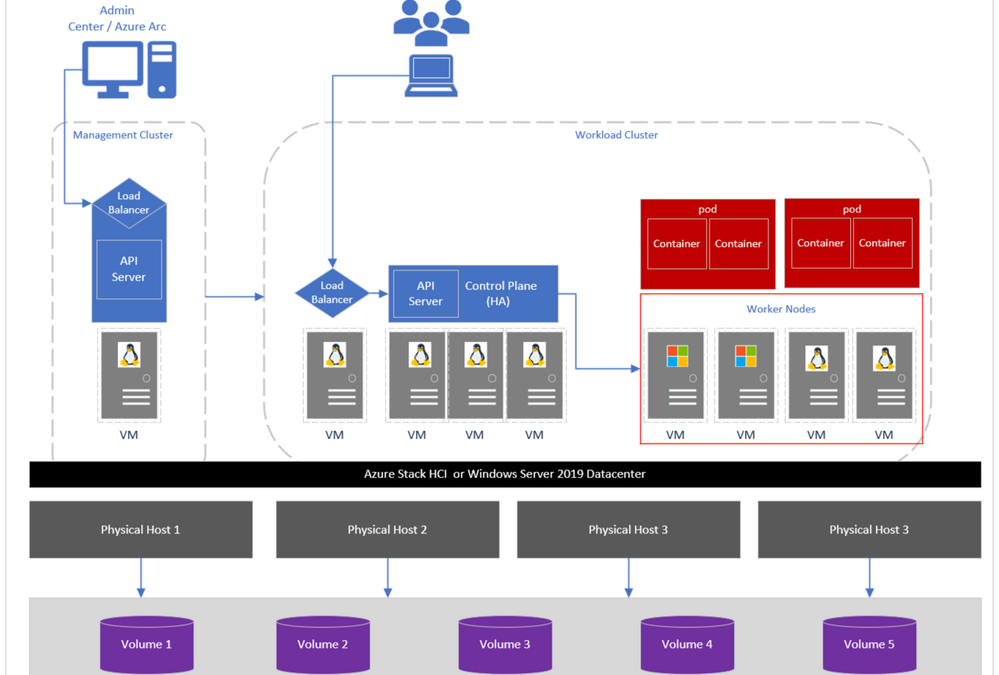
Just to recap, AKS-HCI is a turn-key solution for Administrators to easily deploy, manage Kubernetes clusters in datacenters and edge locations, and developers to run and manage modern applications similar to cloud-based Azure Kubernetes Service. The architecture seamlessly supports running virtualized Windows and Linux workloads on top of Azure Stack HCI or Windows Server 2019 Datacenter. It comprises of different layers which include a management cluster, a load balancer, workload clusters and Cluster Shared Volumes (CSV) which run customer workloads, etc. as shown in the image below. For detailed information on each of these layers visit here.
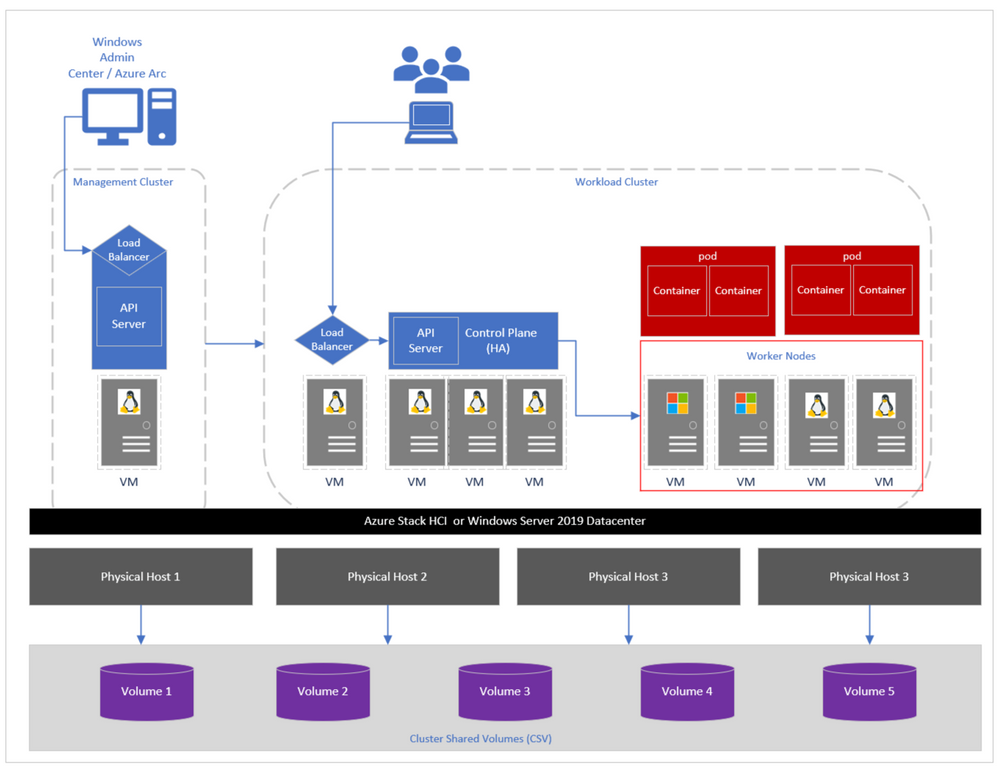
Figure 1: AKS-HCI cluster components.
Cluster Shared Volumes allow multiple nodes in a Windows Server failover cluster or Azure Stack HCI to simultaneously have read-write access to the same disk that is provisioned as an NTFS volume. In AKS-HCI, we use CSVs to persist virtual hard disk (VHD/VHDX) files and other configuration files required to run clusters.
In past releases of AKS-HCI, virtual machine data was saved on a single volume in the system. This architecture generated a single point of failure – the volume hosting all VM data as shown in Figure 2a. In the event of an outage or failure in this volume, the entire cluster would be unreachable and thus impacting application/pod availability as illustrated in 2b.
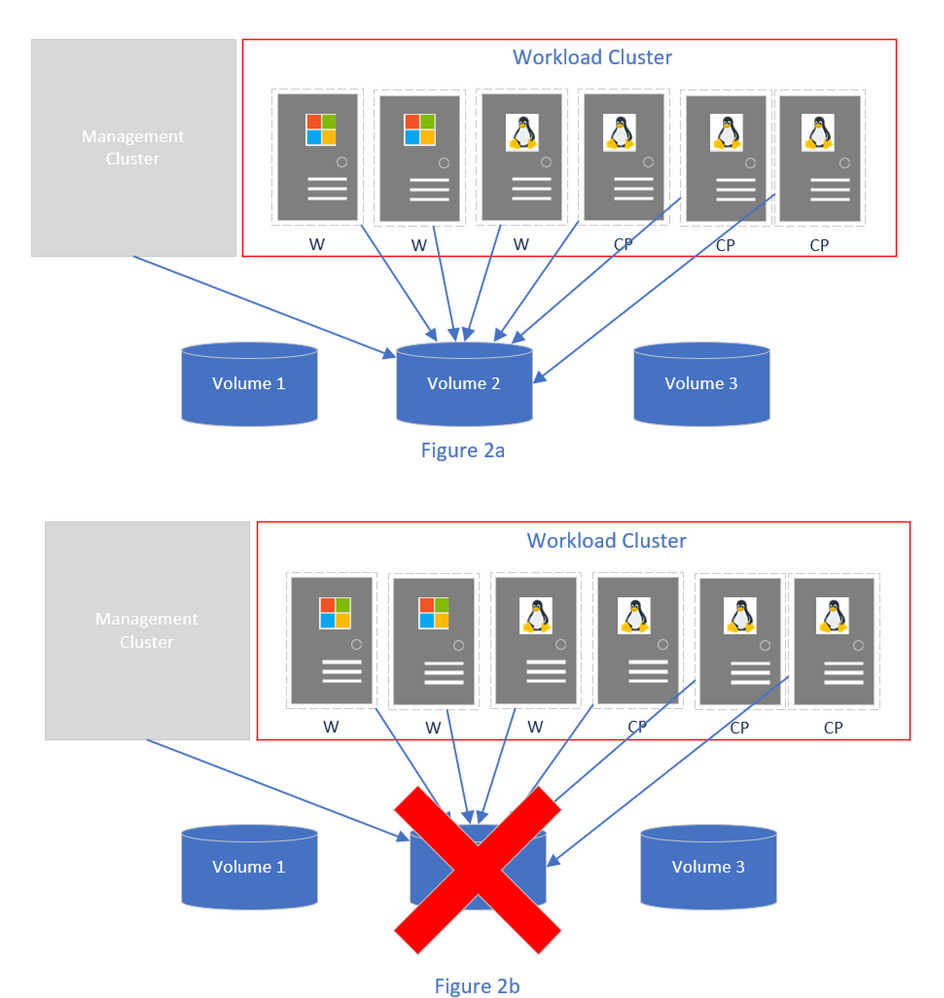
Figure 2: Virtual machines on a single volume.
Starting with the July release, customers running multiple Cluster Shared Volumes (CSV) in their Azure Stack HCI clusters, by default during a new installation of AKS-HCI, the virtual machine data will automatically be spread out across all available CSVs in the cluster. What you will notice is a list of folders prefixed with the name auto-config-container-N created on each cluster shared volume in the system.
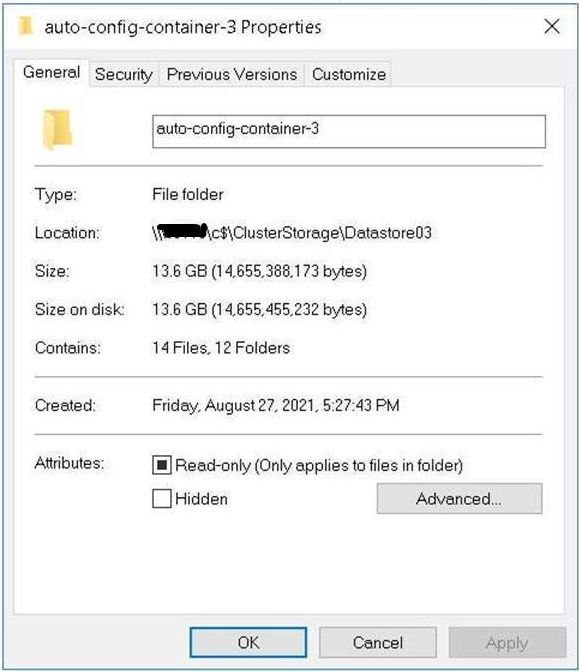
Figure 3: Sample of an auto-config-container-X folder generated by AKS-HCI deployment.
Most customers may not have noticed this behavior as it required no changes in the cluster creation user experience; this happens behind the scenes during initial cluster installation. Note that for customers running clusters based on the June or prior releases, an update and clean installation is required for this functionality to be available.
To illustrate how this improves the reliability of the system, assuming you have 3 volumes and deploy a cluster with VM data spread out as illustrated in Figure 4a. In the event of an outage or failure in volume 2 the cluster would still be operational as workloads would continue running in the remaining VMs (Figure 4b).
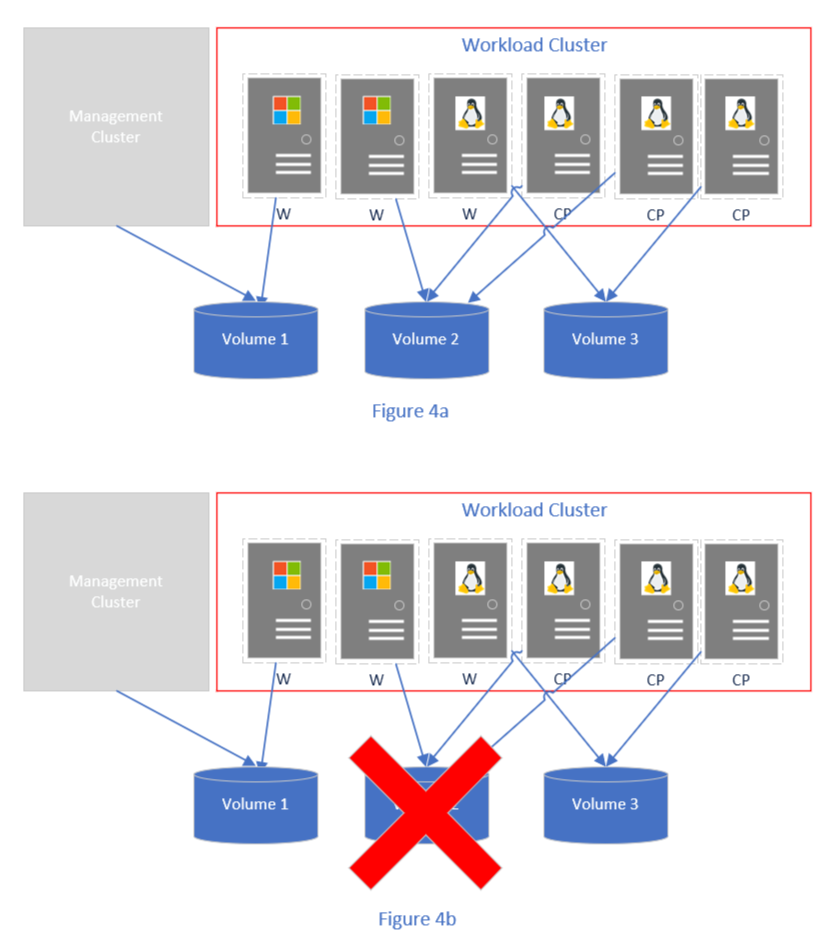
Figure 4: Virtual machines distributed across multiple cluster shared volumes.
To learn more about high availability on AKS-HCI, please visit our documentation for a range of topics.
Useful links:
Try for free: https://aka.ms/AKS-HCI-Evaluate
Tech Docs: https://aka.ms/AKS-HCI-Docs
Issues and Roadmap: https://github.com/azure/aks-hci
Evaluate on Azure: https://aka.ms/AKS-HCI-EvalOnAzure
by Contributed | Sep 16, 2021 | Technology
This article is contributed. See the original author and article here.
Today at Windows Server Summit, Microsoft announced a new Windows Server Hybrid Administrator Associate certification, a certification that members of the team responsible for this blog have been highly involved in developing.
To obtain this certification you need to pass two exams: AZ 800 (Administering Windows Server Hybrid Core Infrastructure) and AZ 801 (Configuring Windows Server Hybrid Advanced Services). The objectives associated with the exams address knowledge of configuring and administering core and advanced Windows Server roles and features, from AD DS, DNS, DHCP, File, Storage and Compute through to Security, High Availability, DR, Monitoring and Troubleshooting. Both the traditional on-premises elements of these Windows Server roles and features are covered by the exam objectives as well as the interaction of these elements with hybrid cloud technologies.
We’ve created two study guides to help you prepare for each exam. In these study guides you will find links to relevant MS Learn modules and learning paths and docs.microsoft.com articles. You can find them here:
https://aka.ms/az-800studyguide (Administering Windows Server Hybrid Core Infrastructure)
https://aka.ms/az-801studyguide (Configuring Windows Server Hybrid Advanced Services)
If you just want to get a good overview of the content of each exam, I ran through the contents of each in briefings to Jeff Woolsey from the Windows Server & Azure Stack HCI product team. Each briefing is about 20 minutes in length and watching both should give you a great idea of what each exam and the certification is all about:
AZ-800 https://youtu.be/yI8BRar8xJY
AZ-801 https://youtu.be/T-JSpxZp8xk
How these exams and the certification came about is directly related this team’s role as Cloud Advocates and our responsibility of advocating to and on behalf of the IT Operations audience. Certification has always been important to us and many of us got our groundings in core Microsoft technologies through preparing to take certification exams.
A good number of us first got certified on Windows NT 4 and my first book was a Microsoft Press training kit for the Windows Server 2003 admin exam. When Rick Claus made the first post on this blog introducing the team back in 2018, one of the first comments we got asked us about future Windows Server training and certification. We know the topic is important to you, our audience, because it has regularly come up when presenting to audiences at Ignite or user groups, or on twitter, or in casual conversation at the supermarket.
Over the last 18 months Cloud Advocates have worked with World Wide Learning, Marketing, and the Windows Server and Azure Stack HCI product teams to design and develop MS Learn and instructor led training content that covered the fundamental technologies addressed by the AZ 800 and AZ 801 exams. These modules, paths, and courses laid the path for the certification announced today.
It’s not a stretch to say that over the last few years cloud technologies have increasingly interacted with the on-premises world. Just as WINS was critical to NT4, AD was critical to Windows 2000, and virtualization critical to Windows Server 2008 and Windows Server 2012, cloud technologies are an important element of today’s on-premises Windows Server deployments.
Role based certifications address the tasks that people perform in the course of their jobs. Any new certification around Windows Server not only had to address the core on-premises roles, but also how those roles are extended by technologies hosted in the cloud. Through our regular interactions with our audience we’ve seen time and time again that we’re all living in a hybrid world even if the degree to which we’re living in that world varies from organization to organization.
Windows Server 2022 has been designed as to work in hybrid cloud environments, something you see through Windows Admin Center through to extended capabilities made available through Azure Arc and Azure File Sync. The description for each exam indicates that exam candidates should have experience with technologies they are being tested on. Whereas a few years ago the hybrid story wasn’t as comprehensive of compelling, the release of Windows Server 2022 provided an opportunity to return to a certification that attests to how people do and will use the operating system today and into the future.
The AZ-800 and AZ-801 exams will go into beta towards the end of 2021. An announcement will be made when the betas are available and we expect that uptake of available seats on the beta will be swift. The exams are likely to RTM early in 2022. By providing you with a lot of information now, we hope you’ll have a good amount of time to get prepared for this brand new certification.

by Contributed | Sep 16, 2021 | Business, Microsoft 365, Technology
This article is contributed. See the original author and article here.
When we look to the future of work, it’s clear it will be built on and powered by the cloud. Microsoft is leading innovations that enable our customers to empower their people to work more collaboratively, effectively, and securely.
The post Office LTSC is now generally available appeared first on Microsoft 365 Blog.
Brought to you by Dr. Ware, Microsoft Office 365 Silver Partner, Charleston SC.
by Contributed | Sep 16, 2021 | Business, Microsoft 365, Technology
This article is contributed. See the original author and article here.
When we look to the future of work, it’s clear it will be built on and powered by the cloud. Microsoft is leading innovations that enable our customers to empower their people to work more collaboratively, effectively, and securely.
The post Office LTSC is now generally available appeared first on Microsoft 365 Blog.
Brought to you by Dr. Ware, Microsoft Office 365 Silver Partner, Charleston SC.
by Contributed | Sep 16, 2021 | Business, Microsoft 365, Technology
This article is contributed. See the original author and article here.
As the world shifts to hybrid work, people need tools that streamline daily tasks and bring them into the flow of their work. That’s why we’re excited about the Microsoft Teams collaborative apps our partners are delivering to customers.
The post New collaborative app from ServiceNow brings employee experiences into the flow of work in Microsoft Teams appeared first on Microsoft 365 Blog.
Brought to you by Dr. Ware, Microsoft Office 365 Silver Partner, Charleston SC.


Recent Comments