This article is contributed. See the original author and article here.
Establishing trust around the integrity of data stored in database systems has been a longstanding problem for all organizations that manage financial, medical, or other sensitive data. Ledger is a new feature in Azure SQL and SQL Server that incorporates blockchain crypto technologies into the RDBMS to ensure the data stored in a database is tamper evident. In this session of Data Exposed with Anna Hoffman and Pieter Vanhove, we will cover the basic concepts of Ledger and how it works, Ledger tables, and digest management, and database verification.
This article is contributed. See the original author and article here.
There is no shortage of incident response frameworks in the security industry. While the processes may vary, there is relatively universal agreement on requirements to remediate an incident and conduct lessons learned. Remediation falls towards the end of the incident response cycle because security teams must fully analyze the incident to understand several dynamics:
Who is the attacker?
When did the incident occur?
Which user, asset, or data are being targeted?
Which attack techniques were leveraged?
Which of our defenses detected it?
Is this the full scope of the compromise, or are more factors involved?
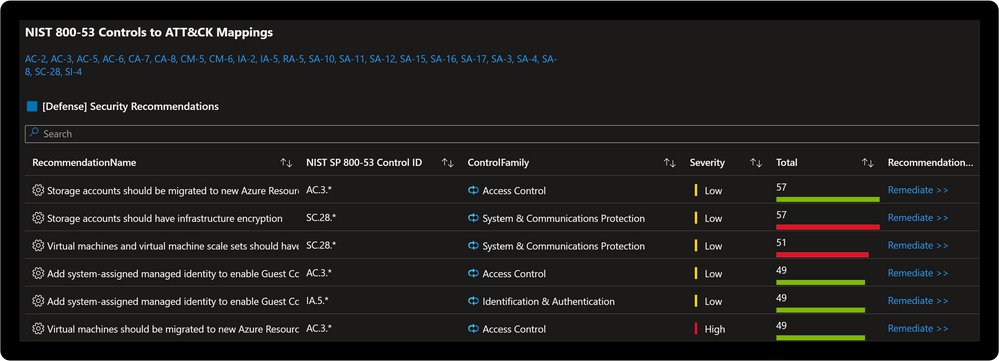
Security teams respond after understanding these and several organizationally aligned information requirements. The incident is closed when there is confidence the attacker was expelled from the environment and respective actions completed. The difference between a young Security Operations Center (SOC) and a mature one often lies in the way incident response teams conducts lessons learned. This process evolves from a “rinse and repeat” type approach to proactive threat modeling. Proactive threat modeling is critical to understanding where the attacker maneuvered through a network. The MITRE ATT&CK® framework allows security teams to understand the methods attackers employ against networks. Recently MITRE Engenuity published the NIST SP 800-53 Controls to ATT&CK Mappings which provides an actionable approach to implementing defenses based in the NIST SP 800-53 controls framework.
Microsoft Sentinel: Threat Analysis & Response Solution
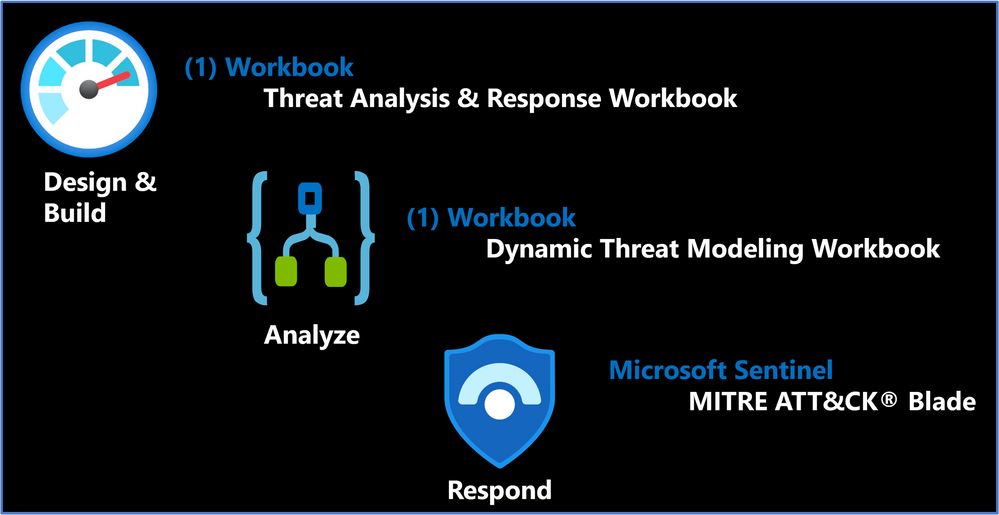
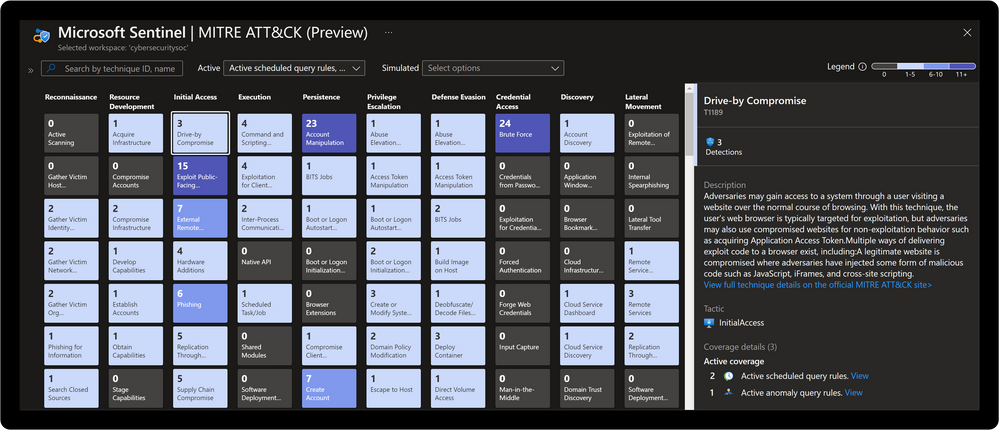
The Microsoft Sentinel: Threat Analysis & Response Solution takes this a step further with (2) new Workbooks designed to support development of threat hunting programs and dynamic threat modeling designed to identify, respond, harden, and remediate against threats. Microsoft Defender for Cloud is a Cloud Workload Protection Platform (CWPP) and Cloud Security Posture Management (CSPM) which provides powerful coupling with Microsoft Sentinel. Where Microsoft Sentinel provides incident response capabilities, Microsoft Defender for Cloud provides remediation actions aligned to respective regulatory compliance initiatives. Once the incident is fully remediated and cloud weaknesses are addressed there is also the ability to evaluate analytics coverage with the Microsoft Sentinel MITRE ATT&CK® blade. Check out the demo to see how.
Solution Benefits
Proactive threat modeling (red vs. blue)
Quantifiable framework for building threat hunting programs
Monitoring & alerting of security coverage, threat vectors, and blind spots
Response via security orchestration automation and response (SOAR) playbooks
Remediation with cloud security posture management (CSPM)
Compliance alignment to NIST SP 800-53 controls
Solution Content & Workflows
Solution Overview
Threat Analysis & Response Workbook
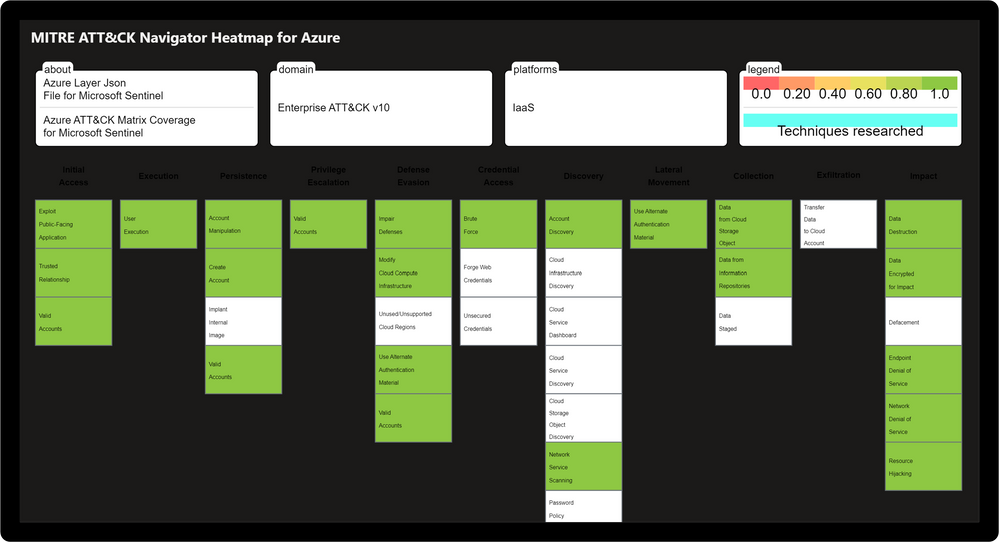
Designed by the Microsoft Threat Intelligence Center, the Threat Analysis & Response Workbook provides the foundation for building threat hunting programs. This workbook features recommended steps for getting started including resources for deploying analytics rules and hunting queries. Data Source Statistics provides an overview of which logs are ingested from respective sources which provides a starting point for determining utility of respective analytics rules. The Microsoft Sentinel GitHub section provides an overview of available analytics by alignment to respective tactics/techniques. MITRE ATT&CK Navigator Heatmap provides an assessment of coverage by tactic and technique areas which is valuable for evaluating the efficiency of organizational threat hunting programs.
Threat Analysis & Response Workbook
Dynamic Threat Analysis & Response Workbook
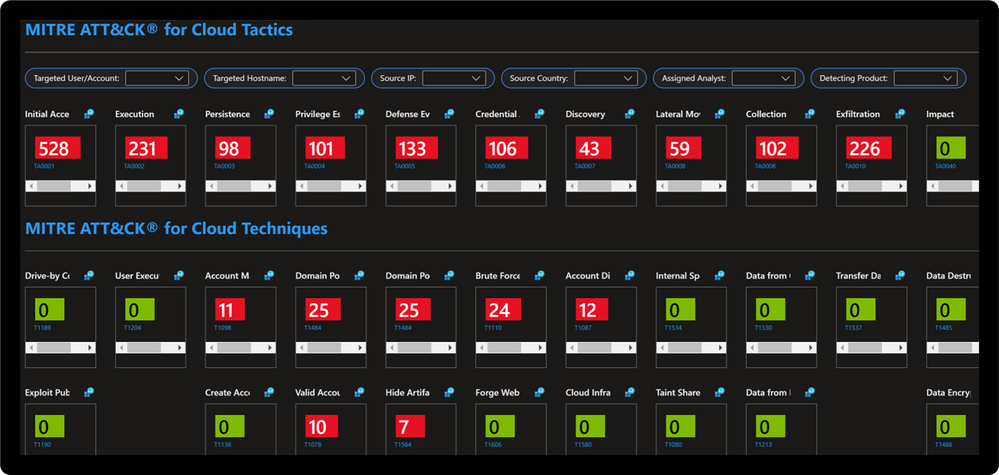
The Dynamic Threat Analysis & Response Workbook dynamically assesses attacks to your on-premises, cloud, and multi-cloud workloads. Attackers are categorized by the MITRE ATT&CK for Cloud Matrix and evaluated against Microsoft Sentinel observed Analytics and Incidents. This provides pivots to evaluate attacks against specific users, assets, attacking IPs, countries, assigned analyst, and detecting product. Each tactic provides a respective control area comprised of technique control cards.
Dynamic Threat Modeling & Response Workbook
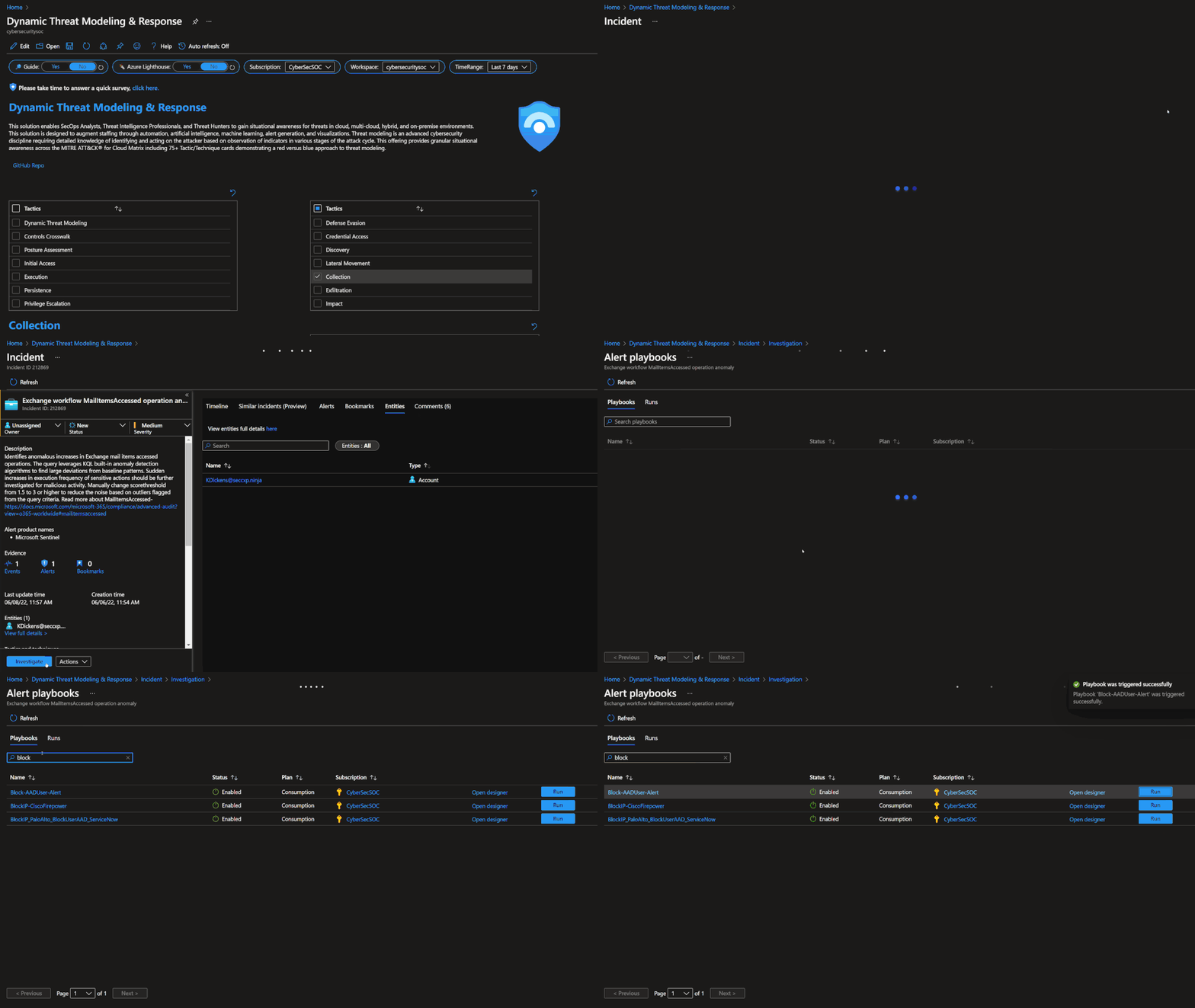
Technique Control Cards provide details of establishing coverage, evaluation of observed attacks, and defense recommendations aligned to NIST SP 800-53 controls. Observed attacks are addressed via Microsoft Sentinel Incidents for Investigation, Playbooks for Response, MITRE ATT&CK blade for Coverage, and Microsoft Defender for Cloud for Remediations.
Improve posture by implementing NIST SP 800-53 control recommendations with Microsoft Defender for Cloud
Microsoft Sentinel: MITRE ATT&CK Blade
MITRE ATT&CK is a publicly accessible knowledge base of tactics and techniques that are commonly used by attackers and is created and maintained by observing real-world observations. Many organizations use the MITRE ATT&CK knowledge base to develop specific threat models and methodologies that are used to verify security status in their environments. Microsoft Sentinel analyzes ingested data, not only to detect threats and help you investigate, but also to visualize the nature and coverage of your organization’s security status.
This solution demonstrates best practice guidance, but Microsoft does not guarantee nor imply compliance. All requirements, tactics, validations, and controls are governed by respective organizations. This solution provides visibility and situational awareness for security capabilities delivered with Microsoft technologies in predominantly cloud-based environments. Customer experience will vary by user and some panels may require additional configurations for operation. Recommendations do not imply coverage of respective controls as they are often one of several courses of action for approaching requirements which is unique to each customer. Recommendations should be considered a starting point for planning full or partial coverage of respective requirements.
This article is contributed. See the original author and article here.
Within hybrid work, organizations have been forced to adapt and reimagine how people will communicate and collaborate. Even with Microsoft Teams providing innovative solutions to hybrid work challenges, employees can often work with organizations outside of their own and occasionally need to join meetings from third-party meeting providers.
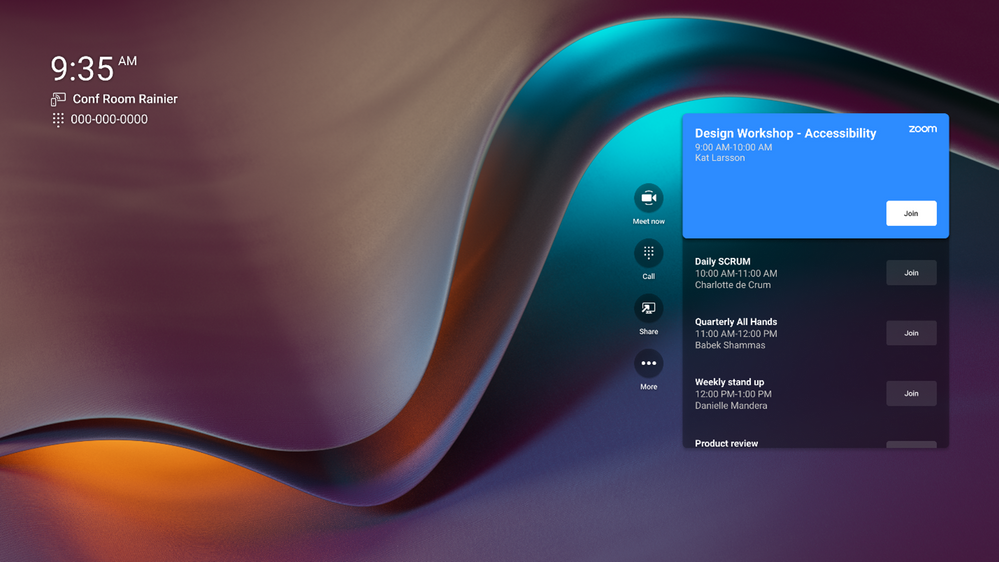
Today, Teams Rooms on Android offers Direct Guest Join, a one-touch experience that allows users to join a third-party online meeting from their Teams Rooms just as easily as they can join meetings hosted in Teams. This experience helps reduce friction when users are joining calls from external partners or clients who may not use the same meeting provider.
Teams Rooms on Android will initially offer interoperability with Zoom meetings, while Cisco Webex and other third-party partners are coming soon to the Android platform. This experience began to rollout on May 25 for Poly Teams certified devices, with Logitech and Yealink fast following, and additional device manufactures coming soon.
Under the hood Microsoft partnered with Zoom, Cisco, GoToMeeting, and BlueJeans to create an interoperability experience with Direct Guest Join. Third-party providers like Zoom provide an embedded web experience that temporarily allows Teams Rooms users to join third-party meetings and collaborate more freely. This web experience provides up-to-date software as well as enterprise-grade privacy and security. As this partnership grows, Direct Guest Join will continue to improve with new and exciting functionalities.
To learn more about the future of Rooms and its interoperability experience, be on the lookout for a joint webcast between Microsoft and Zoom, with Ilya Bukshteyn, VP of Teams Calling and Devices, and Jeff Smith, Head of Zoom Rooms and Whiteboard.
This article is contributed. See the original author and article here.
Hi ninjas and guest,
If you expect me to go straight to a technical overview of what was good and what could be better, then you are probably not following me here. Anyone who is familiar with the Community Ninjas blog, already knows that we love the stories of the community, we like to meet the people behind the stories, we like to bring the community aspects of the technical events, so it’s clear that we could not skip the stories from the Microsoft’s largest annual conference,
The Microsoft Build!
Obviously you can always scroll down to the next story.
So, let’s start with the story behind this post, followed by the stories of the community.
What is Microsoft Build (from my perspective)?
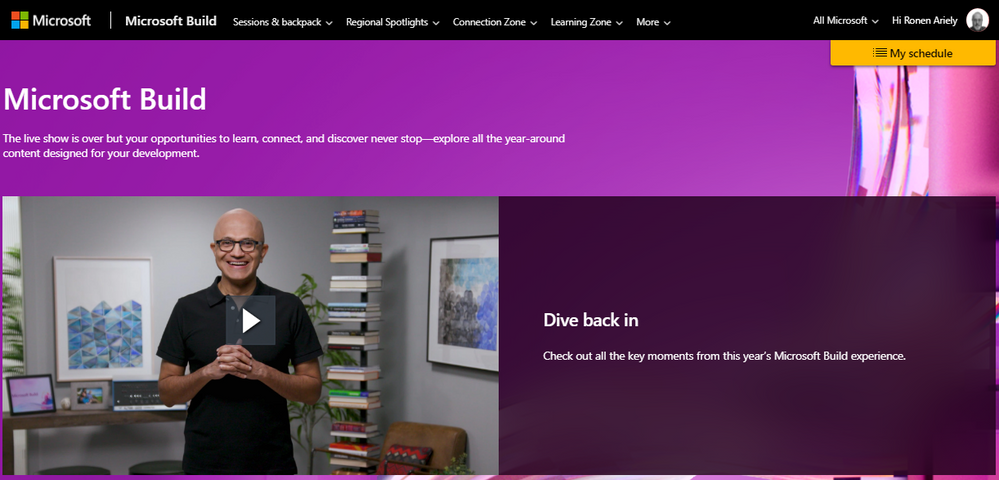
According to Wikipedia Microsoft Build is an annual conference event held by Microsoft, aimed at software engineers and web developers… “aimed developers” is what I remembered, but if you are database administrator or just working with SQL Server, then this year was a bit different. SQL Server 2022 public beta was released and first announced. The SQL Server team presented multiple sessions showing some of the new features everyone can now examine. If you remember for example, then SQL Server 2019 was released during the Ignite conference which more fit for such.
Covid-19 is still here! In the Third time the Microsoft Build conference runs virtually. Many people did not like, since they miss the in-person meeting. I, on the other hand, actually liked it a lot. Microsoft Build, like other Microsoft global events, are usually held in the USA. I am pretty sure that I could not travel to USA at this time and I know that many people have the same limitation – probably most of the global community. Having a virtual event has a lot of advantages. A virtual event increases accessibility both in terms of distance, for people who are on the other side of the world and also in terms of physical accessibility for people with disabilities. With that said, I understand the other side as well. Yes, it much better to meet in-person, but it is better to meet virtually than none. I am wondering how many prefer a virtual conference, on-premises, or maybe hybrid. What do you prefer, why?
The story behind this post
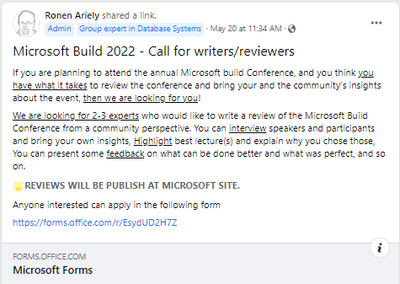
The original plan before the conference
A few days before the conference, I had an idea – let’s get some reviews from the community and publish it in the Microsoft Community Ninjas Blog. My original plan was to find some ninjas from the community who could provide an overview of the event from their point of view. I intended to collect the reviews and publish it in a single post a few days after the conference end. Originally the plan was to get 2 to 4 short paragraphs from each.
As always, the response was great and many members of the community responded to the call.
Out of the submitted responses we selected Six members for the task.
The next steps after the event
I probably did not explain the original plan well, or maybe we chose an amazing team with capabilities and experience I did not take into account. A day before the event I spoke with Carina Claesson, one of the reviewers. Carina sent me a number of links to posts she had previously published which included an overview of events. I immediately realized that what I was about to receive from Carina was much more than I had originally intended – She has written amazing reviews in the past and I started to realize that if I am going to get such a review here, then it is not something that can be assimilated in a single post but something that must stand on its own.
I asked the staff to provide the review no later than one week after the event end. One day more or less and I had all the reviews. It turnup that Carina was not the only one who provide such great work.
Something in my original plan was not best option.
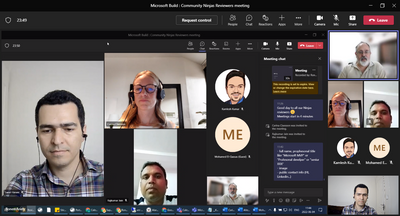
I scheduled a meeting with all the team to come up with a better plan.
The reviewers team
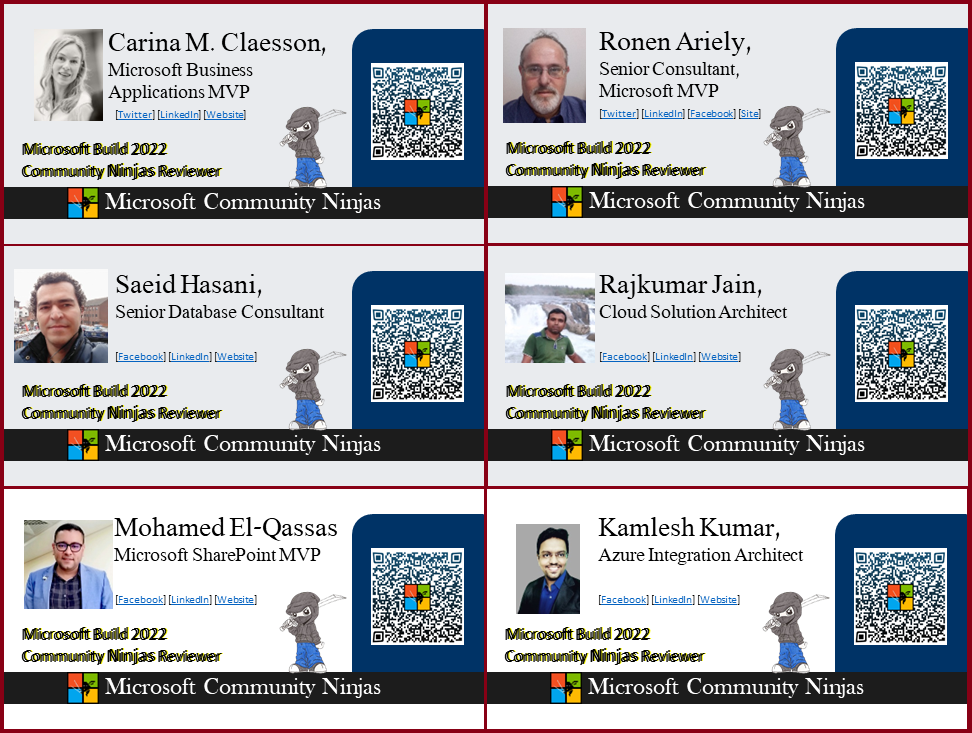
Before I introduce all of our team members, I would like to take this opportunity to thank everyone who took part in this small project. We did not have much time from the moment the idea came up to the beginning of the event and the need to implement the task, and in less than a week we had to coordinate, divide tasks, and bring the best reviews there have been to the Microsoft BUILD conference. Here are the reviewers behind the project
Rajkumar Jain
Cloud Solution architect, DevOps architect and community blogger.
Mohamed El-Qassas is a Microsoft Most Valuable Professional (MVP), Microsoft Certified Trainer (MCT), SharePoint Stack Exchange (StackOverflow) Moderator, Microsoft QnA Moderator, C# Corner MVP, Microsoft TechNet Wiki Judge, Blogger, Speaker, and Technical Consultant with +13 years of experience in SharePoint, Project Server, Microsoft Teams, Microsoft 365, and Power Platform.
Specialized in building solutions with Microsoft Power Platform and related technologies. 10+ years of experience from designing solutions built on Microsoft Dynamics CRM/xRM/365 CE. Passionate exploring the Power Platform. Regularly write reviews after Microsoft events on personal blog. Co-curator and run a weekly newsletter since October 2020. Created a Power Platform related wiki for the community. Enthusiastically explore new technology areas, gather, and share technical information. Strongly believe in sharing content and in a world where we all are uplifting, supportive and we grow together. Carina has been awarded as Microsoft Most Valuable Professional.
A senior database consultant with over 15 years of experience designing, developing and troubleshooting high-volume database solutions in mission-critical environments. Saeid is highly passionate about technology, helping others, and being part of the community; a leader at the Community Ninjas and co-founder of the Persian group, a blogger at Microsoft TechCommunity, and a TechNet Wiki council member. He has been a SQL Server forums moderator at MSDN and TechNet since 2013 and is serving as a Microsoft Q&A forums moderator.
An Integration Architect, Technical Writer, member of the Microsoft TechNet Wiki council, moderator of the Community Ninjas blog at TechCommunity, and the moderator of the community group on Facebook. Kamlesh is active in the community and shares his knowledge in the integration area, also writes a personal technical blog on Azure Integration and Microsoft BizTalk. He has a YouTube channel where he shares the technical videos.
Senior consultant, an applications & data architect, with experience in variety programming languages and technologies, leading teams and enterprise level solutions. Ronen is active in communities (aka pituach) in the fields of Microsoft Azure, Data Platforms and .Net programming. He serves as Moderator at Microsoft forums, writes technical blogs and articles, he is co-admin of two Microsoft’s blogs, and has been awarded as Microsoft Most Valuable Professional.
Instead of reviewing the event in a single post, we decided that we had enough stories for an entire book, so we will publish a series of Build conference reviews. In the next coming days for a few weeks we will publish more posts in which we will present overview from speakers, attendees, Microsoft employees and community members.
This post will be the opening of the Microsoft Build community reviews.
I will present general insights from several members of the community including a short summarize from the reviewers team.
next year?
This experience thought me a so much and we already spoke about huge plans for next year. The sky’s NOT the limit as we touch the Azure clouds every day
First of all, I would like to work together with the build event team, and run a similar project as we did this year with their support. I want to take it to the next level.
I am assuming that next year the event will be held in-person (physical) or as hybrid event. Therefore, like any big newspaper, I want to send reviewers to the field, participate physically in the event (on-premises) to do the task. The reviewers will be able to go around and interview the speakers, the organizers of the event and the attendees in person, take some pictures and bring back their and the community insights.
For the purpose of the assignment we prepared for each of our reviewers this year, a certificate which identifies him as an official reviewer of of the Microsoft Community Ninjas.
So… let’s go over the Microsoft build event from registration to closing as seen from my eyes, my thought, and my insights…
Registration and schedule
The interface is awesome! This is the same system which was used last year. We need such system for our local conferences like in sqlsaturday. It’s simple to use and powerful to manage.
BUT REMEMBER TO TURN DOWN YOUR SPEAKERS!
you have been warned
It’s a real party!
The music is loud and rhythmic. Lots of fun and lots of noise. I’m not sure anyone took into account that some of us are not in the US and we could be in the middle of the night. The music is turned on by default and you will be able to wake up not only your children but also the neighbors.
After a few hours of listening I started to go crazy from the background music that was running all the time in all the sessions while the lecturer was talking – very annoying. My recommendation is not to leave the main page open while you go to a session. My mistake was that I opened each session in separate tab in the browser.
Awesome tool!
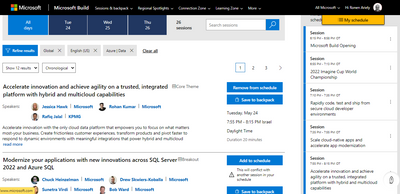
I love to open my schedule on the right and select the session at the same time. Unfortunately the sessions on the right panel did not refreshed automatically when I picked another session. This can be improved (assuming the issue is not in the client side).
Tip! How to select the sessions: My solution was first to filter by category “DATA”, next “Power Platform” and next “Azure”. I selected as much sessions as I can filling my calendar. Finally, I filtered by speakers to make sure that I did not miss any important session. For example, I cannot miss any session with Bob Ward. He is simply too good.
A “HUGE” ISSUE!
problem! I did not find any option to configure my user at the event as an MVP . I search for a way to link my event account to my MVP account. I assume that the way to do it was to contact the MVP team. At first glance this seems irrelevant, but when I signed up for one of the Round Table sessions, my nomination was declined. This seems very strange to me in light of the fact that this was a discussion directly related to my MVP field. What’s more, I know the lecturer and we even schedule for him to speak in the User Group which I lead. He knows me by name, so it does not seem that the filtering goes through the speakers themselves. I contacted the speaker after the session and his words were “this is strange”. I agree. I missed a meeting where I could contribute to.
Sessions level & speakers
Round table sessions were too short. We had a great discussion and 30min was just not enough. The Round tables sessions are awesome!
I participate in all the sessions my schedule allowed me, moving from one session to the next. This event is a pure enjoyment. I am not sure id I learned anything new, but this is a result of the fact that I follow the updates in close channels. Anyone whom I spoke to described it as a pure learning event.
If I need to highlight two best sessions then this will be one of them: a Round Table with Rohit Nayak and Thomas Weiss:
The only problem was that all participates and the speakers wanted to continue and the time was too short.
And obviously the session of the SQL Server team will be in the top but really too short to learn anything. nice for announcements and for new users mostly.
Between the sessions
The only thing I was really missing during the whole event, is the interaction between the participants during the session and between the sessions. The use of chat is technologically efficient, but outdated. I expect virtual events of this magnitude to activate more attractive tools such as virtual reality. The interface of the event was very efficient and convenient and there were no issues. I remember last year there were many technical problems during the first day of the event and I even missed one session altogether since I could not connect to. This year I did not noticed or heard about any issue.
After event
It is highly recommend to watch the sessions which you missed and these you want to dive into. Continue your learning journey beyond the Microsoft Build. You can connect with experts and technical communities. Ask the Expert on topics that you loved at Microsoft Build, use the Microsoft forums for technical questions and the social media networks to interact and meet the experts. Join live meetups and user group’s meetings in your region and local language. Continue your learning now.
Microsoft New Documents
At the first day of the event, a significant amount of new documents were published to support all the new features, new products and new services which were announced at the Microsoft Build conference. If you participate in the Microsoft Build 2022 event or if you missed it, you still need to follow the new documentation of the products/service which you want to use.
A brief overview from speakers, attendees, Microsoft employees and community members
Sray Agarwal – Microsoft MVP and Build event speaker
I attended Microsoft Build 2022 in-person for the first time. I have been an audience to Build before but that was virtual. I was very keen on attending this one and jumped on the opportunity as soon as I got an invitation. Being an MVP, I always wanted to disseminate my experience to a larger community, and nothing can be bigger and better than Build. This build was special for two reason – first as it was a hybrid conference and second as I was a speaker on the topic, I am passionate about. I spoke on responsible and ethical AI and the most exciting part of my session was a room full of audience. Interestingly, the audience were just not listener but very interactive, I was glad about the kind of questions and perspective I got from my audience. The entire build session this year was designed that will allow people to attend and participate in the session from either comfort of their home or from the venue. What I like was the mix of speakers, almost all session was designed in a way that it was very informative and insightful for technical and non-technical experts. This time the audience comprised of people who are in university to people who are stalwarts in their field of expertise. The technical sessions were very insightful. They revealed newer ways of implementation, newer ways of integration and newer way of looking at things. I just wish that we had more time for audience interaction post our sessions.
Based out of London, Sray Agarwal is conversant in advanced Machine Learning with profound knowledge of algorithms and advanced statistic, Sray has joined us as a Principal Consultant in the Fractal AI. His contribution to the development of the technology was recognised by Microsoft when he won the Most Valued Professional in AI award in 2020 and 2021. He is also an expert for United Nations (UNCEFACT) and have recently authored a book on Responsible AI published by Springer
Rajkumar Jain, Cloud Solution architect and DevOps architect and community blogger.
Hello friends/readers,
AWESOME, AMAZING, WOW
I would like to start with these three words about Microsoft Build event.
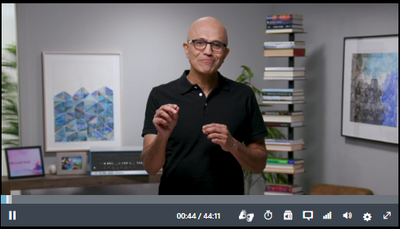
Most awaited event for cloud community held by Microsoft CEO today. I am very excited to join and listen about new announcement, enhancement and upcoming future driven technology.
CEO shared multiple innovative ideas, use cases and how developer can optimize their efforts towards development. That’s why techno expert was waiting to unfold 2022 Microsoft box, excited to join and listen announcement to build future driven application and tools using cloud services.
Let me share summary of event
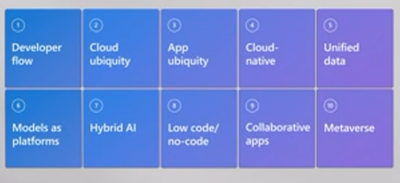
Session was divided into 10 innovative ideas of Azure growth that will cloud community to grow few of them are available and few of them will release soon.
CEO explain how Azure Developer flow help to grow and optimize the development in hybrid model.
Github used as SCM tool and enhanced feature can be used as DevOps/DevSecOps
CodeSpace – A tool use for developing cloud native application
Dev Box – Multi device support either it is IOS device, android device, Linux device or Windows device
Github Copilot – This is community tool where lots of community provider helping to groom Github project and have limited access to only community builder. Very soon it will be available for general availability.
Azure + 5G – Make a difference in society
Azure orbital – Help space agency to grow using Azure orbital service
Window 11 – Microsoft store
Windows 365 – Replace local pc with cloud pc in one click
Xbox Cloud Gaming – available in 26 countries
Cloud native app – All application develops on Microservices
Azure Container Apps – Build modern apps on open source, Focus on apps not on infrastructure
Azure Kubernetes Service (AKS) – Fully managed Kubernetes is the cloud , seamless DevOps
Azure Confidential Computing – Data in use , Data in rest and Data in Transit
New Announcement – Microsoft store Ads, sharing 100% revenue, Azure cognitive services
Many more to come in future for Developer / Business community to grow and achieve goal at minimum cost , minimum time and optimized infra resource.
I hope you like my review , this year I attend virtually but may be next year we will meet in person as you know currently world is working in Hybrid mode :smiling_face_with_smiling_eyes:.
Stay Safe Stay Healthy.
Thanks
Rajkumar Jain
Mohamed El-Qassas & Heba Kamal, the first MVP couple in Middle East and Africa
As expected from the first MVP couple in Middle East and Africa, Mohamed and Heba decided to review the Microsoft Build conference together and wow, what a nice job they have done. They prepared a comprehensive overview of several pages with pictures and insights. We will publish their review in a separate post in a few days.
When I asked then yo provide one sentence in a nutshell, they confirm that Microsoft Build 2022 was a well-organized and successful digital event as usual, and in this post, we have tried to cover most of the important updates and announcements that were shown in Microsoft Build by the CEO Satya Nadella, and it was a really helpful keynote that covered incredible and fantastic announcements and updates.
keep following the Microsoft Build series of reviews to read their review!
Kamlesh Kumar, Integration Architect, Technical Writer and co-leader in the Microsoft Community Ninjas
Overall, how the event was valuable to you and how was it valuable to the community
>> First of all I would like to thanks Microsoft and team to organize this build event. As expected we got to know the many new features and roadmap for many products that Microsoft has planned. This event was very much informative and to know the products upcoming features. If I talk about the community prospective then this build event was not only for Tech person though the non-tech person can also get a lot of new information and if they want to learn the technical stuff then from base they can start.
What do you think is the target audience for this event
>> Personally I feel, this event was for all, either you are techie person or non-technical person who want to learn.
How valuable (for you/for the community) was the content of the lectures you heard?
>> Content of lectures and session was very informative and I learned the many things with live demo given by team.
Do you think that the event provided an opportunity to connect with experts? How?
>> Yes, obesely. There was an option to connect with expert from all over the world in different different time zones. There was an option to connect with experts or product group in one-one conversion and get the expertise advice from them about the product or in their expertise area.
What do you think about the way the event was organized (connection, content, administrative, the web interface, and so on) and what could be done better next year
>> Personally I feel it was very nice and well organized in all the area but still i was missing the old day where we can directly connect with experts in person and discuss the topics. I personally loved the connection zone and learn area in this build and I would love to see much more in future in these areas.
Carina M. Claesson, Microsoft Business Applications MVP
Do you remember how I stated this long (very very very long) post? Remember how my original plan changed once I got the reviews which Carina wrote?
Well… Carina wrote a full book, and not a short one. in the following days Carina is going to publish not one and not two reviews, but at least 5 separate posts, each better than the other. In the meantime, here are some insights from our top reviewer of the Microsoft Build conference 2022.
1. Overall, how the event was valuable to you and how was it valuable to the community I like to keep myself updated around the roadmap for the technologies I’m working with, so that I can suggest good solutions for my customers. I work with Microsoft Business Applications and Power Platform is a part of this event. There are Release Waves and new features documented in Release Plans and there are Microsoft events, where big announcements are made, and the Release Plans might be updated. The event is valuable for the community because Build invites the community to participate and connect. 2. What do you think is the target audience for this event There is already an answer to this question on the Build website, in the FAQ. There it says it is for developers, engineers, and IT professionals, students and career changers new to the tech industry. If you ask me, I would say traditionally it has been targeting professional developers, for the past years low code and collaboration features have been included too. Target audience today I would say professional developers working with Microsoft technologies, but also anyone who creates solutions with Microsoft Business Applications, anyone who utilizes and guides others within the collaboration features in Microsoft 365, and of course anyone who wants to start a career within the already mentioned areas. 3. How valuable (for you/for the community) was the content of the lectures you heard? As already mentioned, Build often comes with big announcements. Within Microsoft Business Applications two such big announcements were Power Pages (Power Apps portals reimagined) and Express Design (making it possible to go from an image or Figma design to app). Besides of now knowing that we have more possibilities within the platform, at Build we could also see some demos using it in action. 4. Do you think that the event provided an opportunity to connect with experts? How? Yes, by participating and engaging in the chat during the sessions and by connecting with others who also attended the event. For the lucky people who got to attend in-person at one of the regional spotlights, that meant even more opportunities. 5. What do you think about the way the event was organized (connection, content, administrative, the web interface, and so on) and what could be done better next year Really good with the choice to participate virtually or at one of the regional spotlights. The digital venue had lots of different choices for languages, closed captioning and audio tracks, and sign language to be turned on or off. It was perfect with a digital backpack and being able to save sessions for up to 90 days. If I could wish for something more, it would be to have sessions available on-demand even faster and that it was possible to download the presentation decks from all sessions (I’ve seen it for some only). Overall, Build 2022 was a really great and inspiring event!
when one door closes another one opens
Wow, it’s time to close the day and prepare the next post in the Microsoft Build 2022 series – Community Ninjas review.
I hope you enjoyed reading and that the content was not too long. Did you cheat and scroll down to skip some sections? We invite you to add your review and feedback using the comments below
Thanks for joining us in the first review of the Microsoft Build conference 2022
This article is contributed. See the original author and article here.
Agenda
The agenda of the workshop was to provide students with a hands-on experience ofMicrosoft Azure Cognitive Servicesfocusing mainly onCustom VisionandQnA Maker.
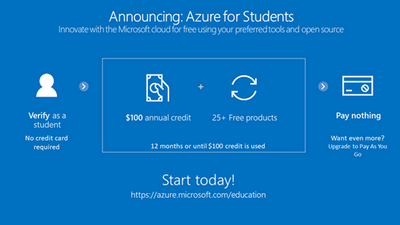
The workshop was attended by 30 students. All students received a Microsoft Azure for Student subscriptions.
Starting with the basic concepts of cloud computing and how Azure Cognitive Services fits into the Microsoft Azure ecosystem. Elaborating on how API calls embed the ability to see, hear, speak, search, understand, and accelerate advanced decision-making into modern applications.
Quick revision of services under the Cognitive Services umbrella such as:
Question Answering– Distill information into easy-to-navigate questions and answers.
Custom Vision– Customize image recognition to fit your business needs.
Face API– Detect and identify people and emotions in images.
Flow of the workshop
After the introduction, the subscription were created by the students. Activating Azure for Student provided each of the students with a balance of $100 USD that they could use to explore and experiment with the services on the Azure portal.
All the activities performed were strictly directed by the Learning module onMicrosoft Learn
How to implement Custom Vision to your application?
Creating a Custom Vision resource to get started
Select the subscription, resource group, region, name, and pricing tier
Upload the existing images of an object to train the model.
Select the“Quick Training”option to quickly prepare the model in minutes
Train an image classification model based on existing images
Publish the model to use it in your applications
How to verify the functionalities of the trained model?
To verify and test the model by running a simple command-line program in the Cloud Shell, real-world solutions, such as web sites or phone applications, use the same ideas and functionalities.
Troubleshooting the errors and blockades faced by the attendees throughout the workshop
After the Custom Vision session, there was short FAQ session to answer all the queries regarding custom vision.
Select the subscription, resource group, region, name, and pricing tier
Create a custom question answering knowledge base
Edit the knowledge base
Train and test the knowledge base
Create a bot for the knowledge base
Test the bot to verify its functionalities.
Conclusion
A questioning session was held where students can ask their queries about Microsoft services especially regrading Microsoft Azure and its services. A brief discussion about the Microsoft certifications and how students can leverage Microsoft Learn to excel in the certification exams.
Provision of a roadmap on what their approach should be if they want to make a career in Artificial Intelligence, Data Science, and Cloud Computing.
Take away from this session was to get a hands-on experience on Custom Vision and QnA Maker as service offerings from Microsoft Azure, and build real-time project on the same to showcase on their resume.






Recent Comments