by Contributed | Jul 16, 2022 | Technology
This article is contributed. See the original author and article here.
One of the main problem that we have when we are working with multiple databases in an Elastic Databases Pool or Azure SQL Managed Instace (that are running on same SQL Instance) is how to consolidate all the information in a single place.
For example, if we use Query Data Store we need to review one by one the database finding the performance problem. Trying to resolve these insights we would like to suggest to use PerfCollector and PerfCollector Analyzer to allows you to capture and query the information collected for all the databases that you have in an Elastic Database Pool and SQL Managed Instance and even, all the databases associated in an Azure SQL Server or On-Premises.
How to collect the data?
Videos how to use?
Where download the PerfCollector Analyzer
Advantages to use PerfCollector Analyzer:
- Aggregate Query Data Store collected information for all databases that you have in Elastic Database Pool, Managed Instance, Azure SQL or On-Premises
- Review best practices in performance:
- Missing Indexes
- Out-Of-Date Statistics
- Other topics.
Some Example queries to obtain the information from Query Data Store for all the databases:
- Highest wait durations at instance level
SELECT TOP 10
    sum(total_query_wait_time_ms) AS sum_total_wait_ms,
	 ws.[wait_category_desc]
FROM [_xTotalxAcummulatedx_xQDSx_query_store_wait_stats] ws
JOIN [_xTotalxAcummulatedx_xQDSx_query_store_plan] p ON ws.plan_id = p.plan_id and ws.dbname = p.dbname
JOIN [_xTotalxAcummulatedx_xQDSx_query_store_query] q ON p.query_id = q.query_id and p.dbname = q.dbname
JOIN [_xTotalxAcummulatedx_xQDSx_query_store_query_text] qt ON q.query_text_id = qt.query_text_id and q.dbname = qt.dbname
GROUP BY ws.[wait_category_desc]
ORDER BY sum_total_wait_ms DESC;
- Highest wait durations per database at instance level/elastic database pool level
SELECT TOP 100
    sum(total_query_wait_time_ms) AS sum_total_wait_ms,
	 ws.[wait_category_desc],
	 q.dbname
FROM [_xTotalxAcummulatedx_xQDSx_query_store_wait_stats] ws
JOIN [_xTotalxAcummulatedx_xQDSx_query_store_plan] p ON ws.plan_id = p.plan_id and ws.dbname = p.dbname
JOIN [_xTotalxAcummulatedx_xQDSx_query_store_query] q ON p.query_id = q.query_id and p.dbname = q.dbname
JOIN [_xTotalxAcummulatedx_xQDSx_query_store_query_text] qt ON q.query_text_id = qt.query_text_id and q.dbname = qt.dbname
GROUP BY q.dbname , ws.[wait_category_desc]
ORDER BY q.dbname, sum_total_wait_ms DESC;
- Highest wait durations per instance level/elastic database pool level and query
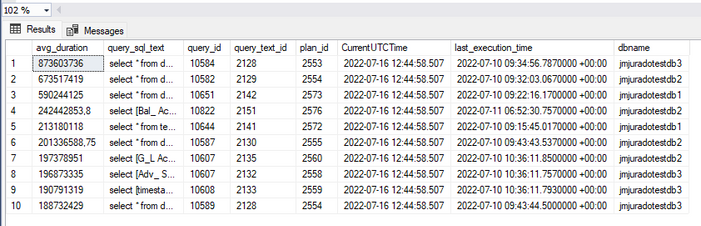
SELECT TOP 10 rs.avg_duration, qt.query_sql_text, q.query_id,
    qt.query_text_id, p.plan_id, GETUTCDATE() AS CurrentUTCTime,
    rs.last_execution_time, p.dbname
FROM [_xTotalxAcummulatedx_xQDSx_query_store_query_text] AS qt
JOIN [_xTotalxAcummulatedx_xQDSx_query_store_query] AS q
    ON qt.query_text_id = q.query_text_id and qt.dbname = q.dbname
JOIN [_xTotalxAcummulatedx_xQDSx_query_store_plan] AS p
    ON q.query_id = p.query_id and q.dbname = p.dbname
JOIN [_xTotalxAcummulatedx_xQDSx_query_store_runtime_stats] AS rs
    ON p.plan_id = rs.plan_id and p.dbname = rs.dbname
WHERE rs.last_execution_time > DATEADD(DAY, -10, GETUTCDATE())
ORDER BY rs.avg_duration DESC;
Video how to use it
Enjoy!
by Contributed | Jul 15, 2022 | Technology
This article is contributed. See the original author and article here.
Azure Stack Hub extends the capabilities of Azure to on-premises and edge locations, enabling you to deploy, manage, and operate a subset of Azure services from your own datacenter or remote locations. The local control plane and Azure consistent developer experience provided by Azure Stack Hub can be used to address challenging technical or regulatory requirements, such as low latency, data sovereignty and security or compliance requirements. For more information, please see Why use Azure Stack Hub?
The Azure Well-Architected Framework (WAF) provides prescriptive guidance and recommendations for architects to use when creating or reviewing cloud solutions. The WAF guidance is organized into five pillars, Reliability, Security, Cost Optimization, Operational Excellence, and Performance Efficiency. Incorporating the recommendations into workload designs helps to ensure reliable, scalable, and performant architecture patterns are implemented for cloud solutions.
Today we are announcing two pillars of the Well-Architected Framework are available in Preview for Azure Stack Hub on the Microsoft Assessment Platform. These are the Reliability and Operational Excellence pillars. If you are using Azure Stack Hub to deploy and operate workloads for key business systems, it is now possible to answers questions for these pillars within the assessments platform. After completing the assessments, you will be provided with a maturity or risk score, together with prescriptive guidance and knowledge links that suggest possible improvements you could make to your architecture design and score.
Reliability
The Reliability pillar of the WAF for Azure Stack Hub focuses on User workload solutions that have been deployed on an Azure Stack Hub scale unit, with questions probing architecture design areas such as high availability, disaster recovery, app and data resiliency capabilities, error handling, performance, and monitoring.
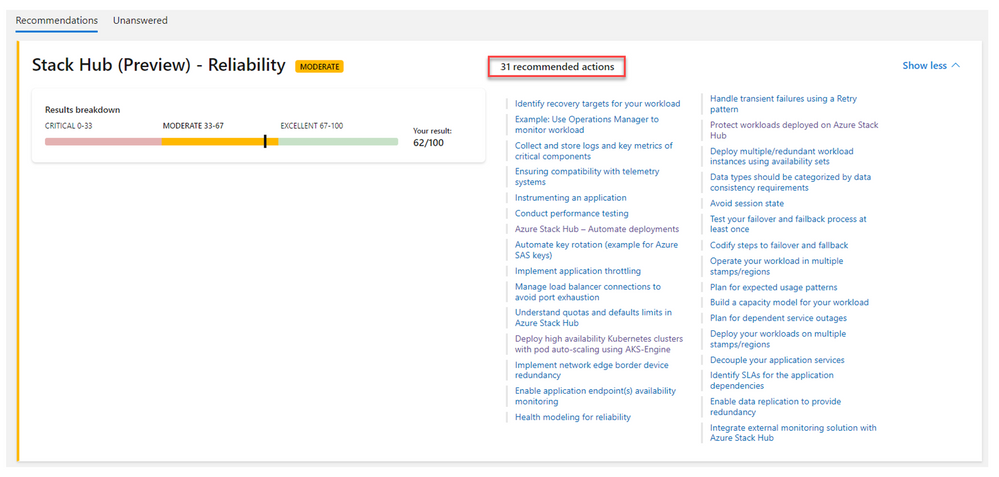
When designing applications using the guidance in the Well-Architected Framework Reliability pillar, the objective is not to avoid any and all failures – it is to respond to failure in a way that avoids downtime and data loss. This is achieved by increasing the resiliency of your applications using patterns that include data replication and application failover capabilities. These design principles are used to provide high availability and increase system uptime, which is a key success-criteria for business-critical systems.
Operational Excellence
The questions in the Excellence pillar for Azure Stack Hub, focus on the Cloud Operator Persona. As a Cloud Operator, you use the administrator portal and PowerShell for day-to-day management and operations of Azure Stack Hub, such as populating the Marketplace, defining quotas, plans and offers, monitoring infrastructure health, and applying platform updates.
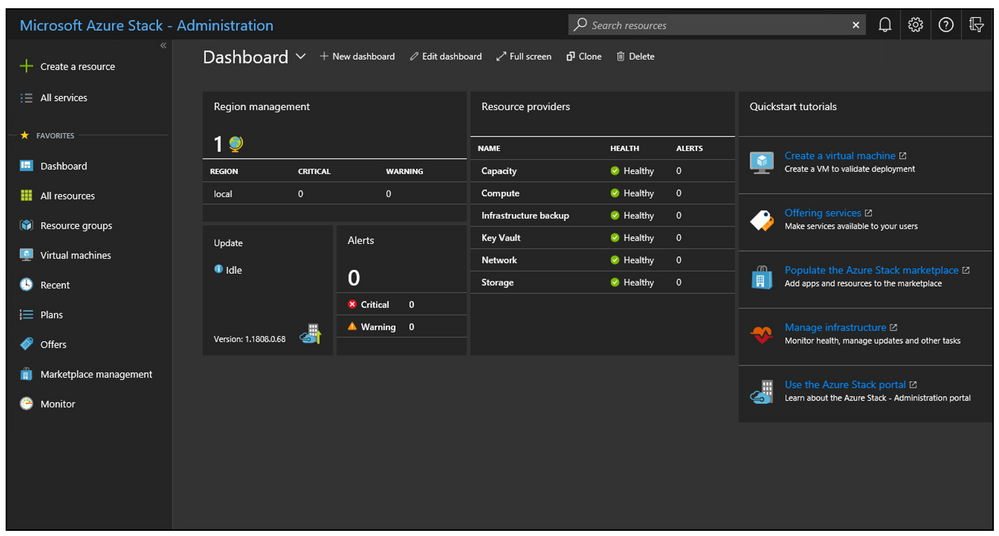
The questions in the Operational Excellence review focus on identifying what processes and procedures Cloud Operators are using to effectively manage and operate the Azure Stack Hub scale unit. Question topics include, identity and access management, network integration, monitoring, and alerting, offering services, capacity management, updates, business continuity and disaster recovery (BC/DR) and effective support and administration.
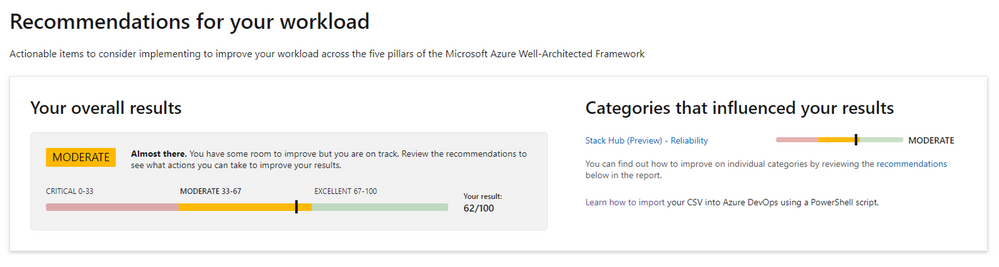
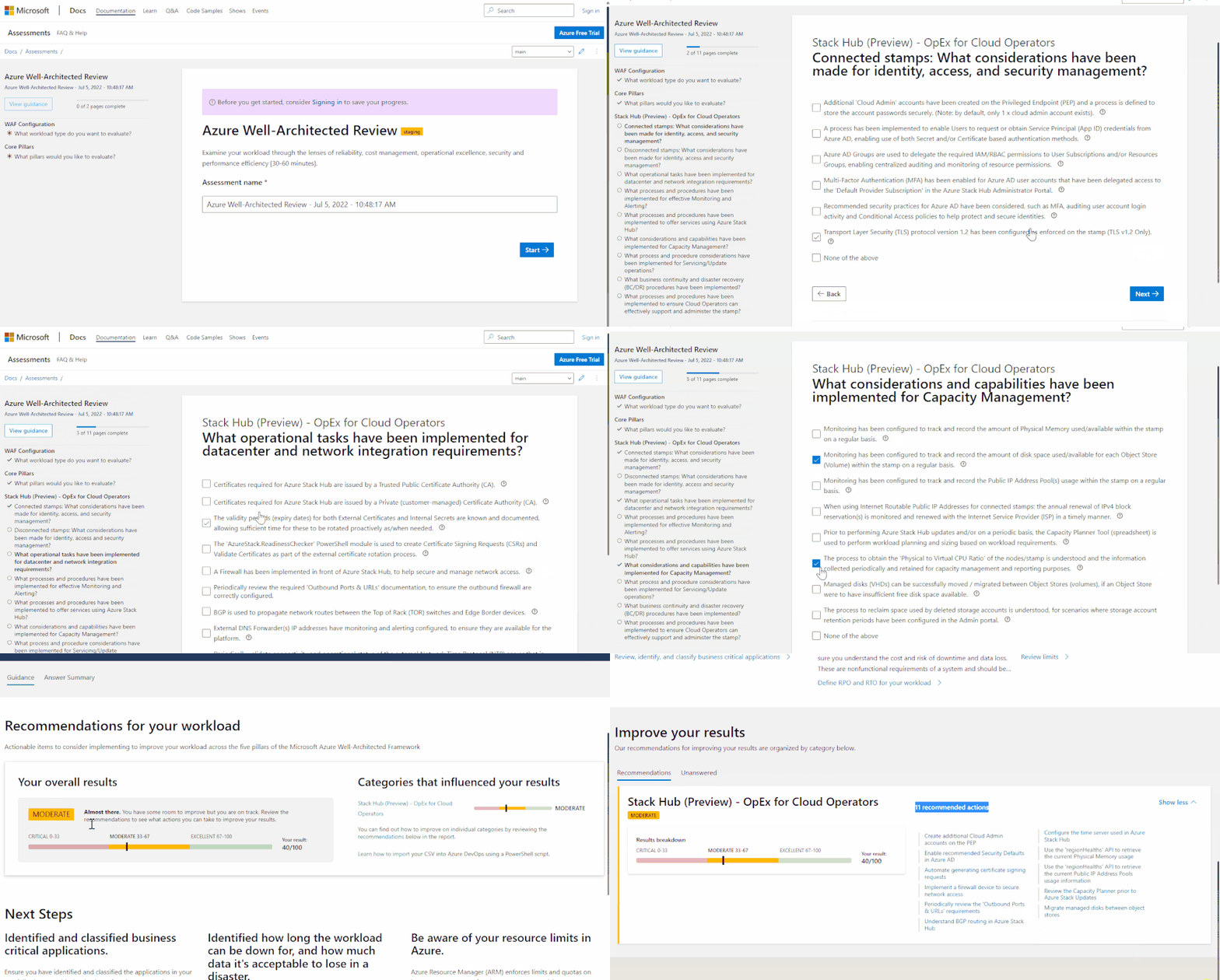
Cloud Operators can use the Azure Well-Architected Review to complete a set of easy-to- questions in order to obtain their maturity score, together with a list of curated / individual recommendations and guidance for how they can improve the processes and procedures they use for operating and managing Azure Stack Hub. An example of the assessment in action is shown below:
We are working to bring the three remaining pillars of the Azure Well-Architected Framework (WAF) to the Assessments Platform for Azure Stack Hub in the coming months. If you have any feedback or comments in relation to the Azure Stack Hub WAF Assessments, please send an email to AzS-WAF-Feedback@microsoft.com.
To get started with the Azure Stack Hub Well-Architected Review Assessments today, please visit this link: https://aka.ms/architecture/review
About the Author
Neil Bird is a Senior Program Manager in the Azure Edge & Platform Engineering team at Microsoft. His background is in Azure and Hybrid Cloud infrastructure, operational excellence, and automation. He is passionate about helping customers deploy and manage cloud solutions effectively using Azure and Azure Edge technologies.
by Contributed | Jul 14, 2022 | Technology
This article is contributed. See the original author and article here.
Introduction:
The purpose of this article is to provide specific guidelines on how to perform a Proof of Concept (PoC) for Microsoft Defender for Cloud’s native Amazon Web Services (AWS) support. This article is part of a series of articles called , each providing specific guidelines on how to perform a PoC for a specific Microsoft Defender for Cloud plan. For a more holistic approach and where you need to validate Microsoft Defender for Cloud’s Cloud Security Posture Management (CSPM) and Cloud Workload Protection (CWP) capabilities all up, see the How to Effectively Perform an Microsoft Defender for Cloud PoC article.
Planning:
This section highlights important considerations and availability information that you should be aware of when planning for the PoC. Let’s start with outlining how to go about planning for a PoC of Microsoft Defender for Cloud native AWS support.
NOTE: At the time of writing this article, Microsoft Defender for Cloud native AWS support isn’t available for national clouds (such as Azure Government and Azure China 21Vianet). For most actual information, see Feature support in government and national clouds.
The first step begins with a clear understanding of the benefits that enabling the native AWS support in Microsoft Defender for Cloud brings to your organization. Microsoft Defender for Cloud’s native AWS support provides:
- Agentless CSPM for AWS resources
- CWP support for Amazon EKS clusters
- CWP support for AWS EC2 instances
- CWP support for SQL servers running on AWS EC2, RDS Custom for SQL Server
The CSPM for AWS resources is completely agentless and at the time of writing this article, supports the data types in AWS as mentioned towards the end of Providing you with recommendations on how to best harden your AWS resources and remediate misconfigurations.
Keep in mind that the CSPM plan for AWS resources is available for Free. Refer this for more information.
The CWP support for Amazon EKS clusters offers a wide set of capabilities including discovery of unprotected clusters, advanced threat detection for the control plane and workload level, Kubernetes data plane recommendations (through the Azure Policy extension) and more.
The CWP support for AWS EC2 instances offers a wide set of capabilities, including automatic provisioning of pre-requisites on existing and new machines, vulnerability assessment, integrated license for Microsoft Defender for Endpoint (MDE), file integrity monitoring and more.
The CWP support for SQL servers running on AWS EC2, AWS RDS Custom for SQL Servers offers a wide set of capabilities, including advanced threat protection, vulnerability assessment scanning, and more.
Now that we’ve touched briefly on the benefits that Microsoft Defender for Cloud’s native AWS support provides, let’s move onto the next step. Next up is identifying which use cases the PoC should cover. A common use case might be that Management ports of EC2 instances should be protected with just-in-time network access control, or blocking public access on S3 buckets.
Preparation and Implementation:
This section highlights the requirements that you should be aware of before starting the PoC. For the complete list of pre-requirements, see the Prerequisites section.
There are three main steps when preparing to enable Microsoft Defender for Cloud’s native AWS support.
- Determining which capabilities are in the scope of the PoC
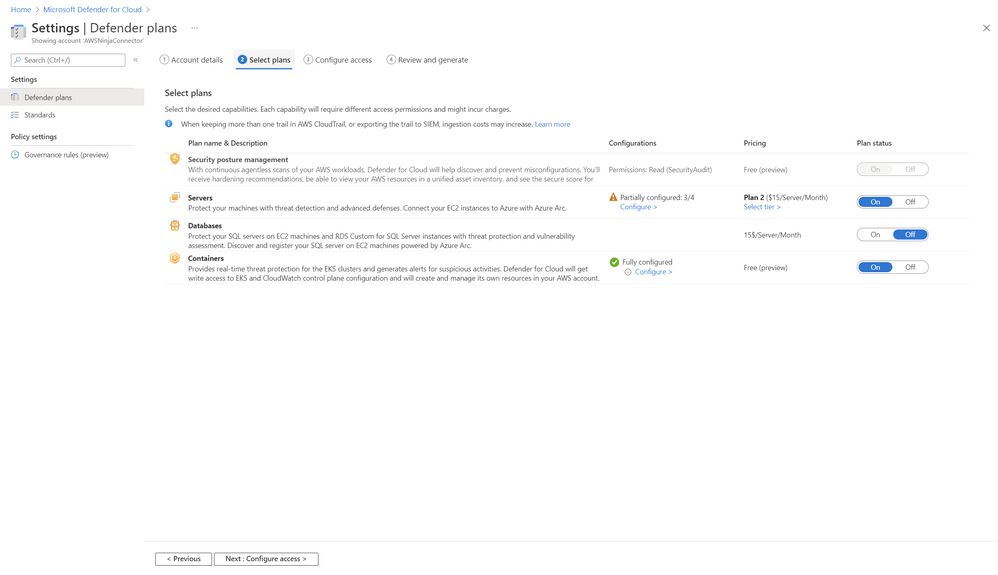
At the time of writing this article, Defender for Cloud supports the following AWS capabilities: (see Figure 1):
- Agentless CSPM for AWS resources
- CWP support for Amazon EKS clusters
- CWP support for AWS EC2 instances
- CWP support for SQL servers running on AWS EC2, RDS Custom for SQL Server
Figure 1: Native CSPM and CWP capabilities for AWS in Microsoft Defender for Cloud
- Selecting the AWS accounts on which you’d like to perform the PoC
For the purposes of this PoC, it’s important that you identify which AWS account(s) are going to be used to perform the PoC of Defender for Cloud’s native AWS support. You can choose a single AWS account or optionally, you can choose a management account, which will include each member account discovered under the provisioned Management account.
- Connecting AWS accounts Microsoft Defender for Cloud
You can connect AWS accounts to Microsoft Defender for Cloud with a few clicks in Azure and AWS. For detailed technical guidance see Microsoft Docs. For a video of step-by-step guidance on how this process looks like end-to-end in Azure and AWS, see this short video.
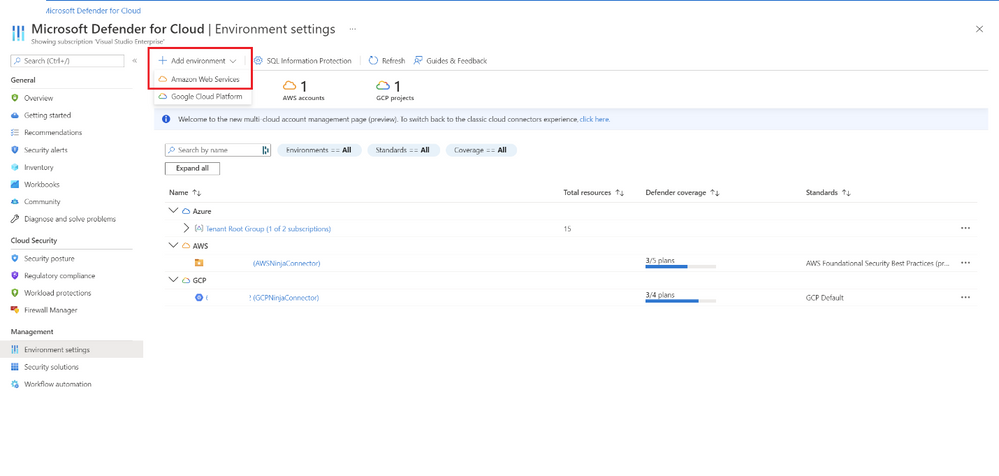 Figure 2: Connecting AWS accounts to Microsoft Defender for Cloud
NOTE: Our service performs API calls to discover resources and refresh their state. If you’ve enabled a trail for read events in CloudTrail and are exporting data out of AWS (i.e. to an external SIEM), the increased volume of calls might also increase ingestion costs and we recommend filtering out the read-only calls from the Defender for (as stated here, under ”Important”).
Validation
Once you’ve created the connector, you can validate it by analyzing the data relevant to the use cases that your PoC covers.
When validating recommendations for AWS resource, you can consult reference list of AWS recommendations.
When validating alerts for EC2 instances, you can consult reference list of alerts for machines.
When validating alerts for EKS clusters, you can consult reference list of alerts for containers – Kubernetes clusters.
When validating alerts for SQL servers running on AWS EC2 and AWS RDS Custom for SQL Server, you can consult reference list of alerts.
Closing Considerations:
By the end of this PoC, you should be able to determine the value of the native AWS support in Microsoft Defender for Cloud and the importance of having it enabled for your AWS resources. Stay tuned for more Microsoft Defender for Cloud PoC Series here.
P.S. To stay up to date on helpful tips and new release, subscribe to our Microsoft Defender for Cloud Newsletter and join our Tech Community where you can be one of the first to hear the latest Defender for Cloud news, announcements and get your questions answered by Azure Security experts.
Reviewers:
Or Serok Jeppa, Senior Program Manager
by Contributed | Jul 13, 2022 | Technology
This article is contributed. See the original author and article here.
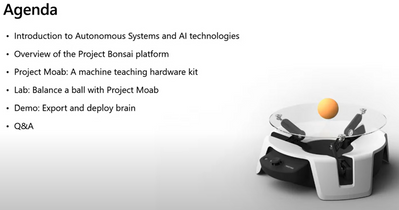
Learn how to simplify the design, development and deployment of intelligent agents for your autonomous systems using project bonsai. You’ll learn concepts such as Machine Teaching and deep reinforcement learning are using to build bonsai brains on the platform.
During this session the team will provide real world scenarios of how project bonsai is being used in the industry. This session will introduce the concepts of Machine teaching and how we can use it together with Deep Reinforcement learning to train an intelligent agent for autonomous systems on Microsoft’s Project Bonsai.
Who is it aimed at? Engineers/Developers/Anyone interested in AI & Autonomous systems.
Watch On Demand
You’ll learn what makes autonomous systems different from other forms of AI and how you can build your autonomous AI on Microsoft project Bonsai.
Speaker Bio’s
Josh Ndemenge
Josh is a cloud developer advocate for Data at Microsoft who has a passion for building solutions that solve immediate problems in the society using Hardware (Electronics) Engineering, Data & AI.
John Alexander
John is a Sr. Machine Teaching Advocate on the Microsoft Autonomous Systems team. John has a passion for designing and building accessible experiences using machine learning coupled with vision, voice, touch, and virtual/mixed reality. He speaks regularly at conferences and is the co-founder of Kansas City .NET Meetup and KC Windows Mixed Reality meetup (now part of KCVR). Based in Kansas City, Missouri USA, John loves to paint, draw, game, do voiceovers, and spend time with his spouse and three children on all sorts of adventures.
Resources
Bonsai documentation – Bonsai | Microsoft Docs
Microsoft Learn Module
MOAB Emulator QuickStarts
by Contributed | Jul 12, 2022 | Technology
This article is contributed. See the original author and article here.
Complying with the new Cybersecurity Maturity Model Certification (CMMC) from the Department of Defense (DoD) can be a challenge for customers and partners in the defense ecosystem.
The broad range of suppliers in the Defense Industrial Base (DIB) providing goods and services to the DoD need to navigate evolving compliance requirements. Microsoft cloud solutions are here to support DIB actors during this transition. Join Forrester and Microsoft on July 25th, 11am PT for this session to: Learn how to navigate the DoD’s CMMC compliance requirements, discover more about the benefits of Microsoft cloud services, like reducing audit-related efforts and get a look into Forrester’s Total Economic Impact™ of Microsoft cloud solutions. Register today


Recent Comments