This article is contributed. See the original author and article here.
Every seller knows how much time gets lost between selling moments. Information arrives in many forms—emails, screenshots, documents, handwritten notes—and turning that into structured CRM data often means manual copying, rework, or skipped fields altogether. At the same time, answering everyday questions like “Which leads should I follow up on?” or “How is my pipeline shaping up right now?” can require complex filters, multiple views, or exporting data just to get a clear answer.
Dynamics 365 Sales is evolving to address these challenges with agentic assistance. Instead of sellers adapting to rigid forms, grids, and filters, agentic AI in Dynamics 365 Sales now adapts to how sellers naturally work—by understanding unstructured inputs, interpreting intent, and assisting directly at the point of action. Two purpose-built agents bring this to life:
A Data Entry Agent that uses LLMs to understand pasted content and uploaded files, extract relevant details, and quickly populate CRM forms for faster lead and contact creation.
A Data Exploration Agent helps sellers quickly understand trends across opportunities, leads, or accounts by turning natural language questions into filtered views and visual insights.
Together, these agents reduce two of the biggest productivity drains in sales—manual data entry and cumbersome data exploration—so sellers can spend less time managing CRM and more time engaging customers.
Let’s look at how these experiences use agentic AI in Dynamics 365 in real sales scenarios:
Capture sales data faster with the Data Entry Agent Accurate customer data is critical, but sellers encounter information in many forms—emails, websites, documents, and business cards. The Data Entry Agent uses large language models to understand unstructured text and files, infer intent, and map extracted details to the right CRM fields, without requiring sellers to manually interpret or retype information.
Capture Lead and Contact details instantly with Smart Paste
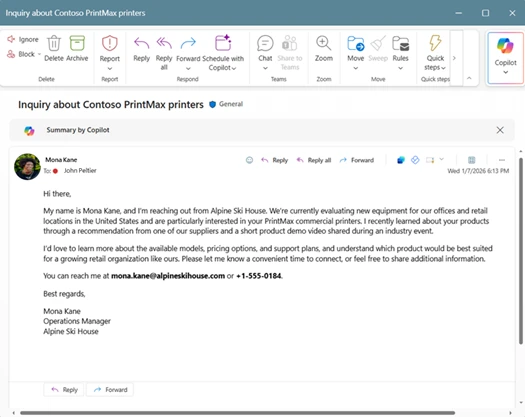
When a seller receives an inbound email from a prospect, creating a lead often means manually copying names, email addresses, phone numbers, and company details into CRM. For example, a prospect may write:
You want to respond quickly, but first you need to log the lead.
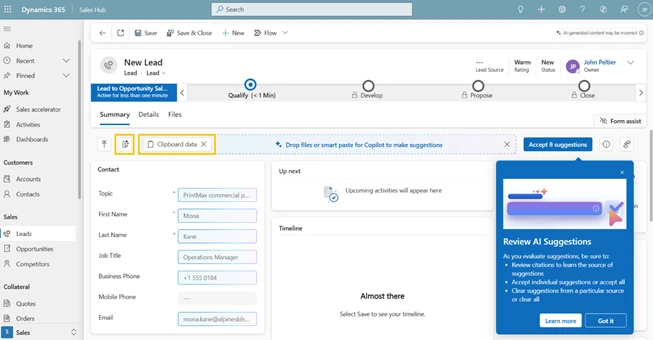
With Smart Paste (Preview), sellers can copy the email content, navigate to the lead or contact form. The system analyzes the copied text, extracts key details such as name, company, email, and phone number, and suggests values inline for the relevant fields. Each suggestion includes inline citation from the email, so sellers can clearly see the source of the information.
Sellers can review AI-generated field suggestions, view citations, accept what looks right, and save—enabling faster lead capture with greater confidence in data accuracy.
Similarly, a seller may be reviewing a prospect’s website or LinkedIn profile in separate tabs. Instead of manually re-entering details later, they can copy text from the company’s About Us page or the prospect’s LinkedIn profile and paste it directly into a CRM form. The agent analyzes the content and suggests values such as industry, company name, location, and job title, allowing the seller to review and apply the information immediately while the context is still fresh.
Convert Physical Documents into CRMRecords with Files (Preview)
After trade shows, conferences, or in-person meetings, sellers often return with a stack of business cards or documents from dozens of conversations. Manually transcribing this information delays follow-up and increases the chance of errors.
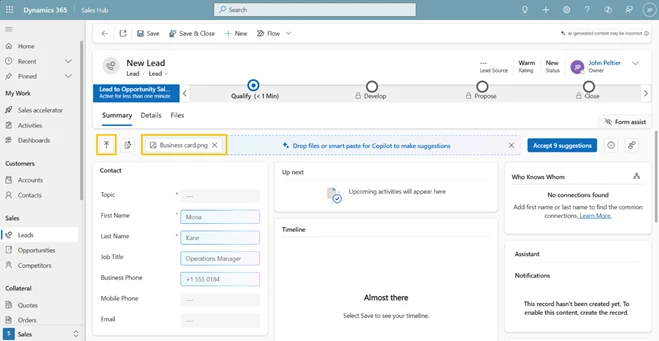
With Files (Preview), sellers can upload images of business cards or documents such as .txt, .docx, .csv, .pdf, .png, .jpg, .jpeg, or .bmp, directly into the form. The system analyses the uploaded files and suggests values for relevant fields, including names, titles, company details, email addresses, and phone numbers. Sellers simply review and confirm the suggestions, turning what once took hours into minutes.
This enables faster post-event follow-up and more complete lead and contact records.
Find and understand sales data faster with the Data Exploration agent
Finding the right records and understanding trends is essential for sellers, but navigating views and filters can be time-consuming. Powered by natural language understanding, the Data Exploration Agent (Preview) translates seller questions into structured filters, allowing users to interact with CRM data using plain language instead of complex query logic, making it easier to plan, prioritize, and understand pipeline health directly within their views.
Find the right records faster using Natural Language in Views
Filtering records in CRM can be time-consuming, especially when multiple criteria are involved. Imagine planning your day and opening My Open Leads to focus on recent campaign responses. Instead of building complex filters, you simply type: “Leads from the Summer Campaign created last month.”
Or, when preparing for a forecast call, you search: “Opportunities from Technology accounts closing next quarter.”
The system interprets the request and automatically applies the appropriate filters to the view. Sellers can review and modify the filters if needed, giving them both speed and control. This simplifies daily planning, follow-ups, and pipeline reviews.
Visualize data in Views to spot trends quickly
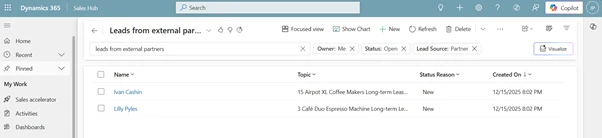
Understanding trends often requires more than scanning rows of data, but building dashboards or exporting reports isn’t practical for day-to-day sales work. With Visualize (Preview), sellers can turn the filtered data they’re already viewing into interactive charts with a single click—directly within the view and without breaking their flow.
Because the visualization is generated from the current view and visible columns, it automatically reflects the exact filters, segments, and scope the seller is working with. Sellers can hover to see detailed values, drill into specific segments, and switch chart types on the fly as new questions come up. This makes it easy to answer questions like “Where are most of my open opportunities concentrated?”, “Which lead sources are driving volume right now?”, or “How is my pipeline distributed across stages?”
Visualize is designed for quick, in-the-moment understanding, not deep reporting. It complements Power BI by giving sellers immediate visual insight at the point of work—without creating reports, navigating dashboards, or leaving CRM—so they can recognize patterns and act faster while staying in flow.
Enable these agentic capabilities in Power Platform Admin Center
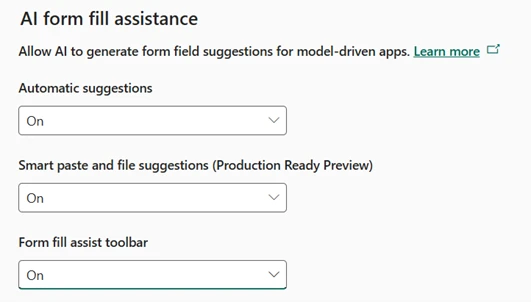
To enable Data Entry agent capabilities, go to Power Platform Admin Center → Settings → Product → Features. Under AI form fill assistance, turn On
Automatic suggestions
Smart paste and file suggestions and
Form fill assist toolbar. Changes apply to model-driven apps once saved.
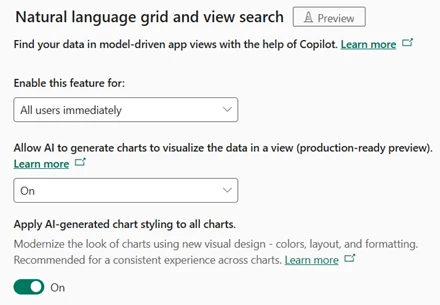
To enable Data Exploration agent capabilities, go to Power Platform Admin Center → Settings → Product → Features.
Under Natural language grid and view search, set Enable this feature for to All users immediately
Turn OnAllow AI to generate chartsto visualize the data in a view and enable AI-generated chart styling for a consistent visual experience.
With agentic AI in Dynamics 365 Sales, the platform evolves from a system of record into a system that understands, assists, and adapts—helping sellers spend more time selling and less time managing CRM.
This article is contributed. See the original author and article here.
We’ve put together something special just for students—a limited time offer that helps you study smarter, stand out in your job search, and turn your ambitions into reality.
This article is contributed. See the original author and article here.
Retail Frontier Firms are evolving their operating models to keep pace with increasingly dynamic markets, using AI to support more responsive and resilient decision-making and execution across commerce channels. Rather than improving individual functions in isolation, these organizations are rethinking how commerce operates end to end, enabling AI agents to work alongside people to support faster, more consistent outcomes across the business. This evolution is accelerating as retailers navigate rising customer expectations, sustained margin pressure, volatile demand, and ongoing labor constraints: conditions that benefit from decisions being made and executed more continuously.
In Retail Frontier Firms, AI capabilities are embedded where decisions and value are created: in stores, at the digital shelf, across merchandising, pricing, fulfillment, customer service, and checkout. AI agents interpret signals from customers, inventory, suppliers, and channels and help coordinate actions across the enterprise. This supports retailers as they respond to change with greater speed, consistency, and scale across touchpoints.
This operating model is enabled by agents that share context and operate cohesively across the retail ecosystem. At the core of agentic commerce is Model Context Protocol (MCP), which provides AI agents with access to a shared, enterprise-grade understanding of products, inventory, pricing, policies, and customer intent. By grounding agents in a common business context, MCP helps support aligned, governed, and consistent decision-making across channels and functions. The future of retail is increasingly shaped by a human and AI agent operating model, connected by shared context and open protocols.
Model Context Protocol (MCP) unlocks hundreds of thousands of business functions for secure, real-time use by agents, developers, and applications.
Agent Communication Protocol (ACP) enables agents across merchandising, supply chain, store operations, and service to collaborate end to end, helping reduce fragmentation and align execution across functions.
Payment and transaction agent protocols extend AI capabilities through checkout and settlement, supporting trusted, compliant transactions across in-store, online, and conversational commerce.
Together, these capabilities support a more outcome-driven operating model focused on availability, margin, conversion, service levels, and loyalty. Humans define strategy, priorities, and guardrails, while AI agents help orchestrate execution across day-to-day operations: supporting modern retail operations designed for Commerce Anywhere.
Emerging retail trends shaping the future of commerce
As consumer expectations continue to rise, shoppers increasingly demand seamless, continuous interactions where they move effortlessly from social-commerce discovery to mobile checkout, in-store pickup, curbside fulfillment, or voice-activated reordering. Frontier retail responds to this shift by dissolving the boundaries between channels and touchpoints, allowing commerce to adapt in real time to customer intent, location, and context. For brands, this means the ability to deliver frictionless, anticipatory commerce at scale by meeting customers wherever they are, with relevance and speed, without adding operational complexity.
The industry is rapidly shifting away from static, siloed channels toward autonomous, context-aware agents that orchestrate buying journeys seamlessly across stores, digital experiences, and conversational interfaces. Agents move beyond traditional personalization. They actively guide product discovery, shape contextual offers, negotiate availability, and coordinate fulfillment, helping to continuously optimize inventory, pricing, promotions, and supply-chain decisions behind the scenes. As personalization and automation become table stakes, agentic AI emerges as the strategic engine driving scalable growth and sustainable Commerce Anywhere.
Introducing Microsoft Dynamics 365 Commerce MCP Server
Agentic commerce introduces a new operating model in which AI agents collaborate through MCP, enabling continuous decision-making and coordinated execution across the retail value chain. The new Dynamics 365 Commerce MCP Server exposes core retail business logic including catalog, pricing, promotions, inventory, carts, orders, and fulfillment as MCP-enabled capabilities. Expected to be in preview in February 2026, this will allow retailers to build agentic commerce experiences where AI agents can securely discover, decide, and execute retail workflows across digital, physical, and conversational channels.
By combining the ERP, Analytics, and Commerce MCP servers, Dynamics 365 supports a more agent-driven operating model in which front-office experiences and back-office operations are connected and optimized, helping retailers operate with greater agility and readiness for Commerce Anywhere.
How retailers can begin adopting agentic commerce today
Retail leaders can begin moving toward agentic commerce by adopting AI agents in three practical ways:
Starting with agents embedded in Dynamics 365
Extending capabilities through custom-built agents using MCP
Leveraging partner-built agents across the broader retail ecosystem
Together, these approaches allow retailers to progress at their own pace while aligning agent adoption to their operating model, business priorities, and maturity.
1. Start with agents embedded in Dynamics 365
Purpose-built agents are designed to address common retail challenges and operational friction points. Dynamics 365 agents and retail industry agents can be embedded directly into core business processes, allowing teams to realize value quickly.
Microsoft retail industry agents, like the Catalog Enrichment Agent and Personalized Shopping Agent are examples of vertical-specific agents designed around retail data models, workflows, and decision patterns that support scenarios like product discovery, assortment accuracy, and personalized engagement without requiring custom development.
Today, in Dynamics 365 the Supplier Communications Agent is a good example of embedded agents in action. Retailers can proactively monitor supply signals and engage suppliers in real time to confirm availability, align delivery timelines, and respond to changes earlier. This supports faster coordination, fewer surprises, and more reliable execution at scale.
2. Build custom agents using MCP
Retail operations are shaped by business logic that is unique to each organization: driven by merchandising strategies, store formats, service models, and supply-chain constraints. Microsoft Copilot Studio enables retailers to build custom AI agents that encode their own rules across replenishment, allocation, fulfillment, and store execution, aligning agent behavior directly to how the business operates.
These custom agents can operate across planning and selling in the flow of work using MCP-powered access to enterprise systems. Inside Microsoft Teams, Merchandising Managers and Planners can collaborate in real time with agents that access products, demand forecasts, supplier relationships, inventory, and pricing through Dynamics 365 ERP MCP.
On the selling side, through the Dynamics 365 Commerce MCP Server, your custom agents can extend intelligence into customer experiences. Agents can discover products, personalize offers, assess availability, reserve inventory, and complete transactions across digital, physical, and conversational channels while operating with a unified view of pricing, promotions, and fulfillment.
// Modify player theme based on localStorage value.
let options = {“autoplay”:false,”hideControls”:null,”language”:”en-us”,”loop”:false,”partnerName”:”cloud-blogs”,”poster”:”https://cdn-dynmedia-1.microsoft.com/is/image/microsoftcorp/938028-agenticcommercewithDynamics-365_tbmnl_en-us?wid=1280″,”title”:””,”sources”:[{“src”:”https://cdn-dynmedia-1.microsoft.com/is/content/microsoftcorp/938028-agenticcommercewithDynamics-365-0x1080-6439k”,”type”:”video/mp4″,”quality”:”HQ”},{“src”:”https://cdn-dynmedia-1.microsoft.com/is/content/microsoftcorp/938028-agenticcommercewithDynamics-365-0x720-3266k”,”type”:”video/mp4″,”quality”:”HD”},{“src”:”https://cdn-dynmedia-1.microsoft.com/is/content/microsoftcorp/938028-agenticcommercewithDynamics-365-0x540-2160k”,”type”:”video/mp4″,”quality”:”SD”},{“src”:”https://cdn-dynmedia-1.microsoft.com/is/content/microsoftcorp/938028-agenticcommercewithDynamics-365-0x360-958k”,”type”:”video/mp4″,”quality”:”LO”}]};
if (currentTheme) {
options.playButtonTheme = currentTheme;
}
3. Extend agentic commerce through partners and the ecosystem
Retailers can further accelerate agent adoption by leveraging partner-built agents designed for specific retail scenarios and industries. Commerce MCP enables software development companies and system integrators to build agents more quickly by reducing integration overhead, standardizing access to retail data, and maintaining enterprise-grade trust and compliance.
Early partner solutions already demonstrate the breadth of what’s possible, from store associate productivity and clienteling to conversational commerce and business-to-business (B2B) buying experiences, including:
Amicis: The Store Commerce Agent is a voice-first, screen-aware assistant designed for in-the-moment store execution. It can help associates complete high-friction tasks like returns, exchanges, order lookups, and policy checks in Dynamics 365 Commerce using natural voice commands, while adapting to what’s on the POS screen.
Evenica: The B2B Licensee Product Request Agent uses conversational AI and image recognition to support licensees in finding beverage products. When a product is not available in the catalog, the agent can create a request case to support the product intake process.
Argano: The Retail Clienteling Agent offers a conversational clienteling experience by bringing together customer insights, product data, and agentic AI into a single, governed workflow. It helps retail associates improve customer relationships by delivering personalized, brand-aligned interactions before, during, and after in-store appointments.
Sunrise: The Commerce Companion is a suite of retail agents that help simplify everyday store operations across inventory and fulfillment to purchasing and store processes. Using natural language, it is designed to deliver fast, accurate answers and guided actions, which can enable associates to serve customers efficiently while keeping operations moving smoothly.
Visionet: FashionGPT Agent can turn natural-language shopping intent into real-time retail execution across product, pricing, inventory, and promotions. It drives the end-to-end shopping journey and help turn conversations into measurable actions across channels.
Together, embedded agents, custom-built agents, and partner solutions give retailers flexible entry points into agentic commerce supporting near-term impact while laying the foundation for a more adaptive, AI-enabled operating model across Commerce Anywhere.
Agentic retail with Dynamics 365 in action at NRF 2026
At NRF, we will demonstrate how Dynamics 365 works with Copilot and agentic capabilities to support Commerce Anywhere and more efficient, end-to-end retail operations. We will share examples of how retailers are using Dynamics 365 to evolve their operating models and advance Frontier Firm capabilities.
Visit us during NRF expo hours at Level 3, Booth 4503, and join the related theater sessions at our booth:
Beyond the Boutique: How Frette Uses AI to Transform Store Experience January 11, 2026 (Sunday), 2:00 PM ET Session led by Sunrise Technologies
Reimagine retail business processes with Agentic ERP January 13, 2026 (Tuesday), 2:30 PM ET
The future of retail belongs to frontier organizations that can sense, decide, and act in real time. With agentic commerce enabled by Dynamics 365, retailers gain the foundation to move faster with confidence, aligning strategy, execution, and customer experience through intelligent agents that operate seamlessly across every channel. We look forward to connecting with you in New York and exploring how agentic business applications in Dynamics 365 can support your next step forward.

![Price Override in Project Operations | Part 1 [Understanding Change Amount effect]](https://www.drware.com/wp-content/uploads/2024/10/cropped-cropped-21688204_10213848566435612_2978963762468624084_o.jpg)



Recent Comments