This article is contributed. See the original author and article here.
We are introducing an important update to streamline and modernize how email templates are created and edited. As of May 23, 2025, we are deprecating the legacy email template rich text editor and enhanced email template editor and moving to a single, modern email template editor for all users.
Change management can be challenging—especially when it involves tools you use every day. This update aims to simplify the experience by consolidating two editors into one, eliminating inconsistencies, and delivering a more streamlined and feature-rich email template editing experience.
What’s new?
Unified editing experience: All templates will now be created and managed using a single, modern rich text email template editor, eliminating the need to switch between different editors.
HTML support for customization: The new editor supports HTML editing, giving you the flexibility to design custom layouts, apply consistent branding, and style content exactly the way you need.
Improved reliability: This unified modern rich text editor removes formatting issues. Additionally, it provides smoother previews and a more reliable experience at both creation and runtime.
What’s going away?
We are phasing out the drag-and-drop layout editor from the legacy tool. Existing templates will remain valid, but admins must review them after the change goes live to ensure the formatting displays correctly in the new rich text editor.
Will my existing email templates still work?
While there’s no change to how emails render when sent, you may need to adjust some formatting at the reviewing and editing stages.
What’s different about the new editor?
The new rich text editor offers a more modern and consistent experience. It now supports HTML editing, which means you can still use custom layouts and styles—just with better reliability.
Can I still use drag-and-drop to design my emails?
We are phasing out the drag-and-drop layout feature from the legacy rich text editor.
Do I need to recreate my templates in the new editor?
No. You can continue using your existing templates. When you open them for editing, they’ll now open in the modern editor automatically.
What changes should I make to existing email templates?
We strongly suggest incorporating these changes to email templates to prevent errors in formatting:
Validate that appropriate width units have been added to the HTML format to help email templates render well at runtime
Avoid nested table structures, which can lead to formatting errors.
What if I need help adjusting to the new editor?
We’ve updated our documentation and support resources to guide you through the transition. You can also reach out to your support contact for personalized help.
This article is contributed. See the original author and article here.
Today at Microsoft Build 2025, we’re excited to announce the new Model Context Protocol (MCP) servers for Microsoft Dynamics 365 ERP and CRM business applications. These MCP servers will help remove the tedious work of connecting systems together to build agents and accelerate the ability for our customers and partners to build AI-powered agents to drive business processes quicker, accelerating their journey to the Frontier Firm in the era of the autonomous enterprise.
To provide some context, generative AI is fundamentally reshaping the way organizations work, introducing a new way of interacting with technology—using natural language to simplify and accelerate tasks. This innovation is driving unprecedented productivity gains, streamlining complex processes that once required manual effort and specialized tools. As this technology matures, we’re entering the next phase: the autonomous enterprise, where organizations and people use technology, particularly AI and automation, to operate and adapt in an age of rapid transformation and innovation. Where there once was “an app for that,” there will now be “an agent for that”.
This transformation isn’t just about automation—it’s about people. By putting intelligent agents in the hands of every employee, organizations are empowering individuals to focus on higher-value work, make decisions faster, and drive innovation. Sales teams can deepen customer relationships without being bogged down by administrative tasks. Finance professionals can move from manual reconciliation to strategic forecasting. Marketers can go from idea to execution, and product managers can orchestrate complex workflows with clarity and speed.
The autonomous enterprise is the future of business. Business applications will work with agents built by Microsoft and our partners. In this new era, organizations aren’t just streamlining operations, they’re amplifying human potential and accelerating their journey to the autonomous enterprise.
This is why we’re so excited about the Dynamics 365 ERP and CRM MCPservers. These servers help eliminate data and application silos, allowing agents to work seamlessly across processes and help enable new autonomous scenarios for improved business functionality and productivity.
Dynamics 365: Agent-ready business applications
Agentic AI is an AI system that can take actions generated by the system, with very limited or even no direct human intervention. Autonomous actions built into agents operating across various business processes, industries, and segments, can make businesses more efficient and responsive. Designed not just to support tasks, but to operate autonomously, AI agents can intelligently orchestrate workflows and make context-aware selections. But how do you create a context-aware agent when data, information, and processes are ever-changing?
MCP standardizes how applications provide context to language models, helping enable seamless integration with different data sources and tools. This open standard connects AI assistants and agents to various systems where data resides, such as content repositories, business tools, and development environments. An MCP-compliant agent uses rich contextual information to act efficiently, unlike a non-MCP-compliant agent, which lacks necessary context.
Using the MCP server, makers can easily connect agents to existing knowledge sources and APIs, helping enable them to interface directly with Dynamics 365 applications. Actions and knowledge synchronize automatically, facilitating real-time updates and the evolution of functionality. This model significantly simplifies agent development and minimizes ongoing maintenance efforts.
Central to this innovation is Microsoft Copilot Studio, which provides a standardized protocol for agents to seamlessly interact with Dynamics 365 applications, helping to ensure consistency, reliability, and scalability. Security and governance are also prioritized from the start as Dynamics 365 MCP servers require authentication and enforce authorization. Agents that access Dynamics 365 through the MCP server must authenticate as a valid Dynamics 365 user, helping to ensure the benefits of Entra ID identity protection. This also prevents escalation of privileges, meaning the agent will only be able to perform the MCP actions that they’re authorized to do. The MCP servers are also made available to Microsoft Copilot Studio using connector infrastructure. This means they can employ enterprise security and governance controls such as data loss prevention controls and multiple authentication methods.
For partners and customers, MCP standardization dramatically reduces complexity, accelerates development, and increases time to value.
MCP-compliant agentic AI
At Microsoft, we bring a deep understanding of critical business processes for small and medium business (SMB) as well as large enterprise organizations through our market-leading Dynamics 365 ERP and CRM business solutions—combined with our industry-specific expertise delivered through our Microsoft Cloud for Industry solutions. This combination of experience and expertise uniquely positions us to deliver on the needs of customers across size, business process, industry, or region.
Our newly introduced set of MCP servers help enable multiple scenarios across business processes. Below are a few examples of what’s possible with Dynamics 365, Microsoft Cloud for Industry, and our broad ecosystem of partners.
Sales and service
Custom agents and AI assistants can now be connected to Microsoft Dynamics 365 Sales, Microsoft Dynamics 365 Customer Service, and Microsoft Dynamics 365 Business Central applications through MCP servers. Agents can retrieve and update CRM data, create quotes, and complete orders. They can also get order/case summaries and email drafts. These MCP servers open endless possibilities in automating tedious jobs in sales and service functions, irrespective of company size or industry.
For example, telesales representatives can use intelligent assistants, such as Claude, connected to Dynamics 365 MCP servers to prioritize leads, qualify them, generate quotes, and send personalized emails—without needing to switch contexts or rely on complex integrations. And when customers encounter an order issue, service representatives can resolve it quickly by using Dynamics 365 Customer Service data to retrieve/update case information and create replacement orders in real time.
Supply chain and finance
The AI procurement agent illustrated below efficiently validates purchase requisitions against company policies, existing inventory, and delivery records to identify a suitable supplier that meets the criteria for cost, speed, sustainability, and reliability. It further consolidates multiple items from the same supplier into one purchase order and sends it for purchase. The agent can significantly enhance efficiency in procurement processes, where timely and budget-conscious supply delivery is critical.
Business Central
For small and medium size businesses, for example, looking to optimize sourcing information and vendor compliance, the custom agent demonstrated here can quickly identify shipments containing materials that require compliance checks. The agent provides guidance on recycling requirements and updated sourcing standards, reads supplier contracts, and suggests next steps like confirming vendor certifications and updating shipment checklists. A solution like this could streamline the compliance process, which can help customers gain a competitive advantage.
Partners using the Dynamics 365 MCP server
Our partners play a crucial role in driving innovation and delivering value to customers. We’re dedicated to making Dynamics 365 MCP servers accessible, helping enable our customers and partners to develop diverse agent scenarios across industries and business processes, regardless of their business application vendor.
With MCP server becoming the standard of the future for agents, partners can use it to more quickly and efficiently orchestrate headless business services in ERP and external systems. It turns simple intent into action, automating procurement for faster, efficient, and resilient supply chain operations. Our ecosystem of partners has started using MCP server for Dynamics 365 to create a host of industry-specific agents.
Avanade, an early adopter of Microsoft 365 Copilot for Sales and a leading Microsoft partner, is excited to use MCP servers for Dynamics 365 to enrich their AI-powered request for proposal (RFP) Insights agent. This agent helps sellers summarize, evaluate, and respond to RFPs using historical Dynamics 365 data, further streamlining proposal generation. While initially for internal use, Avanade is exploring deployment for clients in engineering, construction, and professional services.
Emission AI agent by Fellowmindwill use AI and MCP servers for Dynamics 365 to automatically classify and organize purchase transactions to prepare it for greenhouse gas (GHG) emission accounting purposes by categorizing spend-types (such as office supplies, raw materials, and travel expenses) through data extraction, classification, algorithms, taxonomy mapping, and real-time feedback and learning. The agent provides support to procurement and environmental, social, and governance (ESG) professionals, helping them streamline their processes and achieve more accurate results.
HSO’s PayFlow Agent improves invoice payment efficiency in accounts payable. Streamlining timely payments and reducing inquiries that require manual intervention leads to faster resolutions and enhanced supplier relationships. Using MCP server for Dynamics ERP MCP, PayFlow processes seller payment inquiries, identifies invoice statuses, matches them against buyer receipts, and retrieves tracking information to notify responsible parties to either remit payment promptly or set an expectation of when payment can be received.
JourneyTeam is enriching its Strategic Account Manager agent that accesses MCP servers for Dynamics 365 to optimize lead engagement. The agent summarizes historical services and projects, compares lead summaries and interests, compiles recommendations, then, after manual reviews, will initiate next steps by utilizing MCP servers, Microsoft Azure AI Search, and Document Intelligence.
MCA Connect is building a smart sourcing agent that accesses MCP servers for Dynamics 365 to automate requisition processing, supplier assignment, and workflow submission. The MCP servers give the agent access to actions like getting open requisitions, approving vendors, and assigning suppliers based on supplier performance metrics without the need to create new APIs and integrate with Dynamics 365.
Publicis SapientHummingbird is building an agent to improve lead management using MCP servers for Dynamics 365 to access data that will streamline the process of managing business-to-business leads. This agent automates lead qualification, scoring, and personalized engagement, accelerating hot leads to quotes faster and nurturing warm leads through a series of targeted emails. This innovative approach enhances efficiency, improves customer experience, and drives higher conversion rates and revenue growth.
RSM is building intelligent, secure, and context-aware agents that accelerate workflows, improve decisions, and expand capabilities by embedding them directly into real-world business processes. These agents, developed using Microsoft Copilot Studio, will access MCP servers for Dynamics 365 to support humanitarian logistics by coordinating critical supply chains, helping to ensure timely delivery of life-saving equipment, and automating procurement tasks.
TTEC Digital is building a post-service upselling agent that accesses MCP servers for Dynamics 365 to prospect for warranty plans after a purchase, turning each sale into an upsell opportunity. The agent will help drive personalized sales and service conversations at scale by using the knowledge, tools, and actions from the MCP server.
As we look ahead, the convergence of intelligent agents, standardized platforms, and deep domain expertise will define the next frontier of business transformation. The ability to harness autonomous capabilities will define tomorrow’s market leaders. Businesses that act now will gain a decisive competitive edge and chart a course toward sustained success. The autonomous enterprise is no longer a vision of the future—it’s here, built with Microsoft and its partner ecosystem.
This article is contributed. See the original author and article here.
Today at Microsoft Build 2025, we announced Microsoft 365 Copilot Tuning—a new, low-code capability in Microsoft Copilot Studio for every organization to tune AI models using their own company data, workflows, and processes—all without needing a team of data scientists or weeks of work.
This article is contributed. See the original author and article here.
In an asynchronous chat setup, it’s common for service representatives to place conversations in a waiting state — For example, they are waiting for the customer to respond with additional details. Now, supervisors using Dynamics 365 Contact Center and Dynamics 365 Customer Service can easily monitor these waiting conversations
With this enhancement, supervisors can now monitor these waiting state conversations directly from the Omnichannel real-time analytics dashboard in the Copilot Service workspace. This capability gives supervisors full visibility into waiting conversations. They can review conversation transcripts and take appropriate action, such as transferring the chat to another available service representative, without needing to interrupt the flow of the conversation.
Improving insights for supervisors
Take the example of Contoso Health, a leading insurance provider. Lorenzo is a contact center supervisor at Contoso Health, responsible for ensuring smooth operations across their customer service team. Sara, a customer service representative, is chatting with a customer about an insurance claim. She asks the customer to upload documents and places the conversation in waiting as the customer requires some time to gather the required files. Post that, Sara waited for an hour for the customer to respond and ended her shift for the day.
Previously, Lorenzo would have no visibility into this conversation unless Sara reopened it or he transferred it to himself. But with this new capability, Lorenzo can simply head to the Omnichannel real-time analytics dashboard in the Copilot Service workspace, click Monitor for that conversation, and view full details. He can see the chat transcript, current status, and time elapsed.
This helps Lorenzo quickly assess if the conversation is progressing well, or if the customer might need additional help. If Sara is on vacation or unavailable for an extended period, Lorenzo can transfer the conversation directly to another available service representative — ensuring the customer doesn’t have to wait until Sara returns.
Monitoring waiting state conversations helps businesses ensure higher service quality, better monitoring of service representative responses, faster customer response times, and more efficient supervisor workflows in async channels.
Learn more about monitoring waiting state conversations
This article is contributed. See the original author and article here.
Automated assignment in unified routing enables organizations to efficiently direct customer queries to the most suitable service representatives. To ensure swift response to customers, organizations can use the presence-based assignment functionality to select and deploy the best available service representative for the work. This blog talks about a few scenarios wherein we can make use of presence-based assignments.
Service representative presence
The availability indicator, or presence, represents different stages of service representative availability:
Available: Not engaged in any customer conversations.
Busy: Managing a few customer conversations but still has capacity for more.
Do Not Disturb: Fully occupied with customer conversations and cannot take any more.
Offline: Service representative is disconnected or logged out from the customer service platform.
Away: Indicates the service representative is on a break but still connected to the customer service.
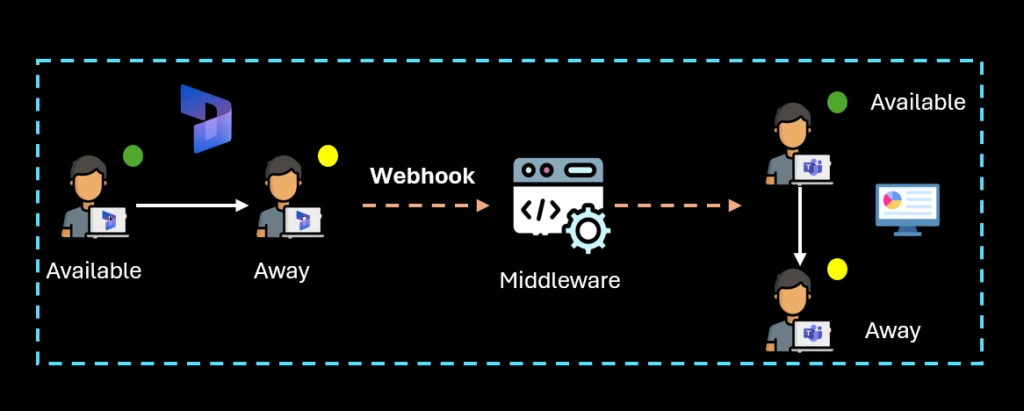
Dynamics 365 Customer Service updates the service representative’s presence in real time based on their capacity utilization and connection status. Additionally, service representatives can also set their presence manually to accurately reflect their availability.
Presence based service representative assignment
Organizations can use these presence statuses to choose the appropriate service representative for a customer query. Depending on their business use cases, they can configure the routing system to select service representatives who are either fully available, those with some capacity, or simply those who are online (excluding service representatives with away or offline statuses).
Option 1: By utilizing the Allowed presences setting in the workstream, they can configure which presence statuses qualify service representatives for work assignment.
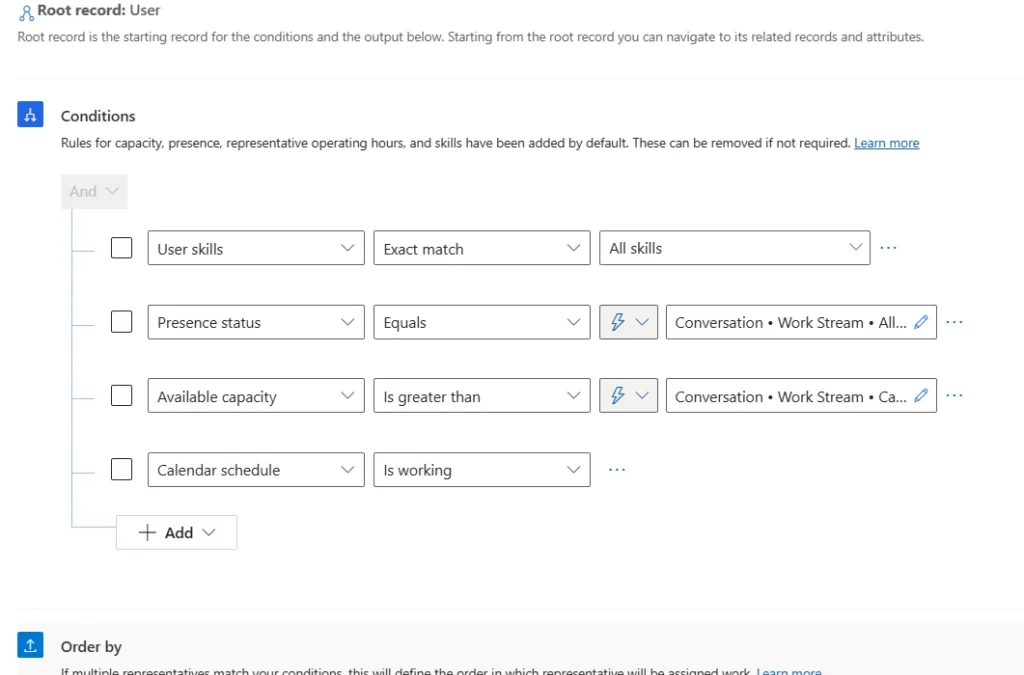
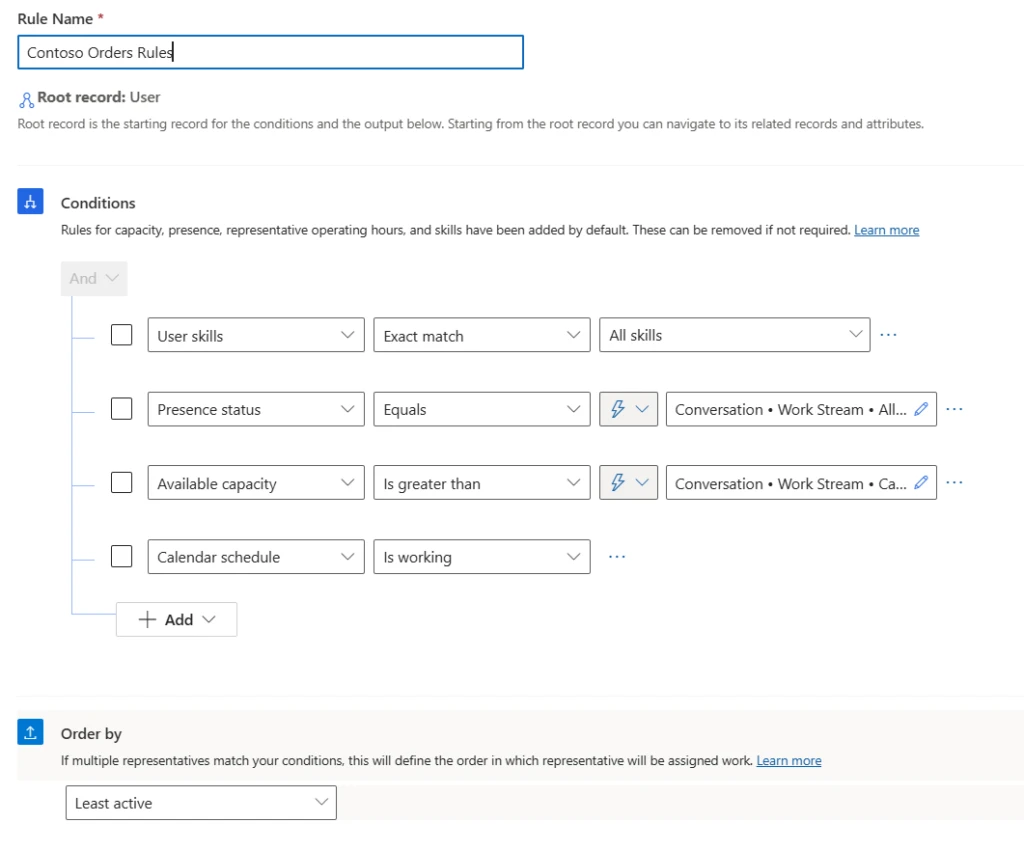
Option 2: Organizations can also write custom assignment rules and set assignment conditions based on the service representative’s presence. Conditions can be static, such as “Service representative presence should be available or busy.” They can also be dynamic, like “Service representative presence should match one of the allowed presences defined in the workstream.”
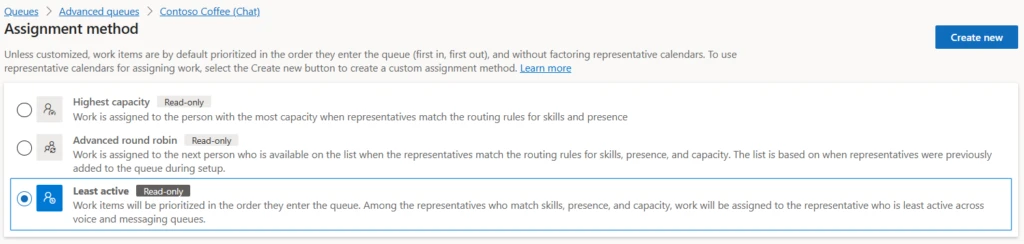
Note: The default assignment methods such as Highest Capacity, Advanced Round Robin, and Least Active Routing (for voice queues) automatically select service representatives whose presence aligns with the allowed presences list.
Example of presence-based assignment
Sara is a director of customer service at Contoso Health, managing a large support organization that serves more than 20 product lines and includes over 5000 service representatives globally.
Scenario: Sara wants to assign ‘Emergency’ chats to service representatives who are completely available to ensure quicker resolution.
Configuration: ‘Allowed presences’ setting in the Copilot Service admin center to specify that only service representatives with the ‘Available’ presence status can be assigned the chats from the ‘Emergency’ workstream.
Scenario: For the email queues, Sara prefers to select service representatives who are online. If none are available, the system should then consider other service representatives in the queue.
Configuration: Sarah sets up a custom assignment ruleset for the email queue. In the first rule, she specifies that only service representatives with a presence status of ‘Available’ or ‘Busy’ should be considered. In the second rule, she broadens the criteria to allow assignment to any service representative in the queue, regardless of their presence.
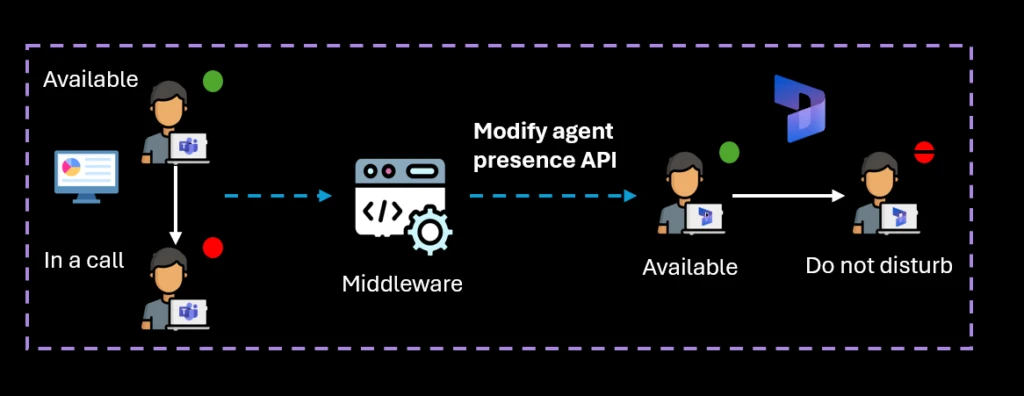
Additional use cases: Sara can easily detect unavailable representatives whose presence status automatically switches to Do Not Disturb (DND) when their capacity is fully utilized. Additionally, she can also configure the system to update representative’s availability based on their response to assignment notifications and prevent work from being assigned to the ones who miss or reject these notifications. Refer to Missed or Reject notification features for more details.
In a world of high-volume customer service requests, organizations can use presence-based assignment to match incoming work with the most suitable service representatives, while steering clear of unavailable or offline ones. Leveraging this capability also enhances the service representative productivity by offering them greater control over their availability and workload management.
Learn more
For more information about unified routing, automated assignment, and service representative presence in Dynamics 365 Customer Service, read the documentation:
Recent Comments