How omnichannel enhances the customer experience

How omnichannel enhances the customer experience

This article is contributed. See the original author and article here.

Omnichannel has become a dominant force in how companies meet customer expectations, and for good reason. Ninety-eight percent of Americans switch between devices on the same day, using multiple channelsvoice, social, chat, email, and SMS. Omnichannel engagement allows customers to reach out on nearly any device, on their preferred channel while managing all engagement channels uniformly on the back end, creating a seamless customer experience.

True omnichannel support ensures an effortless transition and consistent experience from one channel to the next without causing agents to lose context or the customer having to repeat information. In short, omnichannel allows customers to pick up where they left off on one channel and continue the experience on another.

Omnichannel collects and harnesses information from every interaction across channels to drive stronger, more meaningful customer relationships, improve operational performance, and increase revenue. Plus, businesses that adopt omnichannel strategies achieve 91 percent greater year-over-year customer retention rates compared to businesses that don’t.

Multichannel versus omnichannel

Multichannel and omnichannel are often used interchangeably, but they are very different. Like omnichannel, multichannel support offers customers more than one method for contacting customer service. However, rather than working in parallel, each channel lives in its own silo with its own dedicated team of agents. This limits the sharing of communication or information between channels, and often creates a poor customer experience.

For instance, take this scenario: the customer uses one channel to contact support and that team creates a ticket, but if the customer contacts the company again through a different channel, another ticket is created by that team. Each team has a ticket and tries to resolve the same issue. In this example, the customer must repeat the same information shared with the first agent to the second agent, and so on as each new siloed channel is used to contact support. Not only is the customer experience poor, but it’s also highly inefficient for the organization.

Omnichannel shifts this paradigm. Instead of customer ticket resolution, the emphasis is on the customer relationship. Omnichannel provides customers the freedom to move from one channel to the next when contacting support. The one constant is the customer, creating consistency from channel to channel so communications are threaded, making it easy for the customer to pick up where the conversation left off. Omnichannel creates a consistent customer experience at every touchpoint regardless of channel. With omnichannel support, channels are integrated so agents can view the conversation and still maintain context even if the experience leads to multiple channels.

An end-to-end customer view

It is the consistency of the customer experience that leads to positive customer engagement and retention. As customer interactions become more frequent and sentiment toward your brand increases, a positive cycle of interactions occurs, often leading to up- and cross-sell opportunities.

Omnichannel engagement strategies help companies better understand their customers through every interaction as the data is tethered to the customer, not the case number. Through consistent service delivery across channels, customer issues are resolved more efficiently, and this is particularly important in increasing customer satisfaction and building long-term engagement.

Time to adapt

We all know that the pandemic has created significant barriers for most organizations. However, this disruption has fueled a pioneering spirit of ingenuity and innovation as “how we always did it” has now been replaced with “this is how are we do it now.”

With stay-at-home orders, businesses transforming how they reach customers, and social distancing, maintaining quality customer service can be daunting to even the most capable of organizations. However, omnichannel can be a life ring to organizations in the pursuit of meeting customer expectations during this pandemic. In stressful times, providing customers the ability to reach out on their preferred channel is one less trigger for discontent. But that’s just part of the story. Providing the right channels is important as well.

Take for example, the San Diego Workforce Partnership. This nonprofit is reimagining workforce development by delivering programs that help job seekers meet current and future workforce needs. Part of their core beliefs include the understanding that an integrated approach is key to attain durable self-sufficiency. When state and local regulations forced Workforce Partnership to close its physical headquarters and surrounding offices, it became very difficult to service the growing volume of displaced workers.

San Diego Workforce Partnership quickly pivoted. Their core beliefs came into play as the Workforce Partnership reimagined itself leading to a long-lasting transformation, not just a short-term fix. The Workforce Partnership adhered to their foundational beliefs by creating an integrated approach to attain resilience during the crisis and beyond. By leveraging Microsoft Teams, a website chatbot built with Microsoft Power Virtual Agents, and the omnichannel capabilities within Microsoft Dynamics 365 Customer Service, they were able to increase remote collaboration and provide service to more people in need.
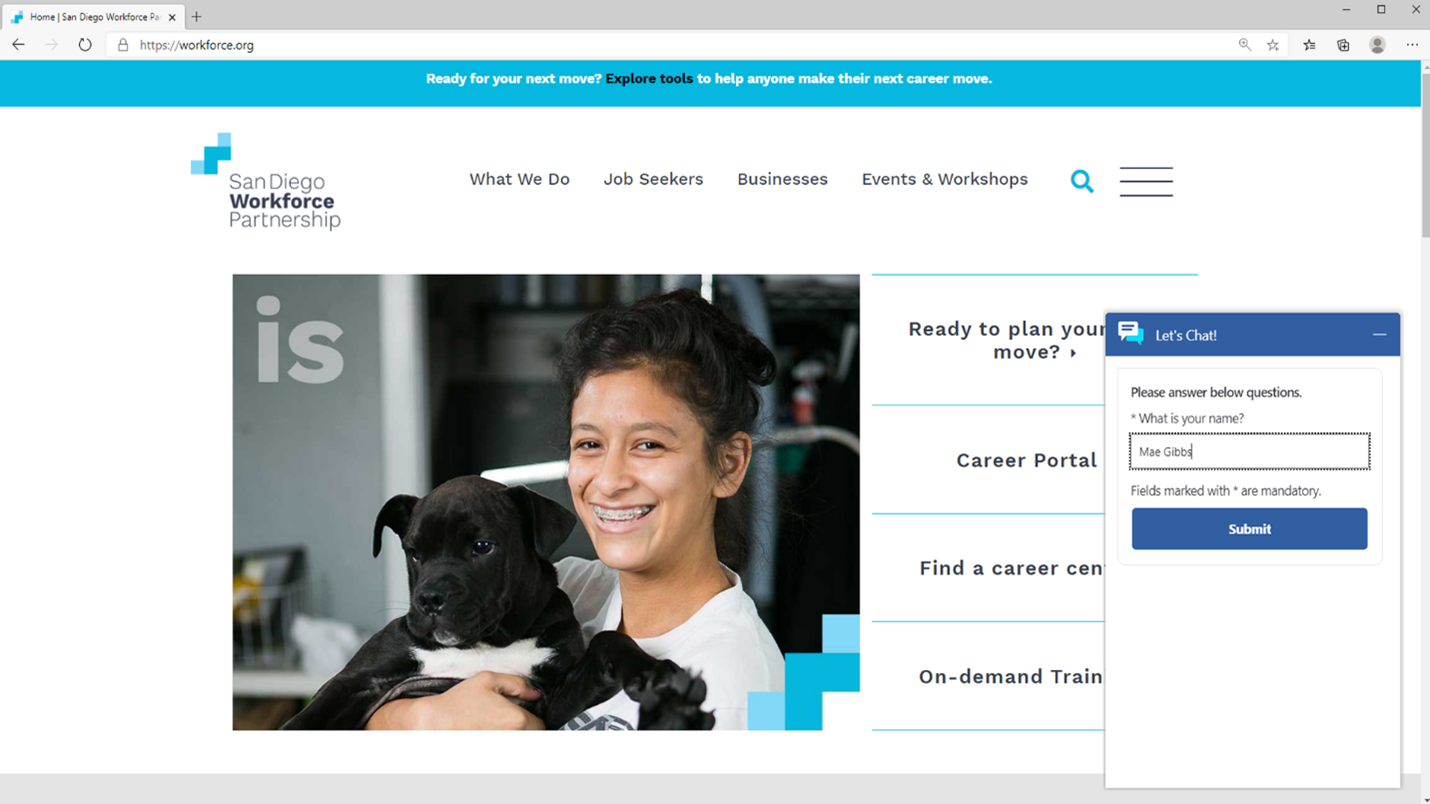
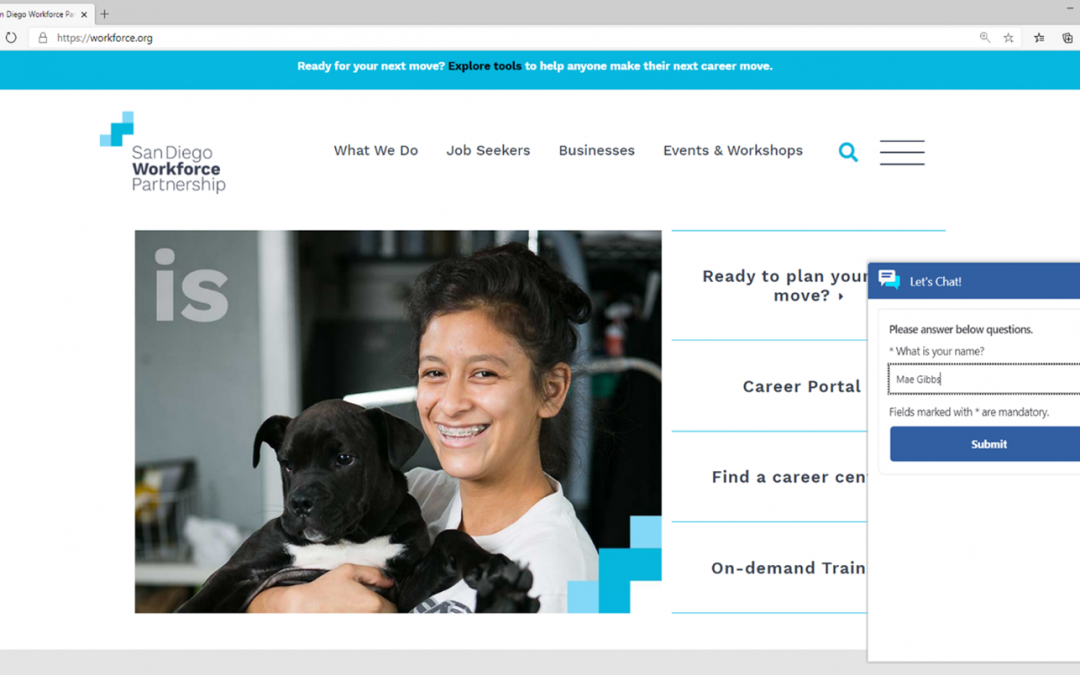
San Diego Workforce Partnership website.

As the shutdown eliminated in-person meetings with displaced workers, the Workforce Partnership website became the primary outreach tool. Now, a chatbot answers routine questions, generating a 75 percent resolution rate, and because the chatbot integrates with omnichannel, it successfully connects customers with live agents upon customer request. The chatbot and omnichannel capabilities within Customer Service have gone a long way toward creating a more positive and consistent experience for those in need of their services. With the chatbot handling increased volumes of inquiries, Workforce Partnership staff have more time to serve their community’s needs, handling each interaction with care and empathy.

One day the Workforce Partnership offices will reopen, and people will return for in-person assistance. But for now, thanks to its remarkable digital transformation and use of the Customer Service omnichannel capabilities and Power Virtual Agents, the community has one more friction-free touchpoint when seeking employment assistance during this time of uncertainty.

Better together

Omnichannel for Customer Service, an add-in to Dynamics 365 Customer Service, enables organizations to instantly connect and engage with customers on their preferred digital channels. The application offers contextual customer identification, real-time notifications, and agent productivity tools like knowledgebase integration, AI-powered agent suggestions, and real-time sentiment analysis. Supervisors get visibility and insights into emerging trends and agent efficiency across all channels through built-in, AI-driven dashboards.

The post How omnichannel enhances the customer experience appeared first on Microsoft Dynamics 365 Blog.

Brought to you by Dr. Ware, Microsoft Office 365 Silver Partner, Charleston SC.
Boost supply chain resilience with cloud and edge scale units in Supply Chain Management

Boost supply chain resilience with cloud and edge scale units in Supply Chain Management

This article is contributed. See the original author and article here.

Companies that work with manufacturing and distribution need to be able to run key business processes 24/7, without interruption, and at scale. Challenges arise with unreliable connections or network latency when business processes compete for the same system resources when peak scale is required, or during periodic or regular maintenance for different regions, across time zones, or to meet different scheduling requirements. The ability to execute daily mission-critical processes must be agnostic to these situations.

Cloud and edge scale units enable companies to execute mission-critical manufacturing and warehouse processes without interruptions. This functionality is provided by the following add-ins, now available in public preview:

  • Cloud Scale Unit Add-in for Dynamics 365 Supply Chain Management
  • Edge Scale Unit Add-in for Dynamics 365 Supply Chain Management

Cloud and edge scale units allow you to build resilience into your supply chain by providing dedicated capacity for your manufacturing and warehouse execution processes. This also places scale units near the location where the work is done, such as on the shop floor or in the warehouse.

How cloud and edge scale units work

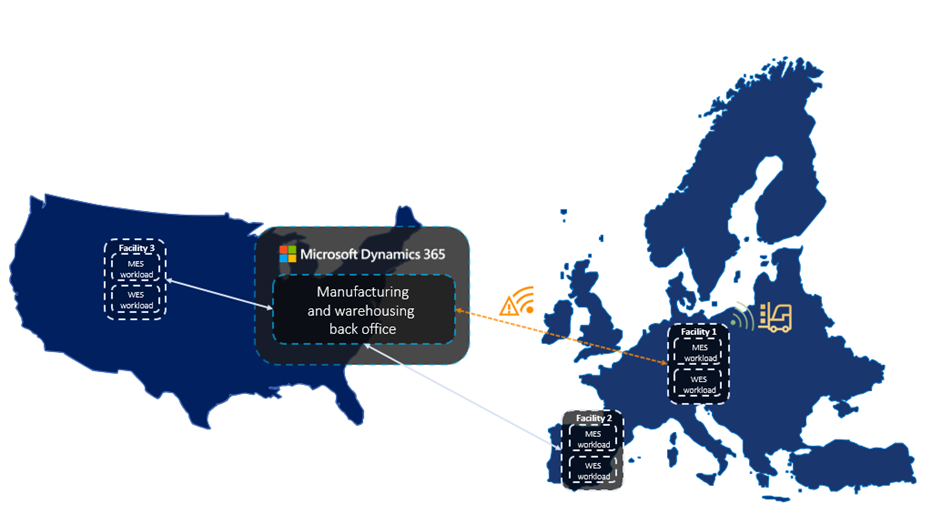
Dynamics 365 Supply Chain Management provides scale units in the cloud that runs in the nearest Microsoft Azure data center. Alternatively, scale units can run on the edge, hosted in appliances right in your facility. All scale units are connected to your enterprise-wide Supply Chain Management hub in the cloud to have all information readily available to fulfill your business needs.

A hybrid multi-node topology for supply chain management

Cloud and edge scale units for Dynamics 365 Supply Chain Management deliver on two key business objectives:

  • When a company is offline or when network latency is high,mission-critical processes must keep running.
  • When throughput is high and heavy processes runin parallel, manufacturing and warehouse processes muststill support high user productivity.

Hybrid multi-node topology is the foundation

One important foundation for cloud and edge scale units is a hybrid multi-node topology for Supply Chain Management. We have evolved the Dynamics 365 architecture into a loosely coupled system that runs selective business processes in a distributed model. Scale units are the environments that run those business processes, where all computation capacity is reserved for the processes and data in the assigned workloads.

Workloads define the processes and data

Workloads define the set of business processes, data, and policies including rules, validation, and ownership that can run on scale units. The preview capabilities include one workload for manufacturing execution and one for warehouse execution. These workloads bring the processes and data from the execution phase of the manufacturing and warehouse processes into the scale units.

Inbound, outbound, and other warehouse management processes for cloud and edge scale units have been split into decoupled phases for planning, execution, receiving, and shipping. Manufacturing processes are structured in a similar way for planning, execution, and finalization. Scale units take ownership of the execution phase.

After you configure the workload, the workers on the manufacturing or warehouse shop floor continue to go through the work and report results like they are used to, but now operate on the dedicated scale unit processing capacity.

Modern user experience for workers on the production floor

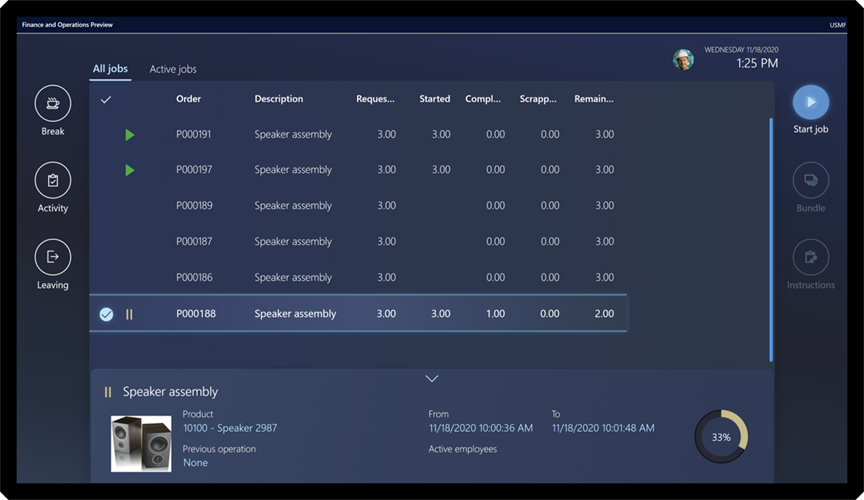
The new Production Floor Execution (PFE) interface for manufacturing workers comes with a modern, touch-friendly user experience. It not only looks great but is also tuned for difficult illumination situations on the shop floor.

a screenshot of a supply chain management app


Plus, the PFE now supports Dynamics 365 Guides which can be used to guide users to complete tasks in the best possible way, especially in complex production scenarios.

Woman using Dynamics 365 Guides to assemble an engin


Deployment experience for scale units and workloads

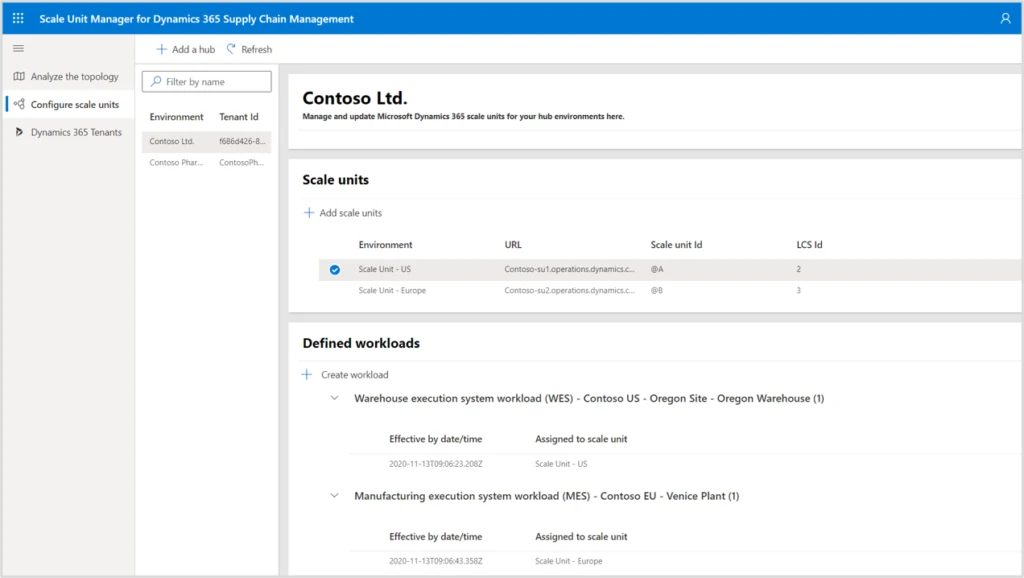
The Scale Unit Manager helps you to configure scale units and define where workloads for selected manufacturing and warehouse facilities run.

graphical user interface, text, application, email

In the future, the topology analysis page will show facilities, your Supply Chain Management hub, and your scale units. By looking at measures for bottlenecks, latency, and performance history you can identify the most beneficial applications for your scale units.

Next steps and learning

Dynamics 365 can help you build resilient supply chains in a multi-node topology using scale units in the cloud or on the edge. This is available now in public preview.

The post Boost supply chain resilience with cloud and edge scale units in Supply Chain Management appeared first on Microsoft Dynamics 365 Blog.

Brought to you by Dr. Ware, Microsoft Office 365 Silver Partner, Charleston SC.
Accelerate implementations with the expanded FastTrack for Dynamics 365

Accelerate implementations with the expanded FastTrack for Dynamics 365

This article is contributed. See the original author and article here.

Today, more than ever, your organization needs to adapt to changing business conditions with incredible speed and efficacy. Whether you’re shifting to digital sales or streamlining your supply chain, Dynamics 365 plays a pivotal role in digital transformation initiatives by bringing customers and business priorities together with the next generation of CRM and ERP applications.

Underpinning many of these successful initiatives is FastTrack for Dynamics 365, a Microsoft engineering powered customer success program that enables organizations to accelerate Dynamics 365 implementations and go live with confidence.

Available at no incremental cost to our customers, FastTrack for Dynamics 365 features learnings and experiences from over 3,000 cloud deployments through Success by Design, the prescriptive guidance (approaches and recommended practices) for designing, building, and deploying a Dynamics 365 solution. It’s no surprise that the program predictably delivers a measurable impact for our customers and partners.

“Intimidator is implementing a full range of ERP capabilities within Dynamics 365. With FastTrack, we were able get the help we needed to go from zero tech to state-of-the-art tech faster than we ever imagined.”Tim Gryder, Project Manager and System Administrator, Intimidator 4×4 Utility Vehicles

To enable more organizations to benefit from the program, we’re expanding and enhancing the FastTrack for Dynamics 365 program. Effective January 1, 2021, the updated program will serve more customers with a streamlined, partner-aligned execution and nomination model.

Expanded to serve more customers

Previously limited to customers with an annual Dynamics 365 investment of $300,000 or more, the program will now serve customers with a lowered minimum annual Dynamics 365 investment of $100,000 as well as provide new self-serve resources for all.

Customers who invest between $100,000 and $300,000 on Dynamics 365 on an annual basis can now, in partnership with a qualified implementing partner, take advantage of Success by Design as well as benefit from the assurance that Microsoft engineering is monitoring and engaging as needed throughout the implementation.

FastTrack for Dynamics 365 continues to offer the full privileges of the program, which includes a comprehensive set of Microsoft-governed implementation reviews and assistance by a designated Microsoft solutions architect, to customers who invest $300,000 or more on Dynamics 365 on an annual basis.

For all customers, particularly those in the early stages of their adoption of Dynamics 365 with an annual investment of less than $100,000, self-serve FastTrack resources are available, which include on-demand Success by Design training, product TechTalks, and go-live readiness for select Dynamics 365 applications.

Streamlined partner-aligned execution and nomination

Partners have traditionally been a cornerstone for delivering FastTrack for Dynamics 365-related services. Given the importance of partners in ensuring customer success, the program will now exclusively be delivered in collaboration with qualified Microsoft partners. Therefore, customers who wish to benefit from the program must work directly with a qualified partner.

To qualify, partners who implement FastTrack for Dynamics 365 must have Gold or Silver status in the Cloud Business Applications competency and must complete Success by Design live training and on-demand Microsoft Learn path. Standardizing and accelerating partner competency ensures that our customers predictably receive a high-quality experience in accelerating their Dynamics 365 implementations with FastTrack.

In addition, qualified partners are now empowered to directly nominate eligible customersthose with an annual spend of $100,000 or morefor FastTrack for Dynamics 365. The new unified customer nomination process for partners and Microsoft ensures that eligible customers can be more efficiently identified and served.

Learn more and get started

We value the trust and investment that our customers put into Dynamics 365 and FastTrack for Dynamics 365 program. The program changes referenced reflect the continued commitment by Microsoft to ensure customer success while strengthening our collaboration with partners.

You are invited to learn more about the guidance on implementation, best practices, and tools offered by FastTrack for Dynamics 365, and connect with your Microsoft account team or partner to discuss how you can take advantage of the FastTrack for Dynamics 365 program.

The post Accelerate implementations with the expanded FastTrack for Dynamics 365 appeared first on Microsoft Dynamics 365 Blog.

Brought to you by Dr. Ware, Microsoft Office 365 Silver Partner, Charleston SC.

Accelerate implementations with the expanded FastTrack for Dynamics 365

Tips for setting up sales forecasting in Dynamics 365 Sales

This article is contributed. See the original author and article here.

Most sales organizations understand the value of maintaining an accurate sales forecast. However, many are still tracking forecasts with a time-consuming spreadsheet. This blog post provides some best practices for using forecasting capabilities in Dynamics 365 Sales to help simplify creating accurate forecasts, even during rapidly changing conditions.

Benefits of sales forecasting

Sales forecasting is a projection of the sales that your organization expects to make within a set timeframe. Having current and accurate sales forecasting empowers you to better allocate your resources, modify your strategy to address unforeseen circumstances, and provide critical coaching support to sellers that need it. Dynamics 365 Sales forecasting simplifies the bottoms-up method of sales forecasting and leverages the collective knowledge of the people closest to the field your sales team.

Here are our best tips for maximizing forecasting capabilities

Start with a template: You might think that building your forecast from scratch is the best approach, but we’ve heard from people that they spent a lot of time doing this only to realize later that they could’ve saved time by using one of the pre-built templates:

  • Org chart forecasting allows you to roll-up your forecast values through your organization’s reporting structure.
  • Product forecasting allows you to base the forecast on the products you expect to sell.
  • Territory forecasting aggregates values through the geographical territories that your company does business in. Configuring a territory forecast requires setting up territories in a hierarchy, assigning territories to individuals, and assigning accounts to territories.

Want more details? Check out our doc: Select a template for a forecast.

Use a descriptive name: Be sure to include the timeframe and other clearly identifiable details in your forecast name so that it’s easier to find later. For example, North America Widget Forecast Q2 2020.

Roll up the hierarchy to the right person: Keeping in mind that you’ll probably want to share your forecasting with your management chain, be sure to put that person’s name at the top of the forecast hierarchy. It’s straightforward to do this just select the right entity type when you set up the forecast and see a quick preview to ensure you made the right selection. We won’t go into the steps now, but check out our docs for details.

Pick the right forecast timeframe (or timeframes): With Dynamics 365 Sales, you can configure multiple forecasts each with different timeframes, which is handy to address different reporting period needs such as monthly or quarterly. We recommend picking either 12 periods for monthly and four periods for quarterly.

Tune the forecast for your organization: Although the templates provide an end-to-end forecast, you may want to modify the forecast so that it works just right. As an example, perhaps you want your finance team to see the whole forecast, you can grant them access through the security tab. For steps on how to do this and more, make sure to read the documentation.

Forecast categories are an important part of the forecast and we’ve provided the most used sales categories out-of-the-box. Deals are segmented into these categories based on the sellers’ confidence level that they will close. The pipeline, best case, and committed categories denote deals that are high, medium, and low confidence, respectively. You’re free to modify these categories to create forecast columns that make the most sense for your organization. Check out the docs for more details.

Keep your team accountable: In the template, we’ve labeled the committed forecast as an adjustable column. This means that your managers and sellers can submit their own forecast outcomes. Coupled with quotas, which we recommend you upload through Excel in the activation step, you’ll be able to inspire more accountability from your team.

Iterate, iterate, iterate: There are many more useful capabilities like filters, snapshots, and drill-downs so even if you later discover that you need to tune up your forecast, no problem. Templates allow you to quickly build a new forecast to tailor fit the experience to your sellers’ needs.

Tips for sales forecasting during a crisis or unpredictable event

Encourage your sales team to keep their sales data up to date more frequently: During uncertain times, sales managers need clear visibility into the rapidly changing pipeline to make the best decisions about where to focus their time and resources. Asking your sales team to input their data as soon as they learn it will help you spot trends in time to mitigate unforeseen outcomes.

Run your forecasts more often: Just as your sales team should be extra vigilant when keeping their sales data up to date, sales managers should run their forecasts more frequently too a couple times a day during a crisis isn’t too often. Because the data may be changing rapidly, running a forecast can help you identify issues more quickly.

Don’t be afraid to step away from your forecast temporarily to focus on building relationships: Forecasting can be difficult when unexpected events happen, and it may be more productive for your sales team to focus on maintaining customer relationships until circumstances become more predictable. Nurturing relationships now will no doubt help you plan later when the time is right, and circumstances become more favorable to projecting sales.

Next steps

You can learn more about sales forecasting in these posts:

Driving accountability with advanced forecasting in Dynamics 365 Sales

Predictive Sales Forecasting in Dynamics 365 Sales

The post Tips for setting up sales forecasting in Dynamics 365 Sales appeared first on Microsoft Dynamics 365 Blog.

Brought to you by Dr. Ware, Microsoft Office 365 Silver Partner, Charleston SC.
Using activity data to improve opportunity scoring predictions in Dynamics 365 Sales

Using activity data to improve opportunity scoring predictions in Dynamics 365 Sales

This article is contributed. See the original author and article here.

Listening to the challenges many of our customers are facing with increasingly working online, we’ve developed new capabilities in Dynamics 365 to discover email messages, meetings, and phone call activities related to an opportunity, and then to factor these signals into the score.

Capturing activities to determine opportunity health

A healthy opportunity will usually have activities happening in it like email messages, meetings, and phone calls. Many of our predictive opportunity scoring customers were gathering these signals manually to determine opportunity health. We’ve replaced the need for customers to manually track activities by using AI to gather activities, approving prediction accuracy and compensating for cases where sellers do not diligently update the opportunity fields.

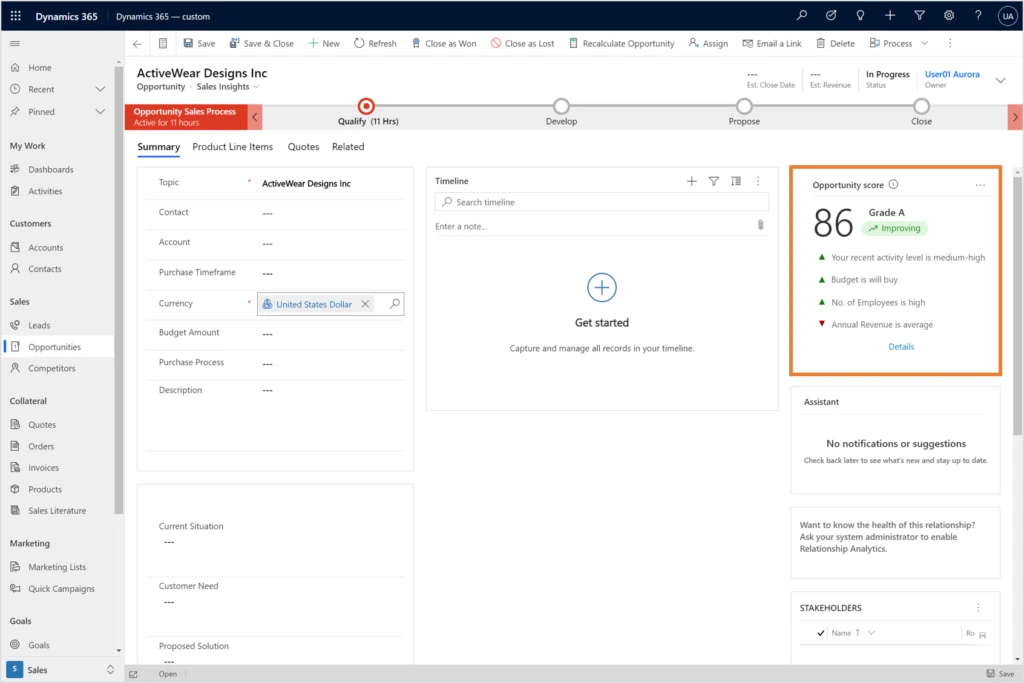
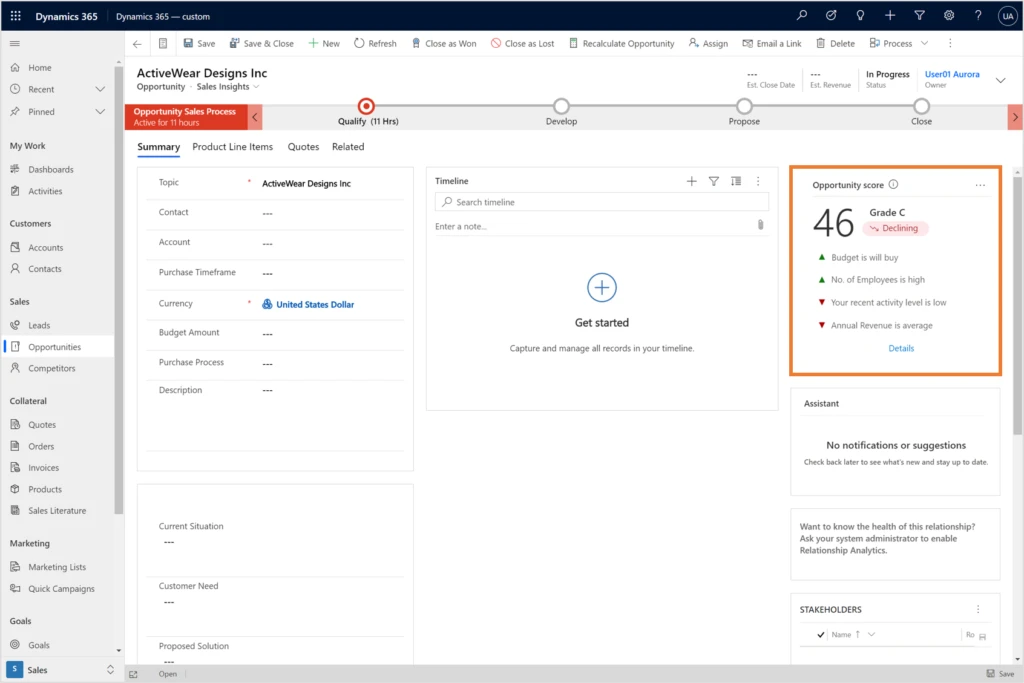
There is additional value in activities they provide actionable explanations for opportunity scoring predictions. It can help the seller make more educated choices about what the best next action might be for example, a high level of activity may indicate that the opportunity is heating up and is worth attention. Likewise, an opportunity with where the activity level is low may need immediate attention.

Here’s an example showing the opportunity score improving:

Screenshot showing predictive opportunity score improving

Here’s an example showing the opportunity score declining:

Screenshot showing predictive opportunity score declining


Connecting opportunities with activities

In addition to activities that are explicitly connected to opportunities, we developed algorithms to infer indirect connections between activities and opportunities, using Contact and Account activity timelines. Since these are not trivial connections (for example, an account may have multiple opportunities), AI is assigning them appropriate predictive weights.

How the predictive opportunity scoring model is trained

First, we make sure, automatically, that the data we have is meaningful and contributing to the prediction. Then we look at each recent activity level of every opportunity and try and find a correlation between this signal and the likelihood of winning the opportunity.

After the model is trained, we can view the open opportunities in the system and give them a score based on past examples. What the AI does is learn how recent activity level affects the likelihood to win an opportunity in your organization.

What Clover Imaging Group has to say about predictive opportunity scoring

“The predictive opportunity scoring model in Dynamics 365 Sales offered sales leaders at Clover Imaging Group valuable machine learning into what has traditionally been a manual process. With the predictive opportunity scoring model implemented, sellers were able to more effectively prioritize their opportunities based on metrics that are unique to our industry and organization. Beyond that, the predictive opportunity scoring model also gave detailed explanations as to why an opportunity was scored as it was, and what needs to be done to achieve a higher success probability. Plus, the Microsoft support and development team took the time to understand the nuances of our business, which allowed the model to pick up and evaluate the metrics most important to us.”

Next steps and continued learning

We encourage you to explore predictive opportunity scoring in Dynamics 365 Sales to see how it can help your sales team to prioritize work more effectively.

To understand the full capabilities of Dynamics 365 Sales and the value they bring to Dynamics 365 customers, visit Dynamics 365 Sales. To get started with activity suggestion, visit Overview of Dynamics 365 Sales. you’re using contact capture and have feedback, questions, or new needs, contact us at D365AISales@microsoft.com.


The post Using activity data to improve opportunity scoring predictions in Dynamics 365 Sales appeared first on Microsoft Dynamics 365 Blog.

Brought to you by Dr. Ware, Microsoft Office 365 Silver Partner, Charleston SC.

Fraud trends part 1: account takeover in a digitalized world

Fraud trends part 1: account takeover in a digitalized world

This article is contributed. See the original author and article here.

This year has been unexpected to say the least. As 2019 ended and business forecasts were written, no one would have ever guessed what was to come in 2020.

As consumer behaviors have shifted in uncertain times, merchants worldwide have quickly adapted and implemented new technologies, tools, and strategies to maintain business continuity and increase their online presence. Unfortunately, as online activity and e-commerce continues to rise, so does potential for exposure to fraud.

In this blog series, we will highlight some of the latest fraud-related events and issues on the rise in our digitized world, affecting individuals and businesses alike. Our goal is to better educate customers on what type of fraud can occur and how they happen, while sharing how solutions like Microsoft Dynamics 365 Fraud Protection can help protect businesses from a similar attack. With the fraud landscape changing every day, Dynamics 365 Fraud Protection strives to help businesses stay ahead of the game.

In this first installment, we will discuss the impact of account takeover (ATO) fraud, a type of identity fraud that can incur massive monetary losses for individuals and, for businesses, lost revenue and damaged reputations.

The impact of account takeover

In a world overflowing with technology and data, there is a constant challenge to protect that data from fraudsters. As software continues to evolve to protect information, so do fraudsters, requiring continuous improvement to security to prevent and identify breaches. For most people, this multi-billion dollar battle goes unnoticed unless they are directly impacted or a story of fraud hits the front page news.

So, what is account takeover? ATO is when a fraudster gains access to an account they don’t own, changes account information, and makes unauthorized transactions. It’s a type of fraud that can affect businesses small and large. ATO incurs tens of billions of dollars in fraud losses every year.

Fraud due to ATO is on the rise, growing faster every year as the world becomes more digitized. In 2017, ATO accounted for $5.1 billion in losses, and according to Juniper Research, online fraudulent transactions are expected to reach $25.6 billion in 2020.

ATO also occurs in the form of fraudsters taking over an account and making fraudulent purchases, or even open new accounts using the victim’s information. This crisis affects both the individual entity who has had their information stolen and the businesses the fraudsters interact with, resulting in United States businesses losing a reported $7 billion in 2019. Another issue with ATO is fraudsters are also taking over mobile phone accounts at an arming rate with 680,000 people falling victim in 2019, a rise of 78 percent from the previous year. ATO is a problem that needs to be addressed to help protect individuals and businesses alike, and luckily, solutions are available to prevent the devastating impacts.

Account takeover losses YoY from 2016-2019

How Dynamics 365 Fraud Protection can help prevent fraud

This is where Microsoft comes in, providing a solution to help protect businesses from fraudulent activity with the implementation of Dynamics 365 Fraud Protection. Recently awarded the Juniper cybersecurity platinum award, this suite of services enables users to gain access to Purchase Protection and two new capabilities, introduced in July 2020: Account Protection and Loss Prevention. The 2020 release wave 2 updates include better integration with Microsoft Dynamics 365 Commerce, among other updates for Dynamics 365 Fraud Protection.

  • Account protection is where the solution to protect accounts from ATO comes into play. Account Protection from Dynamics 365 Fraud Protection safeguards against ATO with the use of adaptive AI technology, BOT protection, device finger printing, the fraud protection network, and account creation and sign-in protection. With these tools, businesses and their users can be better protected from fraudsters attempting an ATO, ultimately protecting sensitive information and the business’s bottom line.

While fraud continues to be on the rise each year, tools to help shield businesses from fraudsters are becoming more readily available. As solutions like Dynamics 365 Fraud Protection utilize the power of AI to continually improve the effectiveness and efficiency of their programs, they can help to better defend businesses against fraud and protect their revenue.

  • Loss prevention helps protect your revenue by identifying potential fraud on returns and discounts arising from omnichannel purchases, enabling store managers and loss prevention officers to quickly take action to mitigate losses. Adaptive AI technology continuously learns and adapts from fraud patterns, working together with the fraud protection network to equip merchants with the tools they needed to optimize fraud controls related to discounts and returns.
  • Purchase protection helps merchants protect online revenue by improving commerce transaction acceptance rates while reducing checkout friction and providing merchants with insightful tools to make decisions that appropriately balance revenue opportunity and customer experience verses fraud loss. The transaction acceptance booster enables merchants to share transactional trust knowledge with issuing banks to help boost authorization rates and reduce wrongful rejects, helping protect revenue streams. Read how Microsoft is teaming up with Capital One and American Express to battle fraudulent purchases. In the 2020 release wave 2, capability will be added to the transaction acceptance booster for merchants to enable sharing of additional contextual data. More coverage will also be added for merchants with additional partner banks.

Next steps

Learn more about our comprehensive fraud protection with Dynamics 365 Fraud Protection and stay tuned for the next blog post of our Fraud Trends Blog Series.

Questions? Please contact your Microsoft sales representative to learn more about Dynamics 365 Fraud Protection capabilities.

The post Fraud trends part 1: account takeover in a digitalized world appeared first on Microsoft Dynamics 365 Blog.

Brought to you by Dr. Ware, Microsoft Office 365 Silver Partner, Charleston SC.