This article is contributed. See the original author and article here.
Over the past two years, businesses of all industries and sizes have had to adapt to new ways of working, a challenging operating environment, and ever-changing customer expectations. With all this change, it’s hard to overstate the impact of having secure and reliable productivity and collaboration tools.
This article is contributed. See the original author and article here.
In telecommunications, avoiding downtime is Job One. Planning, scheduling, and tracking maintenance operations that can reduce or avoid outages is critical. Plant operators need to have a quick, accurate picture of maintenance while maximizing efficiency.
Version 2.0 of Dynamics 365 telecommunications accelerator includes an extended data model and new sample applications to help you meet customer needs and realize time-to-value more quickly.
The first release of Dynamics 365 telecommunications accelerator provided place management and telecommunication sales capabilities for network and mobile operators, internet service providers, and others in telecommunications:
The ability to tie services, products, and deployed plant and network resources to specific geocoded physical locations such as buildings or a campus
Enhanced lead management with built-in service availability, qualification checks, and lookups for network resources, network mapping, and addresses
A telecommunications extension for the Common Data Model, with telco-specific data entities and attributes for fast application development
Partners who work with the Microsoft Power Platform can extend the data model or sample applications.
Add support for maintenance types, plans, network resources, and zones
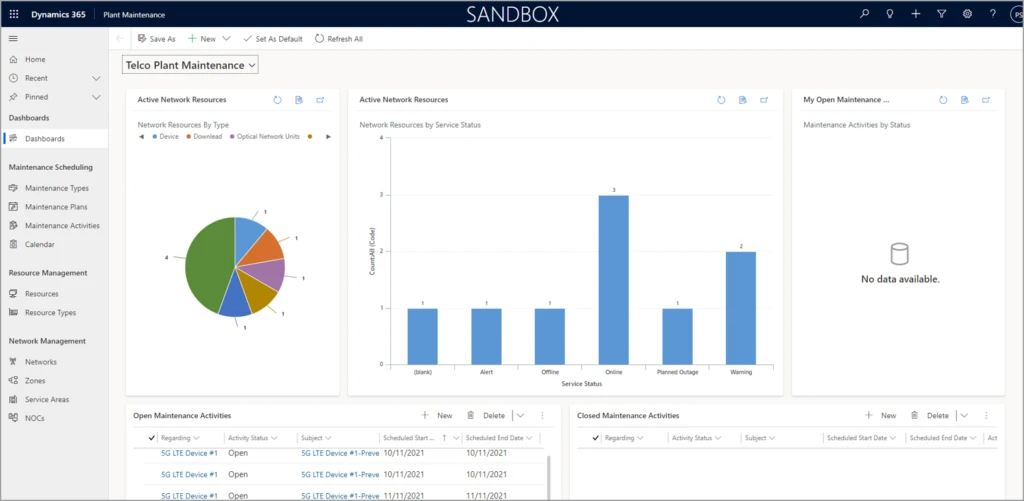
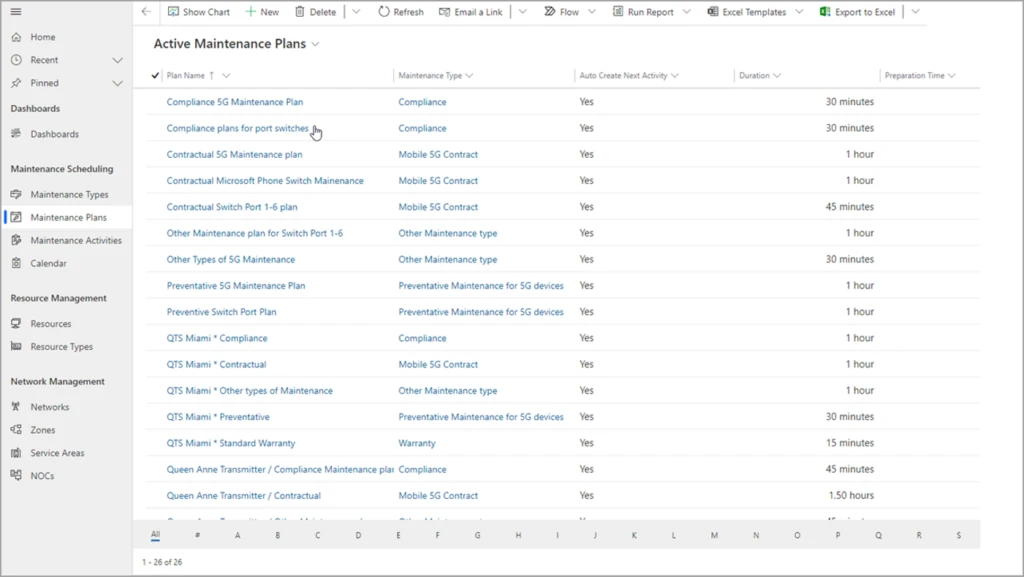
Version 2.0 of the Dynamics 365 telecommunications accelerator enhances the extended data model and adds sample applications. Plant operators can define maintenance types and plans, starting with supplied sample data for warranty, contractual, and compliance.
Operators can also define types of network resources, such as optical network units, antennas, and switches. They can also define network zones and service areas, tracking where they’re deployed, the accounts they serve, and the manufacturer. It’s all fully customizable and configurable out of the box with Dynamics 365.
Schedule maintenance plans and repeatable tasks
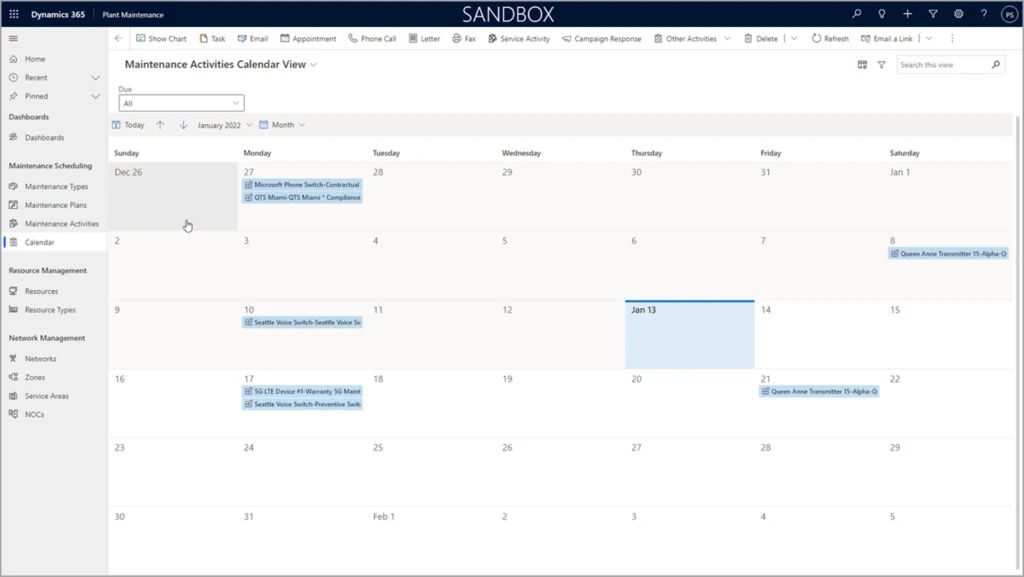
In the latest version of telecommunications accelerator, plant operators can easily schedule repeatable maintenance tasks. This not only streamlines operations, it also helps operators respond to audit and liability questions by tracking maintenance activities.
What our partners are saying
Rhyan J. Neble, Vice President of Product Innovation at ETI Software:
Microsoft’s telecommunications accelerator not only makes it possible for ETI to introduce new features to our customers faster, it empowers our team to innovate and extend our solution. For example, the maintenance scheduling features will enable our digital twin solution to identify customers and service areas impacted by planned and unplanned plant maintenance. This will allow proactive notifications to both the customer service teams and the subscribers. By integrating version 2.0 of the telecommunications accelerator into ETI’s Service Management Platform, we are able to immediately provide critical functionality to our customers and reduce costs at the same time.
Joe McDermott, COO of Carma:
Carma is continually impressed with the collaborative investments Microsoft is making in the Dynamics platform and we’re enthusiastically supporting development of the telecommunications accelerator. The version 2.0 release of the telecom accelerator delivers new functionality that we’ve integrated into Carma’s Network and Digital Infrastructure Platform for our existing and future customers. Planning and documenting preventative and other recurring maintenance is a key activity for datacenter and network operators striving for 100% uptime. With telecommunications accelerator’s plant maintenance features, Carma enables them to manage these activities with ease and visibility across the whole organization.
Next steps
Get started right away with a test drive of version 2.0 of the Dynamics 365 telecommunications accelerator on Microsoft AppSource. The data model, solutions, sample applications and data, Power BI reports, and UX controls that come with the telecommunications accelerator are available to any Microsoft Power Platform developer.
This article is contributed. See the original author and article here.
This month, we’re bringing new capabilities to Microsoft Teams to help people focus on their presentation and stay on top of required trainings, provision Windows 365 Cloud PCs more easily, and more.
This article is contributed. See the original author and article here.
With briefcases and suitcases in tow, business-to-business (B2B) sellers have always traveled the distance to meet buyers wherever they are. Buyers are going digital in a big way, so sellers can put away their bags (at least part of the time) and step into digital or hybrid selling. This dramatic shift in B2B buyingmore digital, more self-servicehas led to a steady decrease in the amount of time buyers spend with sellers. To adapt to this new omnichannel reality, sales teams are reinventing their go-to-market strategies.
B2B selling has truly changed much faster and more dramatically than anyone could have imagined. Buyers now use routinely use up to 10 different channelsup from just five in 2016.1 A “rule of thirds” has emerged: buyers employ a roughly even mix of remote (e.g. videoconferencing and phone conversations), self-service (e.g. e-commerce and digital portals), and traditional sales (e.g. in-person meetings, trade-shows, conferences) at each stage of the sales process.1 The rule of thirds is universal. It describes responses from B2B decision makers across all major industries, at all company sizes, in every country.
Although digital interactions, both remote and self-serve, are here to stay, in-person selling still plays an important role. Buyers aren’t ready to give up face-to-face visits entirely. Buyers view in-person interactions as a sign of how much a supplier values a relationship and can play an especially pivotal part in establishing or re-establishing a relationship. Today’s B2B organizations require a new set of digital-first solutions to navigate the complex and unfamiliar terrain. Microsoft Dynamics 365 Customer Insights can help.
Omnichannel presents new challenges
Increased opportunities to engage involve increased complexity. First, data ends up scattered across many different systems like customer relationship management (CRM), partner relationship management (PRM), e-commerce, web analytics, trials and demos, online chat, mobile, email, event management, and social networking. Assembling those pieces into a complete picture of a buyer or account is a complicated task that few B2B organizations and their existing systems can handle. Second, customer experiences are becoming increasingly fragmented as organizations struggle to maintain consistency from one touchpoint to the next. This issue is particularly acute for sellers when they don’t have critical context like previous interactions conducted on other channels such as content viewed, product trials initiated, online transactions, and product issues. Giving sellers visibility to the data is a start, but that would still require sellers to digest huge amounts of data to make sense of it all, hampering swift action.
But there are new possibilities
To deliver seamless omnichannel experiences, B2B organizations need a customer data platform (CDP) like Dynamics 365 Customer Insights that’s designed to maintain a persistent and unified view of the buyer across channels. The enterprise-grade CDP creates an adaptive profile of each buyer and account, so organizations can rapidly orchestrate cohesive experiences throughout the journey. Leading B2B organizations rely on unified data as a single source of truth as well as to unlock actionable insights that increase sales alignment and conversion, including account targeting, opportunity scoring, recommended products, dynamic pricing, and churn prevention. For example, sales teams can proactively prioritize accounts based on predictive scoring that takes into account firmographics and all past transactional data as well as behavioral insights like trial usage across all contacts at the account. Or a seller knows it’s the right time to engage since a buyer has just signaled high intent through website activities like viewing multiple pieces of content. Insights like these widen the gap between omnichannel sales leaders and the rest of the field.
The profiles and resulting analytics from Dynamics 365 Customer Insights can be leveraged across every function and systemsincluding sales force automation (SFA), account-based management (ABM), and e-commerce platforms, so that every person and system that the buyer engages with has the context to provide proactive and personalized experiences at precisely the right moment. This flexible design enables sales organizations to stay agile and future-proof their data foundation even when new sales tools are inevitably added to the mix.
Importantly, sales organizations can ensure that consent is core to every engagement. Privacy and compliance are crucial when it comes to customer data. In this new privacy-first world, consent funnels are as important as purchase funnels. It’s no longer only about collecting and unifying data. When companies build targeted and personalized experiences, customer consent must be infused across all workflows that use customer data. Dynamics 365 Customer Insights is designed from the ground up to be consent-enabled, allowing sales organizations to automatically honor customer consent and privacy, and build trust, across the entire journey.
A next-gen customer data platform can help
The next normal for B2B sales is here, and there’s no looking back. The buyer’s move to omnichannel isn’t as simple as shifting all transactions online. Omnichannel with e-commerce, videoconference, and face-to-face are all a necessary part of the buyer’s journey. What B2B buyers want is nuanced, and so are their views about the most effective way to engage. B2B organizations must continue to adapt to meet this new omnichannel reality. To learn how a CDP can help delight your customers while helping your sales team navigate omnichannel selling to lower the cost of selling, extend reach, and improve sales effectiveness, visit Dynamics 365 Customer Insights.
This article is contributed. See the original author and article here.
Across industries, companies are finding practical ways to bridge physical reality and digital experiences using hands-free headsets and augmented reality solutions to inform decisions and action on insights produced by smart, connected solutions.
Mixed realitya set of technologies that superimposes digital data and images in the physical worldbrings new opportunities that have become instrumental to how we tap into unique real-world, human capabilities. This technology is becoming more widely used across organizations today and has proven to be transformative to task performance, learning and retention, and collaboration. In fact, the augmented and virtual reality market is expected to reach $372.1 billion by the end of 2022, and swell to $542.8 billion by the end of 2025 according to new data from the IDC.1
Microsoft HoloLens 2 and mixed reality solutions are driving material ROI across industries
Based on the Microsoft-commissioned Forrester Total Economic Impact (TEI) report, Microsoft HoloLens 2 is delivering 177 percent return on investment (ROI) and a net present value (NPV) of $7.6 million over three years with a payback of 13 months.2 Customers across leading industries are realizing significant value from deploying mixed reality solutions in their most common, critical work scenarios.
Manufacturing
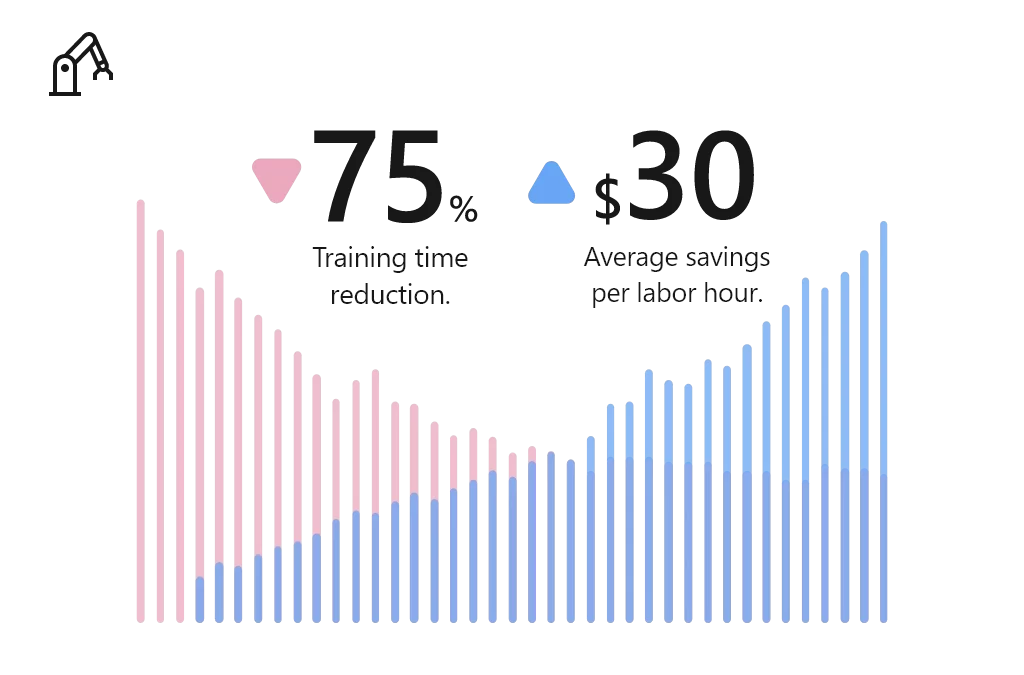
Manufacturing companies deploying Microsoft HoloLens 2 and mixed reality applications to train their workforces, accelerate employee proficiency, and build more agile factories. Using Microsoft mixed reality, Manufacturers reduced training time by 75 percent, at an average savings of $30 per labor hour.2
Common scenarios in which manufacturers benefit from mixed reality on Microsoft HoloLens 2:
Guided assembly and training: Empower employees to learn new skills and complex assembly tasks with holographic step-by-step instructions, no instructor necessary.
Remote inspection and audits: Enable remote employees to solve business problems in real time, using 3D annotations to access, share, and bring critical information into view.
Connected field service: Connect field technicians with remote experts to collaborate seamlessly, heads-up and hands-free with content capture abilities, interactive annotations, and contextual data overlays.
“When you describe a problem, imagine that we are speaking different languages. When you explain it, someone on the other side may not understand precisely what’s happening, but when you show it in real time with the HoloLens, people understand.”Eaton Vehicle Group. Read more about the Eaton Vehicle Group customer story.
Education
Educators are turning to Microsoft HoloLens 2 and mixed reality applications to help students embrace a new way of learning. For example, education institutions reduced 520 annual hours of instruction per expert by 15 percent.2
Common scenarios in which educators benefit from mixed reality on Microsoft HoloLens 2:
Augmented teaching: Captivate students and bring education to life with impressionable, high-impact 3D visualization models that enable virtual collaboration and instruction.
Experiential learning: Enable educators to build an experience-based lesson plan, integrating textbook concepts into physical environments to create a simple “learn by doing” approach for studentshands-on and unmediated.
Scaled learning and research: Develop a scalable research collaboration model that improves efficiency of research, lab work, and medical training.
“We did a trial back with our medical students. The students that had been in the HoloLens lab scored 50 percent better compared to the rest of the med school class.”Case Western. Read more about the Case Western customer story.
Healthcare
Mixed reality is empowering providers, payors, and health science experts to reimagine healthcare by accelerating diagnoses, reducing time-to-care, and enabling personalization. Using Microsoft mixed reality, healthcare providers reduced average consumables by 80%, saving $4,000 per trainee.2
Common scenarios in which healthcare providers benefit from mixed reality on Microsoft HoloLens 2:
Holographic patient consultation: Enable healthcare providers to project 3D holographic visualizations of patients’ internal systems that provide procedural understandingbuilding confidence in upcoming procedures and/or treatments.
Remote expert consultation: Support remote consultation and enable medical staff to consult colleagues with heads-up and hands-free through an interactive collaborative experience from anywhere in the world.
Training simulations: Train medical staff with holographic step-by-step guidance without subject matter experts being physically present.
“Using Dynamics 365 Remote Assist, doctors wearing HoloLens, can hold “hands-free” and “heads-up” Teams video calls with colleagues and experts anywhere in the world. They can receive advice, interacting with the caller and the patient at the same time, while medical notes and X-rays can also be placed alongside the call in the wearer’s field of view.”Imperial College Healthcare NHS Trust. Read more about the Imperial College Healthcare NHS Trust customer story.
Architecture, engineering, and construction
With Mixed Reality, architecture, engineering, and construction (AEC) firms are empowered to overcome design, modeling, collaboration, and building site challenges to enhance project quality, decision-making, improve productivity. For example, AEC firms have reduced rework by 75 percent, saving $44 per hour.2
Common scenarios in which AEC organizations benefit from mixed reality on Microsoft HoloLens 2:
Clash detection: Enable onsite workers to preemptively identify issues, detect clashes, and gain buy-in of onsite workers and key stakeholders with overlay designs on physical locations. This mitigates late-stage design changes that could result in rework, budget overrun, and project delays.
3D plan and model demonstrations: Empower project leaders, designers, and engineers and improve customer service and sales with 3D demonstration and immersive visualizations.
Self-guided learning: Equip onsite workers to view task instructions, essential data, and model visualizations while in the flow of work, increasing speed, quality, and safety.
“We use Dynamics 365 Remote Assist on HoloLens 2 to work more effectively and share expertise at critical milestones. This not only saves us money but also helps us construct datacenters for our customers more quickly.”Microsoft. Read the full customer story.
The Forrester TEI study validates how mixed reality solutions on Microsoft HoloLens 2 are empowering enterprises across industries to achieve more. We believe these technologies have offered not only innovative results, but long-term and sustainable solutions for training, remote collaboration, inspections and audits, field service, and more.
Next steps
We look forward to continuing this blog series with a deep dive spotlight on each of these leading industries. In the meantime, learn more about mixed reality applications on Microsoft HoloLens 2 and get started today:
Request a Dynamics 365 Mixed Reality demo on Microsoft HoloLens 2. Book an appointment with our Microsoft Stores team today. Select ‘Other’ under Choose topic and reference HoloLens 2 demo in “What can we help with”.
This article is contributed. See the original author and article here.
We are excited to share that Microsoft is bringing the Glint solution into Microsoft Viva to make listening and acting on employee feedback an integral part of how businesses engage and develop their talent in the new era of hybrid work.








Recent Comments