Azure Marketplace new offers – Volume 85

Azure Marketplace new offers – Volume 85

This article is contributed. See the original author and article here.

We continue to expand the Azure Marketplace ecosystem. For this volume, 85 new offers successfully met the onboarding criteria and went live. See details of the new offers below:

Applications

ABILITY DatenCockpit.png

ABILITY.DatenCockpit: ABILITY.DatenCockpit is a flexible framework for building a customized portal for your employees, customers, or vendors. Combine data from all your organization’s systems and data sources, and tailor dashboards to your needs and working style.

APENTO Consultant Access.png

APENTO | Consultant Access: This managed service from APENTO grants consultants read-only access to the Microsoft Azure subscriptions of your choice, enabling them to perform tasks or deliver services. Azure Lighthouse delivers an overview of the granted access levels, and you can expand or revoke access at any time.

APENTO Managed Services for our Azure customers.png

APENTO Managed Services for our Azure customers: In this offering, APENTO will provide your organization with a fully managed enterprise-grade platform powered by Microsoft Azure. APENTO’s highly automated approach can handle even the most demanding applications.

apisec.png

APISec: APISec uses smart bots to inspect and map API features, then creates custom security coverage using the Playbook framework (Security as Code) for OWASP top 10, business-logic, and role-configuration flaws. Continuously detect and report vulnerabilities early in the development cycle with APISec.

ARCHIBUS on Azure.png

ARCHIBUS on Azure: ARCHIBUS on Microsoft Azure centrally manages an organization’s internal assets and facility-related business information in cooperation with IoT and other service solutions. This app is available only in Japanese. 

ArchiveMASH.png

ArchiveMASH: Bluesource North America delivers ArchiveMASH as part of a fully managed migration service. Bluesource’s dedicated migrations team installs and configures ArchiveMASH, then delivers the migration until all data has reached its destination.

Authentication Services.png

Authentication Services: Authentication Services provides enterprise-wide access, authentication, and authorization for UNIX, Linux, and Mac OS X systems by using an organization’s existing Active Directory infrastructure. This allows non-Windows resources to join the Active Directory trusted realm.

Azure Sentinel 24x7 Managed Zero Trust Service.png

Azure Sentinel 24×7 Managed Zero Trust Service: Infused Innovations’ threat protection is a managed service that uses your Azure and Microsoft security licensing to deliver a zero-trust environment. Maintain security hygiene on all Windows, Linux, MacOS, iOS, and Android devices and stop zero-day attacks from spreading.

Bizdirect CMS - BizOptima.png

Bizdirect CMS – BizOptima: Bizdirect’s cloud optimization services provide you with status updates of your virtual machines, enabling you to identify what is being overused, underused, or unused. Improve your return on investment with Bizdirect.

Bromcom MIS.png

Bromcom MIS: Bromcom is a cloud-based school management information system providing a comprehensive view of pupil and school performance. Bromcom covers attendance, behavior, examinations, assessments, and progress tracking. Features include parent and student portals, online payments, and more.

Call Recording Service.png

Call Recording Service: Touch Call Recording as a Service enables companies to meet important requirements, including compliance (MiFID, MiFID II, GDPR), documentation, dispute resolution, quality assurance, risk management, audit trails, and training. Boost productivity, add value, and deliver improved customer service.

CentOS 7.6 Free.png

CentOS 7.6 Free: This pre-configured virtual machine from Cognosys launches CentOS, a popular Linux distribution derived from Red Hat Enterprise Linux and used by organizations for development and production servers.

CloudTime.png

CloudTime: CloudTime significantly reduces cloud costs by monitoring your cloud and automatically parking unused resources. Doing so for a just few resources can save thousands of dollars a month on Microsoft Azure bills with little time investment.

Connector.png

Connector: Connector helps companies fulfill their obligations with the Brazilian government, both at the municipal level and the federal level. Connector works with NFe, NFSe, and Reinf documents and is available in Portuguese and Spanish.

Contactable.png

Contactable: PhoneAppli’s phone book and business card management service help manage employee and customer information in the cloud by consolidating all contact information in one place. This app is available only in Japanese.

COVID-19 Remote Monitoring & Compliance.png

COVID-19 Remote Monitoring & Compliance: ConnectedLife offers a scalable COVID-19 remote monitoring, reporting, and compliance solution that supports the needs of healthcare workers, patients, patients’ families, essential workers, and community volunteers.

Cronos Timetable.png

Cronos Timetable: Using artificial intelligence and mathematical models, Cronos Timetable quickly generates school schedules without teacher and class scheduling conflicts.

CyberGate SIP connect to Microsoft Teams.png

CyberGate SIP connect to Microsoft Teams: The CyberGate application server lets you connect a SIP H.264 video door intercom to Microsoft Teams. Enable Teams users to answer incoming intercom calls with two-way audio and live video and open the door for visitors.

Data360 DQ.png

Data360 DQ+: With automated capabilities across data governance, metadata management, data analytics, and data quality, Data360 empowers business and technical users to extract value from data like never before. Data360 makes it easy to identify the trusted data that matters most for your business.

Diffusion Real-time Platform.png

Diffusion Real-time Platform: The Diffusion Real-Time API Management Platform delivers centralized data management, optimization, and integration to simplify development, reduce infrastructure requirements, and speed time to market for corporate applications and systems.

Digital Patient Experience Manager.png

Digital Patient Experience Manager: Built for the healthcare industry, Digital Patient Experience Manager is a communications automation ecosystem that facilitates automated communications across patients’ preferred channels, including email, SMS, and voice. Automate care reminders and improve patient outcomes.

Docker CE with CentOS 8.0.png

Docker CE with CentOS 8.0: This pre-configured virtual machine from Skylark Cloud launches CentOS, a popular Linux distribution, configured with Docker CE. Docker is a set of platform-as-a-service products that uses OS-level virtualization to deliver software in packages called containers.

DRaaS Continuity Planner.png

DRaaS Continuity Planner: Storage Guardian’s free disaster-recovery-as-a-service (DRaaS) platform centralizes the preparation steps to help you plan, test, and communicate your organization’s DRaaS solution.

Dynamic Demand Forecast in COVID-19.png

Dynamic Demand Forecast in COVID-19 and New Normal: Singular Intelligence offers its dynamic demand forecast and causal factors-based simulation solution to help users understand how the COVID-19 pandemic has affected the consumer goods and retail industries. Get automated predictive insights, forecasts, alerts, and more.

Energy Master Platform.png

Energy Master Platform: With cost savings being critical for success and energy prices rising, multi-site corporations are challenged to reduce costs and reach sustainability targets. Energy Master Platform helps clients reduce consumption and costs while building strategies around carbon footprint reduction.

EntelliFusion.png

EntelliFusion: EntelliFusion cleans, shapes, stores, and secures operational data for analytics and machine learning. It is data-agnostic, scalable, and ensures data accuracy and response time performance to promote end-user BI tool adoption.

FACILITYtwin.png

FACILITYtwin: FacilityTwin brings your facility to your fingertips, contextualizing asset maintenance and performance data in mobile and easy-to-use visual interfaces. Transform productivity, risk cost, and flexibility outcomes without interfering with your regulatory processes and systems.

Fata Morgana Benchmark.png

Fata Morgana Benchmark: Pocket Virtuality’s Fata Morgana Benchmark offers simple benchmarking for the graphical subsystem of Microsoft HoloLens devices, graphics processing units, and the Fata Morgana rendering engine.

FlightPulse.png

FlightPulse: Designed by pilots, FlightPulse is a fully configurable electronic flight bag application that puts key operational data directly in the hand of pilots. Unlock and consolidate disparate data to help pilots make informed, data-driven decisions.

GEM Winch by GEM System.png

GEM Winch by GEM System: GEM Winch is a universal modular system for the transformation, anonymization, and creation of data sets. Easily and intuitively decide which data will be included in a data set, which data to anonymize, and more. This app is available only in Czech.

Gorilla Expense.png

Gorilla Expense: Gorilla Expense provides complete visibility into your organization’s travel and expense spending, and it offers savings through automated expense management. Take the pain out of expense reporting with Gorilla Expense.

Industry Weapon MediaBridge for Azure.png

Industry Weapon MediaBridge for Azure: Developed for Industry Weapon’s CommandCenterHD Platform, the MediaBridge appliance provides a secure outbound connection to the Industry Weapon cloud application and handles the content distribution to digital signage devices in your internal network.

Jellyfin - Streaming Media Server on Ubuntu 18.04.png

Jellyfin – Streaming Media Server on Ubuntu 18.04: This virtual machine image built by Tidal Media Inc. launches Jellyfin Streaming Media Server on Ubuntu. Jellyfin delivers streaming media from your dedicated server to user devices via multiple apps.

koel - Music Broadcasting Server on Ubuntu 18.04.png

koel – Music Broadcasting Server on Ubuntu 18.04: This ready-to-run image built by Tidal Media Inc. for web developers contains koel Music Broadcasting Server on Ubuntu 18.04. With a web-based audio streaming service written in Vue on the client side and Laravel on the server side, koel provides flexbox and drag-and-drop functionality.

L Squared Digital Signage for Modern Stores.png

L Squared Digital Signage for Modern Stores: L Squared Hub, a content management system for corporate and retail communication, empowers organizations to deliver high-impact, media-rich content to customers and employees on any digital display. This app is available in English and French.

LandView.png

LandView: LandView tracks files associated with oil wells, acreage, payments, obligations, royalties, and division of interest. You can view this data in its reporting tools and title chain visualizer.

Leni Pharma Portfolio Management.png

Leni Pharma Portfolio Management: Leni, an AI-driven solution from LTI, helps portfolio managers in the pharmaceutical industry assess the risk of ongoing clinical trials, simulate the success of future clinical trials, compare against competitor studies, and predict the probability of study success against a set schedule.

LTI Enterprise Privacy Rights Management Solution.png

LTI Enterprise Privacy Rights Management Solution: LTI’s Enterprise Privacy Rights Management Solution (EPRMS) helps organizations manage consumer requests and meet regulatory timelines. It covers consumer consent, identification of personal data, and rules-based anonymization and deletion of customers’ personal data.

LTI Mosaic Decisions.png

LTI Mosaic Decisions: Mosaic Decisions, LTI’s data analytics platform, harnesses your valuable data to generate actionable insights, which can then facilitate business transformation and enhance the quality and speed of your decision-making.

Managed Detection and Response.png

Managed Detection and Response: The Managed Detection and Response (MDR) service uses Microsoft Azure Sentinel to delegate detection and response to Open Systems AG’s DevSecOps engineers, who are always available to contain threats.

Mixed report AI.png

Mixed report AI: To reduce the spread of COVID-19, EBILAB’s web app helps restaurants and other retail spaces monitor and predict the number of patrons. This app is available only in Japanese.

Neo4j Enterprise 4.0 Causal Cluster.png

Neo4j Enterprise 4.0 Causal Cluster: Improve the throughput and processing of your workloads with a Neo4j 4.0 causal cluster. Neo4j is an open-source graph database platform that helps organizations make sense of their data by revealing how people, processes, locations, and systems are interrelated.

Neo4j Enterprise VM Version 4.1.png

Neo4j Enterprise VM Version 4.1: Deploy an instance of Neo4j 4.1 on Microsoft Azure. Neo4j 4.1 features more role-based access control and improvements to causal clustering, query planning, and memory management. Neo4j is an open-source native graph database providing ACID-compliant transactions.

Optimiz CentOS 8 Linux Web Server.png

Optimized CentOS 8 Linux Web Server: This image offered by tunnelbiz.com contains an optimized version of CentOS 8 and PHP 7.4 for improved web server performance.

Pocket Work Mate.jpg

Pocket Work Mate: Companies can reduce turnover of part-time staff with better training and knowledge-sharing resources. Pocket Work Mate helps educate new staff members, automatically generating multilingual subtitles to uploaded videos. This app is available only in Japanese.

QR code generation service.png

QR code generation service: Ecoeffy’s QR code app is designed for companies interested in implementing self-service platforms and incorporating barcodes, QR codes, or near-field communication (NFC) readers in their processes. This app is available in English and Spanish.

RSA Authentication Manager 8.5.0.0.0.png

RSA Authentication Manager 8.5.0.0.0: RSA Authentication Manager, the on-premises solution behind the RSA SecurID Access hybrid platform, verifies authentication requests and administers authentication policies for enterprise networks.

Simio Manufacturing Process Digital Twin.png

Simio Manufacturing Process Digital Twin: Design and operate your factory with Simio’s 3D process digital twin. Driven by enterprise data, it provides predictive and prescriptive analysis to improve the design and operations of complex systems.

Smart Retail.png

Smart Retail: Control IoT energy costs and reduce your organization’s carbon footprint with Smart Retail. Through remote monitoring, Smart Retail obtains equipment data every 15 minutes, stores it on Microsoft Azure, and processes it with Microsoft Power BI. This app is available only in Spanish.

Sproute SPAN SD-WAN gateway.png

Sproute SPAN SD-WAN gateway: Sproute SPAN SD-WAN gateway helps reduce vendor management burdens; boost network capacity, performance, and availability; improve productivity and security; and enhance visibility throughout your organization.

SymbioSys - Distribution Management-as-a-Service.png

SymbioSys: Distribution Management-as-a-Service: Designed for distributor partner organizations, SymbioSys Distribution Management-as-a-Service helps insurance distributors manage registrations, hierarchies, agent movement, performance, persistency, advisor classifications and rating, incentives, payments, and contests and campaigns.

SymbioSys Contest-as-a-Service (for Distributors).png

SymbioSys Contest-as-a-Service (for Distributors): Based on consolidated data from all insurers, SymbioSys Contest-as-a-Service helps insurance distributors launch innovative contests to drive sales, promote products, improve revivals, and drive recruitment.

SymbioSys Incentive-as-a-Service (for Distributors).png

SymbioSys Incentive-as-a-Service (for Distributors): SymbioSys Incentive-as-a-Service for insurance distributors uniquely addresses the incentive needs of policy contracts, including life, annuity, pensions, property and casualty, and more. Ensure all your organization’s advisors are well motivated to deliver results with SymbioSys Incentive-as-a-Service.

Tick Tock Clock Sync & Monitoring.png

Tick Tock Clock Sync & Monitoring: Tick Tock is a software-based solution for accurate time sync and infrastructure monitoring. It offers sync accuracy as low as 5-to-10 nanoseconds when using hardware timestamps and hundreds of nanoseconds to 5 microseconds when using software timestamps.

Tide.png

Tide: Tide is a cloud-based solution that delivers a centralized bordereau transformation, processing, and repository platform. It ensures that delegated authority data is received on time, in a complete, standardized, and contractually compliant format, and is stored in one location.

UltraBac Dynamic Replication to Azure.png

UltraBac Dynamic Replication to Azure: UltraBac’s replication to low-cost Microsoft Azure storage provides organizations of any size with a powerful and simple-to-implement failover protection plan. Continuously replicate on-premises Windows servers to Azure for nearly instant disaster recovery failover.

Vuforia Expert Capture.png

Vuforia Expert Capture: Vuforia Expert Capture is an end-to-end augmented reality solution that drives transformational workforce productivity. It empowers front-line workers to deliver increased business value by always having the relevant procedural guidance to get the job done quickly, accurately, and safely.

WANdisco LiveData Plane for ADLS Gen1-Gen2.png

WANdisco LiveData Plane for ADLS Gen1-Gen2: WANdisco LiveData Plane enables organizations to continue to read and write source data during data migration. Accelerate the move to ADLS Gen2 with no scripting, coding, or business disruption.

Wragby Azure Managed Services.png

Wragby Azure Managed Services: Wragby Azure Managed Services provide peace of mind to enable you to focus on business operations while realizing your organization’s digital transformation imperatives.

Ynomia Connected Jobsite.png

Ynomia Connected Jobsite: Ynomia Connected Jobsite converts worksites into digital warehouses, displaying the real-time location of building materials. Put critical location data in employees’ hands to increase productivity and reduce costs.

Zaloni Arena.png

Zaloni Arena: Arena is an augmented data operations platform providing an active data catalog that enables self-service data enrichment and consumption. Arena is built with an extensible machine learning platform that improves and safeguards enterprise data assets.

Zepcam Bodycam Solutions.png

Zepcam Bodycam Solutions: Zepcam develops body camera solutions for police, law enforcement, military, public safety, public transport, and other industries. Capture video, audio, and GPS information with superior video quality, secure storage, and unique video management features.

Consulting services

Application Modernization- 2 wk assessment.png

Application Modernization: 2 wk assessment: Dimension Data will assess your applications and dependencies, then provide a report indicating your migration and optimization options and your application readiness to move to Microsoft Azure.

Azure Adoption 2-Wk Workshop.png

Azure Adoption 2-Wk Workshop: In this workshop, Green House Data will cover the Microsoft Cloud Adoption Framework for Azure and create a customized cloud adoption plan for your business.

Azure App Services- 4-weeks Implementation Service.png

Azure App Services: 4-weeks Implementation Service: With this implementation package, which is intended for organizations facing performance, scale, or security issues with their applications, ComtechRIM India Private Limited will provide assistance in migrating apps to Microsoft Azure App Service.

Azure Cost Optimization 3 Week Assessment.png

Azure Cost Optimization 3 Week Assessment: MAQ Software’s assessment will help you track your Microsoft Azure resource consumption and identify opportunities to optimize costs, addressing underutilized resources, security, and reporting.

Azure Managed Security Services- 2 Wk Assessment.png

Azure Managed Security Services: 2 Wk Assessment: In this engagement, CyberProof, a UST Global company, will conduct a cyber maturity assessment for deploying a security operations center (SOC) platform on your Microsoft Azure environment.

Azure Modern Datamart- 1-Day Assessment.png

Azure Modern Datamart: 1-Day Assessment: Modernize your data mart with an assessment from Intuceo, whose consulting team will analyze your data warehousing goals, propose appropriate Microsoft Azure services, and create a plan to implement a data warehousing pilot.

CAF - Strategy,Plan & Ready- 1-Day Workshop.png

CAF – Strategy, Plan & Ready: 1-Day Workshop: FyrSoft’s workshop will introduce you to the Microsoft Cloud Adoption Framework for Azure, help you put together a cloud adoption plan, and establish or optimize your Azure environment.

CenturyLink AVS Migration Assessment 7 Days.png

CenturyLink AVS Migration Assessment 7 Days: This assessment from CenturyLink will provide a high-level indication of costs for an estate on Microsoft Azure VMware Solution, along with recommendations for right-sizing legacy environments ahead of a migration to Azure.

Cloud Alignment- 4-hour workshop.png

Cloud Alignment: 4-hour workshop: Slalom Consulting will meet with your business and technology leaders to determine your organization’s cloud maturity, business and IT alignment, and talent readiness. This workshop is a precursor to Slalom Consulting’s Business Transformation enabled by Cloud (BTeC) engagement.

CloudStart CAF Landing Zone- 4-Wk Implementation.png

CloudStart CAF Landing Zone: 4-Wk Implementation: ANS Group Limited’s CloudStart framework helps clients quickly configure a production-ready Microsoft Azure environment. ANS Group Limited will guarantee you end-to-end coverage and address any questions you have so you can migrate to Azure with full confidence.

Cognitive Services- 2-day Workshop.png

Cognitive Services: 2-day Workshop: In this workshop, Awara IT will focus on Microsoft Azure and solutions using cognitive services: voice and image recognition, text translations, smart search, and bots. Only basic Azure skills are required for the workshop, and it’s suitable for any industry and any project scope.

Data Exploration- 1-Day Workshop.png

Data Exploration: 1-Day Workshop: This workshop from PGS Software will help companies define relevant use cases for machine learning and big data. PGS Software’s data scientists and business analysts will provide guidance on Microsoft Azure data storage solutions, architecture options, and more.

Data Lake Starter Kit 1 hour Implementation.png

Data Lake Starter Kit 1 hour Implementation: In this free engagement, dataroots will implement a module for Terraform, an open-source tool for provisioning and managing cloud infrastructure, that deploys a complete and opinionated data lake network on Microsoft Azure in less than one hour.

DevOps on Azure- 2-Week PoC.png

DevOps on Azure: 2-Week PoC: Infopulse can help you achieve your strategic goals with Microsoft Azure DevOps Services. Infopulse experts will collaborate with you to implement a proof-of-concept project with an appropriate pilot application.

Fast & Smart - 2 weeks implementation.png

Fast & Smart – 2 weeks implementation: 4WARD’s Fast & Smart implementation service makes it easy to switch to Agile work. This offer is available only in Italian and will involve Microsoft Teams, Remote Desktop Gateway, and Windows Virtual Desktop.

Industrial IoT- 1 day Assessment.png

Industrial IoT: 1 day Assessment: CloudPro’s Microsoft Azure experts will examine your production setup and conduct a short interview with you, then devise a roadmap leading you to Azure IoT and helping you implement industrial IoT in your production environment.

Managed IaaS on Azure- 4h Assessment.png

Managed IaaS on Azure: 4h Assessment: akquinet AG’s free assessment will take a deeper look into your Microsoft Azure infrastructure and come up with a managed infrastructure offer tailored to your resource needs.

Modernise your Data Platform- 2 Hour Briefing.png

Modernise your Data Platform: 2 Hour Briefing: In this free briefing, Data-Driven AI will consider your business goals and requirements, then advise you on how to transition to a modern, advanced analytics platform using Microsoft Azure.

Oracle Exadata to Azure 2-Week Assessment US.png

Oracle Exadata to Azure 2-Week Assessment US: Data Intensity’s assessment will enable organizations to build solutions on Microsoft Azure for their Oracle workloads. Data Intensity will consider what can be completed with each workload and how to further integrate Azure services.

Siebel to Azure - 1-Week Migration Assessment.png

Siebel to Azure – 1-Week Migration Assessment: Is your organization using Siebel for customer relationship management and considering alternatives? Speridian Technologies will analyze your Siebel system and provide a business case for migrating to Microsoft Azure.

Snowflake on Azure Consultation - 1 hour briefing.png

Snowflake on Azure Consultation – 1 hour briefing: In this briefing, Agile Solutions will describe the advantages of Snowflake when used on Microsoft Azure. Agile Solutions will also cover migration and Azure ETL (extract, transform, load) technology choices.

SQL Svr DWH Migration to Azure-10wk Implementation.png

SQL Svr DWH Migration to Azure-10wk Implementation: Brillio will assess business and foundation scenarios to set up a smooth migration from your on-premises SQL Server data warehouse to Microsoft Azure. After the assessment, Brillio will ensure business continuity and governance.

Transform & Harden- 6-Wk CAF Azure Implementation.png

Transform & Harden: 6-Wk CAF Azure Implementation: Six Degrees will implement the Microsoft Cloud Adoption Framework for Azure to ensure the right architecture, cost, performance, and security controls are applied to your environment. This will improve efficiency and reduce risk.

Azure Active Directory External Identities goes premium with advanced security for B2C

Azure Active Directory External Identities goes premium with advanced security for B2C

This article is contributed. See the original author and article here.

Howdy folks,


Over the past six months, we have seen organizations adapt to remote business environments and engage with an unprecedented number of external users, and we’ve seen our own service usage growing like crazy for scenarios. With this growth, we also know that security continues to be top of mind.


Today, we are excited to announce the Public Preview of Conditional Access and Identity Protection for Azure Active Directory (Azure AD) B2C. We also have an update to our pricing that makes all Azure AD External Identities features more predictable and affordable with support for premium security features. On the blog today, we’re welcoming back Robin Goldstein, to share more about the new capabilities and pricing.


Regards,


Alex


—–


Hi everyone,


Previously, I shared our Azure AD External Identities vision to make it easier to secure, manage and build apps for collaborating and connecting with external users. Today’s announcement, which adds Conditional Access and Identity Protection to Azure AD B2C, is another step in our journey to help organizations protect all their identities with Microsoft’s world-class security features.


Protect your customers, apps, and brand 

Security is essential to maintaining your customers’ and consumers’ trust and protecting your organization’s data. That’s why so many of our Azure AD customers rely on Azure AD Identity Protection and Azure AD Conditional Access. Identity Protection helps organizations automatically protect against account compromise with cloud intelligence, powered by advanced risk detection based on heuristics, User and Entity Behavior Analytics (UEBA), and machine learning (ML) from signals across the Microsoft ecosystem. By pairing Conditional Access policies with the power of Identity Protection, admins can. This combination already helps Fortune 500 organizations prevent over 10 million attacks each month.


By making risk-based Conditional Access and risk detection features of Identity Protection available in Azure AD B2C, our customers can now:


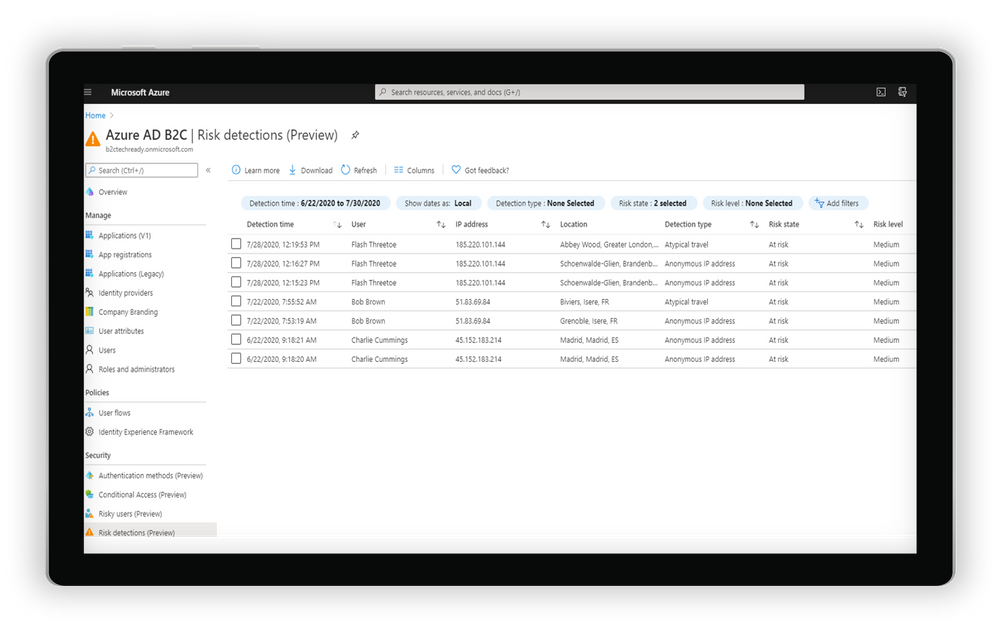
  • Leverage intelligent insights to assess risk with B2C apps and end user accounts. Powered by signals from billions of monthly authentications across Azure AD and Microsoft accounts, Identity Protection real-time ML algorithms use adaptive intelligence to flag authentications as low, medium, or high risk and gets smarter and more accurate over time. Detections include atypical travel, anonymous IP addresses, malware-linked IP addresses, and Azure AD threat intelligence. Portal and API-based reports are also available.

RiskDetections_B2C.pngExamine risk detections flagged through the portal


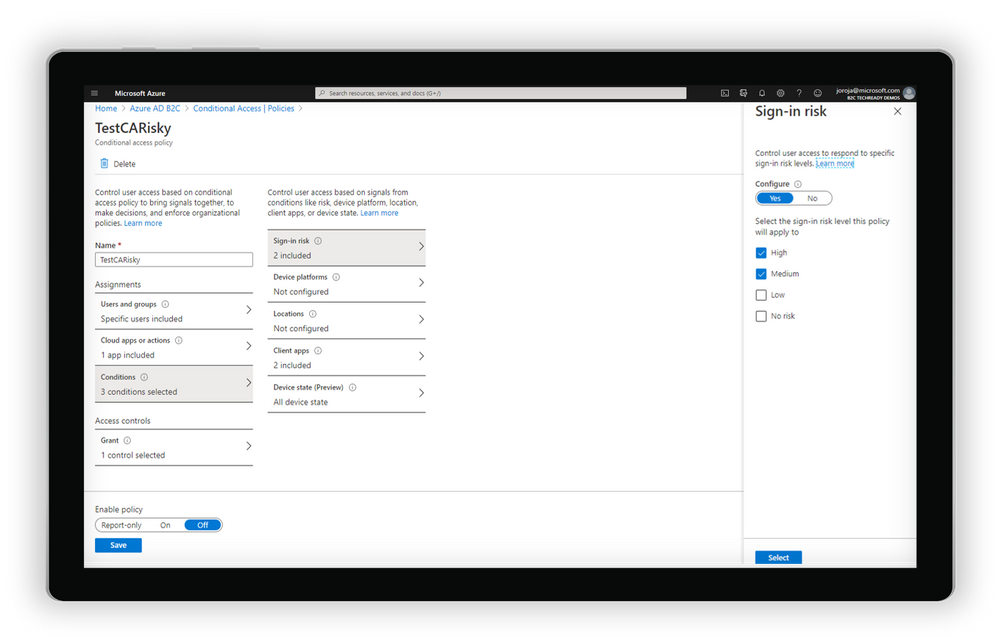
  • Automatically address risks by configuring adaptive authentication policies for B2C users. By tailoring Conditional Access policies, app developers and administrators can mitigate real-time risk by requiring multi-factor authentication (MFA) or blocking access depending on the user risk level detected, with additional controls available based on location, group, and app.

CASnapshot_B2C.png

Create a Conditional Access policy based on the level of sign-in risk


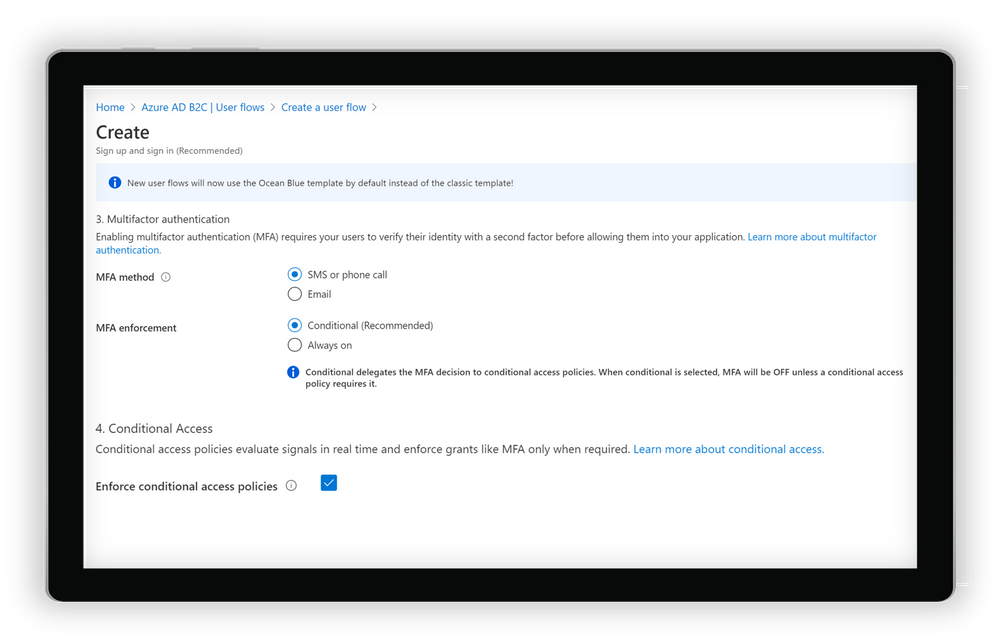
  • Integrate with Azure AD B2C user flows and custom policies. Conditions can be triggered from built-in user flows in Azure AD B2C or can be incorporated into B2C custom policies. As with other aspects of the B2C user flow, end user experience messaging can be customized according to the organization’s voice, brand, and mitigation alternatives.

B2CUserFlow.png

Create a user flow in Azure AD B2C


Get started today

Conditional Access and Identity Protection for Azure Active Directory (Azure AD) B2C will be progressively rolled out across Azure regions starting on September 1. To start using the new features, you will need to do a few things first:


  1. Link your Azure AD B2C tenant to an Azure subscription. This allows you to use Azure AD premium features for Azure AD External Identities and Azure AD B2C.
  2. Enable Premium P2 features in your Azure AD B2C tenant. This allows you to access Identity Protection and all future Premium P2 features for Azure AD External Identities and Azure AD B2C.
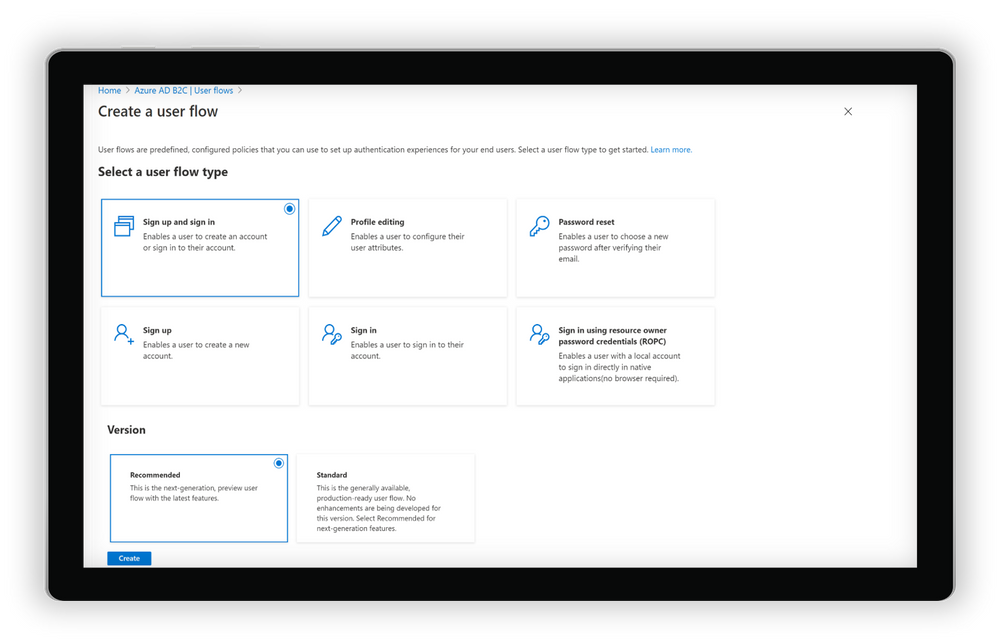
  3. Start using the new recommended user flows in Azure AD B2C. This allows you to connect to your Conditional Access policies and all new features added to B2C user flows in the future.

B2CUserFlow2.png

Selecting and creating recommended user flows in Azure AD B2C


And of course, you can always check out our documentation to learn more about setting up risk-based Conditional Access policies for Azure AD B2C.


Pricing update


Azure AD External Identities features are now available as part of one unified offer based on monthly active usage. Whether you use Azure AD B2C, B2B collaboration or the new self-service sign-up features in Azure AD, securing and managing external users is more affordable than ever, with the first 50,000 monthly active users free at both the Premium P1 and Premium P2 tiers. For more information on the new offer with pricing details click For documentation to set up your tenants for this offer, click here.


As always, we hope you’ll try out the new features and share feedback through the Azure forum or by following @AzureAD on Twitter. 


Thanks!


Robin


Learn more about Microsoft identity:

Azure Data Sessions You Won’t Want to Miss at SQLBits 2020

This article is contributed. See the original author and article here.

SQLBits 2020 is going digital this year – and, with less than a month away, the excitement for “the greatest data show” is only rising. It is the largest SQL Server and Microsoft Data Platform conference in Europe, bringing together customers, partners, and community members – this time as a fully virtual and interactive conference.


From September 29 to October 3, 2020, join the experts from the Microsoft SQL Server/ Azure SQL product groups for 5 days of learning and connecting with our SQL Server community.

To make your conference planning easy for you, I put together a list of the 2 pre-cons and 30+ sessions from the Azure Data team you won’t want to miss:

Date Sessions Speaker(s)
PRE-CONS
9/29/2020 The Azure SQL Workshop Bob Ward, Anna Hoffman
9/30/2020 The SQL Server 2019 Workshop Bob Ward, Pedro Lopes, Anna Hoffman, Buck Woody
THURSDAY
10/1/2020 SQL Server in Azure Virtual Machines reimagined Ajay Jagannathan
10/1/2020 SQL Server to Azure SQL: Performance and Availability Anna Hoffman, Bob Ward
10/1/2020 SQL Server 2019: The Modern Data Platform Bob Ward
10/1/2020 Sandboxing SQL Server 2019 Big Data Clusters Daniel Coelho, Rahul Ajmera
10/1/2020 Optimizing your Azure SQL Database workloads Denzil Ribeiro, Sanjay Mishra, Dimitri Furman
10/1/2020 What’s New in SQL Tools for Developers Drew Skwiers-Koballa, Udeesha Gautam
10/1/2020 Run rich confidential queries using Always Encrypted with secure enclaves Jakub Szymaszek
10/1/2020 SQL Extensibility Architecture in the Machine Learning Platform Michelle Wallig
10/1/2020 Optimize price-performance using Azure SQL Database serverless Morgan Oslake
10/1/2020 SQL Server in Azure Virtual Machine reimagined Pam Lahoud
10/1/2020 Query plans: a map to query performance analysis Pedro Lopes
10/1/2020 10 DBA Tasks for Azure SQL: What’s Different from On-Prem Rie Irish
10/1/2020 Azure Data Studio Features in 20 Minutes Vicky Harp
FRIDAY
10/2/2020 Inside SQL Server on Kubernetes Bob Ward
10/2/2020 An administrators guide to SQL Server 2019 BDC Buck Woody, Melony Qin
10/2/2020 Azure SQL Hyperscale Deep Dive Denzil Ribeiro
10/2/2020 New Azure AD authentication capabilities in Azure SQL  Jakub Szymaszek
10/2/2020 Improving Availability in SQL Server and Azure SQL Database with Accelerated Database Recovery and Resumable Operations Kevin Farlee
10/2/2020 New Azure AD authentication capabilities in Azure SQL Mirek Sztajno
10/2/2020 Azure SQL Managed Instance: A fully managed SQL Server in the cloud Mladen Andzic
10/2/2020 Everything you need to know about storing strings in SQL Server and Azure SQL DB Pedro Lopes
10/2/2020 SQL on Linux – What’s new Tejas Shah
SATURDAY
10/3/2020 Azure SQL: What to use when Anna Hoffman
10/3/2020 Artificial Intelligence, Machine Learning and Deep Learning Buck Woody
10/3/2020 Practical Azure SQL for the Modern Developer Davide Mauri
10/3/2020 Azure data services on Azure Arc James Rowland-Jones, Nellie Gustafsson
10/3/2020 Notebooks in Azure Data Studio Julie Koesmarno, Alan Yu, Chris LaFreniere
10/3/2020 Turbo-charge your SQL Server with In-Memory Database Kevin Farlee
10/3/2020 Democratizing Machine Learning on the SQL Platform Michelle Wallig
10/3/2020 Azure SQL and SQL Server: Path to an Intelligent Database Pedro Lopes
10/3/2020 Network access controls for Azure SQL Database Rohit Nayak
10/3/2020 Azure SQL Database Edge – Optimized SQL Engine for Edge/IoT Computing Sourabh Agaral
10/3/2020 App Modernization and Migration from End to end, using data migration tools and Azure SQL Venkata Raj Pochiraju, Mukesh Kumar
10/3/2020 Database modernization best practices and lessons learned through customer engagements Venkata Raj Pochiraju, Mukesh Kumar
10/3/2020 Coming Soon: Upcoming SQL Tools Features Vicky Harp


Hope to see you there! Tweet us at @AzureSQL for sessions you are most excited about.

Giving Specific Analysts Access to Specific Azure Sentinel Playbooks

Giving Specific Analysts Access to Specific Azure Sentinel Playbooks

This article is contributed. See the original author and article here.

Hi, all! Rod Trent here. I am a Cybersecurity CE/Consultant at Microsoft and working with Azure Sentinel. I also blog for our Secure Infrastructure Blog and have quite a few Azure Sentinel articles posted there already. 


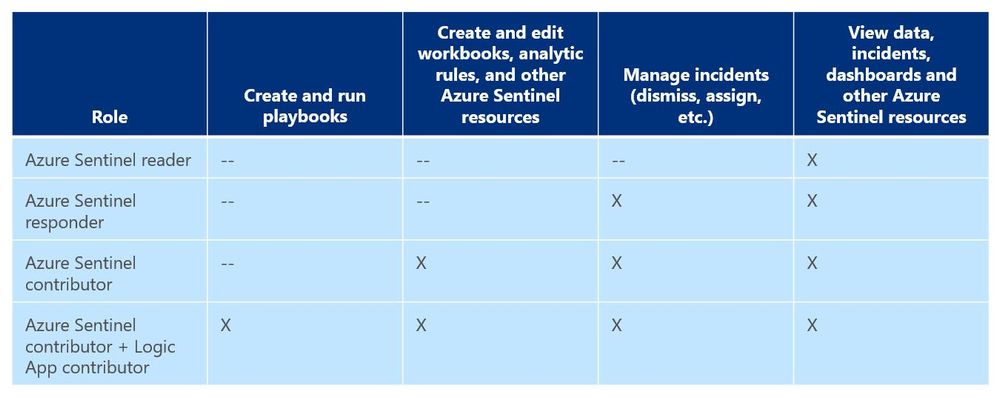
As a general best practice, you want to configure access to Azure Sentinel resources through the Resource Group and you want to ensure you are providing only the access required i.e., using a least permissive model. Azure Sentinel resource access is applied using the following assignment roles 


Azure Sentinel roles and allowed actionsAzure Sentinel roles and allowed actions


I talk about these roles, access, and best practices for access based on analyst levels quite often with our customers. Building security team members’ responsibilities is important and a critical part of the SOC workflow. However, one of the first things customers ask during this discussion is about Playbook usage. As you can see from the table above, to actually run Playbooks (apply automation), an analyst is required to have both Azure Sentinel contributor and Logic App contributor roles. Hmmm…so what if you want the Responder or Reader roles to perform automation? 


Keep in mind that Playbooks are powerful. In the wrong hands, dangerous things can happen. Who really wants to accidentally lock the CEO out their login account because the password was forgotten, was typed in wrong 10 times in the last hour, and the HelpDesk was never called due to ego? But if it’s going to happen – even on purpose – it’s probably best for a seasoned analyst to take the blame for it. It could be a career-ending move for a Tier 1 analyst.  


Creating Playbooks should go through a methodical, logical process. Only create a Playbook out of need and also ensure that the proper teams are involved during the design. Don’t automate just to automate. For example, for those situations where a Playbook causes a user account to be locked or a port to be blocked at the firewall, its best for the Security team to work with the Operations team to make sure it’s done correctly and effectively and that it’s gone through the proper authorizations. Think about it. By applying automation through Playbooks you are effectively shortcutting the Change Management process. Without proper vetting from the proper teams, bad things could happen both technically and politically. Oh…and feelings could be hurt, too. And, what’s worse than that? 


So, after all the vetting has taken place and the authorization checkboxes have been ticked, you may determine that certain Playbooks are safe and they might fit a requirement to be run by those who don’t have the overarching Logic App contributor role or god-like powers in either Azure or Azure Sentinel. You probably don’t want a Tier 1 analyst who is assigned the lowly Azure Sentinel Reader role to be able to lockout users, but it might be beneficial for them to do something more simple like ensuring each open Incident has the IP GEO location applied. 


Fortunately, since Playbooks are built on Logic Apps and Logic Apps provides the ability to set specific access per resource, you can assign specific Playbook access using Access Control (IAM). 


Here’s an example… 


In my Azure tenant I have a user account, Jaime Sommers, who has been assigned the Azure Sentinel Reader role. With that role Jaime is limited to only being able to view data in the Azure Sentinel console.  


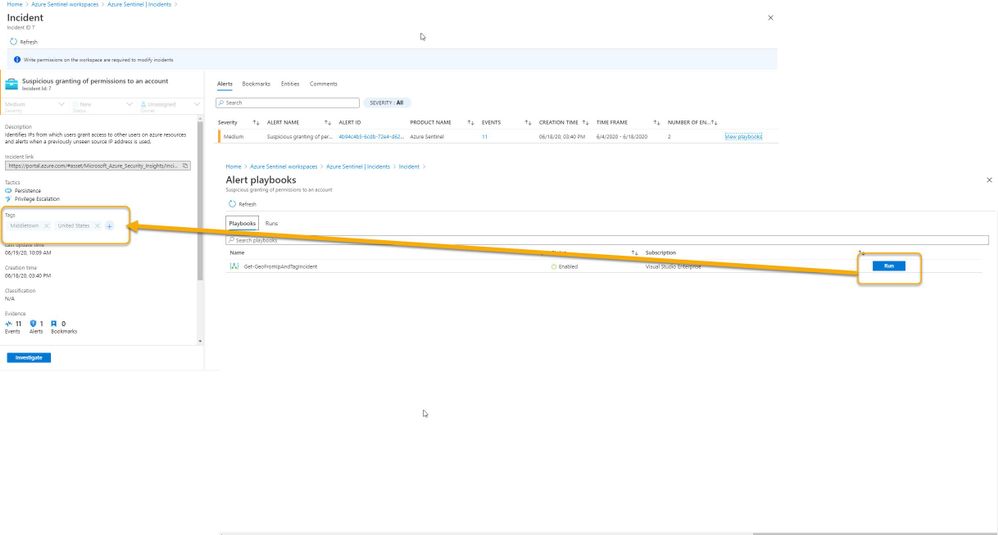
But I want Jaime to be able to add the GEO location to Incidents using the Get-GeoFromIpandTagIncident Playbook – but only THAT Playbook – and none of the others. That’s going to save our team time as our Tier 2 analysts gear up each day to determine which new Incidents they need to start investigating. 


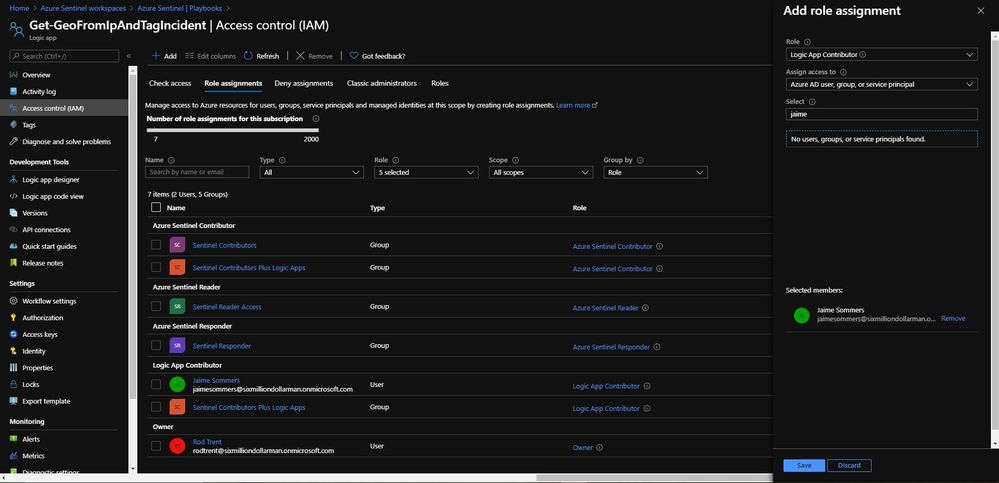
Through the Playbooks blade in the Azure Sentinel console, I access the Access Control (IAM) blade and assign the Logic Apps Contributor role specifically to the user account Jaime Sommers.


Adding the Logic App Contributor role to a specific Playbook for a specific analystAdding the Logic App Contributor role to a specific Playbook for a specific analyst


Adding the Log Analytics Contributor role to a specific Playbook for a specific analyst  

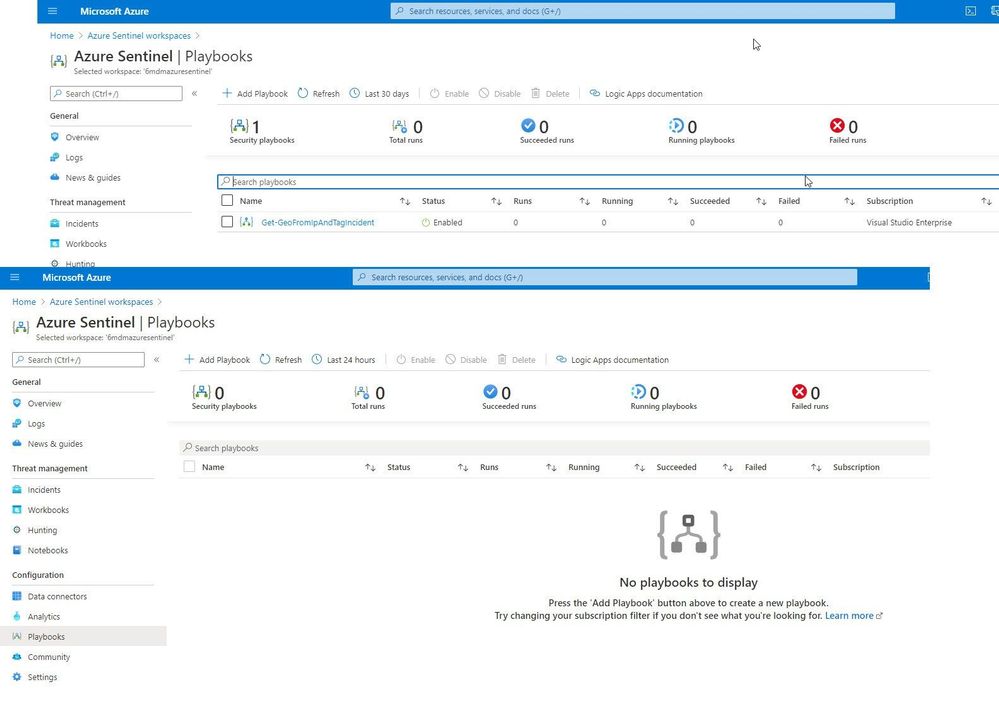
After a brief sync (it can sometimes take a minute or longer), when Jaime refreshes her Playbooks blade, she can now see the specific Playbook and can then use it to apply GEO location to an Incident she is working on. 


Playbook access for JaimePlaybook access for Jaime


As you can see in the image above, the bottom screenshot example is Jaime without the specific Logic App Contributor role assigned and the top screenshot example is after she has been granted access to it. 


Summary

And, even though Jaime is severely limited in what she can do in the Azure Sentinel console due to her lowly Azure Sentinel Reader role assignment, she can now run the Playbook and GEO is assigned to the Incident. 


Huzzah!Huzzah!


* Check out my other blog for more Azure Sentinel content: Rod Trent at the Secure Infrastructure Blog


* Follow me on Twitter: https://twitter.com/rodtrent

How to migrate from Elasticsearch to Azure Data Explorer

How to migrate from Elasticsearch to Azure Data Explorer

This article is contributed. See the original author and article here.

Introduction 

With an ever-expanding ocean of data, more and more organizations need to perform advanced and fast analytics over their business data, logsand telemetry while seeking to reduce costsMany of them are shifting towards Azure Data Explorer (ADX) and taking advantage of the significant benefits it offers to analyze billions of records quickly and cost-effectively.  
But sometimes they are already using other tools. One common scenario is that organizations are already using Elasticsearch, Logstash, and Kibana (The ELK Stack)Migration between big data platforms sounds like a long and complicated process. But that’s not always true. Switching from ELK to Azure Data Explorer offers the opportunity to significantly boost performance, reduce costs and improve the quality of insights by offering advanced query capabilities; all this without entering a long and complex migration, thanks to the tools described below.
 This blog post covers the following topics: 

  1. Why organizations are moving to Azure Data Explorer 
  2. How you can use Azure Data Explorer with Kibana 
  3. What additional tools for data exploration, visualizations, and dashboards are available 
  4. How you can send data to Azure Data Explorer through Logstash (or other tools) 
  5. How to use Logstash to migrate historical data from Elasticsearch to Azure Data Explorer 
  6. Appendix: Step by step example – using Logstash to migrate historical data from Elasticsearch to Azure Data Explorer 

1. Why organizations are moving to Azure Data Explorer 

Azure Data Explorer is a highly scalable and fully managed data analytics service on the Microsoft Azure Cloud. ADX enables real-time analysis of large volumes of heterogeneous data in seconds and allows rapid iterations of data exploration to discover relevant insights. In short, the advantages of ADX can be summed up using the three Ps: Power, Performance, Price.


Power

Power.bmpAzure Data Explorer has a unique column-store inverted-index design. With the intuitive Kusto Query Language (KQL) you can query an enormous amount of data and perform ad-hoc analytics in seconds. 

Users state that they find it easier to find value and new insights from their data, using KQL. They are more engaged and understand the data better, since they can efficiently explore the data and run ad-hoc text parsing, create run-time calculated columns, aggregations, use joins, and plenty of other capabilities.
These capabilities are natively supported without the need to modify the data. You don’t have to pre-organize the data, pre-define scripted fields, or de-normalize the data. There is no need to manage and take care of the hierarchy of Indices, Types, and IDs.

Azure Data Explorer’s machinelearning capabilities can identify patterns that are not obvious and detect differences in data sets. With capabilities like time series analysis, anomaly detection, and forecasting, you can uncover hidden insights and easily point out issues or unusual relationships you may not even be aware of. You can also run inline Python and R as part of the queries.
Also, Azure Data Explorer supports many communication APIs and client libraries, all of which make programmatic access easy.


Performance 

Perf.bmpAs a fully managed service, Azure Data Explorer gives you bestin-class performanceYou can get results from one billion records in less than a second without modifying the data or metadata. ADX can accept hundreds of billions of records a day and store this data reliably for months. ADX is specifically built to handle complex analytics queries on the data and return answers in a matter of seconds, even when the data is a combination of structured, semi-structured (JSON-like nested types), and unstructured (free text). 
 

Price 

icons6.bmpAzure Data Explorer is a managed Platform as a Service (PaaS)so you can reduce the management and operations overhead and save the cost of purchasing and maintaining hardware. Autoscale capabilities are available for better cost control. Due to the efficient data ingestion process and querying engine, compute resources are consumed wisely and economically. The inverted-index columns-store design enables ADX to have a superb data compression ratio, which reduces the amount of required storage, compared to other services. You can run as many queries as you need, thanks to the optimized cost structure, without incurring additional costsIn addition, ADX provides a granular cache policy that customers can set to differentiate between hot data cache and cold data cacheand get even more control over the costs. 

You can configure and estimate the costs with our cost estimator.


2. How you can use Azure Data Explorer with Kibana 

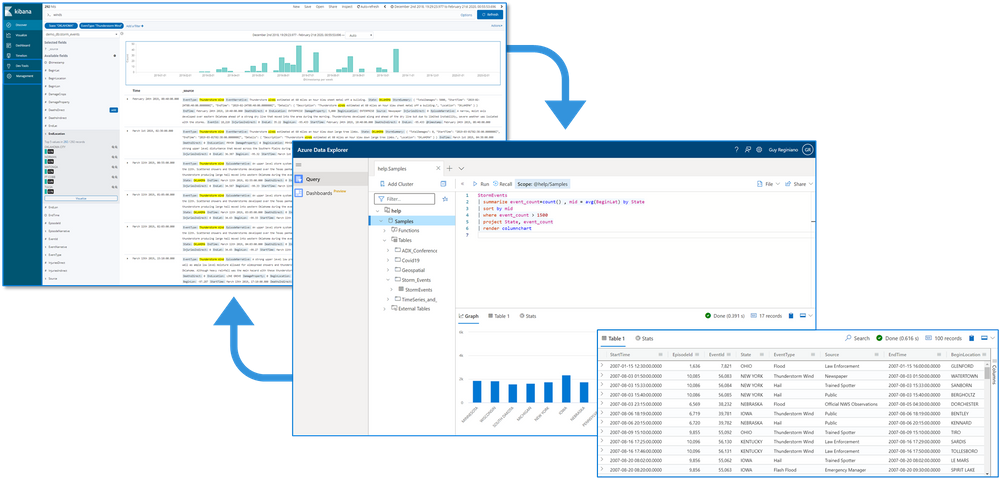
As announced in a separate blog post, we developed the K2Bridge (Kibana-Kusto Bridge), an open-source project that enables you to connect your familiar Kibana’s Discover tab to Azure Data Explorer. Starting with Kibana 6.8, you can store your data in Azure Data Explorer on the back end and use K2Bridge to connect to Kibana. This way, your end-users can keep using Kibana’s Discover tab as their data exploration tool. Connect Kibana to Azure Data Explorer with K2BridgeConnect Kibana to Azure Data Explorer with K2Bridge


3. What additional tools for data exploration, visualizations, and dashboards are available

Azure Data Explorer offers various other exploration and visualization capabilities that take advantage of the rich and built-in analyses options of KQLincluding: 

  • Azure Data Explorer Web UI/Desktop application – to run queries, analyze and explore the data using powerful KQL queries.  
  • The KQL render operator offers various out-of-the-box visualizations such as tables, pie charts, anomaly charts, and bar charts to depict query results. Query visualizations are helpful in anomaly detection, forecasting, machinelearning scenarios, and more.  
    As described in the first chapter, you can efficiently run ad-hoc text parsing, create calculated columns, use joins and plenty of other capabilities, without any modifications or pre-organizations of the data. 
  • Azure Data Explorer dashboards – a web UI that enables you to run queriesbuild dashboardsand share them across your organization. 
  • Integrations with other dashboard services like Power BI and Grafana. 

4. How you can send data to Azure Data Explorer through Logstash (or other tools)   

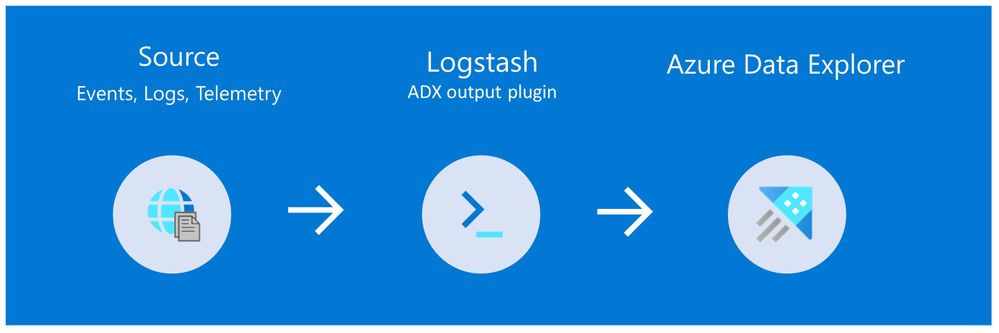
Are you already using Logstash as the data pipeline? If so, redirecting the data to ADX is easy! You can use the open-source Logstash Output Plugin for Azure Data Explorer (detailed example is described in the next chapter), and keep using the Logstash input plugin according to your specific source of the ongoing event stream, as you use it today. chart3.jpg


There are many other ways to ingest data into Azure Data Explorer, including:

  • Ingestion using managed pipelines – using Azure Event GridAzure Data Factory (ADF), IoT Hub and Event Hub (Event Hub can receive data from several publishers, including Logstash and Filebeat, through Kafka). 
  • Ingestion using connectors and plugins – Logstash pluginKafka connectorPower Automate (Flow), Apache Spark connector
  • Programmatic ingestion using SDKs 
  • Tools  LightIngest or Oneclick ingestion (detailed example is described in the next chapter) 
  • KQL ingest control commands

For more information, please refer to the data ingestion overview.


5. How to use Logstash to migrate historical data from Elasticsearch to Azure Data Explorer 


Choose the data you care about 

When you decide to migrate historical data, it is a great opportunity to validate your data and needsThere is a good chance you can remove old, irrelevant, or unwanted data, and only move the data you care aboutBy migrating your freshest and latest data only, you can reduce costs and improve querying performance 
Usually, when organizations migrate from Elasticsearch to Azure Data Explorer, they do not migrate historical data at all. The approach is a “side-by-side” migration: they “fork” their current data pipeline and ingest the ongoing live data to Azure Data Explorer (by using Logstash/Kafka/Event Hub connectors, for example). Anyway, we show how you can migrate your historical data using Logstash. For efficiency, the Logstash output plugin section in the next examples contains a ‘query’ section in which you specify the data you care about and would like to export from Elasticsearch. 


Data migration from Elasticsearch to Azure Data Explorer 

Here we describe two methods to migrate historical data from Elasticsearch using Logstash. See the appendix for a step-by-step tutorial.


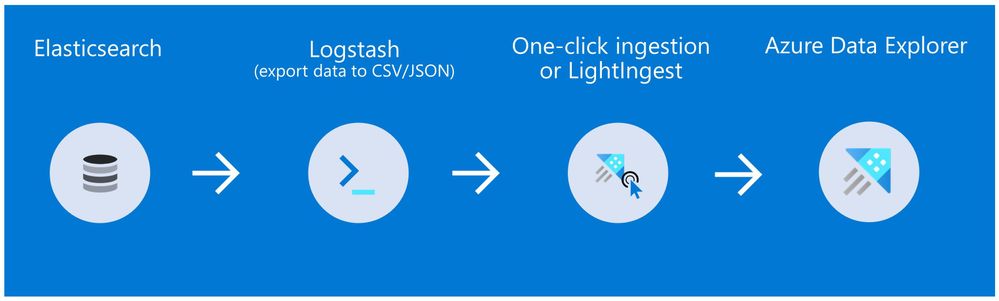
Method 1: Logstash and One-click Ingestion/LightIngest

chart1.jpg

Use Logstash to export the data from Elasticsearch into CSV or JSON file(s), and then use Azure Data Explorer’s One-Click Ingestion feature to ingest the data.  

  • This is an easy way to quickly ramp-up and migrate data because One-Click Ingestion automatically generates the destination table and the ingestion mapping based on the structure of the data source (of course, you can edit the table schema if you want to).  
  • One-Click Ingestion supports ingesting up to 1 GB at time. To ingest a more massive amount of data, you can: 
    • Slice your data into multiple files and ingest them separately. 
    • Use LightIngest – a command-line utility for ad-hoc data ingestion. The utility can pull source data from a local folder (or from an Azure blob storage container). 
    • Use the second method described below. 

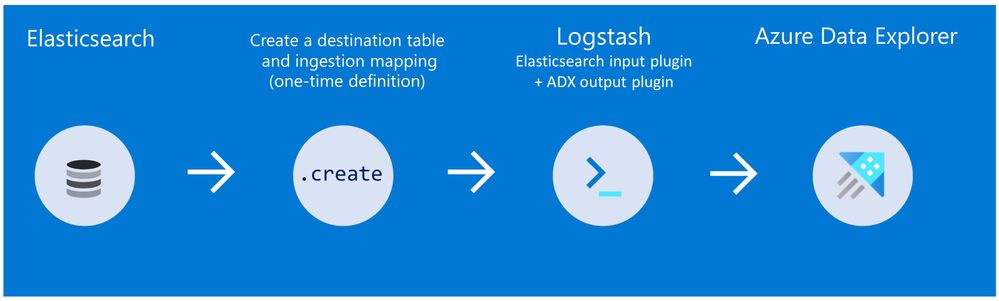
Method 2: Using Logstash only (with the output plugin for Azure Data Explorer)

chart22.jpg

Use Logstash as a pipeline for both exporting data from Elasticsearch and ingesting it into Azure Data Explorer. When you use this method, you should manually create the Azure Data Explorer destination table and define the ingestion mapping. (You can automatically generate the destination table and the table mapping by using One-Click Ingestion with sample data, as described in method 1 first, and then use method 2 for the rest of the data)


Summary 

In this blog post, we talked about the advantages of Azure Data Explorer, went over several visualizations options, including the open-source Kibana-Azure Data Explorer connector, and introduced a variety of ways you can ingest your ongoing data into Azure Data Explorer. Then, we presented two ways to migrate historical data from Elasticsearch to Azure Data Explorer. 
In the appendix, you can find two step-by-step sample scenarios for historical data migration. 
Please do not hesitate to contact our team or leave a comment if you have any questions or concerns.


AppendixStep-by-step example of historical data migration


Method 1: Logstash and OneClick Ingestion 

  1. Use Logstash to export the relevant data to migrate from Elasticsearch into a CSV or a JSON file. Define a Logstash configuration file that uses the Elasticsearch input plugin to receive events from ElasticsearchThe output will be a CSV or a JSON file.
    1. To export your data to a CSV file: use the CSV output plugin. For this example, the config file should look like this:
      # Sample Logstash configuration: Elasticsearch -> CSV file
      
      input {
          # Read documents from Elasticsearch matching the given query
          elasticsearch {
              hosts => ["http://localhost:9200"]
              index => "storm_events"
              query => '{ "query": { "range" : {  "StartTime" : { "gte": "2000-08-01 01:00:00.0000000", "lte": "now" }}}}'
          }
      }
      	
      filter {
          ruby {
              init => "
                  begin
                      @@csv_file    = 'data-csv-export.csv'
                      @@csv_headers = ['StartTime','EndTime','EpisodeId','EventId','State','EventType']
                      if File.zero?(@@csv_file) || !File.exist?(@@csv_file)
                          CSV.open(@@csv_file, 'w') do |csv|
                              csv << @@csv_headers
                          end
                      end
                  end
              "
              code => "
                  begin
                      event.get('@metadata')['csv_file']    = @@csv_file
                      event.get('@metadata')['csv_headers'] = @@csv_headers
                  end
              "
          }
      }
      
      output {
          csv {
              # elastic field name
              fields => ["StartTime","EndTime","EpisodeId","EventId","State","EventType"]
              # This is path where we store output.   
              path => "./data-csv-export.csv"	
          }
      }

      This config file specifies that the ‘input’ for this process is the Elasticsearch cluster, and the ‘output’ is the CSV file.  

      • Implementation note:The filter plugin adds a header with the field names to the CSV file’s first lineThis way, the destination table will be auto built with these column names. The plugin uses the ‘init option of the Ruby plugin to add the header at Logstash startup-time. 
    2. Alternatively, you can export your data to a JSON file, using the file output format.
      This is what our Logstash config file looks like:
       
      # Sample Logstash configuration: Elasticsearch -> JSON file
      
      input {
          # Read documents from Elasticsearch matching the given query
          elasticsearch {
              hosts => ["http://localhost:9200"]
              index => "storm_events"
              query => '{ "query": { "range" : {  "StartTime" : { "gte": "2000-08-01 01:00:00.0000000", "lte": "now" }}}}'
          }
      }
      	
      output {
          file {
              path => "./output_file.json"
              codec => json_lines
          }
      }​
      • The advantage of using JSON over CSV is that later, with OneClick Ingestion, the Azure Data Explorer create table and create json mapping commands will be auto-generated for you. It will save you the need to manually create the JSON table mapping again (in case you want to ingest your ongoing data with Logstash later on. The Logstash output plugin uses json mapping).
  2. Start Logstash with the following command, from Logstash’s bin folder:
    logstash -f pipeline.conf 
  3. If your pipeline is working correctly, you should see a series of events like the following written to the console:console.png


  4. The CSV/JSON file should be created at the destination you specified in the config file. 
  5. Ingest your data into Azure Data Explorer with OneClick Ingestion: 
    1. Open the Azure Data Explorer web UIIf this is the first time you are creating an Azure Data Explorer cluster and database, see this doc.
    2. Rightclick the database name and select Ingest new Data. 
    3. In the Ingest new data page, use the Create new option to set the table name. 
    4. Select Ingestion type from a file and browse your CSV/JSON file. 
    5. Select Edit schema. You will be redirected to the schema of the table that will be created. 
    6. Optionally, on the schema page, click the column headers to change the data type or rename a column. You can also double-click the new column name to edit it.  
      For more information about this page, see the doc.  
    7. Select Start Ingestion to ingest the data into Azure Data Explorer.
  6. After a few minutes, depending on the size of the data set, your data will be stored in Azure Data Explorer and ready for querying. 

  Method 2Using Logstash only

  1. Create an Azure Data Explorer cluster and database. 
    Note: If you have already created your Azure Data Explorer cluster and database, you can skip this step.  

    More information on creating an Azure Data Explorer cluster and database can be found here.

  2. Create the destination table.

    Note: If you have already created your table with One-Click Ingestion, or in other ways, skip this step.
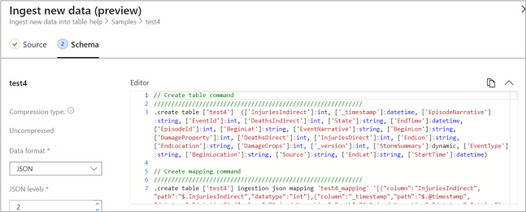
    Tip: The One-Click Ingestion tool auto-generates the table creation and the table mapping commands, based on the structure of sample JSON data you provide. If you use One-Click Ingestion with a JSON file, as described above, you can use the auto-generated commands, from the Editor section.

    Auto-generate the table and its mapping using One-Click IngestionAuto-generate the table and its mapping using One-Click IngestionIn the Azure portal, under your cluster page, on the left menu, select Query (or use Azure Data Explorer Web UI/Desktop application) and run the following command. This command creates a table with the name MyStormEvents, with columns according to the schema of the data.

    .create tables MyStormEvents(StartTime:datetime,EndTime:datetime,EpisodeId:int,EventId:int,State:string,EventType:string) 


  3. Create ingestion mapping.
    Note: If you used One-Click Ingestion with a JSON file, you can skip this step. This mapping is used at ingestion time to map incoming data to columns inside the ADX target table.
    The following command creates a new mapping, named ‘mymapping’, according to the data’s schema. It extracts properties from the incoming temporary JSON on files, that will be automatically generated later, as noted by the path, and outputs them to the relevant column.
    .create table MyStormEvents ingestion json mapping 'mymapping' '[{"column":"StartTime","path":"$.StartTime"},{"column":"EndTime","path":"$.EndTime"} ,{"column":"EpisodeId","path":"$.EpisodeId"}, {"column":"EventId","path":"$.EventId"}, {"column":"State","path":"$.State"},{"column":"EventType","path":"$.EventType "}]'
  4. Your table is ready to be ingested with data from your existing Elasticsearch index. To ingest the historical data from Elasticsearch, you can use the Elasticsearch input plugin to receive data from Elasticsearch, and the Azure Data Explorer (Kusto) output plugin to ingest the data to ADX. 
    1. If you have not used Logstash, you should first install it 
    2. Install the Logstash output plugin for Azure Data Explorer, which sends the data to Azure Data Explorer, by running:
      bin/logstash-plugin install logstash-output-kusto
    3. Define a Logstash configuration pipeline file in your home Logstash directory
      In the input plugin, you can specify a query to filter your data according to a specific time range or any other search criteria. This way, you can migrate only the data you care about. 
      In this example, the config file looks as follows: 
      input {
      # Read all documents from your Elasticsearch, from index “your_index_name”
          elasticsearch {
              hosts => ["http://localhost:9200"]    
      		index => " your_index_name "
              query => '{ "query": { "range" : {  "StartTime" : {"gte": "2020-01-01 01:00:00.0000000", "lte": "now"}} } }'
          }
      }
      
      output {
          kusto {
              path => "/tmp/kusto/%{+YYYY-MM-dd-HH-mm }.txt"
      		ingest_url => "https://<your cluster name>.<your cluster region>.kusto.windows.net”   
      		app_id => "<Your app id>"
      		app_key => "<Your app key>"
      		app_tenant => "<Your app tenant>"
              database => "<Your Azure Data Explorer DB name>"
      		table => "<Your table name>" 
      		mapping => "<Yor mapping name>"
          }
      }
    4. Edit your configuration pipeline file according to your Azure Data Explorer cluster details and start Logstash with the following command, from Logstash’s bin folder:
      logstash -f pipeline.conf 
    5. If your pipeline is working correctly, you should see a series of events like the following written to the console:console.png
    6. After a few minutes, run the following Azure Data Explorer query to see the records in the table you defined: 
      MyStormEvents | count

      The result is the number of records that were ingested into the table. It might take several minutes to ingest the entire dataset, depending on the size of the data set. The result of this query reflects the quantity of ingested records. Your data is now stored in Azure Data Explorer and is ready for querying!


Security Controls in Azure Security Center: Enable Endpoint Protection

Security Controls in Azure Security Center: Enable Endpoint Protection

This article is contributed. See the original author and article here.

With this article, which is part of our recent Azure Security Center (ASC): Secure Score Blog Post Series, we are diving into the Enable Endpoint Protection security control. This security control contains up to 11 recommendations, depending on the resources you have deployed within your environment, and it is worth a maximum of 2 points that count towards your Secure Score. More information about Secure Score can be found here.


Why enabling endpoint protection?


After making sure that your VMs’ management ports are protected, as Kerinne explained in her article, you have already made a huge step towards securing your infrastructure from unauthorized access. However, malware cannot only be downloaded or installed by unauthorized actors, but also inadvertently by legitimate users who are supposed to access your machines. Once a machine is compromised, it could start downloading malware, sending SPAM, execute crypto mining activities, and so on. So, protecting network endpoints is an important step towards enhancing your security posture, but it is not the only security feature that needs to be implemented. With an Endpoint Protection solution, you make sure that if malicious code is found, you have a higher likelihood that it will be detected.


You can find more details about supported endpoint protection solutions here.


Recommendations within the Enable Endpoint Protection security control


The Enable Endpoint Protection security control contains the following 11 recommendations, depending on your environment and agent status:

  • Install endpoint protection solution on virtual machines
  • Install endpoint protection solution on your machines
  • Endpoint protection solution should be installed on virtual machine scale sets
  • Endpoint protection health failures should be remediated on virtual machine scale sets
  • Endpoint protection health issues should be resolved on your machines
  • Monitoring agent should be installed on virtual machine scale sets
  • Monitoring agent should be installed on your machines
  • Monitoring agent should be installed on your virtual machines
  • Log Analytics agent should be installed on your Windows-based Azure Arc machines (Preview)
  • Log Analytics agent should be installed on your Linux-based Azure Arc machines (Preview)
  • Monitoring agent health issues should be resolved on your machines


The screenshot below shows an environment in which only 7 of those 11 recommendations are within the scope of the Enable endpoint protection security control.


Figure 1 - Recommendations within the Enable Endpoint Protection security controlFigure 1 – Recommendations within the Enable Endpoint Protection security control


This is because recommendations which do not apply to any resource within your environment do not appear. Basically, the recommendations that can be part of the control can be reduced to four main categories:


Category #1: Install the Log Analytics agent

Azure Security Center relies on the Log Analytics agent to gain information about a server’s current operating system status, events, logfiles, but it is also used to check if a supported endpoint protection solution has been installed on a machine. So, having the monitoring agent installed is mandatory for making sure that your machines are fully monitored and taking advantages of the Azure Security Center Threat Protection for VMs. For the installation, you can use different approaches, depending on what best fits your needs.

The following recommendations belong to this category:

  • Monitoring agent should be installed on your virtual machines. This recommendation applies to VMs running in Azure.
  • Monitoring agent should be installed on your machines applies to servers which are not running in Azure.
  • Monitoring agent should be installed on virtual machine scale sets applies to VM scale sets in Azure
  • Log Analytics agent should be installed on your Windows-based Azure Arc machines (Preview) applies to Windows-based Azure Arc machines
  • Log Analytics agent should be installed on your Linux-based Azure Arc machines (Preview) applies to Linux-based Azure Arc machines


Category #2: Install one of the support endpoint protection solutions

Besides having the Log Analytics agent installed, of course you want to make sure to have one of the supported endpoint protection solutions installed on your machines. Once you have installed the solution, the particular recommendation that applies to your machine will no longer appear. Only the Microsoft Azure Antimalware solution can be installed directly from the ASC portal. The others need to be installed manually, but then are discovered by Azure Security Center. The following recommendations are part of this category:

  • Install endpoint protection solution on virtual machines applies to VMs running in Azure.
  • Install endpoint protection solution on your machines applies to machines outside of Azure
  • Endpoint protection solution should be installed on virtual machine scale sets applies to VM Scale Sets in Azure.


Category #3: Make sure to resolve Log Analytics Agent health issues

This basically is a single recommendation that is aimed to showing you that one of your machines’ Log Analytics agent is no longer sending data to Azure. This could be an issue with the agent, like the process is no longer running and/or cannot be (re)started, or the machine itself might no longer be working as expected or is switched off. This category is made up of only one recommendation:

  • Monitoring agent health issues should be resolved on your machines


We have published more information on possible Log Analytics agent health issues and how to troubleshoot them in the Azure Security Center Troubleshooting Guide.


Category #4: Make sure to resolve health issues with the endpoint protection solution

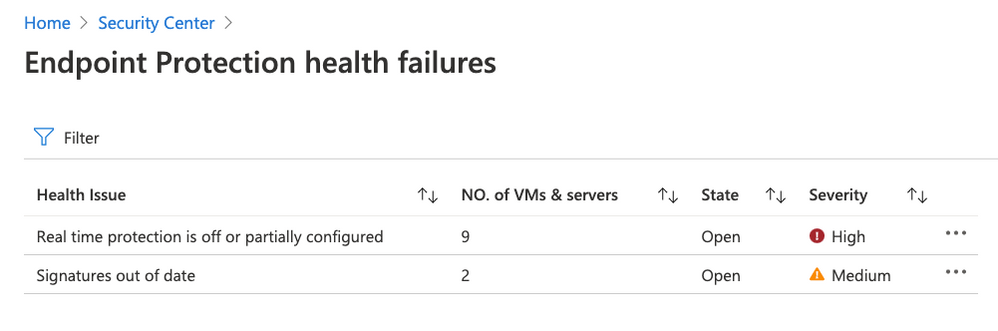
Besides health issues with the Log Analytics agent, Azure Security Center will also report health issues with the endpoint protection solution itself. Health issues include (but are not limited to) out of date signatures and misconfigured real-time protection, as shown in the following screenshot:


Figure 2 - Remediate endpoint protection health issuesFigure 2 – Remediate endpoint protection health issues


The following recommendations belong to this final category:

  • Endpoint protection health failures should be remediated on virtual machine scale sets
  • Endpoint protection health issues should be resolved on your machines


Next steps


As with all security controls, you need to make sure to remediate all recommendations within the control that apply to a particular resource in order to gain credit towards your secure score. That means, that both, the Log Analytics agent, and the respective endpoint protection solution you want to use are installed, running, and securely configured. Now, go ahead and remediate the Enable endpoint protection security control in your environment!


Reviewer


Thank you to @Yuri Diogenes, Principal Program Manager in the CxE ASC Team for reviewing this article.