This article is contributed. See the original author and article here.
We are re-imagining the way employees come together with Microsoft Mesh, a new three-dimensional (3D) immersive experience and, we are excited to announce Mesh public preview availability in October.
This article is contributed. See the original author and article here.
Announcements have been a core part of Viva Engage for years but have recently become a critical way to keep employees informed and engaged with leaders. The broad delivery of announcements across Viva Engage, Viva Connections, Outlook, and Microsoft Teams means that employees can use rich engagement features like reactions, replies, and sharing from within the apps that they use every day. Analytics help track the reach of the announcements, meaning our customers have come to rely on announcements to help run their business and measure the impact their communications are having in your network.
We’ve taken it one step further by enabling specific employees as leaders because we know leaders want to share vision, updates, and perspectives to build culture and manage change. When leaders are selected in Viva Engage, and their audiences have been set up they can send storyline announcements. And now leaders can reach and connect with employees in their organizations and send their posts to multiple audiences. Leaders and their delegates can now configure multiple audiences and effectively target storyline announcements to them.
Leaders can now send targeted storyline announcements to different audiences
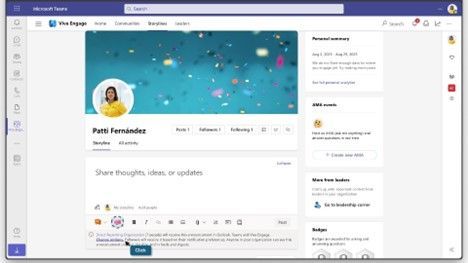
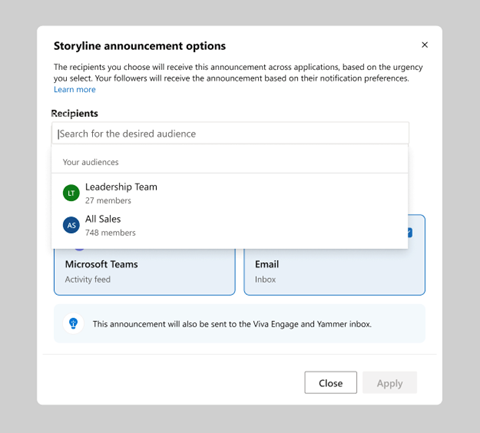
Leaders, and their delegates can now target storyline announcements to preconfigured audiences, expanding the leader’s ability to reach people beyond their direct reporting organization. Upon creating an announcement, the leader’s default audience will be preselected. To add additional audiences, select Change option. This will bring up the Storyline announcements options window in which the default audience can be changed for any of the configured ones. Once an audience is selected, confirm the channels before you send your message.
Set up multiple audiences
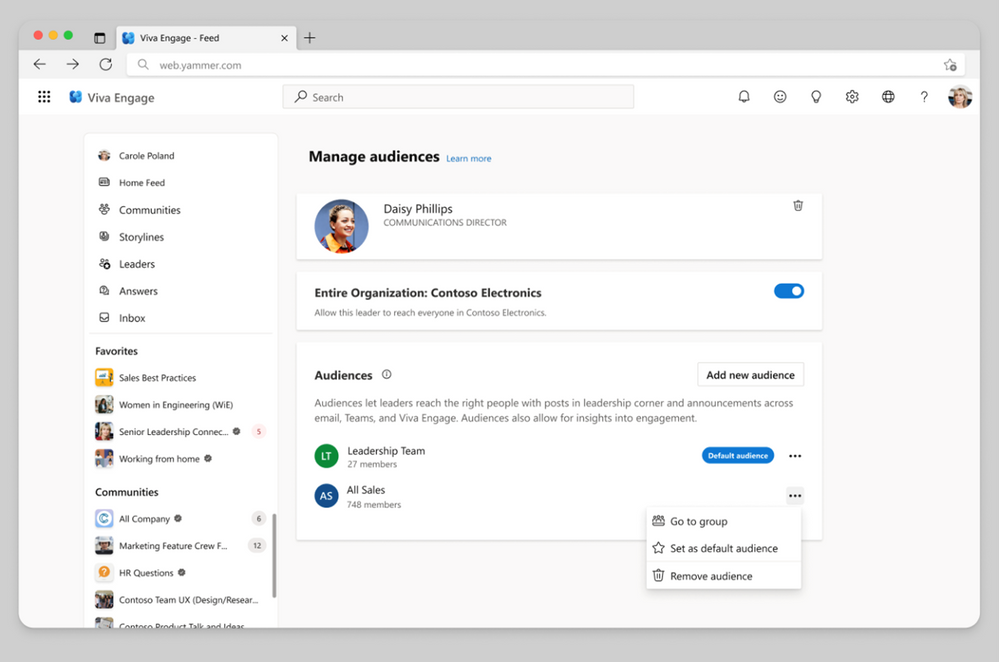
To view information about how to configure audiences, please visit Identify leaders and manage audiences in Viva Engage. To define a leader’s audience, you add individual users or groups, such as security, distribution, or Microsoft 365 groups. When you add a group, changes to the group’s membership, including nested members, automatically update the audience within 24 hours. This functionality makes it easy to apply existing groups that define a leader’s organization to define the leader’s audience in Viva Engage. Customers may have existing distribution lists that they use to communicate with an audience by email. You can add those lists to the leader’s audience in Viva Engage for continuous communication.
Send announcements to your audience across apps
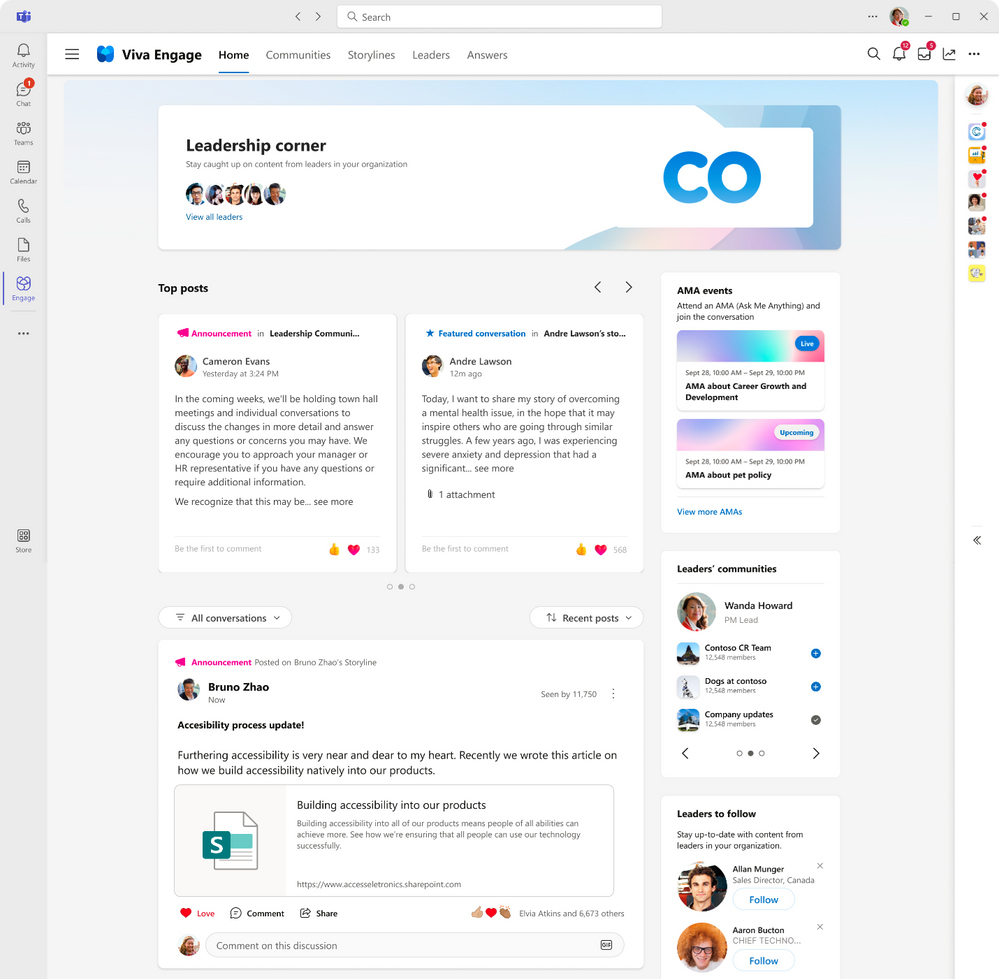
Leaders can make an announcement and select your audience and reach people across apps. Once the announcement is delivered, your audiences can react and reply regardless of what app they receive the announcement. To make your announcements more engaging, attach images or videos, ask a question, pose a poll to your community, or draw attention to specific actions by using rich media within your announcement. Announcements made by leaders will also be highlighted in leadership corner.
Analyze the impact of your communication
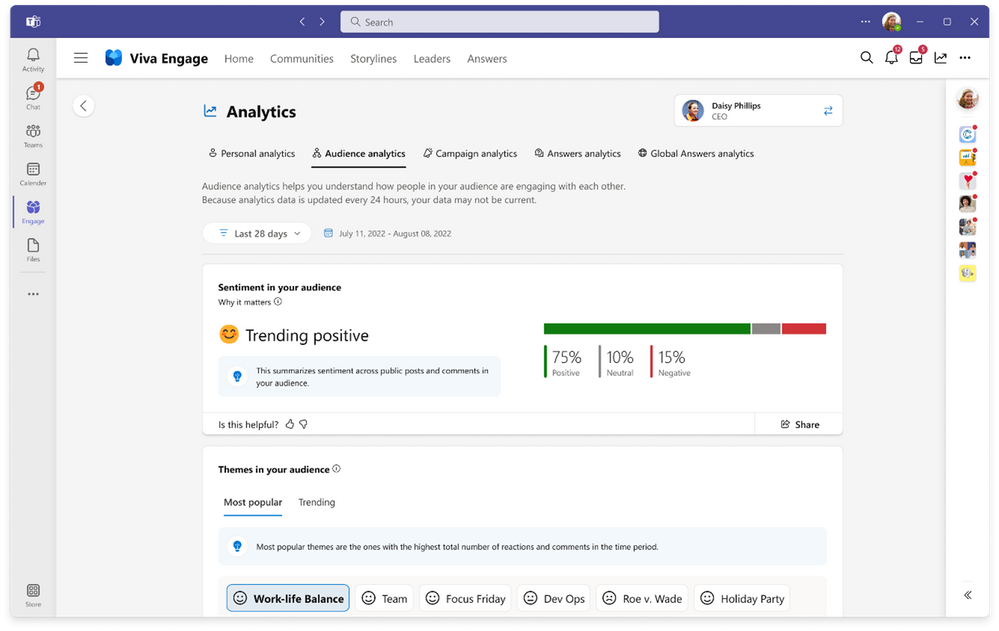
When you post an announcement in Viva Engage, you can expect the message to reach your audience. From the notifications with Microsoft Teams, Outlook interactive messages, Engage notifications, we want to make sure that you understand the impact of your communications by tracking the reach of your communications and the sentiment of your audience. With conversation insights, you’ll be able to view how well your announcement has performed. With personal analytics, you can track the effectiveness across multiple posts and announcements. With audience analytics, leaders can track levels of sentiment analysis to help monitor the engagement, contributions and themes across your audience, beyond what you have sent. You can start to understand and know what your audience thinks is important and can help you identify what to post next.
If you are looking to share important news and information with employees, try using announcements on your storyline posts. With the speed of delivery, ability to measure reach, and a way to spark two-way engagement, announcements are an essential way to keep your employees informed.
This article is contributed. See the original author and article here.
In the fall of 2018, we announced the general availability (GA) of Azure Database for MariaDB. Since that release five years ago, we’ve invested time and resources in Azure Database for MariaDB to further extend our commitment to the open-source community by providing valuable, enterprise-ready features of Azure for use on open-source database instances.
In November 2021 we released Flexible Server, the next-generation deployment option for Azure Database for MySQL. As we continue to invest in Azure Database for MySQL and focus our efforts on Flexible Server to make it the best destination for your open-source MySQL workloads, we’ve decided to retire the Azure Database for MariaDB service in two years (September 2025). This will help us focus on Azure Database for MySQL – Flexible Server to ensure that we are providing the best user experience for our customers.
Azure Database for MySQL – Flexible Server has enhanced features, performance, an improved architecture, and more controls to manage costs across all service tiers when compared to Azure Database for MariaDB. As a result, we encourage you to migrate to Azure Database for MySQL – Flexible Server before the Azure MariaDB retirement to experience the new capabilities of the service, including:
More ways to optimize costs, including support for burstable tier compute options.
Improved performance for business-critical production workloads that require low latency, high concurrency, fast failover, and high scalability.
Improved uptime with the ability to configure a hot standby on the same or a different zone, and a one-hour time window for planned server maintenance.
We understand that you may have a lot of questions about what this announcement means for your Azure Database for MariaDB workloads. As a result, we’ve added several “frequently asked questions” in the article What’s happening to Azure Database for MariaDB?
For quick reference, we’ve included a few key questions and answers below.
Q. Why am I being asked to migrate to Azure Database for MySQL – Flexible Server
A. There’s a high application compatibility between Azure Database for MariaDB and Azure Database for MySQL, as MariaDB was forked from MySQL. Azure Database for MySQL – Flexible Server is the best platform for running all your MySQL workloads on Azure. MySQL- Flexible Server is economical and provides better performance across all service tiers, together with more ways to control your costs for less costly and faster disaster recovery.
Q. After the Azure Database for MariaDB retirement announcement, can I still create new MariaDB servers to meet my business needs?
A. As part of this retirement, we’ll no longer support the ability to create new MariaDB instances by using Azure portal beginning on December 19, 2023. If you do still need to create MariaDB instances to meet business continuity needs, you can use the Azure CLI to do so until March 19, 2024.
Q. Can I choose to continue running Azure Database for MariaDB beyond the sunset date?
A. Unfortunately, we don’t plan to support Azure Database for MariaDB beyond the sunset date of September 19, 2025. As a result, we advise you to start planning your migration as soon as possible.
Q. I have additional questions about the retirement. How can I find out more?
A. If you have questions, get answers from community experts in Microsoft Q&A. If you have a support plan and you need technical help, create a support request that includes the following information:
For Issue type, select Technical.
For Subscription, select your subscription.
For Service, select My services.
For Service type, select Azure Database for MariaDB.
For Resource, select your resource.
For Problem type, select Migration.
For Problem subtype, select Migrating from Azure for MariaDB to Azure for MySQL Flexible Server.
This article is contributed. See the original author and article here.
Note:As announced at Microsoft Inspire 2023, as of September 1, 2023, Microsoft Dynamics 365 Marketing and Microsoft Dynamics 365 Customer Insights have been brought together into one offering. We are retaining the existing Dynamics 365 Customer Insights name to encompass this new offer of both applications. Customers can start with one or both applications and then further invest in the application they want to scale by buying the capacity they need.
In today’s turbulent economic times, companies are facing critical business challenges such as customer acquisition, increasing customer loyalty, and maximizing lifetime value. Often, to save time, they follow a one-size-fits-all approach—resulting in impersonal marketing strategies with low customer engagement. According to the Microsoft Work Trend Index, 89 percent of marketers say they struggle with having time to do their jobs.
To meet these complex challenges, it is crucial for companies to shift their approach from traditional mass communication to personalized engagement based on a deep understanding of each customer’s preferences and actions while ensuring their marketers have more time to leverage their creative and strategic skills to engage their customers. With this very goal in mind, Microsoft launched Dynamics 365 Marketing in 2018.
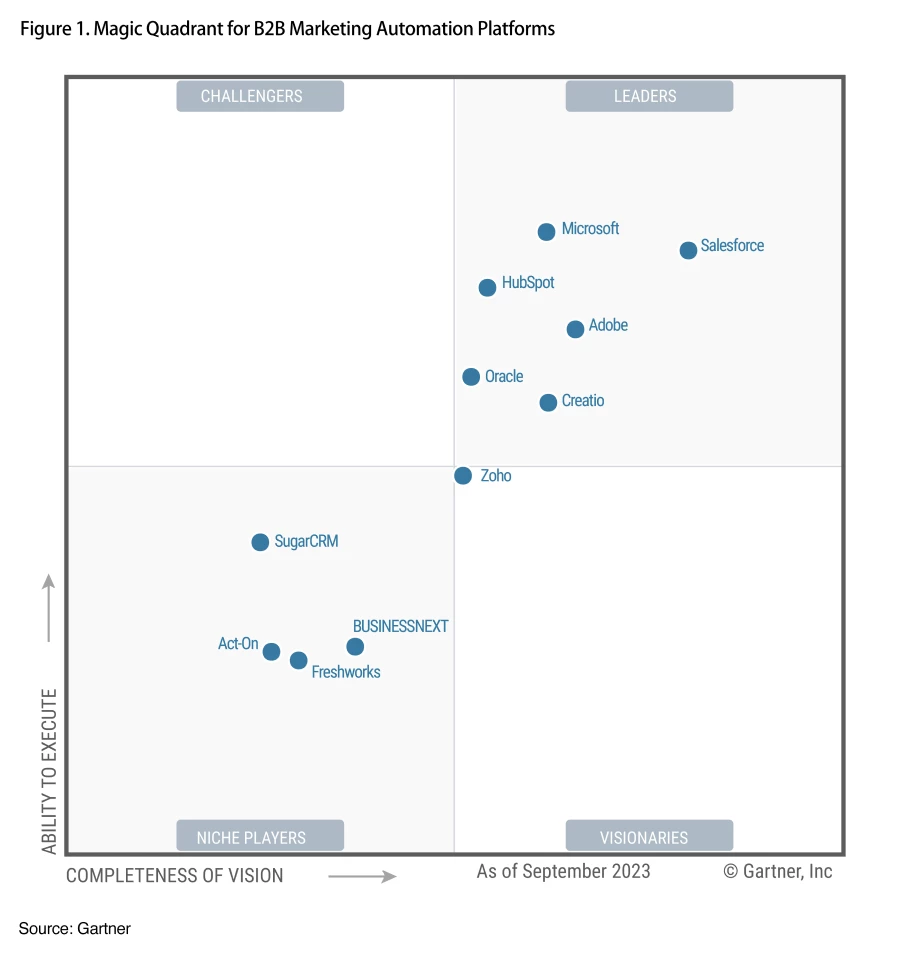
We are pleased and honored to share that in a short span of five years in market, Microsoft has been recognized as a Leader within the 2023 Gartner Magic Quadrant for B2B Marketing Automation Platforms* for the second consecutive year. In this year’s report, Microsoft is positioned highest in Ability to Execute.
Figure 1: Gartner Magic Quadrant for B2B Marketing Automation Platforms**
For Microsoft, this placement recognizes our commitment to help companies better connect with their customers at scale, across all departments, to make this simple and easy for any company with a broad range of skillsets to employ.
Accelerating the journey to more personalized customer engagement
We started our Dynamics 365 Marketing journey in April 2018. Since then, we’ve gathered feedback and continued to learn at a rapid pace to help our customers on their journey to drive meaningful customer engagement, ensure long-term loyalty, and accelerate business success. To be competitive in today’s market, organizations must harness the power of data to gain a deeper understanding of their customers, anticipate behaviors, and craft one-on-one personalized experiences across all touchpoints, including sales, marketing, business operations, and service functions. Generative AI makes these capabilities within reach for every company. That’s why we’ve brought together Dynamics 365 Marketing and Dynamics 365 Customer Insights as one offering named Dynamics 365 Customer Insights, an AI-led solution to revolutionize customer experience. The new Customer Insights enables our customers to be more flexible by giving them access to both a modern, AI-driven customer data platform (Customer Insights data application) and real-time marketing with customer journey orchestration (Customer Insights journeys application). Customers can start with one or both applications and invest in the areas where they most want to scale.
To drive the necessary customer experience (CX) transformation, companies cannot rely on piecemeal integration of sales, service, and marketing products. Gartner predicts that by 2026, 50 percent of replacement customer relationship management (CRM) sales technology decisions will involve solutions including non-sales software comprising other modules from a CRM or a CX suite.[1] However, the reality is that only a few companies are currently delivering on these expectations. Customer experiences often remain fragmented across channels and departments, leading to inconsistencies. Microsoft is uniquely positioned to help customers overcome these challenges, and Dynamics 365 Customer Insights was built exactly for this purpose—to support customers throughout their end-to-end CX journeys.
Like all Dynamics 365 offerings, Customer Insights relies on Microsoft Dataverse to store CRM software data, which enables our customers to securely store and manage their data and harness the true power of that data by removing silos across sales, service, and marketing via a unified platform approach. Customer Insights helps marketers and customer engagement professionals gain a holistic view of their customers, anticipate their needs, and discover growth opportunities. Marketers can also deliver more relevant, contextual, customer-triggered engagements through the power of Copilot in Dynamics 365 Customer Insights. Some of our most recent Copilot capabilities in Customer Insights enable marketers to:
Discover new customer insights by using natural language to ask questions and gather information and suggestions for forming additional, deeper questions.
Get help developing content for emails, social posts, and other text with a tone of voice that matches their brand and campaign.
Enabling our customers to increase their reach
Zurich Insurance Group, a global insurer serving people and businesses in more than 200 countries, wanted to optimize marketing processes to help create more personalized customer experiences. Its Switzerland business unit connects to its customers through hosting online and in-person events—but to drive the highest impact, it must be sure it invites the right customers to the right events. It wanted to improve its ability to track if customers opened event invitations—or even received them, as well as the connection to registration and attendance. It also wanted a formalized way to collect feedback or easily use engagement data to continue to optimize the sales process after the event. Zurich selected Dynamics 365 Marketing to give it the flexibility to reach customers in new ways and drive more effective follow-ups to help shape their journeys. With Dynamics 365 Marketing, Zurich increased its lead quality by over 40 percent.
Over the past decade, Natuzzi, a globally hailed creator of exceptional luxury furniture that delivers a harmonious combination of design, function, aesthetics, and ethics, has seen a rapid global expansion of its heralded luxury brand. Natuzzi lacked a customer engagement platform capable of unifying data from its retail point of sale (POS), enterprise resource planning (ERP) system, and CRM systems. The company also wanted a way to bring together its business-to-business (B2B) and business-to-consumer (B2C) related data sets to drive greater insight between audiences. Adopting Dynamics 365 Marketing and Dynamics 365 Customer Insights, Natuzzi implemented an extensive customer experience platform to transform how its luxury brand discovers and sustains its customers. It uses customer data and insights to nurture customers and prospects through personalized campaigns, delivering emails, SMS texts, promotions, events, sales appointment reminders, and other relationship-building messages.
Microsoft named a Leader by Gartner
Microsoft is named a Leader in the 2023 Gartner Magic Quadrant for B2B Marketing Automation Platforms.
We’re excited to have been recognized as a Leader in the Gartner Magic Quadrant and are committed to helping our customers unify and enrich their customer data to deliver personalized, connected, end-to-end customer journeys across sales, marketing, and service. We truly believe that bringing together Dynamics 365 Marketing and Dynamics 365 Customer Insights enables us to continue investing in capabilities that will enable stronger, insights-based marketing that helps marketers and data analysts glean insights from customer data.
Contact your Microsoft representative to learn more about the value and return on investments, as well as the latest Microsoft Dynamics 365 Customer Insights offer.
Source: Gartner, Magic Quadrant for B2B Marketing Automation Platforms, Rick LaFond, Jeffrey L. Cohen, Matt Wakeman, Jeff Goldberg, Alan Antin, 20 September 2023.
*Gartner is a registered trademark and service mark and Magic Quadrant is a registered trademark of Gartner, Inc. and/or its affiliates in the U.S. and internationally and are used herein with permission. All rights reserved. Gartner does not endorse any vendor, product or service depicted in its research publications, and does not advise technology users to select only those vendors with the highest ratings or other designation. Gartner research publications consist of the opinions of Gartner’s research organization and should not be construed as statements of fact. Gartner disclaims all warranties, expressed or implied, with respect to this research, including any warranties of merchantability or fitness for a particular purpose.
**This graphic was published by Gartner, Inc. as part of a larger research document and should be evaluated in the context of the entire document. The Gartner document is available upon request from Microsoft.
This article is contributed. See the original author and article here.
This blog is a deep dive into the future of requirement gathering. This blog explores how Azure DevOps and Azure OpenAI are joining forces to transform the way we manage project requirements. From automated requirement generation to intelligent analysis, learn how these powerful tools are reshaping the landscape of project management. Stay tuned for an enlightening journey into the world of AI-powered requirement gathering!
Define the Semantic Function to generate feature description-
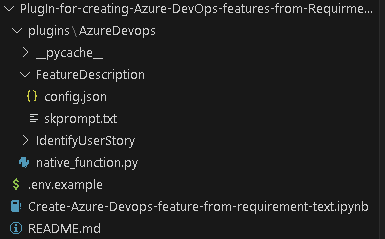
Now that you have below mentioned folder structure.
Create semantic function for generating Feature description.
The first step is to define a semantic function that can interpret the input string and map it to a specific action. In our case, the action is to generate feature description from title. The function could look something like this:
1. Create folder structure
– Create /plugins folder
– Create folder for semantic plugins inside Plugins folder, in this case its “AzureDevops”. (For more details on plugins)
– Create Folder for semantic function inside the skills folder ie ‘/plugin/AzureDevops’, in this case “FeatureDescription” (For more details on functions)
2. Define semantic function
– Once we have folder structure in place lets define the function by having
‘config.json’ with below JSON content for more details on content refer here.
In above file, we are defining semantic function which accept ‘input’ parameter to perform “get standard feature title and description” as mentioned in Description section.
– Now, let’s put the single shot prompt for our semantic function in ‘skprompt.txt’. where ‘{{input}}’ where our input ask would be replaced.
Create feature title and description for {{$input}}  in below format
Feature Title:"[Prodive a short title for the feature]"
Description: "[Provide a more detailed description of the feature's purpose, the problem it addresses, and its significance to the product or project.]

User Needs-
[Outline the specific user needs or pain points that this feature aims to address.]

Functional Requirements:-
- [Requirement 1]
- [Requirement 2]
- [Requirement 3]
- ...

Non-Functional Requirements:-
- [Requirement 1]
- [Requirement 2]
- [Requirement 3]
- ...

Feature Scope:
[Indicates the minimum capabilities that feature should address. Agreed upon between Engineering Leads and Product Mangers] "
Execute above semantic function in action.
– Rename “.env.example’ as ‘.env’ and update the parameters with actual values
– Open notebook “Create-Azure-Devops-feature-from-requirement-text” in visual studio code and follow the steps mentioned to test
– Step 2 Import Packages required to prepare a semantic kernel instance first.
import os
from dotenv import dotenv_values
import semantic_kernel as sk
from semantic_kernel import ContextVariables, Kernel # Context to store variables and Kernel to interact with the kernel
from semantic_kernel.connectors.ai.open_ai import AzureChatCompletion, OpenAIChatCompletion # AI services
from semantic_kernel.planning.sequential_planner import SequentialPlanner # Planner

kernel = sk.Kernel() # Create a kernel instance
kernel1 = sk.Kernel() #create another kernel instance for not having semanitc function in the same kernel

useAzureOpenAI = True

# Configure AI service used by the kernel
if useAzureOpenAI:
    deployment, api_key, endpoint = sk.azure_openai_settings_from_dot_env()
    kernel.add_chat_service("chat_completion", AzureChatCompletion(deployment, endpoint, api_key))
    kernel1.add_chat_service("chat_completion", AzureChatCompletion(deployment, endpoint, api_key))
else:
    api_key, org_id = sk.openai_settings_from_dot_env()
    kernel.add_chat_service("chat-gpt", OpenAIChatCompletion("gpt-3.5-turbo", api_key, org_id))
– Step 3 Importing skills and function from folder
# note: using skills from the samples folder
plugins_directory = "./plugins"

# Import the semantic functions
DevFunctions=kernel1.import_semantic_skill_from_directory(plugins_directory, "AzureDevOps")
FDesFunction = DevFunctions["FeatureDescription"]
– Step 4 calling the semantic function with feature title to generate feature description based on predefined template
resultFD = FDesFunction("Azure Resource Group Configuration Export and Infrastructure as Code (IAC) Generation")
print(resultFD)
Create native function to create features in Azure DevOps
– Create file “native_function.py” under “AzureDevOps” or download the file from repo.
– Copy the code base and update Azure Devops parameter. you can access this as context parameter but for simplicity of this exercise, we kept it as hardcoded. Please find below code flow
– Importing python packages
– Defining class ‘feature‘ and native function as “create” under “@sk_function”.
– Call semantic function to generate feature description.
– Use this description to create Azure DevOps feature.
from semantic_kernel.skill_definition import (
    sk_function,
    sk_function_context_parameter,
)

from semantic_kernel.orchestration.sk_context import SKContext
from azure.devops.v7_1.py_pi_api import JsonPatchOperation

from azure.devops.connection import Connection
from msrest.authentication import BasicAuthentication
import base64
from semantic_kernel import ContextVariables, Kernel
import re
class feature:
    def __init__(self, kernel: Kernel):
        self._kernel = kernel
    _function(
        description="create a Azure DevOps feature with description",
        name="create",
    )
    _function_context_parameter(
        name="title",
        description="the tile of the feature",
    )
    _function_context_parameter(
        name="description",
        description="Description of the feature",
    )
    async def create_feature(self, context: SKContext) -> str:
        feature_title = context["title"]
        get_feature = self._kernel.skills.get_function("AzureDevOps", "FeatureDescription")
        fdetails = get_feature(feature_title)
        # Define a regular expression pattern to match the feature title
        pattern = r"Feature Title:s+(.+)"
        # Search for the pattern in the input string
        match = re.search(pattern, str(fdetails))
        # Check if a match was found
        if match:
            feature_title = match.group(1)
        # Define a regular expression pattern to match the feature description
        # Split the string into lines
        lines = str(fdetails).split('n')
        lines = [line for index, line in enumerate(lines) if index not in [0]]
        description = 'n'.join(lines)
        jsonPatchList = []
        #description=context["description"]
        targetOrganizationName= "XXX"
        targetProjectName= "test"
        targetOrganizationPAT = "XXXXXX"
        workItemCsvFile= "abc"
        teamName = "test Team"
        areaName = teamName
        iterationName ="Sprint 1"
        targetOrganizationUri='https://dev.azure.com/'+targetOrganizationName
        credentials = BasicAuthentication('', targetOrganizationPAT)
        connection = Connection(base_url=targetOrganizationUri, creds=credentials)
        userToken = "" + ":" + targetOrganizationPAT
        base64UserToken = base64.b64encode(userToken.encode()).decode()
        headers = {'Authorization': 'Basic' + base64UserToken}
        core_client = connection.clients.get_core_client()
        targetProjectId = core_client.get_project(targetProjectName).id
        workItemObjects = [
                {
                    'op': 'add',
                    'path': '/fields/System.WorkItemType',
                    'value': "Feature"
                },
                {
                    'op': 'add',
                    'path': '/fields/System.Title',
                    'value': feature_title
                },
                {
                    'op': 'add',
                    'path': '/fields/System.State',
                    'value': "New"
                },
                {
                    'op': 'add',
                    'path': '/fields/System.Description',
                    'value': description
                },
                {
                    'op': 'add',
                    'path': '/fields/Microsoft.VSTS.Common.AcceptanceCriteria',
                    'value': "acceptance criteria"
                },
                {
                    'op': 'add',
                    'path': '/fields/System.IterationPath',
                    'value': targetProjectName+""+iterationName
                }
            ]
        jsonPatchList = JsonPatchOperation(workItemObjects)
        work_client = connection.clients.get_work_item_tracking_client()
        try:
            WorkItemCreation = work_client.create_work_item(jsonPatchList.from_, targetProjectName, "Feature")
        except Exception as e:
            return feature_title+"Feature created unsuccessfully"
        return feature_title+" Feature created successfully"
– Step 6 Executing native function by putting natural language queries in title field
variables["title"] = "creating a nice pipelines"
variables["description"] = "test"
result = await kernel.run_async(
                math_plugin["create"], input_vars=variables
            )
print(result)
Use of Sequential planner to dynamical create N number of features.
– Step 6 Initiate sequential planner with semantic kernel
from plugins.AzureDevops.native_function import feature
planner = SequentialPlanner(kernel)
# Import the native functions
AzDevplugin = kernel.import_skill(feature(kernel1), skill_name="AzureDevOps")
ask = "create two Azure DevOps features for one with title creating user and one with creating work items with standard feature title and description"
plan = await planner.create_plan_async(goal=ask)
for step in plan._steps:
        print(step.description, ":", step._state.__dict__)
This would generate a plan to meet the goal which is above case is “create two Azure DevOps features for one with title creating user and one with creating work items with standard feature title and description” using available function in kernel.
– Step 7 once the plan is created, we can use this plan and execute it to create multiple features.
print("Plan results:")
result = await plan.invoke_async(ask)
for step in plan._steps:
        print(step.description, ":", step._state.__dict__)
This will create two features one for user and one for work item. Using this block, you can create a semantic function-based solution that can interpret natural language requirement document or transcript of reequipment call and use it to create features in azure DevOps. You can increase the accuracy of this solution by brining multi-shot prompt and historical data using collections.
This article is contributed. See the original author and article here.
Azure SQL Database provides a robust DataSync service to synchronize data across multiple Azure SQL databases or between on-premises SQL Server and Azure SQL databases. While generally reliable, some exceptions can disrupt the smooth flow of data synchronization. One such error occurs when custom-defined triggers interfere with DataSync’s internal processes, resulting in a failure like the one described below: Sync failed with the exception ‘An unexpected error occurred when applying batch file sync_XXXXX-XXX-XYZ-afb1-XXXX.batch. See the inner exception for more details.Inner exception: Index was outside the bounds of the array. For more information, provide tracing ID ‘NNNN-3414-XYZ-ZZZ-NNNNNNNX’ to customer support.’
Analyzed the logs, we found that the error message points to a failure when applying a batch file for data synchronization, with an inner exception indicating that an “Index was outside the bounds of the array.” In this situation the error occurs when a custom trigger modifies the underlying data in a way that interferes with DataSync’s internal “data sync trigger” responsible for bulk-insert operations.
In this situation, once we have identified the trigger and table that is causing this issue, we temporarily disable the identified custom triggers and attempt to synchronize the data again. If the data syncs successfully, this confirms that the custom trigger is causing the issue.
-- Disable Trigger
DISABLE TRIGGER [Trigger_Name] ON [Table1];
-- Enable Trigger
ENABLE TRIGGER [Trigger_Name] ON [Table1];
This article is contributed. See the original author and article here.
We’ve got several new capabilities to announce with our September service release (2309), including Microsoft Intune Suite Remote Help expanding to macOS and enhancements to Remote Help for Windows. We’re releasing the Zebra Lifeguard Over-the-Air integration with Intune, which we offered for public preview in May, and we’ve added more than 30 settings for Apple devices, part of our ongoing effort to ensure Intune has Day zero support for the latest Apple releases. Finally, we’ve released Microsoft Intune Endpoint Privilege Management for Windows 365 devices so customers can facilitate elevations for users on Cloud PC devices.
Your feedback is important! Please let us know your thoughts on these new developments by commenting on this post or connecting with me on LinkedIn.
Advancing Remote Help
This month, we’re expanding the capabilities of Remote Help to make it easier for helpdesk agents to assist users and solve issues remotely.
Firstly, Remote Help is now available on macOS! We’ve heard from customers that this is an essential feature of the Microsoft Intune Suite, and we’re excited to expand this capability to macOS. Helpdesk staff on macOS can now connect in view-only sessions to assist macOS users remotely.
Additionally, we’re now offering the ability to launch Remote Help for Windows from the Intune admin center. With this capability, helpdesk agents can seamlessly launch Remote Help on both their device and the user’s. Previously, both the helpdesk and the user had to launch Remote Help on their devices manually. With the new capability, the user receives a notification on their device that the helpdesk agent wants to begin a Remote Help session making it a more streamlined experience.
Intune integration with Zebra LifeGuard OTA
This month, as part of our efforts to improve the experience for frontline workers, the Zebra LifeGuard Over-the-Air (LG OTA) integration with Intune moves from public preview to generally available. With this firmware over-the-air (FOTA) solution, IT admins can update ruggedized Zebra Android devices securely and efficiently without physical access to the devices.
Zebra device updates are managed from the Intune admin center and distributed wirelessly. This makes it easier to keep devices up to date, prevents compatibility issues for users, and reduces security risks. Customers have been asking for the ability to use Intune to manage Zebra devices, and we’re happy to deliver!
New Apple features and iOS/iPadOS 17 and macOS 14 release
We’re always working to improve the Intune experience for Apple users—including for the latest operating systems. With the Apple release of iOS 17.0 and macOS 14.0, our goal is to ensure that Microsoft Intune can provide Day zero support so that features work seamlessly. As part of this effort, we’ve improved the settings catalog and simplified and expedited settings updates for IT admins and users.
To prepare for the releases, we’ve provided many additional settings for Apple devices. We’re aiming to speed up response time and bring these settings in as quickly as possible. Now, we can provide them in a matter of hours instead of months, which is critical as features and capabilities are added to address new Apple releases. The latest batch includes more than 30 additional settings. The settings catalog for macOS, iOS, and iPadOS lists all the settings admins can configure in a device policy.
EPM for Windows 365 devices
Microsoft Intune Endpoint Privilege Management (EPM), part of the Microsoft Intune Suite, enables IT admins to selectively allow applications to run with administrative privileges. Organizations can now facilitate elevations for users on Cloud PC devices via EPM enabling users to easily elevate approved applications without the need for full administrative rights on their Windows device. This means greater efficiency and security for your organization.
Let us know how we’re doing!
Your comments help us improve. Let us know how our new features are working for you by commenting on this post or connect with me on LinkedIn. Stay tuned for more announcements next month!
This article is contributed. See the original author and article here.
In the constantly evolving landscape of modern work, success involves effective meetings and a collaborative workforce. Microsoft understands this well and has introduced Surface Hub 3, an all-in-one hybrid meeting and collaboration device set to transform the way we work.
With this device – the only collaboration board designed end-to-end by Microsoft – we are offering consistency and simplicity to organizations that have Surface Hubs and other Microsoft Teams Rooms in their spaces, while delivering the most options for active collaboration so that teams can get more done.
Learn more about Surface Hub 3 from Sonia and me in our YouTube video!
Unified Microsoft Teams Rooms Experience
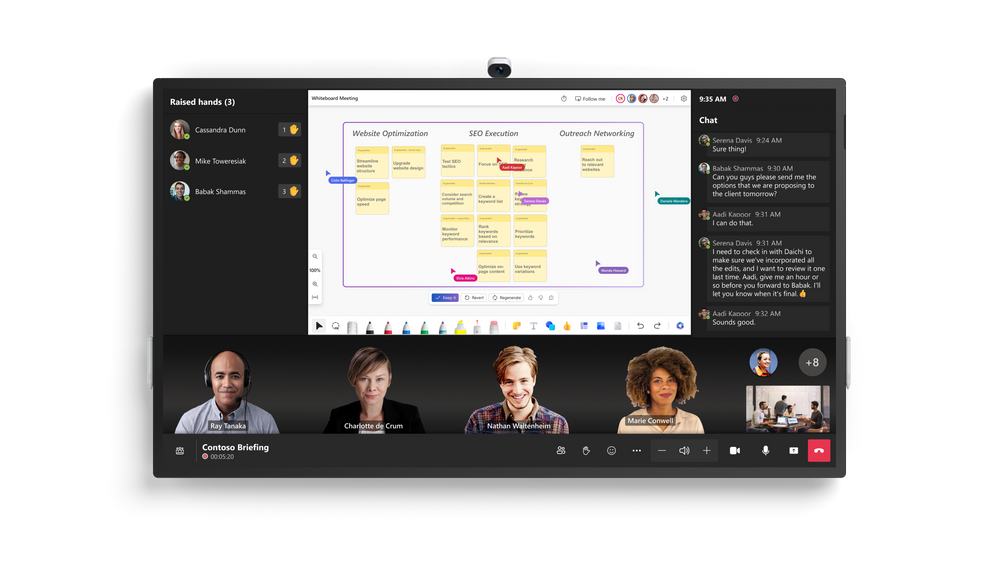
Surface Hub 3 is joining the Microsoft Teams Rooms family as an all-in-one Teams Rooms board running Teams Rooms on Windows. This means that with a consistent experience across all meeting spaces now, your team can effortlessly transition from one room to another, whether the space features the streamlined, touch-first interface on Surface Hub 3 or the traditional console-based Teams Rooms setup. This also means Surface Hub 3 now supports long-requested features by Hub customers—including persistent chat, the Front Row layout (which looks particularly beautiful on the 85” screen), and more. And, going forward, customers can look forward to newly released Teams Rooms features now also coming to Surface Hub on Day 1.
Immersive Meeting Experience
Surface Hub 3 brings a wave of new capabilities.
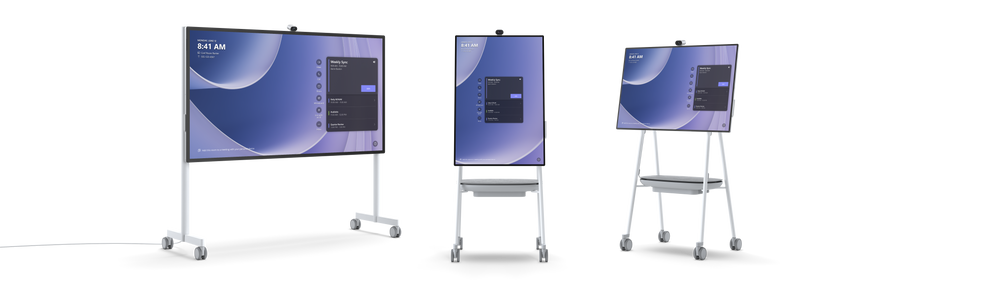
Smart Rotation and Portrait: physically rotate Surface Hub 3 50” between Portrait or Landscape at any time to adapt the screen layout to suit your needs, whether for a natural Whiteboarding session or a more personable one-on-one call.
Mobility and Versatility: The Surface Hub 3 50” is fully mobile on a Steelcase Roam Stand* , offering flexibility in deployment. Choose from a variety of stands and wall-mounting solutions from Steelcase and our Designed for Surface partners. With the APCTM Charge Mobile Battery* , the Surface Hub 3 50” can be taken virtually anywhere in the building.
Premium Design: Surface Hub 3 prioritizes inclusive meetings with clear audio and visuals. The high-resolution, 4K PixelSense display with an anti-glare coating makes content visible in any lighting condition.
Intelligent Audio: The Surface Hub 3 50” features two microphone arrays and speaker pairings. Smart AV optimizes audio based on device orientation, delivering the best stereo experience whether in Portrait or Landscape.
Seamless Integration: Surface Hub 3 pairs with Microsoft Teams Rooms certified peripherals in larger conference rooms, thanks to the Microsoft Teams Rooms on Windows platform. This creates a world of possibilities for different meeting spaces, from traditional setups to large classrooms, with external microphones, speakers, cameras, and more.
Enhanced Collaboration: Surface Hub 3 supports active inking with up to two Surface Hub Pens or Surface Slim pens, providing 20 points of multitouch for immersive on-device collaboration. Built-in palm rejection ensures a natural interaction experience.
Faster Performance: with a 60% CPU performance increase, and a 160% GPU graphics performance increase gen-on-gen, Surface Hub 3 customers will enjoy a more powerful system that is also primed to capitalize on future software innovation. With these capabilities and more, Surface Hub 3 revolutionizes meetings, offering a versatile and inclusive solution for modern workspaces.
1:1 video chat in Portrait on Surface Hub 3 50”
AI-Powered Meetings and Brainstorming
Surface Hub 3 enables customers to leverage AI more than ever to enhance hybrid meetings and collaboration sessions. For example, Cloud IntelliFrame** allows remote attendees to see in-person Surface Hub users more clearly through a smart video feed that separates participants into individual boxes and helps remove distractions. Video segmentation with a unified background in Front Row uses AI to foster inclusion by removing backgrounds and adjusting video sizes, so remote attendees are literally on the same level with each other.** And in the future, Surface Hub 3 will take brainstorming to a new level with AI-powered features from Microsoft Copilot. Copilot in Whiteboard on Surface Hub will help generate and organize ideas efficiently, freeing up time for your team to focus on creative ideation. Stay tuned for more details.
Copilot in Whiteboard, and video segmentation with a unified background, both in Front Row on Surface Hub 3 85”
Streamlined IT Management
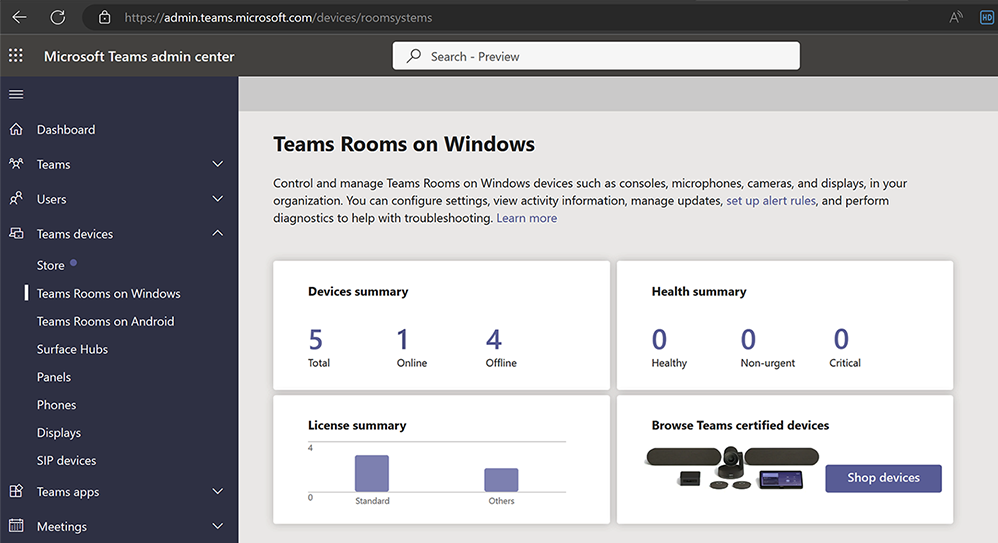
As an IT professional, managing devices in your organization can be a complex task. Surface Hub 3 reduces IT complexity with a streamlined management experience through Microsoft Teams admin center and the new Microsoft Teams Rooms Pro Management Portal**. This allows you to manage all devices seamlessly, making your job easier and ensuring a hassle-free experience for your users.
Microsoft Teams admin center, managing Teams Rooms on Windows
Easy Transition and Support
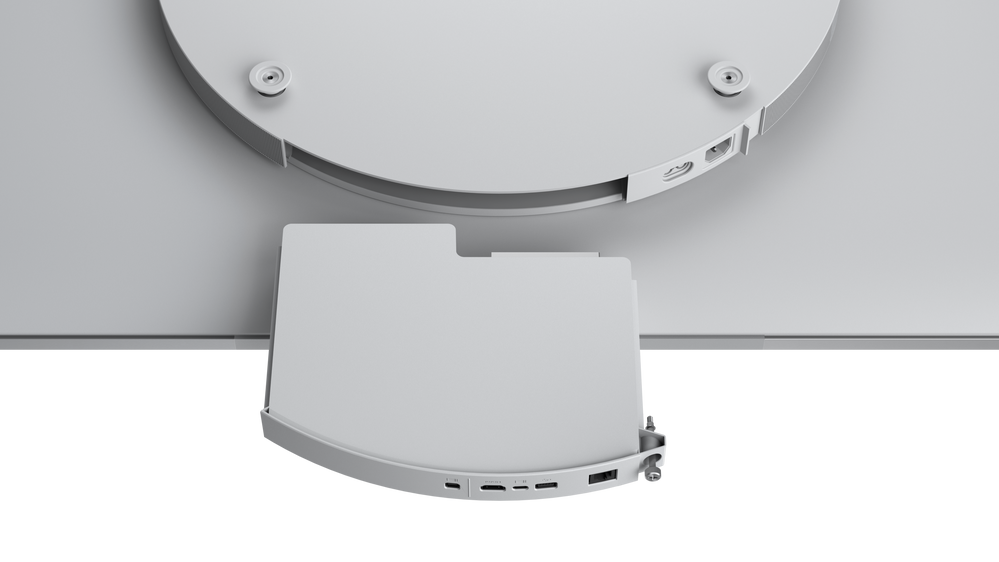
In-market Surface Hub 2S devices can upgrade to the full Surface Hub 3 experience with the Surface Hub 3 Pack. Starting next year, software migration will also be available for Surface Hub 2S devices to move to Microsoft Teams Rooms on Windows. For those customers continuing to run Windows 10 Team edition on their Surface Hub 2S devices, support for that OS will continue until October 14, 2025.
The Surface Hub 3 Pack is easy to swap into both 50” & 85” Surface Hub 2S devices
Innovation is at the heart of our journey, from our origins over a decade ago with Perceptive Pixel and PixelSense to Surface Hub 3. As we continue to push the limits of what’s possible in meetings and teamwork, Surface Hub 3 stands ready to empower your organization for the modern workplace.
Preorder now to elevate your meeting room experience to new heights and embrace the future of collaboration!
This article is contributed. See the original author and article here.
Today at an event in New York, we announced our vision for Microsoft Copilot—a digital companion for your whole life—that will create a single Copilot user experience across Bing, Edge, Microsoft 365, and Windows.
This article is contributed. See the original author and article here.
Introduction
In today’s interconnected digital landscape, Distributed Denial of Service (DDoS) attacks have become a persistent threat to organizations of all sizes. These attacks can disrupt services, compromise sensitive data, and lead to financial losses. To counter this threat, Microsoft Azure offers robust DDoS protection capabilities. In this blog post, we will explore how organizations can leverage Azure Policy to enforce and manage Azure DDoS Protection, enhancing their security posture and ensuring uninterrupted services.
The main objective of this post is to equip you with the knowledge to effectively utilize the built-in policies for Azure DDoS protection within your environment. This includes enabling automated scaling without the need for manual intervention and ensuring that DDoS protection is enabled across your public endpoints.
Understanding Azure DDoS Protection
Microsoft Azure DDoS Protection is a service designed to protect your applications from the impact of DDoS (Distributed Denial of Service) attacks. These attacks aim to overwhelm an application’s resources, rendering it inaccessible to legitimate users. Azure DDoS Protection provides enhanced mitigation capabilities that are automatically tuned to protect your specific Azure resources within a virtual network. It operates at both layer 3 (network layer) and layer 4 (transport layer) to defend against volumetric and protocol attacks.
Azure Policy Overview
Azure Policy is an integral part of Azure Governance, offering centralized automation for enforcing and monitoring organizational standards and compliance across your Azure environment. It streamlines the deployment and management of policies, ensuring consistency in resource configurations. Azure Policy is a powerful tool for aligning resources with industry and organizational security standards, reducing manual effort, and enhancing operational efficiency.
Benefits of Using Azure Policy for DDoS Protection
1- Consistency Across Resources:
Azure Policy enables you to establish a uniform DDoS protection framework across your entire Azure environment. This consistency ensures that no resource is left vulnerable to potential DDoS attacks due to misconfigurations or oversight.
2- Streamlined Automation:
The automation capabilities provided by Azure Policy are great for managing DDoS protection. Instead of manually configuring DDoS settings for each individual resource, Azure Policy allows you to define policies once and apply them consistently across your entire Azure infrastructure. This streamlining of processes not only saves time but also minimizes the risk of human error in policy implementation.
3- Enhanced Compliance:
Adherence to industry and organizational security standards is a top priority for businesses of all sizes. Azure Policy facilitates compliance by allowing you to align your resources with specific security baselines. By enforcing DDoS protection policies that adhere to these standards, you can demonstrate commitment to security and regulatory compliance, thereby improving the trust of your customers and partners.
Built-In Azure DDoS Protection definitions
Note: Azure Standard DDoS Protection has been renamed as Azure DDoS Network Protection. However, it’s important to be aware that the names of the built-in policies have not yet been updated to reflect this change.
Azure DDoS Protection Standard should be enabled
This Azure policy is designed to ensure that all virtual networks with a subnet that have an application gateway with a public IP, have Azure DDoS Network Protection enabled. The application gateway can be configured to have a public IP address, a private IP address, or both. A public IP address is required when you host a backend that clients must access over the Internet via an Internet-facing public IP. This policy ensures that these resources are adequately protected from DDoS attacks, enhancing the security and availability of applications hosted on Azure.
Public IP addresses should have resource logs enabled for Azure DDoS Protection Standard
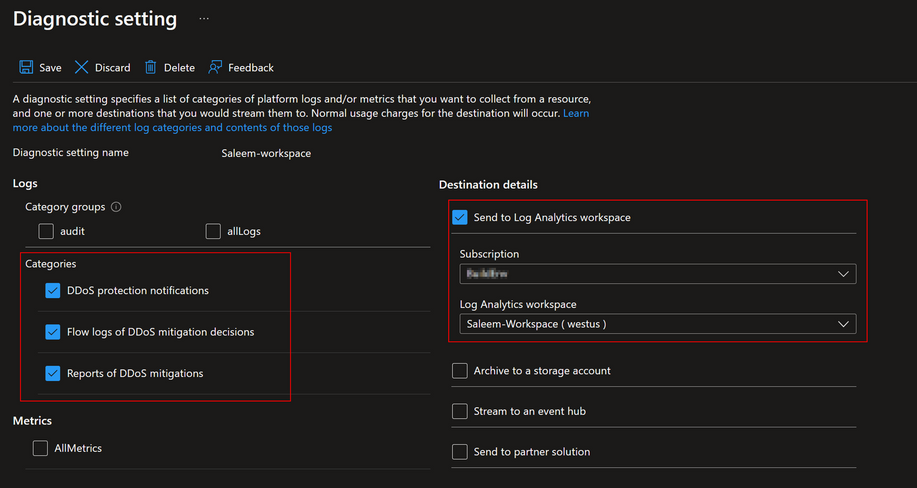
This policy ensures that resource logs for all public IP addresses are enabled and configured to stream to a Log Analytics workspace. This is important as it provides detailed visibility into the traffic data and DDoS attack information.
The diagnostic logs provide insights into DDoS Protection notifications, mitigation reports, and mitigation flow logs during and after a DDoS attack. These logs can be viewed in your Log Analytics workspace. You will get notifications anytime a public IP resource is under attack, and when attack mitigation is over. Attack mitigation flow logs allow you to review the dropped traffic, forwarded traffic, and other interesting data-points during an active DDoS attack in near-real time. Mitigation flow logs offers regular reports on DDoS mitigation, with updates provided every 5 minutes. Additionally, a post-mitigation report is generated for a comprehensive overview.
This policy ensures that these logs are properly configured and streamed to a Log Analytics workspace for further analysis and monitoring. This enhances the security posture by providing detailed insights into traffic patterns and potential security threats while also providing a scalable way to enable telemetry without manual work.
Virtual networks should be protected by Azure DDoS Protection
This policy is designed to ensure that all your virtual networks are associated with a DDoS Protection Network plan. This policy scans your Azure environment and identifies any virtual networks that do not have the DDoS Protection Network plan enabled. If such a network is found, the policy can optionally create a remediation task. This task will associate the non-compliant virtual network with the specified DDoS Protection Plan. This policy helps maintain the security and integrity of your Azure environment by enforcing the best practices for DDoS protection.
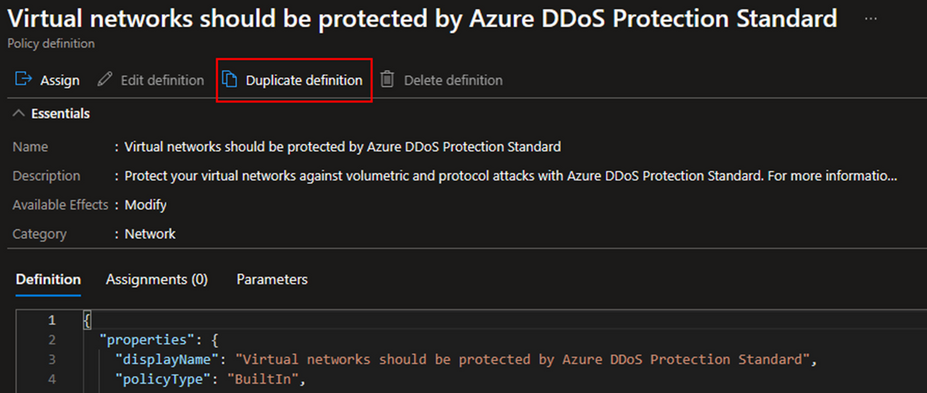
The first step starts with the selection of policy definitions. Given that we already have a set of built-in policies at our disposal, we will choose one of them. In the ‘Definitions’ section, search for ‘DDoS’. For the purposes of this tutorial, I will use the definition titled ‘Virtual networks should be protected by Azure DDoS Protection Standard.’ Upon opening this definition, you can read its description and look at the definition logic.
If you wish to modify the built-in definition before assigning it, you can select the duplicate option to create a copy of it. Choose a name for your duplicated definition, specify its category, and provide a customized description. After saving your changes, a new definition will be created, complete with your changes and categorized as a custom definition.
Policy Assignment and Scope
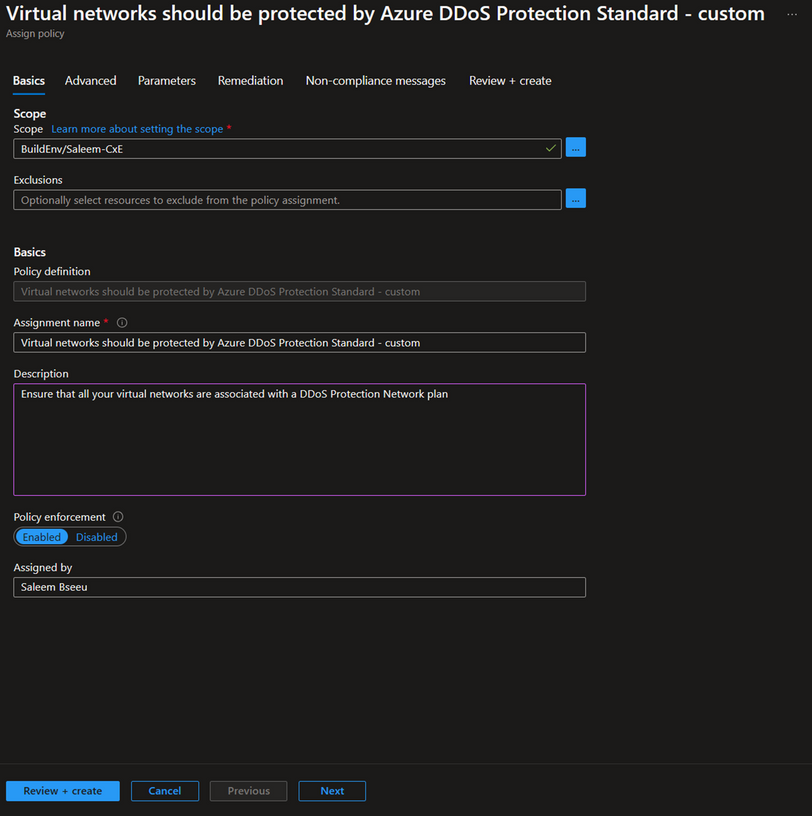
For the next step let’s start assigning our policy definition. To do this, select the ‘Assign’ option located in the top left corner under the definition. The first section you’ll see is ‘Scope’. Here, select the subscription where you want the policy to be active. For a more granular approach, you can also select a specific resource group. In the ‘Basics’ section, you have the option to change the assignment name and add a description.
Note: Make sure to select ‘Enabled’ under policy enforcement if you want the policy to be actively enforced. If you only want to identify which resources are compliant without enforcing the policy, you can leave this setting as ‘Disabled’. For more information about policy enforcement, here Details of the policy assignment structure – Azure Policy | Microsoft Learn
Next, go to the ‘Parameters’ section and choose the DDoS protection plan that you intend to use for protecting your VNets. This selected plan will be used to add your VNets to it.
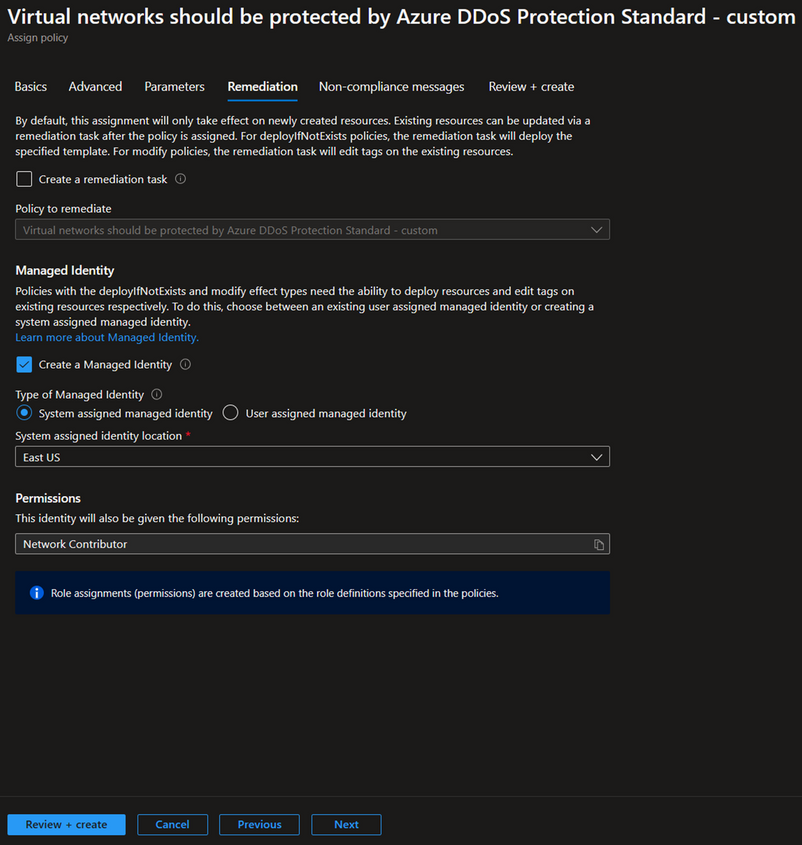
The final section is ‘Remediation’. Here, you have the option to create a remediation task. This means that when the policy is created, the remediation will apply not only to newly created resources but also to existing ones. If this aligns with your desired outcome, check the box for ‘Create a remediation task’ and select the DDoS policy.
Since our policy has a modify effect, it requires either an existing user-assigned managed identity or a system-assigned managed identity. The portal will automatically provide an option to create a managed identity with the necessary permissions, which in this case is ‘Network Contributor’. To learn more about managed identity, see here Remediate non-compliant resources – Azure Policy | Microsoft Learn
Policy Enforcement Best Practices
1- Granularity: Policies should be customized to match the specific needs of different resource types and their importance levels. For example, not all VNets may need DDoS protection, and applying a one-size-fits-all policy across all resources could lead to unnecessary expenses. That’s why it’s important to evaluate the needs of each resource. Resources that handle sensitive data or are vital for business operations may need stricter policies compared to those that are less important. This approach ensures that each resource is properly secured while also being cost-effective.
2- Testing: Before deploying policies to critical resources, it’s recommended to test them in a non-production environment. This allows you to assess the impact of the policies and make necessary adjustments without affecting your production environment. It also helps in identifying any potential issues or conflicts with existing configurations.
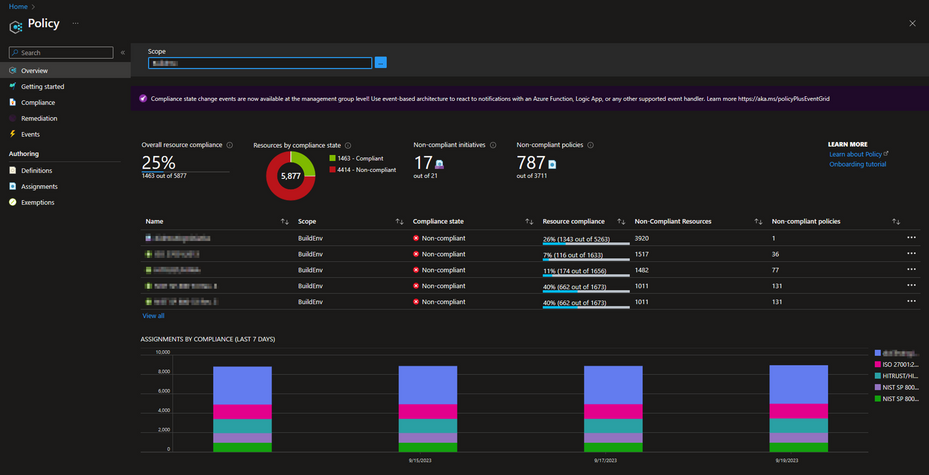
3- Monitoring: Regularly reviewing policy compliance is crucial for maintaining a secure and compliant Azure environment. This involves checking the compliance status of your resources and adjusting policies as necessary based on the review. Azure Policy provides compliance reports that can help in this process. For more information on how to get compliance data or manually start an evaluation scan, see here Get policy compliance data – Azure Policy | Microsoft Learn
Conclusion
Using Azure Policy to enforce and manage Azure DDoS Protection is an essential part of a proactive and comprehensive security strategy. It allows you to continuously monitor your Azure environment, identify non-compliant resources, and take corrective action promptly. This approach not only enhances the security of your applications but also contributes to maintaining their availability and reliability.





Recent Comments