This article is contributed. See the original author and article here.
In an industry defined by both growth and disruption, retailers are depending on technology to navigate challenges ranging from shifting purchase habits to supply chain complexities. Next week, at the National Retail Federation (NRF) Big Show, Microsoft will demonstrate Dynamics 365 solutions powered by AI to help accelerate retail agility and innovation in the next decade.
Gain valuable AI insights for your business
Learn more at the National Retail Federation Big Show
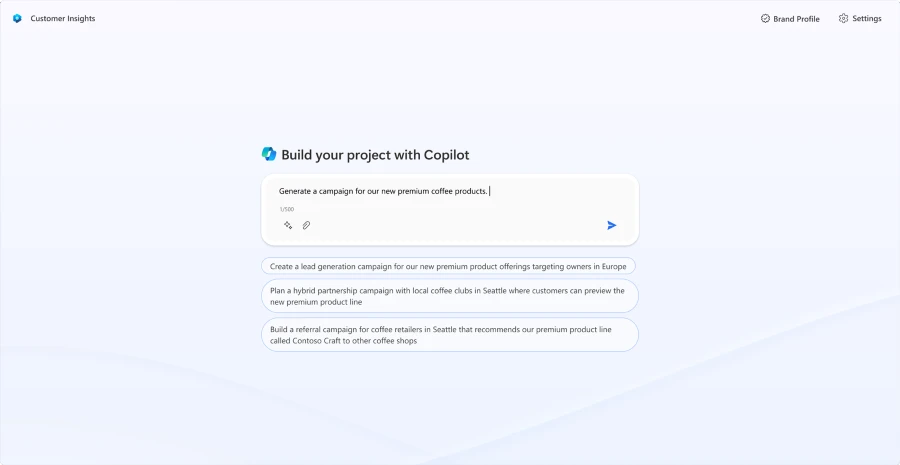
Microsoft Dynamics 365 Customer Insights, providing retailers with AI-powered experiences to transform daily marketing workflows.
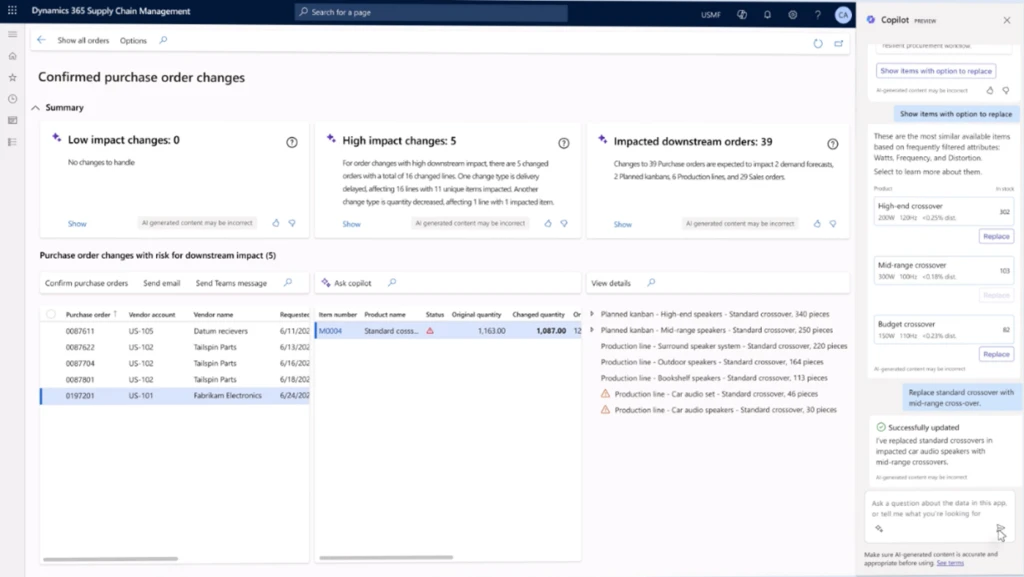
Microsoft Dynamics 365 Supply Chain Management, providing AIpowered guidance for demand planning, streamlining procurement, and enhancing supply chain visibility.
NRF attendees can learn more about the transformative power of AI across the retail industry by attending two Big Ideas Sessions hosted by Shelley Bransten, Corporate Vice President, Global Retail, Consumer Goods, and Gaming Industries, and Kathleen Mitford, Corporate Vice President, Global Industry Marketing.
Helping retailers personalize the shopping experience
Retailers often tell us that they’re under pressure to get marketing and customer experience projects and campaigns to market faster and are asked to do more with less. Yet, the processes and tools they use haven’t evolved to meet this demand.
Deploying a project to market requires various roles or specialists, costly third-party agencies, and siloed applications to review data and create content. Monitoring results for optimization also becomes a timely and tedious task, having to track down the right people with the right application and the right data. These challenges not only hinder a campaign’s time to market and employee productivity, but can also result in a disjointed customer experience.
It’s not just our customers who are feeling the burden of these challenges. The market is feeling it too. For instance, 63% of surveyed retailers said they hope they can improve their marketing with AI in the next 18 to 24 months.1 In the age of AI, shouldn’t it be easier to get your campaigns to market?
We are announcing new Copilot features in Dynamics 365 Customer Insights that will transform how marketers manage and maintain projects and campaigns, increasing productivity, efficiency, and speed to market. These new capabilities build on Copilot features introduced in the past year, including, but not limited to, the ability to generate content ideas, query customer data using natural language, and create customer segments and journeys using next-generation AI.
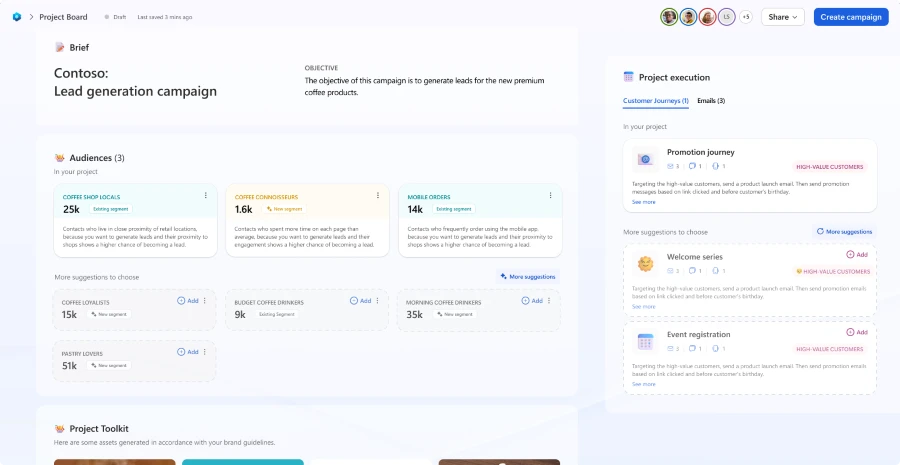
Marketers can kick-start their marketing project by writing their campaign objective in natural language, or by uploading an existing creative brief. The project board is then generated using the prompt or brief, connected organizational data, and previous campaigns in Customer Insights. The project board streamlines and connects all workflows into one place for building and managing marketing assets.
“These new copilot capabilities in Dynamics 365 Customer Insights will enable us to focus our time and energy in the right places—better informing us on optimization priorities without the need to dig into details manually. That alone saves so much time.”
—Hannah Harper, Leatherman, Digital Marketing Manager
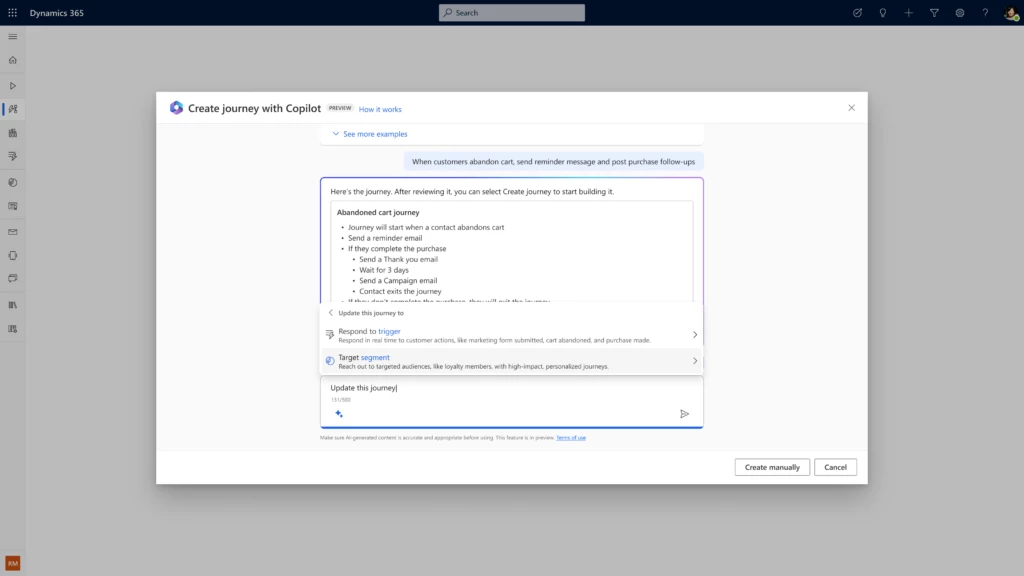
From the project board, marketers can view the campaign’s target audience and segments, as well as recommendations from Copilot for additional segments that may not have been previously considered. Selecting a suggested audience segment automatically generates a complementary customer journey, saving marketers time while also helping them deliver a personalized customer experience.
End-to-end customer journeys containing personalized touchpoints, such as promotional emails or event invitations, are generated using Copilot. Through our partnership with Typeface and its enterprise-grade generative AI capabilities, marketers can produce brand-authentic images across assets, supercharging personalized content for greater impact—all from within Dynamics 365 Customer Insights. Additionally, Typeface helps align content to the organization’s brand guidelines, including themes, fonts, and product images—extracted from a central asset library.
“Every aspect of the enterprise is already being redefined with generative AI, from developer to product to sales experiences. By combining Dynamics 365 Customer Insights with Typeface’s powerful storytelling engine, we’re fundamentally reshaping campaign workflows with generative AI by starting with just a goal. This means personalizing content at an unprecedented scale, bridging the gap between content and data, and ushering in a new era of marketing creativity and productivity.”
—Abhay Parasnis, Founder and CEO of Typeface
These Copilot capabilities will be available in preview in the first quarter of 2024, with general availability by the third quarter of 2024. Existing Customer Insights customers can sign up now for the early access public preview program here.
This is just the beginning; we will be delivering further content curation, journey testing, and metrics monitoring to optimize campaigns. Our vision is that, together, this new AI-first experience will transform how marketers work by reducing the complexities of end-to-end campaign management and enhancing marketer productivity and ROI.
Click the image below to watch a video and learn more about our vision.
Build a real-time retail supply chain
In 2024, retail supply chains face countless challenges, from labor shortages and increasing costs to complexities across omnichannel retail experiences. Enterprise AI solutions, now readily available for retailers, can power greater efficiency, productivity, and innovation across the supply chain.
At Microsoft, we aim to deliver new supply chain innovations powered by Copilot to our customers through our open, flexible, and collaborative Microsoft platform; helping organizations to reduce risk, manage inventory, plan with flexibility, and make quick decisions across the whole supply chain.
New copilot capabilities to improve demand planning
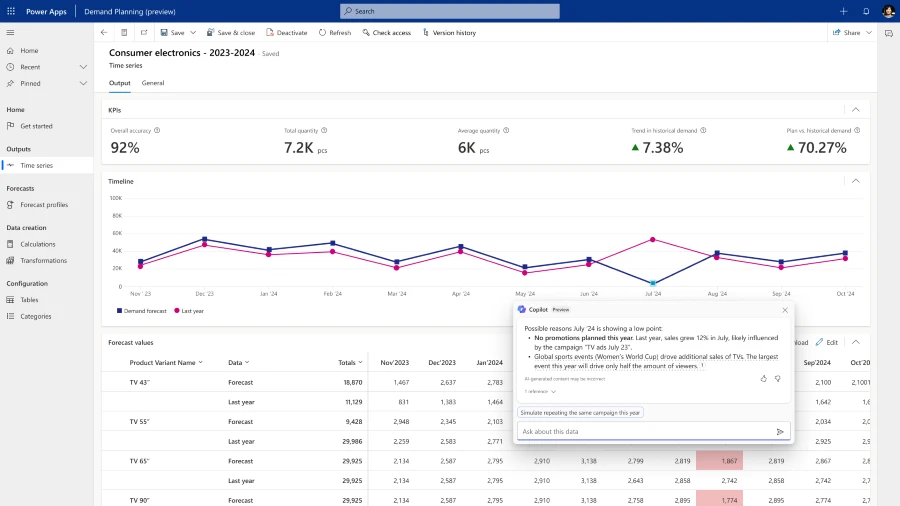
A retailer’s success hinges on having the right inventory at the right place at the right time, and that starts with successful demand planning. We recently announced new demand planning capabilities in Dynamics 365 in November 2023 that uses AI, machine learning, and external signals to predict demand accurately, and now we are enhancing it with Copilot. This will help planners understand how a forecast was generated and help them find patterns and anomalies.
Copilot will also help them make sense of complex relationships across datasets using natural language interactions, and it will also assist with the routine tasks of making demand review reports, saving the planners time to focus on high-priority activities.
Some of our customers, including Domino’s Pizza UK & Ireland, can use the new demand planning capabilities to make smart predictions from the data and insights.
“The demand planning capabilities in Dynamics 365 are helping us make the right decisions to lower wastage, avoid unnecessary deliveries, and be cybersafe.”
—Neha Batra, Head of Business Solutions, Domino’s Pizza UK & Ireland
The new demand planning capabilities create a more flexible, simplified, and intuitive user experience. Planners have an increased level of trust and can rely more on the forecast, knowing how it’s generated. The latest demand planning capabilities help reduce excess inventory and increase working capital for retailers.
New Copilot capabilities to improve productivity and proactively mitigate disruptions
In November 2023, we also announced new Copilot capabilities in preview for Dynamics 365 that enable supply chain teams to take actions based on insights with conversational help while in the flow of work. This helps increase productivity and improved collaboration among employees across the supply chain and other cross-functional teams to proactively mitigate disruptions and further automate their workflows. See the capabilities in action.
We also added new Copilot capabilities that will enhance inventory visibility and enable businesses to promise orders with improved accuracy, significantly helping brands elevate their consumers’ buying experience.
In addition, a new copilot capability that helps to streamline procurement is now generally available. Procurement teams can seamlessly handle the purchase order changes in a scalable and efficient manner and assess the impact of changes downstream to production and distribution before making the right decision.
Generate product enrichment content for e-commerce sites with Copilot
Informative, story-rich product content can drive customer engagement and sales on e-commerce sites. Creating that content, however, can be time-consuming and challenging. In October 2023, we launched in preview the ability for business-to-business and business-to-consumer online retailers to use Copilot in Dynamics 365 Commerce to generate enriched product marketing content for their websites. This helps to decrease the time it takes to create compelling marketing content, while increasing productivity and increasing the overall number of online orders.
Visit our Microsoft booth at NRF this year to see these innovations in action.
Sunday, January 14, 2024 | 1:00 – 1:30 PM Eastern Standard Time (EST)
Join this interactive session to hear about one retailer’s AI journey to date. Hosted by Microsoft’s Corporate Vice President, Retail, Consumer Goods & Gaming Industries, Shelley Bransten, you’ll also learn about new AI-focused findings from Futurum Research and all new AI capabilities in Microsoft Cloud for Retail that will help power your AI transformation.
Generative AI and large language models have captured the attention of executives across industries. While the technology’s use cases seem endless, smart retailers and brands must identify and prioritize the applications of generative AI that will be most valuable to their organization and partner with organizations who will treat their data with the highest privacy standards. Join us to hear how Microsoft is helping organizations large and small maximize their generative AI opportunities safely and responsibly.
Retailers are swimming in data all day, every day. Even with sophisticated legacy technologies and cutting-edge data science, the majority of that data goes uncollected. Insights stay hidden—often in plain sight. But that’s starting to change. AI tools are enabling retailers to understand their customers, merchandising, supply chains, operations, and workforces better than ever before. Join us to hear about the myriad insights that retailers are drawing from newfound and increasingly precise data sources to run leaner, smarter stores.
This article is contributed. See the original author and article here.
One of the common adoption blockers we have heard of from our partners is that they cannot standardize their security and management practices on Microsoft 365 Lighthouse because they cannot manage all their customers using it. This has made it challenging to standardize procedures such as resetting passwords, identifying risky users, or simply navigating a customer admin portal with delegated access. While we made it simple to search and discover users across the SMB customers you were managing in Microsoft 365 Lighthouse, you still needed a second process for the customers you were not managing in Microsoft 365 Lighthouse. This was primarily due to the requirement for Microsoft 365 Business Premium. While we have expanded support for a limited set of subscriptions to manage a customer in Lighthouse over the past couple of years, it was still limited to subscriptions that offered premium security value, preventing you from having a single solution.
Today, we expand support for all your commercial and educational SMB customers. This enables you as a partner to create standardized processes for managing all your SMB customers in Lighthouse. Here are a few of the scenarios you can do now with all your Microsoft 365 SMB customers using Lighthouse:
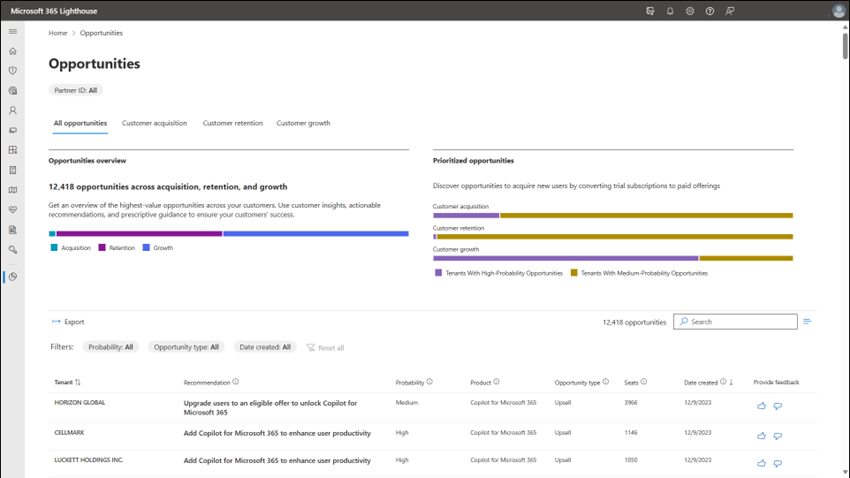
Anticipate your customers’ needs with proactive account management made easy with Sales Advisor opportunities. Anticipate your customers’ needs. Discover the best ways to add value and support business growth with AI-powered insights and recommendations.
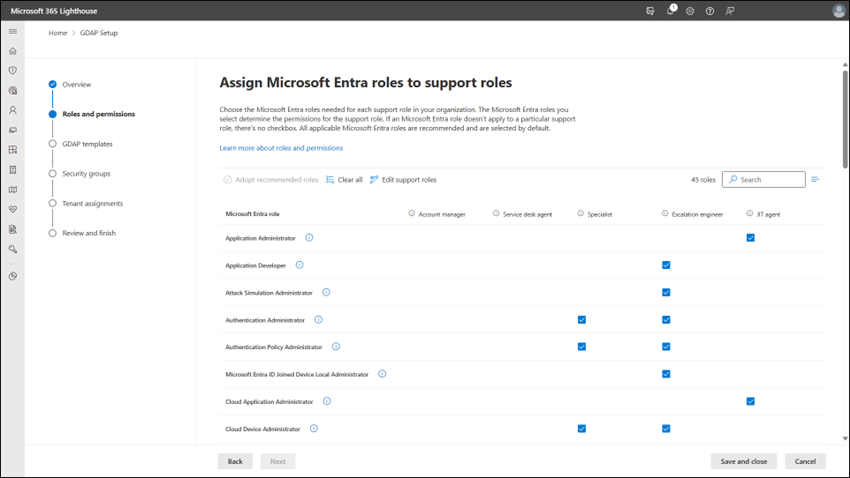
Simplified delegated access across all your customer tenants. Configure granular delegated access to your customers’ tenants to manage users, devices, and data quickly and easily. Reduce risk by rightsizing delegated permissions across your organization while improving your productivity with a guided wizard that helps you scale best practices from across the MSP industry to set up Granular Delegated Access Privileges (GDAP).
Screenshot of Microsoft 365 Lighthouse Granular Delegated Access Privileges setup wizard.
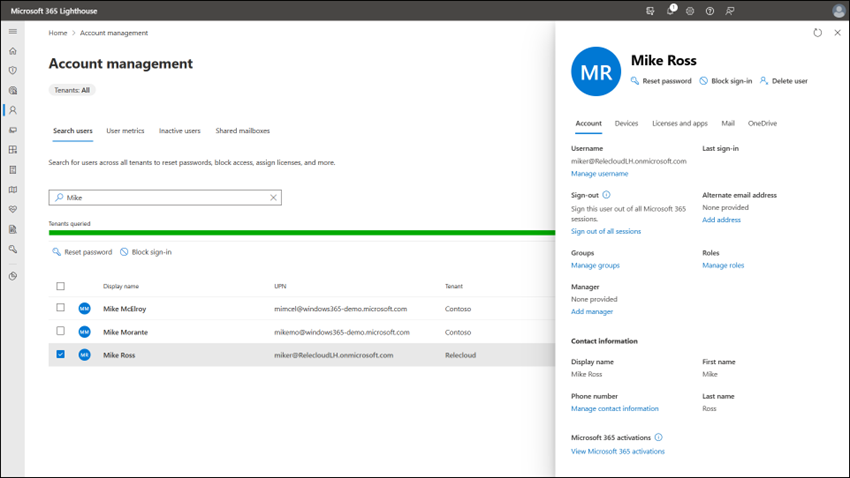
Assist with everyday user management. Lighthouse enables end-to-end user management, which allows you to create new users and quickly search and modify existing user details, including managing security groups, licensing, etc., and offboarding users. In addition to basic user management, Lighthouse adds value by providing management views across your Microsoft SMB customers that allow you to quickly identify and act on inactive accounts, Global Admin accounts, risky user behavior, and multi-factor authentication.
Screenshot of Microsoft 365 Lighthouse showing how to search for a user and view the user’s details.
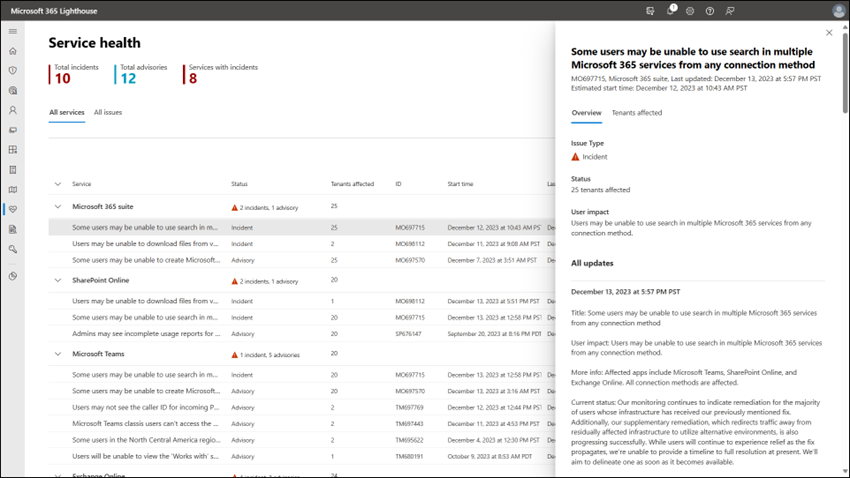
Gain visibility into any Microsoft 365 incidents or advisories affecting your customers with a multi-tenant Service health dashboard.
Screenshot of Microsoft 365 Lighthouse Service Health page.
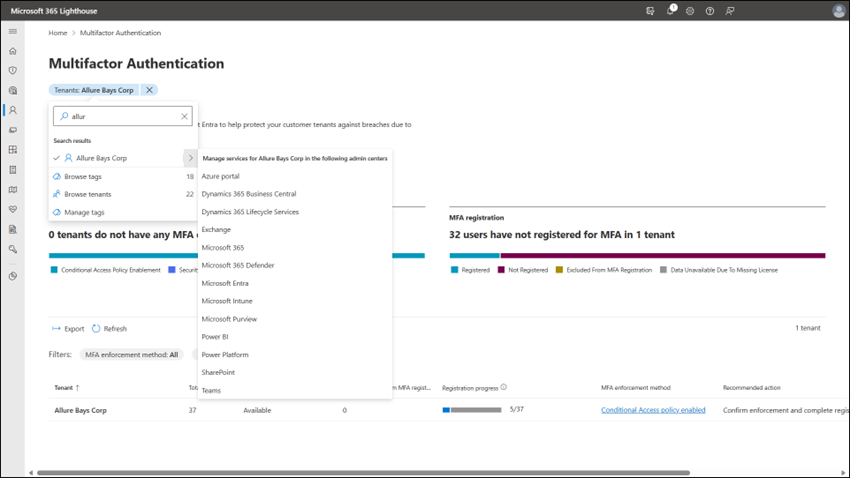
One of the challenges of managing multiple customers is that you often need to use different admin portals, such as the Microsoft 365 admin center, the Azure portal, Microsoft Intune, or Exchange, to name a few. Lighthouse lets you quickly and securely access other Microsoft admin portals for each of your SMB customers in the context of your partner tenant credentials using GDAP. Lighthouse users can leverage our security and management scenarios and seamlessly jump to another Microsoft admin portal when necessary.
Screenshot of Microsoft 365 Lighthouse showing how to navigate into a customer’s Microsoft Entra admin portal.
We are just getting started and will continue to expand on the capabilities we offer to manage the breadth of customers you have in the coming months. So, check back often to learn what is new with Lighthouse.
Not able to manage a customer in Lighthouse?
Here are cases where you will still find that a customer has limited management capabilities in Lighthouse and how you can change it.
By far, the most common cause a customer is “Limited” in that the customer tenant no longer has any active subscriptions and is no longer in use. If this is the case, the recommendation is to remove the reseller relationship (and GDAP relationships (Partner-led termination of a granular admin relationship – Partner Center | Microsoft Learn). It is a best practice to remove relationships that are no longer needed to reduce unnecessary exposure to your organization.
customer tenant is in the Government Cloud. Unfortunately, we cannot support the management of this customer in Microsoft 365 Lighthouse.
The customer is not an SMB and has more than 2,500 licensed users.
You are not in the same geographic area as the customer. If you have customers in a different geographic area, you can set up Lighthouse in that region to manage them.
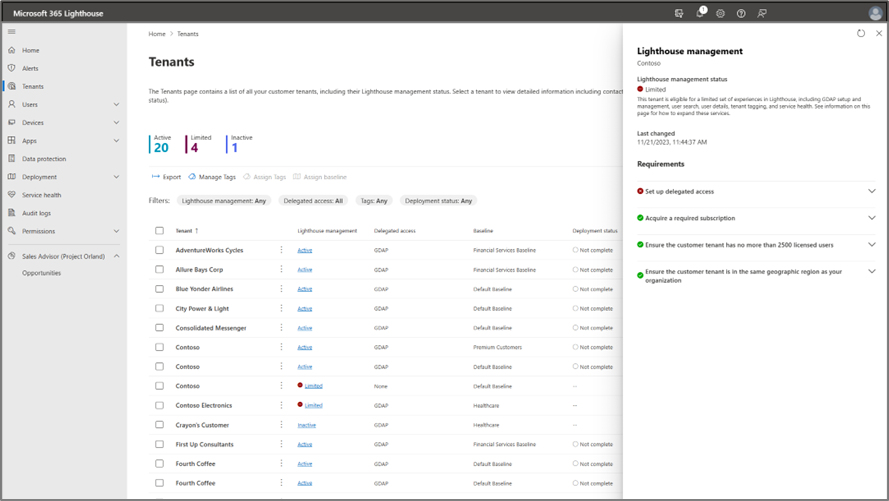
To know why a specific customer is limited, click on Tenants link from the left navigation within Lighthouse and click the “Limited” link to bring up details on why they are not fully managed in Lighthouse:
Tenant list showing Contoso as “Limited” because delegated access has not been configured.
If you have a customer tenant using the Microsoft 365 services and you only have Limited management capabilities within Lighthouse, we want to know. You can leave comments below or use the feedback mechanism in Lighthouse. We want to enable you to manage all your active Microsoft 365 SMB customer tenants in Lighthouse.
This article is contributed. See the original author and article here.
In September 2023, we announced that Dynamics 365 Customer Insights and Dynamics 365 Marketing are coming together as one offering named Dynamics 365 Customer Insights, an AI driven solution which revolutionizes your customers’ experiences.
Within this solution are two apps:
Customer Insights – Data (previously known as Dynamics 365 Customer Insights) that empowers you to know your customers through 360-degree profile.
Customer Insights – Journeys (previously known as Dynamics 365 Marketing) allows you to engage your customers with personalized experiences based on the profile.
In the same timeframe, we also announced the transition from outbound marketing to real-time. The transition to real-time is independent from product name or licensing changes.
New customer environments only include real-time journeys and event management. Existing customers, if necessary, can add outbound marketing through a self-serve interface. We will continue to support outbound marketing but will not be adding new enhancements. We encourage all customers to transition to and use the exciting new capabilities available in real-time journeys. In this blog we cover how to plan for the transition to real-time and the resources that are available to you to help make this seamless.
How do the changes impact me?
If you are a new customer of the Customer Insights – Journeys app, you get real-time journeys only (including Event planning). So you start with the most current and advanced technology and avoid the time & expense of transitioning from outbound later.
Existing customer environments using outbound marketing, show the new product name but otherwise remained unchanged. When provisioning new, copying an existing, or upgrading a solutions-only environment to paid, outbound marketing is not installed by default.
If the system detects there is an existing environment with outbound marketing (in the same geo), then Settings > Version page shows Enable outbound link to install outbound. If you do not see the link or have issues enabling outbound, reach out to us directly as explained in the Transition overview page (see links in the resources section later).
When should I transition to Real-time?
Though we haven’t announced a date for ending outbound support the time to transition is now! Rest assured, we will use our product telemetry data and customer feedback to provide an adequate time window to ensure all customers can plan and complete their transition before support for outbound is ended.
But why wait? Real-time journeys offers most of the capabilities that outbound marketing has and a lot more that outbound doesn’t (and will not) such as the ability to respond and react in near-real time, high scale of 100M contacts/300M interactions in public preview (even more on the roadmap), and new & exciting capabilities with generative AI/Copilot, etc.
How to transition?
You can transition all at once or gradually depending on your business needs, capabilities you use in outbound marketing, and resources availability.
In a one-shot transition, you will recreate all your journeys, segments, and other assets in real-time journeys and then switch over to them over a short period (a few days).
The other approach is to transition gradually over time. You can create all your new campaigns in real-time journeys and leave your current campaigns running in outbound marketing until they complete. This way you build confidence and train your team gradually over time. We’ve prepared guidance on how to manage consent in hybrid/transition situations. With custom reporting capability (see release plan below), single analytics across both outbound and real-time can be created for the hybrid situation.
We know that most of your effort is usually spent in creating and finalizing emails, so we have built a tool in real-time journeys to let you Import outbound emails, templates, and content blocks so you can preserve and reuse them. You will also have a tool to help you quickly migrate consent records.
With either approach, you will want to take a stock of what capabilities of outbound marketing you currently use, how they are supported in real-time journeys, and if there is a need to transfer any data or assets from outbound marketing to real-time journeys. In the transition resources section of our product documentation area, you will find a page for each functional area that has guidance, workarounds, and roadmap for specific capabilities. If you find there are some specific capabilities in outbound marketing that you need but are not yet available in real-time journeys, be assured that we are working to add them as fast as we can. For example, we already have a published release plan for these commonly asked for features:
Forms – unmapped custom fields, form prefill, update none/multiple entities on submission, leads with parent contact
Please note that the above is not an exhaustive list. We release new updates every month. We use your feedback to revise our roadmap continuously to ensure you can transition with confidence.
Conclusion
A large number of customers are already using and benefiting from ease of use and scale offered by real-time. Over the next few months, we are prioritizing work to ensure transitioning to real-time journeys is easy and quick for every customer. While outbound marketing continues to be available and supported for existing customers, we strongly recommend everyone still using outbound marketing transition to real-time journeys to propel your business into the future of marketing and customer experience.
This article is contributed. See the original author and article here.
The start of a new year is often seen as a time to reflect on the past, plan for the future, and set New Year’s resolutions for ourselves. It is also a key time for business leaders to set goals to help their organizations and teams accomplish more in the new year, whether those goals are a new product release, business growth, or workplace culture improvement.
Furthermore, we know that simply writing down your goals is often not enough to achieve them! You also need to communicate your goals with key stakeholders, track your progress, and measure your results. This can be challenging, especially if your organization has multiple goals, competing priorities, or cross-team dependencies.
This is where Viva Goals and Microsoft Copilot can help.
Viva Goals is Microsoft’s solution for creating, managing, and tracking organizational goals. It is founded on the Objective and Key Result (OKR) framework, yet can be customized to meet other goal-setting strategies. To learn more about changing your goal terms from “Objectives and Key Results” to other frameworks or labels, visit our page on customizing terminology in Viva Goals.
With the content generation and summarization capabilities in Copilot in Viva Goals, creating and tracking your goals is becoming even easier.
Quickly create your goals with Copilot in Viva Goals
One challenge we frequently hear from customers is uncertainty about getting started with writing actionable, outcome-driven goals. Setting appropriate and ambitious goals can be daunting, but using Copilot can make the process easier.
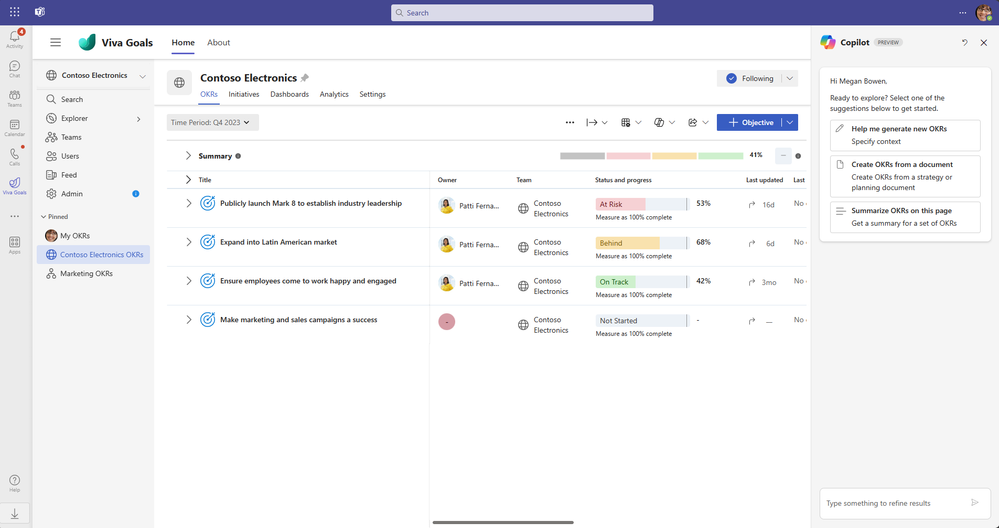
From a quick click of the “Copilot” button in the Viva Goals app (available on Microsoft Teams or in your browser), Copilot is ready to help you generate new goals or OKRs:
Copilot in Viva Goals can be accessed from the tool bar or the Copilot icon within Viva Goals.
Copilot in Viva Goals can help you generate goals in two different ways:
Generating new goals based on context you provide (ex: industry, roles, business mission)
Clicking “Help me generate new OKRs” means Copilot will help you in crafting OKRs, using the conversational interface and its repository of sample OKRs.
Copilot in Viva Goals will generate goals based on prompts or information you provide in the chat.
By asking Copilot to “Write an OKR for this year’s plans to roll out Microsoft Copilot to employees across my organization,” you may get a result like:
Objective: Roll out Microsoft Copilot to employees across the organization Key Result (KR): Train 60% of our employees on the basics of taking the “Copilot for Microsoft 365” training in Viva Learning KR: Set up all required infrastructure and hardware to support Microsoft Copilot for these employees KR: Ensure 60% all newly hired employees have used Microsoft Copilot in their first month of onboarding
Note that this content is AI-generated and will change based on inputs / sample data.
Using the Copilot interface, you can ask Copilot to regenerate these OKRs, refine them (“be more conservative,” “increase the adoption rate,” etc.), or publish them to your Viva Goals instance.
Generating goals from a document you provide (ex: business plan, strategy paper)
Oftentimes, business leaders will already have strategy or business planning documents they have been circulating with their leadership teams. This can be a great place to get started: by uploading these strategy documents to Viva Goals , Copilot can then identify potential goals from the document and format into actionable OKRs. This capability is currently available for local .docx files, and will be expanding file types and file sources in the coming months.
Copilot in Viva Goals can use content from your existing documents to suggest outcome-based goals.
One thing to remember: using Copilot means that you, as the user, are always in control of what gets saved, published, and shared.
Copilot in Microsoft 365 can also be helpful in writing goals
For users that are not currently using Viva Goals, or are looking for suggestions on annual goals elsewhere, Copilot in M365 can be a great place to get started. Copilot in Word or in the Microsoft Copilot web experience can be great resources for creating the right goals for you and your organization. You can use prompts like “Write 3 OKRs for building a new (product/service) in the new year” or “Provide some goal suggestions for boosting employee morale” and work with Microsoft Copilot to refine these goals.
Furthermore, at Ignite last November (2023), we also announced that Microsoft 365 Copilot will be enhanced with Viva in early 2024. This means users will have access to Viva functionality within the Copilot for Microsoft 365 experience, including a chat experience that works across Viva data and apps to support employees, managers, and leaders. To learn more, check out the announcement from our blog in November, New ways Microsoft Copilot and Viva are transforming the employee experience.
Just make sure that after creating your goals, you are communicating these goals to your stakeholders and tracking your progress!
Summarizing your goals with Copilot
With Copilot, it is even easier to summarize and share your goal progress. Copilot uses context from your goal status updates and check-ins to generate summaries of your progress, making it even easier to share your current status with other teams and leadership.
Copilot in Viva Goals will quickly summarize your goals for easy sharing.
You can work with Copilot to tailor the update messages to your audience by asking the conversational AI to make the summary content more succinct, detailed, or professional. Looking to quickly share these updates with your teams, audiences or stakeholders? Use functionality within Viva Goals to broadcast your updates to email via Outlook or to post on Viva Engage with just a few clicks.
With the Viva Goals integration into Viva Engage, it’s easier than ever to share your team goals with your community.
It has never been easier to get started with setting and tracking your goals with Microsoft and Viva Goals, especially with the power of AI. Always make sure to review Copilot’s responses to make sure the suggestions and content it presents are relevant to your organization and your goals.
Set your 2024 Goals with Copilot today
Copilot in Viva Goals is available to Viva suite customers in public preview since December 2023 and will be Generally Available in early 2024. NOTE: Customers with Viva suite licenses interested in using Copilot in Viva Goals should work with their IT Admins to enable public preview of Copilot for users from their Microsoft Admin Center. To learn more about enabling Copilot in Viva Goals, please visit our Copilot in Viva Goals documentation.
Microsoft will also be hosting a webinar session on January 31st, 8am US-PT, for those interested in a live demo and to hear how Copilot in Viva Goals is helping address goal-setting and tracking challenges. More details available at Microsoft Virtual Event “Discovering the Power of Copilot in Viva Goals”.
Have feedback about Copilot in Viva Goals? Use the feedback tool in Viva Goals to let us know your thoughts.
From the Microsoft Viva Goals team to yours, we wish you success in achieving your goals in the new year!
This article is contributed. See the original author and article here.
One of the best practices for securing your organization’s data is to follow the principle of least privilege, which means granting users the minimum level of permissions they need to perform their tasks. Microsoft Entra ID helps you apply this principle by offering a wide range of built-in roles as well as allowing you to create custom roles and assign them to users or groups based on their responsibilities and access needs. You can also use Entra ID to review and revoke any role assignments that are no longer needed or appropriate.
It can be easy to lose track of role assignments if admin activities are not carefully audited and monitored. Routine checks of role assignments and generating alerts on new role assignments are one way to track and manage privileged role assignment.
Chances are that when a user with privileged roles is approached, they’ll say they need the role. This may be true; however, many times users will unknowingly say they need those permissions to carry out certain tasks when they could be assigned a role with lower permissions. For example, a user will be able to reset user passwords as a Global Administrator, but that does not mean they can’t do that with another role with far less permissions.
Defining privileged permissions
Privileged permissions in Entra ID can be defined as “permissions that can be used to delegate management of directory resources to other users, modify credentials, authentication or authorization policies, or access restricted data.” Entra ID roles each have a list of permissions defined to them. When an identity is granted the role, the identity also inherits the permissions defined in the role.
It’s important to check the permissions of these roles. The permissions defined in all built-in roles can be found here. For example, there are a few permissions that are different for the Privileged Authentication Administrator role than the Authentication Administrator role, giving the former more permissions in Entra ID. The differences between the authentication roles can be viewed here.
Another example of having differences between similar roles is for the end user administration roles. The differences and nuances between these roles are outlined in detail here.
Auditing activity
To decide if a user really needs a role, it’s crucial to monitor their activities and find the role with the least privilege that allows them to carry out their work. You’ll need Entra ID audit logs for this. Entra ID audit logs can either be sent to a Log Analytics Workspace or connected to a Sentinel instance.
There are two methods that can be used to get the events of carried out by admin accounts. The first will make use of the IdentityInfo table, which is only available in Sentinel after enabling User and Entity Behavior Analytics (UEBA). If you aren’t using UEBA in Sentinel or if you’re querying a Log Analytics Workspace, then you’ll need to use the second method in the next heading.
Using Microsoft Sentinel
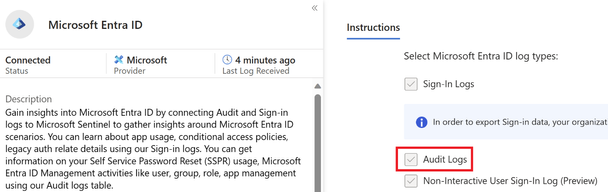
To ingest Entra ID audit logs into Microsoft Sentinel, the Microsoft Entra ID data connector must be enabled, and the Audit Logs must be ticked as seen below.
Figure 1 Entra ID data connector in Sentinel with Audit logs enabled
The IdentityInfo table stores user information gathered by UEBA. Therefore, it also includes the Entra ID roles a user has been assigned. This makes it very simple to get a list of accounts that have been assigned privileged roles.
The query below will give a unique list of activities an account has taken, as well as which roles the account has been assigned:
This will give results for all accounts that carried out tasks in Entra ID and may generate too many operations that were not privileged. To filter for specific Entra ID roles, the following query can be run where the roles are defined in a list. Three roles have been added as examples, but this list can and should be expanded to include more roles:
let PrivilegedRoles = dynamic(["Global Administrator",
                               "Security Administrator",
                               "Compliance Administrator"
                              ]);
AuditLogs
| where TimeGenerated > ago(90d)
| extend ActorName = iif(
                         isnotempty(tostring(InitiatedBy["user"])),
                         tostring(InitiatedBy["user"]["userPrincipalName"]),
                         tostring(InitiatedBy["app"]["displayName"])
                     )
| extend ActorID = iif(
                       isnotempty(tostring(InitiatedBy["user"])),
                       tostring(InitiatedBy["user"]["id"]),
                       tostring(InitiatedBy["app"]["id"])
                   )
| where isnotempty(ActorName)
| join (IdentityInfo
    | where TimeGenerated > ago(7d)
    | where strlen(tostring(AssignedRoles)) > 2
    | summarize arg_max(TimeGenerated, *) by AccountUPN
    | project AccountObjectId, AssignedRoles)
    on $left.ActorID == $right.AccountObjectId
| where AssignedRoles has_any (PrivilegedRoles)
| summarize Operations = make_set(OperationName) by ActorName, ActorID, Identity, tostring(AssignedRoles)
| extend OperationsCount = array_length(Operations)
| project ActorName, AssignedRoles, Operations, OperationsCount, ActorID, Identity
| sort by OperationsCount desc
Once the query is run, the results will give insights into the activities performed in your Entra ID tenant and what roles those accounts have. In the example below, the top two results don’t pose any problems. However, the third row contains a user that has the Global Administrator role and has created a service principal. The permissions needed to create a service principal can be found in roles less privileged than the Global Administrator role. Therefore, this user can be given a less privileged role. To find out which role can be granted, check this list, which contains the least privileged role required to carry out specific tasks in Entra ID.
Figure 2 Actions taken by users in Entra ID
Using Log Analytics Workspace
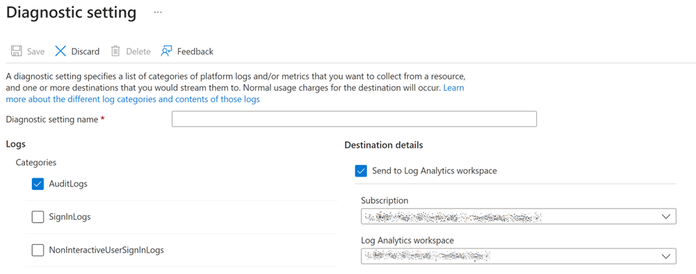
Figure 3 Configuring the forwarding of Entra ID Audit logs to a Log Analytics Workspace
To ingest Entra ID audit logs into a Log Analytics Workspace follow these steps.
Because there is no table that contains the roles an identity has been granted, you’ll need to add the list of users to the query and filter them. There are multiple ways to get a list of users who have been assigned a specific Entra ID role. A quick way to do this is to go to Entra ID and then select Roles and administrators. From there, select the role and export the identities that have been assigned to it. It’s important to have the User Principal Names (UPNs) of the privileged users. You’ll need to add these UPNs, along with the roles the user has, to the query. Some examples have been given in the query itself. If the user has more than one role, then all roles must be added to the query.
Once you run the query, the results will give insights into the activities performed in your Entra ID tenant by the users you have filtered for. In the example below, the top two results can cause problems. Both have the Global Administrator role, but their operations don’t necessitate to have that role. The permissions needed for these operations can be found in roles less privileged than the Global Administrator role. Therefore, these users can be given a less privileged role. To find out which role can be granted, check this list, which contains the least privileged role required to carry out specific tasks in Entra ID.
Figure 4 Actions taken by users in Entra ID
If this user still requires the Global Administrator role then the Security Administrator role will become redundant as the Global Administrator contains more permissions than the Security Administrator role.
Conclusion
Keeping accounts with privileges that are not required is keeping your attack surface greater than it needs to be. By ingesting Entra ID Audit logs, you can query and identify users who have unnecessary and over-privileged roles. You can then find a suitable alternative role for them.
This article is contributed. See the original author and article here.
Overview
Azure Video Indexer (AVI) offers a comprehensive suite of models that extract diverse insights from the audio, transcript, and visuals of videos. Recognizing the boundless potential of AI models and the unique requirements of different domains, AVI now enables integration of custom models. This enhances video analysis, providing a seamless experience both in the user interface and through API integrations.
The Bring Your Own (BYO) capability enables the process of integrating custom models. Users can provide AVI with the API for calling their model, define the input via an Azure Function, and specify the integration type. Detailed instructions are available here.
Demonstrating this functionality, a specific example involves the automotive industry: Users with numerous car videos can now detect various car types more effectively. Utilizing AVI’s Object Detection insight, particularly the Car class, the system has been expanded to recognize new sub-classes: Jeep and Family Car. This enhancement employs a model developed in Azure AI Vision Studio using Florence, based on a few-shots learning technique. This method, leveraging the foundational Florence Vision model, enables training for new classes with a minimal set of examples – approximately 15 images per class.
The BYO capability in AVI allows users to efficiently and accurately generate new insights by building on and expanding existing insights such as object detection and tracking. Instead of starting from scratch, users can begin with a well-established list of cars that have already been detected and tracked along the video, each with a representative image. Users can then use only numerous requests for the new Florence-based model to differentiate between the cars according to their model.
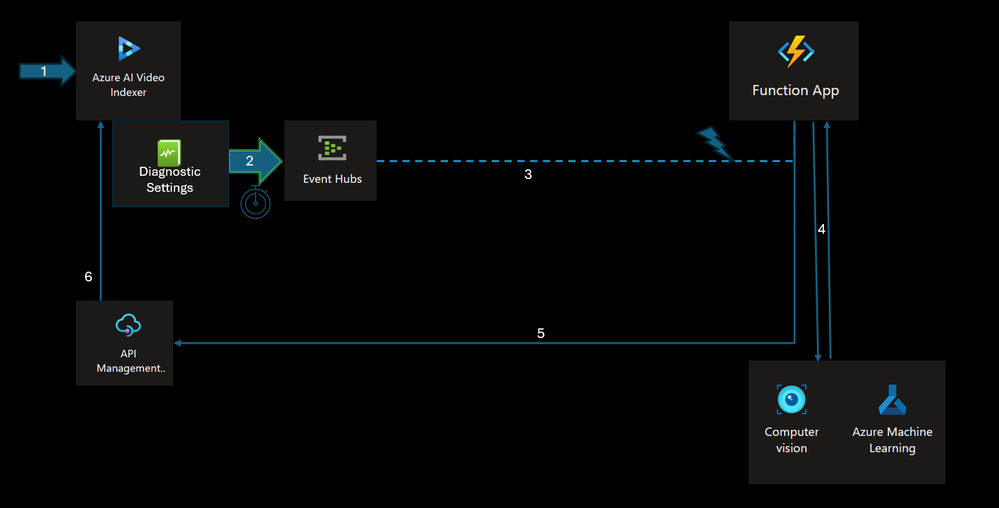
To demonstrate the usage of building customized AI pipeline, we will be using the following pipeline that leverages several key aspects of Video Indexer components and integrations:
1. Users employ their existing Azure Video Indexer account on Azure to index a video, either through the Azure Video Indexer Portal or the Azure Video Indexer API.
2. The Video Indexer account integrates with a Log Analytics workspace, enabling the publication of Audit and Events Data into a selected stream. For additional details on video index collection options, refer to: Monitor Azure Video Indexer | Microsoft Learn.
3. Indexing operation events (such as “Video Uploaded,” “Video Indexed,” and “Video Re-Indexed”) are streamed to Azure Event Hubs. Azure Event Hubs enhances the reliability and persistence of event processing and supports multiple consumers through “Consumer Groups.”
4. A dedicated Azure Function, created within the customer’s Azure Subscription, activates upon receiving events from the EventHub. This function specifically waits for the “Indexing-Complete” event to process video frames based on criteria like object detection, cropped images, and insights. The compute layer then forwards selected frames to the custom model via Cognitive Services Vision API and receives the classification results.In this example it sends the crops of the representative image for each tracked car in the video.
Note: The integration process involves strategic selection of video frames for analysis, leveraging AVI’s car detection and tracking capabilities, to only process representative cropped images of each tracked car in the custom model.
5. The compute layer (Azure Function) then transmits the aggregated results from the custom model back to the Azure API to update the existing indexing data using the Update Video IndexAPI Call.
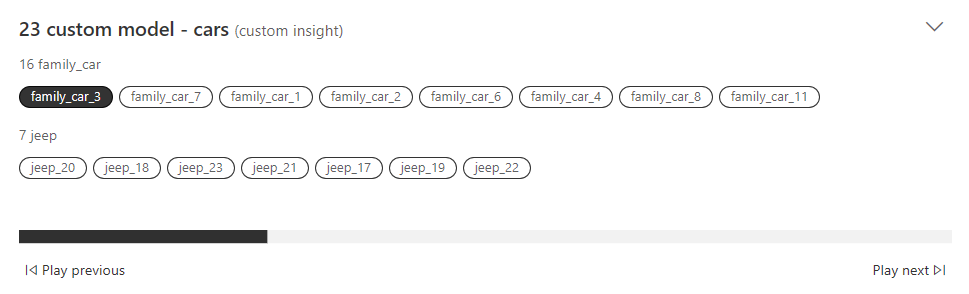
6. The enriched insights are subsequently displayed on the Video Indexer Portal. The ID in the custom model matches the ID in the original insights JSON.
Figure 2: New Insight widget in AVI for the custom model results
Note: for more in-depth step-by-step tutorialaccomplished with code sample, please consult the official Azure Video Indexer GitHub Sampleunder the “Bring-Your-Own” Section.
Result Analysis
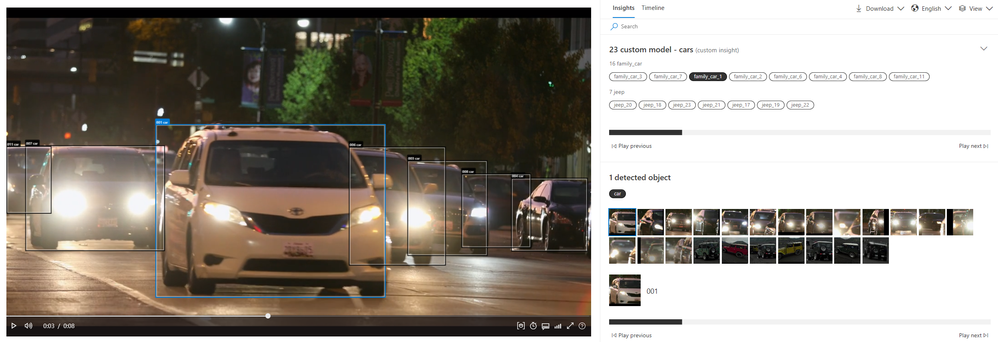
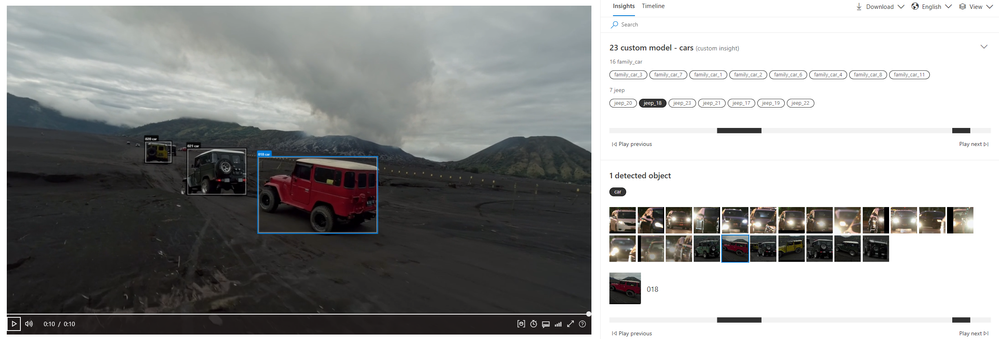
The outcome is a novel insight displayed in the user interface, revealing the outcomes from the custom model. This application allowed for the detection of a new subclass of objects, enhancing the video with additional, user-specific insights. In the examples provided below, each car is distinctly classified: for instance, the white car is identified as a family car (Figure 3), whereas the red car is categorized as a jeep (Figure 4).
Figure 3: Azure Video Indexer with the new custom insight for the white car classified as family car.
Figure 4: Azure Video Indexer with the new custom insight for the red car classified as family jeep.
Conclusions
With only a handful of API calls to the bespoke model, the system effectively conducts a thorough analysis of every car featured in the video. This method, which involves the selective use of certain images for the custom model combined with insights from AVI, not only reduces expenses but also boosts overall efficiency. It delivers a holistic analysis tool to users, paving the way for endless customization and AI integration opportunities.
This article is contributed. See the original author and article here.
Dapr and Service Meshes are more and more usual suspects in Cloud native architectures. However, I noticed that there is still some confusion about their purpose, especially because of some overlapping features. People sometimes wonder how to choose between Dapr and a Service Mesh or even if both should be enabled at the same time.
The purpose of this post is to highlight the differences, especially on the way they handle mTLS, as well as the impact on the application code itself. You can already find a summary about how Dapr and Service Meshes differ on the Dapr web site but the explanations are not deep enough to really understand the differences. This blog post is an attempt to dive deeper and give you a real clue on what’s going on behind the scenes. Let me first start with what Dapr and Service Meshes have in common.
Things that Dapr and Service Meshes have in common
Secure service-to-service communication with mTLS encryption
Service-to-service metric collection
Service-to-service distributed tracing
Resiliency through retries
Yes, this is the exact same list as the one documented on the Dapr web site! However, I will later focus on the mTLS bits because you might think that these are equivalent, overlapping features but the way Dapr and Service Meshes enforce mTLS is not the same. I’ll show some concrete examples with Dapr and the Linkerd Service Mesh to illustrate the use cases.
On top of the above list, I’d add:
They both leverage the sidecar pattern, although the Istio Service Mesh is exploring the Ambient Mesh, which is sidecar free, but the sidecar approach is still mainstream today. Here again, the role of the sidecars and what happens during the injection is completely different between Dapr and Service Meshes.
They both allow you to define fine-grained authorization policies
They both help deal with distributed architectures
Before diving into the meat of it, let us see how they totally differ.
Differences between Dapr and Service Meshes
Applications are Mesh-agnostic, while they must explicitly be Dapr-aware to leverage the Dapr capabilities. Dapr infuses the application code. Being Dapr-aware does not mean that you must use a specific SDK. Every programming language that has an HTTP client and/or gRPC client can benefit from the great Dapr features. However, the application must comply to some Dapr pre-requisites, as it must expose an API to initialize Dapr’s app channel.
Meshes can deal with both layer-4 (TCP) and layer-7 traffic, while Dapr is focused on layer-7 only protocols such as HTTP, gRPC, AMQP, etc.
Meshes serve infrastructure purposes while Dapr serves application purposes
Meshes typically have smart load balancing algorithms
Meshes typically let you define dynamic routes across multiple versions of a given web site/API
Some meshes ship with extra OAuth validation features
Some meshes let you stress your applications through Chaos Engineering techniques, by injecting faults, artificial latency, etc.
Meshes typically incur a steep learning curve while Dapr is much smoother to learn. On the contrary, Dapr even eases the development of distributed architectures.
Dapr provides trueservice discovery, not meshes
Dapr is designed from the ground up to deal with distributed and microservice architectures, while meshes can help with anyarchitecture style, but prove to be a good ally for microservices.
Demo material
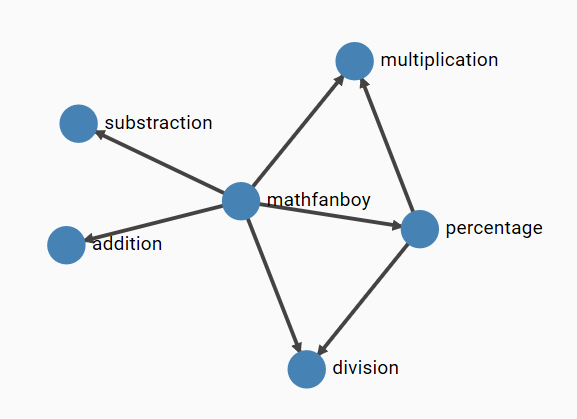
I will reuse one demo app that I developed 4 years ago (time flies), which is a Linkerd Calculator. The below figure illustrates it:
Some services talking together. MathFanBoy, a console app randomly talking to the arithmetic operations, while the percentage operation also calls multiplication and division. The goal of this app was to generate traffic and show how Linkerd helped us see in near real time what’s going on. I also purposely introduced exceptions by performing divisions by zero…to also demo how Linkerd (or any other mesh) helps spot errors. Feel free to clone the repo and try it out on your end if you want to test what is later described in this post. I have now created the exact same app, using Dapr, which is made available here. Let us now dive into the technical details.
Diving into the technical differences
Invisible to the application code vs code awareness
As stated earlier, an application is agnostic to the fact that it is injected or not by a Service Mesh. If you look at the applicationcode of the Linkerd Calculator, you won’t find anything related to Linkerd. The magic happens at deployment time where we annotate our K8s deployment to make sure the application gets injected by the Mesh. On the other hand, the application code of the Dapr calculator is directly impacted in multiple ways:
– While I could use a mere .NET Console App for the Linkerd Calculator, I had to turn MathFanBoy into a web host, to comply with the Dapr app initialization channel. However, because MathFanBoy generates activity by calling random operations, I could not just turn it as an API, so I had to run different tasks in parallel. Here are the most important bits:
class Program
{
static string[] endpoints = null;
static string[] apis = new string[5] { "addition", "division", "multiplication", "substraction", "percentage" };
static string[] operations = new string[5] { "addition/add", "division/divide", "multiplication/multiply", "substraction/substract", "percentage/percentage" };
static async Task Main(string[] args)
{
var host = CreateHostBuilder(args).Build();
var runHostTask = host.RunAsync();
var loopTask = Task.Run(async () =>
{
while (true)
{
var pos = new Random().Next(0, 5);
using var client = new DaprClientBuilder().Build();
var operation = new Operation { op1 = 10, op2 = 2 };
try
{
var response = await client.InvokeMethodAsync
Lines 9 and 10 create the web host. Between lines 13 and 35, I generate random calls to the operations, but here again we have another difference as the application is using the Dapr Client’s InvokeMethodAsync to perform the calls. As you might have noticed, the application does not need to know the URL of these services. Dapr will discover where the services are located, thanks to its Service Discovery feature. The only thing we need to provide is the App ID and the operation that we want to call. With the Linkerd calculator, I had to know the endpoints of the target services, so they were injected through environment variables during the deployment. The same principles apply to the percentage operation, which is a true API. I had to inject the Dapr client through Dependency Injection:
public void ConfigureServices(IServiceCollection services)
        {
            services.AddControllers().AddDapr();
        }
In order to to get an instance through the controller’s constructor:
and use that instance to call the division and multiplication operations from within another controller operation, using again the Invoke method as for MathFanBoy. As you can see, the application code is explicitly using Dapr and must comply to some Dapr requirements. Dapr has many features other than Service Discovery but I’ll stick to that since the point is made that a Dapr-injected Application must be Dapr-aware while it is completely agnostic of a Service Mesh.
mTLS
Now things will get a bit more complicated. While both Service Meshes and Dapr implement mTLS as well as fine-grained authorization policies based on the client certificate presented by the caller to the callee, the level of protection of Dapr-injected services is not quite the same as the one from Mesh-injected services.
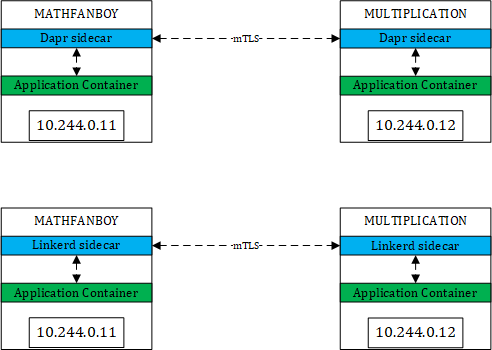
Roughly, you might think that you end up with something like this:
A very comparable way of working between Dapr and Linkerd. This is correct but only to some extents. If we take the happy path, meaning every pod is injected by Linkerd or Dapr, we should end up in the above situation. However, in a K8s cluster, not every pod is injected by Dapr nor Linkerd. The typical reason why you enable mTLS is to make sure injected services are protected from the outside world. By outside world, I mean anything that is not either Dapr-injected, either Mesh-injected. However, with Dapr, nothing prevents the following situation:
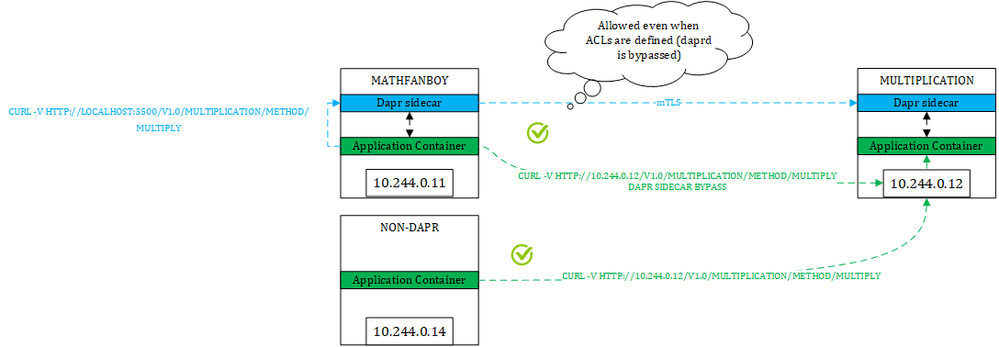
The blue path is taking the Dapr route and is both encrypted and authenticated using mTLS. However, the green paths from both a Dapr-injected pod and a non-Dapr pod still goes through in plain text and anonymously. How come is that possible?
For the blue path, the application is going through the Dapr route ==> http://localhost:3500/ this is the port that the Daprd sidecar listens to. In that case, the sidecar will find out the location of the target and will talk to the target service’s sidecar. However, because Dapr does not intercept network calls, nothing prevents you from taking a direct route, from both a Dapr-injected pod and a non-Dapr one (green paths). So, you might end up in a situation where you enforce a strict authorization policy as shown below:
where you only allow MathFanBoy and Percentage to call the multiplication operation, and yet have other pods bypass the Dapr sidecar, which ultimately defeats the policy itself. Make no mistake, the reason why we define such policies is to enforce a certain behavior and I don’t have peace of mind if I know that other routes are still possible.
So, in summary, Dapr’s mTLS and policies are only effective if you take the Dapr route but nothing prevents you from taking another route.
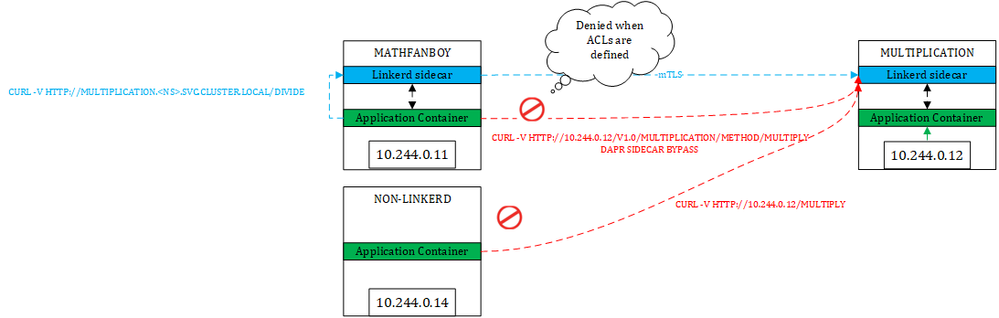
Let us see how this works with Linkerd. As stated on their web site, Linkerd also does not enforce mTLS by default and has added this to their backlog. However, with Linkerd (same and even easier with Istio), we can make sure that only authorized services can talk to meshed ones. So, with Linkerd, we would not end up in the same situation:
First thing to notice, we simply use the service name to contact our target because there is no such Dapr route in this case nor any service discovery feature. However, because Linkerd leverages the Ambassador pattern, which intercepts all network calls coming in and going outside of a pod. Therefore, when the application container of a Linkerd-injected pod tries to connect to another service, Linkerd’s sidecar performs the call to the target, which lands onto the other sidecar (if the target is well a Linkerd-injected service of course). In this case no issue. Of course, as for Dapr, nothing prevents us from directly calling the pod IP of the target. Yet, from an injected pod, the Linkerd sidecar will intercept that call. From a non-injected pod, there is no such outbound sidecar, but our target’s sidecar will still tackle inbound calls, so you can’t bypass it. By default, because Linkerd does not enforce mTLS, it will let it go, unless you define fine-grained authorizations as shown below:
In this case, only MathFanBoy and and Percentage will be allowed to call the multiplication operation. In other words, Linkerd allows us to enforce mTLS, whatever route is taken. With Istio, it’s even easier since you can simply enforce mTLS through the global mesh config. You do not even need to specify explicit authorization policies (although it is a best practice). Just to illustrate the above diagrams, here are some screenshots showing these routes in action:
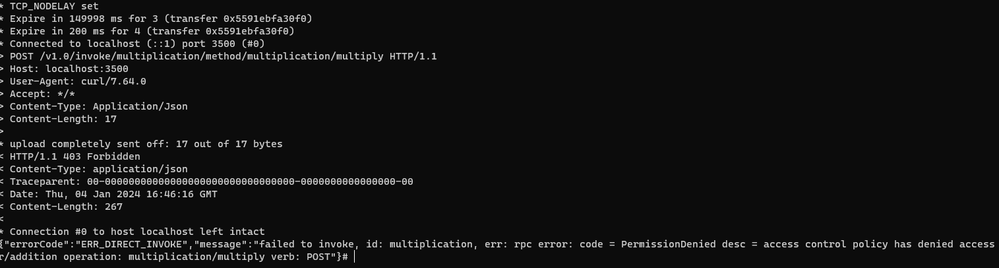
I’m first calling the multiplication operation from the addition pod, while we told Dapr that only MathFanboy and Percentage could call multiplication. As you can see, the Dapr policy kicks in and forbids the call as expected.
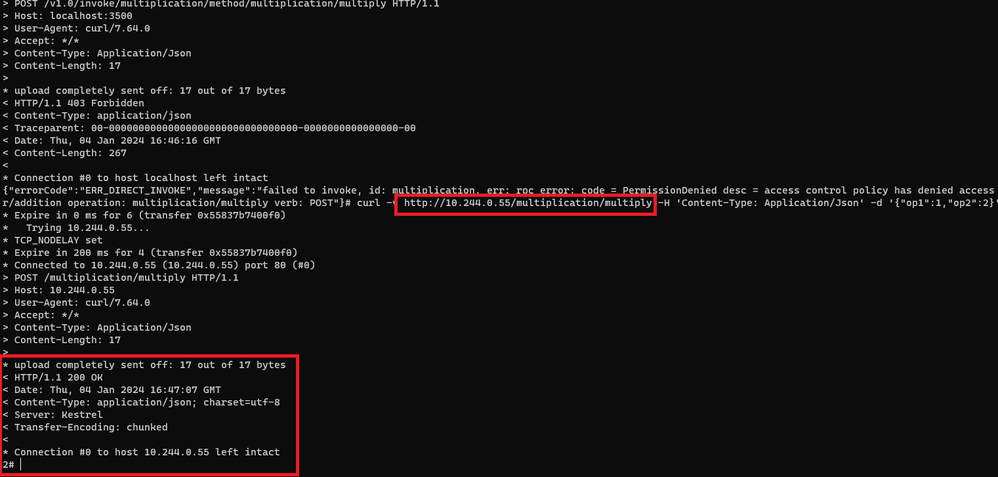
but while this policy is defined, I can still call the multiplication using a direct route (pod IP):
and the same applies to non-injected pods of course.
While, with the Linkerd policy in place, there will be no way to call multiplication other than from MathFanBoy and Percentage. For sake of brevity, I won’t show you the screenshots but trust me, you will be blocked if you try.
Let us now focus on the injection process which will clarify what is going on behind the scenes.
Injection process Dapr vs Service Mesh
Both Dapr and Service Meshes will inject application pods according to annotations. They both have controllers in charge of injecting their victims. However, when looking at the lifecycle of a Dapr-injected pod as well as a Linkerd-injected pod, we can see noticeable differences.
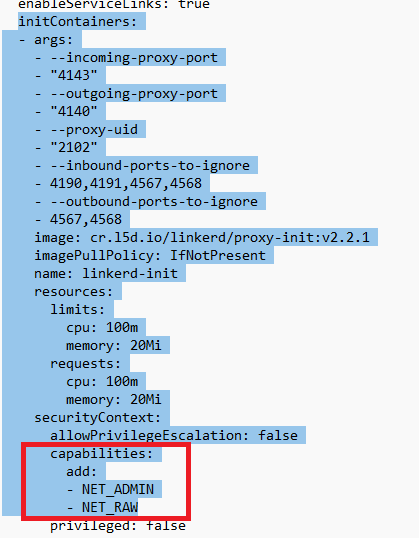
When injecting Linkerd to an application, in plain Kubenet (not using the CNI plugin), we notice that Linkerd injects not only the sidecar but also an Init Container:
When looking more closely at the init container, we can see that it requires a few capabilities such as NET_ADMIN and NET_RAW, and that is because the init container will rewrite IP tables to make sure network traffic entering and leaving the pod is captured by Linkerd’s sidecar. When using Linkerd together with a CNI, the same principle applies but route tables are not rewritten by the init container. No matter how you use Linkerd, all traffic is redirected to its sidecar. This means that the sidecar cannotbe bypassed.
When injecting Dapr, we see that there is no Init Container and only the daprd container (sidecar) is injected:
There is no rewrite of any IP table, meaning that the sidecar can be bypassed without any problem, thus bypass Dapr routes and Dapr policies. In other words, we can easily escape the Dapr world.
Wrapping up
As stated initially, I mostly focused on the impact of Dapr or a Service Mesh on the application itself and how the overall protection given by mTLS varies according to whether you use Dapr or a Service Mesh. I hope it is clear by now that Dapr is definitely an application framework that infuses the application code, while a Service Mesh is completely transparent for the application. Note that the latter is only true when using a decent Service Mesh. By decent, I mean something stable, performant and reliable. I have been recently confronted to a Mesh that I will not name here, but this was a true nightmare for the application and it kept breaking it.
Although Dapr & Service Meshes seem to have overlapping features, they are not equally covering the workloads. With regards to the initial question about when to use Dapr or a Service Mesh, I would take the following elements into account:
– For distributed architectures that are also heavily event-driven, Dapr is a no brainer because Dapr brings many features on the table to interact with message and event brokers, as well as state stores. Yet, Service Meshes could still help measure performance, spot issues and load balance traffic by understanding protocols such as HTTP/2, gRPC, etc. Meshes would also help in the release process of the different services, splitting traffic across versions, etc.
– For heterogeneous workloads, with a mix of APIs, self-hosted databases, self-hosted message brokers (such as Rabbit MQ), etc., I would go for Service Meshes.
– If the trigger of choosing a solution is more security-centric, I would go for a Service Mesh
– If you need to satisfy all of the above, I would combine Dapr and a Service Mesh for microservices, while using Service Mesh only for the other types of workloads. However, when combining, you must consider the following aspects:
– Disable Dapr’s mTLS and let the Service Mesh manage this, including fine-grained authorization policies. Beware that doing so, you would loose some Dapr functionality such as defining ACLs on the components
– Evaluate the impact on the overall performance as you would have two sidecars instead of one. From that perspective, I would not mix Istio & Dapr together, unless Istio’s performance dramatically improves over time.
– Evaluate the impact on the running costs because each sidecar will consume a certain amount of CPU and memory, which you will have to pay for.
– Assess whether your Mesh goes well with Dapr. While an application is agnostic to a mesh, Dapr is not, because Dapr also manipulates K8s objects such as K8s services, ports, etc. There might be conflicts between what the mesh is doing and what Dapr is doing. I have seen Dapr and Linkerd be used together without any issues, but I’ve also seen some Istio features being broken because of Dapr naming its ports dapr-http instead of http. I reported this problem to the Dapr team 2 years ago but they didn’t change anything.
This article is contributed. See the original author and article here.
A well-orchestrated workforce is the backbone of any successful customer service endeavor. This requires a systematic and holistic approach to Workforce Management (WFM), taking into account the diverse needs of customers, the fluctuating demands of the market, and the ever-changing nature of business operations.
WFM holds together the intricate machinery of customer support, ensuring operational efficiency and exceptional customer experiences. In a dynamic environment, where seamless interactions are critical, workforce management goes beyond the simple task of staffing and extends to the strategic alignment of resources, skills, and time.
Businesses choose a workforce management solution based on their unique challenges, such as compliance with labor laws. Microsoft understands that customer scenarios vary, and hence offers an open approach to incorporating the right WFM solutions. This gives customers unparalleled flexibility and efficiency in managing their workforce when using Dynamics 365 Customer Service.
WFM adapter from TTEC Digital for Dynamics 365 Customer Service
As a first step, Microsoft has partnered with TTEC Digital to offer an enhanced adapter that connects Dynamics 365 Customer Service with four leading WFM providers: Calabrio, Verint, NICE and Alvaria. The adapter is bidirectional, enabling seamless data transfer between the systems. It offers features such as real-time adherence reporting and historical reporting. Users can forecast demand on supported channels, namely inbound voice, SMS, email, chat and digital messaging, and staff accordingly.
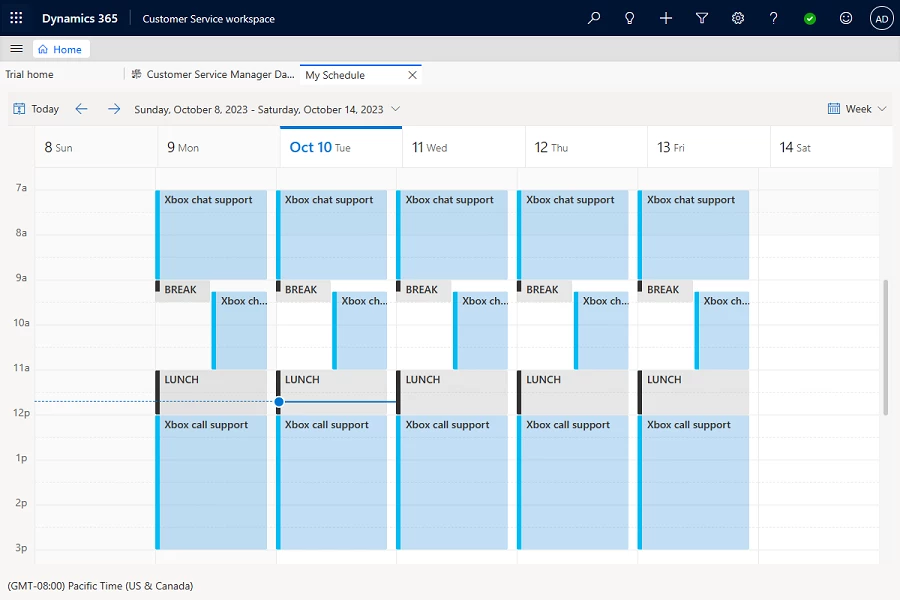
With the enhanced adapter, organizations can use the schedule sync feature to seamlessly import schedules created in the WFM system directly into the agent calendar in Dynamics 365 Customer Service. This functionality empowers agents to conveniently review their daily schedules including breaks, training sessions, and other activities directly in Dynamics 365 Customer Service, eliminating the need to navigate to an external WFM system. This not only boosts individual performance but also contributes to overall team efficiency.
Currently, Schedule Sync is supported when using the adapter with Calabrio’s WFM system. Microsoft plans to expand support for other WFM providers.
Connect any third-party WFM with Dynamics 365 Customer Service
The extensible nature of the Dynamics 365 platform gives organizations a publicly consumable Dataverse API. It offers maximum flexibility and customization for connecting WFM solutions with Dynamics 365 Customer Service.
For a detailed understanding including design architecture, entity details, and API specifications, please refer to this guide. Sample codes are available in the GitHub repository to expedite your journey.
What’s next
Microsoft is committed to an open and flexible approach to bringing more WFM adapters to Microsoft AppSource and enhancing the existing adapter from TTEC. Microsoft expects to offer continued API enhancements to support any third-party WFM connections.
Dynamics 365 Customer Service offers a native forecasting capability, currently in public preview. The feature empowers customers to predict both volume and demand for contact centers. We plan to enhance and expand on this capability with additional advancements, providing customers with more powerful tools for forecasting.
Stay tuned as Dynamics 365 Customer Service continues to evolve and deliver cutting-edge capabilities in WFM that anticipate and meet the ever-changing demands of the modern business landscape. Your journey to enhanced workforce management with Dynamics 365 Customer Service has just begun.
This article is contributed. See the original author and article here.
We’re excited to announce that Forms now supports practice mode, enhancing students’ learning process by offering a new way to review, test, and reinforce their knowledge. Practice mode is only available for quizzes. You can also try out practice mode from this template.
Practice mode
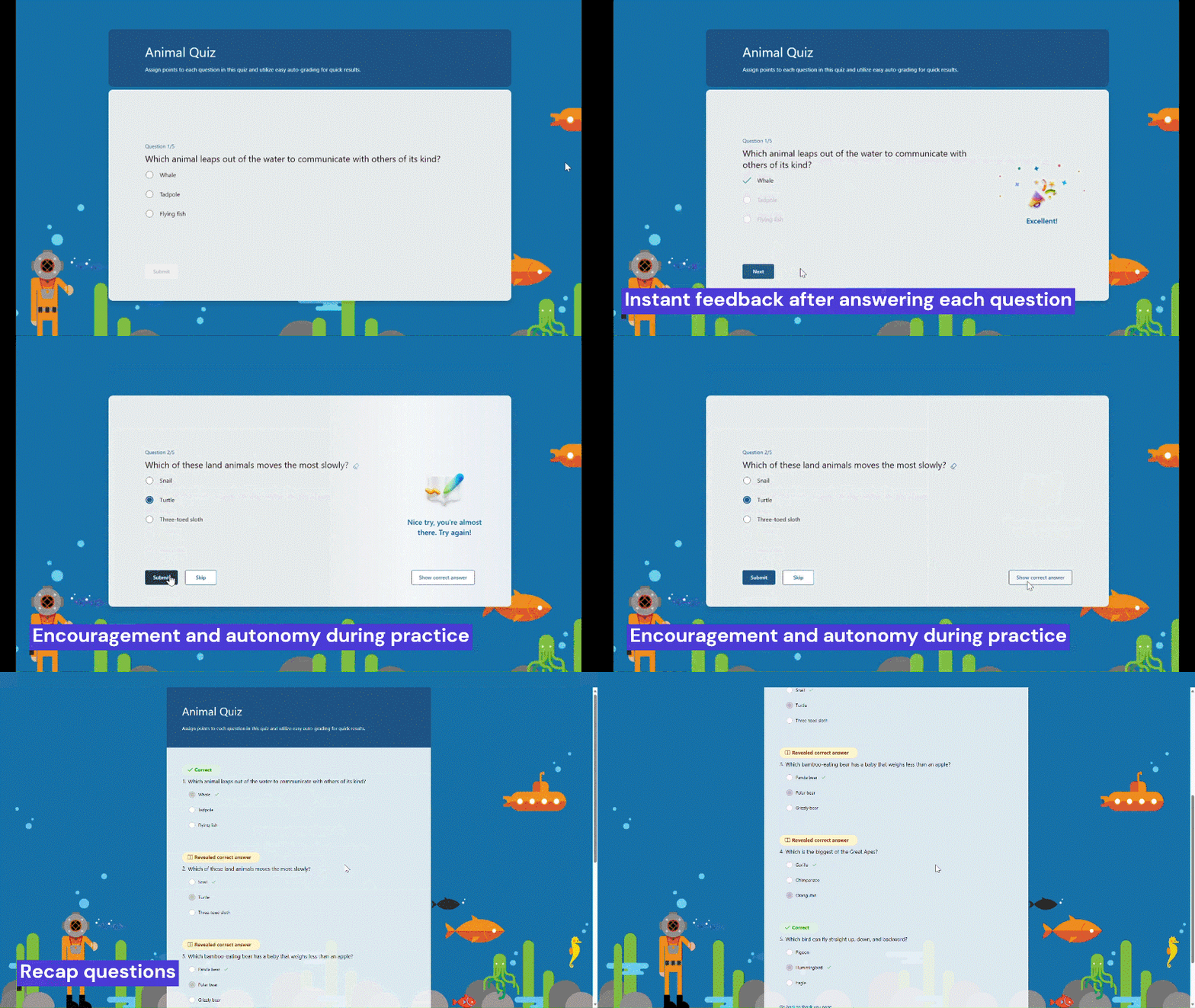
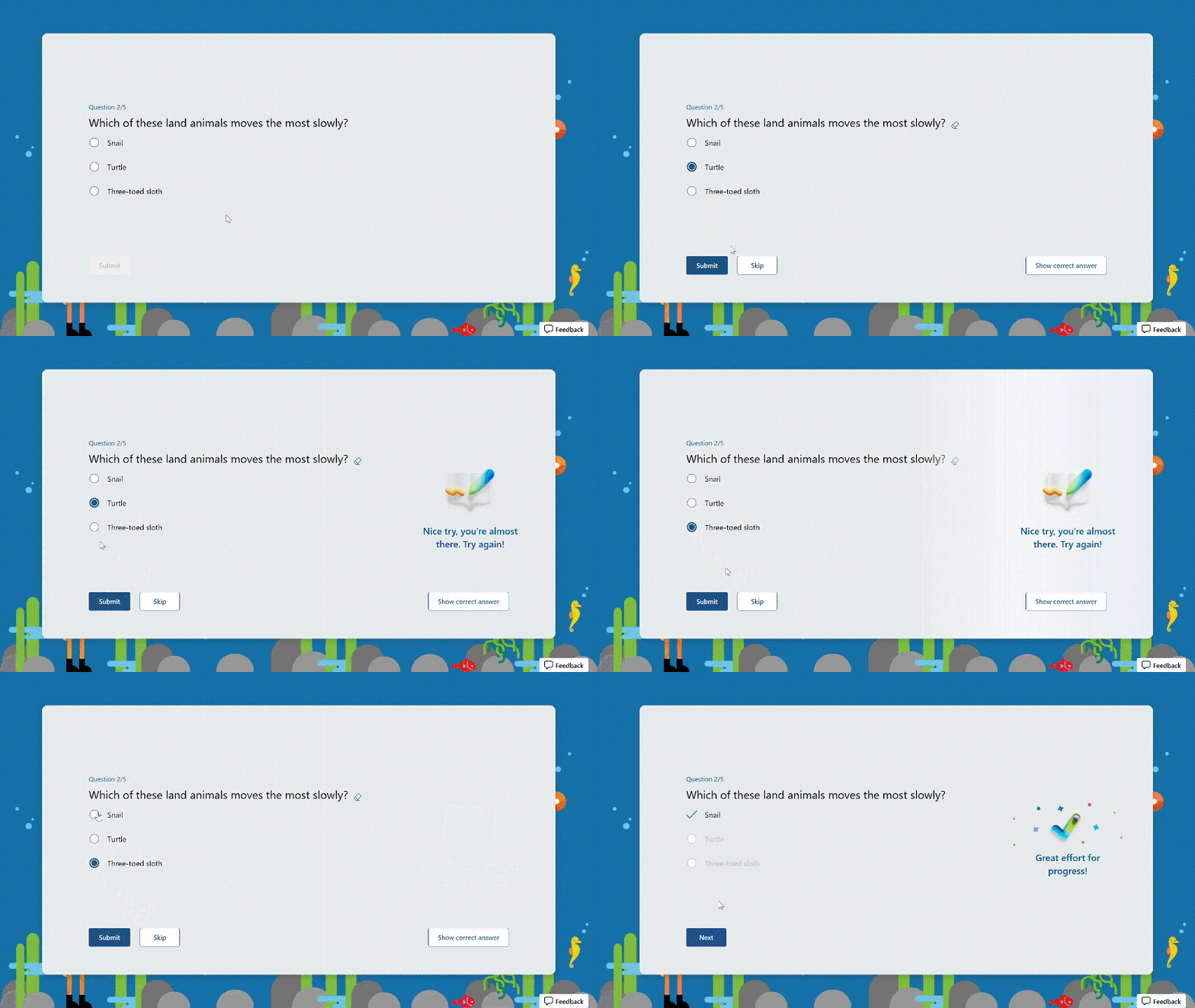
Instant feedback after answering each question In practice mode, questions will be displayed one at a time. Students will promptly receive feedback after answering each question, indicating whether their answer is right or wrong.
Instant feedback after answering each question
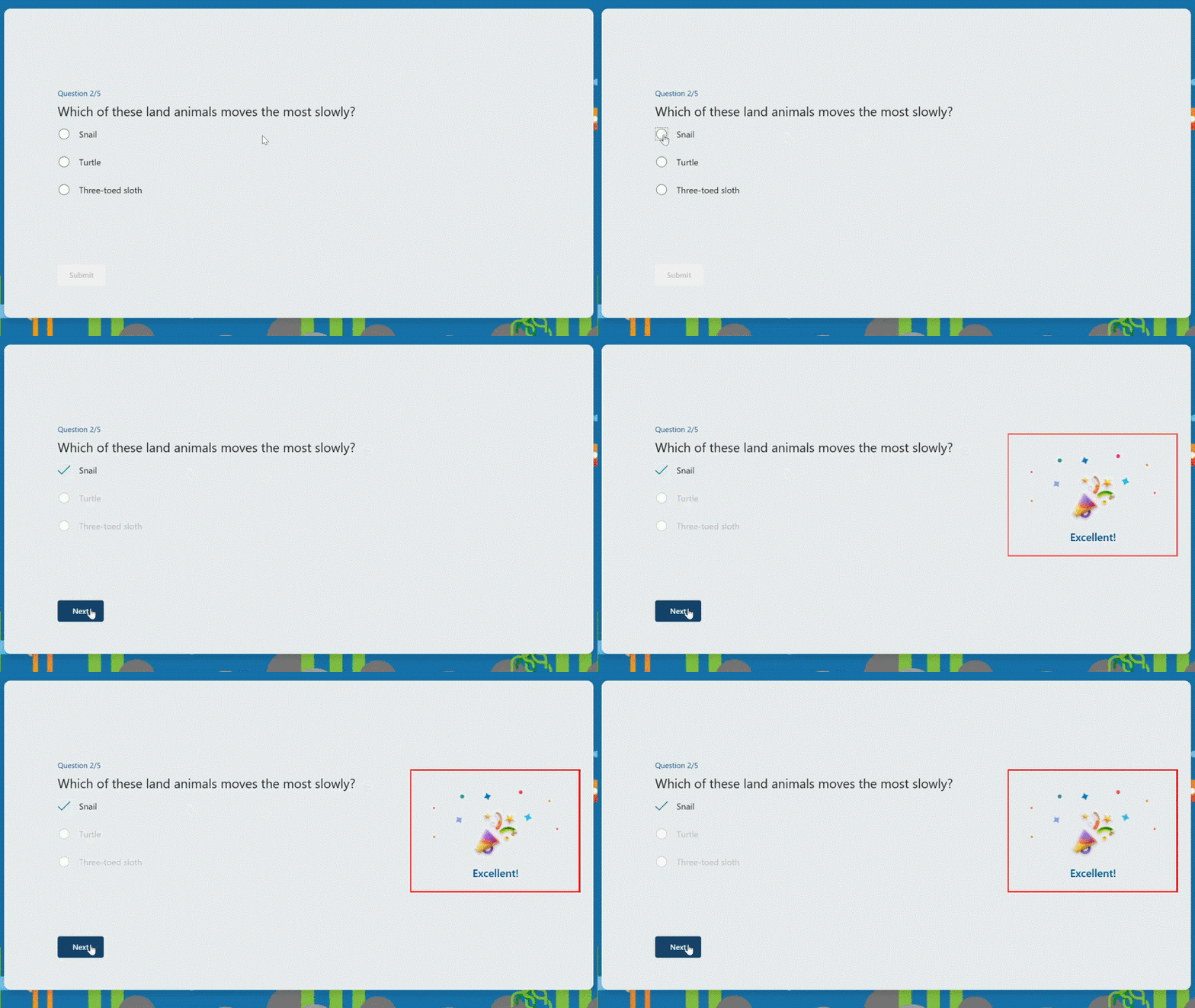
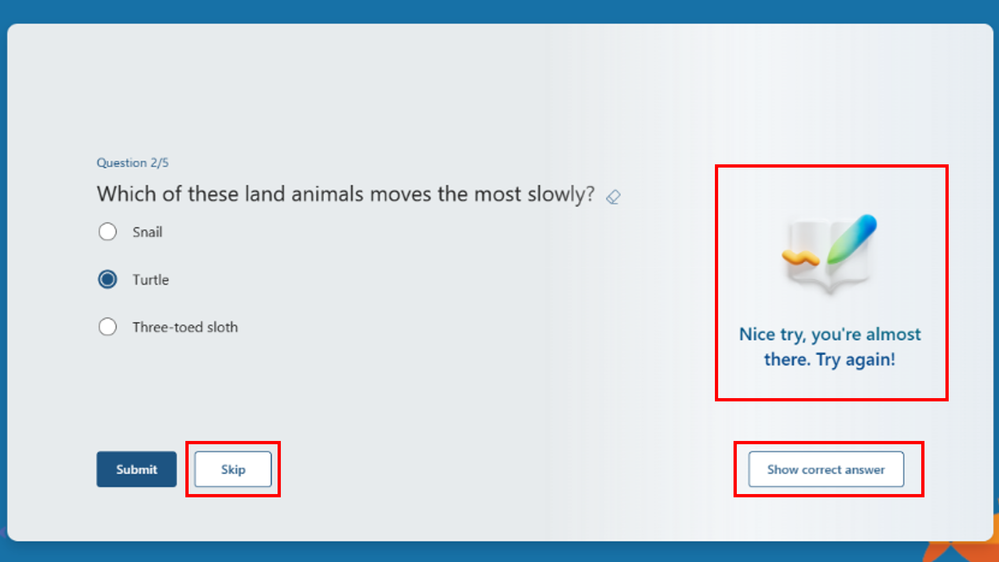
Try multiple times for the correct answer If students provide an incorrect answer, they will be given the opportunity to reconsider and make another attempt until they arrive at the correct one, allowing for immediate re-learning, and consequently strengthening their grasp of specific knowledge.
Try multiple times to get the correct answer
Encouragement and autonomy during practice Whether students answer a question correctly or not, they will receive an encouraging message, giving them a positive practice experience. And they have the autonomy to learn at their own pace. If they answer a question incorrectly, they can choose to retry, view the correct answer, or skip this question.
Encouragement message and other options
Recap questions Once students finish the practice, they can recap all the questions, along with the correct answers, providing a comprehensive overview to help gauge their overall performance.
Recap questions
Enter practice mode Practice mode is only available for quizzes. You can turn it on in the “…” icon in the upper-right corner. Once you distribute the quiz recipients will automatically enter practice mode. Try out practice mode from this template now!
This article is contributed. See the original author and article here.
Generative AI capabilities are rapidly changing the customer service space. You can use Copilot in Dynamics 365 Customer Service today to help agents save time on case and conversation summarization as these features do not require your organization’s support knowledge. However, before agents can use Copilot to answer questions and draft emails, you need to ensure Copilot is using accurate knowledge content.
Good knowledge hygiene is key to bringing Copilot capabilities to life. For Copilot to successfully ingest, index, and surface the right knowledge asset, it’s important to ensure each asset meets defined ingestion criteria. Also, preparing knowledge assets for Copilot ingestion is not a finite process. It is essential to keep ingested knowledge assets in sync with upstream sources, and use proper curation and governance practices.
While every organization has its own unique systems, we aim to provide a general set of best practices for creating and maintaining your Copilot corpus. We’ll cover four main topics here:
Defining the business case
Establishing data quality and compliance standards
Understanding the content lifecycle and integrating feedback
Measuring success
Defining the business case
It is imperative that you look at your organization’s goals holistically to ensure they align with the content you intend to surface. Consult with different roles in each line of business to capture the different types of content they already use or will need. Determine the purpose of each content element to ensure its function and audience are clear. Look at your organization’s common case management workflows that require knowledge to see the greatest impact on productivity.
You may want to take a phased approach to roll out Copilot capabilities to different parts of your organization. The use case for each line of business will enable you to create a comprehensive plan that will be easier to execute as you include more agents. Administrators can create agent experience profiles to determine which groups of agents can begin using Copilot and when.
For example, there may be some lines of business that are more adherent to your established content strategy. Consider deploying to these businesses first. This will create an opportunity to observe and account for variables within your businesses which today are under the surface.
Establishing data quality and compliance standards
Identify the correct combination of content measures and values before bringing content into your Copilot corpus. Careful preparation at this stage will ensure Copilot surfaces the right content to your agents.
The following is a general list of must-haves for high-performing knowledge content:
Intuitive title and description
Separate sections with descriptive subheadings
Use plain language and avoid technical jargon
No knowledge asset attachments; convert them into individual knowledge assets
No excessively long knowledge assets; break them into individual knowledge assets
No broken or missing hyperlinks in the content body
Descriptions for any images that appear in knowledge assets; Copilot cannot read text on images
No customer or personal information about employees, vendors, etc.
A review process for authoring, reviewing, and publishing articles
A log of all actions related to ingesting, checking, and removing knowledge assets
If you’re storing knowledge assets in Dataverse, they should always be the latest version and in Published status.
Understanding the content lifecycle and integrating feedback
As mentioned above, clearly defined processes for authoring, reviewing, publishing, synchronizing, curating, and governing knowledge assets will help ensure Copilot surfaces responses based on the most recent knowledge assets. Determine which roles in your organization will author knowledge assets and the review process they will use to ensure accuracy.
After publishing a knowledge asset, determine how your organization will gather feedback to signal when to update or deprecate the asset. Set an expiration date for each asset so you have a checkpoint at which you can determine whether to update or remove it.
You can use the helpful response rate (HRR) to gather initial agent feedback. HRR is the number of positive (thumbs-up) ratings for each interaction divided by the total ratings (thumbs up + thumbs down). You can correlate this feedback with the knowledge assets Copilot cites in its responses. Gather more detailed feedback by creating a system that enables users to request reviews, report issues, or suggest improvements.
Measuring success
While knowledge management is an ongoing process, so is its measurement. You’ll want to periodically track usage and performance to ensure Copilot is useful to agents and identify areas for improvement.
Tracking analytics
First, you can measure the performance of your knowledge content based on the purpose you outlined at the beginning. You can view some metrics directly within your Customer Service environment. To view Copilot analytics, go to Customer Service historical analytics and select the Copilot tab. Here, comprehensive metrics and insights provide a holistic perspective on the value that Copilot adds to your customer service operations.
You can also build your own Copilot interaction reports to see measurements such as number of page views for each knowledge asset, the age of the asset, and whether the agent used the cited asset. The asset age is based on the date it was ingested by Copilot, so it’s important to ensure publication and ingestion cycles align.
Serving business processes
Some other key metrics that you’ll want to consider will be more closely tied to your organization’s business processes. Some examples include:
Number of cases related to a knowledge article
Number of escalations prevented
Time saved when agents access these articles
Costs saved from reduced escalations and troubleshooting time
Overall, introducing and expanding Copilot capabilities in your CRM is an iterative and ongoing process. Include stakeholders from every role to ensure your organization is using Copilot to help solve the right problems and enhance the agent experience.
AI solutions built responsibly
Enterprise grade data privacy at its core. Azure OpenAI offers a range of privacy features, including data encryption and secure storage. It allows users to control access to their data and provides detailed auditing and monitoring capabilities. Copilot is built on Azure OpenAI, so enterprises can rest assured that it offers the same level of data privacy and protection.
Responsible AI by design. We are committed to creating responsible AI by design. Our work is guided by a core set of principles: fairness, reliability and safety, privacy and security, inclusiveness, transparency, and accountability. We are putting those principles into practice across the company to develop and deploy AI that will have a positive impact on society.












Recent Comments