This article is contributed. See the original author and article here.
We are thrilled to announce that this newsletter edition officially marks one full year of Logic Apps’ Ace Aviators! From our initial newsletter and livestream in February of last year, it’s been an incredible journey witnessing this community take flight. Of course, none of this smooth flying would have been possible without YOU! So, to all our aviators, thank you for reading, watching, and participating this past year. Make sure to keep sharing and posting to #LogicAppsAviators so we can continue to navigate the skies of innovation together.
What is your role and title? What are your responsibilities associated with your position?
Although my title is Solution Architect, my role is of Practice/Competency Lead, and I lead the Microsoft Integration practice (I’m responsible for leading and growing our expertise) within Birlasoft Limited. My role is multifaceted, encompassing strategic leadership, team development, client engagement, and operational excellence.
Below is a breakdown of my responsibilities:
Strategic Leadership:
Defining the vision and direction for the practice, aligning it with the overall organizational strategy.
Identifying and pursuing growth opportunities, including new markets, services, and partnerships.
Staying abreast of industry trends and innovations to ensure our practice remains competitive (I’m not at my best now, but I’m taking steps to improve).
Team Development:
Building and nurturing a high-performing team of experts in our practice area.
Providing mentorship and coaching to help team members develop their skills and expertise.
Fostering a collaborative and innovative work environment.
Client Engagement:
Building strong relationships with clients and understanding their needs and challenges.
Developing and delivering high-quality solutions that meet client requirements.
Managing client expectations and ensuring their satisfaction.
Operational Excellence:
Establishing and maintaining efficient processes and workflows within the practice.
Managing budgets and resources effectively.
Measuring and monitoring key performance indicators (KPIs) and driving continuous improvement.
Overall, my goal is to lead the Microsoft Integration Practice to success by delivering exceptional value to our clients, developing our team, and contributing to the growth of the organization.
Can you provide some insights into your day-to-day activities and what a typical day in your role looks like?
Typical days begin with a coffee-fueled review of emails, calendar, and upcoming meetings, deadlines, and calls. A substantial portion of the day is then dedicated to collaborative meetings with project teams and clients, focusing on progress updates, challenge resolution, and recommendation presentations. Drafting proposals for new RFPs/RFIs or executing ongoing project plans occupies another significant segment of the workday. As the practice lead, I am also prepared to address any ad-hoc requests or situations that may arise within the practice.
The positive response to our proposals, built on strong customer focus and industry best practices, has ignited growth in the Birlasoft Integration Practice. To capitalize on this momentum, I’m busy interviewing and assembling a team of exceptional individuals. It’s an honor to be part of this thriving practice (and I can’t wait to see what we achieve together)!
So, my day involves doing development work, working on POC/RFP/RFI, solution designing, Interviews, handling escalations, mentoring team, resources, and project planning etc.
What motivates and inspires you to be an active member of the Aviators/Microsoft community?
I am a very strong believer in The Value of Giving Back and by nature I like helping people (as much as I can).
What Inspired: When I had started learning BizTalk, I took lot of help from the community written articles and Microsoft documentation. I will be very honest, although Microsoft documentation is very apt but the articles written by community members were more easy to understand, had a different perspective, simple ways to explain etc.
And that’s how I started with an intention of helping people like me by sharing whatever limited knowledge I have in a simplified manner (at least I try to) by various means – answering on forums, writing articles etc. I maintain a blog Techfindings…by Maheshkumar Tiwari through which I share my findings/learnings and it’s been over a decade I am doing it, over LinkedIn/Facebook answering individuals to their questions, also sometimes on groups.
What Motivates: When you receive mail/message/thank you note from someone you don’t know, saying that the content really helped them – to solve the problem, to crack the interview, to clear the understanding etc. — It warms my heart more than any award. It’s the fuel that keeps me creating, knowing I’m truly touching lives.
Looking back, what advice do you wish you would have been told earlier on that you would give to individuals looking to become involved in STEM/technology?
While theoretical knowledge is important, prioritize developing practical skills like coding, data analysis, project management, and problem-solving. Don’t wait for the “perfect” moment or project to begin. Try mini-projects, tinker with code, participate in online challenges. While doing this embrace failures as learning opportunities and steppingstones to improvement.
No one knows everything, and reaching out for help is a sign of strength, not weakness. Seek guidance from seniors, peers, online communities, or any available resources.
Focus on the joy of learning, exploring, and problem-solving, not just achieving a specific degree or job title. Curiosity and a love for understanding how things work will fuel your passion and resilience through challenges.
What are some of the most important lessons you’ve learned throughout your career?
The only thing which is constant is Change – the sooner we accept it and develop/have a mindset to adapt, the better it is.
Survival of the fittest is applicable to every phase of personal/professional life. You really can’t blame others.
Maintaining a healthy balance between work and personal life (unfortunately I am failing in this), practicing self-care, and managing stress are crucial for long-term success.
Building a successful career takes time, dedication, and perseverance. Set realistic goals, celebrate milestones, and don’t get discouraged by setbacks.
Enjoy the process, keep learning, and adapt to the ever-changing field.
Imagine you had a magic wand that could create a feature in Logic Apps. What would this feature be and why?
Without a second thought, following is what I would have created – A wizard which asks me questions about my workflow requirement and once the questionnaire ends, complete workflow should be presented.
Well, that’s from magic wand perspective :smiling_face_with_smiling_eyes:, but above is very much doable.
But, as of now following are the things which we can do at present (few points are from my team – want to share maximum ideas to make Logic app more robust)
Logic Apps should have a feature of disabling the actions from designer. This will help developers in unit testing the code efficiently. We can achieve this by commenting out Json in code view or by creating a backup workflow but that’s a tedious task.
Versioning missing in Azure standard Logic Apps
Breakpoint option should be enabled, so that it will help in debugging.
Retry from the failed step should be extended to loops and parallel branches as well
Need out of box support for Liquid Map debugging, Intellisense support would be also good to have
For now only Json schema is supported in http trigger, if xml support can be added to it.
CRON expression support in Logic app recurrence trigger
Reference documentation as to which WS plan should one choose based on number of workflows, volume of messages processed etc.(will help to justify the cost to clients)
Exact error capture for actions within loop/action within a scope inside a scope etc.
Support for partial deployment of workflows in a single logic app (adding only the new workflows and not overwrite all)
Check out this customer success story about Datex leveraging Microsoft Azure Integration Services to transform its infrastructure for a more modern solution. Azure Integration Services played a crucial role in enabling flexible integrations, data visualization through Power BI, and efficient electronic data integration (EDI) processes using Azure Logic Apps. Read more in this article about how AIS helped provide Datex with a low-code environment, faster time-to-market, cost savings, and enhanced capabilities.
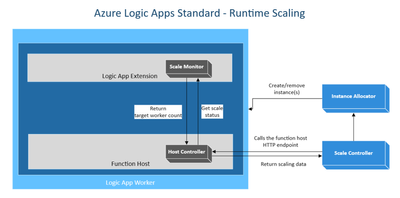
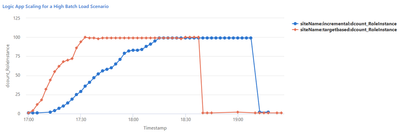
Take a deeper dive into the new target-based scaling for Azure Logic Apps Standard update and how it can help you manage your application’s performance with asynchronous burst loads.
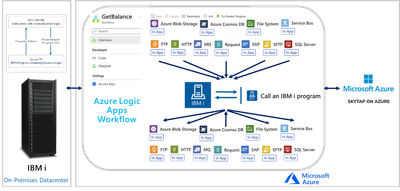
Read more on how Azure Logic Apps can unlock scenarios where it’s required to integrate with IBM i applications in another Mission Critical Series episode.
Struggling to manage your application settings during development and testing, especially when switching between local and cloud environments? Watch Sri’s video to learn how to efficiently manage your app settings.
This article is contributed. See the original author and article here.
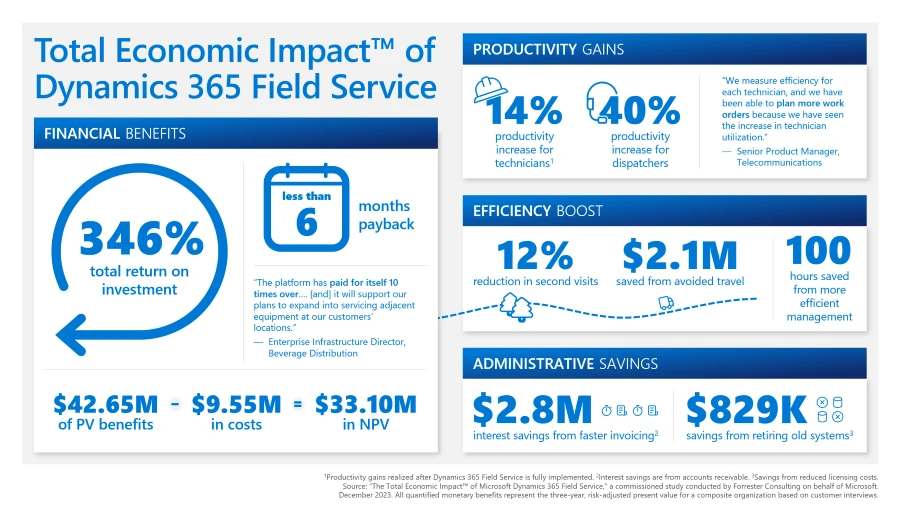
According to our Forrester Consulting study, software that helps organizations elevate field service delivery can improve financial performance in two ways: by helping increase customer retention and expansion by exceeding service expectations, and by increasing productivity. We are pleased to share the results of a December 2023 Forrester Consulting Total Economic ImpactTM (TEI) Study commissioned by Microsoft. Forrester calculates Microsoft Dynamics 365 Field Service delivered benefits of $42.65 million over three years to a composite organization. The total investment required was $9.5 million and provided a ROI of 346% with a payback period of less than six months.
Methodology and purpose
TEI is a methodology developed by Forrester Research to assist companies with technology-related purchase decisions by providing business decision-makers with a framework to evaluate the potential financial impact of the technology on the entire organization.
Forrester Consulting interviewed 11 representatives from seven organizations with experience using Dynamics 365 Field Service to conduct this TEI study. The characteristics of these businesses and the results of the interviews were then aggregated to develop a composite organization. The key findings of the study are based on the composite organization and are summarized below.
Key challenges
The organizations that were interviewed for the study shared the following challenges prior to adopting Dynamics 365:
Lack of visibility into field service status
Communication issues among management, sales, and service teams
Technicians’ inability to complete work orders in a timely fashion
With these challenges top of mind, the interviewees sought to invest in a solution that could improve the productivity and efficiency of their field service teams, enable cost savings, and lead to customer retention and profitability.
Key findings
Dynamics 365 Field Service helps organizations deliver onsite service to customer locations. The application includes work order automation, scheduling algorithms, asset servicing, mobility, Microsoft 365 integration, and infusion of generative AI through Copilot to set up frontline workers for success when they are onsite providing service for customers. It is part of the larger Dynamics 365 portfolio of applications designed to work together to deliver efficiency and improve customer experience.
Forrester’s study revealed seven quantifiable impact areas: increased first-time fix rate, increased field technician productivity, eliminated standard time-to-invoice delays, avoided travel time, improved dispatcher productivity, enhanced management productivity, and retired legacy solutions.
We examine each of these areas below in more detail to understand how Dynamics 365 Field Service delivers value across field service organizations.
Increased first-time fix rate
Sending out field technicians to resolve customer issues is expensive even for the first visit, so many organizations want to do everything they can to avoid a second truck roll to resolve a problem. Deploying Dynamics 365 Field Service helped the organizations to increase their first-time fix rates by ensuring that technicians could quickly locate equipment, understand history and problems, tap into institutional knowledge about problems, and ensuring they had stocked the appropriate parts for service. Increasing the first-time fix rates also helped these organizations avoid 12% of second visits by additional technicians to complete a service call.
Increased technician productivity
Interviewees found that Dynamics 365 Field Service helped to remove many administrative tasks, so field technicians could spend more of their time focusing on addressing customer issues. Organizations were also able to use the solution to find the best field technician for each job, determine the most efficient route for getting to a customer site, and ensuring that technicians were carrying the right parts and tools to fix the problems. In addition, the Microsoft Dynamics 365 Remote Assist feature helped technicians use institutional knowledge, rather than having to spend time tracking down a peer or documentation. And both managers and technicians had greater visibility into technicians’ service calls, which helped them to plan for greater efficiency when scheduling customer work orders. All of this resulted in increasing field technician productivity by up to 14% once Dynamics 365 Field Service and Remote Assist were fully implemented.
Decreased time to invoice customers
An inability to integrate field service applications with key applications in finance often meant considerable time gaps between when a service order was completed and a customer was billed for service. One interviewee noted that using paper-based processes for invoicing service calls meant up to a month could go by before an invoice was sent, but after implementing Dynamics 365 Field Service, customers could be invoiced for work orders on the same day. For the composite organization, eliminating standard time-to-invoice delays resulted in $2.8 million savings in interest on accounts receivable.
Avoided travel time
One key challenge interviewees shared was that field technicians could lose significant time due to traffic delays or inefficient job routing, which required them to go out of their way to get to customer sites. With Dynamics 365 Field Service, dispatchers could ensure that planned routes were the most efficient and economical and that technicians’ routes were updated constantly to avoid potential slowdowns from traffic or road construction. The availability of mixed reality apps like Dynamics 365 Remote Assist and Dynamics 365 Guides also meant that field technicians could get assistance without subject matter experts needing to be on-site.
By using routing algorithms and traffic updates provided by Dynamics 365 Field Service, the composite organization can create more efficient schedules for technicians and save $2.1 million over three years.
Improved dispatcher productivity
Service dispatchers were often relying on highly manual processes to assign field technicians to jobs. Any change in staffing or scheduling increased inefficiency, especially since schedules were shared across whiteboards, spreadsheets, and calendar apps, meaning mistakes and deletions could be made. Dynamics 365 Field Service enables service organizations to automate scheduling and rescheduling for customer service calls. It also helps service managers match the best service technician for a work order based on time or expertise. One project manager interviewed for the study stated that having everything in one place provided better visibility for schedulers that helped them understand job progress and seamlessly include everyone in the workflow.
Overall, the composite organization saw a 40% improvement in dispatcher productivity as well as cost savings of $1.6 million.
Enhanced management productivity
optimize your field service management with proven solutions
Some interviewees had reported that field service managers spent a lot of time resolving scheduling issues, tracking missing parts inventory, and following up on incomplete jobs. With the ability to automate more processes in Dynamics 365 Field Service, those field service managers found they had more time to focus on strategic tasks that help their teams improve in other ways. Because reporting provided managers with information they didn’t have access to before, they were able to get a clearer view into technician productivity, work order status, parts inventory, and other metrics that helped them discover and address gaps so they could meet monthly targets. Service managers also had greater visibility into areas where field technicians needed more training and support, so they could improve team performance overall.
Service managers enhanced management productivity by 100 hours per year.
Retired legacy solutions
In the past, participant organizations used various combinations of email, calendar and scheduling apps, spreadsheets, or third-party field service tools to manage their field service efforts. Implementing Dynamics 365 Field Service, which integrates with Microsoft 365 apps such as Outlook and Microsoft Teams, helped to reduce licensing, administration, and maintenance costs for maintaining separate applications to support field service teams.
Other benefits
Beyond the quantified benefits detailed above, the organizations participating in the TEI study also experienced other benefits, including:
Improved customer experience through increased efficiency and more accurate updates about service calls.
Enhanced employee experience by enabling field technicians to use their mobile phones to complete most of their work tasks.
Improve service delivery speed and quality by using Copilot in Dynamics 365 Field Service in their field service operations.
Access to mixed reality applications such as Dynamics 365 Remote Assist and Microsoft Dynamics 365 Guides to help support field technicians on service calls.
Next steps
As we have seen here, Forrester’s study uncovered seven quantifiable impact areas along with several other significant unquantifiable benefits. When combined, these factors resulted in benefits of $42.65 million over three years for the composite organization. The total investment required was $9.5 million, leading to a 346% ROI with a payback period of less than six months.
This article is contributed. See the original author and article here.
Microsoft Defender for Cloud
Monthly news
February2024 Edition
This is our monthly “What’s new” blog post, summarizing product updates and various new assets we released over the past month. In this edition, we are looking at all the goodness from January 2024.
Legend:
Product videos
Webcasts (recordings)
Docs on Microsoft
Blogs on Microsoft
GitHub
External content
Product improvements
Announcements
Microsoft Defender for Cloud
We’re announcing the release of Defender for Cloud’s agentless malware detection for Azure virtual machines (VM), AWS EC2 instances and GCP VM instances, as a new feature included in Defender for Servers Plan 2. Agentless malware detection for VMs is now included in our agentless scanning platform. Agentless malware scanning utilizes Microsoft Defender Antivirus anti-malware engine to scan and detect malicious files. Any detected threats, trigger security alerts directly into Defender for Cloud and Defender XDR, where they can be investigated and remediated. The Agentless malware scanner complements the agent-based coverage with a second layer of threat detection with frictionless onboarding and has no effect on your machine’s performance.
We’re announcing the general availability (GA) of the integration between Defender for Cloud and Microsoft Defender XDR (formerly Microsoft 365 Defender). The integration brings competitive cloud protection capabilities into the Security Operations Center (SOC) day-to-day. With Microsoft Defender for Cloud and the Defender XDR integration, SOC teams can discover attacks that combine detections from multiple pillars, including Cloud, Endpoint, Identity, Office 365, and more.
Container security is an integral part of Microsoft Defender for Cloud, a Cloud Native Application Platform (CNAPP) as it addresses the unique challenges presented by containerized environments, providing a holistic approach to securing applications and infrastructure in the cloud-native landscape. As organizations embrace multicloud, the silos between cloud environments can become barriers for a holistic approach to container security. Defender for Cloud continues to adapt, offering new capabilities that resonate with the fluidity of multicloud architecture. Our latest additions to AWS and GCP seamlessly traverse cloud silos and provide a comprehensive and unified view of container security posture.
In this blog we dive deep into agentless container security for AWS and GCP.
We have added nine new Azure security recommendations aligned with the Microsoft Cloud Security Benchmark. These new recommendations are currently in public preview.
Cybersecurity risks pose a significant threat to organizations of all sizes. As a result, security teams must be diligent in their efforts to protect their networks and data from potential breaches. However, with the increasing complexity of the digital environment and the expanding attack surface, security teams are faced with more and more tasks to improve the organization’s posture as well as investigating potential incidents. This can lead to critical security risks being overlooked or delayed, leaving organizations vulnerable to cyber-attacks. It becomes increasingly more important to estimate the risk created by the security issues in the environment’s configuration and to prioritize their mitigation correctly.
Prioritized cyber risks allow security teams to focus their efforts and resources on the most critical threats, ensuring that they are addressed promptly and effectively, which ultimately helps to reduce the organization’s overall risk profile.
In this article we discuss a new feature in Defender CSPM helping customers to rank the security issues in their environment configuration and fix them accordingly. This feature is based on the presented framework and enhances the risk prioritization capabilities of Defender CSPM.
While containers have revolutionized modern software development, the complexity of dependencies in containerized environments and the expanded attack surface they present are still significant hurdles for security professionals. The initial step in securing these environments involves identifying vulnerabilities within container images. Yet, the most time-consuming task can often be identifying the right development team to address these vulnerabilities, particularly the mission-critical ones. Microsoft Defender for Cloud addresses this critical need with its container mapping feature. This blog post explores how Defender for Cloud streamlines the process of tracing vulnerabilities in container images back to their origins in CI/CD pipelines, specifically within Azure DevOps and GitHub environments. This functionality is key to facilitating effective developer remediation workflows, thereby enhancing the security posture of cloud-native applications.
This blog post explores how Defender for Cloud streamlines the process of tracing vulnerabilities in container images back to their origins in CI/CD pipeline to facilitate the vulnerability remediation process.
Microsoft Defender for Servers plans require Azure Arc deployment on AWS/GCP machines. This interactive workbook provides an overview of machines in your environment showing their Azure Arc Connected Machine agent deployment status.
Note: If you want to stay current with Defender for Cloud and receive updates in your inbox, please consider subscribing to our monthly newsletter: https://aka.ms/MDCNewsSubscribe
This article is contributed. See the original author and article here.
Do you know about AI Agents? How to apply AI Agents in different scenarios? For AI Agents, Microsoft released the open source framework Autogen. But what is its relationship with Semantic Kernel and Prompt flow? I hope this series can answer your questions. Let everyone have a clear understanding of AI Agents, how to combine Autogen, Semantic Kernel, and Prompt flow to build intelligent applications
Around artificial intelligence, humans have made many attempts in different industries and different application scenarios. With the emergence of LLMs, we have transitioned from traditional chatbots with process predefinition plus semantic matching to Copilot applications that interact with LLMs through natural language. In the past year or so, everyone has mainly focused on basic theories based on LLMs. In 2024 we should enter the application scenario of LLMs. We have a lot of papers, application frameworks, and practices from large companies to support the implementation of LLMs applications. So what is the final form of our so-called artificial intelligence applications? What you can think of is GitHub Copilot for programming assistance, Microsoft 365 Copilot for office scenarios, and Microsoft Copilot on Windows or Bing, etc. But think about the application of Copilot, which relies more on individuals to guide or correct through prompt words, and does not achieve fully intelligent applications. In the 1980s, we began to try to do fully intelligent work, and AI Agent is a fully intelligent best practice.
The agent interacts with the scene where it is located, receives instructions or data in the application scene, and decides different responses based on the instructions or data to achieve the final goal. Intelligent agents not only have human thinking capabilities, but can also simulate human behavior. They can be simple systems based on business processes, or they can be as complex as machine learning models. Agents use pre-established rules or models trained through machine learning/deep learning to make decisions, and sometimes require external control or supervision.
Characteristics of the AI agent:
Planning, divide steps based on tasks, and have a chain of though. With LLMs, it can be said that the planning ability of the agent is greatly enhanced, and the understanding of the task can be more accurate.
Memorythe ability to remember behavior and part of logic, the ability to store experiences, and the ability to self-reflect.
Tool Chain, such as code execution capabilities, search capabilities, and computing capabilities. It can be said that he has strong mobility
perceive and obtain informationsuch as pictures, sounds, temperatures, etc. based on the scene, thus providing better conditions for execution.
Technical support for realizing intelligent agents
There is considerable application practice in the application of LLMs.
There are many frameworks for implementing intelligent agents. The previously mentioned Semantic Kernel or Autogen can implement intelligent agents. The Assitants API has also been added under OpenAI to enhance the model’s capabilities in agents. Now OpenAI’s Assitants API opens up the capabilities of code interpretation, retrieval, and function calling.Assitants APIof Azure OpenAI Service is also coming soon, which can be said to provide enough wisdom for the application capabilities of agents.
Many people pay more attention to the application layer framework. People often compare Semantic Kernel and Autogen. After all, both are from Microsoft and have good task or plan orchestration capabilities. However, some people always feel that the two have many similarities.
Semantic Kernel vs Autogen
Semantic Kernel focuses on effectively dividing individual tasks into steps in Copilot applications. This is also the charm of the Semantic Kernel Planner API. Autogen, on the other hand, focuses more on the construction of agents, dividing tasks to complete goals and assigning tasks to different agents. Each agent executes individually or interactively according to the assigned tasks. Behind each agent’s task can be a streaming task arrangement, or an extended method for solving problems, or skills triggered by corresponding prompts, which can be organized in conjunction with Semantic Kernel plugins. When we want to have a stable task output, we can also add prompt flow to evaluate the output.
Use Semantic Kernel to implement AI agents.
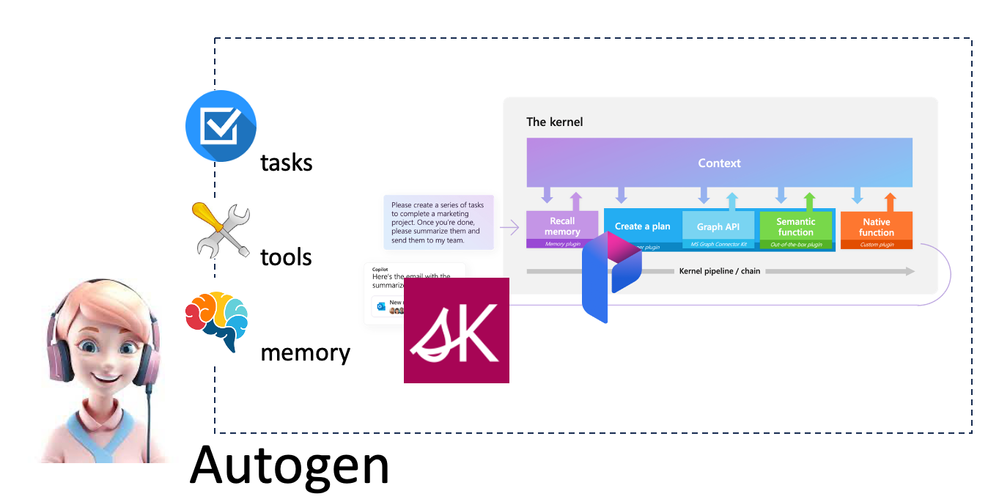
Semantic Kernel has added support for agents in the Experimental library, introduced AgentBuilder, and combined with the Assistant API to complete the brain configuration of the agent. The corresponding planning, memory and tools are defined using different plugins.
WithOpenAIChatCompletionrequires OpenAI/Azure OpenAI Service models that support Assistants API (soon to be released). Currently supported OpenAI models are GPT-3.5 or GPT-4 models.
WithInstructionsWe need to give clear task instructions and inform the agent how to execute it. This is equivalent to a process. You need to describe it clearly, otherwise the accuracy will be reduced.
.FromTemplatecan also use Template to describe task instructions
.WithNameThe name is required to make the call more clear.
.WithPluginis based on different skills and tool chains for the agent to complete tasks. This corresponds to the content of Semantic Kernel.
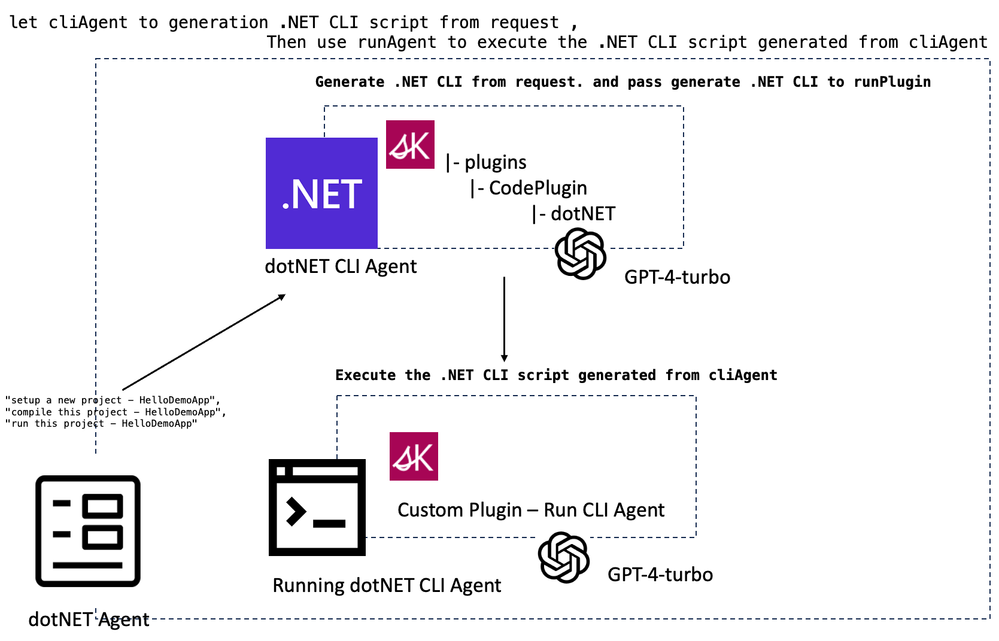
Let’s take a simple scenario and hope to build a .NET console application through an agent, compile and run it, and require it to be completed through an agent. From this scenario, we need two agents – the agent that generates the .NET CLI script and the agent that runs the .NET CLI script. In Semantic Kernel, we use different plugins to define the required planning, memory and tools. The following is the relevant structure diagram.
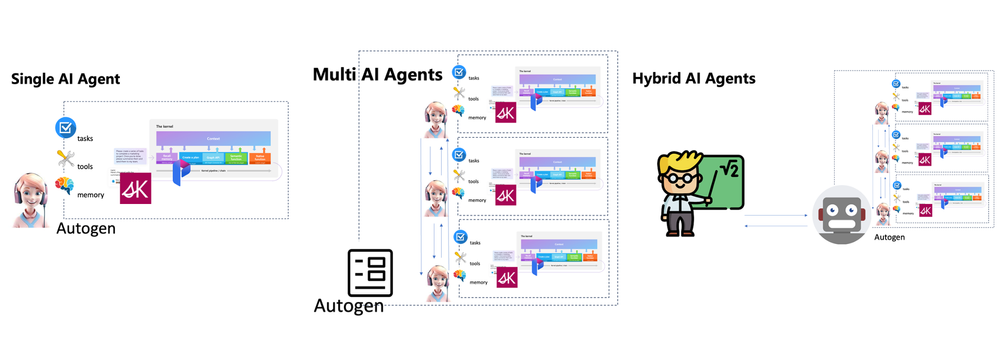
AI Agents are an important scenario for LLMs applications, and building agent applications will be an important technical field in 2024. We currently have three main forms of intelligence, such as single AI agent, multi- AI agents, and hybrid AI agent.
Single AI Agent
Work completed in specific task scenarios, such as the agent workspace under GitHub Copilot Chat, is an example of completing specific programming tasks based on user needs. Based on the capabilities of LLMs, a single agent can perform different actions based on tasks, such as requirements analysis, project reading, code generation, etc. It can also be used in smart homes and autonomous driving.
Multi-AI agents
This is the work of mutual interaction between AI agents. For example, the above-mentioned Semantic Kernel agent implementation is an example. The AI agent generated by the script interacts with your AI agent that executes the script. Multi-agent application scenarios are very helpful in highly collaborative work, such as software industry development, intelligent production, enterprise management, etc.
Hybrid AI Agent
This is human-computer interaction, making decisions in the same environment. For example, smart medical care, smart cities and other professional fields can use hybrid intelligence to complete complex professional work.
At present, the application of intelligent agents is still very preliminary. Many enterprises and individual developers are in the exploratory stage. Taking the first step is very critical. I hope you can try it more. I also hope that everyone can use Azure OpenAI Service to build more agent applications.
This article is contributed. See the original author and article here.
We are happy to share that the new Microsoft Teams bulk installer is now available for Windows.
We shared the news of the general availability of new Microsoft Teams in this blog post, and we have also made available tools that help admins to install the new Teams app. More details can be found in Bulk deploy the new Microsoft Teams desktop client.
Online deployment: Download and install the latest new Teams app machine wide:
Command (Run with admin privilege): teamsbootstrapper.exe -p
During online deployment, the bootstrapper app detects the CPU architecture of the system and downloads the corresponding installer of most recently released new Teams client and installs the client machine wide.
For admins concerned with network bandwidth usage of online deployment, offline deployment mode is a great alternative. Admins can download the client only once and use the bootstrapper to bulk deploy machines in their tenant.
Command for local path (Run with admin privilege): teamsbootstrapper.exe -p -o “c:pathtoteams.msix”
Command for UNC path (Run with admin privilege): teamsbootstrapper.exe -p -o “uncpathtoteams.msix”
During offline deployment, the bootstrapper app installs the admin specified package from either local system or UNC path. Please make sure the correct version of new Teams client is downloaded.
Bulk remove new Teams:
Command for deleting every occurrence of new Teams installation: teamsbootstrapper.exe -x
If you choose the bulk removal option, it will uninstall both the machine level and the user level installations. New Teams app instances that are running will be stopped.
We advise admins to use the bulk installer tool to install new Teams client for their tenants.
There are separate new Teams installer files depending on the target system’s CPU architecture: X64/X86/AMR64. The bootstrapper automatically detects the system architecture and downloads the appropriate installer file to avoid performance.
Online mode automatically downloads the most recent released version of the new Teams app. This prevents the problem of outdated versions of the app being installed over and over, which can increase network usage (outdated app versions will update to the newest release right after installation), and slow down essential feature or security updates.
The bootstrapper can be deployed by admins using the deployment tools they already have for example intune/sccm.
Upcoming features and bug fixes:
Auto start support – Create a new command line option that launches the new Teams app for all users on the machine after provisioning.
This article is contributed. See the original author and article here.
The main components of the Microsoft Intune Suite are now generally available. Read about how consolidated endpoint management adds value and functionality for security teams.
In the rapidly evolving business landscape, corporations are perpetually in search of innovative strategies that can amplify productivity and bolster security. Microsoft President Brad Smith wrote in his blog: AI advancements are revolutionizing knowledge work, enhancing our cognitive abilities, and are fundamental to many aspects of life. These developments present immense opportunities to improve the world by boosting productivity, fostering economic growth, and reducing monotony in jobs. They also enable creativity, impactful living, and discovery of insights in large data sets, driving progress in various fields like medicine, science, business, and security. However, the integration of AI into business operations is not without its hurdles. Companies are tasked with ensuring that their AI solutions are not only robust but also ethical, dependable, and trustworthy.
How Microsoft 365 Delivers Trustworthy AI is a comprehensive document providing regulators, IT pros, risk officers, compliance professionals, security architects, and other interested parties with an overview of the many ways in which Microsoft mitigates risk within the artificial intelligence product lifecycle. The document outlines the Microsoft promise of responsible AI, the responsible AI standard, industry leading frameworks, laws and regulations, methods of mitigating risk, and other assurance-providing resources. It is intended for a wide range of audiences external to Microsoft, who are interested in or involved in the development, deployment, or use of Microsoft AI. As Charlie Bell, EVP of Security at Microsoft describes in his blog, “As we watch the progress enabled by AI accelerate quickly, Microsoft is committed to investing in tools, research, and industry cooperation as we work to build safe, sustainable, responsible AI for all.”
The commitments and standards conveyed in this paper operate at the Microsoft cloud level – these promises and processes apply to AI activity across Microsoft. Where the paper becomes product specific, its sole focus is Microsoft Copilot for Microsoft 365. This does not include Microsoft Copilot for Sales, Microsoft Copilot for Service, Microsoft Copilot for Finance, Microsoft Copilot for Azure, Microsoft Copilot for Microsoft Security, Microsoft Copilot for Dynamics 365, or other Copilots outside of Microsoft 365.
At Microsoft, we comprehend the significance of trustworthy AI. We have formulated a comprehensive strategy for responsible and secure AI that zeroes in on addressing specific business challenges such as safeguarding data privacy, mitigating algorithmic bias, and maintaining transparency. This whitepaper addresses our strategy for mitigating AI risk as part of the Microsoft component of the AI Shared Responsibility Model.
The document is divided into macro sections with relevant articles within each:
Responsible and Secure AI at Microsoft – this section focuses on Microsoft’s commitment to responsible AI and what this looks like in practice. The articles within address key topics including:
The Office of the Responsible AI – read this to gain a deeper understanding of what comprises this division within Microsoft.
The Responsible AI Standard and Impact Assessment – every Microsoft AI project must adhere to the Responsible AI Standard and have a valid impact assessment completed.
Microsoft’s voluntary White House commitments – learn more about the commitments the White House made and how Microsoft shares these principles in our development and deployment practices.
Artificial Generative Intelligence Security team – learn about Microsoft’s center of excellence for Microsoft’s generative AI security and the initiatives being driven by this team.
Addressing New Risk – this section centers on the ways in which Microsoft is continuously improving its security practices and service design to mitigate new risk brought forth by the era of AI. As Brad Smith states in his blog, “Even as recent years have brought enormous improvements, we will need new and different steps to close the remaining cybersecurity gap.” This section addresses many actions Microsoft takes to address novel and preexisting risks in the era of AI. The articles within address salient topics including:
The copilot copyright commitment – how Microsoft addresses the risk of customers inadvertently using copywritten material via Microsoft AI services.
Updating the Security Development Lifecycle (SDL) to address AI risk – the ways Microsoft has adapted our SDL to identify and prioritize AI specific risks.
Copilot tenant boundaries and data protection with shared binary LLMs – this article describes how your data remains protected and secured throughout the data flow process to the copilot LLMs and back to your end user in this multi-tenant environment.
Copilot data storage and processing – this section answers the question, “what are the data storage and processing commitments applicable to Microsoft 365 copilot today?”
AI specific regulations and frameworks for assurance – this section describes upcoming regulations relevant to artificial intelligence and how Microsoft plans to address each. Regulations and frameworks addressed include:
European Union AI Act
ISO 42001 AI Management System
Cyber Executive Order (EO 14028)
NIST AI Risk Management Framework
Assurance Providing Resources – this comprises miscellaneous resources to providing customers assurance that Microsoft is mitigating risk as part of the shared responsibility model.
Defense-in-depth: controls preventing model compromise in the production environment – this article outlines an entire Microsoft control set designed to mitigate model compromise through defense-in-depth.
As with everything Microsoft does, this whitepaper is subject to continuous update and improvement. Please reach out to your Microsoft contacts if you have questions regarding this content; thank you for your continued support and utilization of Microsoft AI.
Download the Whitepaper
We hope this whitepaper has provided you with valuable insights into how Microsoft delivers trustworthy AI across its products and services. If you want to learn more about our responsible and secure AI strategy, you can download the full whitepaper here: https://aka.ms/TrustworthyAI. This document will give you a comprehensive overview of the Microsoft promise of responsible AI, the responsible AI standard, industry leading frameworks, laws and regulations, methods of mitigating risk, and other assurance-providing resources. You will also find detailed information on how Microsoft Copilot for Microsoft 365 adheres to these principles and practices. Download the whitepaper today and discover how Microsoft can help you achieve your AI goals with confidence and trust.
This article is contributed. See the original author and article here.
Microsoft is dedicated to helping organizations transform the way people work using secure, enterprise-grade AI capabilities, no matter which business applications teams depend on. Starting today, you can seamlessly integrate role-specific Copilot capabilities into Microsoft 365 applications and popular customer relationship management (CRM) and contact center systems for sales and customer service professionals.
Now generally available, Microsoft Copilot for Sales and Microsoft Copilot for Service bring together the power of Microsoft Copilot for Microsoft 365 with role-specific insights and actions to streamline business processes, automate repetitive tasks, and unlock creativity. Both provide flexibility to integrate with your existing contact center and CRM systems, such as Salesforce and ServiceNow, to get more done with less effort.
Transform sales productivity with Copilot for Sales
Sellers today face more challenges than ever. A recent survey revealed that 79% of sellers are supporting more customers and accounts than the previous year.1Gartner® research recommends that to drive better sales impact, “sellers must relinquish some control over customer interactions and give AI-powered technology—generative AI, emotion AI and digital humans—more responsibility to execute core selling activities…Let salespeople focus on where they excel: engaging buyers on a human level to understand their needs, motivations and objections, and ultimately validate that a purchase is right for them.”2
At Microsoft, we have been working hard to deliver an AI solution that would address these needs. Last fall, we announced our vision for Copilot for Sales, an AI assistant designed for sales teams to maximize productivity and close more deals. We’re excited to announce that Copilot for Sales is now generally available. Copilot for Sales builds on Copilot for Microsoft 365, enhancing it with connectivity to CRM platforms like Microsoft Dynamics 365 Sales and Salesforce Sales Cloud to bring sales-specific insights and recommendations to apps like Outlook, Microsoft Teams, and Word.
Today, Copilot for Sales helps sellers and sales managers:
Generate sales meeting preparation briefs in Word.
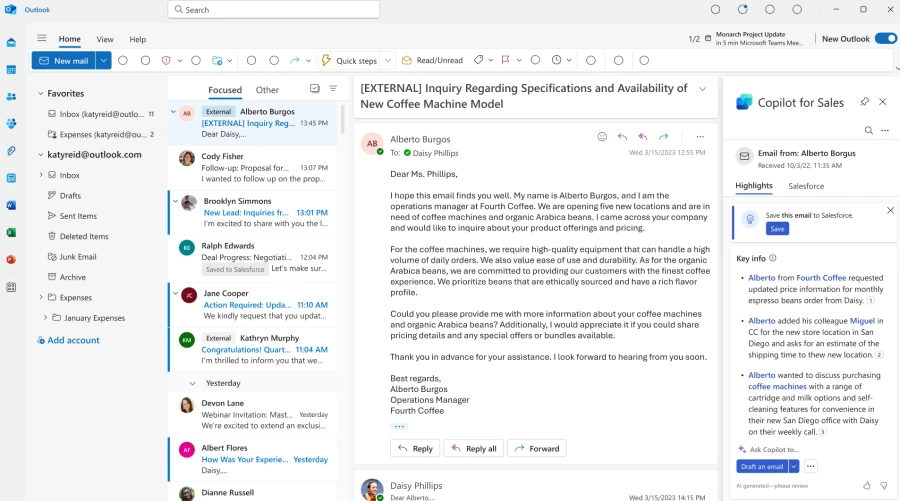
Summarize emails and surface relevant buying intent and budget, authority, need, timing (BANT) analysis in Outlook.
Generate emails in Outlook with relevant product, account, relationship, and opportunity information from their CRM system and Microsoft Graph.
Add leads and update CRM records directly from Outlook.
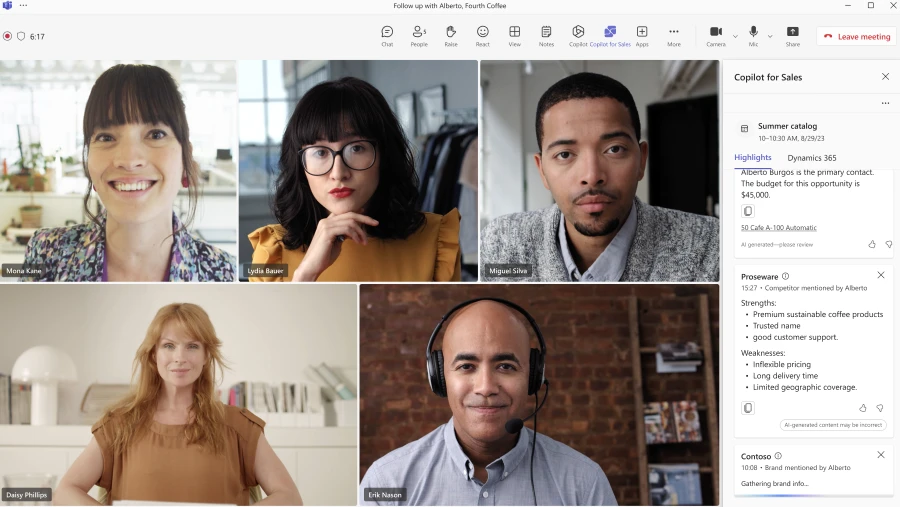
View meeting preparation notes and real-time sales insights during calls in Teams.
View sales meeting summaries in Teams with conversation analysis, sales keywords and KPIs, and suggested tasks.
Create collaborative deal rooms in Teams that sync with CRM data.
Copilot for Microsoft 365 is also included in Copilot for Sales, providing sellers with additional productivity enhancements, like:
Generate presentations in PowerPoint.
Generate plans and organize team information in OneNote.
Ask questions in natural language to catch up on customer interactions using Microsoft Copilot’s chat experience.
Late this month, Copilot for Sales will also bring CRM connectivity to the Microsoft Copilot chat experience, allowing sellers and sales managers to get quick insights on conversion and win rate, sales cycle, and pipeline. Later this year, we plan to enhance Copilot experiences in Microsoft PowerPoint and OneNote as well, tailoring them to address seller-specific needs with CRM connectivity.
Early adopter customers of Copilot for Sales are already seeing an impact in their sales organizations. Avanade employees have been previewing Copilot for Sales capabilities like updating Dynamics 365 Sales records from Outlook, summarizing email threads, generating email drafts, and summarizing meetings with conversation intelligence. These AI capabilities have helped Avanade employees show their clients that they are top of mind, while helping them work more productively.
When we interviewed Copilot for Sales users at Avanade, they reported that Copilot minimizes the need to jump between different interfaces, and the email summary feature saves them 30 to 60 minutes per week. And the impact goes beyond just time savings; Copilot for Sales is improving the quality of sellers’ interactions with their customers as well.
“When our sellers can reduce the time spent on sifting through multiple channels to find what matters with Copilot for Sales, we can be more focused so that we can deliver with clients and drive our business strategy faster.”
Often, an organization’s knowledge is distributed across disparate systems—customer records and case histories in one or multiple CRM systems, along with information scattered across knowledge base articles, public websites, offline files, and more. As a result, agents are tasked with navigating multiple apps to not only access critical insights, but also then manage their engagement with customers, collaborate with internal teams, and take action. According to Gartner, “43 percent of (customer service) reps reported they were overwhelmed by the number of systems and tools needed to complete work.”3
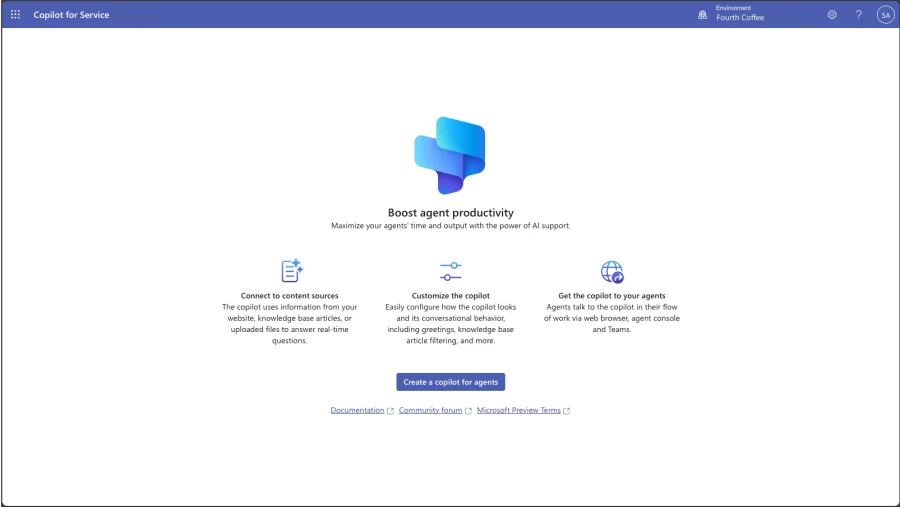
Copilot for Service unlocks an organization’s trusted knowledge to accelerate onboarding and case resolution, improve efficiency, and automate tasks for agents in their flow of work. Without costly development time, organizations can simply point to their data and, in a few minutes, unlock generative AI-powered conversations across their knowledge bases. And for agents, they can tap into this knowledge with a copilot embedded directly in their desktop software of choice such as Salesforce, as well as the other tools they already use every day like Outlook and Teams.
Today, Copilot for Service can help organizations:
Enable generative AI-powered conversations across all of their data with simplified point-and-click access to public websites, SharePoint, knowledge base articles, and offline files.
Access knowledge sources with pre-built integrations for Salesforce, ServiceNow, and Zendesk.
Embed a copilot in agent desktops from Salesforce and other channels to support agents where they work.
Copilot for Microsoft 365 is also included in Copilot for Service. We will introduce additional features in Microsoft 365 apps beginning later this month that will integrate data from CRM systems like Microsoft Dynamics 365 Customer Service and Salesforce Service Cloud including:
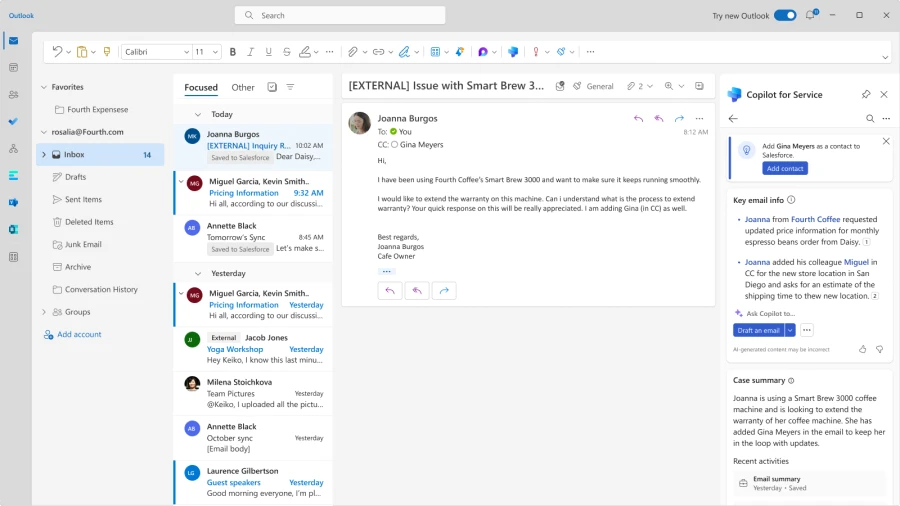
In Outlook, use Copilot to summarize and draft emails, access case summaries, browse and update CRM records, and schedule meetings informed by case summaries and other relevant information from CRM records.
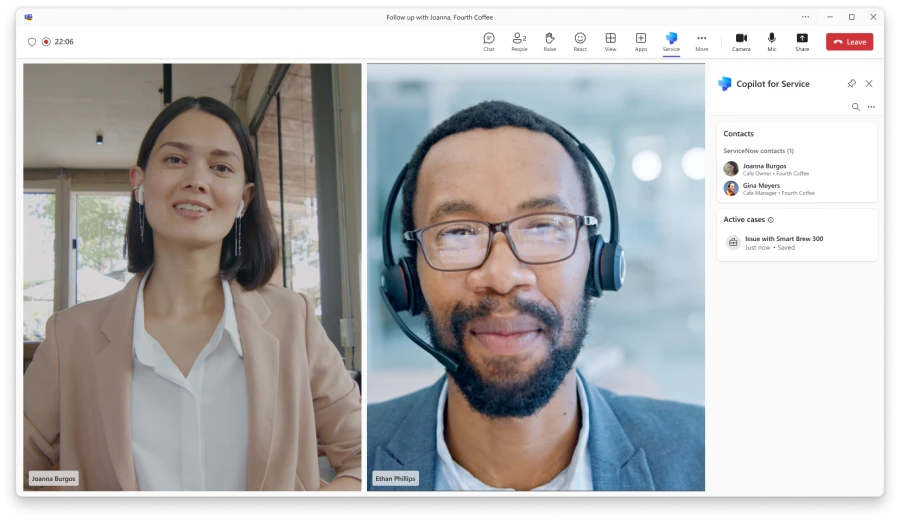
In Teams, use Copilot to browse and update CRM records during a meeting, as well as recap meetings, suggest follow-up action items, and create tasks that can all be saved to CRM systems directly from Teams.
In the Microsoft Copilot chat experience, use Copilot to ask questions over cases and contacts, as well as summarize cases—all from CRM data.
We’re thrilled to see the initial impact that our early adopter customers and partners are having with Copilot for Service. RSM, the leading provider of assurance, tax, and consulting services for the middle market, is equipping agents with the information they need to support customers without changing applications or searching through hundreds of knowledge articles.
“Six months ago, we launched a pilot focused on leveraging Microsoft Copilot for Service and Microsoft Copilot Studio, which provides a framework to build AI-enabled business processes. We have been working to execute against use cases for our own business with a focus on practical AI, and we are thrilled to now be in a position to bring this productivity enhancing technology to help clients implement AI for their businesses.”
—Christian Hutter, RSM’s Microsoft practice leader
Copilot for Service
Modernize your contact center with Copilot designed for service.
Both Copilot for Sales and Copilot for Service are available now for $50 per user/month, which includes the Copilot for Microsoft 365 license. If you already have Copilot for Microsoft 365, you can purchase Copilot for Sales or Copilot for Service for an additional $20 per user/month.
1. Microsoft. “Sellers’ attitudes about AI.” June 2023. An Ipsos study commissioned by Microsoft. Study included 700 participants who use professional CRM systems at organizations of at least 300 people. Industries include Financial Services, Professional Services, Manufacturing, Retail, Technology, and Healthcare.
2. Gartner Article, Focus Your Sellers on the Critical Art of Being Human, September 2023, https://www.gartner.com/en/articles/focus-your-sellers-on-the-critical-art-of-being-human GARTNER is a registered trademark and service mark of Gartner, Inc. and/or its affiliates in the U.S. and internationally and is used herein with permission. All rights reserved.
This article is contributed. See the original author and article here.
We want to help everyone navigate this new world of work. At Microsoft, we’re taking a learn-it-all approach with Copilot, working alongside our customers and employees to understand what the organizations getting the most value out of Copilot are doing right.
This article is contributed. See the original author and article here.
In our January 2024 edition of What’s New in Microsoft Teams, we are highlighting 33 new features and enhancements to Microsoft Teams. These updates will help you collaborate more effectively, streamline workflows, and stay connected with your team. Keep reading to find out more about the latest updates and how they can help you and your organization. From new enhancements to meetings to improvements in chats, Teams Phone, Teams Devices, Platform, and Frontline Workers, there is something for everyone.
Some of my favorite features are Immersive Spaces and Decorate your Background. Immersive Spaces lets you transform your meeting into a 3D immersive experience by allowing your team to join a pre-built immersive space by selecting the view menu in a Teams meeting. Decorate your Background uses AI decorate and customize your real-world room, such as by removing clutter or adding plants to a wall. And this month we announced Intelligent recap is included with the Copilot for Microsoft 365 so users with a Copilot license will now also have access to Intelligent Recap in Teams even if you do not have a Teams Premium license.
And every month we highlight new devices that are certified and ready to use for Teams. You can find more devices for all types of spaces and uses at aka.ms/teamsdevices.
Please check out all the updates and give me your feedback! I’ll try to reply and answer questions as they come up.
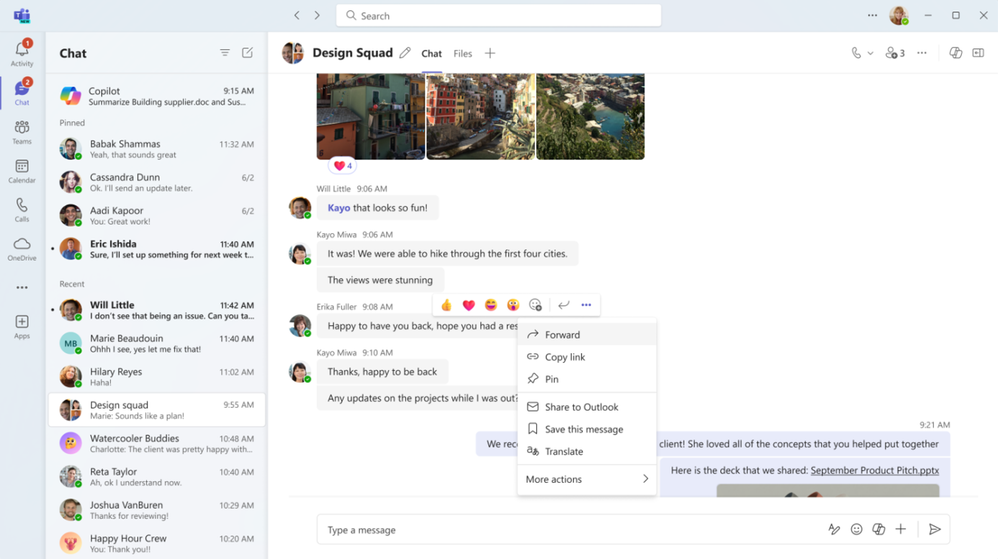
Forward chat messages Forward chat makes it easier to get your work done with fewer clicks. Share a message with another colleague by right clicking the message and selecting “forward” or by clicking the “…” on the message and then “forward”. You can also add additional context to the message to provide greater clarity for the recipient. Messages can be forwarded to 1:1 chats and group chats.
Meetings
Mesh in Microsoft Teams To support hybrid work and geographically distributed organizations, we created Microsoft Mesh and integrated it right into Teams.
Mesh in Teams transforms your Teams meeting into a 3D immersive experience using next-generation technology that helps virtual connections feel more like face-to-face ones.
Getting started is easy. From the View menu in a Teams meeting, select the immersive space (3D) option, and enter a pre-built immersive space where you can connect and collaborate with others in 3D and with those in the standard 2D meeting experience. Whether you choose to use Mesh in Teams for a team social gathering, a brainstorming session, or a round-table discussion, you can use the same Teams features you love from within a 3D space, like accessing shared content for collaboration, communicating with Teams chat, and using live reactions to express yourself.
Mesh in Teams enhances your favorite Teams features by making you feel like you are physically co-located with others. Being in the same 3D environment creates a strong feeling of togetherness, or co-presence. This co-presence can spark spontaneous moments of dialogue and strengthen the bond of a shared experience. Visual and audio cues enable a sense of immersion that help keep you in the moment and eliminate external distractions. Spatial Audio and audio zones enable you to have multiple, simultaneous conversations and communicate effectively in subgroups without talking over each other – just like in the physical world.
Mesh in Teams is available with core Teams licenses. Organizations can also host larger events with custom, immersive experiences tailored to their needs with Microsoft Mesh, available through Teams Premium.
Intelligent recap included with Copilot for Microsoft 365 License If you have a Copilot for Microsoft 365 License you now have intelligent recap for Teams included in your license. Use intelligent recap after meetings to get a summary of the meeting. This summary includes personalized timeline markers to easily browse recordings by when you joined or left, when a screen was shared, and when your name was mentioned. You can also browse recordings by speakers, chapters, and topics as well as access AI-generated meeting notes, tasks, and go to name mentions in the transcript.
Decorate your background Make meetings more fun and personal with Decorate your background. Meeting participants can now use generative background effects in Teams to show up their best – even when the space they’re working from isn’t at its best. With Decorate your background, meeting participants can use the power of AI to generate a background that decorates and enhances their real-world room, such as by cleaning up clutter or adding plants to a wall. This capability is available for users with a Teams Premium license.
People specific link support for Collaborative notes With the launch of Collaborative notes, we are making meetings more effective and secure by using a new link type created by Collaborative notes. The new Collaborative notes component will generate a People specific link (PSL) by default. This link type offers more controlled access than a Company specific link (CSL) and aligns with tenants who have their file-sharing policy set as specific people. Tenants who previously had Collaborative notes disabled due to lack of PSL support can now enable and use the feature.
Automatically view up to 9 videos (3×3) in Teams meetings in Chrome and Edge With this update, you will now be able to automatically see up to 9 videos (3×3) on Chrome and Edge on your screen by default without an explicit action. Previously, Microsoft Teams Meetings supported a maximum of 4 videos (2×2) on the screen by default on web browsers.
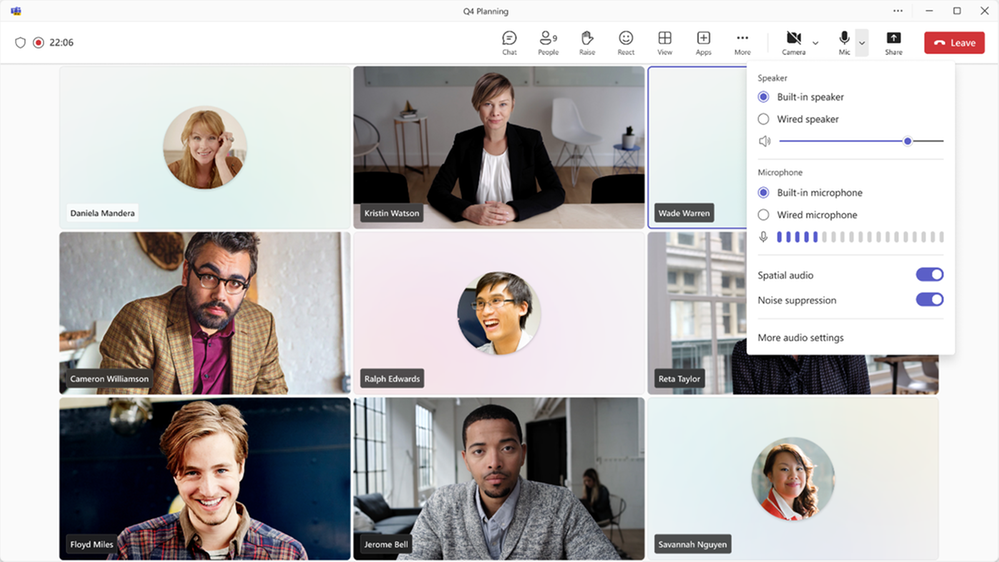
Simplified audio and video controls Audio and video fly-outs in meetings are designed to make it easier and more efficient for you to manage your audio and video settings during Teams meetings. Now, when you want to select your camera or mic device, you can choose the right device directly from the fly-outs. You can also adjust the volume, spatial audio, and noise suppression controls from the audio fly-out. If you didn’t select your background during the pre-join screen, you can easily change your background directly from the camera fly-out. We’ve also made avatars accessible from the camera fly-out so you can use avatars in meetings. You can also adjust brightness and soft focus from the camera fly-out.
Virtual appointments
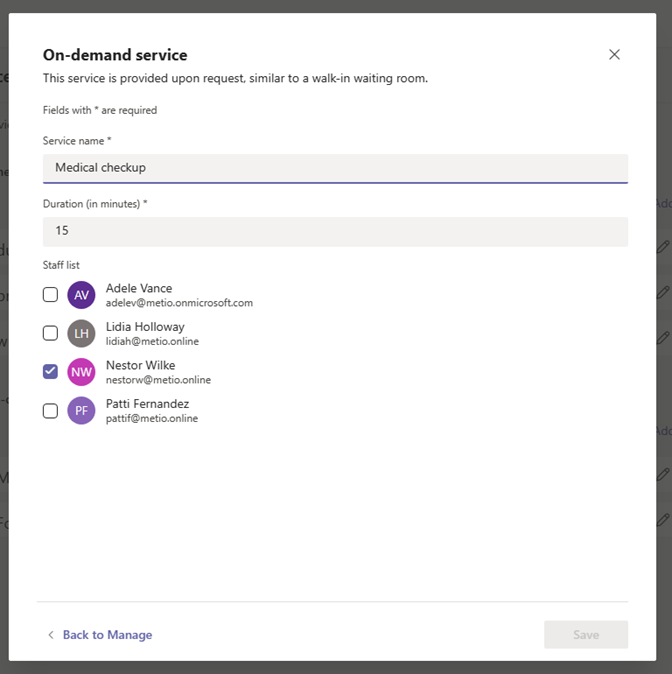
Assign staff and set duration for on-demand Virtual Appointments Scheduling administrators and staff managing on-demand appointments can assign specific staff members and set appointment duration to handle on-demand services. This ensures that when an on-demand appointment is requested, there is a designated staff member assigned to the appointment and the duration of the appointment will be determined. The designated staff member also receives a notification to attend the on-demand appointment. This capability is available for users with a Teams Premium license.
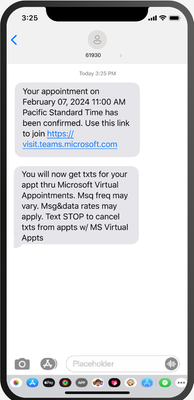
SMS notifications in Virtual Appointments template SMS notifications are available for appointments set up and scheduled using the virtual appointments template within the Teams app to improve the attendees’ appointment experience. Attendees will receive SMS text notifications about their appointment, including appointment details and the meeting join link so they can join directly from mobile if desired. Text notifications are sent for appointment confirmation, updates, and a reminder 15 minutes before the appointment begins. This capability is available for users with a Teams Premium license and is available for users in Canada, United Kingdom, and United States.
Teams Rooms and Devices
Find Certified for Teams devices for all types of spaces and uses at aka.ms/teamsdevices.
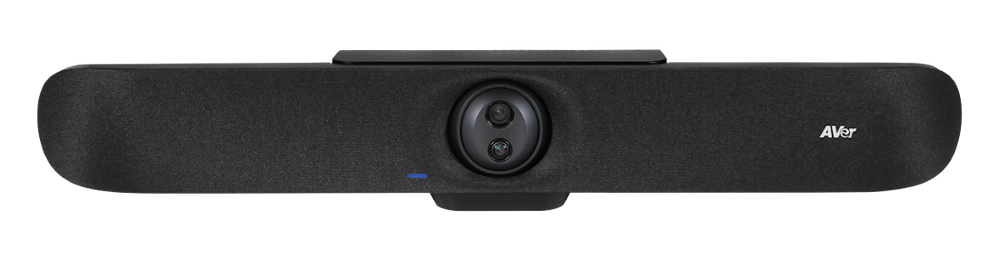
Newly certified for Teams AVer VB350 With a Hybrid 18X Zoom for Medium & Large Rooms With a streamlined design, dual 4K lenses, seamless lens switching, upgraded audio technology, and simple setup, the VB350 is the ultimate all-in-one solution for next-level video meetings. Level up to premium audio and video by using this powerful new video bar in your mid-to-large conference rooms. Learn more about AVer – VB350.
Newly certified for Teams Lenovo ThinkSmart 180 This premium conference bar delivers superior audio and visual experience featuring a modern form factor and best-in-class AI-accelerated performance. This stylish and easy-to-set-up meeting room bar will transform your small and medium-sized meeting rooms into next-generation collaboration spaces in no time at all. Impressive AI features follow the conversation, adjusting the view and audio to allow remote participants to feel like they’re sitting around the table, even if they’re across the world. Learn more about Smart Collaboration | Lenovo Tech today.
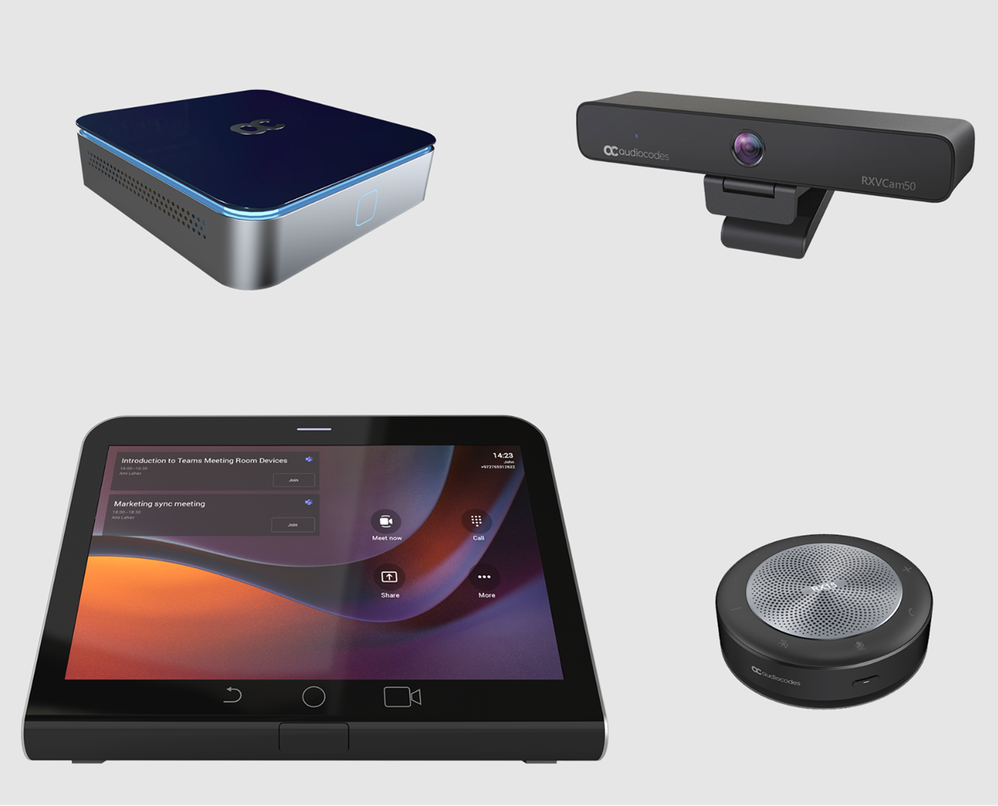
AudioCodes RXV200-B20 bundle is now certified for Teams The RXV200 bundle is designed to deliver an optimal hybrid meeting experience for focus rooms and includes the RXV200 intelligent A/V hub, the RX-PAD touch room controller, the RXVCam50 camera and RX15 speaker. The RXV200 is an Android Microsoft Teams Rooms device that orchestrates multiple audio and video peripherals to deliver an optimal hybrid meeting experience for all participants wherever they are located. The RXV200’s modular design supports content sharing, allowing participants to connect their personal devices via an HDMI cable, as well as dual screens and a wide range of AI capabilities. Learn more about AudioCodes RXV200 bundles.
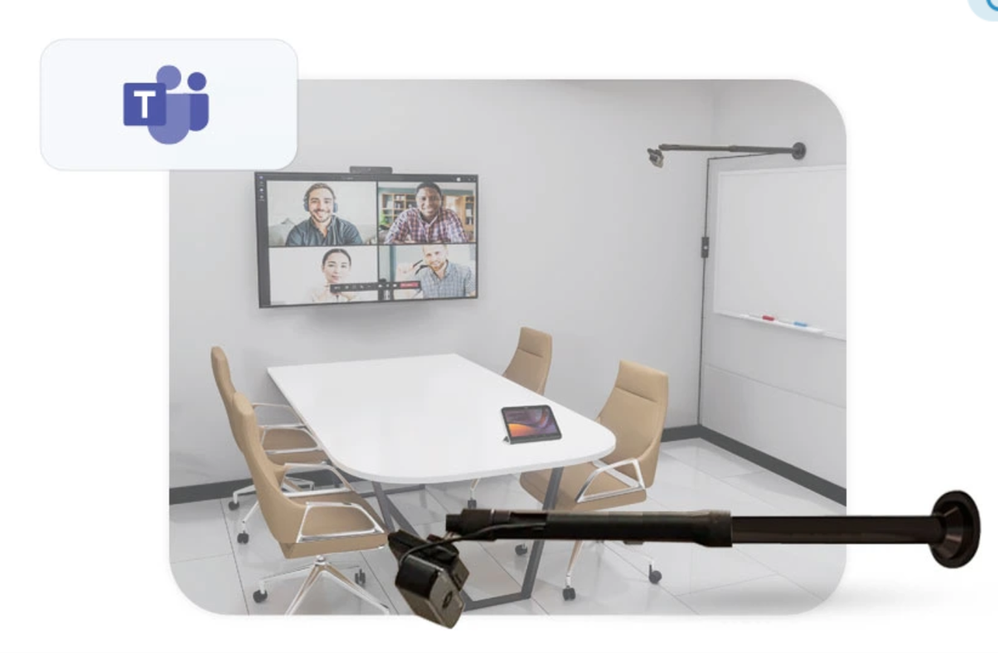
AudioCodes RXVCam10-CC AudioCodes RXVCam10-CC content camera is now certified for Teams. The RXVCam10-CC enables whiteboard content to be easily shared between physically present and remote meeting participants. In conjunction with Microsoft Teams AI content enhancement capabilities, the RXVCam10-CC simplifies team collaboration and brainstorming in hybrid meetings. Leveraging Microsoft Teams AI, the RXVCam10-CC offers intelligent whiteboard detection and automatically adjusts the frame to include the entire whiteboard. It also offers additional content enhancements such as image sharpening, contrast adjustment and overlaying a transparent view of the presenter. The RXVCam10-CC is designed for durability and is easy to install in any meeting room thanks to its adjustable whiteboard mount accessory. Learn more about RXVCam10-CC.
Management of BYOD (Bring your own device) meeting spaces with Teams Rooms Pro Management The ability to view BYOD (bring your own device) rooms in the Pro Management Portal provides IT admins with a comprehensive overview of their BYOD rooms’ utilization and activities. With this new addition, IT admins will gain valuable insights into how these spaces are being utilized, enabling them to make data driven decisions.
New Shared display mode for BYOD meeting rooms The new shared display mode provides you the ability to extend your Teams meeting via a pop-out and view-only version of the stage onto the TV screen in BYOD meeting rooms. This mode ensures the meeting content is extended to the front of the room for others to see and provides you the peace of mind that your desktop is for their viewing only, minimizing the personal information others in the room can see.
Teams Phone
New partner integrations for Teams Phone contact center The Teams Phone contact center and compliance recording certification programs ensure that contact center and compliance recording solutions work smoothly and dependably with Teams by requiring them to pass third-party testing. We have recently certified two new ISV partners, BrightPattern and CenterPal. With these additions we now have 24 Contact Center certified solution partners and 13 Compliance Recording certified solution partners, and there are many more on the way.
Mobile
Updates to mobile in-call user experience Improving your access to calling features with a new and improved user interface during calls.
Live meeting status for mobile On mobile devices, Teams calendar shows the live status of a meeting with the pictures of the people who are on the call, if the meeting is being recorded and how long the meeting has lasted.
Play Azure protected voicemail in mobile Teams app You can now use a link to get to your Azure protected voicemails from the Teams App. You will see a notification for the voicemail on the Teams App and can click the attached link to open the voicemail on the web browser.
Collaborative Apps
1Page The 1Page app is the all-in-one productivity tool that creates a platform to empower sales professionals by connecting them with data, insights, and even prospective or existing customers. Now, with a co-pilot plugin, streamlined data and real-time insights can be accessed from the 1Page app with conversational language prompts across the Microsoft 365 ecosystem.
Alvao Alvao for Microsoft Teams automates routine processes, boosts team productivity, and helps users focus on key projects. With the latest extension into Microsoft 365 applications, tickets opened in outlook can more easily connect with an agent. The app helps with logging chat messages to tickets, creating a simple to track list of tickets to solve, and gives agents the ability to take and resolve tickets immediately.
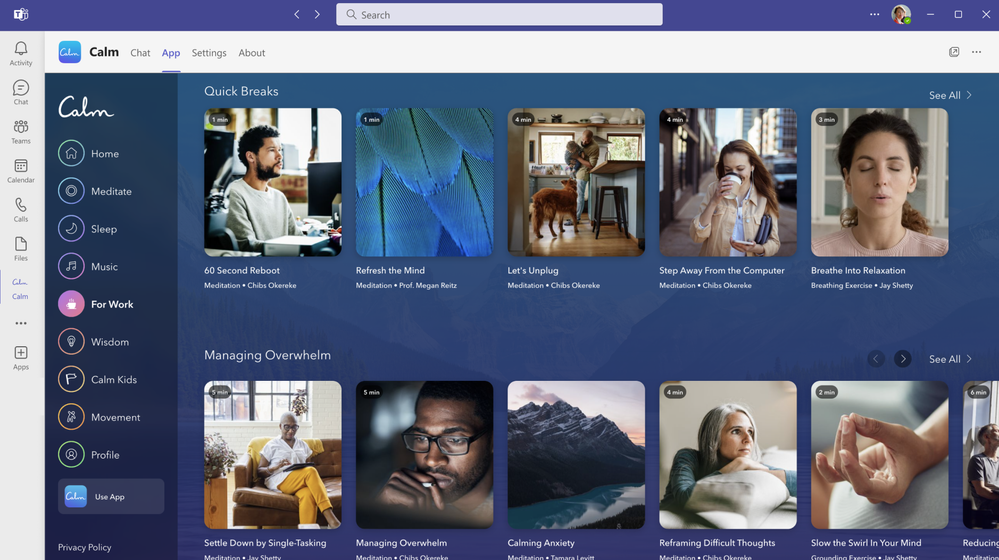
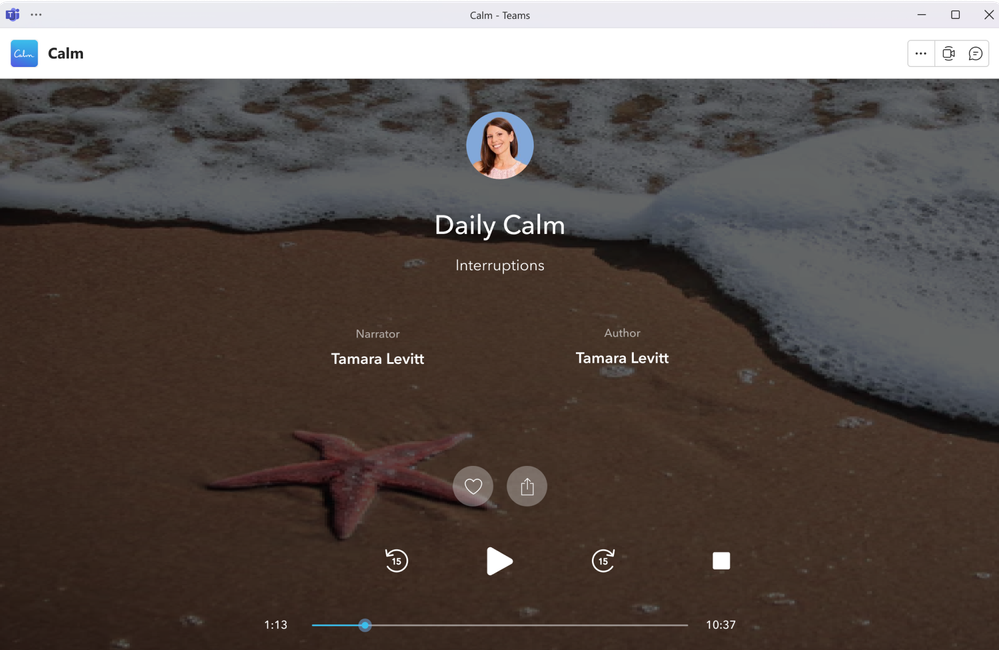
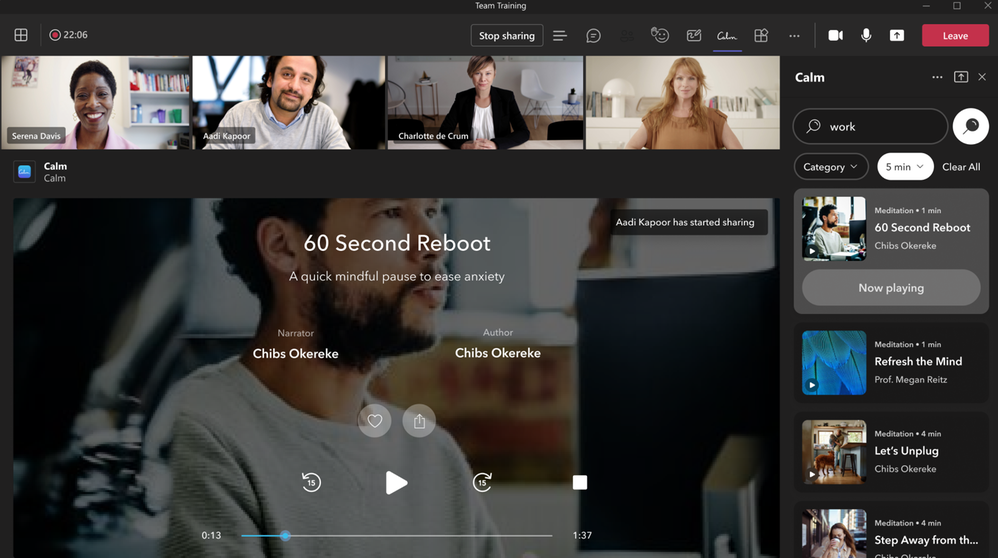
Calm Calm for Microsoft Teams integrates the #1 app for sleep, meditation, and relaxation into your everyday workflow. Calm’s mindfulness content helps you feel more relaxed, productive, and connected by allowing you to engage with more than 3,000 Calm sessions within the Teams interface. This includes content to prepare for key moments at work, music to help focus, breathing exercises, movement, and more. You can access mindfulness sessions for yourself or with others during meetings, share mindfulness content via chat, and set reminders for mental health breaks to help reduce stress and anxiety, reset, refocus, and build resilience.
Planning for Educators Planning for Educators gives users the tools to streamline the planning process in Microsoft Teams so they can spend more time focusing on teaching. This flexible planning tool allows educators to organize and manage class resources including lesson plans, assignments, files, videos, and links. Students can also benefit from Planning’s comprehensive visual timeline and content made more accessible through Microsoft’s Immersive Reader.
SYNQ Frontline Hero The SYNQ Frontline Hero app brings SYNQ’s retail services to Microsoft Teams to connect retail store staff with customers at the speed and convenience of Teams. Staff can use this to efficiently manage in-store and curbside pickup orders, quickly answer customer queries in chat, and respond to requests for staff assistance or customer service.
IT Administration and Security
Configure maintenance window for Teams devices Within the Teams Admin Center, admins can set up the time windows for their Teams devices maintenance. These time windows will be used for performing any device maintenance tasks, such as automatic updates.
Extended real-time telemetry retention for up to 7 days Admins in Teams admin center can troubleshoot meeting quality more efficiently thanks to real-time telemetry that is available for an extended period (up to 7 days following the conclusion of a meeting) for users with Teams Premium licenses. This helps admins find and solve quality issues with detailed telemetry after the meeting for up to 7 days. s This feature is available with a Teams Premium license.
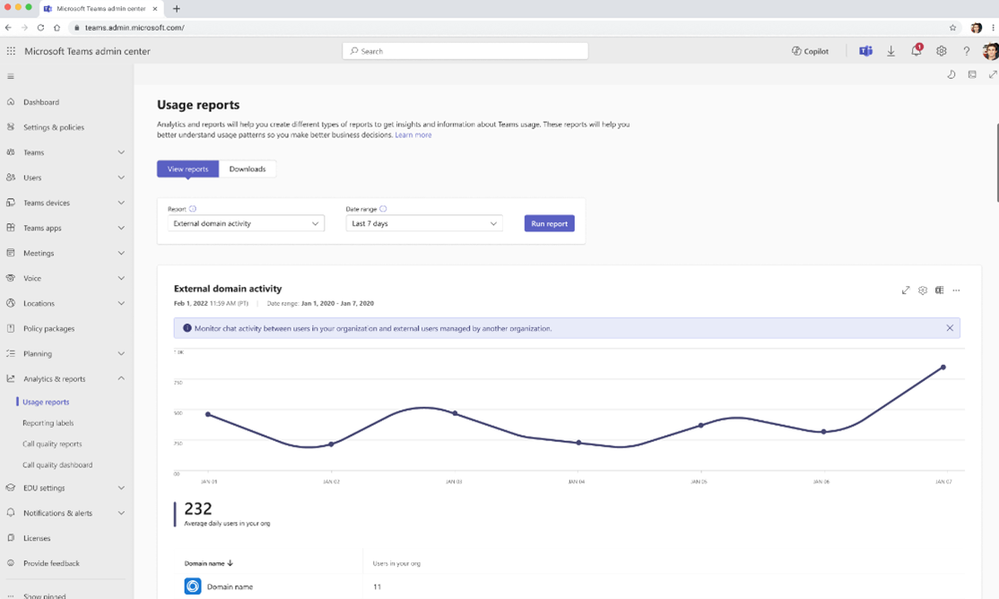
Microsoft Teams admin center – external domain activity report Teams administrators can see which managed domains their users interact with using the external domain activity report. The report will surface the list of domains that your tenant has communicated with via managed communication, and how many internal users have been part of that communication. This report is available for those with open federation on and those with explicit allow lists.
Watermark support for recording playback Watermarked meetings can now have recording enabled. A watermark with an email ID will show up during the playback of the recorded meeting. After a meeting is over, users can view the recorded content with watermarking on web and mobile platforms. This feature requires a Teams Premium license.
New Meeting Option and Meeting Policy ‘Turn off copying or forwarding of meeting chat’ A new meeting option called ‘Turn off copying or forwarding of meeting chat’ lets the meeting organizer disable the ability to copy and share meeting chat messages for participants to prevent data leakage. With this restriction on, meeting participants will not be able to copy chat messages using the menu option or keyboard shortcut, forward messages, or share messages to Outlook. Admins can control whether an organizer can use this feature in the Meeting Options page by using Meeting Policy setting in Teams admin center. Admins can also choose the default value for this meeting option in Meeting Templates they create. This feature requires a Teams Premium license.
Frontline Worker Solutions
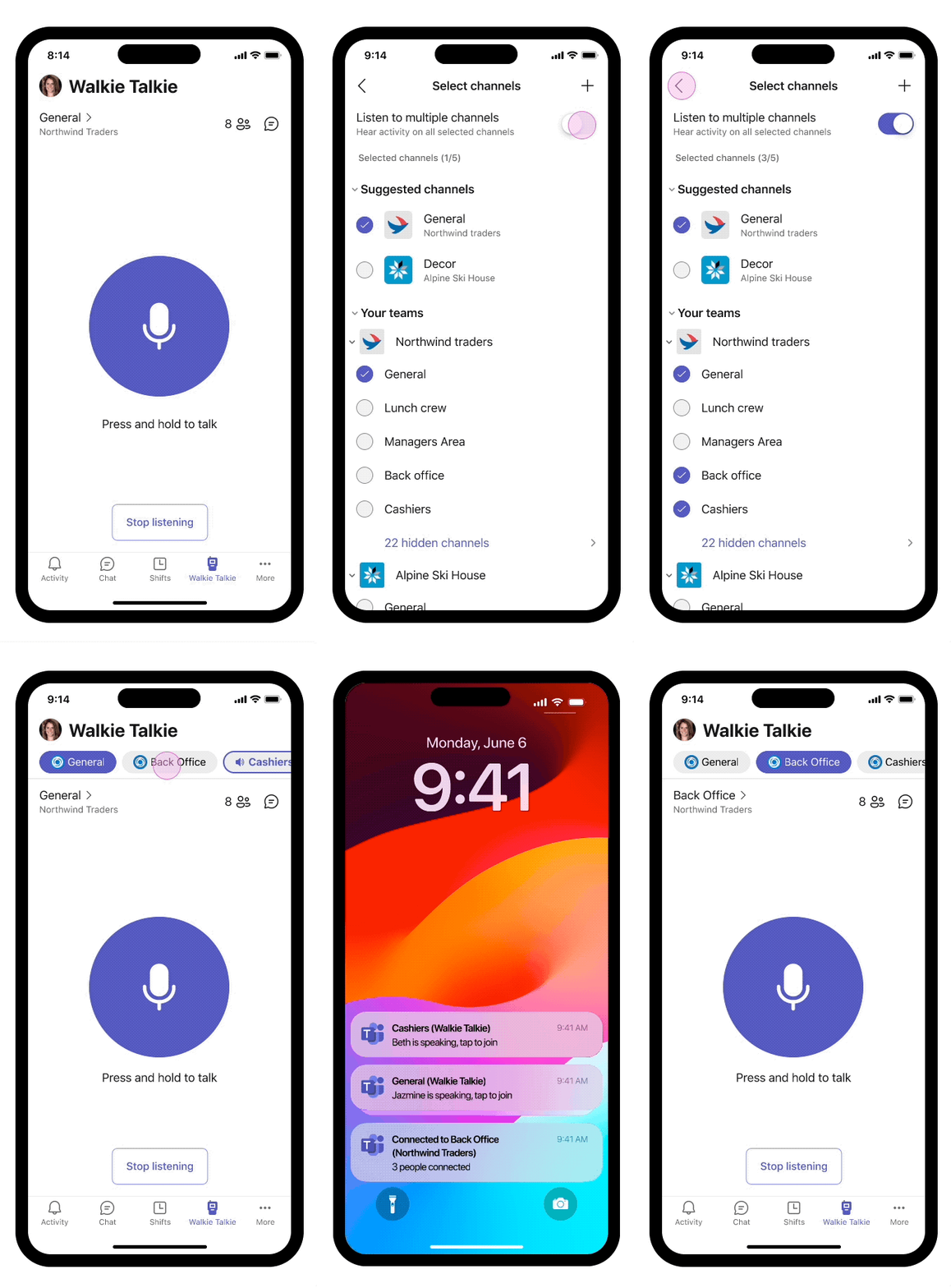
Walkie Talkie: Automatically listen to multiple channels Frontline workers who use Walkie Talkie in Teams can now choose to automatically listen to incoming messages from any of their pinned favorite Teams channels (up to 5 favorite channels). This new feature helps you keep in touch with and easily initiate PTT transitions on multiple channels without needing to switch channels manually.
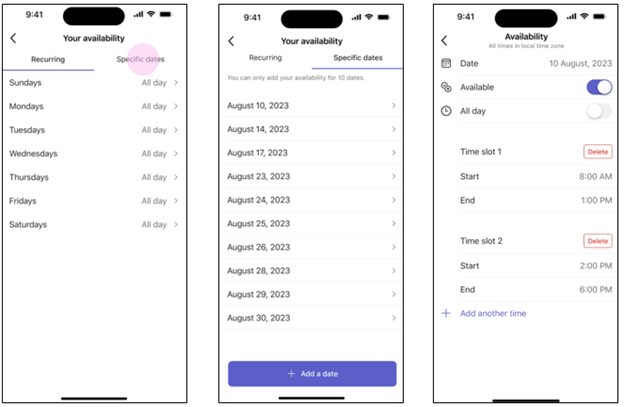
Allow frontline teams to set their shift availability for specific dates Frontline workers can now choose their preferred dates to work, making it easier for them to handle different scheduling needs. This new feature adds to the existing options for weekly availability that repeat. To learn more about recent enhancements to Shifts in Teams, read the latest blog – Discover the latest enhancements in Microsoft Shifts.















Recent Comments