This article is contributed. See the original author and article here.
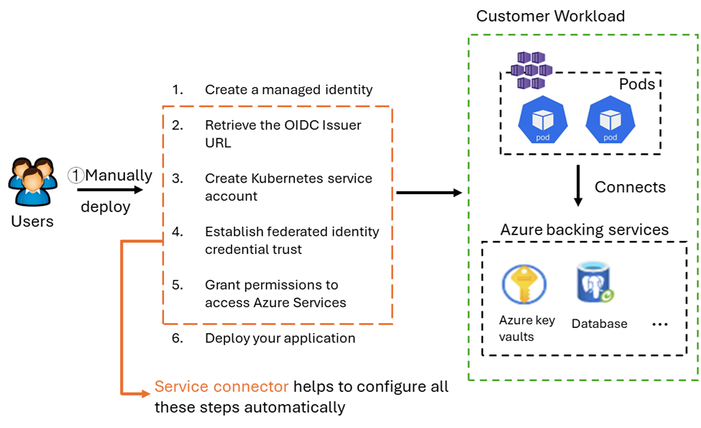
Workloads deployed on an Azure Kubernetes Service (AKS) cluster often need to access Azure backing resources, such as Azure Key Vault, databases, or AI services like Azure OpenAI Service. Users are required to manually configure Microsoft Entra Workload ID or Managed Identities so their AKS workloads can securely access these protected resources.
The Service Connector integration greatly simplifies the connection configuration experience for AKS workloads and Azure backing services. Service Connector takes care of authentication and network configurations securely and follows Azure best practices, so you can focus on your application code without worrying about your infrastructure connectivity.
Now, Service Connector performs steps 2 to 5 automatically. Additionally, for Azure services without public access, Service Connector creates private connection components such as private link, private endpoint, DNS record,
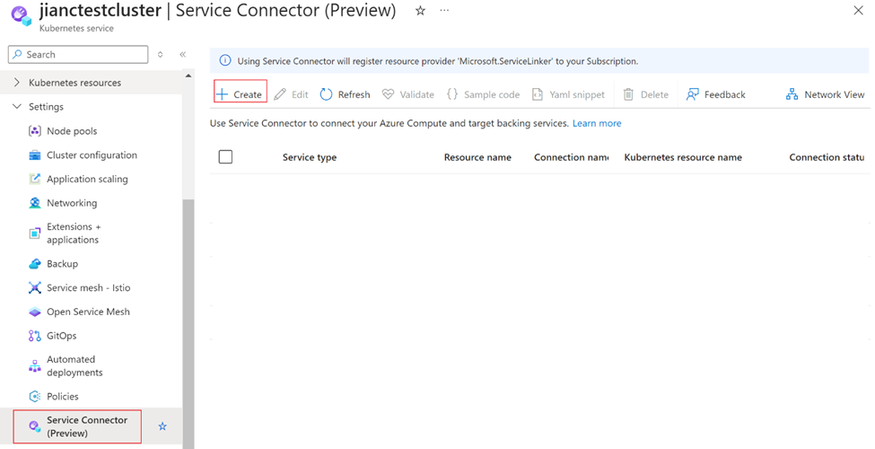
You can create a connection in the Service Connection blade within AKS.
Click create and select the target service, authentication method, and networking rule. The connection will then be automatically set up. Here are a few helpful links to for you to learn more about Service Connector.
This article is contributed. See the original author and article here.
In the dynamic world of service management, every action counts. From frontline workers in the field to back-office functions, the complexity of service delivery impacts the bottom line. Whether it’s a physical product consumed from inventory, or a service provided, both have financial implications, especially when external customers are involved, pricing and profitability come into play.
When a field service organization’s frontline operations run in isolation, consequences can be far-reaching: inaccurate costing, delayed invoicing, dissatisfied customers, and supply chain bottlenecks. To succeed in this complicated environment, organizations must integrate their systems to coordinate their services, finances, and supply chain processes.
Recognizing this critical need, we recently announced the integration between Dynamics 365 Field Service and Business Central, and today we’re thrilled to announce the general availability of the integration between Dynamics 365 Field Service and Dynamics 365 Finance as well as Supply Chain Management. This powerful integration ensures that the work of frontline workers, service managers, and dispatchers are seamlessly synced with the financial and supply chain heart of your business. Let’s explore some of the details of this native integration.
Bridging the gap: Dynamics 365 integration
The challenges
Even with robust systems like Dynamics 365 Field Service and a strong ERP system like Dynamics 365 Finance and Supply Chain Management, gaps can emerge when these systems aren’t fully integrated:
Limited financial insight: Without smooth integration, determining job costs and profitability requires switching between windows and consuming or updated data in multiple systems, which obscures their financial status.
Supply-driven delays: Separate fieldwork and supply chain processes lead to inventory shortages and service delays.
Invoicing bottlenecks: Disparate systems and manual processes cause invoicing and payment delays, disrupting cash flow.
Inconsistent data: Discrepancies across systems create confusion, affecting accuracy of inventory, decision-making, pricing, and costing data.
The solution
Our native integration addresses these challenges head-on:
Operational visibility: Real-time insights into finances and inventory empower informed decision-making across your organization.
Field-informed supply chain: Field Service work orders can drive estimated inventory demand, ensuring seamless supply chain coordination.
Interconnected financial operations: Automated and powerful billing and invoicing capabilities of Finance informed directly by the services provided speed up payment cycles, improve cash flow, minimize errors, boost profitability, and turn every work order into a growth opportunity.
Cost-effective integration: Our pre-built solution reduces implementation expenses and accelerates value realization.
Reduced risk, faster implementation: The native integration minimizes risk while improving implementation timelines.
Essential features
Organizations can create new opportunities to improve efficiency, customer satisfaction, and growth by integrating their Dynamics 365 Field Service and finance and operations applications. Key features of this native integration include:
Data alignment: Dual-write and virtual entities ensure all applications operate from a cohesive set of primary tables.
Primary tables alignment: Basic concepts such as currency, units of measure, products and their attributes (like styles, configurations, colors) are synced between applications to ensure a consistent source of truth.
Legal entity alignment: The company concept, native to Finance and Supply Chain, is used to filter critical lookups to put guard-rails in the system, helping drive transactions along company lines.
Projects and accounts: Work orders are seamlessly synced with projects and customer accounts from the finance and operations applications, allowing for precise project tracking and customer billing.
Inventory: Virtual tables expose inventory from Supply Chain directly in Field Service while work order inventory transactions align with item journals, directly impacting inventory levels in the system of record.
Resources: Using dual-write, resources can be aligned directly with workers ensuring field service work order transactions are automatically associated with the right workers and recorded in their respective hours journal and expense journal lines.
Automated and precise invoicing: The integration automates the syncing of transactions, reducing manual work and mistakes. Organizations can decide when to sync the information and post project journals either as they use them or automatically when they finish the work order.
Full insight and management: No financial system can afford to lose transactional data. Our integration gives organizations complete insight and management of data moving between the systems, making sure they can fix issues that stop data from flowing between applications and re-sync the transaction.
Get started now
Dynamics 365 Field Service and the Dynamics 365 finance and operations applications work together to unlock efficiencies. Organizations that use these solutions together can boost their productivity, revenue, and customer satisfaction. Grow your business with Dynamics 365 Field Service, Dynamics 365 Finance, and Dynamics 365 Supply Chain.
Be on the lookout for future post in June for more ways to take advantage of this powerful integration that make it work for any organization.
This article is contributed. See the original author and article here.
In today’s rapidly evolving sales environment, staying ahead of the curve is more crucial than ever. The latest updates to Copilot in Dynamics 365 Sales, particularly its enhanced integration with Outlook, are transforming how sales professionals gear up for their meetings. Let’s dive into how these new functionalities not only streamline preparation but also enrich customer interactions.
Streamlined Outlook integration for comprehensive sales meeting preparation
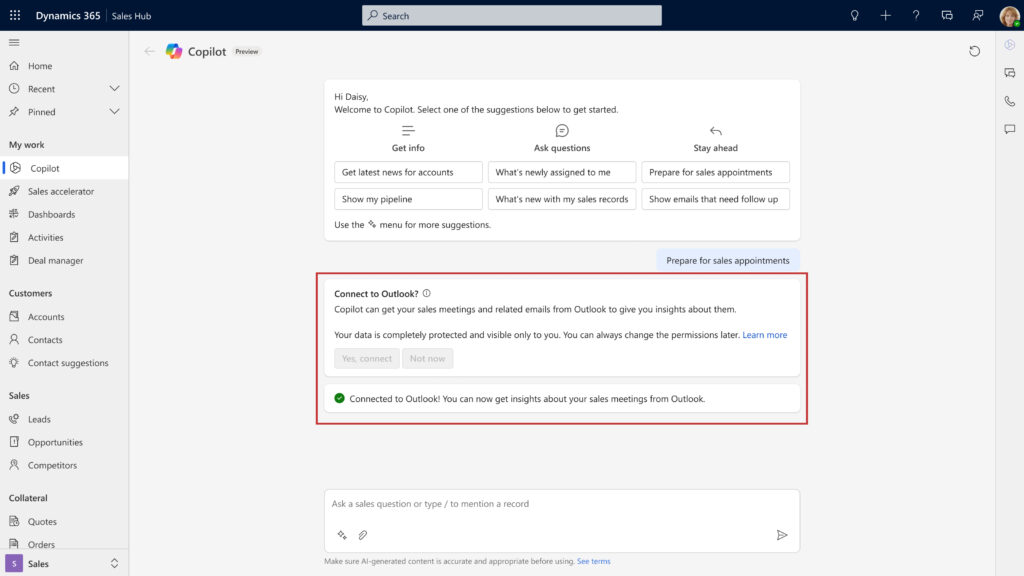
Connect Outlook/Exchange accounts to fetch meetings and related emails
Copilot in Dynamics 365 Sales expands its integration capabilities with Outlook, specifically accommodating users who have not enabled server-side sync. This pivotal update accelerates adoption, providing a unified platform where sales professionals can access and prepare for their Outlook-scheduled sales appointments directly within Dynamics 365. This coherence not only simplifies the logistical aspects of sales preparation but also enhances the overall efficiency and effectiveness of sales operations.
Proactive meeting preparation
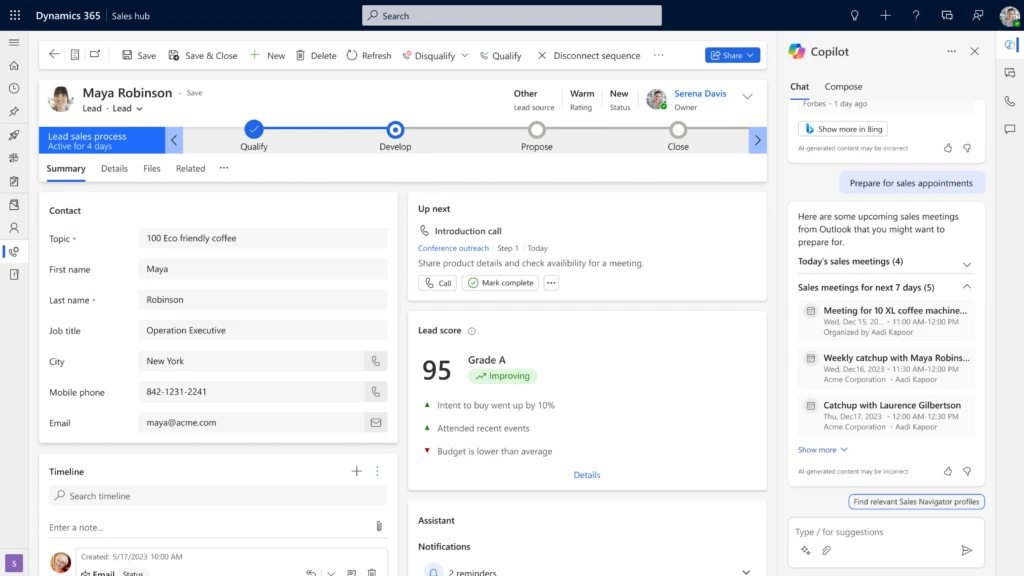
Copilot fetches meetings for today and the next seven days
Copilot now allows sales teams to fetch Outlook meetings for the upcoming week, enabling them to prepare proactively. The ability to view detailed agendas and prepare in advance transforms how sales teams interact with clients, paving the way for more successful outcomes.
Refined meeting summaries for enhanced client interactions
Enhanced summary helps the seller prepare for client interactions
The upgraded meeting preparation tool in Copilot for Dynamics 365 Sales now offers richer, more detailed summaries. This enhancement provides sales teams with critical insights and key talking points, tailored to each meeting’s context. Such targeted preparation boosts confidence and competence, enabling sales professionals to tailor their approaches to meet the specific needs and interests of each client, enhancing the effectiveness of their pitches.
Harnessing innovations for sales excellence
The recent updates to Copilot in D365 Sales are a testament to our commitment to enhance the user experience and functionality of our sales management tools. By leveraging these new features, sales teams can enhance their productivity, improve client interactions, and ultimately drive more successful outcomes. As the digital landscape evolves, tools like Copilot in D365 Sales are invaluable for staying competitive in the fast-paced world of sales.
This article is contributed. See the original author and article here.
Today, we’re excited to introduce rich reporting and easy troubleshooting for the Microsoft Playwright Testing service!
Microsoft Playwright Testing is a managed service built for running Playwright tests easily at scale. Playwright is a fast-growing, open-source framework that enables reliable end-to-end testing and automation for modern web apps. You can read more about the service here.
Now, with this new Reporting feature users can publish test results and related artifacts and view them in the service portal for faster and easier troubleshooting.
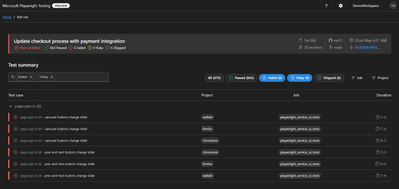
Quickly Identify Failed and Flaky Tests
In the fast-paced world of web development, applications evolve rapidly, constantly reshaping user experiences. To keep up, testing needs to be just as swift. Playwright automates end-to-end tests and delivers essential reports for troubleshooting. The Reporting feature provides a streamlined dashboard that highlights failed and flaky tests, enabling you to identify and address issues quickly. This focused view helps maintain application quality while supporting rapid iteration.
Screenshot of test results filtered by failed and flaky tests
Troubleshoot Tests Easily using rich artifacts
As test suites grow and the frequency of test execution increases, managing generated artifacts becomes challenging. These artifacts are crucial for debugging failed tests and demonstrating quality signals for feature deployment, but they are often scattered across various sources.
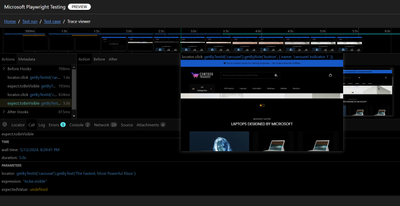
The Reporting feature consolidates results and artifacts, such as screenshots, videos, and traces, into a unified web dashboard, simplifying the troubleshooting process. The Trace Viewer, a tool offered by Playwright, that helps you explore traces and allows you to navigate through each action of your test and visually observe what occurred during each step. It is hosted in the service portal with the test for which it is collected, eliminating the need to store and locate it separately for troubleshooting.
Screenshot of trace viewer hosted in the service portal
Seamless Integration with CI Pipelines
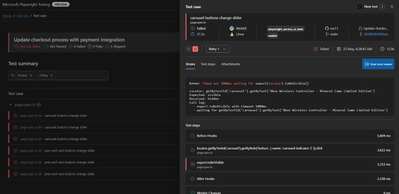
Continuous testing is essential for maintaining application quality, but collecting and maintaining execution reports and artifacts can be challenging. Microsoft Playwright Testing service can be easily configured to collect results and artifacts in CI pipelines. It also captures details about the CI agent running the tests and presents them in the service portal with the test run. This integration facilitates a smooth transition from the test results to the code repository where tests are written. Users can also access the history of test runs in the portal and gain valuable insights, leading to faster troubleshooting and reduced developer workload.
Screenshot of test result with CI information
Join the Private Preview
For current Playwright users, adding the Reporting feature with your existing setup is easy. It integrates with the Playwright test suite, requiring no changes to the existing test code. All you need to do is install a package that extends the Playwright open-source package, add it to your configuration, and you’re ready to go. This feature operates independently of the service’s cloud-hosted browsers, so you can use it without utilizing service-managed browsers.
We invite teams interested in enhancing their end-to-end testing to join the private preview of the Reporting feature. This feature is available at no additional charge during the private preview period. However, usage of the cloud-hosted browsers feature will be billed according to Azure pricing.
Your feedback is invaluable for refining and enhancing this feature. By joining the private preview, you gain early access and direct communication with the product team, allowing you to share your experiences and help shape the future of the product.
Interested in trying out the reporting feature and giving us feedback? Sign up here.
Check out Microsoft Playwright Testing service here. If you are new to Microsoft Playwright Testing service, learn more about it.
This article is contributed. See the original author and article here.
A well-defined data maintenance strategy improves the quality and performance of your database and reduces storage costs. In part one of this series, we covered the roles and responsibilities of your data strategy team, tools for reviewing storage usage, and data management features in Dynamics 365 finance and operations apps that your strategy should include. We recommended that you start your planning by decommissioning unneeded sandbox environments in your tenant. In this post, we focus on creating a data retention strategy for tables as part of your overall storage maintenance strategy.
Create a data retention strategy for tables
After sandbox environments, tables have the greatest impact on total storage volume. Your data maintenance strategy should include a plan for how long to retain the data in specific tables, especially the largest ones—but don’t overlook smaller, easily manageable tables.
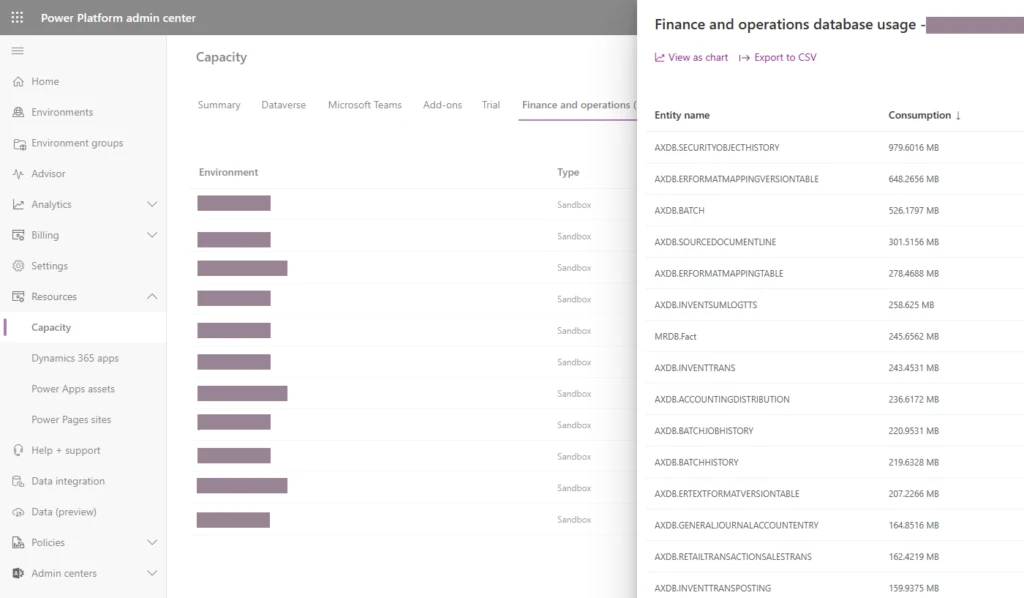
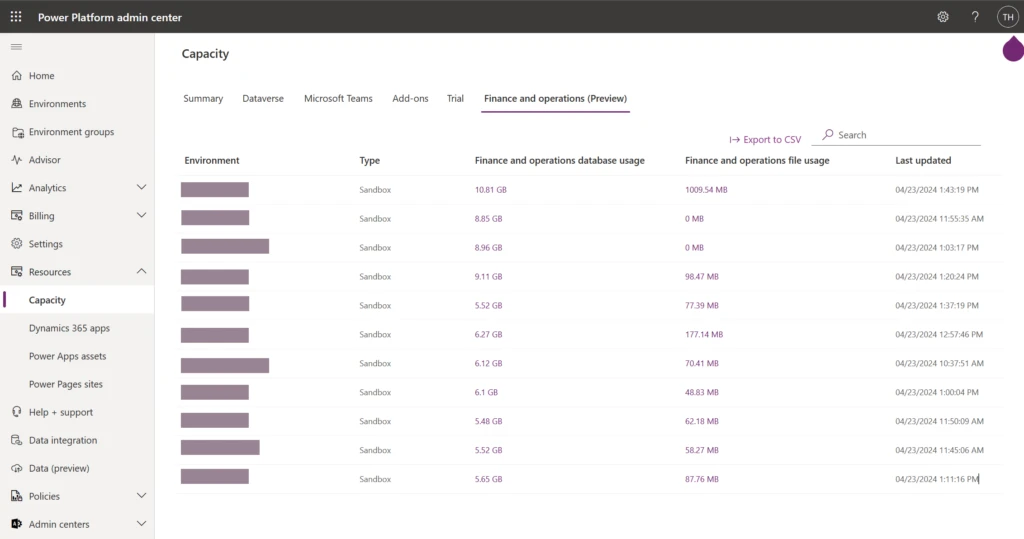
The Finance and operations capacity report showing database usage by table
Identify the largest tables in your production environment. For each one, determine the members of your data strategy team who should be involved and an action based on the table’s data category. The following table provides an example analysis.
This category of data is temporary by design unless it’s affected by a customization or used in a report. Run standard cleanup after testing in a sandbox. Note: If reports are built on temporary data, consider revisiting this design decision.
• System admin • Customization partner or team if customized • BI and reporting team
Log and temporary data with retention settings
DOCUHISTORY, SYSEMAILHISTORY
This data is temporary by design but has an automatically scheduled cleanup. Most automatic jobs have a retention setting. Review retention parameters and update after testing in a sandbox.
• System admin • Customization partner or team if customized
Log data used for auditing purposes
SYSDATABASELOG
Establish which department uses the log data and discuss acceptable retention parameters and cleanup routines.
• System admin • Business users • Controllers and auditors
Data isn’t temporary by design, but is duplicated when posted as financial. Discuss with relevant department how long workbook data is required in the system, then consider cleanup or archiving data in closed periods.
• System admin • Business users related to the workbook module • BI and reporting team for operational and financial reports
Columns with tokens or large data formats
CREDITCARDAUTHTRANS
Some features have in-application compression routines to reduce the size of data. Review the compression documentation and determine what data is suitable for compression.
• System admin • Business users
Financial data in closed periods
GENERALJOURNALACCOUNTENTRY
Eventually you can remove even financial data from the system. Confirm with controlling team or auditors when data can be permanently purged or archived outside of Dynamics 365.
• System admin • Controllers and auditors • Financial business unit • BI and reporting team for financial reports
Log or workbook data in ISV or custom tables
Should start with the ISV’s three-letter moniker
Discuss ISV or custom code tables with their developers.
• System admin • Customization partner or team • ISV • BI and reporting team, depending on the customization
Consider whether table data needs to be stored
For each large table, continue your analysis with the following considerations:
Current business use: Is the data used at all? For instance, was database logging turned on by accident or for a test that’s been completed?
Retention per environment: Evaluate how long data should be in Dynamics 365 per environment. For instance, your admin might use 30 days of batch history in the production environment to look for trends but would be content with 7 days in a sandbox.
Data life cycle after Dynamics 365: Can the data be purged? Should it be archived or moved to long-term storage?
With the results of your analysis, your data strategy team can determine a retention strategy for each table.
Implement your data retention strategy
With your data retention strategy in place, you can start implementing the actions you decided on—running standard cleanups, updating retention settings, configuring archive functions, or reaching out to your ISV or customization partner.
Keep in mind that implementing an effective strategy takes time. You need to test the effect of each action in a sandbox environment and coordinate with multiple stakeholders.
As you implement your strategy, here are some best practices to follow:
Delete or archive data only after all stakeholders have confirmed that it’s no longer required.
Consider the impact of the data life cycle on customizations, integrations, and reports.
Choose the date range or the amount of data to target in each cleanup or archive iteration based on the expected duration and performance of the cleanup or archiving routine, as determined by testing in a sandbox.
Need more help?
Creating a data maintenance strategy for Dynamics 365 finance and operations apps is a complex and ongoing task. It requires a thorough analysis and collaboration among different roles and departments. For help or guidance, contact your Microsoft representative for a Dynamics 365 finance and operations storage capacity assessment.
This article is contributed. See the original author and article here.
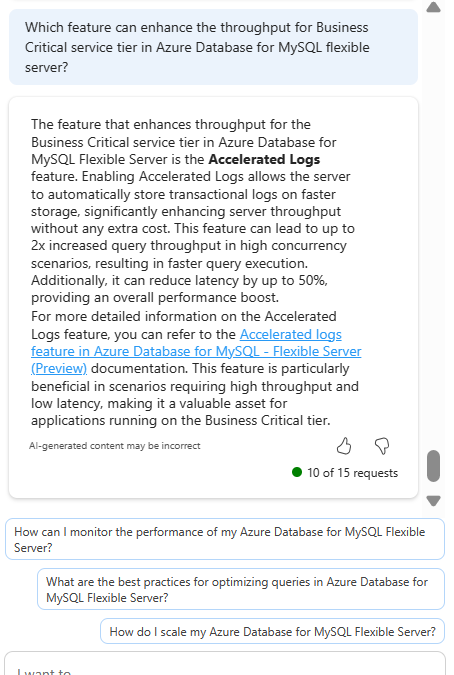
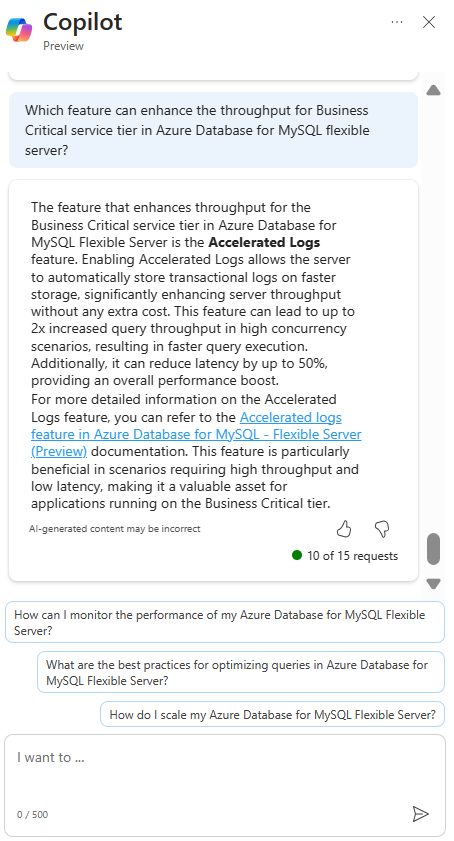
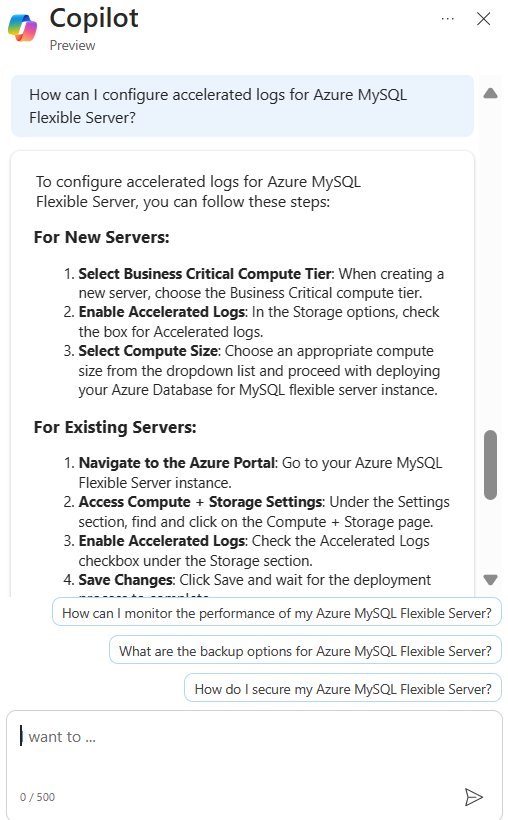
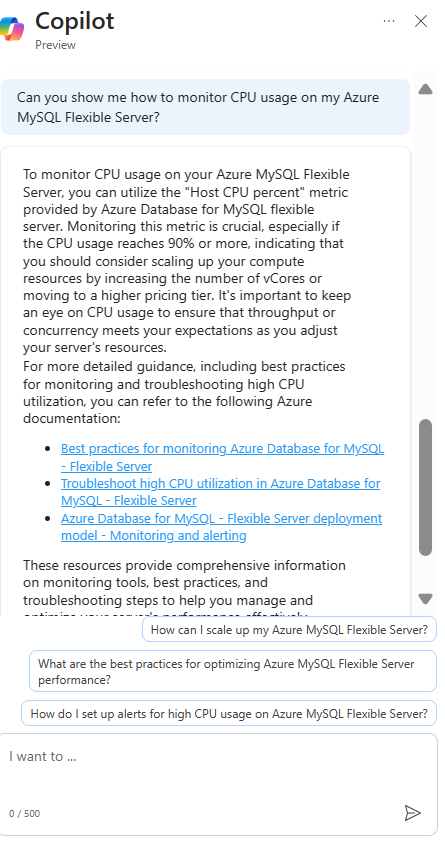
Microsoft Copilot in Azure (Public Preview) is an AI-powered tool to help you do more with Azure. Copilot in Azure extends capabilities to Azure Database for MySQL, allowing users to gain new insights, unlock untapped Azure functionality, and troubleshoot with ease. Copilot in Azure leverages Large Language Models (LLMs) and the Azure control plane, all of this is carried out within the framework of Azure’s steadfast commitment to safeguarding the customer’s data security and privacy.
The experience now supports adding Azure Database for MySQL self- help skills into Copilot in Azure, empowering you with self-guided assistance and the ability to solve issues independently.
You can access Copilot in Azure right from the top menu bar in the Azure portal. Throughout a conversation, Copilot in Azure answers questions, suggests follow-up prompts, and makes high-quality recommendations, all while respecting your organization’s policy and privacy.
For a short demo of this new capability, watch the following video!
Discover new Azure Database for MySQL features with Microsoft Copilot in Azure
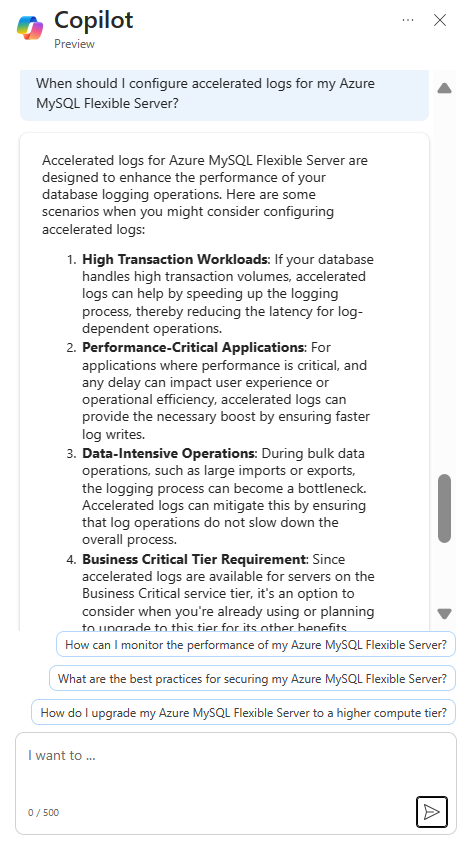
Explore when to enable new features to supplement real-life scenarios
Learn from summarized tutorials to enable features on-the-go
Troubleshoot your Azure Database for MySQL issues and get expert tips
Join the preview
To enable access to Microsoft Copilot in Azure for your organization,complete the registration form. You only need to complete the application process one time per tenant. Check with your administrator if you have questions about joining the preview.
This article is contributed. See the original author and article here.
Data maintenance—understanding what data needs to be stored where and for how long—can seem like an overwhelming task. Cleanup routines can help, but a good data maintenance strategy will make sure that you’re using your storage effectively and avoiding overages. Data management in Dynamics 365 isn’t a one-size-fits-all solution. Your strategy will depend on your organization’s implementation and unique data footprint. In this post, the first of a two-part series, we describe the tools and features that are available in Dynamics 365 finance and operations apps to help you create an effective storage maintenance plan. Part two focuses on implementing your plan.
Your data maintenance team
Data maintenance is often thought to be the sole responsibility of system admins. However, managing data throughout its life cycle requires collaboration from all stakeholders. Your data maintenance team should include the following roles:
Business users. It goes without saying that users need data for day-to-day operations. Involving them in your planning helps ensure that removing old business data doesn’t interfere with business processes.
BI and reporting team. This team comprehends reporting requirements. They can provide insights into what data is essential for operational reports and should be kept in live storage or can be exported to a data warehouse.
Customization team. Customizations might rely on data that’s targeted by an out-of-the-box cleanup routine. Your customization partner or ISV should test all customizations and integrations before you run a standard cleanup in the production environment.
Auditors and controllers. Even financial data doesn’t need to be kept indefinitely. The requirements for how long you need to keep posted data differ by region and industry. The controlling team or external auditors can determine when outdated data can be permanently purged.
Dynamics 365 system admins. Involving your admins in data maintenance planning allows them to schedule cleanup batch jobs during times when they’re least disruptive. They can also turn on and configure new features.
Microsoft 365 system admins.The finance and operations storage capacity report in the Power Platform admin center is helpful when you’re creating a data maintenance strategy, and these admins have access to it.
Tools for reviewing storage usage
After you assemble your team, the next step is to gather information about the size and footprint of your organization’s finance and operations data using the following tools:
Just-in-time database access allows you to access the database of a sandbox environment that has been recently refreshed from production. Depending on the storage actions you have set up or the time since the last database restore, the sandbox might not exactly match the production environment.
Features for managing storage
A comprehensive data maintenance strategy takes advantage of the data management features of Dynamics 365 finance and operations apps. The following features should be part of your plan.
Environment life cycle management is the process of creating, refreshing, and decommissioning sandbox environments according to your testing and development needs. Review your environments’ storage capacity and usage on the Finance and operations page of the capacity report.
The Finance and operations capacity report in the Power Platform admin center
Critically assess the environments and their usage and consider decommissioning sandboxes that you no longer need. For instance, if the system is post go-live, can you retire the training environment? Are performance tests less frequent and easier to run in the QA environment when users aren’t testing?
We highly recommend that you don’t skip the sandbox decommissioning discussion. Reducing the number of sandboxes has a far greater effect on total storage usage than any action that targets a specific table.
Cleanup routines are standard or custom functions that automatically delete temporary or obsolete data from the system.
Retention settings schedule automatic cleanup of certain data after a specified length of time. For example, document history includes a parameter that specifies the number of days to retain history. These cleanup routines might run as batch jobs or behind the scenes, invisible to admins.
Compression routines reduce the size of data in storage. For example, the Compress payment tokens feature applies compression to stored payment property tokens.
Next step
In this post, we covered the roles and responsibilities of your data strategy team, tools for reviewing database storage, and data management features beyond cleanup routines. We suggested that you begin your planning process by reviewing your sandboxes. In part two, we discuss a strategy for specific tables and actions to take.
This article is contributed. See the original author and article here.
In today’s digital-first environment, effective communication is crucial for maintaining strong business relationships and driving sales success. Copilot in Dynamics 365 Sales enhances this aspect by integrating with the rich text editor, revolutionizing how professionals manage their email interactions. This blog delves into how the Copilot’s capabilities can simplify and refine the email drafting process, ensuring every message is crafted to engage and convert.
Use Copilot to draft and adjust emails
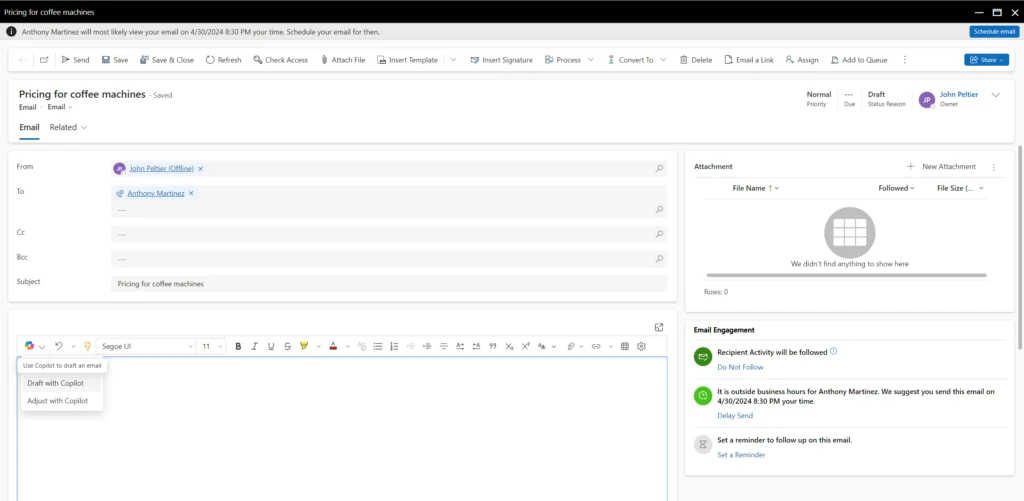
Copilot integrates seamlessly with the rich text editor, providing a sophisticated platform for composing emails. This integration facilitates the use of AI-driven suggestions during the drafting process, enabling quick creation of precise and impactful communications. The combination of the Rich Text Editor’s user-friendly interface with Copilot’s intelligent recommendations bridges the gap between rapid email drafting and maintaining content quality.
AI-Powered drafting for enhanced precision and relevance
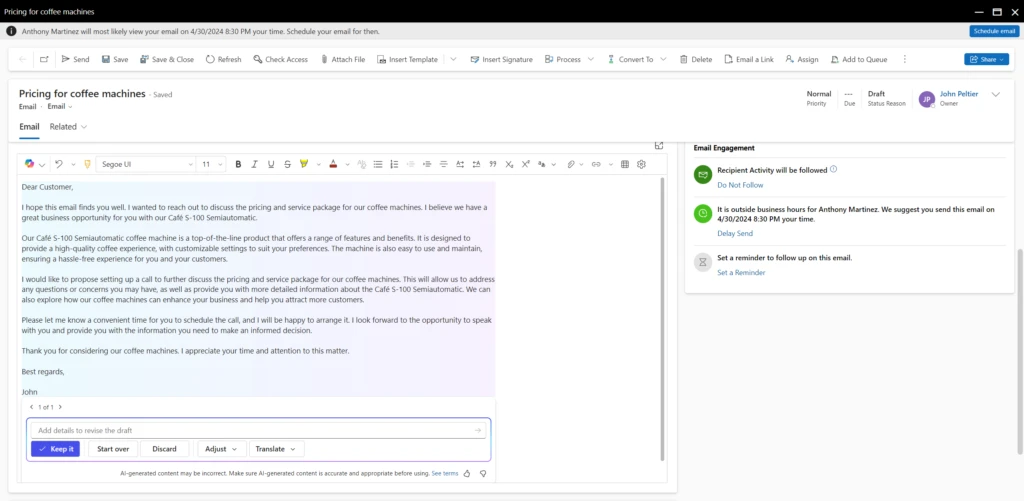
The seller can prompt Copilot to draft an email
Copilot transforms email drafting into a more efficient and targeted process. Leveraging AI, it offers contextual suggestions based on the customer’s interaction history and previous communications. This not only speeds up the drafting process but also ensures that each email is personalized and relevant, significantly enhancing the quality and effectiveness of outbound communications.
Dynamic adjustments for tailored email interactions
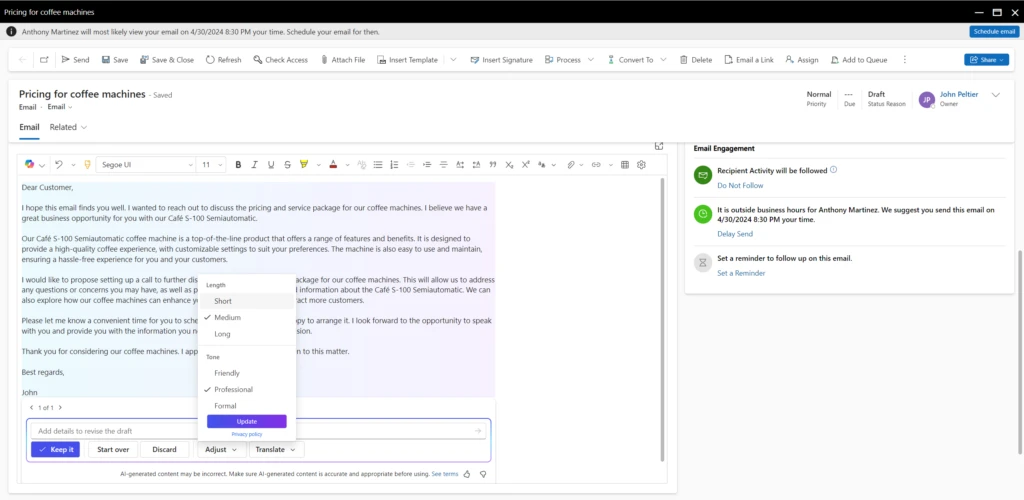
Adjust the length and the tone of the email using Copilot
Beyond basic drafting, the rich text editor equipped with Copilot allows for dynamic adjustments to emails. For example, fine-tuning aspects like language, tone, and style to better match the recipient’s expectations and the specific sales context. This adaptive functionality ensures that each email is crafted to maximize engagement and impact, fostering stronger customer connections and driving superior business results.
Advancing email communications with Copilot
The synergy between Copilot in Dynamics 365 Sales and the rich text editor marks a significant advancement in how sales professionals handle email communications. By employing AI for both drafting and refining emails, sales teams can optimize their time on high-value sales activities. As businesses navigate the complexities of digital interactions, Copilot emerges as an indispensable tool, empowering sales organizations to achieve efficiency and effectiveness in their communication strategies.
Next steps
Read more on Copilot in D365 Sales email integration:
This article is contributed. See the original author and article here.
The crucial role of backup and restore in ADCS
Active Directory Certificate Services (ADCS) serves as a pivotal part within identity and access management (IAM), playing a critical role in ensuring secure authentication and encryption. These functionalities are integral for fostering trust across the enterprise application and service ecosystem. In modern organizations, the significance of Active Directory Certificate Services has grown exponentially, fortifying digital identities, communication channels and data. Given its pervasive role, the potential loss of this service due to systemic identity compromise or a ransomware attack could be catastrophic. Microsoft advocates platform owners adopt an “assume breach” mindset as an initiative-taking measure against these sophisticated cybersecurity threats to ensure and preserve confidentiality, integrity, and availability of IAM based services.
As part of an “assume breach” approach, organizations must prioritize comprehensive backup and restore strategies within their ADCS infrastructure. These strategies are paramount for ensuring swift recovery and restoration of essential certificate services following a cyberattack or data breach. By keeping up-to-date backups and implementing effective restoration procedures, organizations can minimize downtime, mitigate potential damage, and uphold operational continuity amidst evolving security challenges.
Let us look at some of the services and features of an ADCS platform which organizations are dependent on:
Certificate enrollment and renewal: ADCS facilitates automated enrolment and renewal processes, ensuring prompt issuance and rotation of cryptographic keys to maintain security.
Key archival and recovery: Organizations can utilize ADCS to archive private keys associated with issued certificates, enabling authorized personnel to recover encrypted data or decrypt communications when necessary.
Certificate revocation and management: ADCS provides mechanisms for revoking and managing certificates in real-time, allowing organizations to promptly respond to security incidents or unauthorized access attempts.
Public Key Infrastructure (PKI) integration: ADCS seamlessly integrates with existing PKI infrastructures, enabling organizations to use established cryptographic protocols and standards to enhance security across their networks.
Enhanced security controls: ADCS offers advanced security controls, such as role-based access control (RBAC) and audit logging, empowering organizations to enforce granular access policies and keep visibility into certificate-related activities.
Now that we know what this service offers, imagine your organization as a fortified stronghold, wherein Active Directory Certificate Services and Active Directory Domain Services form the bedrock of the Identity and Access Management infrastructure. In case of a cybersecurity breach penetrating this stronghold, the backup and restoration process acts as a crucial defensive measure. It is not merely about restoring ADCS services: it is about swiftly and effectively rebuilding the stronghold. This guarantees the continuation of trust relationships and the seamless operation of vital IT services within the stronghold, such as remote access VPNs, consumer web services, and third-party self-service password reset tools—each of which are essential components for operational continuity, customer experience and business productivity. Without effective backup measures, the stronghold is vulnerable, lacking the protective mechanisms akin to a portcullis or moat.
The significance of thoroughly assessing all backup and recovery procedures cannot be overstated. This is akin to conducting regular fire drills, ensuring that the IT team is adept and prepared to respond to crises effectively. IT administrators must have the requisite knowledge and readiness to execute restoration operations swiftly, thereby upholding the integrity and security of the organization’s IT environment. Additionally, recognizing the potential exploitation of ADCS for keeping persistence underscores the imperative for vigilance in monitoring and securing ADCS components against unauthorized manipulation or access.
What are the key elements for a successful backup and recovery?
From a technical perspective, Active Directory Certificate Services (ADCS) backups must cover the foundational pillars of the service. These include the private key, the Certificate Authority (CA) database, the server configuration (registry settings) and the CAPolicy.inf file. Let us explain each in detail:
CA private key: The most critical logical part of a CA is its private key material. This key is stored in an encrypted state on the local file system by default. The use of devices like Hardware Security Modules (HSMs) is encouraged to protect this material. The private key is static, so it is recommended to create a backup directly after the deployment and to store it in a safe, redundant location.
CA database: By default, this repository holds a copy of all issued certificates, every revoked certificate, and a copy of failed and pending requests. If the CA is configured for Key Archival and recovery, the database will include the private keys for those issued certificates whose templates are configured for the feature.
Server configuration: These are the settings and configurations that dictate ADCS operations. From security policies to revocation lists settings, safeguarding the server configurations ensures that the ADCS can be restored with identical functionality.
CAPolicy.inf: The CAPolicy.inf file is used during the setup of ADCS and then during CA certificate renewal. This file may be used to specify default settings, prevent default template installation, define the hierarchy, and specify a Certificate Policy and Practice Statement.
How is ADCS backed up?
A practical approach to performing a backup involves utilizing ‘certutil,’ a command-line tool integrated into the Windows operating system. This tool offers a range of functions tailored for managing certificates and certificate services. Other methods encompass employing the graphical user interface (GUI) or PowerShell. To start a backup of the CA database using ‘certutil,’ adhere to the outlined example below:
certutil -backupdb -backupkey "C:BackupFolder"
The command syntax is as follows:
backupdb: Starts the backup process for the database.
backupkey: Safeguards the private key of the CA (requires providing a password).
C:BackupFolder: Specifies the path where the backup will be stored. It is important to use a secure location, ideally on a separate drive or device. Note: this folder must be empty.
Running this command starts the creation of a backup encompassing the CA database and the CA’s private key, thereby guaranteeing the safeguarding of the fundamental elements of the CA. Safeguarding these components is imperative, as malevolent actors may exploit the backup for nefarious purposes.
In addition to preserving the CA Database and the CA’s private key, for comprehensive restoration onto a new server, it is crucial to back up the registry settings associated with ADCS using the following command:
All settings on the earlier location of the CA database, as well as configurations related to certificate validity settings, CRL and AIA extensions, can be utilized during the recovery process.
If the source CA utilizes a custom CAPolicy.inf, it is advisable to replicate the file to the identical backup location. The CAPolicy.inf file is typically found in the %windir% directory (default location being C:Windows).
How can the service be restored?
Remove ADCS role(s)
If the source server is still available and a CA Backup is available, remove the CA role from it. This is required for Enterprise CAs that are domain-joined. If present, remove the “Web Server” based roles/features before the Certification Authority role.
Remove the source server from the domain
Reusing the same host name on the destination server requires that the source server either be renamed or removed from the domain and the associated computer object removed from Active Directory before renaming and joining the destination server to the domain.
Adding ADCS role(s)
After ensuring that the destination server has the correct hostname and is successfully integrated into the domain, continue to assign the CA role to it. If the destination server is already part of the domain, it needs Enterprise Admin permission to configure the ADCS role as an Enterprise CA.
Before advancing, transfer the backup folder to a local drive, and, if accessible, move the original CAPolicy.inf file to the %windir% folder on the destination server.
Launch the Add Roles wizard from Server Manager.
Review the “Before You Begin” page, then select Next.
On the “Select Server Roles” page, select Active Directory Certificate Services, then Next, then Next again on the Intro to ADCS page.
On the “Select Role Services” page, ensure only Certificate Authority is selected, then click Next. (Do not choose any other roles)
Configuring ADCS:
Now configure a clean ‘empty’ CA. This is done prior to restoring the configuration and database content:
Select the choice to “Configure Active Directory Certificate Services on this server.”
Confirm that the correct credentials are in place depending on the installation: Local Admin for Standalone CA, Enterprise Administrator needed for Enterprise certification authority.
Check the box for “Certification Authority.”
Select the desired option based on the source CA configuration (“Standalone” or “Enterprise”) on the “Specify Setup Type” page, then click “Next.”
Select “Root” or “Subordinate CA” on the “Specify CA Type” page, then click “Next.”
Select “Use existing key” on the “Set Up Private Key” page, then click “Next.”
Import the Private key from the backup folder copied previously. Select the key and click “Next.”
Configure the desired path on the “Configure Certificate Database” page, then select “Next,” then “Install.”
At this point we have restored the CA and have an empty database with default server settings.
Open “Certificate Authority” manager from Server Manager or from Administrative Tools.
Expand “Certificate Authority (Local)” right click “CAName,” and select “All Tasks,” and click on “Restore CA.”
Click “OK” to stop the service.
Select “Next” on the “Welcome to the Certification Authority Restore Wizard.”
Check only “Certificate Database” and “Certificate Database Log,” click “Browse” and target the backup folder. “C:BackupFolder”, click “Next” and click “Finish” then wait until the restore completes.
Click “Yes” to continue and start the service.
Expand “Certificate Authority (Local)” right click “CAName” and select “Issued Certificates” to verify the database was restored.
Restore registry settings:
After the database is restored, import the configuration settings that were backed up from the source CA’s registry.
Create a registry backup of the destination server:
Locate the “C:BackupFolderCAConfig.reg” file and double click on it to merge the settings, click “Yes” to continue and then “OK” on the Registry Editor confirmation window.
Restart the ADCS Service to verify the restored settings.
After everything is verified, restart the server to ensure it belongs to the “Cert Publishers” group.
Verify server status:
Open “Certificate Authority” manager from Server Manager or from Administrative Tools.
Expand “Certificate Authority (Local),” then “CAName” right click “Revoked Certificates” select “All tasks” then “Publish.” Select “OK” at the popup.
Run ADCSView.msc to verify the health of the destination CA server.
Test certificate issuance:
With the CA restored, test certificate issuance to ensure full functionality.
Publish any templates that were published before and ensure the CA issues certificates are issued as expected.
Note! We recommend an assessment be conducted on all certificate templates to confirm security settings and to reduce the number of templates if possible.
Conclusion
This article highlights the necessity of setting up and upholding a robust “back-and-restore” strategy as a primary defence mechanism against cyber threats. it becomes much more likely that recovery for ADCS will not be successful, and a complete rebuild will be required.
In addition to this, adopting a defence-in-depth approach is equally imperative. This involves implementing supplementary protective measures such as endpoint detection and response through Defender for Endpoint (MDE), or monitoring user and entity behaviour analytics with Microsoft Defender for Identity (MDI). These measures empower cybersecurity operatives to swiftly respond across multiple phases of MITRE ATT&CK, thereby safeguarding the organization’s digital ecosystem, particularly the pivotal identity and access management services.
Integrating the strategic management of ADCS (Active Directory Certificate Services) with these advanced security solutions further strengthens organizational defences against the continually evolving landscape of cyber threats. This strategy augments the resilience of the cybersecurity framework and ensures the continuity and integrity of organizational operations, particularly during the transition to a more secure ADCS infrastructure.
In conclusion, the adoption of a robust backup and restoration strategy, complemented by a multi-faceted defence framework that integrates ADCS management with innovative security solutions, creates a formidable shield against cyber threats. This approach bolsters cybersecurity resilience and fortifies organizational continuity and operational integrity in the dynamic landscape of evolving security challenges.
This article is contributed. See the original author and article here.
Microsoft Copilot is already helping individual employees boost productivity, creativity and time savings. With the announcements at Microsoft Build 2024, we’re delivering an entirely new set of capabilities that unlock Copilot’s ability to drive bottom-line business results for every organization.




Recent Comments