by Scott Muniz | May 19, 2021 | Security, Technology
This article is contributed. See the original author and article here.
CISA and the Federal Bureau of Investigation (FBI) have updated Joint Cybersecurity Advisory AA21-131A: DarkSide Ransomware: Best Practices for Preventing Disruption from Ransomware Attacks, originally released May 11, 2021. This update provides a downloadable STIX file of indicators of compromise (IOCs) to help network defenders find and mitigate activity associated with DarkSide ransomware. These IOCs were shared with critical infrastructure partners and network defenders on May 10, 2021.
CISA encourages users and administrators to review AA21-131A for more information.
by Contributed | May 19, 2021 | Technology
This article is contributed. See the original author and article here.
1. Excellence in SAP Operations & Connecting SAP Systems to Azure Sentinel
SAP certified NetWeaver Applications running on Azure in 2014 and since this time thousands of customers have moved their SAP landscape to Azure. Many customers updated their SAP applications either to modern SAP Support Pack releases or migrated to S4 during the move to Azure.
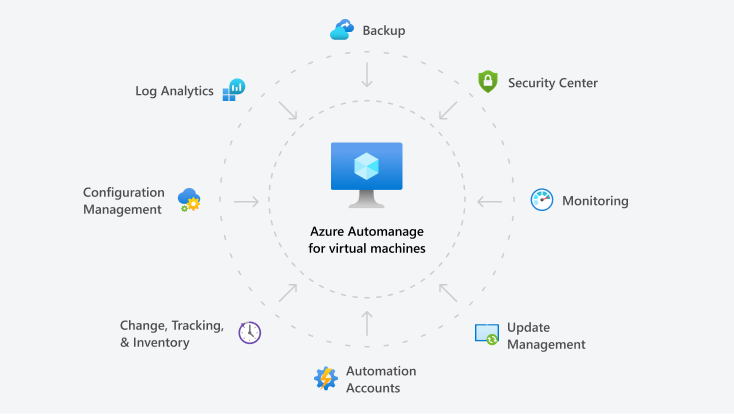
Customers have also leveraged many of the features built into the Azure platform to improve Security, Monitoring, Patching, Backup, Configuration Management and achieve better overall “Operational Excellence”.
More information about Azure Automanage can be found Azure Automanage | Microsoft Azure
Azure Sentinel is an integrated scalable, cloud-native, security information event management (SIEM) and security orchestration automated response (SOAR) solution. A good overview of Azure Sentinel can be found What is Azure Sentinel? | Microsoft Docs
Azure Sentinel: SAP Threat Protection extends this capability to be able to monitor and analyze application level events from SAP systems. This feature is currently in Preview, registration is available https://aka.ms/sapsecsurvey
SAP Threat Protection uses a Docker to host a “connector” VM that interfaces SAP to Azure Sentinel
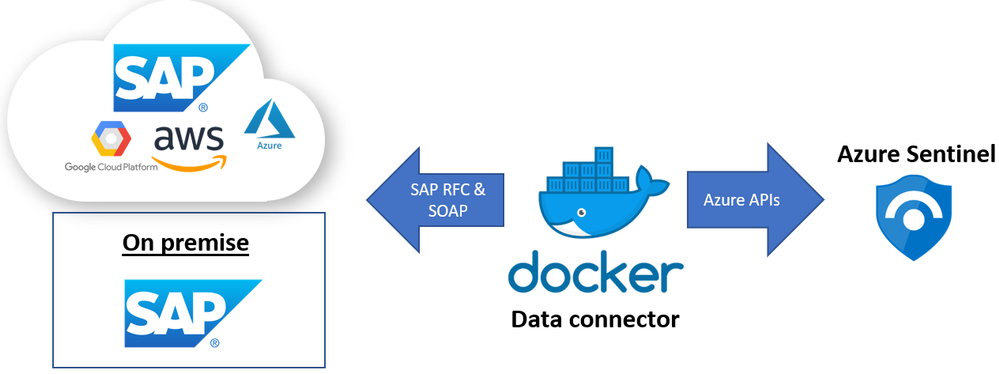
SAP Threat Protection is still in preview and the monitoring capabilities are still being defined. Below are some examples of events that can be monitored:
SAP Business Logic – transaction monitoring, User + Role management
SAP Application Layer – Authentication and Audit log
Database Layer (HANA) – user access and Backup/Restore
OS & Network Layer – file monitoring
More information about which events can be monitored is available to customers who join the Preview for SAP Threat Protection
Installation details:
- SAP Threat Protection can connect to SAP systems running on-prem, in private cloud, Azure or other public clouds
- The solution supports SAP NetWeaver ABAP systems with SAP_BASIS 740 and higher
- For optimal functionality please use SAP_BASIS versions 750 SP13 and higher .
- Make sure older systems have the following SAP Notes applied :
- SAP Note 2641084 – standardized read access for the Security Audit log data
- SAP Note 2173545 – CD: CHANGEDOCUMENT_READ_ALL
- SAP Note 2502336 – RSSCD100 – read only from archive, not from database
- Importing some SAP Transports may be required
- Each SAP system requires and each SAP client requires its own container instance
- The VM and Sentinel workspace can be in different Azure subscriptions and even different Azure AD tenants
- Each SAP connector instance (docker container) supports one SAP client
- The AuditLog file is across SAP clients (system wide) hence in a multi-client SAP system should only be enabled for one instance to avoid data duplication.
Sentinel Blog: Azure Sentinel – Microsoft Tech Community
Preview program at: https://aka.ms/SecurityPrP
Security community at: https://aka.ms/SecurityCommunity
Free public webinars series at: https://aka.ms/SecurityWebinars
Visit our YouTube channel: https://aka.ms/SecurityCommunityVideos
Sentinel Pricing: https://azure.microsoft.com/en-us/pricing/details/azure-sentinel/
Recommended training and certifications AZ-500(Microsoft Certified: Azure Security Engineer Associate) https://docs.microsoft.com/en-us/learn/certifications/exams/az-500
Thanks to Ravi Alwani for contributing this topic
New Azure Monitor for SAP Solutions HA Cluster features – Microsoft Tech Community – Thanks to
Ross Sponholtz for contributing this topic
2. Azure Snapshot Backup for Oracle (including ASM) & Oracle News
This topic contains information for customers running SAP on Oracle systems on Azure:
- Oracle customers including ASM customers can use Azure Backup to take snapshots to Backup or Restore their databases Back up and recover an Oracle Database 19c database on an Azure Linux VM using Azure Backup – Azure Virtual Machines | Microsoft Docs
- The recommended versions are Oracle Linux (OL) 8.3 recommended OL Kernel patch is 5.4.17-2102.200.13.el8uek.x86_64 and Oracle Database 19.10 SBP
- The latest supported Oracle Database release is in 2799920 – Patches for 19c: Database
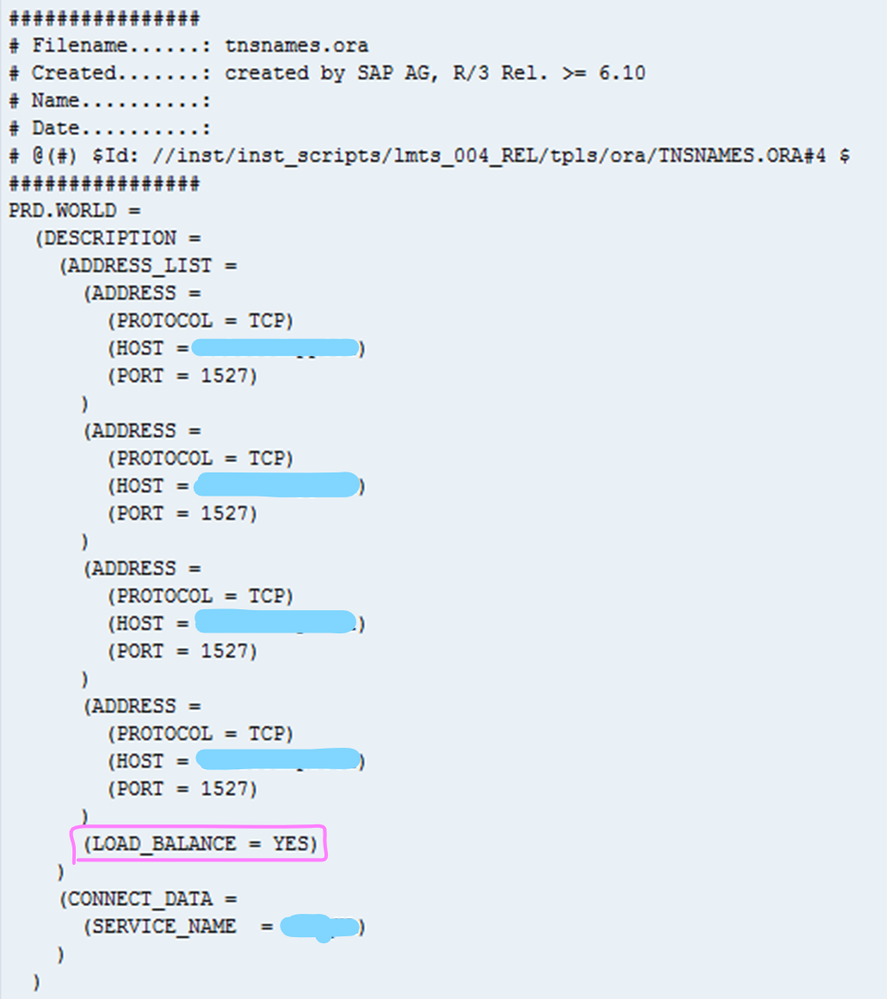
- When setting up Oracle DataGuard on Azure the tnsnames.ora file should be configured as explained in this document
- In all cases it is recommend to review this SAP Note if there are performance problems 1817553 – Checklist for performance problems in SAP Oracle Databases
3. Azure Storage Block Size Physical Constrains & DBMS Disk Storage Guidance
Several customers have encountered issues with DBMS server High Availability technologies and the different types of storage available on Azure. Software based DBMS replication technologies such as SQL Server AlwaysOn, Hana HSR and Oracle DataGuard may not function correctly if the Primary and Secondary(ies) Node are using Azure storage with a different sector size.
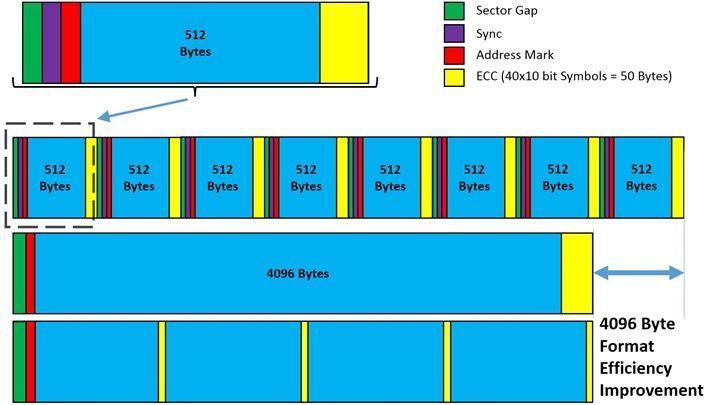
Most Enterprise DBMS storage engine logic detects the disk Sector Size and will align the Transaction Log File(s) metadata and internal boundaries to match the Sector Size (either 512 or 4096 bytes). When using SQL AlwaysOn, HSR or DataGuard with different Sector Sizes on Primary and Replica nodes alignment problems may occur. Some DBMS may handle this (such as SQL Server which will print a warning in the errorlog) and some may not.
The SAP on Azure storage guidance has been updated to include a recommendation to ensure the sector size is the same between HA nodes. Depending on the DBMS and the type of replication technology used the same constraints around Disk Sector size may exist for Disaster Recovery nodes as well.
“Bytes Per Sector”
|
“Bytes per Physical Sector”
|
Drive Type
|
Azure Storage
|
4096
|
4096
|
4K Native
|
UltraDisk
|
512
|
4096
|
Advanced Format (also known as 512E)
|
Premium
|
512
|
512
|
512-byte native
|
–
|
The Linux command fdisk -l or Windows command fsutil ntfsinfo

The diagram below illustrates the benefits of 4K Native.
Additional information for SQL Server can be found here Message misaligned log IOs which required falling back to synchronous IO in SQL Server Error Log – Microsoft Tech Community
SAP HANA Azure virtual machine storage configurations – Azure Virtual Machines | Microsoft Docs
Azure storage types for SAP workload – Azure Virtual Machines | Microsoft Docs
4. Linux Cluster Updates – Redhat & Suse
Customers running on Suse 15 may experience an issue similar to the below – Failed: ‘ServicePrincipalCredentials’ object has no attribute ‘get_token’, if using Azure Fence Agent.

This problem was introduced with package version python3-azure-mgmt-compute-17.0.0-6.7.1 and may occur on any of the SLES 15.X images. The problem can be resolved by downgrading the “python3-azure-mgmt-compute” package
To downgrade the package run this command (two hyphens in front of oldpackage)
#zypper install –oldpackage python3-azure-mgmt-compute=4.6.2-6.3.1
After downgrading it is possible to prevent upgrades of this package with this command:
#zypper addlock python3-azure-mgmt-compute
Customers running Redhat 7.x and 8.x with Pacemaker clusters are recommended to review this Redhat article
This blog will be updated with more information about this issue shortly.
An azure-lb resource fails with error “kill: (xxxx) – No such process” in a Pacemaker cluster – Red Hat Customer Portal
5. Moving Job Logs from Filesystem to Database
In SAP Basis release SAP_BASIS 7.51 it is possible to move Job Logs from the file system to the database. As of SAP_BASIS 7.52 this behavior is defaulted (though it is possible to switch to file system via parameters).
This topic is explained in SAP Note 2360818 – Job log in the database
Instead of storing job log data on the file system this information will be stored in a number of tables TBTCJOBLOG0-9
Very large global single instance SAP systems can have millions and in some cases tens of millions of files in /sapmnt. The majority of these files are usually Job Logs. Customer moving very large systems to Azure with more than 200,000-300,000 files in the /sapmnt file system should test carefully.
Microsoft delivers a tool called diskspd for Windows and Linux that can be used to test disk performance.
It is recommended to follow the process below when moving a large system with a very large /sapmnt to Azure:
- Monitor the total number of files on /sapmnt. Determine if Job Logs comprise the majority of the files
- If possible switch to storing the Job Logs in the database
- If possible clean up Job Log files more regularly
- Use sysstat/SAR, Perfmon or SAN specific tools to monitor the IO patterns on the storage sharing /sapmnt
- Create a /sapmnt on Azure with the same performance capability as measured in step #4
- Run diskspd on this empty file system
- Copy the contents of /sapmnt to the /sapmnt file system on Azure
- Rerun diskspd on the file system on Azure with many files – compare the results to #6
A sample command line that would stress a disk is below
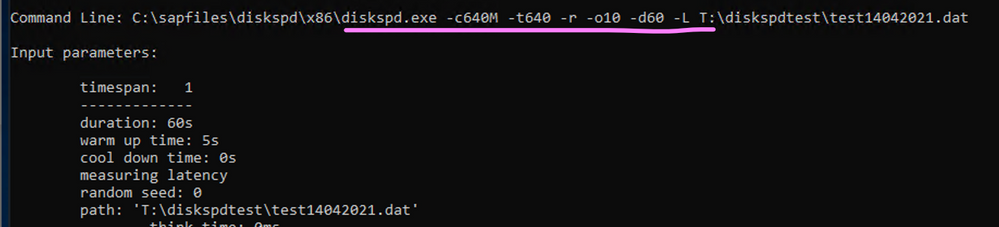
Download Diskspd for Windows and Linux
Use DISKSPD to test workload storage performance – Azure Stack HCI | Microsoft Docs
GitHub – microsoft/diskspd-for-linux: A disk io load-generator and benchmarking tool for Linux, based on the Windows tool diskspd.
How to use Diskspd to check IO subsystem performance – SQLTerritory.com
https://wiki.scn.sap.com/wiki/display/SI/SAP+Kernel%3A+Important+News
6. Optimizing DMO Migrations to Azure – Some Basic Infrastructure Tools
SAP DMO can be used to directly migrate from AnyDB -> SQL Server or to Hana, perform an upgrade and migrate to another datacenter such as Azure. DMO offers a number of different “Zero Downtime” options. These are explained very well in this blog:
Downtime Optimization Approach – Let’s talk all about different ZERO’s | SAP Blogs
This blog explains how to feed a DMO test cycle with the results of a previous test cycle thereby automatically optimizing table splitting – MIGRATE_UT_DUR.XML and MIGRATE_DT_DUR.XML
DMO: optimizing system downtime is timeless… | SAP Blogs
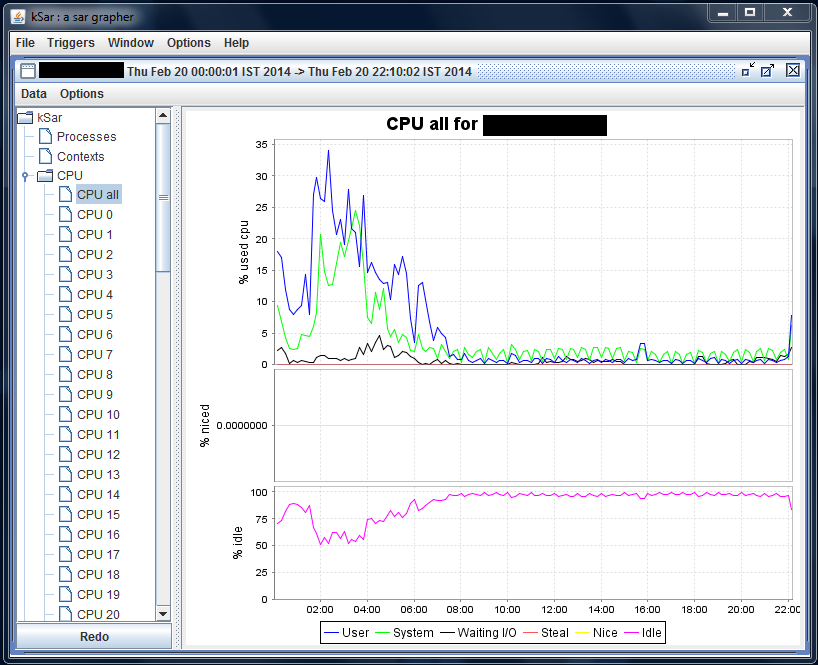
There are two tools that are very useful to isolate and determine the source of resource constraints during a DMO test cycle. During the DMO process writing to the Transaction Log and the DBMS Checkpoint/Savepoint processes in may become a critical gating factor. Another possible problem that is easily identified with these tools is asymmetric CPU load (one CPU core pegged at 100% for long periods of time while other CPUs are at 0%). NMON and SAR allow very clear instant and historical visualization of key performance metrics.
On the Hana DB server and the VM(s) running DMO it is highly recommended to install nmon and sysstat(SAR).
- Unfortunately NMON is not available in any respository such as zypper, apt, yum and must be downloaded http://nmon.sourceforge.net/pmwiki.php
- sysstat or SAR may or may not be installed and activated by default. Typically most Suse gallery images have SAR running by default. Check the directory /var/log/sa. If the directory does not exist or does not contain recent sarXX files then follow the steps below
- KSAR is a graphical tool that presents system performance information in a simple and easy to interpret way. This tool requires a runtime JVM https://github.com/vlsi/ksar
If sysstat needs to be installed follow the steps below
# sudo yum install sysstat
# sudo service sysstat restart
Redirecting to /bin/systemctl restart sysstat.service
The /var/log/sa/sarXX files can be copied onto a Windows PC with sftp
sftp -i <keyfilename>.pem azureuser@<xx.xx.xx.xx>
get /var/log/sa/sar<XX>
Run “Java -jar C:sap_mediaksar.jar“
7. Windows Cluster Across Azure Regions
Recently some customers and partners have asked about Azure Cross Region clusters.
Technically this is possible, though this deployment pattern has not been tested or validated on Azure so far.
The SAP note 1425520 – Disable NI cache for host and service names prevents the SAP application server from caching hostname to IP address lookups. This forces more calls to DNS which in turn may need tuning to lower the TTL (Time to Live).
The blog below and attached video are essential reading for any customer considering such a solution.
Can I run an SAP system in different network subnets? | SAP Blogs
SAP NetWeaver on Network Level (ondemand.com)
Cross region geoclusters for SQL Server are already supported and documented
8. Update on Support Matrix for SAP on Azure
In recent months many new features have become available for SAP customers. The list below is a very brief overview of recommended features and updated documentation
- New VM types certified for Hana & NetWeaver!
These new VMs based on Intel® Xeon® Platinum 8280 (Cascade Lake) processor with an all core base frequency of 2.7 GHz and 4.0 GHz single core turbo frequency deliver an increase from 134,000 SAPS to 170,000 SAPS for 128 cpu configurations. A new 192 cpu VM delivers 256,000 SAPS. Note the restrictions on OS versions. Check this link for Hana Certifications
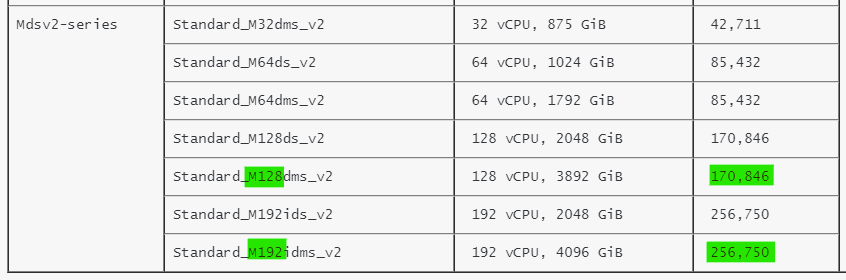
https://techcommunity.microsoft.com/t5/running-sap-applications-on-the/general-availability-of-m-series-msv2-mdsv2-medium-memory-vms/ba-p/2271293
https://docs.microsoft.com/en-us/azure/virtual-machines/msv2-mdsv2-series
SAP Note 1928533 already shows Msv2/Mdsv2 in the chapter “Supported Azure VM types for SAP products on Windows and Linux”
- Azure Hana Large Instances now support a 12TB DRAM + 12TB Intel Optane configuration, improving TCO and performance. A new benchmark result has been published here
- Azure offers the ability to run IBM pSeries and Nutanix environments. The certification and support of SAP NetWeaver and Hana on these solutions is handled by the respective vendor.
Skytap on Azure (microsoft.com)
Hybrid Cloud Solutions with Nutanix and Microsoft Azure
- Multiple Hana datafile support for ANF. There is a 16TB maximum file size limit on NFS therefore multiple Hana datafiles are required for large customers. HANA Data File Partitioning – Installation – Microsoft Tech Community
- It is now possible to backup Azure Files in Azure Backup Back up Azure file shares in the Azure portal – Azure Backup | Microsoft Docs
9. Gen2 Azure VM Does Not Reboot After Suse 15.x Upgrade
Customers running Suse 15 on Generation2 VMs may notice that a VM fails to reboot after an in-place service pack upgrade.
The problem may occur during any upgrade vector such as from the original SLES 15 RTM release to SLES SP1 or SLES SP1 upgrading to SLES SP2.
Service Pack upgrades on Suse Pacemaker systems are generally not recommended so this problem is so far confined to SAP Application servers or surrounding VMs such as Webdispatcher. The issue exclusively applies to Generation2 Virtual Machines and does not apply to Generation1. SLES released a TID with the way to get out of the situation after an unsuccessful post-upgrade reboot or what to do after the upgrade finished before you reboot the VM in this article: grub2 error: symbol `grub_file_filters’ not found | Support | SUSE
Customers planning to upgrade their SLES 15.x versions to a more recent service pack please review this TID.
Linux Rescue VM for Suse Chroot environment in a Linux Rescue VM. – Virtual Machines | Microsoft Docs
10. Windows & SQL Server Topics
There are several new and important Windows and SQL Server topics:
SQL Server 2012 is nearing end of life and in addition to end of life there may be some licensing changes for 3rd party cloud deployments
3049393 – SQL Server 2012 end of Microsoft Extended Support in July 2022
Azure Backup for SQL Server now fully supports nearly all SQL Server Backup & Restore Restore SQL Server databases on an Azure VM – Azure Backup | Microsoft Docs
More features for SQL Server can be found here SQL Server – Microsoft Tech Community
More features for Azure Backup can be found here Azure Backup (@AzureBackup) / Twitter
Customers with hardened Active Directory (“RestrictRemoteSam” security feature) may observe this error in the SAPInst errorlog – OS message 1332 (No mapping between account names and security IDs was done). Use the latest version of SWPM
SWPM now fully supports hardened Domain controllers
3030014 – SWPM stops during check of group membership
2831797 – How to disable page locks during a SAP NetWeaver import on MS SQL Server to prevent deadlocks on split tables
2814195 – Can use a Query Store?
2807743 – Release planning for Microsoft SQL Server 2019
2751450 – SAP Systems on Windows Server 2019
3004493 – 500ms delays in communication between ABAP and MS SQL database
2931465 – Reduce network latency (RTT) using Proximity placement groups on Microsoft Azure – NetWeaver
Additional Links & Notes
Azure Certification and Training courses
Collections – MicrosoftAzuretrainingandcertifications | Microsoft Docs
SAP on Azure Free Online Training Course. Exam AZ-120: Planning and Administering Microsoft Azure for SAP Workloads
https://docs.microsoft.com/en-us/learn/certifications/exams/az-120
A free Certification Exam offer is here https://docs.microsoft.com/en-us/learn/certifications/microsoft-build-cloud-skills-challenge-2020-free-certification-exam-offer
The main SAP on Azure site https://azure.microsoft.com/en-us/solutions/sap/
SAP on Azure Resources https://azure.microsoft.com/en-us/solutions/sap/resources/
SAP on Azure Updates on the main Azure site https://azure.microsoft.com/en-us/updates/?query=sap
SAP on Azure Documentation “Getting Started” https://docs.microsoft.com/en-us/azure/virtual-machines/workloads/sap/get-started
Azure Charts – Your Cloud Radar https://azurecharts.com/
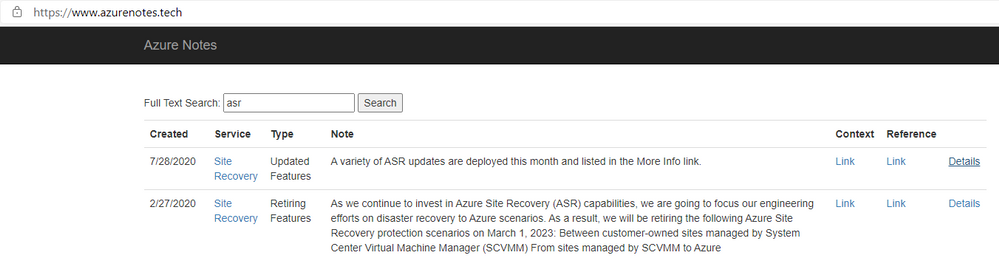
https://www.azurenotes.tech allows you to filter the very large number of new features, updates and documentation references for a given Azure feature (in the example below ASR)
3rd party content in this blog is used under “fair use” copyright exception for promoting scholarship, discussion, research, learning and education

by Contributed | May 19, 2021 | Technology
This article is contributed. See the original author and article here.
Agenda:
May’s call, hosted by David Chesnut, featured the following presenters and topics:
- Abid Rahman announced the GA of keyboard shortcuts and shared plans for the feature going forward. – 00:59
- Sohail Zafar announced the GA of contextual tabs and updates about the feature and plans going forward. – 11:03
- Special guest presenter Damien Bird (DamoBird365) demonstrated how to use Office Scripts with Power Automate to generate and fill in an invoice with data from SharePoint, and then save to a PDF. – 19:57
- Juan Balmori shared Outlook updates on event-based activation and announced new preview events. – 35:09
Q&A (Question & Answers)
Unfortunately, we had some issues with the chat during the call. We apologize to folks who were not able to ask a question. If you have a question, you can reach out to us by using our short survey form. We’ll address any questions in the form during the next call.
Is it possible to see a demonstration of debugging Outlook add-ins in the Outlook application on mobile devices? Ideally for a local developer instance of an add-in server rather than one publicly accessible (since a hurdle is getting the mobile device to communicate successfully with lab instance of add-in server). We’ve encountered issues on Android with certificates running lab instances of add-ins so would like to see a demonstration of recommended approach to testing on mobile devices.
Thanks for this request! We’re working to schedule this demo this on a future call.
When the Outlook REST API is decommissioned in November 2022, what API should add-ins deployed to customer hosted Exchange Servers (2016/2019) use for mobile support? Will the Outlook REST API remain active for Exchange Server and just be decommissioned for O365 accounts?
We’re still working through details on this, and we plan to share more guidance in the future.
Is there any movement on supporting reading values, such as AppDomains and custom properties, from the add-in manifest at runtime through Office.js? The request has come up over the years on forums and been raised on UserVoice. We would prefer to write a key and value to the manifest, instead of passing values to URL endpoints, as this opens the door to people injecting their own values outside of the manifest to those endpoints.
This feature is not on our backlog. We migrated UserVoice requests that had over 100 votes to our new Microsoft 365 Developer Platform Ideas Forum. We’d ask that you Submit an Idea on this page and recreate your request. If there’s enough interest from the community we’ll definitely consider it. Thanks!
What is the roadmap for Office.js for PowerPoint? When will it achieve feature parity with VSTO APIs?
VSTO is a huge API surface, which is why we approach building out the Office JS API based on prioritized scenarios. It’s tremendously helpful to understand the scenarios you are trying to unlock and what API’s you need. That helps us prioritize. Please let us know which scenarios you need enabled on our Ideas page and use the “Office Add-ins development” label. We’re planning to deliver increased API surface area for PowerPoint going forward.
In Excel on the web, when you close an Office Add-In, it creates a bar on the left side of Excel and puts an icon for the add-in on that bar, allowing the user to quickly show or hide add-ins from there. Will this be available in Excel on the desktop?
Thanks for this feature request! Can you let us know more about this on our ideas page and provide a screen shot to help us understand better?
Will you support Excel.Range.Interior characters and the ability to apply formatting at the character level?
Thanks for this request! We’re looking into supporting this. Can you please create a request for this on our ideas page?
Resources:
Keyboard shortcuts
Custom contextual tabs
Office Scripts demo by Damien Bird
Outlook event-based activation
Office Add-ins community call
Office Add-ins feedback
The next Office Add-ins community call is on Wednesday, June 9, 2021 at 8:00AM PDT. Get the calendar invite at https://aka.ms/officeaddinscommunitycall.
by Contributed | May 19, 2021 | Technology
This article is contributed. See the original author and article here.
Today, we are releasing an update (“hotfix”) to our latest generally available version of Windows Admin Center! Windows Admin Center version 2103.2 is now available in preview. Thank you to our customers, partners, and fans for helping us to continue to improve and make Windows Admin Center better! We’re working constantly to ensure users of our product have the best user experience.
This version of Windows Admin Center includes key bug fixes and feature updates to the Azure sign in process, support for Azure China, as well as additional updates to the Events and Remote Desktop tool experience.
Download Windows Admin Center v2103.2 today!
Platform updates
Bug fixes
“Access Denied” fixed
We know several users were met with an “Access denied” error upon starting Windows Admin Center and were unable to use the Windows Admin Center v2103 as a result. We have updated the logic of our automatic extension updates feature to fix this issue.
PowerShell commands fixed
In the v2103 release, many users were unable to utilize PowerShell to manage their Windows Admin Center settings and connections. In this release, you should be able to effectively use these commands to configure your Windows Admin Center gateway.
Certificate error fixed
We know some users were having difficulties navigating in v2103 and kept being presented with an SSL certificate error message. In this release, we have added a fix for this issue and this SSL certificate error message should not occur.
Windows Admin Center now supports signing into the Azure China cloud
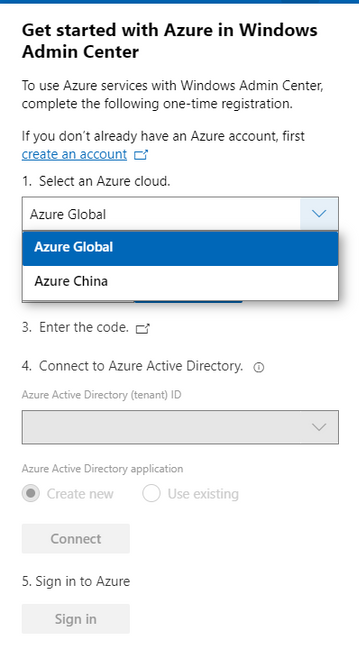
The request for Windows Admin Center to expand their Azure support matrix to sovereign clouds has been a long-standing ask, especially as we continue to introduce additional hybrid capabilities to Windows Admin Center. In this release, when you register your gateway to Azure, you will be prompted to select the cloud you’d like to register in. The two options in this dropdown are Azure Global and Azure China, with Azure Global selected by default. After registering your gateway with your selected cloud, Windows Admin Center will assume that further Azure operations, like Azure sign-in, will be done through the cloud your gateway is registered in.
Some of the Azure services included in Windows Admin Center are not currently supported in Azure China. For more detailed information on the regional support for each Azure service, visit the Microsoft Azure website.
Other updates
- Option to “Install now” for automatic updates (in Windows Admin Center update settings)
- Improvements to the Azure sign-in process and bugfixes
- Updates to notification styling
- Accessibility improvements and bug fixes
Core management tools
Events tool updates
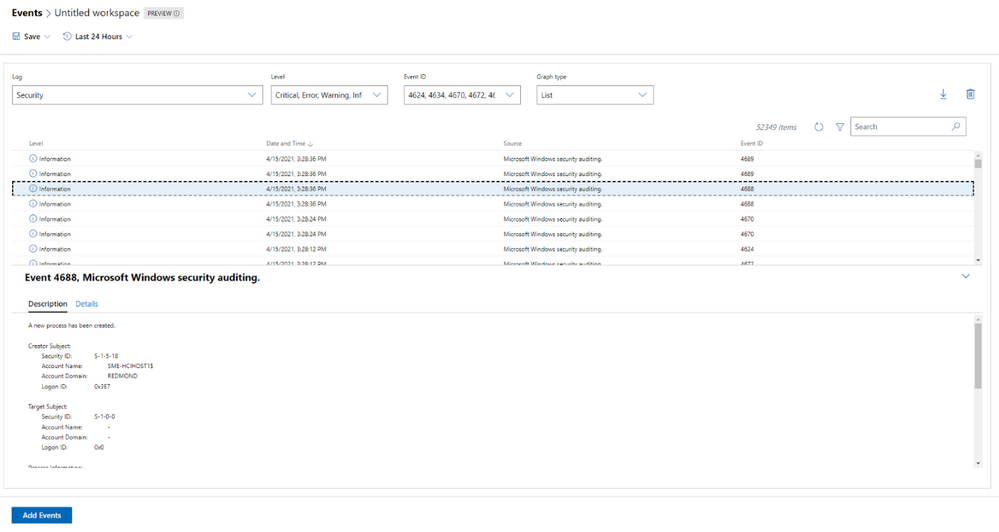
When we released the new look of the Events tool in our 2103 release, we did so with the caveat that not all the existing Events tool functionality was available in this new experience. In this release, we work towards rectifying that with the following improvements:
- The Details pane is now available in the new experience.
- We’ve fixed loading issues that occurred when changing event attributes while viewing events in stacked bar format.
- We’ve tweaked the dropdown menus slightly, so the displayed information remains accurate, even when you modify attributes of an event.
Remote Desktop tool updates
We’ve made a few changes to the Remote desktop tool in this release based on feedback we’ve received through UserVoice.
Windows Admin Center uses TLS ciphers in the Remote Desktop tool when connecting to a client machine. Historically, many of the ciphers offered by Windows Admin Center in this tool were cipher block chain (CBC) ciphers. In this release, we’ve upgraded the remote desktop web client library, and it now includes a wider selection of supported ciphers for you to choose from when you’re setting up RDP on your Windows Admin Center gateway. You should now be able to select ciphers from several suites, with options for both CBC and Galois/Counter mode (GCM).
Additionally, several users had reported through UserVoice that the language of their keyboard in the Remote Desktop tool did not match the language that had been selected. This was a large fix and it is currently only available to users who have access to our Windows Admin Center Insiders extension feed. To add the Insiders extension feed, navigate to the Feeds tab in Extension manager and add https://aka.ms/wac-insiders-feed to the feed list. Then, look for the updated “Remote Desktop” extension.
The Windows Time service extension is now in preview!
The Windows Time service extension uses the Windows Time service (W32Time) to synchronize the date and time for all computers running in Active Directory Domain Services (AD DS). Time synchronization is critical for the proper operation of many Windows services and line-of-business (LOB) applications. The Windows Time service uses the Network Time Protocol (NTP) to synchronize computer clocks on the network. NTP ensures that an accurate clock value, or timestamp, can be assigned to network validation and resource access requests.
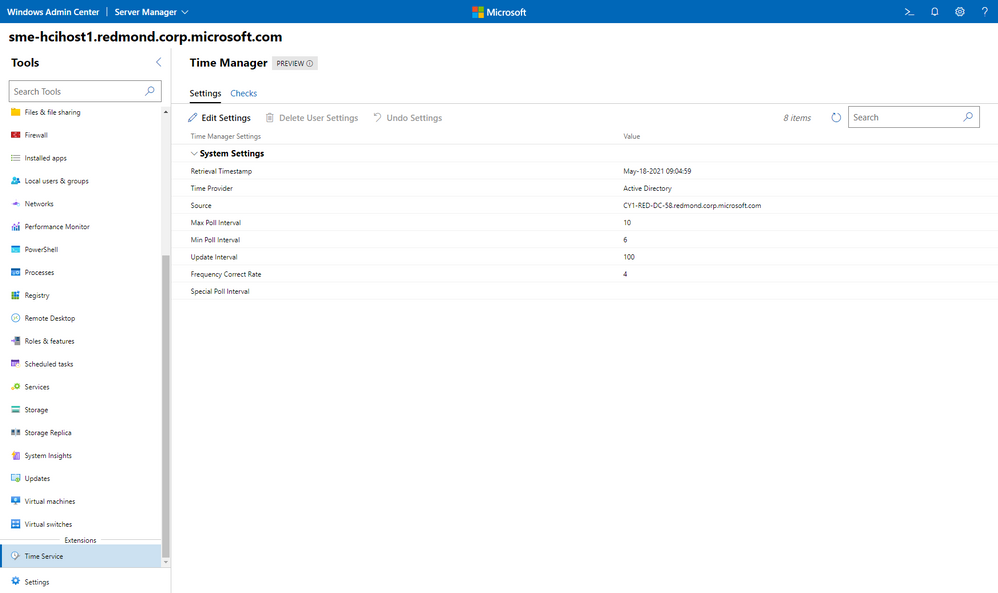
This extension is currently only available to users who have access to our Windows Admin Center Insiders extension feed. To add the Insiders extension feed, navigate to the Feeds tab in Extension manager and add https://aka.ms/wac-insiders-feed to the feed list.
Other changes
- Azure hybrid center bug fixes – We want your experience using Windows Admin Center and Azure to be clean and seamless. In this release, we made several bug fixes to enhance the look of the tool.
- Azure Arc bug fixes – In this release, we improved the Azure Arc user experience by fixing several bugs. Users should no longer face issues with the links in the Azure Arc tool and the disconnect experience.
Partner ecosystem
Windows Admin Center continues to value the collaboration efforts we have with our partners, and these past few months have been a very active period! Since our 2103 release in March, five of our partners have released new or updated versions of their extensions. If you’re interested in developing a Windows Admin Center extension, visit our documentation to get started.
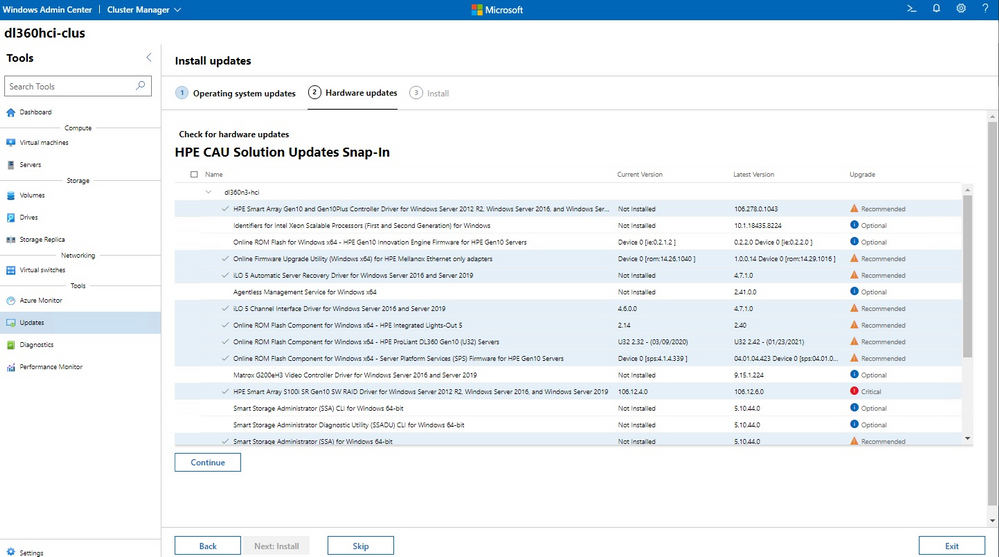
The HPE Azure Stack HCI Cluster Deployment and Update Snap-in is now available. The HPE Deployment snap-in reports the firmware and software inventory and status generated by HPE Smart Update Manager (SUM), then initiates installation of the selected components, followed by showing the completion status. The HPE Update snap-in reports the firmware and software inventory and status generated by HPE Smart Update Manager (SUM). The selected components will get updated on the cluster from Cluster-Aware-Updating (CAU) orchestration.
The cluster deployment snap-in will appear in the Azure Stack HCI cluster create wizard, and the update snap-in will appear in the update wizard in the Updates tool when connected to a cluster.
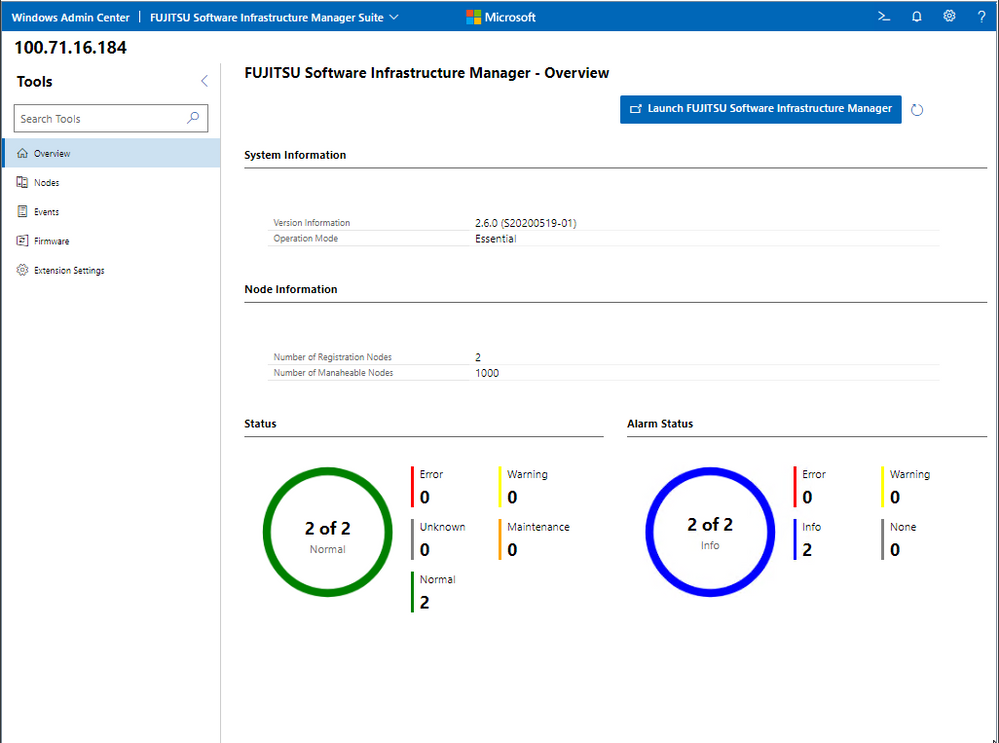
Fujitsu Software Infrastructure Manager (ISM) is now available. By installing ISM, multiple and various types of information and communications technology (ICT) devices can be managed in an integrated way. With this software, you can monitor the status of all the ICT devices in a data center or a machine room. You can also execute batch firmware updates for multiple devices and configure servers automatically. It can reduce costs of operation management and increase the operation quality.
Other partner extension updates
- DataON MUST Pro v2.1.0 – This version of DataON MUST Pro includes slight improvements to the inventory page.
- Fujitsu ServerViewR RAID v1.2.1 – The overview page has been updated to include a refresh button.
- Fujitsu ServerViewR Health v2.0.1 – There are several improvements in this release, including the addition of a refresh button to the overview page and new Windows Admin Center notifications for network error messages. Additionally, you can now perform health monitoring without ServerView agents.
- HPE Server and Azure Stack HCI v1.3.0 – The Inventory tab of the Server extension now reports SSD drive life expectancy and surfaces a warning message upon crossing a threshold. The Overview tab of the Azure Stack HCI extension has been updated with improved cluster classification and storage information reporting.
- Lenovo XClarity Integrator v3.1.23 – The newest release of this extension includes several bugfixes.
- QCT Management Suite v2.3.0 – Updates to this extension include Redfish support, a redesigned overview page, optimization for update experiences, and LLDP support.
Download today!
We hope you enjoy this latest update of Windows Admin Center, the various new functionality in preview, and all the extensions now available. Learn more and download today!
As always, thanks for your ongoing support, adoption, and feedback. Your contributions through user feedback continue to be very important and valuable to us, helping us prioritize and sequence our investments.
<3,
Windows Admin Center Team (@servermgmt)
by Contributed | May 19, 2021 | Technology
This article is contributed. See the original author and article here.
Join Azure Storage product teams and your peers at Build to take part in meaningful conversations about the tools you use every day. Share insights, discover new perspectives, and problem-solve in a collaborative environment to shape the future of Microsoft products.
Check out these product roundtable related to Azure Storage:
Designing and building data-centric cloud native applications
Tuesday, May 25 | 9:30AM – 10:30AM PDT
Azure Storage is a key enabler for cloud native application development and deeply integrated with almost every Azure service. We’ve built key features in the storage services for mobile and web app development, serverless computing and containerized workloads. In this roundtable, we’ll present the upcoming roadmap for these features and welcome your feedback. Share how you’re designing and building apps that work with persistent data and how we can improve to help you build great apps.
Build and run stateful container applications on Azure
Wednesday, May 26 | 3:00PM – 4:00PM PDT
Customers are increasingly using stateful container applications leveraging storage. These environments are prevalent both on-premises and cloud environments running at production scale. Containers provide simplicity, agility, scalability and mobility to applications but this requires careful planning when using state. We would like to learn about your experience running stateful applications on Azure or the Edge.
Register for Build 2021.
We are excited to see you there!
by Contributed | May 19, 2021 | Technology
This article is contributed. See the original author and article here.
Hello everyone, here is part 3 of a series focusing on Endpoint Protection integration with Configuration Manager. This series is recorded by Steve Rachui, a Microsoft principal premier field engineer.
This session focuses on the BitLocker management capabilities integrated into Configuration Manager. Steve details how to configure the integration, how it works and demonstrates the integration in action.
Next in the series Steve focuses on how Configuration Manager can be used to manage the integrated Windows Firewall settings.
Posts in the series
Go straight to the playlist
by Contributed | May 19, 2021 | Technology
This article is contributed. See the original author and article here.
Summary
As containers and cloud native workloads continue to grow, ensuring that customers can reliably acquire vendor artifacts becomes crucial. Microsoft is committed to offer its customers reliable and performant experience for pulling Microsoft container images from the Microsoft Container Registry (MCR or mcr.microsoft.com). MCR contains the full catalog of container images produced by Microsoft with their most up-to-date versions and tags. By leveraging Azure’s global footprint, MCR offers public access to Microsoft’s images globally. With that in mind, we are deprecating all /microsoft org container images hosted in Docker Hub repositories on June 30th, 2021.
How does this impact you?
If you continue to reference Microsoft container images using repositories in Docker Hub, this will have impact on your development, deployment, and automation scripts.
Examples for such references are: `FROM microsoft/*` in Dockerfile or `docker run microsoft/*` in automation scripts. You can leverage https://grep.app/ to discover such references in OSS scripts.
- Starting June 1st, 2021 pulls of microsoft/ org container images from Docker Hub registry will be throttled according to Docker Terms of Use. This will limit the number of pulls that you are allowed within certain time period.
- Starting July 1st, 2021 repositories from microsoft/ org on Docker Hub will be removed. At this point development, deployment and automation scripts that still reference /microsoft org images from Docker Hub registry will break.
To avoid any impact on your development, deployment or automation scripts, you must update `docker pull` commands, `FROM` statements in Dockerfiles, and other references to /microsoft container images to explicitly reference the mcr.microsoft.com registry.
We understand that certain repositories from microsoft/ org on Docker Hub registry are highly trafficked, and customers relying on them may not be able to complete these changes by June 30th, 2021. We are working to identify those repositories and provide extension for them. A list of such repositories and for how long they will be available will be published on MCR’s GitHub repository by June 1st, 2021.
Mapping of Docker Hub repositories to MCR repositories
Mapping between the repository names on Docker Hub and MCR can be found on MCR’s GitHub repository.
Guidance for Consuming Public Container Images
Having a controlled workflow for consumption of public content like container images from Docker Hub and MCR is a key for building a secured and reliable software supply chain. Please see the Open Container Initiative’s Consuming Public Content for general guidance and Azure’s guidance for consuming public content.
Background
Back in 2018, we announced the transition of Microsoft container images hosting to MCR with syndication to Docker Hub, which laid the ground for worldwide distribution of Microsoft container images. Last year Docker announced an update of their terms of use and plans for image retention – both changes impacting pulls of container images from Docker Hub. Microsoft and Docker have worked closely to provide smooth transition for customers who need to pull /microsoft org container images. Docker Hub pages were updated to reflect the new pull location, mcr.microsoft.com, and are continuously updated with information how to pull up-to-date tags from MCR. We will continue this collaboration to provide an easy and frictionless discoverability mechanism for Microsoft container images through Docker Hub.
How to get additional help?
We understand that there may be unanswered questions. You can get additional help by submitting an issue on GitHub or sending an email to mcrfeedback@microsoft.com.

by Contributed | May 19, 2021 | Technology
This article is contributed. See the original author and article here.
Tour your identity options when moving to the Zero Trust security model. Our last Essentials episode gave a high-level overview of the Zero Trust security model principles: identity, endpoints, applications, networks, infrastructure, and data.
Join our host, Jeremy Chapman, as he unpacks the foundational layer of the model with identity. As the primary control plane for Zero Trust, it acts as the front door for people, service accounts, and devices as each requests access to resources. Identity is at the core of the Zero Trust concepts of never trust, always verify and grant the appropriate level of access through the principle of least privilege.
Verify Explicitly
Azure AD — easily implement additional protections to verify explicitly Multi-factor authentication (MFA) — requires an additional authentication factor. Replace passwords with Microsoft Authenticator, Windows Hello, or FIDO2 keys. Activity reports in the Authentication methods — see who’s capable of MFA and passwordless authentication, how many recent registrations and by type. Usage — see the distribution of MFA sign-ins and by method, as well as the number of password changes and resets.
Least Privilege access
Conditional Access in Azure AD — uses real-time intelligence at the time of sign-in to assess the risk level, then blocks or grants access. Built-in Insights and Reporting — expose the impact of enabled policies pre- and post enforcement.
QUICK LINKS:
00:37 — Demo in Azure AD
01:47 — Azure AD Application Proxy
02:50 — How to set up multi-factor authentication
04:44 — Activity Reports for admins
05:21 — Least privileged access and conditional access
07:22 — Conditional Access Insights and Reporting
08:16 — Wrap up
Link References:
For tips and demonstrations, check out our series at https://aka.ms/ZeroTrustMechanics
Learn more at https://aka.ms/zerotrust
Unfamiliar with Microsoft Mechanics?
We are Microsoft’s official video series for IT. You can watch and share valuable content and demos of current and upcoming tech from the people who build it at Microsoft.
Keep getting this insider knowledge, join us on social:
Video Transcript:
-Welcome back to our series for Zero Trust on Microsoft Mechanics. In our Essentials Episode, we gave a high-level overview of the principles for Zero Trust security model, spanning identity, endpoints, applications, networks, infrastructure, and data. Now in this episode, we’re going to unpack the foundational layer of the model with Identity, the primary control plane for Zero Trust, which acts as the front door for people, service accounts, and devices as each request access to resources. Identity is at the core of the Zero Trust concepts of verifying explicitly, and also granting appropriate level of access through the principle of least privilege.
-Now, this begins with Azure Active Directory and first establishing a common and unified directory service to authenticate users, devices, and processes to your resources, apps, and services. In the Microsoft 365 admin center, you’ll see your users, resource accounts, and all of your groups. Now this is powered by Azure Active Directory in the background. In fact, if I click into Azure Active Directory here under the admin centers, it’s going to take me right into Azure AD. And when I click into users, you’re going to see the same people and resource accounts and groups. As I mentioned, one of the key starting points as you move to Zero Trust is unifying the identity and access management environment with your other cloud apps and even your on-premise resources. So now I’m going to click into Enterprise Applications. And here you can see all the SaaS applications that I’ve configured in this tenant that are using an Azure AD to log in. Now, there are thousands of apps that you can choose from. And if I click into Box, for example, you’re going to see the groups that are assigned with access to this application. And under Conditional Access, you can even see some of the access policies assigned to this specific app. And we’re going to go further into Conditional Access policies in a moment.
-Before I jump into the user experience, I want to show you one more thing for connecting your web apps hosted on-premises, the Azure AD Application Proxy. Now here, I can see a few apps that I already have configured for Single Sign-in, along with connector and IP address information. But let me show you what it looks like then to log into a non-Microsoft SaaS app now that Azure AD is configured as its identity provider. So I’m here in the My Apps portal. And if you aren’t familiar with this, you can find it at myapps.microsoft.com. And it gives me a unified view of all the apps that Woodgrove, in this case, has set up for me. And most of these are SaaS apps, but you can see the ones branded Woodgrove. Those are actually on-prem apps. So those are going to work here as well. I’m going to click into ServiceNow and you’ll see that it authenticates me directly into that app.
-If I go back to My Apps, I’ll click into the one called Sales Dashboard On-Prem. And in that case, it’s using the Azure AD App Proxy that we saw earlier to connect me directly, even though that resource is on-premises. Now with Azure AD as your unified identity provider across your apps and services, you can easily implement additional protections to verify explicitly, and here multi-factor authentication, or MFA, is key. Now MFA goes beyond weak password-only authentication and requires an additional authentication factor, like a passcode relayed over an SMS or phone call. And you can even replace passwords using options such as Microsoft Authenticator, Windows Hello, or FIDO2 keys. I’m going to show you how to set this up as an admin. Then we’re going to walk through the user experiences as well as new admin reporting to monitor usage. Now to find your options to configure this in the Azure AD admin center, go to Security, then Authentication methods.
-Here you’ll find methods for FIDO2 security keys, along with the options to target users and groups. This one here is for the Microsoft Authenticator mobile app that you can use in combination with built-in biometric sensors for fingerprint or facial recognition on your phone. And you’ll even find the new Temporary Access Pass method that allows you to provide a time-limited passcode that you can use to register a passwordless sign-in method so that you don’t even need to share the password with the user. Since the account I’m using is setup for passwordless MFA with the Authenticator app, I’ll show you how this even works when logging into non-Microsoft sites directly. So for example, here with ServiceNow, I can use a tenant-specific URL to sign in directly with the service. You’ll see that the Azure AD sign-in page launches, and I’m going to type in my password and username. It’s going to then request passwordless sign-in to match the number on the screen, and then it’s going to send a notification on my phone.
-Okay, so now you can see the notifications come in, I’ll tap on that. And that’s going to open up the Authenticator app and I will then tap on the option here for 26. There we go. And that’s going to sign me in directly into ServiceNow, and I can start working from there. And for admins, we also have reporting to help you track how well your organization is doing. The Activity reports and the Authentication methods area help you to see who’s capable of MFA and passwordless authentication, how many recent registrations have been made, and by which type. Then in Usage, you can see the distribution of MFA sign-ins and by method, as well as the number of password changes and resets. And this will really help as you roll out new authentication methods and track usage over time. So now we’ve shown a few things that you can do to explicitly verify requests to your cross-cloud and on-prem resources and services.
-Another core tenant of Zero Trust is applying Least Privileged Access. So here in Conditional Access in Azure AD, it’s using real-time intelligence at the time of sign-in to assess the risk level of the user or sign-in, the device platform, along with the sign-in location, client apps and device state to make decisions, enforcing access policies in real time, either to block or to grant access. Now earlier, I showed you how ServiceNow could be accessed directly using Azure AD authentication. And in this policy, you’ll see that for ServiceNow you’ll need to log in with MFA. And because I use passwordless earlier that satisfied the requirement.
-A recent addition to Conditional Access is the ability to look at device filters. Now, these filters allow you to scope your Conditional Access policy to a group of devices. For example, you can decide to allow access to privileged resources only from secure access workstation VMs, or conversely, exempt MFA from shared meeting room devices like conference phones, Teams Meeting Room devices, or Surface Hubs. Just to show how this works, I’ll log into a VM that doesn’t meet our secure access workstation requirements, and try to reach the Azure portal. And you’ll see here that I’m blocked from going to the Azure portal. But now let me switch to a second VM that’s a secured access workstation, and you’ll see that when I try to access the Azure portal, it meets the requirements. And then it asks me to verify my identity using passwordless auth. And I’m granted access to my applications and resources in Azure.
-Now Conditional Access can also extend to specific sites and content. So for example, even though I can log into Woodgrove’s marketing site, as you can see here, if I go back to SharePoint’s home and then try to open a highly confidential site, like Project Saturn, you’re going to see that it requires step-up authentication, in my case, again, using passwordless auth, before it allows me to access the protected resource. And now here I can see Project Saturn’s site. So finally, as you roll out Conditional Access, built-in Insights and Reporting in Azure AD can expose the impact of enabled policies, both pre and post-enforcement. Now the Impact Summary is interactive. And for example, can help you identify why sign-ins are failing. And here you can see the device state, device platform, client app, sign-in risk and location. And detailed sign-in events can be found at the bottom of the page. Now, one tip here that you can use is to enforce policies as report only to gauge the impact of them before turning them on. This can help you avoid setting policies that may lock people out of resources they should be able to access.
-That was a tour of your identity options and all the considerations when moving to the Zero Trust security model. Up next, we’ll explore your options for endpoints and applications. And keep checking back to aka.ms/ZeroTrustMechanics for more in our series where I share the tips and hands-on demonstrations of how the tools for implementing the Zero Trust security model work across all the six layers of defense. Now you can also learn more at aka.ms/zerotrust. And thanks for watching.
by Contributed | May 19, 2021 | Technology
This article is contributed. See the original author and article here.
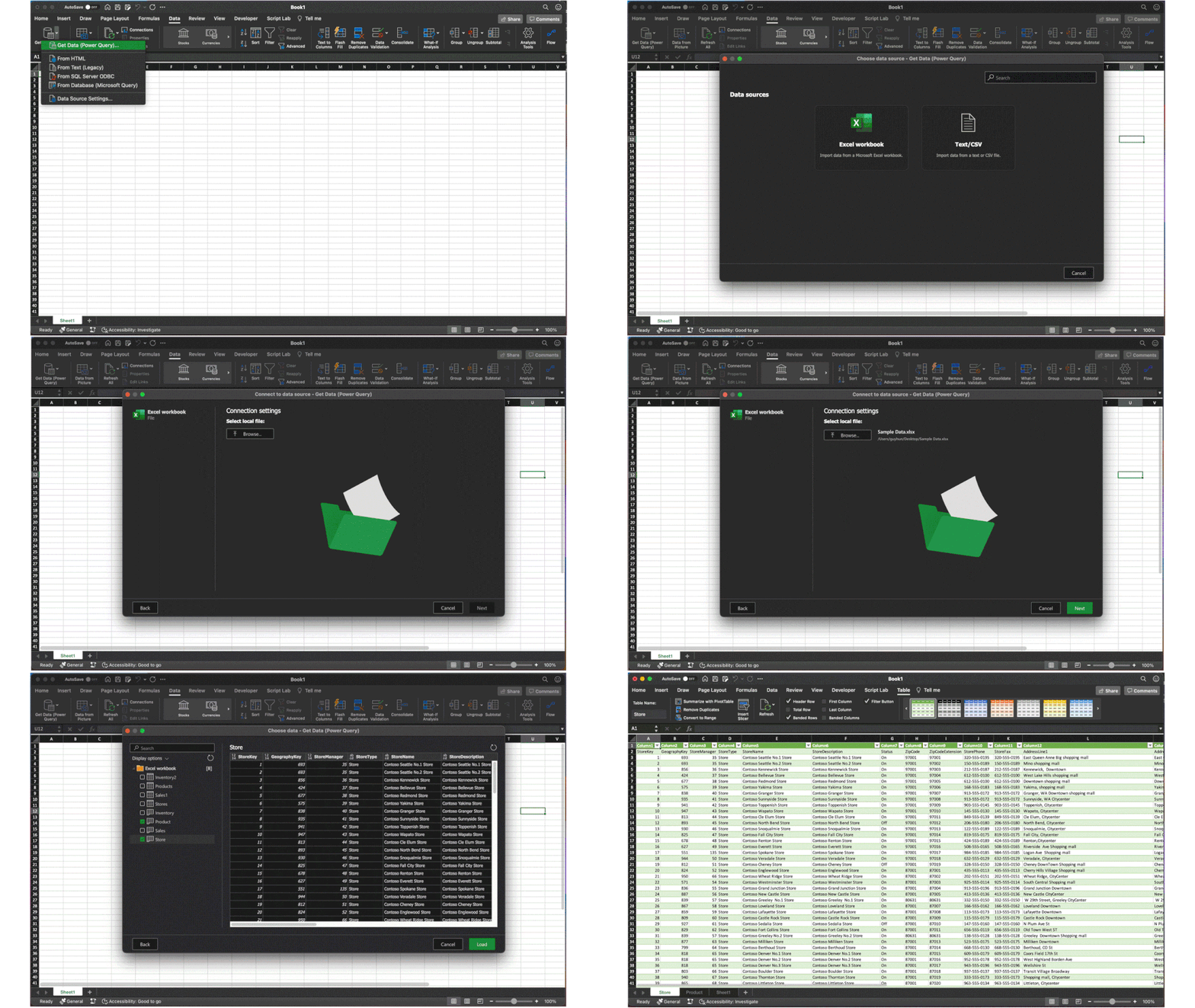
We are excited to announce a new update to Power Query (PQ) in Excel for Mac – the ability to import data from local files. We’ve received many requests for this feature after the introduction of PQ query refresh. Now you can import data from local files including Excel workbooks and text & CSV files.
Getting started
This new functionality is available to Beta channel users running version 16.50 (build 21050400) or later. See this support article to check which version you’re using.
Importing data from local files
You can now import data from local Excel workbooks or text & CSV files.
- Click Get Data (Power Query) on the Data tab
- Select Excel workbook or Text/CSV in the Choose data source dialog box
- Click Browse to select the local file
- Select the data you want to import and click the Load button
Import data from local files
For a feature deep dive, see Import data from local files with Power Query in Excel for Mac on the Office Insider Blog.
Sharing your feedback
Let us know what you think. Send us your feedback via Send a Smile/Frown button at the top right.
Also, subscribe to our Excel Blog and join our Excel Community to stay connected with us and other Excel fans around the world.

by Contributed | May 19, 2021 | Technology
This article is contributed. See the original author and article here.
When you connect to the database using SQL Server Management Studio (SSMS), It will perform several queries to gather the information necessary for the user interface. If one of the queries performed by SSMS is blocked, you may face a lock time-out in the connection:
You can use the PowerShell script below, while attempting to connect, to identify the session that is causing the block:
Note: It is necessary to set values for the highlighted variables. It will create CSVs with the result of the queries in the $OutputFolder.
#Connect to SQL and run QUERY
$SQLServer = “”
$SQLDBName = “”
$SQLUsername = “”
$SQLPassword = “”
$OuputFolder = “C:”
#To get information about sessions that are blocking and being blocked
$SqlQuery = “SELECT current_timestamp as [CURRENT_TIMESTAMP]
, DB_NAME(dtl.resource_database_id) AS database_name
, req.session_id AS blocked_sessionID
, ses.program_name blocked_programName
, ses.host_name blocked_hostname
, ses.login_name blocked_login
, CASE ses.transaction_isolation_level
WHEN 1 THEN ‘ReadUncomitted’
WHEN 2 THEN ‘ReadCommitted’
WHEN 3 THEN ‘Repeatable’
WHEN 4 THEN ‘Serializable’
WHEN 5 THEN ‘Snapshot’
END blocked_isolation_level
, REPLACE(REPLACE(sqltext.TEXT, CHAR(13), ‘ ‘), CHAR(10), ‘ ‘) AS blocked_last_query
, req.status AS [blocked_status]
, req.command AS blocked_command
, req.cpu_time AS blocked_cpuTime
, req.total_elapsed_time AS blocked_totalElapsedTime
, blocked_tran.transaction_id blocked_transaction_id
, osw.blocking_session_id AS blocker_SessionID
, blocker_ses.program_name blocker_programName
, blocker_ses.host_name blocker_hostName
, blocker_ses.login_name blocker_login
, CASE blocker_ses.transaction_isolation_level
WHEN 1 THEN ‘ReadUncomitted’
WHEN 2 THEN ‘ReadCommitted’
WHEN 3 THEN ‘Repeatable’
WHEN 4 THEN ‘Serializable’
WHEN 5 THEN ‘Snapshot’
END blocker_isolation_level
, REPLACE(REPLACE(iif(blocker_sqltext.TEXT is NULL,blocker_sqltext2.event_info,blocker_sqltext.TEXT), CHAR(13), ‘ ‘), CHAR(10), ‘ ‘) AS blocker_last_query
, blocker_req.status AS [blocker_status]
, blocker_req.command AS blocker_command
, blocker_req.cpu_time AS blocker_cpuTime
, blocker_req.total_elapsed_time AS blocker_totalElapsedTime
, blocker_proc.lastwaittype blocker_last_waittype
, blocker_proc.last_batch blocker_last_batch
, blocker_proc.open_tran blocker_open_tran
, blocker_tran.transaction_id blocker_transaction_id
, blocker_proc.cmd blocker_command
, dtl.request_mode AS lockRequestMode
, dtl.resource_type AS lockResourceType
, dtl.resource_subtype AS lockResourceSubType
, osw.wait_type AS taskWaitType
, osw.resource_description AS taskResourceDescription
, osw.wait_duration_ms
FROM sys.dm_exec_requests req
INNER JOIN sys.dm_exec_sessions ses on ses.session_id = req.session_id
CROSS APPLY sys.dm_exec_sql_text(req.sql_handle) AS sqltext
INNER JOIN sys.dm_tran_locks dtl on dtl.request_session_id = req.session_id
INNER JOIN sys.dm_os_waiting_tasks osw on osw.session_id = req.session_id
LEFT JOIN sys.dm_tran_session_transactions blocked_tran on blocked_tran.session_id =req.session_id
INNER JOIN dbo.sysprocesses blocker_proc on osw.blocking_session_id = blocker_proc.spid
LEFT JOIN sys.dm_exec_requests blocker_req on blocker_req.session_id = osw.blocking_session_id
LEFT JOIN sys.dm_exec_sessions blocker_ses on blocker_ses.session_id = osw.blocking_session_id
LEFT JOIN sys.dm_tran_session_transactions blocker_tran on blocker_tran.session_id =osw.blocking_session_id
OUTER APPLY sys.dm_exec_sql_text(blocker_req.sql_handle) AS blocker_sqltext
OUTER APPLY sys.dm_exec_input_buffer(osw.blocking_session_id,0) as blocker_sqltext2;”
#To get the locks that are being held by the sessions that are blocking and being blocked
$SqlQuery2 = “
select DB_NAME(locks.resource_database_id) AS database_name
, locks.request_session_id
, locks.resource_type, locks.resource_subtype
, locks.resource_description
, locks.resource_associated_entity_id
, locks.resource_lock_partition
, locks.request_mode
, locks.request_type
, locks.request_status
, locks.request_reference_count
, locks.request_lifetime
, locks.request_exec_context_id
, locks.request_request_id
, locks.request_owner_type
FROM sys.dm_exec_requests req
INNER JOIN sys.dm_os_waiting_tasks osw on osw.session_id = req.session_id
INNER JOIN sys.dm_tran_locks locks on osw.blocking_session_id = locks.request_session_id or (osw.session_id = locks.request_session_id and osw.blocking_session_id is not null)
order by locks.request_session_id;”
#Dummy query to test if queries are running successfully, in case the previous ones do not return data
$SqlQuery3 = “select CURRENT_TIMESTAMP as timestamp, @@SERVERNAME as server_name, DB_NAME() as database_name, @@SPID as session_id;”
#Connect to SQL Server
$SqlConnection = New-Object System.Data.SqlClient.SqlConnection
$SqlConnection.ConnectionString = “Server = $SQLServer; Database = $SQLDBName; User ID = $SQLUsername; Password = $SQLPassword”
$SqlCmd = New-Object System.Data.SqlClient.SqlCommand
$SqlCmd.Connection = $SqlConnection
#Create the objects that will be used to run the queries
$SqlAdapter = New-Object System.Data.SqlClient.SqlDataAdapter
#Run 1st query
$DataSet = New-Object System.Data.DataSet
$SqlCmd.CommandText = $SqlQuery
$SqlAdapter.SelectCommand = $SqlCmd
$SqlAdapter.Fill($DataSet)
#Output RESULTS of 1st query to CSV
$DataSet.Tables[0] | Export-Csv -Delimiter ‘;’ -Path “$OuputFolderlock_waits_$(get-date -f yyyy-MM-dd-HH.mm.ss).csv” -NoTypeInformation
#Run 2nd query
$DataSet = New-Object System.Data.DataSet
$SqlCmd.CommandText = $SqlQuery2
$SqlAdapter.SelectCommand = $SqlCmd
$SqlAdapter.Fill($DataSet)
#Output RESULTS of 2nd query to CSV
$DataSet.Tables[0] | Export-Csv -Delimiter ‘;’ -Path “$OuputFolderlock_list_$(get-date -f yyyy-MM-dd-HH.mm.ss).csv” -NoTypeInformation
#Run 3rd query
$DataSet = New-Object System.Data.DataSet
$SqlCmd.CommandText = $SqlQuery3
$SqlAdapter.SelectCommand = $SqlCmd
$SqlAdapter.Fill($DataSet)
#Output RESULTS of 3rd query to CSV
$DataSet.Tables[0] | Export-Csv -Delimiter ‘;’ -Path “$OuputFoldertest_connection_$(get-date -f yyyy-MM-dd-HH.mm.ss).csv” -NoTypeInformation
#Close the connection
$SqlConnection.Close()
|
In the CSV files, you should be able to see the last queries of the sessions involved in the block, their isolation level, if they are inside a transaction and the locks they are holding. This should help you understand why the block is happening.
This PowerShell script uses two queries from this blog post. Please refer to this blog post for additional information.
References:
https://techcommunity.microsoft.com/t5/azure-database-support-blog/troubleshooting-high-lock-wait-time-and-lock-time-out/ba-p/2368875


Recent Comments