by Contributed | May 26, 2021 | Technology
This article is contributed. See the original author and article here.
Introduction
Formik is the world’s most popular open-source form library for React and React Native. We can also use this library in our SPFx web part as well to manage form validations. Using this library we don’t have to write custom validations. so let’s start step-by-step implementation.
What is formik?
Formik is a small library that helps us with the these parts: Getting values in and out of form state. Validation and error messages. Handling form submission.
Formik is designed to manage forms with complex validation with ease.
Formik supports synchronous and asynchronous form-level and field-level validation.
Furthermore, it comes with baked-in support for schema-based form-level validation through Yup.
For more details about Fromik refer to the below articles,
Formik official documentation
Manage Forms In React With Formik
Formik validation Schema
SharePoint List Structure
Create a list called Tasks with below fields,
Field Name(Internal name) |
Field Type |
Title (default) |
Single line of text |
StartDate |
Date and Time (Date only)
|
EndDate |
Date and Time (Date only) |
ProjectName |
Single line of text |
TaskDetails |
Multiple lines of text |
After the creation of the list, we will start to create the SPFx web part.
Formik implementation with SPFx
Open a command prompt
Move to the path where you want to create a project
Create a project directory using:
md react-formik
Move to the above-created directory using:
cd react-formik
Now execute the below command to create an SPFx solution:
yo @microsoft/sharepoint
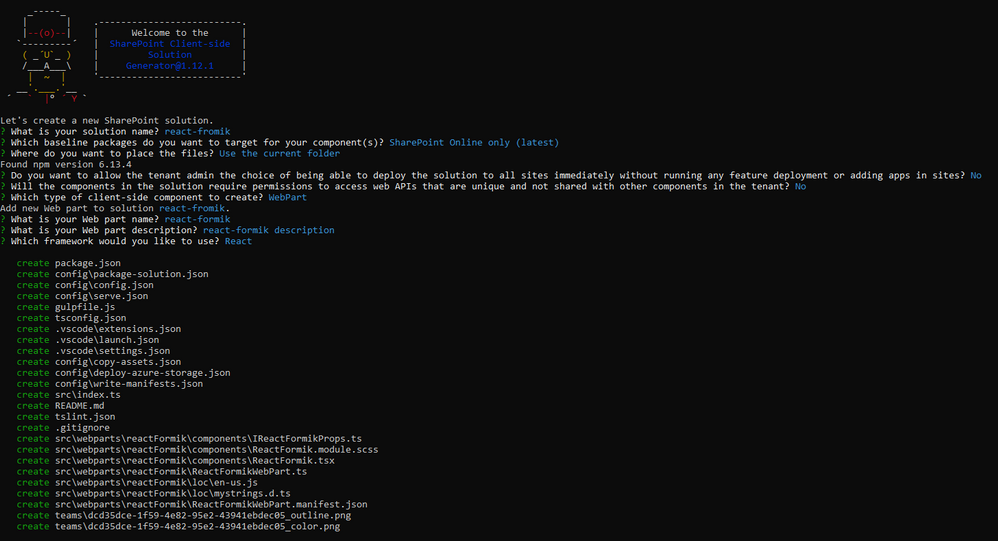
It will ask some questions, as shown below,
After a successful installation, we can open a project in any source code tool. Here, I am using the VS code, so I will execute the command:
code .
Now we will install the following packages:
npm i formik
npm i yup
npm i @pnp/spfx-controls-react
npm i @microsoft/sp-dialog
In the end, our output will be like this,
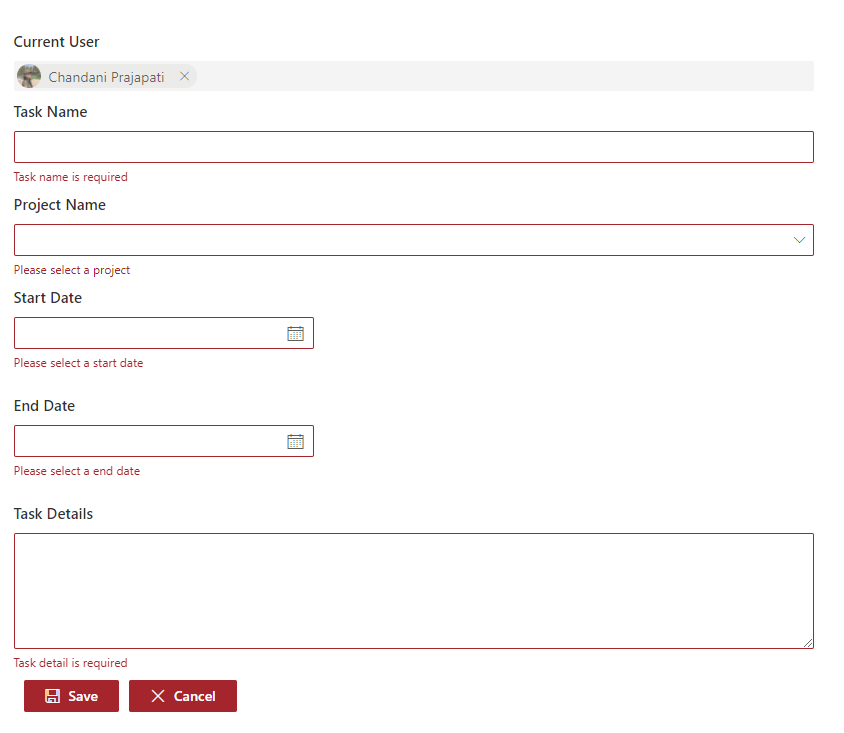
After the successful installation, we will start our form implementation.
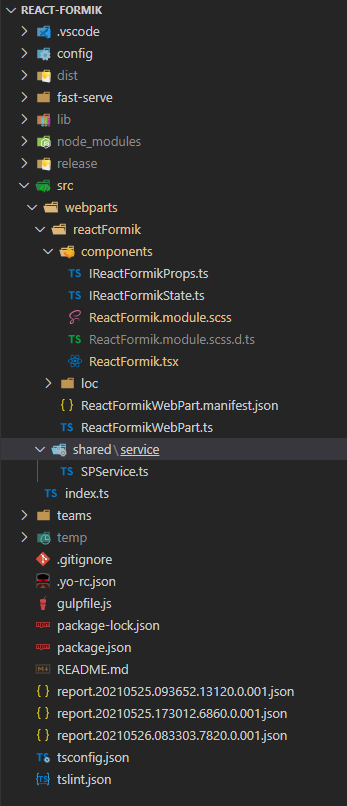
1. Create below files
I{webpartname}State.ts inside src/webparts/reactFormik/components
SPService.ts file inside src/webparts/shared/service
In the end, our structure will be looks like this,
2. Create a state interface as below inside IReactFormikState.ts.
export interface IReactFormikState {
  projectName?: string;
  startDate?: any;
  endDate?: any;
}
3. Create a method to create a task inside SPService.ts.
import "@pnp/sp/webs";
import "@pnp/sp/lists";
import "@pnp/sp/items";
import "@pnp/sp/webs";
import "@pnp/sp/site-users/web";
import { Web } from "@pnp/sp/webs";

export class SPService {

    private web;

    constructor(url: string) {
        this.web = Web(url);
    }

    public async createTask(listName: string, body: any) {
        try {
            let createdItem = await this.web.lists
                .getByTitle(listName)
                .items
                .add(body);
            return createdItem;
        }
        catch (err) {
            Promise.reject(err);
        }
    }
}
4. Move to the ReactFormikWebPart.ts. In this, we will pass the current SP context and read site URL from user.
import * as React from 'react';
import * as ReactDom from 'react-dom';
import { Version } from '@microsoft/sp-core-library';
import {
  IPropertyPaneConfiguration,
  PropertyPaneTextField
} from '@microsoft/sp-property-pane';
import { BaseClientSideWebPart } from '@microsoft/sp-webpart-base';

import * as strings from 'ReactFormikWebPartStrings';
import ReactFormik from './components/ReactFormik';
import { IReactFormikProps } from './components/IReactFormikProps';
import { sp } from "@pnp/sp/presets/all";

export interface IReactFormikWebPartProps {
  description: string;
  siteUrl: string;
}

export default class ReactFormikWebPart extends BaseClientSideWebPart<IReactFormikWebPartProps> {

  protected onInit(): Promise<void> {

    return super.onInit().then(_ => {
      sp.setup({
        spfxContext: this.context
      });
    });
  }

  public render(): void {
    const element: React.ReactElement<IReactFormikProps> = React.createElement(
      ReactFormik,
      {
        description: this.properties.description,
        context: this.context,
        siteUrl: this.properties.siteUrl ? this.properties.siteUrl : this.context.pageContext.web.absoluteUrl
      }
    );

    ReactDom.render(element, this.domElement);
  }

  protected onDispose(): void {
    ReactDom.unmountComponentAtNode(this.domElement);
  }

  protected get dataVersion(): Version {
    return Version.parse('1.0');
  }

  protected getPropertyPaneConfiguration(): IPropertyPaneConfiguration {
    return {
      pages: [
        {
          header: {
            description: strings.PropertyPaneDescription
          },
          groups: [
            {
              groupName: strings.BasicGroupName,
              groupFields: [
                PropertyPaneTextField('description', {
                  label: strings.DescriptionFieldLabel
                }),
                PropertyPaneTextField('siteUrl', {
                  label: strings.SiteUrlFieldLabel
                })
              ]
            }
          ]
        }
      ]
    };
  }
}
5. Move to the ReactFormik.tsx file to render form and validations
yup syntaxs:
1. For string: yup.string().required(‘Required’)
2. For date: yup.date().required(‘Required’).nullable()
Related to Formik
1. Fromik has its own handleReset and handleSubmit method so we don not have to manage manually
2. We have to set state value and error message from control so for that I have created a common method
1. In the constructor, we will set the current SP context, bind the service and required methods and initialize the states.
2. Create createRecord() to create task list item using SPService.
3. In the render(), first we will add all the controls like date picker, text field, people picker, and dropdown, etc inside <Formik>.
then We will set properties as below,
initialValues – This is one type o state at here we will set empty or null or undefined as an initial level.
validationSchema – At here we will do validations using yup. so for this, I am creating one const and wills et this constant in this prop.
onSubmit – At here we will call the method to create a record in the SharePoint list
import * as React from 'react';
import styles from './ReactFormik.module.scss';
import { IReactFormikProps } from './IReactFormikProps';
import { IReactFormikState } from './IReactFormikState';
import { SPService } from '../../shared/service/SPService';
import { TextField } from '@fluentui/react/lib/TextField';
import { Stack, } from '@fluentui/react/lib/Stack';
import { Formik, FormikProps } from 'formik';
import { Label } from 'office-ui-fabric-react/lib/Label';
import * as yup from 'yup';
import { PeoplePicker, PrincipalType } from "@pnp/spfx-controls-react/lib/PeoplePicker";
import { DatePicker, Dropdown, mergeStyleSets, PrimaryButton, IIconProps } from 'office-ui-fabric-react';
import { sp } from '@pnp/sp';
import { Dialog } from '@microsoft/sp-dialog';

const controlClass = mergeStyleSets({
  control: {
    margin: '0 0 15px 0',
    maxWidth: '300px',
  },
});

export default class ReactFormik extends React.Component<IReactFormikProps, IReactFormikState> {

  private cancelIcon: IIconProps = { iconName: 'Cancel' };
  private saveIcon: IIconProps = { iconName: 'Save' };
  private _services: SPService = null;

  constructor(props: Readonly<IReactFormikProps>) {
    super(props);
    this.state = {
      startDate: null,
      endDate: null
    }
    sp.setup({
      spfxContext: this.props.context
    });

    this._services = new SPService(this.props.siteUrl);
    this.createRecord = this.createRecord.bind(this);
  }

  /** set field value and error message for all the fields */
  private getFieldProps = (formik: FormikProps<any>, field: string) => {
    return { ...formik.getFieldProps(field), errorMessage: formik.errors[field] as string }
  }

  /** create record in sharepoint list */
  public async createRecord(record: any) {
    let item = await this._services.createTask("Tasks", {
      Title: record.name,
      TaskDetails: record.details,
      StartDate: record.startDate,
      EndDate: new Date(record.endDate),
      ProjectName: record.projectName,
    }).then((data) => {
      Dialog.alert("Record inseterd successfully !!!");
      return data;
    }).catch((err) => {
      console.error(err);
      throw err;
    });
  }

  public render(): React.ReactElement<IReactFormikProps> {
    /** validations */
    const validate = yup.object().shape({
      name: yup.string().required('Task name is required'),
      details: yup.string()
        .min('15', 'Minimum required 15 characters')
        .required('Task detail is required'),
      projectName: yup.string().required('Please select a project'),
      startDate: yup.date().required('Please select a start date').nullable(),
      endDate: yup.date().required('Please select a end date').nullable()
    })

    return (
      <Formik initialValues={{
        name: '',
        details: '',
        projectName: '',
        startDate: null,
        endDate: null
      }}
        validationSchema={validate}
        onSubmit={(values, helpers) => {
          console.log('SUCCESS!! :-)nn' + JSON.stringify(values, null, 4));
          this.createRecord(values).then(response => {
            helpers.resetForm()
          });
        }}>
        { formik => (
          <div className={styles.reactFormik}>
            <Stack>
              <Label className={styles.lblForm}>Current User</Label>
              <PeoplePicker
                context={this.props.context as any}
                personSelectionLimit={1}
                showtooltip={true}
                showHiddenInUI={false}
                principalTypes={[PrincipalType.User]}
                ensureUser={true}
                disabled={true}
                defaultSelectedUsers={[this.props.context.pageContext.user.email as any]}
              />

              <Label className={styles.lblForm}>Task Name</Label>
              <TextField
                {...this.getFieldProps(formik, 'name')} />

              <Label className={styles.lblForm}>Project Name</Label>
              <Dropdown
                options={
                  [
                    { key: 'Project1', text: 'Project1' },
                    { key: 'Project2', text: 'Project2' },
                    { key: 'Project3', text: 'Project3' },
                  ]
                }
                {...this.getFieldProps(formik, 'projectName')}
                onChange={(event, option) => { formik.setFieldValue('projectName', option.key.toString()) }}
              />

              <Label className={styles.lblForm}>Start Date</Label>
              <DatePicker
                className={controlClass.control}
                id="startDate"
                value={formik.values.startDate}
                textField={{ ...this.getFieldProps(formik, 'startDate') }}
                onSelectDate={(date) => formik.setFieldValue('startDate', date)}
              />

              <Label className={styles.lblForm}>End Date</Label>
              <DatePicker
                className={controlClass.control}
                id="endDate"
                value={formik.values.endDate}
                textField={{ ...this.getFieldProps(formik, 'endDate') }}
                onSelectDate={(date) => formik.setFieldValue('endDate', date)}
              />

              <Label className={styles.lblForm}>Task Details</Label>
              <TextField
                multiline
                rows={6}
                {...this.getFieldProps(formik, 'details')} />

            </Stack>
            <PrimaryButton
              type="submit"
              text="Save"
              iconProps={this.saveIcon}
              className={styles.btnsForm}
              onClick={formik.handleSubmit as any}
            />
            <PrimaryButton
              text="Cancel"
              iconProps={this.cancelIcon}
              className={styles.btnsForm}
              onClick={formik.handleReset}
            />
          </div>
        )
        }
      </Formik >
    );
  }
}
6. Move to the ReactFormik.module.scss file to add some relaetd CSS.
@import '~office-ui-fabric-react/dist/sass/References.scss';
.reactFormik{
  .btnsForm {
    background-color: "[theme:themePrimary, default:#0078d7]";
    border-color: "[theme: themePrimary, default: #0078d7]";
    color: "[theme:white, default:white]" ;
    margin-left: 10px;
    margin-top: 10px;
  }
  .customErrorMeesage{
    color: var(--red-color);
    font-size: 10px;
    font-family: 'Light';
    padding: 2px;
  }
  .lblForm{
  font-size: 15px;
  margin:  5px 0px 5px 0px;
  }
}
Now serve the application using the below command,
gulp serve
Now test the webpart in SharePoint-SiteURL + /_layouts/15/workbench.aspx.
Output
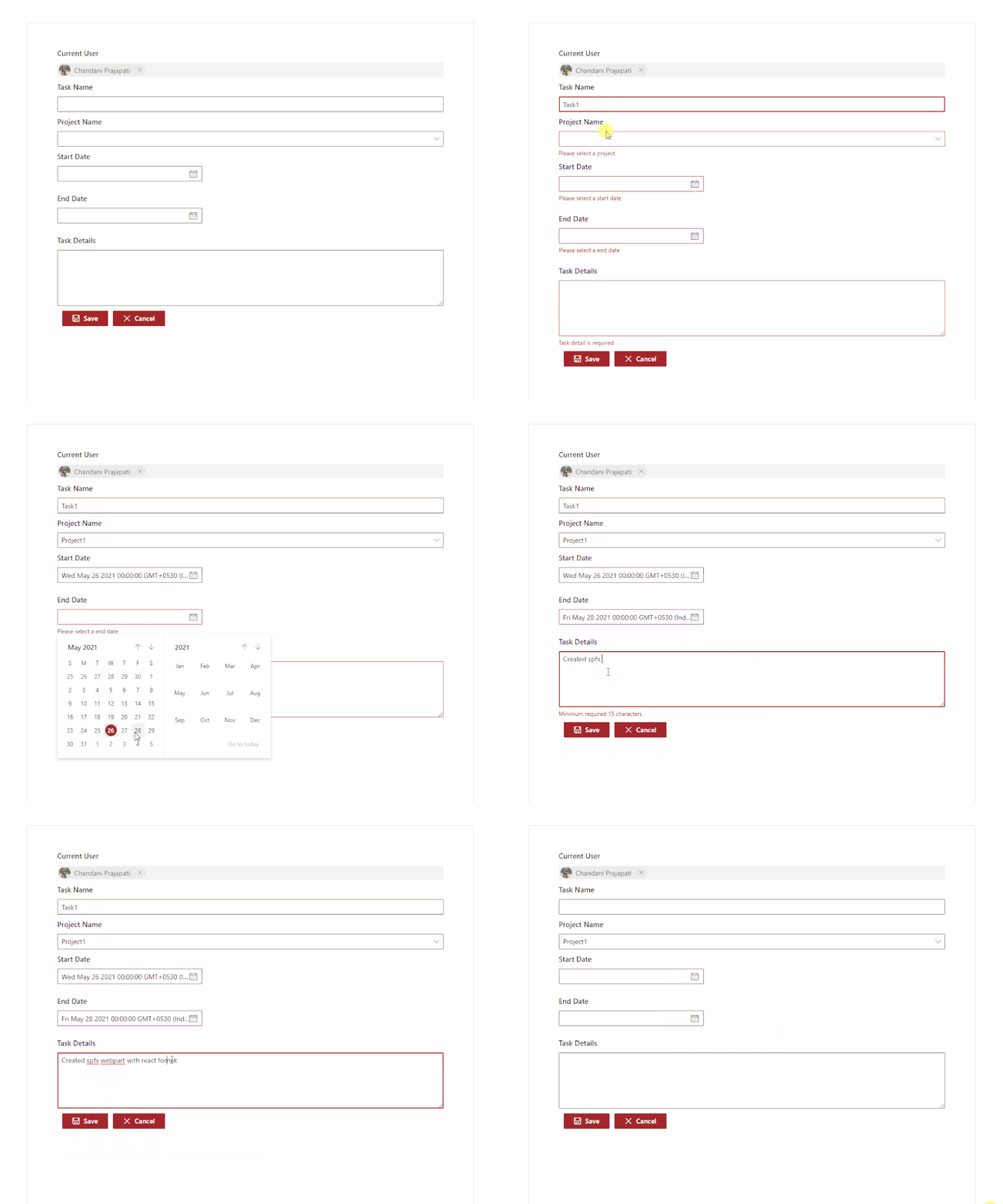
Find the full source code here.
Summary
In this article, we have seen how to implement react formik library in SPFx.
I hope this helps.
Sharing is caring!!
by Contributed | May 26, 2021 | Technology
This article is contributed. See the original author and article here.
We have just released our official Azure Sentinel PowerShell module Az.SecurityInsights which already has over 22.000 downloads and counting!
You can download it from here.
The Azure Sentinel Az.SecurityInsights PowerShell module helps you in automating your daily operational tasks, like interacting with incidents (assign owners, change severity, add comments, etc.), but also for creating and configuring analytics rules, data connectors and bookmarks.
Documentation including samples can be found here
Additional examples can be found on our Azure Sentinel GitHub repo
A frequent asked question is if our PowerShell module supports Azure Sentinel preview features.
Since our PowerShell module is officially supported, we support released features only at this point.
As soon as the preview features are released, we will support them through an update.
A big thank you to our customers, partners, MVP’s, members of our security communities (like Tech Community) and our attendees joining our security events who have asked for this module and supported us in our journey to our release!
by Contributed | May 26, 2021 | Technology
This article is contributed. See the original author and article here.
Overview
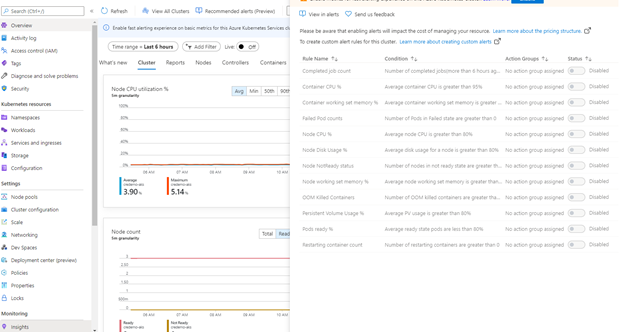
This blog post outlines a list of monitoring metrics that can be used to monitor the Azure Kubernetes Services (AKS) platform health and availability. These are additional to the recommended alerts (preview) that can be found here, “recommended metric alerts (preview) from Container insights”.
Where can you see the recommended alerts ?
In the Azure Portal, navigate to the AKS cluster page, under monitoring section, click on “Insights” to see the recommended alerts options.
Why additional monitors?
When I was involved in AKS cluster setup, I was setting up end-to-end monitoring and alerting. I had hundreds of questions running around my head on what to be monitored at first place? There are numerous components in AKS platform, such as system specific services, pods and containers, hosted applications, and other supporting components. How to figure out the list of components or services to be monitored. How to determine the platform health, availability, and reliability? In what condition these should be turned into an alert?
I went through the predefined list of alerts and realized that they may not be adequate for my requirement. The AKS cluster that hosted my monitoring solution was a shared hosting platform. The requirement was to monitor the platform health (Cluster level) and health status of each hosted applications. But the question was, what data I should use to define platform health, hosted application health, and when to turn them into an alert.
So, I decided to prepare a list of monitor metrics :
(1) For monitoring cluster health.
(2) For monitoring hosted applications level.
These metrics include monitoring of individual components and services that could impact the cluster availability and health.
In this blog I focus on a first set of alerts that can be added in addition to the recommended alerts (preview) in the Azure portal for AKS monitoring. These alerts are created using the Kusto Query Langauge to query the log analytics workspace. You can manually execute
these queries to see the specific information and can also be setup as an automated alert.
Pod scale out (hpa)
Container insights automatically monitors the deployment and HPA with specific metrics, and these are collected at every 60 seconds interval in the InsightMetrics table. The list of available metrics name can be referred in the Azure docs.
The log search query pulls the Pod scale out data from Insight Metrics table and joins the output from “KubePodInventory” to get the number of scaled out replicas in each deployment. The additional logic calculate the scale out percentage with the maximum number of replicas configured in HPA (The HPA specific information is collected in “kube_hpa_status_current_replicas”).
This query returns the results of any application that are hosted with hpa in non-system namespace.
let _minthreshold = 70; // minimum threshold goes here if you want to setup as an alert
let _maxthreshold = 90; // maximum threshold goes here if you want to setup as an alert
let startDateTime = ago(60m);
KubePodInventory
| where TimeGenerated >= startDateTime
| where Namespace !in('default', 'kube-system') // List of non system namespace filter goes here.
| extend labels = todynamic(PodLabel)
| extend deployment_hpa = reverse(substring(reverse(ControllerName), indexof(reverse(ControllerName), "-") + 1))
| distinct tostring(deployment_hpa)
| join kind=inner (InsightsMetrics
    | where TimeGenerated > startDateTime
    | where Name == 'kube_hpa_status_current_replicas'
    | extend pTags = todynamic(Tags) //parse the tags for values
    | extend ns = todynamic(pTags.k8sNamespace) //parse namespace value from tags
    | extend deployment_hpa = todynamic(pTags.targetName) //parse HPA target name from tags
    | extend max_reps = todynamic(pTags.spec_max_replicas) // Parse maximum replica settings from HPA deployment
    | extend desired_reps = todynamic(pTags.status_desired_replicas) // Parse desired replica settings from HPA deployment
    | summarize arg_max(TimeGenerated, *) by tostring(ns), tostring(deployment_hpa), Cluster=toupper(tostring(split(_ResourceId, '/')[8])), toint(desired_reps), toint(max_reps), scale_out_percentage=(desired_reps * 100 / max_reps)
    //| where scale_out_percentage > _minthreshold and scale_out_percentage <= _maxthreshold
    )
    on deployment_hpa
Nodepool scale outs
The following query returns the number of active nodes in each node pools. The additional logic calculates the number of available active node and the max node configuration in the auto-scaler settings to determine the scale out percentage. This is useful when it comes to monitoring the underlying node infrastructure availability for scaling requirement.
let nodepoolMaxnodeCount = 10; // the maximum number of nodes in your auto scale setting goes here.
let _minthreshold = 20;
let _maxthreshold = 90;
let startDateTime = 60m;
KubeNodeInventory
| where TimeGenerated >= ago(startDateTime)
| extend nodepoolType = todynamic(Labels) //Parse the labels to get the list of node pool types
| extend nodepoolName = todynamic(nodepoolType[0].agentpool) // parse the label to get the nodepool name or set the specific nodepool name (like nodepoolName = 'agentpool)'
| summarize nodeCount = count(Computer) by ClusterName, tostring(nodepoolName), TimeGenerated
//(Uncomment the below two lines to set this as an log search alert)
//| extend scaledpercent = iff(((nodeCount * 100 / nodepoolMaxnodeCount) >= _minthreshold and (nodeCount * 100 / nodepoolMaxnodeCount) < _maxthreshold), "warn", "normal")
//| where scaledpercent == 'warn'
| summarize arg_max(TimeGenerated, *) by nodeCount, ClusterName, tostring(nodepoolName)
| project ClusterName,
    TotalNodeCount= strcat("Total Node Count: ", nodeCount),
    ScaledOutPercentage = (nodeCount * 100 / nodepoolMaxnodeCount),
    TimeGenerated,
    nodepoolName
System containers (replicaset) availability
This query monitors the system containers (replicasets) and report the unavailable percentage.
let startDateTime = 5m; // the minimum time interval goes here
let _minalertThreshold = 50; //Threshold for minimum and maximum unavailable or not running containers
let _maxalertThreshold = 70;
KubePodInventory
| where TimeGenerated >= ago(startDateTime)
| distinct ClusterName, TimeGenerated
| summarize Clustersnapshot = count() by ClusterName
| join kind=inner (
    KubePodInventory
    | where TimeGenerated >= ago(startDateTime)
    | where Namespace in('default', 'kube-system') and ControllerKind == 'ReplicaSet' // the system namespace filter goes here
    | distinct ClusterName, Computer, PodUid, TimeGenerated, PodStatus, ServiceName, PodLabel, Namespace, ContainerStatus
    | summarize arg_max(TimeGenerated, *), TotalPODCount = count(), podCount = sumif(1, PodStatus == 'Running' or PodStatus != 'Running'), containerNotrunning = sumif(1, ContainerStatus != 'running')
        by ClusterName, TimeGenerated, ServiceName, PodLabel, Namespace
    )
    on ClusterName
| project ClusterName, ServiceName, podCount, containerNotrunning, containerNotrunningPercent = (containerNotrunning * 100 / podCount), TimeGenerated, PodStatus, PodLabel, Namespace, Environment = tostring(split(ClusterName, '-')[3]), Location = tostring(split(ClusterName, '-')[4]), ContainerStatus
//Uncomment the below line to set for automated alert
//| where PodStatus == "Running" and containerNotrunningPercent > _minalertThreshold and containerNotrunningPercent < _maxalertThreshold
| summarize arg_max(TimeGenerated, *), c_entry=count() by PodLabel, ServiceName, ClusterName
//Below lines are to parse the labels to identify the impacted service/component name
| extend parseLabel = replace(@'k8s-app', @'k8sapp', PodLabel)
| extend parseLabel = replace(@'app.kubernetes.io/component', @'appkubernetesiocomponent', parseLabel)
| extend parseLabel = replace(@'app.kubernetes.io/instance', @'appkubernetesioinstance', parseLabel)
| extend tags = todynamic(parseLabel)
| extend tag01 = todynamic(tags[0].app)
| extend tag02 = todynamic(tags[0].k8sapp)
| extend tag03 = todynamic(tags[0].appkubernetesiocomponent)
| extend tag04 = todynamic(tags[0].aadpodidbinding)
| extend tag05 = todynamic(tags[0].appkubernetesioinstance)
| extend tag06 = todynamic(tags[0].component)
| project ClusterName, TimeGenerated,
    ServiceName = strcat( ServiceName, tag01, tag02, tag03, tag04, tag05, tag06),
    ContainerUnavailable = strcat("Unavailable Percentage: ", containerNotrunningPercent),
    PodStatus = strcat("PodStatus: ", PodStatus),
    ContainerStatus = strcat("Container Status: ", ContainerStatus)
System containers (daemonsets) availability
This query monitors the system containers (daemonsets) and report the unavailable percentage.
let startDateTime = 5m; // the minimum time interval goes here
let _minalertThreshold = 50; //Threshold for minimum and maximum unavailable or not running containers
let _maxalertThreshold = 70;
KubePodInventory
| where TimeGenerated >= ago(startDateTime)
| distinct ClusterName, TimeGenerated
| summarize Clustersnapshot = count() by ClusterName
| join kind=inner (
    KubePodInventory
    | where TimeGenerated >= ago(startDateTime)
    | where Namespace in('default', 'kube-system') and ControllerKind == 'DaemonSet' // the system namespace filter goes here
    | distinct ClusterName, Computer, PodUid, TimeGenerated, PodStatus, ServiceName, PodLabel, Namespace, ContainerStatus
    | summarize arg_max(TimeGenerated, *), TotalPODCount = count(), podCount = sumif(1, PodStatus == 'Running' or PodStatus != 'Running'), containerNotrunning = sumif(1, ContainerStatus != 'running')
        by ClusterName, TimeGenerated, ServiceName, PodLabel, Namespace
    )
    on ClusterName
| project ClusterName, ServiceName, podCount, containerNotrunning, containerNotrunningPercent = (containerNotrunning * 100 / podCount), TimeGenerated, PodStatus, PodLabel, Namespace, Environment = tostring(split(ClusterName, '-')[3]), Location = tostring(split(ClusterName, '-')[4]), ContainerStatus
//Uncomment the below line to set for automated alert
//| where PodStatus == "Running" and containerNotrunningPercent > _minalertThreshold and containerNotrunningPercent < _maxalertThreshold
| summarize arg_max(TimeGenerated, *), c_entry=count() by PodLabel, ServiceName, ClusterName
//Below lines are to parse the labels to identify the impacted service/component name
| extend parseLabel = replace(@'k8s-app', @'k8sapp', PodLabel)
| extend parseLabel = replace(@'app.kubernetes.io/component', @'appkubernetesiocomponent', parseLabel)
| extend parseLabel = replace(@'app.kubernetes.io/instance', @'appkubernetesioinstance', parseLabel)
| extend tags = todynamic(parseLabel)
| extend tag01 = todynamic(tags[0].app)
| extend tag02 = todynamic(tags[0].k8sapp)
| extend tag03 = todynamic(tags[0].appkubernetesiocomponent)
| extend tag04 = todynamic(tags[0].aadpodidbinding)
| extend tag05 = todynamic(tags[0].appkubernetesioinstance)
| extend tag06 = todynamic(tags[0].component)
| project ClusterName, TimeGenerated,
    ServiceName = strcat( ServiceName, tag01, tag02, tag03, tag04, tag05, tag06),
    ContainerUnavailable = strcat("Unavailable Percentage: ", containerNotrunningPercent),
    PodStatus = strcat("PodStatus: ", PodStatus),
    ContainerStatus = strcat("Container Status: ", ContainerStatus)
Individual Container restarts
This query monitors the individual system container restart counts for last 10 minutes
let _threshold = 10m;
let _alertThreshold = 2;
let Timenow = (datetime(now) - _threshold);
let starttime = ago(5m);
KubePodInventory
| where TimeGenerated >= starttime
| where Namespace in ('default', 'kube-system') // the namespace filter goes here
//| where ContainerRestartCount > _alertThreshold
| extend Tags = todynamic(ContainerLastStatus)
| extend startedAt = todynamic(Tags.startedAt)
| where startedAt >= Timenow
| summarize arg_max(TimeGenerated, *) by Name
Use the below steps to test these queries and it’s results.
1. Sign in to the Azure portal.
2. In the Azure portal, search for and select Log Analytics workspaces supporting Container insights.
3. In the pane on the left side, select Logs to open the Azure Monitor logs page. You use this page to write and execute Azure log queries.
4. On the Logs page, paste one of the queries provided earlier into the Search query field and then select Run to validate the results.
The below steps walks through how to create the above queries as an alert rule. Please make sure to uncomment those lines where the threshold has been set to filter the results.
Create an alert rule
1. Sign in to the Azure portal
2. In the Azure portal, search for and select Log Analytics workspaces supporting Container insights.
3. In the left pane, select “Alerts” and click on “+New Alert rule.”
4. In the create alert rule page, select “Add condition”
5. In the “select a signal” page, choose “Custom log search”
6. Paste the alert query in the “Search query” box.
7. Choose “Number of results” under Alert Logic “Based on” option and set “Number of results” ‘Greater than’ and “Threshold value” as ‘0’. (I use “Number of results” instead of “Metrics measurement” as the filtering of result based on threshold is done at the query level.)
8. Set the period and frequency according to your requirement.
9. Click on “Done” to create the condition.
10. Fill the other details like “Alert rule name”, Actions to save the alert rule.
Conclusion
With these monitors, you will have better visibility on the system containers availability, pod and node scale out events. I am drafting the second set of additional monitors which I will publish them in the part 2. Please watch this space for part -2 link.
Happy Monitoring !
by Scott Muniz | May 26, 2021 | Security, Technology
This article is contributed. See the original author and article here.
Google has released Chrome version 91.0.4472.77 for Windows, Mac, and Linux. This version addresses vulnerabilities that an attacker could exploit to take control of an affected system.
CISA encourages users and administrators to review the Chrome Release Note and apply the necessary updates.
by Scott Muniz | May 26, 2021 | Security, Technology
This article is contributed. See the original author and article here.
VMware has released security updates to address multiple vulnerabilities in vCenter Server and Cloud Foundation. A remote attacker could exploit some of these vulnerabilities to take control of an affected system.
CISA encourages users and administrators to review VMware Security Advisory VMSA-2021-0010 and apply the necessary updates and workarounds.
by Contributed | May 26, 2021 | Technology
This article is contributed. See the original author and article here.
Call Summary:
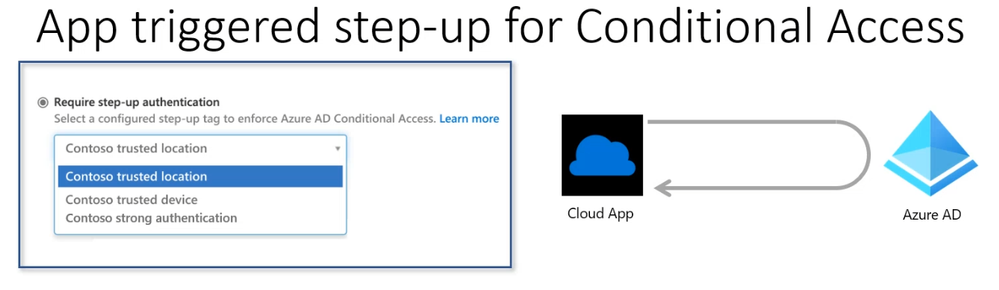
This month’s in-depth topic: Using Conditional Access Auth Context in your app for step-up authentication. Use the Azure AD Conditional access engine’s new Auth Context feature to trigger a demand for step-up authentication from within your application and services. Developers have often wondered if they were to only, selectively demand enhanced stronger authentication like MFA from their end users from within their applications. This capability helps developers build low friction user experiences for some parts of their application, while keeping access to more secure operations and data behind stronger authentication controls. Learn how to enable these scenarios in this session. Microsoft Program Manager presenters – Caleb Baker and Kalyan Krishna. This session was delivered and recorded on May 20, 2021. Live and in chat Q&A throughout call.
Resources:
Actions:
Stay connected:
by Contributed | May 26, 2021 | Technology
This article is contributed. See the original author and article here.
In this latest episode of Azure Unblogged, I am chatting to Dale Kirby (@dalekirby) Cloud Solution Architect at Microsoft about the Azure Arc Jumpstart ArcBox.
In this episode of Azure Unblogged, Thomas Maurer speaks with Dale Kirby about the Jumpstart ArcBox project. The ArcBox project provides an easy to deploy sandbox for all things Azure Arc. ArcBox is designed to be completely self-contained within a single Azure subscription and resource group, which will make it easy for a user to get hands-on with all available Azure Arc technology with nothing more than an available Azure subscription.
You can watch the video here or on Channel 9.
https://channel9.msdn.com/Shows/IT-Ops-Talk/Azure-Unblogged-Azure-Arc-Jumpstart-ArcBox/player?WT.mc_id=modinfra-24200-thmaure
Learn more:
by Contributed | May 26, 2021 | Technology
This article is contributed. See the original author and article here.
Initial Update: Wednesday, 26 May 2021 08:44 UTC
We are aware of issues within Log Analytics and are actively investigating. Some customers may have not been able to perform control plane operation, such as viewing work spaces or solutions via the portal, Poweshell or CLI. Delays of data ingestion may also be experienced in USGov Virginia region.
- Work Around: None
- Next Update: Before 05/26 12:00 UTC
We are working hard to resolve this issue and apologize for any inconvenience.
-Vyom

by Contributed | May 25, 2021 | Technology
This article is contributed. See the original author and article here.
Microsoft is a security and compliance leader. We are constantly humbled that the market keeps validating our goal on delivering Security for All in a Zero Trust World. We are not only best in suite we are also best in breed. Just in the month of May alone Microsoft has added these accolades to it list.
And while we could just rest on our laurels our team is determined to continue to improve and create intelligent security and compliance solutions for the world.
Join us at Microsoft Virtual Security & Compliance Summit on Thursday, June 3, 2021 between 9:00 AM–12:00 PM Pacific Time (12:00 PM–3:00 PM Eastern Time).
The realities of widespread remote and hybrid work scenarios pose new challenges for organizations. Security, compliance, and identity are more complex—and more critical—than ever. Join us to hear some of the industry’s leading voices speak on mitigating risks and strengthening your security posture.
At this event, you’ll gain fresh insights on:
- What’s top of mind for CISOs—like cloud-first security, training, and resiliency.
- How we secure Microsoft today—an insider look.
- Securing the remote and hybrid workplace.
- Trends and best practices from Microsoft defenders, detection, and response teams.
- Strategies for protecting against insider risk.
- Tactics to protect and govern data across your digital estate.
Don’t miss this interactive, high-profile event with Microsoft experts—and the opportunity to connect with your peers on the cybersecurity techniques you need to help safeguard your organization in 2021 and beyond.
To learn more about Microsoft Security solutions, visit our website. Bookmark the Security blog to keep up with our expert coverage on security matters. Also, follow us at @MSFTSecurity for the latest news and updates on cybersecurity.
Follow Christopher on Twitter and LinkedIn
by Contributed | May 25, 2021 | Technology
This article is contributed. See the original author and article here.
Claire Bonaci
You’re watching the Microsoft US health and life sciences, confessions of health geeks podcast, a show that offers Industry Insight from the health geeks and data freaks of the US health and life sciences industry team. I’m your host, Claire Bonaci. As we close out our 2021 nurses week series today guest host Kelly rocky interviews Dr. Tim Raderstorf, Chief Innovation Officer at Ohio State University School of Nursing.
Kelly Robke
Welcome to the podcast everyone. I’m very excited to have Dr. Tim Raderstorf here with us today from the Ohio State University School of Nursing, speaking about an issue near and dear to his heart. Tim is such an incredible nurse leader, as an innovator. He’s one of my heroes, and one of my mentors on my dissertation project for my DNP. Thank you, Tim, for making the time for us today. And I would just like for you to share your nursing journey with our listeners. It’s a very incredible, very unique and compelling path. Would you mind sharing some of the highlights from your nursing career?
Tim Raderstorf
Sure, I’d be happy to. But then thank you for the very kind introduction. I look to you as a mentor and for inspiration as well. So it’s an honor to be here with you today. Yeah, I’m, I’m what I call a little bit of a bent arrow. So I grew up from a place of immense privilege. I went to a Catholic prep school. And when you were good at math and science, they told you to be a physician. So I went to college, no enrolled in pre med, and kind of ignored all the flags that were telling me that clinical care was really where I wanted to be as a nurse, not as a physician. So I ended up working my first summers out of college at a summer camp for kids with the hematology oncology disorders, mostly HIV, sickle cell and cancer, and saw what the nurses did there and was just, you know, one of those lightbulb moments of Oh, this is this is where I need to be. So I went and got a direct entry program. I used that pre med degree to get into nursing school and went and got my master’s in nursing from Xavier University in Cincinnati, started out as a floor nurse at Nationwide Children’s Hospital, and then quickly transitioned into leadership roles. that eventually led to me having the chief innovation officer and faculty role at Ohio State’s College of Nursing.
Kelly Robke
Wow, thank you for that. And I learned something new about you every time I too, began my career working in blood disorders, but on the pregnancy side in hemoglobinopathies, sickle cell trait and disease and also HIV. That was just some incredible work back then. But thank you for reviewing that. The first thing I wanted to ask you about today is if you could tell us a little bit about the Genesis and the necessity in the call to action around nurses everywhere.
Tim Raderstorf
Yeah. Nurses everywhere is a nonprofit that I was fortunate to be a founding member of and continue to be the chief operating officer for that was called together by one of the best entrepreneurs in healthcare, nursing. And BK reached out to 18 of her friends in health care. And somehow me as well, I’m very fortunate to have been included in this group. But said, you know, this is an April of 2020. And it was very clear that the writing was on the wall that things weren’t going to get better soon, and that our nurse colleagues, and more importantly, the public were really going to suffer as part of this pandemic. So she called us all together and said, Hey, we need to find a way to elevate the profession of nursing, while improving health outcomes. And you know, by being nurses, we do that anyways. So let’s find a way that we can partner with the public, not create another nursing organization, but create a public health organizations that’s run by nurses to help the public achieve their their health goals. So it’s been a phenomenal journey. I’d encourage anyone who’s listening to to check out our website at nurses everywhere.com. But led by four past American Nurses Association presidents, the current president of the AMA, a lot of wonderful leaders, intrapreneurs, and entrepreneurs in healthcare, the past American Hospital Association president. So that’s all these amazing leaders who are totally selfless, and, you know, are just really committed to making their communities thrive. So we started nurses everywhere to give the public a voice and to be partners with nursing in that in that venture. And we’ve done it a lot of fun and interesting ways. First, we wanted to know what the public thought about nurses during the pandemic. So we collaborated with the Harris Poll and sent out a survey to over 2000 individuals in the US to ask them how they felt about nurses. And, you know, we knew that we were a trusted profession, and then people loved us from that round, but we weren’t sure as you know, are they enjoying this additional access to nurses that was occurring as part of the the policies are surrounding the pandemic. So we found that 89% of Americans want the same access to nurses after the pandemic as the receiving during the pandemic. And 91%. Want safe us in standard staffing ratios within health systems, and 90% want those same safe staffing ratios within nursing homes. So not only does the public trust us, but we were found new information or, or information that validated that they value us and they see the role that we have in their health care. So together, we wanted to figure out what the next steps would be to continue this partnership and really improve community health in United States. Because if you look at our outcomes, they’re nowhere where they need to be right now. Now, so that’s a tricky scenario, right? How do you have a public health organization that’s run by nurses that that’s for the public? And we’ve we first wanted to see all right, what can we do to raise awareness and change that narrative of what people think of nurses. So for example, I gave an innovation talk in Australia this fall. And one of the CO presenters behind the scenes and zoom, sent me a picture of Greg focker, from Meet the Parents after I presented and said was this inspiration for you. And it was, I’m sure light hearted and you meant to be kind. But it really tells you how the public worldwide views nurses, in my case, male nurse. So we wanted to change the narrative and focus on gratitude, focus on the work that they’re doing, and really capitalize on how the public wanted to help nurses. So we’ve done two things. Since then, one, we launched the thinking nurse wear mask campaign, we created a PSA, and really focused on asking the public if they wanted to be to impact their own health outcomes. And if they wanted to do that in a way that showed gratitude to frontline conditions, the best way they could do it would be the fall COVID protocol and wear their masks in public. And then from there, we were approached by a country music duo who had just created a song called You didn’t have to as really written as as what we’re going to call the nurses week anthem, cheer. But the the husband wife duo, the husband’s mother was a nurse for 35 years in the UK. And we decided that together, nurses everywhere would direct and produce the music video for this. So we were able to pull pictures from from nurses from around around the world, and showcase them in this video. And that got 100,000 views on YouTube in the first two weeks, something that was really elevating the way that the public was interacting with nurses. And now as we move into nurses week, we’re continuing to capitalize on that momentum by using what’s called the think of nurse contest. And this is our call to action for the public. and other health systems are anyone who really wants to get involved, to show gratitude for us, hopefully reaching the next phase of whatever the pandemic may be, by creating their own video to that song and submitting it on social media and our website at nurses everywhere.com. Winners, the winning submission is going to get a private conference or private concert from brown and gray. And there’s a bunch of other great swag and prizes to people who participate in it. So it’s a really fun way for the public to get engaged. But more importantly, in the contest, but more important, it’s a really great way for the public to engage with nurses everywhere so that we can continue to bridge that gap between nurses in public health and really improve health outcomes for into the future.
Kelly Robke
Well, you’ve hit on so many incredible and important value statements related to nursing our role in the community, our role in public health as well. First, I think it is nurses are natural collaborators. And we’ve always been looked upon as the role models in healthcare to demonstrate cross clinical collaboration, cross professional collaboration, but knowing you as an innovator, I think you’re already talking about a very innovative approach to the role of nursing in our community in our society, where we’re redefining what it means to be involved in health care. And and that has to involve maintaining health as well as addressing challenges in health too. We we go beyond the hospital, a traditional hospital system. And as healthcare transforms, we’re going to be right there at the tip of the spear because I think we both regard nurses as natural leaders as well as conveners, if you will. And I think being able to show leadership in this incredible time of unprecedented challenge to health care is just an example of our role within society within our communities. And within the changing paradigm of health. I think it’s really great what you’re doing with nurses everywhere, and really appreciate hearing how that came to be. And in the good work that you’ve been doing. I know my boss, Molly was one of the nurse nurses featured in in the video. So we love that connection as well. And I do hope our listeners will check out the thinking nurse contest that you mentioned, because that’s really cool stuff. I’m gonna throw a wild card question at you because one of the ways you’ve been inspiring and supportive to me personally is the book that you’ve recently published with Dr. Bernadine Melnick, another great nurse innovator. Can you tell us a little bit about your book and how it came about? But it’s one of my favorite reads? So thank you.
Tim Raderstorf
I can, like any good author. I love it. Right here. But yeah, this is a very interesting opportunity to meet, you know, being an innovation and being a fan of the TV show the office. Yeah, because it’s been very clear the direction that paper publication has been going for quite some time. Now. When speaking, when Springer reached out to write this book, we said, well, if we’re going to write a book on innovation, then we have to take an innovative approach to that book. Yes, it can’t be a textbook, like you’ve seen before. So you know, we have a couple concessions, one, we have to be able to write in first person be able to use narrative throughout and implement storytelling to, we want to make sure that there are alternative modalities to engage with this. So there are podcasts that go along with the book, though, when you purchase it, you can listen to podcasts with some of the chapter authors. In three, we wanted them to bring in a concept that hadn’t been in, in healthcare in general on which, which is entrepreneurship and entrepreneurial mindset. So there’s some things on innovation, there are plenty of things on leadership, but the entrepreneurial mindset hadn’t been bad at it. And so we said, you know, this is this is the gap that exists right now, we want to fill that through this book. So it was a long arduous journey, but a great opportunity to showcase the work of many of our peers who have been doing this for a long time, they just may not have had something to point to and say, you know, here it is. So we wrote the book, and really won the American Journal, nurse, American Journal, nurses book the year and the management and leadership section. And it’s just been a very exciting time to see that our peers are recognizing that this needs to be the path that we move forward when it comes to education. And the beauty about education is that that leads to practice. So very excited to see how this book transforms the nursing profession.
Kelly Robke
And what’s the title again, do you mind showing it to our smart listeners,
Tim Raderstorf
but it’s evidence based leadership, innovation and entrepreneurship in nursing and healthcare, a practical guide for success.
Kelly Robke
And you actually assembled quite the dream team of Nursing Practice nursing leadership, nursing innovation, and then like we’ve been talking about the cross collaborative view because it takes a village to get accomplished the bold and transformative changes that nurses are aware of as leaders in healthcare delivery. So I just wanted to make sure we we gave a shout out to that because it’s such an important work to thanks so much for your time and happy nurses week t happy nurses week to you. Thanks so much for having me.
Claire Bonaci
Thank you all for watching. Please feel free to leave us questions or comments below. And check back soon for more content from the HLS industry team.


Recent Comments