by Contributed | May 26, 2021 | Technology
This article is contributed. See the original author and article here.
FAQs from the field on KRBTGT reset
Hello Everyone, my name is Zoheb Shaikh and I’m a Solution Engineer working with Microsoft Mission Critical team (SfMC). Today I’ll share with you some FAQs on KRBTGT reset.
Introduction:
Recently I had couple of customers asking many questions on KRBTGT account password reset and Microsoft’s recommendations for this, in this article I will list these questions and provide my responses which will address many queries you may have.
Before we deep dive into details let’s have a brief on what’s KRBTGT and its use briefly.
KRBTGT: KRB stands for Kerberos and TGT is Ticket Granting Ticket. In simple words during Kerberos Authentication process TGTs are issued to users, services or accounts requesting access to resources, these TGT’s are encrypted by cryptographic key which is derived from the password of the Key Distribution Center’s (KDC) account (KRBTGT), this key is known only by the Kerberos service. Since this is the account which encrypts TGTs it becomes extremely important to secure and monitor (More details on How Kerberos works are here).
The KRBTGT account is a domain default account that acts as a service account for the Key Distribution Center (KDC) service. This account cannot be deleted, account name cannot be changed, and it cannot be enabled in Active Directory.
For information about name forms and addressing conventions, see RFC 4120 .
Coming back to customer queries, our customer wanted to know what Microsoft’s recommendation on resetting KRBTGT is regularly and had various queries on whether this can create an impact.
Why do organizations reset KRBTGT password?
Typically, KRBTGT resets might be performed during compromise recovery scenarios of Active Directory on recommendations from Microsoft DART team/Microsoft Compromise Recovery Team, following a set procedure after ensuring all back doors are closed.
Some organizations might reset KRBTGT password based on recommendations from 3rd party Auditors also.
It is important to remember that resetting the KRBTGT is only one part of a recovery strategy and alone will likely not prevent a previously successful attacker from obtaining unauthorized access to a compromised environment in the future. We strongly advise that customers create a comprehensive recovery plan using guidance found in the white paper of Mitigating Pass the Hash Attacks and Other Credential Theft.
What are Microsoft Recommendations on KRBTGT Reset?
There is no specific recommendation regarding password reset for the KRBTGT account.
Although you can reset it periodically even without any indicators of compromise, you should plan the interval of resets for your organization taking into considerations your backup schedules, operational procedures, security requirements, etc.
However, that is a separate discussion to have, and we are more over going to discuss what exactly happens during a KRBTGT reset and few other queries which came up when discussed this with one of our Mission Critical customers.
FAQs on KRBTGT Reset:
Note: Terms KRB1, KRB2 and KRBOLD used below is only for explanation purposes.
- Why does KRBTGT need to be reset twice?
KRBTGT keeps a password history of 2, hence we reset it twice to invalidate all tickets issued from old KRBTGT password.
- What happens when you reset KRBTGT account password once?
- After 1st reset the new KRBTGT password replicates to all the DC’s in the Domain.
- All new Tickets will use the new password (KRB1).
- Old tickets issued by old KRBTGT password (KRBOLD) should continue to work as password history is 2.
- Post old tickets expiry they should renew tickets with new KRBTGT password (KRB1).
- Present KRBTGT passwords will be KRB1 & KRBOLD.
- What happens when you reset KRBTGT account password twice?
- After second reset new KRBTGT password replicates to all the DCs in domain.
- All new tickets will use the new password (KRB2).
- Old tickets issued by old KRBTGT password (KRB1) should continue to work as password history is 2.
- Present KRBTGT passwords will be KRB1 & KRB2.
- Post old tickets expiry they should renew tickets with new KRBTGT password (KRB2).
- Old KRBTGT password (KTB Old) not valid any more as password history is of 2.
- What could be potential impact based on our experiences?
- All AD dependent applications tickets will get invalidated.
- This will make all applications reach out to DCs for re authentication.
- This may spike LSASS as all machines will reach DCs at once.
- Historically we have observed some non-Windows clients are unable to request new tickets till the expiry of the existing tickets.
- Recovery of a single DC: Will not work anymore because the KRBTGT password is different, and replication will not work (Workaround just promote a new DC).
- Any DC which was not replicating while reset is performed may experience Trust issues.
- Post second Reset which are older than the time 1st reset was performed will get invalidated.
- Is there a security benefit of doing KRBTGT resets regularly?
This is a Million$ question and unfortunately there is no clear answer to this but hopefully the below pointers might help.
- Resetting the KRBTGT is only one part of a recovery strategy and alone will likely not prevent a previously successful attacker from obtaining unauthorized access to a compromised environment in the future.
- If you are suspecting an attack on the environment, please open a support ticket with Microsoft’s Incident Response team.
- If an attacker managed to reach the DCs and successfully hold a Golden Ticket (KRBTGT Account Hash) then it’s a game over where the periodic reset only will not mitigate that as attacker can have already built different ways from controlling DCs and reach to golden ticket again easily so best practice to detect malicious behaviors, close the back doors and ensure AD Security (details in FAQ #7): How Microsoft Advanced Threat Analytics detects golden ticket attacks – Microsoft Tech Community.
- Can Microsoft Defender for Identity help detect KRBTGT compromise.
- Indeed, Microsoft Defender for Identity should be able to help detect attacks on Golden Ticket.
- There are various scenarios in this, please see the article to see more details Microsoft Defender for Identity domain dominance security alerts.
- What should I do to protect my DC’s against an attack?
This is a very broad question without having knowledge of the infrastructure but maybe a way to start this project is by doing an AD Security Assessment from Microsoft which can help find Risk and help improve AD Security. Below are some of the areas where AD Security Assessment may help.
- Review of operational processes.
- Review of the privileged accounts/groups membership as well as regular account hygiene.
- Review of the forest and domain trusts.
- Review operating system configuration, security patch, and update levels.
- Review of domain and domain controller configuration compared to Microsoft recommended guidance.
- Review of key Active Directory object permission delegation.
- Review Tier Model is in place or not.
- Recommendations on using PAW etc.
- Is there a way to reset KRBTGT account safely without having any impact on the environment?
If you maintain a gap of 10 hours or more between KRBTGT account password resets, this may minimize the impact significantly and makes the auditors happy. However this may not add any benefit from a Security prespective.
Note:
- The recommendations and impacts are based on experience/ how it should ideally work. Different environments may observe different issues.
- The responses were based on specific scenarios and queries, it might be different based on scenarios.
Special thanks to my SfMC colleague Ahmed Badr and others at CIS Tech Community for proof reading and suggestions.
Hope this helps,
Zoheb
by Contributed | May 26, 2021 | Technology
This article is contributed. See the original author and article here.
Hi there, Calendar Community!
It is with great excitement that we are announcing that we have graduated the shared calendar improvements in Outlook for Windows out of preview! This new shared calendar experience dramatically improves the reliability and sync latency for shared calendars & delegated calendars in all Outlook clients. The improvements have been released in Outlook on the web, the new Outlook for Mac, and mobile for a while now, and we’re excited that Outlook for Windows is now enabled as well.
Right now, about 10% of Outlook for Windows users in Current Channel with version 2103 have been enabled for those improvements, and we’ll keep expanding gradually throughout the spring and summer.
What exactly is changing?
In July 2019, we announced the preview in Outlook for Windows which has remained opt-in until now, as we turn this on in production. Eventually, it will be just “on”, but this is a journey and arguably the biggest change to Outlook for Windows since its initial release in 1997, so we want our every step to be cautious. With Version 2103 (March 2021 update), the new experience reached feature parity with the classic experience, so we have removed the preview label that was previously shown next to shared calendars that were enabled for the new experience. Since summer 2019, we polished the experience and fixed bugs, thanks to many customer reports. With tens of thousands of daily users on the preview, we feel confident now that the experience is going to delight calendar delegates.
What will your delegates notice?
Despite all the exciting statements above, our hope is that they don’t even notice anything changed. Why would we say that? This is one of those improvements that should be invisible because it eliminates issues but doesn’t change the core product functionality. Calendars will sync faster, and we have eliminated any reliability issues when managing a calendar. Delegates might only notice that things are smoother but no specific, obvious changes.
Please let us know if you have any suggestions or feedback on these improvements by emailing us at olk-calendar-preview[AT]microsoft.com! We cannot guarantee a response to every email, but we promise to read them all and do our very best to respond.
For more details, here are a few more articles for reference:
Outlook Calendaring Team
by Contributed | May 26, 2021 | Technology
This article is contributed. See the original author and article here.
Hello everyone, here is part 6 of a series focusing on Endpoint Protection integration with Configuration Manager. This series is recorded by @Steve Rachui, a Microsoft principal premier field engineer.
This session focuses on how Configuration Manager integrates with Exploit Guard and can be used to deliver Exploit Guard settings. Steve also discusses what Exploit Guard is and why it is important.
Next in the series Steve focuses on how Configuration Manager integrates with Windows Defender Application Guard and how it can be used to enforce Windows Defender Application Guard settings.
Posts in the series
Go straight to the playlist

by Contributed | May 26, 2021 | Dynamics 365, Microsoft 365, Technology
This article is contributed. See the original author and article here.
Most companies use sales pipeline data to gauge a very generalized picture of future sales. But imagine if your company’s data was accurate enough to predict next month’s revenue within a few cents? If an organization can standardize on top-performing sales processes and establish an accurate, targeted picture of the customer, pipeline data becomes far more reliableand future sales become far more predictable.
Insurance brokerage and advisory company Willis Towers Watson (WTW) collected extensive sales data across systems within the organization, but they lacked a centralized system to view the collected data. The company adoptedMicrosoft Dynamics 365 Salesto capture data in a single system where they could extract insights to optimize sales practices and prioritize high-converting customers. By using insights to drive success into sales practices, WTW has increased the reliability of their sales pipeline, making future revenue far more predictable.
“In January, we ran our numbers based on prior performance and predicted almost to the penny what the number would be for new business going forward. Probably very few companies have been able to do something like that.”Luis Maurette, CRB Global Head of Sales and Client Management, WTW
Sales predictability can be increased when sales leaders have two key things:
- An accurate picture of high-conversion customers: Seller conversion rate will increase and sales cycles will close faster if you can provide your sellers a picture of your highest-converting customers. With the right tools, customer profiles can easily be developed from the characteristics of existing customerssales intelligence you already have. According to LinkedIn, 74 percent of sales intelligence users said the tools are extremely critical or critical in closing deals.
- Better, faster sales processes: According to McKinsey, sales performance management can drive up to a 10 to 20 percent increase in revenue per salesperson. That means if you leverage tools that help you identify sales best practices and standardize them across your company, your sales cadence becomes predictable.
Fast access to data, fewer systems to pull data from, and easy collaboration with teammates and stakeholders optimize processes, and in turn makes sales cycles faster.
Identify customers more accurately, win more customers
A better understanding of the customers leads to higher conversion rates. Marcelo Fama, Head of Latin America CRB Ops at WTW says that with the new capabilities offered by Dynamics 365 Sales and Microsoft Relationship Sales (which includes LinkedIn Sales Navigator), “We identify more opportunities sooner with the highly effective, automated triggers in the sales process that come with the platform.” At WTW, they are now able to target unique audiences because of data in Dynamics 365, and have accelerated the sales process because clients recognize right out of the gate that they understand their clients’ needs.
Increase speed and collaboration with Teams
When sellers can quickly access account managers and subject matter experts for quick information within the context of a deal, sales cycles close faster. WTW plans to leverage the integration of the One Microsoft platform to optimize their sales processes. With Microsoft Teams embedded in Dynamics 365 Sales, sellers can share and edit CRM records within the context of chats and channels, providing the seamless collaboration between segments and regions critical to closing deals. “We have aspirations to become even more connected as a company and to accelerate growth through standardized processes,” says Maurette.
Success depends on making it stick
Historically, the failure rate for large-scale change efforts like new customer relationship management (CRM) programs has been as high as 70 percent. WTW reversed this trend and within six months of rapid deployment, 90 percent of WTW sellers were up to speed and using the new tools to work faster and more efficiently.
“In my 18 years at WTW, I don’t think we ever expected staff to adopt anything at above 80 percent, let alone a sales platform. It’s just outstanding.”Jim Blaney, Head of Sales and Client Management, Corporate Risk and Broking, North America, WTW
By tapping into the true value of Dynamics 365 Sales, WTW makes more data-driven decisions with consistency across the company rather than decisions based on guesswork. And the company has a deeper understanding of its clients and can better create targeted campaigns and deliver relevant, personalized services.
Learn more about Dynamics 365 Sales
Want to learn more about Dynamics 365 Sales? Watch Dynamics 365 Sales demos or take the Activate Digital Selling guided tour to see how Dynamics 365 Sales can empower your sellers with actionable insights.
Read more about how Willis Towers Watson brought predictability to their pipeline.
We’re always looking for feedback and would like to hear from you. Please head to the Dynamics 365 Community to start a discussion, ask questions, and tell us what you think.
The post Bring predictability to your revenue pipeline with Dynamics 365 Sales appeared first on Microsoft Dynamics 365 Blog.
Brought to you by Dr. Ware, Microsoft Office 365 Silver Partner, Charleston SC.
by Contributed | May 26, 2021 | Technology
This article is contributed. See the original author and article here.
Howdy folks,
Today we are starting the Conditional Access authentication context public preview. Authentication context allows apps to trigger policy enforcement when a user accesses sensitive data or actions, keeping users more productive and your sensitive resources secure.
We have added this capability for more granular policy targeting because of your feedback – let us know what you think!
Caleb Baker, from our PM team, will walk you through the details below.
Thanks,
Alex Simons
————————————————————————
Getting started with Conditional Access authentication context
Hey there, I am Caleb from the Azure AD team.
We’ve heard from many of you that you want to trigger a Conditional Access policy when sensitive content in your apps is accessed. This includes requiring multi-factor authentication, a compliant device or even GPS-based location. Existing app-level Conditional Access policies don’t support this level of resource granularity, so we’ve added support for authentication contexts.
Now that Conditional Access authentication context is in public preview it’s great to be able to go deeper into some of the details. I can’t wait to see how people use it and integrate authentication context into their own apps.
You can modify your line of business apps, or, thanks to integration with Microsoft Cloud App Security (MCAS), Microsoft Information Protection (MIP), and SharePoint Online, use it with all kinds of cloud apps right away!
Let’s get started!
When you use authentication context, first you will create a custom authentication context value. This is how apps will trigger Conditional Access policies when sensitive data or actions are accessed.
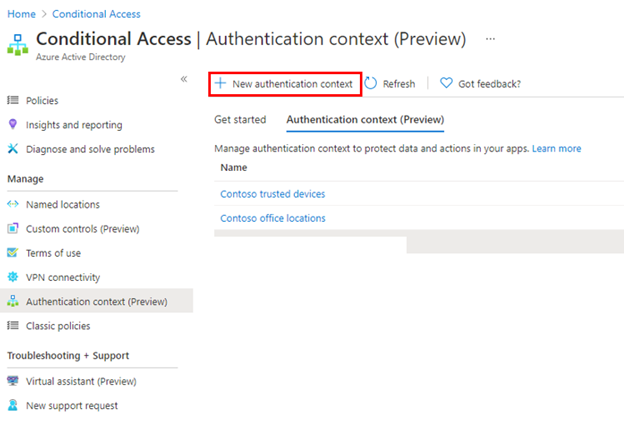
You can do this from the new Conditional Access authentication context tab, and clicking New authentication context.
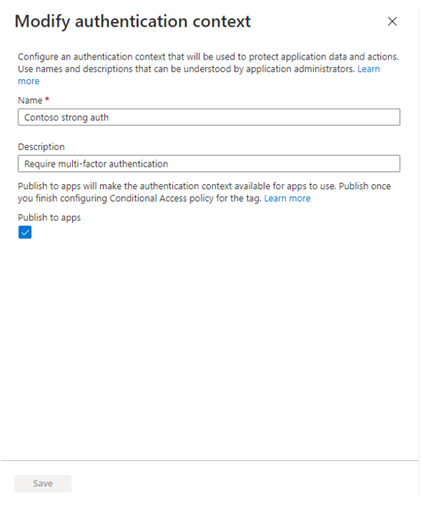
You’ll then provide a display name and description for the new authentication context. We recommend using a name that captures the authentication requirements. For example, Controls trusted devices or Contoso strong auth.
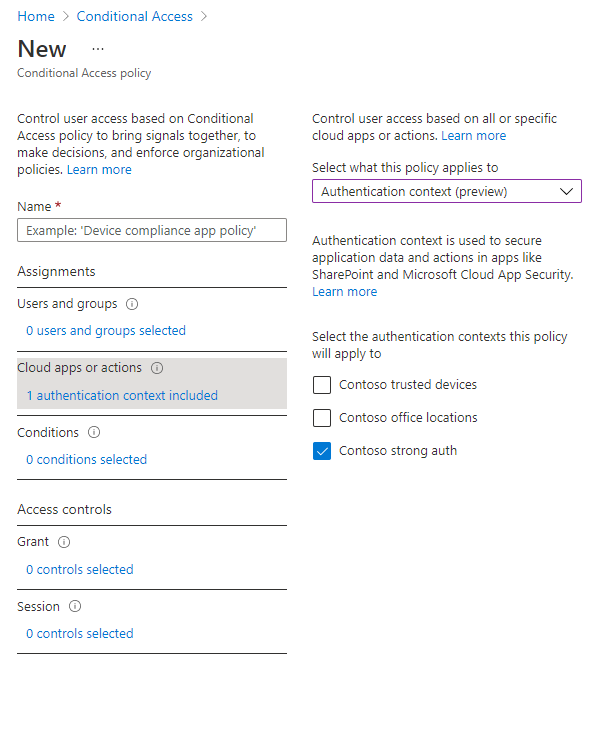
After creating a new authentication context, you then attach it to Conditional Access policies. These are the policies that will be enforced when an application triggers the authentication context. You author these policies in the Conditional Access policy admin UX, the same as any other Conditional Access policy. The only difference is that instead of assigning policy to a cloud app you’ll assign it to an authentication context.
Now that you’ve created an authentication context apps can make use of it. I’ll show an example with MCAS session policy, this will enforce policy when a user downloads a file from an app. MIP label management in the Office Security and Compliance Center has a similar experience for applying authentication context values.
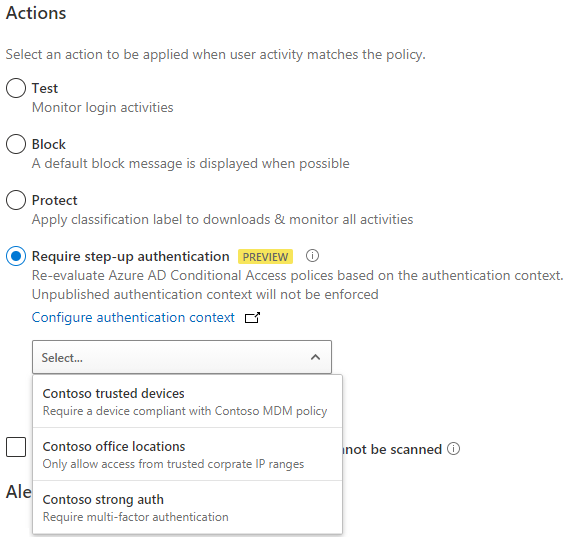
Now when a user attempts to download a sensitive file from an app that is configured to use the MCAS session policy, they will need to satisfy the attached Conditional Access policy.
Here are some of the ways customers have been using authentication context with MCAS and SharePoint.
- Requiring users to authenticate with multi-factor authentication (MFA) when they download sensitive files from any SaaS app on the web, like Office 365, Salesforce, Workday, and more.
- Require terms of use for SharePoint site collections that have been classified as confidential. For several customers this allows them to move sensitive documents to secured sites in SharePoint online, and complete their migration from on-premises.
These documents will help you to learn more about configuring these policies.
Adding authentication context into your apps
Any app using OpenID Connect/OAuth 2.0 for authentication can also use authentication context values, including apps developed by your organization. This allows your apps to better protect sensitive resources, like high-value transactions or viewing employee personal data.
We’ve built this support on a standards-based pattern, commonly used by apps prompting for multi-factor authentication, to help simplify app integration. Of course, you can also use the Microsoft Authentication Library (MSAL) to further simplify app development.
Apps can trigger a specific authentication context value by using an OpenID Connect claim challenge, to request a specific authentication context claim value.

Once the user has been challenged and satisfied policy, they will be issued a new sign-in token containing the required authentication context claim. The app can then use the presence of the claim to grant access.
Here are some additional resources to help with app development, using authentication context.
Next, we’ll be working toward GA and adding support for even more integrations, like Privileged Identity Management role activation!
As always, we’d love to hear from you. Please let us know what you think in the comments below or on the Azure AD feedback forum.
Thanks,
Caleb Baker
Learn more about Microsoft identity:
by Contributed | May 26, 2021 | Technology
This article is contributed. See the original author and article here.
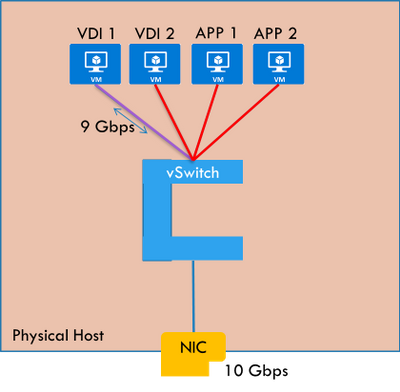
Are you running multiple applications in your HCI cluster? Do you see users complaining about intermittent connectivity issues to certain apps? Do you observe a particular application taking up a lot of network bandwidth thus preventing access to other applications? If yes, please read on to understand how you can resolve such issues in your HCI clusters.
Problem
If the networks configured on your HCI cluster have plenty of bandwidth and no traffic that bursts above what it can handle, you are in a good place and probably do not have a problem with packet loss, delay, or jitter. But generally, that is not the case. We are usually working with a finite amount of network bandwidth.
Some applications running in your network can be sensitive to delay. And they may be hosted with other applications on the same HCI host machine. If that is the case, your network sensitive applications are going to suffer.
Figure: VDI host pool may hog the network bandwidth of the host starving other apps
Solution: Quality of Service (QoS) Policies
What if you can control the network bandwidth of application workloads? This would prevent certain applications from over-consuming the bandwidth, even during traffic bursts.
Azure Stack HCI supports configuring maximum permitted send-side or receive-side bandwidth for virtual machines. This is supported for virtual machines connected to a traditional VLAN network as well as virtual machines connected to a Software Defined Networking (SDN) virtual network. Once set, your virtual machine will not be able to send/receive traffic above the configured maximum limits. For a virtual machine, you can choose to configure either send-side limit, receive side limit, or both.
NOTE: There are other ways to give priority to specific network traffic, like, for example, DSCP markings. While you can use them as per your requirements, SDN QoS described above is a generic way to limit traffic to/from a virtual machine.
Configure and manage QoS policies in Azure Stack HCI
There are two high level steps to configure QoS policies for HCI. First, you need to setup the Network Controller and then configure QoS policies.
Setup Network Controller
Network Controller can be setup using SDN Express Powershell scripts or the Windows Admin Center (WAC) or through System Center Virtual Machine Manager (SCVMM). Please refer to my previous blog post on microsegmentation for details on how to setup Network Controller.
Configure Quality of Service Policies
Once Network Controller is setup, you can go ahead and deploy your QoS policies. Today, you can do this using Network Controller Powershell cmdlets.
NOTE: Configuration support through Windows Admin Center is coming soon.
Step 1: Configure global QoS settings.
You can perform the below steps on a Network Controller machine or a management client of Network Controller. This will enable the global setting to configure QoS policies through Network Controller.
$vswitchConfig=[Microsoft.Windows.NetworkController.VirtualSwitchManagerProperties]::new()
$qos=[Microsoft.Windows.NetworkController.VirtualSwitchQosSettings]::new()
$qos.EnableSoftwareReservations=$true
$vswitchConfig.QosSettings =$qos
Set-NetworkControllerVirtualSwitchConfiguration -ConnectionUri $uri -Properties $vswitchConfig
//ConnectionUri is the REST uri of the Network Controller. Example: https://nc.contoso.com
Step 2: Configure QoS policies on a workload VM network interface.
First, you will need to identify the Network Interface where you want to apply the policy.
$NwInterface=Get-NetworkControllerNetworkInterface -ConnectionUri $uri -ResourceId Vnet-VM2_Net_Adapter_0
//ConnectionUri is the REST uri of the Network Controller. Example: https://nc.contoso.com
Then, you can configure the inbound and/or outbound maximum throughput allowed on the network interface.
$NwInterface.Properties.PortSettings.QosSettings= [Microsoft.Windows.NetworkController.VirtualNetworkInterfaceQosSettings]::new()
$NwInterface.Properties.PortSettings.QosSettings.InboundMaximumMbps =”20″
New-NetworkControllerNetworkInterface -ConnectionUri $uri -ResourceId $NwInterface.ResourceId -Properties $NwInterface.Properties
So, as you can see, with SDN QoS policies, you can prevent network intensive applications from hogging the entire bandwidth of your HCI cluster hosts. Please try this out and give us feedback at sdn_feedback@microsoft.com. Feel free to reach out for any questions as well.

by Contributed | May 26, 2021 | Technology
This article is contributed. See the original author and article here.
We’re glad to announce the release of Log Analytics Workspace Insights (preview) – a new experience providing comprehensive monitoring of your Log Analytics Workspace, through a central view of the workspace usage, performance, health, agents, run queries, and change log.
Accessing Log Analytics Workspace Insights
- Overview at scale – You can launch Log Analytics Workspace Insights through Azure Monitor’s list of insights, which shows an overview of your workspace across the globe: or from the Workspace itself. Opening LA Workspace Insights through Azure Monitor, first shows an overview of all your workspaces, across the globe:
Overview at scale
Select a workspace from the list to reach the more detailed workspace-specific view.
- Workspace-specific insights – open a Log Analytics Workspace and select Insights from its menu. This opens a multi-tabbed view, where you can deep dive into different aspects of your workspace. Below, we review in detail what insights this view provides.
Workspace Overview
The Overview section surfaces main workspace settings and statistics, such as the total monthly ingestion volume, the data retention period, or a set daily cap and how much of was it used already.
It also shows which are the top 5 most used tables, and information on them – how much data was ingested, what’s the daily pattern and anomalies – if found.
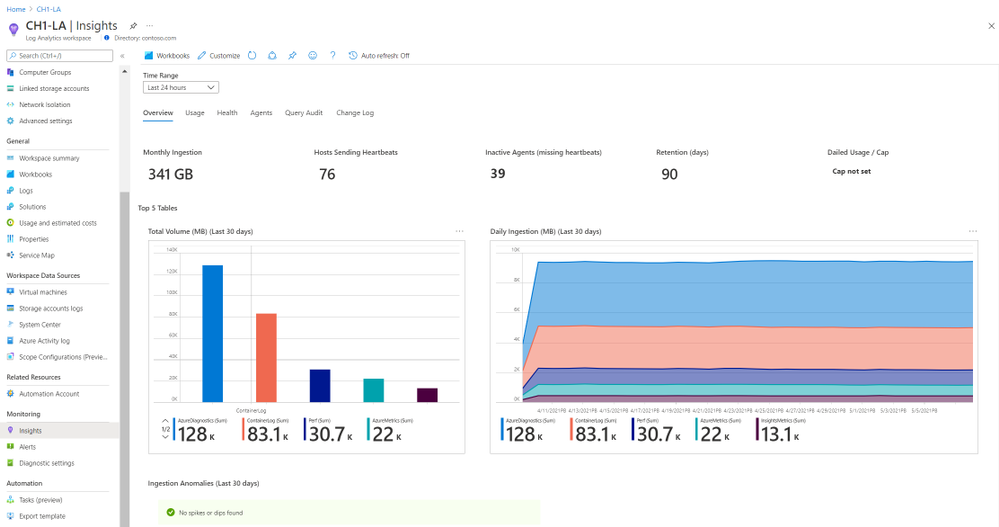 Workspace overview
Workspace Usage
Here you can explore in detail the usage of each table of the workspace. Click a row in the top grid to see table-specific information – how much data was ingested to the table, the percentage of it from the total workspace volume, which resources sent most data, and latency data, charted by time, and split to agent and pipeline latency.
Additionally, you can switch from the Dashboard to the Additional Queries tab to run queries and learn which resources, subscriptions and resource groups ingested most data – across the workspace. That information could help you identify “spamming” resources and save costs.
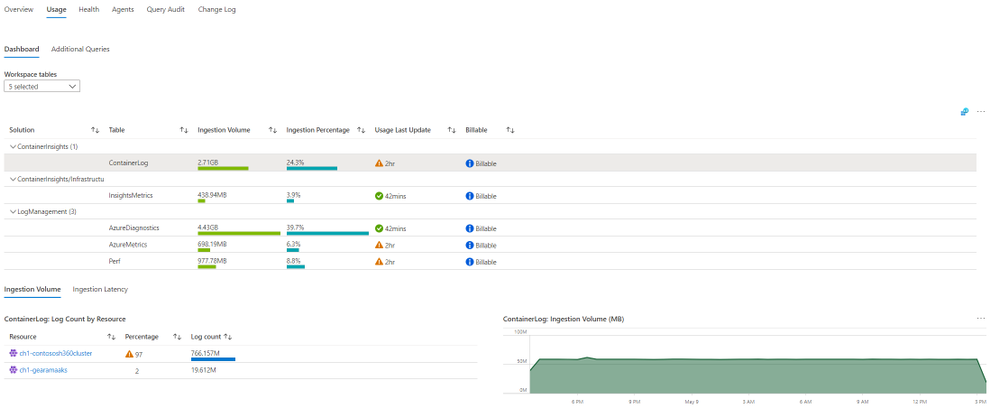 Workspace Usage
Workspace Health
The Health section shows the workspace health state, and known operational errors and warnings you should take note of. The table of operational events is based on the _LogOperation table.
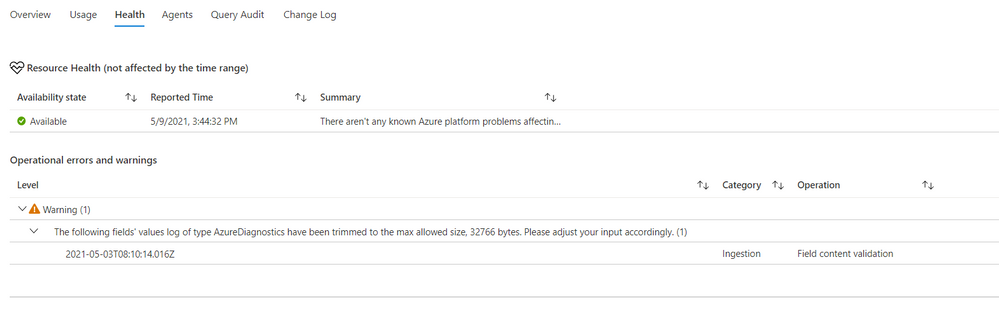 Workspace health
Workspace Agents
The top area of this page shows -operational errors and warnings related to your agents. The events are grouped by their description, but you can expand each type of event to see which resources were affected, and at which times.
Below it, you can review your agents in more detail – agent types, count, health and connectivity to the workspace over time.
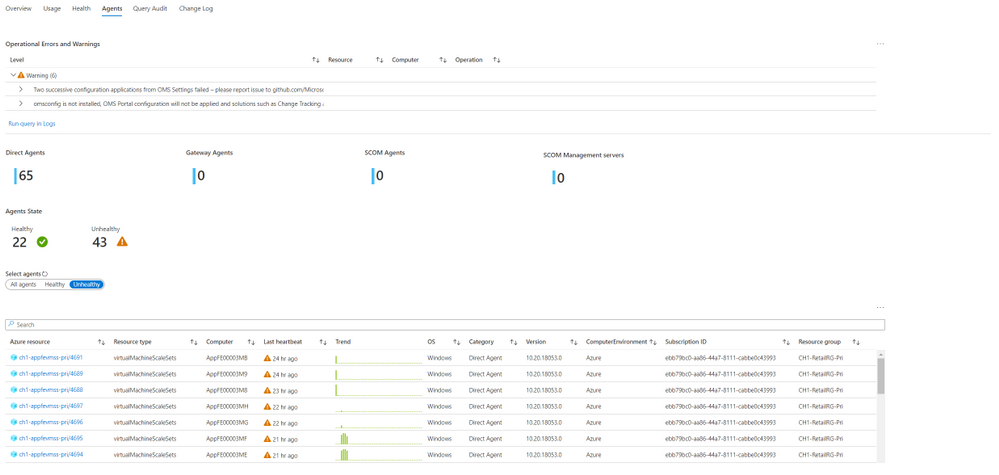 Workspace agents
Workspace Query Audit
The insights regarding workspace queries rely on query auditing logs. If query auditing is enabled on your workspace, this data could help you understand and improve query performance, and load, identify the most inefficient queries and which users query most, or experience query throttling. To enable query auditing on your workspace or learn more about it, see Audit queries in Azure Monitor Logs.
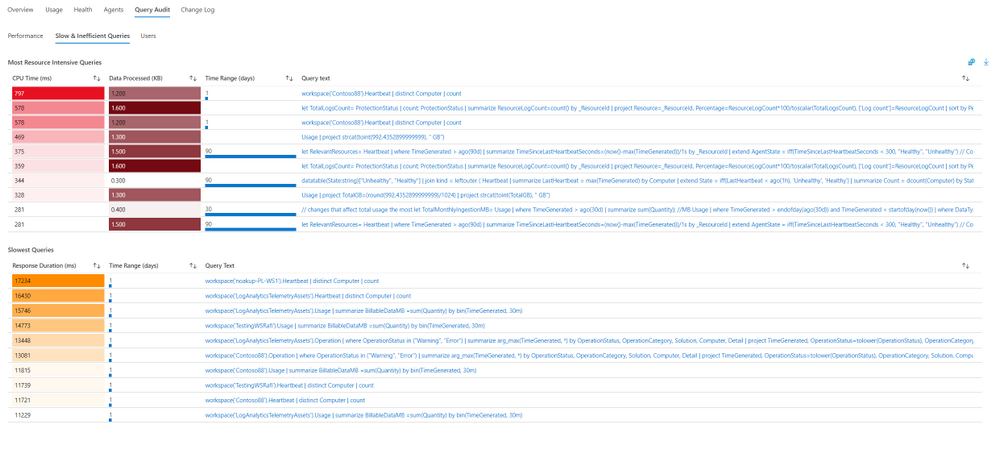 Workspace query audit
Workspace Change Log
This tab shows configuration changes made on the workspace during the last 90 days (regardless of the time range selected), and who performed them, to help you monitor who changes important workspace settings, such as data capping or workspace license.
Feedback
We appreciate your feedback! comment on this blog post and let us know what you think of the this feature.
by Contributed | May 26, 2021 | Technology
This article is contributed. See the original author and article here.
In this month’s edition of the What’s New blog, we’re excited to share news regarding the availability of Microsoft Office Long Term Servicing Channel (LTSC), OneDrive Admin Sync Reports (ADR), and updated Configuration Manager ADRs. We also point you to the latest admin-focused Microsoft Docs articles for Microsoft 365, as well as Amesh Mansukhani’s appearance on two new videos on the Office Deployment Insider’s YouTube channel and an interview on the Practical 365 Podcast!
Faster at-a-glance views with OneDrive Sync Admin Reports
In April, we announced the public preview for OneDrive Sync Admin Reports. Available in the Microsoft 365 Apps admin center, these reports give you an at-a-glance view of everything happening with OneDrive Sync across the organization, including visibility into who is running the OneDrive Sync client and any errors they might be experiencing. Insights like these can help you proactively reach out to educate people and resolve common issues quickly to improve user experience and increase OneDrive adoption.
Easier targeting for Microsoft 365 Apps updates with updated Configuration Manager ADRs
Coming in June, we’re releasing an update to Automatic Deployment Rules (ADR) for Microsoft 365 Apps in Microsoft Endpoint Configuration Manager that adds release type to the Title property in the update catalog. You will be able to use the Title property within the search criteria of your ADR definition to easily target the necessary updates for your environment. In addition, you’ll no longer need to continually update your search criteria with each new release. The version number and architecture values will also trade places.
Amesh Mansukhani talks about the Microsoft 365 Apps Admin Center on Practical 365 Podcast
At the end of April, Amesh Mansukhani, Office Deployment Insiders lead at Microsoft, joined the Practical 365 Podcast to talk about the Microsoft 365 Apps Admin Center. Listen to hear Amesh talk about the importance of keeping your Microsoft 365 Apps up to date and how you can benefit from using the Admin Center to help ensure your users and devices are getting access to the latest updates and to gain better visibility and control over application health. You can watch the video podcast on the Practical 365’s YouTube channel or listen to the audio-only version to learn more.
We’re excited to bring you two brand new videos on the Office Deployment Insiders YouTube Channel!
Get the most out of Microsoft OneDrive with brand new insight capabilities into your overall OneDrive deployment. Explore these new features with Amesh as he dives into fresh ways to analyze OneDrive client reports, sync issues, known folders to leverage KFM’s, and much more.
Introducing Microsoft 365 Apps Inventory, the Apps Inventory service recently added to the Microsoft 365 Apps Admin Center. Join Amesh as he shows how Inventory can help you gain deep insights and a real-time view of Office Apps in your organization.
Commercial Preview of Microsoft Office LTSC
Recently, we announced the Commercial Preview of Microsoft Office LTSC, which is built specifically for organizations running regulated devices that cannot accept feature updates for long periods, devices that are not connected to the internet, and specialty systems that must stay locked in time and require a long-term servicing channel.
Catching up: New Microsoft Docs articles for April
You can catch up on some of the latest Microsoft 365 Apps best practices from the field in these articles:
Network guidance for deploying and servicing Microsoft 365 Apps – This article covers topics such as available options for managing Microsoft 365 apps for remote workers or employees in the office, split tunneling for workforces that frequently connect using VPN, deploying Microsoft 365 Apps using Intune, using Servicing Profiles to manage monthly app updates, and optimizing your network via Configuration Manager. You can also read further guidance on deploying Microsoft 365 Apps.
Build dynamic collections for Microsoft 365 Apps with Configuration Manager – This article shares best practices for using Microsoft Endpoint Configuration Manager’s dynamic collections to simplify management. This month we added a new best practice for setting up a collection that captures all devices running outdated builds, so you can quickly identify devices that lack updates or must be updated to a certain minimum build.
Continue the conversation by joining us in the Microsoft 365 Tech Community! Whether you have product questions or just want to stay informed with the latest updates on new releases, tools, and blogs, Microsoft 365 Tech Community is your go-to resource to stay connected!
by Contributed | May 26, 2021 | Technology
This article is contributed. See the original author and article here.
This week at Microsoft’s annual Build conference we made two announcements related to Azure Durable Functions: Two new backend storage providers, and the GA of Durable Functions for PowerShell. In this post, we’ll go into more details about the new storage providers and what they mean for Durable Functions developers.
New Storage Providers
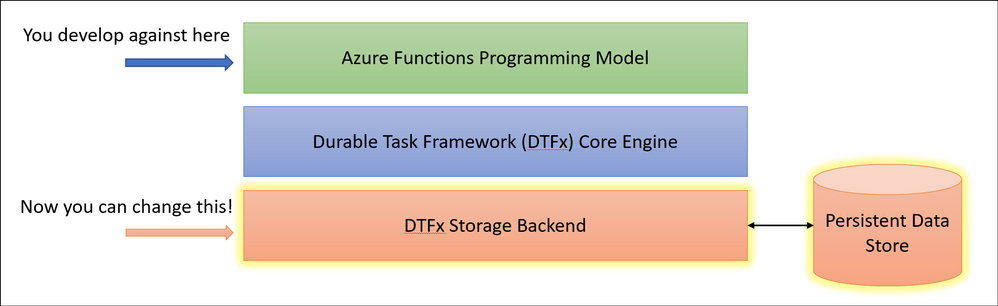
Azure Durable Functions now supports two new backend storage providers for storing durable runtime state, “Netherite” and Microsoft SQL Server (including full support for Azure SQL Database). These new storage options allow you to run at higher scale, with greater price-performance efficiency, and more portability compared to the default Azure Storage configuration. Any of these three storage providers can now be configured without making any code changes to your existing apps.
To learn more, read the Durable Functions storage providers documentation, which also contains a side-by-side comparison of all three supported storage providers.
Durable Functions enables you to write long-running, reliable, event-driven, and stateful logic on the serverless Azure Functions platform using every day imperative code. Since its GA release in 2018, the Durable Functions extension transparently saved execution state into an Azure Storage account, ensuring that functions could recover automatically from any infrastructure failure. The convenience and ubiquity of Azure Storage accounts made it easy to get up-and-running in production with Durable Functions apps in a matter of minutes.
Limitations of the Azure Storage provider
Azure Storage is and will continue to be the default storage provider for Durable Functions. It uses queues, tables, and blobs to persist orchestration and entity state. It also uses blobs and blob leases to manage partitions across a distributed set of nodes. While the Azure Storage provider is the most convenient and lowest-cost option for persisting runtime state, it also has some notable limitations that may prevent it from being usable in certain scenarios.
- Azure Storage has limits on the number of transactions per second for a storage account, limiting the maximum scalability of a Durable Function app.
- Azure Storage has strict data size limits for queue messages and Azure Table entities, requiring slow and expensive workarounds when handling large payloads.
- Azure Storage costs can be hard to predict since they are per-transaction and have very limited support for batching.
- Azure Storage can’t easily support certain enterprise business continuity requirements, such as backup/restore and disaster recovery without data loss.
- Azure Storage can’t be used outside of the Azure cloud.
After speaking with customers who were impacted by some of these limitations, it became clear to us that we needed to invest in alternative storage providers to ensure the needs of all Durable Functions customers could be met.
Fortunately, the architecture of Durable Functions and the underlying Durable Task Framework made it simple for us to enable swapping out backend storage providers without requiring customers to make any code changes. Starting in Durable Functions v2.4.3, we allow you to swap providers by adding a new extension and making a simple configuration change in your host.json file.
Introducing “Netherite” for maximum orchestration throughput
If you’re a fan of Minecraft, you’ll recognize that “Netherite” is the name of a rare material that is more durable than diamond, can float in lava, and cannot burn. The Netherite storage provider aspires to have similar qualities, but in the context of Durable Functions. It was designed and developed in collaboration with Microsoft Research. It combines the high-throughput messaging capabilities of Azure Event Hubs with the FASTER database technology on top of Azure Page Blobs. The design of Netherite enables significantly higher-throughput processing of orchestrations and entities compared to other Durable storage providers. In some benchmark scenarios, throughput was shown to increase by more than an order of magnitude when compared to the default Azure Storage provider!
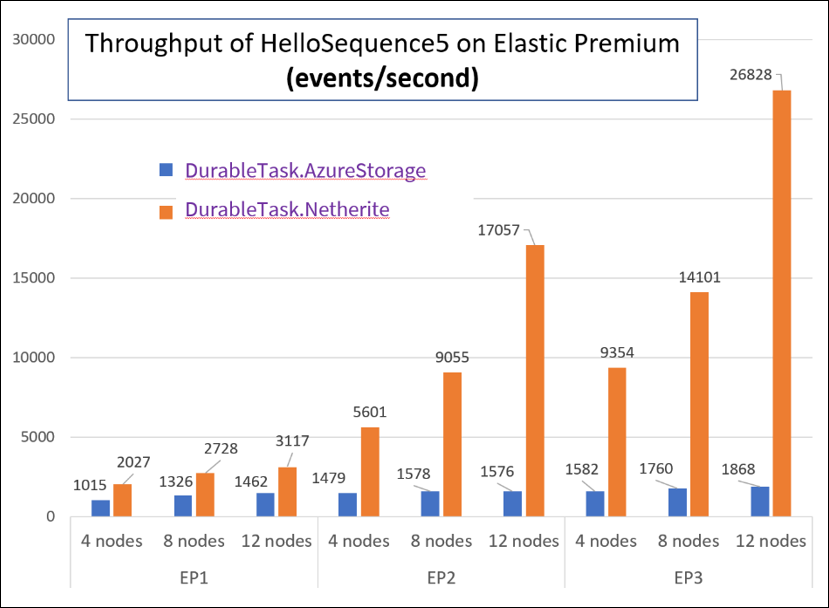
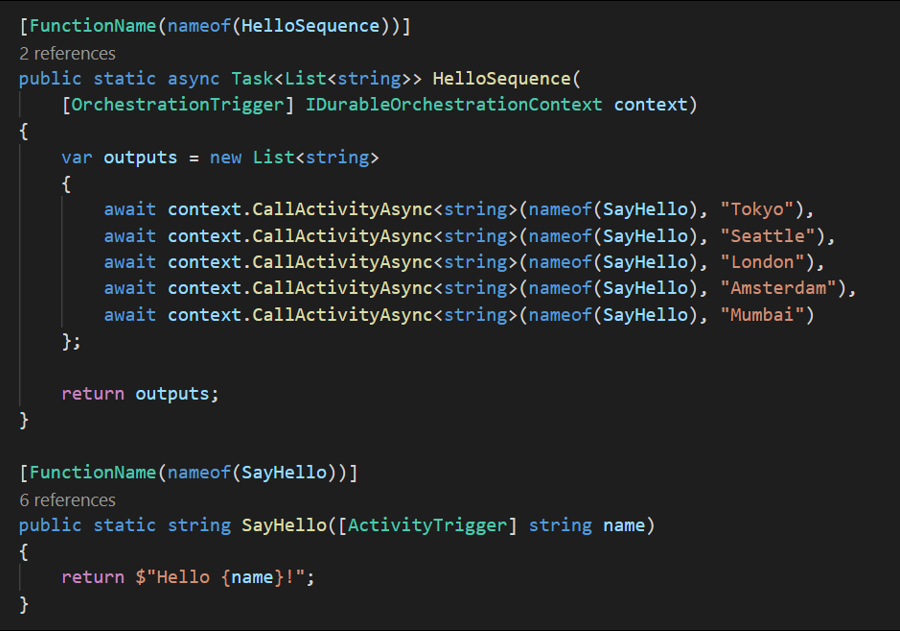
The orchestrator used in the above test is a simple function-chaining sample with 5 activity calls running on the Azure Functions Elastic Premium plan:
The significant increase in throughput shown in the above chart can be achieved using a single Azure Event Hubs throughput unit (1 TU), costing approximately $22/month USD (~€18) on the Standard plan (at the time of writing). Much of this performance gain can be attributed to advanced techniques, such as asynchronous snapshotting and speculative communication, as described in the Serverless Workflows with Durable Functions and Netherite research paper.
For more information and getting-started instructions for the Netherite provider, see the Netherite documentation.
Microsoft SQL for maximum control and portability
While the Netherite provider was designed for maximum throughput, the Microsoft SQL (MSSQL) provider for Durable Functions was designed for the needs of the enterprise, including the ability to decouple from the Azure cloud.
Microsoft SQL can run anywhere, including on-premises servers, Edge devices, Linux Docker containers, on the Azure SQL Database serverless tier, and even on competitor cloud providers like AWS and GCP. This means you can run Durable Functions anywhere that Azure Functions can run, including your own Azure Arc-enabled Kubernetes clusters. In fact, the Azure Functions Core Tools and the Azure Arc App Service extension have been updated to support automatically configuring Durable Function apps on a Kubernetes cluster with the MSSQL KEDA scaler for elastic scale-out.
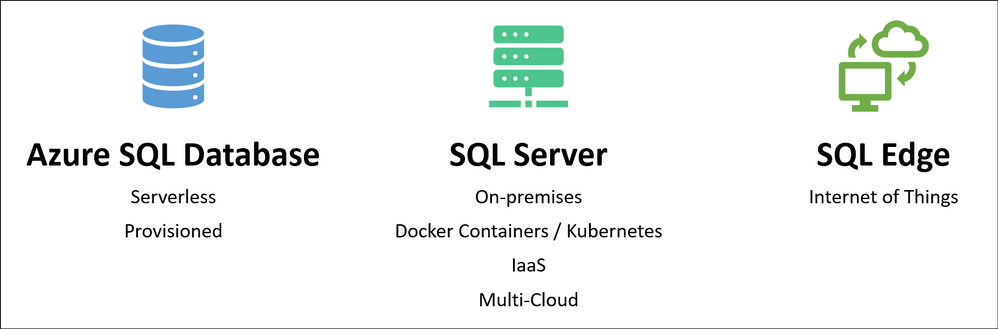
In addition to portability, you also get many other benefits of using Azure SQL database or Microsoft SQL for storing runtime state, including its long-established support for backup/restore, business continuity (high availability and disaster recovery), and data encryption.
The design of the Microsoft SQL storage provider for Durable Functions also makes it easy to integrate with existing SQL-based applications. When your function app starts up, it automatically provisions a set of tables, SQL functions, and stored procedures in the target database within a “dt” schema (“dt” stands for Durable Tasks). You can easily monitor your orchestrations and entities by running SELECT queries against these tables. You can also start new orchestrations using T-SQL and invoking the dt.CreateInstance stored procedure. This is especially useful if you want to extend an existing line-of-business application that already use SQL Server or Azure SQL Database by incorporating database triggers.
For more information and getting-started instructions for the Microsoft SQL provider, see the Durable Task SQL Provider documentation.
Concluding thoughts
We’re really excited about the new possibilities for customers building solutions using Durable Functions. With the availability of the two new storage backends, we hope to see new types of serverless apps get built which may not have been possible before. To be clear, the default Azure Storage provider option isn’t going anywhere, and we’ll continue to promote it as the easiest and lowest cost option for Durable Functions. Customers simply have new options which weren’t previously available.
So which one should you choose? I made a simple graphic to help you decide.
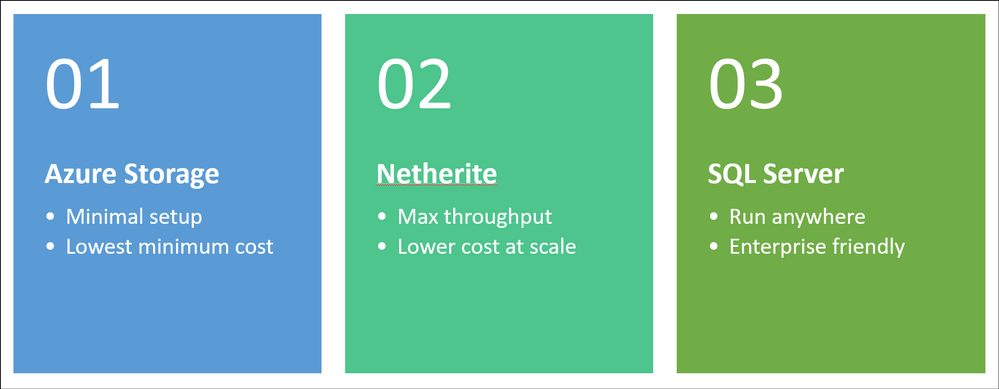
You can find a more comprehensive comparison of the three storage providers here.
As always, the development for Durable Functions happens in the open on GitHub and the new backends are no exception. You can find the Netherite provider at microsoft/durabletask-netherite and the Microsoft SQL provider at microsoft/durabletask-mssql. We encourage you to open issues in these repos and contribute PRs if you have ideas for how we can make them better (we’ve already accepted a few external contributions). Also, don’t forget to give us a :glowing_star: and subscribe for notifications of new releases using the “Watch” button.
by Contributed | May 26, 2021 | Technology
This article is contributed. See the original author and article here.
select 'ALTER TABLESPACE '||tablespace_name||' OFFLINE NORMAL;' from DBA_TABLESPACES;

select 'ALTER DATABASE RENAME FILE '''||NAME|| ''' TO '||NAME||';' from V$DATAFILES;

select 'ALTER TABLESPACE '||tablespace_name||' ONLINE;' from DBA_TABLESPACES;


Recent Comments