This article is contributed. See the original author and article here.
Managing workforce availability efficiently is essential for delivering consistent and high-quality customer service. A well-structured shift planning and scheduling process ensures service representatives are assigned to the right shifts at the right time. This helps businesses maintain optimal service levels while balancing service representative workload. By defining shift structures, aligning staffing with demand, and ensuring fair scheduling practices, organizations can improve workforce efficiency and enhance service quality.
Create shift templates with shift planning
Shift planning forms the backbone of workforce management. It helps businesses organize shift structures, define coverage requirements, and ensure the right service representatives are available. A clear and well-defined shift plan minimizes coverage gaps, reduces scheduling conflicts, and improves operational efficiency.
Key benefits of a shift plan include:
Align staffing with capacity plans: Ensure shift coverage aligns with forecasted service demand by scheduling the right number of service representatives at the right time.
Assign the right skills to the right shifts: Match service representatives with the required expertise to ensure optimal performance across different customer interaction channels.
Structured shift activities: Organize shift time effectively by incorporating work periods, training sessions, scheduled breaks, and lunch intervals. This structure helps optimize service delivery while ensuring employee well-being.
Comprehensive shift calendars: Set operational parameters, including shift days, working hours, and time zones, to ensure alignment with business requirements and global workforce operations.
Ensuring workforce efficiency with seamless scheduling
Once shift plans are in place, scheduling ensures service representatives are assigned efficiently to maintain business continuity. An organized scheduling process helps businesses allocate resources effectively, adapt to changing needs, and maintain fairness in workforce management.
Key benefits include:
Automated scheduling for quick assignments: Generate schedules in bulk based on predefined shift plans and workforce requirements, ensuring efficient allocation of resources.
Flexible manual scheduling: Assign service representatives to shifts manually, allowing for adjustments based on real-time operational needs and individual preferences.
Break distribution for continuous service: Balance workload by strategically distributing breaks across service representatives, preventing service interruptions while maintaining coverage.
Adaptability for changing needs: Easily adjust schedules to accommodate last-minute changes, or unexpected fluctuations in service demand.
By using Dynamics 365 Contact Center’s shift plan and scheduling, businesses can ensure smooth operations, optimize workforce utilization, and provide better service experiences. A well-organized shift structure helps service representatives stay productive and engaged while ensuring that customer support remains uninterrupted. With a strategic approach to planning and scheduling, organizations can balance efficiency with flexibility. Consequently, they foster a more structured and effective service operation.
This article is contributed. See the original author and article here.
In today’s fast-paced service landscape, ensuring the right number of service representatives are available at the right time is critical to maintaining efficiency and delivering exceptional customer experiences. Capacity planning in Dynamics 365 Contact Center empowers organizations to align workforce availability with service demand by providing accurate staffing forecasts. By leveraging historical data and advanced modeling, businesses can make proactive staffing decisions, optimize operational efficiency, and enhance service levels.
Capacity planning offers a structured approach to predicting staffing requirements across different time horizons. Whether planning for the immediate future or long-term workforce strategy, organizations can leverage these capabilities for efficient resource planning.
Short-term planning
Short-term capacity planning enables organizations to predict service representative needs in 15-minute intervals. This capability ensures staffing levels align with fluctuating support demand throughout the day. By continuously analyzing workload patterns, businesses can make real-time adjustments to maintain service quality and responsiveness. This approach helps contact centers proactively address unexpected surges, minimize wait times, and optimize resource utilization. With greater visibility into short-term trends, organizations can ensure seamless customer support while preventing service disruptions.
Long-term planning
Long-term workforce planning enables organizations to predict daily service representative needs well in advance. By assessing workforce requirements over extended periods, businesses can develop hiring strategies, optimize shift allocations, and ensure that they have the right talent in place to meet projected service demands. This forward-looking approach supports strategic decision-making, financial planning, and workforce scalability.
Data slicing
Organizations can break down staffing forecasts by specific channels and queues. Consequently, they get a deeper understanding of workforce distribution across various service touchpoints. This capability helps businesses allocate resources effectively, ensuring that each customer interaction channel is adequately staffed to meet demand.
With the inclusion of Capacity Planning in Dynamics 365 Contact Center, organizations can be well-equipped with the tools they need to optimize staffing efficiency and ensure exceptional service delivery. Capacity planning provides the foresight necessary to manage workforce resources effectively. Businesses can balance operational costs, enhance customer satisfaction, and drive long-term success.
This article is contributed. See the original author and article here.
As finance leaders scale to meet growing business complexity—spanning global entities, evolving regulations, and rising business performance demands—the pressure is on to do more than close the books. Today’s finance organizations must move faster, manage risk more proactively, and adapt dynamically.
That requires more than automation, it demands a new era of ERP. One where systems don’t just record and report, but act, learn, and adapt—where AI agents, embedded in everyday workflows, help finance teams manage complexity, reduce manual effort, and accelerate decision-making.
At Gartner CFO & Finance Executive Conference 2025—taking place at the Gaylord National Resort and Convention Center—we’re showcasing how Microsoft is enabling this shift. Visit our team of technical specialists at Booth #313 and attend our keynote to see how Microsoft is helping finance teams develop and implement AI strategies that align with business goals—without compromising on governance, compliance, or security.
Global-scale financial operations for the modern CFO
As organizations adapt to shifting markets—whether by entering new regions, adjusting product strategies, or responding to evolving regulations—financial operations become more complex. Finance teams are tasked with managing activity across multiple legal entities, currencies, and accounting standards, all while ensuring accuracy, compliance, and transparency. What was once the domain of large multinational companies is now a day-to-day reality for businesses of all sizes. As a result, global-scale financial operations have shifted from being a specialized need within your business systems to a core capability.
This evolving reality is creating a new baseline for finance transformation. Global-scale financial operations are no longer a niche requirement—they’re an operational necessity. Finance teams must support complex processes like consolidation, allocations, revaluation, and compliance across geographies and systems, while maintaining accuracy and transparency.
Multi-entity journal processing from a single experience.
Multi-ledger automation to support International Financial Reporting Standards (IFRS), United States Generally Accepted Accounting Principles (US GAAP), and local standards.
Cross-entity allocations, revaluations, and close activities.
Shared hierarchies for business units, customers, vendors, and financial dimensions.
Integrated consolidation and reporting across systems and geographies.
These features help finance organizations simplify complexity and operate with greater agility and precision—without increasing overhead.
Investing in the future of global-scale finance and agentic operations
As business models continue to evolve and financial complexity deepens, Microsoft is making foundational investments to support the next generation of finance operations. Our roadmap for Dynamics 365 Finance focuses on deepening multi-entity and multi-ledger capabilities, accelerating period-end close, and enabling flexible data hierarchies across legal entities, currencies, and accounting standards. Here are a few things we’re investing in:
Multi-entity and intercompany operations are often constrained by fragmented processes and manual handoffs across legal entities. A new approach is needed to streamline activity across the organization, reduce duplication, and increase control—all without scaling up effort or cost.
Multi-ledger accounting is becoming essential as more companies operate in jurisdictions that require parallel accounting standards. Traditional methods often rely on offline reconciliation or separate systems. We’re investing in ways to maintain compliance and transparency while reducing complexity.
Accelerating period-end close remains one of the most persistent challenges for finance teams. Time-consuming reconciliations, disconnected systems, and limited visibility into task status slow down the close. We’re focusing on integrated task orchestration, automation, and embedded intelligence to improve agility and confidence.
Flexible data hierarchies are increasingly essential as organizations grow and restructure—they help introduce new business units, financial dimensions, and operational models. We’re evolving to provide more support for shared, adaptable hierarchies across entities and dimensions to improve enterprise-wide reporting, planning agility, and compliance alignment.
At the center of this is a new vision for ERP—one that supports your organization’s shift to a more autonomous enterprise. This model brings together adaptive user experiences, AI agents, and a set of modular, extensible capabilities that can be accessed across applications and workflows. Finance professionals can interact with the system in natural language, receive guided recommendations, and delegate tasks to AI-powered agents embedded directly within their daily workflows. At the same time, these systems are becoming more interoperable—able to connect data, coordinate actions, and deliver outcomes across complex organizational structures.
We’re building financial operations solutions that don’t just keep pace with change, they help you lead it.
From intelligent tools to more autonomous financial operations
While intelligent automation has improved efficiency across finance processes, the next phase of transformation will require more than assistance. This next phase calls for intelligent systems that act with autonomy and help finance teams stay ahead of increasing demands.
Microsoft is delivering both embedded and the ability to build AI agents to support this shift:
The Account Reconciliation Agent, embedded in Dynamics 365 Finance, helps automate transaction matching, flag discrepancies, and reduces time spent on period-end close activities. Watch the Account Reconciliation Agent here.
The Finance Reconciliation Agent, available in Excel, enables intelligent reconciliation of data sets from across the business using familiar tools. Watch the Finance Reconciliation Agent here.
Custom finance agents, built with Microsoft Copilot Studio, allow organizations to design their own agent experiences—supporting processes like allocation modeling, compliance validation, or internal control workflows tailored to their unique operating model.
This approach to AI implementation represents a new layer of the finance IT stack—one that not only reduces manual workload but allows you to use and create agents that work for you to enhances accuracy, accountability, and insight.
Gartner CFO & Finance Executive Conference 2025
Learn how Microsoft helps finance teams develop and implement AI strategies.
What to expect: Learn how Microsoft is applying cutting-edge AI to transform finance operations—from reconciliation and forecasting to policy guidance and close review. We’ll share practical examples from our own finance organization, highlight new agent capabilities, and offer guidance on how to begin implementing agent-based automation in your own enterprise.
Whether your finance team supports 10 legal entities or hundreds, the tools to manage complexity, enhance insight, and drive transformation are available now.
Let us show you what’s next in financial and agentic operations, and how Microsoft can help you lead the way.
This article is contributed. See the original author and article here.
Hiring the right talent has never been more critical—or more complex. In today’s competitive labor market, organizations face rising costs per hire, increasing candidate expectations, and greater pressure to deliver a streamlined, responsive recruiting experience. HR leaders need tools that reduce administrative overhead, provide intelligent automation, and help them compete for top talent.
IT plays a vital role in enabling these outcomes by delivering secure, scalable, and integrated HR technology. With the public preview of the Dynamics 365 Human Resources Recruiting add-on, IT administrators can now empower HR teams with a modern recruiting experience—built on Microsoft’s Power Platform and enhanced by AI and Microsoft 365 integration.
Key Features Now Available in Public Preview
The Recruiting add-on provides a structured platform for sourcing, interviewing, and evaluating candidates across multiple job opportunities. Designed to improve collaboration between recruiters, hiring managers, and candidates, the new experience includes:
Outlook-integrated scheduling:
Check availability of interview panel members and candidates.
Share interview time slots and automatically send meeting invites.
Conduct interviews and collect feedback within Microsoft Teams.
AI-enhanced resume processing:
Upload resumes in bulk and automatically generates candidate profiles.
Candidates can upload their resumes and receive suggested interview slots via email.
These features are available as part of the Recruiting add-on (Preview), which runs as a model-driven Power App integrated with Microsoft Teams, Outlook, and Dataverse.
Architecture Highlights
For IT administrators and architects, the Recruiting add-on offers a familiar and manageable footprint within your Microsoft ecosystem:
Built on Power Platform: Leverages Power Apps, Dataverse, and Power Automate for extensibility, automation, and data integration.
Native Microsoft 365 integration: Schedules interviews through Outlook, runs meetings in Teams, and stores feedback securely.
AI-first experience: Reduces manual effort with resume parsing creation powered by Microsoft Copilot.
IT Admin Considerations
To deploy the Recruiting add-on, administrators should:
Install the Recruiting app from Microsoft AppSource.
Enable the preview feature in the Feature Management workspace in Dynamics 365 Finance.
Configure HR parameters to activate the Recruiting experience and Copilot capabilities.
Set up Power Automate flows to enable email notifications, job posting approvals, and status tracking.
The Dynamics 365 Human Resources Recruiting add-on with AI capabilities is now available in public preview. We encourage IT and HR teams to collaborate on deploying the experience in test environments and preparing for broader rollout.
This article is contributed. See the original author and article here.
Managing employee compensation and benefits effectively is critical for attracting and retaining talent. HR teams often face challenges related to system performance, data management, and giving employees better visibility into their plans. Based on customer feedback and a focus on optimizing HR processes, we’re excited to introduce four enhancements in Dynamics 365 Human Resources. We designed these updates to streamline compensation management, improve benefits processing performance, and empower employees with more self-service capabilities.
Feature Details
1. Link Variable Plan Awards and Enrollments to Positions
Until now, variable compensation plans in Dynamics 365 Human Resources could only be linked to employees directly. With the update, you can now associate variable plan awards and enrollments to an employee’s position.
This makes it easier for HR teams to manage compensation aligned to job roles, improving accuracy and scalability—especially for organizations with position-based structures.
Tip: Enable the feature “Ability to link variable pay to position” in Feature Management to use it.
2. Clean Up Benefits Eligibility Process Results
Over time, Benefits eligibility processing results can accumulate, causing system slowdowns and timeout errors. To address this, we have introduced a cleanup batch job that allows customers to periodically delete older process results.
Now, with the Clean up benefits eligibility process results job, quickly define how old records must be before removal, helping maintain system performance and avoiding issues like “Cannot select a record in Benefit eligibility process result.”
Tip: Set up a recurring batch job to automatically clean up old records based on your organization’s data retention needs.
3. Employee Start Date Filtering for Benefits Eligibility Processing
Managing eligibility for a large workforce often means needing more control over who gets processed. To help with this, we have added an Employee Start Date field group to the Benefits Eligibility Processing batch job.
HR teams can now specify a From and To date to include only employees whose start dates fall within a certain range. This improves performance by reducing the number of records processed and allows for more targeted eligibility runs.
From date: Record processing starts from the employee’s start date.
To date: Record processing goes up to the employee’s start date.
Tip: Use this filter when processing eligibility during specific hiring periods or when onboarding seasonal employees.
4. My benefit plans
Employees want transparency and easy access to their benefits information. To support this, we have introduced the new My Benefit Plans tile in Employee Self-Service (ESS).
Employees now view their elected benefits, along with associated dependents and beneficiaries—both for the current and previous benefit periods—all in one place. This empowers employees to better understand their coverage and reduces the need for HR teams to manually answer basic benefits questions.
Tip: Make sure to enable the Benefits Management feature to use the My Benefit Plans tile.
Call to Action
These enhancements in Dynamics 365 Human Resources are designed to help HR teams work more efficiently, keep systems running smoothly, and empower employees with greater self-service access.
Start taking advantage of these new compensation and benefits features today!
Enable the relevant features through Feature Management, explore the capabilities in your environment, and check out our latest release notes for additional details and docs:
This article is contributed. See the original author and article here.
Today, we’re announcing the first price increase for Dynamics 365 Business Central in more than five years. Since our last pricing update, Business Central has supported our customers’ ambitions with hundreds of new features across finance, analytics, supply chain, manufacturing, and beyond. And each year, we release new structural and functional updates, all with the goal of helping small- and medium-sized businesses manage end-to-end business processes on a single, powerful platform.
Microsoft Copilot in Business Central
Perform day-to-day work with the assistance of cutting-edge AI by your side.
While a lot has changed over the years, our mission with Business Central remains the same: help our customers scale operations without compromise. We’ve delivered on this through key product enhancements, including:
In addition to the value that we’ve added to the product thus far, we want to help ensure that our updated pricing offers even more benefits for our customers. To coincide with the price increase, we are increasing the storage entitlement included with each per user license.
The changes will be effective October 1, 2025, and the products will be priced comparably across different currencies. Business Central will be available for purchase at its current price before October 1, 2025.
Below, you will find the list of online products for which prices are being updated, as well as the increased storage allocation.1
Product
Price (USD) and storage before October 1, 2025
Price (USD) and storage as of October 1, 20252
Dynamics 365 Business Central Essentials
$70/month with 2GB storage
$80/month with 3GB storage
Dynamics 365 Business Central Premium
$100/month with 3GB storage
$110/month with 5GB storage
Dynamics 365 Business Central Device
$40/month with 1GB storage
$45/month with 1.5GB storage
The updated prices apply to new subscriptions and to existing subscriptions upon their first renewal on or after October 1, 2025.
1 Prices (and storage, where applicable) are per user, per month (or per device, per month where noted). 2 Prices shown are for informational purposes only and may not be reflective of actual list prices due to currency, country, region, and variant factors. Contact a Microsoft partner for additional information on pricing. Pricing in currencies other than US dollars will also vary for any Microsoft currency conversion rate adjustments that occur prior to October 1, 2025, if any.
This article is contributed. See the original author and article here.
The next wave of innovation for Microsoft Dynamics 365 and Microsoft Power Platform starts today. This morning, at the Microsoft Business Applications Launch Event, we are officially launching the 2025 release wave 1, a six-month rollout of new and enhanced capabilities that will be rolled out between April 2025 and September 2025.
This release wave comes at an exciting moment, in a year marked by rapid advancements in AI. Microsoft Copilot and agents are at the heart of this release wave, promising to transform how we all work and to help elevate organizations into AI-first companies. New Copilot and agent capabilities showcased at today’s event will help you to improve business processes, enhance customer engagement, and empower your workforce to automate tasks.
Watch the Microsoft Business Applications Launch Event to hear directly from product teams as they share demos and real customer stories that showcase the newest features in action. Companies like Eneco, Intralox, Apollo Travel, Murdoch’s Ranch & Home Supply, Pro Refrigeration Incorporated, and State Farm are leveraging these features to drive transformation.
Create your own autonomous agents with Microsoft Copilot Studio
In this release wave, Copilot and agents take center stage with even more functionalities to help organizations transform their operations and deliver exceptional customer experiences. At the event, we are showcasing custom agents that can autonomously conduct a range of processes across sales, service, finance and supply chain functions.
Explore agents pre-built for you in Microsoft Copilot Studio
Microsoft Copilot Studio serves as the foundation for agents, making it easy to customize and build your own customer and internal facing agents using your data and workflows. In addition, upcoming pre-built agents for Dynamics 365 are ready to customize and launch, accelerating your time to value. Stay tuned for blog updates and deep dives about Copilot and agent capabilities during this release wave.
Transform customer experiences with AI agents
AI is transforming every aspect of customer experience, from rethinking user experience and business processes to the way apps are built and maintained. The 2025 release wave 1 features Dynamics 365 customer experience apps designed to help you deliver connected and personalized experiences for customers.
Microsoft Dynamics 365 Sales brings the power of AI to help sellers meet their targets while boosting seller productivity. Copilot and agents enhance performance and simplify tasks to help grow your pipeline, sharpen strategies, and accelerate deals. A re-imagined user experience ensures sellers never miss the best move to close a deal. And automated research, ongoing follow-ups, and prioritized tasks provide continuous guidance—allowing you to focus on the right actions to drive success and grow your business.
Dynamics 365 Sales introduces new Copilot and agent capabilities to research and prioritize inbound leads, initiate sales conversations, and develop personalized sales engagements. These features help your teams to simplify tasks to help grow your pipeline, sharpen strategies, and accelerate deals.
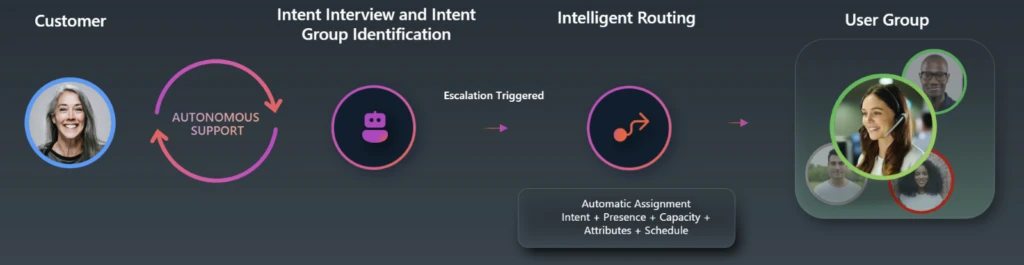
New functionalities for Microsoft Dynamics 365 Customer Service and Microsoft Dynamics 365 Contact Center include Microsoft Teams phone integration, which helps to reduce telephony complexity, proactive conversational journeys, and three agents that work in concert to create an autonomous contact center. These agents automate intent determination, manage the case lifecycle from creation to closure, and convert cases and related conversations into knowledge articles to support your contact center operations.
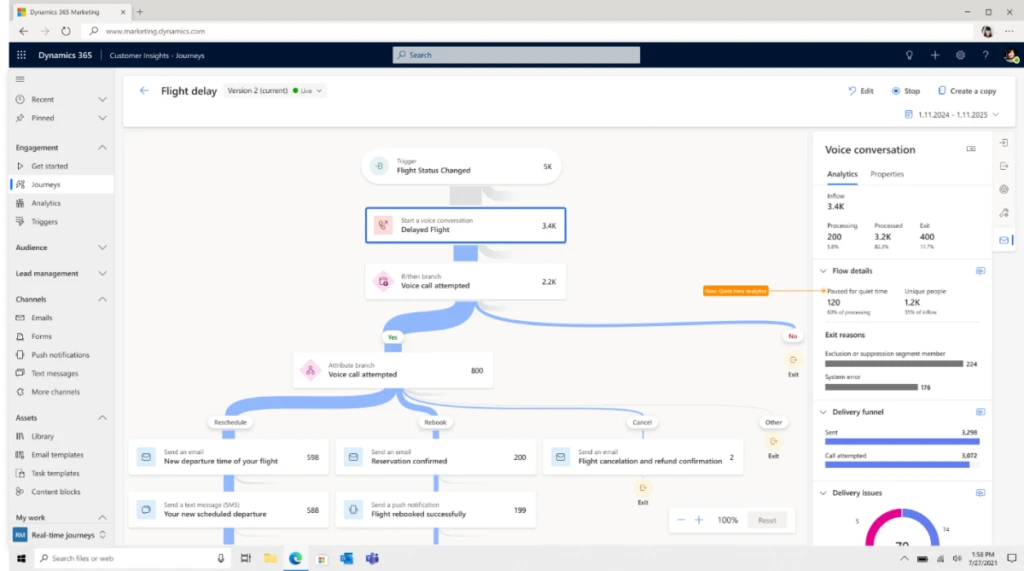
Learn how Apollo Travel, a subsidiary of European travel leader Dertour Group, is using Dynamics 365, Microsoft Power Platform, Microsoft Copilot, and agents to automate a range of processes—from generating hotel descriptions to developing chatbots for case summarization. In addition, using Dynamics 365 Contact Center with Dynamics 365 Customer Insights, Apollo Travel can now leverage custom-built agents to proactively reach out to customers with personalized recommendations, adding value to the customer’s travels and opportunities for upselling additional services. This experience is enabled through new proactive engagement activities such as SMS or phone calls, helping to create personalized journeys in real-time.
Today’s launch also showcases innovation across ERP solutions that is leading organizations into a new era of autonomous operations—where humans and agents work together to drive increased efficiency across business processes.
To support autonomous financial operations, Dynamics 365 Finance introduces the Account Reconciliation Agent, along with a new financial task workspace to help teams manage and track recurring processes like period close with greater structure and visibility.
In Dynamics 365 Project Operations, new capabilities will simplify time, expense, and approvals; accelerate scenario planning with what-if analysis; and improve planning accuracy with customizable task details. Dynamics 365 Human Resources will add AI-powered candidate assessment to help hiring teams identify top applicants faster by comparing resumes to job requirements, and a new onboarding agent that guides new hires through personalized onboarding journeys directly within Microsoft Teams.
In Dynamics 365 Commerce and Dynamics 365 Supply Chain Management, we’re delivering new tools to enhance pricing strategy and procurement efficiency. Unified pricing management enables organizations to centralize omnichannel pricing across segmentation, channel-specific rules, and price trees. At the launch event, we showcase how Murdoch’s Ranch & Home Supply is using the new Supplier Communications Agent in Dynamics 365 Supply Chain Management to reduce manual vendor follow-ups and improve purchase order accuracy.
We also feature how Pro Refrigeration Incorporated is using the Sales Order Agent in Dynamics 365 Business Central to process customer orders faster and improve responsiveness. Business Central also adds the integration with Dynamics 365 Field Service, new Copilot summarization capabilities and Scope 3 emissions tracking to help organizations meet sustainability goals.
Updates include Copilot-first experiences in Dynamics 365 Finance to streamline complex tax and compliance management and automate account and bank reconciliations using intelligent agents. Dynamics 365 Supply Chain Management introduces integrated AI, analytics, and automation features to improve operational efficiency, enhanced supplier communication, demand planning accuracy, and intelligent manufacturing features that align production data to real-world processes.
Microsoft Dynamics 365 Business Central also adds the integration of Field Service with service management, as well as the ability to enhance purchase order line matching with Copilot.
Redefine development: AI-first innovation in Microsoft Power Platform
Microsoft Power Platform continues to empower everyone to build their own AI-powered solutions through low-code or no-code tools with new features. Microsoft Power Apps is changing how software solutions are built with plan designer, enabling makers to build an end-to-end solution plan from simply describing their business problems, generating business requirements, data tables, and suggested solution architecture.
Microsoft Copilot Studio brings together the best AI innovations into a single low-code agent platform so that you can build amazing things. New capabilities like Agent Flows and Deep Reasoning expand the frontier of agents you can build, while new text and generative AI tools give you the ability to direct agents in specialized ways. The general availability of triggers and generative orchestration enables new categories of autonomous agents to transform business processes. We also are introducing more tools to optimize your agents including new diagnostics, testing, and performance analytics.
Watch the virtual Microsoft Business Applications Launch Event
Watch the Microsoft Business Applications Launch Event to discover the latest in Dynamics 365 and Microsoft Power Platform. You’ll get access to in-depth demos of new autonomous agents and other capabilities designed to optimize your workflows and streamline operations.
Don’t forget to review the detailed release plans for Dynamics 365 and Microsoft Power Platform. Stay updated on the latest features and upcoming enhancements, and create your personalized release plan using the release planner to ensure you’re equipped with the knowledge needed to maximize on this new release wave.
We look forward to seeing how capabilities in this release wave enhance your business processes and bring new levels of efficiency and customer success.
This article is contributed. See the original author and article here.
Welcome to the April 2025 release update of unified routing in Dynamics 365 Customer Service and Dynamics 365 Contact Center! This update brings a suite of new features designed to enhance the efficiency and effectiveness of your routing strategies. This post covers unified routing features released from October 2024 to April 2025. Let’s dive into some of the key features.
Least active routing method in messaging
This month, we are extending the least active routing method to messaging channels. Least active routing provides efficient workload distribution by ensuring work items are assigned to service representatives based on when they end their last conversation and have the least active in the queue. This approach prevents back-to-back assignments. Additionally, it ensures agents have adequate rest between customers. This leads to better utilization of agents, improved customer satisfaction (CSAT), service representative satisfaction (ASAT), and lower average handling time (AHT).
Service representatives work across multiple Dynamics 365 environments and use different collaboration tools. This raises the need for synchronizing the right presence status across these instances to ensure service representatives are not overbooked. Also, it provides a seamless engagement experience for both customers and service representatives.
The introduction of presence synchronization APIs, will help contact centers in managing presence status’ of service representatives better. Organizations can retrieve, modify and subscribe to presence change events in real time.
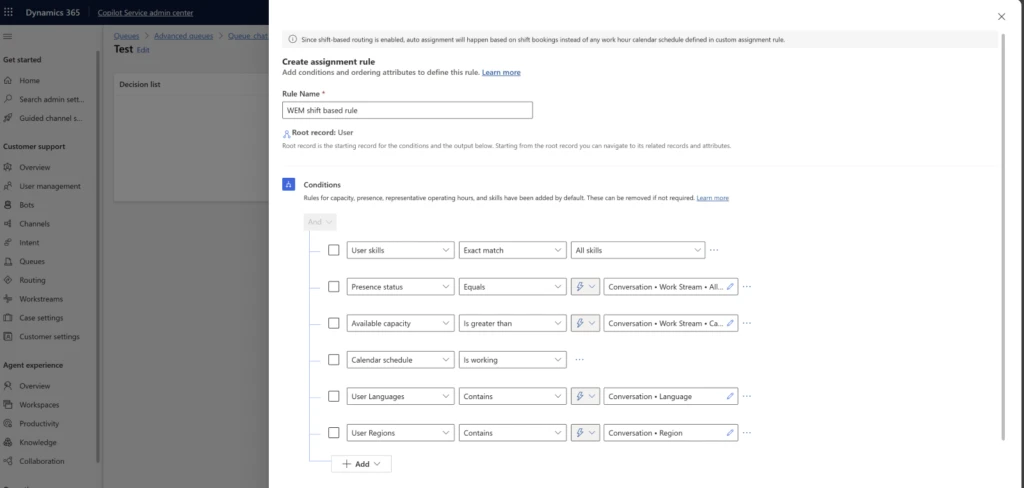
Shift-based routing is a game-changer for organizations with varied working hours and global teams. To reduce conversation rejections, transfers, and customer wait times, it is critical to assign conversations and records to service representatives based on their working shift schedules and plans. This feature allows supervisors to create workforce management shift plans and assign them to one or more representatives. This ensures representatives receive assignments only during their scheduled work times. It optimizes resource usage and enhances customer satisfaction by reducing wait times during off-peak hours.
Reconnecting a returning customer to the last service representative they interacted with is now more efficient with a new notification template for returning conversations. This template provides greater control over the assignment process, ensuring that the original service representative is notified and given the opportunity to take the chat, thus maintaining continuity and enhancing the overall customer experience.
With customized notifications for returning persistent chats, admins can configure a separate notification template for returning chats, choose the auto-assignment behavior, set a distinct notification title, and even customize the timeout period. This feature helps maintain service representative-customer continuity, enabling faster resolution and a smoother experience.
Templates for managing routing rulesets in bulk
In order to simplify routing configuration and improve administrative efficiency, we are delighted to introduce the bulk management of routing rules through templates. Bulk management enables administrators to create routing ruleset templates for queues and workstreams, eliminating the need for multiple versions of the same routing rules. With a few clicks, apply prioritization, assignment, or work classification ruleset templates to multiple queues and workstreams. Administrators can manage rules centrally—any template update instantly applies to all instances in queues or workstreams, removing the need for individual ruleset maintenance.
Make sure to explore these new features to maximize the potential of unified routing in your contact center. Stay tuned for more updates and enhancements!
Learn more about unified routing
See our upcoming and recently released features here:
Recent Comments