This article is contributed. See the original author and article here.
Today, we’re excited to announce we’re removing the waitlist and adding an expanded set of features to the Microsoft Designer preview. With new AI technology at the core, Microsoft Designer simplifies the creative journey by helping you get started quickly, augment creative workflows, and overcome creative roadblocks.
This article is contributed. See the original author and article here.
Discover how Dynamics 365 helps customer experience leaders do more with less
Leaders of organizations in every region and industry are cautiously navigating business decisions of 2023. The recent economic turbulence has forced companies to evaluate their internal processes, tools, and enterprise software to optimize for efficiency. Conversely, customer experience (CX) leaders see 2023 as the year of opportunity. By strengthening their customer experience strategy with technology, CX leaders can retain their most valuable customers, acquire new customers, and look to surpass their competitors. The good news is that you don’t need more to do this. You can do more with less, utilizing the power of AI to optimize experiences for your sellers, marketers, and data analysts so they can deliver better experiences for your customers.
CX leaders know that the first step to any great customer experience is understanding your customer. They need a customer data platform that can do more for them, making sense of their data, offering recommendations, and serving up valuable insights. Microsoft Dynamics 365 Customer Insights unifies and enriches first-party and third-party data to truly understand your customer and predict their intent. It does this while maintaining privacy and compliance with customer consent. Out-of-the-box AI guides data wranglers with the next best action and also can provide predictions for customer lifetime value, so you can determine how to best invest in your customers.
Business Finland utilized Dynamics 365 Customer Insights to gain greater data insights, resulting in the ability to support thousands of Finnish companies through the COVID-19 pandemic, increasing its export sales by 20 percent, and allowing the Finnish government to fund topics and initiatives that align with its strategic goals.
With the latest Copilot in Dynamics 365 Customer Insights, data analysts and marketers can engage directly with customer data using simple, natural language. This saves time for data analysts, allowing them to type the query in their own words instead of identifying the query in SQL. This capability democratizes access to insights, allowing marketers to use their customer data platform (CDP) to ask questions using everyday language and receive answers fast, without needing to know SQL programming. With simple prompts, marketers can explore, understand, and predict customer preferences and needs in near real time, reducing the reliance on the analytics team to provide them with the customer insights they need.
Engage your customer
Customers today expect personalized experiences, but your marketers don’t have the time or resources to tailor every interaction with every customer. Microsoft Dynamics 365 Marketing can do more with less by using AI to orchestrate personalized journeys across every customer touchpoint. In addition to customer journeys, Dynamics 365 offers email marketing, lead scoring, marketing pages, and social posting, allowing you to seamlessly connect your marketing and sales processes. Mid-Continent Instruments and Avionics, an aviation parts supplier, is using Dynamics 365 Marketing to automate the follow-up process for completed repairs, tying this activity into product campaigns, and communicating more effectively with customers.
With Copilot in Dynamics 365 Marketing, marketers can eliminate the time-consuming process of manually building customer segments for email campaigns, utilizing the query assist feature that allows them to describe their targeted segment in natural language. When they are ready to craft their email content, marketers can harness the Copilot feature, content ideas, to generate content by providing a few prompts. They can also tailor the tone to meet the needs of their audience. With Copilot in Dynamics 365 Marketing, marketers can spend less time on copywriting and audience segmentation, and more time on strategic marketing efforts.
Deliver for your customer
You’ve moved your customer down the funnel, understanding and predicting their intent, personalizing experiences with communications and offers, and now they’re ready to purchase. Microsoft Dynamics 365 Sales enables salespeople to build strong relationships with your customers, take actions based on insights, and close deals faster. You can use Dynamics 365 Sales to keep track of your accounts and contacts, nurture your sales from lead to order, and create sales collateral. Sales managers can use AI to make their sales teams stronger by monitoring conversations with customers using conversation intelligence and providing coaching and feedback to sellers, or by creating step-by-step guidance for next best steps with sequences.
DP World shortened sales cycles enabling five times more proactive sales and two times greater retention with Dynamics 365 Sales.
With Copilot in Microsoft Viva Sales, part of Dynamics 365 Sales, sellers can save time with generated email content suggestions, which includes data that is relevant to the customer, such as pricing, promotions, and deadlines. In addition, they can generate an email response that proposes a meeting date and time based on availability of their Outlook calendar. These new capabilities help sellers automate and expedite administrative work so they can focus on what matters mostmaking meaningful connections and building trust with their customers and prospects.
Learn how to do more with less
With Dynamics 365 Customer Insights, Marketing, and Sales, you can connect your teams across all business processes to ensure your customer is always at the center. This ensures they have a personalized, seamless experience, from consideration to purchase. To learn more or take a guided tour, please visit our connected sales and marketing solution page. To learn more about Dynamics 365 Copilot, read the announcement blog from Microsoft Corporate Vice President, Business Applications, Emily He.
This article is contributed. See the original author and article here.
With Azure Database for MySQL – Flexible Server, you can configure high availability with automatic failover within a region. The high availability solution is designed to ensure that committed data is never lost because of failures and that the database won’t be a single point of failure in your software architecture.
Within a region, there are three potential options to consider, as shown in the following table:
Option (Mode)
Committed SLA
Non-HA
99.9%
Same Zone HA
99.95%
Zone Redundant HA (ZHRA)*
99.99%
*ZRHA is only available in regions that support availability zones. For the latest list of Azure regions, in the Azure Database for MySQL documentation, see Azure regions.
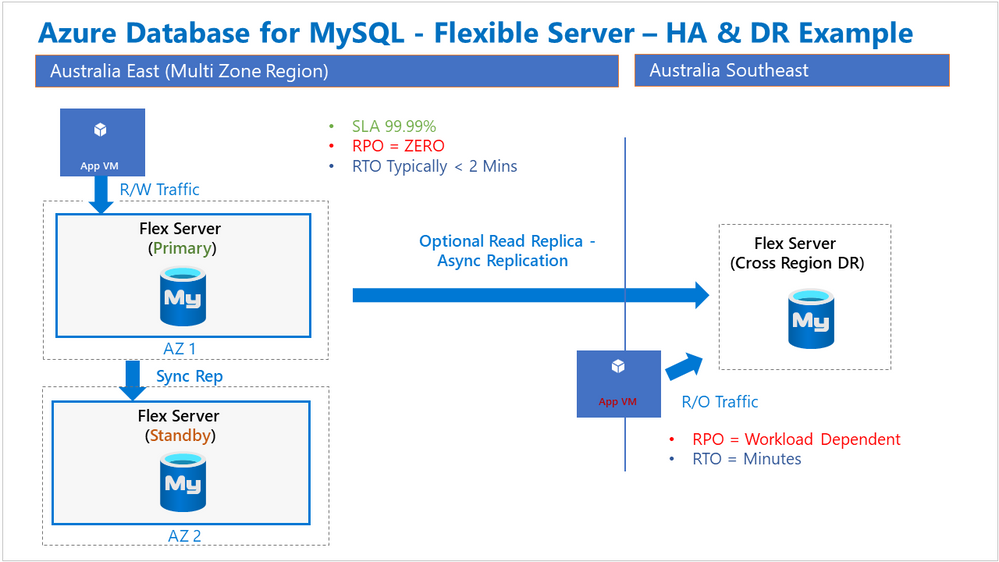
In addition to the ‘in-region’ modes listed above, there’s also an option to design for protection of database services across Azure regions. One common pattern we’ve seen with several customers is the need for maximum in-region availability along with a cross region disaster recovery capability. This manifests itself as ZRHA in the primary region and a Read Replica in another region, preferably the paired region, as illustrated in the following diagram:
With ZRHA, failover between the Primary and Standby servers is automatically managed by the Azure platform, and importantly, the service endpoint name does not change. On the other hand, the manual process associated with a regional failover does introduce a change to the service endpoint name. Some customers have expressed an interest in being able to perform a regional failover without later having to update the associated application connection strings.
In this post, I’ll explain how to address this requirement and provide a regional failover that requires no application connection string changes.
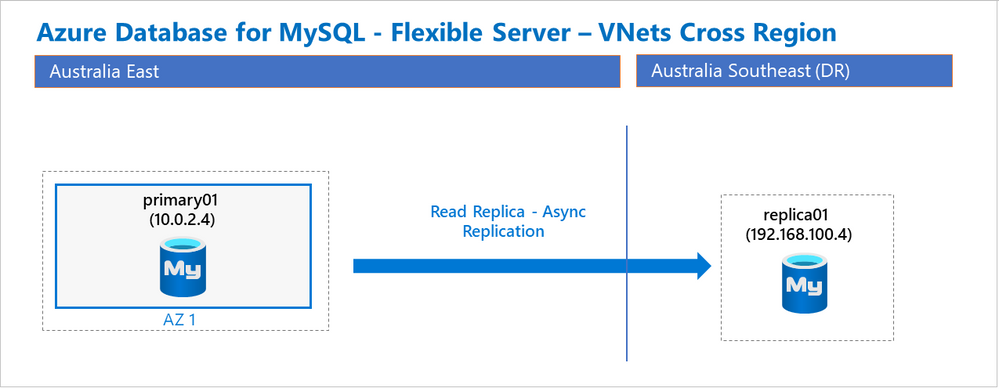
For our purposes, we’ll use the following simplified architecture diagram as a starting point:
In this illustration, there’s a single Primary server located in Australia East and a Replica is hosted in Australia Southeast. With this setup, it’s important to understand some implementation details, especially around networking and guidance:
Each server is deployed using the Private Access option.
Each server is registered to the same Azure Private DNS Zone, in this case, myflex.private.mysql.database.azure.com.
Each server is on separate a VNet, and the two VNets are peered with each other.
Each VNet is linked to the Private DNS zone.
The server name, IP address, server type, and region for the two servers I created are shown in the following table:
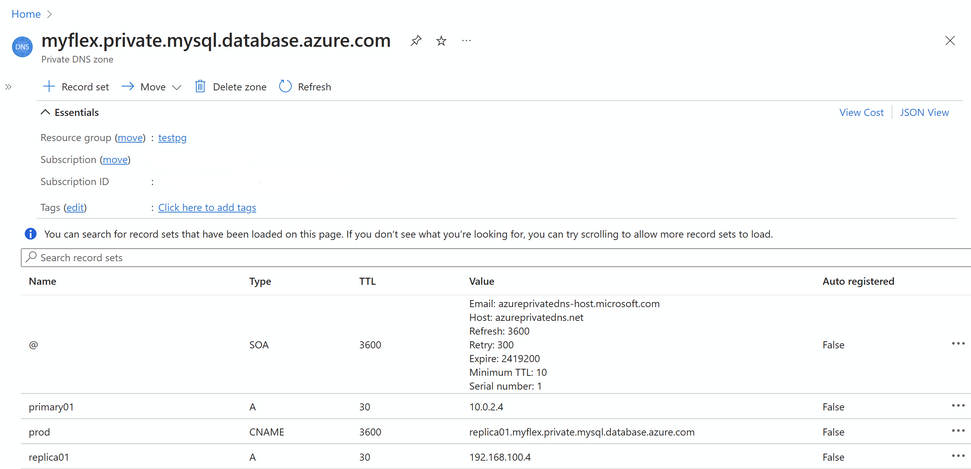
When configured properly, the Private DNS Zone (should appear as shown in the following image:
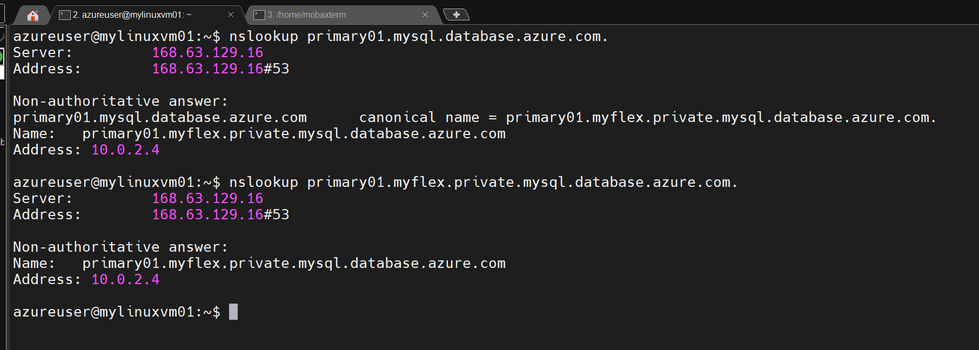
It’s possible to resolve these DNS names from within either VNet. For example, the Linux shell shows the following detail for a Linux VM, which happens to be on the Australia East VNet, and it can resolve the both the service name and the private DNS zone name of each of the servers.
Note: This Linux VM is being used simply to host the ‘nslookup’ and ‘mysql’ binaries that we are using in this article:
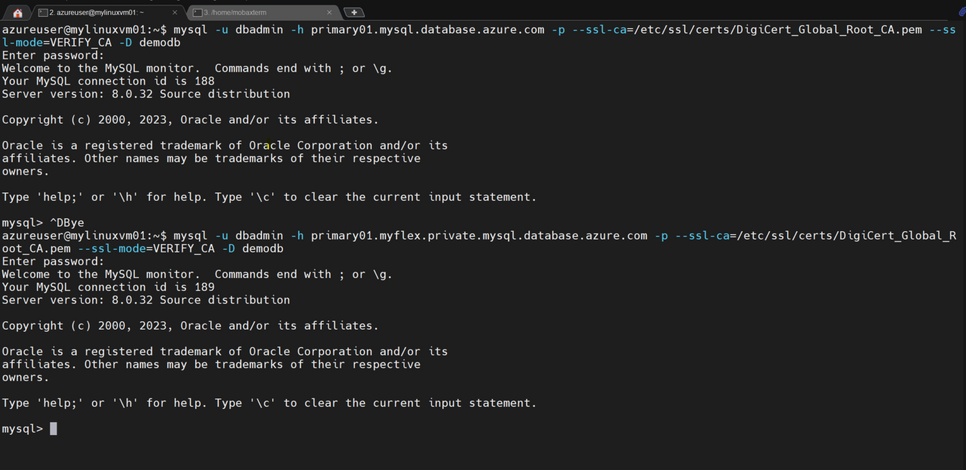
In addition to name resolution and courtesy of our VNet peering, I can also connect to both databases using either the service name or the private DNS name. Running the command-line application ‘mysql’, I’ll connect to the primary server using both DNS names as shown in the following image:
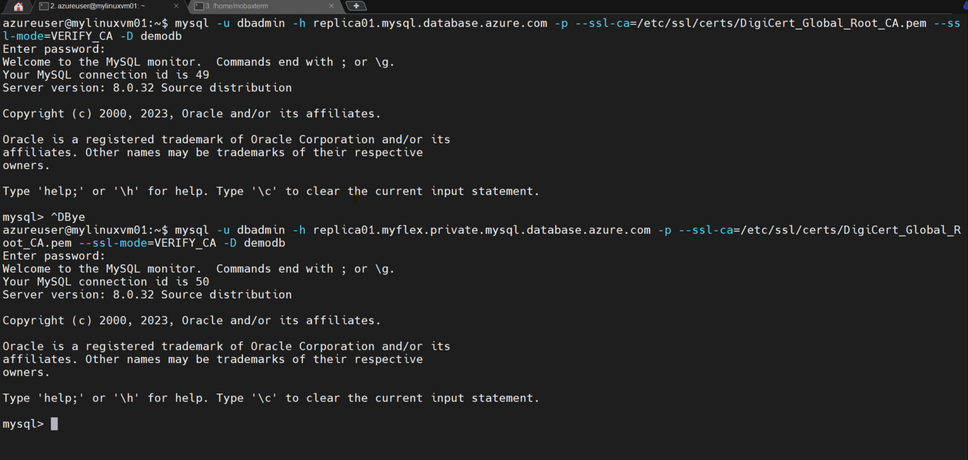
And next, I’ll use ‘mysql’ again to connect to both DNS names for the replica server:
To recap, we have set up a primary server in one region and replica service in another region using the Private Access networking, standard VNET peering, and Private DNS Zone features. I then verified that I could connect to both databases using the service name, or the name allocated by the Private DNS zone. The remaining question, however, is how to failover to the replica database, for example in a DR drill, and allow my application to connect to the promoted replica without making any changes to the application configuration? The answer, it turns out, is pretty simple…
In addition to typical DNS record types of ‘A’ Address and ‘PTR’ Pointer, ‘CNAME’ is another useful record type that I can use as an “alias” to effectively point to another DNS entry. Next, I’ll demonstrate how to configure a ‘CNAME’ record to point to either of the databases in our set up.
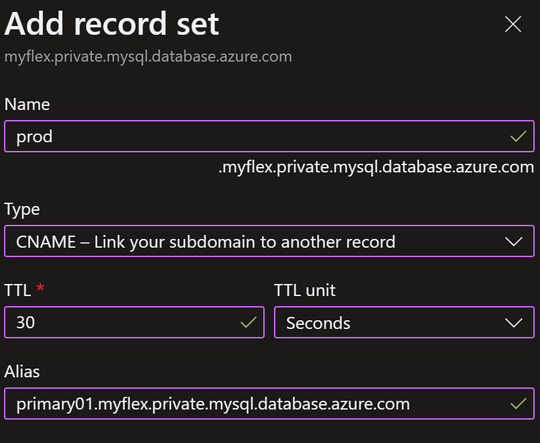
For this example, I’ll create a CNAME record with value ‘prod’ that points at the ‘A’ record for the Primary server. Inside the Private DNS Zone you can add a new record by choosing ‘+ Record Set’. Then you can add a CNAME record like so:
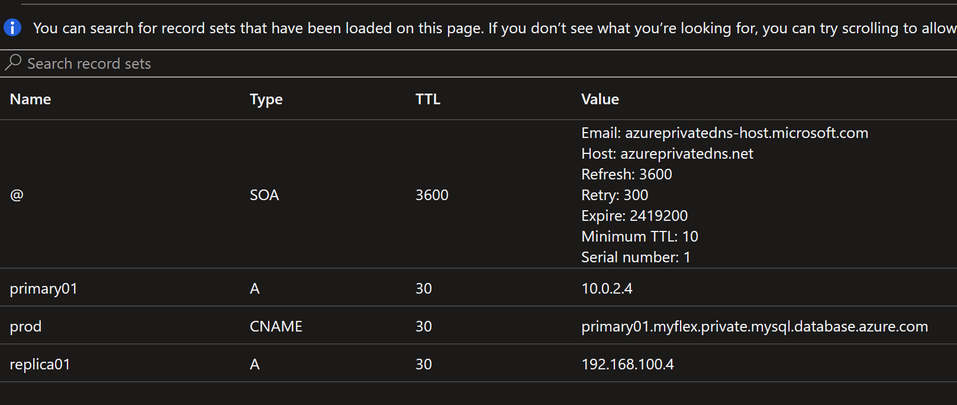
While the default TTL is 1 hour, I’ve reduced this to 30 seconds to limit DNS clients and applications from caching an answer for too long, which can have a significant impart during or after a failover. After I’ve added the CNAME record, the DNS zone looks like this:
Notice that the new ‘prod’ name points to the ‘A’ record for the primary server.
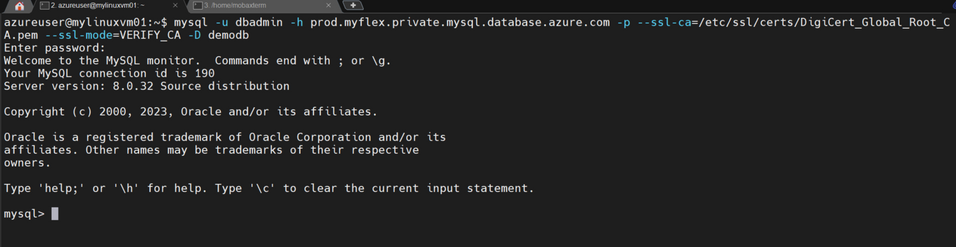
Now, I’ll verify that I can use the CNAME record to connect to the primary database:
Cool! That’s just DNS doing its thing with the CNAME record type.
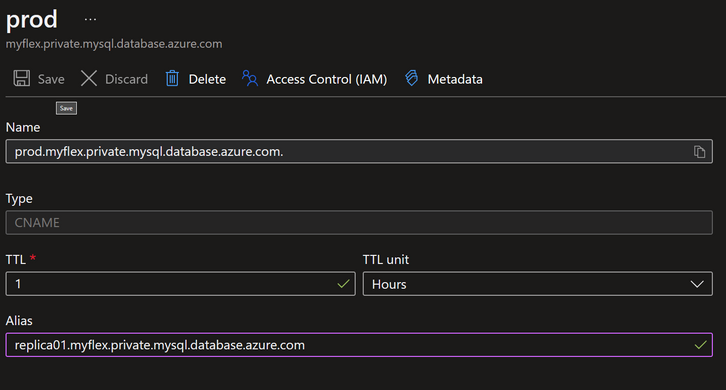
It is also possible to edit the CNAME DNS record to point it to the replica:
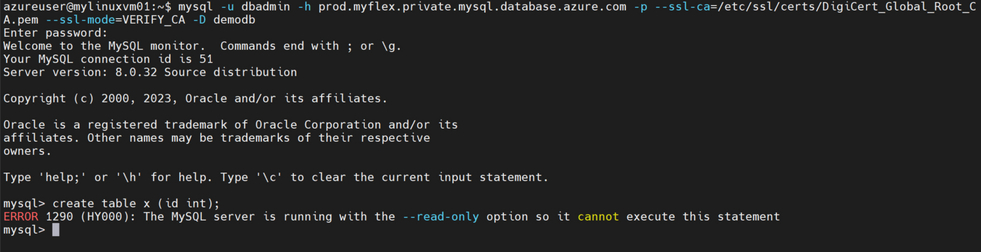
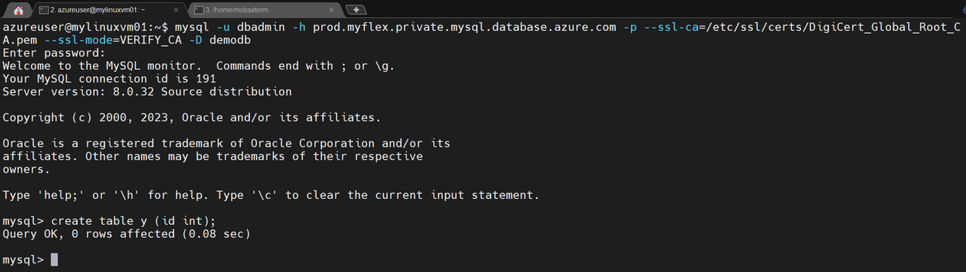
After saving the updated CNAME, when I connect to ‘prod’, it is now connecting to the replica, which is in READ-ONLY mode. I can verify this by trying a write operation, such as creating a table:
Sure enough, the CNAME ‘prod’ now points to the replica, as expected.
Given what I’ve shown so far, it’s clear the using the flexibility of Azure Private DNS and CNAME records is ideal for this use case.
The last step in this process is to perform the failover and complete the testing.
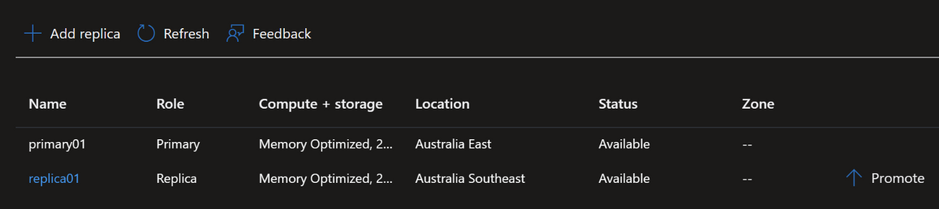
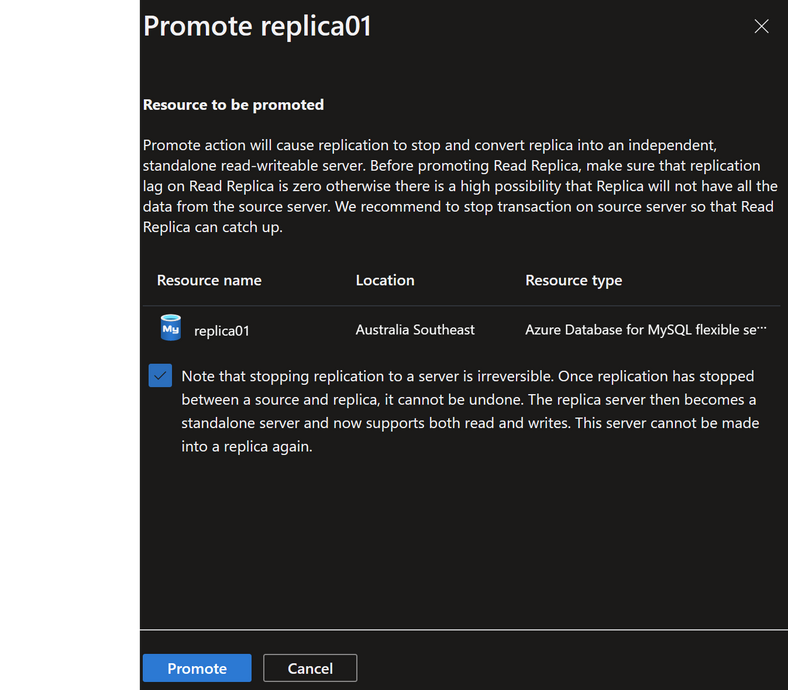
In the Azure portal, navigate to the Replication blade of either the Replica server or the Standby server, and then ‘Promote’ the Replica:
After selecting Promote, the following window appears:
When the newly promoted Replica server is available, I want to verify two things, that the:
CNAME record points to the Replica (now Primary)
Database is writeable
From an application perspective (the application is the mysql client in this article), we haven’t had to make any changes to connect to our database regardless of which region is hosting the workload. This method can be easily integrated within DR procedures or failover testing. Making use of the Azure CLI to semi-automate these changes is also possible and could possibly reduce the likelihood of human errors associated with changing DNS records. However, DNS changes are, in general, less risky than making application configuration changes.
If you have any feedback or questions about the information provided above, please leave a comment below or email us at AskAzureDBforMySQL@service.microsoft.com. Thank you!
This article is contributed. See the original author and article here.
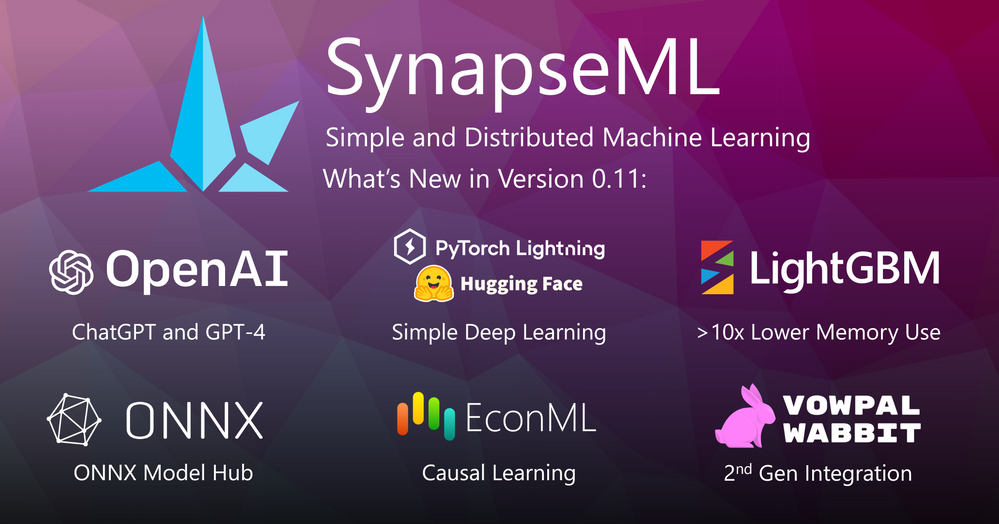
Announcing SynapseML v0.11. The new version contains many new features to help you build scalable machine learning pipelines.
We are pleased to announce SynapseML v0.11, a new version of our open-source distributed machine learning library that simplifies and accelerates the development of scalable AI. In this release, we are excited to introduce many new features from the past year of developments well as many bug fixes and improvements. Though this post will give a high-level overview of the most salient new additions, curious readers can check out the full release notes for all of the new additions.
OpenAI Language Models and Embeddings
A new release wouldn’t be complete without joining the large language model (LLM) hype train and SynapseML v0.11 features a variety of new features that make large-scale LLM usage simple and easy. In particular, SynapseML v0.11 introduces three new APIs for working with foundation models: `OpenAIPrompt`, ` OpenAIEmbedding`, and `OpenAIChatCompletion`. The `OpenAIPrompt` API makes it easy to construct complex LLM prompts from columns of your dataframe. Here’s a quick example of translating a dataframe column called “Description” into emojis.
from synapse.ml.cognitive.openai import OpenAIPrompt

emoji_template = """
  Translate the following into emojis
  Word: {Description}
  Emoji: """

results = (OpenAIPrompt()
    .setPromptTemplate(emoji_template)
    .setErrorCol("error")
    .setOutputCol("Emoji")
    .transform(inputs))
This code will automatically look for a database column called “Description” and prompt your LLM (ChatGPT, GPT-3, GPT-4) with the created prompts. Our new OpenAI embedding classes make it easy to embed large tables of sentences quickly and easily from your Apache Spark clusters. To learn more, see our docs on using OpenAI embeddings API and the SynapseML KNN model to create an LLM-based vector search engine directly on your spark cluster. Finally, the new OpenAIChatCompletion transformer allows users to submit large quantities of chat-based prompts to ChatGPT, enabling parallel inference of thousands of conversations at a time. We hope you find the new OpenAI integrations useful for building your next intelligent application.
Simple Deep Learning
SynapseML v0.11 introduces a new Simple deep learning package that allows for the training of custom text and deep vision classifiers with only a few lines of code. This package integrates the power of distributed deep network training with PytorchLightning with the simple and easy APIs of SynapseML. The new API allows users to fine-tune visual foundation models from torchvision as well as a variety of state-of-the-art text backbones from HuggingFace.
Here’s a quick example showing how to fine-tune custom vision networks:
Keep an eye out with upcoming new releases of SynapseML featuring additional simple deep-learning algorithms that will make it easier than ever to train and deploy models at scale.
LightGBM v2
LightGBM is one of the most used features of SynapseML and we heard your feedback on better performance! SynapseML v0.11 introduces a completely refactored integration between LightGBM and Spark, called LightGBM v2. This integration aims for high performance by introducing a variety of new streaming APIs in the core LightGBM library to enable fast and memory-efficient data sharing between spark and LightGBM. In particular, the new “Streaming execution mode” has a >10x lower memory footprint than earlier versions of SynapseML yielding fewer memory issues and faster training. Best of all, you can use the new mode by just passing a single extra flag to your existing LightGBM models in SynapseML.
ONNX Model Hub
SynapseML supports a variety of new deep learning integrations with the ONNX runtime for fast, hardware-accelerated inference in all of the SynapseML languages (Scala, Java, Python, R, and .NET). In version 0.11 we add support for the new ONNX model hub, which is an open collection of state-of-the-art pre-trained ONNX models that can be quickly downloaded and embedded into spark pipelines. This allowed us to completely deprecate and remove our old dependence on the CNTK deep learning library.
To learn more about how you can embed deep networks into Spark pipelines, check out our ONNX episode in the new SynapseML video series:
Causal Learning
SynapseML v0.11 introduces a new package for causal learning that can help businesses and policymakers make more informed decisions. When trying to understand the impact of a “treatment” or intervention on an outcome, traditional approaches like correlation analysis or prediction models fall short as they do not necessarily establish causation. Causal inference aims to overcome these shortcomings by bridging the gap between prediction and decision-making. SynapseML’s causal learning package implements a technique called “Double machine learning”, which allows us to estimate treatment effects without data from controlled experiments. Unlike regression-based approaches, this approach can model non-linear relationships between confounders, treatment, and outcome. Users can run the DoubleMLEstimator using a simple code snippet like the one below:
from pyspark.ml.classification import LogisticRegression
from synapse.ml.causal import DoubleMLEstimator

dml = (DoubleMLEstimator()
      .setTreatmentCol("Treatment")
      .setTreatmentModel(LogisticRegression())
      .setOutcomeCol("Outcome")
      .setOutcomeModel(LogisticRegression())
      .setMaxIter(20))

dmlModel = dml.fit(dataset)
For more information, be sure to check out Dylan Wang’s guided tour of the DoubleMLEstimator on the SynapseML video series:
Vowpal Wabbit v2
Finally, SynapseML v0.11 introduces Vowpal Wabbit v2, the second-generation integration between the Vowpal Wabbit (VW) online optimization library and Apache Spark. With this update, users can work with Vowpal wabbit data directly using the new “VowpalWabbitGeneric” model. This makes working with Spark easier for existing VW users. This more direct integration also adds support for new cost functions and use cases including “multi-class” and “cost-sensitive one against all” problems. The update also introduces a new progressive validation strategy and a new Contextual Bandit Offline policy evaluation notebook to demonstrate how to evaluate VW models on large datasets.
Conclusion
In conclusion, we are thrilled to share the new SynapseML library with you with you and hope you will find that it simplifies your distributed machine learning pipelines. This blog only covered the highlights, so be sure to check out the full release notes for all the updates and new features. Whether you are working with large language models, training custom classifiers, or performing causal inference, SynapseML makes it easier and faster to develop and deploy machine learning models at scale.
This article is contributed. See the original author and article here.
We’re excited to return to Field Service Palm Springs from April 25 through April 27, 2023, at the JW Marriott Desert Springs Resort & Spa.
We will showcase how Connected Field Service helps leaders:
Move beyond the costly break/fix model to a proactive, predictive model.
Unlock the power of data and use Internet of Things (IoT), machine learning, and AI.
Transform their field operations and improve customer experience.
This year, we are hosting a thought leadership luncheon with our partner Hitachi Solutions to discuss the benefits of a connected field service and how to use data to remain competitive, and continuously improve business performance and customer experiences in an increasingly challenging environment.
Field service organizations manage hundreds of technicians with varying expertise, experiences, and skills. With 80 percent of consumers more likely to make a purchase from a brand that provides personalized experiences, organizations have come to realize how important quality service is to remain resilient despite uncertainty.1 Employees are working from remote or distributed locations, reducing the amount of personalized interaction. Meanwhile, remote monitoring of IoT devices continues to transform service from a cost center to a revenue generator.
Connected Field Service is the ability to add connected devices, powered by the Internet of Things (IoT), and uses cloud capabilities to augment your existing field service operations. It enables organizations to transform the way they provide service from a costly, reactive break-fix model to a proactive, and in some cases, even predictive service model through the holistic combination of IoT diagnostics, scheduling, asset maintenance, and inventory on the same platform.
IoT has brought a new level of efficiency to the field service industry, helping service professionals address issues more proactively and minimize downtime. As McKinsey researchers predict, IoT applications could generate a value of over $470 billion annually by 2025 by enhancing operations across various industries.2
By integrating IoT signals across the enterprise, a connected field service helps organizations predict and resolve customer issues before the customer is aware, thereby ensuring consistent and dependable customer operations through hassle-free and preemptive field service.
Four Connected Field Service solutions
Connected Field Service combines four innovative Microsoft solutions that enable service leaders to digitally transform service organizations:
Provides service technicians with upsell and cross-sell recommendations
Enables team members in non-sales roles to advance deals with step-by-step guidance
Enables sales teams and service technicians to access customer information and sales resources in non-office environments
Drives visibility into product and parts usage across the organization
Connected Field Service becomes a reality with Microsoft. Service leaders can better manage costs, enhance service delivery, and increase customer satisfaction (CSAT) by proactively resolving customer issues before the customer is aware. Take advantage of smart, internet-ready devices that can detect and diagnose issues, integrating with field service management (FSM) software like Dynamics 365 Field Service to automatically initiate troubleshooting and, when needed, create work orders to dispatch technicians for onsite service. Learn how you can use technology to schedule preventative maintenance based on consumption rather than rely on a regimented schedule. Best of all, enjoy the flexibility of implementing the solution in stages so your team can ramp up via a natural progression. Learn more about the latest Dynamics 365 Field Service features.
Engage with Microsoft at Field Service Palm Springs 2023
We invite you to join us, along with our partners, to discover how Connected Field Service using Dynamics 365 Field Service and IoT can help create a seamless service experience that enhances customer experiences, increases cost savings, and improves efficiency.
Register for Field Service Palm Springs and visit the Microsoft booth (101/103) where you can meet with Dynamics 365 Field Service experts to discuss how connected data enables better experiences across your organization.
About Field Service Palm Springs
For 20 years, Field Service Palm Springs has become the must-attend conference for service executives. From early IoT concepts to AI, Field Service is where innovative ideas spread, and future strategies are created. Today, Field Service is a global event, with major conferences in Palm Springs, Amelia Island, San Diego, Amsterdam, and Singapore.
Since 2003, the top service and support minds have gathered in Palm Springs in April for the flagship Field Service conference. With forward-looking content and unique session formats that ensure you learn and network most effectively, Field Service is designed to help you achieve service excellence and drive profitability.
Microsoft Dynamics 365 Field Service
Optimize service operations and inventory management.
This article is contributed. See the original author and article here.
Pricing is one of the fundamental tools to boost supply chain profits by better matching supply and demand. Many businesses have started to reform their pricing strategies in recent years as a result of the growth of e-commerce and the constantly changing business environments in order to improve pricing transparency, supply chain agility and margin optimization.
We are launching the Public Preview of Pricing management within Dynamics 365 Supply Chain Management from 10.0.33 to support sales managers managing and execute the attribute-based omnichannel sales pricing.
Why attribute-based omnichannel pricing?
Transaction to omnichannel pricing:
Traditional business-to-business (B2B) organizations are increasingly considering switching to omnichannel sales and selling directly to end customers in order to have greater control over price and margins. The omnichannel transformation results in significant modifications to pricing models and rules.
By offering an omnichannel price engine, a central place to manage pricing rules and automated omnichannel pricing execution, Dynamics 365 Supply Chain Management aids B2B business in the transition to omnichannel pricing.
Transaction to attribute-based pricing:
Working with the marketing and product manager to comprehend the product differentiating features, target customer segments and other pricing sensitivity elements is one of the important responsibilities of the sales managers. The package types, the delivery mode and the expected receipt date could be one of the pricing differentiators. By giving business the ability to convert data from customers, product, and orders into price attributes and building pricing on different pricing structure, Dynamics 365 Supply Chain Management supports business to adopt the attribute-based pricing model.
What is Pricing management?
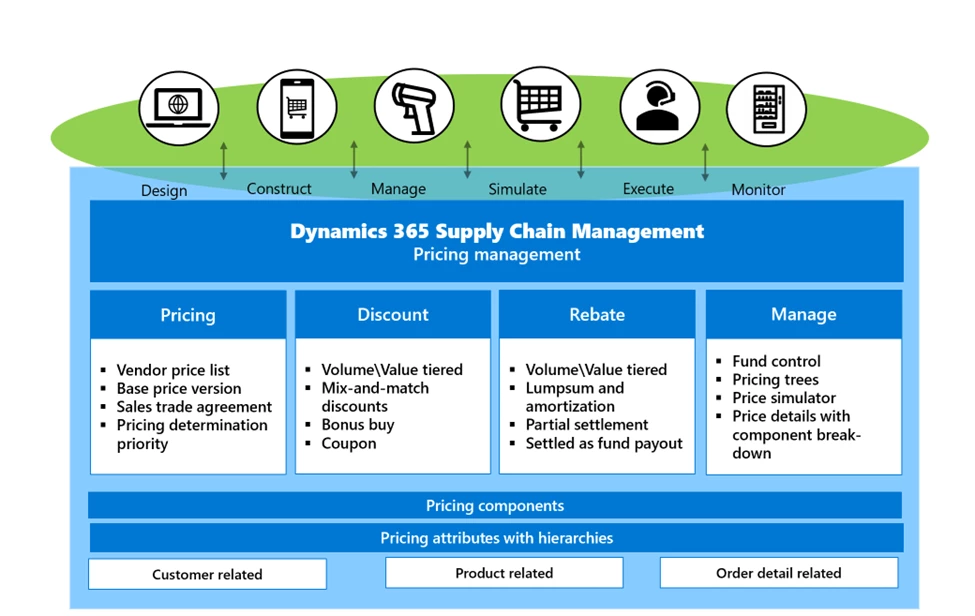
Dynamics 365 Supply Chain Management Pricing Management leverages the Commerce Scale Unit (CSU) to help traditional B2B companies embrace omnichannel pricing. Pricing management enables attribute-based pricing for the price components that are across the sales pricing structures, including product base price, sales trade agreement price, discounts, charges and rebate management.
How Pricing management supports business flows:
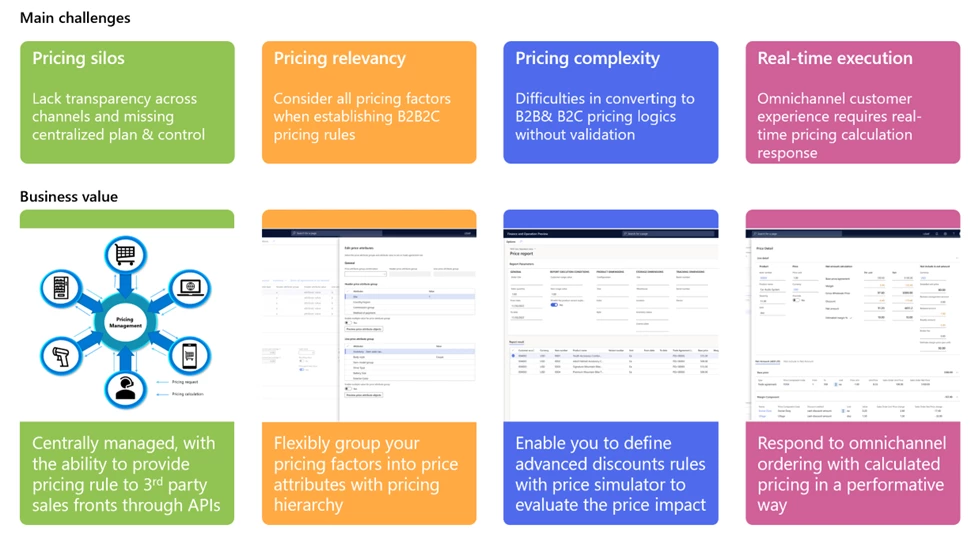
DESIGN your pricing component types using price attributes.
CONSTRUCT your pricing structure with pricing components, such as margin elements.
MANAGE price markup based on product standard cost (for manufactured products) or vendor price catalog (for trading products).
SIMULATE pricing rules and impacts.
EXECUTE pricing calculation across channels.
MONITOR promotion fund consumption with control.
Flexible data model for building price attributes. Price attributes can be based on categorized product pricing differentiators, customer groups and order types.
Central place to offer, manage and calculate pricing. Boost pricing transparency across channels, which is essential for aligning pricing strategies across multiple channels.
Manage complex pricing structureswith price component breakdowns. When you place an order, the pricing details reflect the pricing structure for you to understand the pricing calculation sequence and price breakdowns for future in-depth analysis.
Establish the sophisticated pricing with pricing simulator to evaluate the impact. When converting from B2B pricing to B2B and B2C pricing, consider discount concurrency, bundle sales, mandatory sales items, and bonus free item pricing rules.
Fund control to ensure you don’t avoid margin leakage from fund consumption.
Real-time cross channel pricing execution with the pricing engine to quickly determine pricing while considering a variety of commercial aspects, such as the item’s general base price, the price of a sales trade agreements, long-term discount agreements, short-term promotion discounts, and retrospective rebate calculations for each sales order.
External applications can retrieve calculated pricing by leverage the Commerce Scale Unit (CSU)based Pricing APIs.
Next steps:
If your organization on the journal transition to attribute-based omnichannel selling pricing, consider taking the next step with Pricing Management within Dynamics 365 Supply Chain Management.
If you are a potential customer or partner and want to learn more, contact the https://learn.microsoft.com/en-us/dynamics365/supply-chain/pricing-management/price-attributes-overview product team directly by email.
This article is contributed. See the original author and article here.
Your brand is the face of your business. And often, the live chat widget on your website is the first point of contact for your customers. Having a strong brand for your customer service products can build trust and credibility, differentiate yourself from competitors, ensure consistency in communication, and create a positive emotional connection with customers.
We are excited to announce our upgraded live chat widget that allows you to customize every detail of the widget to match your brand identity. From the font and color scheme to the iconography, you can now own every pixel of the widget and ensure that it represents your brand in the best possible way.
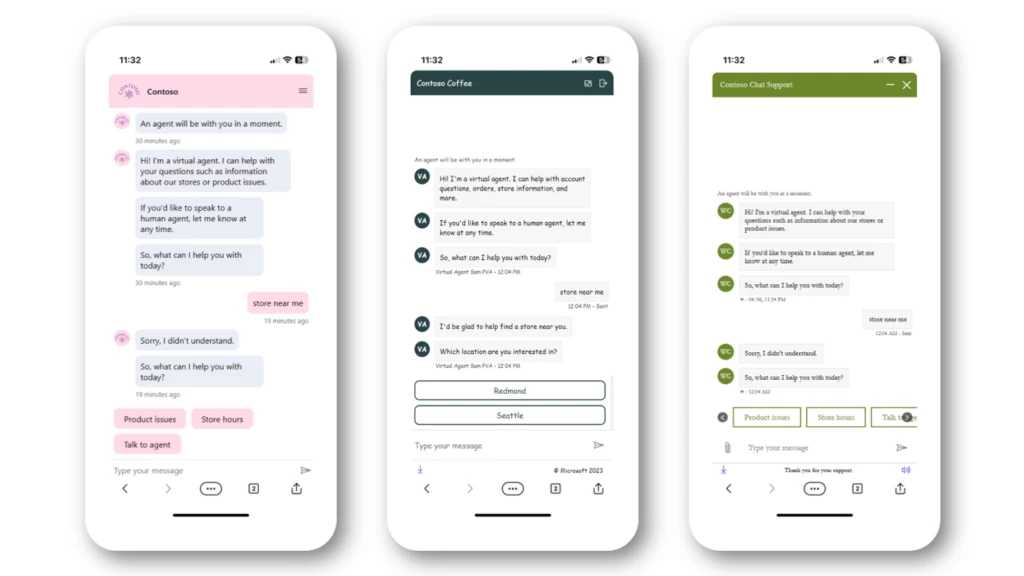
Three customized chat widgets, each representing a different branding style
Style every component of the live chat widget to reflect your brand
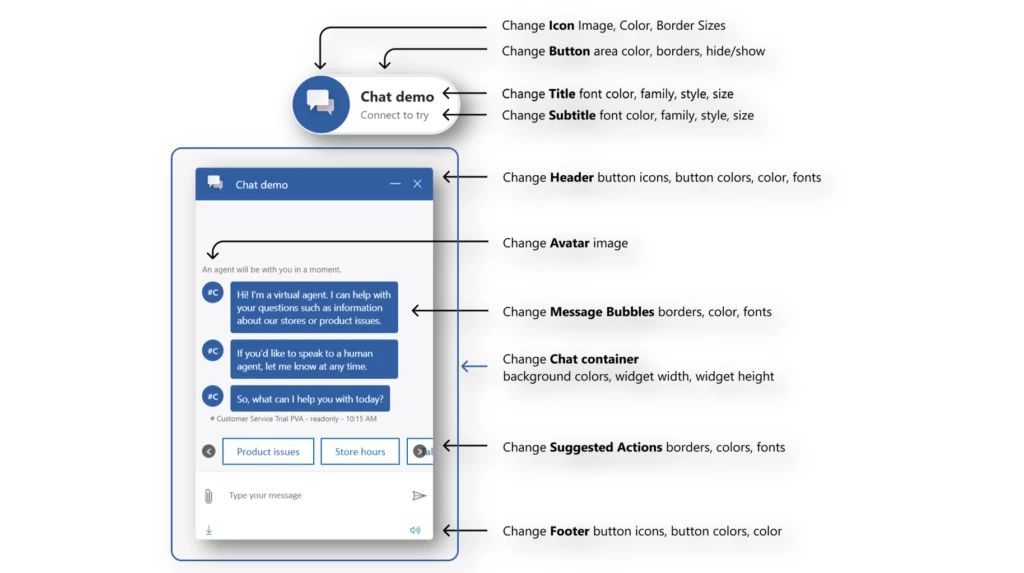
When you update your environment with the latest release, you can use our live chat script tag customization to edit the design of the live chat widget through CSS-represented styling. It is easier than ever to create a branded look for your chat widget. You can choose the font, color, style, and size of every component of the chat widget to reflect your brand. The image below shows examples of chat widget components and the different ways you can change them.
Editable elements in the default chat button and chat container
This article is contributed. See the original author and article here.
Como criar uma extensão customizada para o Azure DevOps
Em alguns casos, é necessário criar uma extensão personalizada para o Azure DevOps, seja para adicionar funcionalidades que não estão disponíveis nativamente ou para modificar alguma funcionalidade existente que não atenda às necessidades do projeto. Neste artigo, mostraremos como criar uma extensão personalizada para o Azure DevOps e como publicá-la no Marketplace do Azure DevOps.
Antes de começar certifique:
Ter uma conta no Azure DevOps. Caso ainda não tenha uma, você pode criar uma seguindo as instruções disponíveis aqui.
Ter um editor de código instalado, como o Visual Studio Code, que pode ser baixado em code.visualstudio.com.
Ter a versão LTS do Node.js instalada, disponível para download em, nodejs.org. Ter o compilador de TypeScript instalado, sendo a versão recomendada 4.0.2 ou superior. Ele pode ser instalado via npm em npmjs.com.
Ter o CLI do TFX instalado, sendo a versão recomendada 0.14.0 ou superior. Ele pode ser instalado globalmente via npm com o comando npm i -g tfx-cli ou conferindo mais detalhes em TFX-CLInpm i -g tfx-cli.
Preparando o ambiente de desenvolvimento
Crie uma pasta para a extensão, por exemplo, my-extension e dentro desta pasta crie a uma subpasta, por exemplo, task.
Abra o terminal na pasta criada e execute o comando npm init -y, o parâmetro -y é para aceitar todas as opções padrão. Você vai notar que foi criado um arquivo chamado package.json e nele estão as informações da extensão.
Substitua o <> por ID único de cada extensão, você pode gerar um ID aqui. Substitua o <> pelo publisher ID criado no passo 1 da etapa de publish.
Na pasta raiz da sua extensão my-extension, crie uma pasta chamada images e adicione uma imagem chamada icon.png com o tamanho de 128×128 pixels. Essa imagem será usada como ícone da sua extensão no Marketplace.
Criando a extensão
Depois de configurar o ambiente, você pode criar a extensão.
Na pasta task crie um arquivo chamado task.json e adicione o seguinte conteúdo:
Substitua o <> pelo mesmo GUID gerado no passo 8 da etapa de preparação de ambiente de desenvolvimento.
Esse arquivo descreve a extensão que será executada no pipeline. Nesse caso, a extensão ainda não faz nada, mas você pode adicionar os inputs e a lógica para executar qualquer coisa.
Na sequência crie um arquivo chamado index.js e adicione o seguinte conteúdo:
Esse arquivo é o responsável por executar a extensão. Nesse caso, ele apenas retorna uma mensagem de sucesso. Você pode adicionar a lógica para executar qualquer coisa.
Adicione na pasta task uma imagem chamada icon.png com o tamanho de 32×32 pixels. Essa imagem será usada como ícone da sua extensão no Azure Pipelines.
No terminal, execute o comando tsc, para compilar o código Typescript para Javascript. Esse comando irá gerar um arquivo chamado index.js na pasta task.
Para executar a extensão localmente, execute o comando node index.js. Você deve ver a mensagem My Extension Succeeded!.
Quando a sua extensão estiver pronta, você pode publicá-la no Marketplace. Para isso será necessário criar um editor de extensão no Marketplace.
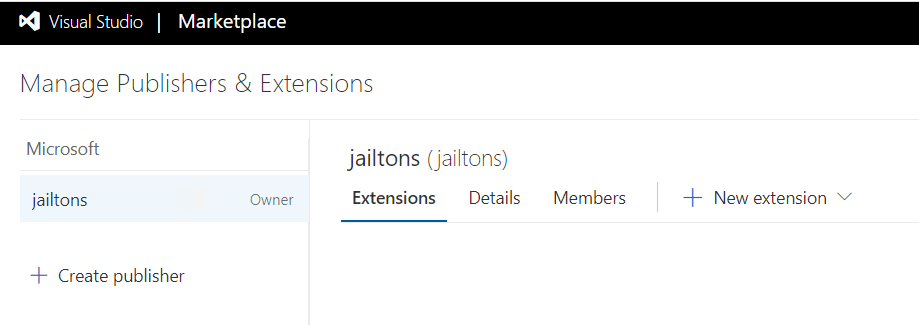
Acesse o Marketplace e clique em Publish Extension. Após fazer o login, você será redirecionado para a página de criação de um editor de extensão. Preencha os campos e clique em Create.
Imagem 1 – Criando um editor de extensão no Portal no Marketplace
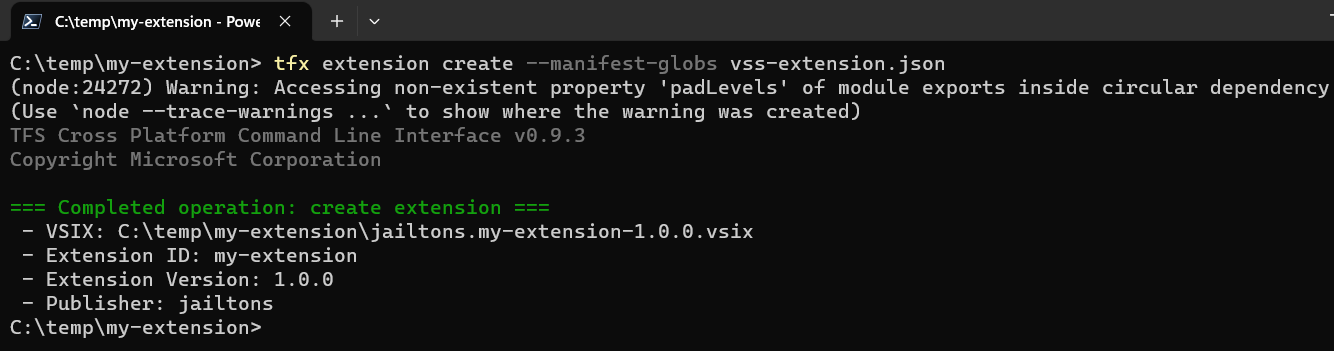
No terminal execute o comando tfx extension create –manifest-globs vss-extension.json, na pasta My-Extension. Esse comando irá gerar um arquivo chamado publishID-1.0.0.vsix, que é o arquivo que será publicado no Marketplace.
Imagem 2 – Tela de linha de comando TFX CLI, criando uma extensão
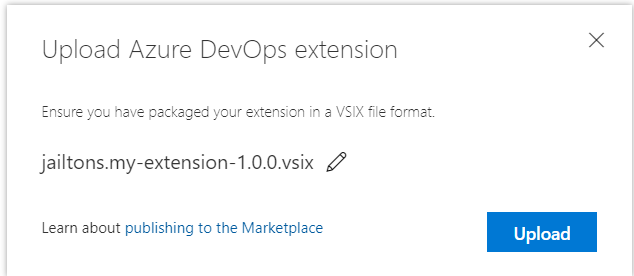
Acesse a página de publicação de extensão no Marketplace e clique New extension e seguida Azure DevOps. Selecione o arquivo my-extension-1.0.0.vsix e clique em Upload.
Imagem 3 – Tela para fazer o Upload de uma Extensão para o Marketplace
Se tudo ocorrer bem, você verá algo como a imagem abaixo.
Imagem 4 – Exemplo de uma extensão publicada no Marketplace
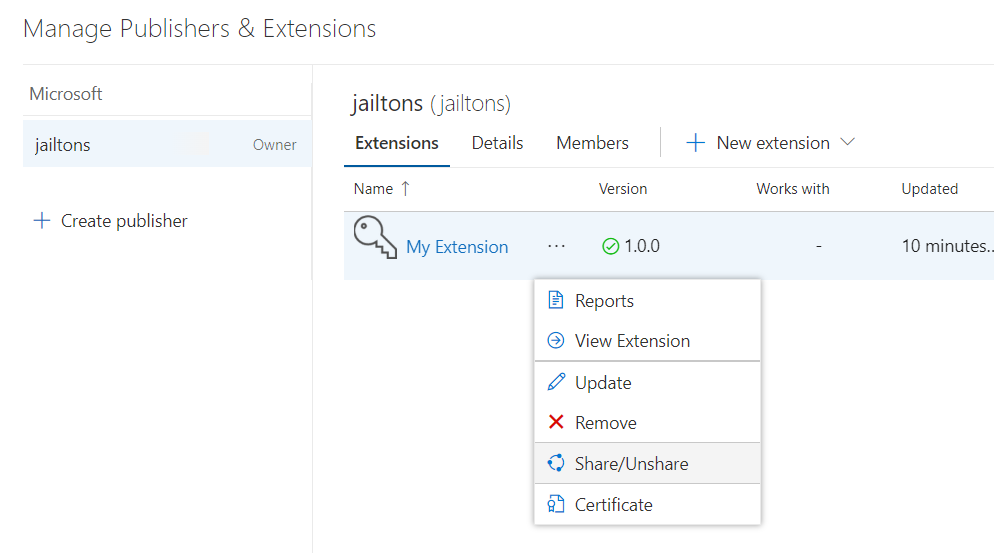
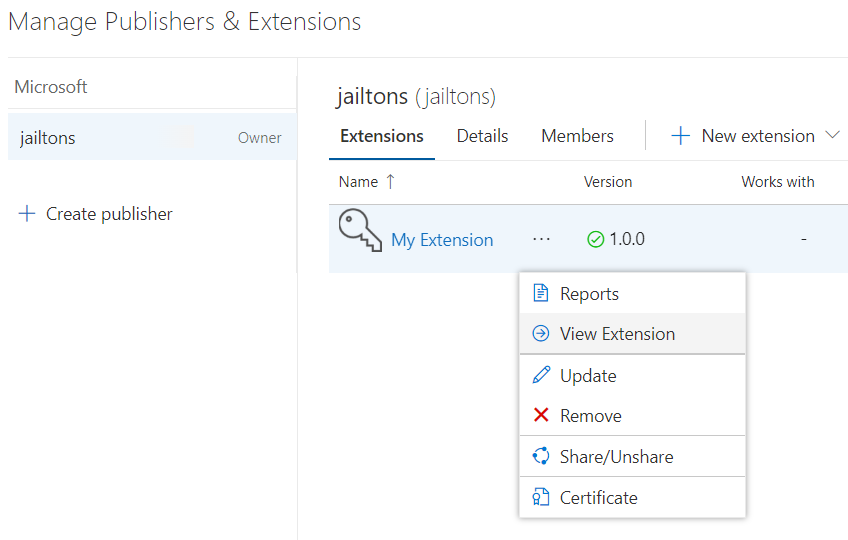
Com a extensão publicada, será necessário compartilhá-la com a sua organização. Para isso, clique no menu de contexto da extensão e clique em Share/UnShare.
Imagem 5 – Menu de opções de uma extensão, com a opção de compartilhar destacada
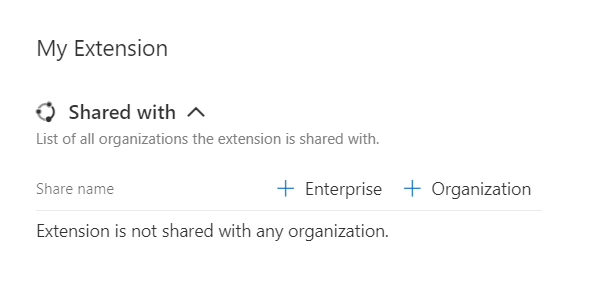
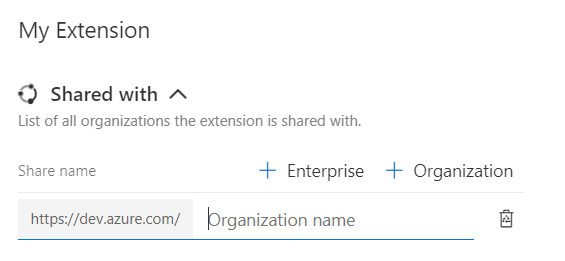
Clique em + Organization.
Imagem 6 – Tela para compartilhar um extensão
E digite o nome da sua Organização, ao clicar fora da caixa de digitação a validação é feita e o compartilhamento é realizado.
Imagem 7 – Exemplo de como é possível compartilhar uma extensão com uma organização
Instalando a extensão na sua organização
Após publicar a extensão no Marketplace, você pode instalá-la na sua organização, para isso siga os passos abaixo.
Clique no menu de contexto da extensão e clique em View Extension.
Imagem 8 – Menu de uma extensão, opção de visualizar destacada
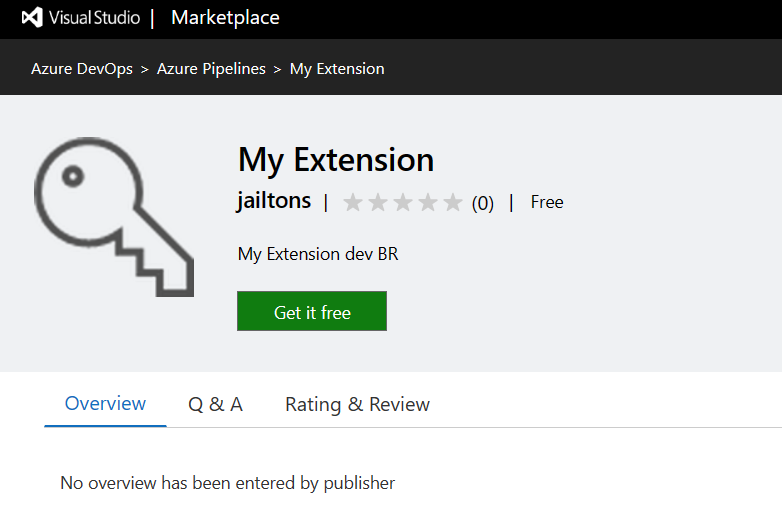
Você verá algo como a imagem abaixo.
Imagem 9 – Tela da extensão no Marketplace
Clique em Get it free.
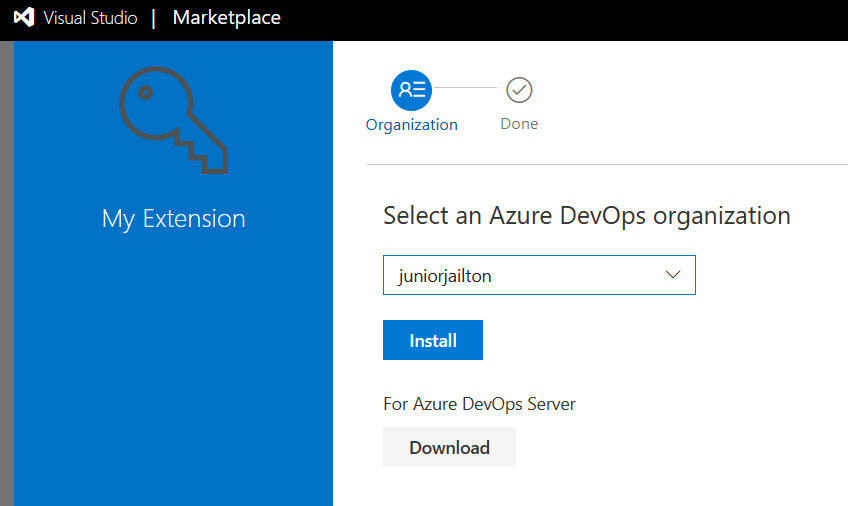
Verifique se sua organização está selecionada e clique em Install.
Imagem 10 – Tela de instalação da extensão no marketplace
Se a instalação ocorrer tudo bem, você verá algo como a imagem abaixo.
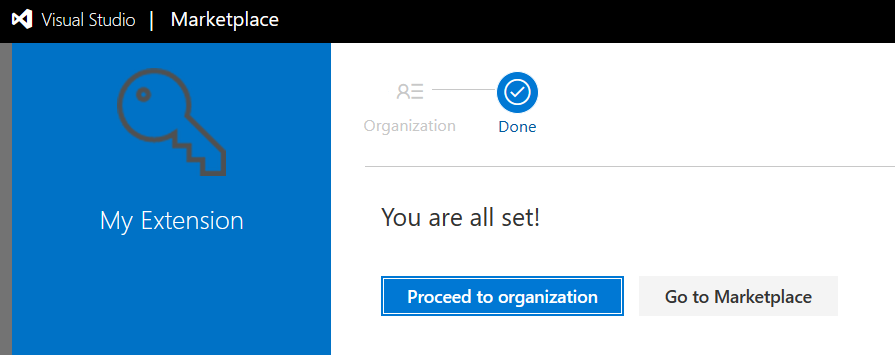
Imagem 11 – Tela de confirmação de instalação da extensão
Após a instalação, você verá a extensão na lista de extensões instaladas e poderá ser utilizada nos seus pipelines.
Conclusão
O uso de extensões customizadas no Azure DevOps desbloqueiam funcionalidades que não estão disponíveis. Neste artigo, você aprendeu como criar uma extensão customizada e como publicá-la no Marketplace. Espero que tenha gostado e que possa aplicar o conhecimento adquirido em seus projetos.
This article is contributed. See the original author and article here.
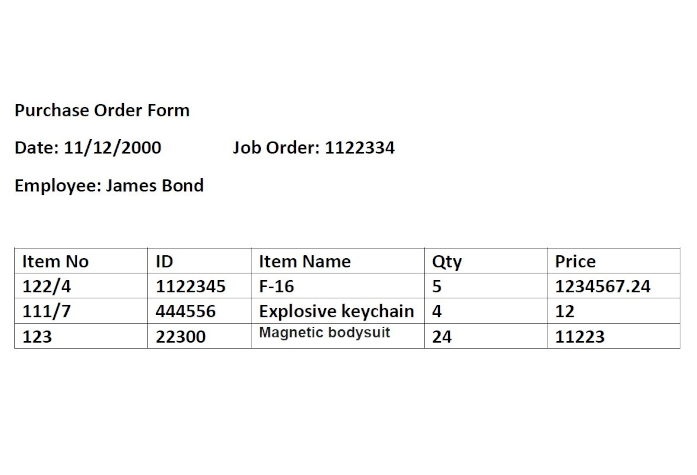
Documents can contain table data. For example, earning reports, purchase order forms, technical and operational manuals, etc., contain critical data in tables. You may need to extract this table data into Excel for various scenarios.
Extract each table into a specific worksheet in Excel.
Extract the data from all the similar tables and aggregate that data into a single table.
Here, we present two ways to generate Excel from a document’s table data:
Azure Function (HTTP Trigger based): This function takes a document and generates an Excel file with the table data in the document.
Apache Spark in Azure Synapse Analytics (in case you need to process large volumes of documents).
The Azure function extracts table data from the document using Form Recognizer’s “General Document” model and generates an Excel file with all the extracted tables. The following is the expected behavior:
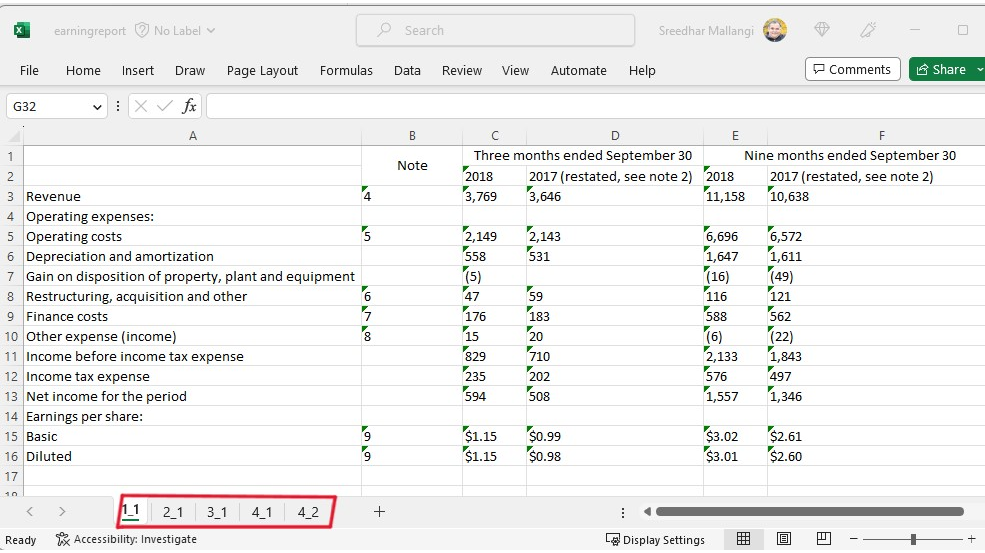
Each table on a page gets extracted and stored to a sheet in the Excel document. The sheet name corresponds to the page number in the document.
Sometimes, there are key-value pairs on the page that need to be captured in the table. If you need that feature, leverage the add_key_value_pairs flag in the function.
Form Recognizer extracts column and row spans, and we take advantage of this to present the data as it is represented in the actual table.
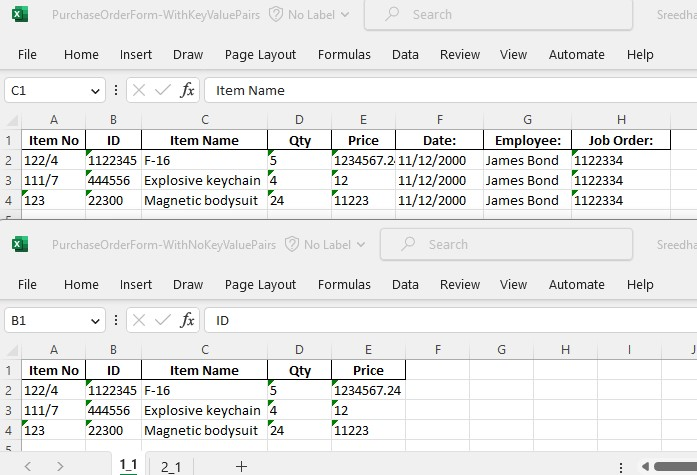
Following are two sample extractions.
Top excel is with key value pairs added to the table. Bottom one is without the key value pairs.
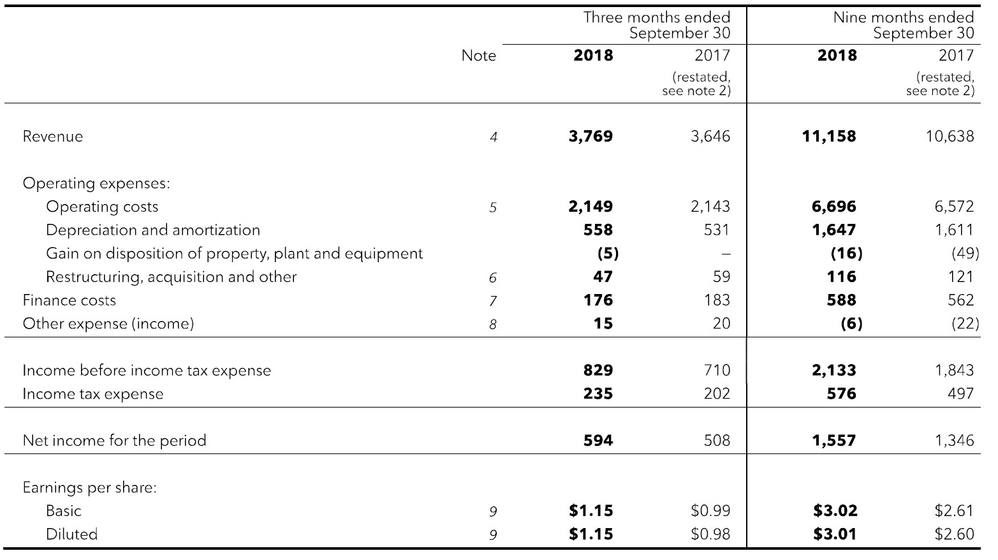
The Excel shown above is the extraction of table data from an earnings report. The earnings report file had multiple pages with tables, and the fourth page had two tables.
Solution
Azure Function and Synapse Spark Notebook is available here in this GIT Repository






Recent Comments