by Scott Muniz | Sep 4, 2020 | Uncategorized
This article is contributed. See the original author and article here.
News this week includes:
Azure Active Directory External Identities goes premium with advanced security for B2C.
MSIX announces new updates to the MSIX Labs for IT Pros.
Surface announced a new configuration of Surface Hub 2S with Windows 10 Pro and Enterprise.
@Abhiram is our Member of the Week, and a great contributor in the Microsoft Edge Insider community.
View the Weekly Roundup for August 31-Sept 4th in Sway and attached PDF document.

by Scott Muniz | Sep 4, 2020 | Uncategorized
This article is contributed. See the original author and article here.

Using Apache JMeter™ to perform load testing for the Azure App Service that requires Azure AD authentication
Kuniteru Asami is an Azure MVP and core staff member of the Japan Azure User Group. Kuniteru has been providing technical consulting for Microsoft Azure for more than 10 years since its initial release. Moreover, the Japanese Azure expert is the CEO of a company with six Azure MVPs on its staff. Follow him on Twitter @kunyami

How can I protect static files with authorization on ASP.NET Core?
Jun-ichi Sakamoto is a Japanese MVP for Developer Technologies. The 10-time MVP title holder specializes in C#, ASP.NET, Blazor, Azure Web Apps, TypeScript. Jun-ichi’s publication of NuGet packages – like Entity Framework Core, helper, testing tools, Blazor components, and more – have been downloaded more than 18 million times. For more on Jun-ichi, check out his Twitter @jsakamoto

ASP.NET MVC: LOAD JQUERY PLUGIN ON BOOTSTRAP MODAL
Asma Khalid is an Entrepreneur, ISV, Product Manager, Full Stack .Net Expert, Community Speaker, Contributor, and Aspiring YouTuber. Asma counts more than 7 years of hands-on experience in Leading, Developing & Managing IT-related projects and products as an IT industry professional. Asma is the first woman from Pakistan to receive the MVP award three times, and the first to receive C-sharp corner online developer community MVP award four times. See her blog here.

SQL Server Data Migration Tools and Services
Sergio Govoni is a graduate of Computer Science from “Università degli Studi” in Ferrara, Italy. Following almost two decades at Centro Software, a software house that produces the best ERP for manufacturing companies that are export-oriented, Sergio now manages the Development Product Team and is constantly involved on several team projects. For the provided help to technical communities and for sharing his own experience, since 2010 he has received the Microsoft Data Platform MVP award. During 2011 he contributed to writing the book: SQL Server MVP Deep Dives Volume 2. Follow him on Twitter or read his blogs in Italian and English.

Group SharePoint items by weekday (in the correct order)
Marijn Somers is an MVP for Office Apps and Services who has been active in various roles to help clients deliver successful collaboration and content management solutions for more than 14 years. These roles include project manager, presales engineer, evangelist, SPOC (Single-Point-Of-Contact), trainer, analyst and administrator. Marjin is the founder and owner of Balestra, an outfit which focuses on Microsoft Office 365 and specializes in governance and user adoption for collaboration and document management. Follow him on Twitter @MarjinSomers
by Scott Muniz | Sep 4, 2020 | Azure, Technology, Uncategorized
This article is contributed. See the original author and article here.
Working on a case I got to scenario where customer may would like to better understand the TEMPDB usage and isolation between databases in an elastic pool.
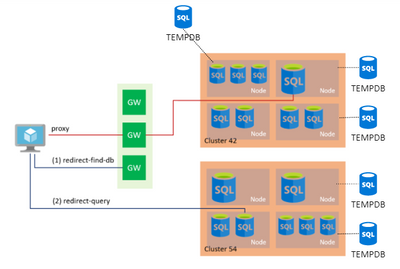
First speaking about isolation. Each DB even though they are below one logical instance, behind the scenes each Azure DB will leave on different node. So, each DB will have one isolated DB, except for Elastic Pool that share same hardware and share same TEMPDB. Even though there are some considerations to check reg isolation of data. More information below:

https://docs.microsoft.com/en-us/sql/relational-databases/databases/tempdb-database
Azure SQL Database single databases and elastic pools support global temporary tables and global temporary stored procedures that are stored in tempdb and are scoped to the database level. Global temporary tables and global temporary stored procedures are shared for all users’ sessions within the same Azure SQL database. User sessions from other Azure SQL databases cannot access global temporary tables. For more information, see Database scoped global temporary tables (Azure SQL Database). Azure SQL Managed Instance) supports the same temporary objects as does SQL Server. For Azure SQL Database single databases and elastic pools, only master database and tempdb database apply. For more information, see What is an Azure SQL Database server. For a discussion of tempdb in the context of Azure SQL Database single databases and elastic pools, see tempdb Database in Azure SQL Database single databases and elastic pools. For Azure SQL Managed Instance, all system databases apply.
One way to test the isolation you can create a global temp table, like sample below.
DROP TABLE IF EXISTS ##TEMP_COLUMNS
GO
SELECT * INTO ##TEMP_COLUMNS
FROM sys.columns
When trying to select from the global temp connected to another database you should get
SELECT * FROM ##TEMP_COLUMNS

Msg 208, Level 16, State 0, Line 1
Invalid object name '##TEMP_COLUMNS'.
On Elastic pool also same rule applies. Even though they are sharing the same space used, global temp tables are scoped to database level.
TEMPDB Space monitoring
First you need to check what is your database SLO. The max space for each DB or Pool will depends on SLO for DB
SELECT * FROM [sys].[database_service_objectives] DSO
database_id edition service_objective elastic_pool_name
----------- ------- ----------------- -----------------
8           Basic   ElasticPool       fonsecanetPool
DTU Model
vCore
Then you can use queries like sample below to monitor the TEMPDB usage
-- Determining the Amount of Space Used  / free
SELECT
	 [Source] = 'database_files'
	,[TEMPDB_max_size_MB] = SUM(max_size) * 8 / 1027.0
	,[TEMPDB_current_size_MB] = SUM(size) * 8 / 1027.0
	,[FileCount] = COUNT(FILE_ID)
FROM tempdb.sys.database_files
WHERE type = 0 --ROWS

SELECT
	 [Source] = 'dm_db_file_space_usage'
	,[free_space_MB] = SUM(U.unallocated_extent_page_count) * 8 / 1024.0
	,[used_space_MB] = SUM(U.internal_object_reserved_page_count + U.user_object_reserved_page_count + U.version_store_reserved_page_count) * 8 / 1024.0
    ,[internal_object_space_MB] = SUM(U.internal_object_reserved_page_count) * 8 / 1024.0
    ,[user_object_space_MB] = SUM(U.user_object_reserved_page_count) * 8 / 1024.0
    ,[version_store_space_MB] = SUM(U.version_store_reserved_page_count) * 8 / 1024.0
FROM tempdb.sys.dm_db_file_space_usage U

-- Obtaining the space consumed currently in each session
SELECT
	 [Source] = 'dm_db_session_space_usage'
	,[session_id] = Su.session_id
	,[login_name] = MAX(S.login_name)
	,[database_id] = MAX(S.database_id)
	,[database_name] = MAX(D.name)
	,[elastic_pool_name] = MAX(DSO.elastic_pool_name)
	,[internal_objects_alloc_page_count_MB] = SUM(internal_objects_alloc_page_count) * 8 / 1024.0
	,[user_objects_alloc_page_count_MB] = SUM(user_objects_alloc_page_count) * 8 / 1024.0
FROM tempdb.sys.dm_db_session_space_usage SU
LEFT JOIN sys.dm_exec_sessions S
        ON SU.session_id = S.session_id
LEFT JOIN sys.database_service_objectives DSO
        ON S.database_id = DSO.database_id
LEFT JOIN sys.databases D
	ON S.database_id = D.database_id
WHERE internal_objects_alloc_page_count + user_objects_alloc_page_count > 0
GROUP BY Su.session_id
ORDER BY [user_objects_alloc_page_count_MB] desc, Su.session_id;


-- Obtaining the space consumed in all currently running tasks in each session
SELECT
	 [Source] = 'dm_db_task_space_usage'
	,[session_id] = SU.session_id
	,[login_name] = MAX(S.login_name)
	,[database_id] = MAX(S.database_id)
	,[database_name] = MAX(D.name)
	,[elastic_pool_name] = MAX(DSO.elastic_pool_name)
	,[internal_objects_alloc_page_count_MB] = SUM(SU.internal_objects_alloc_page_count) * 8 / 1024.0
	,[user_objects_alloc_page_count_MB] = SUM(SU.user_objects_alloc_page_count) * 8 / 1024.0
FROM tempdb.sys.dm_db_task_space_usage SU
LEFT JOIN sys.dm_exec_sessions S
        ON SU.session_id = S.session_id
LEFT JOIN sys.database_service_objectives DSO
        ON S.database_id = DSO.database_id
LEFT JOIN sys.databases D
	ON S.database_id = D.database_id
WHERE internal_objects_alloc_page_count + user_objects_alloc_page_count > 0
GROUP BY SU.session_id
ORDER BY [user_objects_alloc_page_count_MB] desc, session_id;
https://github.com/FonsecaSergio/ScriptCollection/blob/master/SQL/AzureSQL%20-%20Monitor%20tempdb%20usage.sql
In this test we can see this DB is part of Basic Elastic Pool.
https://docs.microsoft.com/en-us/sql/relational-databases/databases/tempdb-database?view=sql-server-ver15#tempdb-database-in-sql-database
| SLO |
Max tempdb Data File Size (GBs) |
# of tempdb data files |
Max tempdb data size (GB) |
| Basic Elastic Pools (all DTU configurations) |
13.9 |
12 |
166.7 |
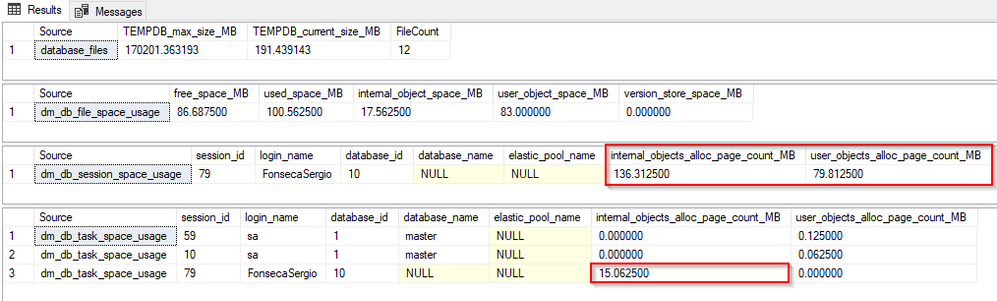
We can see in the results above
- TEMPDB max size / current size and File count
- That depends on the DB Service level as mentioned above
- TEMPDB file space used where
-
internal_object_reserved_page_count – Total number of pages in uniform extents allocated for internal objects in the file. Unused pages from an allocated extent are included in the count.
There is no catalog view or dynamic management object that returns the page count of each internal object.
- Internal objects are only in tempdb. The following objects are included in the internal object page counters:
- Work tables for cursor or spool operations and temporary large object (LOB) storage
- Work files for operations such as a hash join
- Sort runs
-
user_object_reserved_page_count – Total number of pages allocated from uniform extents for user objects in the database. Unused pages from an allocated extent are included in the count.
You can use the total_pages column in the sys.allocation_units catalog view to return the reserved page count of each allocation unit in the user object. However, note that the total_pages column includes IAM pages.
- The following objects are included in the user object page counters:
- User-defined tables and indexes
- System tables and indexes
- Global temporary tables and indexes
- Local temporary tables and indexes
- Table variables
- Tables returned in the table-valued functions
-
version_store_reserved_page_count – Total number of pages in the uniform extents allocated for the version store. Version store pages are never allocated from mixed extents.
For more information, see sys.dm_tran_version_store (Transact-SQL).
- TEMPDB usage per session
- We can see session 79 is using around 79 Mb of TEMPDB for user objects
- TEMPDB usage in running task per session
- In this view we can see all user requests currently running that are consuming tempdb, this can be also useful to do some specific troubleshooting. In this image we can see some internal objects being currently used. Could be used for sorting / hash join / etc or some other internal operation.
For this second test I created a global temp table in another DB in the pool, we can monitor the usage but by design we will miss some metadata like DB name as we cannot look on master.sys.databases and local user db sys.databases only includes master + current user db. With this we can see that all databases in the same elastic pool share same tempdb database space. Even though you still cannot access global temp table from other database in same pool as temp tables are scoped to database level.
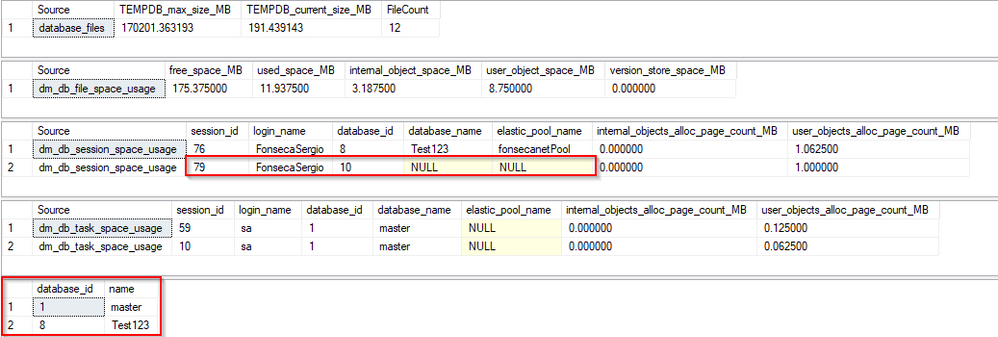
We can still connect to master db and check sys.databases manually to match database id to name
SELECT database_id, name FROM sys.databases
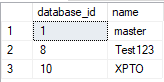
Transactions using TEMPDB
You can also connect directly to user DB and check if there is any session ID that have a open transaction using TEMPDB.
SELECT
	 [Source] = 'database_transactions'
	,[session_id] = ST.session_id
	,[transaction_id] = ST.transaction_id
	,[database_id] = DT.database_id
	,[database_name] = CASE
		WHEN D.name IS NULL AND DT.database_id = 2 THEN 'TEMPDB'
		ELSE D.name
	 END
	,[database_transaction_log_used_Kb] = CONVERT(numeric(18,2), DT.database_transaction_log_bytes_used / 1024.0 )
	,[database_transaction_begin_time] = DT.database_transaction_begin_time
	,[transaction_type_desc] = CASE database_transaction_type
		WHEN 1 THEN 'Read/write transaction'
		WHEN 2 THEN 'Read-only transaction'
		WHEN 3 THEN 'System transaction'
		WHEN 4 THEN 'Distributed transaction'
	END
	,[transaction_state_desc] = CASE database_transaction_state
		WHEN 0 THEN 'The transaction has not been completely initialized yet'
		WHEN 1 THEN 'The transaction has been initialized but has not started'
		WHEN 2 THEN 'The transaction is active'
		WHEN 3 THEN 'The transaction has ended. This is used for read-only transactions'
		WHEN 4 THEN 'The commit process has been initiated on the distributed transaction. This is for distributed transactions only. The distributed transaction is still active but further processing cannot take place'
		WHEN 5 THEN 'The transaction is in a prepared state and waiting resolution.'
		WHEN 6 THEN 'The transaction has been committed'
		WHEN 7 THEN 'The transaction is being rolled back'
		WHEN 8 THEN 'The transaction has been rolled back'
	END
FROM sys.dm_tran_database_transactions DT
INNER JOIN sys.dm_tran_session_transactions ST
	ON DT.transaction_id = ST.transaction_id
LEFT JOIN sys.databases D
	ON DT.database_id = D.database_id
ORDER BY ST.session_id


by Scott Muniz | Sep 4, 2020 | Uncategorized
This article is contributed. See the original author and article here.
PowerShell provides an effective way to run queries or actions at scale, whether that’s against Azure resources, Azure Active Directory identities or Office 365 environments (including Exchange Online, SharePoint Online and Microsoft Teams). The first step is connecting PowerShell to your tenant and subscription with valid credentials, using the “Connect-AzAccount” command. So what happens if you hit an error with that very first step?
The warning sign
In PowerShell, I ran the “Connect-AzAccount” command, visited the website and entered the provided (redacted) code. The login process seemed to then authorize my username and password without error, but there was something strange in what was returned (see if you can spot it, below):

This was a slightly tricky question, as you may not be able to tell that I haven’t blacked out the SubscriptionName or TenantID for security reasons. They appeared blank.
This account has access to multiple subscriptions in a single tenant, so before we start issuing commands, we need to set the context. Usually one is picked up by default but you can use the same process to switch to a different subscription or tenant if needed. In this case, with none selected, I issued the next command “Set-AzContext” and provided the -SubscriptionID that I wanted the commands to act against, only ….

Denied!
Troubleshooting
On hitting this error I did what most seasoned IT Professionals would do – I searched the internet for the phrase “failed to acquire token silently as no token was found in the cache the refresh token had expired due to inactivity”.
No matter what permutation I used of these search terms, the limited results I did find were related to API calls or application errors. Not at all helpful in this context (see what I did there?).
What was helpful was this Doc regarding Azure PowerShell context objects. It didn’t specifically list the above error, but it did give me the PowerShell credentials equivalent of “turn it off and back on again” – the “Clear-AzContext” command!

After running Clear-AzContext, I was able to re-run Connect-AzAccount and pick up a default context successfully, then run my commands.
Conclusion
What caused this error to fire? I have no idea. It’s one of those scenarios where the cost benefit analysis doesn’t really stack up to investigate it further. It was likely a one-off incident on my particular PC and I could invest a ton of time in trying to reproduce it or troubleshoot it – or I could accept that I found a quick and easy fix. If it does re-occur or if we get an outpouring of comments that it happens to other people all the time too, then it might be worth looking into further.
But for now, I’ll take the win that clearing the cache was enough to pull down a new, valid authentication token. And it is worth the time to blog about it, for the next seasoned IT Professional that encounters the same thing.
Yours in troubleshooting,
SCuffy.
by Scott Muniz | Sep 4, 2020 | Azure, Technology, Uncategorized
This article is contributed. See the original author and article here.
An accurate infrastructure diagram is invaluable to your IT team. It can be used by cloud architects to redesign the existing cloud infrastructure, DevOps engineers responsible for implementing that design, or project managers to ensure the rollout has been executed according to the scope.
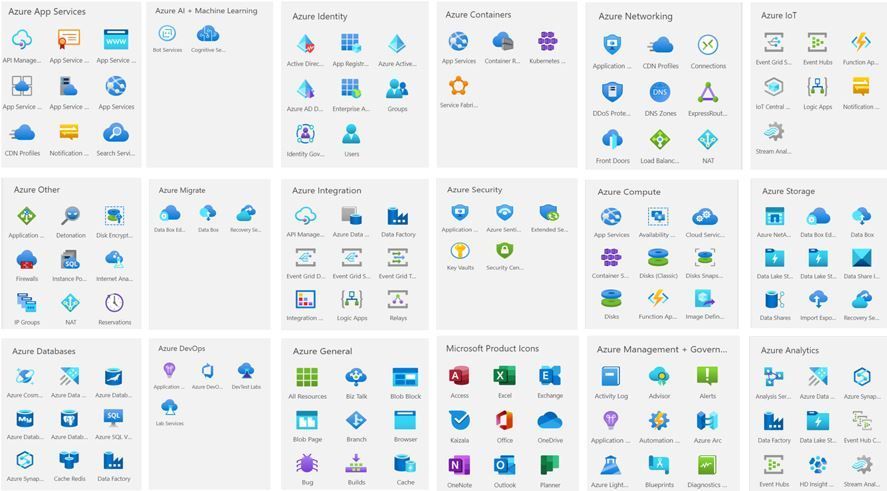
We introduced Azure shapes in Visio about two years ago. Today, we are excited to announce more than 250 of the latest Azure shapes are available in Visio for the web. These refreshed icons are better aligned with the Microsoft Fluent design and let you create IT diagrams that accurately represent modern cloud services, tools, and frameworks from Azure.
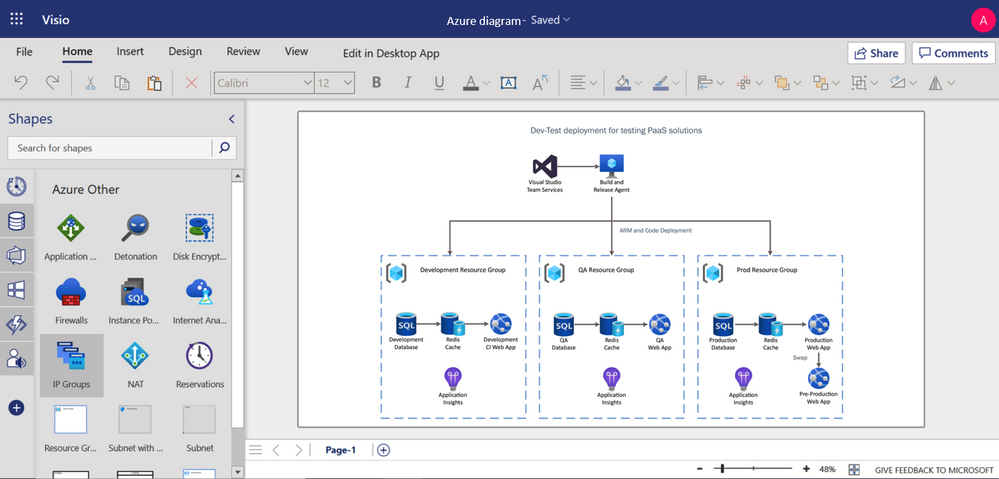
You can use Visio for the web to build Azure diagrams for network topologies, virtual machine configurations, operations, and more. These provide a means of clearly documenting the existing infrastructure for clarity and help visualize various service interactions. For example, you can build a diagram showing how to configure infrastructure for development and testing of a standard PaaS-style system that leverages Azure DevOps, Azure SQL Database, Azure Cache Redis and Application insights service. By sharing diagrams like this among your team, everyone is on the same page for executing concepts. Detailed Azure diagrams can also serve as roadmaps for scaling and managing your Azure network as it grows with your business.
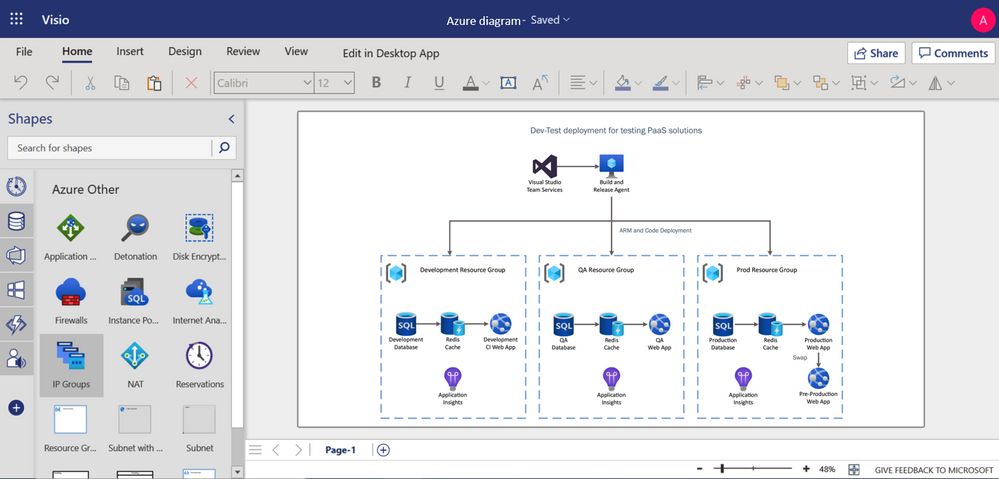
Azure diagram representing Dev-test deployment for PaaS solutions
There are 18 shape sets in all, including Azure AI and Machine Learning, Azure App Services, Azure Compute, Azure Containers, Azure Databases, Azure General, Azure IoT, Azure Identity, Azure Integration, Azure Management & Governance, Azure Analytics, Azure Migrate, Azure Networking, Azure Security, Azure Storage, Azure Other, and Microsoft Product Icons.
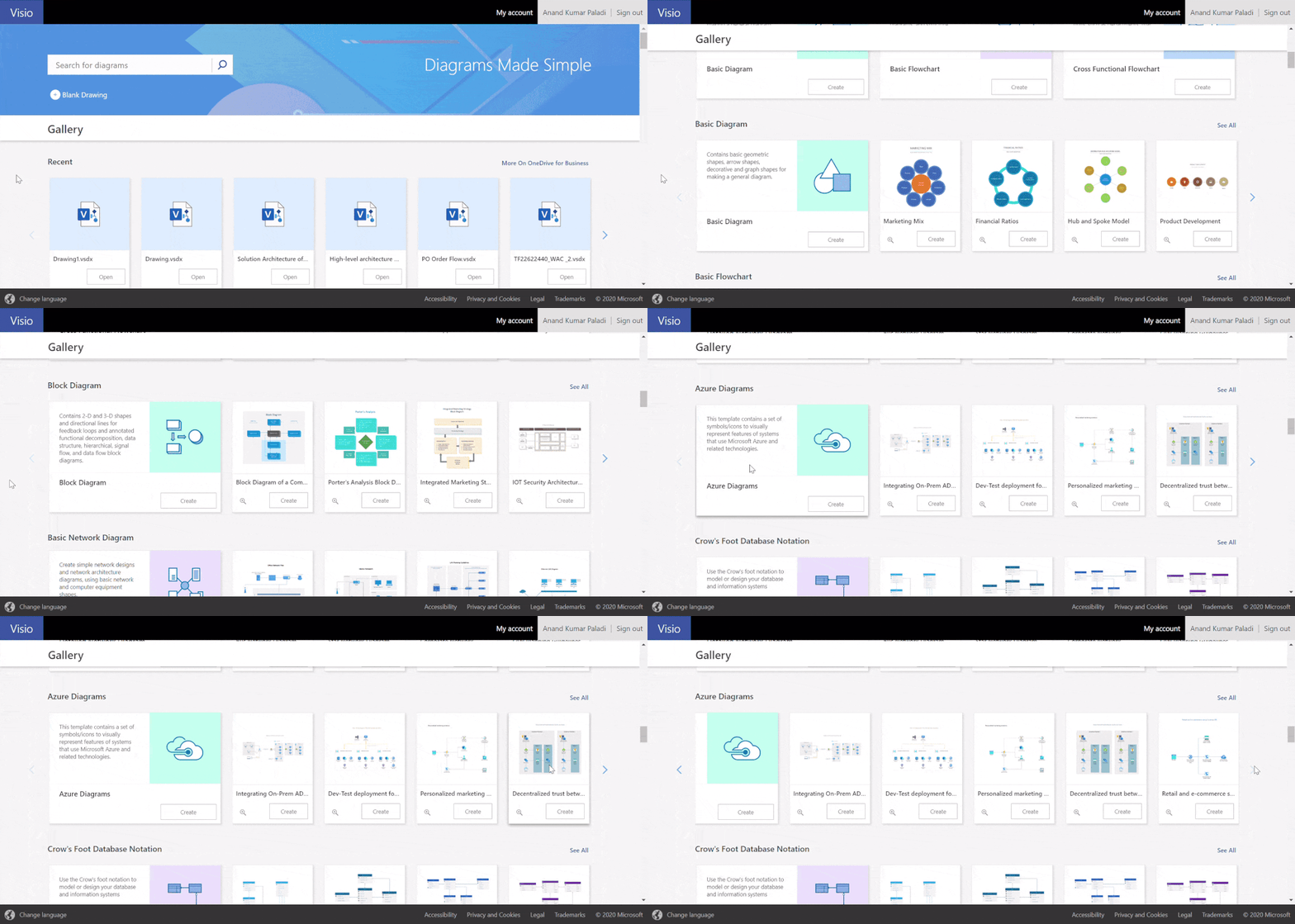
To help you get started easily, we have provided a few starter diagrams using various Azure services. Visit visio.office.com, select the preferred diagram template, and start visualizing your Azure infrastructure. Our support page provides even more details on how to create your Azure diagrams.
For questions or feedback regarding Visio Azure templates and other features, please email us at tellvisio@microsoft.com. Keep visiting the Visio Tech Community, and follow us on Facebook and Twitter to stay current on the latest Visio releases.


Recent Comments