by Scott Muniz | Sep 4, 2020 | Azure, Technology, Uncategorized
This article is contributed. See the original author and article here.
Azure Data Explorer has a mature, open source Kafka Connect sink connector that is in use in production by multiple customers. The connector was *gold* certified in September 2020 by Confluent and is now listed in Confluent Connector Hub. The certification involved stringent testing by Confluent for quality, standards, best practices, feature completeness, delivery guarantees and performance. To meet the certification requirements, we added a number of new features to our connector, renamed some, and removed support for some with version 1.x. This article details the same.
For comprehensive information about our connector, visit our Git repo.
Improved delivery guarantees
Our connector now offers “At least once” delivery guarantees (no data loss).
What’s new
1. Comprehensive upfront validation
The connector validates for all required and dependent sink properties, access and grants and shuts down upfront with appropriate error messages.
2. Configurable behavior on error
A new sink property with possible values of fail (shut down connector task), ignore (ignore and continue processing), and log (log errors and continue processing).
behavior.on.error
3. *New* configurable retries
A set of new sink properties-
errors.retry.max.time.ms
errors.retry.backoff.time.ms
errors.retry.max.time.ms: Period of time in milliseconds to retry for transient errors
errors.retry.backoff.time.ms: Period of time in milliseconds to backoff before retry for transient errors
4. Additional converters supported
We have added support for the following converters-
org.apache.kafka.connect.json.JsonConverter
io.confluent.connect.avro.AvroConverter
io.confluent.connect.json.JsonSchemaConverter
JsonSchemaConverter is for Json with schema.
4. Schema registry support
The connector now supports schema registry with the property-
value.converter.schema.registry.url
We support schema registry for avro and json, protobuf is on the roadmap.
5. Schema with message
The connector now supports messages with schema with the following sink property that accepts a boolean-
value.converter.schemas.enable
6. Kafka Connect deadletterqueue
The optional sink properties below can be provided for Kafka Connect to redirect messages that failed deserialization-
errors.deadletterqueue.bootstrap.servers
errors.deadletterqueue.topic.name
errors.deadletterqueue.security.protocol
errors.deadletterqueue.sasl.mechanism
errors.deadletterqueue.sasl.jaas.config
errors.deadletterqueue.sasl.kerberos.service.name
The last 4 sink properties are required for secure clusters and*kerberos* property is specific to kerberized Kafka clusters.
7. Miscellaneous deadletterqueue
The optional sink properties below can be provided for the connector to redirect messages that failed besides deserialization, e.g. transient failures beyond retry period –
misc.deadletterqueue.bootstrap.servers
misc.deadletterqueue.topic.name
misc.deadletterqueue.security.protocol
misc.deadletterqueue.sasl.mechanism
misc.deadletterqueue.sasl.jaas.config
misc.deadletterqueue.sasl.kerberos.service.name
The last 4 sink properties are required for secure clusters and*kerberos* property is specific to kerberized Kafka clusters.
What’s renamed
For the purpose of standardization and consistency, we have renamed some properties-
| Previous name |
New name |
| kusto.auth.authority |
aad.auth.authority |
| kusto.auth.appid |
aad.auth.appid |
| kusto.auth.appkey |
aad.auth.appkey |
| kusto.tables.topics_mapping |
kusto.tables.topics.mapping |
| kusto.sink.tempdir |
tempdir.path |
| kusto.sink.flush_interval_ms |
flush.interval.ms |
kusto.sink.flush_size
|
flush.size.bytes |
What’s removed
The following properties are no longer supported with version 1.x-
| Property name |
Rationale |
| kusto.auth.username |
Customers typically only use application IDs/service principals; We therefore removed support for user principals |
| kusto.auth.password |
Customers typically only use application IDs/service principals; We therefore removed support for user principals |
| eventDataCompression |
We now compress all data shipped to Azure Data Explorer, to improve performance |
Connector documentation
Visit out Git repo
Connector download
Visit out Git repo release page
Confluent Connector Hub
https://www.confluent.io/hub/microsoftcorporation/kafka-sink-azure-kusto
Need support?
Ran into a bug? Need hep getting started? Have a feature request? Open an issue.
Want to contribute?
Read our guidelines and get involved. We welcome community contribution.
by Scott Muniz | Sep 4, 2020 | Uncategorized
This article is contributed. See the original author and article here.
Hi Guys, welcome to SQL Server Allocation Series, hope you enjoy the post1 and post2.
Today, I’m going to show you the detail of IAM page.
An Index Allocation Map (IAM) page maps the extents in a 4-GB part of a database file used by an allocation unit. An allocation unit is one of three types:
- IN_ROW_DATA
Holds a partition of a heap or index.
- LOB_DATA
Holds large object (LOB) data types, such as XML, VARBINARY(max), and VARCHAR(max).
- ROW_OVERFLOW_DATA
Holds variable length data stored in VARCHAR, NVARCHAR, VARBINARY, or SQL_VARIANT columns that exceed the 8,060 byte row size limit.
Each partition of a heap or index contains at least an IN_ROW_DATA allocation unit. It may also contain a LOB_DATA or ROW_OVERFLOW_DATA allocation unit, depending on the heap or index schema.
An IAM page covers a 4-GB range in a file and is the same coverage as a GAM or SGAM page. If the allocation unit contains extents from more than one file, or more than one 4-GB range of a file, there will be multiple IAM pages linked in an IAM chain. Therefore, each allocation unit has at least one IAM page for each file on which it has extents. There may also be more than one IAM page on a file, if the range of the extents on the file allocated to the allocation unit exceeds the range that a single IAM page can record.
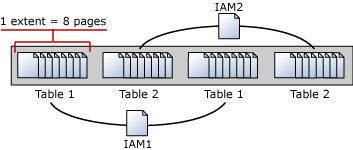
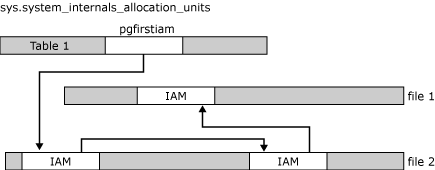
IAM pages linked in a chain per allocation unit An IAM page has a header that indicates the starting extent of the range of extents mapped by the IAM page. The IAM page also has a large bitmap in which each bit represents one extent. The first bit in the map represents the first extent in the range, the second bit represents the second extent, and so on. If a bit is 0, the extent it represents is not allocated to the allocation unit owning the IAM. If the bit is 1, the extent it represents is allocated to the allocation unit owning the IAM page.
When the SQL Server Database Engine has to insert a new row and no space is available in the current page, it uses the IAM and PFS pages to find a page to allocate, or, for a heap or a Text/Image page, a page with sufficient space to hold the row. The SQL Server Database Engine uses the IAM pages to find the extents allocated to the allocation unit. For each extent, the SQL Server Database Engine searches the PFS pages to see if there is a page that can be used. Each IAM and PFS page covers lots of data pages, so there are few IAM and PFS pages in a database. This means that the IAM and PFS pages are generally in memory in the SQL Server buffer pool, so they can be searched quickly. For indexes, the insertion point of a new row is set by the index key, but when a new page is needed, the previously described process occurs.
In post 1, I created a table with 8 pages, all these 8 pages are in mixed extent. I’m going to insert more rows into the table to increase the pages. As you expected, these new rows/pages will be allocated to uniform extents.
I’m going to walk you through how SQL Server save the info in IAM pages.
Data manipulation:
T-SQL:
insert heaptable1 values(15,REPLICATE(‘o’,8000)) –page 9
insert heaptable1 values(16,REPLICATE(‘p’,8000)) –page 10
insert heaptable1 values(17,REPLICATE(‘q’,8000)) –page 11
insert heaptable1 values(18,REPLICATE(‘r’,8000)) –page 12
insert heaptable1 values(19,REPLICATE(‘s’,8000)) –page 13
insert heaptable1 values(20,REPLICATE(‘t’,8000)) –page 14
insert heaptable1 values(21,REPLICATE(‘u’,8000)) –page 15
insert heaptable1 values(22,REPLICATE(‘v’,8000)) –page 16
insert heaptable1 values(23,REPLICATE(‘w’,8000)) –page 17
The table heaptable1 has 17 pages in four extents, two mixed extents and two uniform extents.
select allocated_page_file_id as [FileID],allocated_page_page_id as [PageID],page_type_desc,extent_page_id/8 as ExtentID,
is_mixed_page_allocation,extent_page_id as [First Page in Extent],extent_page_id+7 as [LastPage in Extent],is_allocated From
sys.dm_db_database_page_allocations(db_id(),object_id(‘dbo.heaptable1′),null,null,’detailed’) order by allocated_page_page_id
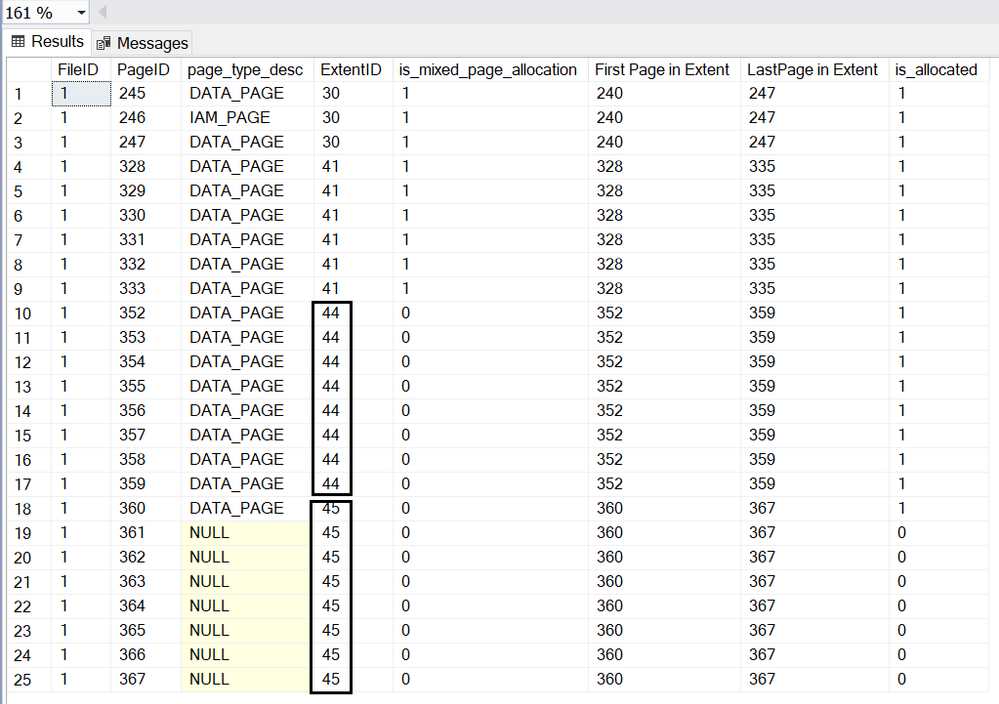
Page 246 is the IAM page.
Page 245,247,328,329,330,331,332 and 333 are in mixed extent.
Starting from page (1:352), all the pages are allocated in uniform extent.
Page(1:352)~(1:359) are in extent 44,
Page(1:360)~(1:367) are in extent 45.
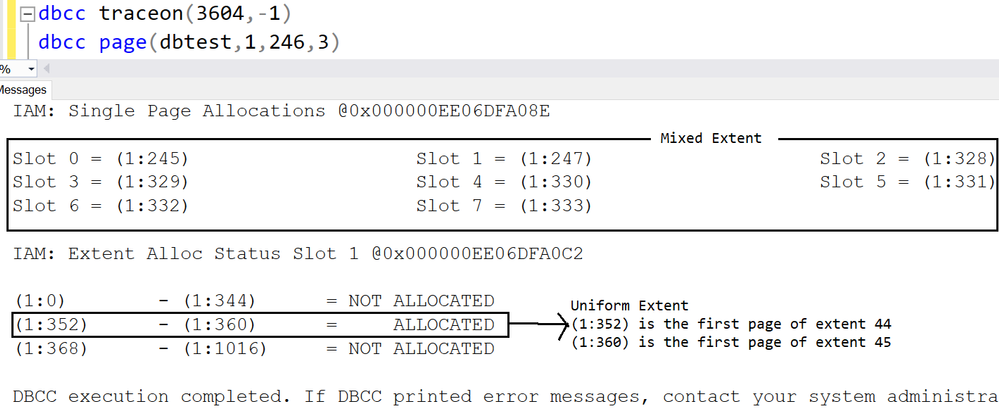
Let me run DBCC PAGE of IAM page to show you how the info recorded.
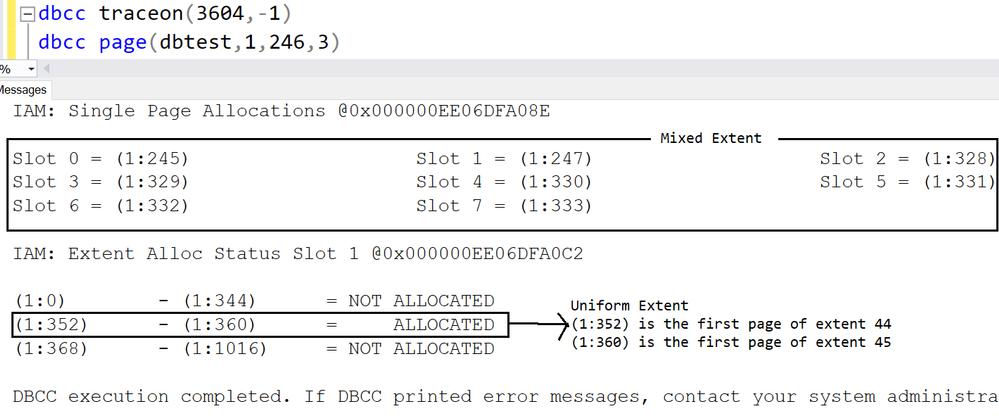
The first 8 pages are listed under ‘Single page allocations’, which means they are in mixed extent.
(1:352)~(1:360) are in uniform extent, the result matches the DMF sys.dm_db_database_page_allocations
(1:352) is the first page of extent 44
(1:360) is the first page of extent 45
Let’s dive into the IAM page with parameter 1:
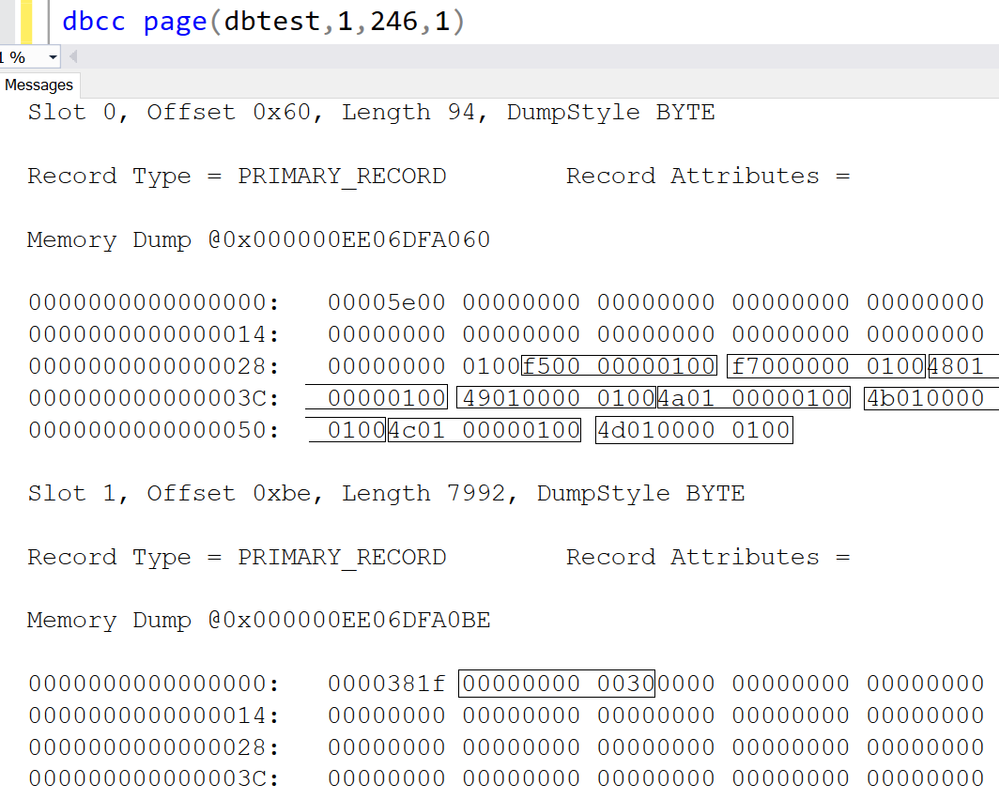
1.There are two slots in IAM page,
- The first slot(slot 0) are for pages in Mixed extent.
- The second slot(slot 1) are for pages in Uniform extent.
2.Let me interpret the slot 0.
1)Each string in rectangle stands for one page, the format is PageId:FileId.
2)The first 8 characters are page id, the last four part is for Fileid.
Here is the interpretation table:
|
Original string->
|
PId:FileId->
|
FId:PId->
|
FId:PId->
|
FId:PId(Decimal)
|
|
f50000000100
|
f5000000:0100
|
0100: f5000000
|
0001:000000f5
|
1:245
|
|
f70000000100
|
f7000000:0100
|
0100:f7000000
|
0001:000000f7
|
1:247
|
|
480100000100
|
48010000:0100
|
0100:48010000
|
0001:00000148
|
1:328
|
|
490100000100
|
49010000:0100
|
0100:49010000
|
0001:00000149
|
1:329
|
|
4a0100000100
|
4a010000:0100
|
0100:4a010000
|
0001:0000014a
|
1:330
|
|
4b0100000100
|
4b010000:0100
|
0100:4b010000
|
0001:0000014b
|
1:331
|
|
4c0100000100
|
4c010000:0100
|
0100:4c010000
|
0001:0000014c
|
1:332
|
|
4d0100000100
|
4d010000:0100
|
0100:4d010000
|
0001:0000014d
|
1:333
|
3.I have demonstrate how the IAM page stores the first 8 pages in mixed extent, now let’s move on to the uniform extent.
4.The uniform extents info is stored in the second slot(slot 1).
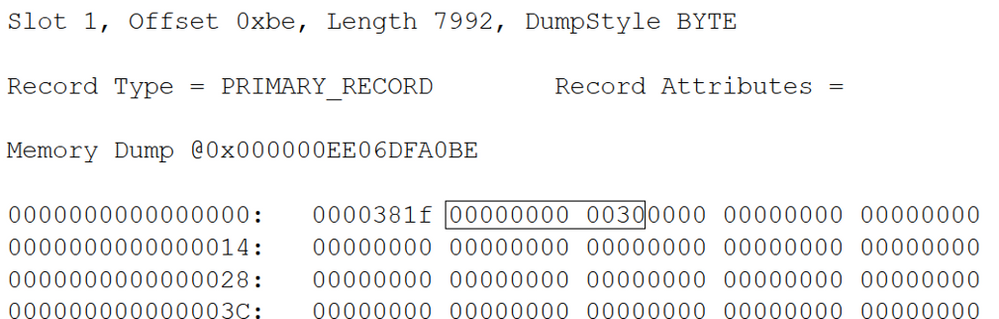
1)’0000381f’ is reserved, we don’t need to worry about it.
2)The string I cared about is ‘00000000 0030’
Following table interprets the string.

3)Each bit in the table stands for one extent.
4)0 means the extent is not occupied/allocated by this table of the IAM.
5)1 means the extent is occupied/allocated by this table of IAM, and it’s uniform extent.
6)Here is more detail
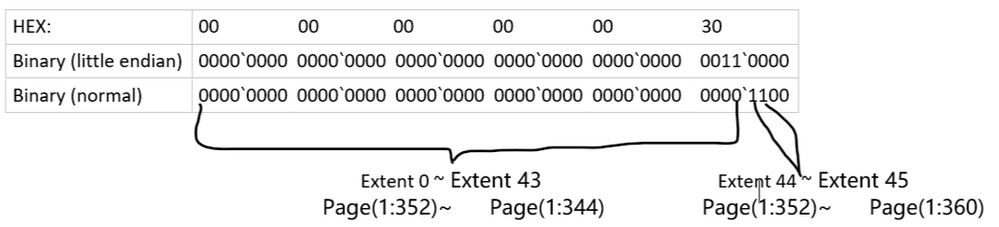
Which exactly as same as the result we got from DBCC Page with parameter 3 before.
You may download the dbtest20200904.zip and give it a try.
by Scott Muniz | Sep 4, 2020 | Uncategorized
This article is contributed. See the original author and article here.
Hello everyone, here is part 17 of a series focusing on Application Deployment in Configuration Manager. This series is recorded by @Steve Rachui, a Microsoft principal premier field engineer.
This session focuses on the Install Application option for rapidly deploying applications to device(s). The tutorial walks through what this component is, how to configure it and demonstrates its use.
Posts in the series
Go straight to the playlist
by Scott Muniz | Sep 4, 2020 | Uncategorized
This article is contributed. See the original author and article here.
This week, we bring you recent articles by Excel MVPs Mourad Louha, Ismael Romero, and Frederic Le Guen.
Datentypen aus Power BI in Excel abrufen (Get data types from Power BI in Excel)
Excel MVP Mourad Louha describes his first experience with Power BI datatypes in Excel and how easy it is to get custom datatypes into Excel – starting with an introduction to the geography datatype and then the steps to create custom datatype from an existing Power BI dataset.
Power Query: Repetir y numerar filas como n de N (Power Query: Repeat and number rows as n of N)
Excel MVP Ismael Romero describes using Power Query to obtain an enumerated list in ‘n of N’ form for each original record.
Le secret du raccourci Ctrl + D (The Secret of Ctrl-D)
Excel MVP Frederic Le Guen reveals the secret of Ctrl-D when working with graphics objects in Excel.
Find this useful or want to know more about a specific Excel topic? Leave a comment below.
by Scott Muniz | Sep 4, 2020 | Azure, Technology, Uncategorized
This article is contributed. See the original author and article here.
JUST ENOUGH AZURE DATA EXPLORER FOR CLOUD ARCHITECTS
This article provides a high-level overview of all the key capabilities in Azure Data Explorer, positioning, and resources, and is intended to demystify Azure Data Explorer for cloud architects.
WHAT IS AN ANALYTICAL DATABASE?
Analytical databases are purpose-built and optimized to query and run advanced analytics on large volumes of data with extremely low response times. Modern analytical databases are generally distributed, scalable, fault-tolerant, and feature columnar, compressed formats, and intelligently use in-memory and disk caching technologies. In contrast, transactional databases are optimized for single digit millisecond point reads by key or intra-partition range query, support random CRUD and ACID semantics, and more.
WHAT IS AZURE DATA EXPLORER?
Azure Data Explorer, code name, Kusto, is a low latency, big data, Microsoft proprietary, append-only analytical database. It is feature and functionality rich as a platform – with durable storage, query engine, search engine, proprietary Kusto Query Language, support for ingestion of data in disparate formats from disparate sources, in batch and streaming, with advanced analytics/data science and geospatial analytical capabilities out of the box, server side programmability and support for visualization, scheduling, orchestration and automation.
Azure Data Explorer is mature and heavily used internally at Microsoft and powers many core Azure offerings such as Azure Monitor, Azure Sentinel, Azure Time Series Insights and more. It is fully managed, scalable, secure, robust, and enterprise ready and is a popular platform for log analytics, time series analytics, IoT, and general-purpose exploratory analytics. In a subsequent section, we cover, what Azure Data Explorer is not.
USE CASES FOR AZURE DATA EXPLORER
- Azure Data Explorer is a big data solution, ideal for-
- Analytics on IoT telemetry
- Analytics on all manners of time series data
- Analytics on all manners of logs
- Analytics on clickstream and any other form of live sources
- Text search
- Geo-spatial analytics
- Advanced analytics
- Exploratory environment for data scientists and business/data analysts
Reference architecture is covered further in this article, after the value proposition.
VALUE PROPOSITION AND SALIENT FEATURES
1. LOW LATENCY QUERY ENGINE
Azure Data Explorer leverages innovative, and contemporary compressed columnar and row stores along with a hierarchical cache paradigm, featuring configurable hot and cold caches backed by memory and local disk, with data persistency on Azure Storage. With this architecture, terabytes and petabytes of data can be queried, and results returned within milliseconds to seconds. Refer the white paper for more implementation details.
For applications where performance of analytical queries is critical, Azure Data Explorer is a great fit as a backend analytical database.
2. DISTRIBUTED BY DESIGN
Azure Data Explorer is a big data, cluster computing system comprised of engine nodes that serve out queries and data management service nodes that perform/orchestrate a variety of data related activities including ingestion and shard management. A few key capabilities of distributed systems are partitioning, consistency, replication, scalability and fault tolerance.
- Data persisted in Azure Data Explorer is durably backed by Azure Storage that offers replication out of the box, locally within an Azure Data Center, zonally within an Azure Region.
- An Azure Data Explorer cluster can be scaled up vertically or down as workload resource requirements change. Azure Data Explorer clusters can be scaled out horizontally and scaled in, manually, or with auto-scale.
- From a partitioning perspective, Azure Data Explorer natively partitions by ingestion time with a proprietary formula to prevent hot spotting, but also offers a user configurable partitioning based on data attributes/columns. Out of the box, the service offers options of strong and weak consistency, with strong consistency as the default. All data ingested into Azure Data Explorer is automatically indexed, allowing fast lookup queries.
For analytical applications where scale and reliability are a must, Azure Data Explorer is a great fit.
3. RICH INTEGRATION AND CONNECTOR ECOSYSTEM
Azure Data Explorer has a rich connector eco-system for batch and near real-time ingestion, with Microsoft first party services as well as open source distributed systems.
It supports open source integration systems and aggregator, connector frameworks, like Apache Kafka’s Kafka Connect and ELK stack’s Logstash. It supports Apache Spark for both read and persist, opening up numerous integration possibilities with open source big data systems, whether transactional or analytical.
From a streaming perspective, Azure Data Explorer supports Azure IoT, Azure Event Hub and Apache Kafka. For bulk ingestion or event-driven ingestion, Azure Data Explorer integrates with Azure Storage, with a queued ingestion functionality, and with Azure Event Grid for configurable event driven ingestion.
From an ingestion format perspective, Azure Data Explorer supports a number of formats from CSV and JSON to binary formats like Avro, Parquet and ORC, with support for multiple compression codecs.
It is a common pattern today to curate all enterprise information assets in a data lake. Azure Data Explorer supports the external table paradigm with an integration with Azure Data Lake Store. It also features continuous ingest and continuous export capabilities to Azure Data Lake Store.
Collectively, with the connector eco-system, support for disparate ingestion formats and compression, whether in batch or streaming modes, with support for business workflows, scheduling, and orchestration, Azure Data Explorer is enterprise-ready from an integration perspective.
4. QUERY LANGUAGE AND SERVER-SIDE PROGRAMMABILITY
Azure Data Explorer features a proprietary Kusto Query Language (KQL), that is expressive, and intuitive. KQL supports querying structured, semi-structured, and unstructured(text search) data, all the typical operators of a database query language, typical aggregation and sorting capability, relational query grammar with joins, and hints and more, cross-cluster and cross database queries, and is feature rich from a parsing (json, XML etc) perspective. It supports geospatial analytics and advanced analytics as well.
Azure Data Explorer supports server-side stored functions, continuous ingest and continuous export to Azure Data Lake store. It also supports ingestion time transformations on the server side with update policies, and precomputed scheduled aggregates with materialized views (preview).
Azure Data Explorer with Kusto Query Language capabilities, and its support for ingesting disparate formats, in batch or near real time, allows enterprises to gain insights instantly from data, in its raw form, in previously unthought of ways and proactively, reactively respond. With the server-side capabilities detailed above, Azure Data Explorer supports building common automated analytical application features.
5. ADVANCED ANALYTICS
Azure Data Explorer offers time series capabilities, including a large set of functions from basic element-wise operation (adding, subtracting time series) via filtering, regression, seasonality detection up to anomaly detection and forecasting. Time series functions are optimized for processing thousands of time series in seconds. Azure Data Explorer also offers clustering plugins for pattern detection that are very powerful for diagnosis of anomalies, and root cause analysis. You can extend Azure Data Explorer capabilities by embedding python code in KQL query, leveraging Python open source eco-system for ML, statistics, signal processing and a lot more. Using inline Python you can do in-place machine learning model training, leveraging Azure Data Explorer compute, against data stored within ADX, or train your model anywhere, export it to ADX and use ADX solely for scoring. You can also query ADX from Jupyter/Azure notebooks by using KqlMagic extension from within the notebook. To note, ADX supports ONNX models.
With its support for data science languages and libraries, training and scoring, both in batch and near real time, Azure Data Explorer makes a compelling modern advanced analytics platform.
6. VISUALIZATION
Azure Data Explorer offers visualization out of the box with its Web/Desktop based integrated development environment. It also offers native dashboarding out of the box, with support for a variety of charts, and direct query support. Further, it has native integration with Power BI with support for predicate and projection pushdown and native connectors for Grafana, Kibana and Redash (now Databricks), and ODBC support for Tableau, Sisense, Qlik and more. With KQL used in Jupyter notebooks along with Python, Python visualization libraries can be leveraged as well.
An analytical database platform is incomplete without a complementary and strong visualization story. With its own native dashboarding, charting, and support for popular BI/dashboarding ISV solutions, Azure Data Explorer makes it possible to build visualization rich analytical solutions.
7. AUTOMATED INFORMATION LIFECYCLE MANAGEMENT
Azure Data Explorer offers configurable time duration based hot cache policy with automated eviction upon expiration. It offers configurable time to live/retention policy with automated removal of data upon expiration.
Historical data can be persisted in Azure Data Lake Store, with the “External Table” feature to query via KQL. Azure Data Lake Store offers its own information lifecycle management with tiers, automated retention and archival.
8. SECURITY
Azure Data Explorer offers enterprise grade security and has adoption in security critical industry domains such as healthcare and finance, and governments.
PERIMETER PROTECTION
Azure Data Explorer is a Vnet injectable service and offers a perimeter protection solution with network isolation, with network security group rules and firewall for inbound and outbound access control respectively. It also supports service endpoint to storage to bypass the public internet and optimally route over the Azure backbone.
AUTHENTICATION
Azure Data Explorer supports Azure Active Directory (AAD) authentication out of the box.
AUTHORIZATION
Azure Data Explorer supports access control based on AAD security groups, with Role Based Access Control at a cluster, database, and table row level granularity.
DATA MASKING
Azure Data Explorer supports configurable data masking.
ENCRYPTION
Azure Data Explorer supports it supports encryption over the wire with TLS 1.2 by default, and AES256 bit “at rest” encryption with Microsoft Managed keys (default) or “Bring Your Own Keys” at its durable storage layer (cold cache), with user configurable “at rest” encryption for its hot cache (disks). Intra–cluster shuffle is encrypted with IPSec.
AUDITING
All operations are audited and persisted.
COMPLIANCE CERTIFICATIONS & GDPR
It is rich from a compliance certification perspective and has delete support for GDPR. Information in Azure Data Explorer can be catalogued in Azure Data Catalog to fulfill governance requirements. Azure Data Explorer audit/monitoring data can be ingested into Azure Sentinel or any other SIEM of choice.
9. WORKLOAD ISOLATION AND COST CENTER CHARGEABILITY
Azure Data Explorer supports centralizing ingestion and data engineering in a (leader) cluster and in-place querying federated to follower clusters made possible by Azure Data Share. This simplifies cost center chargeability, and sizing query clusters, preventing resource contention between data engineering and querying workloads with the separate cluster per workload model.
10. DEVELOPER AND OPERATIONS FRIENDLY
Azure Data Explorer has SDKs in C#, Java, Python, Node, R and Go, and a REST interface for management and data operations. From an IDE perspective it offers a Web user interface and a Desktop IDE with built-in powerful intellisense, visualization and query-sharing/collaboration.
Azure Data Explorer offers logging, monitoring, diagnostics and alerting with its Azure Monitor integration. Patching of infrastructure, health monitoring etc are fully managed by the service. Provisioning and deployment automation is simplified through support for Azure DevOps. Due to its managed nature, it does not require a database administrator.
The capabilities detailed above make the service both developer and operations friendly.
11. COST OPTIMIZATION
Azure Data Explorer offers reserved instance pricing, which is cost optimization with a term commitment model. It offers information lifecycle management by automatically evicting expired data from hot cache, and deleting expired data in cold cache as a cost optimization. It offers configurable auto-scale out and scale-in capability to right-size a cluster based on workload in execution. Azure Advisor recommendations are available for optimization of the cluster, including rightsizing. Azure Data Explorer offers a developer SKU and the ability to pause clusters when not in use as further cost optimizations. Review our
12. AVAILABILITY AND DISASTER RECOVERY
Azure Data Explorer is built natively highly available from the ground up, leverages the natively resilient Azure storage for data durability, supports zonal redundancy, and offers an SLA of 99.9% with configurable options for disaster recovery. Azure Data Explorer’s underlying services are provisioned highly available across compute nodes, load balanced as required and are self-healing.
Azure Data Explorer is available in all Azure regions and is one of the foundational services deployed after infrastructure and identity in a region.
For analytical applications that need to be resilient to all manners of failures, Azure Data Explorer is a great fit. Learn more about high availability and disaster recovery in Azure Data Explorer here.
13. AUTOMATION, SCHEDULING & ORCHESTRATION
Azure Data Explorer supports Azure Data Factory, Azure Logic Apps, and Power Automate (previously Microsoft Flow) for data movement/composing business workflows, for scheduling and orchestration.
REFERENCE ARCHITECTURE
RESOURCES


Recent Comments