by Scott Muniz | Sep 9, 2020 | Uncategorized
This article is contributed. See the original author and article here.
Even at the best of times, starting a new job can be daunting. With remote working becoming the “new normal” for many organisations, starting a new job without meeting new colleagues in person can be a very strange experience, particularly for those who have traditionally been office-based and surrounded by a working team.
Yammer can play a key role in onboarding, especially with an all-virtual on-boarding experience. Yammer provides an open, online platform that allows new employees to discover and connect with others, without the need for formal introductions via email or video call.
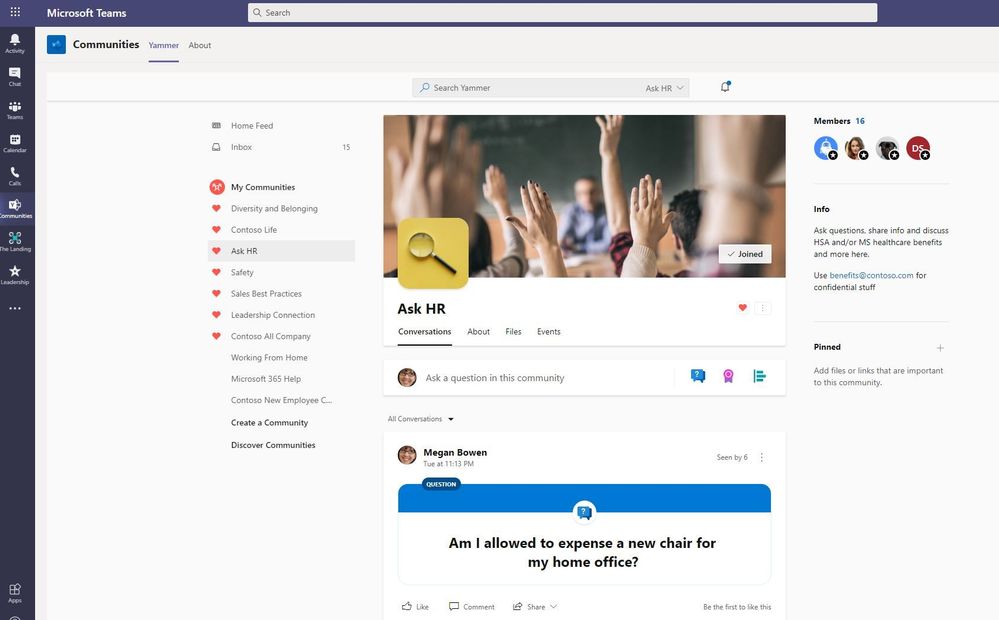
 Ask HR community in Microsoft Teams
In our organisation, we’re finding that an all-virtual approach to on-boarding requires more of a structured method. Previously, day one included time physically in the office, even if they would be based primarily remote, to give an immediate chance to put names to friendly faces and experience the office atmosphere. However, with our physical office environment out of the equation, there’s less opportunity to ‘bump into’ other employees who may be useful to know from a professional and personal point of view. HR and Line Managers are working together to set up scheduled Microsoft Teams meetings with appropriate contacts. While this is of course a sensible approach, it doesn’t provide the opportunity for the new employee to connect with others across the company who aren’t directly related to their role.
Yammer’s open community structure closes this gap, allowing new employees to virtually observe their new colleagues interacting, (as they might in an office) and giving them a chance to display their personality by joining or starting conversation threads.

We’ve learned a few things along the way for community managers, HR and line managers for setting up the onboarding experience to make sure new employees feel welcomed into your company through Yammer:
1. Introduce them to the network
An introductory post from the new employee’s line manager into All Company, or relevant community works really well, usually encouraging lots of other employees to follow up with replies of welcome. Friendly hellos can settle those new-job nerves even if they’re not in person.
2. Help them realize the benefit of Yammer
New employees may not have come across platforms like Yammer previously, so during the first couple of days is an excellent chance to help them discover the benefits of being active in the Yammer network. Even if they have used Yammer in the past, it’s still a great chance to explain the particular setup of communities and use cases in your organization and point out which ones could benefit them.
3. Suggest Communities for them to join
Have a list of 5 tops work related communities you’d recommend by their role and interests. Work with their line manager or HR team to get a list of recommended communities.
Additionally, we spend a lot of time with colleagues and sometimes it’s nice to take a break from work stresses and be reminded that we are all human. If your Yammer network includes communities that offer some light relief from work, make sure your new starters are included, so that they can start getting to know colleagues on a more personal level.
For example, my favorite non-work related communities in our Yammer network are:
- Office Chat – Somewhere to replicate not-necessarily-work-related office chat
- Rate My Plate – Brave employees put their cooking skills on show for the admiration (or amusement) of others
Related Resource: Top Ten Suggested Communities
4. Look out for their initial posts
Respond to their first few posts in Yammer if you can, to give them a positive experience from the beginning, making them more likely to continue using the platform. You might not have the answer to their question, but you can @mention the right people or help to share the message into the right communities to get the conversation in front of the right community for the best response.
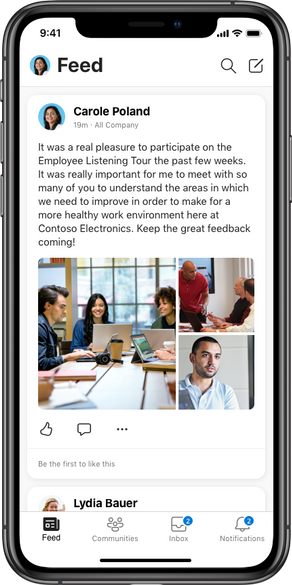
5. Get the mobile app or add Yammer to Microsoft Teams
Encourage them to use and interact with Yammer wherever they are to do their work. They might use a variety of tools, and Yammer can be integrated with them.
6. Timing is key! Start early
You’ll want to introduce new starters to Yammer as soon as possible, to get them plugged into the right communities and conversations right away. This helps to connect them, regardless of where they are physically located and make them feel part of the larger organization and initiatives going on.
We want to ensure that that new starters feel welcomed, get to know their colleagues remotely, and become an active part of the Yammer network themselves, especially within their first few weeks on the job!
Are you using Yammer with your new employees today? How can you add Yammer to your existing processes?

I’m Lyndsay Ansell, Internal Communication Specialist at Modality Systems. I’m working to reinvigorate our Yammer network as part of a wider Internal Comms strategy. Having spent the last 4 years working in the UC industry, communication of all forms really interests me, and I’m constantly looking for new ideas and opinions around the subject.
by Scott Muniz | Sep 9, 2020 | Azure, Technology, Uncategorized
This article is contributed. See the original author and article here.
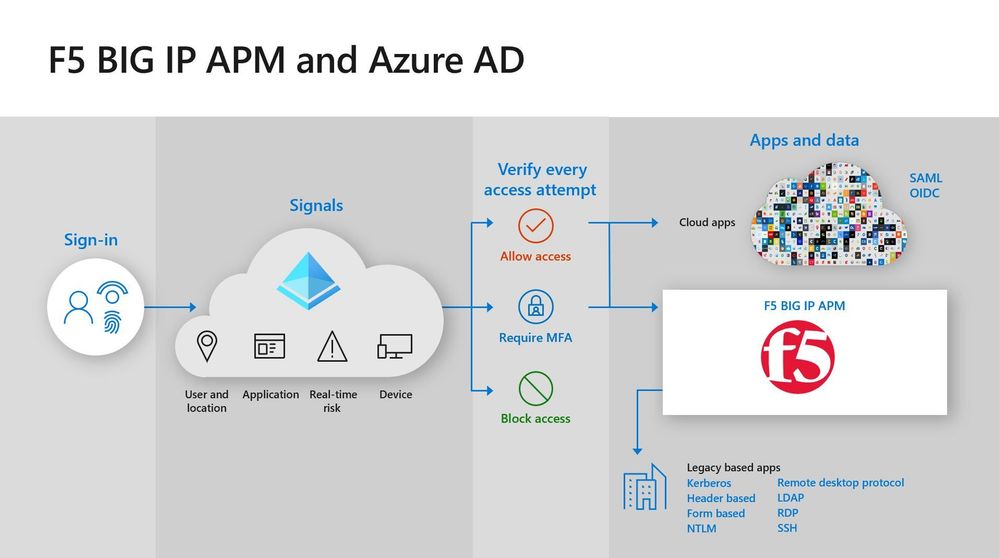
Hello! In today’s “Voice of the Customer” blog, Lyvon Garth, CISO, Durham County, Aaron Stone, Assistant Director and members of his team provide details about how they use Azure Active Directory (Azure AD) and F5 BIG-IP APM to apply consistent security policies across their hybrid environment. With half the county workforce working remotely, it was important to make it easy for users to access both on-premises and cloud apps while enforcing multi-factor authentication. Azure AD and BIG-IP APM enabled them to do just that.
Reducing cybersecurity risk with Azure Active Directory and F5 BIG-IP APM
By Lyvon Garth, CISO, Durham County; Antonio Davis, Platform Manager, Durham County; Aaron Stone, Assistant Director, IT Operations and Infrastructure, Durham County; Monte Cooley, Network Administrator, Durham County
On March 6, 2020, Durham County was the victim of a ransomware attack. Fortunately for us, our threat response solution notified us quickly and we were able to shut down our systems before it spread. We did not pay a ransom, no data was stolen, and we were able to keep critical infrastructure up and running. But it was still extremely disruptive. Eighty servers and hundreds of computers needed to be rebuilt. Staff weren’t able to access all our systems and applications. To reduce the risk of this happening again, we decided to implement multi-factor authentication (MFA), which makes it more difficult for a user’s accounts to be compromised.
Durham County is located in North Carolina. This vibrant and creative region is home to the Research Triangle Park, an innovation center anchored by three major research universities, University of North Carolina Chapel Hill, Duke University, and North Carolina State University. To meet the needs of our citizens, we are working on several digital transformation initiatives. We deployed a Transparency Portal to give people easy access to county performance metrics, budgets, and other data. We’re also digitizing all of our workflows. These efforts are paying off. In a recent report that ranks how well United States counties are using technology, Durham Country tied for second place in counties with populations between 250,000-499,999.
Improving security in a hybrid environment
As we made plans to implement MFA across the organization, it was important to use the same authentication solution across all our apps to simplify the process for employees. This was challenging because, although we have begun modernizing our technology, we still support about 400 legacy on-premises apps. Many of these are homegrown apps that service the specific needs of one of the 27 departments within our county.
To complicate matters, the malware attack occurred as COVID-19 began spreading in the United States. Within a few weeks, half of Durham County staff transitioned to remote work. We needed a solution that would allow these employees and others who work in the field to easily authenticate to on-premises apps using MFA.
We chose Azure AD as our identity and access management solution for several reasons. Improving the security of our identities is very important to us, and Azure AD security capabilities like MFA, Conditional Access, and Privileged Identity Management will help us do that. Azure AD also supports SCIM provisioning, which makes it easy to integrate software-as-a-service (SaaS) apps. The team was also already familiar with Azure AD because we use it for authentication to Office 365 apps.
Single sign-on across cloud and on-premises apps
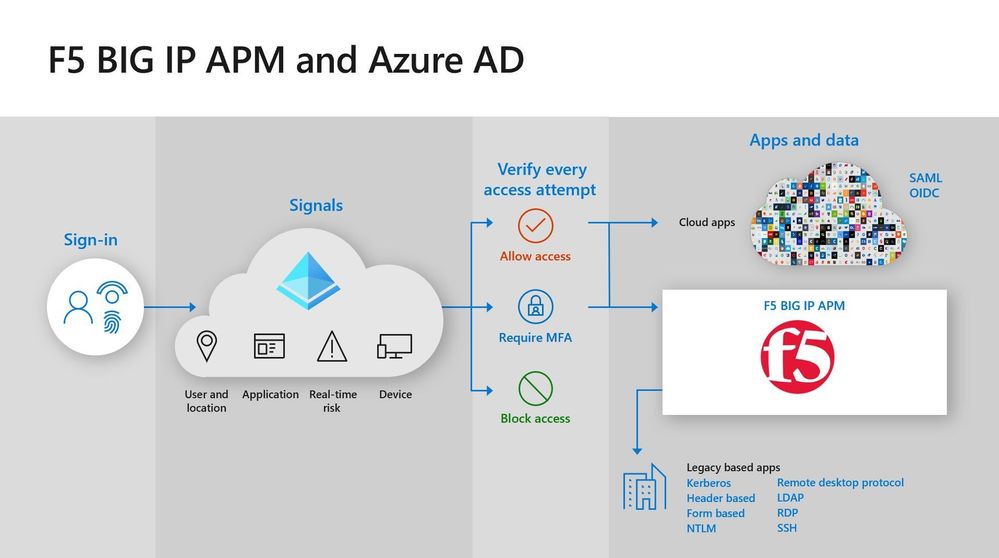
Once we selected Azure AD, we needed to address authentication to our cloud apps and our legacy apps. Many of legacy apps do not support modern authentication standards, which made integration with Azure AD challenging. F5 BIG-IP APM provided the perfect solution. We use F5 BIG-IP APM as a VPN to our on-premises apps. It is interoperable with Azure AD, so employees can use their Azure AD credentials to single sign-on (SSO) to apps that are on-premises.
Once we decided on Azure AD and F5 BIG-IP APM, we contacted Patriot Consulting for help. Patriot Consulting was a great partner. Even before we committed to the project, they offered advice that helped us recover from the ransomware attack. With their help, we were able to get all our legacy apps onboarded to F5 BIG-IP APM in about three weeks.
Better protection with fine-grained security controls
The primary objective of our deployment was to improve security. Because we use Azure AD as the identity provider for all our apps, we can apply security controls to all of them without requiring users to sign in multiple times. The most important security control that we’ve put in place is MFA. By requiring two or more authentication factors, we significantly reduce the risk of an account compromise.
We also use Azure AD Conditional Access policies to apply finetuned policies based on circumstances. Users that are working on the network only need to use MFA once a day to sign into all their apps. Employees outside the network use MFA each time they access an app. And users that try to sign in from outside the country are blocked entirely. Azure AD Conditional Access also uses Microsoft Mobile Endpoint Manager to check the device that employees are using. Only devices that are enrolled and managed by Mobile Endpoint Manager can access our resources. These polices make us more secure with minimal disruption to productivity.
Saving money with self-service password reset
We also anticipate cost savings from our Azure AD deployment. The service desk currently receives 100 calls per month from users who need help with their passwords. Our Chief Information Officer has mandated that we get that number down to zero. We recently rolled out self-service password reset to a pilot group of users. When these users forget a password, they can now go to a web form to change their password rather than call the service desk. So far this has reduced our calls by 80% By the end of June, we will deploy a registration process to enroll the entire county in self-service password reset and MFA.
Building a security culture
The malware event was challenging for everyone who works for the county government. But the good news is that employees are interested in helping to improve security to reduce the risk of it happening again. The security controls provided by Azure AD combined with employee engagement make it much less likely that we will suffer another attack.
Learn more
If you operate a hybrid environment and want to make access to on-premises and cloud apps easier for your remote workforce, Azure AD and F5 BIG-IP APM may be the right solution. Read how Azure AD and F5 can help you secure your apps.
Top 5 ways Azure AD can help you enable remote work
Developing applications for secure remote work with Azure AD
Microsoft’s COVID-19 response
by Scott Muniz | Sep 9, 2020 | Azure, Technology, Uncategorized
This article is contributed. See the original author and article here.
Final Update: Wednesday, 09 September 2020 17:18 UTC
We’ve confirmed that all systems are back to normal with no customer impact as of 09/09,16:53 UTC. Our logs show the incident started on 09/06, 07:00 UTC and that during the 3 days, 9 hours and 53 minutes that it took to resolve the issue small set of customers using Azure Sentinel and Log Search Alert may have experienced failures in running alert rules which caused alerts to not be published to the workspace. Azure Sentinel retries failed queries, so most of the queries should eventually succeed.
-
Root Cause: The failure was due to dependency on one of the backend services.
-
Incident Timeline: 3 Days, 9 Hours & 53 minutes – 09/06, 07:00 UTC through 09/09, 16:53 UTC
We understand that customers rely on Alert rules as a critical service and apologize for any impact this incident caused.
-Jayadev
Initial Update: Wednesday, 09 September 2020 15:55 UTC
We are aware of issues within Azure Sentinel Service and are actively investigating. Some customers may see the alert rules failing and will hence may not able to publish the alert to the workspace.
- Work Around: None
- Next Update: Before 09/09 20:00 UTC
We are working hard to resolve this issue and apologize for any inconvenience.
-Mohini
by Scott Muniz | Sep 9, 2020 | Azure, Technology, Uncategorized
This article is contributed. See the original author and article here.
We are getting ready to release a new version of the Azure SQL DB Management Pack for SCOM (7.0.25.0). We would love to get your feedback on this public preview before the final release.
The biggest addition is support for vCore-based pricing tier for Azure SQL DB. This model was introduced after the last Azure SQL DB MP release so the current MP (7.0.4.0) doesn’t work with it.
Please download at:
Microsoft System Center Management Pack (Community Technical Preview) for Azure SQL Database
What’s New
- Added support of vCore-based pricing tier
- Updated the token renewal algorithm to get rid of 401 responses
- Updated Core Library MP and the “Summary” Dashboard
- Updated display strings
Issues Fixed
- Fixed an issue with an unnecessary slash symbol in some requests to Azure REST API
- Fixed monitoring issues for databases that are replicated by failover groups and elastic pools
We are looking forward to hearing your feedback.


Recent Comments