by Scott Muniz | Sep 14, 2020 | Uncategorized
This article is contributed. See the original author and article here.
Log Analytics is a great way to query your data and reach insights.
Did you know Log Analytics allows you to easily share your insights and queries with others – right from the UI?
How to?
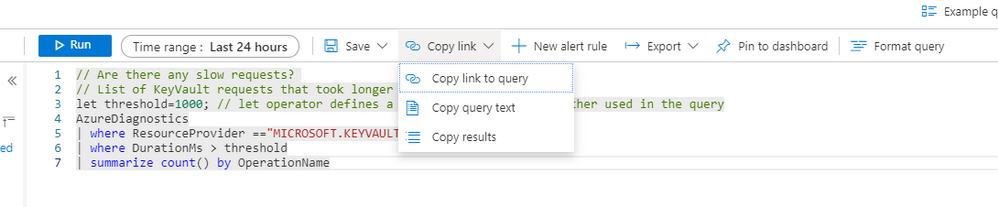
After composing your query, you can use our copy link menu to choose what you want to share:

You can:
1. Copy a link to the query – A link to the query will be copied to your clipboard, recipients will be able to drill into Log Analytics and run the query you shared with them.
2. Copy query text – your query text and a link to the query will be copied to the clipboard.
3. Copy results – your result set and a link to the query will be copied to your clipboard.
After selecting what you want to share, simply paste it in your favorite tool.
In my example, I used e-mail:
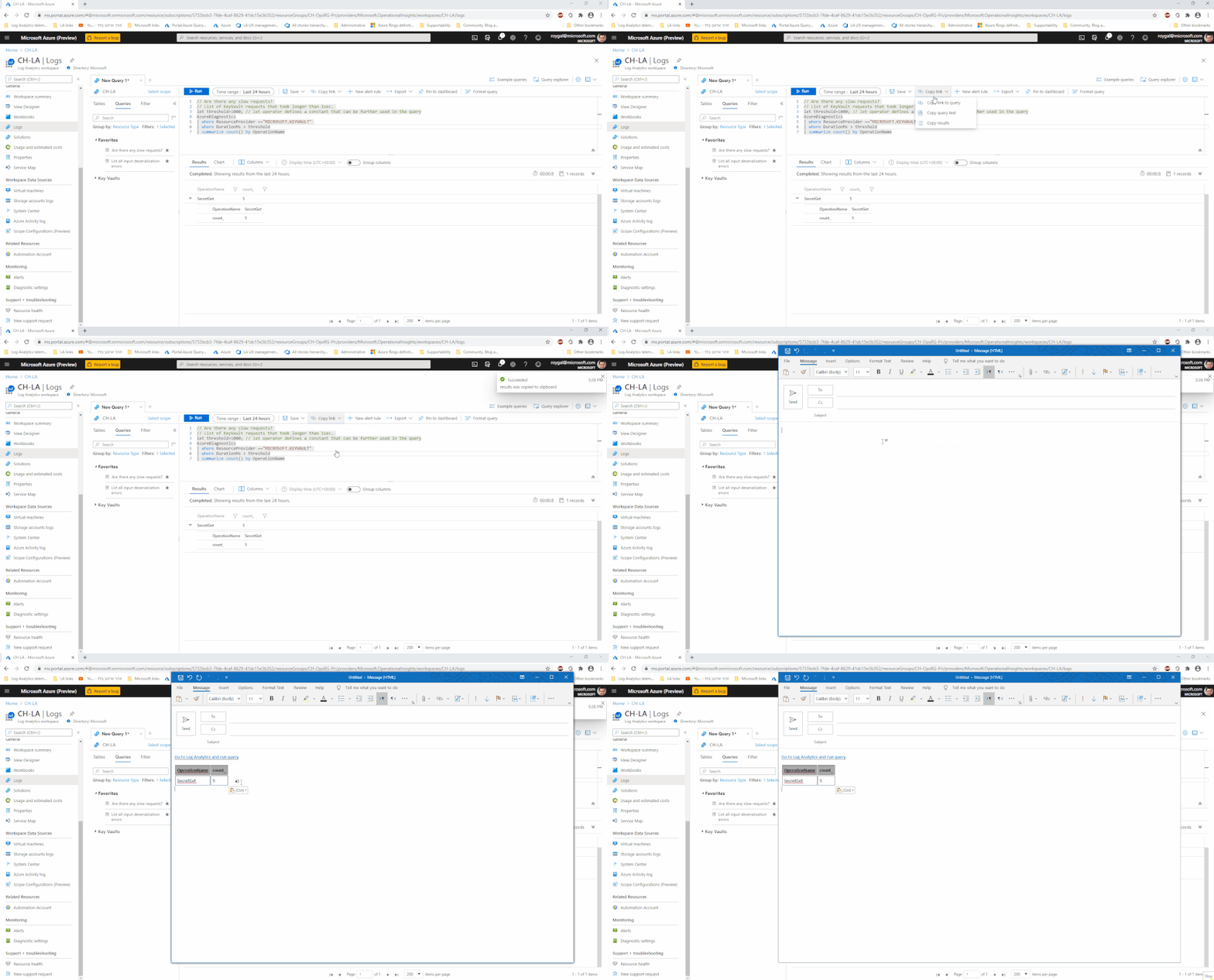
Please note, the recipient of your query must have sufficient permissions and Azure access to run the query.
Receiving a query:
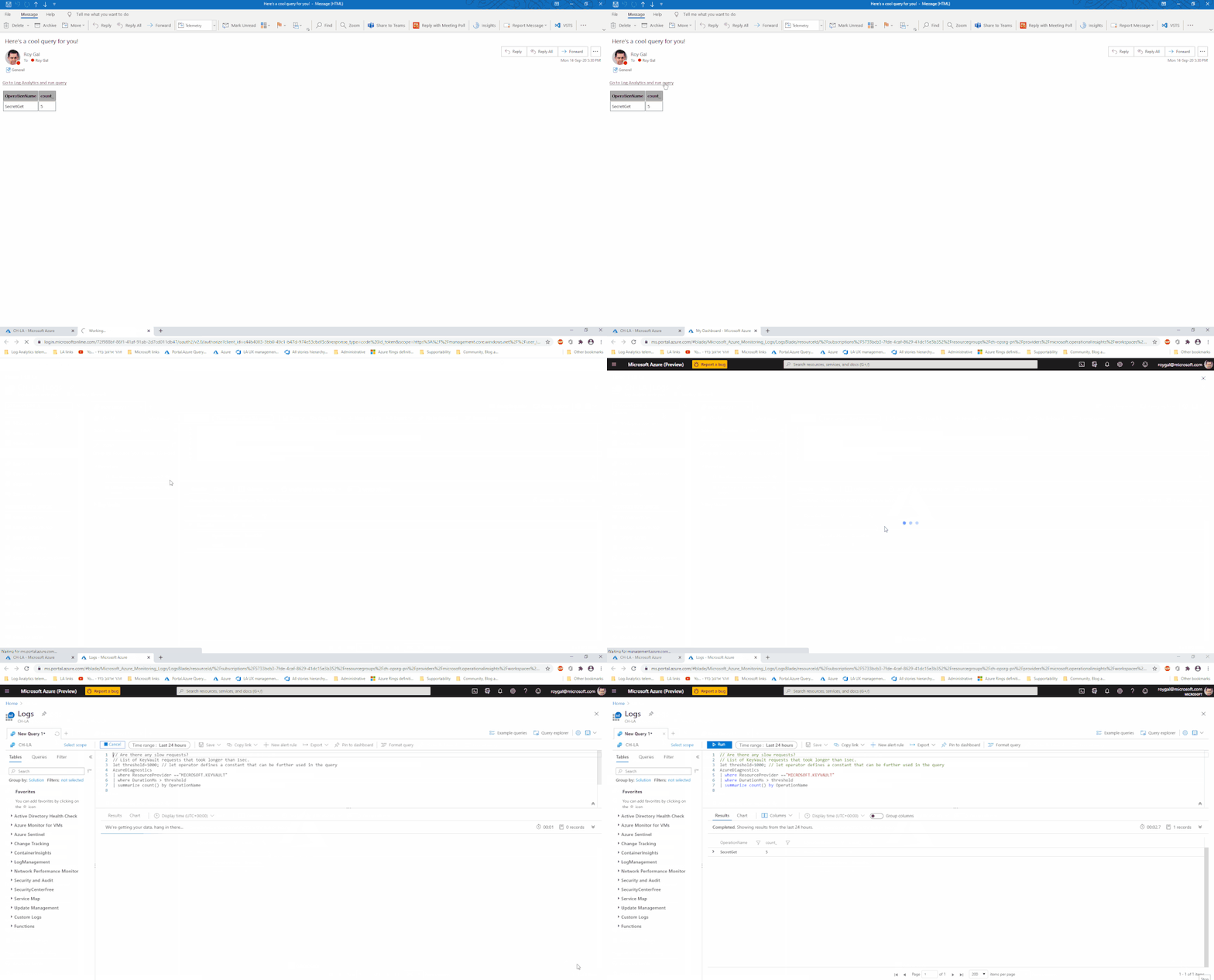
When your recipients receives the query link, all they need to do is click it.
Log Analytics will open in the right context and will run the query:
Summary:
Sharing an insight right from the UI is quick and easy.
Try using it today!
by Scott Muniz | Sep 14, 2020 | Uncategorized
This article is contributed. See the original author and article here.
This installment is part of a broader series to keep you up to date with the latest features in Azure Sentinel. The installments will be bite-sized to enable you to easily digest the new content.
Today we are announcing a new feature in Azure Sentinel that enhances our multi-workspace and multi-tenant capabilities.
As you might know, there are certain occasions where your Azure Sentinel environment is spread across multiple workspaces. There are various reasons for this, like data ownership requirements or multi-tenant/multi-geography setups. For a full explanation of use cases and alternatives, refer to Extend Sentinel across workspaces/tenants.
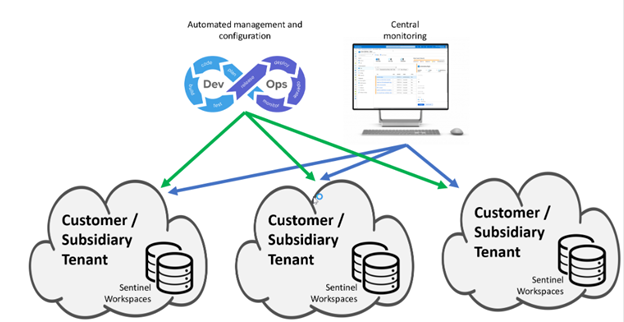
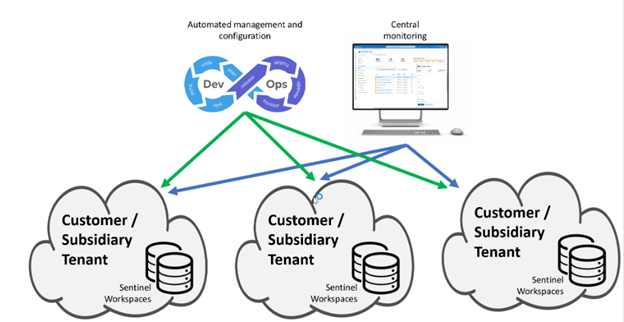
In these cases, there’s normally the need to have a central place where we can oversee the whole environment. This can be for example a global SOC or in the case of an MSSP, a multi-customer console. This central place can be also used to replicate configuration (analytics rules, workbooks, playbooks,…) and manage all your workspace from a single point, ideally using DevOps processes and tooling. The following diagram describes this setup:
Up to now, customers and partners were able to do many things across workspaces, like hunting, workbooks and incident management.
Today we are happy to present the ability to create Analytics Rules that inspect data stored across multiple workspaces! 
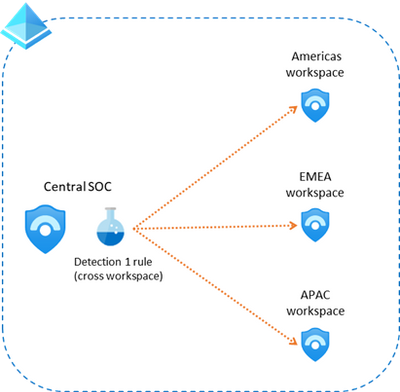
With this new feature you can now create in your Central SOC, an analytics rule that spans across other workspaces, like shown in this picture:
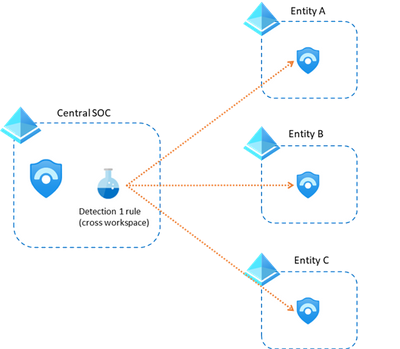
This can also be used in a multi-tenant setup (using Azure Lighthouse) like shown here:
There are some things you need to consider when using this feature:
- Both the source and target workspaces need to have the Sentinel solution installed on them.
- You can include a maximum of 10 workspaces in each detection.
- Incidents and alerts raised by a cross-workspace analytics rule, will only be created in the workspace where the rule was defined (they will not show up in the “remote” workspaces)
Handling Entities
One of the great things about this feature, is that alerts and incidents created as part of a cross-workspace analytics rule, will also contain all the related entities, even if those entities are not from the workspace where the rule and incident where triggered.
This, for example, will allow analysts to analyze data from all workspaces related to an alert/incident.
Some other features are still not fully functional in the cross-workspace scenario, like full visual investigation or UEBA. These will come in the future.
When to use cross-workspace Analytics Rules
There are mainly two scenarios where customer and partners can benefit from this new feature:
- When the analytics rule needs to consider data stored in multiple workspaces.
- To protect the Intellectual Property created as part of an analytics rule (MSSP scenario described later in this article)
There are other scenarios where customers and partners should not use cross-workspace rules:
- When the same rule applies to multiple individual workspaces, but data should not be considered together. As explained above, some Sentinel features will not fully function in a cross-workspace scenario and in addition it would make it more difficult to discern which workspace is the alert coming from.
Creating a cross-workspace Analytic Rule
Creating a cross-workspace rule is very easy…the only thing that changes compared to a regular rule is the query itself. In order to span multiple workspaces, you need to include the workspace and union KQL statements, adding tables from other workspaces as needed (remember the limit is 15). For example, a query to find EventID 4625 in two workspaces, would look like this:
workspace('<workspace-A>').SecurityEvent

| union workspace('<workspace-B>').SecurityEvent

| where EventID == '4625'
Remember that you can also leverage KQL functions to create aliases, that make it easier for you to use multiple workspaces. For example, you could create a function named wsAB_SecurityEvent that contains:
workspace('<workspace-A>').SecurityEvent

| union workspace('<workspace-B>').SecurityEvent
After defining this function, you can just use it in your analytics rules like this:
wsAB_SecurityEvent

| where EventID == '4625'
MSSP considerations
This new feature has special relevance for MSSPs as they normally manage multiple Sentinel environments spread across multiple organizations and tenants.
One of the reasons to use this feature is for example when the MSSP needs to hide the contents of the query from the end customer. In that case, the MSSP can create the query in its own tenant and Sentinel workspace but point at the customer workspace. See more information about protecting MSSPs intellectual property in this blog post.
The recommended approach for this scenario is to create analytics rules that only contain workspaces from a single customer (see diagram below). Mixing customer workspaces into a single analytics rule can lead to confusion and poor manageability.
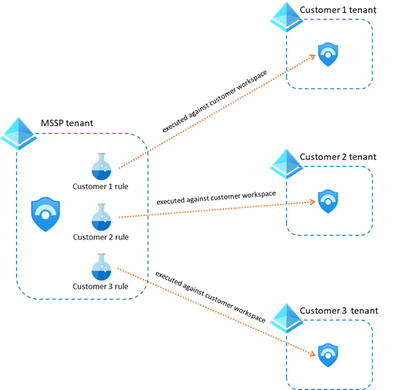
The analytics rules in this case would contain a KQL query that doesn’t need the union statement, they would be as simple as this:
workspace('customerA_workspace').SecurityEvent
| where EventID == '4625'
Get started today!
We encourage you to leverage this new feature that enhances our cross-workspace capabilities and offers more flexibility in the way you organize your SOC.
Try it out, and let us know what you think!

by Scott Muniz | Sep 14, 2020 | Azure, Technology, Uncategorized
This article is contributed. See the original author and article here.

Fluid Framework is now open source! It is built from the ground up for low latency collaboration and synchronization. Checkout the docs and playground examples our team helped put together!
Follow Us on Twitter @azureadvocates to stay up to date with all our activity!
Content Round Up
Fluid Storybook.js Integration – Phase 1
Dan Wahlin
Building a sample app based on Storybook.js to allow ISVs and eventually the public to demo Fluid examples live and see the code directly in the browser.
Azure Stack Hub Partner Solutions Series – Eversource
Thomas Maurer
Together with the Azure Stack Hub team, we are starting a journey to explore the ways our customers and partners use, deploy, manage, and build solutions on the Azure Stack Hub platform. Together with the Tiberiu Radu (Azure Stack Hub PM @rctibi) and myself (Azure Cloud Advocate @ThomasMaurer), we created a new Azure Stack Hub Partner solution video series to show how our customers and partners use Azure Stack Hub in their Hybrid Cloud environment. In this series, as we will meet customers that are deploying Azure Stack Hub for their own internal departments, partners that run managed services on behalf of their customers, and a wide range of in-between as we look at how our various partners are using Azure Stack Hub to bring the power of the cloud on-premises.
How I Built a Resume API w/ JavaScript and Azure Functions [Community]
Lucie Simeckova
Been inspired by the Cloud Resume Challenge by Forest Brazeal to build more stuff in the cloud. I wanted to build something simple to continue my Cloud journey. I decided to build an open-source REST API for my JSON-based standard format resume. I’m using JavaScript and Azure Functions. Also, this would be a great challenge for newbies getting into Azure functions, a hands-on micro project to get started with Azure Functions.
Notify about YouTube comments with Azure Functions
Lucie Simeckova
In this article, we’ll use Azure Functions and a couple of third-party APIs to create a JavaScript serverless application to send notification emails when new comments are added in any video from a YouTube channel.
Creating a baby boy chatbot name finder with no servers to worry about
Lucie Simeckova
Serverless services are your great ally when dealing with an evolving architecture. Mo will show you how a strategic, tactically motivated evolution journey could look like. To build nothing less and utterly grand such as a baby boy name generator for puzzled parents. We’ll talk about SAAS vs serverless as well, which is a fine but distinct line.
RFM NAV Customer Classification with Python and Azure Functions
Lucie Simeckova
The main goal of this article is to show you how you could modernize your old fashion NAV on-premises ERP, giving some of the Cloud power out there, using the Serverless Azure Functions Architecture. We will create an Azure Function that would act as an API Rest endpoint to classify customer based on their RFM score so we can integrate this information into the customer e-commerce. We will use SQL to add the RFM classification login and Python to create the Azure Function.
Medical Image Classification using Azure Functions and Cognitive Services
Lucie Simeckova
Learn how to serve all those models which you trained, using Azure Functions, a serverless framework designed to run your code on the cloud without worrying about resource allocation. The article goes through the following steps:-
– Training a classification model using Azure cognitive services
– Initialize a local environment for developing Azure Functions in Python.
– Build a serverless HTTP API for classifying an x-ray image into two classes: Pneumonia and Normal.
– Consume the API from a web app.
Azure Functions with PowerShell: Swiss army knife for Ops [Community]
Lucie Simeckova
Nowadays, infrastructure tasks have reached a new level with the help of devs tools (like control version system) but, operations teams take all of the advantages of ‘new world’? Serverless computing enables ways to build and create applications without concern about managing the infrastructure.
Handle Cosmos Cassandra API Rate Limiting for Go apps
Abhishek Gupta
Azure Cosmos DB is a resource governed system that allows you to execute a certain number of operations per second based on the provisioned throughput you have configured. If clients exceed that limit and consume more request units than what was provisioned, it leads to rate limiting of subsequent requests and exceptions being thrown – they are also referred to as 429 errors.
Blog/ Project Bicep Sneak Peek
Justin Yoo
This post discusses how Bicep, the ARM template DSL, looks like and how we can leverage it for ARM template authoring.
Why Every Developer Should Become a Writer
Lucas Santos
Translation of my PT article with the same title to the global public with my personal opinions and tips on why every developer should write articles.
Azure Stack Hub Partner Solutions Series – Eversource
Thomas Maurer
Together with the Azure Stack Hub team, we are starting a journey to explore the ways our customers and partners use, deploy, manage, and build solutions on the Azure Stack Hub platform. Together with the Tiberiu Radu (Azure Stack Hub PM @rctibi) and myself (Azure Cloud Advocate @ThomasMaurer), we created a new Azure Stack Hub Partner solution video series to show how our customers and partners use Azure Stack Hub in their Hybrid Cloud environment. In this series, as we will meet customers that are deploying Azure Stack Hub for their own internal departments, partners that run managed services on behalf of their customers, and a wide range of in-between as we look at how our various partners are using Azure Stack Hub to bring the power of the cloud on-premises.
Surface Duo Dev: Do One Better with Dual Screens!
Nitya Narasimhan
Surface Duo Dev: Learning Resources For Beginners
Nitya Narasimhan
Azure Automatic VM guest OS patching
Thomas Maurer
If you want to keep your Azure virtual machines (VMs) up-to-date, then there is a service called Azure Update Management, which helps you to manage updates on your Azure VM guest operating system. However, this needed some additional planning and configuration. To make patching of your Azure virtual machines (VMs) easier, there is a new option called Automatic VM guest patching, which helps ease update management by safely and automatically patching virtual machines to maintain security compliance.
Microsoft 365 Developer Podcast – Fluid
Dan Wahlin
Podcast recording with Jeremy Thake on the MIcrosoft 365 Developer Podcast:
An introduction to service mesh with Linkerd
Lucas Santos
In this article, I talk about how we can leverage and create service meshes using Linkerd
Xamarin Podcast Ep 77: Surface Duo, Android Startup Times, and Xamarin.Essentials
Matt Soucoup
This month James and Matt talk about new Microsoft Learn modules on the Surface Duo. The continuing saga of the Xamarin.Forms Shell quick tips.
by Scott Muniz | Sep 14, 2020 | Uncategorized
This article is contributed. See the original author and article here.
In about a week from today Microsoft Ignite 2020 gets underway. It’s quite a bit different this year but the one thing you can be certain of is we have lots of new and interesting content for you to enjoy.
If you haven’t registered yet, go do it now! It’s free to attend this year, and packed full of digital experiences for you to enjoy.
This post is to highlight the Exchange, Outlook and Bookings sessions we have created and curated for your viewing pleasure. The links won’t be live until the event starts, but we wanted to give you a peek into what to expect.
To be honest we have seen this shift to digital as an opportunity to give you more sessions about the things you want to hear about. With less constraints like rooms and speakers and space to worry about we decided to create content this year you wouldn’t normally get to see, and we really hope you enjoy it!
Here’s a list of all the material we have available, with links that will go live when the event starts on September 22nd 2020 at 8am PST. Enjoy!
Roadmap Sessions – Focused on What’s New and Upcoming
- Exchange – Here, There and Everywhere – Exchange might have been around for more than 20 years but that doesn’t mean it’s old – Come and hear about our plans for the future of both on-prem and cloud, we’ll talk through some of the lifecycle changes taking place and give you an all around look inside the thing that is – Exchange.
- The Outlook vision: IT and user value in a hybrid workspace – Hear from Outlook’s new leader, Lynn Ayres, on how to empower your users and organization in areas such as Time Management, Mobile Productivity, and hybrid workplaces. Learn about the “One Outlook” vision – inspiring agile innovation, providing IT with tools to meet security and compliance standards, and offering users more value, faster. Lynn will cover the use of AI to help users get work done more efficiently, new integrations with Microsoft 365 apps, and Bookings in the Enterprise.
- Exchange Online IT Admin Experiences – We’ve been working very hard on updating the Exchange Online admin interfaces, and we’d like to show you the results! Come and see what we’re working on in the new Admin Center and hear about our plans for Exchange Online PowerShell.
- The Evolution of Outlook – Learn about the vision for the evolution of Outlook as your personal organizer and the transformation of communications and time management in the workplace. We’ll share the roadmap for Outlook and its future within the scaffolding of the evolving Microsoft 365 productivity suite.
- Exchange Online Transport – New Email Management, Optics, and End-user Experiences – The Exchange Online Transport team don’t just do plumbing, oh no. They see it as their mission to make sure emails arrive on time, get where they’re supposed to be going and do so with style. They have been busy the last year building some very cool features to turn sending and receiving email from mundane to joyful.
- Introducing the new Outlook for Mac – Last year, in November we launched a preview of the new Outlook for Mac for our Insiders users – with a brand new user experience and rebuilt on Microsoft sync technology. Since then we have been hard at work adding an incredible number of new features and experiences. Come learn about all the new capabilities that makes this the best mail and calendar application on the Mac platform.
- Microsoft Bookings – Our Vision – Learn about our vision for Bookings as your smart scheduling tool. We’ll discuss how Bookings can be used to meet a variety of your organization’s scheduling needs, and also give you a glimpse into our future roadmap and key scenarios.
Technical Deep Dives or Walk-throughs
- Outlook Calendar: Fundamentals and Collaboration – We know that features must work flawlessly, and that you want to be able to use any Outlook client to accomplish your time management needs. This sessions updates you on these “fundamental” investments so that your users have less issues, more consistency, and love using the features that Outlook offers them.
- Exchange Online Transport – Email Security Updates – The Exchange Online Transport team don’t just do plumbing, or delivering email with style, oh no. They do it all while ensuring the security of the data they send and receive is second to none. Come and hear about the latest updates to Exchange Online transport designed to ensure security and integrity of your mission critical communications.
- Outlook and its place in your organization’s mobile productivity strategy – Delegate and shared mailboxes. Check. Sensitivity labeling. Check. Up Next, dark mode and more. Check. What’s next? Split screens, drag and drop and connected experiences: learn about the innovation in Outlook mobile designed to keep you organized, connected and prepared through out your day asked for by our leading Enterprise customers.
- Deploying and Administering Microsoft Bookings – Take a deeper look under the hood of Microsoft Bookings. Learn more about what happens behind the scenes when a Bookings calendar is created, how Bookings interfaces with Exchange and Outlook, and best practices in managing its usage across your organization.
- The new Outlook for Mac – Under the Hood – Come learn about the internals of the new Outlook for Mac and some best practices on how to deploy it within your organization. We will go over all nuts and bolts such as how the Microsoft sync technology works, various account types we support, authentication models, deployment configurations that you can deploy that best suit your needs and much more.
- Delivering a better, more innovative Outlook faster than ever – Understand how the common architecture and embedded web experiences will change the face of Outlook, and it’s already started
- Voice and more AI assistance in Outlook – From neural network voice readouts to voice commanding — Explore and see demos of AI and Cortana capabilities built into Outlook that help take the load off your workforce for optimal personal organization and time management.
- What’s new in Outlook on the Web – Outlook on the web is one of the first apps where we ship new and awesome stuff, and this year will be no different! Come join us on a session so we can show you all that is new, we have AI, Search, and more!
- What’s new in Outlook on mobile browser – Remember the update we did to Outlook on a desktop browser? We are doing the same to Outlook in a mobile browser! Come join us as we share all our updates and new features.
- Sorting out your Outlook contacts and connections – Outlook is enhancing the way you manage contacts on your mobile device with new sorting and filtering options, support for contact subfolders and a performance updates you’ll love. No more duplicates! Tune in to learn about these new updates and get a preview for what is next to come.
Learning Path – Mailbox Protection with Microsoft 365
This particular set of content is important and we’ll have more on this subject in the coming months, but the high level is this: How can you be sure we look after and protect your email and calendar data from end to end? What are all the things we do to make sure that your data is protected and privacy ensured from the device in your hand or on your desk to the bits on a disk in one of our datacenters.
This collection of recordings help explain what we do, how it works, and what it means, and we really hope you find these recordings helpful and informative. You’ll recognize the speakers as experts in their field.
Learning Path – Setting Up for Success With Exchange Online
This next set of material is something we probably wouldn’t have been able to do at Ignite this year were it a physical in-person event. Why? Because those kind of events we all fondly remember (remember the food? How can we ever forget the catering…) were always limited in terms of rooms, speakers and sessions. With an all-digital event, we can do whatever we want! Well, sort of. But in this case, we did exactly what we wanted to do – give you high quality content from the people that know it inside out.
The people presenting these sessions all work in Microsoft’s support or field organizations. Unlike our engineering and marketing teams they work with real customers day after day, helping solve issues and problems, helping customers get our software deployed and so on.
Engineering teams know how they designed something to work. Marketing knows what engineering told them about how it should work. The presenters of these sessions know how it actually works.
So, for some real world, hard-earned advice about migration from on-prem to the cloud, take a look at these recordings. You can consume them in any order, pick and choose what you want to see, or sit back and watch them as a collective playlist.
- Establishing Exchange Hybrid Mailflow – How to plan for and enable Hybrid. How to get SMTP mail to flow despite your overly complicated existing config.
- Plan and Run the Exchange Hybrid Configuration Wizard – This session covers the basics of why and how you need to run the HCW
- Configuring Exchange Hybrid Modern Auth – Securing your on prem Exchange Environment with modern authentication when enabling HMA. Learn how Conditional Access can be leveraged and how to lock down legacy auth and what to expect when using Outlook Mobile with HMA.
- Migrating mailboxes to Exchange Online – Lessons learned from the trenches of Support of how to perform Hybrid Mailbox migrations to Exchange Online with the best chance of success and the least amount of pain involved. We will also discuss the basics of how moves really work and go over common errors that are seen (and how to avoid them!).
- Gliding your Exchange Public Folders to the cloud – The session highlights best practices to be followed to ensure your public folder migration to Exchange Online is quick and trouble free.
- Solving Exchange Client Connectivity Conundrums – Client connectivity cases can often be very complex. From ActiveSync to Web Services there’s often confusion on where to start troubleshooting, what tools to use, and how to connect the dots. This session will use common issues to illustrate how a Microsoft engineer “follows the data” to drive case resolution.
- Connecting Exchange Hybrid and Teams – How to enable Teams for your Org even though your mailboxes are still on-prem.
- Managing Exchange DL’s in a Hybrid Org – Common issue – how do you manage DL’s when users are split between on-prem and EXO – here’s how.
- Decommissioning On-Premises Exchange Servers – So you’ve moved all or most of your mailboxes to Exchange Online. You’ve been tasked with reducing or eliminating the on-prem footprint. How can we do this without causing availability issues or a support ticket? We’ll cover some gotchas we’ve helped our customer with so you’ll avoid the same pitfalls. We’ll review the process for the main portions of exchange, such as; client access, transport, and mailbox components.
- Troubleshooting Exchange Hybrid – Tips and Tricks for bumps you might hit along the way.
Wrap Up
We hope you agree, that’s a lot of content. We know, as we spent a lot of time making it the last month or two and we really hope you enjoy and learn from it.
We always love to hear your feedback, but unlike physical events you can’t just come down to the booth after a session and talk to the speaker or the team. The best place to leave feedback or ask question will be in the Tech Community, so please interact there with us, or leave comments here on the blog.
Speaking of Tech Community, we’ve arranged a post-event Ask Me Anything session so you can ask us questions! The AMA will take place on October 8th from 9:00 – 10:00am PST in the Exchange AMA space in the Exchange Community. We’ll remind you all nearer the time, but if you want to pop that into the old calendar now, that would be splendid.
Greg Taylor
Director of Product Marketing – Exchange Server and Online
by Scott Muniz | Sep 14, 2020 | Uncategorized
This article is contributed. See the original author and article here.
Another day I got this case about Synapse feature limitation. The customer was not sure about the information found on the documentation.
So the idea here is a quick review about the documentation.
Spark Limitations:
When you create a Spark Pool you will be able to define how much resources your pool will have as you can check it here: https://docs.microsoft.com/en-us/azure/synapse-analytics/quickstart-create-apache-spark-pool-portal
If you may want to define a CAP for the session that you are executing and that is the example: https://techcommunity.microsoft.com/t5/azure-synapse-analytics/livy-is-dead-and-some-logs-to-help/ba-p/1573227
In other words, you may have one notebook taking over all your resources or you may have 5 notebooks running at the same time, looking though this way there is not a fixed limit as you would see on ADW. Spark is a pool of resources.
This one I guess it is better to get an idea: https://docs.microsoft.com/en-us/azure/synapse-analytics/spark/apache-spark-concepts
“It is the definition of a Spark pool that, when instantiated, is used to create a Spark instance that processes data. When a Spark pool is created, it exists only as metadata; no resources are consumed, running, or charged for. A Spark pool has a series of properties that control the characteristics of a Spark instance; these characteristics include but are not limited to name, size, scaling behavior, time to live.”
Thanks to my colleague Charl Roux for the discussion about Spark.
ADF Pipeline:
This one is clear on the documentation:
:https://docs.microsoft.com/en-us/azure/data-factory/concepts-pipelines-activities
|
concurrency
|
The maximum number of concurrent runs the pipeline can have. By default, there is no maximum. If the concurrency limit is reached, additional pipeline runs are queued until earlier ones complete
|
About SQL OD:
(https://docs.microsoft.com/en-us/azure/synapse-analytics/sql/on-demand-workspace-overview)
“SQL on-demand is serverless, hence there is no infrastructure to setup or clusters to maintain. A default endpoint for this service is provided within every Azure Synapse workspace, so you can start querying data as soon as the workspace is created. There is no charge for resources reserved, you are only being charged for the data scanned by queries you run, hence this model is a true pay-per-use model.”
So basically here we have another scenario of not a documented limit because there is no fixed limit. You could 300 small queries running or you could have the one query running alone and using all resources while the others wait. SQL on-demand has a Control node that utilizes a Distributed Query Processing (DQP) engine to optimize and orchestrate distributed execution of user query by splitting it into smaller queries that will be executed on Compute nodes. In SQL on-demand, each Compute node is assigned a task and set of files to execute the task on. The task is a distributed query execution unit, which is actually part of the query user submitted. Automatic scaling is in effect to make sure enough Compute nodes are utilized to execute user queries.
As for ADW the limits are pretty much clear on the documentation and it is tied to the Service Levels:
https://docs.microsoft.com/en-us/azure/synapse-analytics/sql-data-warehouse/memory-concurrency-limits
That is it!
Liliam C Leme
UK Engineer


Recent Comments